Providing Out-of-Band Connectivity to Mission-Critical IT Resources

PDU Remote Management

PDU Remote Management

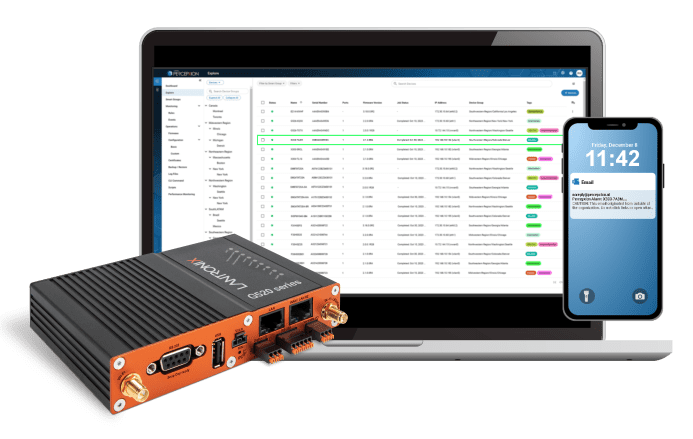
The Hive SR PDU remote management solution from ZPE Systems.

PDUs (power distribution units) and busways are critical network infrastructure devices that control and optimize how power flows to equipment like servers, routers, firewalls, and switches. They’re difficult to manage remotely, so configuring and updating new devices or fixing problems typically requires tedious, on-site work. This difficulty is magnified in complex, distributed networks with hundreds of individual power devices that must be managed one at a time. What’s needed is a PDU remote management solution that unifies control over distributed devices. It should also streamline infrastructure management with an open architecture that supports third-party power software and automation.

The problem: PDU management is cumbersome for large, distributed networks

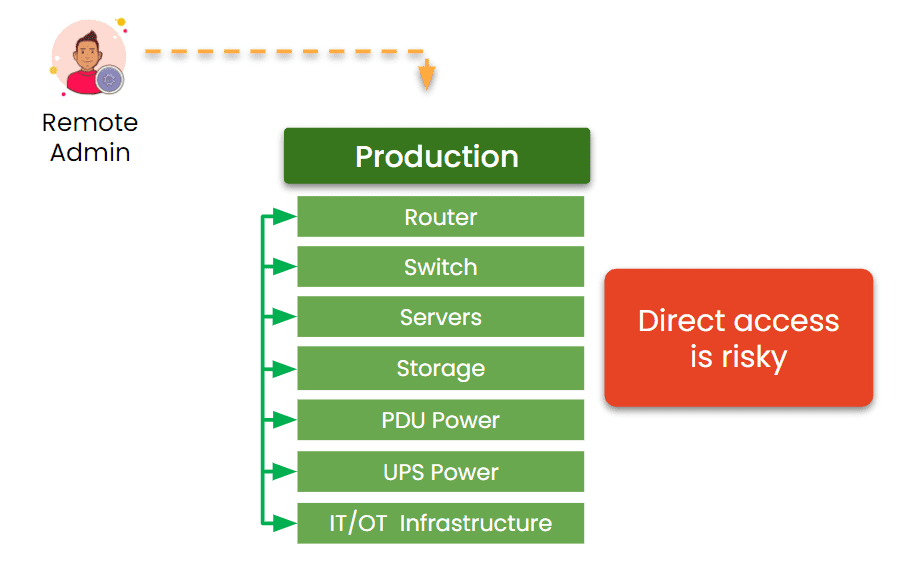
PDUs and busways are deployed across remote and distributed locations beyond the central data center, including edge computing sites, automated manufacturing plants, and colocations. They typically aren’t network-connected and do not come with up-to-date firmware at deployment time, requiring on-site technicians for maintenance. Upgrading and managing thousands of PDUs and busways requires hundreds of work hours from on-site IT teams who must manually connect to each unit.

The current solution: PDU remote management with jump boxes or serial consoles

Since most PDUs and busways can’t connect to the network, the only way to remotely manage them is to physically connect them via serial (a.k.a., RS-232) cable to a device that can be remotely accessed, such as an Intel NUC jump box or a serial console.

Unfortunately, jump boxes usually aren’t set up to manage more than one serial connection at a time, so they only solve the remote access problem without providing any centralized management of multiple PDUs or multiple sites. Jump boxes are often deployed without antivirus or other security software installed and with insecure, unpatched operating systems containing potential vulnerabilities, leaving branch networks exposed.

On the other hand, serial consoles can manage multiple serial devices at once and provide remote access, but they often don’t integrate with PDU/busway software and only support a few chosen vendors, which limits their control capabilities and may prevent remote firmware updates. They’re also usually single-purpose devices that take up valuable rack space in remote sites with limited real estate and don’t interoperate with third-party software for automation, monitoring, and security.

The Hive SR + ZPE Cloud: A next-gen PDU remote management solution

The ZPE Cloud and Nodegrid Hive SR solutions for PDU remote management.
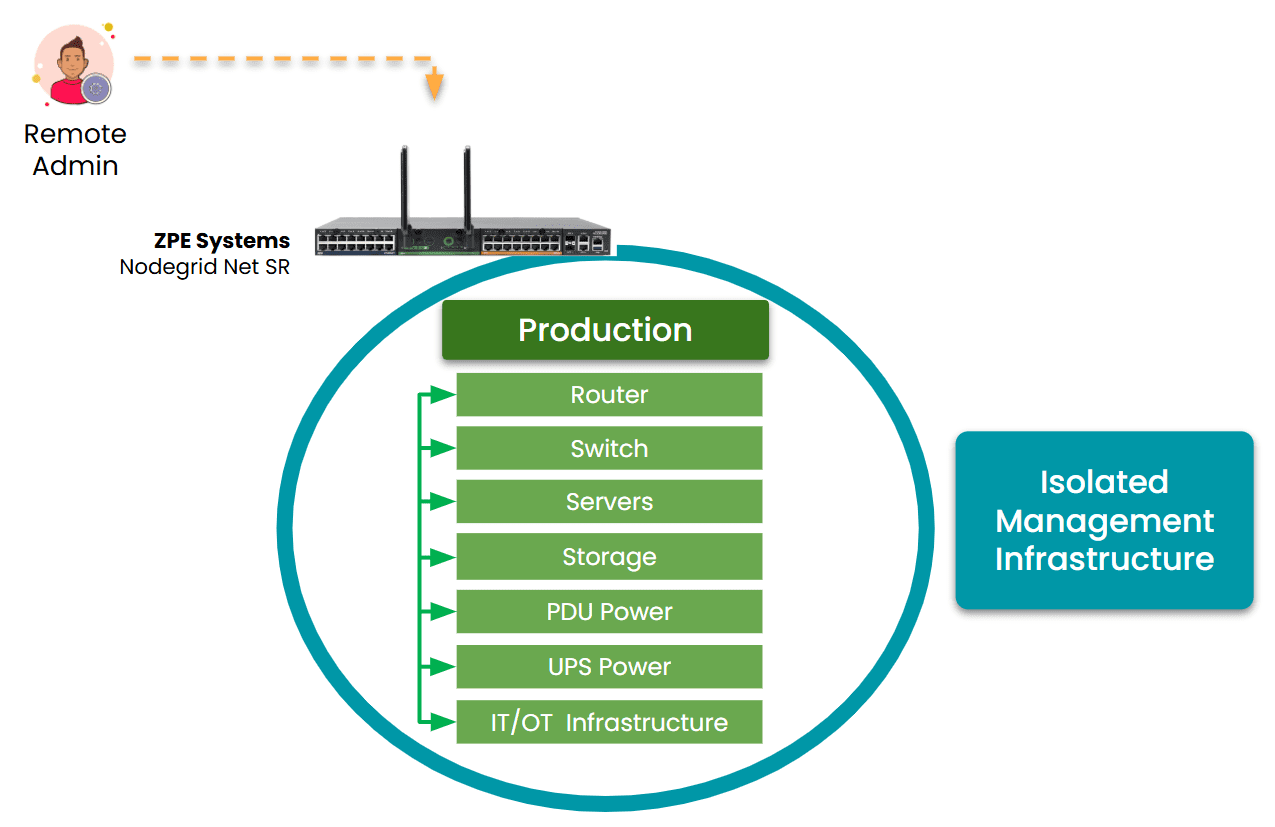
The Hive SR is an integrated branch services router from the Nodegrid family of vendor-neutral infrastructure management solutions offered by ZPE Systems. The Hive automatically discovers power devices and provides secure remote access, eliminating the need to manage PDUs and busways on-site. The ZPE Cloud management platform gives IT teams centralized control over power devices and other infrastructure at all distributed locations so they can update or roll-back firmware, configure and power-cycle equipment, and see monitoring alerts.

The ZPE Cloud PDU remote management solution from ZPE Systems.

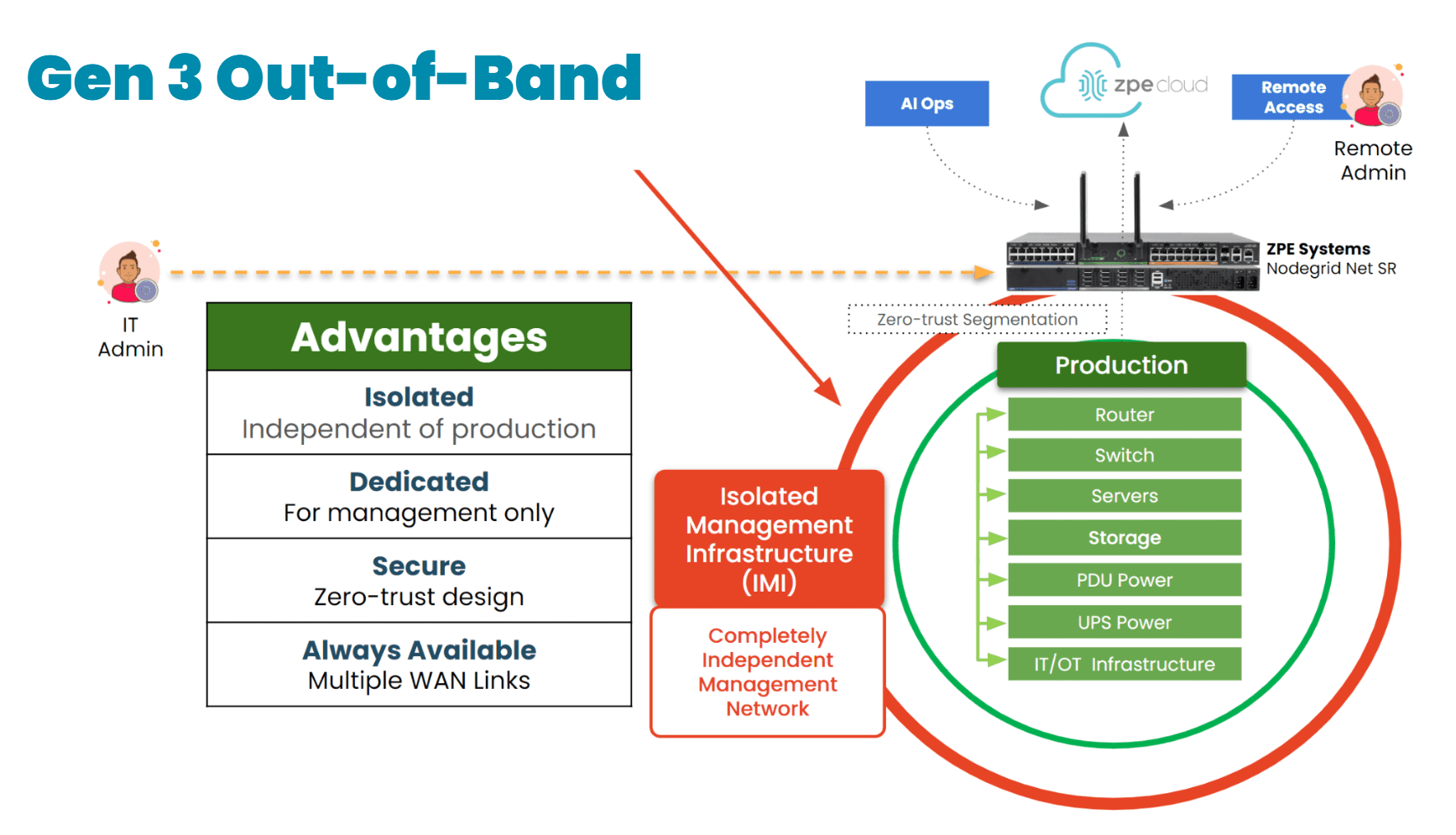
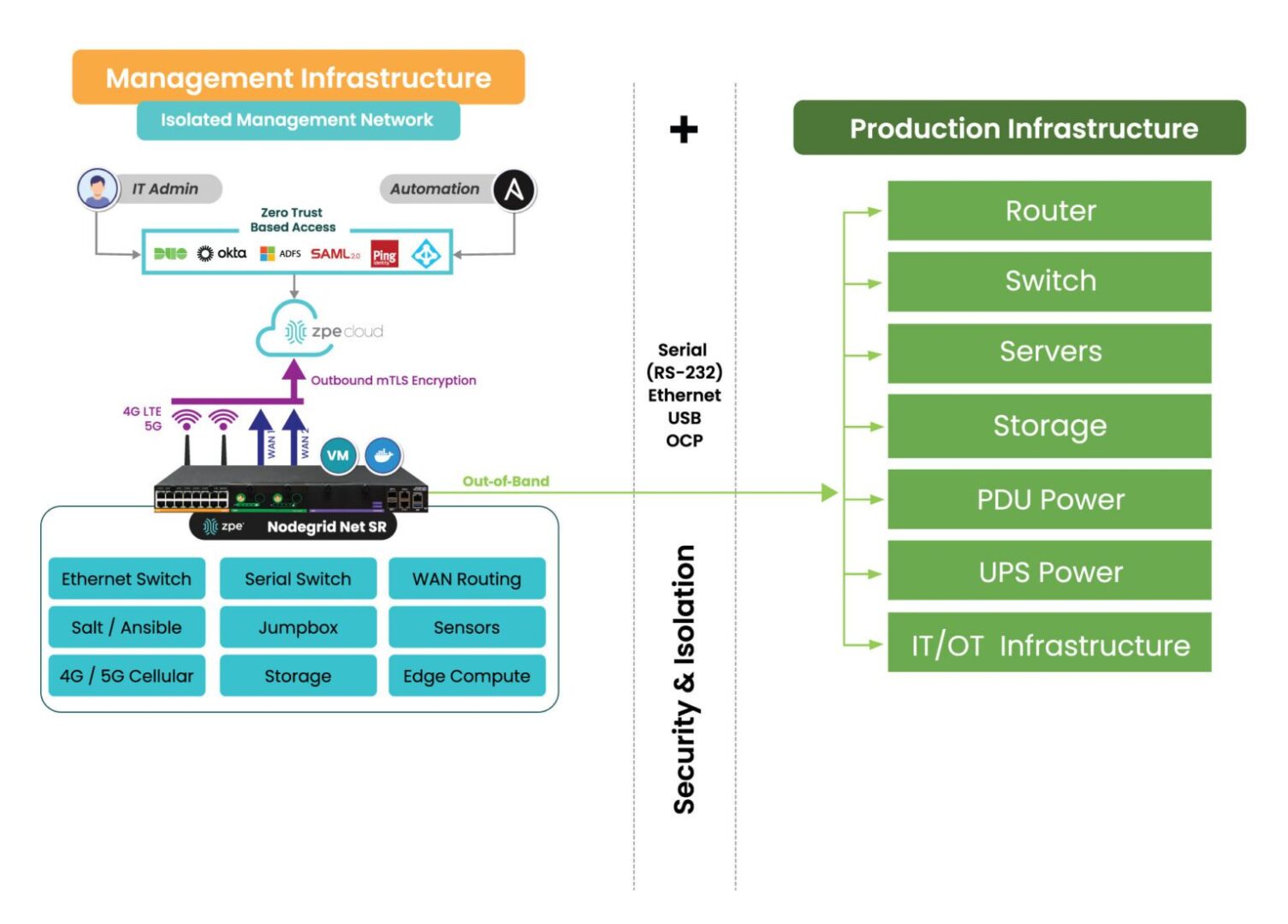
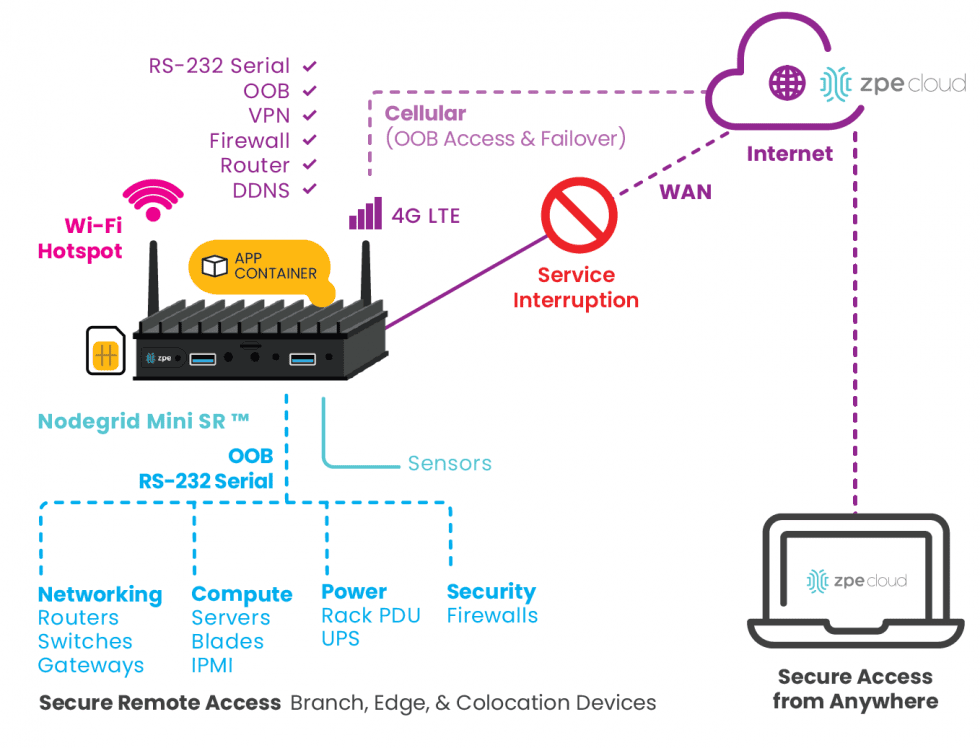
In addition to integrated branch networking capabilities like gateway routing, switching, firewall, Wi-Fi access point, 5G/4G cellular WAN failover, and centralized infrastructure control, the Hive SR and ZPE Cloud also deliver vendor-neutral out-of-band (OOB) management. ZPE’s Gen 3 OOB solution creates an isolated management network that doesn’t rely on production resources and, as such, remains remotely accessible during major outages, ransomware infections, and other adverse events. This gives IT teams a lifeline to perform remote recovery actions, including rolling-back PDU firmware updates, power-cycling hung devices, and rebuilding infected systems, without the time and expense of an on-site visit.

A diagram showing how the Nodegrid Hive SR can be deployed for PDU remote management.

The Hive and ZPE Cloud have open architectures that can host or integrate other vendors’ software for PDU/busway management, NetOps automation, zero-trust and SASE security, and more. Administrators get a single, unified, cloud-based platform to orchestrate both automated and manual workflows for PDUs, busways, and any other Nodegrid-connected infrastructure at all distributed business sites. Plus, all ZPE solutions are frequently patched and protected by industry-leading security features to defend your critical branch infrastructure.


Download our Automated PDU Provisioning and Configuration solution guide to learn more about vendor-neutral PDU remote management with Nodegrid devices like the Hive SR.
Download

Download our Centralized IT Infrastructure Management and Orchestration solution guide to learn how ZPE Cloud can improve your operational efficiency and resilience.
Download

3 Reasons to Use Starlink for Out-of-Band (and How to Set it Up)

ZPE Systems and Starlink setup guide

Most organizations rely on critical IT in order to serve their essential business functions. A reliable method to maintain critical IT is to use dedicated out-of-band (OOB) management networks, which traditionally have relied on plain old telephone service (POTS) lines or dedicated telephony circuits for remote access. However, these traditional links come with high costs, lots of complexity, and slow performance, which make them difficult to deploy and maintain.

Enter Starlink, a satellite-based Internet service that offers a cost-effective and scalable alternative for out-of-band remote access. This post discusses how Starlink solves these common problems and gives you a free guide that walks you through the setup process.


Problem: POTS and Telephony Lines Are Expensive

For decades, IT professionals have relied on POTS and telephony lines for OOB management, mainly because these lines remain operational even when the primary data network goes down. A major problem is that POTS lines are increasingly expensive to install and maintain, particularly in remote or rural areas. Additionally, 4G/5G LTE options aren’t always available due to coverage limitations or large enough data plans. The shift towards VoIP (Voice over IP) and digital communications has made POTS lines even less relevant, with many service providers phasing out support. This leaves businesses with fewer options and higher costs for maintaining these legacy systems.

Solution: Starlink is Cost-Effective

Starlink offers a much more cost-effective solution. You can use off-the-shelf routers to set up an OOB management network for a fraction of the cost of traditional methods. Starlink also has a relatively low monthly subscription fee and straightforward pricing model, which make it easy to budget and plan IT expenditures. If components fail or break, you can typically repair or replace them yourself to get back up and running quickly.

An image of a Starlink dish

Figure 1: Starlink requires only a dish, router, and few other components, making it a cost-effective alternative to expensive POTS lines.

Problem: Traditional Lines Are Difficult To Scale

Traditional POTS-based systems are notoriously difficult to scale, often requiring significant infrastructure investments and complex configurations. Copper wiring is expensive to install and maintain, and as more connections come online, switching systems must be upgraded. On top of this, POTS lines are being phased out, which means there are fewer resources being devoted to scaling and maintaining them.

Solution: Starlink is Simple to Set Up and Scale

Starlink entirely eliminates the need for telephony lines, and is a simple and scalable solution for OOB remote access. You can find the full list of components in our setup guide below, but with a Starlink terminal, compatible router, and minimal configuration, you can scale your OOB network wherever you have Starlink coverage. This ease-of-use extends to day-to-day management as well. Starlink’s satellite service offers global coverage, meaning you can manage your network devices, servers, and other critical infrastructure from virtually anywhere in the world.

The setup process for Starlink includes simple instructions that you can follow on your smartphone

Figure 2: Starlink comes with a straightforward out-of-box experience and step-by-step instructions. You can set up an out-of-band network in about one hour.

Problem: POTS Lines Lack Performance

POTS is designed primarily for voice communication and offers extremely limited bandwidth. It can’t support modern data services (such as video or high-speed internet) efficiently. As out-of-band management advances with data and video monitoring capabilities (such as AI computer vision), POTS infrastructure just doesn’t have the bandwidth to keep up.

Solution: Starlink Meets Modern Performance Requirements

Starlink provides high-speed internet, at speeds that typically range from 50 to 200Mbps. The connection handles much larger volumes of data than POTS lines are capable of, and Starlink’s low-Earth orbit satellites reduce latency to as low at 25ms compared to the typical 150ms of POTS lines. Out-of-band using Starlink means that IT teams can manage more systems and data, and have a more responsive experience, whether they’re managing edge routers across their bank branches or monitoring the cooling systems in their distributed colocations.

Image of the Starlink speed test performed on a smartphone

Figure 3: Starlink provides high-speed connectivity, with speeds ranging from 50 to 200Mbps.

Get Started With Starlink Using Our Setup Guide

We created this step-by-step walkthrough that shows how to set up Starlink for out-of-band. It instructs how to connect the components according to a wiring diagram, configure your ZPE Nodegrid hardware, and test your connection performance using free tools. Read it now using the button below.

Get Starlink Setup Guide

Starlink setup guide

What is Passive Optical Networking?

What is Passive Optical Networking (PON)?

Passive optical networking (PON) is a high-speed broadband technology that enables the delivery of multiple services over a single fiber optic cable. XGS-PON – 10G Symmetrical PON –  offers speeds of up to 10 Gbps downstream and 10 Gbps upstream (hence the term ‘symmetrical’), making it ideal for applications such as video streaming, online gaming, and cloud computing.


What Problems Does PON Solve for Out-of-Band Management?

PON addresses the issue of efficiency in terms of both uplink costs and bandwidth usage. Traditional POTS lines and dedicated circuits rely on legacy infrastructure that requires regular maintenance. This infrastructure must scale as more out-of-band devices are added to the network, which increases costs and energy consumption. On top of this, using a 10G uplink for a serial console’s 10K traffic is like throwing away 99% of that high bandwidth. Per Gartner’s Market Guide for Optical Transport Systems report (Published 20 November 2023) the best way to “lower cost and energy per transported bit” is by using technologies such as passive optical networking.

Because PON uses passive optical splitters that have no moving parts or powered components between the central hub and end users, PON is much more efficient for deploying serial consoles close to target assets. These out-of-band devices can be deployed in large quantities and close to the network edge, with up to 256 devices sharing one uplink. This reduces cabling and power requirements, and is ideal for MSP and campus operators, where there are many out-of-band devices distributed over long distances. 


More About PON: GPON and XGS-PON Technologies

Passive Optical Networking (PON) leverages time-division multiplexing (TDM) and different wavelengths of light to transmit and receive data on a single fiber strand. This allows efficient communication among up to 256 devices over a single fiber. Initially developed for fiber-to-the-home (FTTH) deployments, PON technology has evolved to facilitate the addition of network nodes with minimal infrastructure changes. GPON (gigabit-capable PON) and XGS-PON use different frequencies for upstream and downstream data transmission. The upstream headend, known as the Optical Line Terminal (OLT), manages and coordinates the time slots allocated to downstream Optical Network Units (ONUs) for data transmission.


GPON and XGS-PON Support on ZPE Systems’ Nodegrid SR Gateway

ZPE Systems’ Nodegrid SR appliances, which are used as out-of-band access nodes or complete branch gateways, now support GPON and XGS-PON technology (patent pending) via SFP and SFP+ ports. The Nodegrid SR family is offered in multiple form factors to be right-sized for deployments in branch offices, factories, smart buildings, and industrial environments (such as for SCADA).

Having support for GPON and XGS-PON means network engineers now have a flexible choice of high-speed uplink technologies. This versatility makes the Nodegrid SR gateway suitable for edge deployments, where it can establish an OOBI-WAN™ (out-of-band infrastructure WAN) link, and for data centers, where it enhances uplink efficiency. Given the low bandwidth requirements of serial console and out-of-band communications, PON technology is well-suited for these applications. A single fiber strand can be shared among hundreds of out-of-band and serial console devices using passive optical splitters. Organizations can deploy out-of-band devices close to the racks and edges of the network in a cost- and energy-efficient manner. Additionally, ZPE devices support ONU SFPs compatible with third-party OLT headends, ensuring broad interoperability and integration.


Benefits of Using XGS-PON with ZPE Systems’ Nodegrid SR Gateway

The benefits of using XGS-PON with ZPE Systems’ Nodegrid SR gateway include:

  • High-Speed Connectivity: XGS-PON delivers symmetrical speeds of up to 10 Gbps, making it ideal for high-bandwidth applications like video streaming, online gaming, and cloud computing. This ensures consistent and high-quality service for end-users.
  • Cost-Effectiveness: Deploying XGS-PON is a cost-effective solution for delivering high-speed broadband services, especially in scenarios where upgrading existing infrastructure may be challenging.
  • Scalability: The Nodegrid SR Gateway, acting as an ONU, can connect up to 256 serial consoles through a single fiber strand. PON’s use of asymmetric wavelengths and TDM enables multiple devices to share the same fiber strand efficiently. Optical splitters, which require no external power, facilitate the sharing of fiber between multiple ONUs, which makes scaling much more cost and energy efficient.
  • Reliability: The Nodegrid SR gateway is proven by service providers worldwide. Its robust design and compatibility with various network configurations make it a reliable choice for delivering high-quality broadband services.

A network diagram showing a PON Uplink on Nodegrid SR Gateway

Figure 1: ZPE Nodegrid SR gateway with XGS-PON ONU support


XGS-PON Enhances Efficiency of Out-of-Band

XGS-PON is a significant advancement over traditional, copper-based uplinks. The integration of XGS-PON support in the ZPE Systems Nodegrid SR Gateway allows network architects to deploy a dedicated out-of-band ring that is not only high-speed but also cost-effective, energy-efficient, and capable of covering longer distances. PON technology, with its ability to handle the lower data rates of out-of-band transmissions, is an ideal uplink medium for serial console transmission. The combination of XGS-PON and the Nodegrid SR Gateway provides a powerful and flexible solution for modern network infrastructure.

Be one of the first to try PON on the Nodegrid SR Gateway

Set up a demo for a deeper dive into PON use cases and how it can benefit your organization.

Schedule a demo

Comparing Console Server Hardware

Console servers – also known as serial consoles, console server switches, serial console servers, serial console routers, or terminal servers – are critical for data center infrastructure management. They give administrators a single point of control for devices like servers, switches, and power distribution units (PDUs) so they don’t need to log in to each piece of equipment individually. It also uses multiple network interfaces to provide out-of-band (OOB) management, which creates an isolated network dedicated to infrastructure orchestration and troubleshooting. This OOB network remains accessible during production network outages, offering remote teams a lifeline to recover systems without costly and time-consuming on-site visits. 

Console server hardware can vary significantly across different vendors and use cases. This guide compares console server hardware from the three top vendors and examines four key categories: large data centers, mixed environments, break-fix deployments, and modular solutions.

Console server hardware for large data center deployments

Large and hyperscale data centers can include hundreds or even thousands of individual devices to manage. Teams typically use infrastructure automation, like infrastructure as code (IaC), because managing devices at such a large scale is impossible to do manually. The best console server hardware for high-density data centers will include plenty of managed serial ports, support hundreds of concurrent sessions, and provide support for infrastructure automation.

Click here to compare the hardware specs of the top providers, or read below for more information.

Nodegrid Serial Console Plus (NSCP)

The Nodegrid Serial Console Plus (NSCP) from ZPE Systems is the only console server providing up to 96 RS-232 serial ports in a 1U rack-mounted form factor. Its quad-core Intel processor and robust (as well as upgradable) internal storage and RAM options, as well as its Linux-based Nodegrid OS, support Guest OS and Docker containers for third-party applications. That means the NSCP can directly host infrastructure automation (like Ansible, Puppet, and Chef), security (like Palo Alto’s next-generation firewalls and Secure Access Service Edge), and much more. Plus, it can extend zero-touch provisioning (ZTP) to legacy and mixed-vendor devices that otherwise wouldn’t support automation.

The NSCP also comes packed with hardware security features including BIOS protection, UEFI Secure Boot, self-encrypted disk (SED), Trusted Platform Module (TPM) 2.0, and a multi-site VPN using IPSec, WireGuard, and OpenSSL protocols. Plus, it supports a wide range of USB environmental monitoring sensors to help remote teams control conditions in the data center or colocation facility.

Advantages:

  • Up to 96 managed serial ports in a 1U appliance
  • Intel x86 CPU and 4GB of RAM for 3rd-party Docker and VM apps
  • Extends ZTP and automation to legacy and mixed-vendor infrastructure
  • Robust on-board security features like BIOS protection and TPM 2.0
  • Supports a wide range of USB environmental monitoring sensors
  • Wi-Fi and 5G/4G LTE options available
  • Supports over 1,000 concurrent sessions

Disadvantages:

  • USB ports limited on 96-port model

Opengear CM8100

The Opengear CM8100 comes in two models: the 1G version includes up to 48 managed serial ports, while the 10G version supports up to 96 serial ports in a 2U form factor. Both models have a dual-core ARM Cortex processor and 2GB of RAM, allowing for some automation support with upgraded versions of the Lighthouse management software. They also come with an embedded firewall, IPSec and OpenVPN protocols for a single-site VPN, and TPM 2.0 security.

Advantages:

  • 10G model comes with software-selectable serial ports
  • Supports OpenVPN and IPSec VPNs
  • Fast port speeds

Disadvantages:

  • Automation and ZTP require Lighthouse software upgrade
  • No cellular or Wi-Fi options
  • 96-port model requires 2U of rack space

Perle IOLAN SCG (fixed)

The IOLAN SCG is Perle’s fixed-form-factor console server solution. It supports up to 48 managed serial ports and can extend ZTP to end devices. It comes with onboard security features including an embedded firewall, OpenVPN and IPSec VPN, and AES encryption. However, the IOLAN SCG’s underpowered single-core ARM processor, 1GB of RAM, and 4GB of storage limit its automation capabilities, and it does not integrate with any third-party automation or orchestration solutions. 

Advantages:

  • Supports ZTP for end devices
  • Comprehensive firewall functionality

Disadvantages

  • Very limited CPU, RAM, and flash storage
  • Does not support third-party automation

Comparison Table: Console Server Hardware for Large Data Centers

Nodegrid NSCP Opengear CM8100 Perle IOLAN SCG
Serial Ports 16 / 32 / 48 / 96x RS-232 16 / 32 / 48 / 96x RS-232 16 / 32 / 48x RS-232
Max Port Speed 230,400 bps 230,400 bps 230,000 bps
Network Interfaces

2x SFP+ 

2x ETH

1x Wi-Fi (optional)

2x Dual SIM LTE (optional)

2x ETH 1x ETH
Additional Interfaces

1x RS-232 console

2x USB 3.0 Type A

1x HDMI Output

1x RS-232 console

2x USB 3.0

1x RS-232 console

1x Micro USB w/DB9 Adapter

Environmental Monitoring Any USB sensors
CPU Intel x86_64 Quad-Core ARM Cortex-A9 1.6 GHz Dual-Core ARM 32-bit 500MHz Single-Core
Storage 32GB SSD (upgrades available) 32GB eMMC 4GB Flash
RAM 4GB DDR4 (upgrades available) 2GB DDR4 1GB
Power

Single or Dual AC

Dual DC

Dual AC

Dual DC

Single AC
Form Factor 1U Rack Mounted

1U Rack Mounted (up to 48 ports)

2U Rack Mounted (96 ports)

1U Rack Mounted
Data Sheet Download

CM8100 1G

CM8100 10G

Download

Console server hardware for mixed environments

Data center deployments that include a mix of legacy and modern solutions from multiple vendors benefit from console server hardware that includes software-selectable serial ports. This feature allows administrators to manage devices with straight or rolled RS-232 pinouts from the same console server. 

Click here to compare the hardware specs of the top providers, or read below for more information.

Nodegrid Serial Console S Series

The Nodegrid Serial Console S Series has up to 48 auto-sensing RS-232 serial ports and 14 high-speed managed USB ports, allowing for the control of up to 62 devices. Like the NSCP, the S Series has a quad-core Intel CPU and upgradeable storage and RAM, supporting third-party VMs and containers for automation, orchestration, security, and more. It also comes with the same robust security features to protect the management network.

Advantages:

  • Includes 14 high-speed managed USB ports
  • Intel x86 CPU and 4GBof RAM for 3rd-party Docker and VM apps
  • Supports a wide range of USB environmental monitoring sensors
  • Extends ZTP and automation to legacy and mixed-vendor infrastructure
  • Robust on-board security features like BIOS protection and TPM 2.0
  • Supports 250+ concurrent sessions

Disadvantages

  • Only offers 1Gbps and Ethernet connectivity for OOB

Opengear OM2200

The Opengear OM2200 comes with 16, 32, or 48 software-selectable RS-232 ports, or, with the OM2224-24E model, 24 RS-232 and 24 managed Ethernet ports. It also includes 8 managed USB ports and the option for a V.92 analog modem. It has impressive storage space and 8GB of DDR4 RAM for automated workflows, though, as with all Opengear solutions, the upgraded version of the Lighthouse management software is required for ZTP and NetOps automation support.

Advantages:

  • Optional managed Ethernet ports
  • Optional V.92 analog modem for OOB
  • 64GB of storage and 8GB DDR4 RAM

Disadvantages:

  • Automation and ZTP require Lighthouse software upgrade
  • No cellular or Wi-Fi options

Comparison Table: Console Server Hardware for Mixed Environments

  Nodegrid S Series Opengear OM2200
Serial Ports

16 / 32 / 48x Software Selectable RS-232

14x USB-A serial

16 / 32 / 48x Software Selectable RS-232
8x USB 2.0 serial


(OM2224-24E) 24x Software Selectable RS-232 and 24x Managed Ethernet

Max Port Speed

230,400 bps (RS-232)

921,600 bps (USB)

230,400 bps
Network Interfaces 2x1Gbps or 2x ETH

2x SFP+ or 2x ETH

1x V.92 modem (select models)

Additional Interfaces

1x RS-232 console

1x USB 3.0 Type A

1x HDMI Output

1x RS-232 console

1x Micro USB

2x USB 3.0

Environmental Monitoring Any USB sensors
CPU Intel x86_64 Dual-Core AMD GX-412TC 1.4 GHz Quad-Core
Storage 32GB SSD (upgrades available) 64GB SSD
RAM 4GB DDR4 (upgrades available) 8GB DDR3
Power

Single or Dual AC

Dual DC

Dual AC

Dual DC

Form Factor 1U Rack Mounted 1U Rack Mounted
Data Sheet Download Download

Console server hardware for break-fix deployments

A full-featured console server solution may be too complicated and expensive for certain use cases, especially for organizations just looking for “break-fix” OOB access to remotely troubleshoot and recover from issues. The best console server hardware for this type of deployment provides fast and reliable network access to managed devices without extra features that increase the price and complexity.

Click here to compare the hardware specs of the top providers, or read below for more information.

Nodegrid Serial Console Core Edition (NSCP-CE)

The Nodegrid Serial Console Core Edition (NSCP-CE) provides the same hardware and security features as the NSCP, as well as ZTP, but without the advanced automation capabilities. Its streamlined management and affordable price tag make it ideal for lean, budget-conscious IT departments. And, like all Nodegrid solutions, it comes with the most comprehensive hardware security features in the industry. 

Advantages:

  • Up to 48 managed serial ports in a 1U appliance
  • Extends ZTP and automation to legacy and mixed-vendor infrastructure
  • Robust on-board security features like BIOS protection and TPM
  • Supports a wide range of USB environmental monitoring sensors
  • Analog modem and 5G/4G LTE options available
  • Supports over 100 concurrent sessions

Disadvantages

  •  Supports automation only via ZPE Cloud

Opengear CM7100

The Opengear CM7100 is the previous generation of the CM8100 solution. Its serial and network interface options are the same, but it comes with a weaker, Armada 800 MHz CPU, and there are options for smaller storage and RAM configurations to reduce the price. As with all Opengear console servers, the CM7100 doesn’t support ZTP without paying for an upgraded Lighthouse license, however.

Advantages:

  • Can reduce storage and RAM to save money
  • Supports OpenVPN and IPSec VPNs
  • Fast port speeds

Disadvantages:

  • Automation and ZTP require Lighthouse software upgrade
  • No cellular or Wi-Fi options
  • 96-port model requires 2U of rack space

Comparison Table: Console Server Hardware for Break-Fix Deployments

  Nodegrid NSCP-CE Opengear CM7100
Serial Ports 16 / 32 / 48 / RS-232 16 / 32 / 48 / 96x RS-232
Max Port Speed 230,400 bps 230,400 bps
Network Interfaces

2x SFP ETH

1x Analog modem (optional)

2x 5G/4G LTE (optional)

2x ETH
Additional Interfaces

1x RS-232 console

2x USB 3.0 Type A

1x RS-232 console

2x USB 2.0

Environmental Monitoring Any USB sensors Smoke, water leak, vibration
CPU Intel x86_64 Dual-Core Armada 370 ARMv7 800 MHz
Storage 16GB Flash (upgrades available) 4-64GB storage
RAM 4GB DDR4 (upgrades available) 256MB-2GB DDR3
Power

Dual AC

Dual DC

Single or Dual AC
Form Factor 1U Rack Mounted

1U Rack Mounted (up to 48 ports)

2U Rack Mounted (96 ports)

Data Sheet Download Download

Modular console server hardware for flexible deployments

Modular console servers allow organizations to create customized solutions tailored to their specific deployment and use case. They also support easy scaling by allowing teams to add more managed ports as the network grows, and provide the flexibility to swap-out certain capabilities and customize their hardware and software as the needs of the business change. 

Click here to compare the hardware specs of the top providers, or read below for more information.

Nodegrid Net Services Router (NSR)

The Nodegrid Net Services Router (NSR) has up to five expansion bays that can support any combination of 16 RS-232 or 16 USB serial modules. In addition to managed ports, there are NSR modules for Ethernet (with or without PoE – Power over Ethernet) switch ports, Wi-Fi and dual-SIM cellular, additional SFP ports, extra storage, and compute. 

The NSR comes with an eight-core Intel CPU and 8GB DDR4 RAM, offering the same vendor-neutral Guest OS/Docker support and onboard security features as the NSCP. It can also run virtualized network functions to consolidate an entire networking stack in a single device. This makes the NSR adaptable to nearly any deployment scenario, including hyperscale data centers, edge computing sites, and branch offices.

Advantages:

  • Up to 5 expansion bays provide support for up to 80 managed devices
  • 8GB of DDR4 RAM
  • Robust on-board security features like BIOS protection and TPM 2.0
  • Supports a wide range of USB environmental monitoring sensors
  • Wi-Fi and 5G/4G LTE options available
  • Optional modules for various interfaces, extra storage, and compute

Disadvantages

  • No V.92 modem support

Perle IOLAN SCG L/W/M

The Perle IOLAN SCG modular series is customizable with cellular LTE, Wi-Fi, a V.92 analog modem, or any combination of the three. It also has three expansion bays that support any combination of 16-port RS-232 or 16-port USB modules. Otherwise, this version of the IOLAN SCG comes with the same security features and hardware limitations as the fixed form factor models.

Advantages:

  • Cellular, Wi-Fi, and analog modem options
  • Supports ZTP for end devices
  • Comprehensive firewall functionality

Disadvantages

  • Very limited CPU, RAM, and flash storage
  • Does not support third-party automation

Comparison Table: Modular Console Server Hardware

  Nodegrid NSR Perle IOLAN SCG R/U
Serial Ports

16 / 32 / 48 / 64 / 80x RS-232 with up to 5 serial modules

16 / 32 / 48 / 64 / 80x USB with up to 5 serial modules

Up to 50x RS-232/422/485

Up to 50x USB

Max Port Speed 230,400 bps 230,000 bps
Network Interfaces

1x SFP+ 

1x ETH with PoE in

1x Wi-Fi (optional)

1x Dual SIM LTE (optional)

2x SFP or 2x ETH
Additional Interfaces

1x RS-232 console

2x USB 2.0 Type A

2x GPIO

2x Digital Out

1x VGA

Optional Modules (up to 5):

16x ETH

8x PoE+

16x SFP

8x SFP+

16x USB OCP Debug

1x RS-232 console

1x Micro USB w/DB9 adapter


Environmental Monitoring Any USB sensors
CPU Intel x86_64 Quad- or Eight-Core ARM 32-bit 500MHz Single-Core
Storage 32GB SSD (upgrades available) 4GB Flash
RAM 8GB DDR4 (upgrades available 1GB
Power

Dual AC

Dual DC

Dual AC

Dual DC

Form Factor 1U Rack Mounted 1U Rack Mounted
Data Sheet Download Download

Get the best console server hardware for your deployment with Nodegrid

The vendor-neutral Nodegrid platform provides solutions for any use case, deployment size, and pain points. Schedule a free Nodegrid demo to learn more.

Want to see Nodegrid in action?

Watch a demo of the Nodegrid Gen 3 out-of-band management solution to see how it can improve scalability for your data center architecture.

Watch a demo

Data Center Scalability Tips & Best Practices

Data center scalability is the ability to increase or decrease workloads cost-effectively and without disrupting business operations. Scalable data centers make organizations agile, enabling them to support business growth, meet changing customer needs, and weather downturns without compromising quality. This blog describes various methods for achieving data center scalability before providing tips and best practices to make scalability easier and more cost-effective to implement.

How to achieve data center scalability

There are four primary ways to scale data center infrastructure, each of which has advantages and disadvantages.


4 Data center scaling methods

Method Description Pros and Cons
1. Adding more servers Also known as scaling out or horizontal scaling, this involves adding more physical or virtual machines to the data center architecture. Can support and distribute more workloads

Eliminates hardware constraints

Deployment and replication take time

Requires more rack space

Higher upfront and operational costs

2. Virtualization Dividing physical hardware into multiple virtual machines (VMs) or virtual network functions (VNFs) to support more workloads per device. Supports faster provisioning

Uses resources more efficiently

Reduces scaling costs

Transition can be expensive and disruptive

Not supported by all hardware and software

3. Upgrading existing hardware Also known as scaling up or vertical scaling, this involves adding more processors, memory, or storage to upgrade the capabilities of existing systems. Implementation is usually quick and non-disruptive

More cost-effective than horizontal scaling

Requires less power and rack space

Scalability limited by server hardware constraints

Increases reliance on legacy systems

4. Using cloud services Moving some or all workloads to the cloud, where resources can be added or removed on-demand to meet scaling requirements. Allows on-demand or automatic scaling

Better support for new and emerging technologies

Reduces data center costs

Migration is often extremely disruptive

Auto-scaling can lead to ballooning monthly bills

May not support legacy software

It’s important for companies to analyze their requirements and carefully consider the advantages and disadvantages of each method before choosing a path forward. 

Best practices for data center scalability

The following tips can help organizations ensure their data center infrastructure is flexible enough to support scaling by any of the above methods.

Run workloads on vendor-neutral platforms

Vendor lock-in, or a lack of interoperability with third-party solutions, can severely limit data center scalability. Using vendor-neutral platforms ensures that teams can add, expand, or integrate data center resources and capabilities regardless of provider. These platforms make it easier to adopt new technologies like artificial intelligence (AI) and machine learning (ML) while ensuring compatibility with legacy systems.

Use infrastructure automation and AIOps

Infrastructure automation technologies help teams provision and deploy data center resources quickly so companies can scale up or out with greater efficiency. They also ensure administrators can effectively manage and secure data center infrastructure as it grows in size and complexity. 

For example, zero-touch provisioning (ZTP) automatically configures new devices as soon as they connect to the network, allowing remote teams to deploy new data center resources without on-site visits. Automated configuration management solutions like Ansible and Chef ensure that virtualized system configurations stay consistent and up-to-date while preventing unauthorized changes. AIOps (artificial intelligence for IT operations) uses machine learning algorithms to detect threats and other problems, remediate simple issues, and provide root-cause analysis (RCA) and other post-incident forensics with greater accuracy than traditional automation. 

Isolate the control plane with Gen 3 serial consoles

Serial consoles are devices that allow administrators to remotely manage data center infrastructure without needing to log in to each piece of equipment individually. They use out-of-band (OOB) management to separate the data plane (where production workflows occur) from the control plane (where management workflows occur). OOB serial console technology – especially the third-generation (or Gen 3) – aids data center scalability in several ways:

  1. Gen 3 serial consoles are vendor-neutral and provide a single software platform for administrators to manage all data center devices, significantly reducing management complexity as infrastructure scales out.
  2. Gen 3 OOB can extend automation capabilities like ZTP to mixed-vendor and legacy devices that wouldn’t otherwise support them.
  3. OOB management moves resource-intensive infrastructure automation workflows off the data plane, improving the performance of production applications and workflows.
  4. Serial consoles move the management interfaces for data center infrastructure to an isolated control plane, which prevents malware and cybercriminals from accessing them if the production network is breached. Isolated management infrastructure (IMI) is a security best practice for data center architectures of any size.

How Nodegrid simplifies data center scalability

Nodegrid is a Gen 3 out-of-band management solution that streamlines vertical and horizontal data center scalability. 

The Nodegrid Serial Console Plus (NSCP) offers 96 managed ports in a 1RU rack-mounted form factor, reducing the number of OOB devices needed to control large-scale data center infrastructure. Its open, x86 Linux-based OS can run VMs, VNFs, and Docker containers so teams can run virtualized workloads without deploying additional hardware. Nodegrid can also run automation, AIOps, and security on the same platform to further reduce hardware overhead.

Nodegrid OOB is also available in a modular form factor. The Net Services Router (NSR) allows teams to add or swap modules for additional compute, storage, memory, or serial ports as the data center scales up or down.

Want to see Nodegrid in action?

Watch a demo of the Nodegrid Gen 3 out-of-band management solution to see how it can improve scalability for your data center architecture.

Watch a demo

Edge Computing Use Cases in Banking

financial services

The banking and financial services industry deals with enormous, highly sensitive datasets collected from remote sites like branches, ATMs, and mobile applications. Efficiently leveraging this data while avoiding regulatory, security, and reliability issues is extremely challenging when the hardware and software resources used to analyze that data reside in the cloud or a centralized data center.

Edge computing decentralizes computing resources and distributes them at the network’s “edges,” where most banking operations take place. Running applications and leveraging data at the edge enables real-time analysis and insights, mitigates many security and compliance concerns, and ensures that systems remain operational even if Internet access is disrupted. This blog describes four edge computing use cases in banking, lists the benefits of edge computing for the financial services industry, and provides advice for ensuring the resilience, scalability, and efficiency of edge computing deployments.

4 Edge computing use cases in banking

1. AI-powered video surveillance

PCI DSS requires banks to monitor key locations with video surveillance, review and correlate surveillance data on a regular basis, and retain videos for at least 90 days. Constantly monitoring video surveillance feeds from bank branches and ATMs with maximum vigilance is nearly impossible for humans, but machines excel at it. Financial institutions are beginning to adopt artificial intelligence solutions that can analyze video feeds and detect suspicious activity with far greater vigilance and accuracy than human security personnel.

When these AI-powered surveillance solutions are deployed at the edge, they can analyze video feeds in real time, potentially catching a crime as it occurs. Edge computing also keeps surveillance data on-site, reducing bandwidth costs and network latency while mitigating the security and compliance risks involved with storing videos in the cloud.

2. Branch customer insights

Banks collect a lot of customer data from branches, web and mobile apps, and self-service ATMs. Feeding this data into AI/ML-powered data analytics software can provide insights into how to improve the customer experience and generate more revenue. By running analytics at the edge rather than from the cloud or centralized data center, banks can get these insights in real-time, allowing them to improve customer interactions while they’re happening.

For example, edge-AI/ML software can help banks provide fast, personalized investment advice on the spot by analyzing a customer’s financial history, risk preferences, and retirement goals and recommending the best options. It can also use video surveillance data to analyze traffic patterns in real-time and ensure tellers are in the right places during peak hours to reduce wait times.

3. On-site data processing

Because the financial services industry is so highly regulated, banks must follow strict security and privacy protocols to protect consumer data from malicious third parties. Transmitting sensitive financial data to the cloud or data center for processing increases the risk of interception and makes it more challenging to meet compliance requirements for data access logging and security controls.

Edge computing allows financial institutions to leverage more data on-site, within the network security perimeter. For example, loan applications contain a lot of sensitive and personally identifiable information (PII). Processing these applications on-site significantly reduces the risk of third-party interception and allows banks to maintain strict control over who accesses data and why, which is more difficult in cloud and colocation data center environments.

4. Enhanced AIOps capabilities

Financial institutions use AIOps (artificial intelligence for IT operations) to analyze monitoring data from IT devices, network infrastructure, and security solutions and get automated incident management, root-cause analysis (RCA), and simple issue remediation. Deploying AIOps at the edge provides real-time issue detection and response, significantly shortening the duration of outages and other technology disruptions. It also ensures continuous operation even if an ISP outage or network failure cuts a branch off from the cloud or data center, further helping to reduce disruptions and remote sites.

Additionally, AIOps and other artificial intelligence technology tend to use GPUs (graphics processing units), which are more expensive than CPUs (central processing units), especially in the cloud. Deploying AIOps on small, decentralized, multi-functional edge computing devices can help reduce costs without sacrificing functionality. For example, deploying an array of Nvidia A100 GPUs to handle AIOps workloads costs at least $10k per unit; comparable AWS GPU instances can cost between $2 and $3 per unit per hour. By comparison, a Nodegrid Gate SR costs under $5k and also includes remote serial console management, OOB, cellular failover, gateway routing, and much more.

The benefits of edge computing for banking

Edge computing can help the financial services industry:

  • Reduce losses, theft, and crime by leveraging artificial intelligence to analyze real-time video surveillance data.
  • Increase branch productivity and revenue with real-time insights from security systems, customer experience data, and network infrastructure.
  • Simplify regulatory compliance by keeping sensitive customer and financial data on-site within company-owned infrastructure.
  • Improve resilience with real-time AIOps capabilities like automated incident remediation that continues operating even if the site is cut off from the WAN or Internet
  • Reduce the operating costs of AI and machine learning applications by deploying them on small, multi-function edge computing devices. 
  • Mitigate the risk of interception by leveraging financial and IT data on the local network and distributing the attack surface.

Edge computing best practices

Isolating the management interfaces used to control network infrastructure is the best practice for ensuring the security, resilience, and efficiency of edge computing deployments. CISA and PCI DSS 4.0 recommend implementing isolated management infrastructure (IMI) because it prevents compromised accounts, ransomware, and other threats from laterally moving from production resources to the control plane.

IMI with Nodegrid(2)

Using vendor-neutral platforms to host, connect, and secure edge applications and workloads is the best practice for ensuring the scalability and flexibility of financial edge architectures. Moving away from dedicated device stacks and taking a “platformization” approach allows financial institutions to easily deploy, update, and swap out applications and capabilities on demand. Vendor-neutral platforms help reduce hardware overhead costs to deploy new branches and allow banks to explore different edge software capabilities without costly hardware upgrades.

Edge-Management-980×653

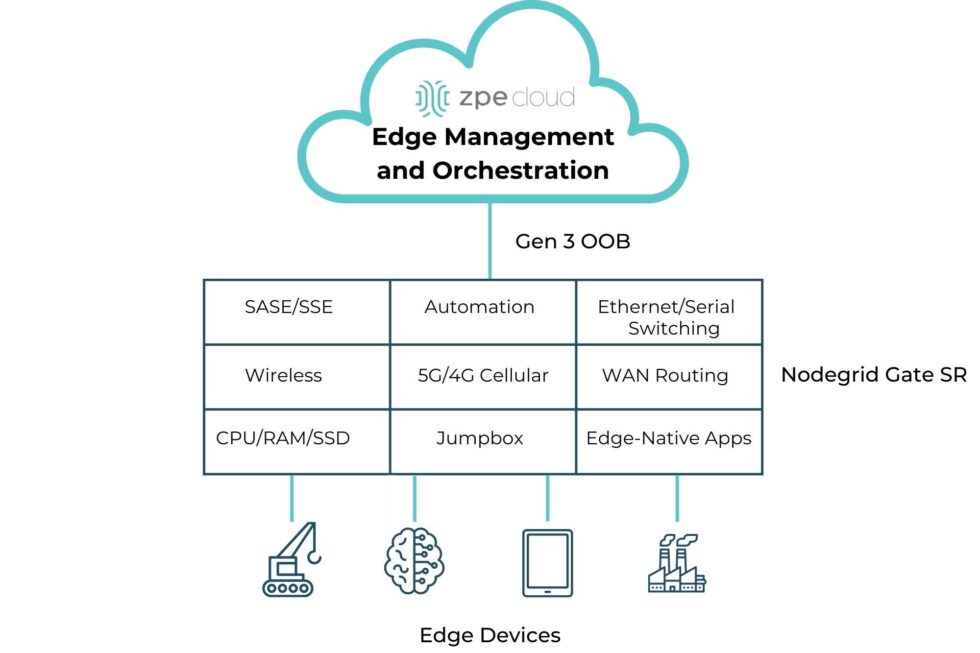
Additionally, using a centralized, cloud-based edge management and orchestration (EMO) platform is the best practice for ensuring remote teams have holistic oversight of the distributed edge computing architecture. This platform should be vendor-agnostic to ensure complete coverage over mixed and legacy architectures, and it should use out-of-band (OOB) management to provide continuous remote access to edge infrastructure even during a major service outage.

How Nodegrid streamlines edge computing for the banking industry

Nodegrid is a vendor-neutral edge networking platform that consolidates an entire edge tech stack into a single, cost-effective device. Nodegrid has a Linux-based OS that supports third-party VMs and Docker containers, allowing banks to run edge computing workloads, data analytics software, automation, security, and more. 

The Nodegrid Gate SR is available with an Nvidia Jetson Nano card that’s optimized for artificial intelligence workloads. This allows banks to run AI surveillance software, ML-powered recommendation engines, and AIOps at the edge alongside networking and infrastructure workloads rather than purchasing expensive, dedicated GPU resources. Plus, Nodegrid’s Gen 3 OOB management ensures continuous remote access and IMI for improved branch resilience.

Get Nodegrid for your edge computing use cases in banking

Nodegrid’s flexible, vendor-neutral platform adapts to any use case and deployment environment. Watch a demo to see Nodegrid’s financial network solutions in action.

Watch a demo