Providing Out-of-Band Connectivity to Mission-Critical IT Resources

Terminal Server Alternative for Simple Break/Fix Use Cases


The Nodegrid Serial Console Core Edition terminal server alternative.

A terminal server is a device that provides consolidated remote management access to routers, switches, and other network infrastructure in data centers. There are numerous reasons to consider replacing an existing terminal server solution. Many of these devices are old and unpatched, leaving them vulnerable to exploits. Older solutions may not integrate well with newer hardware and software or lack the ability to unify management for all deployed terminal servers across a distributed enterprise network, creating a lot of management complexity and potential human error.

On the other hand, some newer terminal server solutions (also known as serial consoles or console servers) include advanced features or beefed-up hardware that increase both costs and complexity. It’s important to find the right balance between security, functionality, and ease-of-use for your particular use case. This guide compares five terminal server alternatives that are optimized for simple break/fix deployments, giving teams reliable remote management access without unnecessary complications.

Key takeaways


Pros

Cons

ZPE Nodegrid NSCP-Core Edition

  • Up to 48 managed serial ports in a 1U appliance
  • Extends OOB management and ZTP to legacy and mixed-vendor infrastructure
  • Analog modem and 5G/4G LTE options available
  • Robust on-board security features like BIOS protection and TPM
  • Integrates with third-party software
  • Supports a wide range of USB environmental monitoring sensors
  • Supports automation only via ZPE Cloud

Opengear CM8100

  • 2U model can manage up to 96 devices 
  • Extensible operating system
  • Automatic port discovery
  • No cellular, Wi-Fi, or analog modem
  • Doesn’t support 2FA or SAML 2.0 security
  • Most automation requires Lighthouse Enterprise software upgrade

WTI DSM Series

  • Can manage up to 50 devices
  • Optional analog modem or 4G cellular
  • Integrates with select third-party vendors
  • OS is not extensible
  • Lacks an embedded firewall
  • No environmental sensor ports

Vertiv Avocent ACS8000

  • Includes 8 managed USB ports for 56 total serial connections
  • 4G LTE WAN, OOB, and failover support
  • Environmental sensor port
  • Doesn’t support any third-party integrations 
  • Lacks advanced authentication features
  • No embedded firewall or VPN

Perle IOLAN SDSC

  • Simple, easy-to-manage solution
  • Includes an analog modem for OOB
  • Robust security features
  • OOB is only available over an analog connection
  • Doesn’t integrate with any third-party software
  • Barebones internal hardware can’t support modern software

Comparing terminal server alternatives for break/fix use cases

Read our in-depth reviews of the best terminal server alternatives below, or click here to compare tech specs.

ZPE Nodegrid NSCP-Core Edition

The Nodegrid Serial Console Core Edition (NSCP-CE) from ZPE Systems provides out-of-band (OOB) serial console management for up to 48 devices. It’s vendor-neutral, which means it can extend OOB control and zero-touch provisioning (ZTP) to legacy and mixed-vendor infrastructure. It has dual SFP+ and dual Ethernet ports as well as 5G/4G LTE, Wi-Fi, and analog modem options for both network failover and OOB management.

Nodegrid’s management software is available either on-premises or in the cloud so you can choose the best option for your use case. ZPE frequently patches the NSCP-CE’s software, firmware, and modern, Linux-based operating system to prevent known exploits. Plus, the device itself comes backed with security features like BIOS protection, UEFI Secure Boot, self-encrypted disk (SED), Trusted Platform Module (TPM) 2.0, and multi-site VPN using IPSec, WireGuard, and OpenSSL protocols.

The NSCP-CE’s vendor-neutral architecture integrates with third-party 2FA and SAML 2.0 authentication providers as well as other software for security, automation, and troubleshooting. It also supports a wide range of USB environmental monitoring sensors to help remote teams control conditions in the data center.

Pros:

  • Up to 48 managed serial ports in a 1U appliance
  • Extends OOB management and ZTP to legacy and mixed-vendor infrastructure
  • Analog modem and 5G/4G LTE options available
  • Robust on-board security features like BIOS protection and TPM
  • Integrates with third-party software
  • Supports a wide range of USB environmental monitoring sensors

Cons:

  •  Supports automation only via ZPE Cloud

Opengear CM8100

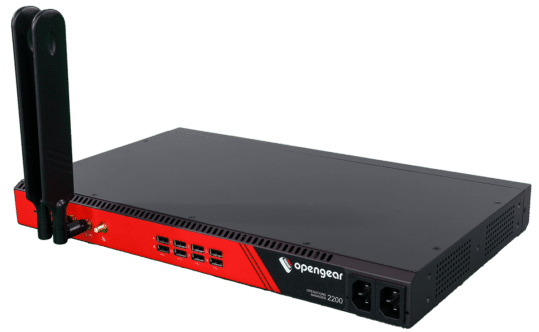
The Opengear CM8100 console server provides remote terminal server management for up to 48 devices in a 1U form-factor, or up to 96 devices in a 2U form-factor. It comes with dual ETH ports or dual switchable ETH/SFP ports for in-band, out-of-band, and failover, without any alternative network interfaces like cellular or analog modem. It supports some automation, such as ZTP and Python scripts, but only with an upgraded version of the Opengear Lighthouse management software.

The CM8100 includes some advanced security features like IPsec & OpenVPN, SSL tunnels, and Secure Shell (SSHv2) as well as a stateful firewall with IP filtering and port forwarding. While its embedded Linux operating system is programmable and extensible with third-party integrations, it does not support 2FA, SAML 2.0, or multi-site IPsec VPN.

Pros:

  • 2U model can manage up to 96 devices
  • Extensible operating system
  • Automatic port discovery

Cons:

  • No cellular, Wi-Fi, or analog modem
  • Doesn’t support 2FA or SAML 2.0 security
  • Most automation requires Lighthouse Enterprise software upgrade

WTI DSM Series

The WTI DSM series provides out-of-band terminal server management for up to 50 devices. It comes with options for single or dual Ethernet interfaces as well as an optional analog modem or cellular interface. The WTI centralized management software integrates with some third-party software like PRTG and Splunk, and it provides ZTP and RESTful API support for automation. However, only a small handful of providers are supported, and the device’s OS is not extensible.

DSM console servers come with robust security features including advanced authentication, port-specific password protection, and invalid access lockout and alarm. It also integrates with Duo, RSA, Okta, and Azure for 2FA. It lacks an embedded firewall, however, as well as an environmental sensor port.

Pros:

  • Can manage up to 50 devices
  • Optional analog modem or 4G cellular
  • Integrates with select third-party vendors

Cons:

  • OS is not extensible
  • Lacks an embedded firewall
  • No environmental sensor ports

Vertiv Avocent ACS8000

The Vertiv Avocent ACS800 can manage up to 48 devices over RS-232 serial and up to 8 devices over USB for a total of 56 managed ports. In addition to dual Ethernet and dual SFP ports, you can add 4G LTE connectivity for WAN, OOB, and failover. The on-premises DSView management software provides ZTP as well as event logging and notifications, but it doesn’t support any third-party integrations.

The ACS8000 doesn’t support 2FA, SAML 2.0, or advanced authentication features, though it does support FIPS 410-2 cryptography. It also lacks an embedded firewall and VPN functionality. It does, however, have an environmental sensor port.

Pros:

  • Includes 8 managed USB ports for 56 total serial connections
  • 4G LTE WAN, OOB, and failover support
  • Environmental sensor port

Cons:

  • Doesn’t support any third-party integrations
  • Lacks advanced authentication features
  • No embedded firewall or VPN

Perle IOLAN SDSC

The Perle IOLAN SDSC is a simple break/fix terminal server that can manage up to 32 devices. It has dual Ethernet ports for WAN and failover, but OOB is only available via the included analog modem, so it’ll be a much slower experience for remote administrators. Perle’s management software provides ZTP but does not offer any automation capabilities or integrate with any third-party solutions. Additionally, the SDSC’s barebones CPU, RAM, and storage hardware may make the software itself slow and frustrating to use, even over the in-band Ethernet connection.

The IOLAN SDSC comes with an embedded firewall and advanced security features like 2FA, IPsec VPN/OpenVPN, and remote RADIUS, TACACS+, and LDAP authentication.

Pros:

  • Simple, easy-to-manage solution
  • Includes an analog modem for OOB
  • Robust security features

Cons:

  • OOB is only available over an analog connection
  • Doesn’t integrate with any third-party software
  • Barebones internal hardware can’t support modern software

Tech Specs: Terminal server alternatives for break/fix use cases


Nodegrid NSCP-CE

Opengear CM8100

WTI OOB Rescue

Vertiv Avocent ACS8000

Perle IOLAN SDSC

Serial Ports

16 / 32 / 48x RS-232

16 / 32 / 48 / 96x RS-232

8 / 24 / 40x RS-232 

8 / 16 / 32 / 48x RS-232

8 / 16 / 32x RS-232

Network Interfaces

2x SFP & 2x ETH

1x Analog modem (optional)

2x 5G/4G LTE (optional)

2x ETH

1x ETH

or

2x ETH

1x Analog modem (optional)

1x 4G Cellular (optional)

2x SFP & 2x ETH

2x ETH

Additional Interfaces

1x RS-232 console

2x USB 3.0 Type A

1x RS-232 console

2x USB 3.0

1x RS-232 console

1x USB Mini Set-up Port

1x RS-232 console

8x USB 2.0 Type A

CPU

Intel x86_64 Dual-Core

ARM Cortex-A9 1.6 GHz Dual-Core

ARM Cortex-A9 Dual-Core

MPC8349E 400 MHz

Storage

16GB Flash (upgrades available)

32GB eMMC Flash

16GB eMMC Flash

16MB Flash

RAM

4GB DDR4 (upgrades available)

2GB DDR4

1GB DDR3L

64MB

Environmental Monitoring

Any USB sensors

4 digital-in ports

Wi-Fi

Optional

No

No

No

No

Cellular

Optional

No

Optional

Optional

No

Power

Dual AC

or

Dual DC

Dual AC

or

Dual DC

Single AC

or

Single DC

Single or Dual AC

or

Single or Dual DC

Single AC

Form Factor

1U Rack Mounted

1U Rack Mounted (up to 48 ports)

2U Rack Mounted (96 ports)

1U Rack Mounted

1U Rack Mounted

1U Rack Mounted

Experience the convenience of a vendor-neutral management platform

The Nodegrid Serial Console Core Edition is a vendor-neutral terminal server alternative that strikes the perfect balance between simplicity, functionality, and security. With flexible OOB and networking options, extensible cloud-based software, and industry-leading security features, Nodegrid can streamline and protect any environment.

Schedule a demo to see the Nodegrid terminal server alternative in action.

Edge Computing Platforms: Insights from Gartner’s 2024 Market Guide

Interlocking cogwheels containing icons of various edge computing examples are displayed in front of racks of servers

Edge computing allows organizations to process data close to where it’s generated, such as in retail stores, industrial sites, and smart cities, with the goal of improving operational efficiency and reducing latency. However, edge computing requires a platform that can support the necessary software, management, and networking infrastructure. Let’s explore the 2024 Gartner Market Guide for Edge Computing, which highlights the drivers of edge computing and offers guidance for organizations considering edge strategies.

What is an Edge Computing Platform (ECP)?

Edge computing moves data processing close to where it’s generated. For bank branches, manufacturing plants, hospitals, and others, edge computing delivers benefits like reduced latency, faster response times, and lower bandwidth costs. An Edge Computing Platform (ECP) provides the foundation of infrastructure, management, and cloud integration that enable edge computing. The goal of having an ECP is to allow many edge locations to be efficiently operated and scaled with minimal, if any, human touch or physical infrastructure changes.

Before we describe ECPs in detail, it’s important to first understand why edge computing is becoming increasingly critical to IT and what challenges arise as a result.

What’s Driving Edge Computing, and What Are the Challenges?

Here are the five drivers of edge computing described in Gartner’s report, along with the challenges that arise from each:

1. Edge Diversity

Every industry has its unique edge computing requirements. For example, manufacturing often needs low-latency processing to ensure real-time control over production, while retail might focus on real-time data insights to deliver hyper-personalized customer experiences.

Challenge: Edge computing solutions are usually deployed to address an immediate need, without taking into account the potential for future changes. This makes it difficult to adapt to diverse and evolving use cases.

2. Ongoing Digital Transformation

Gartner predicts that by 2029, 30% of enterprises will rely on edge computing. Digital transformation is catalyzing its adoption, while use cases will continue to evolve based on emerging technologies and business strategies.

Challenge: This rapid transformation means environments will continue to become more complex as edge computing evolves. This complexity makes it difficult to integrate, manage, and secure the various solutions required for edge computing.

3. Data Growth

The amount of data generated at the edge is increasing exponentially due to digitalization. Initially, this data was often underutilized (referred to as the “dark edge”), but businesses are now shifting towards a more connected and intelligent edge, where data is processed and acted upon in real time.

Challenge: Enormous volumes of data make it difficult to efficiently manage data flows and support real-time processing without overwhelming the network or infrastructure.

4. Business-Led Requirements

Automation, predictive maintenance, and hyper-personalized experiences are key business drivers pushing the adoption of edge solutions across industries.

Challenge: Meeting business requirements poses challenges in terms of ensuring scalability, interoperability, and adaptability.

5. Technology Focus

Emerging technologies such as AI/ML are increasingly deployed at the edge for low-latency processing, which is particularly useful in manufacturing, defense, and other sectors that require real-time analytics and autonomous systems.

Challenge: AI and ML make it difficult for organizations to determine how to strike a balance between computing power and infrastructure costs, without sacrificing security.

What Features Do Edge Computing Platforms Need to Have?

To address these challenges, here’s a brief look at three core features that ECPs need to have according to Gartner’s Market Guide:

  1. Edge Software Infrastructure: Support for edge-native workloads and infrastructure, including containers and VMs. The platform must be secure by design.
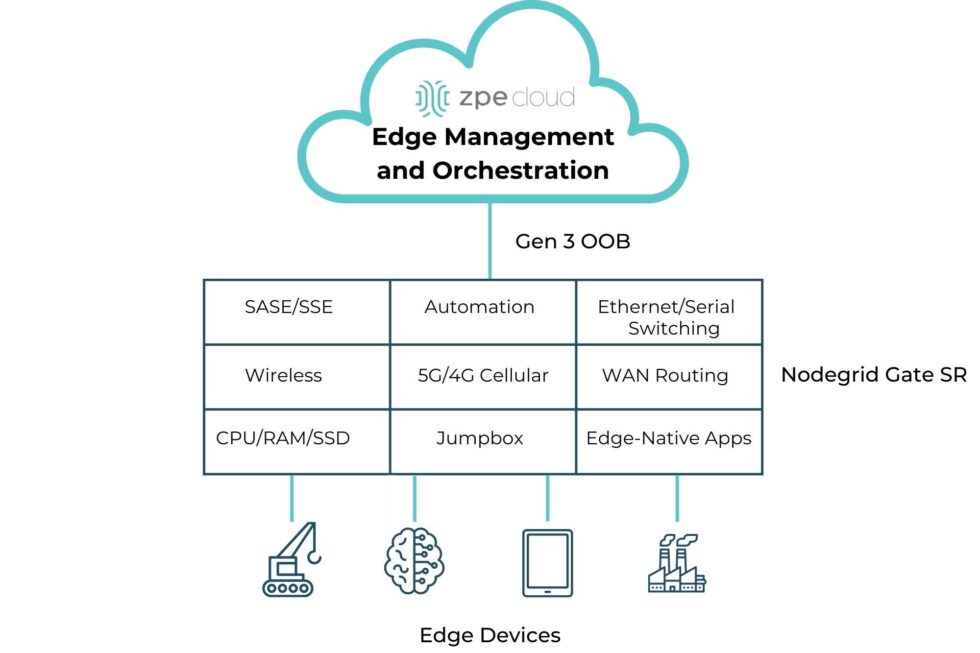
  2. Edge Management and Orchestration: Centralized management for the full software stack, including orchestration for app onboarding, fleet deployments, data storage, and regular updates/rollbacks.
  3. Cloud Integration and Networking: Seamless connection between edge and cloud to ensure smooth data flow and scalability, with support for upstream and downstream networking.

A simple diagram showing the computing and networking capabilities that can be delivered via Edge Management and Orchestration.

Image: A simple diagram showing the computing and networking capabilities that can be delivered via Edge Management and Orchestration.

  1.  

How ZPE Systems’ Nodegrid Platform Addresses Edge Computing Challenges

ZPE Systems’ Nodegrid is a Secure Service Delivery Platform that meets these needs. Nodegrid covers all three feature categories outlined in Gartner’s report, allowing organizations to host and manage edge computing via one platform. Not only is Nodegrid the industry’s most secure management infrastructure, but it also features a vendor-neutral OS, hypervisor, and multi-core Intel CPU to support necessary containers, VMs, and workloads at the edge. Nodegrid follows isolated management best practices that enable end-to-end orchestration and safe updates/rollbacks of global device fleets. Nodegrid integrates with all major cloud providers, and also features a variety of uplink types, including 5G, Starlink, and fiber, to address use cases ranging from setting up out-of-band access, to architecting Passive Optical Networking.

Here’s how Nodegrid addresses the five edge computing challenges:

1. Edge Diversity: Adapting to Industry-Specific Needs

Nodegrid is built to handle diverse requirements, with a flexible architecture that supports containerized applications and virtual machines. This architecture enables organizations to tailor the platform to their edge computing needs, whether for handling automated workflows in a factory or data-driven customer experiences in retail.

2. Ongoing Digital Transformation: Supporting Continuous Growth

Nodegrid supports ongoing digital transformation by providing zero-touch orchestration and management, allowing for remote deployment and centralized control of edge devices. This enables teams to perform initial setup of all infrastructure and services required for their edge computing use cases. Nodegrid’s remote access and automation provide a secure platform for keeping infrastructure up-to-date and optimized without the need for on-site staff. This helps organizations move much of their focus away from operations (“keeping the lights on”), and instead gives them the agility to scale their edge infrastructure to meet their business goals.

3. Data Growth: Enabling Real-Time Data Processing

Nodegrid addresses the challenge of exponential data growth by providing local processing capabilities, enabling edge devices to analyze and act on data without relying on the cloud. This not only reduces latency but also enhances decision-making in time-sensitive environments. For instance, Nodegrid can handle the high volumes of data generated by sensors and machines in a manufacturing plant, providing instant feedback for closed-loop automation and improving operational efficiency.

4. Business-Led Requirements: Tailored Solutions for Industry Demands

Nodegrid’s hardware and software are designed to be adaptable, allowing businesses to scale across different industries and use cases. In manufacturing, Nodegrid supports automated workflows and predictive maintenance, ensuring equipment operates efficiently. In retail, it powers hyperpersonalization, enabling businesses to offer tailored customer experiences through edge-driven insights. The vendor-neutral Nodegrid OS integrates with existing and new infrastructure, and the Net SR is a modular appliance that allows for hot-swapping of serial, Ethernet, computing, storage, and other capabilities. Organizations using Nodegrid can adapt to evolving use cases without having to do any heavy lifting of their infrastructure.

5. Technology Focus: Supporting Advanced AI/ML Applications

Emerging technologies such as AI/ML require robust edge platforms that can handle complex workloads with low-latency processing. Nodegrid excels in environments where real-time analytics and autonomous systems are crucial, offering high-performance infrastructure designed to support these advanced use cases. Whether processing data for AI-driven decision-making in defense or enabling real-time analytics in industrial environments, Nodegrid provides the computing power and scalability needed for AI/ML models to operate efficiently at the edge.

Read Gartner’s Market Guide for Edge Computing Platforms

As businesses continue to deploy edge computing solutions to manage increasing data, reduce latency, and drive innovation, selecting the right platform becomes critical. The 2024 Gartner Market Guide for Edge Computing Platforms provides valuable insights into the trends and challenges of edge deployments, emphasizing the need for scalability, zero-touch management, and support for evolving workloads.

Click below to download the report.

Get a Demo of Nodegrid’s Secure Service Delivery

Our engineers are ready to walk you through the software infrastructure, edge management and orchestration, and cloud integration capabilities of Nodegrid. Use the form to set up a call and get a hands-on demo of this Secure Service Delivery Platform.

American Water Cyberattack: Another Wake-Up Call for Critical Infrastructure

Industrial water treatment plant with water
The October 2024 cyberattack on American Water, one of the largest water and wastewater utility companies in the U.S., signals yet another wake-up call for critical infrastructure security. Because millions of people rely on this critical service for safe drinking water and sanitation, this attack highlights why it’s so important to address cyber vulnerabilities.

Let’s trace the timeline of the attack, how it likely started, and the best practice architecture that could have mitigated or prevented the American Water cyberattack.

Timeline of the October 2024 American Water Cyberattack

  • Initial Intrusion (October 5, 2024)
    The attack on American Water was first detected in early October, when cybersecurity monitoring tools flagged suspicious activity within the company’s IT systems. Employees reported an unusual system slowdown, and automated alerts indicated possible unauthorized access.
  • Rapid Escalation (October 6-7, 2024)
    Within 24 hours of detection, the attackers had moved deeper into the company’s IT environment. In response, American Water initiated emergency protocols, including isolating key systems to prevent further damage. To contain the breach, critical operational technology (OT) systems — responsible for managing water treatment and distribution — were temporarily shut down
  • Public Notification and Response (October 8, 2024)
    American Water notified federal authorities, including the Cybersecurity and Infrastructure Security Agency (CISA), state regulators, and the public. The company reassured customers that water quality had not been compromised, but certain automated operations had been affected, leading to temporary disruptions in water distribution.
  • Ongoing Recovery (October 2024 – Present)
    As the investigation continued, third-party cybersecurity firms were brought in to assess the extent of the breach and assist in recovery. Manual operations were implemented in areas where automated systems were impacted. While the threat was contained, the company faced a lengthy process of system restoration and reconfiguration.

Impact of the Attack

The impact of the American Water cyberattack appears minimal. A class-action lawsuit was recently filed seeking $5-million in damages on behalf of affected customers, but this is the typical fallout that results from a breach. American Water did not shut down any treatment plants, and although they were forced to temporarily shut down their customer portal, pause billing, and revert to some manual processes, there were no water contamination or public health risks that came out of the attack. Per American Water’s FAQ page, it seems business is nearly back to normal.

However, this shouldn’t diminish the need for utilities providers to shore-up their defenses and ensure resilience of their IT architectures. The Oldsmar, Florida incident is an example of how an error or breach can change water treatment chemistry (in this case, adding too much lye to the water supply) and poison a population. There have also been many attempts by U.S. adversaries in which attackers were able to change water chemistry or disrupt automated operations.

Government agencies like the EPA have been warning that attacks on water treatment utilities are increasing. Lawmakers are also calling for inspections of IT systems, such as to ensure best practices are being followed for managing passwords and keeping remote access from Internet exposure, and considering civil and criminal penalties for those who don’t comply.

How the Attack Likely Happened

The American Water cyberattack is still under investigation. Specifics of how it occurred haven’t been released, but several likely scenarios have emerged based on trends in similar attacks:

  • Phishing or Social Engineering:
    Employees may have unknowingly opened a malicious email attachment or clicked a harmful link, allowing attackers access to the internal network, similar to 2023’s Ragnar Locker attacks. Water utilities and other public services often have large workforces, which makes them susceptible to phishing campaigns.
  • Ransomware:
    There are indications that ransomware may have encrypted key files and systems, similar to what happened during the MGM hack. Ransomware attacks on critical infrastructure have increased in recent years, with attackers locking companies out of their own data and demanding payment to restore access.
  • IT/OT Integration Vulnerabilities:
    Water utilities often rely on a hybrid network where both information technology (IT) systems and operational technology (OT) systems are integrated to monitor and control water purification, distribution, and wastewater management. While this setup improves efficiency, it can also create additional vulnerabilities if the two environments are not properly segregated. Once attackers gain access to the IT network, they can use it as a bridge to reach OT systems, which are typically less secure.
  • Internet-Facing Systems:
    In the past, the Chinese-sponsored hacker group Volt Typhoon took advantage of firewalls that were connected both to the internet and to critical control systems. This approach also takes advantage of a lack of control plane segregation, as hackers can remote-in via internet-facing systems and gain management access to critical systems.

The Solution: Isolated Management Infrastructure (IMI)

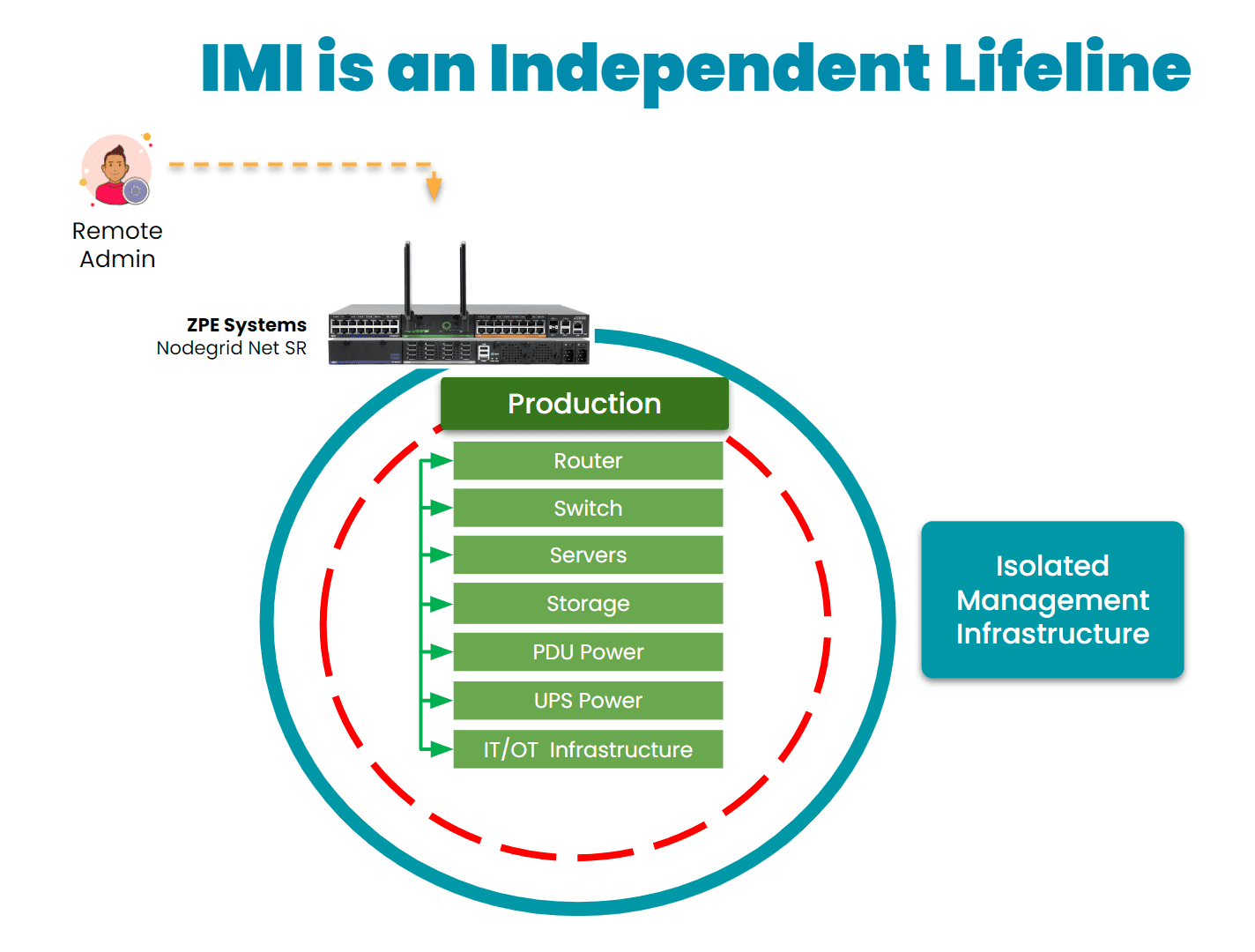
As with the global CrowdStrike outage, the most important takeaway from the American Water cyberattack is that organizations need the ability to recover fast. Remote access solutions help with this, but it matters how these solutions are architected and which capabilities they offer.

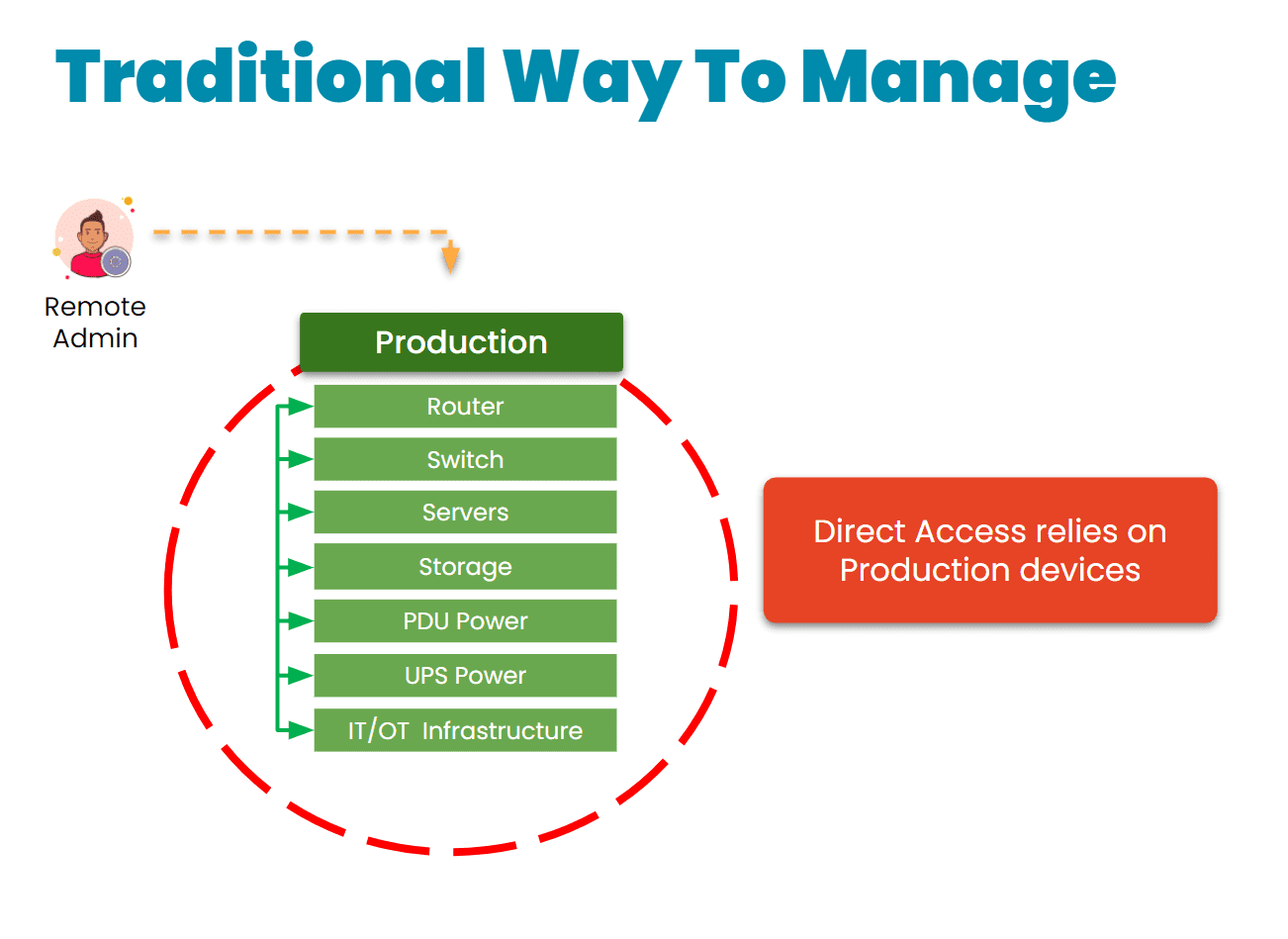
The traditional approach is to gain remote access via a direct link to the affected systems. The problem with this is that when these systems are breached, encrypted, or offline, it’s impossible to remote-into them. This requires teams to physically connect to and revive systems (as with the CrowdStrike incident), or worse – completely replace their infrastructure, as Merck did during the 2017 NotPetya breach.

Traditional remote management via direct link
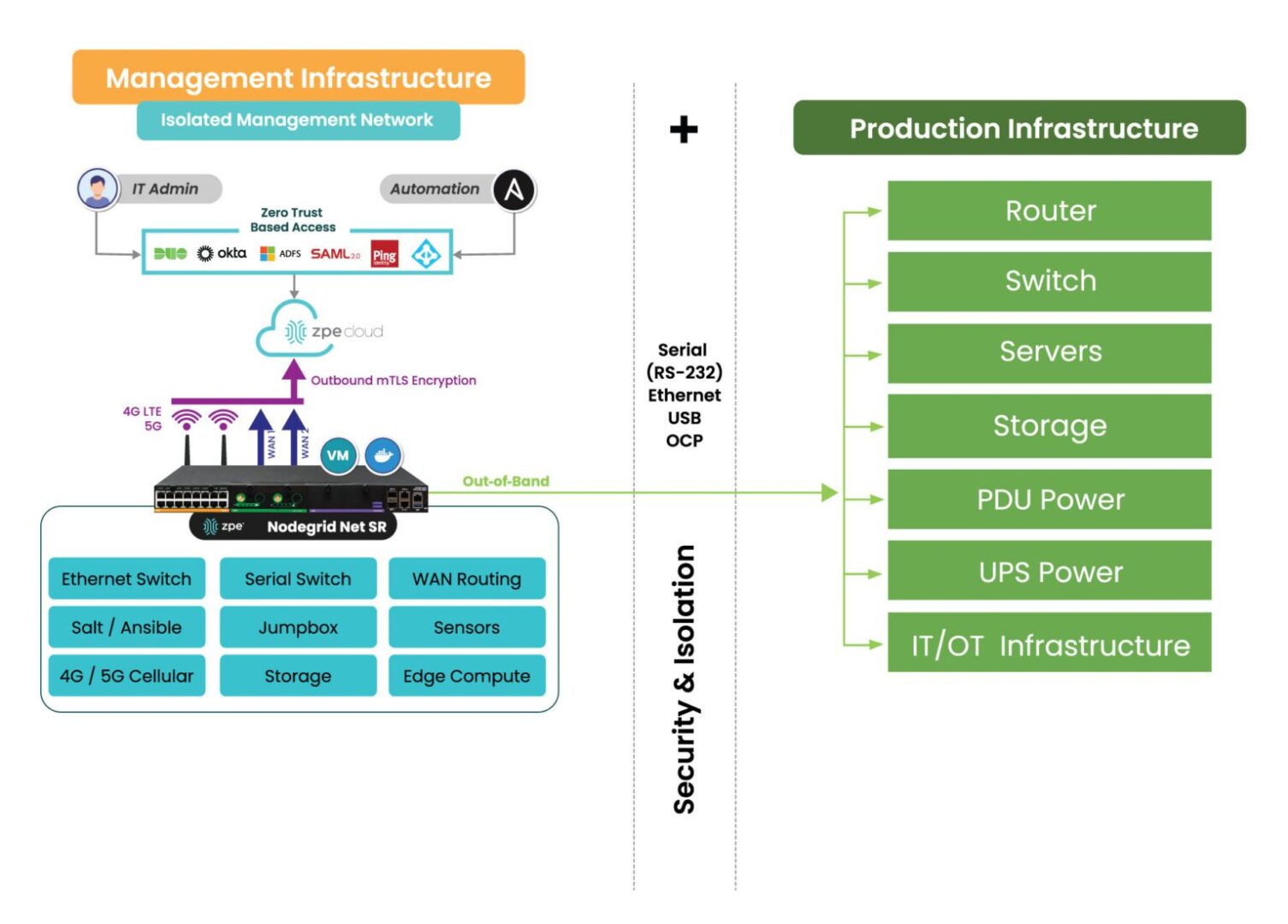
Instead, organizations are turning to a best practice architecture that has been used by hyperscalers and large enterprises for years. This solution is called Isolated Management Infrastructure. IMI creates a management network that is connected to but completely independent of production network equipment, an architecture that resembles out-of-band (OOB) management. This gives teams a lifeline to their main IT and OT systems, including servers, switches, sensors, controllers, and other critical assets, even when their main systems are offline.
IMI is a lifeline to production assets

Here’s how IMI and out-of-band management could have helped mitigate the effects of the American Water attack:

  • Enhanced Containment: By isolating the network used for system control and monitoring, OOB management could have ensured that even if the primary network was compromised, attackers would not have been able to access or disable key operational systems. This would have limited the need to shut down OT systems and prevented widespread operational disruption.
  • Faster Recovery: With isolated management infrastructure, administrators would have been able to access critical systems remotely, even during the attack. This capability enables faster diagnosis of the issue and restoration of services without relying on compromised networks. In the case of a ransomware attack, for example, OOB management can help initiate recovery operations from backups, minimizing downtime.
  • Reduced Attack Surface: By creating an independent network with fewer access points and stricter controls, OOB infrastructure reduces the chances of attackers exploiting vulnerabilities. It’s an additional layer of security that complicates attempts to breach sensitive control systems.
IMI with Nodegrid2

30-year cybersecurity expert James Cabe recently published a walkthrough of how to do this. Read his article, What to do if you’re ransomware’d, to see how to deploy the Gartner-recommended Isolated Recovery Environment that lets you fight through an active attack.

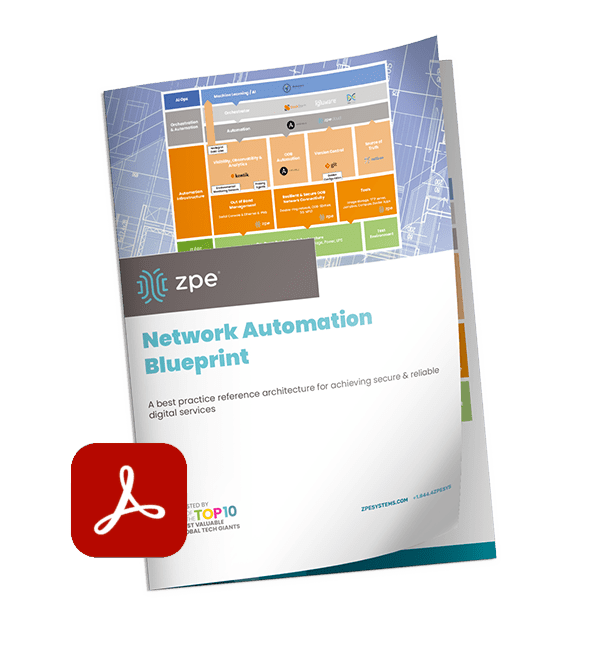
Get the Blueprint for Building IMI

The American Water cyberattack is another wake-up call for critical infrastructure providers to rethink their cybersecurity strategies. Isolated Management Infrastructure is the key approach to retaining control during an attack, but requires the robust capabilities of Generation 3 out-of-band to ensure rapid recovery. To help utilities and essential services fortify their infrastructure, ZPE Systems recently created a blueprint for building IMI. Download the blueprint now to follow the best practices architecture and become resilient against cyberattacks.

Network Virtualization Platforms: Benefits & Best Practices

Network Virtualization Platforms: Benefits & Best Practices

Simulated network virtualization platforms overlaying physical network infrastructure.

Network virtualization decouples network functions, services, and workflows from the underlying hardware infrastructure and delivers them as software. In the same way that server virtualization makes data centers more scalable and cost-effective, network virtualization helps companies streamline network deployment and management while reducing hardware expenses.

This guide describes several types of network virtualization platforms before discussing the benefits of virtualization and the best practices for improving efficiency, scalability, and ROI.

What do network virtualization platforms do?

There are three forms of network virtualization that are achieved with different types of platforms. These include:

Type of Virtualization Description Examples of Platforms
Virtual Local Area Networking (VLAN) Creates an abstraction layer over physical local networking infrastructure so the company can segment the network into multiple virtual networks without installing additional hardware.

SolarWinds Network Configuration Manager

ManageEngine Network Configuration Manager

Software-Defined Networking (SDN) Decouples network routing and control functions from the actual data packets so that IT teams can deploy and orchestrate workflows across multiple devices and VLANs from one centralized platform.

Meraki

Juniper

Network Functions Virtualization (NFV) Separates network functions like routing, switching, and load balancing from the underlying hardware so teams can deploy them as virtual machines (VMs) and use fewer physical devices.

Red Hat OpenStack

VMware vCloud NFV

While network virtualization is primarily concerned with software, it still requires a physical network infrastructure to serve as the foundation for the abstraction layer (just like server virtualization still requires hardware in the data center or cloud to run hypervisor software). Additionally, the virtualization software itself needs storage or compute resources to run, either on a server/hypervisor or built-in to a networking device like a router or switch. Sometimes, this hardware is also referred to as a network virtualization platform.

The benefits of network virtualization

Virtualizing network services and workflows with VLANs, SDN, and NFVs can help companies:

  • Improve operational efficiency with automation. Network virtualization enables the use of scripts, playbooks, and software to automate workflows and configurations. Network automation boosts productivity so teams can get more work done with fewer resources.
  • Accelerate network deployments and scaling. Legacy deployments involve configuring and installing dedicated boxes for each function. Virtualized network functions and configurations can be deployed in minutes and infinitely copied to get new sites up and running in a fraction of the time.
  • Reduce network infrastructure costs. Decoupling network functions, services, and workflows from the underlying hardware means you can run multiple functions from once device, saving money and space.
  • Strengthen network security. Virtualization makes it easier to micro-segment the network and implement precise, targeted Zero-Trust security controls to protect sensitive and valuable assets.

Network virtualization platform best practices

Following these best practices when selecting and implementing network virtualization platforms can help companies achieve the benefits described above while reducing hassle.

Vendor neutrality

Ensuring that the virtualization software works with the underlying hardware is critical. The struggle is that many organizations use devices from multiple vendors, which makes interoperability a challenge. Rather than using different virtualization platforms for each vendor, or replacing perfectly good devices with ones that are all from the same vendor, it’s much easier and more cost-effective to use virtualization software that interoperates with any networking hardware. This type of software is called ‘vendor neutral.’

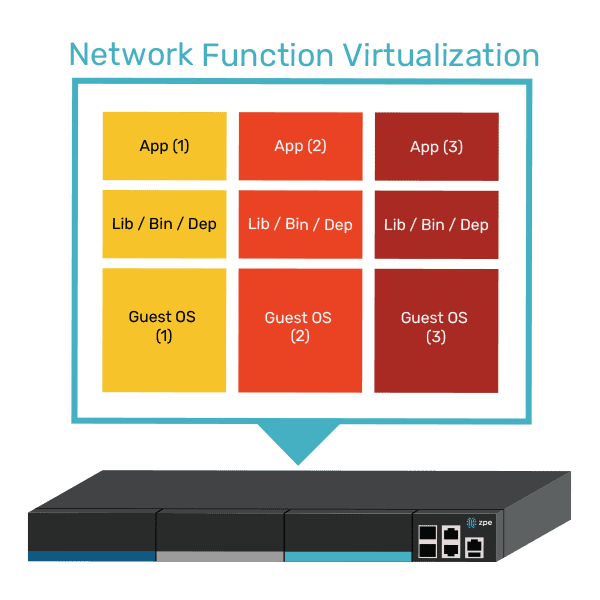
To improve efficiency even more, companies can use vendor-neutral networking hardware to host their virtualization software. Doing so eliminates the need for a dedicated server, allowing SDN software and virtualized network functions (VNFs) to run directly from a serial console or router that’s already in use. This significantly consolidates deployments, which saves  money and reduces the amount of space needed This can be a lifesaver in branch offices, retail stores, manufacturing sites, and other locations with limited space.

A diagram showing how multiple VNFs can run on a single vendor-neutral platform.

Virtualizing the WAN

We’ve mostly discussed virtualization in a local networking context, but it can also be extended to the WAN (wide area network). For example, SD-WAN (software-defined wide area networking) streamlines and automates the management of WAN infrastructure and workflows. WAN gateway routing functions can also be virtualized as VNFs that are deployed and controlled independently of the physical WAN gateway, significantly accelerating new branch launches.

Unifying network orchestration

The best way to maximize network management efficiency is to consolidate the orchestration of all virtualization with a single, vendor-neutral platform. For example, the Nodegrid solution from ZPE Systems uses vendor-neutral hardware and software to give networking teams a single platform to host, deploy, monitor, and control all virtualized workflows and devices. Nodegrid streamlines network virtualization with:

  • An open, x86-64bit Linux-based architecture that can run other vendors’ software, VNFs, and even Docker containers to eliminate the need for dedicated virtualization appliances.
  • Multi-functional hardware devices that combine gateway routing, switching, out-of-band serial console management, and more to further consolidate network deployments.
  • Vendor-neutral orchestration software, available in on-premises or cloud form, that provides unified control over both physical and virtual infrastructure across all deployment sites for a convenient management experience.

Want to see vendor-neutral network orchestration in action?

Nodegrid unifies network virtualization platforms and workflows to boost productivity while reducing infrastructure costs. Schedule a free demo to experience the benefits of vendor-neutral network orchestration firsthand.

Schedule a Demo

PDU Remote Management

PDU Remote Management

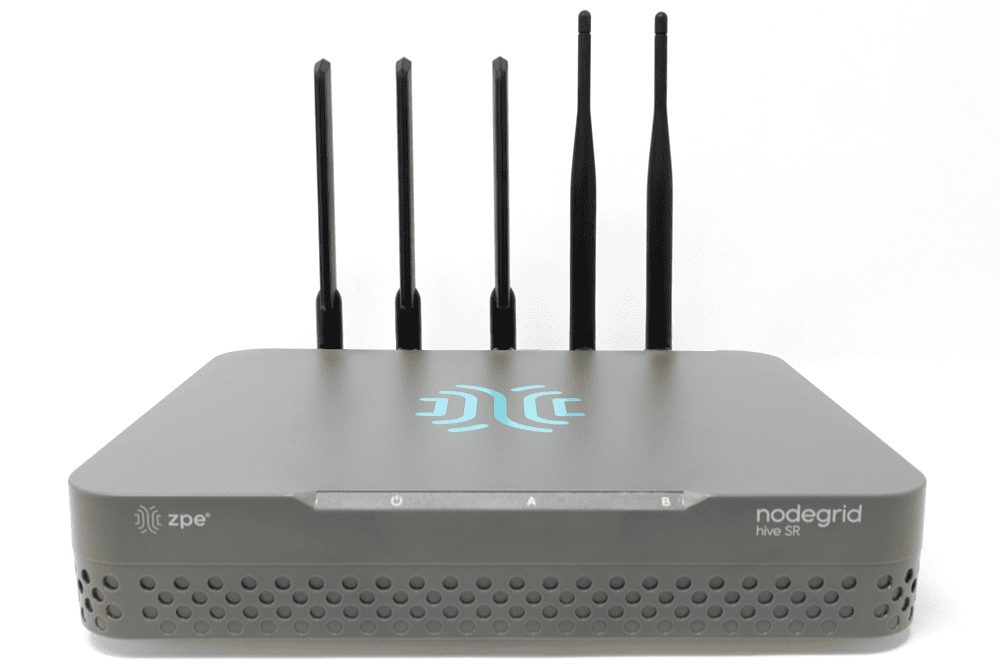
The Hive SR PDU remote management solution from ZPE Systems.

PDUs (power distribution units) and busways are critical network infrastructure devices that control and optimize how power flows to equipment like servers, routers, firewalls, and switches. They’re difficult to manage remotely, so configuring and updating new devices or fixing problems typically requires tedious, on-site work. This difficulty is magnified in complex, distributed networks with hundreds of individual power devices that must be managed one at a time. What’s needed is a PDU remote management solution that unifies control over distributed devices. It should also streamline infrastructure management with an open architecture that supports third-party power software and automation.

The problem: PDU management is cumbersome for large, distributed networks

PDUs and busways are deployed across remote and distributed locations beyond the central data center, including edge computing sites, automated manufacturing plants, and colocations. They typically aren’t network-connected and do not come with up-to-date firmware at deployment time, requiring on-site technicians for maintenance. Upgrading and managing thousands of PDUs and busways requires hundreds of work hours from on-site IT teams who must manually connect to each unit.

The current solution: PDU remote management with jump boxes or serial consoles

Since most PDUs and busways can’t connect to the network, the only way to remotely manage them is to physically connect them via serial (a.k.a., RS-232) cable to a device that can be remotely accessed, such as an Intel NUC jump box or a serial console.

Unfortunately, jump boxes usually aren’t set up to manage more than one serial connection at a time, so they only solve the remote access problem without providing any centralized management of multiple PDUs or multiple sites. Jump boxes are often deployed without antivirus or other security software installed and with insecure, unpatched operating systems containing potential vulnerabilities, leaving branch networks exposed.

On the other hand, serial consoles can manage multiple serial devices at once and provide remote access, but they often don’t integrate with PDU/busway software and only support a few chosen vendors, which limits their control capabilities and may prevent remote firmware updates. They’re also usually single-purpose devices that take up valuable rack space in remote sites with limited real estate and don’t interoperate with third-party software for automation, monitoring, and security.

The Hive SR + ZPE Cloud: A next-gen PDU remote management solution

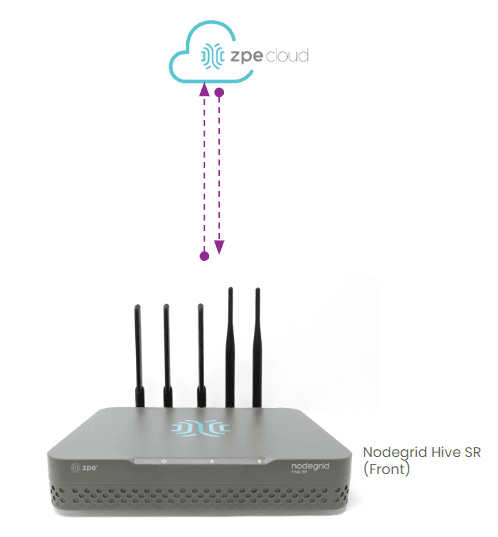
The ZPE Cloud and Nodegrid Hive SR solutions for PDU remote management.
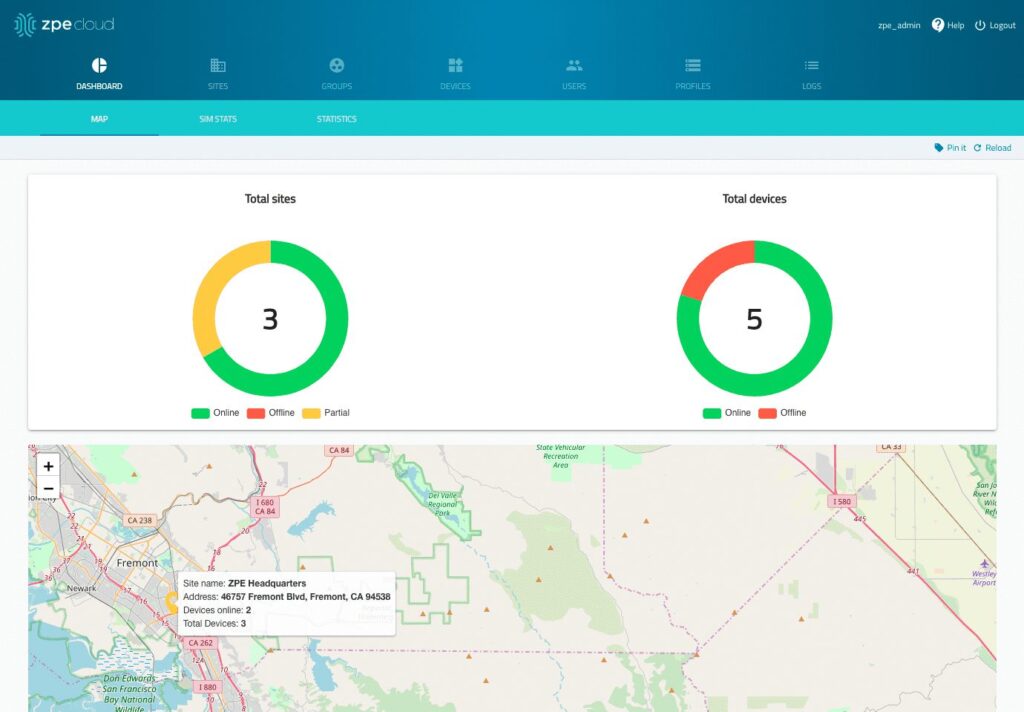
The Hive SR is an integrated branch services router from the Nodegrid family of vendor-neutral infrastructure management solutions offered by ZPE Systems. The Hive automatically discovers power devices and provides secure remote access, eliminating the need to manage PDUs and busways on-site. The ZPE Cloud management platform gives IT teams centralized control over power devices and other infrastructure at all distributed locations so they can update or roll-back firmware, configure and power-cycle equipment, and see monitoring alerts.

The ZPE Cloud PDU remote management solution from ZPE Systems.

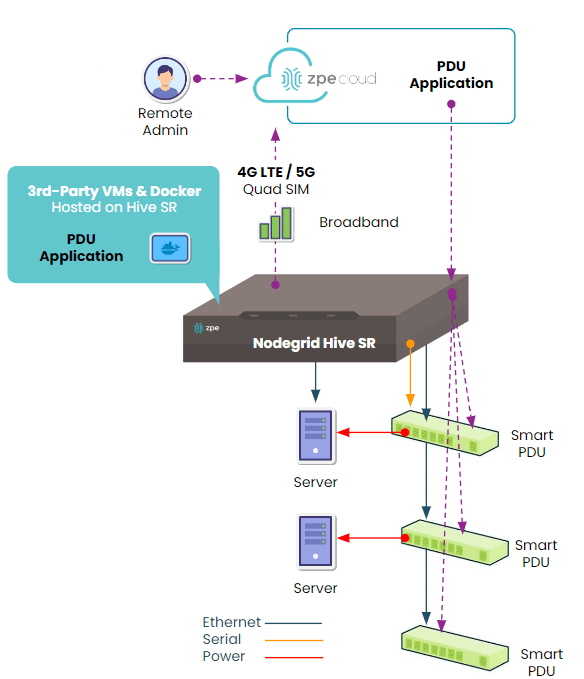
In addition to integrated branch networking capabilities like gateway routing, switching, firewall, Wi-Fi access point, 5G/4G cellular WAN failover, and centralized infrastructure control, the Hive SR and ZPE Cloud also deliver vendor-neutral out-of-band (OOB) management. ZPE’s Gen 3 OOB solution creates an isolated management network that doesn’t rely on production resources and, as such, remains remotely accessible during major outages, ransomware infections, and other adverse events. This gives IT teams a lifeline to perform remote recovery actions, including rolling-back PDU firmware updates, power-cycling hung devices, and rebuilding infected systems, without the time and expense of an on-site visit.

A diagram showing how the Nodegrid Hive SR can be deployed for PDU remote management.

The Hive and ZPE Cloud have open architectures that can host or integrate other vendors’ software for PDU/busway management, NetOps automation, zero-trust and SASE security, and more. Administrators get a single, unified, cloud-based platform to orchestrate both automated and manual workflows for PDUs, busways, and any other Nodegrid-connected infrastructure at all distributed business sites. Plus, all ZPE solutions are frequently patched and protected by industry-leading security features to defend your critical branch infrastructure.


Download our Automated PDU Provisioning and Configuration solution guide to learn more about vendor-neutral PDU remote management with Nodegrid devices like the Hive SR.
Download

Download our Centralized IT Infrastructure Management and Orchestration solution guide to learn how ZPE Cloud can improve your operational efficiency and resilience.
Download

The Best Serial Consoles for Linux

Photos of the best serial consoles for Linux

The serial console port on a Linux device allows administrators to manage the machine via the command line interface (CLI), without a keyboard, mouse, or monitor attached. Serial console management is useful for performing administrative tasks on headless Linux servers (meaning, those without ports for a keyboard or monitor) and embedded Linux systems like routers and storage devices.

While it’s possible to directly connect a laptop or Intel NUC jump box to the serial console port on a Linux device with a serial cable, this only allows you to manage one machine at a time, so it’s inefficient at scale. A serial console server (also known as a serial console or console server) provides multiple managed serial ports that administrators can connect to Linux machines, as well as many other devices. It unifies the management of all connected machines so administrators can control them all from one place, significantly streamlining infrastructure workflows.

Enterprise serial consoles for Linux provide additional capabilities like out-of-band (OOB) management, infrastructure automation, and embedded security. This guide compares the best solutions to help you choose the right console server for your enterprise.

Quick Links

  1. Nodegrid Serial Console
  2. Opengear CM8100
  3. Perle IOLAN SCG
  4. Lantronix LM83X
  5. Vertiv Avocent ACS8000

How to use the serial console port on a Linux device

The Linux kernel does not support serial console capabilities by default, so it must be configured to output console messages to the serial port first. This involves modifying the bootloader to specify new kernel options, formatted like so:

console=device,options

device:         tty0 for the foreground virtual console
                ttyX for any other virtual console
                ttySx for a serial port
                lp0 for the first parallel port
                ttyUSB0 for the first USB serial device

options:        depend on the driver. For the serial port this
                defines the baudrate/parity/bits/flow control of
                the port, in the format BBBBPNF, where BBBB is the
                speed, P is parity (n/o/e), N is number of bits,
                and F is flow control ('r' for RTS). Default is
                9600n8. The maximum baudrate is 115200.

Source

For more information on configuring the Linux serial console, read guides from docs.kernel.org, RedHat, or Ubuntu.

Comparing the best serial consoles for Linux

  ZPE Nodegrid Opengear CM8100 Perle IOLAN SCG LWM Lantronix LM83X Vertiv Avocent ACS8000
Cellular OOB
ZTP for End Devices
Guest OS
3rd Party Automation
Embedded Firewall
3rd Party Security


All of these solutions provide remote out-of-band management and consolidated control for Linux infrastructure. They also offer automation capabilities via zero-touch provisioning (ZTP), automatically deploying configurations over the network as soon as new devices come online. Some important differentiating features include cellular capabilities for OOB and failover, advanced security features like an embedded firewall and VPN support, and the ability to host and integrate third-party automation tools.

1. Nodegrid Serial Console

Nodegrid is a family of serial console server solutions from ZPE Systems. Nodegrid provides up to 96 managed serial ports while only taking up a single unit of rack space (Patent No. 9,905,980), significantly reducing the number of management devices needed to control large data center deployments. The Nodegrid Serial Console Plus (NSCP) comes with built-in 4G/5G LTE and Wi-Fi for failover and OOB management, while the S Series has auto-sensing serial ports for mixed legacy/modern environments. The NSCP-Core Edition is a low-cost alternative for break-fix deployments that provides Gen 3 security and OOB serial console management.

Front and back views of the Nodegrid Serial Console from ZPE Systems

The Nodegrid platform runs on the open, Linux-based Nodegrid OS and uses Intel x86 processors, allowing it to natively run VM and Docker applications for other vendors’ software. That means you can host third-party NetOps automation solutions like Ansible and Chef, and even extend that automation to legacy equipment. Nodegrid also provides device auto-discovery and ZTP.

Nodegrid serial consoles include an embedded firewall with a multi-site IPsec VPN and advanced authentication support to protect the OOB network. It also comes with unique hardware security features like geofencing, BIOS protection, and UEFI Secure Boot to prevent malicious actors from hijacking the management network with a stolen device.

Pros:

  • Up to 96 managed serial ports in a 1U appliance
  • Fast OOB with 4G/5G LTE and Wi-Fi options
  • 2 Ethernet and 2 10GB SFP+ ports (NSCP) or 2 Ethernet and 1 1GB SFP+ (NSCP-Core)
  • Intel x86 CPU and lots of RAM for 3rd-party Docker and VM apps
  • Comprehensive security including SAML 2.0
  • Supports ZTP and NetOps orchestration tools
  • Vendor-neutral infrastructure orchestration platform

Cons:

  • USB ports limited on 96-port model


Opengear CM8100

The Opengear CM8100 serial console has up to 48 ports in a 1U model or 96 ports in a 2U model. It only uses Ethernet for failover and OOB, without any options for cellular or Wi-Fi. It runs an embedded Linux operating system that is programmable and extensible with third-party integrations.

The Opengear CM8100 console server

With an upgraded “Automation” edition of its Lighthouse software, Opengear console servers gain ZTP, RESTful APIs, Docker containers, and Python scripts for infrastructure automation capabilities. The CM8100 comes with a stateful firewall that provides IP filtering and port forwarding. It supports IPsec & OpenVPN and advanced authentication, but not 2FA or SAML 2.0.

Pros:

  • Programmable and extensible
  • Gateway router features
  • Stateful firewall
  • 2 Ethernet ports (16 & 32 port models) or 2 Ethernet or 2 SFP+ (48 & 96 port models)

Cons:

  • Automation and ZTP require software upgrade
  • No support for 2FA or SAML 2.0
  • No cellular or Wi-Fi access


Perle IOLAN SCG

The Perle IOLAN SCG serial console supports up to 48 managed serial ports. While its fixed-form-factor models only support copper Ethernet for networking and OOB, the SCG also has a modular version with options for Wi-Fi, cellular, and analog modem.

The Perle IOLAN SCG LWM modular console server

IOLAN SCG console servers contain an underpowered 500 MHz core 32-bit ARM processor and little storage or memory headroom for automation, though Perle’s management software can extend ZTP to end devices. The solution does include a robust embedded firewall and support for two-factor authentication.

Pros:

  • Programmable and extensible
  • Gateway router features
  • Stateful firewall

Cons:

  • Automation and ZTP require software upgrade
  • No support for 2FA or SAML 2.0
  • No cellular or Wi-Fi access


Lantronix LM83X

The Lantronix LM83X serial console is a modular solution with three expansion bays, supporting up to 104 managed serial ports. It has versatile options for 4G LTE, analog modem, fiber, DSL, or satellite for OOB and failover.

The Lantronix LM83X console server

The LM83X’s ARM CPU architecture prevents it from running VMs and Docker containers for automation or third-party software. The Lantronix Control Center software does not support any third-party integrations, though it does provide some built-in automation and playbook capabilities. The LM83X offers some advanced authentication support and IP filtering but lacks an embedded firewall or VPN.

Pros:

  • Manages up to 104 serial devices with expansion cards
  • Flexible OOB and failover options
  • Robust device monitoring tools

Cons:

  • Can’t run Guest OS or 3rd-party apps
  • No support for 3rd-party integrations
  • No embedded firewall


Vertiv Avocent ACS8000

The Vertiv Avocent ACS8000 provides up to 48 managed serial ports, with faster-than-average minimum port speeds of 1200 bps. It uses 4G LTE for OOB and failover and has an updated Linux operating system.

The Vertiv Avocent ACS8000 console server

While the ACS8000 has ZTP for end devices, its ARM architecture does not support VMs, Docker apps, or third-party automation and orchestration. The proprietary DSViewTM software offers some automation capabilities for event logging and notifications but is not extensible with third-party integrations. The ACS8000 has an embedded firewall and IPSec VPN support, but lacks advanced authentication features.

Pros:

  • Fast minimum port speeds
  • 4G cellular for OOB and failover
  • Environmental sensor port

Cons:

  • No support for Docker or third-party orchestration
  • Software is not extensible
  • Lacks advanced authentication features


How to choose the best serial console for your Linux environment

These solutions all provide remote out-of-band management and consolidated infrastructure control for Linux devices. However, Nodegrid goes above and beyond by offering a truly vendor-neutral platform that supports third-party integrations and direct hosting of other vendors’ automation and orchestration software. Plus, only Nodegrid secures the automated control plane with robust on-board hardware security protection and a full suite of firewall, encryption, and authentication features like 2FA and SAML.

Ready to replace your outdated console servers?

We know that replacing outdated, EOL devices takes a lot of effort. That’s why ZPE now offers a complete package of budget-friendly products and engineering services to help. Click here to see how we make it easy to upgrade to the best serial console for Linux.


Which Nodegrid serial console is right for you?

  NSCP S Series NSCP-CE NSR
Use Cases Hyperscale data centers and cloud service providers Mixed legacy, modern, and multi-vendor environments Break-fix solution for data centers, colocations, and branches Modular and adaptable to any use case
Serial 16 / 32 / 48 / 96 16 / 32 / 48 16 / 32 / 48 16 / 32 / 48 / 64 / 80
Network 2 SFP+ & 2 ETH 2 SFP+ or 2 ETH 2 SFP & 2 ETH 2 SFP+ & 2 ETH
CPU Intel x86_64 quad core Intel x86_64 dual core Intel x86_64 dual core Intel x86_64 quad core or 8-core
Guest OS 1 1 0 1-6
Docker Apps 1-2 1-2 0 1-4
Storage 32GB SSD 32GB SSD 16GB SSD 32GB – 128GB
RAM 4GB DDR4 4GB DDR3 4GB DDR4 8GB DDR4
Wi-Fi Optional Optional Optional Optional
Cellular Optional Optional Optional Optional
Power

Single or Dual AC

Dual DC

Single or Dual AC

Dual DC

Dual AC

Dual DC

Single or Dual AC

Dual DC

Data Sheet Download Download Download Download


To learn more about Nodegrid serial consoles for Linux

contact ZPE Systemswatch a demo