Providing Out-of-Band Connectivity to Mission-Critical IT Resources

White Box Networking: Making the Switch

A close up of fingers plugging an Ethernet cable into a white box networking switch
Vendor lock-in is risky to corporate revenue and security. Enterprise technology ends up on rails, so to speak. Organizations lose the ability to choose the best features, pricing, and functionality for their use cases and instead must go along with their vendor’s roadmap. This is leading executives to take a hard look at their existing networking tech stacks so they can break out of their closed ecosystems. White box networking solutions, which are designed around completely open and customizable hardware components, offer an escape from vendor lock-in. In this blog, we’ll discuss how white box networking works, what the benefits and challenges are, and how to build the best solution.

Table of Contents

  1. White box networking explained
  2. The benefits of white box networking
  3. The problem with white box networking
  4. The solution: White box networking with ZPE Systems

To see an example of white box networking in action, request a

free Nodegrid demo

White box networking explained

White box networking involves the use of hardware – like switches and routers – that are built with commodity parts and can run any software. These solutions are highly customizable, enabling organizations to mix and match parts from different suppliers to get exactly the features they need, like port configurations, storage capacity, and computational power. In addition, white box devices can run operating systems and software that’s been custom-made or heavily modified, allowing even greater flexibility.

The benefits of white box networking
.

Cost savings: Network Operating Systems (NOS) are often the most expensive component of a networking solution, involving recurring licensing fees, support contracts, and periodic update costs. Plus, the vendor may decide to overhaul or replace their software platform, requiring expensive network hardware replacements and licensing upsells to maintain support. White box networking decouples the hardware and software, giving organizations complete control over their NOS and allowing the use of open source or in-house operating systems. By eliminating their reliance on commercial NOS, companies can reduce both their upfront software costs and their recurring licensing fees.

Hardware and software freedom: Even if an off-the-shelf networking solution comes with the necessary features and functionality right now, that’s no guarantee that the feature roadmap will always align with an enterprise’s goals and future growth. A white box solution can be changed at any time by installing new software or replacing hardware components, so it can grow and evolve with an organization. This also means that companies can take advantage of new and emerging technologies like SD-WAN or AIOps as quickly as they want without needing to completely replace the underlying infrastructure – they can simply add the required hardware and software to their existing white box solutions.

Easy management and interoperability: The biggest benefit of white box networking is that it can be managed by any platform and integrated with any third-party solutions. This makes it easier for an organization to create a fully unified environment with centralized orchestration, end-to-end network automation, and complete visibility. Network teams get holistic control over the entire white box infrastructure from a single pane of glass, using their preferred automation scripts and orchestration tools, which ensures greater performance, reliability, and efficiency.
.

The problem with white box networking

Though white box networking has many advantages in theory, a lot of companies find it hard to achieve these benefits in practice. For one thing, many white box vendors focus simply on the hardware and don’t provide a default NOS. That means organizations need to spend additional time purchasing, customizing, or writing their own NOS as well as deploying that NOS to all new white box devices.

In addition, white box hardware is often sold in bulk and can become prohibitively expensive if bought in smaller quantities. An organization might end up buying a lot of extra parts they don’t need just to avoid outrageous shipping fees, and then they’re left with the hassle of storing or reselling that hardware.

White box networking also requires a lot of extra work to configure, deploy, and manage compared to a commercial off-the-shelf (COTS) solution. For many companies, the complexity of enterprise networks and the tech talent shortage make white box networking too much of a headache. Plus, white box manufacturers typically don’t provide ongoing support in the form of NOS updates and security patches, which means the enterprise must take on this responsibility themselves.

Plus, white box devices can also increase the security attack surface of the enterprise network. A poorly configured and unpatched NOS is a tempting target for cybercriminals, who can use a compromised white box device to access sensitive network resources.

The solution: White box networking with ZPE Systems

To use white box networking effectively while avoiding these challenges, you need a complete solution, not just disparate parts to assemble on your own. That solution should combine the open ecosystem approach of white box hardware, the centralized management and security patch advantages of point solutions, and pre-validated applications that don’t require a professional coder to deploy.

For example, the Nodegrid platform from ZPE Systems turns white box networking into a complete enterprise solution. Nodegrid devices are highly customizable, inexpensive, and arrive fully assembled. These devices come pre-installed with the Nodegrid OS, which is built on an x86-64 bit Linux kernel to ensure easy setup and interoperability. ZPE Systems can even manage Nodegrid OS updates and security patches for you, helping to reduce your attack surface and close the tech talent gap. Plus, you can directly host or integrate your choice of networking applications (including Docker containers and SASE solutions) for greater functionality, security, and ease of use.

The Nodegrid solution addresses every major challenge of white box networking so you get complete vendor freedom and simplified management in a single, affordable platform.

Ready to learn more?

To learn more about white box networking with Nodegrid,contact ZPE Systems today. Contact Us

Why You Need an Out-of-Band Cybersecurity Platform

out of band cyber security
As enterprise networks continue to grow in size and complexity, many organizations struggle to defend their expanding attack surface. The cost of failure also continues to grow – according to IBM’s 2022 Cost of a Data Breach report, the average cost of a successful ransomware attack reached $4.54 million. Koroush Saraf, VP of Product Management at ZPE Systems, identified the top five cybersecurity gaps that must be closed to achieve holistic cybersecurity, which include:

  • Unnecessary exposure of management ports
  • Credential theft
  • Unpatched infrastructure
  • Inability to deploy the right security tools
  • Human error

Closing these gaps requires a three-pronged approach – out-of-band infrastructure, an open platform from which to deploy and manage security tools, and end-to-end automation (aka, hyperautomation). In this blog, we’ll explain how an out-of-band cybersecurity platform combines these three key features into a single, holistic network security solution. Want to see an out-of-band cybersecurity platform in action? Request a free demo of the Nodegrid solution.

Why you need an out-of-band cybersecurity platform

An out-of-band (OOB) cybersecurity platform provides a single, unified interface from which to:

  • View and manage network infrastructure
  • Deploy and control all of the various security policies and applications needed to protect that infrastructure, and
  • Orchestrate network, infrastructure, and security automation.

This platform resides and operates on an out-of-band network running parallel to the production network, which ensures 24/7 availability even if there’s a LAN failure or ISP outage. All network, infrastructure, and security management occur OOB, which prevents resource-intensive orchestration workflows from negatively impacting performance. This vendor-neutral, automation-friendly, out-of-band approach to cybersecurity helps you in several areas.

Reduce your attack surface

The management ports on devices like servers and switches are frequently targeted by cybercriminals because they can be used to gain access to valuable data and resources on the production network. With an out-of-band cybersecurity platform, all infrastructure and network management occurs on the OOB network, which means you no longer need to expose management ports on the production network. Isolating management and orchestration workflows to the OOB network helps reduce the attack surface by making it much more difficult for attackers to find and access those open management ports. Vendor-neutral OOB cybersecurity platforms can also help companies reduce the number of individual devices and solutions on their network, which decreases the attack surface even more. An open OOB serial console like the Nodegrid Serial Console Plus (NSCP) can host other vendors’ applications and solutions and seamlessly integrate them into the cybersecurity platform, so there are fewer devices to patch and defend, and fewer vectors through which cybercriminals can attack.

Understand your attack surface

A centralized, vendor-neutral cybersecurity platform is able to dig its hooks into every component of an enterprise network, providing a complete overview of the entire architecture. With this holistic view, security analysts gain a better understanding of the attack surface and what’s needed to protect each vulnerability. For example, a cybersecurity platform can provide information about software versioning to help with security patch management or help identify which ports are open in various applications and why. Armed with this knowledge, an organization can then deploy granular policies, tools, and controls that are custom-tailored to provide the best defense.

Mitigate human error

Even the best network engineer, working in the ideal environment, will occasionally make mistakes. For example, a recent FAA outage that delayed thousands of flights was caused by a contractor mistakenly deleting some files. And unfortunately, the combination of a tech industry recession and a tech talent gap has meant that many IT teams are overworked and understaffed – far from an ideal situation. Human error is a leading cause of successful breaches, so network automation can reduce human error by letting scripts and playbooks handle many of the tedious and repetitive workflows involved in network management. An out-of-band cybersecurity platform can host or integrate with all the leading automation solutions and scripting languages, giving overworked admins the freedom to use the tools they’re most comfortable with. The centralized platform consolidates automated workflows in a single place for streamlined deployments and efficient management. Organizations can even achieve hyperautomation – automating every task and workflow across the network and security architecture – using the cybersecurity platform as an orchestration hub. This empowers understaffed teams to optimize network performance and security while reducing manual interventions, mitigating the risk of human error.

Ensure 24/7 coverage and availability

An out-of-band cybersecurity platform uses a dedicated network interface – such as a 5G cellular modem – to ensure continuous management access even when there’s an outage on the production network. That means admins have 24/7 access to the cybersecurity platform itself, as well as the devices and systems being protected by that platform. And, crucially, all of the security policies and tools will continue to protect production network infrastructure during that downtime. This continuous availability makes it possible for IT teams to remotely recover from device and network failures without the need for costly and time-consuming truck rolls. Or, in the event of a successful attack such as ransomware, admins can conduct recovery operations on the OOB network, creating an isolated recovery environment (IRE) that’s inaccessible to attackers.

Why choose Nodegrid as your OOB cybersecurity platform

An out-of-band cybersecurity platform uses OOB infrastructure, vendor-neutral management software, and end-to-end automation to provide holistic network security. The Nodegrid platform from ZPE Systems delivers all of this functionality in a single package. Using Gen 3 out-of-band serial consoles and integrated services routers, Nodegrid can dig its orchestration hooks into every system, device, and solution in your infrastructure for complete control. Nodegrid can host or integrate with your choice of automation tools (such as Chef, Ansible, and Puppet) and security applications (such as NGFWs and SSE) for seamless and unified network security management. Plus, with fast and reliable OOB network interface options – including 5G cellular and Wi-Fi – you can maintain 24/7 security coverage and management availability.

Ready to learn more?

To learn more about the Nodegrid out-of-band cybersecurity platform, contact ZPE Systems today. Contact Us
Building an IoT Device Management System

shutterstock_1350962531(1)(1)

Internet of Things (IoT) devices are integral components of many modern businesses. In 2020, there were almost 9 billion active IoT devices—that number is predicted to exceed 25 billion by 2030. Effectively deploying, monitoring, and managing all of these devices in an enterprise environment requires powerful, centralized orchestration using an IoT device management system. This post discusses the best practices and key considerations to keep in mind when planning, designing, and building your IoT device management system.

What is an IoT device management system?

An IoT device management system provides a unified platform from which to manage all of the IoT devices in use by an organization. Many of these devices operate with little-to-no human interaction, in remote sites that may be difficult or even dangerous to access for routine maintenance. For example, IoT sensors are used inside oil pipelines to monitor crucial metrics like flow, pressure, and temperature. In addition, one organization may need to employ dozens or hundreds of different IoT devices to handle specific functions. These devices often come from different vendors, with separate management platforms, patch schedules, and configuration schemes. This results in a lot of management complexity for the IT teams responsible for provisioning, maintaining, and troubleshooting all of these devices, creating the need for an IoT device management system. The goal of such a solution is to bring all of the tasks involved in IoT device management under one roof, including:


  • → Onboarding:
    Bringing new IoT devices onto the network with the proper credentials and security policies
  • → Configuration: Provisioning new IoT devices with the necessary settings
  • → Maintenance: Updating firmware and applying security patches in a timely manner
  • → Security: Applying enterprise security policies to all IoT devices on the network
  • → Diagnostics: Collecting and analyzing logs to help identify and fix IoT device issues
  • → End-of-life management: Decommissioning EOL devices so they don’t create a security risk by remaining online and unpatched
Nodegrid is a vendor-agnostic IoT device management system that enables end-to-end automation and reliable OOB management access. To see Nodegrid in action, schedule a free demo.

Best practices for building an IoT device management system

Here are some best practices and key considerations to keep in mind when planning, designing, and building your IoT device management system.

Avoid closed ecosystems

There are off-the-shelf software solutions for IoT device management that are designed to work within a single vendor’s ecosystem. While they may offer some support for third-party devices, they generally work best if you’re already operating within that vendor’s environment. For example, AWS IoT Device Management works with third-party IoT devices but requires an existing AWS infrastructure to use it effectively. These types of solutions will usually include a library of features and supported integrations, but you may not be able to integrate your preferred scripting languages, open-source tools, or other third-party components. A vendor-neutral, or vendor-agnostic, IoT device management system does not suffer from these limitations. In addition to the ability to hook into multi-vendor IoT devices, these platforms also allow you to use your choice of third-party software and scripts. A vendor-neutral solution gives you the freedom to build a truly bespoke IoT device management system that makes use of your team’s existing skills, preferred tools, and custom innovations.

Ensure 24/7 remote management access

One of the benefits of IoT devices is they can be deployed anywhere. However, maintaining continuous access to devices in remote and hard-to-reach environments can prove challenging. Natural disasters, LAN failures, ISP outages, political instability, and global pandemics can all occur with little-to-no warning, leaving organizations cut off from their critical remote IoT devices and infrastructure. Out-of-band (OOB) management solves this problem by providing an alternative path to remote network infrastructure. For example, an IoT device management system can use OOB serial consoles to create a management network that’s dedicated to the orchestration, maintenance, and troubleshooting of production network equipment. These serial consoles have multiple redundant network interfaces (e.g., 5G cellular, Fiber, and Wi-Fi) so admins can remotely access the IoT device management system even when the remote site loses its main internet connection. This ensures that organizations can recover from remote network failures faster, continue internal operations during ISP outages, and maintain continuous access to their IoT devices.

Protect IoT infrastructure with Zero Trust Security

IoT device management systems help ensure the security of remote IoT devices by simplifying tasks like firmware updates and vulnerability patch deployment. However, the IoT device management platform itself is a potential target for malicious actors hoping to gain complete control over an organization’s IoT infrastructure. That’s why organizations must protect their IoT device management system using Zero Trust Security. Zero Trust Security follows the principle of “never trust, always verify” by requiring all users, systems, and devices to continuously prove their trustworthiness as they access the network and enterprise resources. It also requires the consistent application of enterprise security policies and controls to every system and application that connects to the network, including the IoT device management system. That means, for example, that you should use technology such as two-factor authentication (2FA) and identity and access management (IAM) to control access and prevent compromised accounts from gaining control.

  • ☆ Bonus tip: Zero Trust Security is easier to apply if you use a vendor-neutral IoT device management system that supports integrations with third-party security solutions like next-generation firewalls (NGFWs) and Secure Access Service Edge (SASE). This will also ensure that Zero Trust controls are in place to protect the OOB management network from unauthorized access.

However, it’s important to acknowledge that there’s currently no way to completely prevent a breach from occurring. According to the Sophos State of Ransomware 2022 survey, 66% of organizations were hit by ransomware in 2021 alone, and that number is only expected to trend upwards over time. That’s why another critical aspect of Zero Trust Security for IoT device management is building a resilient network architecture with automation tools that reduce the MTTR (mean time to recovery) when—and not if—a breach occurs. Learn more about how to implement such an architecture with ZPE’s network automation blueprint.

Building an IoT device management system with Nodegrid

An IoT device management system is meant to simplify and streamline the management of remote, hard-to-reach, and complex IoT devices and infrastructure. Vendor-neutral systems allow you to customize your platform with the third-party tools and solutions that work best for your team and your organization’s use case. Out-of-band (OOB) management ensures that IT teams have reliable, 24/7 access to remote IoT systems. Finally, Zero Trust Security protects the IoT device management system and all connected devices from malicious attacks. The Nodegrid platform from ZPE Systems is a completely vendor-agnostic IoT device management system supported by Gen 3 OOB serial consoles like the Nodegrid Serial Console Plus (NSCP) and all-in-one edge gateway routers like the Mini Services Router (MSR). Nodegrid supports integrations with your choice of custom scripts, automation tools, and security solutions so you can build a bespoke IoT device management system that addresses your organization’s unique challenges and use cases.

Ready to learn more about the Nodegrid IoT device management system?

Contact ZPE Systems today to learn more about the Nodegrid IoT device management system, contact ZPE Systems today. Contact Us

What To Look for In a Cloud Edge Gateway Solution

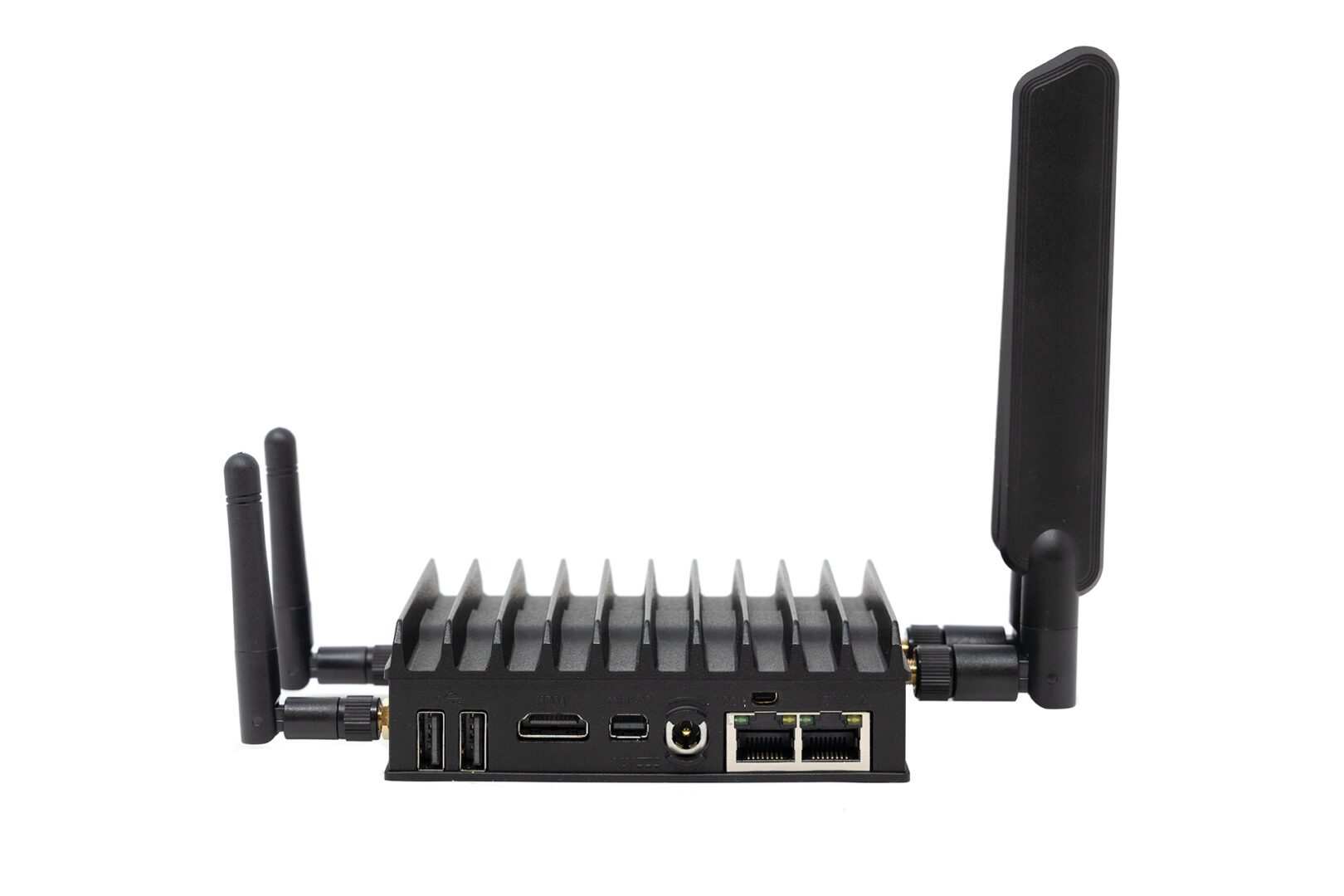
Mini-SR-Rear
Gartner predicts that by 2029 more than 15 billion IoT devices will connect to enterprise infrastructure. Many of these devices will operate outside of the centralized enterprise network, in satellite offices, manufacturing facilities, retail stores, and other remote locations. These remote – or edge – IoT devices need a secure and reliable way to connect to cloud resources and applications.

A cloud edge gateway is a hardware or software solution used to connect edge devices to the cloud. Some edge gateways are also routers that connect the edge location’s network to the WAN (wide area network) or SD-WAN (software-defined wide area network). In addition, many cloud edge gateway solutions also provide management access to connected devices, so administrators can remotely monitor and control edge infrastructure.

Some popular use cases for cloud edge gateways include:

  • Retail stores: Cloud edge gateways give retail stores a fast and secure connection for POS (point of sale) terminals, credit card readers, and security cameras.
  • Remote health facilities: Hospitals and clinics in remote areas use cloud edge gateways to securely and reliably transmit health data from IoT medical devices.
  • Police/emergency response vehicles: Cloud edge gateways enable secure data transmission from police, fire, and EMS vehicles to cloud applications.

In this blog post, we’ll discuss the key characteristics and components of a robust, secure, and reliable cloud edge gateway solution.

What to look for in a cloud edge gateway

Vendor neutrality

In a decentralized network with many remote locations, network solutions like edge gateways are often chosen based on which vendor offered the best deal or had the most compelling sales pitch at the time a new site was opening. This creates a heterogeneous network architecture, with each vendor offering their own platform from which to monitor and manage their solutions. With so many platforms to learn and keep track of, it becomes very challenging for admins to keep networks operating at peak efficiency.

A vendor-neutral cloud edge gateway solution reduces management complexity by seamlessly integrating with the existing edge infrastructure. For example, Nodegrid Services Routers can run other vendors’ software, so admins can keep using the management platform they’re most comfortable with. Or, admins can use the ZPE Cloud network orchestration platform to manage any other vendor solution that’s connected to a Nodegrid device.

Vendor-neutral cloud edge gateways give organizations the freedom to continue expanding to new locations without worrying about integration issues. Vendor neutrality also reduces headaches for network administrators so they can focus on improving efficiency and optimizing performance.

High-speed cellular failover and out-of-band management

Edge IoT devices are used for critical operations, which means they need 24/7 connectivity. Cellular failover provides a secondary internet connection that’s independent of wired network infrastructure. A cloud edge gateway with cellular failover ensures that IoT devices have uninterrupted access to the cloud even if the primary ISP connection goes down. The best solution supports high-speed 4G/5G cellular to reduce the performance impact of failover, as well as providing dual-SIM slots for redundancy.

In addition, admins need management access to edge infrastructure and IoT devices that are independent of both the WAN and the LAN (local area network), so if something like a firmware update causes the local network to go down, they can repair the issue without needing to dispatch an expensive truck roll. Out-of-band (OOB) management uses a secondary network interface (like a 5G cellular SIM) to create an OOB network that’s dedicated to management and troubleshooting. An edge gateway with OOB management ensures that admins have 24/7 high-speed access to remote infrastructure so they can recover from problems faster and reduce downtime.

Secure hardware and software

The security threats to enterprise networks are ceaseless and growing more sophisticated by the day. Many IoT devices and edge locations operate with little-to-no human intervention, which means breaches could go undetected for a long time. In addition, it can be difficult to stay on top of patch schedules or remotely install security updates on so many devices in so many locations, which can leave edge networks vulnerable to attack.

The right cloud edge gateway comes with robust hardware security features like BIOS protection, encrypted disks, and geofencing that prevent malicious actors from using a stolen gateway to hijack edge networks. Its management software should also include Zero Trust security features like SAML 2.0 integration, selectable cryptographic protocols and cipher suite levels, and two-factor authentication (2FA). With a vendor-neutral solution like Nodegrid, admins can even use the cloud edge gateway to push out security updates to connected devices using the ZPE Cloud management platform.

Automation support

It’s growing more difficult for people to simultaneously manage the complex network infrastructures required for modern business operations while ensuring peak performance and 24/7 availability. Network automation solutions help decrease the burden on overworked admins and can improve the performance and reliability of edge networks.

Many edge gateways include some automation features as part of their management software. However, these tend to be limited to baked-in workflows, meaning admins may not be able to use custom scripts or third-party playbooks. The best cloud edge gateway has vendor-neutral automation support so admins can use their choice of automation solutions. For example, Nodegrid edge gateways can directly host automation playbooks from all the major platforms including Ansible and Puppet. Nodegrid also supports custom scripting and third-party integrations for even greater flexibility.

The best cloud edge gateway solution is vendor-neutral, uses high-speed cellular for failover and OOB management, follows Zero Trust best practices to keep the infrastructure secure, and supports all of the major automation tools and scripting languages. With the edge gateway market still being somewhat new, there’s really only one solution that checks all these boxes: the Nodegrid family of cloud edge gateway routers.

Why choose the Nodegrid cloud edge gateway solution?

There are six Nodegrid Services Router models to choose from based on your deployment size, networking requirements, and use case. For example, the Mini SR delivers versatile edge networking capabilities in a device approximately the size of an iPhone, which is perfect for mobile emergency response units or retail branches where space is at a premium.

For larger deployments, such as an edge compute data center or Smart Building system, the Net SR provides a modular solution with options for additional serial console ports, disk space, compute, PoE, and more.

Nodegrid’s vendor-neutral platform is extensible and capable of directly hosting other vendor solutions for automation, security, and other networking functions. Cellular failover and high-speed OOB are delivered via dual- or quad-SIM cellular slots with 5G/4G LTE support. Nodegrid devices are protected by secure hardware features, SAML 2.0 and 2FA support, and advanced authentication, plus the OS is kept up-to-date with frequent patches. Nodegrid is also the only cloud edge gateway with full support for all the top automation and IaC (infrastructure as code) solutions, including Ansible, Chef, and Puppet.

Ready to learn more about the Nodegrid cloud edge gateway solution?

Contact ZPE Systems today to learn more about the Nodegrid cloud edge gateway solution.

Contact Us

Uplogix 5000 Local Manager EOL Best Replacement Options

A businessman considers two different options, such as which model to replace the Uplogix 5000 Local Manager EOL with
The Uplogix 5000 Local Manager line of serial console servers will go end-of-life (EOL) on December 31, 2025, with software support ending on December 31, 2023. Uplogix recommends the LM83X as a replacement model, but there are some concerns and limitations to be aware of before you make this switch. In this blog, we’ll compare the new LM83X to the Uplogix 5000 Local Manager and discuss an alternative replacement option.

About the Uplogix 5000 Local Manager

The 5000 Local Manager is Uplogix’s flagship serial console, providing out-of-band (OOB) management for up to 38 devices. Management access is delivered via two 10/100/1000 Mbps Base-T Ethernet interfaces, with a slot available for an optional v.92 modem, cellular SIM, RS-232 card, or fiber module.

All Uplogix serial console servers use the Local Manager software platform for monitoring and management. This software includes automation capabilities for routine management, maintenance, and recovery tasks. However, the Local Manager platform does not support the use of third-party automation tools or custom scripts. In addition, while the 5000 Local Manager hardware can access and manage devices from other vendors, the management software is not easily extensible by the customer. That means users are locked into the vendor’s feature roadmap and automation capabilities.

Uplogix 5000 Local Manager tech specs:

System
CPU Intel 1.3 GHz Atom
RAM 1 GB
Storage 40 GB 2.5″ SSD
Local interfaces – Up to 38 x RS-232 Serial ports

– Up to 8 x dedicated 10/100/1000 Mbps Ethernet ports

– 1 x RS-232 Power management port

– 1 x RJ-11 Modem port

– 2 x USB ports

Management interfaces – 2 x 10/100/1000 Mbps Base Ethernet interfaces

– 1 x RS-232 Console port

Option slots 1 available for field installable internal modems (v.92, cellular, or RS232) or a fiber module
Expansion slots 2 available for:

– 8 Port Serial card

– 16 Port Serial card

– 8 Port Ethernet card (10/100/1000 Mbps)

Power Dual AC or Dual DC
Features
Vendor-neutral Heterogeneous device access and management
Security – Secure Shell (SSHv2)

– TACACS and Radius authentication

– IP and caller ID filtering

– FIPS 140-2 Level 2

– Automatic session management to prevent unauthorized access

– Enforces RBAC, command-level authorization

– Logging of user access, device changes, and session activity

OOB/Failover – POTS lines

– Cellular modems

– Fiber

– DSL

– Satellite

Device monitoring In-band or out-of-band data collection every 5 to 30 seconds
Environmental monitoring – Temperature

– Humidity

Remote access – SSHv2

– Secure access to web-only management interfaces

Automation Rule-based engine for automation of routine management tasks

– No third-party automation

– cannot be easily expanded by customer

Remote power management Monitors and controls power, can remotely restart a managed device

Uplogix ended the sale of the 5000 Local Manager at the end of 2020, with the EOL date set at 12/31/2022. The EOL Uplogix 5000 product SKUs are listed below.

Uplogix 5000 EOL replacement option: The Uplogix LM83X

Uplogix released a new Local Manager serial console to replace the 5000: the LM83X. This model can manage up to 104 devices through the use of three expansion bays for additional serial and Ethernet ports. In addition to two 10/100/1000 Base-T Ethernet interfaces, the new Local Manager has a 1-Gbps SFP port for faster management access.

The LM83X runs on the same Local Manager software platform as its predecessor, which means it also suffers from vendor lock-in and limited automation capabilities. In addition, the Uplogix platform has some advanced security features like FIPS 140-2 Level 2 certification and support for Radius authentication, but it doesn’t support SAML 2.0 for cross-domain single sign-on. That makes it difficult to extend Zero Trust Security best practices to the out-of-band management network, which can leave the entire enterprise vulnerable to an attack.

Another crucial consideration is that Uplogix was just bought by Lantronix, one of its biggest competitors. It’s still unknown how Uplogix will be integrated, leaving existing customers uncertain about the future of their hardware and software support contracts.

Uplogix 5000 Local Manager vs. LM83X tech specs:

Uplogix 5000 Uplogix LM83X
System
CPU Intel 1.3 GHz Atom Not listed
RAM 1 GB Not listed
Storage 40 GB 2.5″ SSD 256 GB NVMe
Local interfaces – Up to 38 x RS-232 Serial ports

– Up to 8 x dedicated 10/100/1000 Mbps Ethernet ports

– 1 x RS-232 Power management port

– 1 x RJ-11 Modem port

– 2 x USB ports

– Up to 104 x RS-232 Serial ports

– 1 x USB-A port

– 1 x USB-C port

Management interfaces – 2 x 10/100/1000 Mbps BaseT Ethernet interfaces

– 1 x RS-232 Console port

– 2 x 10/100/1000 BaseT Ethernet ports

– 1 x 1-Gbps SFP port

Option slots 1 available for field installable internal modems (v.92, cellular, or RS232) or a fiber module 1 available for field installable internal modems (v.92, cellular, or RS232) or a fiber module
Expansion slots 2 available for:

– 8 Port Serial card

– 16 Port Serial card

– 8 Port Ethernet card (10/100/1000 Mbps)

3 available for:

– 8 Port, 16 Port, or 32 Port Serial cards

– 8 Port Ethernet card (10/100/1000 Mbps)

– LCD keypad

Power Dual AC or Dual DC Redundant internal universal power
Features
Vendor-neutral Heterogeneous device access and management Heterogeneous device access and management
Security – Secure Shell (SSHv2)

– TACACS and Radius authentication

– IP and caller ID filtering

– FIPS 140-2 Level 2

– Automatic session management to prevent unauthorized access

– Enforces RBAC, command-level authorization

– Logging of user access, device changes, and session activity

– Secure Shell (SSHv2)

– TACACS and Radius authentication

– IP and caller ID filtering

– FIPS 140-2 Level 2

– Automatic session management to prevent unauthorized access

– Enforces RBAC, command-level authorization

– Logging of user access, device changes, and session activity

OOB/Failover – POTS lines

– Cellular modems

– Fiber

– DSL

– Satellite

– POTS lines

– Cellular modems

– Fiber

– DSL

– Satellite

Device monitoring In-band or out-of-band data collection every 5 to 30 seconds In-band or out-of-band data collection every 5 to 30 seconds
Environmental monitoring – Temperature

– Humidity

– Temperature

– Humidity

Remote access – SSHv2

– Secure access to web-only management interfaces

– SSHv2

– Secure access to web-only management interfaces

Automation Rule-based engine for automation of routine management tasks

– No third-party automation

– Not easily expandable

Rule-based engine for automation of routine management tasks

– No third-party automation

– Not easily expandable

Remote power management Monitors and controls power, can remotely restart a managed device Monitors and controls power, can remotely restart a managed device

Alternative Uplogix 5000 EOL replacement options from ZPE Systems

The Uplogix Local Manager solutions are what’s known as second generation, or Gen 2, out-of-band serial consoles. That means they provide heterogeneous device management, built-in security features, and some automation capabilities. However, they fall short of true vendor neutrality, which makes it impossible to achieve end-to-end network automation. In addition, without SAML 2.0 support, Uplogix devices are vulnerable to compromise by malicious actors who could use them to gain control over the production network.

To get secure and extensible OOB management access with end-to-end automation capabilities, you need a Gen 3 out-of-band serial console solution like the Nodegrid platform from ZPE Systems.

About the Nodegrid Serial Console Plus (NSCP)

The Nodegrid Serial Console Plus (NSCP) provides Gen 3 OOB management for up to 96 devices, including support for Cisco and legacy pinouts. Management access is delivered via two Gigabit Ethernet ports, two SFP+ ports, or v.92 modem, with out-of-band and network failover to dual SIM 5G/4G LTE cellular, WiFi, or v.92 modem.

All Nodegrid devices can be managed with one of two offerings: the on-premises Nodegrid Manager software or the ZPE Cloud application. Both solutions are easily extensible with your choice of third-party applications for infrastructure automation and orchestration, security, big data analytics, and more. Nodegrid hardware can even directly host other vendors’ software, giving you a convenient platform for Docker containers, Infrastructure as Code (IaC) playbooks, Security Service Edge (SSE) applications, and SD-WAN solutions.

The Gen 3 NSCP protects your infrastructure using Zero Trust best practices like SAML 2.0 support, disk encryption, and secure boot. ZPE Systems is also the only serial console vendor with a FIPS 140-3 pre-certification, making them the most secure OOB solution on the market.

Head-to-head: Uplogix 5000 vs. Uplogix LM83X vs. NSCP tech specs

Uplogix 5000 Uplogix LM83X Nodegrid Serial Console Plus (NSCP)
System
CPU Intel 1.3 GHz Atom Not listed Intel x 86, 64 bit
RAM 1 GB Not listed 4 GB / 8 GB
Storage 40 GB 2.5″ SSD 256 GB NVMe 32 GB FLASH
Local interfaces – Up to 38 x RS-232 Serial ports

– Up to 8 x dedicated 10/100/1000 Mbps Ethernet ports

– 1 x RS-232 Power management port

– 1 x RJ-11 Modem port

– 2 x USB ports

– Up to 104 x RS-232 Serial ports

– 1 x USB-A port

– 1 x USB-C port

– Up to 96 x RS-232 Serial ports

– 2 x 1-GbE Ethernet

– 2 x SFP+

– 2 x USB 3.0 ports

– 1 x HDMI port

– 1 x Console port

– can manage devices RS-232, USB, IPMI, SSH,Telenet, WebUI, RESTAPI

– can manage over 500 devices (mix of serial and IP) on a single appliance

Management interfaces – 2 x 10/100/1000 Mbps BaseT Ethernet interfaces

– 1 x RS-232 Console port

– 2 x 10/100/1000 BaseT Ethernet ports

– 1 x 1-Gbps SFP port

– 2 x 1-GbE Ethernet

– 2 x SFP+

– 1 x v.92 Modem

Option slots 1 available for field installable internal modems (v.92, cellular, or RS232) or a fiber module 1 available for field installable internal modems (v.92, cellular, or RS232) or a fiber module – Wi-Fi

– Dual SIM 5G/4G LTE cellular

– v.92 modem

Expansion slots 2 available for:

– 8 Port Serial card

– 16 Port Serial card

– 8 Port Ethernet card (10/100/1000 Mbps)

3 available for:

– 8 Port, 16 Port, or 32 Port Serial cards

– 8 Port Ethernet card (10/100/1000 Mbps)

– LCD keypad

Power Dual AC or Dual DC Redundant internal universal power Single or Dual AC, Dual DC
Features
Vendor-neutral Heterogeneous device access and management Heterogeneous device access and management – Vendor-neutral device access and management

– Can directly host third-party apps for security, automation, etc.

– Platform integrates with third-party solutions not hosted on Nodegrid hardware

– Can extend Zero Touch Provisioning to other vendor devices

Security – Secure Shell (SSHv2)

– TACACS and Radius authentication

– IP and caller ID filtering

– FIPS 140-2 Level 2

– Automatic session management to prevent unauthorized access

– Enforces RBAC, command-level authorization

– Logging of user access, device changes, and session activity

– Secure Shell (SSHv2)

– TACACS and Radius authentication

– IP and caller ID filtering

– FIPS 140-2 Level 2

– Automatic session management to prevent unauthorized access

– Enforces RBAC, command-level authorization

– Logging of user access, device changes, and session activity

Hardware Security:

– TPM 2.0

– Encrypted solid-state disk

– UEFI BIOS with protection

– Secure boot (signed OS)

– Geofencing

Authentication:

– Local

– RADIUS

– TACACS+

– LDAP/AD

– NIS and Kerberos

– SAML 2.0 (Okta, Duo, PingID, ADFS)

OOB/Failover – POTS lines

– Cellular modems

– Fiber

– DSL

– Satellite

– POTS lines

– Cellular modems

– Fiber

– DSL

– Satellite

– 5G/4G/LTE

– V.92 modem

– Wi-Fi

Device monitoring In-band or out-of-band data collection every 5 to 30 seconds In-band or out-of-band data collection every 5 to 30 seconds – Keystroke logging

– Logging to ZPE Cloud, NFS, Local

– Alert on cable disconnects

Environmental monitoring – Temperature

– Humidity

– Temperature

– Humidity

– Particulate

– Smoke

– Airflow & temperature

– Proximity/door lock

– Temp & humidity

– 7-port USB hub

– 8-port GPIO

– 4-port Relay

Remote access – SSHv2

– Secure access to web-only management interfaces

– SSHv2

– Secure access to web-only management interfaces

– SSH direct to consoles

– ZPE Cloud (web) or Nodegrid Manager (local)

Automation Rule-based engine for automation of routine management tasks

– No third-party automation

– cannot be easily expanded by customer

Rule-based engine for automation of routine management tasks

– No third-party automation

– cannot be easily expanded by customer

– ZPE Cloud

– Chef

– Docker

– KVM Hypervisor

– Puppet

– Python

– RedHat Ansible

– Ruby

– ShellScript

– Node.js JavaScript

Remote power management Monitors and controls power, can remotely restart a managed device Monitors and controls power, can remotely restart a managed device – Support major power strip manufacturers

– Power management integrated with serial session (escape sequence in the serial session or power buttons in web serial session)

– Power control of VMs

– Access rights for users and user groups

The Uplogix LM83X is the direct replacement for the EOL Uplogix 5000 Local Manager, which means it provides the same base capabilities with some upgraded hardware features. However, this also means the LM83X suffers from the same limitations as its predecessor, namely a lack of SAML 2.0 integration and a closed management platform that doesn’t support third-party automation. To achieve end-to-end network automation, you need a Gen 3 OOB serial console solution like the Nodegrid Serial Console Plus.

Uplogix 5000 Local Manager EOL product SKUs

Product SKU Description End of Hardware Support End of Software Support End of Life End of Sale
71-1321-10 FIPS Uplogix 5000 Local manager, 14 Serial, V.92 modem 12/31/2023 12/31/2025 12/31/2025 12/31/2020
61-5001-01 Uplogix 5000 8 Port Serial Expansion Module w/LMS-FIPS 12/31/2023 12/31/2025 12/31/2025 12/31/2020
61-5500-30 Uplogix 5000 Local Manager 12/31/2023 12/31/2025 12/31/2025 12/31/2020
61-5500-33 FIPS Uplogix 5000 Local Manager 12/31/2023 12/31/2025 12/31/2025 12/31/2020

Ready to replace your Uplogix 5000​?

To replace your Uplogix 5000 Local Manager EOL serial console server with the Gen 3 Nodegrid Serial Console Plus, Contact ZPE Systems today!

Request a Demo Today