Yes, You Can Have A Complete Out-of-Band Management Solution In One Device!
Out-of-Band (OOB) management used to be a last resort, a ‘break glass’ tool for gaining access to failed IT. But many organizations are now realizing that out-of-band is a strategic weapon that can do much more than get them out of a jam. It can help patch systems within 48 hours, test config changes and firmware updates, and monitor infrastructure health to prevent failures and stay proactive.
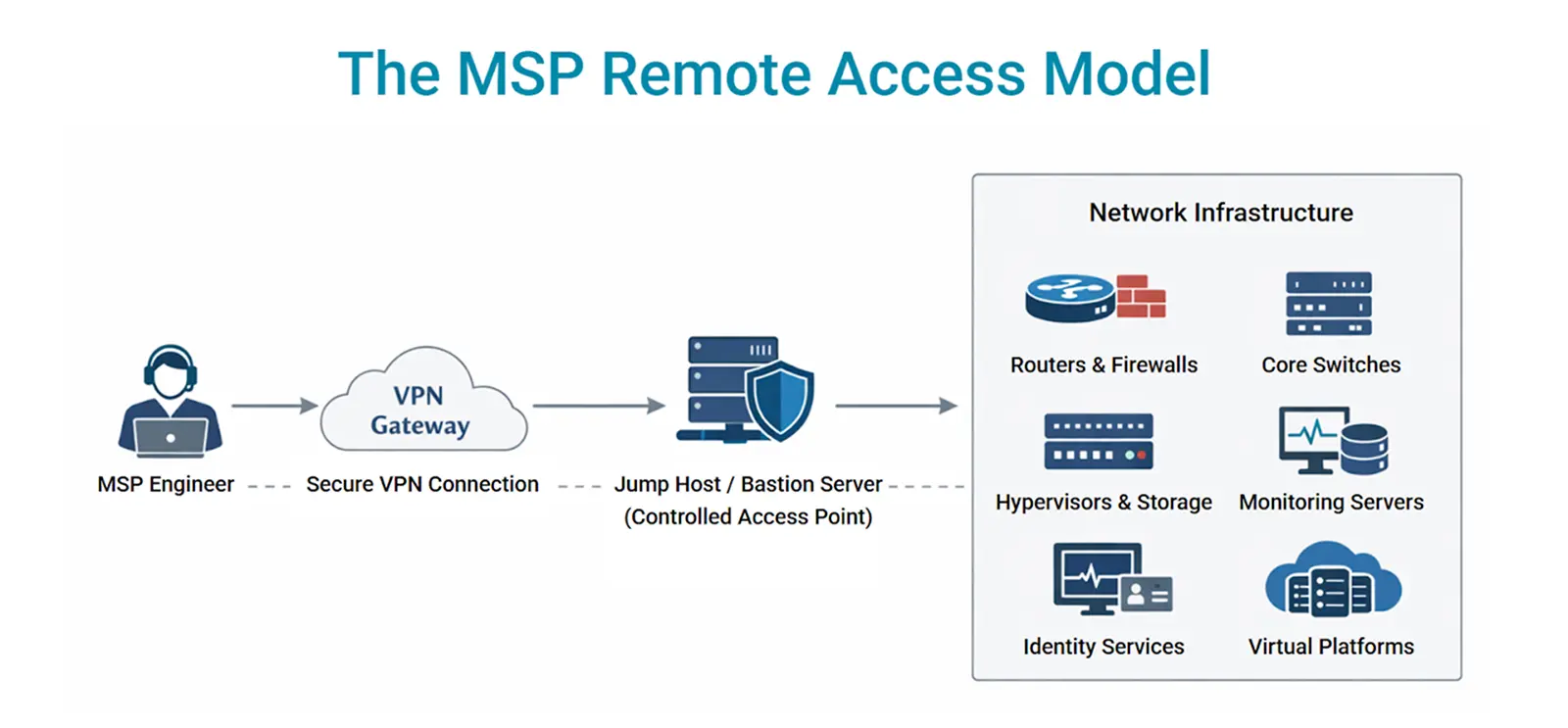
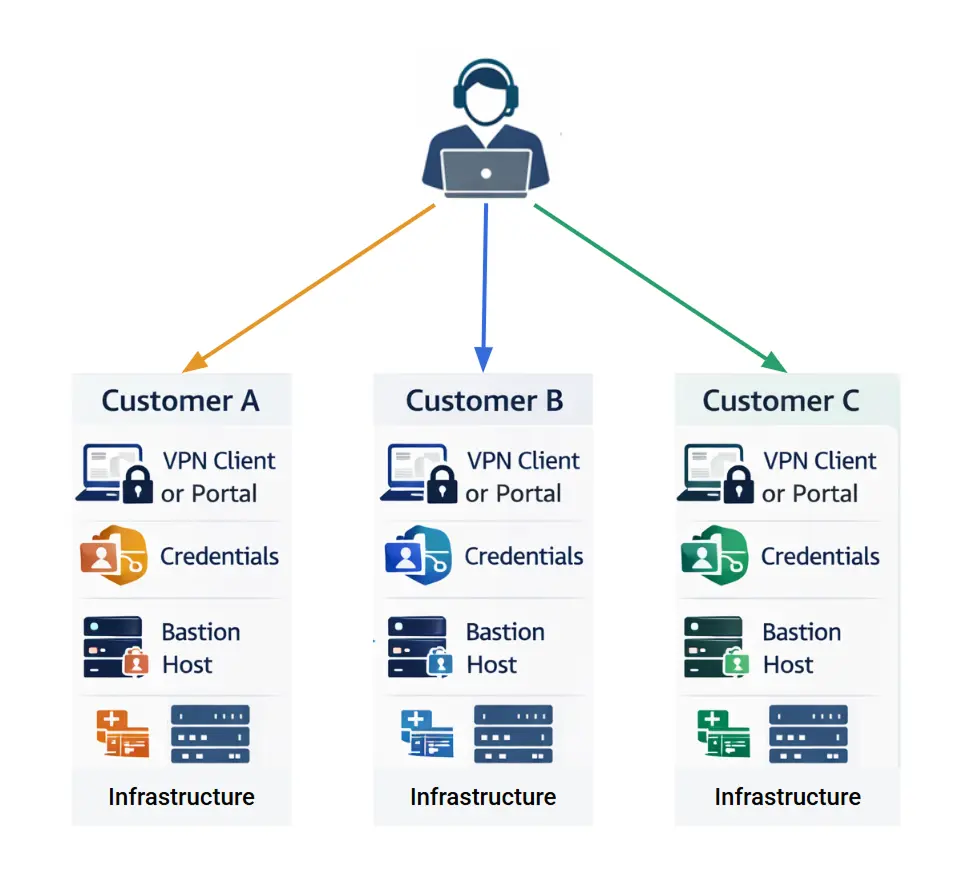
But there’s one big problem that stops teams from putting together an out-of-band infrastructure: there are too many devices to piece together and manage.
Traditionally, teams have built OOB environments using multiple devices from different vendors:
- Routers provided secure connectivity and routing logic.
- WAN routers served as modular access points.
- Cellular devices offered LTE/5G backup and remote cellular access when wired networks failed.
- Serial console servers were added to gain terminal-level access to switches, firewalls, and other appliances.
- Firewalls or VPN concentrators (for security-conscious teams) were deployed to secure management plane access through encrypted tunnels.
The Complexity of Multi-Device OOB Environments
For teams managing a few sites, juggling devices may be feasible. But when there are dozens, hundreds, or thousands of locations, the cracks begin to show:
1. Operational Complexity
Every device has its own OS, firmware, and configuration syntax. Pushing a global policy change like updating SSH access rules or hardening TLS settings requires custom playbooks for each platform. Over time, this increases the risk of misconfigurations and creates blind spots in security audits.
2. Troubleshooting Bottlenecks
When a site goes dark, support teams need rapid access to console ports, environmental telemetry, and WAN connectivity diagnostics. But a fragmented toolset makes root-cause analysis a game of guesswork – Did the router fail? Does the modem have signal? Is the serial port offline?
3. Inefficient Use of Space and Power
Remote cabinets and edge environments have very limited (if any) rack space. You might have 1RU or less of space, but three devices that need to be installed. Even if you get crafty and manage to squeeze them in, having multiple devices increases power draw, thermal output, and points of failure. This isn’t scalable, especially in cramped environments like cell towers, retail stores, or substations.
4. Increased Procurement and Support Costs
Assembling out-of-band networks from multiple vendor devices simply makes more work for procurement teams, who face long lead times and inconsistent licensing models. But that’s just the beginning. Costs pile up when you need to maintain this infrastructure. It’s extremely expensive to have a separate contract for each cellular device at every location, for example, which can easily add up to hundreds of thousands of dollars every year. Or, having third-party maintenance contracts for existing devices that have gone EOL.
Why Teams Dream of a Single-Box Solution
Remember when the smartphone hit the market? Rather, when it became commonplace and developers started making an app for everything? There were so many single-function devices and items that you didn’t need anymore – phone, alarm clock, digital camera, calculator, notepad, mp3 player, flashlight – the list goes on.
Networking and IT teams are dreaming of something similar for their infrastructure. At every expo and conference in recent years, we talked with thousands of people who said that out-of-band adds too much extra equipment (and work) that they don’t want to deal with.
So, what do they want? Something that “just works,” according to those we talked to recently at RSA Conference 2025. They want to be able to deploy one box that securely comes online, can be configured remotely/automatically, and doesn’t require a bunch of other devices for automation or computing or cellular. Here are some popular wish-list use cases:
- Remote Sites & Branch Offices: A single appliance that can offer serial access to critical equipment, cellular WAN failover, and environmental monitoring in space-constrained sites.
- Colocation Data Centers: One platform that combines console access, VPN tunneling, and rack telemetry to reduce hardware costs and footprints.
- Industrial & OT Environments: Ruggedized devices with extended temperature ranges, shock resistance, and power redundancy ideal for energy, utilities, and manufacturing.
Imagine their surprise when we say, “That’s our box. We do what nobody else can.”
ZPE Systems’ Nodegrid is Single-Box Out-of-Band Management and More
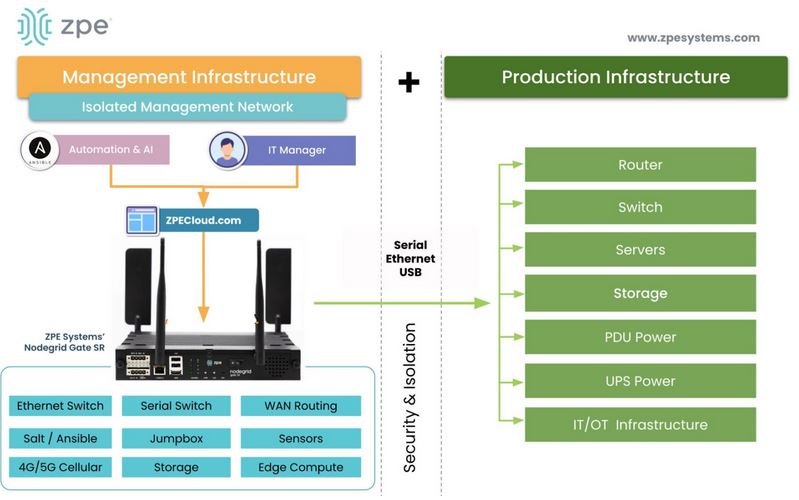
ZPE Systems developed this all-in-one capability and offers devices in a variety of sizes, up to 1RU. This platform is called Nodegrid and it combines the many functions we discussed, plus the ability to host third-party apps/tools, run Ansible and custom automation, and provide centralized management via on-prem deployment or ZPE Cloud connection.
All-in-One Capabilities
One Nodegrid device handles all the functions of traditional, dedicated devices, including:
- Serial console server (for direct access to routers, switches, firewalls)
- Cellular modem (LTE/5G with dual SIM failover)
- Ethernet routing and switching
- Secure VPN or SD-WAN capability
- USB out-of-band storage or keyboard-video-mouse (KVM) options
On top of these, Nodegrid runs VMs, Docker containers, apps, and automation solutions. It replaces up to nine traditional devices and fits neatly in 1RU or less of space.
Here’s how our customer Vapor IO used Nodegrid to free up 5RU and automate their deployments. Read Vapor IO case study .
Centralized Management and Policy Enforcement
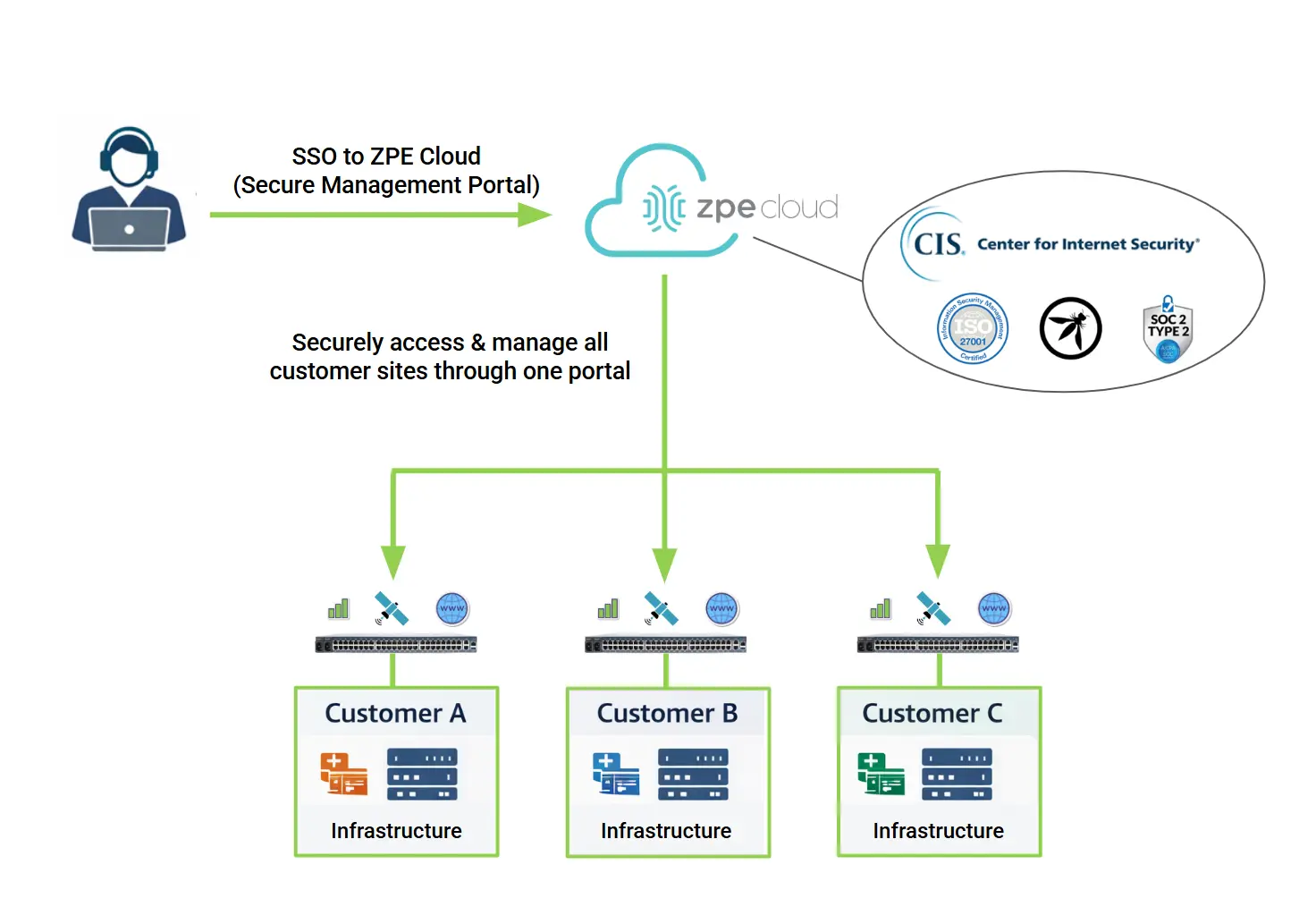
Administrators can deploy and manage thousands of units through a single orchestration platform, via Nodegrid Manager (on-prem) or ZPE Cloud (SaaS). This lets them easily enforce access policies, audit activity, and automate firmware updates without relying on disparate interfaces.
Isolated Management Infrastructure Best Practices
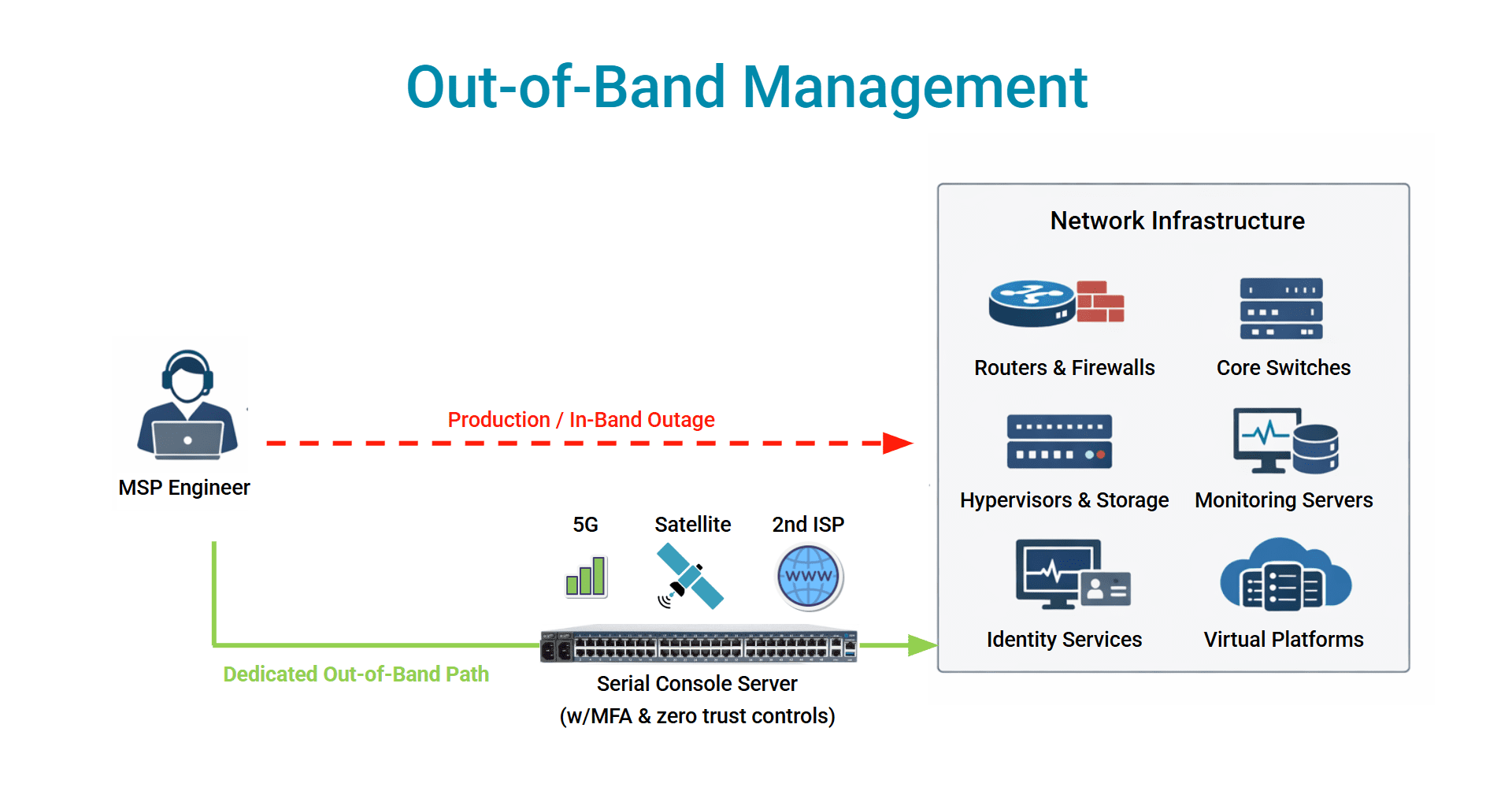
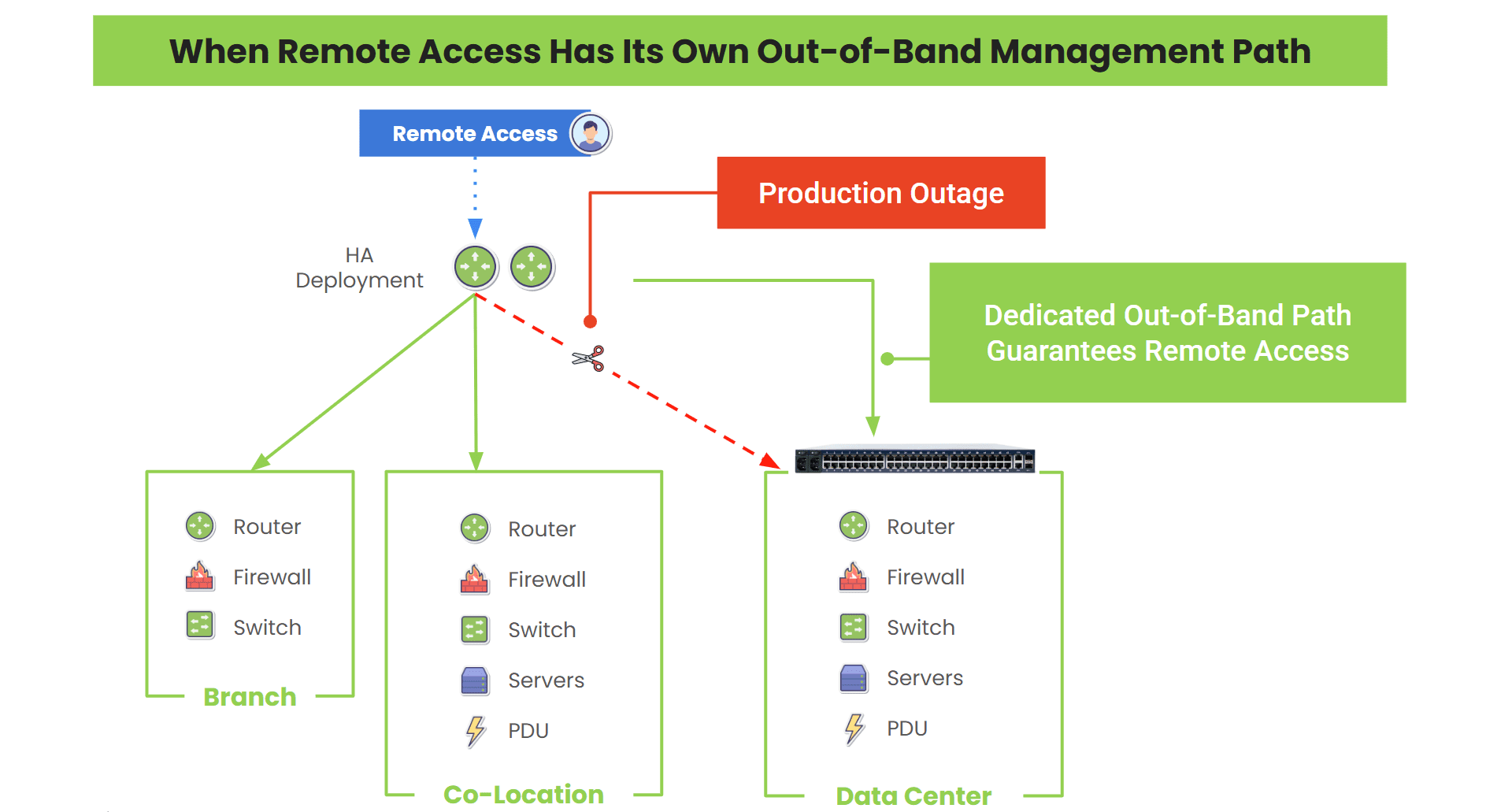
Nodegrid provides what is called Isolated Management Infrastructure (IMI), which is an industry best practice for maintaining resilience. Unlike traditional out-of-band, which relies in part on production systems, IMI creates a completely separate management network that remains accessible and online even if the production network completely fails. This lets teams access and recover their systems during an active cyberattack or outage. IMI has been used by hyperscalers for more than a decade and is now being written into new laws around the world.
Hardened Security
The Nodegrid and ZPE Cloud platform have the industry’s highest security. You can read the full security assurance document that covers the hardware, software, and cloud security features, as well as the third-party certifications. Here are some of the highlights: secure boot, signed OS, self-encrypted disk, three Synopsys validations, ISO27001, FIPS 140-3, SOC 2 Type 2.
Automation-Ready
Nodegrid integrates with Ansible, Terraform, and Python APIs, enabling Infrastructure-as-Code (IaC) workflows and automated responses to network incidents. Automation can run natively on the Nodegrid device, or stored in ZPE Cloud and pushed down where needed.
Schedule a Demo
The days of piecing together out-of-band solutions are coming to a close. The overhead, security gaps, and physical constraints are driving a clear trend: simplify the edge, secure the core, and consolidate the tools.
ZPE Systems helps you do all three of these. To get hands-on with our products or chat with an engineer about your specific use case, schedule a demo at the link below.
See Nodegrid in Action!
Senior Sales Engineer Marcel van Zwienen put together this 20-minute video giving you a first-hand look at Nodegrid’s interface. He shows you how ZPE Cloud makes it easy to monitor, troubleshoot, and update devices even if they’re thousands of miles away. Don’t miss it!
“That’s So Obvious Now…” – 3 Real Lessons in Network Resilience
3 Real Lessons in Network Resilience
By Ahmed Algam
Over the past few months, I’ve seen many real-world examples of this. These incidents drove home a hard truth about architecting for network resilience:
Out-of-Band (OOB) access isn’t optional. It’s essential.
Here are three short but very real stories that made this point crystal clear.
1. The Power Outage That Didn’t Stop Us
Our Fremont office went dark. Completely dark. There was a power outage and our provider failed to give us a heads-up, so it took us by surprise.
No power meant routers, ESXi hosts, Proxmox servers, backup systems, and even Wi-Fi were knocked offline. It was a total blackout.
But we weren’t scrambling. We had architected a true out-of-band path using LTE. Even with the production network down, we still had a way in.
From miles away, we diagnosed the problem, rebooted critical infrastructure, and got things running again before most people even noticed.
Lesson: Your recovery plan is only as good as your last mile. If your failover path isn’t truly independent, it’s not a plan – it’s wishful thinking.
2. The Engineer Who Locked Himself Out
A partner’s network went down during a routine change. Not uncommon. What was uncommon? The fact that they had no access to fix it.
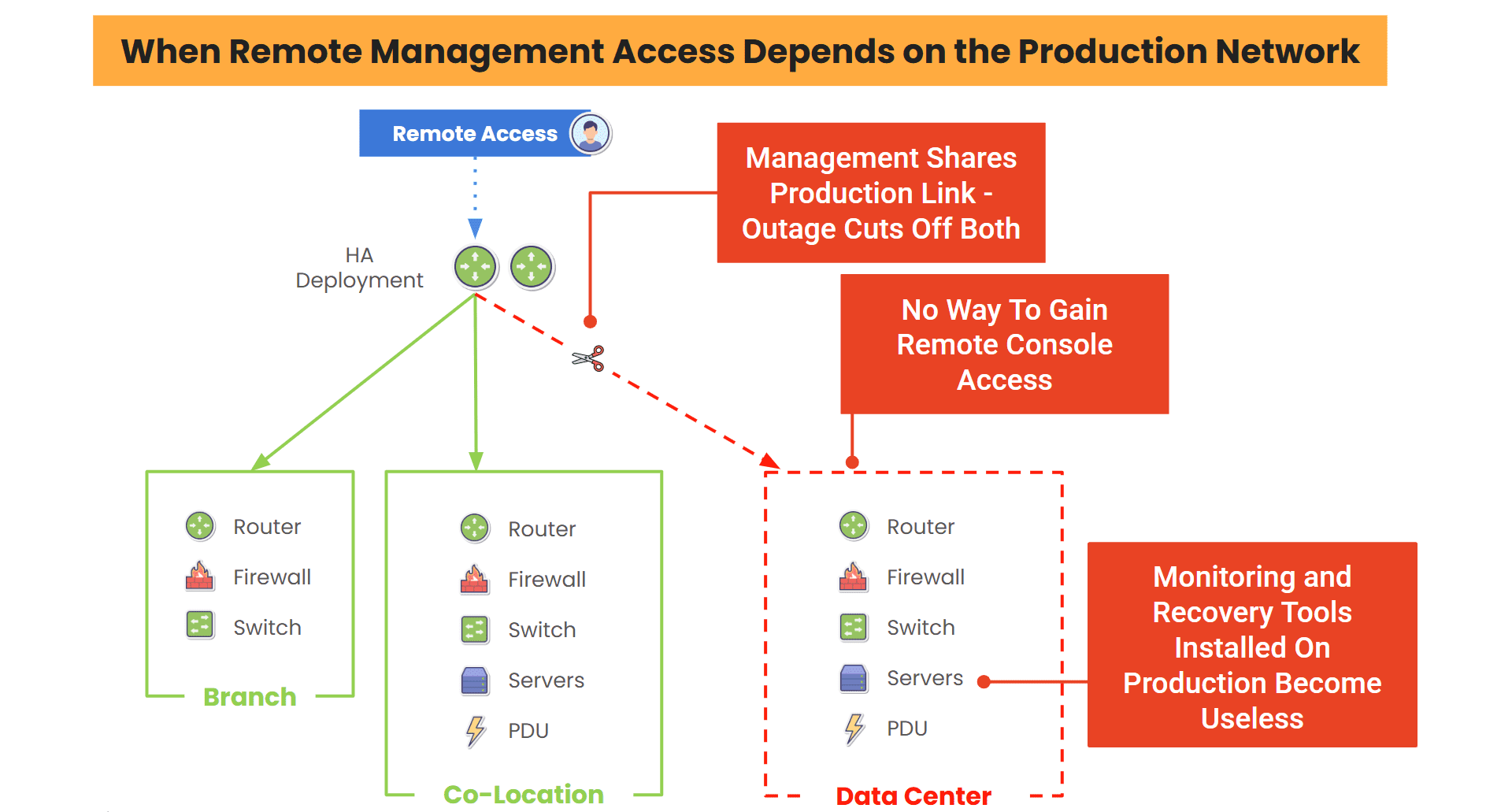
All their management traffic – SSH, APIs, everything – was routed through the same production network that had just failed. When that network died, so did their ability to reach any routers or switches. The team was flying blind.
We got the call, helped them recover, and discussed IMI best practices afterward.
Lesson: Never mix management and user traffic. You need a control plane that exists outside your data plane, especially when uptime is mission-critical.
3. “That’s So Obvious Now…” – The Failover Fail
A customer had the right idea: install a 4G modem as a failover path. This is common, and it’s a great way to gain access in case the main path goes down.
But the modem was physically wired into their primary Cisco router.
When that router failed (power surge), so did the modem. To make things worse, their monitoring agent was running in-band. So when the network collapsed, their monitoring did, too. No visibility, no access, no control.
We pointed out this problem. Then we suggested running the agent on dedicated OOB gear instead. Their response?
“That’s so obvious now…but I didn’t even think about it.”
Lesson: Monitoring doesn’t help if it goes down with everything else. Build it into your OOB infrastructure. Make it resilient, not just present.
What I Want You To Take Away From These Stories
Resilience isn’t just about having backup tools or extra hardware. It’s about designing for failure.
It’s about building your architecture so that even if the core goes dark, you still have eyes and hands on the network.
Out-of-Band isn’t a Luxury. It’s your Lifeline. Make sure to Architect it like one.
Here Are Resources to Help Build Your OOB Lifeline
- Rollback Gone Wrong: How Out-of-Band Saved Our Engineering Backbone
- After The Firewall Fails: How Gen 3 Out-of-Band Cuts the Ransomware Killchain
- Out-of-Band Deployment Guide
- The CrowdStrike Outage: How to Recover Fast and Avoid the Next Outage
Get Hands-On Help From Our Engineers
My colleagues have years of experience architecting these resilience practices. Please use the form to send us a message and get help with your specific use case.
Out-of-Band Deployment Guide
Out-of-band management (OOBM) is a network resilience strategy that involves moving the control plane of critical infrastructure, such as routers, switches, and servers, to a separate network. Doing so isolates the control plane from the production network so it won’t be negatively affected by equipment failures, ISP outages, or ransomware attacks.
This guide describes two out-of-band deployment types and highlights three key best practices to maximize network resilience.
Out-of-band deployment types
✔ Lower cost
✔ Reduced management complexity
✘ EoR device is a single point of failure for the row
✘ Cable management is messier
✘ Less flexibility
✔ Eliminates a single point of failure
✔ Provides greater flexibility to modify, upgrade, or scale
✘ Requires more OOBM switches
✘ Additional switches could affect throughput, power draw, and cost
✘ Increases management complexity
End-of-row OOBM deployments
In an end-of-row (EoR) out-of-band deployment, one or more OOBM switches are installed in every row of data center infrastructure, rather than in every single rack. All the serial cables for infrastructure devices in a particular row are run to wherever the OOBM switch (also known as a serial console or console server) is located, which is typically at the end of the row.
An EoR deployment requires fewer OOBM devices than a ToR deployment, which reduces costs and management complexity. It also simplifies scaling, as new racks full of infrastructure could be added to the row without requiring additional OOBM serial consoles.
On the other hand, that one serial console becomes a single point of failure for the entire row’s OOBM functionality. If that device becomes unavailable because of a botched update or malware attack, management teams lose OOBM access to the entire row. Cable management is also more difficult because serial cables must run from every device in every cabinet to the EoR console server. Plus, EoR deployments are less flexible, because upgrading or swapping out a single OOBM device affects an entire row of infrastructure.
Top-of-rack OOBM deployments
In a top-of-rack (ToR) out-of-band deployment, one or more OOBM switches are installed in every single rack in the data center. This keeps all serial cables inside the rack, which simplifies cable management. Instead of a single point of failure for the whole row, each serial console only affects one rack, enhancing resilience. Teams can also upgrade or swap out devices without worrying about what’ll happen to the entire row, making ToR deployments a little more flexible.
The main drawback of a top-of-rack deployment is that it requires more OOBM console servers than an EoR architecture. This makes OOBM deployments more expensive and adds more devices for teams to manage and monitor. It also increases the power draw in the data center, further driving up costs (and carbon footprints), and adds more network hops to local traffic, which could affect throughput.
Multi-layered OOBM deployments
A third, less common approach is to deploy OOBM devices both top-of-rack and end-of-row. This makes the OOBM network highly resilient to both outages and ransomware attacks, providing a completely isolated management environment while maintaining the flexibility of a ToR deployment.
Out-of-band deployment best practices
The following best practices can help improve the flexibility, security, scalability, and resilience of out-of-band deployments.
Vendor-neutral platforms
Using vendor-neutral OOBM console servers helps consolidate data center management in a single platform. These devices can manage infrastructure from any vendor and integrate with third-party solutions for security, automation, troubleshooting, and more. Vendor-neutral OOBM deployments reduce management complexity and costs, while ensuring easy scalability.
OOBM security
OOBM devices and networks must be protected against compromise to keep bad actors from commandeering the control plane. The best practice is to use OOBM switches with strong hardware security, SAML integrations for multi-factor authentication (MFA) and single sign-on (SSO), embedded firewalls, and frequent firmware/software updates to patch new vulnerabilities.
Infrastructure automation
OOBM serial consoles should support automation to improve scalability and efficiency, while reducing complexity and recovery times. At a minimum, they need zero-touch provisioning (ZTP) to automatically configure new infrastructure devices over the network. Advanced solutions like the Nodegrid Serial Console Plus can also host or integrate third-party automation for things like configuration management, security monitoring, troubleshooting, and even AIOps.
Streamline your out-of-band deployment with Nodegrid
Nodegrid OOBM switches can be deployed top-of-rack, end-of-row, or both to improve the resilience of any data center architecture. They have an open architecture that can integrate and host other vendors’ software and virtualized network functions for security, automation, and much more. Nodegrid serial consoles and all connected devices can be remotely managed from a single, on-premises or cloud-based software platform, significantly reducing management complexity. Plus, Nodegrid is frequently patched and comes back with security features like BIOS protection, UEFI Secure Boot, self-encrypted disk (SED), Trusted Platform Module (TPM) 2.0, an embedded firewall, and SAML 2.0 integrations.
Reach out to ZPE Systems for more help comparing end-of-row vs. top-of-rack deployments or to see a demo of the Nodegrid platform in action.