Providing Out-of-Band Connectivity to Mission-Critical IT Resources

Raspberry Pi Alternatives for Business
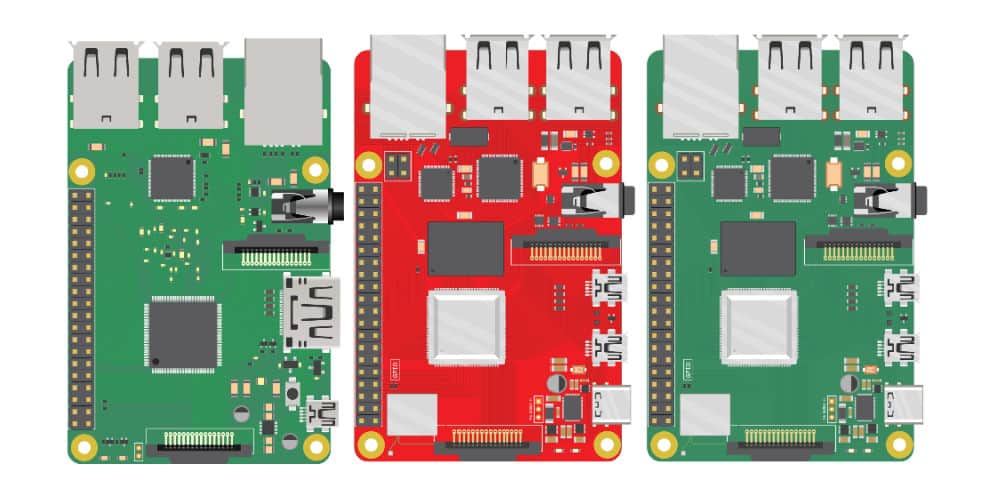
Raspberry Pi alternatives
Many businesses use Raspberry Pi devices as jump boxes to remotely access the control plane of critical infrastructure. By their very nature, these devices usually aren’t correctly managed or vetted by the security team. This creates a security challenge known as Shadow IT. Shadow IT is a situation that arises when an organization has devices in use that are not known to, or securely managed by, the IT or Information Security department. These unmanaged devices are vulnerable to attack, and Raspberry Pi jump boxes are particularly tempting targets to cybercriminals because they provide access to important remote infrastructure. This blog discusses the security risks of using Raspberry Pi jump boxes and provides solutions in the form of secure, enterprise-grade Raspberry Pi alternatives.

Why consider Raspberry Pi alternatives?

Unmanaged Raspberry Pi devices don’t receive patches, aren’t visible to change management systems, and are excluded from security audits. These unsecured devices are used to access critical remote infrastructure, which creates a number of security risks.

Raspberry Pi security risks

  • Malware vulnerability – Deploying Raspberry Pi devices without onboarding them with IT means they’re not protected by enterprise antimalware solutions, leaving them exposed to viruses and ransomware attacks.
  • Undetected misconfigurations – Since unmanaged Raspberry Pi devices aren’t monitored by security or change management systems, it’s more likely that misconfigurations and vulnerabilities will remain undetected, leaving a potential backdoor open for cybercriminals.
  • Lack of IAM – A Raspberry Pi jump box that isn’t covered by enterprise IAM (Identity and Access Management) is susceptible to attack because security teams can’t extend Zero Trust security policies or controls to protect it (e.g., multi-factor authentication, role-based access control, and single sign-on).
  • Non-compliance – For organizations in regulated industries, a Raspberry Pi jump box could expose them to potential liability, because the org can’t monitor who’s using that device to access what data, resulting in non-compliance with privacy laws like HIPAA.
  • Lack of centralized Fleet Management – Organizations who have hundreds or thousands of these jump boxes have no way to centrally manage them, which makes upgrades, app deployments, licensing, patch management, and other tasks more time-consuming.
  • Lack of secure OS – Operating systems and software contain thousands of common  vulnerabilities, and there’s no way to automatically apply security patches or OS upgrades to unmanaged Raspberry Pi devices.
  • Lack of secure HW – Raspberry Pi storage disks often aren’t encrypted and lack any sort of secure boot sequence or other onboard security features, which means a stolen device could be used to breach the network or introduce malware.

Ultimately, Raspberry Pi devices expand a company’s attack surface because they fall outside of enterprise security policies, controls, solutions, and monitoring. However, many organizations use a Raspberry Pi to avoid the expense of deploying another fully managed device as a jump box in every site that houses critical infrastructure. Overcoming this challenge requires an enterprise-grade networking solution that includes remote out-of-band access to the control plane to eliminate the need for a jump box altogether.

Looking for alternative options for your Intel NUC jump boxes? Read Best Intel NUC Alternatives

Raspberry Pi alternatives from ZPE Systems

The Nodegrid product line from ZPE Systems helps organizations avoid Shadow IT by simplifying the tech stack with all-in-one network management solutions. In addition to data center and branch networking functionality like gateway routing, switching, and Wi-Fi, all Nodegrid devices provide out-of-band (OOB) management access over 5G/4G LTE.

Nodegrid is more secure than a Raspberry Pi jump box because it’s an enterprise solution that’s onboarded with IT and covered by all your security policies, controls, and solutions. In addition, Nodegrid boxes themselves are protected by enterprise security features such as BIOS protection, Signed OS, UEFI Secure Boot, and self-encrypted disk (SED).

Plus, all Nodegrid devices are completely vendor-neutral, which means they easily integrate with third-party Zero Trust security solutions and can even directly host other vendors’ security software to further reduce your tech stack.

Key Nodegrid features

All Nodegrid Devices Include:

Key features

Strong Out-of-band management integration

Extensible applications with virtualization and containers

Zero Touch Provisioning (ZTP) over the WAN

Vendor-neutral, unified management via ZPE Cloud/Nodegrid Manager

Modern x86-64bit Linux Kernel

Extended automation based on actionable data

Failover to 4G/5G/LTE & Wi-Fi

Power control and monitoring

Orchestration support via Puppet, Chef, Ansible, RESTful

Security

BIOS protection

TPM 2.0

UEFI Secure Boot

Signed OS

Self-Encrypted Disk (SED)

Geofencing

X.509 SSH certificate support, 4096-bit encryption keys

Selectable cryptographic protocols for SSH and HTTPS (TLSv1.3)

Selectable cypher suite levels: high, medium, low, custom

SSL VPN (Client and Server)

IPSec, Wireguard, and Strongswan with support for multi-sites

Local, AD/LDAP, RADIUS, TACACS+, Kerberos, authentication

SAML support via DUO, OKTA, Ping Identity

Local, backup-user authentication support

User-access lists per port

Group/role-based authorization: AD/LDAP, RADIUS, TACACS+

Fine grain and role-based access control

Firewall – IP packet and security filtering, IP forwarding support

MD5 / SHA System Configuration Checksum™

System event syslog

Custom security settings

Strong password enforcement

Two-Factor Authentication with RSA and DUO

Networking

IPv4 / IPv6 Support

Embedded Layer 2 switching

VLAN

Layer 3 Routing

BGP

OSFP

RIP

QoS

DHCP (Client and Server)

RIPv1, RIPv2

VXLAN

DDNS

NTP

To learn more about the security benefits of Nodegrid’s Raspberry Pi alternatives, contact ZPE Systems.

Nodegrid product comparison

The Nodegrid product line includes serial console servers (also known as RS232 serial switches) for data center deployments, as well as network edge routers for distributed branch and campus sites. Each solution delivers Gen 3 OOB management and all-in-one networking in a variety of sizes and configurations to suit any use case.

Nodegrid Serial Consoles

Nodegrid Serial Console Plus

Nodegrid Serial Console S Series

CPU

X86-64bit Intel 

X86-64bit Intel

Guest Docker

1-2

1-2

Storage

32GB

32GB

Wi-Fi

Yes

Yes

Cellular (Dual-SIM)

2

None

Serial

16 – 96

Auto-sensing

Network

2x Gb ETH 2x SFP+

2x SFP

Data Sheet

Download

Download


Nodegrid Network Edge Routers

Link SR

Bold SR

Hive SR

Gate SR

Net SR

Mini SR

CPU

X86-64bit Intel 

X86-64bit Intel

X86-64bit Intel 

X86-64bit Intel 

X86-64bit Intel 

X86-64bit Intel 

Cores

2

4 or 8

4 or 8

2, 4 or 8

2, 4, 8 or 16

4

Guest VM

1

1

1-2

1-3

1-6

1

Guest Docker

2+

2+

2+

2+

2+

2+

Storage

16GB – 128GB

32GB – 128GB

16GB – 128GB

32GB – 128GB

32GB – 128GB

14GB SED

Additional Storage

Up to 4TB

Up to 4TB

Up to 4TB

Up to 4TB

Up to 4TB

Wi-Fi

Yes

Yes

Yes

Yes

Yes

Yes

Cellular modem

1

1-2

1-2

1-2

1-6

1

5G

Yes

Dual 5G

Dual 5G

6x 5G

Sim slots

2

4

4

4

12

1

Serial Console Switch

1

8

Via USB

8

16-80

Via USB

Network

1x Gb ETH 1x SFP

5x Gb ETH

2x GbE ETH 2x 10 Gbps

4x 10/100/1000/2.5 Gbps RJ-45

2x SFP 5x Gb ETH

4x 1Gb ETH PoE+

2x 1Gb ETH 2x SFP+ Multiple expansion cards

2x 1Gb ETH

Data Sheet

Download

Download

Download

Download

Download

Download

The Nodegrid line of Raspberry Pi alternatives from ZPE Systems can help your organization prevent Shadow IT to reduce your attack surface and improve your security posture without increasing costs.

Ready for a Raspberry Pi alternative?

Want to see one of ZPE’s Raspberry Pi alternatives in action? Request a free Nodegrid demo! Request a Demo

Building an IoT Device Management System

shutterstock_1350962531(1)(1)

Internet of Things (IoT) devices are integral components of many modern businesses. In 2020, there were almost 9 billion active IoT devices—that number is predicted to exceed 25 billion by 2030. Effectively deploying, monitoring, and managing all of these devices in an enterprise environment requires powerful, centralized orchestration using an IoT device management system. This post discusses the best practices and key considerations to keep in mind when planning, designing, and building your IoT device management system.

What is an IoT device management system?

An IoT device management system provides a unified platform from which to manage all of the IoT devices in use by an organization. Many of these devices operate with little-to-no human interaction, in remote sites that may be difficult or even dangerous to access for routine maintenance. For example, IoT sensors are used inside oil pipelines to monitor crucial metrics like flow, pressure, and temperature. In addition, one organization may need to employ dozens or hundreds of different IoT devices to handle specific functions. These devices often come from different vendors, with separate management platforms, patch schedules, and configuration schemes. This results in a lot of management complexity for the IT teams responsible for provisioning, maintaining, and troubleshooting all of these devices, creating the need for an IoT device management system. The goal of such a solution is to bring all of the tasks involved in IoT device management under one roof, including:


  • → Onboarding:
    Bringing new IoT devices onto the network with the proper credentials and security policies
  • → Configuration: Provisioning new IoT devices with the necessary settings
  • → Maintenance: Updating firmware and applying security patches in a timely manner
  • → Security: Applying enterprise security policies to all IoT devices on the network
  • → Diagnostics: Collecting and analyzing logs to help identify and fix IoT device issues
  • → End-of-life management: Decommissioning EOL devices so they don’t create a security risk by remaining online and unpatched
Nodegrid is a vendor-agnostic IoT device management system that enables end-to-end automation and reliable OOB management access. To see Nodegrid in action, schedule a free demo.

Best practices for building an IoT device management system

Here are some best practices and key considerations to keep in mind when planning, designing, and building your IoT device management system.

Avoid closed ecosystems

There are off-the-shelf software solutions for IoT device management that are designed to work within a single vendor’s ecosystem. While they may offer some support for third-party devices, they generally work best if you’re already operating within that vendor’s environment. For example, AWS IoT Device Management works with third-party IoT devices but requires an existing AWS infrastructure to use it effectively. These types of solutions will usually include a library of features and supported integrations, but you may not be able to integrate your preferred scripting languages, open-source tools, or other third-party components. A vendor-neutral, or vendor-agnostic, IoT device management system does not suffer from these limitations. In addition to the ability to hook into multi-vendor IoT devices, these platforms also allow you to use your choice of third-party software and scripts. A vendor-neutral solution gives you the freedom to build a truly bespoke IoT device management system that makes use of your team’s existing skills, preferred tools, and custom innovations.

Ensure 24/7 remote management access

One of the benefits of IoT devices is they can be deployed anywhere. However, maintaining continuous access to devices in remote and hard-to-reach environments can prove challenging. Natural disasters, LAN failures, ISP outages, political instability, and global pandemics can all occur with little-to-no warning, leaving organizations cut off from their critical remote IoT devices and infrastructure. Out-of-band (OOB) management solves this problem by providing an alternative path to remote network infrastructure. For example, an IoT device management system can use OOB serial consoles to create a management network that’s dedicated to the orchestration, maintenance, and troubleshooting of production network equipment. These serial consoles have multiple redundant network interfaces (e.g., 5G cellular, Fiber, and Wi-Fi) so admins can remotely access the IoT device management system even when the remote site loses its main internet connection. This ensures that organizations can recover from remote network failures faster, continue internal operations during ISP outages, and maintain continuous access to their IoT devices.

Protect IoT infrastructure with Zero Trust Security

IoT device management systems help ensure the security of remote IoT devices by simplifying tasks like firmware updates and vulnerability patch deployment. However, the IoT device management platform itself is a potential target for malicious actors hoping to gain complete control over an organization’s IoT infrastructure. That’s why organizations must protect their IoT device management system using Zero Trust Security. Zero Trust Security follows the principle of “never trust, always verify” by requiring all users, systems, and devices to continuously prove their trustworthiness as they access the network and enterprise resources. It also requires the consistent application of enterprise security policies and controls to every system and application that connects to the network, including the IoT device management system. That means, for example, that you should use technology such as two-factor authentication (2FA) and identity and access management (IAM) to control access and prevent compromised accounts from gaining control.

  • ☆ Bonus tip: Zero Trust Security is easier to apply if you use a vendor-neutral IoT device management system that supports integrations with third-party security solutions like next-generation firewalls (NGFWs) and Secure Access Service Edge (SASE). This will also ensure that Zero Trust controls are in place to protect the OOB management network from unauthorized access.

However, it’s important to acknowledge that there’s currently no way to completely prevent a breach from occurring. According to the Sophos State of Ransomware 2022 survey, 66% of organizations were hit by ransomware in 2021 alone, and that number is only expected to trend upwards over time. That’s why another critical aspect of Zero Trust Security for IoT device management is building a resilient network architecture with automation tools that reduce the MTTR (mean time to recovery) when—and not if—a breach occurs. Learn more about how to implement such an architecture with ZPE’s network automation blueprint.

Building an IoT device management system with Nodegrid

An IoT device management system is meant to simplify and streamline the management of remote, hard-to-reach, and complex IoT devices and infrastructure. Vendor-neutral systems allow you to customize your platform with the third-party tools and solutions that work best for your team and your organization’s use case. Out-of-band (OOB) management ensures that IT teams have reliable, 24/7 access to remote IoT systems. Finally, Zero Trust Security protects the IoT device management system and all connected devices from malicious attacks. The Nodegrid platform from ZPE Systems is a completely vendor-agnostic IoT device management system supported by Gen 3 OOB serial consoles like the Nodegrid Serial Console Plus (NSCP) and all-in-one edge gateway routers like the Mini Services Router (MSR). Nodegrid supports integrations with your choice of custom scripts, automation tools, and security solutions so you can build a bespoke IoT device management system that addresses your organization’s unique challenges and use cases.

Ready to learn more about the Nodegrid IoT device management system?

Contact ZPE Systems today to learn more about the Nodegrid IoT device management system, contact ZPE Systems today. Contact Us

What To Look for In a Cloud Edge Gateway Solution

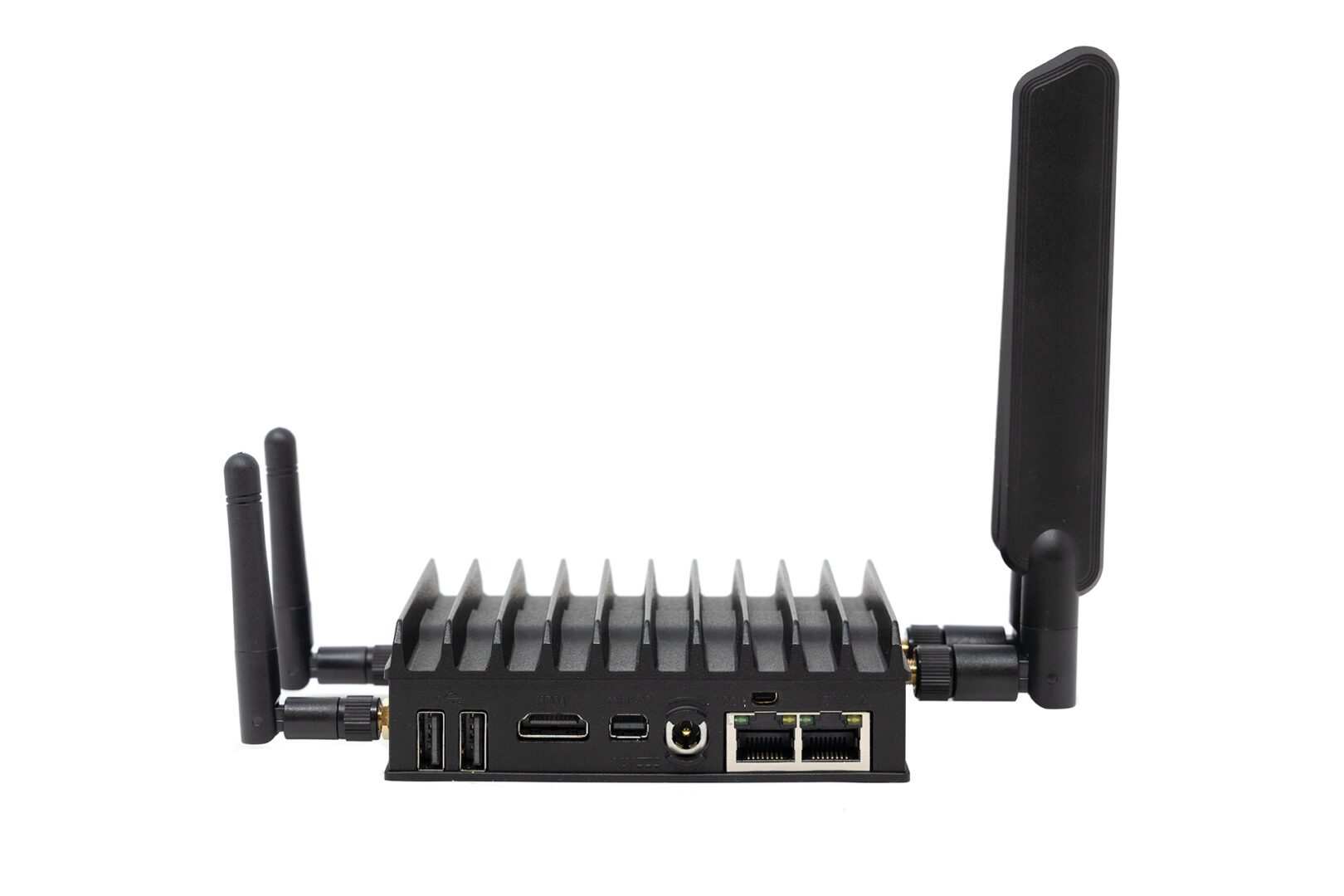
Mini-SR-Rear
Gartner predicts that by 2029 more than 15 billion IoT devices will connect to enterprise infrastructure. Many of these devices will operate outside of the centralized enterprise network, in satellite offices, manufacturing facilities, retail stores, and other remote locations. These remote – or edge – IoT devices need a secure and reliable way to connect to cloud resources and applications.

A cloud edge gateway is a hardware or software solution used to connect edge devices to the cloud. Some edge gateways are also routers that connect the edge location’s network to the WAN (wide area network) or SD-WAN (software-defined wide area network). In addition, many cloud edge gateway solutions also provide management access to connected devices, so administrators can remotely monitor and control edge infrastructure.

Some popular use cases for cloud edge gateways include:

  • Retail stores: Cloud edge gateways give retail stores a fast and secure connection for POS (point of sale) terminals, credit card readers, and security cameras.
  • Remote health facilities: Hospitals and clinics in remote areas use cloud edge gateways to securely and reliably transmit health data from IoT medical devices.
  • Police/emergency response vehicles: Cloud edge gateways enable secure data transmission from police, fire, and EMS vehicles to cloud applications.

In this blog post, we’ll discuss the key characteristics and components of a robust, secure, and reliable cloud edge gateway solution.

What to look for in a cloud edge gateway

Vendor neutrality

In a decentralized network with many remote locations, network solutions like edge gateways are often chosen based on which vendor offered the best deal or had the most compelling sales pitch at the time a new site was opening. This creates a heterogeneous network architecture, with each vendor offering their own platform from which to monitor and manage their solutions. With so many platforms to learn and keep track of, it becomes very challenging for admins to keep networks operating at peak efficiency.

A vendor-neutral cloud edge gateway solution reduces management complexity by seamlessly integrating with the existing edge infrastructure. For example, Nodegrid Services Routers can run other vendors’ software, so admins can keep using the management platform they’re most comfortable with. Or, admins can use the ZPE Cloud network orchestration platform to manage any other vendor solution that’s connected to a Nodegrid device.

Vendor-neutral cloud edge gateways give organizations the freedom to continue expanding to new locations without worrying about integration issues. Vendor neutrality also reduces headaches for network administrators so they can focus on improving efficiency and optimizing performance.

High-speed cellular failover and out-of-band management

Edge IoT devices are used for critical operations, which means they need 24/7 connectivity. Cellular failover provides a secondary internet connection that’s independent of wired network infrastructure. A cloud edge gateway with cellular failover ensures that IoT devices have uninterrupted access to the cloud even if the primary ISP connection goes down. The best solution supports high-speed 4G/5G cellular to reduce the performance impact of failover, as well as providing dual-SIM slots for redundancy.

In addition, admins need management access to edge infrastructure and IoT devices that are independent of both the WAN and the LAN (local area network), so if something like a firmware update causes the local network to go down, they can repair the issue without needing to dispatch an expensive truck roll. Out-of-band (OOB) management uses a secondary network interface (like a 5G cellular SIM) to create an OOB network that’s dedicated to management and troubleshooting. An edge gateway with OOB management ensures that admins have 24/7 high-speed access to remote infrastructure so they can recover from problems faster and reduce downtime.

Secure hardware and software

The security threats to enterprise networks are ceaseless and growing more sophisticated by the day. Many IoT devices and edge locations operate with little-to-no human intervention, which means breaches could go undetected for a long time. In addition, it can be difficult to stay on top of patch schedules or remotely install security updates on so many devices in so many locations, which can leave edge networks vulnerable to attack.

The right cloud edge gateway comes with robust hardware security features like BIOS protection, encrypted disks, and geofencing that prevent malicious actors from using a stolen gateway to hijack edge networks. Its management software should also include Zero Trust security features like SAML 2.0 integration, selectable cryptographic protocols and cipher suite levels, and two-factor authentication (2FA). With a vendor-neutral solution like Nodegrid, admins can even use the cloud edge gateway to push out security updates to connected devices using the ZPE Cloud management platform.

Automation support

It’s growing more difficult for people to simultaneously manage the complex network infrastructures required for modern business operations while ensuring peak performance and 24/7 availability. Network automation solutions help decrease the burden on overworked admins and can improve the performance and reliability of edge networks.

Many edge gateways include some automation features as part of their management software. However, these tend to be limited to baked-in workflows, meaning admins may not be able to use custom scripts or third-party playbooks. The best cloud edge gateway has vendor-neutral automation support so admins can use their choice of automation solutions. For example, Nodegrid edge gateways can directly host automation playbooks from all the major platforms including Ansible and Puppet. Nodegrid also supports custom scripting and third-party integrations for even greater flexibility.

The best cloud edge gateway solution is vendor-neutral, uses high-speed cellular for failover and OOB management, follows Zero Trust best practices to keep the infrastructure secure, and supports all of the major automation tools and scripting languages. With the edge gateway market still being somewhat new, there’s really only one solution that checks all these boxes: the Nodegrid family of cloud edge gateway routers.

Why choose the Nodegrid cloud edge gateway solution?

There are six Nodegrid Services Router models to choose from based on your deployment size, networking requirements, and use case. For example, the Mini SR delivers versatile edge networking capabilities in a device approximately the size of an iPhone, which is perfect for mobile emergency response units or retail branches where space is at a premium.

For larger deployments, such as an edge compute data center or Smart Building system, the Net SR provides a modular solution with options for additional serial console ports, disk space, compute, PoE, and more.

Nodegrid’s vendor-neutral platform is extensible and capable of directly hosting other vendor solutions for automation, security, and other networking functions. Cellular failover and high-speed OOB are delivered via dual- or quad-SIM cellular slots with 5G/4G LTE support. Nodegrid devices are protected by secure hardware features, SAML 2.0 and 2FA support, and advanced authentication, plus the OS is kept up-to-date with frequent patches. Nodegrid is also the only cloud edge gateway with full support for all the top automation and IaC (infrastructure as code) solutions, including Ansible, Chef, and Puppet.

Ready to learn more about the Nodegrid cloud edge gateway solution?

Contact ZPE Systems today to learn more about the Nodegrid cloud edge gateway solution.

Contact Us

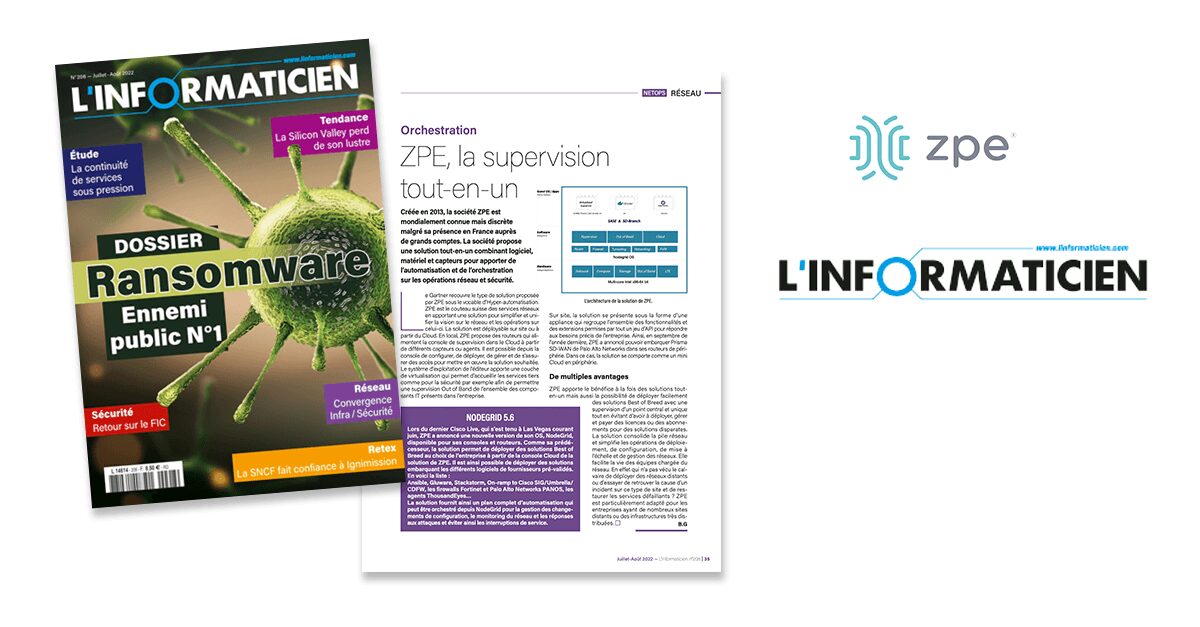
ZPE Systems Featured in L’Informaticien Magazine

L’Informaticien and ZPE Systems

ZPE Systems is featured in L’Informaticien Magazine, a France-based publication with a wide audience. Read the English translation here, and check out the original source content with the links at the bottom. Be sure to follow us on LinkedIn and Twitter for more updates about our global presence.

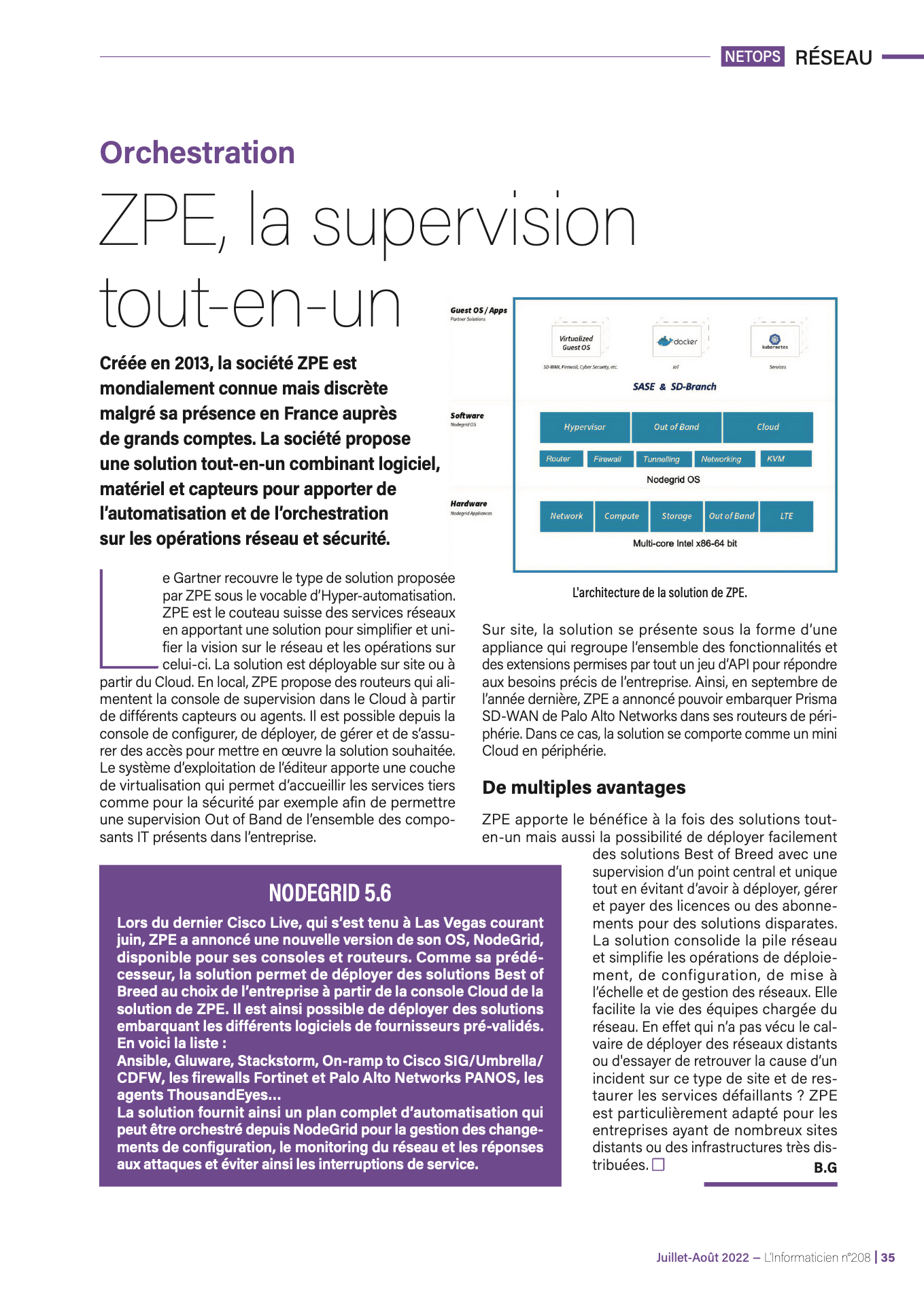
ZPE, All-in-one Supervision

Founded in 2013, ZPE Systems is world famous but discreet despite its presence in France with large accounts. The company offers an all-in-one solution combining software, equipment and sensors to provide automation and orchestration on network operations and security.

Gartner covers the type of solution offered by ZPE under the term of Hyperautomation. ZPE is the Swiss army knife of network services by providing a solution to simplify and unify the vision of the network and the operations on this one. The solution can be deployed on site or from the Cloud. Locally, ZPE offers routers that supply the supervision console in the Cloud from different sensors or agents. It is possible from the console to configure, deploy, manage, and ensure access to implement the desired solution. The publisher’s operating system brings a layer of virtualization which makes it possible to accommodate third-party services such as for security, for example, in order to allow Out-of-Band supervision of all the IT components present in the company. On site, the solution comes in the form of an appliance which brings together all the functionalities and extensions allowed by a whole set of APIs to meet specific business needs. Thus, in September of last year, ZPE announced that it could ship Palo Alto Networks Prisma SD-WAN in its edge routers. In this case, the solution behaves like a mini Cloud at the edge.

Multiple advantages

ZPE brings the benefit of both all-in-one solutions but also the ability to easily deploy best-of-breed solutions with a supervision from a central and unique point, while avoiding the need to deploy, manage, and pay for licenses or subscriptions for disparate solutions. The solution consolidates the network stack and simplifies the operations of deployment, configuration, updating network scale and management. This makes life easier for the teams in charge of the network. Who has not experienced the ordeal of deploying remote networks or to try to find the cause of an incident on this type of site and to restore the faulty services? ZPE is particularly suitable for companies with many sites or highly distributed infrastructures

Nodegrid 5.6

During the last Cisco Live, held in Las Vegas during June, ZPE announced a new version of its Nodegrid OS available for its consoles and routers. Like its predecessor, the solution makes it possible to deploy best-of-breed at the choice of the company from the Cloud console of the ZPE solution. It is thus possible to deploy solutions embedding the various software from pre-validated suppliers.

Here is the list:

  • Ansible
  • Gluware
  • Stackstorm
  • On-ramp to Cisco SIG/Umbrella/CDFW, Fortinet, Palo Alto Networks’ PANOS firewalls, ThousandEyes agents

The solution thus provides a complete automation plan that can be orchestrated from Nodegrid for configuration change management, network monitoring and response to attacks and thus avoid service interruptions.

LInformaticien

Help NetOps Teams Using Application Hosting & Guest OS

Application hosting helps your business become more flexible. This virtualization approach is a perfect solution if you’re looking to reduce your networking stack, make critical services more globally available, and ensure that your network is always up to date.

If you’re not familiar with application hosting, read our other blog post to get acquainted.

Application hosting helps your business become more flexible. This virtualization approach is a perfect solution if you’re looking to reduce your networking stack, make critical services more globally available, and ensure that your network is always up to date.

If you’re not familiar with application hosting, read our other blog post to get acquainted.

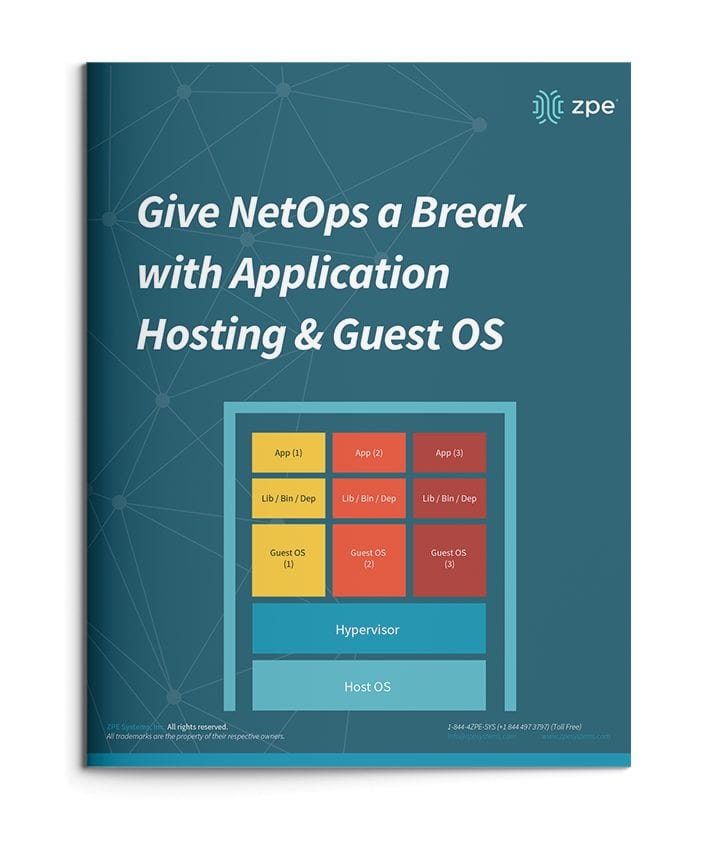
Give NetOps a Break with Application Hosting & Guest OS

For a quick recap, here are some things to know:

  • Application hosting means creating a cloud-based model (SaaS) through which to deliver your applications. One of the biggest benefits is that you don’t have to install and manage applications locally, and can instead keep them centralized on a server and bring them to clients anywhere in your organization.
  • To use application hosting, you need a virtual machine (VM) and something called a ‘Guest OS’.
  • Running on a VM, a guest OS can be Windows, Linux, Ubuntu, or other common operating system, and it’s this operating system that determines what applications you can run.
  • In between your device’s operating system (or host OS) and the guest OS is something called a hypervisor. A hypervisor is able to create VMs and tell the hardware how to allocate resources for VMs. This is an essential component of virtualization and application hosting.

How Does Application Hosting Help NetOps?

Modern business moves faster than ever, and to reach your goals, your NetOps teams need a modernized network that moves fast, too. But this can be difficult to achieve, since your network is likely made up of many different hardware & software systems, and admin protocols. There’s just so much to juggle that it seems like your network his holding back operations.

The good news is, application hosting and virtualization can alleviate many of the obstacles standing in the way of your network. Let’s compare how you manage your solutions before and after application hosting.

NetOps the Old Way

To boil it down, NetOps the old way is slow and cumbersome. This is mainly due to having many physical devices that you have to manage, which puts time consuming on-site support at the top of your priorities. This becomes even more complicated when you have many branch and remote networks.

Without application hosting, you need to install applications locally. Your only option is to put IT staff on site for this task. From there, the job can take days to complete, especially if your stack consists of many devices. And this is all part of a best-case scenario, which unfortunately isn’t the norm.

Another problem can arise — hardware & software incompatibilities. Suppose you try to install or update applications, and once you connect to a device you discover that the latest OS doesn’t support your software. Now what? Since you recently updated the OS for devices at every location, you have to roll back configurations or find a workaround for your application’s new release.

All of this can quickly become complex and difficult to track. Having to locally manage your edge environment leaves your network open to human errors. Your peace of mind is merely wishful thinking, because your physical & virtual assets aren’t as consistent, secure, or reliable as you’d hoped.

NetOps with Application Hosting

When you introduce application hosting, NetOps becomes fast and agile. Putting all your applications in the cloud means you can deliver them right where they’re needed, and thanks to guest OS, you don’t have to worry about incompatibilities.

Put your applications in a centralized server, and you no longer need to worry about on-site support. Your NetOps teams can tap into your server to install, update, and manage applications no matter where they are. This means faster releases and shorter time-to-market, so you can support your business alongside demand.

If you choose a powerful platform like Nodegrid, you can further help NetOps with even more capabilities. The Nodegrid Services Router can pack all your network functions into a single box, with add-on compute modules that allow you to run many guest OSes. Not only does this cut your stack, but it also gives your NetOps teams reliable remote access via out-of-band.

See how you can streamline NetOps with application hosting and Nodegrid.

Your Application Hosting & Guest OS Checklist

Follow these simple steps to get started setting up your virtual network environment

Checklist-App

Application Hosting and Guest OS Alleviate Many Problems for NetOps Teams.

You typically need to install and manage applications on local devices. This is challenging because each appliance has its own operating system, which is compatible with some applications but not others. You need to alter your stack in order to make changes or updates, while on-site support keeps costing you time, money, and valuable resources. With application hosting, you virtualize your environment and deliver applications via server. It’s an SaaS model that allows you to distribute the network apps you need — when and where you need them. You don’t have to deal with the tedious tasks that come with managing localized apps. And using guest OS, you further streamline your environment by deploying virtualized operating systems on VMs, eliminating OS incompatibilities across the edge.

  • Instead of waiting, you can deploy applications on demand
  • You don’t need on-site support — virtualization lets NetOps manage from anywhere
  • You get consistent peace of mind at the edge, with the latest updates and fixes

Put application hosting and guest OS to work and streamline your operations. Here’s how to get started:


Deploy Your Physical System

Set up your server and other necessary infrastructure components, such as databases or repositories. Use the Nodegrid Services Router for all-in-one functionality. The NSR provides server, compute, storage, and other capabilities in one device. You save space and power consumption.


Load a Hypervisor-Capable OS

To make the most of application hosting and keep your stack compact using guest OS, you need to install an operating system that’s capable of being a hypervisor. This is the layer that’s capable of interacting with both your VM/application layer, and your hardware. Nodegrid OS is capable of being a hypervisor, and supports out-of-band and cloud connectivity. This versatile software is built into every Nodegrid device, and is also available as a standalone package.


Deploy VMs and Guest OSes

With your hardware and software set up, you can deploy your virtual machines (VMs) and guest OSes. These allow you to virtualize and diversity the OS layer of your infrastructure. You don’t have to clutter your stack with many specialized devices each running a unique OS. Just spin up an appropriate VM with compatible guest OS, and it’s easy to deploy the applications you need. The NSR can directly host guest OSes, third-party and custom applications, and Docker and Kubernetes containers.


Maintain Port & IP Addresses

To keep your infrastructure properly connected and traffic flowing, you need to configure and maintain your network port and IP addresses. This means adjusting NAT settings to allow application requests and deny unsecured traffic. With the NSR, you can host network ports and IP addresses, making management even easier. For more information about application hosting, guest OS, or how to set up your environment, get in touch with ZPE Systems.