Providing Out-of-Band Connectivity to Mission-Critical IT Resources

Network Resilience Doesn’t Mean What it Did 20 Years Ago

Network resilience requirements have changed

Enterprise networks are like air. When they’re running smoothly, it’s easy to take them for granted, as business users and customers are able to go about their normal activities. But when customer service reps are suddenly cut off from their ticketing system, or family movie night turns into a game of “Is it my router, or the network?”, everyone notices. This is why network resilience is critical.

But, what exactly does resilience mean today? Let’s find out by looking at some recent real-world examples, the history of network architectures, and why network resilience doesn’t mean what it did 20 years ago.

Why does network resilience matter?

There’s no shortage of real-world examples showing why network resilience matters. The takeaway is that network resilience is directly tied to business, which means that it impacts revenue, costs, and risks. Here is a brief list of resilience-related incidents that occurred in 2023 alone:

  • FAA (Federal Aviation Administration) – An overworked contractor unintentionally deleted files, which delayed flights nationwide for an entire day.
  • Southwest Airlines – A firewall configuration change caused 16,000 flight cancellations and cost the company about $1 billion.
  • MOVEit FTP exploit – Thousands of global organizations fell victim to a MOVEit vulnerability, which allowed attackers to steal personal data for millions.
  • MGM Resorts – A human exploit and lack of recovery systems let an attack persist for weeks, causing millions in losses per day.
  • Ragnar Locker attacks – Several large organizations were locked out of IT systems for days, which slowed or halted customer operations worldwide.

What does network resilience mean?

Based on the examples above, it might seem that network resilience could mean different things. It might mean having backups of golden configs that you could easily restore in case of a mistake. It might mean beefing up your security and/or replacing outdated systems. It might mean having recovery processes in place.

So, which is it?

The answer is, it’s all of these and more.

Donald Firesmith (Carnegie Mellon) defines resilience this way: “A system is resilient if it continues to carry out its mission in the face of adversity (i.e., if it provides required capabilities despite excessive stresses that can cause disruptions).”

Network resilience means having a network that continues to serve its essential functions despite adversity. Adversity can stem from human error, system outages, cyberattacks, and even natural disasters that threaten to degrade or completely halt normal network operations. Achieving network resilience requires the ability to quickly address issues ranging from device failures and misconfigurations, to full-blown ISP outages and ransomware attacks.

The problem is, this is now much more difficult than it used to be.

How did network resilience become so complicated?

Twenty years ago, IT teams managed a centralized architecture. The data center was able to serve end-users and customers with the minimal services they needed. Being “constantly connected” wasn’t a concern for most people. For the business, achieving resilience was as simple as going on-site or remoting-in via serial console to fix issues at the data center.
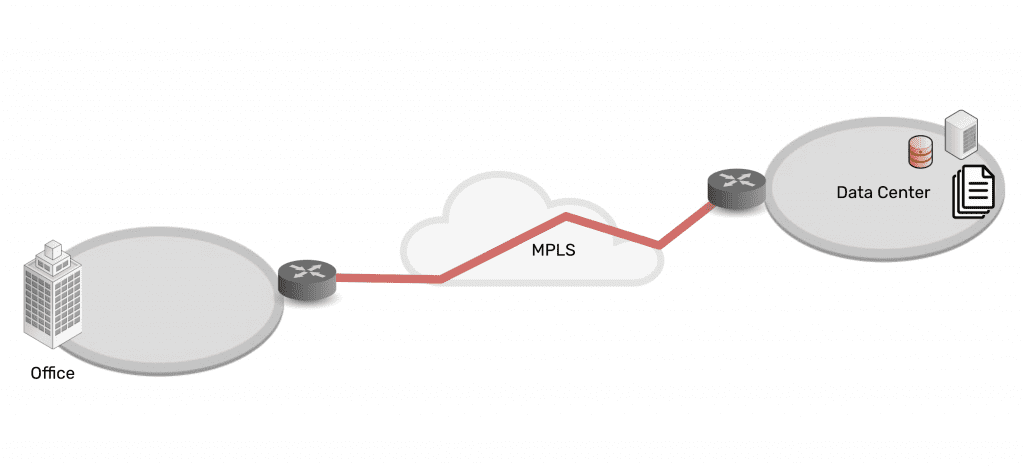
Network architecture showing simplicity of data center connected via MPLS to branch office

Then in the mid-2000s, the advent of the cloud changed everything. Infrastructure, data, and computing became decentralized into a distributed mix of on-prem and cloud solutions. Users could connect from anywhere, and on-demand services allowed people to be plugged in around-the-clock. Services for work, school, and entertainment could be delivered anytime, no matter where users were.
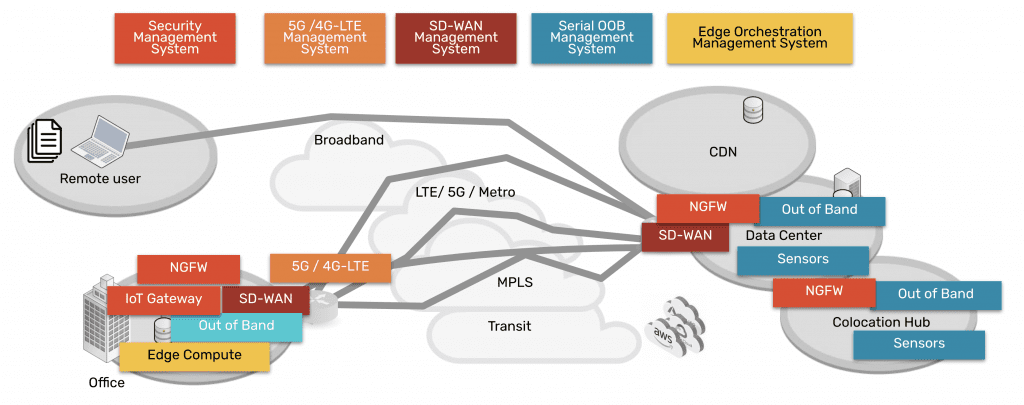
Network architecture showing complexity of data center, CDN, remote user, branch office, all connected via many paths

Behind the scenes, this explosion of architecture created three problems for achieving network resilience, which a simple serial could no longer fix:

Too Much Work

Infrastructure, data, and computing are widely distributed. Systems inevitably break and require work, but teams don’t have the staff to keep up.

Too Much Complexity

Pairing cloud and box-based stacks creates complex networks. Teams leave systems outdated, because they don’t want to break this delicate architecture.

Too Much Risk

Unpatched, outdated systems are prime targets for packaged attacks that move at machine speed. Defense requires recovery tools that teams don’t have.

Enabling businesses to be resilient in the modern age requires an approach that’s different than simply deploying a serial console for remote troubleshooting. Gen 1 and 2 serial consoles, which have dominated the market for 20 years, were designed to solve basic issues by offering limited remote access and some automation. The problem is, these still leave teams lacking the confidence to answer questions like:

  • “How can we guarantee access to fix stuff that breaks, without rolling trucks?”
  • “Can we automate change management, without fear of breaking the network?”
  • “Attacks are inevitable — How do we stop hackers from cutting off our access?”

Hyperscalers, Internet Service Providers, Big Tech, and even the military have a resilience model that they’ve proven over the last decade. Their approach involves fully isolating command and control from data and user environments. This allows them to not only gain low-level remote access to maintain and fix systems, but also to “defend the hill” and maintain control if systems are compromised or destroyed.

This approach uses something called Isolated Management Infrastructure (IMI).

Isolated Management Infrastructure is the best practice for network resilience

Isolated Management Infrastructure is the practice of creating a management network that is completely separate from the production network. Most IT teams are familiar with out-of-band management as this network; IMI, however, provides many capabilities that can’t be hosted on a traditional serial console or OOB network. And with increasing vulnerabilities, CISA issued a binding directive specifically calling for organizations to implement IMI.

Isolated Management Infrastructure using Gen 3 serial consoles, like ZPE Systems’ Nodegrid devices, provides more than simple remote access and automation. Similar to a proper out-of-band network, IMI is completely isolated from production assets. This means there are no dependencies on production devices or connections, and management interfaces are not exposed to the internet or production gear. In the event of an outage or attack, teams retain management access, and this is just the beginning of the benefits of having IMI.
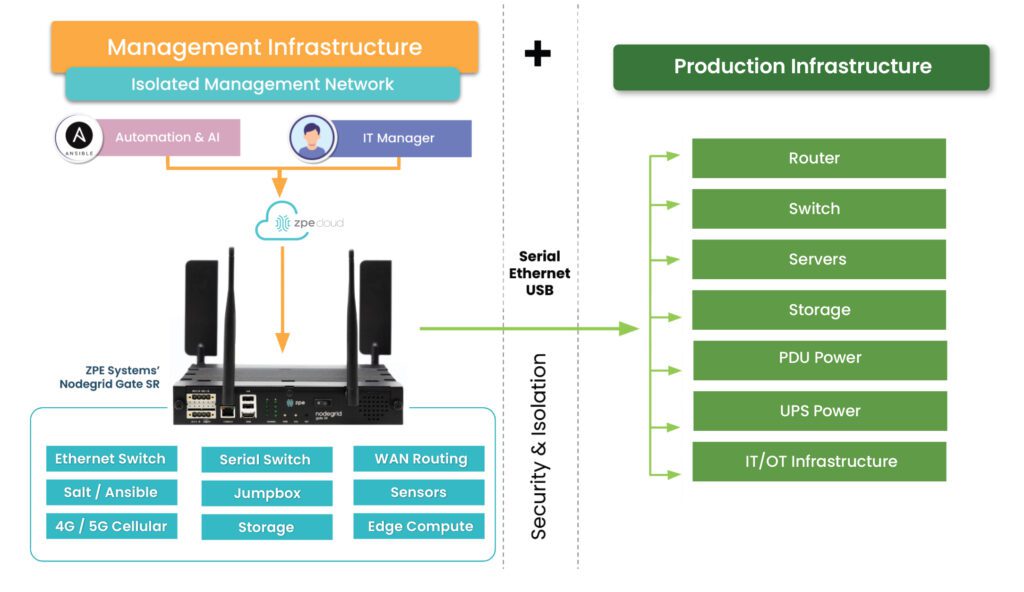
A network architecture diagram showing Isolated Management Infrastructure next to production infrastructure

IMI includes more than nine functions that are required for teams to fully service their production assets. These include:

  • Low-level access to all management interfaces, including serial, Ethernet, USB, IPMI, and others, to guarantee remote access to the entire environment
  • Open, edge-native automation to ensure services can continue operating in the event of outages or change errors
  • Computing, storage, and jumpbox capabilities that can natively host the apps and tools to deploy an IRE, to ensure fast, effective recovery from attacks

Get the guide to build IMI

ZPE Systems has worked alongside Big Tech to fulfill their requirements for IMI. In doing so, we created the Network Automation blueprint as a technical guide to help any organization build their own Isolated Management Infrastructure. Download the blueprint now to get started.


Best Network Performance Monitoring Tools

Best Network Performance Monitoring Tools
Network performance monitoring tools provide visibility into the health and efficiency of networks and their underlying infrastructure of devices and software. Some platforms focus entirely on collecting and analyzing logs from various sources on the network, while others provide additional management capabilities that let you control, change, and troubleshoot network infrastructure. Choosing the right solution requires a thoughtful consideration of factors such as the cost, scalability, and interoperability of the software, as well as your team’s experience and abilities. This guide compares three of the best network performance monitoring tools by analyzing these critical factors before providing advice on the most scalable and cost-effective way to deploy your solutions.

Comparing best network performance monitoring tools

Platform

Key Features

SolarWinds Network Performance Monitor (NPM)

  • Network device, performance, and fault monitoring

  • Deep packet inspection and analysis

  • LAN and WAN monitoring

  • Automatic network discovery, mapping, and monitoring

  • Network availability monitoring

  • Network diagnostics

  • Network path analysis

  • Network performance testing

  • SNMP monitoring

  • Wi-Fi analysis

Kentik

  • Network telemetry dashboards

  • Multi-vendor network monitoring

  • Cloud, edge, and hybrid cloud monitoring

  • SaaS application performance & uptime monitoring

  • Intelligent automated alerts

  • SNMP, traffic flow, VPC, host agent, and synthetic monitoring

  • Multi-cloud performance monitoring

  • Kubernetes workload monitoring

  • SD-WAN monitoring

  • Network security monitoring

  • Network map visualizations

  • QoE monitoring

ThousandEyes

  • Network availability and performance testing

  • WAN performance monitoring

  • Cisco SD-WAN monitoring and optimization

  • Browser session monitoring

  • Network path visibility

  • User Wi-Fi connectivity monitoring

  • VPN mapping and monitoring

  • Cross-layer data visualizations

Disclaimer: This comparison was written by a 3rd party in collaboration with ZPE Systems using data gathered from publicly available data sheets and admin guides, as of 10/20/2023. Please email us if you have corrections or edits, or want to review additional attributes: Matrix@zpesystems.com

SolarWinds Network Performance Monitor (NPM)

The Network Performance Monitor (NPM) is part of the SolarWinds Orion platform of integrated products. This mature and richly featured monitoring software is delivered as a cloud-based service and can observe SaaS (software as a service), cloud, hybrid cloud, and on-premises infrastructure. With advanced features like deep packet inspection (DPI), WAN optimization monitoring, automatic network mapping, and automated diagnostic tools, SolarWinds NPM is meant to be a complete, enterprise-grade observability solution. As part of the Orion platform, it’s also extensible with other products from the SolarWinds ecosystem, such as a Network Configuration Manager. As an enterprise solution, SolarWinds NPM comes with a high price tag that grows even larger as additional monitoring agents are added, limiting the scalability. Another important factor to consider is that SolarWinds recently suffered a high-profile hack that compromised thousands of customers, so there are security risks involved in trusting the Orion supply chain. Additionally, despite a large library of integrations, SolarWinds is a closed ecosystem that doesn’t work well with 3rd-party tools or custom scripts.​

Pros

Cons

  • Supports SaaS, cloud, and on-premises networks
  • Includes advanced monitoring features like DPI
  • Part of a large ecosystem of observability and management solutions
  • Pricing is expensive and limits scalability
  • Recently suffered a high-profile breach that impacted thousands of customers
  • Closed ecosystem may not support your 3rd-party tools

Kentik

Kentik is an end-to-end network observability platform for cloud, multi-cloud, hybrid cloud, SaaS, and data center infrastructure. In addition to network performance monitoring, the platform includes monitoring solutions for SaaS application performance and SD-WAN performance. Other observability features include SaaS uptime monitoring, AI-driven insights and alerts, network security monitoring, and QoE (Quality of Experience) monitoring. Kentik also recently launched a Kubernetes network monitoring solution called Kentik Kube that provides end-to-end cluster visibility. Overall, Kentik is a powerful network observability platform that includes many of its most innovative features in its “Essentials” and “Pro” pricing packages, providing a lot of bang for your buck. The downside is that you can’t subscribe to features individually and must purchase a whole package, meaning you could end up paying for features you don’t need. Because Kentik is not a large vendor, its customer service may be slow to respond in some cases. Additionally, although Kentik does have a large library of integrations, it is not a vendor-neutral platform.

Pros

Cons

  • Supports cloud, multi-cloud, hybrid cloud, SaaS, and data center infrastructure
  • Includes many advanced features and solutions at no additional cost
  • Provides AI-driven network insights and intelligent alerts
  • Products aren’t available a la carte
  • Customer service and technical support can be slow to respond
  • Isn’t entirely vendor-neutral

ThousandEyes

ThousandEyes is a digital experience monitoring platform primarily focused on network and application synthetic testing, end-user performance monitoring, and ISP Internet monitoring for SaaS, cloud, and on-premises networks. Additionally, ThousandEyes is part of the Cisco family and can be used to monitor and optimize Cisco SD-WAN architectures. Across its family of observability products, ThousandEyes includes features like wireless network visibility, SaaS performance visualizations, cloud application outage detection, and SD-WAN performance forecasting. The major advantage of the ThousandEyes platform is that it provides true end-to-end visibility of the entire service delivery chain, including end-user device performance and third-party provider availability. One downside is the endpoint agent-based monitoring solution requires on-premises VMs to run, which can be cumbersome to maintain and limits scalability. The pricing is expensive compared to similar solutions, and you may have to combine products to get all the features you need. Additionally, ThousandEyes is not a vendor-neutral platform and has a relatively small library of integrations.

Pros

Cons

  • Supports SaaS, cloud, and on-premises networks
  • Works with Cisco DNA software for SD-WAN monitoring
  • Provides end-to-end visibility of the entire service delivery chain
  • Agent-based monitoring requires on-premises VMs, limiting scalability
  • Pricing is expensive compared to similar solutions
  • Limited integrations, preventing interoperability

Conclusion

Each of the solutions on this list has advantages that make it well-suited to certain environments, as well as limitations to consider. Solarwinds NPM is part of a large ecosystem of observability and management solutions that includes advanced features like DPI, but it’s suffering from a major security incident and has a closed ecosystem. Kentik packs a lot of innovative, AI-driven monitoring capabilities into its platform offerings, but its pricing tiers are inflexible, and it doesn’t have the large, enterprise-grade support team of its larger competitors. ThousandEyes provides end-to-end visibility of the entire service delivery chain and works seamlessly with Cisco DNA software, but it has a steep learning curve and a limited library of integrations.

How to run the best network performance monitoring tools

Most network performance monitoring tools – even cloud-based SaaS offerings – communicate with endpoint agents using software deployed on VMs (virtual machines) running on-premises in each business location. Running these VMs on fully provisioned servers or PCs is expensive, but deploying them on NUCs is highly insecure, especially as organizations scale out with distributed branches and edge computing sites. What’s needed is a consolidated hardware solution that combines critical branch, edge, and data center networking functionality with vendor-neutral VM and application hosting, such as the Nodegrid platform from ZPE Systems. Nodegrid’s serial switches and network edge routers run the open, Linux-based Nodegrid OS, which can host your choice of third-party software – including Docker containers – for network performance monitoring, SD-WAN, security, automation, and more. Nodegrid’s versatile, modular hardware solutions also provide out-of-band (OOB) management access to critical remote infrastructure and monitoring solutions, giving teams a lifeline to recover from outages and ransomware attacks. Nodegrid uses innovative, enterprise-grade security features like Secure Boot, self-encrypted disk, and two-factor authentication (2FA), and its onboard software is frequently patched for vulnerabilities to defend against a breach. Deploying Nodegrid at each business site consolidates your network to reduce hardware overhead, streamlining management and enabling easy scalability.

Deploy the best network performance monitoring tools with Nodegrid

Reach out to ZPE Systems to see a demo of how the best network performance monitoring tools run on the Nodegrid platform.
Contact Us

What is an Application Delivery Platform?

An illustration showing a breakout of various software application components to highlight the need for an application delivery platform

Modern software architectures are highly complex and often very difficult to maintain and operate. A single enterprise application comprises hundreds (or even thousands) of individual services, technologies, and toolchains while requiring a lot of underlying infrastructure, such as servers, routing and load balancing rules, and security controls. All of this complexity increases overhead costs and adds to the ever-growing workloads of software, network, and infrastructure teams, especially when you multiply this effort across dozens or hundreds of software deployments.

Platform engineering is a new discipline introduced by Gartner to address these challenges by reducing the complexity of software engineering, network operations, and application delivery. The platforms built by these engineers are known by several names, including internal developer platforms, internal developer portals, and application delivery platforms. This guide defines an application delivery platform, discusses the underlying technology, and highlights a leading platform engineering solution.
.

Table of Contents:
  1. What is an application delivery platform?
  2. What is the importance of an application delivery platform?
  3. What technology makes up an application delivery platform?
  4. Introducing ZPE Systems’ Services Delivery Platform

What is an application delivery platform?

An application delivery platform is a suite of technologies that handles all the services that support an application, including security, traffic management, load balancing, and data management. Platform engineers combine all these services into a common toolset used to deploy applications at customer sites, so there’s no need to build a new architecture every time. This streamlined experience makes application delivery cost-effective by significantly reducing workloads and deployment timelines.

What is the importance of an application delivery platform?

The goal of an application delivery platform is to reduce deployment and management complexity. Deployment complexity leads to a greater risk of human error when configuring things like security controls and access policies, and any mistakes are likely to be found and exploited by cybercriminals. Management complexity makes it harder to stay on top of patch schedules. Unpatched software often contains vulnerabilities that are exploited by cybercriminals; for example, known ransomware groups targeted unpatched IBM software earlier this year.

By reducing complexity, an application delivery platform also reduces the attack surface, improving an organization’s overall security posture.

What technology makes up an application delivery platform?

By its very nature, an application delivery platform is highly customized to fit the needs of the applications being supported. Here are some examples of the services and technologies that are often included.

  • Server storage & compute: The platform needs storage (usually solid-state) and processing units (CPUs or GPUs) to run the applications and store necessary data. Ideally, the OS and computing architecture will support containers (e.g., Docker) for microservices applications.
  •  
  • Automation tools: A key feature of application delivery platforms is the ability to automatically provision and deploy new environments, apps, and network services as well activate services licenses and service chaining. That means the platform should host automation tools for configuration management, code delivery, and software-defined networking (SDN).
  •  
  • Security: The ideal platform makes it possible to deliver applications without configuring security every time. That means it provides unified management and repeatable deployments for security services like firewall traffic inspection, access control lists, and advanced authentication.
  •  
  • Routing & load balancing: A lot of backend networking goes into the typical application deployment to ensure traffic is routed correctly and optimized for performance. An application delivery platform should support network functions virtualization (NFVs) and SDN so standard network configurations can be easily deployed alongside the applications being delivered.
  • Management tools: Engineers need a way to remotely access, manage, and troubleshoot application deployments, even (and especially) during major service disruptions. The ideal platform includes out-of-band serial console management and supports third-party troubleshooting tools so remote teams can quickly recover systems and applications without an expensive on-site visit.

While this list is far from exhaustive, it covers the foundational technology that supports an application delivery platform. Platform engineering is still in its infancy, and many organizations struggle to efficiently execute it because of how many moving pieces need to be considered. The goal is to find a solution that provides the best framework of hardware and software capabilities that platform engineers can build upon, so they can create a fully customized application delivery platform without reinventing the wheel.

Introducing ZPE Systems’ Services Delivery Platform

Zero Pain Ecosysteme

The Services Delivery Platform from ZPE Systems is the perfect foundation for any platform engineering initiative. Nodegrid edge routers serve as the hardware backbone, providing networking and failover capabilities, OOB serial console management, and plenty of memory, storage, and CPU headroom for additional apps and services. You can build a fully customized hardware platform with the modular Net Services Router (NSR), extending your storage or compute capabilities or adding more ports to support your application deployment.

The vendor-neutral, Linux-based Nodegrid OS can run your custom applications as well as third-party automation, security, DevOps, and management tools. Plus, Nodegrid unifies all connected services and applications under a single management umbrella, allowing teams to oversee and orchestrate all of their deployments from one convenient portal.


Ready to Learn More?

The Services Delivery Platform from ZPE Systems simplifies platform engineering with powerful, multipurpose hardware and an open, vendor-neutral OS. Contact us today to learn more about using Nodegrid for your application delivery platform!

Contact Us

Atsign: Why Choose ZPE Systems to Host IoT Security?

Colin

A Conversation with Atsign CTO & Co-Founder, Colin Constable

This is a guest post composed by Atsign, creators of zero-attack-surface solutions including atProtocol.

We recently sat down with our CTO and Mariposa Rotary Club extraordinaire, Colin Constable, to discuss our partnership with our friends over at ZPE Systems. Let’s explore the driving force behind this powerful partnership, and how together we’re securing IoT devices and the data shared between them.

Why is this partnership strategically important?

We are a software company that helps people connect beyond the edge of the Internet. And as a software company, we need to have hardware to run our software on. After looking at a number of hardware platforms, ZPE stood out as an organization that provides a strong array of network connectivity options. Our software running on ZPE’s hardware serves as an edge platform that gives customers reliable access to edge-generated data.

What are some of the synergies between Atsign and ZPE?

First and foremost, ZPE’s hardware was designed from scratch to provide the openness and flexibility that we were looking for in a hardware platform. If I were going to design something like this myself, it would look very much like a ZPE box! It is incredibly easy to drop our Docker containers straight onto the platform, and they just simply work, which is quite a joy. To have a Docker container environment on an edge box is really the thing that makes ZPE stand out as a platform. Combine that with the fact that ZPE boxes are running x86, which makes things easy–plus actually having dual SIM cards–we can work with our MVNO partners to provide constant connectivity; even if hardlines go down, there’s cellular backup. The thing we can offer ZPE and their customers is if the box can see the Internet, then you’ll be able to address it, get data to and from it, and actually even log into it, and get hold of the built-in UI on the box.

Tell us about ZPE’s Docker Container support

Our docker containers literally just ran perfectly on the ZPE hardware. I went into the UI, selected my docker container, and it just ran. It doesn’t get much easier than that. Plus, there’s the promise of being able to have the docker container talk to connected devices like V.24 cables to provide connectivity to IoT devices.

Once IoT devices become directly addressable, then it opens up all kinds of opportunities for more efficient delivery or sharing of information that can save customers tons of money by eliminating a lot of the current infrastructure they currently use to do that job.

What are some real-world use cases for Atsign and ZPE Systems?

Because ZPE boxes have lots of connectivity options (e.g. serial ports, 4/5G backhaul, and ethernet–with more coming!) for connecting IoT devices, then you can have always-on devices at the edge, and be able to address and get data to and from them. For example, a radio station that has DSL connectivity, and cellular backup would be able to just automatically move over to cellular backup, notify the radio station that it’s on cellular backup, but use that connectivity until the ADSL line comes back online and at all times be able to get information from the equipment at the radio station. This is critical for radio stations, as it eliminates “dead air,” that moment when the transmitter is not transmitting. Sponsors rely on radio stations to put out notifications for what their businesses are doing, so having constant, uninterrupted connectivity is essential.

Do Atsign & ZPE Systems improve sustainability?

Traditional solutions would have you installing many different boxes. What we really like about the ZPE platform is that although the hardware provides lots of connectivity options–that reduces the footprint for starters–there’s no need to have different modems and firewalls, and any other services can be added via docker containers, so you actually have an environment where you have a single box, and it can do multiple functions at the edge.

What are your final thoughts on the partnership between Atsign and ZPE Systems?

As a software company, we need hardware to deploy on. We especially need hardware that can sit on the edge with all the right connectivity points. Atsign and ZPE Systems is really a perfect combination of great software and great hardware at the edge.

Bonus: What is Colin’s favorite firewall configuration for a ZPE box?

My favorite firewall rule is the one that costs the least money, and is ultimately the most secure firewall ruleset: Deny All. If you’ve got Deny All, that means that you don’t have to deal with the pain and complexities of firewall rules in order to address devices, which is what the real cost of networking is these days; it’s not necessarily the hardware, it’s actually having people to administer firewall rulesets. Having zero network attack surfaces, having a Deny All ruleset, just means you don’t have to have people changing rulesets all the time, which is a good thing.

Best Intel NUC Alternatives

Intel NUC Alternatives

Service providers often struggle with the hybrid nature of their business. Even as they transition more towards a consumable service-based model that’s decoupled from traditional hardware solutions, there’s still a need for some sort of box to be deployed physically at a customer’s premises. Providers frequently rely on COTS (Common Off The Shelf) hardware to reduce costs and simplify the deployment process.

One commonly used COTS device is the Intel NUC, or “Next Unit of Computing,” which is a small appliance-like mini computer. Some service providers utilize Intel NUC devices as jump boxes, while others use them as a platform to deploy their services on-site. While these mini-computers are relatively inexpensive and easy to install, they create added security risks and management headaches that service providers need to be aware of.

This post highlights the challenges and security risks involved in relying on Intel NUC devices before discussing enterprise-grade Intel NUC alternatives that solve these problems.

Table of contents:


Why is Intel NUC so popular in IT infrastructure?

Managed Service Providers (MSPs) and Managed Security Service Providers (MSSPs) often use Intel NUC jump boxes to remotely access the control plane of critical client infrastructure. These mini PCs typically run bare bones software to reduce licensing costs, which means they are unpatched, unmonitored, and unsecured. This lack of oversight and management makes Intel NUCs popular access points for hackers to breach client networks.

Why consider Intel NUC alternatives?

Service providers like to use Intel NUC boxes because they’re cheaper, faster to install, and take up less space than a full PC or server. NUCs are often deployed without antivirus, monitoring agents, or other security software installed, which excludes them from the service provider’s security coverage. Plus, clients are frequently unaware that these devices are in their racks accessing their infrastructure, so they don’t access them in security and compliance audits. Other Intel NUC challenges include:

  • Lack of centralized management – Each Intel NUC is an island that’s managed and accessed individually, which makes it impossible to efficiently deploy updates, install new tools, or monitor for problems.
  • Insecure, unpatched OS – Operating systems and software contain thousands of potential vulnerabilities that hackers can exploit, so a lack of monitoring and patch management creates a huge security risk.
  • No hardware security – Intel NUC boxes lack any hardware security, which means someone could steal the device and use it to deploy malware or access client resources – or even just pawn the hardware.
  • Regulatory issues – When providers use unmanaged jump boxes to access client infrastructure, they expose their customers to potential noncompliance with privacy laws like HIPAA that require strict data access controls.
  • Affects insurance eligibility – Using an unsecured Intel NUC may also disqualify customers from receiving cybersecurity insurance benefits in the event of a successful breach.

While Intel NUCs are a quick and inexpensive way for MSPs, MSSPs, and other service providers to remotely access client infrastructure, they also make it easier for cybercriminals to breach enterprise networks. To reduce the attack surface without increasing the cost, hassle, or footprint of deploying jump boxes, you need an enterprise-grade solution that combines networking functions, security, and remote out-of-band access to the control plane to eliminate the need for a separate device.

Intel NUC alternatives from ZPE Systems

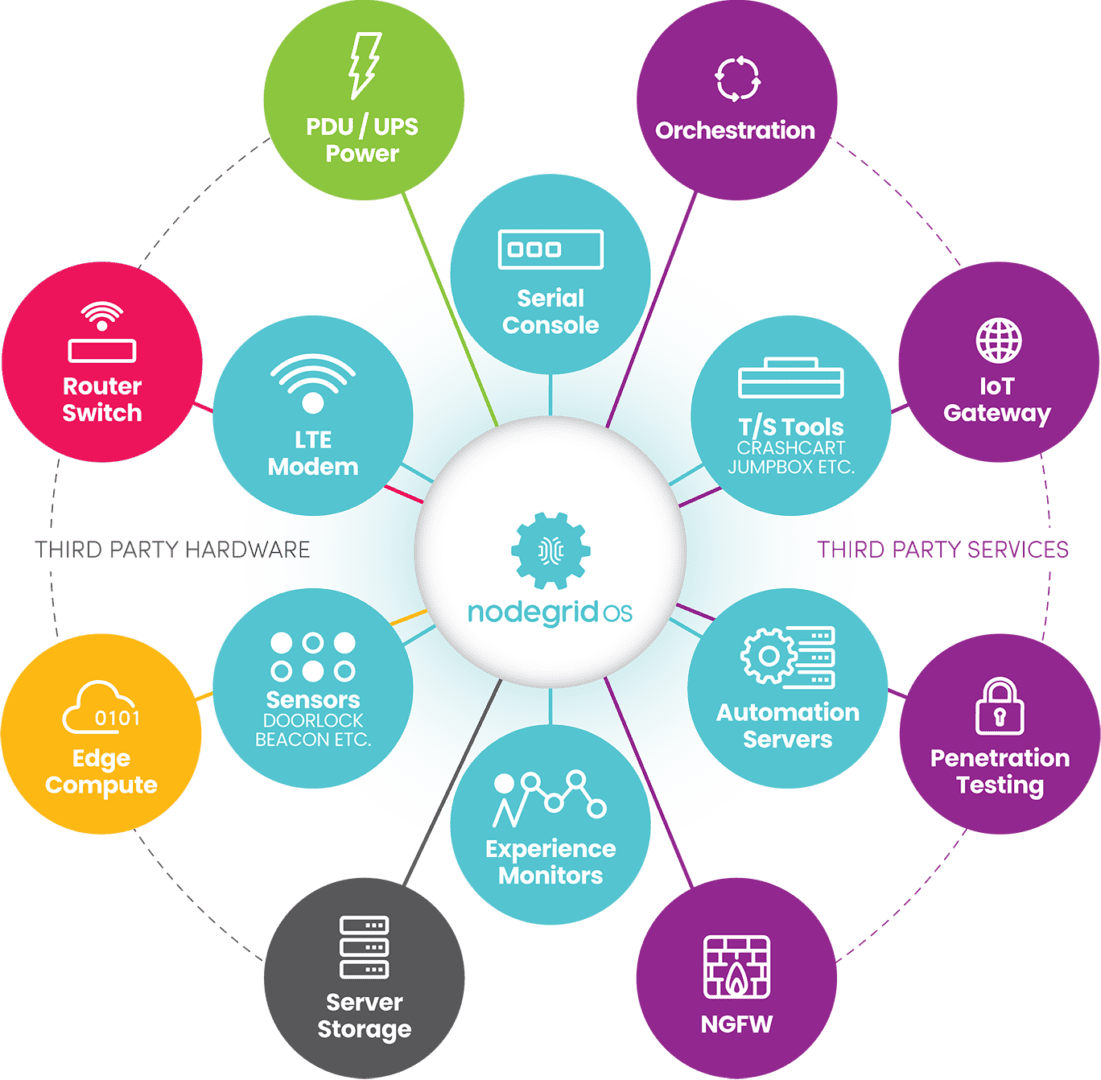
The Nodegrid product line from ZPE Systems simplifies the tech stack in data centers and network closets with all-in-one infrastructure management solutions. Nodegrid devices roll up gateway routing, switching, Wi-Fi, and 5G/4G/LTE out-of-band management to cut down on the number of boxes in the rack. They’re also enterprise solutions, which means they can be onboarded with your security team and covered by your monitoring, intrusion detection, antivirus, and other security controls.

In addition, all Nodegrid boxes are protected by hardware security features such as BIOS protection, self-encrypted disk (SED), UEFI Secure Boot, and Signed OS. Plus, Nodegrid’s hardware and software are completely vendor-neutral, allowing easy integrations with third-party security solutions and SAML 2.0 authentication. Nodegrid can even directly host other vendors’ security software to further reduce your tech stack.

Key Nodegrid features


All Nodegrid Devices Include:

Key features

Strong Out-of-band management integration

Extensible applications with virtualization and containers

Zero Touch Provisioning (ZTP) over the WAN

Vendor-neutral, unified management via ZPE Cloud/Nodegrid Manager

Modern x86-64bit Linux Kernel

Extended automation based on actionable data

Failover to 4G/5G/LTE & Wi-Fi

Power control and monitoring

Orchestration support via Puppet, Chef, Ansible, RESTful

Security

BIOS protection

TPM 2.0

UEFI Secure Boot

Signed OS

Self-Encrypted Disk (SED)

Geofencing

X.509 SSH certificate support, 4096-bit encryption keys

Selectable cryptographic protocols for SSH and HTTPS (TLSv1.3)

Selectable cypher suite levels: high, medium, low, custom

SSL VPN (Client and Server)

IPSec, Wireguard, and Strongswan with support for multi-sites

Local, AD/LDAP, RADIUS, TACACS+, Kerberos, authentication

SAML support via DUO, OKTA, Ping Identity

Local, backup-user authentication support

User-access lists per port

Group/role-based authorization: AD/LDAP, RADIUS, TACACS+

Fine grain and role-based access control

Firewall – IP packet and security filtering, IP forwarding support

MD5 / SHA System Configuration Checksum™

System event syslog

Custom security settings

Strong password enforcement

Two-Factor Authentication with RSA and DUO

Networking

IPv4 / IPv6 Support

Embedded Layer 2 switching

VLAN

Layer 3 Routing

BGP

OSFP

RIP

QoS

DHCP (Client and Server)

RIPv1, RIPv2

VXLAN

DDNS

NTP

To learn more about the benefits of Nodegrid’s Intel NUC alternatives, contact ZPE Systems.

Nodegrid product comparison

The Nodegrid family of network edge routers delivers secure, Gen 3 OOB management for reliable remote access to distributed customer sites like branch offices or manufacturing centers.

Nodegrid Service Delivery Platform Family


Link SR

Bold SR

Hive SR

Gate SR

Net SR

Mini SR

CPU

X86-64bit Intel 

X86-64bit Intel

X86-64bit Intel 

X86-64bit Intel 

X86-64bit Intel 

X86-64bit Intel 

Cores

2

4 or 8

4 or 8

2, 4 or 8

2, 4, 8 or 16

4

Guest VM

1

1

1-2

1-3

1-6

1

Guest Docker

2+

2+

2+

2+

2+

2+

Storage

16GB – 128GB

32GB – 128GB

16GB – 128GB

32GB – 128GB

32GB – 128GB

14GB SED

Additional Storage

Up to 4TB

Up to 4TB

Up to 4TB

Up to 4TB

Up to 4TB

Wi-Fi

Yes

Yes

Yes

Yes

Yes

Yes

Cellular modem

1

1-2

1-2

1-2

1-6

1

5G

Yes

Dual 5G

Dual 5G

6x 5G

Sim slots

2

4

4

4

12

1

Serial Console Switch

1

8

Via USB

8

16-80

Via USB

Network

1x Gb ETH 1x SFP

5x Gb ETH

2x GbE ETH 2x 10 Gbps

4x 10/100/1000/2.5 Gbps RJ-45

2x SFP 5x Gb ETH

4x 1Gb ETH PoE+

2x 1Gb ETH 2x SFP+ Multiple expansion cards

2x 1Gb ETH

Data Sheet

Download

Download

Download

Download

Download

Download

The Nodegrid family of Intel NUC alternatives from ZPE Systems can help MSPs and MSSPs ensure secure, reliable remote management access to customer infrastructure without increasing costs.

Ready for a Demo?

To see one of ZPE’s Intel NUC alternatives in action, request a free Nodegrid demo! Request a Demo

Cisco 2900 EOL: Replacement Options

cisco 2900 eol

The Cisco ISR 2900 series of branch routers went EOS (end-of-sale) on the 9th of December 2017, and Cisco concluded support on the 31st of December 2022. In this guide, we’ll compare migration options for the Cisco ISR 2900 EOL models to help you select a solution that supports your business use case, deployment size, and future growth.

Disclaimer: This comparison was written by a third party in collaboration with ZPE Systems using data gathered from publicly available data sheets and admin guides, as of 5/12/2023. Please email us if you have corrections or edits, or want to review additional attributes: Matrix@zpesystems.com


Table of Contents

Cisco ISR 2900 overview

The Cisco ISR 2900 is a line of enterprise gateway routers designed for branch and edge networking. It’s a modular solution that can be expanded with optional Network Interface Modules (NIMs) and Service Modules (SMs) for more functionality. There are two primary use cases for the 2900:

Converged branch networking – The ISR 2900 easily integrates with Cisco’s SD-WAN, SD-Branch, cloud security, and DNA network management software, can be extended with optional modules for added hardware capabilities, and supports NFV (network functions virtualization) for all-in-one branch networking.

Out-of-band (OOB) management – Using serial port modules, the ISR 2900 turns into an out-of-band (OOB) serial console solution that provides remote management access to the control plane of branch infrastructure.

The ISR 2900 is officially EOL as of the 31st of December 2022. The EOL models include all 2901, 2911, 2921, and 2951 ISR product SKUs.

Looking for replacement options for your other Cisco ISR EOL products? Read our guide to Cisco ISR EOL Replacement Options.


Cisco 2900 EOL replacement options

The discontinuation of the Cisco 2900 has left many organizations looking for migration options. Let’s compare two direct replacements from Cisco before discussing alternative options that deliver better branch management capabilities and greater opportunities for automation.

Cisco ISR 1100

Cisco ISR 1100 is a series of enterprise branch routers, though in this comparison we’re only looking at the models that support SD-WAN and thus serve as direct replacements for the discontinued 2900 models. The capabilities of the 1100 series vary, mostly because only some of the models are modular. For example, the fixed form-factor 1100-4G/4G LTE models have cellular functionality but offer fewer networking and security features. Conversely, the 1161X-8P and 112x-8P models are modular and can be extended with optional modules (like cellular for the 1161X or terminal server ports for the 112x-8P).

Even with these expansions, the compact ISR 1100s are best suited for smaller deployments in branch offices or small, provider-managed edge data centers. If your organization uses the ISR 2900 for converged branch networking, the 1100s are the closest Cisco replacement, though it supports OOB serial modules as well.

Cisco Catalyst C8300

The Cisco Catalyst C8300 series is a modular branch and edge networking solution, though due to its large size, it’s sometimes used as a primary on-premises gateway router. There are four models to choose from – two 2RU units with 2 SM and 2 NIM slots, and two 1RU units with 1 SM and 1 NIM slot. Each chassis comes with 6 embedded Layer3 Ethernet ports (1 Gbps and/or 10 Gbps) as well as a console port and USB port. All other port configurations and capabilities come via Cisco expansion modules, including options for 5G/4G cellular.

The Catalyst C8300 is a big, robust solution that’s designed for medium to large deployments such as campuses, colocation sites, and AI/machine learning data centers. The C8300 is primarily a converged branch networking solution like the ISR 1100 series, but it provides OOB management with optional serial cards.

Cisco 2900 replacement option comparison table


Cisco ISR 2900 (EOL)

Cisco ISR 1100

Cisco Catalyst 8300

Nodegrid Net SR

Nodegrid Serial Console Plus

Form Factor

1-2 RU

Desktop-1RU

1-2 RU

1 RU

1 RU

Max IPsec Throughput

Not defined

Up to 18.8 Gbps

Up to 18.8 Gbps

600 Mbps – 1.2 Gbps

600Mbps

Total Onboard WAN or LAN 10/100/1000 Ports

2-3

4-6

4-6

2

2

Total Onboard WAN or LAN 10Gbps Ports

0

0

0-2

2

2

WAN Ports

2-3

0-6

2-6

1+, configurable

0-4

LAN Ports

2-3

0-6

2-6

4-84

0-4

Slots

2-3

0-1

2-4

5

0

Default Memory

512 MB

4 GB

8 GB

8 GB

4 GB

Max Memory

2 GB

8 GB

32 GB

64 GB

16 GB

Compute

UCS-E Card

On-board, Compute card

On-board

OOB Capabilities

Requires Serial Card

Requires Serial Card

Requires Serial Card

Included

Included

Environmental Monitoring

N/A

N/A

N/A

Included

Included

For users looking for a Cisco solution to replace their EOL ISR 2900, the ISR 1100 series and Catalyst C8300 are the closest direct replacements. However, both product lines suffer from a major limitation – they aren’t vendor-neutral.

While Cisco routers integrate with some third-party partners, they do not support custom or third-party applications for automation and orchestration, which limits you to the automation offered by Cisco’s software. This lack of open integrations increases the chances that a Cisco solution won’t be able to hook into all the hardware and software components of a distributed and multi-vendor network architecture.

For example, if you utilize different SD-WAN and next-generation firewall (NGFW) vendors at some of your remote sites, Cisco’s automation may not extend to these devices. That means you’ll need to send out technicians to all remote sites (which could number in the dozens or hundreds) just to set up these services when you otherwise could have deployed them automatically.

Want to learn more about breaking free of locked ecosystems? Read The Benefits of Vendor Agnostic Platforms in Network Management

When network solutions like the Cisco 2900 go EOL, it’s the perfect opportunity to look for alternative options that provide the functionality you need without locking you into an ecosystem or limiting your automation capabilities.

Cisco 2900 direct replacement options from ZPE Systems

ZPE Systems provides a line of vendor-neutral solutions for branch and edge networking called Nodegrid. The Nodegrid Net Services Router (NSR) and Nodegrid Serial Console Plus (NSCP) serve as direct replacements for Cisco 2900 EOL products.

Nodegrid Net Services Router (NSR)

The Nodegrid NSR is a modular branch networking solution that you can customize to increase your terminal server ports, storage space, processing power, or switch ports. The NSR delivers converged branch networking capabilities like SD-WAN, SD-Branch, and NFVs, plus it can host your choice of custom and third-party applications for automation, security, and more.

While the NSR is the perfect converged branch solution to replace the Cisco ISR 2900, it also provides 3rd generation (or Gen 3) OOB management. That means Nodegrid’s OOB network is completely vendor-neutral and can extend automation capabilities to all your legacy and mixed-vendor infrastructure for efficient deployments, management, and orchestration.

Want to see the Nodegrid converged branch networking solution in action? Watch a Demo

Nodegrid Serial Console Plus (NSCP)

The NSCP is a robust, scalable branch networking and out-of-band serial console solution. The NSCP comes in 16-, 32-, 48-, and 96-port models, so you can choose the solution that’s right-sized to your deployment and use case. Plus, you can get built-in 5G/4G LTE and Wi-Fi options for failover and out-of-band.

Like the NSR, the NSCP is also an open platform that can run your choice of software to expand your capabilities and reduce your tech stack. Like the NSR, the NSCP delivers Gen 3 OOB management of all connected infrastructure, enabling true end-to-end automation in data centers, branches, and other remote sites. The NSCP is the perfect replacement for enterprises utilizing the Cisco 2900 for out-of-band management, though it also provides converged branch networking capabilities at any scale.

All Nodegrid devices run the open, Linux-based Nodegrid OS which can host your choice of third-party or custom applications, freeing you from vendor lock-in. You can even integrate infrastructure orchestration tools like Puppet, Chef, and Ansible to extend automation to end devices, regardless of vendor. This is what makes Nodegrid the world’s first Gen 3 branch networking solution.

Want to see how Nodegrid stacks up against Cisco’s replacement options? Click here to download the services routers comparative matrix.

Global support and supply chain

Leaving a trusted ecosystem behind to adopt alternative options can be risky, so it’s important to find a vendor that offers the support you need to make the transition and keep your operations running smoothly. ZPE Systems offers global product support using the “follow the sun” model, which means you get support when you need it, regardless of your timezone. You also won’t have to worry about supply chain issues causing stock shortages – ZPE supplies hyperscalers in 10K+ units per quarter and has great, consistent supply chain control.

Need to replace your Cisco 2900 EOL?

To learn more about replacing your Cisco 2900 EOL solution with the vendor-neutral Nodegrid platform and our shipping in as little as two weeks, contact ZPE Systems today. Contact Us

Cisco 2900 EOL product tables with migration SKUs

Cisco 2900 EOL Model

In Scope Features

Replacement Product (modular form factor)

Cisco ISR 2901

Cisco ISR 2911

Cisco ISR 2921

Cisco ISR 2951

Serial Console Module, Routing, 16 serial ports

ZPE-NSR-816-DAC with 1 x 16 port serial module 1 x ZPE-NSR-16SRL-EXPN

Cisco ISR 2901

Cisco ISR 2911

Cisco ISR 2921

Cisco ISR 2951

Serial Console Module, Routing, 32 serial ports

ZPE-NSR-816-DAC with 2×16 port serial module 2x ZPE-NSR-16SRL-EXPN

Cisco ISR 2901

Cisco ISR 2911

Cisco ISR 2921

Cisco ISR 2951

Serial Console Module, Routing, 48 serial ports

ZPE-NSR-816-DAC with 3×16 port serial module 3x ZPE-NSR-16SRL-EXPN

Cisco ISR 2901

Cisco ISR 2911

Cisco ISR 2921

Cisco ISR 2951

Serial Console Module, Routing, 60 serial ports

ZPE-NSR-816-DAC with 4×16 port serial module 4x ZPE-NSR-16SRL-EXPN

80 serial port option – no Cisco equivalent

Serial Console Module, Routing, 80 serial ports

ZPE-NSR-816-DAC with 5×16 port serial module 5x ZPE-NSR-16SRL-EXPN


Cisco 2900 EOL Model

In Scope Features

Replacement Product (fixed form factor)

Cisco ISR 2901

Cisco ISR 2911

Cisco ISR 2921

Cisco ISR 2951

Serial Console Module, Routing, 16 serial ports

ZPE-NSCP-T16R-STND-DAC

Cisco ISR 2901

Cisco ISR 2911

Cisco ISR 2921

Cisco ISR 2951

Serial Console Module, Routing, 32 serial ports

ZPE-NSCP-T32R-STND-DAC

Cisco ISR 2901

Cisco ISR 2911

Cisco ISR 2921

Cisco ISR 2951

Serial Console Module, Routing, 48 serial ports

ZPE-NSCP-T48R-STND-DAC

96 serial port option – no Cisco equivalent

Serial Console Module, Routing, 96 serial ports

ZPE-NSCP-T96R-STND-DAC

Want to see how Nodegrid compares to other serial console solutions?