Providing Out-of-Band Connectivity to Mission-Critical IT Resources

Cloud-Delivered Branch: Simplifying Remote Management
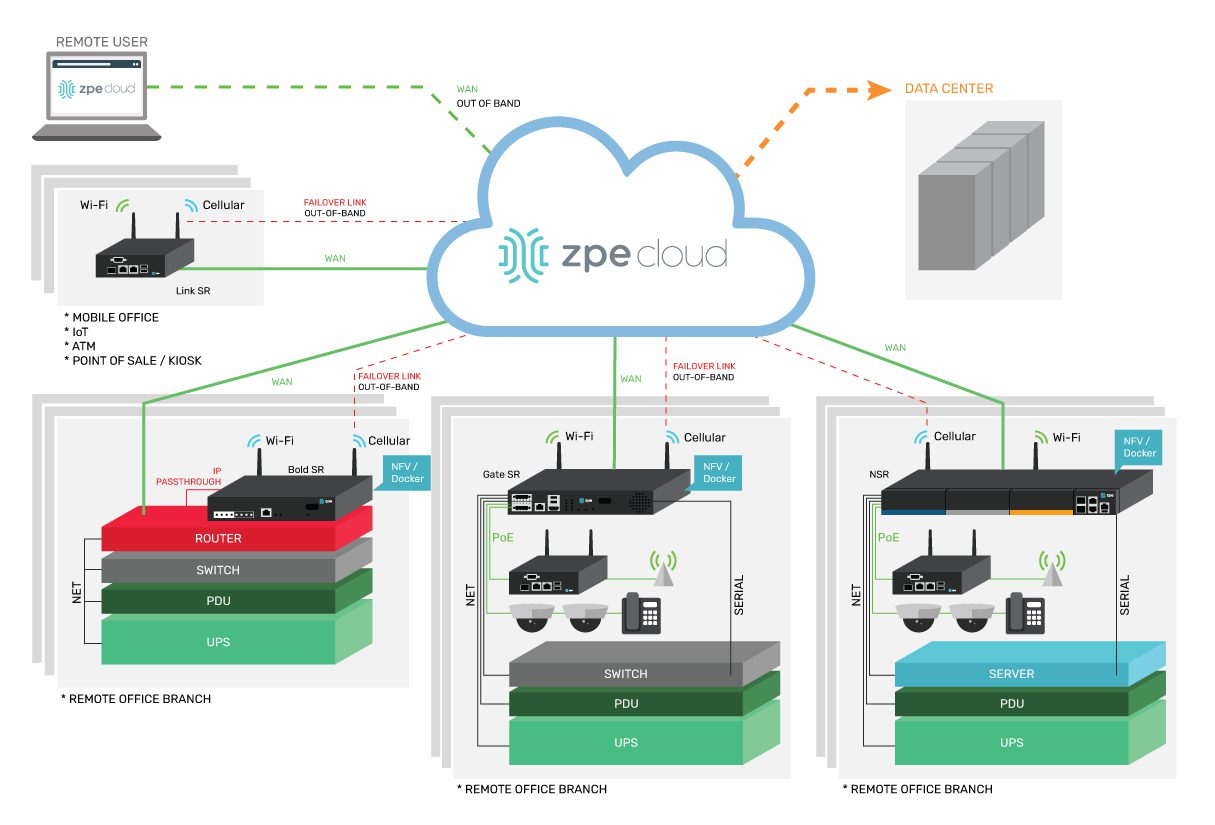
BranchDiagram
Modern enterprises must grow to remain competitive, but this expansion makes WAN management more challenging. Spinning up a new branch or edge computing site with traditional WAN infrastructure can be time-consuming and expensive, with network solutions needing to be purchased and installed and new MPLS links taking weeks or even months to activate. Each branch has infrastructure that admins need to manage remotely, which means accessing many different jump boxes and remembering many different configuration schemas. Essentially, it’s like each branch has its own unique toolkit. That means every additional branch increases the management complexity, making it more likely that mistakes or inefficiencies will occur.

The cloud-delivered branch is a relatively new concept that provides branch networking, security, and management solutions as a cloud-based service. The idea is to simplify remote management by reducing the number of individual solutions deployed at each branch and allowing admins to monitor and control all of their branches from a single place. This is like giving teams one single toolkit that can service every branch.

This post describes the three cloud-based services involved in a cloud-delivered branch, and gives an example of how to implement a cloud-delivered branch using the Nodegrid platform from ZPE Systems.

To see examples of a cloud-delivered branch in action, request a free demo of the Nodegrid platform.

Request a Demo

How a cloud-delivered branch simplifies remote management

There are three key components of a cloud-delivered branch: cloud-based infrastructure management, cloud-based network management, and cloud-based cybersecurity. Let’s discuss the technologies used in each component.

Cloud-managed branch gateways

A branch gateway is a networking device that lives in the branch and provides access to the enterprise WAN as well as cloud resources and the internet. A gateway that’s optimized for branch networking will usually combine multiple network functionalities in one to save rack space and reduce complexity. For the purposes of the cloud-delivered branch, one of these features should be device management, i.e. serial console/console server technology. This functionality means that any infrastructure component connected to the gateway, whether it’s via RJ-45 or Wi-Fi, can be remotely managed by simply logging into the gateway’s software, reducing the need for a jump box or dedicated management hardware. Of course, what makes it a cloud-managed branch gateway is that admins manage it (and all connected infrastructure) from a cloud platform instead of directly connecting to the gateway over the WAN. This means that admins have management access from anywhere in the world, without needing to be on the enterprise network.

Software-defined wide area networking (SD-WAN)

SD-WAN, or software-defined wide area networking, simplifies WAN management by decoupling control functions from the underlying hardware and making them available as software. Essentially, SD-WAN splits a WAN architecture into two layers: the physical hardware that connects branches to the enterprise network (e.g., cloud-managed branch gateways), and the networking logic that orchestrates WAN traffic (e.g., routing rules and load balancing). In a cloud-delivered branch, SD-WAN’s software lives in the cloud, giving network teams a centralized place from which to monitor and control the entire WAN architecture, no matter how many branches are involved.

Secure Access Service Edge (SASE)

SASE (pronounced “sassy”) is a solution that combines multiple enterprise security technologies into a single stack that’s delivered as a cloud-based service. SASE uses SD-WAN technology to directly connect branch users and devices to enterprise resources in the cloud, first passing that traffic through the SASE stack to ensure that security policies and controls are applied. That means this traffic doesn’t need to go through a traditional firewall, which reduces bottlenecks at the central data center without requiring a security appliance at each branch. Eliminating firewalls at most branches decreases management complexity for network admins, and reducing the load on a centralized data center firewall improves performance for the entire enterprise.

How to implement a cloud-delivered branch with Nodegrid

A cloud-delivered branch uses cloud-based infrastructure management, network management, and security to simplify remote branch management. The best practices for building infrastructure to support a cloud-delivered branch include:

Best practices: Benefits:
Using vendor-neutral hardware and software solutions Reduces the number of infrastructure devices that need to be deployed

Enables unified, centralized infrastructure management

Supports third-party apps and automation

Implementing out-of-band (OOB) management at each site Provides an alternative path to critical remote infrastructure during WAN/LAN outages

Reduces the frequency and cost of truck-rolls

Ensures that resource-intensive automation workflows don’t cause production latency

Incorporating branch LAN management into the cloud-management umbrella Extends software-defined networking control into the branch LAN

Unifies branch WAN and LAN management behind a single pane of glass

Increases efficiency and ensures holistic coverage

Let’s walk through an example of how these best practices are implemented using the Nodegrid platform from ZPE Systems.

Vendor-neutral branch gateways and cloud management

A Nodegrid branch gateway such as the Bold Services Router is installed at each branch to provide WAN and internet access. These all-in-one networking solutions provide routing, switching, and console server management functionality, reducing the number of infrastructure devices that need to be deployed. All Nodegrid devices are completely vendor-neutral, which means you can use them to host your SD-WAN, SASE, or edge computing applications, saving you from buying and installing additional hardware. In addition, vendor-neutral Nodegrid gateways unify branch infrastructure management through the ZPE Cloud software. Any infrastructure connected to a Nodegrid device at any branch is available to manage through ZPE’s centralized, cloud-based platform, simplifying remote management and providing greater opportunities for optimization and automation. Plus, ZPE Cloud software is also vendor-neutral, meaning you can integrate third-party apps and tools to create a fully customizable infrastructure and network orchestration platform.

Gen 3 out-of-band management

One of the most challenging aspects of remote branch management is recovering from network outages without any technical staff on-site to reboot devices or refresh IP addresses. Out-of-band (OOB) management solves this problem by providing an alternative path to critical remote infrastructure that doesn’t rely on the production WAN or LAN. Teams use OOB management to troubleshoot and fix problems and recover from outages, reducing the need for costly truck-rolls. Nodegrid branch gateways provide Gen 3 OOB management capabilities, the most advanced form of OOB technology. Nodegrid gateways are considered Gen 3 because they support third-party infrastructure and network automation via the OOB network. That means teams can use their preferred scripting languages and tools to execute resource-intensive automation workflows on a management network that’s completely separate from the production network. For example, admins can run AIOps root-cause analysis tools to fix problems, or orchestrate automation device provisioning, without taking up valuable MPLS bandwidth or creating additional latency on the production LAN. Additionally, companies typically need a jump box at every branch to host all their troubleshooting, remediation, and automation tools. The benefit of vendor-neutral Nodegrid devices is that they become a one-stop shop for OOB as well as all the services and tools you’d normally install on a jump box. This eliminates the need for separate out-of-band management and jump box appliances.

Branch LAN management with SD-Branch

SD-WAN provides software abstraction and cloud management for WAN architectures, but it typically stops at the edge of the branch, meaning admins use a different solution to manage the internal branch LANs. Nodegrid gateways extend software-defined networking control into the branch LAN using technology called SD-Branch. That means teams can use the same ZPE Cloud platform to control every aspect of branch networking, creating a streamlined management environment that increases efficiency and ensures holistic coverage. Using a Nodegrid device for your cloud-delivered branch reduces the number of network solutions deployed at each site, standardizes branch network management, and increases your automation and orchestration capabilities. Deploying fewer boxes decreases the cost to spin up a new branch, while standardization and automation helps to reduce operating expenses and increase operational efficiency.

Ready to learn more about implementing a cloud-delivered branch?

To learn more about implementing a cloud-delivered branch with Nodegrid, contact ZPE Systems today.
Contact Us

A Guide to SD-WAN Deployment Models

SD-WAN

Software-defined wide area networking, or SD-WAN, uses software abstraction to create a virtual overlay network that sits on top of the underlying WAN infrastructure. This gives organizations greater control over distributed network architectures and enables a high degree of automation. SD-WAN can be deployed in a hub-and-spoke model or a variety of mesh topologies depending on the organization’s requirements and capabilities.

In this guide are the most common SD-WAN deployment models with diagrams, pros and cons, and best practices to help organizations choose the right topology.

Hub-and-spoke SD-WAN deployment models

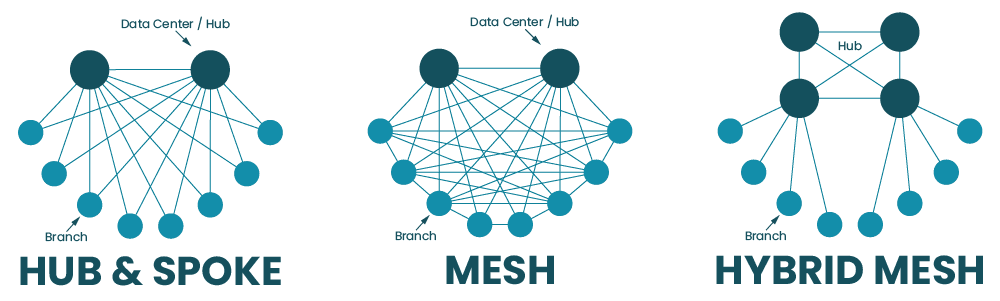
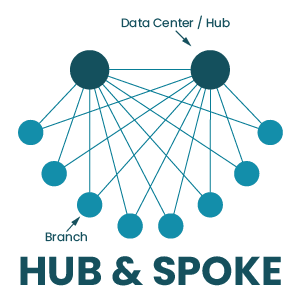
In the hub-and-spoke model, large data centers serve as centralized hubs that all SD-WAN traffic must flow through. The spokes are the campuses, branch offices, and edge sites that connect to each hub in order to access the enterprise WAN.

Hub & Spoke

The hub-and-spoke SD-WAN deployment model can be executed in a couple of different ways:

Spoke-to-hub only

In this SD-WAN deployment model, the spokes for a particular hub are unable to communicate with each other, they can only interact with the central hub. The networking logic for this deployment model is relatively simple compared to the others. It’s also useful when spoke sites need to be isolated from each other for security, privacy, or regulatory reasons.

Spoke-to-spoke via hub

In this deployment, spoke sites can communicate with each other, but all of their traffic must pass through the central hub first. Again, this makes SD-WAN networking logic a little simpler than allowing direct communication between sites. It also allows spoke traffic to pass through a centralized firewall first so that traffic can be inspected and security policies can be applied without needing to deploy firewall appliances at each spoke site.

Hub-and-spoke pros and cons

The hub-and-spoke approach is relatively easy to deploy and manage because all SD-WAN traffic must flow through a limited number of hub data centers. There’s no need to configure, secure, and load-balance network traffic between the numerous spoke sites that comprise an enterprise network, so organizations that are adopting SD-WAN for the first time tend to favor this approach.

However, since all spoke traffic needs to pass through a centralized hub, this creates bottlenecks that can impact network performance for all connected sites. Centralized hubs also represent single points of failure for the spokes that rely on them for enterprise network access – if a hub goes down due to a cybersecurity breach, ISP outage, or equipment failure, then spokes will lose their ability to communicate with each other or access enterprise network resources. Plus, since all traffic and data are aggregated in centralized hubs, they present attractive targets to cybercriminals, who can easily get all the valuable data they want in a single location instead of needing to move around the network.

Hub-and-spoke best practices

If you’re considering the hub-and-spoke approach, it’s important to have a business continuity plan that accounts for hub failures. For example, you should have some sort of network failover option (such as cellular LTE) in case the ISP connection goes down. You should also be able to redirect traffic from one hub to another if the first hub gets overloaded or experiences a failure. In addition, hubs should be deployed with out-of-band (OOB) management so network admins have 24/7 management access even if the SD-WAN connection goes down.

Learn more about Out-of-band (OOB) management.

Mesh SD-WAN deployment models

In the mesh deployment model, campuses, branch offices, and edge sites have some ability to communicate with each other directly, without their traffic needing to pass through a hub first. The degree to which sites can interact with each other depends on the type of mesh topology that’s deployed.

Full mesh deployment

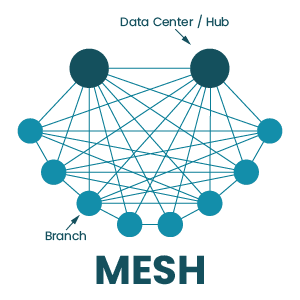
In a full mesh deployment, there is any-to-any communication between edge and branch sites using overlay tunnels. There are often still hub data centers to handle requests for centralized enterprise resources, but most other requests are handled by services deployed at the network edge (either at the sites themselves or in the cloud).

Mesh

Full mesh pros and cons

The full mesh topology enables faster communication between sites. It also allows organizations to deploy applications and services at the edge of the network where data is being generated and used, which is known as edge computing. There are also no single points of failure in the full mesh SD-WAN architecture, which reduces the risk of an outage and shortens the duration of outages that do occur. In addition, data and applications are distributed across many different locations, which can limit the damage caused by security breaches – instead of finding all your valuable data in a single server, cybercriminals have to jump around the network, increasing the chances they’ll be caught.

However, the full mesh topology is the most challenging to implement, manage, and optimize because there are so many moving parts involved. Each site needs a full stack of networking and security solutions because they aren’t relying on a centralized hub. Increasing the complexity of the SD-WAN architecture also increases the risk that mistakes will be made during configurations, deployments, and updates.

Partial mesh deployment

In this topology, some spokes can directly communicate with each other, and some services are deployed at the edge. However, there isn’t a full decentralization of applications and security, so some traffic still needs to pass through a hub.

Partial mesh pros and cons

Many organizations arrive at a partial mesh deployment on their journey from a hub-and-spoke deployment to a full mesh. A partial mesh topology reduces some of the load on centralized hubs and firewalls by moving certain services to the edge and allowing some direct site-to-site communications, which can improve performance. The organization can still rely on some centralized security functionality, reducing the number of security appliances or cloud-based services needed to protect the edge.

However, a partial mesh doesn’t completely address the limitations of a more centralized hub-and-spoke deployment. Hubs still represent potential bottlenecks and points of failure in the SD-WAN architecture. Plus, there’s still a lot of data centralization, meaning that storage and data processing servers in hubs will make attractive targets to hackers.

Hybrid mesh deployment

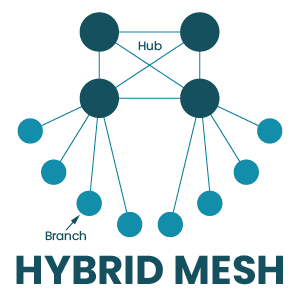
In a hybrid mesh, many hubs are deployed in a mesh topology, which means there is frequent communication and a high level of redundancy. However, branch and edge sites are still deployed as spokes, which means all their traffic goes through the hub mesh.

Hybrid Mesh

Hybrid mesh pros and cons

A hybrid mesh deployment ensures that no single hub acts as a single point of failure, enabling a high degree of redundancy and load balancing. Spoke sites can’t directly interact with each other, which reduces the complexity of the SD-WAN topology and decreases the number of security appliances to purchase and manage. Bottlenecking is also less of an issue because traffic from spokes doesn’t have to pass through a single designated hub, and can instead be distributed across multiple hubs.

However, a hybrid mesh topology is still fairly centralized, so you don’t get all the security and performance benefits of a decentralized full mesh deployment. Hubs are still valuable targets for cybercriminals, edge sites still need to send data to hubs for processing, and spokes cannot access enterprise network resources without going through the hub mesh. If that hub mesh is unavailable for any reason, spoke sites will be completely cut off.

Regional mesh

A regional mesh allows organizations to implement different deployment models for different regions. For instance, one region may have a spoke-to-spoke deployment, while another has a partial mesh. When traffic from one region needs to go to another, it must pass through a regional hub first.

Regional mesh pros and cons

The regional mesh model gives large or highly distributed organizations the flexibility to use deployments that meet the specific requirements of each region. For example, there may be a cluster of branch offices that process classified data for the defense industry, so the organization uses the spoke-to-hub-only deployment to isolate those sites from the rest of the enterprise network. In another region, the org may run a lot of edge computing for machine learning applications and need there to be fast and seamless communication between edge data centers. In that case, they might deploy a full mesh topology in that specific region.

However, this flexibility can also create a lot of management complexity. Admins need to learn, manage, and troubleshoot different configurations, network logic, and security rules for different regions. Plus, each region is subject to the downsides and limitations of whichever deployment model is used there. In addition, regional hubs often still act as potential bottlenecks and points of failure between each region and the enterprise network.

Mesh best practices

All of the best practices for the hub-and-spoke model also apply to mesh SD-WAN deployments. There are a couple of additional considerations for organizations considering a more decentralized deployment, including:

Cloud-delivered security – Mesh deployments typically require security solutions deployed at the edge, so that traffic doesn’t need to pass through a centralized firewall. However, purchasing appliances for each location is expensive and adds to the complexity of the architecture. Solutions like SSE (Security Service Edge) allow you to use your SD-WAN technology to send edge traffic through security services in the cloud. SSE takes many of the capabilities of traditional security appliances and combines them into a cloud-delivered stack, so organizations can get enterprise-level protection without needing to deploy additional hardware or route traffic through a central bottleneck.

Network automation – Manually configuring and controlling a complex mesh network increases the risk of human error. Luckily, SD-WAN’s software abstraction makes it easier to use automated scripts and playbooks to handle a lot of the tedious, repetitive tasks that are prone to mistakes such as device configurations and ACL (access control list) updates. Automation also means that work can get done faster and without putting additional pressure on overworked network teams.

Centralized orchestration – Mesh topologies have so many moving parts, and needing to manage each one of them separately makes it impossible to holistically control, optimize, and secure the deployment. Centralized orchestration gives network teams a common interface they can use to create, organize, deploy, monitor, and troubleshoot automated and manual SD-WAN workflows. That means the orchestrator should be vendor-neutral so it can dig its hooks into every device, application, and service in every SD-WAN site in your deployment.

Vendor neutrality – On that note, vendor neutrality is also a best practice because of how it simplifies and strengthens automation infrastructure. Many vendors lock you into using specific tools, applications, and devices, which makes automation pipelines more complicated and brittle — if one component breaks, the whole infrastructure goes down. Using vendor-neutral tools and orchestration platforms means you don’t have to inflate your toolkit or overcomplicate your automation pipeline, improving resiliency.

Choosing the right SD-WAN deployment model

Every SD-WAN topology comes with its own advantages and limitations, so organizations must assess their requirements and capabilities to determine which one to deploy. For example, if your team doesn’t have any SD-WAN experience, then jumping right into a full mesh deployment may not be practical. If you need your edge sites to have real-time data processing abilities (for example, in healthcare applications), then you may want to consider a less centralized mesh topology.

  Pros Cons
Hub-and-spoke
  • Easy to deploy
  • Reduced management complexity
  • Creates bottlenecks
  • Hubs are single points of failure
  • Centralized data is a target for hackers
Full mesh
  • Enables edge computing
  • No single points of failure
  • Decentralized data limits the blast radius of breaches
  • Complex implementation and management
  • Increases risk of human error
  • Requires edge or cloud-delivered security solutions
Partial mesh
  • Reduces some load on centralized hubs
  • Easier to deploy than a full mesh
  • Enables edge computing
  • Hubs can still create bottlenecks
  • Hubs are still potential points of failure
  • There is still some data centralization
Hybrid mesh
  • Enables a high degree of redundancy among hubs
  • Not as complex as a full mesh
  • Reduces bottlenecks
  • There is still some data centralization
  • There is still some bottlenecking
  • Hub mesh is still a point of failure
Regional mesh
  • Flexible and customizable
  • Addresses specific needs of individual sites and regions
  • Each regional hub is a potential point of failure
  • Variety of topologies creates a lot of management complexity
  • Subject to the downsides and limitations of all the deployment models in use

Ready to learn more about SD-WAN deployment models?

For more guidance on how to choose and implement SD-WAN deployment models, contact the experts at ZPE Systems. Contact Us

SD-WAN Benefits: Your Definitive Guide

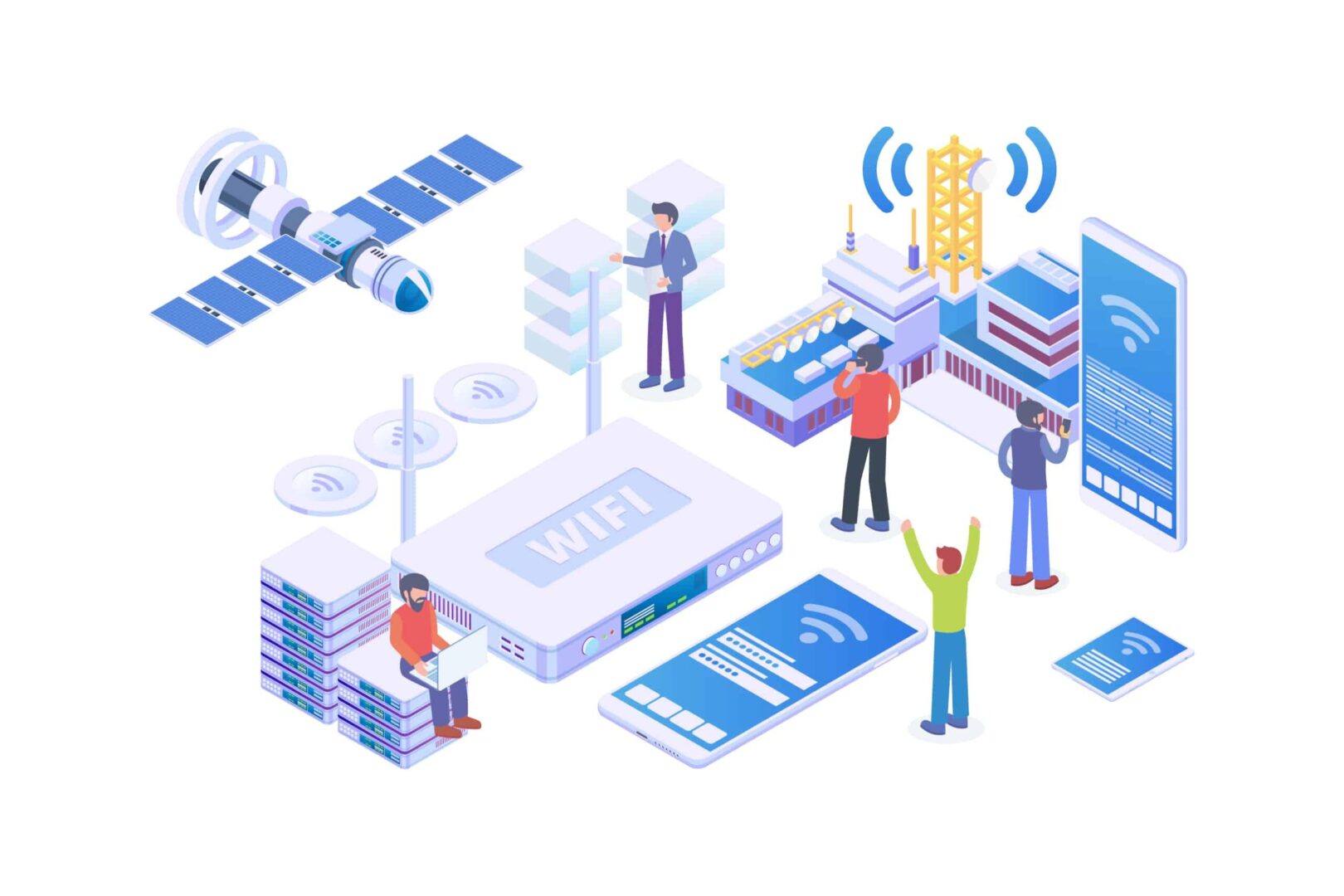
Illustration of a variety of devices connected to a complex enterprise WAN that needs SD-WAN benefits like centralized orchestration and enhanced security.
SD-WAN, or software-defined wide area networking, is on the rise as organizations grow more distributed and networks get more complicated. SD-WAN’s market share was an estimated $3.4 billion in 2022 and is predicted to increase to $13.7 billion by 2027. Orgs leverage SD-WAN to reduce MPLS costs, improve WAN performance, facilitate greater automation and orchestration capabilities, and improve their security posture. This post explains how SD-WAN works in addition to its benefits.

How does SD-WAN work?

SD-WAN uses software abstraction to decouple WAN control functions from the underlying hardware. When possible, it leverages traditional MPLS to handle requests for enterprise resources in the data center, but it can also use less-expensive cellular and public internet links to handle cloud-destined traffic. SD-WAN uses virtualized and cloud-based security technologies to securely connect remote sites to SaaS, web, and cloud resources, reducing MPLS bandwidth and eliminating the need for VPNs.

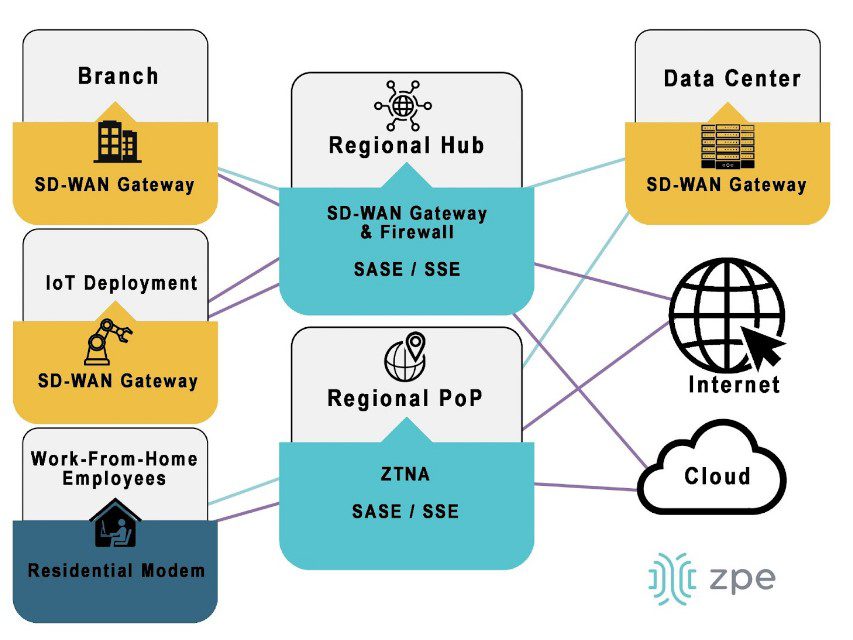
SDWan Gateway
Organizations install SD-WAN gateways at campuses, branches, data centers, and any other business locations accessing the WAN architecture. These gateways virtualize WAN management at their sites, giving admins control via centralized software (which is often cloud-based).

Regional points-of-presence (PoPs) act as SD-WAN gateways for employees working from home, giving them access to enterprise network resources without a VPN. Often, major SD-WAN providers have an existing network of regional PoPs to take advantage of, but large or especially geographically diverse organizations may also wish to deploy their own PoPs in specific areas.

There are several different SD-WAN deployment architectures for companies to choose from depending on their specific requirements and capabilities. Learn more in A Guide to SD-WAN Deployment Models.

SD-WAN benefits guide

SD-WAN benefits organizations with complex and highly-distributed networks in the following ways:

SD-WAN Benefits

Reduces costs

  • MPLS bandwidth reduction
  • Fewer circuit installations
  • Faster branch deployments

Improves performance

  • Fewer data center bottlenecks
  • Faster issue response
  • Holistic performance monitoring

Enables automation & orchestration

  • Automated configurations
  • Policy-based workflow automation
  • Centralized orchestration

Enhances branch security capabilities

  • On-ramp to SSE technology
  • Enterprise policy extension
  • Secure access for remote users

SD-WAN reduces costs

MPLS bandwidth is far more expensive than standard broadband, fiber, or cellular, often hundreds of dollars per megabit per month. For branches with existing MPLS circuits installed, SD-WAN reduces bandwidth costs by redirecting traffic that’s destined for the cloud or internet across less-expensive channels, reserving the MPLS for enterprise traffic alone.

For some branch networking use cases, such as IoT (internet of things) deployments relying entirely on cloud-based software and data processing, organizations may opt to forgo a new MPLS installation and rely solely on SD-WAN and cloud-based security solutions. Not only does this save money on installation costs and bandwidth, but it significantly reduces the time it takes to spin up a new branch, enabling that branch to generate revenue sooner.

SD-WAN improves performance

SD-WAN uses technologies like application awareness and guaranteed minimum bandwidth to provide efficient, intelligent routing for improved performance. For example, in organizations with SASE (secure access service edge) deployments, SD-WAN automatically separates cloud- and SaaS-destined traffic to flow through the cloud-based SASE stack instead of the central firewall. This reduces the load on the firewall and ensures improved performance for users who do need to access enterprise resources, while at the same time providing a “shortcut” for remote users trying to reach the cloud.

SD-WAN also responds to availability and performance issues much faster than human admins are capable of, automatically redirecting traffic to avoid bottlenecks or downed nodes to ensure a seamless end-user experience. In addition, SD-WAN’s software abstraction makes it easier to centralize WAN management, giving admins full visibility into every part of the WAN architecture for holistic performance monitoring.

SD-WAN enables automation & orchestration

SD-WAN’s software abstraction opens up many automation opportunities because WAN configurations and workflows are no longer tied to the underlying hardware. For example, device, system, and service configurations can be written as scripts or playbooks and deployed automatically to reduce the time and effort required to spin up a new branch. Policy-based automation can handle additional tasks such as load balancing and failover, and route automation faster and more efficiently than human beings can.

SD-WAN also makes it possible to bring the WAN under one management platform for holistic monitoring and centralized orchestration. This gives admins control over large, distributed, and complex WAN architectures. For example, a centralized SD-WAN platform makes it easier to orchestrate traffic across hybrid cloud architectures because admins can monitor and manage WAN workflows across their various branches, private clouds, and public clouds.

SD-WAN automation and orchestration reduce the number of tedious, manual workflows that fall on overworked networking teams. This helps to decrease the rate of human error in device and security configurations, which in turn decreases the risk that mistakes will cause outages or be exploited by cybercriminals. Centralized SD-WAN orchestration also helps organizations improve their security posture by providing more holistic visibility into things like patch statuses, system changes, and traffic patterns.

SD-WAN enhances branch security capabilities

Another way SD-WAN improves network security is by making it easier to enforce security policies at branches and edge sites without deploying additional hardware or backhauling traffic through a central firewall. Since the SD-WAN control plane is decoupled from the underlying WAN hardware, organizations can also deploy advanced security technologies with fewer device compatibility issues.

SD-WAN enables organizations to use cloud-based security solutions like SSE (security service edge). SD-WAN’s intelligent, application-aware routing can automatically separate traffic from branches and other remote sites based on whether it’s destined for enterprise data center resources or resources that live in the cloud. Cloud-destined traffic is then diverted through the SSE stack, bypassing the main firewall and reducing bottlenecks at the data center.

SSE’s security stack typically includes Firewall-as-a-Service (FWaaS) technology which provides the same (or better) capabilities as a hardware appliance. SSE is also used to extend enterprise security and access control policies to traffic between remote sites and the cloud.

In addition, the SSE stack supports Zero Trust Network Access (ZTNA), which provides secure remote access to enterprise and cloud resources to WFH employees and other systems outside the WAN. In this way, ZTNA is similar to a VPN, only more secure. ZTNA only lets remote users see and interact with one specific resource at a time, and makes them re-authenticate if they wish to access something else. If a remote user account is compromised, this re-authentication step increases the chances that unusual behavior or failed multi-factor authentication (MFA) attempts will trigger an account lock, decreasing the blast radius of an attack.

When SD-WAN and SSE are married together under a single orchestration platform, the result is SASE (secure access service edge). Organizations can purchase a complete SASE solution, or use a vendor-neutral platform to combine the SD-WAN and SSE solutions of their choice for greater customization.

Learn more about SD-WAN benefits

SD-WAN helps organizations reduce MPLS-related costs, improve WAN performance, enable greater automation and orchestration capabilities, and improve overall network security. Learn more about SD-WAN from the branch networking experts at ZPE Systems.

SD-WAN Learning center

Ready to learn more about SD-WAN benefits?

To see how a vendor-neutral orchestration platform simplifies branch management and accelerates SD-WAN benefits, request a free demo of the Nodegrid solution from ZPE Systems.

Contact Us

Simplifying Retail Network Management

Retail network management is visualized with interconnecting icons of networked retail services displayed in front of a retail warehouse

Fast and reliable networks are critical to the success of retail operations. Without network access, stores can’t process payments, handle customer data, or update inventory, which makes outages highly disruptive. According to a recent study, downtime could cost over $300,000 per hour in lost business, which is why it’s crucial that admins have the necessary tools to effectively monitor, manage, and optimize retail networks. This blog discusses some of the specific challenges involved in retail network management and how the right edge gateway solution can help overcome these difficulties.

Retail network management challenges

Managing a retail network comes with unique challenges, especially as the size and geographical distribution of the organization grows. Examples of these challenges include:

  1. Extending fast, reliable connectivity to the entire store for payment processing machines, inventory scanners, and other crucial devices. This is especially challenging in big box stores and other locations with large footprints as well as service-based chains with mechanics’ bays, drive-thrus, and other outdoor or semi-outdoor devices.
    .
  2. Maintaining optimal environmental conditions for networking equipment that’s often installed in closets, storage rooms, warehouses, and other out-of-the-way locations. The priority is typically to keep these devices hidden from customers, so they’re kept in areas that may not be climate controlled and may not have staff physically checking them every day. This increases the risk of environmental issues (like heat and humidity) causing a device failure and means no one is likely to notice the issue until it’s too late.
    .
  3. Remotely troubleshooting and recovering from issues without any on-site technicians. If the ISP connection, WAN, or LAN go down, there’s often no way to remotely access on-site equipment to diagnose and fix the problem. That means network outages require truck rolls to solve, with stores losing money waiting for technicians to travel on-site.
    .
  4. Efficiently monitoring and managing a distributed retail network architecture made up of many different network solutions and platforms. The lack of centralized management increases the risk of human error and makes it difficult to preemptively address potential problems or optimize the speed and performance of the network.

Retail network management teams need a robust solution that addresses these particular challenges. For example, they need small and powerful network devices that use centralized management to reduce management complexity. They also need a way to monitor environmental conditions and recover from outages without having to be on-site.

Simplifying retail network management

Now, let’s discuss how a robust branch gateway solution can help organizations address these challenges.

Compact, all-in-one networking

The layout of a retail store is carefully planned to ensure an optimal experience for customers, which means networking devices need to be as unobtrusive as possible. The ideal branch gateway for retail is compact and combines multiple networking functions, reducing the number of devices that need to be installed. Retail notoriously operates on a small profit margin, so the branch gateway also needs to be affordable without sacrificing performance.

Environmental monitoring

Environmental monitoring sensors collect data on conditions like temperature, humidity, and air quality in the location where networking equipment is installed. These sensors typically connect to the retail branch gateway via USB and report back to the management platform, giving admins the ability to remotely monitor the environment. This is crucial when most retail networks are managed by admins in a centralized office which may be hundreds or thousands of miles away from the stores themselves. Environmental monitoring allows them to identify and resolve potential problems before they cause device failures and outages. For example, if environmental sensors detect high temperatures, admins can get on-site personnel to turn up the air conditioning or call in an HVAC repair before devices overheat and bring down the network.

Out-of-band (OOB) management

Out-of-band (OOB) management uses redundant network interfaces (often cellular) to provide an alternative path to remote infrastructure. A branch gateway with OOB allows admins to remotely connect to devices in the store without relying on an IP address from the LAN, which means they’ll always have access even if the production network goes down. Without OOB management, the retail location goes offline for hours or even days waiting for a technician to arrive on-site, diagnose, and repair the issue. With OOB, admins can remotely access the infrastructure to restore services, often so fast that customers don’t even notice. That means they can remotely recover from more outages without truck rolls, saving time and money.

Vendor-neutral orchestration

A vendor-neutral branch gateway can interface with all the other devices in a retail network infrastructure, even if they’re from a different vendor’s ecosystem. This gives admins a single platform from which to monitor and manage every device in the store. Even better is when all of the branch gateways in the entire retail network architecture hook into a single, centralized, cloud-based orchestration platform. Admins can then monitor, control, and optimize network infrastructure for all the retail locations from one place for ultimate efficiency.

In addition, a vendor-neutral retail network management platform enables the use of third-party automation solutions. Automation reduces the risk of human error and makes it easier for teams to effectively manage and optimize even complex retail network architectures.

Retail network management with Nodegrid

Compact, all-in-one branch gateways like Nodegrid use environmental monitoring, OOB management, and vendor-neutral platforms to simplify retail network management. The Nodegrid Mini SR, for example, is an inexpensive retail branch gateway that’s roughly the size of an iPhone, so you can easily deploy them anywhere in your store without disrupting the customer experience. Despite its small size and low price point, the MSR still delivers Gen 3 OOB management capabilities while supporting Nodegrid environmental monitoring sensors and third-party automation. The Nodegrid platform is also completely vendor-neutral, giving retail network admins a single pane of glass from which to monitor, orchestrate, and optimize the entire distributed network architecture.

Ready to learn more about Nodegrid?

To learn more about about simplifying retail network management with Nodegrid, click here to download the Mini SR datasheet, or contact ZPE Systems today.

Contact Us

What To Look for In a Cloud Edge Gateway Solution

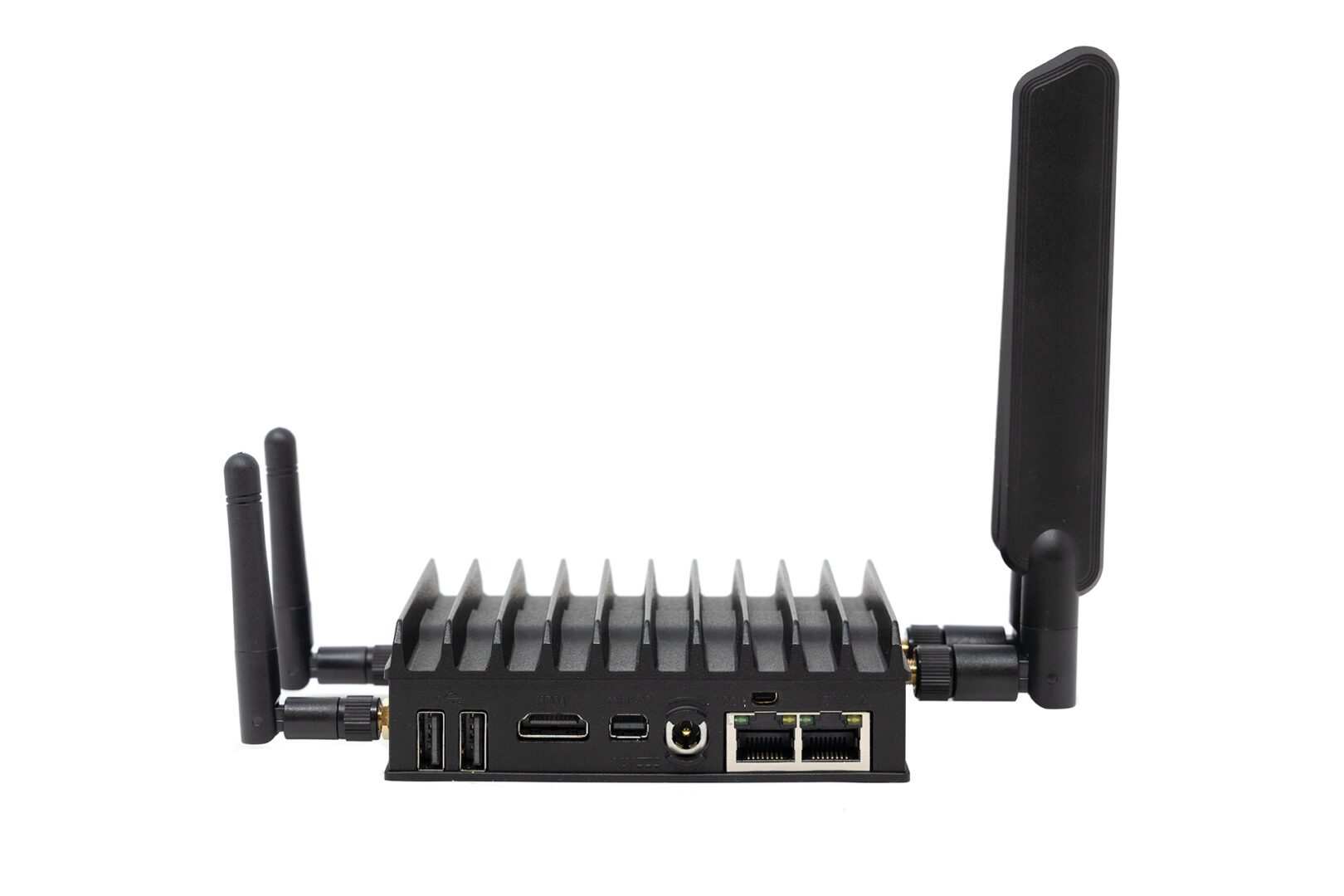
Mini-SR-Rear
Gartner predicts that by 2029 more than 15 billion IoT devices will connect to enterprise infrastructure. Many of these devices will operate outside of the centralized enterprise network, in satellite offices, manufacturing facilities, retail stores, and other remote locations. These remote – or edge – IoT devices need a secure and reliable way to connect to cloud resources and applications.

A cloud edge gateway is a hardware or software solution used to connect edge devices to the cloud. Some edge gateways are also routers that connect the edge location’s network to the WAN (wide area network) or SD-WAN (software-defined wide area network). In addition, many cloud edge gateway solutions also provide management access to connected devices, so administrators can remotely monitor and control edge infrastructure.

Some popular use cases for cloud edge gateways include:

  • Retail stores: Cloud edge gateways give retail stores a fast and secure connection for POS (point of sale) terminals, credit card readers, and security cameras.
  • Remote health facilities: Hospitals and clinics in remote areas use cloud edge gateways to securely and reliably transmit health data from IoT medical devices.
  • Police/emergency response vehicles: Cloud edge gateways enable secure data transmission from police, fire, and EMS vehicles to cloud applications.

In this blog post, we’ll discuss the key characteristics and components of a robust, secure, and reliable cloud edge gateway solution.

What to look for in a cloud edge gateway

Vendor neutrality

In a decentralized network with many remote locations, network solutions like edge gateways are often chosen based on which vendor offered the best deal or had the most compelling sales pitch at the time a new site was opening. This creates a heterogeneous network architecture, with each vendor offering their own platform from which to monitor and manage their solutions. With so many platforms to learn and keep track of, it becomes very challenging for admins to keep networks operating at peak efficiency.

A vendor-neutral cloud edge gateway solution reduces management complexity by seamlessly integrating with the existing edge infrastructure. For example, Nodegrid Services Routers can run other vendors’ software, so admins can keep using the management platform they’re most comfortable with. Or, admins can use the ZPE Cloud network orchestration platform to manage any other vendor solution that’s connected to a Nodegrid device.

Vendor-neutral cloud edge gateways give organizations the freedom to continue expanding to new locations without worrying about integration issues. Vendor neutrality also reduces headaches for network administrators so they can focus on improving efficiency and optimizing performance.

High-speed cellular failover and out-of-band management

Edge IoT devices are used for critical operations, which means they need 24/7 connectivity. Cellular failover provides a secondary internet connection that’s independent of wired network infrastructure. A cloud edge gateway with cellular failover ensures that IoT devices have uninterrupted access to the cloud even if the primary ISP connection goes down. The best solution supports high-speed 4G/5G cellular to reduce the performance impact of failover, as well as providing dual-SIM slots for redundancy.

In addition, admins need management access to edge infrastructure and IoT devices that are independent of both the WAN and the LAN (local area network), so if something like a firmware update causes the local network to go down, they can repair the issue without needing to dispatch an expensive truck roll. Out-of-band (OOB) management uses a secondary network interface (like a 5G cellular SIM) to create an OOB network that’s dedicated to management and troubleshooting. An edge gateway with OOB management ensures that admins have 24/7 high-speed access to remote infrastructure so they can recover from problems faster and reduce downtime.

Secure hardware and software

The security threats to enterprise networks are ceaseless and growing more sophisticated by the day. Many IoT devices and edge locations operate with little-to-no human intervention, which means breaches could go undetected for a long time. In addition, it can be difficult to stay on top of patch schedules or remotely install security updates on so many devices in so many locations, which can leave edge networks vulnerable to attack.

The right cloud edge gateway comes with robust hardware security features like BIOS protection, encrypted disks, and geofencing that prevent malicious actors from using a stolen gateway to hijack edge networks. Its management software should also include Zero Trust security features like SAML 2.0 integration, selectable cryptographic protocols and cipher suite levels, and two-factor authentication (2FA). With a vendor-neutral solution like Nodegrid, admins can even use the cloud edge gateway to push out security updates to connected devices using the ZPE Cloud management platform.

Automation support

It’s growing more difficult for people to simultaneously manage the complex network infrastructures required for modern business operations while ensuring peak performance and 24/7 availability. Network automation solutions help decrease the burden on overworked admins and can improve the performance and reliability of edge networks.

Many edge gateways include some automation features as part of their management software. However, these tend to be limited to baked-in workflows, meaning admins may not be able to use custom scripts or third-party playbooks. The best cloud edge gateway has vendor-neutral automation support so admins can use their choice of automation solutions. For example, Nodegrid edge gateways can directly host automation playbooks from all the major platforms including Ansible and Puppet. Nodegrid also supports custom scripting and third-party integrations for even greater flexibility.

The best cloud edge gateway solution is vendor-neutral, uses high-speed cellular for failover and OOB management, follows Zero Trust best practices to keep the infrastructure secure, and supports all of the major automation tools and scripting languages. With the edge gateway market still being somewhat new, there’s really only one solution that checks all these boxes: the Nodegrid family of cloud edge gateway routers.

Why choose the Nodegrid cloud edge gateway solution?

There are six Nodegrid Services Router models to choose from based on your deployment size, networking requirements, and use case. For example, the Mini SR delivers versatile edge networking capabilities in a device approximately the size of an iPhone, which is perfect for mobile emergency response units or retail branches where space is at a premium.

For larger deployments, such as an edge compute data center or Smart Building system, the Net SR provides a modular solution with options for additional serial console ports, disk space, compute, PoE, and more.

Nodegrid’s vendor-neutral platform is extensible and capable of directly hosting other vendor solutions for automation, security, and other networking functions. Cellular failover and high-speed OOB are delivered via dual- or quad-SIM cellular slots with 5G/4G LTE support. Nodegrid devices are protected by secure hardware features, SAML 2.0 and 2FA support, and advanced authentication, plus the OS is kept up-to-date with frequent patches. Nodegrid is also the only cloud edge gateway with full support for all the top automation and IaC (infrastructure as code) solutions, including Ansible, Chef, and Puppet.

Ready to learn more about the Nodegrid cloud edge gateway solution?

Contact ZPE Systems today to learn more about the Nodegrid cloud edge gateway solution.

Contact Us

Key Automation Infrastructure Components That Enable End-to-End Network Automation

A resilient network containing automation infrastructure components and concepts overlays a busy industrial plant that uses OT automation.

As inflation rises, new business declines, and another COVID-19 surge looms on the horizon, many organizations are bracing for a recession. CIOs and IT managers are having to do more with less—less staff, less budget for upgrades and repairs, and less access to on-site infrastructure. Despite these restrictions, they still need to ensure the 24/7 availability and optimal performance of enterprise network resources as any amount of downtime could severely impact business revenue.

The ability to continue providing digital services in less-than-ideal situations is known as network resiliency. Network automation is a key tool for ensuring resiliency during staffing shortages and lockdowns, and a network automation framework provides the tools and methodologies needed to create a fully-automated network infrastructure.

The four building blocks of a resilient network automation framework include:

  1. IT/OT production infrastructure
  2. Automation infrastructure
  3. Orchestration infrastructure
  4. AIOps

We’ve previously discussed the role of IT/OT production infrastructure in network automation and how an IT/OT convergence strategy accelerates network automation. In this post, we’ll describe the automation infrastructure components that enable end-to-end network automation. Future blogs will explain how the orchestration infrastructure layer and AIOps layer build upon these components to ensure business resiliency.

What is automation infrastructure?

Automation infrastructure is composed of all the hardware and software solutions that enable automation to occur. These solutions target the IT and OT production infrastructure and automate some or all of their workflows.

Key automation infrastructure components

There are a variety of hardware and software solutions that provide automation capabilities for specific workflows, use cases, and deployment models. As part of a resilient network automation framework, the most important automation infrastructure components include:

Gen 3 OOB serial consoles

Serial consoles are typically installed in data centers and used to manage other devices over a serial cable connection. They create an out-of-band management (OOBM) network that’s dedicated to troubleshooting, management, and orchestration traffic, and which is accessible via a secondary internet connection (often using cellular). This secondary connection ensures administrators always have remote management access to critical data center infrastructure even when the primary ISP, WAN link, or production LAN goes down. That means businesses can recover from outages faster and without dispatching expensive truck rolls.

The latest generation of serial consoles, Gen 3, gives administrators the ability to automate workflows on all data center infrastructure. Gen 3 serial consoles are vendor-neutral, which means they can extend their automated management capabilities to any vendor’s device. That vendor neutrality also means that Gen 3 serial consoles support custom scripts and third-party automation tools in addition to whatever automation capabilities are built-in.

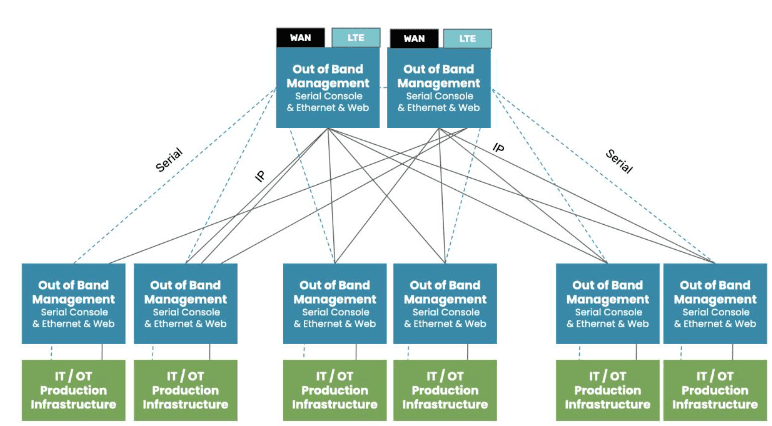
For peak resiliency, data center deployments should follow a two-tier OOB architecture. That means each rack of IT/OT production infrastructure should connect to its own Gen 3 serial console, which provides OOB management access and automation. These top-of-rack serial consoles should then connect to an OOB appliance in the middle or end of the row. This ensures OOBM access for the top-of-rack appliances and creates an additional layer of redundancy and resiliency.

Screenshot 2022-12-05 202130
Another important aspect of Gen 3 serial consoles is security. Since serial consoles provide comprehensive management access to critical infrastructure, they’re a tempting target for cybercriminals. A secure Gen 3 OOBM solution includes:

  • Integration support for third-party security solutions like next-generation firewalls (NGFWs), security service edge (SSE), and SAML 2.0
  • An up-to-date operating system (OS) kernel that’s frequently patched by the vendor when vulnerabilities are identified
  • Onboard firewall functionality to inspect traffic on both the OOB network and the production network
  • Hardware security features like encrypted boot sequences and BIOS protection to prevent unauthorized access on stolen serial consoles

Gen 3 OOB serial consoles are the automation infrastructure components that enable automation and resiliency for data center deployments at the core of enterprise networks.

SD-WAN gateway routers

A gateway router is used to connect a LAN infrastructure to the internet and the enterprise WAN architecture. As part of a resilient network automation framework, all gateway routers should support SD-WAN (software-defined wide area networking).

SD-WAN separates the control and management processes from underlying WAN hardware and virtualizes them as software. SD-WAN uses features like application awareness and guaranteed minimum bandwidth to automatically optimize network performance. An SD-WAN solution can also use automatic load balancing and failover to ensure continuous availability in the event of a localized failure or data center outage.

SD-WAN is usually a cloud-based service that delivers centralized management and orchestration of automated workflows. This service runs on top of the gateway routers deployed at each site.

An SD-WAN gateway router is a key automation infrastructure component for the main office, data center, branch, and edge deployments because it enables automated WAN management and orchestration. An all-in-one cloud-managed gateway router is particularly useful for OT automation in remote facilities like warehouses and factories because it provides SD-WAN capabilities, OOBM, and routing in one multi-function device.

Monitoring, visibility, and analytics

Monitoring and visibility solutions give administrators virtual eyes and ears on remote network infrastructure. As part of a resilient network automation framework, a visibility solution should be vendor neutral so it can dig its probes into any device in a mixed vendor environment. It should also include environmental monitoring sensors that collect data on conditions in the rack.

Device monitoring and environmental sensors give administrators the ability to detect potential issues and respond quickly to prevent outages. Monitoring and visibility solutions also collect valuable data that can feed into the AIOps building block of the network automation framework.

Infrastructure as Code

Infrastructure as Code, or IaC, uses software abstraction to decouple infrastructure configurations from the underlying hardware. Configurations are written as scripts or definition files that automatically provision virtual machines (VMs), containers, or software-defined networking (SDN) devices. An IaC definition file can be deployed repeatedly, which means many identical resources can be spun up quickly while ensuring consistent configurations. An IaC config can also undergo automatic security testing before it’s deployed to any devices to prevent vulnerabilities from affecting production.

Another important aspect of IaC is automatic configuration management. Configuration management solutions like RedHat Ansible allow administrators to define the desired state of a system or network resource. The configuration management tool continuously monitors the resource to detect unauthorized changes, which might be made by a careless sysadmin or could be a sign of a malware infection. As soon as the change is detected, the configuration management solution uses a programmatic playbook to take whatever actions are needed to restore the system to its proper state.

IaC helps ensure network resiliency by reducing human error in device configurations and updates, as well as by enabling the use of pre-production automated security vulnerability scanning and configuration management. Infrastructure as Code also facilitates another key automation infrastructure component—immutable infrastructure.

Immutable infrastructure

In-place system and device updates are a common cause of hangs or failures which can be challenging to resolve remotely. Immutable infrastructure resolves this problem by eliminating updates and configuration changes altogether. Immutable infrastructure refers to virtual systems and network resources that are never changed in place. If an immutable resource has an issue or vulnerability, or if its OS is out of date, an entirely new resource is spun up and the old one is simply deleted.

IaC is an immutable infrastructure best practice because it gives administrators the ability to provision many devices very quickly and with identical configurations. Immutable infrastructure is secure, easy to deploy, and resilient to failure, making it an important part of the network automation framework.

Why Nodegrid is a key automation infrastructure component

The automation infrastructure building block of the network automation framework relies on vendor-neutral OOBM devices like gateway routers and Gen 3 serial consoles that extend automation to converged IT/OT production infrastructure. These devices must also support monitoring and visibility solutions, Infrastructure as Code with configuration management, and immutable infrastructure.

For example, the Nodegrid platform from ZPE Systems includes OOB management hardware for a variety of data centers, branch, and edge deployments. Nodegrid serial consoles, such as the NSCP, can dig their hooks into any device in your data center to enable end-to-end network automation. A Nodegrid Gen 3 OOB serial console can even extend IaC and immutable practices to legacy devices to ensure resiliency without expensive forklift upgrades.

Nodegrid services routers, such as the Mini SR, are compact edge gateways that deliver SD-WAN support, OOBM, and cloud management capabilities to IT/OT infrastructure in smaller branch office and edge data center deployments. Nodegrid SRs can help you consolidate an entire rack of branch infrastructure into a single device to reduce management complexity, CapEx, and OpEx.

Nodegrid out-of-band is delivered via WiFi, Ethernet, or 5G/4G LTE to ensure administrators have fast and reliable access to remote infrastructure. All Nodegrid OOB devices are protected by robust hardware security features like BIOS protection, UEFI Secure Boot, geofencing, disk encryption, and TPM 2.0. Plus, Nodegrid supports integrations with Zero Trust Security solutions like identity and access management (IAM) and SAML 2.0, as well as providing an on-ramp to SSE.

Nodegrid serial consoles and services routers also include interfaces for environmental monitoring sensors to collect crucial data about conditions in your rack. These sensors, as well as any other connected devices, can all be observed and managed from a single, centralized monitoring and reporting platform.

What makes Nodegrid a crucial element of automation infrastructure is its ability to directly host Infrastructure as Code and automated configuration solutions, including Ansible, Chef, Puppet, SaltStack, Monit, and Docker. Nodegrid appliances can then extend the capabilities of the IaC solution to any of the modern, legacy, and mixed-vendor devices it manages.

ZPE’s Network Automation Blueprint

Automation infrastructure works together with IT/OT production infrastructure, orchestration, and AIOps to ensure network resiliency during uncertain times. The Network Automation Blueprint from ZPE Systems provides a reference architecture for achieving Gartner’s definition of hyperautomation as well as meeting the Open Networking User Group (ONUG) Orchestration and Automation recommendations.

In future blog posts, we’ll discuss the remaining two building blocks of the Network Automation Blueprint in depth. In the meantime, you can read about IT/OT production infrastructure or click here to get a sneak peek of the blueprint, which includes a 10-step checklist to get started with automation now.

Want to learn more about key automation infrastructure?

To learn more about Nodegrid as a key automation infrastructure component, contact ZPE Systems today.

Contact Us