Providing Out-of-Band Connectivity to Mission-Critical IT Resources

Raspberry Pi Alternatives for Business

Raspberry Pi alternatives
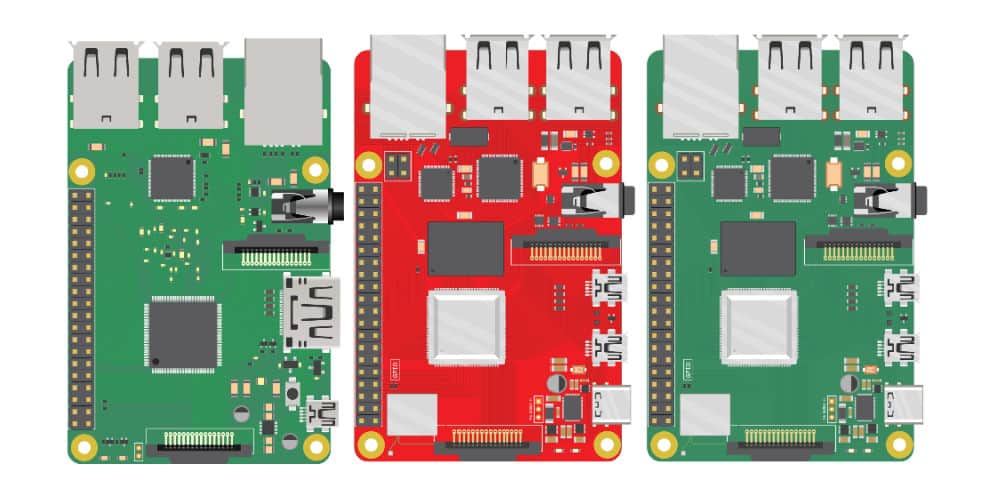
Many businesses use Raspberry Pi devices as jump boxes to remotely access the control plane of critical infrastructure. By their very nature, these devices usually aren’t correctly managed or vetted by the security team. This creates a security challenge known as Shadow IT. Shadow IT is a situation that arises when an organization has devices in use that are not known to, or securely managed by, the IT or Information Security department. These unmanaged devices are vulnerable to attack, and Raspberry Pi jump boxes are particularly tempting targets to cybercriminals because they provide access to important remote infrastructure. This blog discusses the security risks of using Raspberry Pi jump boxes and provides solutions in the form of secure, enterprise-grade Raspberry Pi alternatives.

Why consider Raspberry Pi alternatives?

Unmanaged Raspberry Pi devices don’t receive patches, aren’t visible to change management systems, and are excluded from security audits. These unsecured devices are used to access critical remote infrastructure, which creates a number of security risks.

Raspberry Pi security risks

  • Malware vulnerability – Deploying Raspberry Pi devices without onboarding them with IT means they’re not protected by enterprise antimalware solutions, leaving them exposed to viruses and ransomware attacks.
  • Undetected misconfigurations – Since unmanaged Raspberry Pi devices aren’t monitored by security or change management systems, it’s more likely that misconfigurations and vulnerabilities will remain undetected, leaving a potential backdoor open for cybercriminals.
  • Lack of IAM – A Raspberry Pi jump box that isn’t covered by enterprise IAM (Identity and Access Management) is susceptible to attack because security teams can’t extend Zero Trust security policies or controls to protect it (e.g., multi-factor authentication, role-based access control, and single sign-on).
  • Non-compliance – For organizations in regulated industries, a Raspberry Pi jump box could expose them to potential liability, because the org can’t monitor who’s using that device to access what data, resulting in non-compliance with privacy laws like HIPAA.
  • Lack of centralized Fleet Management – Organizations who have hundreds or thousands of these jump boxes have no way to centrally manage them, which makes upgrades, app deployments, licensing, patch management, and other tasks more time-consuming.
  • Lack of secure OS – Operating systems and software contain thousands of common  vulnerabilities, and there’s no way to automatically apply security patches or OS upgrades to unmanaged Raspberry Pi devices.
  • Lack of secure HW – Raspberry Pi storage disks often aren’t encrypted and lack any sort of secure boot sequence or other onboard security features, which means a stolen device could be used to breach the network or introduce malware.

Ultimately, Raspberry Pi devices expand a company’s attack surface because they fall outside of enterprise security policies, controls, solutions, and monitoring. However, many organizations use a Raspberry Pi to avoid the expense of deploying another fully managed device as a jump box in every site that houses critical infrastructure. Overcoming this challenge requires an enterprise-grade networking solution that includes remote out-of-band access to the control plane to eliminate the need for a jump box altogether.

Looking for alternative options for your Intel NUC jump boxes? Read Best Intel NUC Alternatives

Raspberry Pi alternatives from ZPE Systems

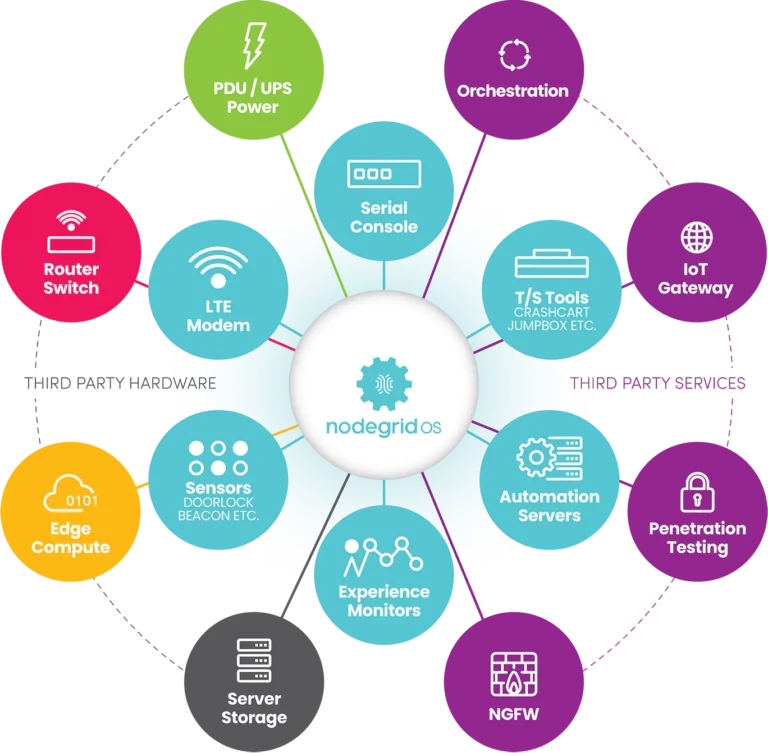
The Nodegrid product line from ZPE Systems helps organizations avoid Shadow IT by simplifying the tech stack with all-in-one network management solutions. In addition to data center and branch networking functionality like gateway routing, switching, and Wi-Fi, all Nodegrid devices provide out-of-band (OOB) management access over 5G/4G LTE.

Nodegrid is more secure than a Raspberry Pi jump box because it’s an enterprise solution that’s onboarded with IT and covered by all your security policies, controls, and solutions. In addition, Nodegrid boxes themselves are protected by enterprise security features such as BIOS protection, Signed OS, UEFI Secure Boot, and self-encrypted disk (SED).

Plus, all Nodegrid devices are completely vendor-neutral, which means they easily integrate with third-party Zero Trust security solutions and can even directly host other vendors’ security software to further reduce your tech stack.

Key Nodegrid features

All Nodegrid Devices Include:

Key features

Strong Out-of-band management integration

Extensible applications with virtualization and containers

Zero Touch Provisioning (ZTP) over the WAN

Vendor-neutral, unified management via ZPE Cloud/Nodegrid Manager

Modern x86-64bit Linux Kernel

Extended automation based on actionable data

Failover to 4G/5G/LTE & Wi-Fi

Power control and monitoring

Orchestration support via Puppet, Chef, Ansible, RESTful

Security

BIOS protection

TPM 2.0

UEFI Secure Boot

Signed OS

Self-Encrypted Disk (SED)

Geofencing

X.509 SSH certificate support, 4096-bit encryption keys

Selectable cryptographic protocols for SSH and HTTPS (TLSv1.3)

Selectable cypher suite levels: high, medium, low, custom

SSL VPN (Client and Server)

IPSec, Wireguard, and Strongswan with support for multi-sites

Local, AD/LDAP, RADIUS, TACACS+, Kerberos, authentication

SAML support via DUO, OKTA, Ping Identity

Local, backup-user authentication support

User-access lists per port

Group/role-based authorization: AD/LDAP, RADIUS, TACACS+

Fine grain and role-based access control

Firewall – IP packet and security filtering, IP forwarding support

MD5 / SHA System Configuration Checksum™

System event syslog

Custom security settings

Strong password enforcement

Two-Factor Authentication with RSA and DUO

Networking

IPv4 / IPv6 Support

Embedded Layer 2 switching

VLAN

Layer 3 Routing

BGP

OSFP

RIP

QoS

DHCP (Client and Server)

RIPv1, RIPv2

VXLAN

DDNS

NTP

To learn more about the security benefits of Nodegrid’s Raspberry Pi alternatives, contact ZPE Systems.

Nodegrid product comparison

The Nodegrid product line includes serial console servers (also known as RS232 serial switches) for data center deployments, as well as network edge routers for distributed branch and campus sites. Each solution delivers Gen 3 OOB management and all-in-one networking in a variety of sizes and configurations to suit any use case.

Nodegrid Serial Consoles

Nodegrid Serial Console Plus

Nodegrid Serial Console S Series

CPU

X86-64bit Intel 

X86-64bit Intel

Guest Docker

1-2

1-2

Storage

32GB

32GB

Wi-Fi

Yes

Yes

Cellular (Dual-SIM)

2

None

Serial

16 – 96

Auto-sensing

Network

2x Gb ETH 2x SFP+

2x SFP

Data Sheet

Download

Download


Nodegrid Network Edge Routers

Link SR

Bold SR

Hive SR

Gate SR

Net SR

Mini SR

CPU

X86-64bit Intel 

X86-64bit Intel

X86-64bit Intel 

X86-64bit Intel 

X86-64bit Intel 

X86-64bit Intel 

Cores

2

4 or 8

4 or 8

2, 4 or 8

2, 4, 8 or 16

4

Guest VM

1

1

1-2

1-3

1-6

1

Guest Docker

2+

2+

2+

2+

2+

2+

Storage

16GB – 128GB

32GB – 128GB

16GB – 128GB

32GB – 128GB

32GB – 128GB

14GB SED

Additional Storage

Up to 4TB

Up to 4TB

Up to 4TB

Up to 4TB

Up to 4TB

Wi-Fi

Yes

Yes

Yes

Yes

Yes

Yes

Cellular modem

1

1-2

1-2

1-2

1-6

1

5G

Yes

Dual 5G

Dual 5G

6x 5G

Sim slots

2

4

4

4

12

1

Serial Console Switch

1

8

Via USB

8

16-80

Via USB

Network

1x Gb ETH 1x SFP

5x Gb ETH

2x GbE ETH 2x 10 Gbps

4x 10/100/1000/2.5 Gbps RJ-45

2x SFP 5x Gb ETH

4x 1Gb ETH PoE+

2x 1Gb ETH 2x SFP+ Multiple expansion cards

2x 1Gb ETH

Data Sheet

Download

Download

Download

Download

Download

Download

The Nodegrid line of Raspberry Pi alternatives from ZPE Systems can help your organization prevent Shadow IT to reduce your attack surface and improve your security posture without increasing costs.

Ready for a Raspberry Pi alternative?

Want to see one of ZPE’s Raspberry Pi alternatives in action? Request a free Nodegrid demo! Request a Demo
What Is a Zero Trust Gateway?

What Is a Zero Trust Gateway(2)
The constant threat of cyberattacks has made network security a top priority for companies in every sector, with Gartner predicting that global cybersecurity spending will reach $188 billion in 2023. However, security continues to get more challenging due to factors like a rise in remote work, an increasing reliance on touchless internet of things (IoT) devices, and the overall decentralization of enterprise networks. It’s hard to create a secure perimeter around the enterprise when its users, devices, applications, and data could be anywhere in the world.

The zero trust security methodology addresses this challenge by shrinking the focus from one large security perimeter and instead creating smaller “micro-perimeters” around each individual resource that needs defending. It’s called zero trust because it follows the principle of “never trust, always verify.” That means each user and device needs to verify its identity and prove its trustworthiness before it can penetrate the micro-perimeter. So, for example, if a cybercriminal uses stolen credentials to log into the enterprise network, they have to pass through many different security checkpoints to see or access any sensitive resources, which increases the likelihood they’ll get caught before excessive damage is done.

One way to implement micro-perimeters and apply zero trust security policies is with a device called a zero trust gateway. This post discusses the technologies that make up a zero trust gateway and explains how they work together to defend enterprise networks.

What is a zero trust gateway?

A zero trust gateway is a device that sits at the edge of the network – or at the top of the rack – and applies zero trust security policies and controls to traffic flowing in either direction. The gateway can be a dedicated security appliance, but it’s often more cost- and space-effective to use a multi-functional device that combines security, networking, and infrastructure management in a single box.

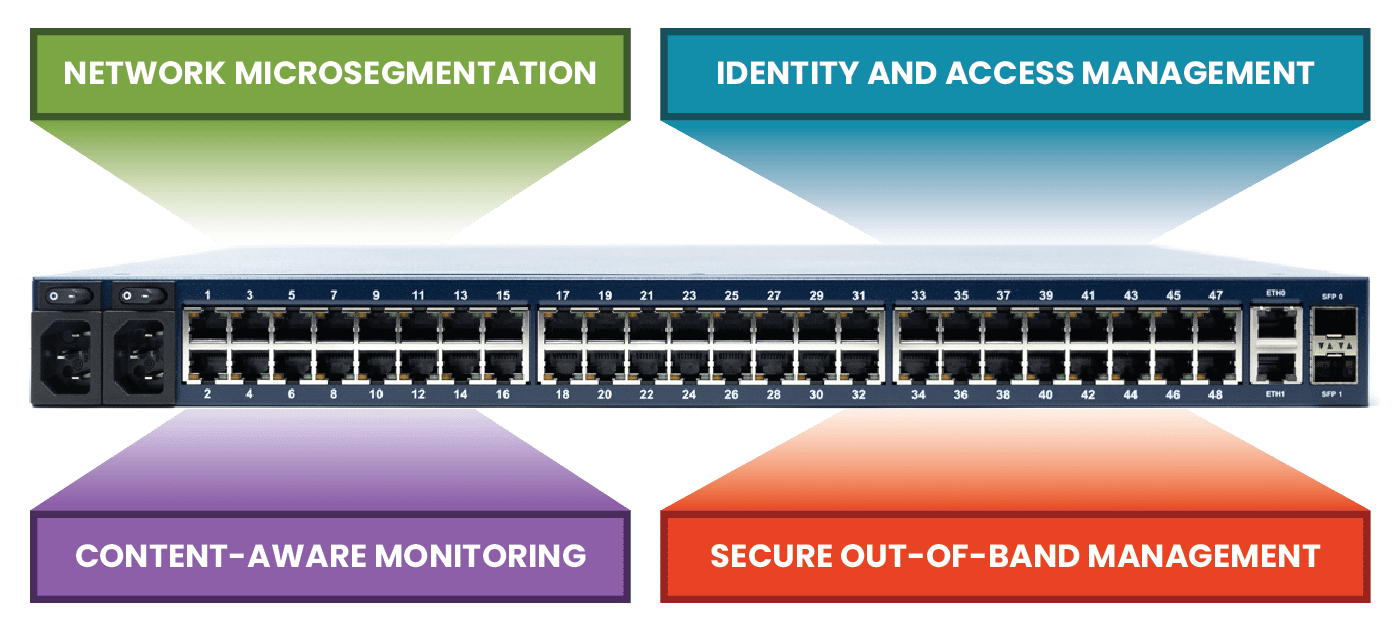
Some of the key features used in an all-in-one zero trust gateway include network micro-segmentation, identity and access management, context-aware monitoring, and secure out-of-band management. There are a small number of mature solutions that deliver all of these features off-the-shelf, but they lock you into their small solution ecosystem and limited feature roadmap. A better approach is to start with a vendor-neutral platform that lets you host and integrate your choice of security applications to create a fully customized zero trust gateway. Let’s walk through how each of these security technologies works and how to combine them into a bespoke zero trust gateway solution.

To see an example of a vendor-neutral zero trust gateway at work, request a demo of the Nodegrid solution from ZPE Systems.

Request a Demo

Network micro-segmentation

A zero trust micro-perimeter is made up of granular access control policies and security controls that are custom-tailored to the specific vulnerabilities and requirements of resources they’re defending. For example, an on-premises database containing sensitive financial records needs different policies than a cloud-based application that doesn’t process any personal information. To implement micro-perimeters, resources first need to be logically organized based on their sensitivity level, who needs access to them, and what their interdependencies are.

Network micro-segmentation is used to separate resources based on these criteria so that micro-perimeters can then be applied. For a device to be considered a zero trust gateway, it must support VLAN micro-segmentation and be able to apply access control rules consistently across all micro-segments.

Identity and access management

In a zero trust architecture, user and device permissions should be limited to only what’s necessary to perform their job role. For example, an HR account used to manage employee records shouldn’t have access to customer financial data, and vice versa. Access policies should be specific to individual micro-segments and resources and need to be applied to all users and devices consistently, no matter where they’re logging in from. That means a remote user should follow the same authentication steps and have the same permissions as they would if they logged in at the office.

For a large enterprise network, this is only achievable with a centralized identity and access management (IAM) solution. An IAM provides a single platform from which to create, manage, and apply security policies. A zero trust IAM also enables best practices like single sign-on (SSO) and two-factor authentication (2FA).

A zero trust gateway needs to integrate with your chosen IAM provider to ensure that policies are applied to both production traffic and management traffic. Some vendor-neutral gateway solutions can even directly host and run third-party IAM solutions, providing a more integrated experience and saving rack space.

Context-aware monitoring

Many successful cyberattacks use stolen credentials gained through phishing schemes and other social engineering tactics. For example, Mailchimp was recently attacked by malicious actors using credentials stolen from employees through social engineering. It’s difficult to detect and contain such an attack because the criminal looks like an authorized user. However, careful monitoring often reveals suspicious behavior, such as logging in from an unusual IP address or time zone, making multiple access requests to areas of the network they don’t usually visit, or transferring abnormally large quantities of data.

User and entity behavior analytics, or UEBA, uses machine learning technology to monitor and analyze account activity on the enterprise network. UEBA creates a baseline of “normal” behavior for individual accounts so it can detect any anomalous activity. UEBA integrates with other security and monitoring solutions, such as IAM and firewalls, so it can compare data from various sources to make more informed decisions. This is one of the ways that zero trust security verifies the trustworthiness of accounts trying to access sensitive resources, making UEBA a critical component of zero trust gateways.

Secure out-of-band (OOB) management

Admins need a fast and reliable way to access remote infrastructure for management, troubleshooting, and recovery. For example, it’s common for a single data center management team to be responsible for customer equipment in multiple DCs distributed around the world for redundancy. These admins can’t physically go on-site every time a firmware update fails or a device loses its IP address. That’s why they rely on remote out-of-band (OOB) management; remote OOB management creates a separate network just for management traffic that doesn’t rely on the production LAN. Admins access the OOB network using a dedicated management device, like a jump box or a serial console server.

This management device is a tempting target for cybercriminals, as gaining control of that device will give them complete control over the connected infrastructure. One way to protect the OOB network is by using a zero trust gateway with integrated management ports. For example, the Nodegrid Net Services Router (NSR) is a modular zero trust gateway that can be customized to connect to any type of device that needs to be managed or secured. The NSR comes with gateway routing and switching capabilities, an embedded firewall, and hardware security features like secure boot and a self-encrypted disk. Nodegrid is also completely vendor-neutral, which means it can directly host or integrate with your choice of third-party security solutions, including next-generation firewalls (NGFWs) and zero trust technologies like identity and access management and UEBA.

The NSR is a modular, open platform upon which to build a fully customized zero trust gateway for large data center deployments. The Nodegrid product line from ZPE Systems also includes a variety of serial console solutions and integrated all-in-one gateway routers to support other use cases, such as edge computing sites, branches, and automated IoT deployments.

A zero trust gateway helps organizations implement micro-perimeters of specific policies and controls to defend sensitive data and other valuable resources. A vendor-neutral, integrated solution like the Nodegrid Serial Console Plus from ZPE Systems makes it possible to combine zero trust security with networking and management functionality to create a streamlined, cost-effective zero trust gateway deployment.

Ready to learn more about Zero Trust Gateway?

To learn more about deploying Nodegrid as a zero trust gateway in your enterprise, contact ZPE Systems today.

Contact Us

ZPE Systems’ Services Delivery Platform accelerates time-to-market

Zero Pain Ecosystemedit

ZPE Systems’ Services Delivery Platform accelerates time-to-market with any app, anytime, anywhere

IT teams can deliver instant business value with the on-demand services delivery architecture

Fremont, CA, April 25, 2023 — ZPE Systems’ Services Delivery Platform is IT’s ‘easy’ button for delivering instant business value. Instead of deploying dedicated NGFW hardware and Intel® NUCs, ZPE’s Intel-based platform runs 3rd party apps at remote locations delivered via ZPE Cloud app marketplace. This speed and flexibility simplify global service delivery and fleet management for manufacturing, healthcare, finance, and other industries, where any app can be automatically deployed from the cloud.

Why is this important?

Private-cloud and on-prem services must run on dedicated systems, which causes infrastructure sprawl. This complexity pulls IT teams away from generating revenue, recovering from outages, and stopping ransomware attacks. Their job becomes managing low-level infrastructure and inefficient delivery pipelines. The Services Delivery Platform alleviates this by giving them the speed and flexibility to:

  • Secure remote locations with cloud-deployed pen test agents & other services
  • Segment edge networks regardless of interface type
  • Eliminate supply chain risks with hardened devices
  • Shrink attack surfaces with swift centralized patch management
  • Collapse device stacks into 1RU or less using virtual services

Services Delivery Platform apps and services

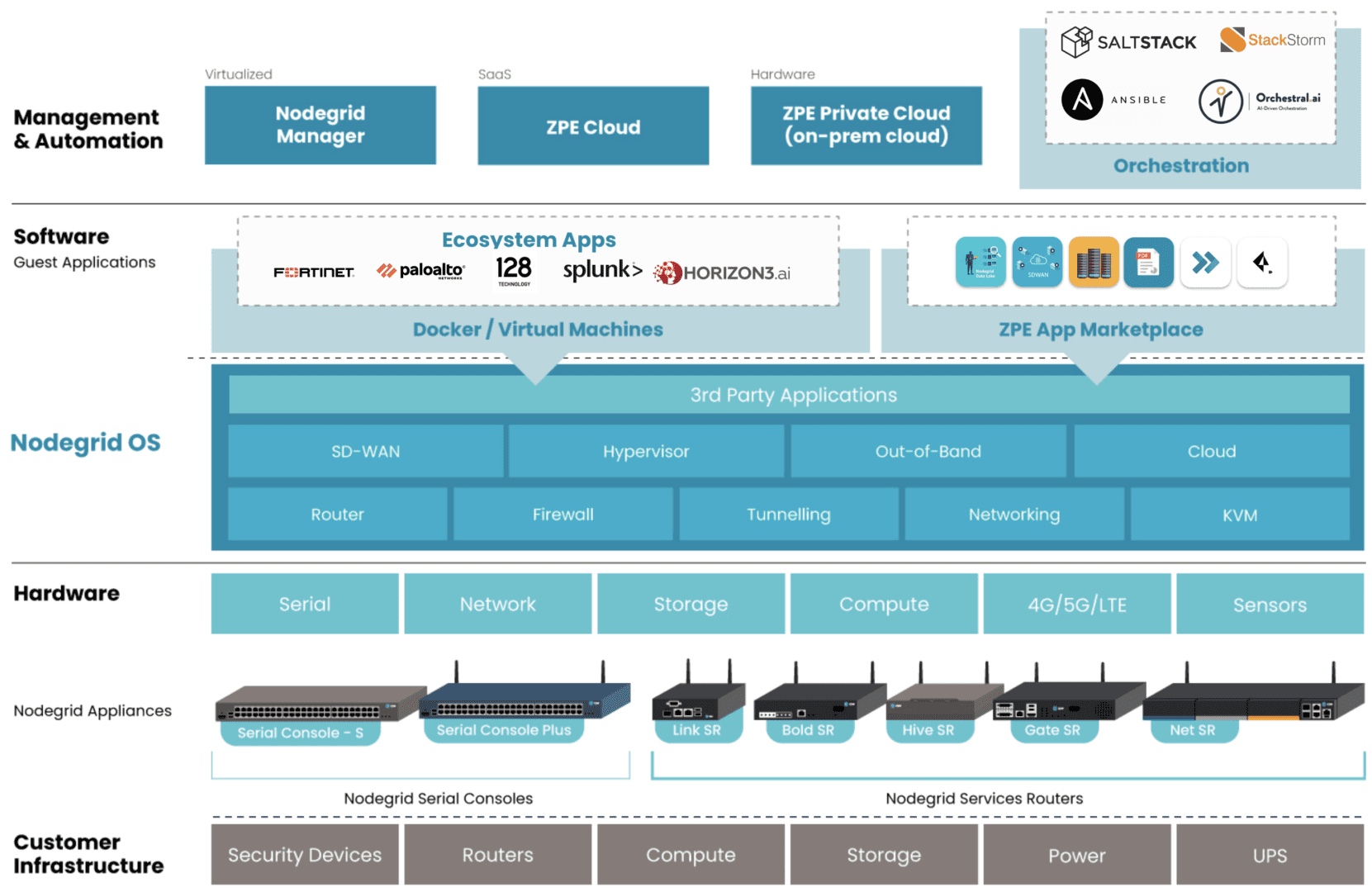
Graphic: ZPE’s Services Delivery Platform is represented as blue blocks. Examples of 3rd-party hosted apps are represented in white blocks under Ecosystem Apps.

The Services Delivery Platform brings to life Gartner’s concept of platform engineering. This platform-as-a-service model allows admins to tailor environments with the right apps for SD-WAN, NGFW, pen testing, and other functions, without battling vendor lock-in or changes in security posture. They also gain a consistent management experience across private-cloud and on-prem solutions.

Teams typically avoid platform engineering because there are no best practices for creating the proper control plane management network on secure devices.

ZPE Systems worked with Big Tech to define these best practices, which enterprises can now apply to private-cloud colo and edge deployments using the Services Delivery Platform. This establishes the resilient control plane management network and platform engineering component, both on a single, multi-function device connected to the cloud.

Enterprises accelerate revenue generation, reduce outage costs, and stop ransomware attacks using this architecture.

How does it work?

Nodegrid edge routers bring dedicated LAN and WAN links through multiple interface types (serial, ethernet, USB, IPMI). These create a secure control plane — a Double-RingTM management architecture — while eliminating the hardware attack surface with security features including TPM 2.0, encrypted disk, geofencing, and fully-signed Nodegrid OS.

This network is the foundation of the Services Delivery Platform. Along with hosting the management network, Nodegrid devices directly run VMs, containers, and any choice of app using the onboard multi-core Intel CPU and Linux-based Nodegrid OS. This OS also extends automation across environments and devices to give teams end-to-end activation and chaining of SASE, NGFWs, SD-WAN, and any cloud or on-prem solution.

“I’ve been in ops for a long time. Most of your day is spent just figuring out how to get your environments to work right,” says James Cabe, Director, Technical Alliances at ZPE Systems. “The Services Delivery Platform is a game-changer. The whole thing sits right on the Nodegrid box and you can switch or swap out services whenever you need to. Just choose what you want to deploy and go. It’s all done via separate control plane with no attack surface and no exposure to the Internet.”

Where can I find more information?

Go to zpesystems.com/services-delivery-platform to learn more about the Services Delivery Platform.

If you’re attending RSA Conference April 24-27, visit ZPE Systems at booth 4125 between north and south halls and ask for a demo.  Use this code for free RSA expo pass: 52EZPESYSXP

Zero Touch Deployment Cheat Sheet

A zero touch deployment cheat sheet is visualized as a literal cheat sheet used by a student during an exam

Zero touch deployment is meant to make admins’ lives easier by automatically provisioning new devices. However, many teams find the reality of zero touch deployment much more frustrating than manual device configurations. For example, zero touch deployment isn’t always compatible with legacy systems, can be difficult to scale, and is often error-prone and difficult to remotely troubleshoot. This post provides a “cheat sheet” of solutions to the most common zero touch deployment challenges to help organizations streamline their automatic device provisioning.

Zero touch deployment cheat sheet

Zero touch deployment – also known as zero touch provisioning (ZTP) – uses software scripts or definition files to automatically configure new devices. The goal is for a team to be able to ship a new-in-box device to a remote branch where a non-technical user can plug in the device’s power and network cables, at which point the device automatically downloads its configuration from a centralized repository via the branch DHCP server.

In practice, however, there are a variety of common issues that force admins to intervene in the “zero touch” deployment. This guide discusses these challenges and advises how to overcome them to achieve truly zero touch deployments.

Zero touch deployment challenge: The solution:
Legacy systems don’t have native support for zero touch Extending zero touch to legacy systems using a vendor-neutral platform
Deployment errors result in costly truck-rolls Recovering from errors remotely with Gen 3 out-of-band (OOB) management
Securing remote deployments causes firewall bottlenecks Moving security to the edge with Zero trust gateways and Secure Access Service Edge (SASE)
Automating deployments at scale increases management complexity Maintaining control through centralized, vendor-neutral orchestration with version control

Extend zero touch to legacy systems with a vendor-neutral platform

Challenge Solution

While many new systems and networking solutions support zero touch deployment, sometimes there’s still a need to repurpose or reconfigure legacy systems that don’t come with native ZTP support.

Pre-staging these devices before shipping them to the branch is a security risk because the system could be intercepted in transit; plus, they’re likely already deployed at remote sites and need to be reconfigured in place. Without a way to extend zero touch deployment capabilities to those legacy systems, companies often have to pay for admins to travel to remote branches, negating any cost savings they were hoping to gain from reusing older devices.

One way to extend zero touch to legacy systems is with a vendor-neutral management platform. For example, a vendor-neutral serial console switch with auto-sensing ports can connect to modern and legacy infrastructure solutions in a heterogeneous branch deployment so they can all be managed from a single place.

From that unified management platform, admins can write and deploy configuration scripts to connected devices, including legacy systems that don’t support zero touch. Technically, this isn’t zero touch deployment because the system doesn’t automatically download and run its configuration file, but it’s still a way to turn an on-site, manual process into one that’s remotely activated and mostly automated.

Recover from deployment errors with Gen 3 OOB management

Challenge Solution

A new branch deployment almost never goes completely according to plan, and this is especially true when teams are using zero touch for the first time, or aren’t completely comfortable with software-defined infrastructure and networking. In the best-case scenario, when there’s a configuration error, the zero touch deployment aborts, and an admin is able to correct the problem and restart the process.

However, sometimes the deployment hiccup causes the device to hang, freeze, or get stuck in a reboot cycle. Or, even worse, an unnoticed error in the configuration could allow the deployment to finish successfully but then go on to affect other production dependencies and bring the entire branch network down. Either way, organizations must again deal with the expenses involved in sending a tech out to troubleshoot and fix the problem.

The best way to ensure continuous access to remote infrastructure is with out-of-band (OOB) management. An OOB solution, such as a serial console or all-in-one branch gateway, connects to the management ports on infrastructure devices so admins can remotely monitor and control every device from a single place without IP addresses.

This creates a separate (out-of-band) network that’s dedicated to management and troubleshooting, making it possible for teams to remotely recover devices that have failed the zero touch deployment process or brought down production LAN dependencies. Plus, the OOB gateway uses independent, redundant network interfaces to ensure admins still have remote access even if the production WAN or ISP link goes down.

To ensure full OOB management coverage of a heterogenous, mixed-vendor environment, the out-of-band solution should be completely vendor-neutral. An open OOB device also supports integrations with third-party solutions for automation, orchestration, and security. This kind of out-of-band platform is known as Gen 3 OOB. Gen 3 OOB management ensures that teams can remotely recover from zero touch deployment errors no matter what device is affected or how the production network is impacted.

Secure remote deployments with zero trust gateways and SASE

Challenge Solution

Organizations need to secure all devices at all remote sites using consistent policies and security controls. However, for smaller branches and IoT sites, it usually isn’t cost-effective to deploy a security appliance in each location.

Plus, adding more firewalls also adds more management complexity. That means traffic is usually backhauled through the main data center firewall, creating bottlenecks and causing network latency for the entire enterprise.

Using zero trust gateways and cloud-based security services, companies can move security to the branch without the cost and complexity of additional firewalls. An all-in-one, zero trust gateway solution combines SD-WAN, gateway routing, and OOB management in a single device. It also supports zero trust authentication technologies like SAML 2.0 and 2FA. A zero trust gateway also needs to support network micro-segmentation, which will allow the use of highly specific security policies and targeted security controls. Plus, by enabling software-defined wide area networking (SD-WAN), a zero trust gateway facilitates the use of SASE.

Secure Access Service Edge (SASE) is a cloud-based service that combines several enterprise security solutions into a single platform. Zero trust gateways use SD-WAN’s intelligent routing capabilities to detect branch traffic that’s destined for the cloud or web. This traffic is directed through the SASE stack for firewall inspection and security policy application, allowing it to bypass the main security appliance entirely. SASE helps reduce the load on the enterprise firewall, reducing bottlenecks and improving performance without sacrificing security.

Scale zero touch deployments with centralized orchestration

Challenge Solution
Zero touch deployments occur (at least in theory) without any admin intervention, but they still need to be monitored for failures. Keeping track of a handful of automatic deployments may seem easy enough, but as the number and frequency increases, it becomes more challenging. This is especially true when companies kick off large-scale expansions, deploying dozens of devices at once, all of which could be plugged in at any time to begin the automated provisioning process. Plus, different devices need different configuration files, and admins need a way to work together without overwriting each other’s code or duplicating each other’s efforts. A vendor-neutral orchestration platform provides a central hub for network and infrastructure automation across the entire enterprise. This platform uses the serial consoles and OOB gateways in each remote location to gain control over all the connected devices, so network teams can monitor and deploy all their zero touch configurations from one place. An orchestration platform is the single source of truth for all automation, so it needs to support version control. This ensures that admins can see who created or changed a configuration file and revert to a previous version when there’s a mistake.

Simplifying zero touch deployment with Nodegrid

Zero touch deployment can be a hassle, but using vendor-neutral management systems, Gen 3 OOB management, zero trust gateways, and centralized orchestration can help organizations overcome the most common hurdles. For example, a vendor-neutral Nodegrid branch gateway deployed at each remote site helps you extend automation to legacy systems, provides fast and reliable out-of-band access to recover from issues, enables zero trust security & SASE, and gives you unified orchestration through the Nodegrid Manager (on premises) and ZPE Cloud software.

Ready to learn more about zero touch deployment?

Nodegrid has a solution for every zero touch deployment challenge. Schedule a demo to see how Nodegrid’s vendor-neutral platform can simplify zero touch deployment for your enterprise.

Contact Us

3 Gaps That Will Leave IT Teams Scrambling

Today’s IT teams must maintain a growing infrastructure of on-prem and cloud solutions. These range from physical routers, out-of-band devices, and firewalls, to Zero Trust Security solutions, micro-segmentation tools, and network automation integrations. Despite an abundance of physical and virtual solutions meant to help keep digital services online, many organizations face an overwhelming number of tasks just to sustain everyday operations. 

With the rising risk of recession, organizations will be forced to cut back on resources including staff, training, and tools. This will only worsen the existing challenges teams face in their efforts to maintain their distributed infrastructure. 

In this blog, we’ll explore three gaps that will leave IT teams scrambling and show you several practical approaches to cope during recession. 

Gap 1: Lack of staff

IT teams have been historically understaffed, and most people can remember at least one significant tech worker hiring campaign from the past decade. Today’s CIOs may in fact be facing the biggest talent gap since 2008. For example, in the cybersecurity sector alone, the 2021 (ISC)2 Cybersecurity Workforce Study reported that despite adding 700,000 cybersecurity professionals to the workforce in 2021, there’s still a gap of more than 2.7 million workers globally, 377,000 of which are needed in the United States. 

Trained staff are a must for managing an organization’s distributed sites, especially as team silos disappear and workers are required to have a breadth of skills. Business leaders increasingly need people who are proficient in networking and programming, so they can maintain normal operations while progressing their digital transformation initiatives such as hyperautomation. It’s a challenge that often comes down to hiring new talent or increasing the skills of existing employees, and both of these approaches require plenty of time and money. 

This issue will only worsen with the coming recession as companies begin to tighten their belts and slash budgets. Major brands have already shed thousands of workers this year, leaving IT teams to make due with existing staff numbers or even reduced headcounts. In the simplest terms, the coming recession will leave companies much less willing or able to invest in staff. 

Gap 2: Lack of tools to reduce workloads

Today’s infrastructure incorporates solutions from many different vendors, but the problem is these often come with their own unique tools that are meant to serve only a specific function. Managing SD-WAN, SASE, ZTNA, orchestration, and out-of-band solutions means jumping between disparate tools, many of which lack integration with one another. This complexity leaves operational teams stuck in a reactionary break/fix posture trying to climb mountains of never-ending support tickets. 

To address this challenge, many Big Tech companies empower their IT teams through digital transformation initiatives, such as using automation to achieve a proactive approach. But this requires additional investments in upskilling staff and acquiring adequate automation infrastructure/tools. For many organizations, a lack of money and resources makes this difficult during normal economic conditions, and will only become exacerbated with the coming recession. IT teams will continue scrambling with their inflated workloads.

Gap 3: Lack of trust in automation

Automation can greatly reduce the risk of human error (and subsequent outages) by handling simple workloads, such as device provisioning and firmware updates. However, companies that do have the resources to implement automation also recognize its limitations. Automation solutions that aren’t optimized leave IT teams with mundane tasks like managing, scheduling, and restarting bots. But to even reach this level of automation requires training staff who typically don’t have a background in programming or development. 

These teams will be unfamiliar with NetOps/DevOps concepts. In order to develop essential automation practices, these employees will need to learn through trial and error. This is a problem because most organizations lack the proper automation infrastructure and tools that allow their IT teams to recover from mistakes. Operational teams in charge of keeping infrastructure running often fear automation for this exact reason — if they make one error, there’s the potential that it will bring down the network, lead to unhappy customers, and cost them their job. 


BlueprintPDF

Close these gaps with the Network Automation Blueprint

You can close these gaps for good using out-of-band, jump boxes, and tools you already have. After years of working directly with tech giants, we’ve created a best practice reference architecture any company can use to automate their network. This Network Automation Blueprint has been proven by global enterprises to increase capabilities and reduce workloads through trustworthy automation.

Simplifying Retail Network Management

Retail network management is visualized with interconnecting icons of networked retail services displayed in front of a retail warehouse

Fast and reliable networks are critical to the success of retail operations. Without network access, stores can’t process payments, handle customer data, or update inventory, which makes outages highly disruptive. According to a recent study, downtime could cost over $300,000 per hour in lost business, which is why it’s crucial that admins have the necessary tools to effectively monitor, manage, and optimize retail networks. This blog discusses some of the specific challenges involved in retail network management and how the right edge gateway solution can help overcome these difficulties.

Retail network management challenges

Managing a retail network comes with unique challenges, especially as the size and geographical distribution of the organization grows. Examples of these challenges include:

  1. Extending fast, reliable connectivity to the entire store for payment processing machines, inventory scanners, and other crucial devices. This is especially challenging in big box stores and other locations with large footprints as well as service-based chains with mechanics’ bays, drive-thrus, and other outdoor or semi-outdoor devices.
    .
  2. Maintaining optimal environmental conditions for networking equipment that’s often installed in closets, storage rooms, warehouses, and other out-of-the-way locations. The priority is typically to keep these devices hidden from customers, so they’re kept in areas that may not be climate controlled and may not have staff physically checking them every day. This increases the risk of environmental issues (like heat and humidity) causing a device failure and means no one is likely to notice the issue until it’s too late.
    .
  3. Remotely troubleshooting and recovering from issues without any on-site technicians. If the ISP connection, WAN, or LAN go down, there’s often no way to remotely access on-site equipment to diagnose and fix the problem. That means network outages require truck rolls to solve, with stores losing money waiting for technicians to travel on-site.
    .
  4. Efficiently monitoring and managing a distributed retail network architecture made up of many different network solutions and platforms. The lack of centralized management increases the risk of human error and makes it difficult to preemptively address potential problems or optimize the speed and performance of the network.

Retail network management teams need a robust solution that addresses these particular challenges. For example, they need small and powerful network devices that use centralized management to reduce management complexity. They also need a way to monitor environmental conditions and recover from outages without having to be on-site.

Simplifying retail network management

Now, let’s discuss how a robust branch gateway solution can help organizations address these challenges.

Compact, all-in-one networking

The layout of a retail store is carefully planned to ensure an optimal experience for customers, which means networking devices need to be as unobtrusive as possible. The ideal branch gateway for retail is compact and combines multiple networking functions, reducing the number of devices that need to be installed. Retail notoriously operates on a small profit margin, so the branch gateway also needs to be affordable without sacrificing performance.

Environmental monitoring

Environmental monitoring sensors collect data on conditions like temperature, humidity, and air quality in the location where networking equipment is installed. These sensors typically connect to the retail branch gateway via USB and report back to the management platform, giving admins the ability to remotely monitor the environment. This is crucial when most retail networks are managed by admins in a centralized office which may be hundreds or thousands of miles away from the stores themselves. Environmental monitoring allows them to identify and resolve potential problems before they cause device failures and outages. For example, if environmental sensors detect high temperatures, admins can get on-site personnel to turn up the air conditioning or call in an HVAC repair before devices overheat and bring down the network.

Out-of-band (OOB) management

Out-of-band (OOB) management uses redundant network interfaces (often cellular) to provide an alternative path to remote infrastructure. A branch gateway with OOB allows admins to remotely connect to devices in the store without relying on an IP address from the LAN, which means they’ll always have access even if the production network goes down. Without OOB management, the retail location goes offline for hours or even days waiting for a technician to arrive on-site, diagnose, and repair the issue. With OOB, admins can remotely access the infrastructure to restore services, often so fast that customers don’t even notice. That means they can remotely recover from more outages without truck rolls, saving time and money.

Vendor-neutral orchestration

A vendor-neutral branch gateway can interface with all the other devices in a retail network infrastructure, even if they’re from a different vendor’s ecosystem. This gives admins a single platform from which to monitor and manage every device in the store. Even better is when all of the branch gateways in the entire retail network architecture hook into a single, centralized, cloud-based orchestration platform. Admins can then monitor, control, and optimize network infrastructure for all the retail locations from one place for ultimate efficiency.

In addition, a vendor-neutral retail network management platform enables the use of third-party automation solutions. Automation reduces the risk of human error and makes it easier for teams to effectively manage and optimize even complex retail network architectures.

Retail network management with Nodegrid

Compact, all-in-one branch gateways like Nodegrid use environmental monitoring, OOB management, and vendor-neutral platforms to simplify retail network management. The Nodegrid Mini SR, for example, is an inexpensive retail branch gateway that’s roughly the size of an iPhone, so you can easily deploy them anywhere in your store without disrupting the customer experience. Despite its small size and low price point, the MSR still delivers Gen 3 OOB management capabilities while supporting Nodegrid environmental monitoring sensors and third-party automation. The Nodegrid platform is also completely vendor-neutral, giving retail network admins a single pane of glass from which to monitor, orchestrate, and optimize the entire distributed network architecture.

Ready to learn more about Nodegrid?

To learn more about about simplifying retail network management with Nodegrid, click here to download the Mini SR datasheet, or contact ZPE Systems today.

Contact Us