Providing Out-of-Band Connectivity to Mission-Critical IT Resources

IoT in Finance Industry and Security Challenges

IoT in Finance Industry and Security Challenges
The Internet of Things (IoT) drives new innovations in the finance industry by empowering organizations to harvest more data, improve operational efficiency, and provide better customer service. However, adding dozens of low-touch devices to the network’s edge creates major security, privacy, and compliance challenges.

This post discusses how to take advantage of IoT in the finance industry by overcoming security challenges with automation, secure platforms, and vendor-neutral orchestration

IoT in the Finance Industry: Security Challenges and Solutions

The challenge: Unpatched, out-of-date IoT devices are easier to compromise for harvesting sensitive data.

The solution: Automated patch management using vendor-neutral management platforms that can dig their hooks into multi-vendor IoT.

The challenge: Unsecured remote management interfaces can be used by cybercriminals to access IoT devices and data.

The solution: Secure management hardware and software protected by robust security features like self-encrypted disk (SED) and two-factor authentication (2FA).

The challenge: It’s difficult to enforce security and privacy policies on remote IoT devices that process regulated financial data at the edge of the network.

The solution: A vendor-neutral security orchestration platform that extends Zero Trust Security policies and controls to multi-vendor IoT at the edge.

The challenge: It’s difficult to troubleshoot and resolve security incidents involving remote IoT devices without expensive, time-consuming truck rolls.

The solution: Secure out-of-band (OOB) management solutions that integrate with (or even directly host) third-party automation and AIOps tools.

The challenge: A lot of complexity is involved in gaining holistic security coverage over a distributed, multi-vendor financial network without leaving any gaps.

The solution: A vendor-neutral platform that unifies security and network management for the entire architecture behind a single pane of glass.


IoT in the finance industry: security challenges and solutions

There were over 10.54 million global IoT cybersecurity attacks in December 2022 alone. In the finance industry, a breach can result in significant consequences, including regulatory fines and irreparable reputational damage, which means IoT security must be a top priority. Let’s discuss the specific security challenges of using IoT in the finance industry.

Challenge #1: Keeping IoT devices up-to-date

IoT typically uses low-touch, set-it-and-forget-it devices, so they’re deployed around the network’s edge and receive little interaction from operators or technical staff. For example, IoT devices collect sensitive financial data from ATMs, self-service payment kiosks, and smartphone applications with little-to-no human oversight. That makes it easy for network teams to forget about operating system (OS) and software updates, especially when dozens or thousands of IoT devices are in use.

In fact, a recent report found that teams wait an average of 205 days to patch their infrastructure. This is a frightening statistic given that out-of-date software is rife with vulnerabilities just waiting to be exploited by cybercriminals looking for valuable financial data.

Solution: Automated patch management

Automating patches is the best way to ensure they’re installed on time. For example, many IoT device management systems provide dashboards where admins can see IoT device versioning information at-a-glance, manually deploy or roll-back updates, or create automated schedules/triggers to deploy those updates without manual intervention. However, most of these platforms only work within specific vendor ecosystems, which limits your capabilities. The best practice is to use a vendor-neutral IoT device management platform that can dig its hooks into multi-vendor IoT devices. This will ensure that critical IoT devices like credit card payment readers are kept secure and up-to-date.


A vendor-neutral IoT device management platform with automated patch management ensures that all devices are kept up-to-date and no vulnerabilities fall between the cracks.

Challenge #2: Securing remote management interfaces

Network admins typically work from a centralized location, which means they remotely access and manage IoT deployments at the branch and edge using jump boxes or serial consoles. If these remote management devices and interfaces aren’t adequately secured, malicious actors could use them to access IoT data and move laterally to other sensitive resources on the network. However, many admins deploy jump boxes without onboarding them with IT, which means they’re not added to security monitoring software and don’t have enterprise policies or controls applied. Serial consoles, on the other hand, often lack the advanced security features and integrations needed to protect them from cybercriminals.

Solution: Secure management hardware and software

The newest generation of serial consoles includes robust hardware security features and supports advanced authentication methods to safeguard remote management interfaces from compromise. A 3rd generation – or Gen 3 – serial console has onboard security features like a self-encrypted disk (SED), secure boot, BIOS protection, and geofencing, so malicious actors can’t access a stolen device. In addition, it supports SAML 2.0 authentication (via integrations with providers like Okta and Ping) and other advanced authentication methods to prevent unauthorized access to its software.


A Gen 3 serial console solution uses robust onboard security features and third-party security integrations to protect management hardware and interfaces.

Challenge #3: Complying with data privacy regulations

In a highly-regulated industry like finance, organizations must keep track of which people and devices can access sensitive data and ensure that permissions are granted on a least-privilege basis. Typically, achieving this level of granular control requires applying strict Zero Trust Security policies to every device and user accessing the network, including IoT devices at the edge. However, extending enterprise security policies and controls to the edge is difficult in a distributed, heterogeneous environment due to vendor lock-in.

For example, some branch networking solutions don’t support integrations with third-party identity management tools, forcing you to use their built-in access management settings. That means admins must manually recreate their Zero Trust data access policies in the router settings at every single branch and ensure they’re kept up-to-date.

Solution: Vendor-neutral Zero Trust Security orchestration

A centralized Zero Trust Security orchestration platform allows admins to deploy and manage security policies and controls across the network from a single place. A vendor-neutral platform can extend policy enforcement and other vital security controls to any device or application on the network. For example, you can apply the same Zero Trust data policies to all branch routers in the entire architecture to ensure consistent enforcement.  Such a platform makes compliance easier because financial organizations gain greater control over data access privileges and monitoring for IoT devices deployed anywhere in the world.


A vendor-neutral Zero Trust Security orchestration platform simplifies IoT data compliance by providing a centralized control panel to deploy and manage security policies across the entire distributed network architecture.

Challenge #4: Quickly resolving IoT security incidents

When malicious actors compromise an IoT device, financial organizations must act quickly to avoid regulatory fees and reputational damage. However, these devices are often deployed in remote, hard-to-reach locations with no technical or security staff nearby, such as in rural or island communities. That means problems require an expensive, time-consuming truck roll to resolve. Even with a team on-site, manual root cause analysis (RCA) and recovery efforts take a lot of time and effort, increasing both the duration and the expense of incidents.

Solution: Secure OOB with automation and AIOps support

The solution to this IoT security challenge involves out-of-band serial consoles and automation.

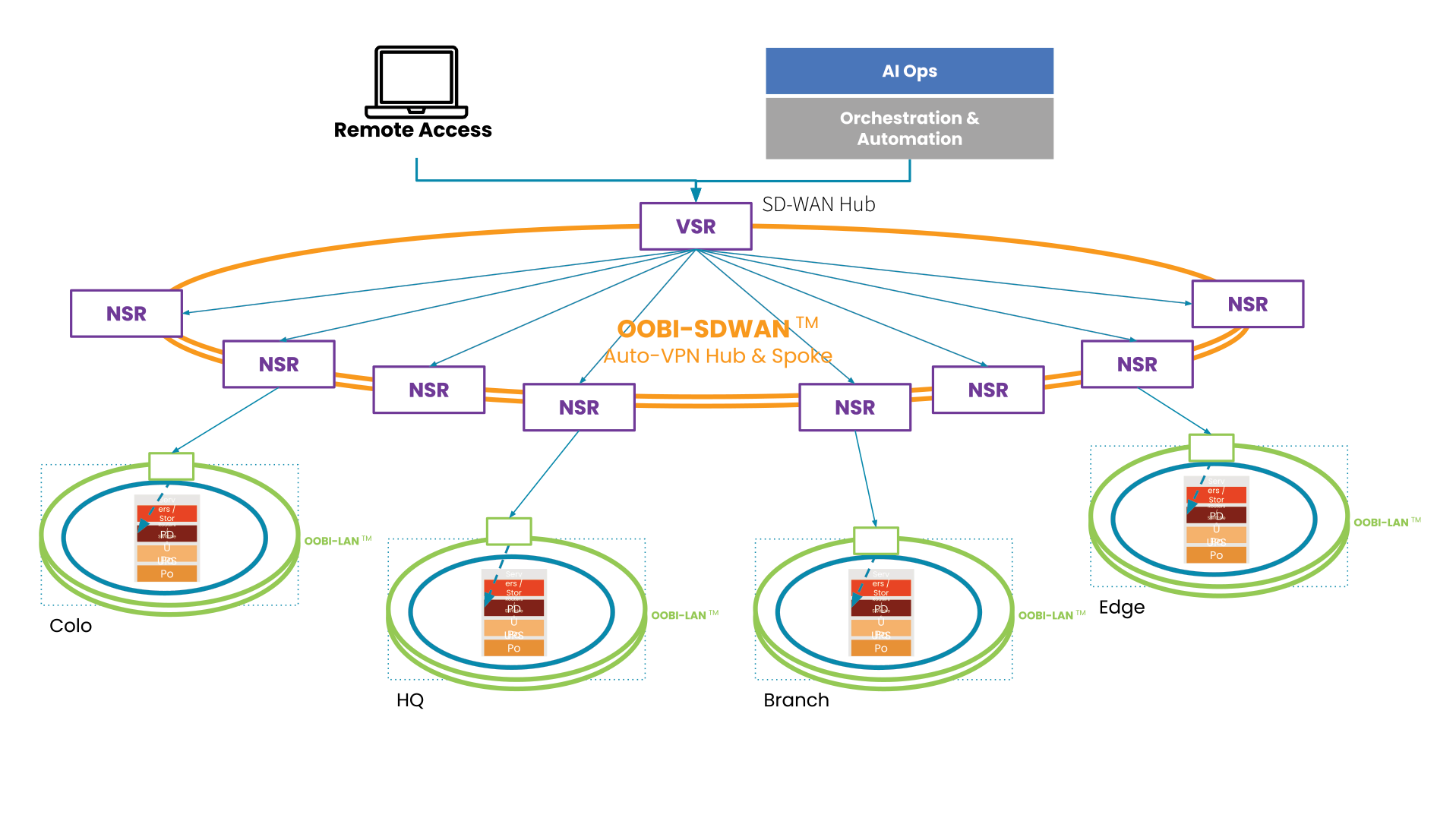
  • Out-of-band (OOB) serial consoles create a dedicated control plane to manage, troubleshoot, and recover remote devices and infrastructure. Admins access this control plane via alternative network interfaces that don’t rely on the production network at all. This means teams can still reach remote IoT devices even if the ISP goes down or the LAN is compromised by ransomware. The best practice is to use a Gen 3 serial console with advanced security features, as discussed above.
  • Automation and AIOps streamline the incident resolution process by automating RCA and recovery workflows. A Gen 3 OOB serial console solution can integrate or even directly host third-party automation and AIOps tools, ensuring teams always have remote access to their recovery toolkit during an outage or breach.


A secure, Gen 3 OOB serial console ensures 24/7 remote access to edge IoT deployments and supports automation and AIOps for faster security incident resolution.

Challenge #5: Gaining holistic security coverage

A distributed financial services network with many branches, ATMs, edge sites, and IoT devices has a large attack surface, so it requires several different security solutions to cover all potential vulnerabilities. Gaining complete security coverage over every IoT device in every location means deploying many appliances, each of which needs to be installed, patched, and managed, adding a lot of complexity to network and security operations and further increasing the attack surface. The need to orchestrate so many moving pieces increases the risk that security teams will make mistakes and prevent organizations from operating efficiently.

Solution: Unified, vendor-neutral security orchestration

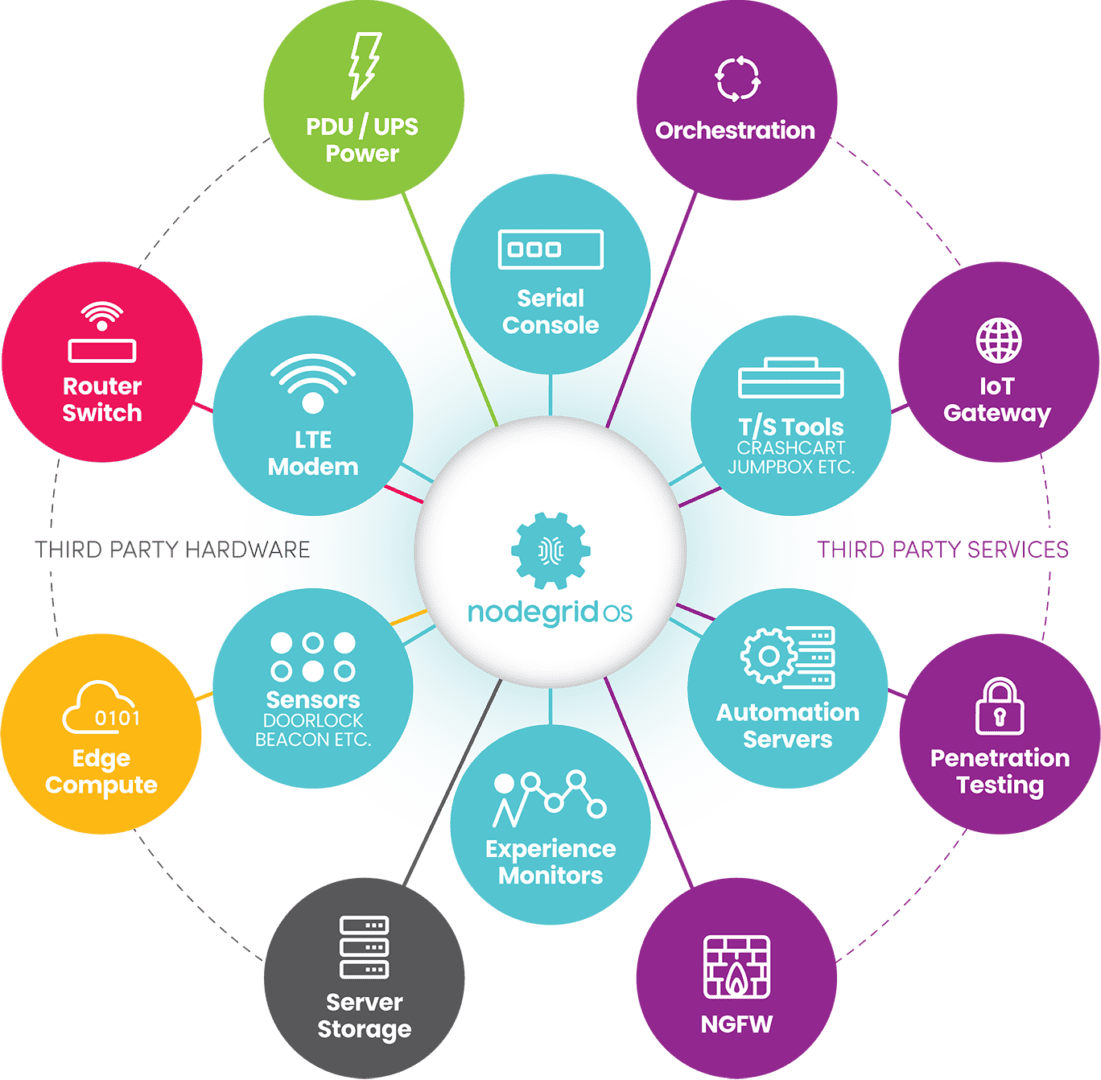
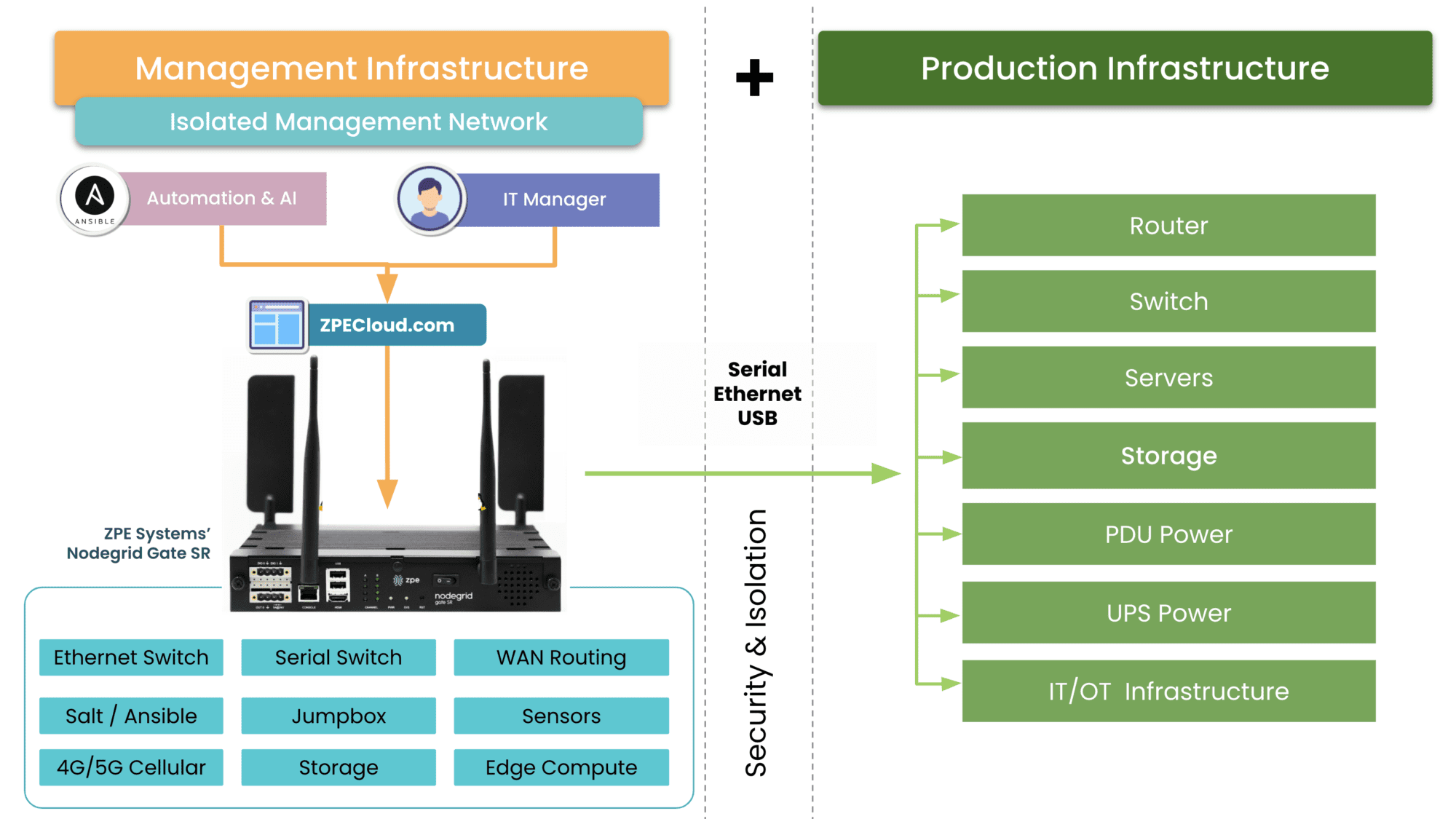
A vendor-neutral security orchestration platform unifies a company’s security solutions and workflows under a single management umbrella. For example, the Nodegrid platform from ZPE Systems can dig its hooks into other vendors’ security appliances and virtual solutions, giving security analysts a holistic overview of the entire architecture from a single centralized portal. Teams can use Nodegrid to orchestrate firewalls, identity and access management (IAM), patches, secure access service edge (SASE), and more.

Nodegrid’s hardware can even directly host third-party security applications for a streamlined, consolidated branch deployment. You can use the Nodegrid platform to build a complete DCIM (data center infrastructure management), network management, and automation orchestration solution, streamlining operations with a truly unified experience.

A vendor-neutral security orchestration platform provides holistic security coverage while reducing complexity, which prevents human error and increases operational efficiency.

IoT in the finance industry and security challenges

Deploying IoT in the finance industry comes with security challenges, including patch management, unsecured management interfaces, policy enforcement, incident resolution, and complexity. The Nodegrid platform provides finance industry solutions to help you overcome each of these challenges, including:

A truly vendor-neutral platform that unifies security, network, and infrastructure management behind a single pane of glass for holistic coverage.

Ready to Learn More?

To learn more about deploying IoT in the finance industry and overcoming security challenges with Nodegrid, contact ZPE Systems.

Contact Us

Atsign: Why Choose ZPE Systems to Host IoT Security?

Colin

A Conversation with Atsign CTO & Co-Founder, Colin Constable

This is a guest post composed by Atsign, creators of zero-attack-surface solutions including atProtocol.

We recently sat down with our CTO and Mariposa Rotary Club extraordinaire, Colin Constable, to discuss our partnership with our friends over at ZPE Systems. Let’s explore the driving force behind this powerful partnership, and how together we’re securing IoT devices and the data shared between them.

Why is this partnership strategically important?

We are a software company that helps people connect beyond the edge of the Internet. And as a software company, we need to have hardware to run our software on. After looking at a number of hardware platforms, ZPE stood out as an organization that provides a strong array of network connectivity options. Our software running on ZPE’s hardware serves as an edge platform that gives customers reliable access to edge-generated data.

What are some of the synergies between Atsign and ZPE?

First and foremost, ZPE’s hardware was designed from scratch to provide the openness and flexibility that we were looking for in a hardware platform. If I were going to design something like this myself, it would look very much like a ZPE box! It is incredibly easy to drop our Docker containers straight onto the platform, and they just simply work, which is quite a joy. To have a Docker container environment on an edge box is really the thing that makes ZPE stand out as a platform. Combine that with the fact that ZPE boxes are running x86, which makes things easy–plus actually having dual SIM cards–we can work with our MVNO partners to provide constant connectivity; even if hardlines go down, there’s cellular backup. The thing we can offer ZPE and their customers is if the box can see the Internet, then you’ll be able to address it, get data to and from it, and actually even log into it, and get hold of the built-in UI on the box.

Tell us about ZPE’s Docker Container support

Our docker containers literally just ran perfectly on the ZPE hardware. I went into the UI, selected my docker container, and it just ran. It doesn’t get much easier than that. Plus, there’s the promise of being able to have the docker container talk to connected devices like V.24 cables to provide connectivity to IoT devices.

Once IoT devices become directly addressable, then it opens up all kinds of opportunities for more efficient delivery or sharing of information that can save customers tons of money by eliminating a lot of the current infrastructure they currently use to do that job.

What are some real-world use cases for Atsign and ZPE Systems?

Because ZPE boxes have lots of connectivity options (e.g. serial ports, 4/5G backhaul, and ethernet–with more coming!) for connecting IoT devices, then you can have always-on devices at the edge, and be able to address and get data to and from them. For example, a radio station that has DSL connectivity, and cellular backup would be able to just automatically move over to cellular backup, notify the radio station that it’s on cellular backup, but use that connectivity until the ADSL line comes back online and at all times be able to get information from the equipment at the radio station. This is critical for radio stations, as it eliminates “dead air,” that moment when the transmitter is not transmitting. Sponsors rely on radio stations to put out notifications for what their businesses are doing, so having constant, uninterrupted connectivity is essential.

Do Atsign & ZPE Systems improve sustainability?

Traditional solutions would have you installing many different boxes. What we really like about the ZPE platform is that although the hardware provides lots of connectivity options–that reduces the footprint for starters–there’s no need to have different modems and firewalls, and any other services can be added via docker containers, so you actually have an environment where you have a single box, and it can do multiple functions at the edge.

What are your final thoughts on the partnership between Atsign and ZPE Systems?

As a software company, we need hardware to deploy on. We especially need hardware that can sit on the edge with all the right connectivity points. Atsign and ZPE Systems is really a perfect combination of great software and great hardware at the edge.

Bonus: What is Colin’s favorite firewall configuration for a ZPE box?

My favorite firewall rule is the one that costs the least money, and is ultimately the most secure firewall ruleset: Deny All. If you’ve got Deny All, that means that you don’t have to deal with the pain and complexities of firewall rules in order to address devices, which is what the real cost of networking is these days; it’s not necessarily the hardware, it’s actually having people to administer firewall rulesets. Having zero network attack surfaces, having a Deny All ruleset, just means you don’t have to have people changing rulesets all the time, which is a good thing.

Opengear EOL: IM7200 Alternative Options

Opengear alternatives

The Opengear IM7200 is a line of out-of-band (OOB) serial consoles, also known as terminal servers, console servers, serial console servers, serial console routers, and serial console switches. The Infrastructure Manager (IM) solution provides consolidated remote management of data center infrastructure. The IM7200 is EOL as of the 31st of March, 2023, with an end-of-sale date of the 30th of September 2023 – click here to see a full list of affected product SKUs. In this blog, we’ll discuss replacement options for the IM7200, including Opengear alternatives that deliver unlimited automation capabilities and complete vendor freedom.


Table of contents:

Opengear IM7200 overview

The Opengear IM7200 is a line of serial console solutions that provide out-of-band (OOB) management for 8-48 devices. It’s designed to give administrators a dedicated control plane from which to access and manage remote infrastructure in data centers and large IT deployments.

With the IM7200 now EOL, Opengear recommends migrating to the OM2200 series. Let’s take a look at the features, specifications, and limitations of the Opengear OM2200 before discussing some alternative options.


Looking for replacement options for other discontinued serial consoles and branch routers? Try:

Opengear migration options: OM2200

The Opengear OM2200 Operations Manager console server solution provides OOB management for up to 48 devices over serial and/or Ethernet. OOB and failover use dual fiber ports, with an optional LTE-A Pro cellular module available. One of the OM2200’s biggest strengths is its power management capabilities, uniquely supporting over 100 power vendors’ equipment.

The OM series is Opengear’s line of NetOps console servers, which means they support Opengear’s automation modules as well as Python scripts and Docker container deployments. However, Zero Touch Provisioning (ZTP) and RESTful APIs are locked behind an upgraded version of Opengear’s Lighthouse software. In addition, the OM2200 is what’s known as a 2nd generation or “Gen 2” serial console, which means it isn’t vendor-neutral and can’t integrate or host third-party applications for automation or security.

Opengear OM2200 Features & Tech Specs

Notable Serial Console Features

• SSH direct to consoles

• Keystroke logging

• Alert on cable disconnects

• Text pattern match

• Multiple concurrent sessions

• Automatic device name discovery

OOB Managed Interfaces

• 16, 32, 48 ports

Hardware

• AMD X86, 64-bit CPU

• 8 GB DRAM

• 64 GB SSD

Automation

• Opengear NetOps modules

• Docker

• Python

• Perl and bash support

• Ruby

Automation for End Devices

• Can run playbooks

• Python

• Lighthouse

Guest OS

• Docker support

Power Management

• Monitor UPS battery status

• Automate routine maintenance and load testing

• Control PDU outlets via serial, USB, and Ethernet

• Enforce remote power permissions and map managed consoles to outlets

• Minimize MTTR with out-of-band power control

• Uniquely supports over 100 power vendors’ equipment

Hardware Security

• TPM 2.0

• Embedded firewall

Form Factor

Fixed 1RU


Opengear OM2200 limitations

The OM2200 is a good Gen 2 serial console switch that offers some major improvements over the IM7200, but it still falls short of delivering Gen 3 OOB console server functionality in the following ways.

  • Vendor lock-in: The X86 CPU and Linux-based OS makes the OM2200 programmable and extensible, but Opengear’s Lighthouse management software is not truly vendor-neutral. That means your third-party integration capabilities will be limited to specific supported solutions. If you have a hybrid, distributed, or multi-vendor infrastructure, this limitation could leave gaps in your management and orchestration coverage.
  • Limited automation: The OM2200 improves upon the 7200 by supporting Opengear NetOps modules and allowing scripting and ZTP within the Lighthouse Automation edition. However, this automation only extends to certain supported end-devices, which means you’ll either need to stay within Opengear’s ecosystem, or manually provision and deploy the rest of your infrastructure.
  • Lack of security: The OM2200 includes TPM 2.0 security, SAML 2.0 support, and an embedded firewall. However, it does not include additional hardware security like geofencing, BIOS protection, or UEFI secure boot. This increases the risk that a stolen serial console could be used by cybercriminals to breach your OOB management network.


Both the Opengear IM7200 and OM2200 are Gen 2 serial console servers, which means they provide OOB management access as well as some automation functionality to simplify individual network management workflows. However, due to vendor lock-in and minimal hardware security, the OM series falls short of the end-to-end automation and security required for a Gen 3 serial console solution.

Opengear alternative options from ZPE Systems

Another migration option for EOL Opengear console servers is the Nodegrid solution from ZPE Systems. This Gen 3 OOB management platform includes a wide range of serial console servers and integrated branch services routers to choose from, with the Nodegrid Serial Console Plus (NSCP), the Nodegrid Serial Console S Series, and the Noderid Net Services Router (NSR) serving as direct replacements for the IM7200.

Nodegrid Serial Console Plus (NSCP)

The high-density Nodegrid Serial Console Plus comes in 16, 32, 48, and 96 serial RJ45 port configurations as well as providing 2 USB 3.0 ports for a total of 98 managed devices on a single 1RU solution. That means a single NSCP could replace up to 12 Opengear IM7200 serial consoles, saving on hardware costs and optimizing rack space.

Nodegrid Serial Console S Series

The Nodegrid S series, which comes in 16, 32, or 48-port configurations, uses auto-sensing ports to provide seamless management of modern, legacy, and mixed-vendor infrastructure. The S Series RS232 serial console switch is the perfect legacy modernization platform because it allows you to extend automation to end devices that otherwise wouldn’t support it.

Nodegrid Net Services Router (NSR)

The Nodegrid Net Services Router (NSR) is an all-in-one branch networking solution that delivers OOB, SD-WAN, and more in a single box. The NSR has a modular design that lets you customize your solution with extra terminal server capabilities, storage, processing power, or GbE Ethernet ports.

All Nodegrid devices are secured with on-board features like BIOS protection, geofencing, TPM 2.0, and UEFI Secure Boot. An embedded firewall provides additional functionality like multi-site IPSec VPN, advanced authentication, and 2FA and SAML 2.0.

Nodegrid’s hardware can also directly host VMs, Docker containers, and third-party security and automation applications. Plus, the Linux-based Nodegrid OS supports NetOps automation and orchestration via integrations with tools like Docker, Chef, Puppet, and Ansible. In addition, ZPE’s management software, which is available as an on-premises or web-based solution, provides vendor-neutral visibility and orchestration of all your data center and cloud infrastructure behind one pane of glass.

Nodegrid features & tech specs


Nodegrid NSCP

Nodegrid S Series

Nodegrid NSR

Notable Serial Console Features

• SSH direct to consoles

• Keystroke logging

• Logging to ZPE Cloud, NFS, Local

• Alert on cable disconnects

• Text pattern match with scriptable actions

• Multiple concurrent sessions

• Automatic device name discovery

• Session sharing for collaboration

• IP address per serial port

• Secure session logout enforcement

• Power control hotkey on serial port

• Configurable icon per serial port

• SSH direct to consoles

• Keystroke logging

• Logging to ZPE Cloud, NFS, Local

• Alert on cable disconnects

• Text pattern match with scriptable actions

• Multiple concurrent sessions

• Automatic device name discovery

• Session sharing for collaboration

• IP address per serial port

• Secure session logout enforcement

• Power control hotkey on serial port

• Configurable icon per serial port

• SSH direct to consoles

• Keystroke logging

• Logging to ZPE Cloud, NFS, Local

• Alert on cable disconnects

• Text pattern match with scriptable actions

• Multiple concurrent sessions

• Automatic device name discovery

• Session sharing for collaboration

• IP address per serial port

• Secure session logout enforcement

• Power control hotkey on serial port

• Configurable icon per serial port

OOB Managed Interfaces

• 16, 32, 48, 96 ports (1RU)

• 16, 32, 48 ports

• Up to 5 x 16-port RJ-45 Serial modules

Hardware

• Intel X86, 64-bit CPU optimized for running VMs and automation tools

• Dual-SIM 5G/4G/LTE, Wi-Fi, and V.02 modem for OOB/Failover

• Intel X86, 64-bit CPU optimized for running VMs and automation tools

• Dual-SIM 5G/4G/LTE, Wi-Fi, and V.02 modem for OOB/Failover

• Intel X86, 64-bit CPU optimized for running VMs and automation tools

• Dual-SIM 5G/4G/LTE, Wi-Fi, and V.02 modem for OOB/Failover

Automation

• ZPE Cloud

• Chef

• Docker

• Puppet

• Python

• Ruby

• ShellScript

• Node.js JavaScript

• Red Hat Ansible

• KVM Hypervisor

• ZPE Cloud

• Chef

• Docker

• Puppet

• Python

• Ruby

• ShellScript

• Node.js JavaScript

• Red Hat Ansible

• KVM Hypervisor

• ZPE Cloud

• Chef

• Docker

• Puppet

• Python

• Ruby

• ShellScript

• Node.js JavaScript

• Red Hat Ansible

• KVM Hypervisor

Automation for End Devices

• ZPE Cloud

• Chef

• Docker

• Puppet

• Python

• Ruby

• ShellScript

• Node.js JavaScript

• Red Hat Ansible

• KVM Hypervisor

• ZPE Cloud

• Chef

• Docker

• Puppet

• Python

• Ruby

• ShellScript

• Node.js JavaScript

• Red Hat Ansible

• KVM Hypervisor

• ZPE Cloud

• Chef

• Docker

• Puppet

• Python

• Ruby

• ShellScript

• Node.js JavaScript

• Red Hat Ansible

• KVM Hypervisor

Guest OS

• VMs, Docker, Kubernetes, LXC

• VMs, Docker, Kubernetes, LXC

• VMs, Docker, Kubernetes, LXC

Power Management

• Supports major power strips manufacturers

• Power management integrated with serial session (escape sequence in the serial session or power buttons in web serial session)

• Power control of VMs

• Access rights for users & user groups

• Supports major power strips manufacturers

• Power management integrated with serial session (escape sequence in the serial session or power buttons in web serial session)

• Power control of VMs

• Access rights for users & user groups

• Supports major power strips manufacturers

• Power management integrated with serial session (escape sequence in the serial session or power buttons in web serial session)

• Power control of VMs

• Access rights for users & user groups

Hardware Security

• TPM 2.0

• Encrypted solid-state disk

• UEFI BIOS with protection

• Secure Boot (signed OS

• Geofencing

• TPM 2.0

• Encrypted solid-state disk

• UEFI BIOS with protection

• Secure Boot (signed OS

• Geofencing

• TPM 2.0

• Encrypted solid-state disk

• UEFI BIOS with protection

• Secure Boot (signed OS

• Geofencing

Form Factor

Fixed 1RU

Fixed 1RU

Modular 1RU

The Nodegrid Gen 3 serial console solution is an Opengear alternative that serves as a direct replacement for the IM7200 while delivering enhanced automation capabilities and complete vendor freedom.

Watch a free Nodegrid demo to see a Gen 3 console server solution in action.

Watch the Video

Opengear IM7200 migration SKUs:

Opengear IM7200 EOL SKU

In Scope Features

ZPE Replacement Product

IM7208-2-DAC

IM7208-2-DDC

8 Serial ports, OOB management

Fixed Form Factor:

ZPE-NSCP-T16R-STND-DAC

ZPE-NSC-T16S-STND-DAC

ZPE-NSCP-T16R-STND-DDC

ZPE-NSC-T16S-STND-DDC


Modular Form Factor:

ZPE-NSR-816-DAC with 1 x 16 port serial module 1 x ZPE-NSR-16SRL-EXPN

ZPE-NSR-816-DDC with 1 x 16 port serial module 1 x ZPE-NSR-16SRL-EXPN

IM7216-2-DAC

IM7216-2-DDC

16 Serial ports, OOB management

Fixed Form Factor:

ZPE-NSCP-T16R-STND-DAC

ZPE-NSC-T16S-STND-DAC

ZPE-NSCP-T16R-STND-DDC

ZPE-NSC-T16S-STND-DDC


Modular Form Factor:

ZPE-NSR-816-DAC with 1 x 16 port serial module 1 x ZPE-NSR-16SRL-EXPN

ZPE-NSR-816-DDC with 1 x 16 port serial module 1 x ZPE-NSR-16SRL-EXPN

IM7232-2-DAC

IM7232-2-DDC

32 Serial ports, OOB management

Fixed Form Factor:

ZPE-NSCP-T32R-STND-DAC

ZPE-NSC-T32S-STND-DAC

ZPE-NSCP-T32R-STND-DDC

ZPE-NSC-T32S-STND-DDC


Modular Form Factor:

ZPE-NSR-816-DAC with 2 x 16 port serial module 2 x ZPE-NSR-16SRL-EXPN

ZPE-NSR-816-DDC with 2 x 16 port serial module 2 x ZPE-NSR-16SRL-EXPN

IM7248-2-DAC

IM7248-2-DDC

48 Serial ports, OOB management

Fixed Form Factor:

ZPE-NSCP-T48R-STND-DAC

ZPE-NSC-T48S-STND-DAC

ZPE-NSCP-T48R-STND-DDC

ZPE-NSC-T48S-STND-DDC


Modular Form Factor:

ZPE-NSR-816-DAC with 3 x 16 port serial module 3 x ZPE-NSR-16SRL-EXPN

ZPE-NSR-816-DDC with 3 x 16 port serial module 3 x ZPE-NSR-16SRL-EXPN

96 port not available in IM or OM series

96 Serial ports, OOB management

ZPE-NSCP-T96R-STND-DAC

ZPE-NSCP-T96R-STND-DDC

Ready to replace your EOL Opengear IM7200 with a Gen 3 out-of-band serial console solution?

Call ZPE Systems today at 1-844-4ZPE-SYS for a special trade-in promotion.

Contact Us

99.999% Uptime for a Top-10 Engineering School

Providing low-level remote access and automation saves hundreds of hours per month for the university’s small IT team

One of the largest universities in the United States fosters academics and research for nearly 40,000 students, staff, and researchers. The university sits among the top 10 schools for engineering, and heavily integrates technology into all disciplines, including engineering, computer sciences, and agricultural studies.

The university received a grant to expand, update, and connect their network of campuses, while enhancing infrastructure and mobility, resiliency, and campus amenities.  But having more than 200 on-campus buildings presents a challenge. The campus is home to academic facilities as well as a hospital, airport, 60,000-seat sports stadium, and dozens of leased spaces for local businesses. This makes the university equivalent to a small city, and its network infrastructure is what keeps it all connected.

Their small IT team was responsible for maintaining more than 10,000 management devices, most of which were long past EOL and frequently failing. They needed a refresh, but with a solution that could also reduce the hundreds of hours they spent every month on travel and on-site work. To maximize their day-to-day efficiency, they required a solution that could overcome these operational gaps:

  • Reducing the 100-150 hours of monthly travel times, by giving engineers the ability to fully access their stack remotely
  • Reducing the 80-120 hours of monthly on-site work required to maintain the 99.999% SLA, by automating manual jobs such as patching and firmware upgrades
  • Expanding their management headroom and use-case adaptability, by migrating to IPv6 and reducing the existing 6RU device stack

Download the full case study to see how ZPE’s Nodegrid hardware and software solved these problems.

EngineeringSchoolCover

Download the full case study

Problems and Gaps

The university is one of the largest in the United States. It sits among the nation’s top 50 schools for research expenditures, and heavily integrates technology into all disciplines, including engineering. Its main campus is home to more than 200 buildings that sit on over 2,500 acres of land. The campus is essentially a small city, and the university’s network infrastructure keeps it all connected.

This network infrastructure, however, was well beyond EOL and in disrepair. But rather than simply upgrade to newer devices, the university’s small IT team wanted to improve the overall quality of life well into the future. This meant addressing three gaps:

  • Inefficient management at scale — Each engineer spent an average of ten hours per month on travel alone, just to traverse the campus’ wide footprint and get to each MDF/IDF closet.
  • Too much focus on ops — The aging infrastructure was on the brink of collapse and required each engineer to spend eight hours per month in on-site work, just to keep devices running.
  • Too many devices — The infrastructure includes roughly 10,000 devices to manage, which was exhausting IP on their limited IPv4 network and too rigid to fit in tight spaces, like their remote farm closets and research labs.

Solution

The university deployed the full lineup of Nodegrid devices, including the Nodegrid Serial Console, Nodegrid Services Routers, and Nodegrid Manager. These allowed them to overcome all three gaps using remote management, automation, and consolidated functionality, to save engineers hundreds of hours every month. Download the full case study to see the complete solution and benefits.

Need Help Replacing End-of-Life Gear?

Check out our complete products and services package to make your EOL transition seamless. Choose from a variety of Synopsys-validated devices, get a generous trade-in discount, and let our engineers install and configure into your environment. Click below to explore this offer and more customer case studies.

Network Automation Cost Savings Calculator

automation cost savings calculator
Many organizations feel continuous financial pressure to cut costs and streamline operations due to economic factors like the ongoing threat of a recession and global supply chain interruptions. Network automation can help companies across all industries save money during lean financial times. A recent Cisco and ACG Research study found that network automation can reduce OPEX by 55% by streamlining workflows such as device provisioning and service ticket management. Though they aren’t mentioned in the study, additional savings are generated by using automation to avoid outages and accelerate recovery efforts.

This post discusses how to save money through automation and provides a network automation cost savings calculator for a more customized estimate of your potential ROI.


Table of contents

How network automation provides cost savings

Network automation reduces costs by streamlining operations, preventing outages, and aiding in backup and recovery workflows.

Network automation saves money by solving problems

Problem: High OPEX

Solution: Automation tackles repetitive tasks like new installs and ticketing operations, which helps you generate revenue sooner and reduce the time and resources spent on maintaining operations.

Problem: Too many outages

Solution: Automation allows teams to be proactive by leveraging critical data to identify potential problems before they cause outages, freeing them from the typical break/fix approach.

Problem: Slow recovery

Solution: Automation speeds up processes like backups, snapshotting, and device re-imaging, which makes networks more resilient by accelerating recovery from outages and ransomware.

Reduces OPEX

The focus of the Cisco/ACG study was the economic benefits of streamlining network operations through automation. For example, the OPEX (operational expenditure) involved in spinning up a new branch is too high because deployments require so much work, time, and staff. Using automation to provision and deploy new resources can significantly reduce the time it takes to spin up a new branch, which means the site could start generating revenue much sooner. Using automation to monitor device health and environmental conditions could extend the life expectancy of critical (and expensive) equipment while reducing the number of on-site staff needed to maintain that equipment.

Network automation reduces OPEX by increasing the efficiency of repetitive or tedious tasks like new installs, incident management, and device monitoring. Crucially, automation does so without reducing the quality of service for end users and often only improves the speed, reliability, and overall experience.

Prevents outages

Network downtime is an expense that cash-strapped businesses can’t afford to bear. According to a recent ITIC survey, a single hour of downtime costs most organizations (91%) over $300,000 in lost business, with 44% of enterprises reporting outage costs exceeding $1 million. However, preventing downtime is difficult when most network teams are caught in a reactive break/fix cycle because they lack the staffing, resources, and technology required to maintain visibility and identify issues before they occur.

Network automation solves this problem using advanced machine learning algorithms to analyze monitoring data and identify potential issues before they cause outages. For example, AIOps (artificial intelligence for IT operations) solutions provide real-time analysis of infrastructure, network, and security logs. AIOps is adept at recognizing patterns and detecting anomalies in data so that it can identify issues before they affect the performance or reliability of the network.

Accelerates recovery

While network automation helps to reduce downtime, it can’t eliminate outages altogether. When outages do occur, recovery is often a long, drawn-out process involving a lot of manual work, during which time revenue and customer faith may be lost. Network resilience is the ability to quickly recover from ransomware, equipment failures, and other causes of downtime with as little impact as possible on end users and business revenue. Automation speeds up recovery efforts in a few critical ways:

  • Streamlined backups – Automation makes performing regular backups and snapshots easier, reducing the risk of gaps or inaccuracies.
  • Reduced imaging delays – Automatic provisioning ensures that clean systems are spun up quickly so that business can resume as soon as possible.
  • Faster failover – Automatic network failover and routing technologies can reroute traffic around downed nodes before a human admin has time to respond, providing a more seamless end-user experience.

Network automation is a direct source of cost savings because it reduces OPEX without negatively impacting the business or customer experience. Automation also indirectly saves money by helping organizations avoid outages through proactive monitoring and maintenance. In addition, network automation technologies make businesses more resilient by speeding up recovery efforts when breaches and failures do occur.

Network automation cost savings calculator

ZPE Systems provides network and infrastructure automation solutions for any use case, pain point, or technological need. ZPE’s vendor-neutral platform allows you to extend automation to every device on your network, including legacy and mixed-vendor solutions, so that you can achieve true end-to-end automation (a.k.a. hyperautomation). For a customized estimation of how much money you can save by automating your network operations with ZPE Systems, check out our network automation cost savings calculator.

Ready to Learn More?

For help with the network automation cost savings calculator or to learn more about automating your network operations, contact ZPE Systems today.

Contact Us

Best Intel NUC Alternatives

Intel NUC Alternatives

Service providers often struggle with the hybrid nature of their business. Even as they transition more towards a consumable service-based model that’s decoupled from traditional hardware solutions, there’s still a need for some sort of box to be deployed physically at a customer’s premises. Providers frequently rely on COTS (Common Off The Shelf) hardware to reduce costs and simplify the deployment process.

One commonly used COTS device is the Intel NUC, or “Next Unit of Computing,” which is a small appliance-like mini computer. Some service providers utilize Intel NUC devices as jump boxes, while others use them as a platform to deploy their services on-site. While these mini-computers are relatively inexpensive and easy to install, they create added security risks and management headaches that service providers need to be aware of.

This post highlights the challenges and security risks involved in relying on Intel NUC devices before discussing enterprise-grade Intel NUC alternatives that solve these problems.

Table of contents:


Why is Intel NUC so popular in IT infrastructure?

Managed Service Providers (MSPs) and Managed Security Service Providers (MSSPs) often use Intel NUC jump boxes to remotely access the control plane of critical client infrastructure. These mini PCs typically run bare bones software to reduce licensing costs, which means they are unpatched, unmonitored, and unsecured. This lack of oversight and management makes Intel NUCs popular access points for hackers to breach client networks.

Why consider Intel NUC alternatives?

Service providers like to use Intel NUC boxes because they’re cheaper, faster to install, and take up less space than a full PC or server. NUCs are often deployed without antivirus, monitoring agents, or other security software installed, which excludes them from the service provider’s security coverage. Plus, clients are frequently unaware that these devices are in their racks accessing their infrastructure, so they don’t access them in security and compliance audits. Other Intel NUC challenges include:

  • Lack of centralized management – Each Intel NUC is an island that’s managed and accessed individually, which makes it impossible to efficiently deploy updates, install new tools, or monitor for problems.
  • Insecure, unpatched OS – Operating systems and software contain thousands of potential vulnerabilities that hackers can exploit, so a lack of monitoring and patch management creates a huge security risk.
  • No hardware security – Intel NUC boxes lack any hardware security, which means someone could steal the device and use it to deploy malware or access client resources – or even just pawn the hardware.
  • Regulatory issues – When providers use unmanaged jump boxes to access client infrastructure, they expose their customers to potential noncompliance with privacy laws like HIPAA that require strict data access controls.
  • Affects insurance eligibility – Using an unsecured Intel NUC may also disqualify customers from receiving cybersecurity insurance benefits in the event of a successful breach.

While Intel NUCs are a quick and inexpensive way for MSPs, MSSPs, and other service providers to remotely access client infrastructure, they also make it easier for cybercriminals to breach enterprise networks. To reduce the attack surface without increasing the cost, hassle, or footprint of deploying jump boxes, you need an enterprise-grade solution that combines networking functions, security, and remote out-of-band access to the control plane to eliminate the need for a separate device.

Intel NUC alternatives from ZPE Systems

The Nodegrid product line from ZPE Systems simplifies the tech stack in data centers and network closets with all-in-one infrastructure management solutions. Nodegrid devices roll up gateway routing, switching, Wi-Fi, and 5G/4G/LTE out-of-band management to cut down on the number of boxes in the rack. They’re also enterprise solutions, which means they can be onboarded with your security team and covered by your monitoring, intrusion detection, antivirus, and other security controls.

In addition, all Nodegrid boxes are protected by hardware security features such as BIOS protection, self-encrypted disk (SED), UEFI Secure Boot, and Signed OS. Plus, Nodegrid’s hardware and software are completely vendor-neutral, allowing easy integrations with third-party security solutions and SAML 2.0 authentication. Nodegrid can even directly host other vendors’ security software to further reduce your tech stack.

Key Nodegrid features


All Nodegrid Devices Include:

Key features

Strong Out-of-band management integration

Extensible applications with virtualization and containers

Zero Touch Provisioning (ZTP) over the WAN

Vendor-neutral, unified management via ZPE Cloud/Nodegrid Manager

Modern x86-64bit Linux Kernel

Extended automation based on actionable data

Failover to 4G/5G/LTE & Wi-Fi

Power control and monitoring

Orchestration support via Puppet, Chef, Ansible, RESTful

Security

BIOS protection

TPM 2.0

UEFI Secure Boot

Signed OS

Self-Encrypted Disk (SED)

Geofencing

X.509 SSH certificate support, 4096-bit encryption keys

Selectable cryptographic protocols for SSH and HTTPS (TLSv1.3)

Selectable cypher suite levels: high, medium, low, custom

SSL VPN (Client and Server)

IPSec, Wireguard, and Strongswan with support for multi-sites

Local, AD/LDAP, RADIUS, TACACS+, Kerberos, authentication

SAML support via DUO, OKTA, Ping Identity

Local, backup-user authentication support

User-access lists per port

Group/role-based authorization: AD/LDAP, RADIUS, TACACS+

Fine grain and role-based access control

Firewall – IP packet and security filtering, IP forwarding support

MD5 / SHA System Configuration Checksum™

System event syslog

Custom security settings

Strong password enforcement

Two-Factor Authentication with RSA and DUO

Networking

IPv4 / IPv6 Support

Embedded Layer 2 switching

VLAN

Layer 3 Routing

BGP

OSFP

RIP

QoS

DHCP (Client and Server)

RIPv1, RIPv2

VXLAN

DDNS

NTP

To learn more about the benefits of Nodegrid’s Intel NUC alternatives, contact ZPE Systems.

Nodegrid product comparison

The Nodegrid family of network edge routers delivers secure, Gen 3 OOB management for reliable remote access to distributed customer sites like branch offices or manufacturing centers.

Nodegrid Service Delivery Platform Family


Link SR

Bold SR

Hive SR

Gate SR

Net SR

Mini SR

CPU

X86-64bit Intel 

X86-64bit Intel

X86-64bit Intel 

X86-64bit Intel 

X86-64bit Intel 

X86-64bit Intel 

Cores

2

4 or 8

4 or 8

2, 4 or 8

2, 4, 8 or 16

4

Guest VM

1

1

1-2

1-3

1-6

1

Guest Docker

2+

2+

2+

2+

2+

2+

Storage

16GB – 128GB

32GB – 128GB

16GB – 128GB

32GB – 128GB

32GB – 128GB

14GB SED

Additional Storage

Up to 4TB

Up to 4TB

Up to 4TB

Up to 4TB

Up to 4TB

Wi-Fi

Yes

Yes

Yes

Yes

Yes

Yes

Cellular modem

1

1-2

1-2

1-2

1-6

1

5G

Yes

Dual 5G

Dual 5G

6x 5G

Sim slots

2

4

4

4

12

1

Serial Console Switch

1

8

Via USB

8

16-80

Via USB

Network

1x Gb ETH 1x SFP

5x Gb ETH

2x GbE ETH 2x 10 Gbps

4x 10/100/1000/2.5 Gbps RJ-45

2x SFP 5x Gb ETH

4x 1Gb ETH PoE+

2x 1Gb ETH 2x SFP+ Multiple expansion cards

2x 1Gb ETH

Data Sheet

Download

Download

Download

Download

Download

Download

The Nodegrid family of Intel NUC alternatives from ZPE Systems can help MSPs and MSSPs ensure secure, reliable remote management access to customer infrastructure without increasing costs.

Ready for a Demo?

To see one of ZPE’s Intel NUC alternatives in action, request a free Nodegrid demo! Request a Demo