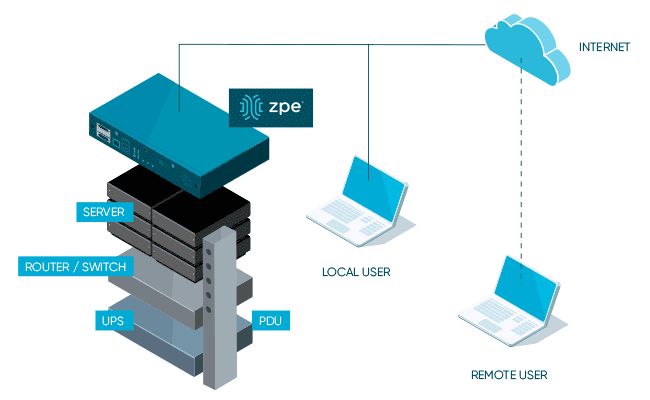
Providing Out-of-Band Connectivity to Mission-Critical IT Resources

Best Intel NUC Alternatives

Intel NUC Alternatives

Service providers often struggle with the hybrid nature of their business. Even as they transition more towards a consumable service-based model that’s decoupled from traditional hardware solutions, there’s still a need for some sort of box to be deployed physically at a customer’s premises. Providers frequently rely on COTS (Common Off The Shelf) hardware to reduce costs and simplify the deployment process.

One commonly used COTS device is the Intel NUC, or “Next Unit of Computing,” which is a small appliance-like mini computer. Some service providers utilize Intel NUC devices as jump boxes, while others use them as a platform to deploy their services on-site. While these mini-computers are relatively inexpensive and easy to install, they create added security risks and management headaches that service providers need to be aware of.

This post highlights the challenges and security risks involved in relying on Intel NUC devices before discussing enterprise-grade Intel NUC alternatives that solve these problems.

Table of contents:


Why is Intel NUC so popular in IT infrastructure?

Managed Service Providers (MSPs) and Managed Security Service Providers (MSSPs) often use Intel NUC jump boxes to remotely access the control plane of critical client infrastructure. These mini PCs typically run bare bones software to reduce licensing costs, which means they are unpatched, unmonitored, and unsecured. This lack of oversight and management makes Intel NUCs popular access points for hackers to breach client networks.

Why consider Intel NUC alternatives?

Service providers like to use Intel NUC boxes because they’re cheaper, faster to install, and take up less space than a full PC or server. NUCs are often deployed without antivirus, monitoring agents, or other security software installed, which excludes them from the service provider’s security coverage. Plus, clients are frequently unaware that these devices are in their racks accessing their infrastructure, so they don’t access them in security and compliance audits. Other Intel NUC challenges include:

  • Lack of centralized management – Each Intel NUC is an island that’s managed and accessed individually, which makes it impossible to efficiently deploy updates, install new tools, or monitor for problems.
  • Insecure, unpatched OS – Operating systems and software contain thousands of potential vulnerabilities that hackers can exploit, so a lack of monitoring and patch management creates a huge security risk.
  • No hardware security – Intel NUC boxes lack any hardware security, which means someone could steal the device and use it to deploy malware or access client resources – or even just pawn the hardware.
  • Regulatory issues – When providers use unmanaged jump boxes to access client infrastructure, they expose their customers to potential noncompliance with privacy laws like HIPAA that require strict data access controls.
  • Affects insurance eligibility – Using an unsecured Intel NUC may also disqualify customers from receiving cybersecurity insurance benefits in the event of a successful breach.

While Intel NUCs are a quick and inexpensive way for MSPs, MSSPs, and other service providers to remotely access client infrastructure, they also make it easier for cybercriminals to breach enterprise networks. To reduce the attack surface without increasing the cost, hassle, or footprint of deploying jump boxes, you need an enterprise-grade solution that combines networking functions, security, and remote out-of-band access to the control plane to eliminate the need for a separate device.

Intel NUC alternatives from ZPE Systems

The Nodegrid product line from ZPE Systems simplifies the tech stack in data centers and network closets with all-in-one infrastructure management solutions. Nodegrid devices roll up gateway routing, switching, Wi-Fi, and 5G/4G/LTE out-of-band management to cut down on the number of boxes in the rack. They’re also enterprise solutions, which means they can be onboarded with your security team and covered by your monitoring, intrusion detection, antivirus, and other security controls.

In addition, all Nodegrid boxes are protected by hardware security features such as BIOS protection, self-encrypted disk (SED), UEFI Secure Boot, and Signed OS. Plus, Nodegrid’s hardware and software are completely vendor-neutral, allowing easy integrations with third-party security solutions and SAML 2.0 authentication. Nodegrid can even directly host other vendors’ security software to further reduce your tech stack.

Key Nodegrid features


All Nodegrid Devices Include:

Key features

Strong Out-of-band management integration

Extensible applications with virtualization and containers

Zero Touch Provisioning (ZTP) over the WAN

Vendor-neutral, unified management via ZPE Cloud/Nodegrid Manager

Modern x86-64bit Linux Kernel

Extended automation based on actionable data

Failover to 4G/5G/LTE & Wi-Fi

Power control and monitoring

Orchestration support via Puppet, Chef, Ansible, RESTful

Security

BIOS protection

TPM 2.0

UEFI Secure Boot

Signed OS

Self-Encrypted Disk (SED)

Geofencing

X.509 SSH certificate support, 4096-bit encryption keys

Selectable cryptographic protocols for SSH and HTTPS (TLSv1.3)

Selectable cypher suite levels: high, medium, low, custom

SSL VPN (Client and Server)

IPSec, Wireguard, and Strongswan with support for multi-sites

Local, AD/LDAP, RADIUS, TACACS+, Kerberos, authentication

SAML support via DUO, OKTA, Ping Identity

Local, backup-user authentication support

User-access lists per port

Group/role-based authorization: AD/LDAP, RADIUS, TACACS+

Fine grain and role-based access control

Firewall – IP packet and security filtering, IP forwarding support

MD5 / SHA System Configuration Checksum™

System event syslog

Custom security settings

Strong password enforcement

Two-Factor Authentication with RSA and DUO

Networking

IPv4 / IPv6 Support

Embedded Layer 2 switching

VLAN

Layer 3 Routing

BGP

OSFP

RIP

QoS

DHCP (Client and Server)

RIPv1, RIPv2

VXLAN

DDNS

NTP

To learn more about the benefits of Nodegrid’s Intel NUC alternatives, contact ZPE Systems.

Nodegrid product comparison

The Nodegrid family of network edge routers delivers secure, Gen 3 OOB management for reliable remote access to distributed customer sites like branch offices or manufacturing centers.

Nodegrid Service Delivery Platform Family


Link SR

Bold SR

Hive SR

Gate SR

Net SR

Mini SR

CPU

X86-64bit Intel 

X86-64bit Intel

X86-64bit Intel 

X86-64bit Intel 

X86-64bit Intel 

X86-64bit Intel 

Cores

2

4 or 8

4 or 8

2, 4 or 8

2, 4, 8 or 16

4

Guest VM

1

1

1-2

1-3

1-6

1

Guest Docker

2+

2+

2+

2+

2+

2+

Storage

16GB – 128GB

32GB – 128GB

16GB – 128GB

32GB – 128GB

32GB – 128GB

14GB SED

Additional Storage

Up to 4TB

Up to 4TB

Up to 4TB

Up to 4TB

Up to 4TB

Wi-Fi

Yes

Yes

Yes

Yes

Yes

Yes

Cellular modem

1

1-2

1-2

1-2

1-6

1

5G

Yes

Dual 5G

Dual 5G

6x 5G

Sim slots

2

4

4

4

12

1

Serial Console Switch

1

8

Via USB

8

16-80

Via USB

Network

1x Gb ETH 1x SFP

5x Gb ETH

2x GbE ETH 2x 10 Gbps

4x 10/100/1000/2.5 Gbps RJ-45

2x SFP 5x Gb ETH

4x 1Gb ETH PoE+

2x 1Gb ETH 2x SFP+ Multiple expansion cards

2x 1Gb ETH

Data Sheet

Download

Download

Download

Download

Download

Download

The Nodegrid family of Intel NUC alternatives from ZPE Systems can help MSPs and MSSPs ensure secure, reliable remote management access to customer infrastructure without increasing costs.

Ready for a Demo?

To see one of ZPE’s Intel NUC alternatives in action, request a free Nodegrid demo! Request a Demo


The Importance of Remote Site Monitoring for Network Resilience

remote site monitoring

Enterprise networks are huge and complex, with infrastructure hosted in many different facilities across a wide geographic area. Though most network infrastructure isn’t housed in the same location as the core business, it’s still vital to the business’s continual operation. Remote site monitoring gives network admins a virtual presence in remote sites like data centers, manufacturing facilities, electrical substations, water treatment plants, and oil pipelines.

Most organizations already have some form of remote infrastructure monitoring, but traditional solutions come with major limitations that make it difficult for networking teams to maintain 24/7 uptime. In this blog, we’ll discuss the importance of remote site monitoring, analyze the limitations of traditional solutions, and explain how the ideal remote monitoring platform improves network resilience.

The importance of remote site monitoring

Many organizations have reduced their IT staff due to the economic recession, leaving networking and infrastructure teams stretched too thin. When there aren’t enough eyes on remote infrastructure, enterprise networks are more vulnerable to breaches, hardware failures, and other major causes of network outages. With the average cost of downtime rising above $100k in 2022, and cyberattacks causing major disruptions to oil pipelines in recent years, this is a problem that’s too expensive to ignore.

The limitations of traditional remote site monitoring solutions

Many organizations rely on remote site monitoring solutions that are fragmented and vendor-specific. Admins have to log in to one platform to view monitoring data for a remote site’s wireless access points, for example, and a different platform to monitor IoT devices in the warehouse. These complex and repetitive tasks can lead to fatigue and negligence, especially for overworked and understaffed networking teams. At an even higher level, this makes it difficult to see the relationships between different systems and solutions or get a complete picture of the overall health of the enterprise network.

Another limitation of traditional solutions is that they’re often affected by the same issues as the infrastructure they’re monitoring. For example, if the LAN goes down in a remote office and the on-premises security appliance can’t get an IP address, then admins won’t be able to remotely access that appliance to view the monitoring logs. This can significantly delay or even prevent remote diagnostic and recovery efforts, leading to expensive truck rolls.

The problem gets even worse if the remote site is inaccessible due to natural disasters, conflicts, or other external factors. Network teams need a way to get eyes on the problem, diagnose the root cause, and deploy fixes without physically seeing or touching the affected infrastructure.

The ideal remote site monitoring solution

To avoid these limitations and ensure network resilience, the ideal remote site monitoring solution should consider the following factors:

Vendor-neutral and centralized

A vendor-neutral monitoring platform can collect and analyze logs from every component of your infrastructure. This gives admins complete coverage, so nothing falls between the cracks.

Another benefit of vendor neutrality is that it enables unified, centralized monitoring. That means networking teams only need to log in to a single portal to observe the entire distributed enterprise architecture.

Out-of-band

Deploying remote site monitoring on an out-of-band (OOB) network means that it won’t rely on production LAN, WAN, or ISP infrastructure. This ensures that admins always have access to vital monitoring data even during an outage, making it easier to remotely diagnose the issue.

Plus, using an OOB management solution for monitoring improves network resilience even further by giving admins a direct connection to remote infrastructure that doesn’t require an IP address. That means they can still access and fix remote devices during an outage.

Automated

Automated monitoring solutions help to ensure that admins are quickly notified of potential issues and that possible remediation steps are taken even if nobody is available right away. Some solutions can, for example, automatically refresh DHCP on a device that lost its IP address or re-direct traffic to a secondary resource when the primary server stops responding.

Automated monitoring solutions help to reduce the workload on understaffed networking teams without sacrificing resilience.

Building network resilience with ZPE Systems

A centralized, vendor-neutral remote site monitoring solution with out-of-band management and automation support helps to ensure network resilience even when IT staff is reduced or remote sites become inaccessible. The Network Automation Blueprint from ZPE Systems provides a reference architecture for achieving network resilience with OOB, automation, monitoring, and more.

Ready to learn more?

To learn more about remote site monitoring and network resilience, contact ZPE Systems today.

Contact Us

Upgrade Network Infrastructure With Minimal Business Interruption

upgrade network infrastructure

Outdated network infrastructure poses a significant risk to the security and continuity of business operations. According to NTT’s “2020 Global Network Insights Report,” obsolete devices contain nearly twice as many security vulnerabilities as currently supported solutions. Outdated network hardware is also more likely to fail, and the ability to recover from a failure is severely hampered by a lack of vendor support. However, network upgrades can be highly disruptive, so many organizations delay network upgrades to avoid business interruption. They don’t realize that their outdated devices are like ticking time bombs that could bring down their network at any moment. In this post, we’ll provide advice that helps answer the question: How do I upgrade network infrastructure without disrupting business operations?

Why and when to upgrade network infrastructure

Obsolete network infrastructure no longer receives updates and security patches from the vendor. That means any vulnerabilities that exist on the device will remain open, giving cybercriminals time to find and exploit them. In addition, older network solutions often lack the advanced security features like SSO and MFA, which are required for Zero Trust.

Even supported legacy devices suffer from limitations that can prevent a business from achieving its technological goals. For instance, legacy devices may not support automation, making it difficult to achieve NetDevOps transformation. Plus, as enterprise networks grow more distributed, there’s a need for solutions that support SD-WAN and SD-Branch technology.

Sometimes the solutions themselves aren’t terribly outdated, it’s just that business requirements have changed in such a way that the existing infrastructure can’t support. For example, an organization may migrate some applications and systems to the cloud, so they need networking solutions that support hybrid environments. In addition, the mix of old and new devices and cloud and on-premises resources increases management complexity and prevents teams from effectively leveraging network orchestration.

Obsolete devices, outdated security, limited automation support, and changing business requirements are all important reasons to upgrade network infrastructure. However, these upgrades must be approached with a thoughtful strategy to reduce the impact on the performance and availability of business resources.

How to upgrade network infrastructure with minimal business interruption

Vendor agnostic platforms are the key to smooth network infrastructure upgrades. Vendor agnostic (a.k.a. vendor neutral) network management platforms support integrations with all or most viable and established network solutions, including legacy devices.

Vendor-neutral management devices, such as the Nodegrid Serial Console, support both legacy and modern Cisco pinouts. That means Nodegrid provides a single, unified platform from which to manage all the outdated devices you already have as well as any new solutions you add to your infrastructure. This reduces management complexity for network administrators, giving them more time to focus on optimizing performance and planning future network upgrades.

Additionally, a vendor-neutral network orchestration platform can use that management device to extend modern automation and orchestration to legacy hardware. A truly vendor-agnostic platform, such as Nodegrid Manager (for on-premises and private cloud deployments) or ZPE Cloud (for public cloud and hybrid deployments) can run third-party automation playbooks and custom Python scripts. This gives network administrators the unprecedented ability to implement a fully-automated NetOps environment even while still rolling out infrastructure upgrades.

The final piece of the puzzle is vendor-neutral Zero Touch Provisioning (ZTP). ZTP gives you the ability to deploy new devices efficiently and securely in remote data centers, branch offices, and edge compute sites. ZTP devices are provisioned automatically over the network, reducing the need for onsite deployments or pre-staging. A vendor-neutral ZTP solution like Nodegrid can extend ZTP to other vendors’ devices so you can quickly deploy upgraded infrastructure.

Nodegrid delivers vendor-neutral management, orchestration, and ZTP so you can upgrade network infrastructure with minimal business interruption.

Need Help Upgrading Your Network Infrastructure?

Contact ZPE Systems to learn how to upgrade your network infrastructure with Nodegrid.

Contact Us

Part 2: Immutable Infrastructure: Best Practices for Network Professionals

immutable infrastructure best practices
Immutable infrastructure involves servers, network appliances, and other devices which are never updated or changed. In part 1 of our blog series, we discussed the most inherent challenges with the immutable infrastructure paradigm. This post will cover immutable infrastructure best practices that you should follow to overcome these challenges and fully embrace immutable principles in your enterprise.

Immutable infrastructure best practices for network professionals

Infrastructure as Code (IaC)

Infrastructure as code, or IaC, uses software abstraction to separate infrastructure configurations from the underlying hardware, allowing you to write configurations as repeatable scripts that you can deploy to many different devices. It also facilitates automation and orchestration through tools like RedHat Ansible, which stores and automatically executes configuration scripts according to predefined playbooks.

IaC is used traditionally for physical and virtual server configurations, but you can also use it to create and maintain virtualized network device configurations. This is sometimes called network infrastructure as code or software-defined networking (SDN). SDN goes beyond just abstracting configurations from the underlying networking hardware. It virtualizes your entire network, creating an overlay for managing and optimizing network routing, load balancing, segmentation, and more.

IaC is an immutable infrastructure best practice because it allows you to create and deploy configurations quickly and at scale. It enables truly immutable infrastructure that you can copy, delete, and replace at will. Without IaC, you must provision each new and updated instance manually. Even with a large team of engineers, updates could take a long time, and intermediate periods during which different versions of the same server or network configuration were active simultaneously will appear. Plus, manual configurations are error-prone, and mistakes could create vulnerabilities in your network.

Infrastructure as code and network infrastructure as code allow you to deploy virtual configurations programmatically and automatically. For immutable infrastructure, IaC is frequently used to deploy and configure images for containers and other virtualized environments.

Golden images

A golden image is a standardized template for physical or virtualized infrastructure. You start with a base image with only the software and settings required universally across all instances of that device. Then, you install any agents or services needed for monitoring, threat detection, analysis, etc. Finally, you harden the image with security policies and tools, and patch any known security vulnerabilities. Once the golden image is complete, you freeze it so no further changes can be made.

Best practices for creating, securing, and updating golden images for immutable infrastructure include:

  • Incorporate as many dependencies and settings as possible in your golden image to reduce the amount of configuration that needs to happen at deployment. This will ensure that the golden image you’ve tested and validated is as close as possible to the final production configuration. It will also make it faster and easier to scale.
  • Continuously scan and analyze golden images for new security vulnerabilities. That way, you can create and deploy patched versions as soon as possible, hopefully before a malicious actor has time to exploit those vulnerabilities.
  • Fully decommission old images once they’ve been replaced with newer, more secure versions. This will ensure a consistent and secure environment, and decrease the risk of accidentally spinning up new instances with old images.
  • Store golden images in multiple locations on a micro-segmented network. Use zero trust security to create granular policies and build  customized micro-perimeters around your golden images. This will protect your images from exfiltration or unauthorized modifications. It will also ensure access to golden images for recovery purposes even if you must isolate particular micro-segments during a breach.

Golden images for virtualized servers and network devices can be deployed, modified, and updated through IaC orchestration platforms—Like AWS, Azure, etc. This further streamlines the provisioning of immutable infrastructure, ensures consistent configurations across instances, and facilitates fast and easy scaling.

Stateful and persistent data

You should strive to make infrastructure and data as ephemeral as possible. Still, there are cases where you’ll need data to persist as you’re creating, deleting, and copying immutable resources. For stateful and persistent data, you should use mountable storage attachable to new instances when old ones are terminated.

Make sure you separate the ephemeral data from stateful/persistent data, so you only keep what you absolutely need to. This will help you reduce storage costs and simplify your overall operations. In addition, you should ship log files off immutable instances and send them to a centralized monitoring server as frequently as possible to ensure they persist.

Implementing immutable infrastructure best practices in your enterprise

Many of these immutable infrastructure best practices rely on modern, software-defined technology stacks, making it challenging to apply them to legacy infrastructure. You also need clear, centralized orchestration to see and control every piece of your immutable infrastructure, even across highly distributed networks with remote branch and edge locations. Finally, all of your immutable infrastructure solutions must work together seamlessly regardless of vendor or ecosystem.

ZPE Systems can solve all these challenges with the Nodegrid network orchestration solution. Nodegrid supports network functions virtualization (NFV), which turns your physical networking appliances into virtualized solutions you can configure and manage through IaC and SDN. Nodegrid’s vendor-neutral serial console servers also support legacy pinouts, so you can bring your legacy physical infrastructure under your immutable orchestration umbrella.

The ZPE Cloud network orchestration platform can also control remote data center, branch, and edge infrastructure. You can host your choice of SD-WAN (software-defined wide area networking) solution on your Nodegrid devices or use ZPE Cloud’s SD-WAN app. This technology allows you to extend the reach of your virtualized network orchestration to your WAN architecture. To dig even deeper, you can use the SD-Branch app to control branch and edge LANs as well.

The ZPE Cloud platform and all Nodegrid devices are truly vendor-neutral, allowing integrations with leading third-party IaC, SDN, and security providers. Nodegrid empowers you to create a tightly-integrated, seamless immutable infrastructure solution for total network control.

See how Nodegrid can help you implement immutable infrastructure best practices in your enterprise.

Call 1-844-4ZPE-SYS to view a free demo.

Contact Us

Data Logging, Alert Notifications and Actionable Data

When you’re the one responsible for critical infrastructure assets within the data center, you’ve got to be quick to respond and readily available to take care of any issues that might surface.

What if something goes wrong?

Without Nodegrid’s Data Logging features, here’s how your day could go:

  • You only know of the issue after the fact. You’re made aware once someone has reported the issue.
  • Now you need to find out the location of the server – Where is the issue stemming from?
  • You need to look for the console access that is connected to the device
  • In case of power, you need to gain access to the PDU, enter those credentials (that you might have forgot), identify which outlet the device is plugged into, and then initiate the power cycle to that outlet.
  • You might not even know what happened to the device in the first place.

All these steps take time, time which is of the essence especially when it comes to critical infrastructure assets. Uptime is of the utmost importance.

This is why Nodegrid is trusted by some of the data center world’s largest companies.

Nodegrid’s Data Logging abilities allow you to collect a wide variety of data, such as key input, console messages and errors, and console usage.

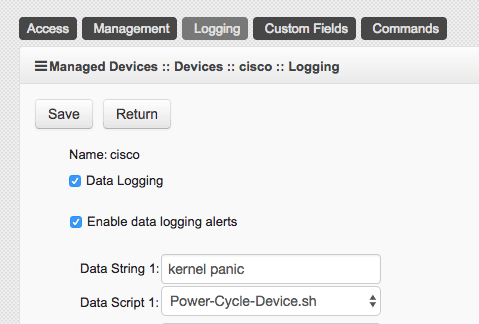
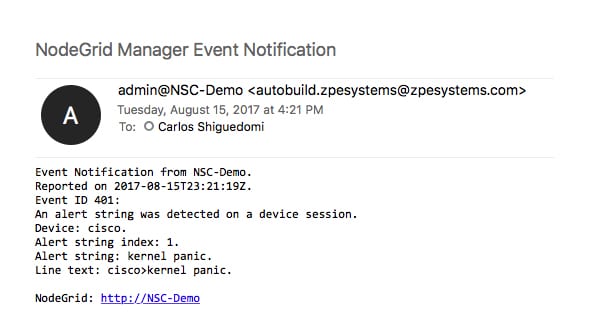
Set actionable string alerts and notifications whenever a known problem occurs – Choose any or all of the following notification types: e-mail, text, syslog, or snmptrap.
Nodegrid allows you to take actions based on string matches and console output. A recurring issue pops up, if its string matches, your selected script will be executed to alleviate the problem. Automate your fixes to save time and money.

All this is done in a matter of seconds:

  • A problem happens, Nodegrid finds a string match and executes the repair script
  • You get a detailed notification, telling you which devices experienced a specific problem
  • Data log is also sent to you to further investigate the issue and check for anomalies.

Nodegrid’s 64-bit Linux OS is ready for your automation scripts, allowing for multiple language options such as Python, JavaScript on Node.js, Bash, and more…

If data logging, alert notifications, and actually doing something with that information through actionable data is something that’s important to you, contact a ZPE representative to find out how we can help you out.