Providing Out-of-Band Connectivity to Mission-Critical IT Resources

White Box Networking: Making the Switch

A close up of fingers plugging an Ethernet cable into a white box networking switch
Vendor lock-in is risky to corporate revenue and security. Enterprise technology ends up on rails, so to speak. Organizations lose the ability to choose the best features, pricing, and functionality for their use cases and instead must go along with their vendor’s roadmap. This is leading executives to take a hard look at their existing networking tech stacks so they can break out of their closed ecosystems. White box networking solutions, which are designed around completely open and customizable hardware components, offer an escape from vendor lock-in. In this blog, we’ll discuss how white box networking works, what the benefits and challenges are, and how to build the best solution.

Table of Contents

  1. White box networking explained
  2. The benefits of white box networking
  3. The problem with white box networking
  4. The solution: White box networking with ZPE Systems

To see an example of white box networking in action, request a

free Nodegrid demo

White box networking explained

White box networking involves the use of hardware – like switches and routers – that are built with commodity parts and can run any software. These solutions are highly customizable, enabling organizations to mix and match parts from different suppliers to get exactly the features they need, like port configurations, storage capacity, and computational power. In addition, white box devices can run operating systems and software that’s been custom-made or heavily modified, allowing even greater flexibility.

The benefits of white box networking
.

Cost savings: Network Operating Systems (NOS) are often the most expensive component of a networking solution, involving recurring licensing fees, support contracts, and periodic update costs. Plus, the vendor may decide to overhaul or replace their software platform, requiring expensive network hardware replacements and licensing upsells to maintain support. White box networking decouples the hardware and software, giving organizations complete control over their NOS and allowing the use of open source or in-house operating systems. By eliminating their reliance on commercial NOS, companies can reduce both their upfront software costs and their recurring licensing fees.

Hardware and software freedom: Even if an off-the-shelf networking solution comes with the necessary features and functionality right now, that’s no guarantee that the feature roadmap will always align with an enterprise’s goals and future growth. A white box solution can be changed at any time by installing new software or replacing hardware components, so it can grow and evolve with an organization. This also means that companies can take advantage of new and emerging technologies like SD-WAN or AIOps as quickly as they want without needing to completely replace the underlying infrastructure – they can simply add the required hardware and software to their existing white box solutions.

Easy management and interoperability: The biggest benefit of white box networking is that it can be managed by any platform and integrated with any third-party solutions. This makes it easier for an organization to create a fully unified environment with centralized orchestration, end-to-end network automation, and complete visibility. Network teams get holistic control over the entire white box infrastructure from a single pane of glass, using their preferred automation scripts and orchestration tools, which ensures greater performance, reliability, and efficiency.
.

The problem with white box networking

Though white box networking has many advantages in theory, a lot of companies find it hard to achieve these benefits in practice. For one thing, many white box vendors focus simply on the hardware and don’t provide a default NOS. That means organizations need to spend additional time purchasing, customizing, or writing their own NOS as well as deploying that NOS to all new white box devices.

In addition, white box hardware is often sold in bulk and can become prohibitively expensive if bought in smaller quantities. An organization might end up buying a lot of extra parts they don’t need just to avoid outrageous shipping fees, and then they’re left with the hassle of storing or reselling that hardware.

White box networking also requires a lot of extra work to configure, deploy, and manage compared to a commercial off-the-shelf (COTS) solution. For many companies, the complexity of enterprise networks and the tech talent shortage make white box networking too much of a headache. Plus, white box manufacturers typically don’t provide ongoing support in the form of NOS updates and security patches, which means the enterprise must take on this responsibility themselves.

Plus, white box devices can also increase the security attack surface of the enterprise network. A poorly configured and unpatched NOS is a tempting target for cybercriminals, who can use a compromised white box device to access sensitive network resources.

The solution: White box networking with ZPE Systems

To use white box networking effectively while avoiding these challenges, you need a complete solution, not just disparate parts to assemble on your own. That solution should combine the open ecosystem approach of white box hardware, the centralized management and security patch advantages of point solutions, and pre-validated applications that don’t require a professional coder to deploy.

For example, the Nodegrid platform from ZPE Systems turns white box networking into a complete enterprise solution. Nodegrid devices are highly customizable, inexpensive, and arrive fully assembled. These devices come pre-installed with the Nodegrid OS, which is built on an x86-64 bit Linux kernel to ensure easy setup and interoperability. ZPE Systems can even manage Nodegrid OS updates and security patches for you, helping to reduce your attack surface and close the tech talent gap. Plus, you can directly host or integrate your choice of networking applications (including Docker containers and SASE solutions) for greater functionality, security, and ease of use.

The Nodegrid solution addresses every major challenge of white box networking so you get complete vendor freedom and simplified management in a single, affordable platform.

Ready to learn more?

To learn more about white box networking with Nodegrid,contact ZPE Systems today. Contact Us

Why You Need an Out-of-Band Cybersecurity Platform

out of band cyber security
As enterprise networks continue to grow in size and complexity, many organizations struggle to defend their expanding attack surface. The cost of failure also continues to grow – according to IBM’s 2022 Cost of a Data Breach report, the average cost of a successful ransomware attack reached $4.54 million. Koroush Saraf, VP of Product Management at ZPE Systems, identified the top five cybersecurity gaps that must be closed to achieve holistic cybersecurity, which include:

  • Unnecessary exposure of management ports
  • Credential theft
  • Unpatched infrastructure
  • Inability to deploy the right security tools
  • Human error

Closing these gaps requires a three-pronged approach – out-of-band infrastructure, an open platform from which to deploy and manage security tools, and end-to-end automation (aka, hyperautomation). In this blog, we’ll explain how an out-of-band cybersecurity platform combines these three key features into a single, holistic network security solution. Want to see an out-of-band cybersecurity platform in action? Request a free demo of the Nodegrid solution.

Why you need an out-of-band cybersecurity platform

An out-of-band (OOB) cybersecurity platform provides a single, unified interface from which to:

  • View and manage network infrastructure
  • Deploy and control all of the various security policies and applications needed to protect that infrastructure, and
  • Orchestrate network, infrastructure, and security automation.

This platform resides and operates on an out-of-band network running parallel to the production network, which ensures 24/7 availability even if there’s a LAN failure or ISP outage. All network, infrastructure, and security management occur OOB, which prevents resource-intensive orchestration workflows from negatively impacting performance. This vendor-neutral, automation-friendly, out-of-band approach to cybersecurity helps you in several areas.

Reduce your attack surface

The management ports on devices like servers and switches are frequently targeted by cybercriminals because they can be used to gain access to valuable data and resources on the production network. With an out-of-band cybersecurity platform, all infrastructure and network management occurs on the OOB network, which means you no longer need to expose management ports on the production network. Isolating management and orchestration workflows to the OOB network helps reduce the attack surface by making it much more difficult for attackers to find and access those open management ports. Vendor-neutral OOB cybersecurity platforms can also help companies reduce the number of individual devices and solutions on their network, which decreases the attack surface even more. An open OOB serial console like the Nodegrid Serial Console Plus (NSCP) can host other vendors’ applications and solutions and seamlessly integrate them into the cybersecurity platform, so there are fewer devices to patch and defend, and fewer vectors through which cybercriminals can attack.

Understand your attack surface

A centralized, vendor-neutral cybersecurity platform is able to dig its hooks into every component of an enterprise network, providing a complete overview of the entire architecture. With this holistic view, security analysts gain a better understanding of the attack surface and what’s needed to protect each vulnerability. For example, a cybersecurity platform can provide information about software versioning to help with security patch management or help identify which ports are open in various applications and why. Armed with this knowledge, an organization can then deploy granular policies, tools, and controls that are custom-tailored to provide the best defense.

Mitigate human error

Even the best network engineer, working in the ideal environment, will occasionally make mistakes. For example, a recent FAA outage that delayed thousands of flights was caused by a contractor mistakenly deleting some files. And unfortunately, the combination of a tech industry recession and a tech talent gap has meant that many IT teams are overworked and understaffed – far from an ideal situation. Human error is a leading cause of successful breaches, so network automation can reduce human error by letting scripts and playbooks handle many of the tedious and repetitive workflows involved in network management. An out-of-band cybersecurity platform can host or integrate with all the leading automation solutions and scripting languages, giving overworked admins the freedom to use the tools they’re most comfortable with. The centralized platform consolidates automated workflows in a single place for streamlined deployments and efficient management. Organizations can even achieve hyperautomation – automating every task and workflow across the network and security architecture – using the cybersecurity platform as an orchestration hub. This empowers understaffed teams to optimize network performance and security while reducing manual interventions, mitigating the risk of human error.

Ensure 24/7 coverage and availability

An out-of-band cybersecurity platform uses a dedicated network interface – such as a 5G cellular modem – to ensure continuous management access even when there’s an outage on the production network. That means admins have 24/7 access to the cybersecurity platform itself, as well as the devices and systems being protected by that platform. And, crucially, all of the security policies and tools will continue to protect production network infrastructure during that downtime. This continuous availability makes it possible for IT teams to remotely recover from device and network failures without the need for costly and time-consuming truck rolls. Or, in the event of a successful attack such as ransomware, admins can conduct recovery operations on the OOB network, creating an isolated recovery environment (IRE) that’s inaccessible to attackers.

Why choose Nodegrid as your OOB cybersecurity platform

An out-of-band cybersecurity platform uses OOB infrastructure, vendor-neutral management software, and end-to-end automation to provide holistic network security. The Nodegrid platform from ZPE Systems delivers all of this functionality in a single package. Using Gen 3 out-of-band serial consoles and integrated services routers, Nodegrid can dig its orchestration hooks into every system, device, and solution in your infrastructure for complete control. Nodegrid can host or integrate with your choice of automation tools (such as Chef, Ansible, and Puppet) and security applications (such as NGFWs and SSE) for seamless and unified network security management. Plus, with fast and reliable OOB network interface options – including 5G cellular and Wi-Fi – you can maintain 24/7 security coverage and management availability.

Ready to learn more?

To learn more about the Nodegrid out-of-band cybersecurity platform, contact ZPE Systems today. Contact Us
Network Engineers: 5 Must-Have Tools During a Slow Economy

Network Engineers: 5 Must-Have Tools During a Slow Economy

Network engineers need powerful tools to keep digital services online and customers happy. This is especially true during economic downturn, when organizations must freeze hiring and put more strain on existing staff. Revenue relies on network availability, and with experts predicting a recession this winter, significant operational challenges are inevitable for most organizations.

The burden of overcoming these challenges falls on network engineers. Success means maintaining reliable services and reaping any professional benefits (salary increases, promotions, etc.). Failure, on the other hand, means the very realistic possibility of major business losses and job cuts, including yours.

In order to make sure you don’t fall into the latter scenario, here are five must-have tools and techniques to help network engineers overcome these challenges.

Tool 1. OOBI-LAN™

Out-of-band (OOB) management is an essential part of a network engineer’s toolkit. At the conceptual level, out-of-band is meant to provide management access to production equipment, even if the production equipment is offline.

One major problem is that many organizations invest a lot of time and money into their production infrastructure, but not into any dedicated OOB infrastructure. In other words, they deploy OOB solutions that rely in part on their production equipment, such as OOB VLANs connected to in-band switches. All it takes is a mistake, misconfiguration, or attack to bring down the production and management networks, leaving network engineers to rebuild the entire system from scratch while their services remain offline to customers. This is simply not acceptable in a slow economy, where the business’ resources and revenue are already too thin.

From the pandemic lockdowns, organizations have learned that they need a way to more quickly recover their network locations. According to the Uptime Institute’s 2022 Outage Analysis, outages lasting longer than 24 hours increased to nearly 30% in 2021. This has led many to build dedicated OOB infrastructure for the LAN (OOBI-LAN). They deploy a serial console locally to establish connectivity to the management ports of their sensitive equipment. Network engineers must use this serial console to access their production infrastructure. This serial console minimizes the attack surface since it’s the only device connected to the Internet, and allows network engineers to restore services even if production equipment is down.

Tool 2. OOBI-WAN™

A critical tool for network engineers is out-of-band that enables remote WAN management. But typically, organizations employ a WAN management strategy that also relies on their production infrastructure, such as for creating VPN tunnels for management traffic. If a VPN tunnel becomes broken or the production gear fails, network engineers are suddenly left without remote access to their equipment.

Aside from a lack of availability, traditional OOB access comes with real security risks. Exposing LTE modems to the Internet, leveraging untrusted third-party VPN services, using OOB hardware that’s old and unpatched, and worse — exposing the management port of devices to public Internet. All of these are attack surfaces, any of which can give access to your infrastructure and be used as the pivot point to get to the rest of the infrastructure.

traditional WAN management approach

Image: Management access depends on production equipment to establish VPN tunnels. 

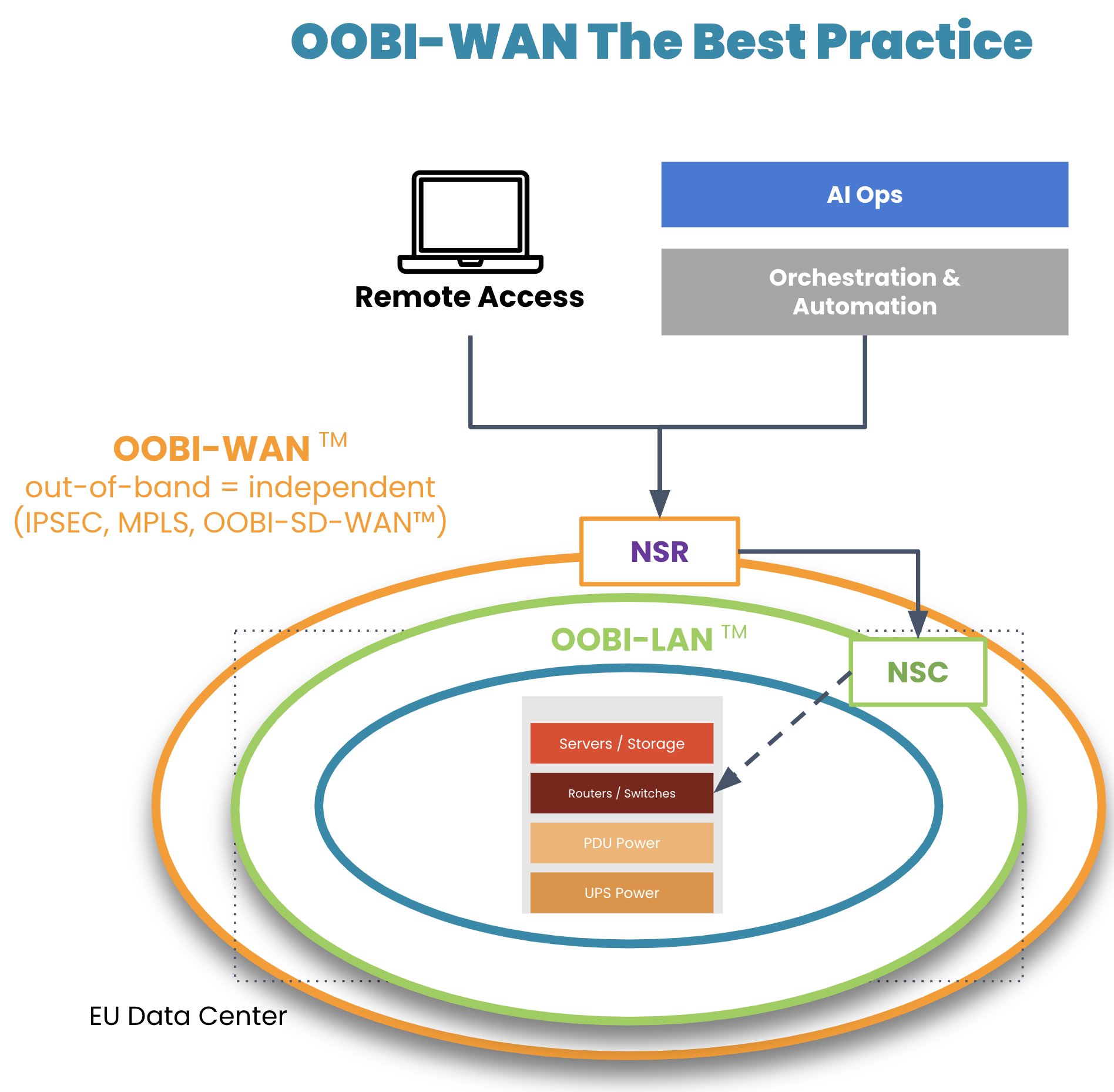
On top of their OOBI-LAN, organizations have built dedicated OOB infrastructure for the WAN (OOBI-WAN – there’s a Star Wars reference somewhere in there) for added resilience against these scenarios.

OOBI-WAN is the WAN best practice

Image: OOBI-WAN and OOBI-LAN create a fully separate out-of-band infrastructure that can be used to completely rebuild production infrastructure. 

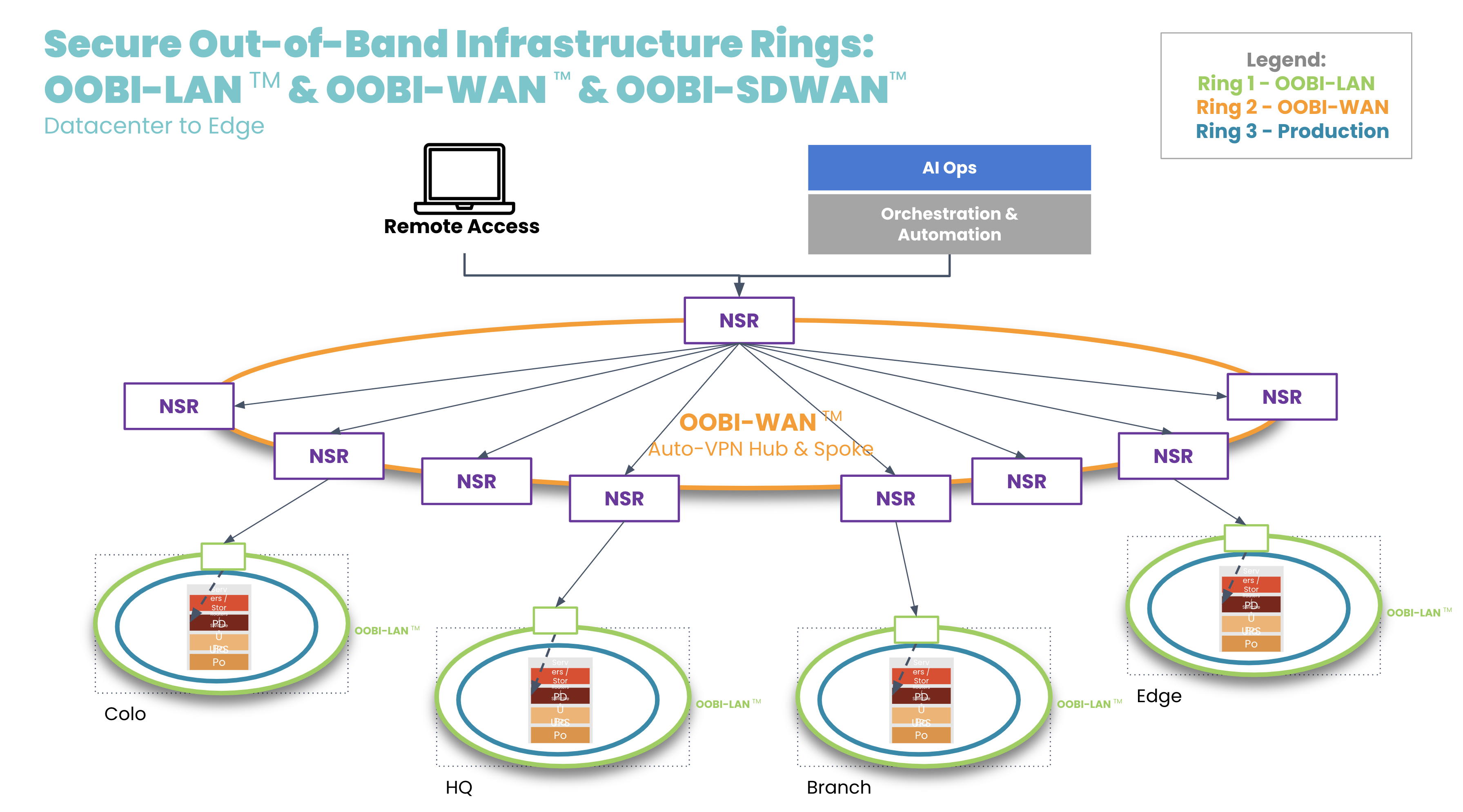
OOBI-WAN uses MPLS, IPsec, or SD-WAN links to create an overlay network dedicated specifically to management traffic. This gives network engineers private access to their infrastructure for management and troubleshooting, essentially creating a completely separate OOB network that does not rely on any part of the production network. OOBI-WAN lets network engineers use their WAN connection to remotely access their OOBI-LAN and fully rebuild their distributed networks, regardless of the state of their production infrastructure.  

A key part of OOBI-WAN is the inherent security that is built at all layers. To build secure OOBI-WAN, the best practice is to use OOBI-SDWAN™ which automates the building of VPN tunnels between all the nodes that need to be managed. OOBI-SDWAN provides the expected auto-VPN feature which means VPN encryption keys remain secure, as they don’t need to be copied/pasted/typed into multiple third-party devices. OOBI-SDWAN also ensures that an SLA is provided on the OOBI network along with observability dashboards of connectivity and the access state of the network. The combination of OOBI-SDWAN with a zero trust security framework is the best way to gain reliability in a way that reduces your risk.

OOBI-WAN hub and spoke

Tool 3. Fully independent automation infrastructure

Another tool that network engineers are becoming familiar with is automation. Network automation codifies repetitive tasks to reduce workloads for configuration management, compliance, and troubleshooting. During a slow economy, being able to scale an IT team’s efforts is especially valuable to business operations and end customers.

There is one major concern, however: having automation that runs loose and begins destroying the network, much like a bull in a China shop. Network engineers typically must learn new automation tools and programming languages, which requires trial and error. And because there is a lack of a best practice reference architecture, teams don’t know any better than to automate directly on the production network. This causes anxiety, as one mistake could bring down the network, cause catastrophic losses, and leave network engineers without an efficient way to recover.

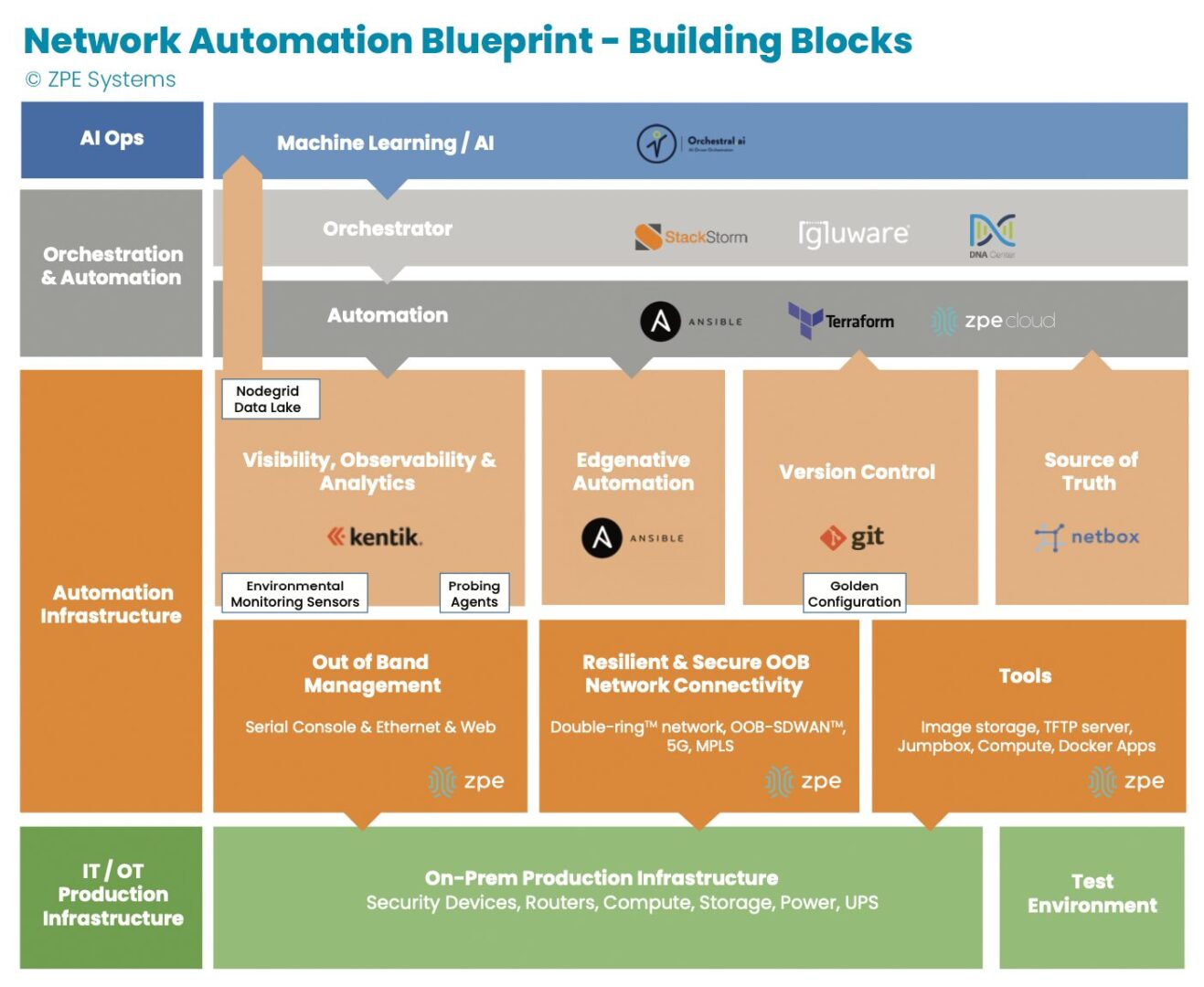
Image: The orange section describes dedicated automation infrastructure used for safely implementing automation.

In recent years, teams have been deploying automation on dedicated infrastructure like their OOB network. This automation infrastructure sits between the production infrastructure and the orchestration infrastructure, and serves as a safe way to build an automation pipeline. Open, Linux-based appliances like the Nodegrid Net SR combine a variety of functions and can host automation tools, like those for observability and analytics, version control, and source of truth. This independent automation infrastructure allows network engineers to ensure the integrity of configuration changes, software updates, and remediation protocols in an out-of-band manner, rather than testing directly on the production network. They can scale their capabilities, and in case of errors, roll back to a golden configuration that keeps services online.

Tool 4. Remote access to local jump box

Network engineers have another tool at their disposal: the jump box (a.k.a. jump server, jump host). A jump box hosts tools for maintaining operations, and these include file servers, image storage, configuration management tools, and troubleshooting commands. The jump box is a valuable asset for normal operations and for restoring services, such as when a device fails and needs its image rebuilt.

The issue with jump boxes is that they are typically a separate device that requires power, cooling, rack space, and maintenance. Some jump boxes also require on-site technicians to physically connect to the equipment needing repair.

Many organizations have adapted by upgrading their OOB infrastructure with appliances that can run full virtual machines (VMs). These can run all the tools mentioned above as well as with Docker containers, while consolidating power consumption, cooling resources, and rack space. The OOB appliance can double as a jump box. Combined with OOBI-LAN and OOBI-WAN, network engineers get remote access to re-image a device, diagnose DNS/routing issues, and perform any other necessary tasks. Key point is that discrete jump boxes – Like the Intel NUC — to be converted to virtual jump boxes running on a secure OOB platform like the Nodegrid Service routers.

Tool 5. Smart hands

A final way that network engineers get help through a slow economy is by outsourcing to so-called ‘smart hands.’ Employing smart hands means involving a third-party expert who can take on some of the IT workload. It’s a viable strategy, especially for teams feeling crushed by corporate belt tightening and the resulting mountain of tasks.

Companies who take this approach must be aware that the skills of smart hands varies greatly, as does the cost. This means it’s essential to strike a balance between which tasks to outsource, and which tasks to keep in house. For example, many organizations use smart hands for simple jobs such as replacing hardware and installing equipment at new sites. For more specialized jobs that require deeper knowledge of the environment, such as fixing a misconfigured IP address or route, teams use in-house personnel. This balance helps organizations get the support they need to keep operations running.

Get a cheat sheet to implement these tools fast

Some companies thrive during economic downturn, because they’ve intelligently placed these tools within their network architecture. Over the past decade, we’ve worked with these companies — including the largest tech giants — to describe in painstaking detail how they set up their infrastructure. We just released all 40+ pages of this validated reference architecture, complete with implementation diagrams and examples.

It’s called the network automation blueprint and it combines all of these tools. Network engineers can confidently answer questions like:

  • How do we meet SLAs with a smaller workforce?
  • How can we keep sites operating without physical access to equipment?
  • How can we perform weekly updates/patching without breaking things?

The blueprint is your cheat sheet to implementing a more resilient network, and fast. Click the button below to download your copy now.

3 Gaps That Will Leave IT Teams Scrambling This Winter

Winter is Looming – Wolf Howling

Today’s IT teams must maintain a growing infrastructure of on-prem and cloud solutions. These range from physical routers, out-of-band devices, and firewalls, to Zero Trust Security solutions, micro-segmentation tools, and network automation integrations. Despite an abundance of physical and virtual solutions meant to help keep digital services online, many organizations face an overwhelming number of tasks just to sustain everyday operations. 

With the rising risk of recession, organizations will be forced to cut back on resources including staff, training, and tools. This will only worsen the existing challenges teams face in their efforts to maintain their distributed infrastructure. 

In this blog, we’ll explore three gaps that will leave IT teams scrambling this winter, and show you several practical approaches to cope during recession. 

Gap 1: Lack of staff

IT teams have been historically understaffed, and most people can remember at least one significant tech worker hiring campaign from the past decade. Today’s CIOs may in fact be facing the biggest talent gap since 2008. For example, in the cybersecurity sector alone, the 2021 (ISC)2 Cybersecurity Workforce Study reported that despite adding 700,000 cybersecurity professionals to the workforce in 2021, there’s still a gap of more than 2.7 million workers globally, 377,000 of which are needed in the United States. 

Trained staff are a must for managing an organization’s distributed sites, especially as team silos disappear and workers are required to have a breadth of skills. Business leaders increasingly need people who are proficient in networking and programming, so they can maintain normal operations while progressing their digital transformation initiatives such as hyperautomation. It’s a challenge that often comes down to hiring new talent or increasing the skills of existing employees, and both of these approaches require plenty of time and money. 

This issue will only worsen with the coming recession as companies begin to tighten their belts and slash budgets. Major brands have already shed thousands of workers this year, leaving IT teams to make due with existing staff numbers or even reduced headcounts. In the simplest terms, the coming recession will leave companies much less willing or able to invest in staff. 

Gap 2: Lack of tools to reduce workloads

Today’s infrastructure incorporates solutions from many different vendors, but the problem is these often come with their own unique tools that are meant to serve only a specific function. Managing SD-WAN, SASE, ZTNA, orchestration, and out-of-band solutions means jumping between disparate tools, many of which lack integration with one another. This complexity leaves operational teams stuck in a reactionary break/fix posture trying to climb mountains of never-ending support tickets. 

To address this challenge, many Big Tech companies empower their IT teams through digital transformation initiatives, such as using automation to achieve a proactive approach. But this requires additional investments in upskilling staff and acquiring adequate automation infrastructure/tools. For many organizations, a lack of money and resources makes this difficult during normal economic conditions, and will only become exacerbated with the coming recession. IT teams will continue scrambling with their inflated workloads.

Gap 3: Lack of trust in automation

Automation can greatly reduce the risk of human error (and subsequent outages) by handling simple workloads, such as device provisioning and firmware updates. However, companies that do have the resources to implement automation also recognize its limitations. Automation solutions that aren’t optimized leave IT teams with mundane tasks like managing, scheduling, and restarting bots. But to even reach this level of automation requires training staff who typically don’t have a background in programming or development. 

These teams will be unfamiliar with NetOps/DevOps concepts. In order to develop essential automation practices, these employees will need to learn through trial and error. This is a problem because most organizations lack the proper automation infrastructure and tools that allow their IT teams to recover from mistakes. Operational teams in charge of keeping infrastructure running often fear automation for this exact reason — if they make one error, there’s the potential that it will bring down the network, lead to unhappy customers, and cost them their job. 


BlueprintPDF

Close these gaps with the Network Automation Blueprint

You can close these gaps for good using out-of-band, jump boxes, and tools you already have. After years of working directly with tech giants, we’ve created a best practice reference architecture any company can use to automate their network. This Network Automation Blueprint has been proven by global enterprises to increase capabilities and reduce workloads through trustworthy automation.

Data Center Colocation Services: Best Practices for Managing Remote Infrastructure

Data center colocation services can help your customers stay secure

The demand for data center colocation services is on the rise, with the industry estimating an increase of 13.35% in 2022. Colocation services are often less expensive than maintaining an on-site data center, allowing you to redirect resources to more exciting and lucrative technology initiatives. However, remote infrastructure can be more challenging to monitor, secure, and troubleshoot. Plus, if you’re not careful, usage-based pricing could cause your budget to spiral out of control. Here’s what to know about the potential challenges and the best practices to implement to avoid common pitfalls.

Data center colocation services: Challenges and solutions

Challenge 1: Visibility

One way that data center colocation services differ from on-premises data centers is that there is often less physical access to and visibility over the infrastructure. Administrators can’t pop in every day to check environmental conditions like temperature and humidity or to verify that nobody has opened the cage without permission or physically tampered with the equipment. This can make it challenging to maintain optimal conditions to extend the life of your equipment and prevent catastrophic failure.

In addition, colocation facilities also follow the shared responsibility model, which means they’re responsible for a certain portion of security, and you’re responsible for the rest. The facility usually has security cameras, electronic door locks, and other security measures in place, but you generally won’t have access to the videos or logs as a customer. That means you need to ensure that you make up the difference with comprehensive monitoring solutions so there are no gaps in your coverage.

Solution 1: Environmental and infrastructure monitoring

Environmental monitoring sensors collect data on conditions in the data center, providing administrators with a virtual presence in remote colocation facilities. The sensors connect to the I/O ports of console servers and other infrastructure management systems, allowing administrators to monitor things like temperature, humidity, and air quality. Often, these systems use pre-set baselines and will trigger automatic alerts when conditions exceed safe levels, making it easier to efficiently monitor remote infrastructure.

Some environmental monitoring systems also include physical tampering sensors, which will alert administrators if someone opens the door to your cage or comes in close proximity to your equipment without prior authorization. This helps to supplement the physical security provided by colocation services and gives you more control over your remote infrastructure.

Challenge 2: Compliance with data privacy regulations

When the infrastructure used to store and process data is no longer managed on-site by in-house staff, it gets much more difficult to stay compliant with strict data privacy regulations. For example, if your organization processes HIPAA data, you need to know exactly who has access to that data, what specific data they access, and why they need access. That also includes access to the infrastructure that stores and processes the data.

If that infrastructure is housed and managed by a third party, as is the case with data center colocation, you need stricter privacy and security controls to maintain compliance.

Solution 2: Zero trust security

The zero trust security methodology is based on the principle of “never trust, always verify.” In the zero trust model, you microsegment your network to facilitate the creation of highly precise security policies and controls. This allows you to control exactly who has access to which resources in your colocation facility.

In addition, the zero trust methodology recommends identity and access management (IAM) solutions with two-factor authentication (2FA) and user and entity behavior analytics (UEBA). These solutions force an account to re-verify its identity and re-establish trust before it can move to different microsegments and access other resources. This both aids in data privacy compliance and limits the lateral movement of compromised accounts, improving the overall security of your remote infrastructure.

Challenge 3: Around-the-clock access to remote infrastructure

Colocation data center infrastructure is managed remotely over the WAN, which requires an internet connection. When administrators manage that infrastructure on the same production network used for data traffic, it’s known as in-band management.

The issue with in-band management is that it relies on the same LAN architecture that’s used in production. That means a misconfiguration or hardware failure that takes the LAN offline will also cut off all management access, making remote troubleshooting impossible. The same issue occurs if there’s a WAN failure or ISP outage.

If administrators can’t troubleshoot and recover the infrastructure remotely, you will need to dispatch a truck roll, which is both expensive and time-consuming. And, the longer that infrastructure is offline, the higher your downtime costs, including lost business and reputation damage.

Solution 3: Out-of-band (OOB) management

Out-of-band (OOB) management uses serial consoles with secondary WAN interfaces to provide an alternative path to remote infrastructure. OOB serial consoles create a dedicated management network that’s separate from the production LAN. This gives you the ability to perform resource-intensive orchestration workflows without negatively impacting production performance.

OOB management also allows administrators to remotely troubleshoot device failures, LAN misconfigurations, and other sources of outages. This reduces your reliance on truck rolls and helps you recover from outages quicker, so you can lower your costs and protect your reputation.

Challenge 4: Colocation bills

The cost of data center colocation services is generally dependent on your power and bandwidth usage as well as the amount of space your equipment takes up. If not managed properly, usage-based pricing can cause your monthly bill to vary dramatically, wreaking havoc on your budget. Many factors lead to usage spikes, such as sudden surges in demand and inefficient power distribution.

Plus, as your business grows and your technology requirements evolve, you may need to scale up the number of devices in your rack. And as you add more computing, storage, and server resources, you also need more management devices (e.g., serial consoles), all of which take up valuable real estate in the data center.

Solution 4: DCIM orchestration, SDN, and all-in-one devices

This particular challenge has multiple solutions, any or all of which can help keep costs in check while enabling easier scaling.

Data center infrastructure management (DCIM) solutions provide a centralized platform from which to monitor and control remote infrastructure. DCIM tools give administrators the ability to monitor power flows and redistribute loads on demand for more efficient power usage. Modern DCIM orchestration solutions also include automation capabilities for optimal power load balancing.

Software-defined networking (SDN) creates a virtual overlay network, dedicated to management and orchestration, that sits on top of the network architecture. This facilitates the use of sophisticated network automation workflows such as intelligent routing, which can automatically redirect traffic to alternative resources when the bandwidth load on your colocation infrastructure is too high. SDN can help you stay within bandwidth usage thresholds at your colocation data center(s), so you can use your services more cost-effectively.

Finally, all-in-one networking devices can help you reduce the number of boxes in your rack, so you use less square footage in the data center. For example, a device like the Nodegrid Serial Console Plus provides out-of-band management access, routing, switching, and network failover in a single box. Plus, it includes 96 managed serial ports in a single 1U rack-mount form factor, reducing the number of management devices required to control large-scale data center deployments.

Want more solutions on how ZPE can help?

Learn more about how Nodegrid can help you efficiently manage your data center colocation services!

Contact ZPE Systems

Solving Remote IT Infrastructure Management Challenges With Gen 3 Out-of-Band

Remote it infrastructure management

Enterprise IT management used to be much simpler. The entire network infrastructure would reside in the same location as the administrators who managed it, typically in closets and basement rooms in the HQ office building. Those days are long gone, however, and now most infrastructure is housed in off-site data centers, colocations, the cloud, or a combination of these. For most organizations, it isn’t feasible to maintain tech teams in each of these locations, which means administrators need to remotely manage their IT infrastructure.

Remote IT infrastructure management presents some interesting challenges. First, you need a way to remotely troubleshoot and recover from outages when the main WAN connection is unavailable. Second, you need to maintain optimal environmental conditions and monitor for issues that could damage data center equipment.

Solving remote IT infrastructure management challenges with Gen 3 out-of-band

Out-of-band (OOB) management uses a dedicated network to handle the orchestration and troubleshooting of remote infrastructure. This provides an alternative network path to this infrastructure in case the primary WAN link is down, and allows administrators to perform complex orchestration workflows without slowing down the production network.

Gen 3 OOB uses serial consoles to give administrators management access to many devices in the rack from one centralized portal. What makes an OOB serial console “Gen 3” is a combination of high-speed out-of-band access, complete vendor neutrality, and end-to-end automation and orchestration support. Let’s discuss how Gen 3 out-of-band can solve the three major remote IT infrastructure management challenges.

Remote troubleshooting and outage recovery

Downtime is expensive, which is why it’s important to recover from network outages as quickly as possible. However, many of the tools used to remotely manage IT infrastructure require a network connection. If a piece of networking hardware fails and takes down the LAN, or the ISP suffers a regional outage, administrators are left without access to troubleshoot and fix the problem. That leaves only two options: dispatching a truck roll or hiring on-site managed services. Option one is time-consuming and expensive, and option two is a security risk (and also expensive).

A Gen 3 OOB solution provides one or more alternative network paths to remote infrastructure. Often, it uses a cellular modem or secondary broadband network interface, which may also provide network failover capabilities. All network and infrastructure management occurs on this dedicated network, which provides two benefits:

  1. Deployment, maintenance, and orchestration activities won’t take up bandwidth on the production network; and
  2. Administrators can still access critical remote infrastructure during a production network outage.

Gen 3 OOB improves upon earlier technology which used slow dial-up interfaces, insecure hardware, and closed OS architectures. Gen 3 out-of-band includes security features like UEFI secure boot, geofencing, and an onboard firewall. The operating system is Linux-based to allow for easy integrations with any vendor solution, and vulnerabilities are patched quickly. This ensures that administrators have constant, high-speed, secure access to remote multi-vendor IT infrastructure.

Remote monitoring of environmental conditions

The environmental conditions in the data center have a major impact on the performance and functionality of critical infrastructure. Environmental threats like heat, moisture, power surges, smoke, and even physical tampering are major causes of data center downtime. When you don’t have actual eyes on the conditions in your rack, it can be difficult to detect environmental issues early on, when there’s still a chance to correct the issue and prevent downtime.

A Gen 3 OOB serial console includes GPIO interfaces for environmental monitoring sensors. These sensors are used to measure the temperature, relative humidity, air quality, and airflow in a rack, and in some cases can also detect smoke, proximity, and tampering. The monitoring sensors feed data back into a centralized environmental monitoring system which provides visualizations of present and historical conditions. It also sends automatic alerts to administrators when conditions require immediate attention. Plus, since this monitoring system is integrated with an OOB serial console, administrators can stay abreast of environmental conditions even when the production network goes down.

Remote IT infrastructure automation and orchestration

Automation allows IT teams to manage network infrastructures faster and more efficiently while reducing the risk of human error. However, one of the major hurdles to automation is vendor lock-in. Many infrastructure solutions don’t integrate with third-party automation tools and instead require you to use their own proprietary scripting languages and playbooks. Since many IT infrastructures are made up of a variety of vendor hardware and software solutions, administrators are forced to learn and manage multiple different automation platforms.

This difficulty only increases when those solutions are managed remotely. Administrators need to remotely jump from box to box and interface to interface just to execute basic automation workflows. It gets even more complicated when there are multiple remote sites to manage, as is the case in many large and globalized enterprises.

By definition, a Gen 3 out-of-band platform is vendor-neutral. That means it can dig its orchestration hooks into every hardware and software solution in your data center. It also supports integrations and direct hosting of third-party automation tools, so you can use the scripting languages and automation solutions of your choice. Finally, a Gen 3 solution centralizes the orchestration of all remote IT infrastructure automation workflows, so administrators can monitor and manage everything from behind one pane of glass.

Solving remote IT infrastructure management challenges with the Nodegrid Gen 3 out-of-band platform

The Nodegrid remote IT infrastructure management solution from ZPE Systems is the first Gen 3 out-of-band platform. Nodegrid delivers secure OOB, a robust environmental monitoring system, and end-to-end automation and orchestration in a single Gen 3 OOB serial console.

The Nodegrid Serial Console Plus (NSCP) provides OOB access and network failover via built-in 5G/4G LTE cellular and Wi-Fi modules, ensuring administrators have a dedicated high-speed connection to critical network infrastructure. Nodegrid hardware is protected by onboard security features like TPM 2.0, encrypted SSD, UEFI BIOS protection, secure boot, and geofencing, so you don’t have to worry about malicious actors compromising your management network. The open architecture, Linux-based Nodegrid OS is secured by frequent patches and supports third-party integrations or the direct hosting of third-party applications.

The Nodegrid environmental monitoring system includes sensors for dry contact, temperature, humidity, smoke, airflow, dust, and particulates so you have 24/7 visibility into the conditions in your rack. These sensors integrate seamlessly with the Nodegrid OS as well as the ZPE Cloud remote IT infrastructure management platform.

ZPE Cloud provides a centralized control panel from which to monitor and orchestrate your Gen 3 OOB network. ZPE Cloud’s vendor-neutral platform can “say yes” to any hardware, software, or automation solution you choose, so you can achieve end-to-end infrastructure automation without compromises.

Ready to learn more?

To learn more about how Nodegrid solves remote IT infrastructure management challenges through Gen 3 OOB, contact ZPE Systems

Contact Us