Providing Out-of-Band Connectivity to Mission-Critical IT Resources

Edge Computing Use Cases in Retail

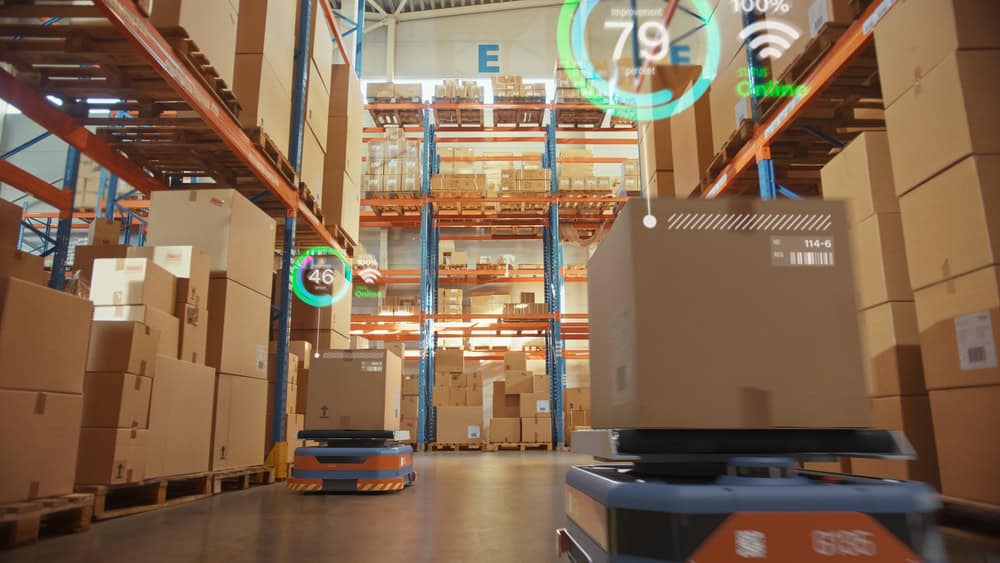
Automated transportation robots move boxes in a warehouse, one of many edge computing use cases in retail
Retail organizations must constantly adapt to meet changing customer expectations, mitigate external economic forces, and stay ahead of the competition. Technologies like the Internet of Things (IoT), artificial intelligence (AI), and other forms of automation help companies improve the customer experience and deliver products at the pace demanded in the age of one-click shopping and two-day shipping. However, connecting individual retail locations to applications in the cloud or centralized data center increases network latency, security risks, and bandwidth utilization costs.

Edge computing mitigates many of these challenges by decentralizing cloud and data center resources and distributing them at the network’s “edges,” where most retail operations take place. Running applications and processing data at the edge enables real-time analysis and insights and ensures that systems remain operational even if Internet access is disrupted by an ISP outage or natural disaster. This blog describes five potential edge computing use cases in retail and provides more information about the benefits of edge computing for the retail industry.

5 Edge computing use cases in retail

.

1. Security video analysis

Security cameras are crucial to loss prevention, but constantly monitoring video surveillance feeds is tedious and difficult for even the most experienced personnel. AI-powered video surveillance systems use machine learning to analyze video feeds and detect suspicious activity with greater vigilance and accuracy. Edge computing enhances AI surveillance by allowing solutions to analyze video feeds in real-time, potentially catching shoplifters in the act and preventing inventory shrinkage.

2. Localized, real-time insights

Retailers have a brief window to meet a customer’s needs before they get frustrated and look elsewhere, especially in a brick-and-mortar store. A retail store can use an edge computing application to learn about customer behavior and purchasing activity in real-time. For example, they can use this information to rotate the products featured on aisle endcaps to meet changing demand, or staff additional personnel in high-traffic departments at certain times of day. Stores can also place QR codes on shelves that customers scan if a product is out of stock, immediately alerting a nearby representative to provide assistance.

3. Enhanced inventory management

Effective inventory management is challenging even for the most experienced retail managers, but ordering too much or too little product can significantly affect sales. Edge computing applications can improve inventory efficiency by making ordering recommendations based on observed purchasing patterns combined with real-time stocking updates as products are purchased or returned. Retailers can use this information to reduce carrying costs for unsold merchandise while preventing out-of-stocks, improving overall profit margins.
.

4. Building management

Using IoT devices to monitor and control building functions such as HVAC, lighting, doors, power, and security can help retail organizations reduce the need for on-site facilities personnel, and make more efficient use of their time. Data analysis software helps automatically optimize these systems for efficiency while ensuring a comfortable customer experience. Running this software at the edge allows automated processes to respond to changing conditions in real-time, for example, lowering the A/C temperature or routing more power to refrigerated cases during a heatwave.

5. Warehouse automation

The retail industry uses warehouse automation systems to improve the speed and efficiency at which goods are delivered to stores or directly to users. These systems include automated storage and retrieval systems, robotic pickers and transporters, and automated sortation systems. Companies can use edge computing applications to monitor, control, and maintain warehouse automation systems with minimal latency. These applications also remain operational even if the site loses internet access, improving resilience.

The benefits of edge computing for retail

The benefits of edge computing in a retail setting include:
.

Edge computing benefits

Description

Reduced latency

Edge computing decreases the number of network hops between devices and the applications they rely on, reducing latency and improving the speed and reliability of retail technology at the edge.

Real-time insights

Edge computing can analyze data in real-time and provide actionable insights to improve the customer experience before a sale is lost or reduce waste before monthly targets are missed.

Improved resilience

Edge computing applications can continue functioning even if the site loses Internet or WAN access, enabling continuous operations and reducing the costs of network downtime.

Risk mitigation

Keeping sensitive internal data like personnel records, sales numbers, and customer loyalty information on the local network mitigates the risk of interception and distributes the attack surface.

Edge computing can also help retail companies lower their operational costs at each site by reducing bandwidth utilization on expensive MPLS links and decreasing expenses for cloud data storage and computing. Another way to lower costs is by using consolidated, vendor-neutral solutions to run, connect, and secure edge applications and workloads.

For example, the Nodegrid Gate SR integrated branch services router delivers an entire stack of edge networking, infrastructure management, and computing technologies in a single, streamlined device. The open, Linux-based Nodegrid OS supports VMs and Docker containers for third-party edge computing applications, security solutions, and more. The Gate SR is also available with an Nvidia Jetson Nano card that’s optimized for AI workloads to help retail organizations reduce the hardware overhead costs of deploying artificial intelligence at the edge.

Consolidated edge computing with Nodegrid

Nodegrid’s flexible, scalable platform adapts to all edge computing use cases in retail. Watch a demo to see Nodegrid’s retail network solutions in action.
Watch a demo

Why Securing IT Means Replacing End-of-Life Console Servers

Rene Neumann – Why Securing IT Means Replacing End of Life Console Servers


The world as we know it is connected to IT, and IT relies on its underlying infrastructure. Organizations must prioritize maintaining this infrastructure; otherwise, any disruption or breach has a ripple effect that takes services offline for millions of users (take 2024’s CrowdStrike outage, for example). A big part of this maintenance is ensuring that all hardware components, including console servers, are up-to-date and secure. Most console servers reach end-of-life (EOL) and need to be replaced, but for many reasons, whether budgetary concerns or the “if it isn’t broken” mentality, IT teams often keep their EOL devices. Let’s look at the risks of using EOL console servers, and why replacing them goes hand-in-hand with securing IT.

The Risks of Using End-of-Life Console Servers

End-of-life console servers can undermine the security and functionality of IT systems. These risks include:

1. Lack of Security Features and Updates

Aging console servers lack adequate hardware and management security features, meaning they can’t support a zero trust approach. On top of this, once a console server reaches EOL, the manufacturer stops providing security patches and updates. The device then becomes vulnerable to newly discovered CVEs and complex cyberattacks (like the MOVEit and Ragnar Locker breaches). Cybercriminals often target outdated hardware because they know that these devices are no longer receiving updates, making them easy entry points for launching attacks.

2. Compliance Issues

Many industries have stringent regulatory requirements regarding data security and IT infrastructure. DORA, NIS2 (EU), NIST2 (US), PCI 4.0 (finance), and CER Directive are just a few of the updated regulations that are cracking down on how organizations architect IT, including the management layer. Using EOL hardware can lead to non-compliance, resulting in fines and legal repercussions. Regulatory bodies expect organizations to use up-to-date and secure equipment to protect sensitive information.

3. Prolonged Recovery

EOL console servers are prone to failures and inefficiencies. As these devices age, their performance deteriorates, leading to increased downtime and disruptions. Most console servers are Gen 2, meaning they offer basic remote troubleshooting (to address break/fix scenarios) and limited automation capabilities. When there is a severe disruption, such as a ransomware attack, hackers can easily access and encrypt these devices to lock out admin access. Organizations then must endure prolonged recovery (like the CrowdStrike outage, or 2023’s MGM attack) because they need to physically decommission and restore their infrastructure.


The Importance of Replacing EOL Console Servers

Here’s why replacing EOL console servers is essential to securing IT:

1. Modern Security Approach

Zero trust is an approach that uses segmentation across IT assets. This ensures that only authorized users can access resources necessary for their job function. This approach requires SAML, SSO, MFA/2FA, and role-based access controls, which are only supported by modern console servers. Modern devices additionally feature advanced security through encryption, signed OS, and tampering detection. This ensures a complete cyber and physical approach to security.

2. Protection Against New Threats

New CVEs and evolving threats can easily take advantage of EOL devices that no longer receive updates. Modern console servers benefit from ongoing support in the form of firmware upgrades and security patches. Upgrading with a security-focused device vendor can drastically shrink the attack surface, by addressing supply chain security risks, codebase integrity, and CVE patching.

3. Ease of Compliance

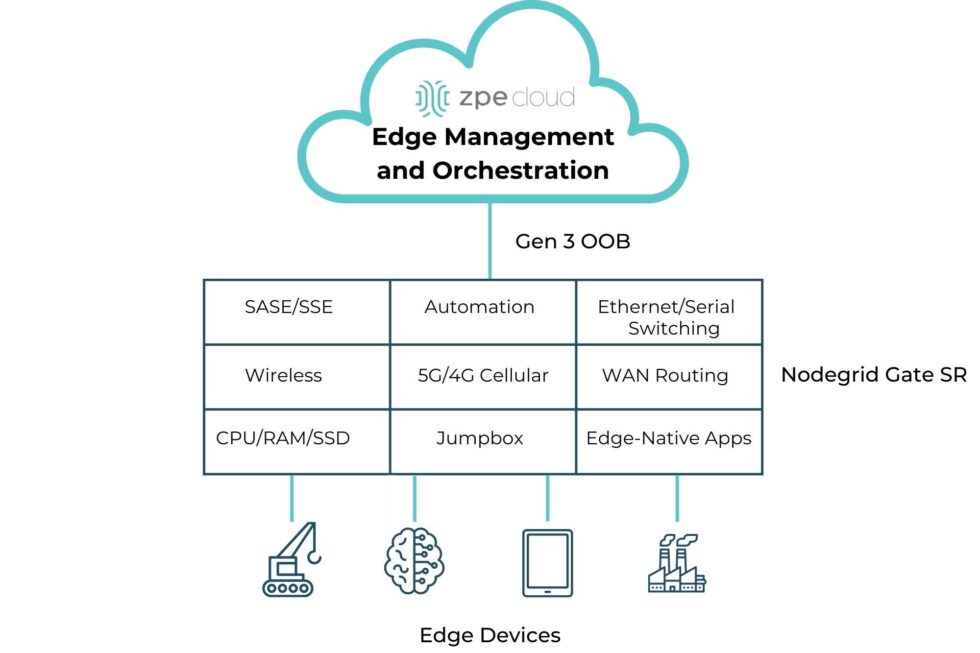
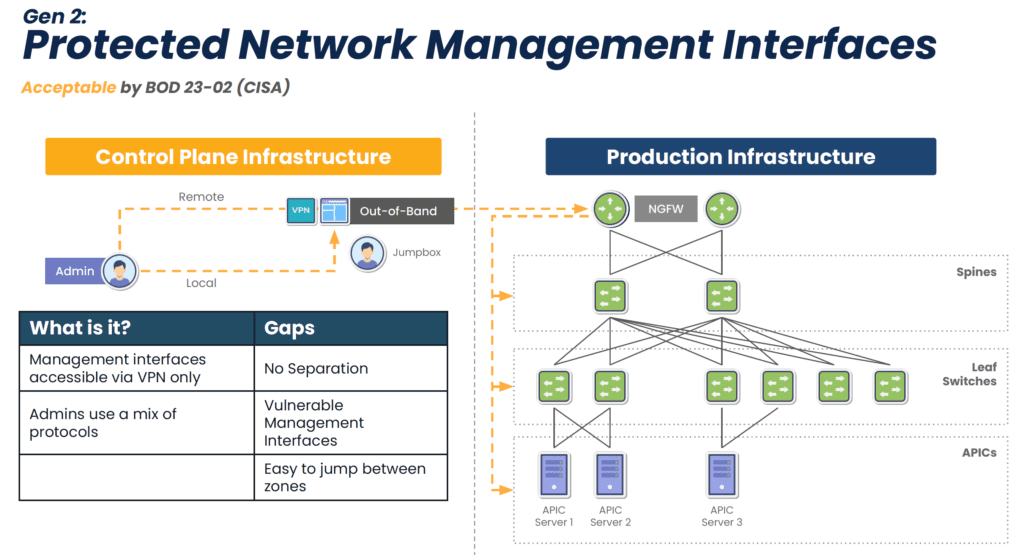
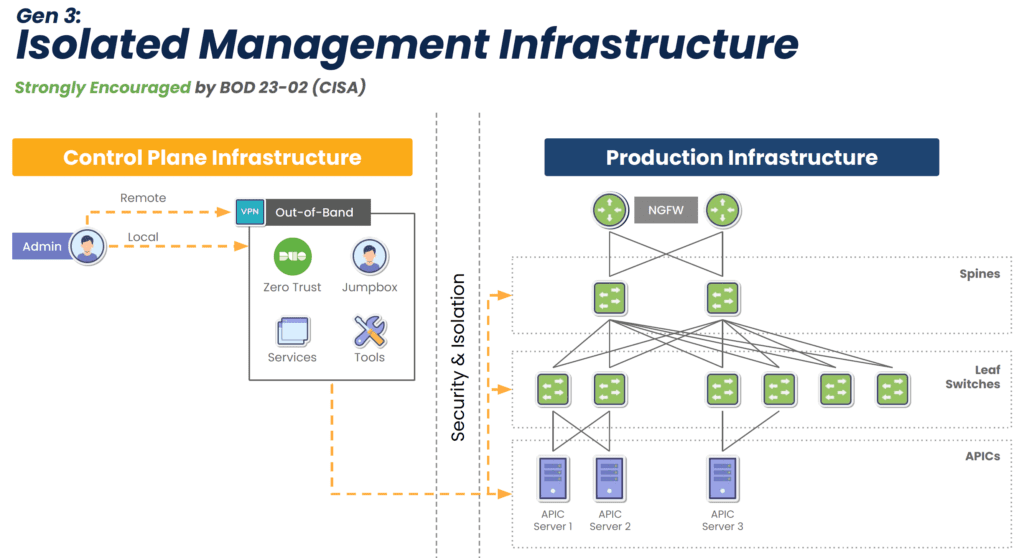
EOL devices lack modern security features, but this isn’t the only reason why they make it difficult or impossible to comply with regulations. They also lack the ability to isolate the control plane from the production network (see Diagram 1 below), meaning attackers can easily move between the two in order to launch ransomware and steal sensitive information. Watchdog agencies and new legislation are stipulating that organizations follow the latest best practice of separating the control plane from production, called Isolated Management Infrastructure (IMI). Modern console servers make this best practice simple to achieve by offering drop-in out-of-band that is completely isolated from production assets (see Diagram 2 below). This means that the organization is always in control of its IT assets and sensitive data.

A network diagram showing Gen 2 out-of-band is vulnerable to the internet

Diagram 1: Though an acceptable approach, Gen 2 out-of-band lacks isolation and leaves management interfaces vulnerable to the internet.

A network diagram showing how Gen 3 out-of-band secures network and management interfaces.

Diagram 2: Gen 3 out-of-band fully isolates the control plane to guarantee organizations retain control of their IT assets and sensitive info.

4. Faster Recovery

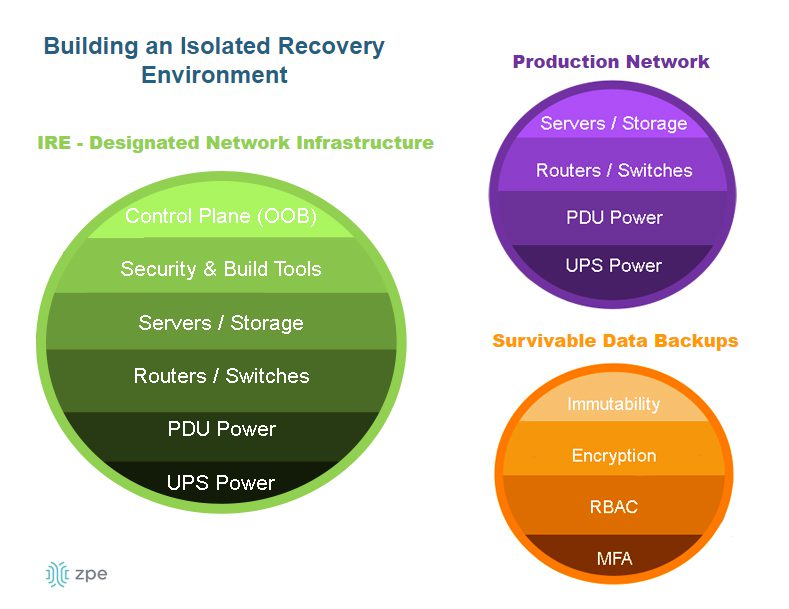
New console servers are designed to handle more workloads and functions, which eliminates single-purpose devices and shrinks the attack surface. They can also run VMs and Docker containers to host applications. This enables what Gartner calls the Isolated Recovery Environment (IRE) (see Diagram 3 below), which is becoming essential for faster recovery from ransomware. Since the IMI component prohibits attackers from accessing the control plane, admins retain control during an attack. They can use the IMI to deploy their IRE and the necessary applications — remotely — to decommission, cleanse, and restore their infected infrastructure. This means that they don’t have to roll trucks week after week when there’s an attack; they just need to log into their management infrastructure to begin assessing and responding immediately, which significantly reduces recovery times.

A diagram showing the components of an isolated recovery environment.

Diagram 3: The Isolated Recovery Environment allows for a comprehensive and rapid response to ransomware attacks.

Get a Walkthrough of IMI and IRE

Let’s cover what IMI and IRE would look like in your environment and walk through some outage recovery scenarios. Use the link below to set up a technical discussion.

Meet Me at Cisco Live Amsterdam 2026

Visit booth C10 at Cisco Live Amsterdam to chat about IMI, IRE, and replacing end-of-life console servers. You can also catch my 10-minute presentation on Wednesday, February 11 at 1:50pm in the Speakers Corner. I’ll cover From Pilot Projects to Global Rollouts: Why Out-of-Band Management is Crucial for Scaling AI Infrastructure, with more concepts and network diagrams showing how to achieve true resilience. Visit our Cisco Live page below to let me know you’re coming. See you at the show!

Rene Neumann presents at Cisco Live Amsterdam 2026

The CrowdStrike Outage: How to Recover Fast and Avoid the Next Outage

CrowdStrike Outage BSOD


On July 19, 2024, CrowdStrike, a leading cybersecurity firm renowned for its advanced endpoint protection and threat intelligence solutions, experienced a significant outage that disrupted operations for many of its clients. This outage, triggered by a software upgrade, resulted in crashes for Windows PCs, creating a wave of operational challenges for banks, airports, enterprises, and organizations worldwide. This blog post explores what transpired during this incident, what caused the outage, and the broader implications for the cybersecurity industry.

What happened?

The incident began on the morning of July 19, 2024, when numerous CrowdStrike customers started reporting issues with their Windows PCs. Users experienced the BSOD (blue screen of death), which is when Windows crashes and renders devices unusable. As the day went on, it became evident that the problem was widespread and directly linked to a recent software upgrade deployed by CrowdStrike.

Timeline of Events

  1. Initial Reports: Early in the day, airports, hospitals, and critical infrastructure operators began experiencing unexplained crashes on their Windows PCs. The issue was quickly reported to CrowdStrike’s support team.
  2. Incident Acknowledgement: CrowdStrike acknowledged the issue via their social media channels and direct communications with affected clients, confirming that they were investigating the cause of the crashes.
  3. Root Cause Analysis: CrowdStrike’s engineering team worked diligently to identify the root cause of the problem. They soon determined that a software upgrade released the previous night was responsible for the crashes.
  4. Mitigation Efforts: Upon isolating the faulty software update, CrowdStrike issued guidance on how to roll back the update and provided patches to fix the issue.

What caused the CrowdStrike outage?

The root cause of the outage was a software upgrade intended to enhance the functionality and security of CrowdStrike’s Falcon sensor endpoint protection platform. However, this upgrade contained a bug that conflicted with certain configurations of Windows PCs, leading to system crashes. Several factors contributed to the incident:

  1. Insufficient Testing: The software update did not undergo adequate testing across all possible configurations of Windows PCs. This oversight meant that the bug was not detected before the update was deployed to customers.
  2. Complex Interdependencies: The incident highlights the complex interdependencies between software components and operating systems. Even minor changes can have unforeseen impacts on system stability.
  3. Rapid Deployment: In the cybersecurity industry, quick responses to emerging threats are crucial. However, the pressure to deploy updates rapidly can sometimes lead to insufficient testing and quality assurance processes.

We need to remember one important fact: whether software is written by humans or AI, there will be mistakes in coding and testing. When an issue slips through the cracks, the customer lab is the last resort to catch it. Usually, this can be done with a controlled rollout, where the IT team first upgrades their lab equipment, performs further testing, puts in place a rollback plan, and pushes the update to a less critical site. But in a cloud-connected SaaS world, the customer is no longer in control. That’s why they sign waivers stating that if such an incident occurs, the company that caused the problem is not liable. Experts are saying the only way to address this challenge is to have an infrastructure that’s designed, deployed, and operated for resilience. We discuss this architecture further down in this article.

How to recover from the CrowdStrike outage

CrowdStrike gives two options for recovering:

  • Option 1: Reboot in Safe Mode – Reboot the affected device in Safe Mode, locate and delete the file “C-00000291*.sys”, and then restart the device.
  • Option 2: Re-image – Download and configure the recovery utility to create a new Windows image, add this image to a USB drive, and then insert this USB drive into the target device. The utility will automatically find and delete the file that’s causing the crash.

The biggest obstacle that is costing organizations a lot of time and money is that with either of these recovery methods, IT staff need to be physically present to work on each affected device. They need to go one by one manually remediating via Safe Mode or physically inserting the USB drive. What makes this more difficult is that many organizations use physical and software/management security controls to limit access. Locked device cabinets slow down physical access to devices, and things like role-based access policies and disk encryption can make Safe Mode unusable. Because this outage is affecting more than 8.5 million computers, this kind of work won’t scale efficiently. That’s why organizations are turning to Isolated Management Infrastructure (IMI) and the Isolated Recovery Environment (IRE).

How IMI and IRE help you recover faster

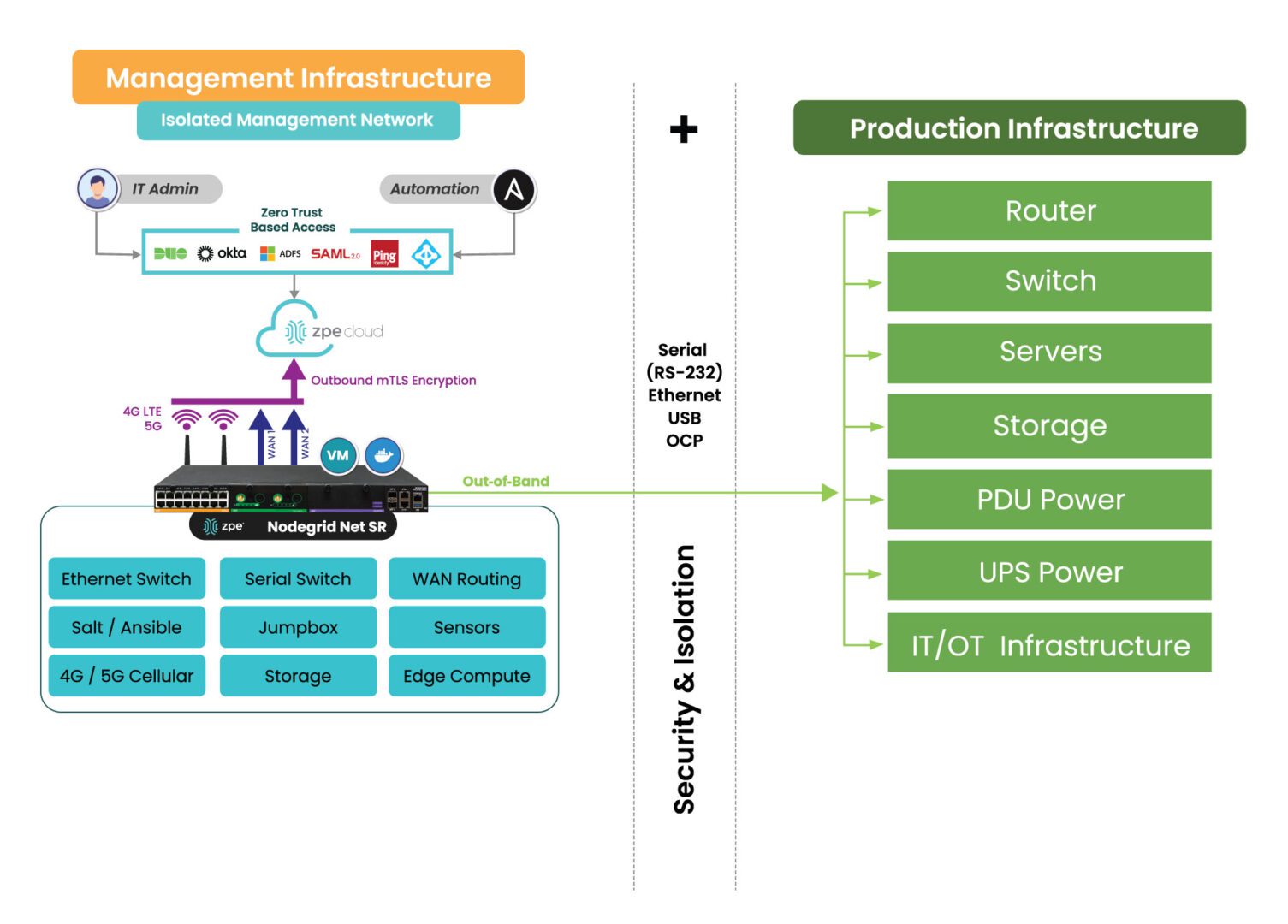
IMI is a dedicated control plane network that’s meant for administration and recovery of IT systems, including Windows PCs affected by the CrowdStrike outage. It uses the concept of out-of-band management, where you deploy a management device that is connected to dedicated management ports of your IT infrastructure (e.g., serial ports, IPMI ports, and other ethernet management ports). IMI also allows you to deploy recovery services for your digital estate that is immutable and near-line when recovery needs to take place.

IMI does not rely at all on the production assets, as it has its own dedicated remote access via WAN links like 4G/5G, and can contain and encrypt recovery keys and tools with zero trust.

IMI gives teams remote, low-level access to devices so they can recover their systems remotely without the need to visit sites. Organizations that employ IMI are able to revert back to a golden image through automation, or deploy bootable tools to all the computers at the site to rescue them without data loss.

The dedicated out-of-band access to serial/IPMI and management ports gives automation software the same abilities as if a physical crash cart was pulled up to the servers. ZPE Systems’ Nodegrid (now a brand of Legrand) enables this architecture as explained next. Using Nodegrid and ZPE Cloud, teams can use either option to recover from the CrowdStrike outage:

  • Option 1: Reboot in Pre-Execution Environment Software – Nodegrid gives low-level network access to connected Windows as if teams were sitting directly in front of the affected device. This means they can remote-in, reboot to a network image, remote into the booted image, delete the faulty file, and restart the system.
  • Option 2: Re-image – ZPE Cloud serves as a file repository and orchestration engine. Teams can upload their working Windows image, and then automatically push this across their global fleet of affected devices. This option speeds up recovery times exponentially.
  • Option 3: – Run Windows Deployment server on the IMI device at the location and re-image servers and workstations if a good backup of the data has been located. This backup can be made available through the IMI after the initial image has been deployed. The IMI can provide dedicated secure access to the InTune services in your M365 cloud, and the backups do not have to transit the entire internet for all workstations at the time, speeding up recovery many times over.

All of these options can be performed at scale or even automated. Server recovery with large backups, although it may take a couple of hours, can be delivered locally and tracked for performance and consistency.

But what about the risk of making mistakes when you have to repeat these tasks? Won’t this cause more damage and data loss?

Any team can make a mistake repeating these recovery tasks over a large footprint, and cause further damage or loss of data, slowing the recovery further. Automated recovery through the IMI addresses this, and can provide reliable recording and reporting to ensure that the restoration is complete and trusted. 

What does IMI look like?

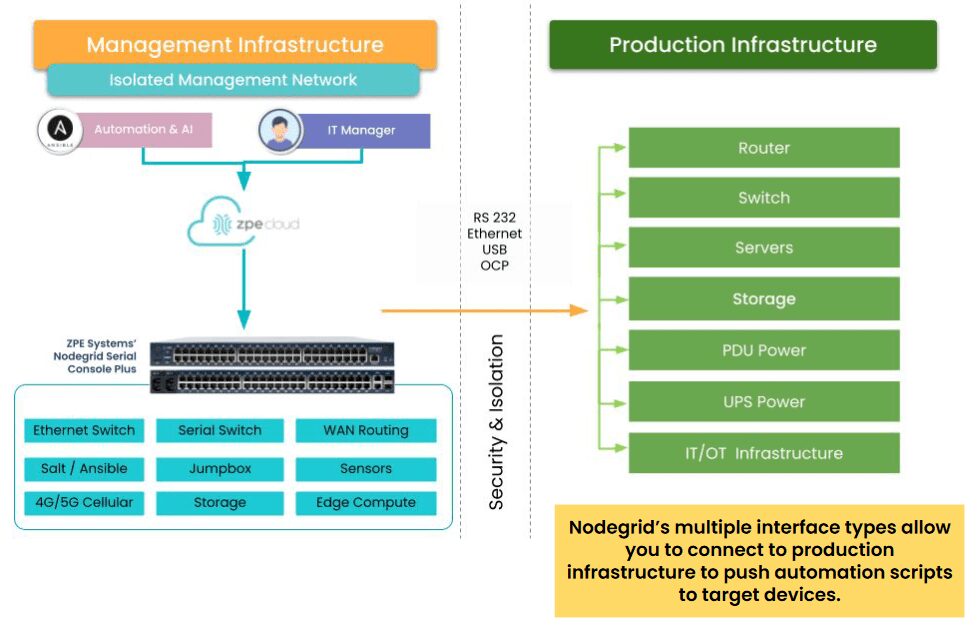
Here’s a simplified view of Isolated Management Infrastructure. You can see that ZPE’s Nodegrid device is needed, which sits beside production infrastructure and provides the platform for hosting all the tools necessary for fast recovery.

A diagram showing how to use Nodegrid Gen 3 OOB to enable IMI.

What you need to deploy IMI for recovery:

  1. Out-of-band appliance with serial, USB, ethernet interfaces (e.g., ZPE’s Nodegrid Net SR)
  2. Switchable PDU: Legrand Server Tech or Raritan PDU
  3. Windows PXE Boot image

Here’s the order of operations for a faster CrowdStrike outage recovery:

  • Option 1 – Recover
    1. IMI deployed with a ZPE Nodegrid device that will start Pre-Execution Environment (PXE) which are Windows boot images that the Nodegrid will push to the computers when they boot up
    2. Send recovery keys from Intune to IMI remote storage over ZPE Cloud’s zero trust platform easily available in cloud or air-gapped through Nodegrid Manager
    3. Enable PXE service (automated across entire enterprise) and define the PXE recovery image
    4. Use serial or IP control of power to the computers, or if possible Intel vPro or IPMI capable machines, to reboot all machines
    5. All machines will boot and check in to a control tower for PXE, or be made available to remote into using stored passwords on the PXE environment, Windows AD, or other Privileged Access Management (PAM)
    6. Delete Files
    7. Reboot


  • Option 2 – Lean re-image
    1. IMI deployed with a Windows Pre-Execution boot image running PXE service
    2. Enable access to cloud and Azure Intune to the IMI remote storage for the local image for the PC
    3. Enable PXE service (automated across entire enterprise) and define the PXE recovery image
    4. Use serial or IP control of power to the computers, or if possible, Intel vPro or IPMI capable machines, to reboot all machines
    5. Machines will boot and check in to Intune either through the IMI or through normal Internet access and finish imaging
    6. Once the machine completes the InTune tasks, InTune will signal backups to come down to the machines. If these backups are offsite, they can be staged on the IMI through backup software running on a virtual machine located on the IMI appliance to speed up recovery and not impede the Internet connection at the remote site
    7. Pre-stage backups onto local storage, push recovery from the virtual machine on the IMI


  • Option 3 – Windows controlled re-image
    1. Windows Deployment Server (WDS) installed as a virtual machine running on the IMI appliance (offline to prevent issues or online but under a slowed deployment cycle in case there was an issue) 
    2. Send recovery keys from Intune to IMI remote storage over a zero trust interface in cloud or air-gapped
    3. Use serial or IP control of power to the computers, or if possible, Intel vPro or IPMI capable machines, to reboot all machines
    4. Machines will boot and check in to the WDS for re-imaging
    5. Machines will boot and check in to Intune either through the IMI or through normal Internet access and finish imaging
    6. Once the machine completes the InTune tasks, InTune will signal backups to come down to the machines. If these backups are offsite, they can be staged on the IMI through backup software running on a virtual machine located on the IMI appliance to speed up recovery and not impede the Internet connection at the remote site
    7. Pre-stage backups onto local storage, push recovery from the virtual machine on the IMI

Deploy IMI to avoid the next outage

Get in touch for help choosing the right size IMI deployment for your organization. Nodegrid and ZPE Cloud are the drop-in solution to recovering from outages, with plenty of device options to fit any budget and environment size. Contact ZPE Sales now or download the blueprint to help you begin implementing IMI.

Benefits of Edge Computing

An illustration showing various use cases and benefits of edge computing

Edge computing delivers data processing and analysis capabilities to the network’s “edge,” at remote sites like branch offices, warehouses, retail stores, and manufacturing plants. It involves deploying computing resources and lightweight applications very near the devices that generate data, reducing the distance and number of network hops between them. In doing so, edge computing reduces latency and bandwidth costs while mitigating risk, enhancing edge resilience, and enabling real-time insights. This blog discusses the five biggest benefits of edge computing, providing examples and additional resources for companies beginning their edge journey.
.

5 benefits of edge computing​

Edge Computing:

Description

Reduces latency

Leveraging data at the edge reduces network hops and latency to improve speed and performance.

Mitigates risk

Keeping data on-site at distributed edge locations reduces the chances of interception and limits the blast radius of breaches.

Lowers bandwidth costs

Reducing edge data transmissions over expensive MPLS lines helps keep branch costs low.

Enhances edge resilience

Analyzing data on-site ensures that edge operations can continue uninterrupted during ISP outages and natural disasters.

Enables real-time insights

Eliminating off-site processing allows companies to use and extract value from data as soon as it’s generated.

1. Reduces latency

Edge computing leverages data on the same local network as the devices that generate it, cutting down on edge data transmissions over the WAN or Internet. Reducing the number of network hops between devices and applications significantly decreases latency, improving the speed and performance of business intelligence apps, AIOps, equipment health analytics, and other solutions that use edge data.

Some edge applications run on the devices themselves, completely eliminating network hops and facilitating real-time, lag-free analysis. For example, an AI-powered surveillance application installed on an IoT security camera at a walk-up ATM can analyze video feeds in real-time and alert security personnel to suspicious activity as it occurs.​


Read more examples of how edge computing improves performance in our guide to the Applications of Edge Computing.

2. Mitigates risk

Edge computing mitigates security and compliance risks by distributing an organization’s sensitive data and reducing off-site transmission. Large, centralized data stores in the cloud or data center are prime targets for cybercriminals because the sheer volume of data involved increases the chances of finding something valuable. Decentralizing data in much smaller edge storage solutions makes it harder for hackers to find the most sensitive information and also limits how much data they can access at one time.

Keeping data at the edge also reduces the chances of interception in transit to cloud or data center storage. Plus, unlike in the cloud, an organization maintains complete control over who and what has access to sensitive data, aiding in compliance with regulations like the GDPR and PCI DSS 4.0.
.

To learn how to protect edge data and computing resources, read Comparing Edge Security Solutions.

3. Lowers bandwidth costs

Many organizations use MPLS (multi-protocol label switching) links to securely connect edge sites to the enterprise network. MPLS bandwidth is much more expensive than regular Internet lines, which makes transmitting edge data to centralized data processing applications extremely costly. Plus, it can take months to provision MPLS at a new site, delaying launches and driving up overhead expenses.

Edge computing significantly reduces MPLS bandwidth utilization by running data-hungry applications on the local network, reserving the WAN for other essential traffic. Combining edge computing with SD-WAN (software-defined wide area networking) and SASE (secure access service edge) technologies can markedly decrease the reliance on MPLS links, allowing organizations to accelerate branch openings and see faster edge ROIs.
.

Learn more about cost-effective edge deployments in our Edge Computing Architecture Guide.

4. Enhances edge resilience

Since edge computing applications run on the same LAN as the devices generating data, they can continue to function even if the site loses Internet access due to an ISP outage, natural disaster, or other adverse event. This also allows uninterrupted edge operations in locations with inconsistent (or no) Internet coverage, like offshore oil rigs, agricultural sites, and health clinics in isolated rural communities. Edge computing ensures that organizations don’t miss any vital health or safety alerts and facilitates technological innovation using AI and other data analytics tools in challenging environments..
.

For more information on operational resilience, read Network Resilience: What is a Resilience System?

5. Enables real-time insights

Sending data from the edge to a cloud or on-premises data lake for processing, transformation, and ingestion by analytics or AI/ML tools takes time, preventing companies from acting on insights at the moment when they’re most useful. Edge computing applications start using data as soon as it’s generated, so organizations can extract value from it right away. For example, a retail store can use edge computing to gain actionable insights on purchasing activity and customer behavior in real-time, so they can move in-demand products to aisle endcaps or staff extra cashiers as needed.
.

To learn more about the potential uses of edge computing technology, read Edge Computing Examples.

Simplify your edge computing deployment with Nodegrid

The best way to achieve the benefits of edge computing described above without increasing management complexity or hardware overhead is to use consolidated, vendor-neutral solutions to host, connect, and secure edge workloads. For example, the Nodegrid Gate SR from ZPE Systems delivers an entire stack of edge networking and infrastructure management technologies in a single, streamlined device. The open, Linux-based Nodegrid OS supports VMs and containers for third-party applications, with an Nvidia Jetson Nano card capable of running AI workloads alongside non-AI data analytics for ultimate efficiency.

Improve your edge computing deployment with Nodegrid

Nodegrid consolidates edge computing deployments to improve operational efficiency without sacrificing performance or functionality. Schedule a free demo to see Nodegrid in action.

Schedule a Demo

Improving Your Zero Trust Security Posture

Zero Trust for the Edge(1)

The current cyber threat landscape is daunting, with attacks occurring so frequently that security experts recommend operating under the assumption that your network is already breached. Major cyber attacks – and the disruptions they cause – frequently make news headlines. The MGM hack, LendingTree breach, and CDK Global attack are just a few examples that affected thousands of people per incident and now have many organizations rethinking their resilience strategies.

The zero trust security methodology outlines the best practices for limiting the blast radius of a successful breach by preventing malicious actors from moving laterally through the network and accessing the most valuable or sensitive resources. Many organizations have already begun their zero trust journey by implementing role-based access controls (RBAC), multi-factor authentication (MFA), and other security solutions, but still struggle with coverage gaps that result in ransomware attacks and other disruptive breaches. This blog provides advice for improving your zero trust security posture with a multi-layered strategy that mitigates weaknesses for complete coverage.

How to improve your zero trust security posture

.

Strategy

Description

Gain a full understanding of your protect surface

Use automated discovery tools to identify all the data, assets, applications, and services that an attacker could potentially target.

Micro-segment your network with micro-perimeters

Implement specific policies, controls, and trust verification mechanisms to mitigate and protect surface vulnerabilities.

Isolate and defend your management infrastructure

Use OOB management and hardware security to prevent attackers from compromising the control plane.

Defend your cloud resources

Understand the shared responsibility model and use cloud-specific tools like a CASB to prevent shadow IT and enforce zero trust.

Extend zero trust to the edge

Use edge-centric solutions like SASE to extend zero trust policies and controls to remote network traffic, devices, and users.

Gain a full understanding of your protect surface

Many security strategies focus on defending the network’s “attack surface,” or all the potential vulnerabilities an attacker could exploit to breach the network. However, zero trust is all about defending the “protect surface,” or all the data, assets, applications, and services that an attacker could potentially try to access. The key difference is that zero trust doesn’t ask you to try to cover any possible weakness in a network, which is essentially impossible. Instead, it wants you to look at the resources themselves to determine what has the most value to an attacker, and then implement security controls that are tailored accordingly.

Gaining a full understanding of all the resources on your network can be extraordinarily challenging, especially with the proliferation of SaaS apps, mobile devices, and remote workforces. There are automated tools that can help IT teams discover all the data, apps, and devices on the network. Application discovery and dependency mapping (ADDM) tools help identify all on-premises software and third-party dependencies; cloud application discovery tools do the same for cloud-hosted apps by monitoring network traffic to cloud domains. Sensitive data discovery tools scan all known on-premises or cloud-based resources for personally identifiable information (PII) and other confidential data, and there are various device management solutions to detect network-connected hardware, including IoT devices.
,

  • Tip: This step can’t be completed one time and then forgotten – teams should execute discovery processes on a regular, scheduled basis to limit gaps in protection. 

Micro-segment your network with micro-perimeters

Micro-segmentation is a cornerstone of zero-trust networks. It involves logically separating all the data, applications, assets, and services according to attack value, access needs, and interdependencies. Then, teams implement granular security policies and controls tailored to the needs of each segment, establishing what are known as micro-perimeters. Rather than trying to account for every potential vulnerability with one large security perimeter, teams can just focus on the tools and policies needed to cover the specific vulnerabilities of a particular micro-segment.

Network micro-perimeters help improve your zero trust security posture with:

  • Granular access policies granting the least amount of privileges needed for any given workflow. Limiting the number of accounts with access to any given resource, and limiting the number of privileges granted to any given account, significantly reduces the amount of damage a compromised account (or malicious actor) is capable of inflicting.
  • Targeted security controls addressing the specific risks and vulnerabilities of the resources in a micro-segment. For example, financial systems need stronger encryption, strict data governance monitoring, and multiple methods of trust verification, whereas an IoT lighting system requires simple monitoring and patch management, so the security controls for these micro-segments should be different.
  • Trust verification using context-aware policies to catch accounts exhibiting suspicious behavior and prevent them from accessing sensitive resources. If a malicious outsider compromises an authorized user account and MFA device – or a disgruntled employee uses their network privileges to harm the company – it can be nearly impossible to prevent data exposure. Context-aware policies can stop a user from accessing confidential resources outside of typical operating hours, or from unfamiliar IP addresses, for example. Additionally, user entity and behavior analytics (UEBA) solutions use machine learning to detect other abnormal and risky behaviors that could indicate malicious intent.

Isolate and defend your management infrastructure

For zero trust to be effective, organizations must apply consistently strict security policies and controls to every component of their network architecture, including the management interfaces used to control infrastructure. Otherwise, a malicious actor could use a compromised sysadmin account to hijack the control plane and bring down the entire network.

According to a recent CISA directive, the best practice is to isolate the network’s control plane so that management interfaces are inaccessible from the production network. Many new cybersecurity regulations, including PCI DSS 4.0, DORA, NIS2, and the CER Directive, also either strongly recommend or require management infrastructure isolation.

Isolated management infrastructure (IMI) prevents compromised accounts, ransomware, and other threats from moving laterally to or from the production LAN. It gives teams a safe environment to recover from ransomware or other cyberattacks without risking reinfection, which is known as an isolated recovery environment (IRE). Management interfaces and the IRE should also be protected by granular, role-based access policies, multi-factor authentication, and strong hardware roots of trust to further mitigate risk.

A diagram showing how to use Nodegrid Gen 3 OOB to enable IMI.The easiest and most secure way to implement IMI is with Gen 3 out-of-band (OOB) serial console servers, like the Nodegrid solution from ZPE Systems. These devices use alternative network interfaces like 5G/4G LTE cellular to ensure complete isolation and 24/7 management access even during outages. They’re protected by hardware security features like TPM 2.0 and GPS geofencing, and they integrate with zero trust solutions like identity and access management (IAM) and UEBA to enable consistent policy enforcement.

Defend your cloud resources

The vast majority of companies host some or all of their workflows in the cloud, which significantly expands and complicates the attack surface while making it more challenging to identify and defend the protect surface. Some organizations also lack a complete understanding of the shared responsibility model for varying cloud services, increasing the chances of coverage gaps. Additionally, many orgs struggle with “shadow IT,” which occurs when individual business units implement cloud applications without going through onboarding, preventing security teams from applying zero trust controls.

The first step toward improving your zero trust security posture in the cloud is to ensure you understand where your cloud service provider’s responsibilities end and yours begin. For instance, most SaaS providers handle all aspects of security except IAM and data protection, whereas IaaS (Infrastructure-as-a-Service) providers are only responsible for protecting their physical and virtual infrastructure.

It’s also vital that security teams have a complete picture of all the cloud services in use by the organization and a way to deploy and enforce zero trust policies in the cloud. For example, a cloud access security broker (CASB) is a solution that discovers all the cloud services in use by an organization and allows teams to monitor and manage security for the entire cloud architecture. A CASB provides capabilities like data governance, malware detection, and adaptive access controls, so organizations can protect their cloud resources with the same techniques used in the on-premises environment.
.

Example Cloud Access Security Broker Capabilities

Visibility

Compliance

Threat protection

Data security

Cloud service discovery

Monitoring and reporting

User authentication and authorization

Data governance and loss prevention

Malware (e.g., virus, ransomware) detection

User and entity behavior analytics (UEBA)

Data encryption and  tokenization

Data leak prevention

Extend zero trust to the edge

Modern enterprise networks are highly decentralized, with many business operations taking place at remote branches, Internet of Things (IoT) deployment sites, and end-users’ homes. Extending security controls to the edge with on-premises zero trust solutions is very difficult without backhauling all remote traffic through a centralized firewall, which creates bottlenecks that affect performance and reliability. Luckily, the market for edge security solutions is rapidly growing and evolving to help organizations overcome these challenges. 

Security Access Service Edge (SASE) is a type of security platform that delivers core capabilities as a managed, typically cloud-based service for the edge. SASE uses software-defined wide area networking (SD-WAN) to intelligently and securely route edge traffic through the SASE tech stack, allowing the application and enforcement of zero trust controls. In addition to CASB and next-generation firewall (NGFW) features, SASE usually includes zero trust network access (ZTNA), which offers VPN-like functionality to connect remote users to enterprise resources from outside the network. ZTNA is more secure than a VPN because it only grants access to one app at a time, requiring separate authorization requests and trust verification attempts to move to different resources. 

Accelerating the zero trust journey

Zero trust is not a single security solution that you can implement once and forget about – it requires constant analysis of your security posture to identify and defend weaknesses as they arise. The best way to ensure adaptability is by using vendor-agnostic platforms to host and orchestrate zero trust security. This will allow you to add and change security services as needed without worrying about interoperability issues.

For example, the Nodegrid platform from ZPE Systems includes vendor-neutral serial consoles and integrated branch services routers that can host third-party software such as SASE and NGFWs. These devices also provide Gen 3 out-of-band management for infrastructure isolation and network resilience. Nodegrid protects management interfaces with strong hardware roots-of-trust, embedded firewalls, SAML 2.0 integrations, and other zero trust security features. Plus, with Nodegrid’s cloud-based or on-premises management platform, teams can orchestrate networking, infrastructure, and security workflows across the entire enterprise architecture.


Improve your zero trust security posture with Nodegrid

Using Nodegrid as the foundation for your zero trust network infrastructure ensures maximum agility while reducing management complexity. Watch a Nodegrid demo to learn more.

Schedule a Demo

Applications of Edge Computing

A healthcare worker presents various edge computing concepts to highlight some of the applications of edge computing

The edge computing market is huge and continuing to grow. A recent study projected that spending on edge computing will reach $232 billion in 2024. Organizations across nearly every industry are taking advantage of edge computing’s real-time data processing capabilities to get immediate business insights, respond to issues at remote sites before they impact operations, and much more. This blog discusses some of the applications of edge computing for industries like finance, retail, and manufacturing, and provides advice on how to get started.

What is edge computing?

Edge computing involves decentralizing computing capabilities and moving them to the network’s edges. Doing so reduces the number of network hops between data sources and the applications that process and use that data, which mitigates latency, bandwidth, and security concerns compared to cloud or on-premises computing.

Learn more about edge computing vs cloud computing or edge computing vs on-premises computing.

Edge computing often uses edge-native applications that are built from the ground up to harness edge computing’s unique capabilities and overcome its limitations. Edge-native applications leverage some cloud-native principles, such as containers, microservices, and CI/CD. However, unlike cloud-native apps, they’re designed to process transient, ephemeral data in real time with limited computational resources. Edge-native applications integrate seamlessly with the cloud, upstream resources, remote management, and centralized orchestration, but can also operate independently as needed.
.

Applications of edge computing

Industry

Applications

Financial services

  • Mitigate security and compliance risks of off-site data transmission

  • Gain real-time customer and productivity insights

  • Analyze surveillance footage in real-time

Industrial manufacturing

  • Monitor and respond to OT equipment issues in real-time

  • Create more efficient maintenance schedules

  • Prevent network outages from impacting production

Retail operations

  • Enhance the in-store customer experience

  • Improve inventory management and ordering

  • Aid loss prevention with live surveillance analysis

Healthcare

  • Monitor and respond to patient health issues in real-time

  • Mitigate security and compliance risks by keeping data on-site

  • Reduce networking requirements for wearable sensors

Oil, gas, & mining

  • Ensure continuous monitoring even during network disruptions

  • Gain real-time safety, maintenance, and production recommendations

  • Enable remote troubleshooting and recovery of IT systems

AI & machine learning

  • Reduce the costs and risks of high-volume data transmissions

  • Unlock near-instantaneous AI insights at the edge

  • Improve AIOps efficiency and resilience at branches

Financial services

The financial services industry collects a lot of edge data from bank branches, web and mobile apps, self-service ATMs, and surveillance systems. Many firms feed this data into AI/ML-powered data analytics software to gain insights into how to improve their services and generate more revenue. Some also use AI-powered video surveillance systems to analyze video feeds and detect suspicious activity. However, there are enormous security, regulatory, and reputational risks involved in transmitting this sensitive data to the cloud or an off-site data center.

Financial institutions can use edge computing to move data analytics applications to branches and remote PoPs (points of presence) to help mitigate the risks of transmitting data off-site. Additionally, edge computing enables real-time data analysis for more immediate and targeted insights into customer behavior, branch productivity, and security. For example, AI surveillance software deployed at the edge can analyze live video feeds and alert on-site security personnel about potential crimes in progress.

Industrial manufacturing

Many industrial manufacturing processes are mostly (if not completely) automated and overseen by operational technology (OT), such as supervisory control and data acquisition systems (SCADA). Logs from automated machinery and control systems are analyzed by software to monitor equipment health, track production costs, schedule preventative maintenance, and perform quality assurance (QA) on components and products. However, transferring that data to the cloud or centralized data center increases latency and creates security risks.

Manufacturers can use edge computing to analyze OT data in real time, gaining faster insights and catching potential issues before they affect product quality or delivery schedules. Edge computing also allows industrial automation and monitoring processes to continue uninterrupted even if the site loses Internet access due to an ISP outage, natural disaster, or other adverse event in the region. Edge resilience can be further improved by deploying an out-of-band (OOB) management solution like Nodegrid that enables control plane/data plane isolation (also known as isolated management infrastructure), as this will give remote teams a lifeline to access and recover OT systems.

Retail operations

In the age of one-click online shopping, the retail industry has been innovating with technology to enhance the in-store experience, improve employee productivity, and keep operating costs down. Retailers have a brief window of time to meet a customer’s needs before they look elsewhere, and edge computing’s ability to leverage data in real time is helping address that challenge. For example, some stores place QR codes on shelves that customers can scan if a product is out of stock, alerting a nearby representative to provide immediate assistance.

Another retail application of edge computing is enhanced inventory management. An edge computing solution can make ordering recommendations based on continuous analysis of purchasing patterns over time combined with real-time updates as products are purchased or returned. Retail companies, like financial institutions, can also use edge AI/ML solutions to analyze surveillance data and aid in loss prevention.

Healthcare

The healthcare industry processes massive amounts of data generated by medical equipment like insulin pumps, pacemakers, and imaging devices. Patient health data can’t be transferred over the open Internet, so getting it to the cloud or data center for analysis requires funneling it through a central firewall via MPLS (for hospitals, clinics, and other physical sites), overlay networks, or SD-WAN (for wearable sensors and mobile EMS devices). This increases the number of network hops and creates a traffic bottleneck that prevents real-time patient monitoring and delays responses to potential health crises.

Edge computing for healthcare allows organizations to process medical data on the same local network, or even the same onboard chip, as the sensors and devices that generate most of the data. This significantly reduces latency and mitigates many of the security and compliance challenges involved in transmitting regulated health data offsite. For example, an edge-native application running on an implanted heart-rate monitor can operate without a network connection much of the time, providing the patient with real-time alerts so they can modify their behavior as needed to stay healthy. If the app detects any concerning activity, it can use multiple cellular and ATT FirstNet connections to alert the cardiologist without exposing any private patient data.

Oil, gas, & mining

Oil, gas, and other mining operations use IoT sensors to monitor flow rates, detect leaks, and gather other critical information about equipment deployed in remote sites, drilling rigs, and offshore platforms all over the world. Drilling rigs are often located in extremely remote or even human-inaccessible locations, so ensuring reliable communications with monitoring applications in the cloud or data center can be difficult. Additionally, when networks or systems fail, it can be time-consuming and expensive – not to mention risky – to deploy IT teams to fix the issue on-site.

The energy and mining industries can use edge computing to analyze data in real time even in challenging deployment environments. For example, companies can deploy monitoring software on cellular-enabled edge computing devices to gain immediate insights into equipment status, well logs, borehole logs, and more. This software can help establish more effective maintenance schedules, uncover production inefficiencies, and identify potential safety issues or equipment failures before they cause larger problems. Edge solutions with OOB management also allow IT teams to fix many issues remotely, using alternative cellular interfaces to provide continuous access for troubleshooting and recovery.

AI & machine learning

Artificial intelligence (AI) and machine learning (ML) have broad applications across many industries and use cases, but they’re all powered by data. That data often originates at the network’s edges from IoT devices, equipment sensors, surveillance systems, and customer purchases. Securely transmitting, storing, and preparing edge data for AI/ML ingestion in the cloud or centralized data center is time-consuming, logistically challenging, and expensive. Decentralizing AI/ML’s computational resources and deploying them at the edge can significantly reduce these hurdles and unlock real-time capabilities.

For example, instead of deploying AI on a whole rack of GPUs (graphics processing units) in a central data center to analyze equipment monitoring data for all locations, a manufacturing company could use small edge computing devices to provide AI-powered analysis for each individual site. This would reduce bandwidth costs and network latency, enabling near-instant insights and providing an accelerated return on the investment into artificial intelligence technology.

AIOps can also be improved by edge computing. AIOps solutions analyze monitoring data from IT devices, network infrastructure, and security solutions and provide automated incident management, root-cause analysis, and simple issue remediation. Deploying AIOps on edge computing devices enables real-time issue detection and response. It also ensures continuous operation even if an ISP outage or network failure cuts off access to the cloud or central data center, helping to reduce business disruptions at vital branches and other remote sites.

Getting started with edge computing

The edge computing market has focused primarily on single-use-case solutions designed to solve specific business problems, forcing businesses to deploy many individual applications across the network. This piecemeal approach to edge computing increases management complexity and risk while decreasing operational efficiency.

The recommended approach is to use a centralized edge management and orchestration (EMO) platform to monitor and control edge computing operations. The EMO should be vendor-agnostic and interoperate with all the edge computing devices and edge-native applications in use across the organization. The easiest way to ensure interoperability is to use vendor-neutral edge computing platforms to run edge-native apps and AI/ML workflows.

For example, the Nodegrid platform from ZPE Systems provides the perfect vendor-neutral foundation for edge operations. Nodegrid integrated branch services routers like the Gate SR with integrated Nvidia Jetson Nano use the open, Linux-based Nodegrid OS, which can host Docker containers and edge-native applications for third-party AI, ML, data analytics, and more. These devices use out-of-band management to provide 24/7 remote visibility, management, and troubleshooting access to edge deployments, even in challenging environments like offshore oil rigs. Nodegrid’s cloud-based or on-premises software provides a single pane of glass to orchestrate operations at all edge computing sites.

Streamline your edge computing deployment with Nodegrid

The vendor-neutral Nodegrid platform can simplify all applications of edge computing with easy interoperability, reduced hardware overhead, and centralized edge management and orchestration. Schedule a Nodegrid demo to learn more.
Schedule a Demo