Providing Out-of-Band Connectivity to Mission-Critical IT Resources

Network Automation Cost Savings Calculator

automation cost savings calculator
Many organizations feel continuous financial pressure to cut costs and streamline operations due to economic factors like the ongoing threat of a recession and global supply chain interruptions. Network automation can help companies across all industries save money during lean financial times. A recent Cisco and ACG Research study found that network automation can reduce OPEX by 55% by streamlining workflows such as device provisioning and service ticket management. Though they aren’t mentioned in the study, additional savings are generated by using automation to avoid outages and accelerate recovery efforts.

This post discusses how to save money through automation and provides a network automation cost savings calculator for a more customized estimate of your potential ROI.


Table of contents

How network automation provides cost savings

Network automation reduces costs by streamlining operations, preventing outages, and aiding in backup and recovery workflows.

Network automation saves money by solving problems

Problem: High OPEX

Solution: Automation tackles repetitive tasks like new installs and ticketing operations, which helps you generate revenue sooner and reduce the time and resources spent on maintaining operations.

Problem: Too many outages

Solution: Automation allows teams to be proactive by leveraging critical data to identify potential problems before they cause outages, freeing them from the typical break/fix approach.

Problem: Slow recovery

Solution: Automation speeds up processes like backups, snapshotting, and device re-imaging, which makes networks more resilient by accelerating recovery from outages and ransomware.

Reduces OPEX

The focus of the Cisco/ACG study was the economic benefits of streamlining network operations through automation. For example, the OPEX (operational expenditure) involved in spinning up a new branch is too high because deployments require so much work, time, and staff. Using automation to provision and deploy new resources can significantly reduce the time it takes to spin up a new branch, which means the site could start generating revenue much sooner. Using automation to monitor device health and environmental conditions could extend the life expectancy of critical (and expensive) equipment while reducing the number of on-site staff needed to maintain that equipment.

Network automation reduces OPEX by increasing the efficiency of repetitive or tedious tasks like new installs, incident management, and device monitoring. Crucially, automation does so without reducing the quality of service for end users and often only improves the speed, reliability, and overall experience.

Prevents outages

Network downtime is an expense that cash-strapped businesses can’t afford to bear. According to a recent ITIC survey, a single hour of downtime costs most organizations (91%) over $300,000 in lost business, with 44% of enterprises reporting outage costs exceeding $1 million. However, preventing downtime is difficult when most network teams are caught in a reactive break/fix cycle because they lack the staffing, resources, and technology required to maintain visibility and identify issues before they occur.

Network automation solves this problem using advanced machine learning algorithms to analyze monitoring data and identify potential issues before they cause outages. For example, AIOps (artificial intelligence for IT operations) solutions provide real-time analysis of infrastructure, network, and security logs. AIOps is adept at recognizing patterns and detecting anomalies in data so that it can identify issues before they affect the performance or reliability of the network.

Accelerates recovery

While network automation helps to reduce downtime, it can’t eliminate outages altogether. When outages do occur, recovery is often a long, drawn-out process involving a lot of manual work, during which time revenue and customer faith may be lost. Network resilience is the ability to quickly recover from ransomware, equipment failures, and other causes of downtime with as little impact as possible on end users and business revenue. Automation speeds up recovery efforts in a few critical ways:

  • Streamlined backups – Automation makes performing regular backups and snapshots easier, reducing the risk of gaps or inaccuracies.
  • Reduced imaging delays – Automatic provisioning ensures that clean systems are spun up quickly so that business can resume as soon as possible.
  • Faster failover – Automatic network failover and routing technologies can reroute traffic around downed nodes before a human admin has time to respond, providing a more seamless end-user experience.

Network automation is a direct source of cost savings because it reduces OPEX without negatively impacting the business or customer experience. Automation also indirectly saves money by helping organizations avoid outages through proactive monitoring and maintenance. In addition, network automation technologies make businesses more resilient by speeding up recovery efforts when breaches and failures do occur.

Network automation cost savings calculator

ZPE Systems provides network and infrastructure automation solutions for any use case, pain point, or technological need. ZPE’s vendor-neutral platform allows you to extend automation to every device on your network, including legacy and mixed-vendor solutions, so that you can achieve true end-to-end automation (a.k.a. hyperautomation). For a customized estimation of how much money you can save by automating your network operations with ZPE Systems, check out our network automation cost savings calculator.

Ready to Learn More?

For help with the network automation cost savings calculator or to learn more about automating your network operations, contact ZPE Systems today.
Contact Us

ZPE Systems’ Services Delivery Platform accelerates time-to-market

Zero Pain Ecosystemedit

ZPE Systems’ Services Delivery Platform accelerates time-to-market with any app, anytime, anywhere

IT teams can deliver instant business value with the on-demand services delivery architecture

Fremont, CA, April 25, 2023 — ZPE Systems’ Services Delivery Platform is IT’s ‘easy’ button for delivering instant business value. Instead of deploying dedicated NGFW hardware and Intel® NUCs, ZPE’s Intel-based platform runs 3rd party apps at remote locations delivered via ZPE Cloud app marketplace. This speed and flexibility simplify global service delivery and fleet management for manufacturing, healthcare, finance, and other industries, where any app can be automatically deployed from the cloud.

Why is this important?

Private-cloud and on-prem services must run on dedicated systems, which causes infrastructure sprawl. This complexity pulls IT teams away from generating revenue, recovering from outages, and stopping ransomware attacks. Their job becomes managing low-level infrastructure and inefficient delivery pipelines. The Services Delivery Platform alleviates this by giving them the speed and flexibility to:

  • Secure remote locations with cloud-deployed pen test agents & other services
  • Segment edge networks regardless of interface type
  • Eliminate supply chain risks with hardened devices
  • Shrink attack surfaces with swift centralized patch management
  • Collapse device stacks into 1RU or less using virtual services

Services Delivery Platform apps and services

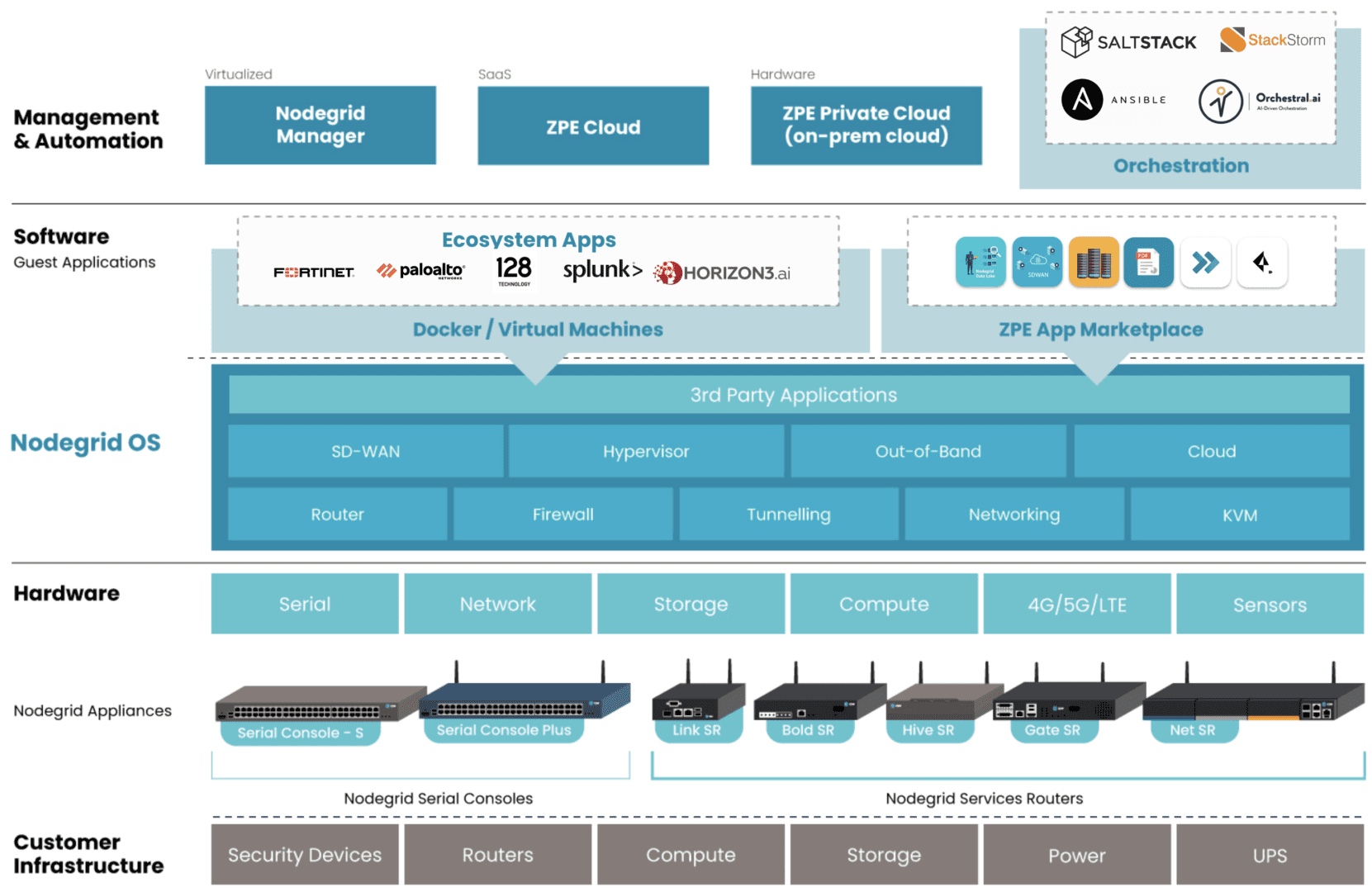
Graphic: ZPE’s Services Delivery Platform is represented as blue blocks. Examples of 3rd-party hosted apps are represented in white blocks under Ecosystem Apps.

The Services Delivery Platform brings to life Gartner’s concept of platform engineering. This platform-as-a-service model allows admins to tailor environments with the right apps for SD-WAN, NGFW, pen testing, and other functions, without battling vendor lock-in or changes in security posture. They also gain a consistent management experience across private-cloud and on-prem solutions.

Teams typically avoid platform engineering because there are no best practices for creating the proper control plane management network on secure devices.

ZPE Systems worked with Big Tech to define these best practices, which enterprises can now apply to private-cloud colo and edge deployments using the Services Delivery Platform. This establishes the resilient control plane management network and platform engineering component, both on a single, multi-function device connected to the cloud.

Enterprises accelerate revenue generation, reduce outage costs, and stop ransomware attacks using this architecture.

How does it work?

Nodegrid edge routers bring dedicated LAN and WAN links through multiple interface types (serial, ethernet, USB, IPMI). These create a secure control plane — a Double-RingTM management architecture — while eliminating the hardware attack surface with security features including TPM 2.0, encrypted disk, geofencing, and fully-signed Nodegrid OS.

This network is the foundation of the Services Delivery Platform. Along with hosting the management network, Nodegrid devices directly run VMs, containers, and any choice of app using the onboard multi-core Intel CPU and Linux-based Nodegrid OS. This OS also extends automation across environments and devices to give teams end-to-end activation and chaining of SASE, NGFWs, SD-WAN, and any cloud or on-prem solution.

“I’ve been in ops for a long time. Most of your day is spent just figuring out how to get your environments to work right,” says James Cabe, Director, Technical Alliances at ZPE Systems. “The Services Delivery Platform is a game-changer. The whole thing sits right on the Nodegrid box and you can switch or swap out services whenever you need to. Just choose what you want to deploy and go. It’s all done via separate control plane with no attack surface and no exposure to the Internet.”

Where can I find more information?

Go to zpesystems.com/services-delivery-platform to learn more about the Services Delivery Platform.

If you’re attending RSA Conference April 24-27, visit ZPE Systems at booth 4125 between north and south halls and ask for a demo.  Use this code for free RSA expo pass: 52EZPESYSXP

Zero Touch Deployment Cheat Sheet

A zero touch deployment cheat sheet is visualized as a literal cheat sheet used by a student during an exam

Zero touch deployment is meant to make admins’ lives easier by automatically provisioning new devices. However, many teams find the reality of zero touch deployment much more frustrating than manual device configurations. For example, zero touch deployment isn’t always compatible with legacy systems, can be difficult to scale, and is often error-prone and difficult to remotely troubleshoot. This post provides a “cheat sheet” of solutions to the most common zero touch deployment challenges to help organizations streamline their automatic device provisioning.

Zero touch deployment cheat sheet

Zero touch deployment – also known as zero touch provisioning (ZTP) – uses software scripts or definition files to automatically configure new devices. The goal is for a team to be able to ship a new-in-box device to a remote branch where a non-technical user can plug in the device’s power and network cables, at which point the device automatically downloads its configuration from a centralized repository via the branch DHCP server.

In practice, however, there are a variety of common issues that force admins to intervene in the “zero touch” deployment. This guide discusses these challenges and advises how to overcome them to achieve truly zero touch deployments.

Zero touch deployment challenge: The solution:
Legacy systems don’t have native support for zero touch Extending zero touch to legacy systems using a vendor-neutral platform
Deployment errors result in costly truck-rolls Recovering from errors remotely with Gen 3 out-of-band (OOB) management
Securing remote deployments causes firewall bottlenecks Moving security to the edge with Zero trust gateways and Secure Access Service Edge (SASE)
Automating deployments at scale increases management complexity Maintaining control through centralized, vendor-neutral orchestration with version control

Extend zero touch to legacy systems with a vendor-neutral platform

Challenge Solution

While many new systems and networking solutions support zero touch deployment, sometimes there’s still a need to repurpose or reconfigure legacy systems that don’t come with native ZTP support.

Pre-staging these devices before shipping them to the branch is a security risk because the system could be intercepted in transit; plus, they’re likely already deployed at remote sites and need to be reconfigured in place. Without a way to extend zero touch deployment capabilities to those legacy systems, companies often have to pay for admins to travel to remote branches, negating any cost savings they were hoping to gain from reusing older devices.

One way to extend zero touch to legacy systems is with a vendor-neutral management platform. For example, a vendor-neutral serial console switch with auto-sensing ports can connect to modern and legacy infrastructure solutions in a heterogeneous branch deployment so they can all be managed from a single place.

From that unified management platform, admins can write and deploy configuration scripts to connected devices, including legacy systems that don’t support zero touch. Technically, this isn’t zero touch deployment because the system doesn’t automatically download and run its configuration file, but it’s still a way to turn an on-site, manual process into one that’s remotely activated and mostly automated.

Recover from deployment errors with Gen 3 OOB management

Challenge Solution

A new branch deployment almost never goes completely according to plan, and this is especially true when teams are using zero touch for the first time, or aren’t completely comfortable with software-defined infrastructure and networking. In the best-case scenario, when there’s a configuration error, the zero touch deployment aborts, and an admin is able to correct the problem and restart the process.

However, sometimes the deployment hiccup causes the device to hang, freeze, or get stuck in a reboot cycle. Or, even worse, an unnoticed error in the configuration could allow the deployment to finish successfully but then go on to affect other production dependencies and bring the entire branch network down. Either way, organizations must again deal with the expenses involved in sending a tech out to troubleshoot and fix the problem.

The best way to ensure continuous access to remote infrastructure is with out-of-band (OOB) management. An OOB solution, such as a serial console or all-in-one branch gateway, connects to the management ports on infrastructure devices so admins can remotely monitor and control every device from a single place without IP addresses.

This creates a separate (out-of-band) network that’s dedicated to management and troubleshooting, making it possible for teams to remotely recover devices that have failed the zero touch deployment process or brought down production LAN dependencies. Plus, the OOB gateway uses independent, redundant network interfaces to ensure admins still have remote access even if the production WAN or ISP link goes down.

To ensure full OOB management coverage of a heterogenous, mixed-vendor environment, the out-of-band solution should be completely vendor-neutral. An open OOB device also supports integrations with third-party solutions for automation, orchestration, and security. This kind of out-of-band platform is known as Gen 3 OOB. Gen 3 OOB management ensures that teams can remotely recover from zero touch deployment errors no matter what device is affected or how the production network is impacted.

Secure remote deployments with zero trust gateways and SASE

Challenge Solution

Organizations need to secure all devices at all remote sites using consistent policies and security controls. However, for smaller branches and IoT sites, it usually isn’t cost-effective to deploy a security appliance in each location.

Plus, adding more firewalls also adds more management complexity. That means traffic is usually backhauled through the main data center firewall, creating bottlenecks and causing network latency for the entire enterprise.

Using zero trust gateways and cloud-based security services, companies can move security to the branch without the cost and complexity of additional firewalls. An all-in-one, zero trust gateway solution combines SD-WAN, gateway routing, and OOB management in a single device. It also supports zero trust authentication technologies like SAML 2.0 and 2FA. A zero trust gateway also needs to support network micro-segmentation, which will allow the use of highly specific security policies and targeted security controls. Plus, by enabling software-defined wide area networking (SD-WAN), a zero trust gateway facilitates the use of SASE.

Secure Access Service Edge (SASE) is a cloud-based service that combines several enterprise security solutions into a single platform. Zero trust gateways use SD-WAN’s intelligent routing capabilities to detect branch traffic that’s destined for the cloud or web. This traffic is directed through the SASE stack for firewall inspection and security policy application, allowing it to bypass the main security appliance entirely. SASE helps reduce the load on the enterprise firewall, reducing bottlenecks and improving performance without sacrificing security.

Scale zero touch deployments with centralized orchestration

Challenge Solution
Zero touch deployments occur (at least in theory) without any admin intervention, but they still need to be monitored for failures. Keeping track of a handful of automatic deployments may seem easy enough, but as the number and frequency increases, it becomes more challenging. This is especially true when companies kick off large-scale expansions, deploying dozens of devices at once, all of which could be plugged in at any time to begin the automated provisioning process. Plus, different devices need different configuration files, and admins need a way to work together without overwriting each other’s code or duplicating each other’s efforts. A vendor-neutral orchestration platform provides a central hub for network and infrastructure automation across the entire enterprise. This platform uses the serial consoles and OOB gateways in each remote location to gain control over all the connected devices, so network teams can monitor and deploy all their zero touch configurations from one place. An orchestration platform is the single source of truth for all automation, so it needs to support version control. This ensures that admins can see who created or changed a configuration file and revert to a previous version when there’s a mistake.

Simplifying zero touch deployment with Nodegrid

Zero touch deployment can be a hassle, but using vendor-neutral management systems, Gen 3 OOB management, zero trust gateways, and centralized orchestration can help organizations overcome the most common hurdles. For example, a vendor-neutral Nodegrid branch gateway deployed at each remote site helps you extend automation to legacy systems, provides fast and reliable out-of-band access to recover from issues, enables zero trust security & SASE, and gives you unified orchestration through the Nodegrid Manager (on premises) and ZPE Cloud software.

Ready to learn more about zero touch deployment?

Nodegrid has a solution for every zero touch deployment challenge. Schedule a demo to see how Nodegrid’s vendor-neutral platform can simplify zero touch deployment for your enterprise.

Contact Us

Upgrade Network Infrastructure With Minimal Business Interruption

upgrade network infrastructure

Outdated network infrastructure poses a significant risk to the security and continuity of business operations. According to NTT’s “2020 Global Network Insights Report,” obsolete devices contain nearly twice as many security vulnerabilities as currently supported solutions. Outdated network hardware is also more likely to fail, and the ability to recover from a failure is severely hampered by a lack of vendor support. However, network upgrades can be highly disruptive, so many organizations delay network upgrades to avoid business interruption. They don’t realize that their outdated devices are like ticking time bombs that could bring down their network at any moment. In this post, we’ll provide advice that helps answer the question: How do I upgrade network infrastructure without disrupting business operations?

Why and when to upgrade network infrastructure

Obsolete network infrastructure no longer receives updates and security patches from the vendor. That means any vulnerabilities that exist on the device will remain open, giving cybercriminals time to find and exploit them. In addition, older network solutions often lack the advanced security features like SSO and MFA, which are required for Zero Trust.

Even supported legacy devices suffer from limitations that can prevent a business from achieving its technological goals. For instance, legacy devices may not support automation, making it difficult to achieve NetDevOps transformation. Plus, as enterprise networks grow more distributed, there’s a need for solutions that support SD-WAN and SD-Branch technology.

Sometimes the solutions themselves aren’t terribly outdated, it’s just that business requirements have changed in such a way that the existing infrastructure can’t support. For example, an organization may migrate some applications and systems to the cloud, so they need networking solutions that support hybrid environments. In addition, the mix of old and new devices and cloud and on-premises resources increases management complexity and prevents teams from effectively leveraging network orchestration.

Obsolete devices, outdated security, limited automation support, and changing business requirements are all important reasons to upgrade network infrastructure. However, these upgrades must be approached with a thoughtful strategy to reduce the impact on the performance and availability of business resources.

How to upgrade network infrastructure with minimal business interruption

Vendor agnostic platforms are the key to smooth network infrastructure upgrades. Vendor agnostic (a.k.a. vendor neutral) network management platforms support integrations with all or most viable and established network solutions, including legacy devices.

Vendor-neutral management devices, such as the Nodegrid Serial Console, support both legacy and modern Cisco pinouts. That means Nodegrid provides a single, unified platform from which to manage all the outdated devices you already have as well as any new solutions you add to your infrastructure. This reduces management complexity for network administrators, giving them more time to focus on optimizing performance and planning future network upgrades.

Additionally, a vendor-neutral network orchestration platform can use that management device to extend modern automation and orchestration to legacy hardware. A truly vendor-agnostic platform, such as Nodegrid Manager (for on-premises and private cloud deployments) or ZPE Cloud (for public cloud and hybrid deployments) can run third-party automation playbooks and custom Python scripts. This gives network administrators the unprecedented ability to implement a fully-automated NetOps environment even while still rolling out infrastructure upgrades.

The final piece of the puzzle is vendor-neutral Zero Touch Provisioning (ZTP). ZTP gives you the ability to deploy new devices efficiently and securely in remote data centers, branch offices, and edge compute sites. ZTP devices are provisioned automatically over the network, reducing the need for onsite deployments or pre-staging. A vendor-neutral ZTP solution like Nodegrid can extend ZTP to other vendors’ devices so you can quickly deploy upgraded infrastructure.

Nodegrid delivers vendor-neutral management, orchestration, and ZTP so you can upgrade network infrastructure with minimal business interruption.

Need Help Upgrading Your Network Infrastructure?

Contact ZPE Systems to learn how to upgrade your network infrastructure with Nodegrid.

Contact Us

How To Keep Colocation Data Center Pricing in Check

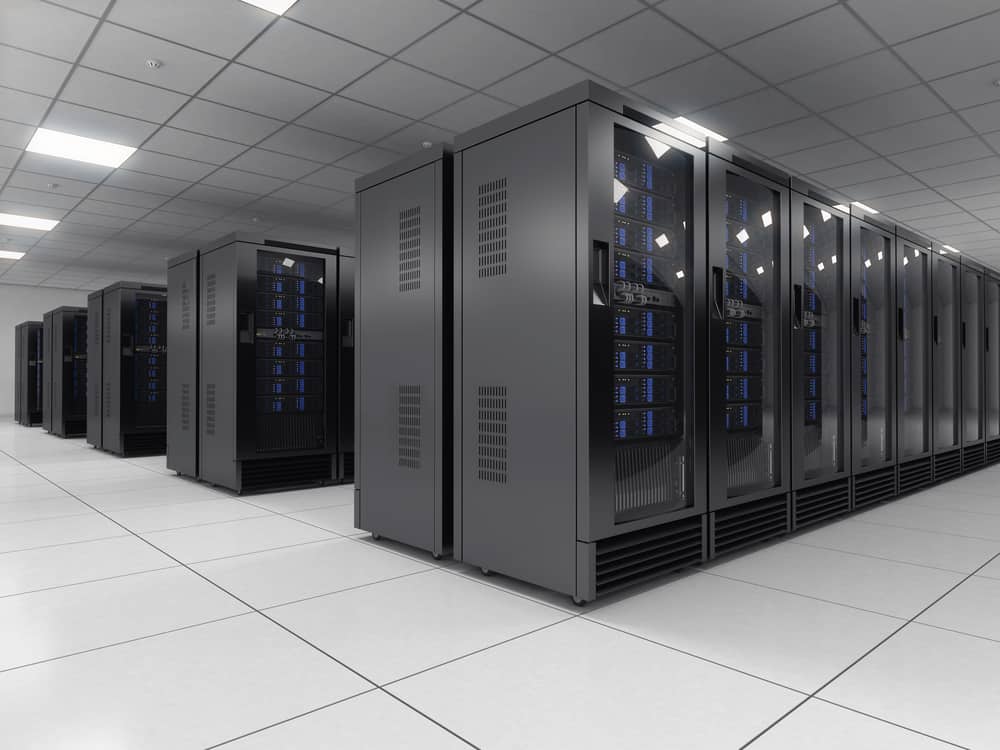
Rows of data center racks in a colocation facility take up a lot of space, which contributes to colocation data center pricing.

With inflation and supply chain issues causing hardware prices to surge, and a winter recession looming on the horizon, every organization is looking for ways to cut technology costs. Though colocation hosting is often much less expensive than building and maintaining an on-premises data center, factors like physical space usage, power and bandwidth consumption, and remote support can cause your monthly colo bill to spiral out of control. This blog examines some of the most common reasons for colocation data center pricing increases and offers advice on how to keep these costs in check.

Colocation data center pricing considerations

First, here are four common factors that could cause your colocation data center pricing to increase.

1. Physical space

One of the major elements determining colocation pricing is the amount of physical space being rented. Some facilities charge by the rack unit and others by square footage (i.e., how much floor space is taken up by your racks). Costs for colocation space are typically calculated based on your portion of the facility’s operating expenses, which include things like physical security, building maintenance, and energy for cooling.

2. Power consumption

Power usage also heavily affects colocation data center pricing. While some facilities offer flat-rate power pricing, it’s more common to see pricing based on kilowatt usage. The price of data center power usage depends on many factors, such as electricity costs in the region, how energy-efficient the facility is, and how much energy it takes to cool your equipment.

3. Bandwidth consumption

Bandwidth is another usage-based expense that affects data center pricing. Organizations usually purchase bandwidth from the ISP, not directly from the facility, although some data centers do offer colo packages that also include internet access and bandwidth. That means that bandwidth pricing varies significantly from organization to organization.

4. Remote hands

Though colocation data centers handle many aspects of building and facility maintenance, customers are typically responsible for deploying and maintaining their own equipment. Most organizations do so via remote DCIM (data center infrastructure management) solutions, so they do not need to maintain a physical presence in the colocation facility. However, sometimes hardware failures or other issues make remote troubleshooting impossible, so they need to use on-site managed services, sometimes referred to as “remote hands.” Some colocation facilities include an allotted time for remote hands services in their pricing, but more often this is an added fee that’s paid for as needed.

There are many other factors contributing to the cost of colocation data center hosting—such as the location of the facility, the cost of your hardware, and the uptime promised by the provider. However, these four factors are relatively easy for you to change and control without needing to completely overhaul your infrastructure or move to a different facility.

Four ways to keep colocation data center pricing in check

Now, let’s discuss how to decrease your physical footprint, lower your power and bandwidth consumption, and minimize your reliance on managed support services.

Consolidated devices

Replacing bulky, outdated, single-purpose hardware with consolidated, high-density devices is a great way to reduce your colocation data center footprint without sacrificing functionality or performance. For example, the Nodegrid Serial Console Plus (NSCP) provides out-of-band management, routing, and switching for up to 96 devices in a single, 1U rackmount appliance. The NSCP helps reduce the number of serial consoles, KVM switches, or jump boxes in your colocation data center, allowing you to save money or use the extra space for new equipment.

Another option is the Nodegrid Net Services Router (NSR), a modular appliance that can replace up to six other devices in your rack. The NSR provides routing and switching with network failover and out-of-band management, with expansion modules for Docker & Kubernetes container hosting, Guest OS & VNF hosting, and more. The NSR is an ideal solution for small colocation deployments because it can reduce the number of computing and storage devices in your rack. For example, the NSR can reduce your footprint from 4U to 1U, allowing you to cut costs and reduce the complexity of your remote infrastructure.

Remote DCIM power management

As mentioned above, most organizations use remote DCIM solutions to manage colocation infrastructure. Power management is an important aspect of remote DCIM for keeping colocation data center costs in check. Remote DCIM power management allows you to visualize power consumption, both at the individual device level and at a big-picture level. If you can see where you’re using power inefficiently, you can correct the problem (for instance, by replacing a faulty UPS or simply redistributing the load) before costs spiral out of control.

For power cost savings, you should use remote management DCIM that supports automation, such as Nodegrid Manager. This vendor-neutral platform allows seamless integrations with third-party or self-developed automation tools and scripts. That means you can use Nodegrid to automatically monitor for and correct inefficient power load distribution to ensure consistent usage and prevent overage fees. Plus, Nodegrid supports end-to-end automation for all your network and infrastructure management workflows, helping to reduce the overall manual workload for your administrators.

Software-defined networking

Traditionally, administrators set and monitor bandwidth usage by accessing the CLI (command line interface) or GUI (graphical user interface) on individual, hardware-based network devices like switches and routers. For complex and distributed network architectures using many switches in many locations (including remote colocation facilities), manual bandwidth control is so time-consuming and inefficient that organizations end up with a “set it and forget it” approach. That means bandwidth usage is free to fluctuate as much as it wants within certain thresholds, and organizations just eat the overage costs.

Software-defined networking, or SDN, decouples network routing and management workflows from the underlying hardware. This allows organizations to centrally control and automate their entire network architecture, which includes bandwidth management for remote colocation infrastructure. Centralized SDN management gives administrators a single interface from which to control all the networking devices and workflows, so they don’t need to jump from device to device to monitor and manage bandwidth usage.

The application of SDN technology to WAN management is known as SD-WAN, and when that extends into the remote LAN it’s known as SD-Branch. SDN, SD-WAN, and SD-Branch technology use intelligent routing to ensure efficient bandwidth usage and network load balancing. That means you can keep your colocation data center bandwidth costs in check while significantly reducing the amount of work involved for your network administrators.

Out-of-band management

Out-of-band management, or OOBM, separates your management network from your production network, allowing you to remotely manage, troubleshoot, and orchestrate your colocation data center infrastructure on a dedicated connection. This has numerous benefits, including:

  • Resource-intensive network orchestration workflows won’t affect the bandwidth or performance of the production network.
  • Administrators can still access remote infrastructure even if the primary ISP link goes down.
  • Administrators gain the ability to remotely troubleshoot even when a hardware failure or configuration mistake causes a production network outage.

OOBM can help reduce your reliance on colocation data center managed services because your administrators have an alternative path to critical infrastructure even during an outage. A Gen 3 OOB solution like Nodegrid can further reduce your colocation data center pricing in several ways:

  1. OOB management is built into all Nodegrid devices, so you don’t need to purchase any additional hardware (or rent additional rack space) to enable out-of-band management.
  2. Nodegrid OOB integrates with the vendor-agnostic Nodegrid Manager platform, which means you’ll have reliable 24/7 remote access to monitor and orchestrate power load distribution to ensure cost-efficiency.
  3. Nodegrid OOB devices can directly host your software-defined networking, SD-WAN, and SD-Branch solutions so you don’t need to purchase additional hardware. You can also integrate SDN, SD-WAN, and SD-Branch software with the Nodegrid Manager platform for unified control.

The Nodegrid solution from ZPE Systems can help you keep colocation data center pricing in check through consolidated devices, remote DCIM orchestration, software-defined networking support, and Gen 3 out-of-band management.

Want to find out more about reducing colocation data center pricing with Nodegrid?

Contact ZPE Systems today!

How SASE Technology Defends Your Network Edge

SASE technology can offer you defense for your network edge

Secure Access Service Edge, or SASE, is a cloud-based service that combines software-defined wide area networking (SD-WAN) with critical network security technologies like CASB, ZTNA, SWG, and FWaaS. SASE technology connects remote, branch office, and edge computing resources directly to web and cloud services, reducing the load on the main firewall while extending enterprise security policies and controls to protect this traffic. In this article, we’ll dive into the specific technology that SASE uses to defend your network edge.

How SASE technology defends your network edge

SASE protects network edge traffic by rolling up an entire network security technology stack into a single, cloud-delivered service. The key security components of a SASE solution include CASB, ZTNA, SWG, and FWaaS.

CASB

A cloud access security broker, or CASB, is a software service that sits between your main enterprise network and your cloud-based infrastructure. A CASB allows you to extend your enterprise security policies to the traffic flowing between your WAN and the cloud so you can ensure consistent protection. A CASB is actually a collection of multiple security technologies, such as:

  • User and Entity Behavior Analytics (UEBA) – Monitors the behavior of users and devices on the network to detect suspicious activity and enforce security policies.
  • Cloud application discovery – Identifies all cloud applications and services in use by the organization and analyzes relative risk levels.
  • Data Loss Prevention (DLP) – Applies data governance policies to prevent the exfiltration of sensitive and proprietary information.
  • Adaptive access control – Uses session context (e.g., originating location, time, behavior) to determine whether to grant access.
  • Malware detection – Scans traffic between the enterprise and the cloud to detect and block viruses and other malware.

ZTNA

Zero trust network access, or ZTNA, connects remote users and devices to enterprise network resources, similar to a VPN. Unlike a VPN, however, ZTNA creates a direct connection to the specific resources requested by the user, rather than granting full access to the network. This prevents remote users from seeing or interacting with any network resources outside of the specific service they’ve explicitly authenticated to.

ZTNA follows the zero trust motto of “never trust, always verify.” It uses technologies like context and role-based identity verification and two-factor authentication (2FA) to prevent unauthorized access. And, since users need to re-authenticate to every enterprise resource, ZTNA is able to prevent malicious actors from discovering valuable systems and data or moving laterally on the enterprise network.

SWG

A secure web gateway, or SWG, is a service that sits between your enterprise network and the public internet. All web-destined traffic passes through the SWG, where enterprise web filtering and application control policies are applied. Traditionally, an SWG is a hardware device that sits in the data center, which means all remote, branch, and edge traffic needs to be backhauled through a single appliance. As part of a SASE solution, an SWG sits in the cloud instead, so remote traffic doesn’t need to pass through the data center. This improves overall network performance, reduces or eliminates bottlenecks, and ensures consistent application of acceptable use policies and application security controls.

FWaaS

Firewall-as-a-Service, or FWaaS, delivers next-generation firewall technology as a cloud-based service. That means remote and cloud-destined traffic can bypass the firewall in your data center, reducing bottlenecks and performance issues. At the same time, FWaaS provides the same level of security and protection as an NGFW, including features like URL filtering, intrusion detection and prevention, and deep packet inspection (DPI). FWaaS gives SASE solutions the ability to protect remote, edge, and cloud-destined traffic with the same policies and controls as the main enterprise network to ensure consistent security and optimal performance.

SASE technology uses CASB, ZTNA, SWG, and FWaaS to defend your network edge. However, you still need a way to direct remote, branch office, and edge traffic to your SASE security stack. That’s where SD-WAN technology comes in.

Accessing SASE technology with SD-WAN

While it’s possible to use standard WAN architectures to connect to SASE technology, the most reliable and efficient way to access SASE is with SD-WAN. SD-WAN uses software abstraction to create a virtual overlay management network on top of your WAN hardware. This virtual management network enables the use of automation and orchestration to manage the remote network traffic.

In a SASE deployment, SD-WAN uses intelligent routing to separate all remote traffic that’s destined for the cloud. Instead of backhauling this traffic through the enterprise firewall, SD-WAN routes it through the SASE technology stack, significantly reducing the load on your data center infrastructure. This improves network and application performance for your entire enterprise without sacrificing security.

SD-WAN solutions may sit on top of traditional WAN infrastructure, or they may replace that hardware entirely, using SD-WAN routers provided by the vendor. However, rather than investing in specialized vendor hardware, an even better approach is to use vendor-neutral network management devices that can host or integrate with every piece of your SASE and SD-WAN technology stack.

For example, the Nodegrid line of vendor-neutral serial consoles and network edge routers are the perfect on-ramp for your SASE solution. Nodegrid can directly host or integrate with third-party SD-WAN solutions like Palo Alto Networks’ Prisma SD-WAN, or you can use ZPE Cloud’s SD-WAN app. Nodegrid also supports seamless integrations with your choice of SASE provider, giving you a unified, centralized SD-WAN and SASE orchestration platform.

SASE learning center:

★   Understanding Key SASE Components & Benefits
★   SASE Implementation: A Step-by-Step Guide for Businesses
★   The SASE Model: Key Use Cases & Benefits

Want to find out more about accessing SASE technology with Nodegrid SD-WAN?

Contact ZPE Systems today!