Providing Out-of-Band Connectivity to Mission-Critical IT Resources

The Future of Data Centers: Overcoming the Challenges of Lights-Out Operations
Future of lights-out data centers

In a recent article, Y Combinator announced its search for startups aiming to eliminate human intervention in data center development and operation. While one half of this vision seems focused on automating the design and construction of data centers, the other half – focused on fully automating operations (a.k.a. “lights-out”) – is already a reality. ZPE Systems and Legrand are enabling enterprises to achieve this kind of operation by providing the best practices that are already in use in hyperscale data centers for lights-out management.

The Need for Lights-Out Data Centers

The growth of cloud computing, edge deployments, and AI-driven workloads means data centers need to be as efficient, scalable, and resilient as possible. The challenge is that because there is so much infrastructure to manage, the buildout and operation of these data centers becomes very costly and time consuming.

Diane Hu, a YC group partner who previously worked in augmented reality and data science, says, “Hyperscale data center projects take many years to complete. We need more data centers that are created faster and cheaper to build out the infrastructure needed for AI progress. Whether it be in power infrastructure, cooling, procurement of all materials, or project management.”

Dalton Caldwell, a YC managing director who also cofounded App.net, adds, “Software is going to handle all aspects of planning and building a new data center or warehouse. This can include site selection, construction, set up, and ongoing management. They’re going to be what’s called lights-out. There’s going to be robots, autonomously operating 24/7. We want to fund startups to help create this vision.”

In terms of ongoing management and operations, bringing this vision to life will require organizations to overcome several significant problems:

  1. Rising Operational Costs: Staffing and maintaining on-site engineers 24/7 is costly. Labor expenses, training, and turnover increase operational overhead.
  2. Human Error and Downtime: Human error is the leading cause of downtime, so having manual processes often leads to costly outages caused by typos, misconfigurations, and slow response times.
  3. Security Threats: Physical access to data centers increases the risk of insider threats, breaches, and unauthorized interventions.
  4. Remote Site Management: Managing geographically distributed data centers and edge locations requires staff to be on-site. What’s needed is a scalable and efficient solution that lets staff remotely perform every job, outside of physically installing equipment.
  5. Sustainability and Energy Efficiency: On-site workers have specific heating/cooling needs that must be met in order to comfortably perform their jobs. Reducing human presence in data centers enables better energy management, which can lower carbon footprints and reduce cooling requirements.

The Roadblocks to Lights-Out Data Centers

Despite the obvious benefits, organizations struggle to implement fully autonomous data center operations. The obstacles include:

  • Legacy Infrastructure: Many enterprises still rely on outdated equipment that lacks the necessary integrations for automation and remote control. Adding functions or capabilities typically means deploying more physical boxes, which increases costs and complexity.
  • Network Resilience and Connectivity: Traditional in-band network management fails during outages, making it difficult to troubleshoot and recover remotely. Without complete separation of the management network from production networks, organizations are unable to achieve true resilience from errors, outages, and breaches.
  • Integration Challenges: Implementing AI-driven automation, OOB management, and cybersecurity protections requires seamless interoperability between different vendors’ solutions.
  • Security Concerns: A fully automated data center must have robust access controls, zero-trust security frameworks, and remote threat mitigation capabilities.
  • Skill Gaps: The shift to automation necessitates retraining IT staff, who may be unfamiliar with the latest technologies required to maintain a hands-off data center.
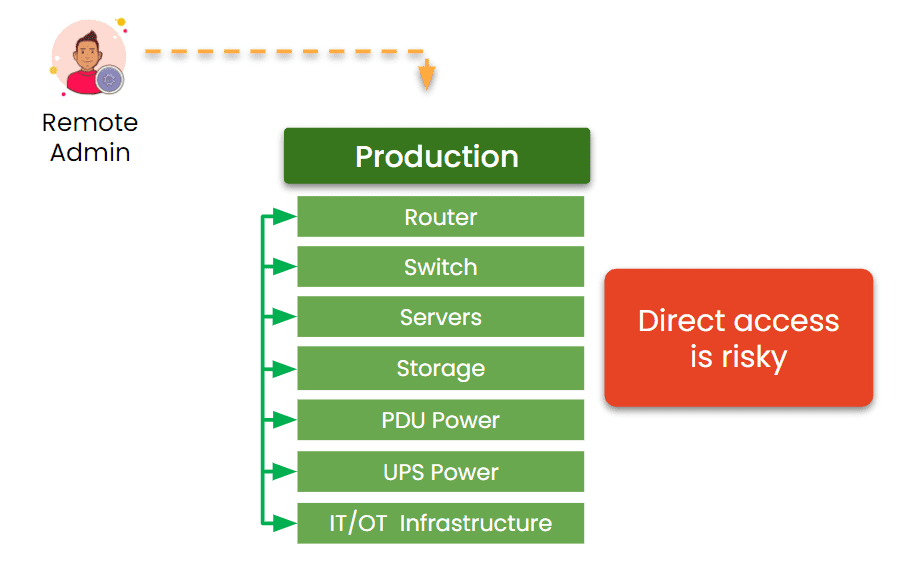
Direct remote access is risky

Image: The traditional management approach relies on production assets. This makes it impossible to achieve resilience, because production failures cut off remote admin access.

How ZPE Systems is Powering Lights-Out Operations

ZPE Systems is already helping companies overcome these challenges and transition to lights-out data center operations. As part of Legrand, ZPE is a key component in a total solution offering that includes everything from cabinets and containment to power distribution and remote access. By leveraging out-of-band management, intelligent automation, and zero-trust security, ZPE enables enterprises to manage their infrastructure remotely and securely.
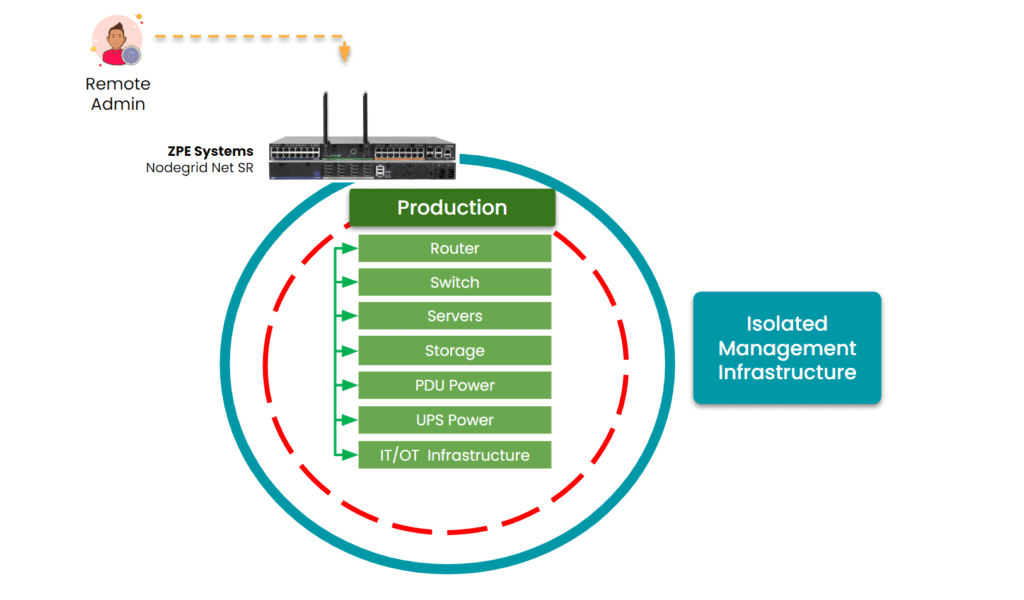
Isolated Management Infrastructure is critical to lights-out data center operations.

Image: ZPE Systems’ Nodegrid creates an Isolated Management Infrastructure. This gives admins secure remote access, even when the production network fails or suffers an attack.

Key benefits of this management infrastructure include:

  • Reliable Remote Access: ZPE’s OOB solutions ensure secure access to critical infrastructure even when primary networks fail. This is made possible by ZPE’s Isolated Management Infrastructure (IMI), which creates a fully separate management network. This single-box solution helps organizations achieve lights-out operations without device sprawl.
  • Automated Remediation: ZPE’s platform hosts third party applications, Docker containers, and AI and automation solutions. Organizations can leverage data about device health, telemetry, environmentals, and in-band performance, to resolve issues fast and prevent downtime.
  • Hardened Security: ZPE’s solutions are built with security in mind, from local MFA, to self-encrypted disk and signed OS. ZPE also has the most security certifications and validations, including SOC2 Type 2, FIPS 140-3, and ISO27001. Read our full supply chain security assurance pdf.
  • Multi-Vendor Integration: ZPE is the only drop-in solution that works across diverse environments, regardless of which vendor solutions are already in place. This makes it easy to deploy IMI and the resilience architecture necessary for achieving lights-out operations.
  • Comprehensive Data Center Solutions: With Legrand’s full suite of data center infrastructure, organizations benefit from a fully integrated approach that ensures efficiency, scalability, and resilience.

Lights-out data centers are an achievable reality. By addressing the key challenges and leveraging advanced remote management solutions, enterprises can reduce operational costs, enhance security, and improve efficiency. As part of Legrand, ZPE Systems continues to lead the charge in enabling this transformation for organizations across the globe.

See How Vapor IO Achieved Lights-Out Operations with ZPE Systems

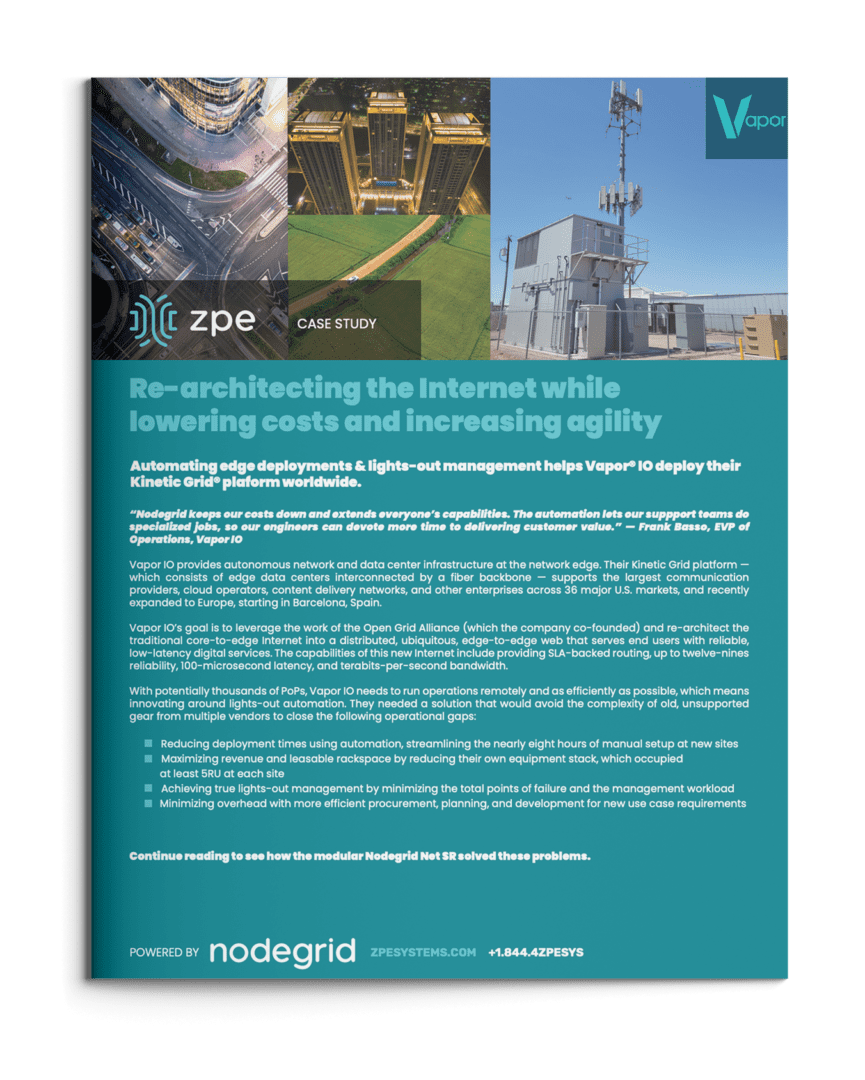
Vapor IO is re-architecting the internet. They deploy micro data centers at the network edge, serving markets across the U.S. and Europe. When they needed to achieve true lights-out operations, they chose ZPE Systems’ Nodegrid. Find out how this solution reduced deployment times to just one hour and delivered additional time and cost savings. Download the full case study below.
Get in Touch for a Demo of Lights-Out Data Center Operations

Our engineers are ready to walk you through lights-out operations. Click below to set up a demo.

Network Resilience Doesn’t Mean What it Did 20 Years Ago

Network resilience requirements have changed

Enterprise networks are like air. When they’re running smoothly, it’s easy to take them for granted, as business users and customers are able to go about their normal activities. But when customer service reps are suddenly cut off from their ticketing system, or family movie night turns into a game of “Is it my router, or the network?”, everyone notices. This is why network resilience is critical.

But, what exactly does resilience mean today? Let’s find out by looking at some recent real-world examples, the history of network architectures, and why network resilience doesn’t mean what it did 20 years ago.

Why does network resilience matter?

There’s no shortage of real-world examples showing why network resilience matters. The takeaway is that network resilience is directly tied to business, which means that it impacts revenue, costs, and risks. Here is a brief list of resilience-related incidents that occurred in 2023 alone:

  • FAA (Federal Aviation Administration) – An overworked contractor unintentionally deleted files, which delayed flights nationwide for an entire day.
  • Southwest Airlines – A firewall configuration change caused 16,000 flight cancellations and cost the company about $1 billion.
  • MOVEit FTP exploit – Thousands of global organizations fell victim to a MOVEit vulnerability, which allowed attackers to steal personal data for millions.
  • MGM Resorts – A human exploit and lack of recovery systems let an attack persist for weeks, causing millions in losses per day.
  • Ragnar Locker attacks – Several large organizations were locked out of IT systems for days, which slowed or halted customer operations worldwide.

What does network resilience mean?

Based on the examples above, it might seem that network resilience could mean different things. It might mean having backups of golden configs that you could easily restore in case of a mistake. It might mean beefing up your security and/or replacing outdated systems. It might mean having recovery processes in place.

So, which is it?

The answer is, it’s all of these and more.

Donald Firesmith (Carnegie Mellon) defines resilience this way: “A system is resilient if it continues to carry out its mission in the face of adversity (i.e., if it provides required capabilities despite excessive stresses that can cause disruptions).”

Network resilience means having a network that continues to serve its essential functions despite adversity. Adversity can stem from human error, system outages, cyberattacks, and even natural disasters that threaten to degrade or completely halt normal network operations. Achieving network resilience requires the ability to quickly address issues ranging from device failures and misconfigurations, to full-blown ISP outages and ransomware attacks.

The problem is, this is now much more difficult than it used to be.

How did network resilience become so complicated?

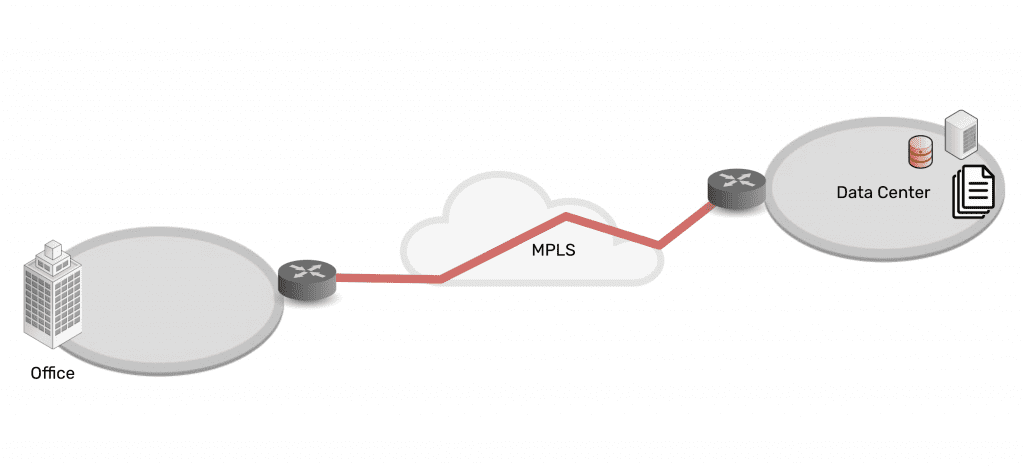
Twenty years ago, IT teams managed a centralized architecture. The data center was able to serve end-users and customers with the minimal services they needed. Being “constantly connected” wasn’t a concern for most people. For the business, achieving resilience was as simple as going on-site or remoting-in via serial console to fix issues at the data center.

Network architecture showing simplicity of data center connected via MPLS to branch office

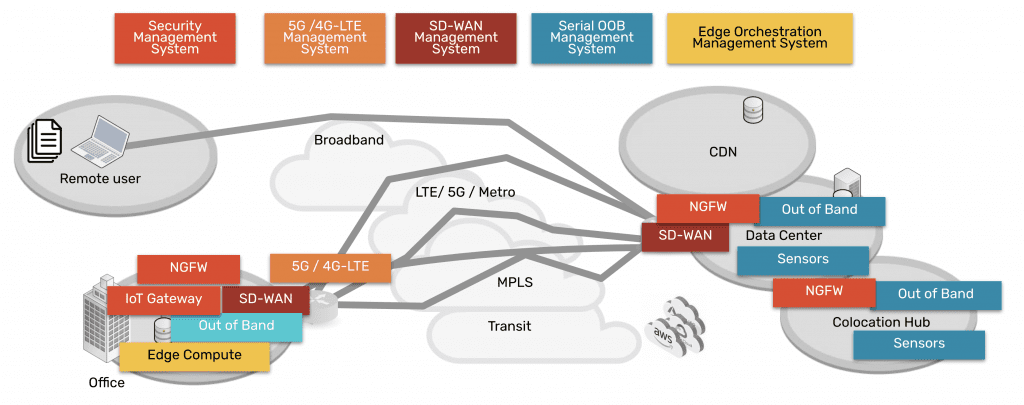
Then in the mid-2000s, the advent of the cloud changed everything. Infrastructure, data, and computing became decentralized into a distributed mix of on-prem and cloud solutions. Users could connect from anywhere, and on-demand services allowed people to be plugged in around-the-clock. Services for work, school, and entertainment could be delivered anytime, no matter where users were.

Network architecture showing complexity of data center, CDN, remote user, branch office, all connected via many paths

Behind the scenes, this explosion of architecture created three problems for achieving network resilience, which a simple serial could no longer fix:

Too Much Work

Infrastructure, data, and computing are widely distributed. Systems inevitably break and require work, but teams don’t have the staff to keep up.

Too Much Complexity

Pairing cloud and box-based stacks creates complex networks. Teams leave systems outdated, because they don’t want to break this delicate architecture.

Too Much Risk

Unpatched, outdated systems are prime targets for packaged attacks that move at machine speed. Defense requires recovery tools that teams don’t have.

Enabling businesses to be resilient in the modern age requires an approach that’s different than simply deploying a serial console for remote troubleshooting. Gen 1 and 2 serial consoles, which have dominated the market for 20 years, were designed to solve basic issues by offering limited remote access and some automation. The problem is, these still leave teams lacking the confidence to answer questions like:

  • “How can we guarantee access to fix stuff that breaks, without rolling trucks?”
  • “Can we automate change management, without fear of breaking the network?”
  • “Attacks are inevitable — How do we stop hackers from cutting off our access?”

Hyperscalers, Internet Service Providers, Big Tech, and even the military have a resilience model that they’ve proven over the last decade. Their approach involves fully isolating command and control from data and user environments. This allows them to not only gain low-level remote access to maintain and fix systems, but also to “defend the hill” and maintain control if systems are compromised or destroyed.

This approach uses something called Isolated Management Infrastructure (IMI).

Isolated Management Infrastructure is the best practice for network resilience

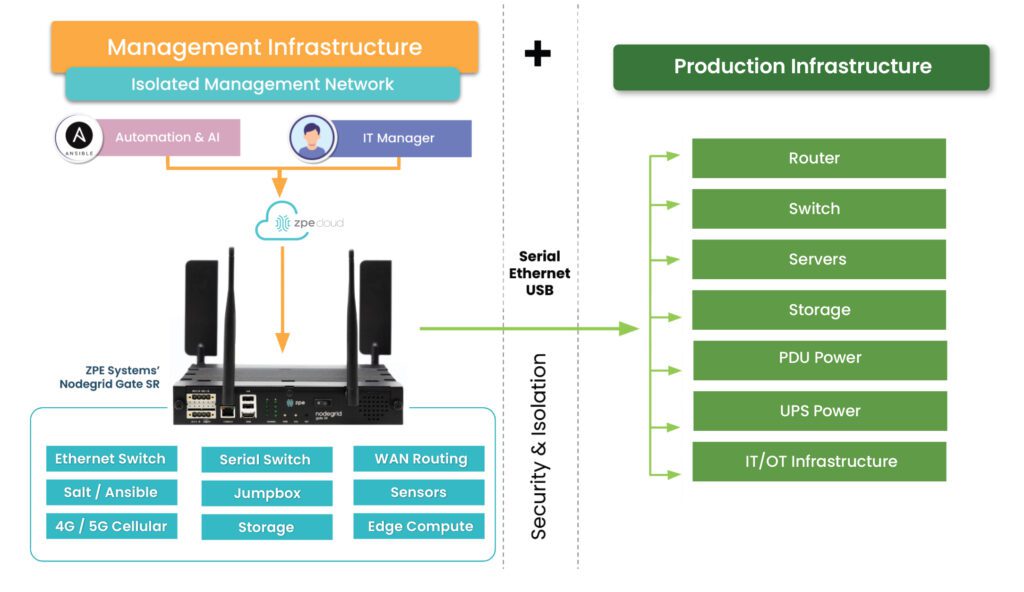
Isolated Management Infrastructure is the practice of creating a management network that is completely separate from the production network. Most IT teams are familiar with out-of-band management as this network; IMI, however, provides many capabilities that can’t be hosted on a traditional serial console or OOB network. And with increasing vulnerabilities, CISA issued a binding directive specifically calling for organizations to implement IMI.

Isolated Management Infrastructure using Gen 3 serial consoles, like ZPE Systems’ Nodegrid devices, provides more than simple remote access and automation. Similar to a proper out-of-band network, IMI is completely isolated from production assets. This means there are no dependencies on production devices or connections, and management interfaces are not exposed to the internet or production gear. In the event of an outage or attack, teams retain management access, and this is just the beginning of the benefits of having IMI.

A network architecture diagram showing Isolated Management Infrastructure next to production infrastructure

IMI includes more than nine functions that are required for teams to fully service their production assets. These include:

  • Low-level access to all management interfaces, including serial, Ethernet, USB, IPMI, and others, to guarantee remote access to the entire environment
  • Open, edge-native automation to ensure services can continue operating in the event of outages or change errors
  • Computing, storage, and jumpbox capabilities that can natively host the apps and tools to deploy an IRE, to ensure fast, effective recovery from attacks

Get the guide to build IMI

ZPE Systems has worked alongside Big Tech to fulfill their requirements for IMI. In doing so, we created the Network Automation blueprint as a technical guide to help any organization build their own Isolated Management Infrastructure. Download the blueprint now to get started.

Collaboration in DevOps: Strategies and Best Practices

Collaboration in DevOps is illustrated by two team members working together in front of the DevOps infinity logo.
The DevOps methodology combines the software development and IT operations teams into a highly collaborative unit. In a DevOps environment, team members work simultaneously on the same code base, using automation and source control to accelerate releases. The transformation from a traditional, siloed organizational structure to a streamlined, fast-paced DevOps company is rewarding yet challenging. That’s why it’s important to have the right strategy, and in this guide to collaboration in DevOps, you’ll discover tips and best practices for a smooth transition.

Collaboration in DevOps: Strategies and best practices

A successful DevOps implementation results in a tightly interwoven team of software and infrastructure specialists working together to release high-quality applications as quickly as possible. This transition tends to be easier for developers, who are already used to working with software code, source control tools, and automation. Infrastructure teams, on the other hand, sometimes struggle to work at the velocity needed to support DevOps software projects and lack experience with automation technologies, causing a lot of frustration and delaying DevOps initiatives. The following strategies and best practices will help bring Dev and Ops together while minimizing friction.

Turn infrastructure and network configurations into software code

Infrastructure and network teams can’t keep up with the velocity of DevOps software development if they’re manually configuring, deploying, and troubleshooting resources using the GUI (graphical user interface) or CLI (command line interface). The best practice in a DevOps environment is to use software abstraction to turn all configurations and networking logic into code.

Infrastructure as Code (IaC)

Infrastructure as Code (IaC) tools allow teams to write configurations as software code that provisions new resources automatically with the click of a button. IaC configurations can be executed as often as needed to deploy DevOps infrastructure very rapidly and at a large scale.

Software-Defined Networking (SDN) 

Software-defined networking (SDN) and Software-defined wide-area networking (SD-WAN) use software abstraction layers to manage networking logic and workflows. SDN allows networking teams to control, monitor, and troubleshoot very large and complex network architectures from a centralized platform while using automation to optimize performance and prevent downtime.

Software abstraction helps accelerate resource provisioning, reducing delays and friction between Dev and Ops. It can also be used to bring networking teams into the DevOps fold with automated, software-defined networks, creating what’s known as a NetDevOps environment.

Use common, centralized tools for software source control

Collaboration in DevOps means a whole team of developers or sysadmins may work on the same code base simultaneously. This is highly efficient — but risky. Development teams have used software source control tools like GitHub for years to track and manage code changes and prevent overwriting each other’s work. In a DevOps organization using IaC and SDN, the best practice is to incorporate infrastructure and network code into the same source control system used for software code.

Managing infrastructure configurations using a tool like GitHub ensures that sysadmins can’t make unauthorized changes to critical resources. For example, administrators initiate many ransomware attacks and other major outages by directly changing infrastructure configurations without testing or approval. This happened in a high-profile MGM cyberattack when an IT staff member fell victim to social engineering and granted elevated Okta privileges to an attacker without having to get approval from a second pair of eyes.

Using DevOps source control, all infrastructure changes must be reviewed and approved by a second party in the IT department to ensure they don’t introduce vulnerabilities or malicious code into production. Sysadmins can work quickly and creatively, knowing there’s a safety net to catch mistakes, reducing Ops delays, and fostering a more collaborative environment.

Consolidate and integrate DevOps tools with a vendor-neutral platform

An enterprise DevOps deployment usually involves dozens – if not hundreds – of different tools to automate and streamline the many workflows involved in a software development project. Having so many individual DevOps tools deployed around the enterprise increases the management complexity, which can have the following consequences.

  • Human error – The harder it is to stay on top of patch releases, security bulletins, and monitoring logs, the more likely it is that an issue will slip between the cracks until it causes an outage or breach.
  • Security complexity – Every additional DevOps tool added to the architecture makes integrating and implementing a consistent security model more complex and challenging, increasing the risk of coverage gaps.
  • Spiraling costs – With many different solutions handling individual workflows around the enterprise, the likelihood of buying redundant services or paying for unneeded features increases, which can impact ROI.
  • Reduced efficiency – DevOps aims to increase operational efficiency, but having to work across so many disparate tools can slow teams down, especially when those tools don’t interoperate.

The best practice is consolidating your DevOps tools with a centralized, vendor-neutral platform. For example, the Nodegrid Services Delivery Platform from ZPE Systems can host and integrate 3rd-party DevOps tools, unifying them under a single management umbrella. Nodegrid gives IT teams single-pane-of-glass control over the entire DevOps architecture, including the underlying network infrastructure, which reduces management complexity, increases efficiency, and improves ROI.

Maximize DevOps success

DevOps collaboration can improve operational efficiency and allow companies to release software at the velocity required to stay competitive in the market. Using software abstraction, centralized source code control, and vendor-neutral management platforms reduces friction on your DevOps journey. The best practice is to unify your DevOps environment with a vendor-neutral platform like Nodegrid to maximize control, cost-effectiveness, and productivity.

Want to Simplify collaboration in DevOps with the Nodegrid platform?

Reach out to ZPE Systems today to learn more about how the Nodegrid Services Delivery Platform can help you simplify collaboration in DevOps.


Contact Us

Best DevOps Tools

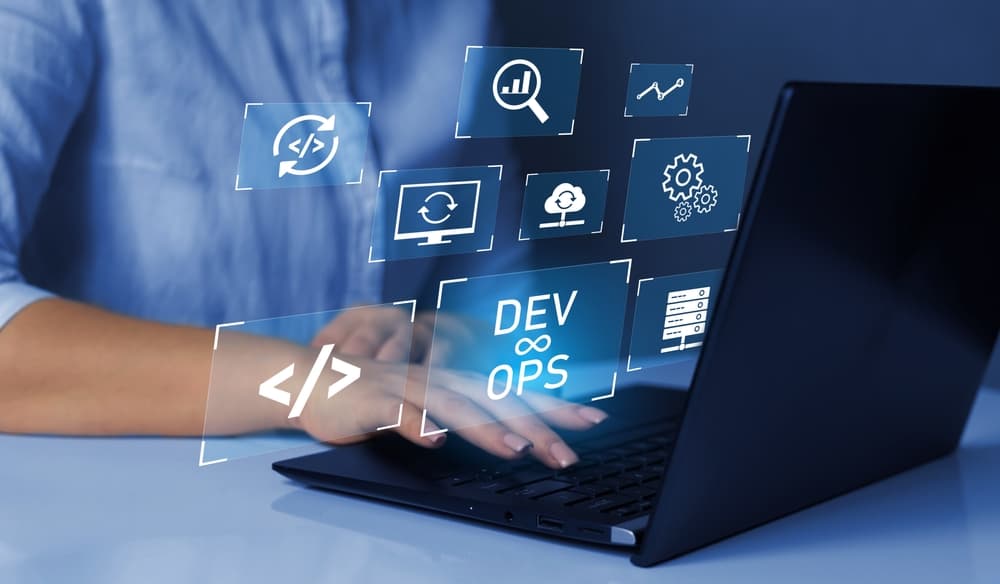
A glowing interface of DevOps tools and concepts hover above a laptop.
DevOps is all about streamlining software development and delivery through automation and collaboration. Many workflows are involved in a DevOps software development lifecycle, but they can be broadly broken down into the following categories: development, resource provisioning and management, integration, testing, deployment, and monitoring. The best DevOps tools streamline and automate these key aspects of the DevOps lifecycle. This blog discusses what role these tools play and highlights the most popular offerings in each category.

The best DevOps tools

Categorizing the Best DevOps Tools

Version Control Tools

Track and manage all the changes made to a code base.

IaC Build Tools

Provision infrastructure automatically with software code.

Configuration Management Tools

Prevent unauthorized changes from compromising security.

CI/CD Tools

Automatically build, test, integrate, and deploy software.

Testing Tools

Automatically test and validate software to streamline delivery.

Container Tools

Create, deploy, and manage containerized resources for microservice applications.

Monitoring & Incident Response Tools

Detect and resolve issues while finding opportunities to optimize.

DevOps version control

In a DevOps environment, a whole team of developers may work on the same code base simultaneously for maximum efficiency. DevOps version control tools like GitHub allow you to track and manage all the changes made to a code base, providing visibility into who’s making what changes at what time. Version control prevents devs from overwriting each other’s work or making unauthorized changes. For example, a developer may come up with a way to improve the performance of a feature by changing the existing code, but doing so inadvertently creates a vulnerability in the software or interferes with other application functions. DevOps version control prevents unauthorized code changes from integrating with the rest of source code and tracks who’s responsible for making the request, improving the stability and security of the software.

  •  Best DevOps version control tool: Github

Infrastructure as Code (IaC)

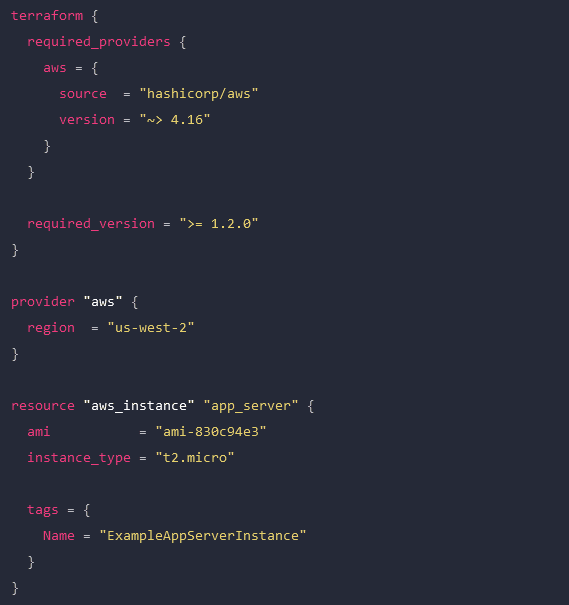
Infrastructure as Code (IaC) streamlines the Operations side of a DevOps environment by abstracting server, VM, and container configurations as software code. IaC build tools like HashiCorp Terraform allow Ops teams to write infrastructure configurations as declarative or imperative code, which is used to provision resources automatically. With IaC, teams can deploy infrastructure at the velocity required by DevOps development cycles. A screenshot of a Terraform configuration for AWS infrastructure.

An example Terraform configuration for IaC.

Configuration management

Configuration management involves monitoring infrastructure and network devices to make sure no unauthorized changes are made while systems are in production. Unmonitored changes could introduce security vulnerabilities that the organization is unaware of, especially in a fast-paced DevOps environment. In addition, as systems are patched and updated over time, configuration drift becomes a concern, leading to additional quality and security issues. DevOps configuration management tools like RedHat Ansible automatically monitor configurations and roll back unauthorized modifications. Some IaC build tools, like Terraform, also include configuration management.

Continuous Integration/Continuous Delivery (CI/CD)

Continuous Integration/Continuous Delivery (CI/CD) is a software development methodology that goes hand-in-hand with DevOps. In CI/CD, software code is continuously updated and integrated with the main code base, allowing a continuous delivery of new features and improvements. CI/CD tools like Jenkins automate every step of the CI/CD process, including software building, testing, integrating, and deployment. This allows DevOps organizations to continuously innovate and optimize their products to stay competitive in the market.

Software testing

Not all DevOps teams utilize CI/CD, and even those that do may have additional software testing needs that aren’t addressed by their CI/CD platform. In DevOps, app development is broken up into short sprints so manageable chunks of code can be tested and integrated as quickly as possible. Manual testing is slow and tedious, introducing delays that prevent teams from achieving the rapid delivery schedules required by DevOps organizations. DevOps software testing tools like Selenium automatically validate software to streamline the process and allow testing to occur early and often in the development cycle. That means high-quality apps and features get out to customers sooner, improving the ROI of software projects.

  •  Best software testing tool: Selenium

Container management

In DevOps, containers are lightweight, virtualized resources used in the development of microservice applications. Microservice applications are extremely agile, breaking up software into individual services that can be developed, deployed, managed, and destroyed without affecting other parts of the app. Docker is the de facto standard for basic container creation and management. Kubernetes takes things a step further by automating the orchestration of large-scale container deployments to enable an extremely efficient and streamlined infrastructure.

Monitoring & incident management

Continuous improvement is a core tenet of the DevOps methodology. Software and infrastructure must be monitored so potential issues can be resolved before they affect software performance or availability. Additionally, monitoring data should be analyzed for opportunities to improve the quality, speed, and usability of applications and systems. DevOps monitoring and incident response tools like Cisco’s AppDynamics provide full-stack visibility, automatic alerts, automated incident response and remediation, and in-depth analysis so DevOps teams can make data-driven decisions to improve their products.

Deploy the best DevOps tools with Nodegrid

DevOps is all about agility, speed, and efficiency. The best DevOps tools use automation to streamline key workflows so teams can deliver high-quality software faster. With so many individual tools to manage, there’s a real risk of DevOps tech sprawl driving costs up and inhibiting efficiency. One of the best ways to reduce tech sprawl (without giving up all the tools you love) is by using vendor-neutral platforms to consolidate your solutions. For example, the Nodegrid Services Delivery Platform from ZPE Systems can host and integrate 3rd-party DevOps tools, reducing the need to deploy additional virtual or hardware resources for each solution. Nodegrid utilizes integrated services routers, such as the Gate SR or Net SR, to provide branch/edge gateway routing, in-band networking, out-of-band (OOB) management, cellular failover, and more. With a Nodegrid SR, you can combine all your network functions and DevOps tools into a single integrated solution, consolidating your tech stack and streamlining operations.

A major benefit of using Nodegrid is that the Linux-based Nodegrid OS is Synopsys secure, meaning every line of source code is checked during our SDLC. This significantly reduces CVEs and other vulnerabilities that are likely present in other vendors’ software.

Learn more about efficient DevOps management with vendor-neutral solutions

With the vendor-neutral Nodegrid Services Delivery Platform, you can deploy the best DevOps tools while reducing tech sprawl. Watch a free Nodegrid demo to learn more.

Request a Demo

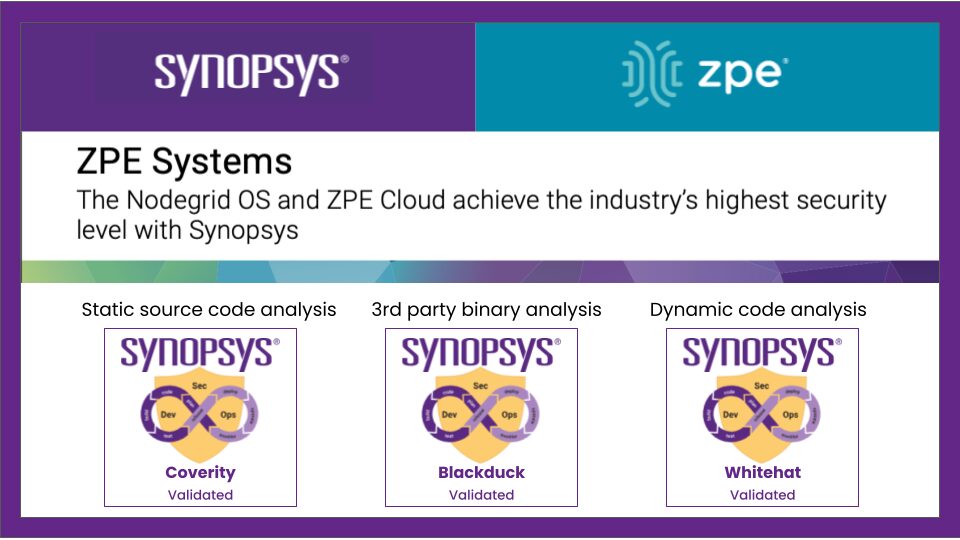
Nodegrid OS and ZPE Cloud achieve industry’s highest security with Synopsys

Synopsys and ZPE validation

How do you address security across the software development life cycle?

“Security is the cornerstone of ZPE’s infrastructure management solutions,” says Koroush Saraf, Vice President of Product Management and Marketing at ZPE Systems. “Our automation platform touches every aspect of our customers’ critical infrastructure, from networking and firewall gear, to servers, smart PDUs, and everything else in their production network. The ZPE portfolio is architected with the strongest security and implemented with the same level of scrutiny.”

Given the critical nature of enterprise networking, security is paramount to ZPE’s customers.

“The average time taken to apply patches and fix vulnerabilities can be more than 205 days,” says Saraf. “This is due to many reasons: limited resources and time, concerns that something may break, or in some cases, admins don’t even know that a critical patch is available. That’s why ZPE takes on the responsibility for customers. They’re assured that the systems running their infrastructure are running the latest, most secure software. And if a patch fails, our built-in undo button reverts to a safe configuration before any damage can be done.”

Saraf adds, “Like with all modern organizations, ZPE uses a complex mix of proprietary, open source, and third-party software obtained through a variety of sources from the software supply chain. Think third-party libraries, packaged software from ISVs, IoT and embedded firmware, and especially open source components. In fact, studies show that over three-quarters of the code in any given application is likely to be open source.”

“Most third parties won’t provide the source code behind their software,” notes Saraf. “But the question remains whether that supplier is as security-conscious as ZPE. Again, we found the solution with Synopsys, which gives us insight into any third-party software we include without requiring access to the source code.”

The solution: Comprehensive security testing with Synopsys AST

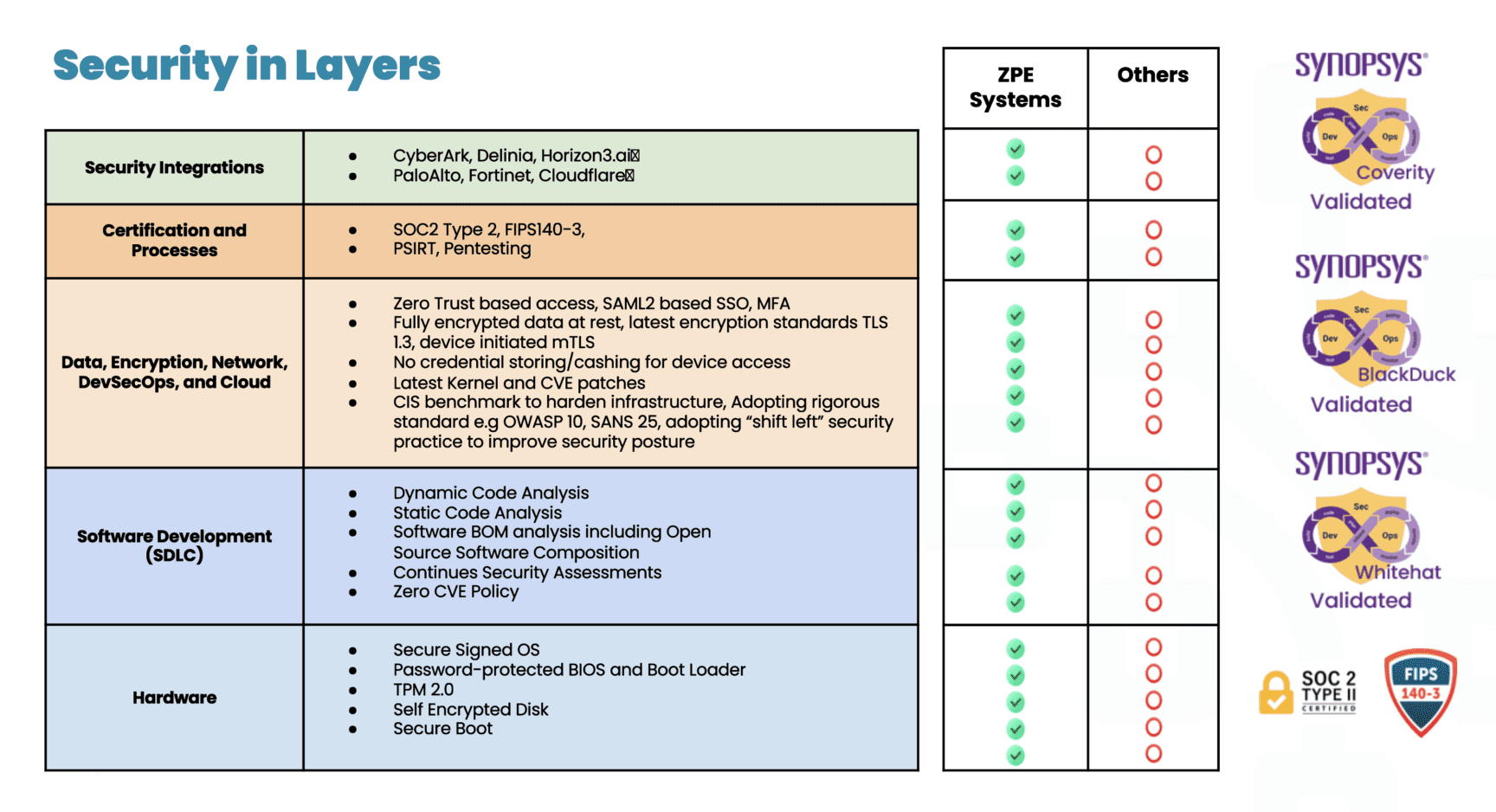
Different security solutions focus on different aspects of vulnerability detection and risk mitigation. By layering multiple solutions such as static analysis, dynamic analysis, and software composition analysis, ZPE covers a wide range of potential vulnerabilities, ensuring that code quality and security issues are identified at various stages during the software development life cycle and across different types of code.

Table showing ZPE Systems' security in layers

Coverity® provides the speed, ease of use, accuracy, industry standards compliance, and scalability to develop high-quality, secure applications. Coverity identifies critical quality defects and security vulnerabilities as code is written, early in ZPE’s development process when they are easiest to fix. Coverity seamlessly integrates automated security testing into CI/CD pipelines, supports existing development tools and workflows, and can be deployed either on-premises or in the cloud.

WhiteHat™ Dynamic is a software-as-a-service dynamic application security testing solution that allows businesses to quickly deploy a scalable web security program. No matter how many websites or how often they change, WhiteHat Dynamic can scale to meet any demand. It provides security and development teams with fast, accurate, and continuous vulnerability assessments of applications in QA and production, applying the same techniques hackers use to find weaknesses This enables ZPE to streamline the remediation process, prioritize vulnerabilities based on severity and threat, and focus on remediation and its overall security posture.

Black Duck® helps ZPE identify supply chain security and license risks even when it doesn’t have access to the underlying software’s code. This is a critical security tool for the modern software supply chain. Black Duck Binary Analysis can scan virtually any software, including desktop and mobile applications, third-party libraries, packaged software, and embedded system firmware. It quickly generates a complete Software Bill of Materials (SBOM), which tracks third-party and open source components, and identifies known security vulnerabilities, associated licenses, and code quality risks.

The result: A notable reduction of CVEs

“One of the outcomes from taking a comprehensive, layered approach to security testing has been a notable reduction in CVEs on the systems we deploy,” says Saraf.

“I think a lot of industry players don’t give enough attention to patching CVEs. They wait until after a security incident, or until a customer specifically asks. Unfortunately, it’s normal to see unpatched, outdated software running on critical infrastructure. The Equifax breach of 2017 is just one example that exposed the personal data of millions. It’s a particular problem with IoT and embedded devices—many of those systems get installed and forgotten. But it’s another attack surface, especially if you use the equipment for critical infrastructure automation.”

“ZPE’s goal is to reduce the attack surface of our systems to as close to zero as possible, either by making sure that software vulnerabilities are identified and addressed, and that our software is running the most secure and up-to-date versions. It’s an ongoing process— what is vulnerability-free today won’t necessarily be so tomorrow—which is why ZPE always stays security-conscious. I think the company’s commitment to security has positioned ZPE as a trusted partner for enterprises seeking secure automation solutions for their critical infrastructure needs.


Download the document for details about Synopsys and ZPE Systems

How to Fight the latest Ransomware Attacks

Nodegrid plus Synopsys is the most secure platform for Isolated Management Infrastructure (IMI). This architecture is recommended by the FBI and CISA, and allows you to fight back when ransomware strikes. Check out our latest IMI articles from cybersecurity veterans James Cabe and Koroush Saraf, who have helped companies including Fortinet, Microsoft, and Palo Alto Networks.

Data Center Migration Checklist

A data center migration is represented by a person physically pushing a rack of data center infrastructure into place
Various reasons may prompt a move to a new data center, like finding a different provider with lower prices, or the added security of relocating assets from an on-premises location to a colocation facility or private cloud.

Despite the potential benefits, data center migrations are often tough on enterprises, both internally and from the client side of things. Data center managers, systems administrators, and network engineers must cope with the logistical difficulties of planning, executing, and supporting the move. End-users may experience service disruptions and performance issues that make their jobs harder. Migrations also tend to reveal any weaknesses in the actual infrastructure that’s moved, which means systems that once worked perfectly may require extra support during and after the migration.

The best way to limit headaches and business disruptions is to plan every step of a data center migration meticulously. This guide provides a basic data center migration checklist to help with planning and includes additional resources for streamlining your move.

Data center migration checklist

Data center migrations are always complex and unique to each organization, but there are typically two major approaches:

  • Lift-and-shift. You physically move infrastructure from one data center to another. In some ways, this is the easiest approach because all components are known, but it can limit your potential benefits if gear remains in racks for easy transport to the new location rather than using the move as an opportunity to improve or upgrade certain parts.
  • New build. You replace some or all of your infrastructure with different solutions in a new data center. This approach is more complex because services and dependencies must be migrated to new environments, but it also permits organizations to simultaneously improve operational processes, cut costs, and update existing tech stacks.

The following data center migration checklist will help guide your planning for either approach and ensure you’re asking the right questions to prepare for any potential problems.

Quick Data Center Migration Checklist

  • Conduct site surveys of the current and the new data centers to determine the existing limitations and available resources, like space, power, cooling, cable management, and security.

  • Locate – or create – documentation for infrastructure requirements such as storage, compute, networking, and applications.

  • Outline the dependencies and ancillary systems from the current data center environment that you must replicate in the new data center.

  • Plan the physical layout and overall network topology of the new environment, including physical cabling, out-of-band management, network, storage, power, rack layout, and cooling.

  • Plan your management access, both for the deployment and for ongoing maintenance, and determine how to assist the rollout (for example, with remote access and automation).

  • Determine your networking requirements (e.g., VLANs, IP addresses, DNS, MPLS) and make an implementation plan.

  • Plan out the migration itself and include disaster recovery options and checkpoints in case something changes or issues arise.

  • Determine who is responsible for which aspects of the move and communicate all expectations and plans.

  • Assign a dedicated triage team to handle end-user support requests if there are issues during or immediately after the move.

  • Create a list of vendor contacts for each migrated component so it’s easier to contact support if something goes wrong.

  • If possible, use a lab environment to simulate key steps of the data center migration to identify potential issues or gaps.

  • Have a testing plan ready to execute once the move is complete to ensure infrastructure integrity, performance, and reliability in the new data center environment.

1.  Site surveys

The first step is to determine your physical requirements – how much space, power, cooling, cable management, etc., you’ll need in the new data center. Then, conduct site surveys of the new environment to identify existing limitations and available resources. For example, you’ll want to make sure the HVAC system can provide adequate climate control – specific to the new locale – for your incoming hardware. You may need to verify that your power supply can support additional chillers or dehumidifiers, if necessary, to maintain optimal temperature ranges. In addition to physical infrastructure requirements, factors like security and physical accessibility are important considerations for your new location.

2. Infrastructure documentation

At a bare minimum, you need an accurate list of all the physical and virtual infrastructure you’re moving to the new data center. You should also collect any existing documentation on your application and system requirements for storage, compute, networking, and security to ensure you cover all these bases in the migration. If that documentation doesn’t exist, now’s the time to create it. Having as much documentation as possible will streamline many of the following steps in your data center move.

3. Dependencies and ancillary services

Aside from the infrastructure you’re moving, hundreds or thousands of other services will likely be affected by the change. It’s important to map out these dependencies and ancillary services to learn how the migration will affect them and what you can do to smooth the transition. For example, if an application or service relies on a legacy database, you may need to upgrade both the database and its hardware to ensure end-users have uninterrupted access. As an added benefit, creating this map also aids in implementing micro-segmentation for Zero Trust security.

4. Layout and topology

The next step is to plan the physical layout of the new data center infrastructure. Where will network, storage, and power devices sit in the rack and cabinets? How will you handle cable management? Will your planned layout provide enough airflow for cooling? This is also the time to plan the network topology – how traffic will flow to, from, and within the new data center infrastructure.

5. Management access

You must determine how your administrators will deploy and manage the new data center infrastructure. Will you enable remote access? If so, how will you ensure continuous availability during migration or when issues arise? Do you plan to automate your deployment with zero touch provisioning?

6. Network planning

If you didn’t cover this in your infrastructure documentation, you’ll need specific documentation for your data center networking requirements – both WAN (wide area networking) and LAN (local area networking). This is a good time to determine whether you want to exactly replicate your existing network environment or make any network infrastructure upgrades. Then, create a detailed implementation plan covering everything from VLANs to IP address provisioning, DNS migrations, and ordering MPLS circuits.

7. Migration & build planning

Next, plan out each step of the move or build itself – the actions your team will perform immediately before, during, and after the migration. It’s important to include disaster recovery options in case critical services break, or unforeseen changes cause delays. Implementing checkpoints at key stages of the move will help ensure any issues are fixed before they impact subsequent migration steps.

8. Assembling a team

At this stage, you likely have a team responsible for planning the data center migration, but you also need to identify who’s responsible for every aspect of the move itself. It’s critical to do this as early as possible so you have time to set expectations, communicate the plan, and handle any required pre-migration training or support. Additionally, ensure this team includes dedicated support staff who can triage end-user requests if any issues arise during or after the migration.

9. Vendor support

Any experienced sysadmin will tell you that anything that could go wrong with a data center migration probably will, so you should plan for the worst but hope for the best. That means collecting a list of vendor contacts for each hardware and software component you’re migrating so it will be easier to contact support if something goes awry. For especially critical systems, you may even want to alert your vendor POCs prior to the move so they can be on hand (or near their phones) on the day of the move.

10. Lab simulation

This step may not be feasible for every organization, but ideally, you’ll use a lab environment to simulate key stages of the data center migration before you actually move. Running a virtualized simulation can help you identify potential hiccups with connection settings or compatibility issues. It can also highlight gaps in your planning – like forgetting to restore user access and security rules after building new firewalls – so you can address them before they affect production services.

11. Post-migration testing

Finally, you need to create a post-migration testing plan that’s ready to implement as soon as the move is complete. Testing will validate the integrity, performance, and reliability of infrastructure in the new environment, allowing teams to proactively resolve issues instead of waiting for monitoring notifications or end-user complaints.

Streamlining your data center migration

Using this data center migration checklist to create a comprehensive plan will help reduce setbacks on the day of the move. To further streamline the migration process and set yourself up for success in your new environment, consider upgrading to a vendor-neutral data center orchestration platform. Such a platform will provide a unified tool for administrators and engineers to monitor, deploy, and manage modern, multi-vendor, and legacy data center infrastructure. Reducing the number of individual solutions you need to access and manage during migration will decrease complexity and speed up the move, so you can start reaping the benefits of your new environment sooner.

Want to learn more about Data Center migration?

For a complete data center migration checklist, including in-depth guidance and best practices for moving day, click here to download our Complete Guide to Data Center Migrations or contact ZPE Systems today to learn more.
Contact Us Download Now