Providing Out-of-Band Connectivity to Mission-Critical IT Resources

Edge Computing vs Cloud Computing

A factory floor with digital overlays showing edge computing data analysis dashboards

Both edge computing and cloud computing involve moving computational resources – such as CPUs (central processing units), GPUs (graphics processing units), RAM (random access memory), and data storage – out of the centralized, on-premises data center. As such, both represent massive shifts in enterprise network designs and how companies deploy, manage, secure, and use computing resources. Edge and cloud computing also create new opportunities for data processing, which is sorely needed as companies generate more data than ever before, thanks in no small part to an explosion in Internet of Things (IoT) and artificial intelligence (AI) adoption. This year, IoT devices alone are predicted to generate 80 zettabytes of data, much of it decentralized around the edges of the network. AI, machine learning, and other data analytics applications, meanwhile, require vast quantities of data (and highly scalable infrastructure) to provide accurate insights. This guide compares edge computing vs cloud computing to help organizations choose the right deployment model for their use case.

 Table of Contents

Defining edge computing vs cloud computing

Edge computing involves deploying computing capabilities to the network’s edges to enable on-site data processing for Internet of Things (IoT) sensors, operational technology (OT), automated infrastructure, and other edge devices and services. Edge computing deployments are highly distributed across remote sites far from the network core, such as oil & gas rigs, automated manufacturing plants, and shipping warehouses. Ideally, organizations use a centralized (usually cloud-based) orchestrator to oversee and conduct operations across the distributed edge computing architecture.
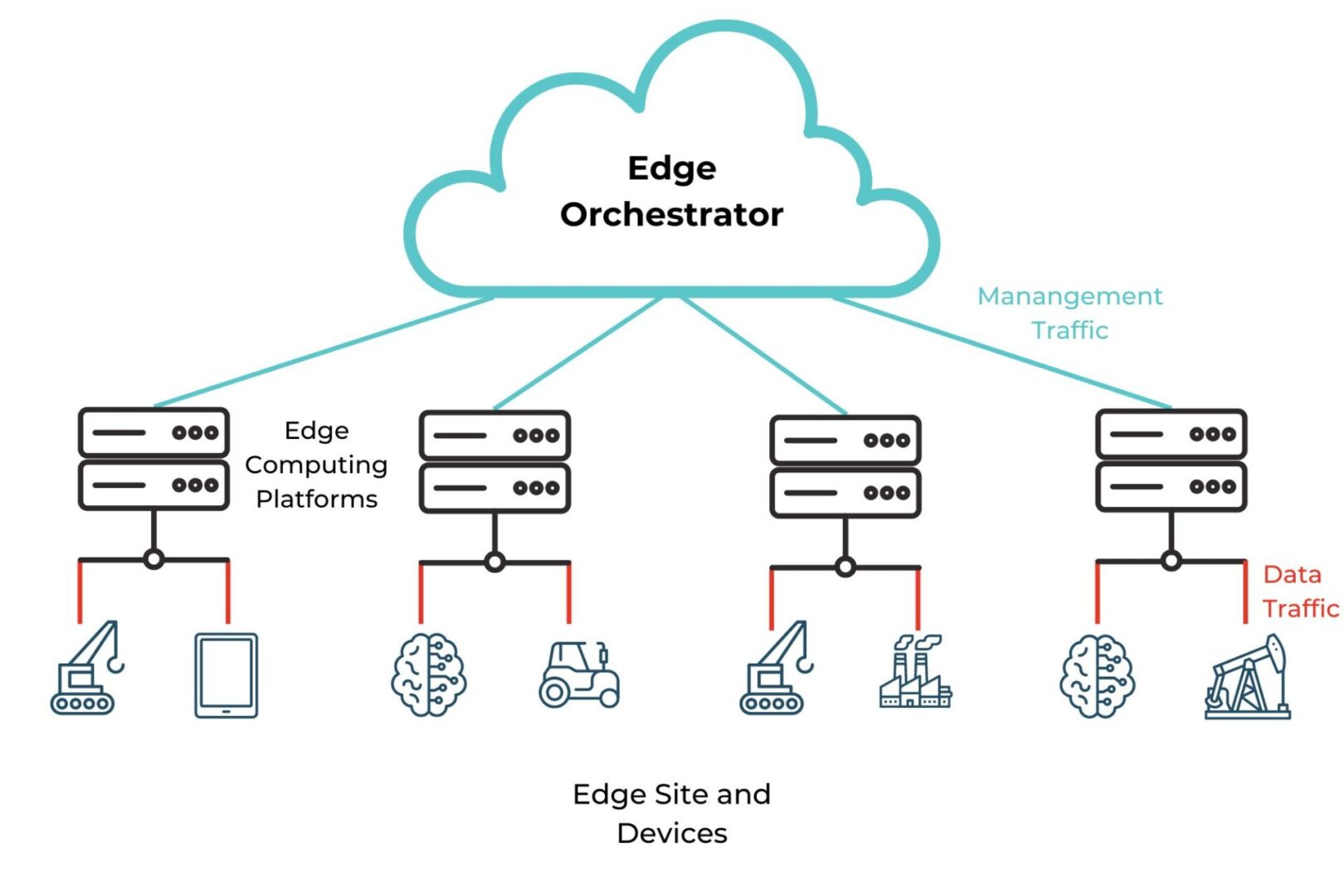
Diagram showing an example edge computing architecture controlled by a cloud-based edge orchestrator.

Reducing the number of network hops between edge devices and the applications that process and use edge data enables real-time data processing, reduces MPLS bandwidth costs, improves performance, and keeps private data within the security micro-perimeter. Cloud computing involves using remote computing resources over the Internet to run applications, process and store data, and more. Cloud service providers manage the physical infrastructure and allow companies to easily scale their virtual computing resources with the click of a button, significantly reducing operational costs and complexity over on-premises and edge computing deployments.

Examples of edge computing vs cloud computing

Edge computing works best for workloads requiring real-time data processing using fairly lightweight applications, especially in locations with inconsistent or unreliable Internet access or where privacy/compliance is a major concern. Example edge computing use cases include:

Cloud computing is well-suited to workloads requiring extensive computational resources that can scale on-demand, but that aren’t time-sensitive. Example use cases include:

The advantages of edge computing over cloud computing

Using cloud-based applications to process edge device data involves transmitting that data from the network’s edges to the cloud provider’s data center, and vice versa. Transmitting data over the open Internet is too risky, so most organizations route the traffic through a security appliance such as a firewall to encrypt and protect the data. Often these security solutions are off-site, in the company’s central data center, or, best-case scenario, a SASE point-of-presence (PoP), adding more network hops between edge devices and the cloud applications that service them.  This process increases bandwidth usage and introduces latency, preventing real-time data processing and negatively affecting performance, which is one of the main reasons why organizations are repatriating workloads from the cloud to on-prem.

Edge computing moves data processing resources closer to the source, eliminating the need to transmit this data over the Internet. This improves performance by reducing (or even removing) network hops and preventing network bottlenecks at the centralized firewall. Edge computing also lets companies use their valuable edge data in real time, enabling faster insights and greater operational efficiencies.

Edge computing mitigates the risk involved in storing and processing sensitive or highly regulated data in a third-party computing environment, giving companies complete control over their data infrastructure. It can also help reduce bandwidth costs by eliminating the need to route edge data through VPNs or MPLS links to apply security controls.

Edge computing advantages:

  • Improves network and application performance
  • Enables real-time data processing and insights
  • Simplifies security and compliance
  • Reduces MPLS bandwidth costs

The disadvantages of edge computing compared to cloud computing

Cloud computing resources are highly scalable, allowing organizations to meet rapidly changing requirements without the hassle of purchasing, installing, and maintaining additional hardware and software licenses. Edge computing still involves physical, on-premises infrastructure, making it far less scalable than the cloud. However, it’s possible to improve edge agility and flexibility by using vendor-neutral platforms to run and manage edge resources. An open platform like Nodegrid allows teams to run multiple edge computing applications from different vendors on the same box, swap out services as business needs evolve, and deploy automation to streamline multi-vendor edge device provisioning from a single orchestrator. A diagram showing how the Nodegrid Mini SR combines edge computing and networking capabilities on a small, affordable, flexible platform.
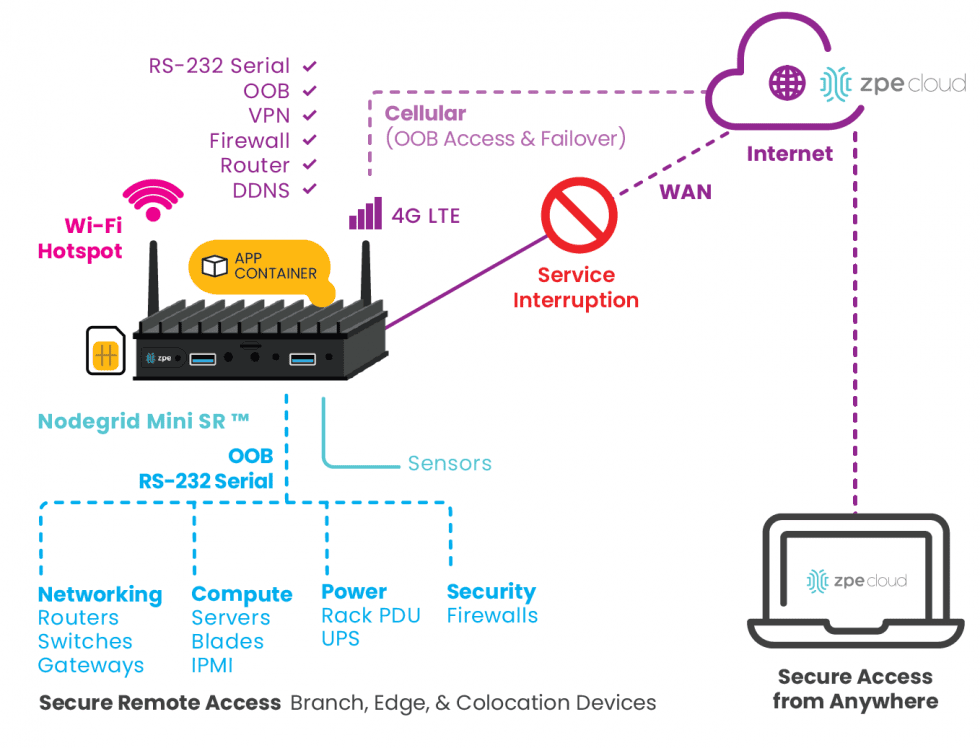
Diagram showing how the Nodegrid Mini SR combines edge computing and networking capabilities on a small, affordable, flexible platform.

Organizations often deploy edge computing in less-than-ideal operating environments, such as closets and other cramped spaces that lack the strict HVAC controls that maintain temperature and humidity in cloud data centers. These environments also typically lack the physical security controls that prevent unauthorized individuals from tampering with equipment, such as guarded entryways, security cameras, and biometric locks. The best way to mitigate this disadvantage is with an environmental monitoring system that uses sensors to detect temperature and humidity changes that could cause equipment failures as well as proximity alarms to notify administrators when someone gets too close. It’s also advisable to use hermetically sealed edge computing devices capable of operating in extreme temperatures and with built-in security features making them tamper-proof.

Cloud computing is often more resilient than edge computing because cloud service providers must maintain a certain level of continuous uptime to meet service level agreements (SLAs). Edge computing operations could be disrupted by network equipment failures, ISP outages, ransomware attacks, and other adverse events, so it’s essential to implement resilience measures that keep services running (if in a degraded state) and allow remote teams to fix problems without having to be on site. Edge resilience measures include Gen 3 out-of-band management, control plane/data plane separation (also known as isolated management infrastructure or IMI), and isolated recovery environments (IRE).

Edge computing disadvantages:

  • Less scalable than cloud infrastructure
  • Lack of environmental and security controls
  • Requires additional resilience measures

Edge-native applications vs cloud-native applications

Edge-native applications and cloud-native applications are similar in that they use containers and microservices architectures, as well as CI/CD (continuous integration/continuous delivery) and other DevOps principles.

Cloud-native applications leverage centralized, scalable resources to perform deep analysis of long-lived data in long-term hot storage environments. Edge-native applications are built to leverage limited resources distributed around the network’s edges to perform real-time analysis of ephemeral data that’s constantly moving. Typically, edge-native applications are highly contextualized for a specific use case, whereas cloud-native applications offer broader, standardized capabilities. Another defining characteristic of edge-native applications is the ability to operate independently when needed while still integrating seamlessly with the cloud, upstream resources, remote management, and centralized orchestration.

Choosing edge computing vs cloud computing

Both edge computing and cloud computing have unique advantages and disadvantages that make them well-suited for different workloads and use cases. Factors like increasing data privacy regulations, newsworthy cloud provider outages, greater reliance on human-free IoT and OT deployments, and an overall trend toward decentralizing business operations are pushing organizations to adopt edge computing. However, most companies still rely heavily on cloud resources and will continue to do so, making it crucial to ensure seamless interoperability between the edge and the cloud.

The best way to ensure integration is by using vendor-neutral platforms. For example, Nodegrid integrated services routers like the Gate SR provide multi-vendor out-of-band serial console management for edge infrastructure and devices, using an embedded Jetson Nano card to support edge computing and AI workloads. The ZPE Cloud management platform unifies orchestration for the entire Nodegrid-connected architecture, delivering 360-degree control over complex and highly distributed networks. Plus, Nodegrid easily integrates – or even directly hosts – other vendors’ solutions for edge data processing, IT automation, SASE, and more, making edge operations more cost-effective. Nodegrid also provides the complete control plane/data plane separation needed to ensure edge resilience.

Get edge efficiency and resilience with Nodegrid

The Nodegrid platform from ZPE Systems helps companies across all industries streamline their edge operations with resilient, vendor-neutral, Gen 3 out-of-band management. Request a free Nodegrid demo to learn more. REQUEST A DEMO
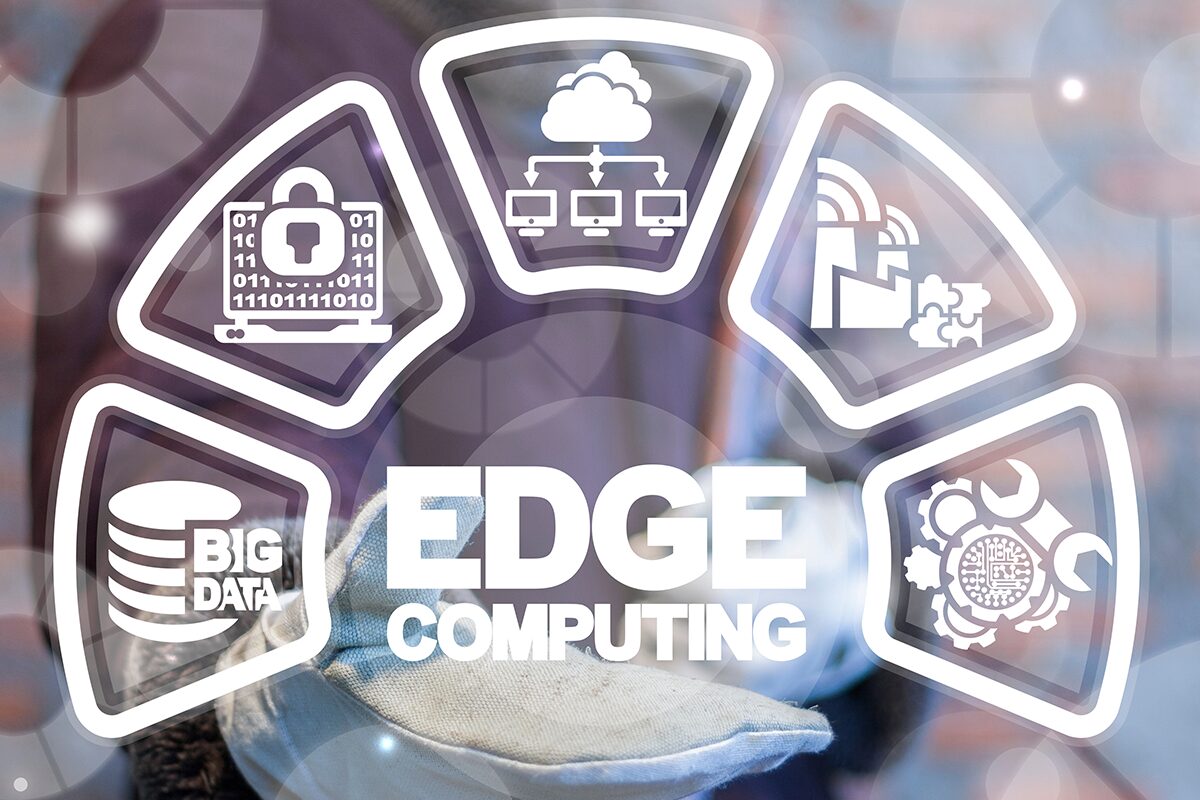
Edge Computing Architecture Guide

Edge-computing-architecture-concept-icons-arranged-around-the-word-edge-computing
Edge computing is rapidly gaining popularity as more  organizations see the benefits of decentralizing data processing for Internet of Things (IoT) deployments, machine learning applications, operational technology (OT), AI and machine learning, and other edge use cases. This guide defines edge computing and edge-native applications, highlights a few key use cases, describes the typical components of an edge deployment, and provides additional resources for building your own edge computing architecture.

Table of Contents

What is edge computing?

The Open Glossary of Edge Computing defines it as deploying computing capabilities to the edges of a network to improve performance, reduce operating costs, and increase resilience. Edge computing reduces the number of network hops between data-generating devices and the applications that process and use that data, mitigating latency, bandwidth, and security concerns compared to cloud or on-premises computing.

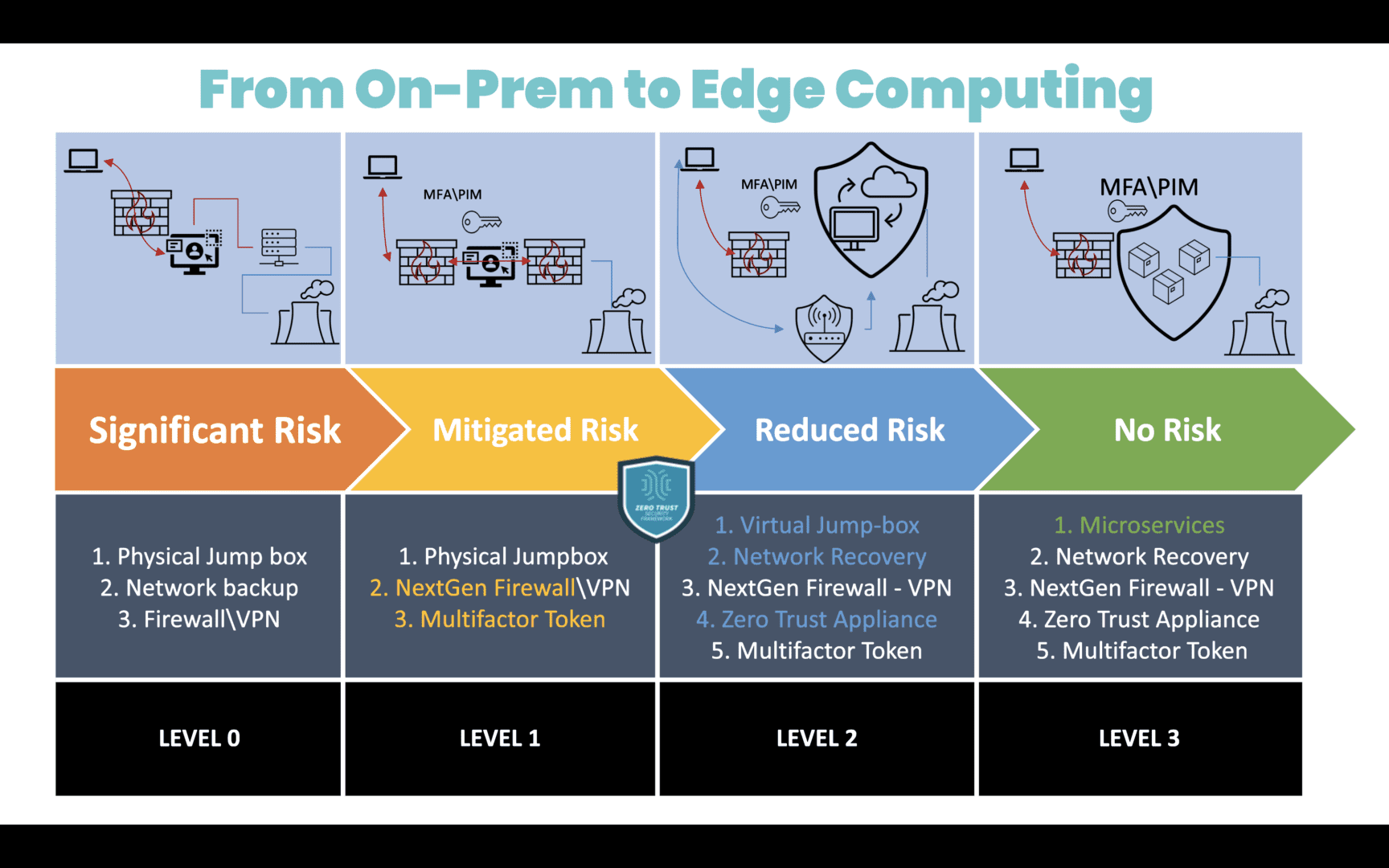
A diagram showing the migration path from on-premises computing to edge computing, along with the associated level of security risk.

Image: A diagram showing the migration path from on-premises computing to edge computing, along with the associated level of security risk.

Edge-native applications

Edge-native applications are built from the ground up to harness edge computing’s unique capabilities while mitigating the limitations. They leverage some cloud-native principles, such as containers, microservices, and CI/CD (continuous integration/continuous delivery), with several key differences.

Edge-Native vs. Cloud-Native Applications

Edge-Native Cloud-Native
Topology Distributed Centralized
Compute Real-time processing with limited resources Deep processing with scalable resources
Data Constantly changing and moving Long-lived and at rest in a centralized location
Capabilities Contextualized Standardized
Location Anywhere Cloud data center

Source: Gartner

Edge-native applications integrate seamlessly with the cloud, upstream resources, remote management, and centralized orchestration, but can also operate independently as needed. Crucially, they allow organizations to actually leverage their edge data in real-time, rather than just collecting it for later processing.

Edge computing use cases

Nearly every industry has potential use cases for edge computing, including:

Industry Edge Computing Use Cases
Healthcare
  • Mitigating security, privacy, and HIPAA compliance concerns with local data processing
  • Improving patient health outcomes with real-time alerts that don’t require Internet access
  • Enabling emergency mobile medical intervention while reducing mistakes
Finance
  • Reducing security and regulatory risks through local computing and edge infrastructure isolation
  • Getting fast, localized business insights to improve revenue and customer service
  • Deploying AI-powered surveillance and security solutions without network bottlenecks
Energy
  • Enabling network access and real-time data processing for airgapped and isolated environments
  • Improving efficiency with predictive maintenance recommendations and other insights
  • Proactively identifying and remediating safety, quality, and compliance issues
Manufacturing
  • Getting real-time, data-driven insights to improve manufacturing efficiency and product quality
  • Reducing the risk of confidential production data falling into the wrong hands in transit
  • Ensuring continuous operations during network outages and other adverse events
  • Using AI with computer vision to ensure worker safety and quality control of fabricated components/products
Utilities/Public Services
  • Using IoT technology to deliver better services, improve public safety, and keep communities connected
  • Reducing the fleet management challenges involved in difficult deployment environments
  • Aiding in disaster recovery and resilience with distributed redundant edge resources

To learn more about the specific benefits and uses of edge computing for each industry, read Distributed Edge Computing Use Cases.

Edge computing architecture design

An edge computing architecture consists of six major components:

Edge Computing Components Description Best Practices
Devices generating edge data IoT devices, sensors, controllers, smartphones, and other devices that generate data at the edge Use automated patch management to keep devices up-to-date and protect against known vulnerabilities
Edge software applications Analytics, machine learning, and other software deployed at the edge to use edge data Look for edge-native applications that easily integrate with other tools to prevent edge sprawl
Edge computing infrastructure CPUs, GPUs, memory, and storage used to process data and run edge applications Use vendor-neutral, multi-purpose hardware to reduce overhead and management complexity
Edge network infrastructure and logic Wired and wireless connectivity, routing, switching, and other network functions Deploy virtualized network functions and edge computing on common, vendor-neutral hardware
Edge security perimeter Firewalls, endpoint security, web filtering, and other enterprise security functionality Implement edge-centric security solutions like SASE and SSE to prevent network bottlenecks while protecting edge data
Centralized management and orchestration An EMO (edge management and orchestration) platform used to oversee and conduct all edge operations Use a cloud-based, Gen 3 out-of-band (OOB) management platform to ensure edge resilience and enable end-to-end automation

Click here to learn more about the infrastructure, networking, management, and security components of an edge computing architecture.

How to build an edge computing architecture with Nodegrid

Nodegrid is a Gen 3 out-of-band management platform that streamlines edge computing with vendor-neutral solutions and a centralized, cloud-based orchestrator.

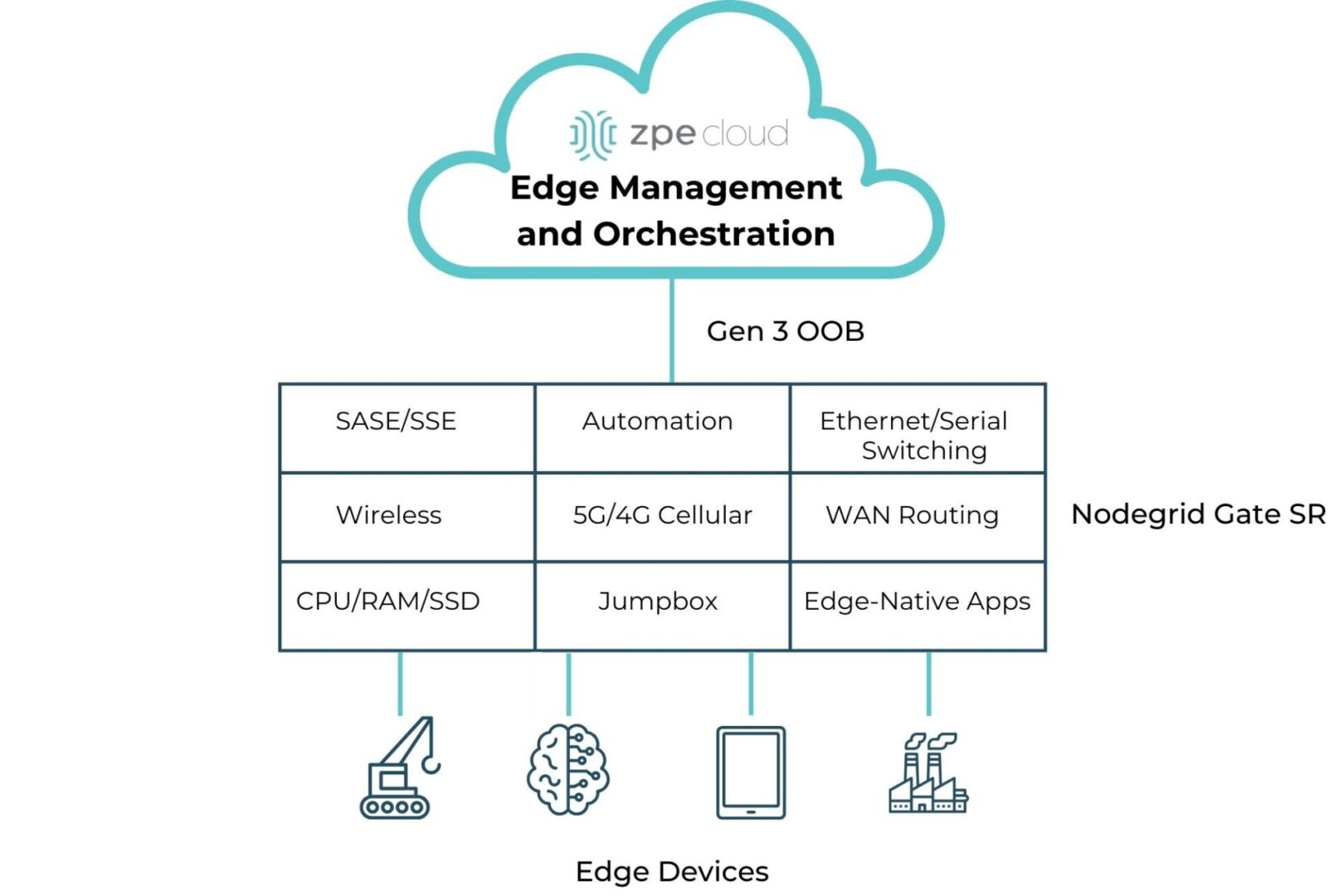
A diagram showing all the edge computing and networking capabilities provided by the Nodegrid Gate SR

Image: A diagram showing all the edge computing and networking capabilities provided by the Nodegrid Gate SR.

Nodegrid integrated services routers deliver all-in-one edge computing and networking functionality while taking up 1RU or less. A Nodegrid box like the Gate SR provides Ethernet and Serial switching, serial console/jumpbox management, WAN routing, wireless networking, and 5G/4G cellular for network failover or out-of-band management. It includes enough CPU, memory, and encrypted SSD storage to run edge computing workflows, and the x86-64bit Linux-based Nodegrid OS supports virtualized network functions, VMs, and containers for edge-native applications, even those from other vendors. The new Gate SR also comes with an embedded NVIDIA Jetson Orin NanoTM module featuring dual CPUs for EMO of AI workloads and infrastructure isolation.

Nodegrid SRs can also host SASE, SSE, and other security solutions, as well as third-party automation from top vendors like Redhat and Salt. Remote teams use the centralized, vendor-neutral ZPE Cloud platform (an on-premises version is available) to deploy, monitor, and orchestrate the entire edge architecture. Management, automation, and orchestration workflows occur over the Gen 3 OOB control plane, which is separated and isolated from the production network. Nodegrid OOB uses fast, reliable network interfaces like 5G cellular to enable end-to-end automation and ensure 24/7 remote access even during major outages, significantly improving edge resilience.

Streamline your edge deployment

The Nodegrid platform from ZPE Systems reduces the cost and complexity of building an edge computing architecture with vendor-neutral, all-in-one devices and centralized EMO. Request a free Nodegrid demo to learn more.

Click here to learn more!

NIS2 Compliance & Requirements

NIS2 Compliance

NIS2 – an update of the EU’s Network and Information Security Directive – seeks to enhance the cybersecurity level and resilience of EU member states. Compared to the original NIS, it significantly increases risk management, corporate accountability, business continuity, and reporting requirements. NIS2 became law in all EU member states on 17 October 2024, so affected organizations must take action to avoid fines and other penalties. This guide describes the 10 minimum cybersecurity requirements mandated by NIS2 and provides tips to simplify NIS2 compliance. Citation: Directive (EU) 2022/2555 of the European Parliament and of the Council of 14 December 2022 on measures for a high common level of cybersecurity across the Union, amending Regulation (EU) No 910/2014 and Directive (EU) 2018/1972, and repealing Directive (EU) 2016/1148 (NIS 2 Directive)

Who does NIS2 apply to, and what are the consequences for noncompliance?

NIS2 applies to organizations providing services deemed “essential” or “important” to the European economy and society. Essential Entities (EE) generally have at least 250 employees, annual turnover of €50 million, or balance sheets of €43 million. Essential sectors include:

Important Entities (IE) generally have at least 50 employees, annual turnover of €10 million, or balance sheets of €10 million. Important sectors include:

  • Postal services
  • Waste management
  • Chemicals
  • Research
  • Food
  • Manufacturing (e.g., medical devices and other equipment)
  • Digital providers (e.g., social networks, online marketplaces)

The NIS2 Directive outlines three types of penalties for noncompliance: non-monetary remedies, administrative fines, and criminal sanctions. Non-monetary remedies include things like compliance orders, binding instructions, security audit orders, and customer threat notification orders. Financial penalties for Essential Entities max out at €10 million or 2% of the global annual revenue, whichever is higher; for Important Entities, the maximum is €7 million or 1.4% of the global annual revenue, whichever is higher. NIS2 also directs member states to hold top management personally responsible for gross negligence in a cybersecurity incident, which could involve:

  • Ordering organizations to notify the public of compliance violations
  • Publicly identifying the people and/or entities responsible for the violation
  • Temporarily banning an individual from holding management positions (EEs only)

Even the nonfinancial penalties of NIS2 noncompliance can affect revenue by causing reputational damage and potential lost business, so it’s crucial for IEs and EEs to be prepared when this directive takes effect in their state.

10 Minimum requirements for NIS2 compliance

The NIS2 directive requires essential and important entities to take “appropriate and proportional” measures to manage security and resilience risks and minimize the impact of incidents. It mandates an “all-hazards approach,” which means creating a comprehensive business continuity framework that accounts for any potential disruptions, whether they be natural disasters, ransomware attacks, or anything in between. Organizations must implement “at least” the following requirements as a baseline for NIS2 compliance (click links for more info):

10 NIS2 Compliance Requirements

NIS2 Minimum Requirement

Implementation Tip

Maintain comprehensive risk analysis and information system security policies

Keep policies in a centralized repository with version control to track changes and prevent unauthorized modifications.

Implement robust security incident handling measures

Use AIOps to accelerate incident creation, triage, and root-cause analysis (RCA).

Establish business continuity and crisis management strategies

Use out-of-band (OOB) management and isolated recovery environments (IREs) to minimize downtime and improve resilience.

Mitigate supply chain security risks

Implement User and Entity Behavior Analytics (UEBA) to monitor third parties on the network.

Ensure network and IT system security throughout acquisition, development, and maintenance

Use automated provisioning, vulnerability scanning, and patch management to reduce risks.

Perform regular cybersecurity and risk-management assessments

Use artificial intelligence technology like large language models (LLMs) to streamline assessments.

Enforce cybersecurity training requirements for all personnel

Simulate phishing emails and other social engineering attacks to prepare users for the real thing.

Implement cryptography and, when necessary, encryption

Ensure all physical systems are protected by strong hardware roots of trust like TPM 2.0.

Establish secure user access control and asset management practices 

Use zero-trust policies and controls to restrict privileges and limit lateral movement.

Use multi-factor authentication (MFA) and encrypted communications 

Extend MFA to management interfaces and recovery systems to prevent compromise.

1. Risk analysis and information system security policies

Organizations must create and update comprehensive policies covering cybersecurity risk analysis and overall IT system security practices. These policies should cover all the topics listed below and include specific consequences and/or corrective measures for failing to follow the outlined processes.

Tip: Keeping all company policies in a centralized, version-controlled repository will help track updates over time and prevent anyone from making unauthorized changes.

2. Security incident handling

Entities must implement incident-handling tools and practices to help accelerate resolution and minimize the impact on end users and other essential or important services. This includes mechanisms for identifying problems, triaging according to severity, remediating issues, and notifying relevant parties. NIS2 outlines a specific timeline for reporting significant security incidents to the relevant authorities:

  • Within 24 hours – Entities must provide an early warning indicating whether they suspect an unlawful or malicious attack or whether it could have a cross-border impact.
  • Within 72 hours – Entities must update the relevant authorities with an assessment of the attack, including its severity, impact, and indicators of compromise.
  • Within one month – Organisations must submit a final report including a detailed description of the incident, the most likely root cause or type of threat, what mitigation measures were taken, and, if applicable, the cross-border impact. If the incident is still ongoing, entities must submit an additional report within one month of resolution.
Tip: AIOps (artificial intelligence for IT operations) analyzes monitoring logs using machine learning to identify threat indicators and other potential issues that less sophisticated tools might miss. It can also generate, triage, and assign incidents, perform root-cause analysis (RCA) and other automated troubleshooting, and take other actions to streamline security incident handling.

3. Business continuity and crisis management

Essential and important entities must establish comprehensive business continuity and crisis management strategies to minimize service disruptions. These strategies should include redundancies and backups as part of a resilience system that can keep operations running, if in a degraded state, during major cybersecurity incidents. It’s also crucial to maintain continuous access to management, troubleshooting, and recovery infrastructure during an attack.

Tip: Serial consoles with out-of-band (OOB) management provide an alternative path to systems and infrastructure that doesn’t rely on the production network, ensuring 24/7 management and recovery access during outages and other major incidents. OOB serial consoles can also be used to create an isolated recovery environment (IRE) where teams can safely restore and rebuild critical services without risking ransomware reinfection.

4. Supply chain security

Organizations must implement supply chain security risk management measures to limit the risk of working with third-party suppliers. These include performing regular risk assessments based on the supplier’s security and compliance history, applying zero-trust access control policies to third-party accounts, and keeping third-party software and dependencies up-to-date.

Tip: User and entity behavior analytics (UEBA) software uses machine learning to analyze account activity on the network and detect unusual behavior that could indicate compromise. It establishes baselines for normal behavior based on real user activity, reducing false positives and increasing detection accuracy even with vendors and contractors who operate outside of normal business hours and locations.

5. Secure network and IT system acquisition, development, and maintenance

Entities must ensure the security of network and IT systems during acquisition, development, and maintenance. This involves, among other things, inspecting hardware for signs of tampering before deployment, changing default settings and passwords on initial startup, performing code reviews on in-house software to check for vulnerabilities, and applying security patches as soon as vulnerabilities are discovered.

Tip: Automation can streamline many of these practices while reducing the risk of human error. For example, zero-touch provisioning automatically configures devices as soon as they come online, reducing the risk of attackers compromising a system-default admin account. Automated vulnerability scanning tools can help detect security flaws in software and systems; automated patch management ensures third-party updates are applied as soon as possible.

6. Cybersecurity and risk-management assessments

Organizations must have a way to objectively assess their cybersecurity and risk-management practices and remediate any identified weaknesses. These assessments involve identifying all the physical and logical assets used by the company, scanning for potential threats, determining the severity or potential impact of any identified threats, taking the necessary mitigation steps, and thoroughly documenting everything to streamline any reporting requirements.

Tip: An AI-powered cybersecurity risk assessment tool uses large language models (LLMs) and other machine learning technology to automate assessments with greater accuracy than older solutions. These tools are often better at identifying novel threats than human assessors or signature-based detection methods, and they typically provide automated reporting to aid in NIS2 compliance.

7. Cybersecurity training

Essential and important entities must enforce cybersecurity training and basic security hygiene policies for all staff. This training should include information about the most common social engineering attacks, such as email phishing or vishing (voice phishing), compliant data handling practices, and how to securely create and manage account credentials.

Tip: Some cybersecurity training programs include attack simulations – such as fake phishing emails – to test trainees’ knowledge and give them practice identifying social engineering attempts. These programs help companies identify users who need additional education and periodically reinforce what they have learned.

8. Cryptography and encryption

NIS2 requires organizations to use cryptography to protect systems and data from tampering. This includes encrypting sensitive data and communications when necessary.

Tip: Roots of Trust (RoTs) are hardware security mechanisms providing cryptographic functions, key management, and other important security features. RoTs are inherently trusted, so it’s important to choose up-to-date solutions offering strong cryptographic algorithms, such as Trusted Platform Module (TPM) 2.0.

9. User access control and asset management

Entities must establish policies and procedures for employees accessing sensitive data, including least-privilege access control and secure asset management. This also includes mechanisms for revoking access and locking down physical assets when users violate safe data handling policies, or malicious outsiders compromise privileged credentials.

Tip: Zero trust security uses network micro-segmentation and highly specific security policies to protect sensitive resources. MFA and continuous authentication controls seek to re-establish trust each time a user requests access to a new resource, making it easier to catch malicious actors and preventing lateral movement on the network.

10. Multi-factor authentication (MFA) and encrypted communications

The final minimum requirement for NIS2 compliance is using multi-factor authentication (MFA) and continuous authentication solutions to verify identities, as described above. Additionally, entities must be able to encrypt voice, video, text, and internal emergency communications when needed.

Tip: MFA, continuous authentication, and other zero-trust controls should also extend to management interfaces, resilience systems, and isolated recovery environments to prevent malicious actors from compromising these critical resources. The best practice is to isolate management interfaces and resilience systems using OOB serial consoles to prevent lateral movement from the production network.

How ZPE streamlines NIS2 compliance

EU-based entities classified as essential or important have limited time to implement all the security policies, practices, and tools required for NIS2 compliance. Using vendor-neutral, multi-purpose hardware platforms to deploy new security controls can help reduce the hassle and expense, making it easier to meet the October deadline. For example, a Nodegrid serial console from ZPE Systems combines out-of-band management, routing, switching, cellular failover, SSL VPN and secure tunnel capabilities, and environmental monitoring in a single device. The vendor-neutral Nodegrid OS supports GuestOS and containers for any third-party software, including next-generation firewalls (NGFWs), Secure Access Service Edge (SASE), automation tools like Puppet and Ansible, and UEBA. Nodegrid devices have strong hardware Roots of Trust with TPM 2.0, selectable encrypted cryptographic protocols and cipher suite levels, and configuration checksumTM. Plus, Nodegrid’s Gen 3 OOB creates the perfect foundation for infrastructure isolation, resilience systems, and isolated recovery environments.

Looking to Upgrade to a Nodegrid serial console?

Looking to replace your discontinued, EOL serial console with a Gen 3 out-of-band solution? Nodegrid can expand your capabilities and manage your existing solutions from other vendors. Click here to learn more!

DORA Compliance & Requirements

A map of the EU with the words DORA Digital Operation Resilience Act.

The European Union’s Digital Operational Resilience Act (DORA) creates a regulatory framework for information and communication technology (ICT) risk management and network resilience. It entered into EU law on 16 January 2023 and took effect on 17 January 2025, applying to any firm operating within the European financial sector. This guide outlines the technical requirements for DORA compliance and provides tips and best practices to streamline implementation.

Citation: Digital Operational Resilience Act (DORA)

Which organizations does DORA affect, and what are the consequences of non-compliance?

DORA applies to financial entities operating in the European Union, including:

  • Financial services
  • Payment institutions
  • Crypto-asset service providers
  • Crowdfunding service providers
  • Investment firms
  • Insurance companies
  • Data analytics and audit services
  • Fintech companies
  • Trading venues
  • Credit institutions
  • Credit rating agencies

Crucially, DORA also applies to third-party digital service providers that work with financial institutions, such as colocation data centers and cloud service providers.

Once DORA takes effect, each EU state will designate “competent authorities” to enforce compliance. Each state determines its own penalties, but potential consequences for non-compliance include fines, remediation, and withdrawal of DORA authorization.

ICT service providers (such as cloud vendors) labeled “critical” by the European Commission face additional oversight and non-compliance penalties, including fines of up to 1% of the provider’s average daily worldwide turnover the previous business year. Overseers can levy fines on a provider every day for up to six months until compliance requirements are met. These steep penalties make it essential for service providers to ensure their systems and processes are DORA-compliant.

What are DORA’s technical requirements?

DORA Requirement

Description

Technical Best Practices

ICT risk management

Financial institutions must develop a comprehensive ICT risk management framework containing strategies and tools for business resilience, recovery, and communication.

• Control/data plane separation

• Isolated recovery environments

ICT third-party risk management

Financial organizations in the EU must manage the risk of working with third-party vendors to prevent supply chain attacks.

• Automated patch management

• AIOps security monitoring

Digital operational resilience testing

Financial entities must establish a resilience testing program to validate their security defenses, backups, redundancies, and recovery systems every year.

• Control/data plane separation

• Alternative networking, compute, and storage

• Automated provisioning and recovery tools

ICT-related incident management

Financial firms must submit a root cause report within one month of a major incident.

• AIOps anomaly detection

• AIOps incident management

• AIOps root-cause analysis (RCA)

Information sharing

DORA encourages financial institutions to share cyber threat information within the community to help raise awareness and mitigate risks.

Using logs and analyses from technology solutions like UEBA and AIOps.

Oversight of critical third-party providers

Digital service providers deemed “critical” must follow the same compliance rules as the financial institutions they work with.

All of the above.

ICT risk management

DORA requires financial institutions to develop a comprehensive ICT risk management framework containing strategies and tools for business resilience, recovery, and communication. In addition to written policies and documented procedures, financial entities must implement technology such as security hardware and software, redundancies and backups, and resilience systems. Best practices for DORA-compliant risk management technologies include:

ICT third-party risk management

Financial organisations in the EU must manage the risk of working with third-party vendors to prevent supply chain attacks such as the MOVEit breach. ICT third-party risk management (TPRM) involves performing vendor due diligence to validate compliance with security standards and ensuring contractual provisions are in place to hold vendors accountable for security failures. On the technical side, financial entities should implement security policies and controls to limit third-party access and use monitoring tools that detect vulnerabilities, apply patches, and identify suspicious account behavior. Best practices for DORA-compliant TPRM technologies include:

Digital operational resilience testing

DORA requires financial entities to establish a resilience testing program to validate their security defenses, backups, redundancies, and recovery systems once per year. Examples of resilience tests include vulnerability scans, network security assessments, open-source software analyses, physical security reviews, penetration testing, and source code reviews. Financial entities deemed “critical,” as well as their critical ICT providers, must also undergo threat-led penetration testing (TLPT) every three years. DORA stipulates that these tests be performed by independent parties, though they can be internal so long as the organization takes steps to eliminate any conflict of interest. Technical best practices include:

ICT incident reporting

DORA streamlines and consolidates the incident reporting requirements that are currently fragmented across EU states. The takeaway from this section is a requirement for financial firms to submit a root cause report within one month of a major incident. Technical best practices for meeting this requirement involve using AIOps for:

Information sharing

This is less of a requirement than a suggestion, but DORA both allows and encourages financial institutions to share cyber threat information within the community to help raise awareness and mitigate risks. Best practices involve using (anonymized) logs from some of the technologies mentioned above, such as UEBA and AIOps.

Oversight of critical third-party providers

DORA requires “critical” digital service providers to follow the same compliance rules as the financial institutions they work with. Regulators may deem a provider critical if a large number of financial entities rely on them for business continuity or if they are difficult to replace/substitute when a failure occurs. Any cloud vendors, colocation data centers, or other digital service providers working in the EU’s financial sector should prepare for DORA by implementing:

Best practices for DORA compliance

Some of the technologies that can help simplify DORA compliance for financial institutions and critical service providers include:

Control/data plane separation

Separating the data plane (i.e., production network traffic) from the control plane (i.e., management and troubleshooting traffic) simplifies DORA compliance in two key ways:

  1. It isolates the management interfaces used to control ICT systems, making them inaccessible to malicious actors who breach the production network and aiding in resilience.
  2. It prevents resource-intensive automation, security monitoring, and resilience testing workflows from affecting the speed or availability of the production network.

The best practice for control and data plane separation is to use Gen 3 out-of-band (OOB) serial consoles, such as the Nodegrid product line from ZPE Systems. Gen 3 OOB provides a dedicated network for management traffic that doesn’t depend on production network resources, ensuring remote teams always have access, even during outages or ransomware attacks. It’s also vendor-neutral, allowing administrators to deploy third-party monitoring, automation, security, troubleshooting, and testing tools on the isolated control plane. Gen 3 OOB helps financial institutions and ICT service providers meet resilience and testing requirements cost-effectively.

Isolated recovery environments

Ransomware continues to be one of the biggest threats to resilience, with ransomware cases increasing by 73% in 2023 despite heightened awareness and additional cybersecurity spending. Preventing an attack may be nearly impossible, and full recovery often takes weeks due to the high rate of reinfection. The best way to reduce recovery time and meet DORA resilience requirements is with an isolated recovery environment (IRE) that’s fully separated from the production infrastructure.

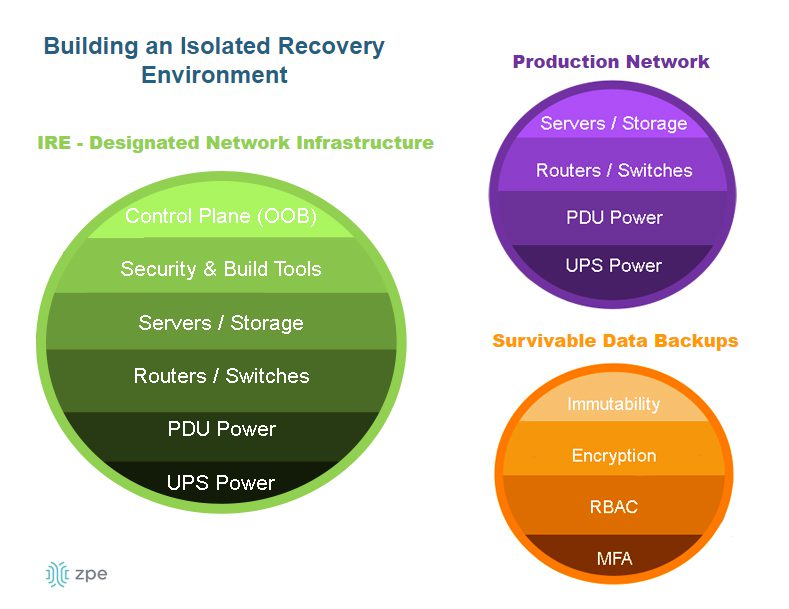
A diagram showing the components of an isolated recovery environment.

An IRE contains systems dedicated to recovering from ransomware and other breaches, where teams can rebuild and restore applications, data, and other resources before deploying them back to the production network. It uses designated network infrastructure that’s completely separate from the production environment to mitigate the risk of malware reinfection. It also contains technologies like Retention Lock, role-based access control, and out-of-band management so teams can quickly and safely recover critical services and reduce DORA penalties.

Automated patch management

Cybercriminals often breach networks by exploiting known vulnerabilities in outdated software and firmware, as happened with 2023’s Ragnar Locker attacks. For large financial institutions and critical ICT providers, manually tracking and installing patches for all the third-party hardware and software used across the organization is too difficult and time-consuming, leaving potential vulnerabilities exposed for years. The best practice for meeting DORA’s third-party risk management requirement is to use an automated, vendor-agnostic patch management solution.

Automatic patch management tools discover all the software and devices used by the organization, monitor for known exploited vulnerabilities, and notify teams when vendors release updates. They centralize patch management for the entire network to simplify TPRM and aid in DORA compliance.

AIOps

AIOps uses artificial intelligence technology to automate and streamline IT operations. AIOps collects and analyses all the data generated by IT infrastructure, applications, monitoring tools, and security solutions to help identify significant events and make “intelligent” recommendations. AIOps helps with DORA compliance by providing:

  • Anomaly detection – Artificial intelligence analyses logs and detects outlier data points that could indicate an in-progress data breach or other problematic event.
  • Incident management – AIOps automatically generates, triages, and assigns service desk tickets to the appropriate team for resolution, significantly accelerating incident response.
  • Root-cause analysis – AIOps combs through all the relevant logs to determine the most likely cause of adverse events, making it easier to meet DORA’s root-cause reporting requirements.

How ZPE streamlines DORA compliance

The Nodegrid out-of-band management platform from ZPE Systems helps financial institutions and critical service providers meet DORA resilience requirements without increasing network complexity. Vendor-neutral Nodegrid serial consoles and integrated edge services routers deliver control plane isolation, centralized infrastructure patch management, and Guest OS/container hosting for third-party security, recovery, and AIOps tools. The Nodegrid platform provides a secure foundation for an isolated recovery environment that contains all the technology needed to get services back online and stay DORA compliant.

Download our 3 Steps to Ransomware Recovery whitepaper to learn how to improve network resilience with Nodegrid.
Download the Whitepaper

See how Nodegrid helped one of the EU’s largest banks meet modern security and compliance requirements.
Read the case study


Looking to replace your discontinued, EOL serial console with a Gen 3 out-of-band solution?

Looking to replace your discontinued, EOL serial console with a Gen 3 out-of-band solution? Nodegrid can expand your capabilities and manage your existing solutions from other vendors.

Click here to learn more!

SD-WAN Management Guide

SD-WAN Management Platform

SD-WAN applies software-defined networking (SDN) principles to wide area networks (WANs), which means it decouples networking logic from the underlying WAN hardware. SD-WAN management involves orchestrating and optimizing software-defined WAN workflows across the entire architecture, ideally from a single, centralized platform. This SD-WAN management guide explains how this technology works, the potential benefits of using it, and the best practices to help you get the most out of your SD-WAN deployment.

How does SD-WAN management work?

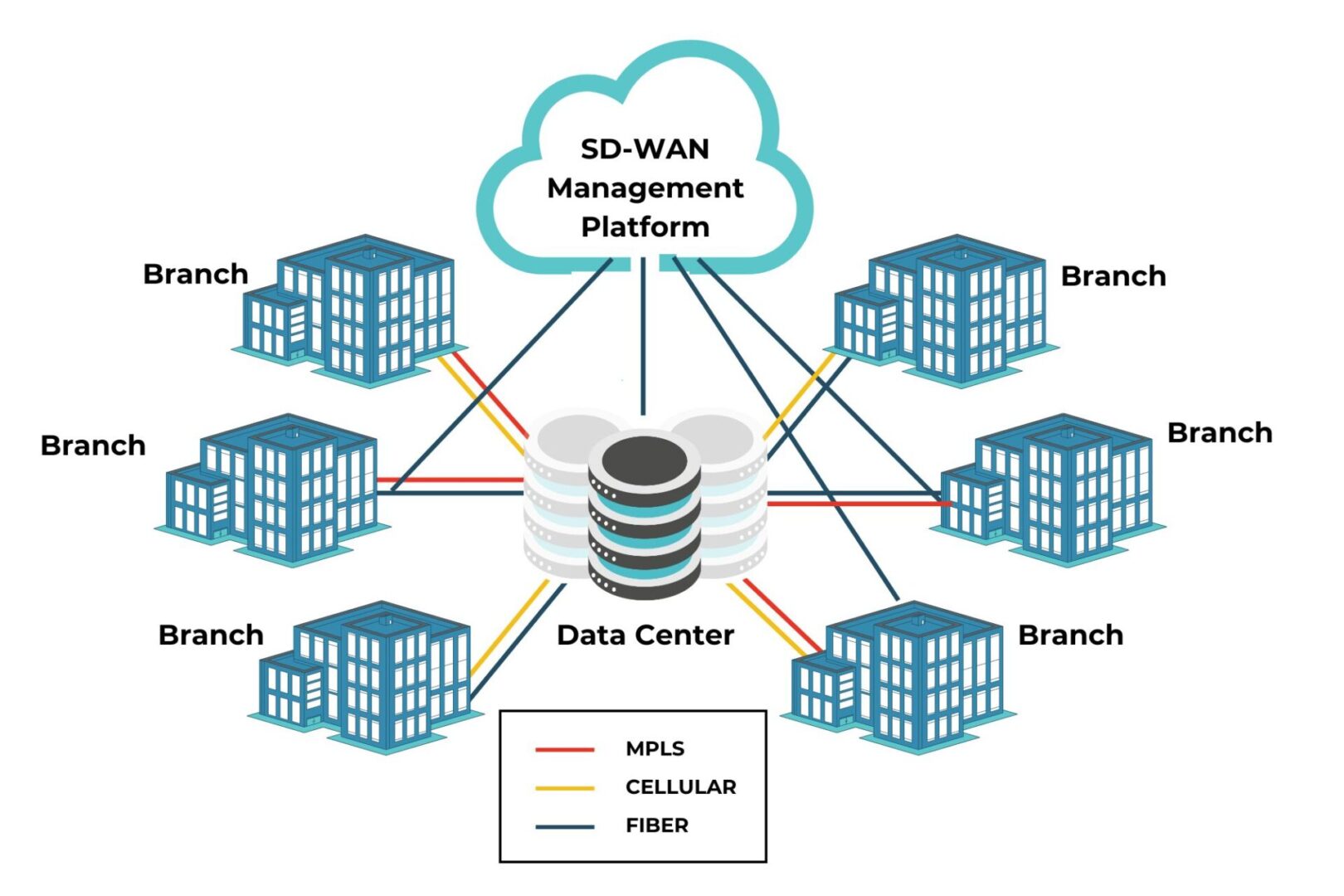
A typical WAN architecture uses a variety of links, including MPLS, wireless, broadband, and VPNs, to connect branches and other remote locations to enterprise applications and resources. SD-WAN is a virtualized service that overlays this physical architecture, giving software teams a unified software interface from which to manage network traffic and workflows across the enterprise. SD-WAN management decouples network control functions from the gateways and routers installed at remote sites, preventing administrators from having to manage each one individually. It also reduces the reliance on manual CLI rules and prompts, which are time-consuming and prone to human error, allowing teams to deploy policies across an entire network at the same time.

SD-WAN can also use multiple connection types (including 5G LTE, MPLS, and fiber) interchangeably, switching between them as needed to ensure optimal performance. Plus, SD-WAN management enables organizations to use virtualized and cloud-based security technologies (such as SASE) to secure remote traffic to SaaS, web, and cloud resources. This allows organizations to reduce traffic on expensive MPLS links by utilizing less-costly cellular and public internet links to handle cloud-destined traffic.

The benefits of SD-WAN management

SD-WAN Benefit

Description

Branch bandwidth cost reduction

SD-WAN reduces bandwidth costs by redirecting cloud- and internet-destined traffic across less expensive channels, reserving the MPLS link for enterprise traffic alone

Branch performance optimization

SD-WAN management uses technologies like application awareness and guaranteed minimum bandwidth to automatically optimize network performance

Branch automation & orchestration

SD-WAN’s software-based management enables automatic deployments, load balancing, failover, and intelligent routing with a centralized orchestrator

Branch security enhancement

SD-WAN enables the use of cloud-based security solutions like SASE and Zero Trust Edge that extend enterprise security controls to branch network traffic

Cost reduction

MPLS links provide a secure connection between branches and centralized data center resources, but the bandwidth is far more expensive than fiber or cellular. SD-WAN reduces branch bandwidth costs by using less expensive channels for traffic that’s destined for resources online and in the cloud, reserving MPLS bandwidth for enterprise traffic alone.

Improved performance

To optimize the performance of a traditional WAN, teams must create specific routing, bandwidth utilization, and load-balancing rules for each branch and appliance, and hope these policies adequately predict and resolve any potential issues. SD-WAN management uses technologies like application awareness and guaranteed minimum bandwidth to automatically optimize network performance.

Automation & orchestration

By decoupling network control functions from the underlying WAN hardware, SD-WAN enables automatic device deployments, load balancing, failover, and intelligent routing. Teams can orchestrate automated workflows across the entire network architecture from a centralized software platform, to make deployments and configuration changes more efficient.

Enhanced security

Branch networks often suffer from security gaps due to the difficulty in extending enterprise security policies and controls to remote sites. Securing branch traffic usually means backhauling all traffic through the data center’s firewall, eating up expensive MPLS bandwidth and introducing latency for the rest of the enterprise. Some organizations opt to deploy security appliances at each branch site, which is costly and gives network administrators more moving parts to manage. 

SD-WAN enables the use of cloud-based security solutions like SASE and Zero Trust Edge that extend enterprise security defenses to branch network traffic without backhauling or additional hardware. SD-WAN automatically identifies traffic destined for web or cloud resources and routes it through the cloud-based security stack across less-expensive internet links, saving money and reducing management complexity while improving branch security.

How to get the most out of your SD-WAN deployment

There are a variety of SD-WAN deployment models, each of which solves a different WAN problem, so it’s important to assess your organization’s requirements and capabilities to ensure you build an architecture that meets your needs. It’s also critical to consider the scalability, adaptability, security, and resilience of your SD-WAN deployment to prevent headaches down the road. 

For example, using a vendor-neutral platform like Nodegrid to host SD-WAN allows you to easily expand your branch networking capabilities with third-party software for automation, security, monitoring, troubleshooting, and more without deploying additional hardware, allowing you to easily scale and adapt to changing business requirements. Nodegrid also consolidates branch functions like routing, switching, out-of-band serial console management, SD-WAN management, and SASE network security in a single device for cost-effective branch deployments. Plus, Nodegrid enables isolated management infrastructure that’s resilient to threats and provides a safe recovery environment from ransomware attacks and network failures. 

Ready to get started on your SD-WAN deployment?

Nodegrid unifies control over mixed-vendor hardware and software solutions across the enterprise network architecture for efficient, streamlined SD-WAN management. Request a free demo to learn more.

Request a Demo

PCI DSS 4.0 Requirements

Businessman,Using,Virtual,Touch,Screen,Clicks,Abbreviation:,Pci,Dss.,Concept
The Security Standards Council (SSC) of the Payment Card Industry (PCI) released the version 4.0 update of the Data Security Standard (DSS) in March 2022. PCI DSS 4.0 applies to any organization in any country that accepts, handles, stores, or transmits cardholder data. This standard defines cardholder data as any personally identifiable information (PII) associated with someone’s credit or debit card. The risks for PCI DSS 4.0 noncompliance include fines, reputational damage, and potentially lost business, so organizations must stay up to date with all recent changes.

The new requirements cover everything from protecting cardholder data to implementing user access controls, zero trust security measures, and frequent penetration (pen) testing. Each major requirement defined in the updated PCI DSS 4.0 is summarized below, with tables breaking down the specific compliance stipulations and providing tips or best practices for meeting them.

Citation: The PCI DSS v4.0

PCI DSS 4.0 requirements and best practices

Every PCI DSS 4.0 requirement starts with a stipulation that the processes and mechanisms for implementation are clearly defined and understood. The best practice involves updating policy and process documents as soon as possible after changes occur, such as when business goals or technologies evolve, and communicating changes across all relevant business units.

Jump to the other requirements below:

Build and maintain a secure network and systems

Requirement 1: Install and maintain network security controls

Network security controls include firewalls and other security solutions that inspect and control network traffic. PCI DSS 4.0 requires organizations to install and properly configure network security controls to protect payment card data.

Stipulations for Compliance

Best Practices

Network security controls (NSCs) are configured and maintained.

Validate network security configurations before deployment and use configuration management to track changes and prevent configuration drift.

Network access to and from the cardholder data environment (CDE) is restricted.

Monitor all inbound traffic to the CDE, even from trusted networks, and, when possible, use explicit “deny all” firewall rules to prevent accidental gaps.

Network connections between trusted and untrusted networks are controlled.

Implement a DMZ that manages connections between untrusted networks and public-facing resources on the trusted network.

Risks to the CDE from computing devices that can connect to both untrusted networks and the CDE are mitigated.

Use security controls like endpoint protection and firewalls to protect devices from Internet-based attacks and zero-trust and network segmentation to prevent lateral movement to CDEs.

Requirement 2: Apply secure configurations to all system components

Attackers often compromise systems using known default passwords or old, forgotten services. PCI DSS 4.0 requires organizations to properly configure system security settings and reduce the attack surface by turning off unnecessary software, services, and accounts.

Stipulations for Compliance

Best Practices

System components are configured and managed securely.

Continuously check for vendor-default user accounts and security configurations and ensure all administrative access is encrypted using strong cryptographic protocols.

Wireless environments are configured and managed securely.

Apply the same security standards consistently across wired and wireless environments, and change wireless encryption keys whenever someone leaves the organization.

Protect account data

Requirement 3: Protect stored account data

Any payment account data an organization stores must be protected by methods such as encryption and hashing. Organizations should also limit account data storage unless it’s necessary and, when possible, truncate cardholder data.

Stipulations for Compliance

Best Practices

Storage of account data is kept to a minimum.

Use data retention and disposal policies to configure an automated, programmatic procedure to locate and remove unnecessary account data.

Sensitive authentication data (SAD) is not stored after authorization.

Review data sources to ensure that the full contents of any track, card verification code, and PIN/PIN blocks are not retained after the authorization process is completed.

Access to displays of full primary account number (PAN) and ability to copy cardholder data are restricted.

Use role-based access control (RBAC) to limit PAN access to individuals with a defined need and use the masking approach to display only the number of digits needed for a specific function.

PAN is secured wherever it is stored.

Render PAN unreadable using one-way hashing with a randomly generated secret key, truncation, index tokens, and strong cryptography with secure key management.

Cryptographic keys used to protect stored account data are secured.

Manage cryptographic keys with a centralized key management system that’s PCI DSS 4.0 compliant to restrict access to key-encrypting keys and store them separately from data-encrypting keys.

Where cryptography is used to protect stored account data, key management processes and procedures covering all aspects of the key lifecycle are defined and implemented.

Use a key management solution that simplifies or automates key replacement for old or compromised keys.

Requirement 4: Protect cardholder data with strong cryptography during transmission over open, public networks

While requirement 3 applies to stored card data, requirement 4 outlines stipulations for protecting cardholder data in transit.

Stipulations for Compliance

Best Practices

PAN is protected with strong cryptography during transmission.

Encrypt PAN over both public and internal networks and apply strong cryptography at both the data level and the session level.

Maintain a vulnerability management program

Requirement 5: Protect all systems and networks from malicious software

Organizations must take steps to prevent malicious software (a.k.a., malware) from infecting the network and potentially exposing cardholder data.

Stipulations for Compliance

Best Practices

Malware is prevented, or detected and addressed.

Use a combination of network-based controls, host-based controls, and endpoint security solutions; supplement signature-based tools with AI/ML-powered detection.

Anti-malware mechanisms and processes are active, maintained, and monitored.

Update tools and signature databases as soon as possible and prevent end-users from disabling or altering anti-malware controls.

Anti-phishing mechanisms protect users against phishing attacks.

Use a combination of anti-phishing approaches, including anti-spoofing controls, link scrubbers, and server-side anti-malware.

Requirement 6: Develop and maintain secure systems and software

Development teams should follow PCI-compliant processes when writing and validating code. Additionally, install all appropriate security patches immediately to prevent malicious actors from exploiting known vulnerabilities in systems and software.

Stipulations for Compliance

Best Practices

Bespoke and custom software are developed securely.

Use manual or automatic code reviews to search for undocumented features, validate that third-party libraries are used securely, analyze insecure code structures, and check for logical vulnerabilities.

Security vulnerabilities are identified and addressed.

Use a centralized patch management solution to automatically notify teams of known vulnerabilities and pending updates.

Public-facing web applications are protected against attacks.

Use automatic vulnerability security assessment tools that include specialized web scanners that analyze web application protection.

Changes to all system components are managed securely.

Use a centralized source code version management solution to track, approve, and roll back changes.

Implement strong access control measures

Requirement 7: Restrict access to system components and cardholder data by business need-to-know

This PCI DSS 4.0 requirement aims to limit who and what has access to sensitive cardholder data and CDEs to prevent malicious actors from gaining access through a compromised, over-provisioned account. “Need to know” means that only accounts with a specific need should have access to sensitive resources; it’s often applied using the “least-privilege” approach, which means only granting accounts the specific privileges needed to perform a job role.

Stipulations for Compliance

Best Practices

Access to system components and data is appropriately defined and assigned.

Use RBAC to provide accounts with access privileges based on their job functions (e.g., ‘customer service agent’ or ‘warehouse manager’) rather than on an individual basis.

Access to system components and data is managed via an access control system.

Use a centralized identity and access management (IAM) system to manage access across the enterprise, including branches, edge computing sites, and the cloud.

Requirement 8: Identify users and authenticate access to system components

Organizations must establish and prove the identity of any users attempting to access CDEs or sensitive data. This requirement is core to the zero trust security methodology which is designed to limit the scope of data access and theft once an attacker has already compromised an account or system.

Stipulations for Compliance

Best Practices

User identification and related accounts for users and administrators are strictly managed throughout an account’s lifecycle.

Use an account lifecycle management solution to streamline account discovery, provisioning, monitoring, and deactivation.

Strong authentication for users and administrators is established and managed.

Replace relatively weak passwords/passphrases with stronger authentication factors like hardware tokens or biometrics.

Multi-factor authentication (MFA) is implemented to secure access into the CDE.

MFA should also protect access to management interfaces on isolated management infrastructure (IMI) to prevent attackers from controlling the CDE.

MFA systems are configured to prevent misuse.

Secure the MFA system itself with strong authentication and validate MFA configurations before deployment to ensure it requires two different forms of authentication and does not allow any access without a second factor.

Use of application and system accounts and associated authentication factors is strictly managed.

Whenever possible, disable interactive login on system and application accounts to prevent malicious actors from logging in with them.

Requirement 9: Restrict physical access to cardholder data

Malicious actors could gain access to cardholder data by physically interacting with payment devices or tampering with the hardware infrastructure that stores and processes that data. These PCI DSS 4.0 requirements outline how to prevent physical data access.

Stipulations for Compliance

Best Practices

Physical access controls manage entry into facilities and systems containing cardholder data.

Use logical or physical controls to prevent unauthorized users from connecting to network jacks and wireless access points within the CDE facility.

Physical access for personnel and visitors is authorized and managed.

Require visitor badges and an authorized escort for any third parties accessing the CDE facility, and keep an accurate log of when they enter and exit the building.

Media with cardholder data is securely stored, accessed, distributed, and destroyed.

Do not allow portable media containing cardholder data to leave the secure facility unless absolutely necessary.

Point of interaction (POI) devices are protected from tampering and unauthorized substitution.

Use a centralized, vendor-neutral asset management system to automatically discover and track all POI devices in use across the organization.

Use of application and system accounts and associated authentication factors is strictly managed.

Whenever possible, disable interactive login on system and application accounts to prevent malicious actors from logging in with them.

Regularly monitor and test networks

Requirement 10: Log and monitor all access to system components and cardholder data

User activity logging and monitoring will help prevent, detect, and mitigate CDE breaches. PCI DSS 4.0 requires organizations to collect, protect, and review audit logs of all user activities in the CDE.

Stipulations for Compliance

Best Practices

Audit logs are implemented to support the detection of anomalies and suspicious activity, and the forensic analysis of events.

Use a user and entity behavior analytics (UEBA) solution to monitor user activity and detect suspicious behavior with machine learning algorithms.

Audit logs are protected from destruction and unauthorized modifications.

Never store audit logs in public-accessible locations; use strong RBAC and least-privilege policies to limit access.

Audit logs are reviewed to identify anomalies or suspicious activity.

Use an AIOps tool to analyze audit logs, detect anomalous activity, and automatically triage and notify teams of issues.

Audit log history is retained and available for analysis.

Retain audit logs for at least 12 months in a secure storage location; keep the last three months of logs immediately accessible to aid in breach resolution.

Time-synchronization mechanisms support consistent time settings across all systems.

Use NTP to synchronize clocks across all systems to help with breach mitigation and post-incident forensics.

Failures of critical security control systems are detected, reported, and responded to promptly.

Use AIOps to automatically detect, triage, and respond to security incidents. AIOps also provides automatic root-cause analysis (RCA) for faster incident resolution.

Requirement 11: Test security of systems and network regularly

Researchers and attackers continuously discover new vulnerabilities in systems and software, so organizations must frequently test network components, applications, and processes to ensure that in-place security controls are still adequate. ge changes; ensure alerts are monitored.

Stipulations for Compliance

Best Practices

Wireless access points are identified and monitored, and unauthorized wireless access points are addressed.

Use a wireless analyzer to detect rogue access points.

External and internal vulnerabilities are regularly identified, prioritized, and addressed.

PCI DSS 4.0 requires internal and external vulnerability scans at least once every three months, but performing them more often is encouraged if your network is complex or changes frequently.

External and internal penetration testing is regularly performed, and exploitable vulnerabilities and security weaknesses are corrected.

Work with a PCI DSS-approved vendor to perform external and internal penetration testing; conduct pen testing on network segmentation controls.

Network intrusions and unexpected file changes are detected and responded to.

Use AI-powered, next-generation firewalls (NGFWs) with enhanced detection algorithms and automatic incident response capabilities.

Unauthorized changes on payment pages are detected and responded to.

Use anti-skimming technology like file integrity monitoring (FIM) to detect unauthorized payment page changes; ensure alerts are monitored.

Maintain an information security policy

Requirement 12: Support information security with organizational policies and programs

The final requirement is to implement information security policies and programs to support the processes described above and get everyone on the same page about their responsibilities regarding cardholder data privacy.

Stipulations for Compliance

Best Practices

Acceptable use policies for end-user technologies are defined and implemented.

Enforce usage policies with technical controls capable of locking users out of systems, applications, or devices if they violate these policies.

Risks to the cardholder data and environment are formally identified, evaluated, and managed.

Use a centralized patch management system to monitor firmware and software versions, detect changes that may increase risk, and deploy updates to fix vulnerabilities.

PCI DSS compliance is managed.

Service providers must assign executive responsibility for managing PCI DSS 4.0 compliance.

PCI DSS scope is documented and validated.

Frequently validate PCI DSS scope by evaluating the CDE and all connected systems to determine if coverage should be expanded.

Security awareness education is an ongoing activity.

Require all users to take security awareness training upon hire and every year afterwards; it’s also recommended to provide refresher training when someone transfers into a role with more access to sensitive data.

Personnel are screened to reduce risks from insider threats.

In addition to screening new hires, conduct additional screening when someone moves into a role with greater access to the CDE.

Risk to information assets associated with third-party service provider (TPSP) relationships is managed.

Thoroughly analyze the risk of working with third-parties based on their reporting practices, breach history, incident response procedures, and PCI DSS validation.

Third-party service providers (TPSPs) support their customers’ PCI DSS compliance.

Require TPSPs to provide their PCI DSS Attestation of Compliance (AOC) to demonstrate their compliance status.

Suspected and confirmed security incidents that could impact the CDE are responded to immediately.

Create a comprehensive incident response plan that designates roles to key stakeholders.

Isolate your CDE and management infrastructure with Nodegrid

The Nodegrid out-of-band (OOB) management platform from ZPE Systems isolates your control plane and provides a safe environment for cardholder data, management infrastructure, and ransomware recovery. Our vendor-neutral, Gen 3 OOB solution allows you to host third-party tools for automation, security, troubleshooting, and more for ultimate efficiency.

Ready to know more about PCI DSS 4.0 Requirements?

Learn how to meet PCI DSS 4.0 requirements for network segmentation and security by downloading our isolated management infrastructure (IMI) solution guide.
Download the Guide