
What is a Hyperscale Data Center?
As today’s enterprises race toward digital transformation with cloud-based applications, software-as-a-service (SaaS), and artificial intelligence (AI), data center architectures are evolving. Organizations rely less on traditional server-based infrastructures, preferring the scalability, speed, and cost-efficiency of cloud and hybrid-cloud architectures using major platforms such as AWS and Google. These digital services are supported by an underlying infrastructure comprising thousands of servers, GPUs, and networking devices in what’s known as a hyperscale data center.
The size and complexity of hyperscale data centers present unique management, scaling, and resilience challenges that providers must overcome to ensure an optimal customer experience. This blog explains what a hyperscale data center is and compares it to a normal data center deployment before discussing the unique challenges involved in managing and supporting a hyperscale deployment.
What is a hyperscale data center?
As the name suggests, a hyperscale data center operates at a much larger scale than traditional enterprise data centers. A typical data center houses infrastructure for dozens of customers, each containing tens of servers and devices. A hyperscale data center deployment supports at least 5,000 servers dedicated to a single platform, such as AWS. These thousands of individual machines and services must seamlessly interoperate and rapidly scale on demand to provide a unified and streamlined user experience.
The biggest hyperscale data center challenges
Operating data center deployments on such a massive scale is challenging for several key reasons.
Overcoming hyperscale data center challenges requires unified, scalable, and resilient infrastructure management solutions, like the Nodegrid platform from ZPE Systems.
How Nodegrid simplifies hyperscale data center management
The Nodegrid family of vendor-neutral serial console servers and network edge routers streamlines hyperscale data center deployments. Nodegrid helps hyperscale providers overcome their biggest challenges with:
- A unified, integrated management platform that centralizes control over multi-vendor, distributed hyperscale infrastructures.
- Innovative, vendor-neutral serial console servers and network edge routers that extend the unified, automated control plane to legacy, mixed-vendor infrastructure.
- The open, Linux-based Nodegrid OS which hosts or integrates your choice of third-party software to consolidate functions in a single box.
- Fast, reliable out-of-band (OOB) management and 5G/4G cellular failover to facilitate easy remote recovery for improved resilience.
The Nodegrid platform gives hyperscale providers single-pane-of-glass control over multi-vendor, legacy, and distributed data center infrastructure for greater efficiency. With a device like the Nodegrid Serial Console Plus (NSCP), you can manage up to 96 devices with a single piece of 1RU rack-mounted hardware, significantly reducing scaling costs. Plus, the vendor-neutral Nodegrid OS can directly host other vendors’ software for monitoring, security, automation, and more, reducing the number of hardware solutions deployed in the data center.
Nodegrid’s out-of-band (OOB) management creates an isolated control plane that doesn’t rely on production network resources, giving teams a lifeline to recover remote infrastructure during outages, equipment failures, and ransomware attacks. The addition of 5G/4G LTE cellular failover allows hyperscale providers to keep vital services running during recovery operations so they can maintain customer SLAs.
Want to learn more about Nodegrid hyperscale data center solutions from ZPE Systems?
Nodegrid’s vendor-neutral hardware and software help hyperscale cloud providers streamline their operations with unified management, enhanced scalability, and resilient out-of-band management. Request a free Nodegrid demo to see our hyperscale data center solutions in action.
Healthcare Network Design
This guide to healthcare network design describes the core technologies comprising a resilient network architecture before discussing how to take resilience engineering to the next level with automation, edge computing, and isolated recovery environments.
Core healthcare network resilience technologies
A resilient healthcare network design includes resilience systems that perform critical functions while the primary systems are down. The core technologies and capabilities required for resilience systems include:
- Full-stack networking – Routing, switching, Wi-Fi, voice over IP (VoIP), virtualization, and the network overlay used in software-defined networking (SDN) and software-defined wide area networking (SD-WAN)
- Full compute capabilities – The virtual machines (VMs), containers, and/or bare metal servers needed to run applications and deliver services
- Storage – Enough to recover systems and applications as well as deliver content while primary systems are down
- Automation – Tools like zero-touch provisioning (ZTP) that facilitate speedy recovery while minimizing human error
These are the main technologies that allow healthcare IT teams to reduce disruptions and streamline recovery. Once organizations achieve this base level of resilience, they can evolve by adding more automation, edge computing, and isolated recovery infrastructure.
Extending automated control over healthcare networks
Automation is one of the best tools healthcare teams have to reduce human error, improve efficiency, and ensure network resilience. However, automation can be hard to learn, and scripts take a long time to write, so having systems are easily deployable with low technical debt is critical. Tools like ZTP (zero-touch provisioning), and the integration of technology like Infrastructure as Code (IaC), accelerate recovery by automating device provisioning. Healthcare organizations can use automation technologies such as AIOps with resilience systems technologies like out-of-band (OOB) management to monitor, maintain, and troubleshoot critical infrastructure.
Using automation to observe and control healthcare networks helps prevent failures from occuring, but when trouble does actually happen, resilience systems ensure infrastructure and services are quickly returned to health or rerouted when needed.
Improving performance and security with edge computing
The healthcare industry is one of the biggest adopters of IoT (Internet of Things) technology. Remote, networked medical devices like pacemakers, insulin pumps, and heart rate monitors collect a large volume of valuable data that healthcare teams use to improve patient care. Transmitting that data to a software application in a data center or cloud adds latency and increases the chances of interception by malicious actors. Edge computing for healthcare eliminates these problems by relocating applications closer to the source of medical data, at the edges of the healthcare network. Edge computing significantly reduces latency and security risks, creating a more resilient healthcare network design.
Note that teams also need a way to remotely manage and service edge computing technologies. Find out more in our blog Edge Management & Orchestration.
Increasing resilience with isolated recovery environments
Ransomware is one of the biggest threats to network resilience, with attacks occurring so frequently that it’s no longer a question of ‘if’ but ‘when’ a healthcare organization will be hit.
- Read about the high-profile ransomware attacks affecting MOVEit customers and MGM
Recovering from ransomware is especially difficult because of how easily malicious code can spread from the production network into backup data and systems. The best way to protect your resilience systems and speed up ransomware recovery is with an isolated recovery environment (IRE) that’s fully separated from the production infrastructure.
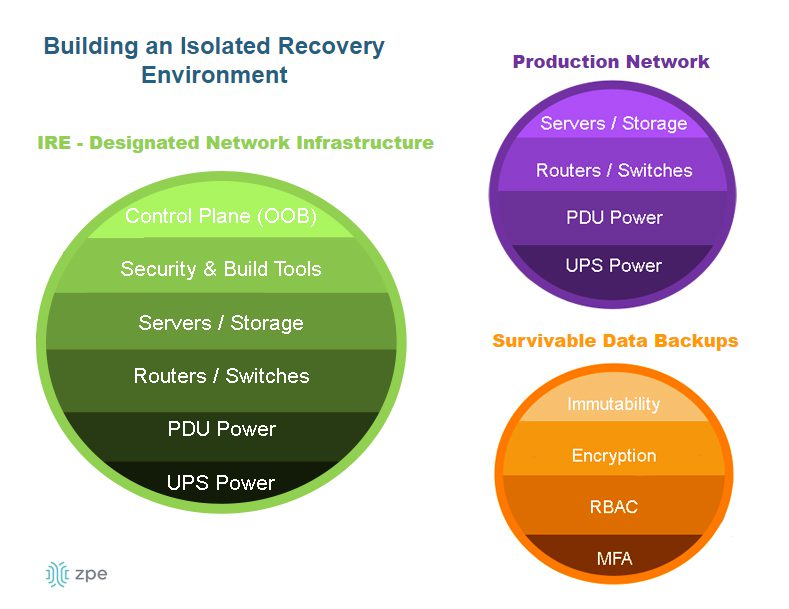
An IRE ensures that IT teams have a dedicated environment in which to rebuild and restore critical services during a ransomware attack, as well as during other disruptions or disasters. An IRE does not replace a traditional backup solution, but it does provide a safe environment that’s inaccessible to attackers, allowing response teams to conduct remediation efforts without being detected or interrupted by adversaries. Isolating your recovery architecture improves healthcare network resilience by reducing the time it takes to restore critical systems and preventing reinfection.
To learn more about how to recover from ransomware using an isolated recovery environment, download our whitepaper, 3 Steps to Ransomware Recovery.
Resilient healthcare network design with Nodegrid
A resilient healthcare network design is resistant to failures thanks to resilience systems that perform critical functions while the primary systems are down. Healthcare organizations can further improve resilience by implementing additional automation, edge computing, and isolated recovery environments (IREs).
Nodegrid healthcare network solutions from ZPE Systems simplify healthcare resilience engineering by consolidating the technologies and services needed to deploy and evolve your resilience systems. Nodegrid’s serial console servers and integrated branch/edge routers deliver full-stack networking, combining cellular, Wi-Fi, fiber, and copper into software-driven networking that also includes compute capabilities, storage, vendor-neutral application & automation hosting, and cellular failover required for basic resilience. Nodegrid also uses out-of-band (OOB) management to create an isolated management and recovery environment without the cost and hassle of deploying an entire redundant infrastructure.
Ready to see how Nodegrid can improve your network’s resilience?
Nodegrid streamlines resilient healthcare network design with consolidated, vendor-neutral solutions. Request a free demo to see Nodegrid in action.
Best DevOps Tools
The best DevOps tools
DevOps version control
In a DevOps environment, a whole team of developers may work on the same code base simultaneously for maximum efficiency. DevOps version control tools like GitHub allow you to track and manage all the changes made to a code base, providing visibility into who’s making what changes at what time. Version control prevents devs from overwriting each other’s work or making unauthorized changes. For example, a developer may come up with a way to improve the performance of a feature by changing the existing code, but doing so inadvertently creates a vulnerability in the software or interferes with other application functions. DevOps version control prevents unauthorized code changes from integrating with the rest of source code and tracks who’s responsible for making the request, improving the stability and security of the software.
- Best DevOps version control tool: Github
Infrastructure as Code (IaC)
Infrastructure as Code (IaC) streamlines the Operations side of a DevOps environment by abstracting server, VM, and container configurations as software code. IaC build tools like HashiCorp Terraform allow Ops teams to write infrastructure configurations as declarative or imperative code, which is used to provision resources automatically. With IaC, teams can deploy infrastructure at the velocity required by DevOps development cycles. 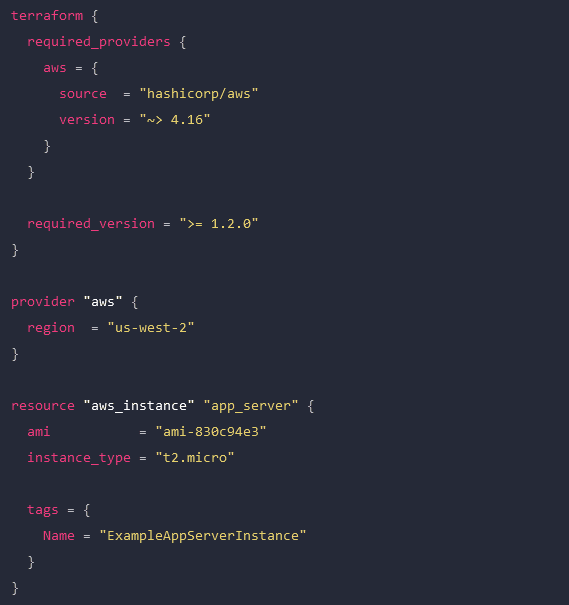
An example Terraform configuration for IaC.
- Best Infrastructure as Code (IaC) tool: HashiCorp Terraform
Configuration management
Configuration management involves monitoring infrastructure and network devices to make sure no unauthorized changes are made while systems are in production. Unmonitored changes could introduce security vulnerabilities that the organization is unaware of, especially in a fast-paced DevOps environment. In addition, as systems are patched and updated over time, configuration drift becomes a concern, leading to additional quality and security issues. DevOps configuration management tools like RedHat Ansible automatically monitor configurations and roll back unauthorized modifications. Some IaC build tools, like Terraform, also include configuration management.
- Best configuration management tool: RedHat Ansible
Continuous Integration/Continuous Delivery (CI/CD)
Continuous Integration/Continuous Delivery (CI/CD) is a software development methodology that goes hand-in-hand with DevOps. In CI/CD, software code is continuously updated and integrated with the main code base, allowing a continuous delivery of new features and improvements. CI/CD tools like Jenkins automate every step of the CI/CD process, including software building, testing, integrating, and deployment. This allows DevOps organizations to continuously innovate and optimize their products to stay competitive in the market.
- Best CI/CD tool: Jenkins
Software testing
Not all DevOps teams utilize CI/CD, and even those that do may have additional software testing needs that aren’t addressed by their CI/CD platform. In DevOps, app development is broken up into short sprints so manageable chunks of code can be tested and integrated as quickly as possible. Manual testing is slow and tedious, introducing delays that prevent teams from achieving the rapid delivery schedules required by DevOps organizations. DevOps software testing tools like Selenium automatically validate software to streamline the process and allow testing to occur early and often in the development cycle. That means high-quality apps and features get out to customers sooner, improving the ROI of software projects.
- Best software testing tool: Selenium
Container management
In DevOps, containers are lightweight, virtualized resources used in the development of microservice applications. Microservice applications are extremely agile, breaking up software into individual services that can be developed, deployed, managed, and destroyed without affecting other parts of the app. Docker is the de facto standard for basic container creation and management. Kubernetes takes things a step further by automating the orchestration of large-scale container deployments to enable an extremely efficient and streamlined infrastructure.
- Best container management tools: Docker and Kubernetes
Monitoring & incident management
Continuous improvement is a core tenet of the DevOps methodology. Software and infrastructure must be monitored so potential issues can be resolved before they affect software performance or availability. Additionally, monitoring data should be analyzed for opportunities to improve the quality, speed, and usability of applications and systems. DevOps monitoring and incident response tools like Cisco’s AppDynamics provide full-stack visibility, automatic alerts, automated incident response and remediation, and in-depth analysis so DevOps teams can make data-driven decisions to improve their products.
- Best monitoring & incident management tool: Cisco AppDynamics
Deploy the best DevOps tools with Nodegrid
DevOps is all about agility, speed, and efficiency. The best DevOps tools use automation to streamline key workflows so teams can deliver high-quality software faster. With so many individual tools to manage, there’s a real risk of DevOps tech sprawl driving costs up and inhibiting efficiency. One of the best ways to reduce tech sprawl (without giving up all the tools you love) is by using vendor-neutral platforms to consolidate your solutions. For example, the Nodegrid Services Delivery Platform from ZPE Systems can host and integrate 3rd-party DevOps tools, reducing the need to deploy additional virtual or hardware resources for each solution. Nodegrid utilizes integrated services routers, such as the Gate SR or Net SR, to provide branch/edge gateway routing, in-band networking, out-of-band (OOB) management, cellular failover, and more. With a Nodegrid SR, you can combine all your network functions and DevOps tools into a single integrated solution, consolidating your tech stack and streamlining operations.
A major benefit of using Nodegrid is that the Linux-based Nodegrid OS is Synopsys secure, meaning every line of source code is checked during our SDLC. This significantly reduces CVEs and other vulnerabilities that are likely present in other vendors’ software.
Learn more about efficient DevOps management with vendor-neutral solutions
With the vendor-neutral Nodegrid Services Delivery Platform, you can deploy the best DevOps tools while reducing tech sprawl. Watch a free Nodegrid demo to learn more.
Best Network Performance Monitoring Tools
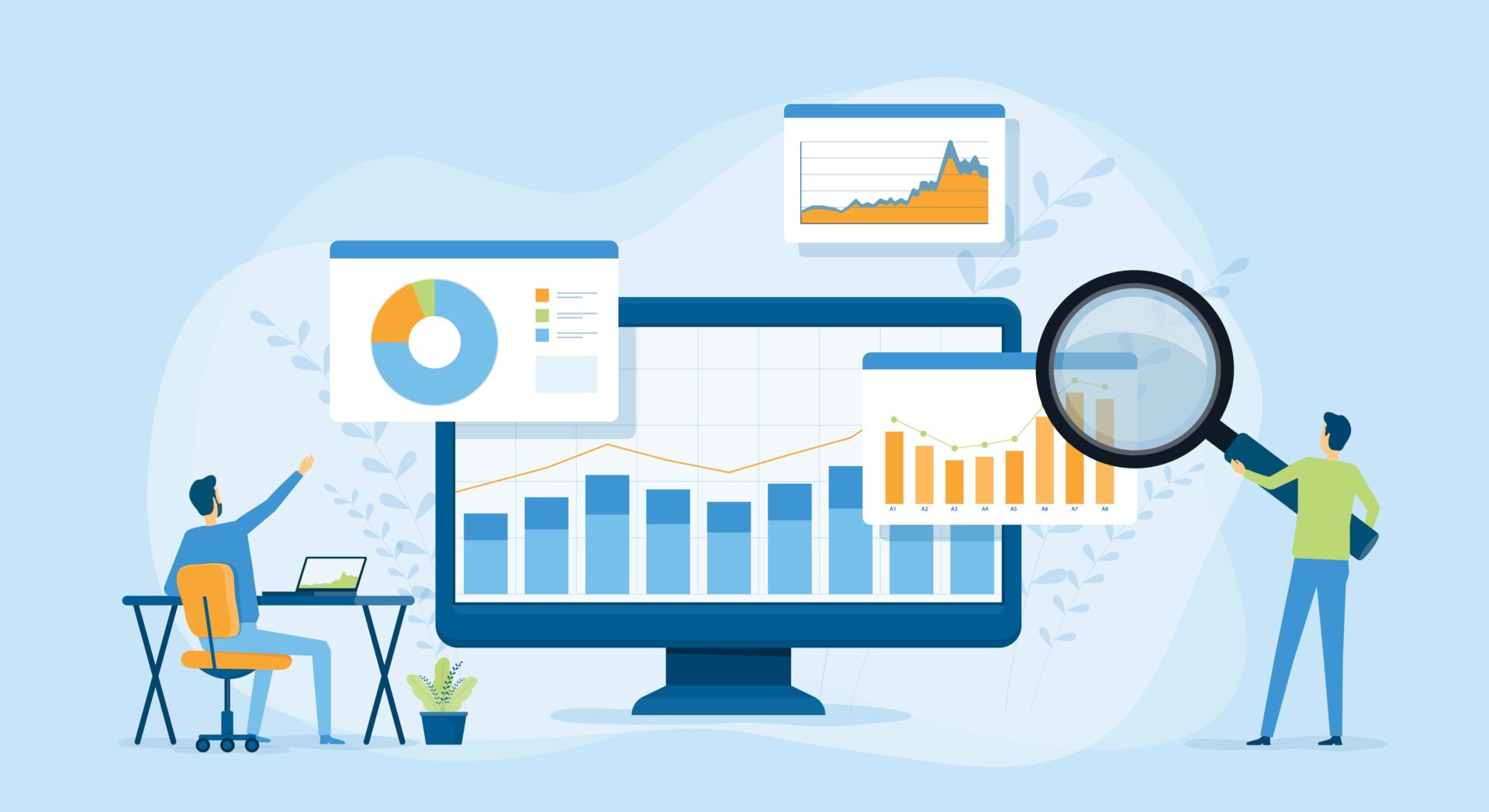
Comparing best network performance monitoring tools
Disclaimer: This comparison was written by a 3rd party in collaboration with ZPE Systems using data gathered from publicly available data sheets and admin guides, as of 10/20/2023. Please email us if you have corrections or edits, or want to review additional attributes: Matrix@zpesystems.com
SolarWinds Network Performance Monitor (NPM)
The Network Performance Monitor (NPM) is part of the SolarWinds Orion platform of integrated products. This mature and richly featured monitoring software is delivered as a cloud-based service and can observe SaaS (software as a service), cloud, hybrid cloud, and on-premises infrastructure. With advanced features like deep packet inspection (DPI), WAN optimization monitoring, automatic network mapping, and automated diagnostic tools, SolarWinds NPM is meant to be a complete, enterprise-grade observability solution. As part of the Orion platform, it’s also extensible with other products from the SolarWinds ecosystem, such as a Network Configuration Manager. As an enterprise solution, SolarWinds NPM comes with a high price tag that grows even larger as additional monitoring agents are added, limiting the scalability. Another important factor to consider is that SolarWinds recently suffered a high-profile hack that compromised thousands of customers, so there are security risks involved in trusting the Orion supply chain. Additionally, despite a large library of integrations, SolarWinds is a closed ecosystem that doesn’t work well with 3rd-party tools or custom scripts.
Kentik
Kentik is an end-to-end network observability platform for cloud, multi-cloud, hybrid cloud, SaaS, and data center infrastructure. In addition to network performance monitoring, the platform includes monitoring solutions for SaaS application performance and SD-WAN performance. Other observability features include SaaS uptime monitoring, AI-driven insights and alerts, network security monitoring, and QoE (Quality of Experience) monitoring. Kentik also recently launched a Kubernetes network monitoring solution called Kentik Kube that provides end-to-end cluster visibility. Overall, Kentik is a powerful network observability platform that includes many of its most innovative features in its “Essentials” and “Pro” pricing packages, providing a lot of bang for your buck. The downside is that you can’t subscribe to features individually and must purchase a whole package, meaning you could end up paying for features you don’t need. Because Kentik is not a large vendor, its customer service may be slow to respond in some cases. Additionally, although Kentik does have a large library of integrations, it is not a vendor-neutral platform.
ThousandEyes
ThousandEyes is a digital experience monitoring platform primarily focused on network and application synthetic testing, end-user performance monitoring, and ISP Internet monitoring for SaaS, cloud, and on-premises networks. Additionally, ThousandEyes is part of the Cisco family and can be used to monitor and optimize Cisco SD-WAN architectures. Across its family of observability products, ThousandEyes includes features like wireless network visibility, SaaS performance visualizations, cloud application outage detection, and SD-WAN performance forecasting. The major advantage of the ThousandEyes platform is that it provides true end-to-end visibility of the entire service delivery chain, including end-user device performance and third-party provider availability. One downside is the endpoint agent-based monitoring solution requires on-premises VMs to run, which can be cumbersome to maintain and limits scalability. The pricing is expensive compared to similar solutions, and you may have to combine products to get all the features you need. Additionally, ThousandEyes is not a vendor-neutral platform and has a relatively small library of integrations.
Conclusion
Each of the solutions on this list has advantages that make it well-suited to certain environments, as well as limitations to consider. Solarwinds NPM is part of a large ecosystem of observability and management solutions that includes advanced features like DPI, but it’s suffering from a major security incident and has a closed ecosystem. Kentik packs a lot of innovative, AI-driven monitoring capabilities into its platform offerings, but its pricing tiers are inflexible, and it doesn’t have the large, enterprise-grade support team of its larger competitors. ThousandEyes provides end-to-end visibility of the entire service delivery chain and works seamlessly with Cisco DNA software, but it has a steep learning curve and a limited library of integrations.
How to run the best network performance monitoring tools
Most network performance monitoring tools – even cloud-based SaaS offerings – communicate with endpoint agents using software deployed on VMs (virtual machines) running on-premises in each business location. Running these VMs on fully provisioned servers or PCs is expensive, but deploying them on NUCs is highly insecure, especially as organizations scale out with distributed branches and edge computing sites. What’s needed is a consolidated hardware solution that combines critical branch, edge, and data center networking functionality with vendor-neutral VM and application hosting, such as the Nodegrid platform from ZPE Systems. Nodegrid’s serial switches and network edge routers run the open, Linux-based Nodegrid OS, which can host your choice of third-party software – including Docker containers – for network performance monitoring, SD-WAN, security, automation, and more. Nodegrid’s versatile, modular hardware solutions also provide out-of-band (OOB) management access to critical remote infrastructure and monitoring solutions, giving teams a lifeline to recover from outages and ransomware attacks. Nodegrid uses innovative, enterprise-grade security features like Secure Boot, self-encrypted disk, and two-factor authentication (2FA), and its onboard software is frequently patched for vulnerabilities to defend against a breach. Deploying Nodegrid at each business site consolidates your network to reduce hardware overhead, streamlining management and enabling easy scalability.
Deploy the best network performance monitoring tools with Nodegrid
Reach out to ZPE Systems to see a demo of how the best network performance monitoring tools run on the Nodegrid platform.
Contact Us
Breaking Down The 2023 Ragnar Locker Cyberattacks
This article was written by James Cabe, CISSP, a 30-year cybersecurity expert who’s helped major companies including Microsoft and Fortinet.
Throughout 2023, several organizations were successfully hit by Ragnar Locker cyberattacks. The affected victims spanned the globe and were forced to shut down much of their critical operations, while the attackers demanded tens of millions of dollars in ransom payments. Despite the group being taken down by law enforcement in October, organizations are re-evaluating their defensive measures — and more importantly, their recovery strategies — to combat these attacks.
If you read my previous articles about the ongoing MOVEit breach and the ransomware that hit MGM, you probably know that isolation is key. It helps you fight through attacks by cutting the kill chain, so that you can restore services quickly without reinfection.
Who Carries Out Ragnar Locker Cyberattacks?
Recent Ragnar Locker cyberattacks were carried out by the Dark Angels Team cybercriminal group. Dark Angels Team’s modus operandi is to breach a company’s defenses, spread laterally, and steal data that can be used to extort the target company. The approach they take involves gaining access to the Windows domain controller, where they deploy ransomware. They encrypt devices using Windows and ESXi encryptors, which gives organizations little recourse aside from taking their critical systems offline in order to stop the spread.

How Do Ragnar Locker Cyberattacks Start?
Ragnar Locker breaches, like all ransomware attacks, require a kill chain that must first be initiated. MITRE ATT&CK defines this as the ‘initial,’ and in these attacks, the initial comes from social engineering. Email stuffing is often the tactic of choice, whereby the attacker sends an email that appears to have a trail of replies or forwards (see the example below). Email trails like this trick spam filters and land directly in the target’s inbox. When an employee clicks a malicious link inside the email, the attack kicks off.
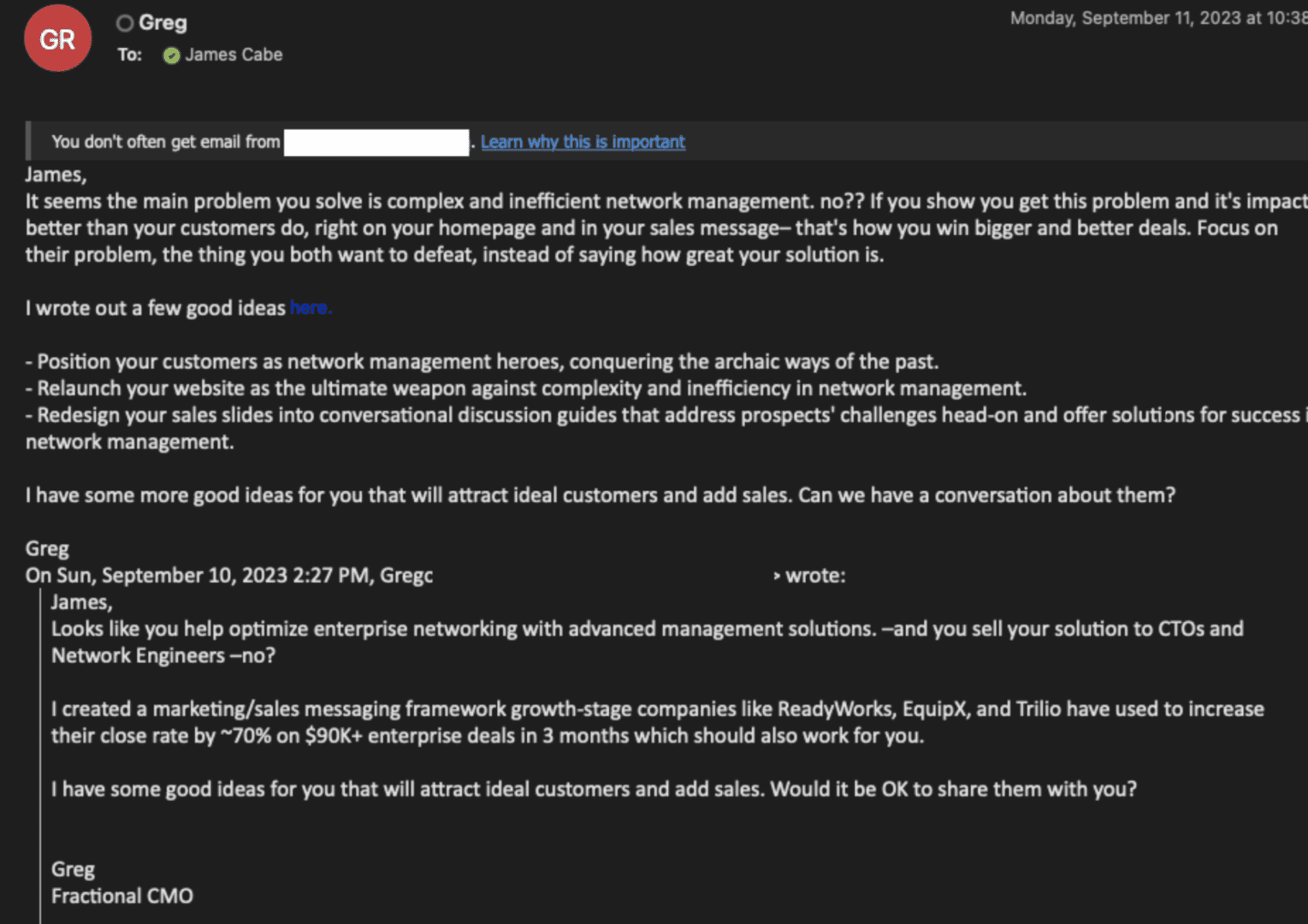
Image: Email stuffing is used by marketers and threat actors alike to bypass spam filters.
How Do Companies Discover Ragnar Locker Cyberattacks?
After the Ragnar Locker cyberattack kicks off, the bad link uses Java to load the locker ransomware, then a series of batch scripts installs a payload consisting of virtual box emulation software. This emulation software takes over and encrypts the host, and displays the ransomware message (see image below).
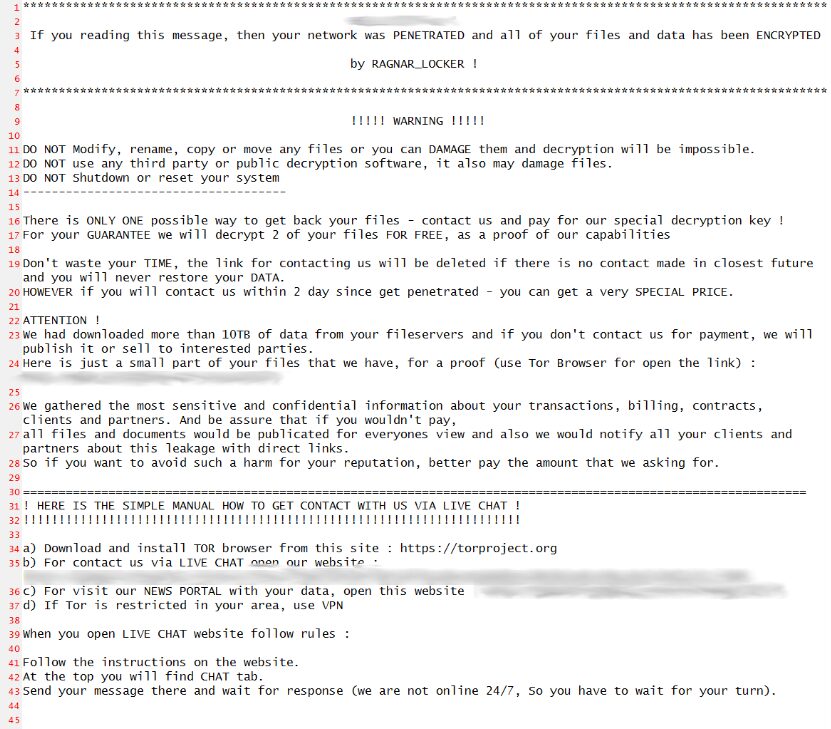
Image: A Ragnar Locker ransomware message showing on encrypted devices.
How Do Ragnar Locker Cyberattacks Spread?
The attack spreads by gaining access to Windows domain controllers and then attacking the management interfaces of the VMware ESXi machines. Most organizations don’t properly segment or isolate these management interfaces. This makes them especially vulnerable even to older Babuk ransomware source code that is an ESXi encryptor. Basically, the attackers only need to gain access to the management network, and then they can attack the production network.
From Intel471: “VMware’s ESXi is called a ‘bare metal’ hypervisor because the underlying hardware on which it is installed doesn’t need an operating system. ESXi allows the hardware to be utilized for multiple virtual machines (VMs), which saves on hardware costs. ESXi is a fruitful target for attackers since it may be connected to several VMs and the storage for them. Security experts warn ransomware actors have built specific binaries to target these systems. Groups joining this trend include HelloKitty, Black Basta, Cheerscrypt and GwisinLocker.”
They continue, “Over the last few years, several vulnerabilities have been identified in ESXi, including CVE-2021-21974. The vulnerability is a heap overflow vulnerability within Open Service Location Protocol (OpenSLP), which is a network discovery tool. The vulnerability is remotely exploitable over port 427, and has a Common Vulnerability Scoring System Version 3.0 (CVSSv3) base score of 8.8. It’s suspected that it may be the vulnerability exploited in this attack. VMware said that “significantly out-of-date products” were targeted with vulnerabilities that had been addressed. It affects ESXi versions 7.0 before ESXi70U1c-17325551, 6.7 before ESXi670-202102401-SG and 6.5 before ESXi650-202102101-SG. Due to other vulnerabilities in OpenSLP, VMware disabled OpenSLP starting in 2021 in ESXi versions 7.0 U2c and ESXi 8.0, which is the current version.”
Ultimately, these attacks exploit a combination of a lack of management plane isolation to the VMware management interfaces, specifically on port 427 (OpenSLP), and a lack of patching and updating. Organizations also typically lack a backup authentication mechanism for the control plane, as well as Privileged Access Management, which are both good fallback options.
How Can Companies Stop Ragnar Locker Cyberattacks?
Ragnar Locker ransomware and other attacks are successful because companies don’t employ proper management plane isolation. Attackers can gain access to VMware management interfaces, and then they essentially have the keys to the kingdom. That’s it. No amount of defense can save you.
If you recall CISA’s binding operational directive, they call for an isolated management infrastructure. This is what we refer to as IMI. Rather than serving as a defense, like we think of traditional cybersecurity products, the IMI is an architecture that allows you to fight back. It’s your quick-reaction force, your cavalry, your secret weapon that ensures you always have a counterattack ready to deploy.
IMI is infrastructure that is dedicated — and most importantly, fully isolated from production assets — to ensuring operations can recover quickly from breaches and outages. Here’s a graphical breakdown:
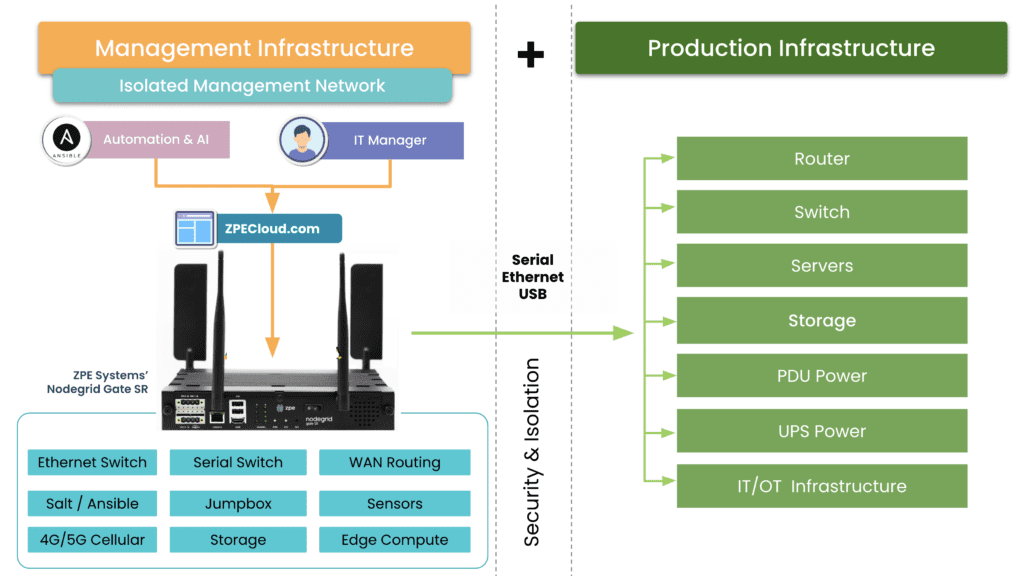
The IMI includes all of the tools you need for rerouting traffic, decommissioning affected gear, wiping/re-imaging devices, and restoring infrastructure. You can also incorporate automation to speed the process along and make recovery something that happens in minutes or hours at the most. Aside from being completely isolated from production assets, the IMI itself is also segmented and employs zero trust practices. This means that you and only you have access to your secret weapon for cutting the ransomware kill chain.
How Do You Use Isolated Management Infrastructure?
An IMI can host an IRE (Isolated Recovery Environment), which is used to cut off all user data and remote access (except for OOB) to an entire infected site. A properly implemented recovery environment should automate most of these activities to speed up the recovery. One of the first considerations is the requirement for a secondary organization in your IAM that is not attached to normal operations. This is what is known as a set of “Break the Glass” accounts. These are known in military circles but have made it into formal practice as part of a strong playbook for ransomware. Once you do this, you can instantiate selected Zero Trust remote access to the site using credentials that are not in the scope of the attack, and then bring up a communications channel for a virtual war room using software like Rocket Chat, Jitsi, Slack, or other standalone communications tools that are installable on the IRE environment.
Avoiding normal authentication methods or IAM and normal communication channels is required for the integrity of the recovery and strengthens the recovery playbook. During this time, no email may be used that is associated directly with the organization. Ideally, email should never touch an account that is associated with it either.
The next step is to create a new set of clean side networks that do not directly connect to the main backbone or put it behind another firewall for triage good/bad. Using a sniffer software running on the IRE, the recovery team can then run a passive scan or an active scanner against all machines continuing to try to send email to Exchange/M365. You can give access to people that are deemed good (not sending traffic) but lock off (with an EDR) the ability to open Outlook for a while, while keeping them on the web email. From there, continue working through to find all the sending drivers to see if they have a good backup. If not, back up the infected drive for offline data retrieval for later. Then re-image while scanning the UEFI BIOS during boot (if needed, run an IPMI scan). If the site has a list of assets that are considered crown jewels, prioritize these.
Once you have a segmented “clean side” established with all the network services required to operate the site (DNS, IAM, DHCP), then Internet access can be restored to this site on a limited basis; which means only out-bound communications, nothing in-bound. Restorative operations can continue apace. making sure that the infected side assets are captured in backup for later forensics following chain-of-custody if damages exceeding insurance limits are found to be the case. This is decided in the war room.
Download the Isolated Management Infrastructure Blueprint
Now is the time to lay the groundwork for your IMI so you can fight back against ransomware. Download the Network Automation Blueprint, which gives you a step-by-step guide to building your Isolated Management Infrastructure.
Get in touch with me!
True security can only be achieved through resilience, and that’s my mission. If you want help shoring up your defenses, building an IMI, and implementing a Resilience System, get in touch with me. Here are links to my social media accounts:
Nodegrid OS and ZPE Cloud achieve industry’s highest security with Synopsys
How do you address security across the software development life cycle?
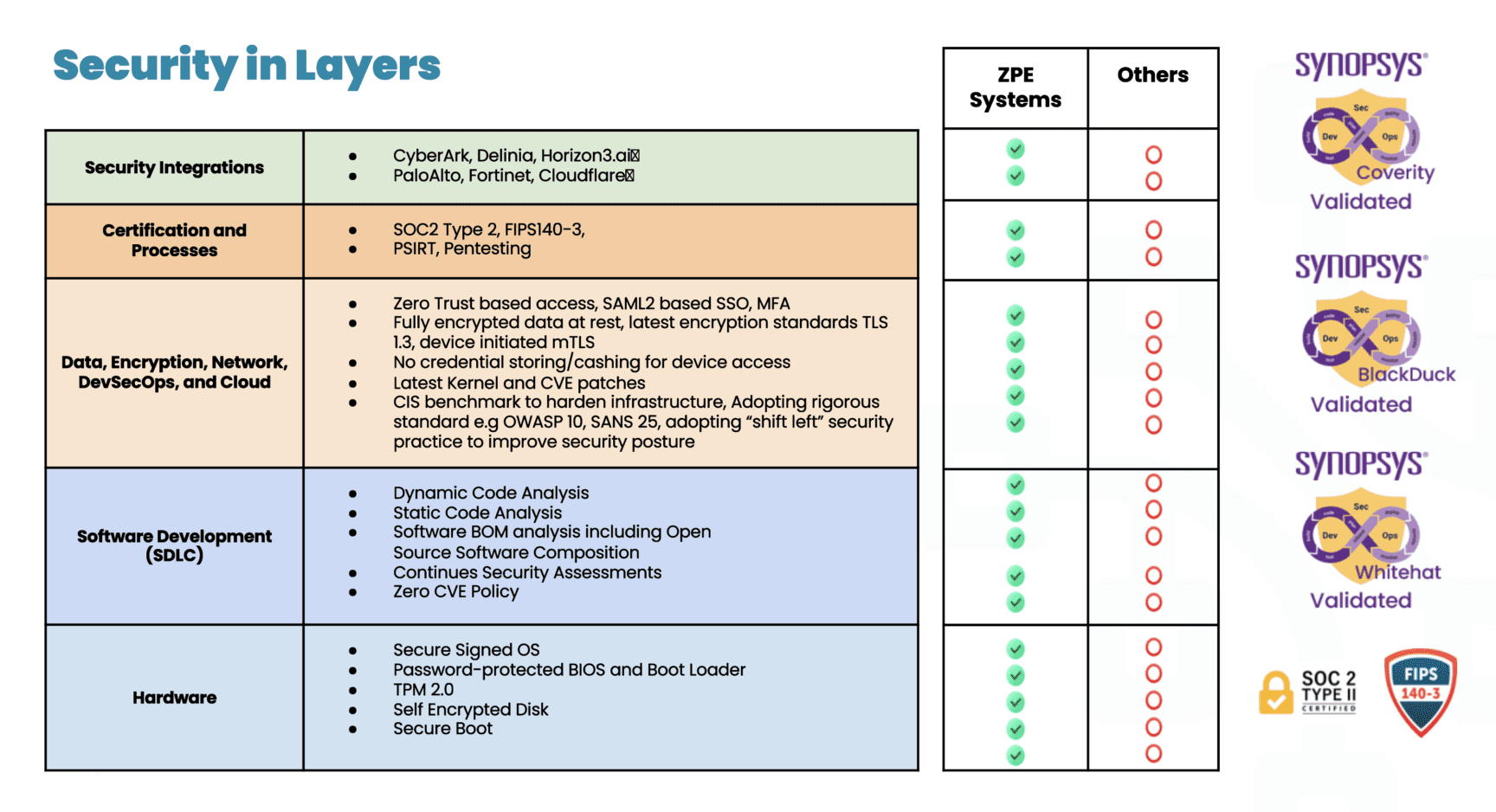
“Security is the cornerstone of ZPE’s infrastructure management solutions,” says Koroush Saraf, Vice President of Product Management and Marketing at ZPE Systems. “Our automation platform touches every aspect of our customers’ critical infrastructure, from networking and firewall gear, to servers, smart PDUs, and everything else in their production network. The ZPE portfolio is architected with the strongest security and implemented with the same level of scrutiny.”
Given the critical nature of enterprise networking, security is paramount to ZPE’s customers.
“The average time taken to apply patches and fix vulnerabilities can be more than 205 days,” says Saraf. “This is due to many reasons: limited resources and time, concerns that something may break, or in some cases, admins don’t even know that a critical patch is available. That’s why ZPE takes on the responsibility for customers. They’re assured that the systems running their infrastructure are running the latest, most secure software. And if a patch fails, our built-in undo button reverts to a safe configuration before any damage can be done.”
Saraf adds, “Like with all modern organizations, ZPE uses a complex mix of proprietary, open source, and third-party software obtained through a variety of sources from the software supply chain. Think third-party libraries, packaged software from ISVs, IoT and embedded firmware, and especially open source components. In fact, studies show that over three-quarters of the code in any given application is likely to be open source.”
“Most third parties won’t provide the source code behind their software,” notes Saraf. “But the question remains whether that supplier is as security-conscious as ZPE. Again, we found the solution with Synopsys, which gives us insight into any third-party software we include without requiring access to the source code.”
The solution: Comprehensive security testing with Synopsys AST
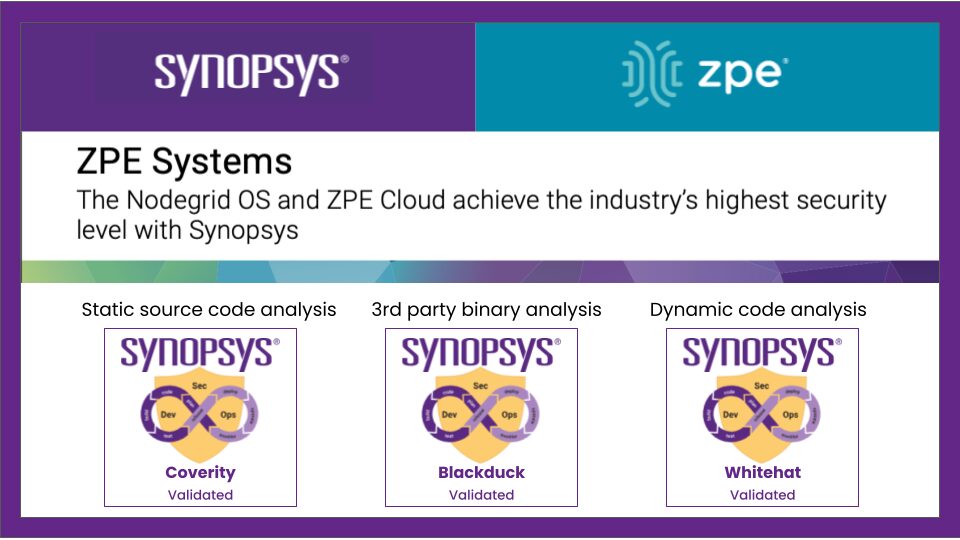
Different security solutions focus on different aspects of vulnerability detection and risk mitigation. By layering multiple solutions such as static analysis, dynamic analysis, and software composition analysis, ZPE covers a wide range of potential vulnerabilities, ensuring that code quality and security issues are identified at various stages during the software development life cycle and across different types of code.
Coverity® provides the speed, ease of use, accuracy, industry standards compliance, and scalability to develop high-quality, secure applications. Coverity identifies critical quality defects and security vulnerabilities as code is written, early in ZPE’s development process when they are easiest to fix. Coverity seamlessly integrates automated security testing into CI/CD pipelines, supports existing development tools and workflows, and can be deployed either on-premises or in the cloud.
WhiteHat™ Dynamic is a software-as-a-service dynamic application security testing solution that allows businesses to quickly deploy a scalable web security program. No matter how many websites or how often they change, WhiteHat Dynamic can scale to meet any demand. It provides security and development teams with fast, accurate, and continuous vulnerability assessments of applications in QA and production, applying the same techniques hackers use to find weaknesses This enables ZPE to streamline the remediation process, prioritize vulnerabilities based on severity and threat, and focus on remediation and its overall security posture.
Black Duck® helps ZPE identify supply chain security and license risks even when it doesn’t have access to the underlying software’s code. This is a critical security tool for the modern software supply chain. Black Duck Binary Analysis can scan virtually any software, including desktop and mobile applications, third-party libraries, packaged software, and embedded system firmware. It quickly generates a complete Software Bill of Materials (SBOM), which tracks third-party and open source components, and identifies known security vulnerabilities, associated licenses, and code quality risks.
The result: A notable reduction of CVEs
“One of the outcomes from taking a comprehensive, layered approach to security testing has been a notable reduction in CVEs on the systems we deploy,” says Saraf.
“I think a lot of industry players don’t give enough attention to patching CVEs. They wait until after a security incident, or until a customer specifically asks. Unfortunately, it’s normal to see unpatched, outdated software running on critical infrastructure. The Equifax breach of 2017 is just one example that exposed the personal data of millions. It’s a particular problem with IoT and embedded devices—many of those systems get installed and forgotten. But it’s another attack surface, especially if you use the equipment for critical infrastructure automation.”
“ZPE’s goal is to reduce the attack surface of our systems to as close to zero as possible, either by making sure that software vulnerabilities are identified and addressed, and that our software is running the most secure and up-to-date versions. It’s an ongoing process— what is vulnerability-free today won’t necessarily be so tomorrow—which is why ZPE always stays security-conscious. I think the company’s commitment to security has positioned ZPE as a trusted partner for enterprises seeking secure automation solutions for their critical infrastructure needs.
Download the document for details about Synopsys and ZPE Systems
How to Fight the latest Ransomware Attacks
Nodegrid plus Synopsys is the most secure platform for Isolated Management Infrastructure (IMI). This architecture is recommended by the FBI and CISA, and allows you to fight back when ransomware strikes. Check out our latest IMI articles from cybersecurity veterans James Cabe and Koroush Saraf, who have helped companies including Fortinet, Microsoft, and Palo Alto Networks.