Providing Out-of-Band Connectivity to Mission-Critical IT Resources

Network Virtualization Platforms: Benefits & Best Practices

Network Virtualization Platforms: Benefits & Best Practices

Simulated network virtualization platforms overlaying physical network infrastructure.

Network virtualization decouples network functions, services, and workflows from the underlying hardware infrastructure and delivers them as software. In the same way that server virtualization makes data centers more scalable and cost-effective, network virtualization helps companies streamline network deployment and management while reducing hardware expenses.

This guide describes several types of network virtualization platforms before discussing the benefits of virtualization and the best practices for improving efficiency, scalability, and ROI.

What do network virtualization platforms do?

There are three forms of network virtualization that are achieved with different types of platforms. These include:

Type of Virtualization Description Examples of Platforms
Virtual Local Area Networking (VLAN) Creates an abstraction layer over physical local networking infrastructure so the company can segment the network into multiple virtual networks without installing additional hardware.

SolarWinds Network Configuration Manager

ManageEngine Network Configuration Manager

Software-Defined Networking (SDN) Decouples network routing and control functions from the actual data packets so that IT teams can deploy and orchestrate workflows across multiple devices and VLANs from one centralized platform.

Meraki

Juniper

Network Functions Virtualization (NFV) Separates network functions like routing, switching, and load balancing from the underlying hardware so teams can deploy them as virtual machines (VMs) and use fewer physical devices.

Red Hat OpenStack

VMware vCloud NFV

While network virtualization is primarily concerned with software, it still requires a physical network infrastructure to serve as the foundation for the abstraction layer (just like server virtualization still requires hardware in the data center or cloud to run hypervisor software). Additionally, the virtualization software itself needs storage or compute resources to run, either on a server/hypervisor or built-in to a networking device like a router or switch. Sometimes, this hardware is also referred to as a network virtualization platform.

The benefits of network virtualization

Virtualizing network services and workflows with VLANs, SDN, and NFVs can help companies:

  • Improve operational efficiency with automation. Network virtualization enables the use of scripts, playbooks, and software to automate workflows and configurations. Network automation boosts productivity so teams can get more work done with fewer resources.
  • Accelerate network deployments and scaling. Legacy deployments involve configuring and installing dedicated boxes for each function. Virtualized network functions and configurations can be deployed in minutes and infinitely copied to get new sites up and running in a fraction of the time.
  • Reduce network infrastructure costs. Decoupling network functions, services, and workflows from the underlying hardware means you can run multiple functions from once device, saving money and space.
  • Strengthen network security. Virtualization makes it easier to micro-segment the network and implement precise, targeted Zero-Trust security controls to protect sensitive and valuable assets.

Network virtualization platform best practices

Following these best practices when selecting and implementing network virtualization platforms can help companies achieve the benefits described above while reducing hassle.

Vendor neutrality

Ensuring that the virtualization software works with the underlying hardware is critical. The struggle is that many organizations use devices from multiple vendors, which makes interoperability a challenge. Rather than using different virtualization platforms for each vendor, or replacing perfectly good devices with ones that are all from the same vendor, it’s much easier and more cost-effective to use virtualization software that interoperates with any networking hardware. This type of software is called ‘vendor neutral.’

To improve efficiency even more, companies can use vendor-neutral networking hardware to host their virtualization software. Doing so eliminates the need for a dedicated server, allowing SDN software and virtualized network functions (VNFs) to run directly from a serial console or router that’s already in use. This significantly consolidates deployments, which saves  money and reduces the amount of space needed This can be a lifesaver in branch offices, retail stores, manufacturing sites, and other locations with limited space.
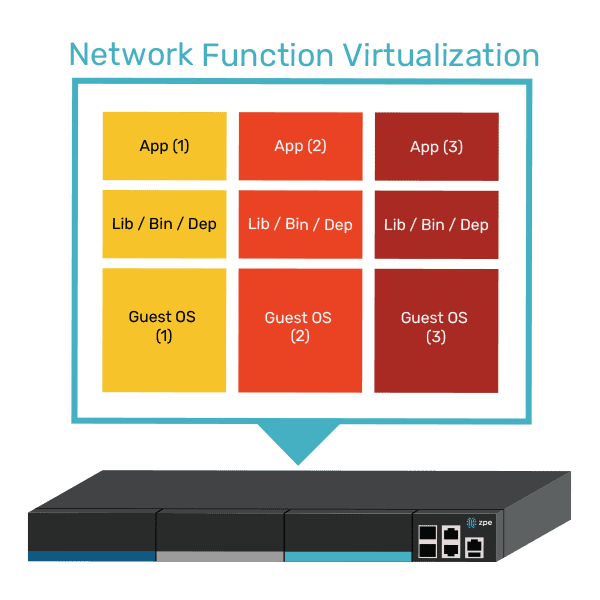
A diagram showing how multiple VNFs can run on a single vendor-neutral platform.

Virtualizing the WAN

We’ve mostly discussed virtualization in a local networking context, but it can also be extended to the WAN (wide area network). For example, SD-WAN (software-defined wide area networking) streamlines and automates the management of WAN infrastructure and workflows. WAN gateway routing functions can also be virtualized as VNFs that are deployed and controlled independently of the physical WAN gateway, significantly accelerating new branch launches.

Unifying network orchestration

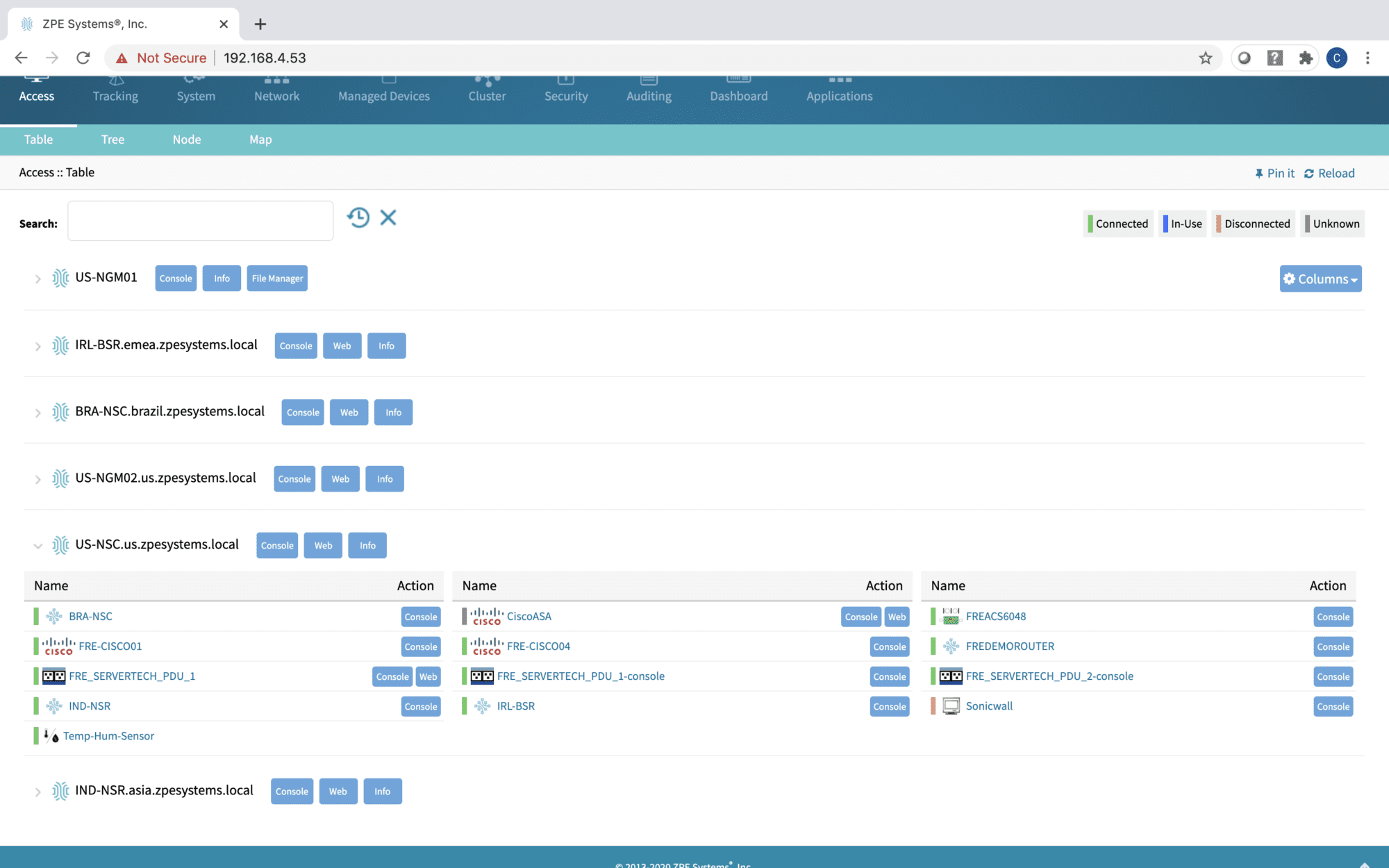
The best way to maximize network management efficiency is to consolidate the orchestration of all virtualization with a single, vendor-neutral platform. For example, the Nodegrid solution from ZPE Systems uses vendor-neutral hardware and software to give networking teams a single platform to host, deploy, monitor, and control all virtualized workflows and devices. Nodegrid streamlines network virtualization with:

  • An open, x86-64bit Linux-based architecture that can run other vendors’ software, VNFs, and even Docker containers to eliminate the need for dedicated virtualization appliances.
  • Multi-functional hardware devices that combine gateway routing, switching, out-of-band serial console management, and more to further consolidate network deployments.
  • Vendor-neutral orchestration software, available in on-premises or cloud form, that provides unified control over both physical and virtual infrastructure across all deployment sites for a convenient management experience.

Want to see vendor-neutral network orchestration in action?

Nodegrid unifies network virtualization platforms and workflows to boost productivity while reducing infrastructure costs. Schedule a free demo to experience the benefits of vendor-neutral network orchestration firsthand.
Schedule a Demo

PDU Remote Management

PDU Remote Management

The Hive SR PDU remote management solution from ZPE Systems.

PDUs (power distribution units) and busways are critical network infrastructure devices that control and optimize how power flows to equipment like servers, routers, firewalls, and switches. They’re difficult to manage remotely, so configuring and updating new devices or fixing problems typically requires tedious, on-site work. This difficulty is magnified in complex, distributed networks with hundreds of individual power devices that must be managed one at a time. What’s needed is a PDU remote management solution that unifies control over distributed devices. It should also streamline infrastructure management with an open architecture that supports third-party power software and automation.

The problem: PDU management is cumbersome for large, distributed networks

PDUs and busways are deployed across remote and distributed locations beyond the central data center, including edge computing sites, automated manufacturing plants, and colocations. They typically aren’t network-connected and do not come with up-to-date firmware at deployment time, requiring on-site technicians for maintenance. Upgrading and managing thousands of PDUs and busways requires hundreds of work hours from on-site IT teams who must manually connect to each unit.

The current solution: PDU remote management with jump boxes or serial consoles

Since most PDUs and busways can’t connect to the network, the only way to remotely manage them is to physically connect them via serial (a.k.a., RS-232) cable to a device that can be remotely accessed, such as an Intel NUC jump box or a serial console.

Unfortunately, jump boxes usually aren’t set up to manage more than one serial connection at a time, so they only solve the remote access problem without providing any centralized management of multiple PDUs or multiple sites. Jump boxes are often deployed without antivirus or other security software installed and with insecure, unpatched operating systems containing potential vulnerabilities, leaving branch networks exposed.

On the other hand, serial consoles can manage multiple serial devices at once and provide remote access, but they often don’t integrate with PDU/busway software and only support a few chosen vendors, which limits their control capabilities and may prevent remote firmware updates. They’re also usually single-purpose devices that take up valuable rack space in remote sites with limited real estate and don’t interoperate with third-party software for automation, monitoring, and security.

The Hive SR + ZPE Cloud: A next-gen PDU remote management solution

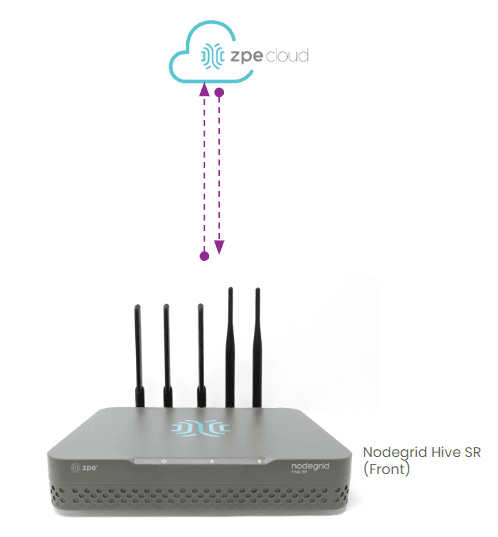
The ZPE Cloud and Nodegrid Hive SR solutions for PDU remote management.
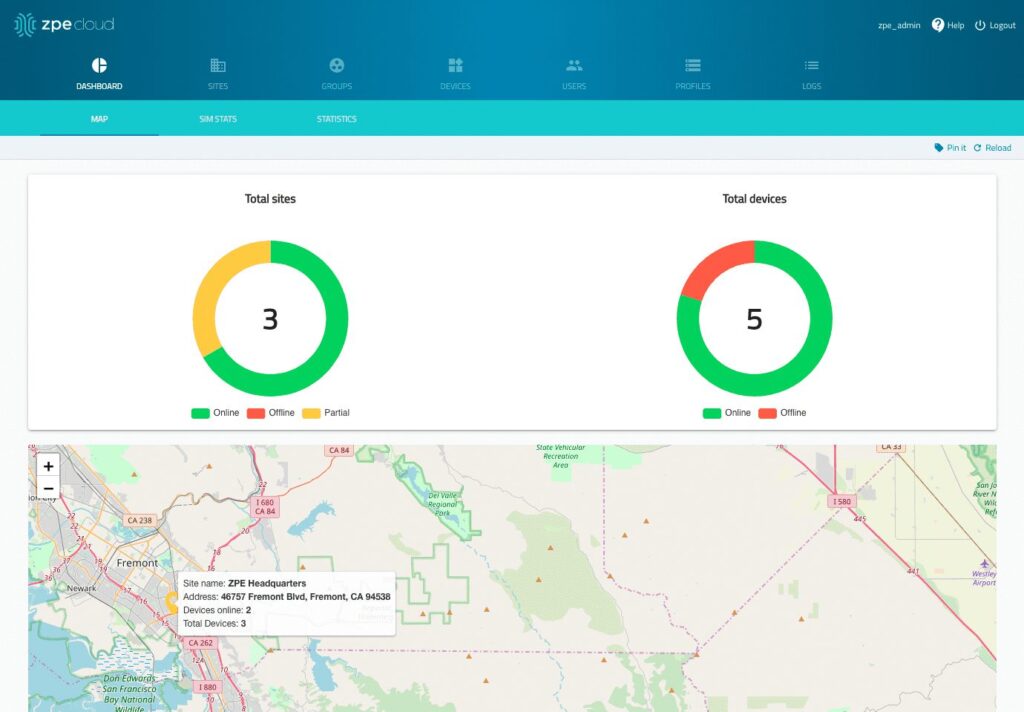
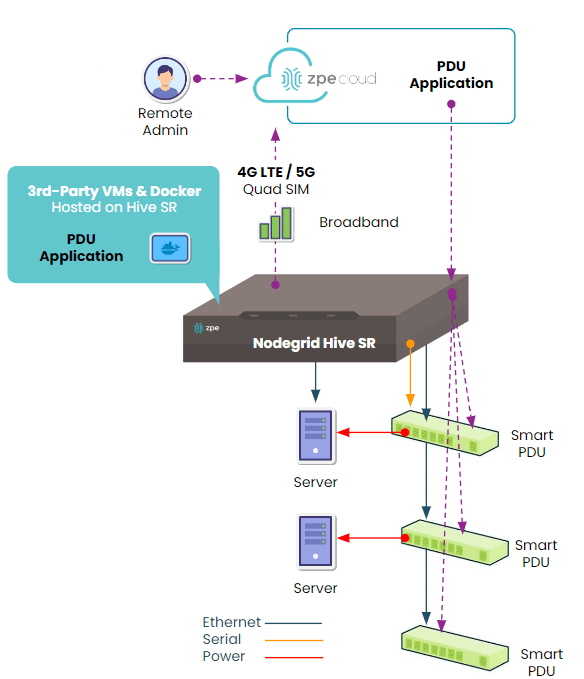
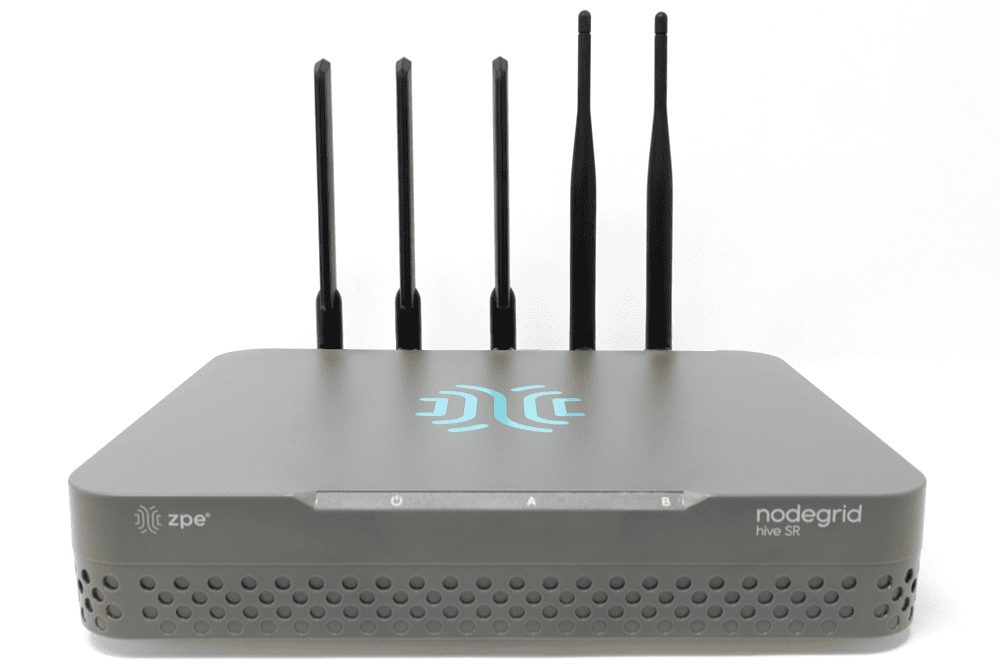
The Hive SR is an integrated branch services router from the Nodegrid family of vendor-neutral infrastructure management solutions offered by ZPE Systems. The Hive automatically discovers power devices and provides secure remote access, eliminating the need to manage PDUs and busways on-site. The ZPE Cloud management platform gives IT teams centralized control over power devices and other infrastructure at all distributed locations so they can update or roll-back firmware, configure and power-cycle equipment, and see monitoring alerts.

The ZPE Cloud PDU remote management solution from ZPE Systems.

In addition to integrated branch networking capabilities like gateway routing, switching, firewall, Wi-Fi access point, 5G/4G cellular WAN failover, and centralized infrastructure control, the Hive SR and ZPE Cloud also deliver vendor-neutral out-of-band (OOB) management. ZPE’s Gen 3 OOB solution creates an isolated management network that doesn’t rely on production resources and, as such, remains remotely accessible during major outages, ransomware infections, and other adverse events. This gives IT teams a lifeline to perform remote recovery actions, including rolling-back PDU firmware updates, power-cycling hung devices, and rebuilding infected systems, without the time and expense of an on-site visit.

A diagram showing how the Nodegrid Hive SR can be deployed for PDU remote management.

The Hive and ZPE Cloud have open architectures that can host or integrate other vendors’ software for PDU/busway management, NetOps automation, zero-trust and SASE security, and more. Administrators get a single, unified, cloud-based platform to orchestrate both automated and manual workflows for PDUs, busways, and any other Nodegrid-connected infrastructure at all distributed business sites. Plus, all ZPE solutions are frequently patched and protected by industry-leading security features to defend your critical branch infrastructure.


Download our Automated PDU Provisioning and Configuration solution guide to learn more about vendor-neutral PDU remote management with Nodegrid devices like the Hive SR.
Download

Download our Centralized IT Infrastructure Management and Orchestration solution guide to learn how ZPE Cloud can improve your operational efficiency and resilience.
Download

Top 5 Data Center Mistakes and How To Avoid Them

Top 5 Data Center Mistakes and How To Avoid Them

Data center deployments require careful planning and execution. The sheer complexity makes it easy to stumble into common pitfalls that can compromise uptime, security, and scalability. After talking with hundreds of customers, we’ve compiled the top five data center mistakes organizations often make during deployments, with tips on how to avoid them.

1. Overlooking Isolated Management Infrastructure

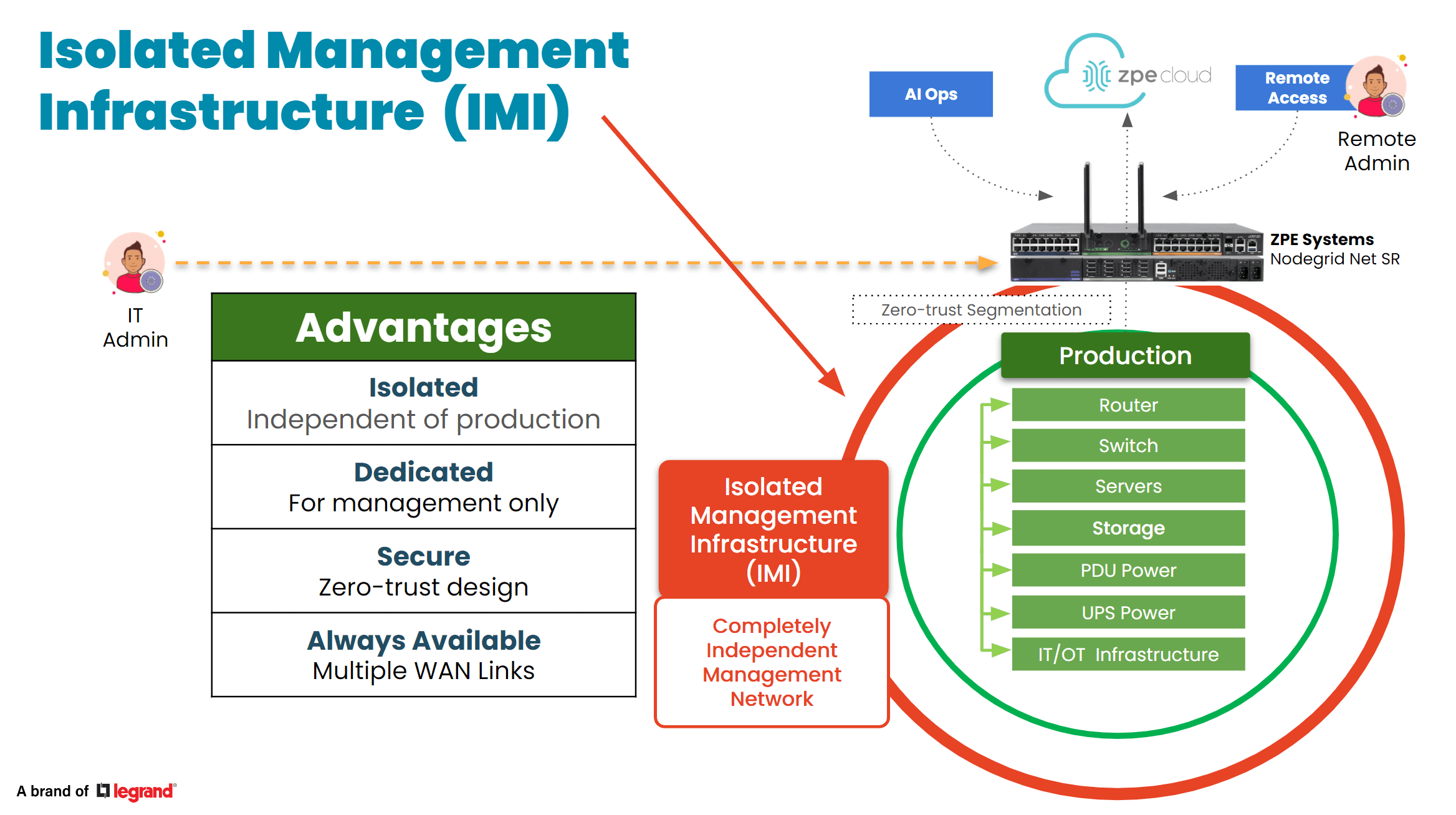
In the data center, the focus is bringing production infrastructure online, including power, cabling, racks, servers, and network gear. But many project managers and architects say they wished they’d given more attention to setting up proper management infrastructure. This oversight usually leads to business challenges down the line, especially when management access relies on the production infrastructure. When a device fails or goes offline, there’s no choice but to go on-site to manually troubleshoot and recover. Many professionals admit to making this data center mistake and wish that they had considered this early in the planning process. Incorporating something called Isolated Management Infrastructure from the start can avoid this challenge, since it provides a dedicated management plane through which teams can access production gear without relying on the production network. 

Tip: Make management infrastructure a priority in your initial planning stages. This proactive approach can prevent complications later.

IMI

2. Neglecting Automation for Configuration and Scaling

Many data center implementors focus heavily on the “rack and stack” initial setup, but fail to automate processes for configuration and scaling operations. This data center mistake often leads to days’ or weeks’ worth of manual, repetitive work, while also exposing the organization to human error. A lot of people we talked to wish they’d invested just a few weeks into automating essential tasks such as switch setup, VLAN configurations, and IP address assignments, which would have saved them lots of time later on and likely helped to prevent errors. Additionally, if rearchitecting is needed, automated systems allow for quick reimplementation, minimizing the time and complexity involved. 

Tip: Dedicate time to automating routine processes. This investment will pay off in enhanced operational efficiency and reduced human error.

3. Inadequate Out-of-Band Management

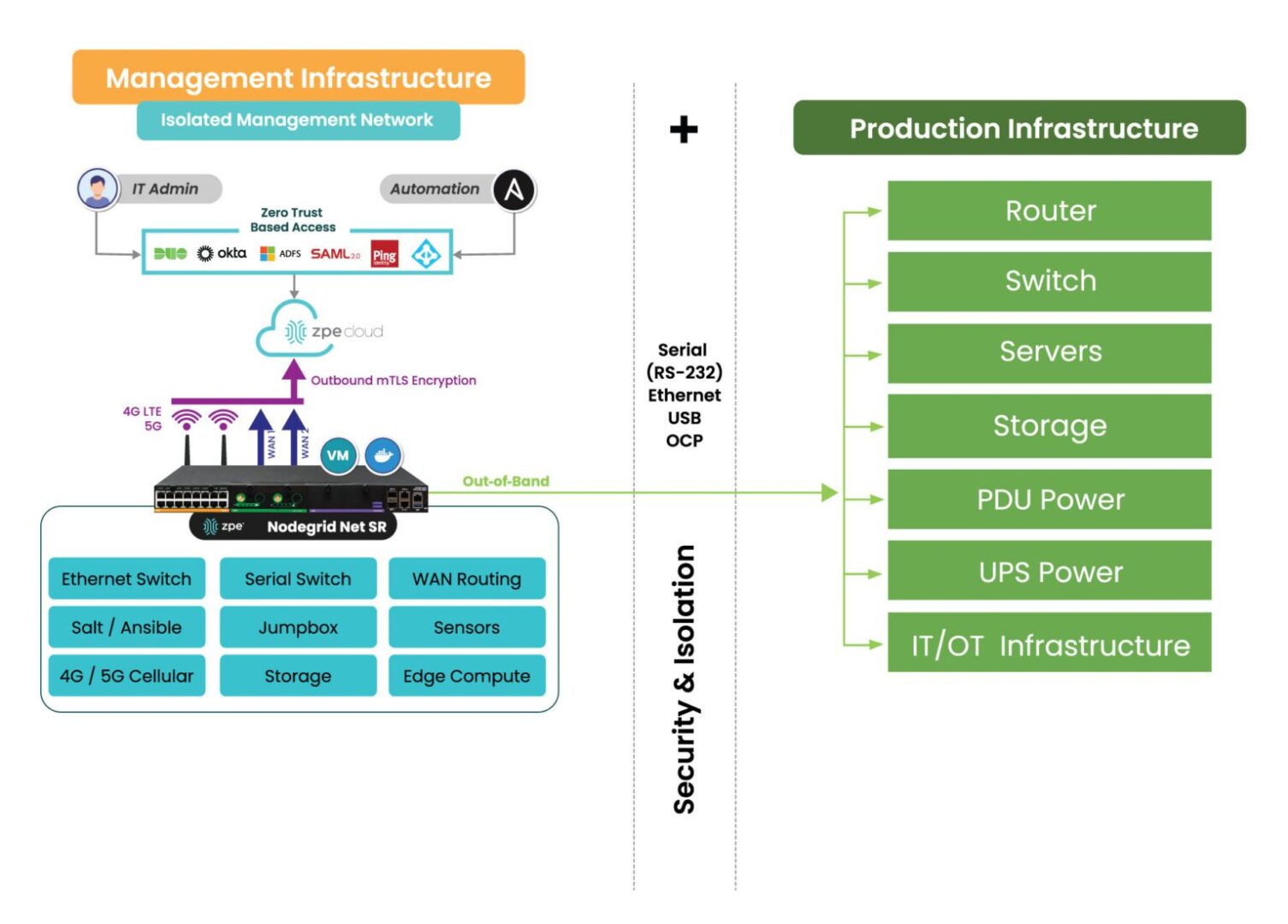
When people think of out-of-band (OOB) management, a common misconception is that it is solely about Ethernet switches. However, it’s crucial not to overlook the importance of having management access to your entire device stack. Low-level access can be essential for system recovery and management. The recent CrowdStrike outage is a perfect example – when the failed devices needed to be reimaged, typical out-of-band management solutions were inadequate at providing this type of low-level access. Generation three out-of-band serial consoles, like the Nodegrid Net SR, give Ethernet, serial, and USB access, allowing teams to remote-in at the BIOS level to revive failed devices. Using this kind of comprehensive out-of-band – on a fully isolated management plane – helps teams remotely recover and confidently automate processes.

Tip: Ensure that your OOB strategy includes robust serial console access to enhance system reliability and recovery capabilities.

IMI with Nodegrid2

4. Ignoring Security Best Practices

Zero trust security is no longer just advisable, it’s essential. The typical approach is to establish direct connectivity to devices to configure, troubleshoot, upgrade, etc. But this comes with unnecessary risks, often exposing management ports to the Internet and leaving you at risk of attack. Without a fully isolated management plane and zero trust security controls, how would you recover if you were ransomware’d? This is why it’s essential to implement security controls like role-based access and multi-factor authentication, and ensure complete separation of management and production networks. 

Tip: Prioritize security by adopting a zero-trust approach and implementing rigorous access controls to safeguard your data center.

5. Cutting Corners on Out-of-Band Management

In the race for implementing AI, it’s crucial to invest in AI data center infrastructure. But organizations often cut corners on their ability to manage the underlying infrastructure that powers AI. Management access should not stop at ethernet switches; it should extend to encompass serial console access, PDUs, jump boxes, 5G connectivity, routing, WAN links, and a centralized cloud hub with secure tunnels to colocation sites. Using a comprehensive and centralized platform like Nodegrid consolidates many management devices into one while giving remote control to optimize AI’s underlying infrastructure. Aside from enhancing efficiency, this approach minimizes waste and energy consumption, which addresses environmental, social, and governance (ESG) concerns. 

Tip: Avoid the partial out-of-band management deployment. A complete system not only supports resilience and security but also contributes to sustainability goals.


Addressing these common data center mistakes can significantly enhance operational efficiency, security, and scalability. By prioritizing management infrastructure, automating processes, ensuring adequate out-of-band access, implementing robust security measures, and investing wisely in management systems, organizations can build resilient data centers equipped to meet the demands of today and the future.

See ZPE Cloud in action with this video demo

Senior Sales Engineer Marcel van Zwienen gives you a hands-on demo of ZPE Cloud in this video. Watch Marcel take you from signing in to gaining remote access for troubleshooting, to showing how to apply configuration changes automatically across device fleets. Watch now at the link below.

Use Our Blueprint to Avoid Data Center Mistakes

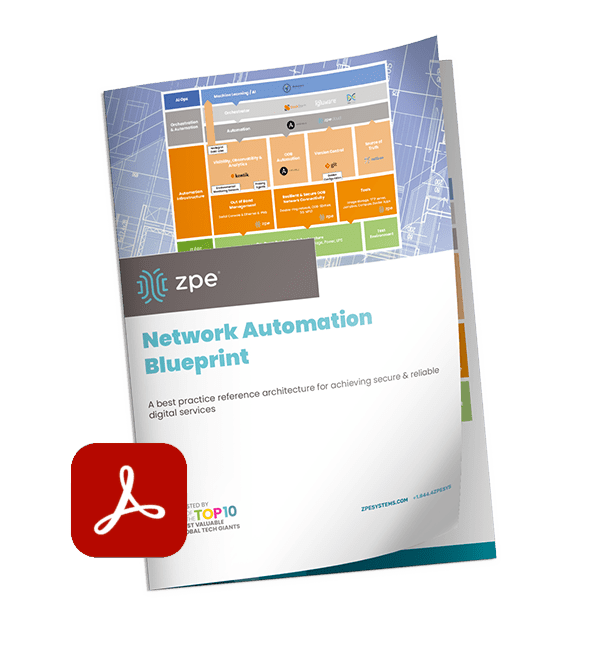
Our blueprint shows how to deploy an isolated management infrastructure, which gives you secure remote access to recover from outages and automate operations. Download now for the complete guide.

Perle Console Server Replacement Options

NCSP Back side

Perle offers two console server solutions for out-of-band (OOB) management of data center infrastructure: the IOLAN SCG and the IOLAN SCR. The SCG is available in both fixed and modular form factors, while the SCR comes in four models with different combinations of 56 managed ports, allowing companies to choose the OOB management hardware that best suits their environment. Unfortunately, IOLAN solutions suffer from hardware and software limitations that can curb scalability and limit agility. This guide discusses Perle console server replacement options that enable streamlined growth through automation capabilities and vendor freedom.


Key takeaways

  • Perle IOLAN SCG appliances offer out-of-band console server management for up to 48 devices in a fixed or modular form factor. Perle IOLAN SCR console servers come with four different managed port configurations for added flexibility.
  • Perle console servers offer some automation capabilities, like auto-discovery and zero-touch provisioning, as well as comprehensive firewall functionality. However, their underpowered hardware and closed management software prevent Guest OS hosting or third-party infrastructure automation and orchestration.
  • The Nodegrid platform from ZPE Systems overcomes these limitations with robust CPU, RAM, and storage, as well as vendor-neutral software. It enables data center scalability by providing high-density serial port configurations and supporting 3rd-party automation.
  • Nodegrid can also run networking, security, edge computing, AIOps, and more, consolidating the data center tech stack and improving operational efficiency.


Perle IOLAN console server overview

Perle IOLAN SCG console servers provide out-of-band management for up to 48 infrastructure devices. Fixed-form-factor models use copper Ethernet for networking and OOB, while the modular version has options for Wi-Fi, cellular, and dial-up. The modular series also has three expansion bays that support any combination of 16-port RS-232 or USB serial modules.

Perle IOLAN SCR console servers come in four different models with up to 56 managed serial, USB, and Ethernet ports, as well as optional cellular integration.

Click here to compare Perle console server tech specs.

Perle console servers have automatic LLDP (Link Layer Discovery Protocol) discovery and can extend zero-touch provisioning (ZTP) to end-devices. They come with an embedded firewall, OpenVPN and IPSec VPN, and AES encryption. The PerleVIEW cloud-based management software provides centralized monitoring and control of all connected data center infrastructure.


Why consider Perle console server alternatives

IOLAN console servers have an underpowered 500 MHz core 32-bit ARM processor, 4GB of flash storage, and 1GB RAM. This hardware may be sufficient for basic infrastructure management workflows and ZTP, but it prevents Guest OS hosting and more advanced automation. The Perle platform also doesn’t integrate with any third-party automation or orchestration solutions.

An inability to fully automate infrastructure management workflows – or to orchestrate those tasks that can be automated – ultimately limits operational efficiency and data center scalability. Consequently, IT teams can’t effectively support the needs of the growing business, adapt to strategy changes, or focus on revenue-driving innovations like artificial intelligence and machine learning (AI/ML).

What’s needed is an open platform that can manage any device, automate any workflow, and work with third-party software to provide a fully integrated infrastructure orchestration experience.


Perle console server replacement options from ZPE Systems

Nodegrid is a family of vendor-neutral console server solutions from ZPE Systems. It comes in four models:

  1. The Nodegrid Serial Console Plus (NSCP) is a robust platform offering up to 96 managed serial ports in a 1U rack-mounted form factor for hyperscale data centers and cloud service providers.
  2. The Nodegrid Serial Console S Series provides up to 48 auto-sensing ports to unify management of legacy, modern, and multi-vendor data center environments.
  3. The Nodegrid Net Services Router (NSR) is a modular solution that can be customized with a range of serial, networking, storage, and compute cards to adapt to any use case.
  4. The Nodegrid Serial Console Plus Core Edition (NSCP-CE) is ideal for break-fix deployments while providing more robust security capabilities than comparable solutions.

Nodegrid devices come with Intel x86-32 bit processors, robust (and upgradable) internal storage and RAM options, and a Linux-based Nodegrid OS. The NSCP, S Series, and NSR support Guest OS and Docker containers for third-party applications. That means they can directly host infrastructure automation and orchestration (like Ansible, Puppet, and Chef), security (like Palo Alto’s next-generation firewalls), and much more. Plus, it can extend this automation to legacy and mixed-vendor devices that otherwise wouldn’t support it.

All Nodegrid models can use a wide range of USB environmental monitoring sensors to help remote teams maintain optimal conditions in the data center. Nodegrid hardware protects the control plane with advanced security features like BIOS protection, UEFI Secure Boot, self-encrypted disk (SED), Trusted Platform Module (TPM) 2.0, and a multi-site VPN using IPSec, WireGuard, and OpenSSL protocols. The Nodegrid OS and the ZPE Cloud management software are also Synopsys-validated as achieving industry-leading security.


Which Nodegrid serial console is right for you?

Use Cases
Serial
Network
CPU
Guest OS
Docker Apps
Storage
RAM
Wi-Fi
Cellular
Power
Data Sheet
Nodegrid NSCP
Hyperscale data centers and cloud service providers
16 / 32 / 48 / 96
2 SFP+ & 2 ETH
Intel x86_64 quad core
1
1-2
32GB SSD
4GB DDR4
Optional
Optional
Single or Dual AC

Dual DC

Nodegrid NSC S Series
Mixed legacy, modern, and multi-vendor environments
16 / 32 / 48
2 SFP+ or 2 ETH
Intel x86_64 dual core
1
1-2
32GB SSD
4GB DDR3
Optional
Optional
Single or Dual AC

Dual DC

Nodegrid NSR
Modular and adaptable to any use case
16 / 32 / 48 / 64 / 80
2 SFP+ & 2 ETH
Intel x86_64 quad core or 8-core
1-6
1-4
32GB – 128GB
8GB DDR4
Optional
Optional
Single or Dual AC

Dual DC

Nodegrid NSCP-CE
Break-fix solution for data centers, colocations, and branches
16 / 32 / 48
2 SFP & 2 ETH
Intel x86_64 dual core
0
0
16GB SSD
4GB DDR4
Optional
Optional
Dual AC

Dual DC

Future-proof your data center with Nodegrid

Perle console servers deliver unified, out-of-band management of remote data center infrastructure with some basic automation capabilities, but their closed architecture and underpowered hardware limit extensibility and scalability. Nodegrid improves upon outdated console server solutions with a vendor-neutral platform that supports unlimited innovation and growth with less management complexity.

To learn more about Perle console server replacement options, schedule a demo of the vendor-neutral Nodegrid platform.


Perle IOLAN console server tech specs

Use Cases
Serial
Network
CPU
Guest OS
Docker Apps
Storage
RAM
Wi-Fi
Cellular
Power
IOLAN SCG (Fixed)
Data centers
16 / 32 / 48
1 ETH
ARM 32-bit 500MHz single core
0
0
4GB Flash
1GB
No
No
Single AC
IOLAN SCG (Modular)
Multiple
Up to 50
2 SFP or 2 ETH
ARM 32-bit 500MHz single core
0
0
4GB Flash
1GB
Optional
Optional
Dual AC

Dual AC

IOLAN SCG (Modular)
Large data centers
24 / 32 / 40 / 56
2 SFP (SCR256)

2 SFP & 2 ETH (SCR226, 242, 258)

ARM 32-bit 500MHz single core
0
0
4GB Flash
1GB
Optional
Optional
Dual AC

Ready to replace your outdated Perle console server?


We know that replacing outdated, EOL devices takes a lot of effort. That’s why ZPE now offers a complete package of budget-friendly products and engineering services to help streamline the process.

Click here to see how we make it easy to upgrade to next-gen out-of-band management.

How Oxidized Network Backups Improve Resilience

How Oxidized Network Backups Improve Resilience

A network administrator configures an enterprise networking device.

Network outages are extraordinarily expensive and disruptive to business, with recent EMA research finding that outages cost an average of $14,056 per minute in 2024. While these outages have numerous possible causes, two of the largest and most preventable are human error and configuration issues. Enterprise networks keep growing bigger and more complicated, with factors like network decentralization, the use of network automation solutions, and the constant threat of cybersecurity breaches contributing to management complexity and the risk of costly mistakes.

Oxidized is an open-source network configuration backup and change management tool that can help prevent human errors and malicious actors from disrupting network services. It also accelerates recovery from equipment failures and ransomware attacks without increasing network complexity. This guide explains how Oxidized network backups can improve resilience, or the ability to withstand adversity and continue business operations with minimal disruption.

What is Oxidized, and how does it work?

Oxidized is a lightweight tool that automatically backs up network device configurations and tracks changes. It supports more than 130 operating systems and easily integrates with third-party network management tools like LibreNMS.

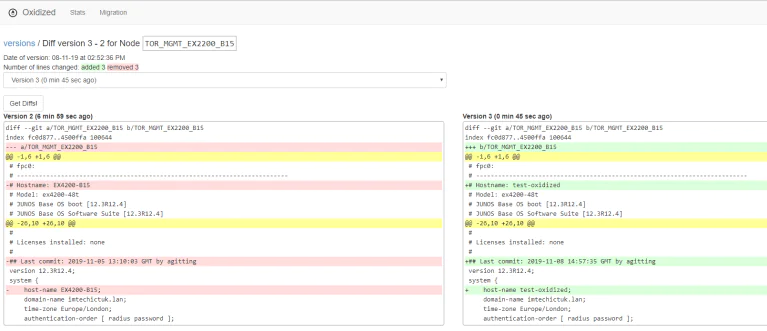
Oxidized uses REST APIs to pull configurations from network devices and send them to a Git repository or network management platform. Administrators can configure it to make backups according to a specific schedule, and it automatically pulls a new version (called a diff version) whenever a device’s configuration is changed. Teams can view diff versions in the Oxidized web UI as well as whichever Git repository or management platform the backups are being sent to.

Viewing Oxidized network backup diff versions in the web UI.

Viewing diff versions in the Oxidized web UI. Source

How Oxidized network backups improve resilience

Network resilience is the ability to minimize business disruptions when adverse events occur, such as ransomware attacks, botched updates, natural disasters, and equipment failures. Oxidized network backups improve resilience in numerous ways. For example:

  1. Administrators can easily roll-back device configurations to a previous version if a change causes problems. This significantly shortens the duration of outages or service degradations.
  2. Teams can quickly deploy known-good configurations to replacement devices when equipment failures or ransomware breaches happen, significantly accelerating recovery times.
  3. Configurations can be monitored with version control to prevent unauthorized changes from proliferating unnoticed, helping teams stop ransomware and other malicious actors in their tracks.

Enhancing network resilience with out-of-band management

Network backups are crucial, but they’re only one piece of the resilience puzzle. Another best practice for minimizing business disruption is to isolate the network control plane with out-of-band (OOB) management. OOB moves all network management and infrastructure control functions to an entirely separate network that runs parallel with the production (or in-band) network but doesn’t rely on any of the same infrastructure or services. It allows teams to perform management, troubleshooting, backup, and recovery workflows remotely on a dedicated connection, such as secondary Fiber or cellular LTE, that remains available even if the in-band network goes down from an equipment failure, ISP outage, or ransomware attack.

By isolating management interfaces and workflows on a separate network, OOB management helps prevent malicious software or people from accessing them from a breached production system. For example, running Oxidized backups on the OOB network ensures that teams can safely deploy configs to new or rebuilt equipment without risking ransomware reinfection, speeding up recovery times and reducing financial impacts.

Minimize business disruption with Oxidized + Nodegrid

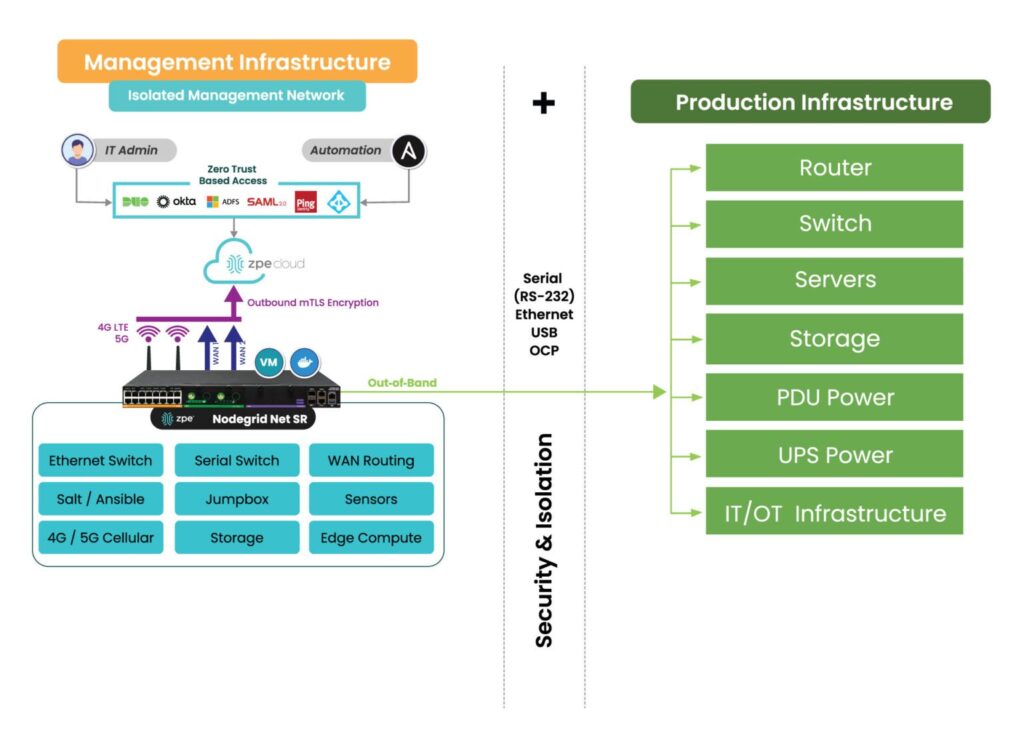
Nodegrid is a vendor-neutral out-of-band management platform that uses console servers and integrated branch services routers to isolate your control plane without the need for parallel infrastructure.

OOB management network isolation with the Nodegrid platform.

OOB management network isolation with the Nodegrid platform.

Nodegrid’s open architecture and extensible management software allow you to integrate, host, and run your choice of third-party services and solutions. You can use it to deploy network automation, run next-generation firewall software, host recovery tools, or even deliver services while the primary network or systems are down. With the combination of Oxidized network backups and Nodegrid OOB, you can minimize the impact of adverse events without driving up costs or complexity.

Deploying Oxidized network backups with Nodegrid OOB helps reduce the duration, expense, and hassle of downtime. Schedule a Nodegrid demo to learn more.

Serial Console Redirection Guide

Serial Console Redirection Guide

Serial-console-rediction-guide

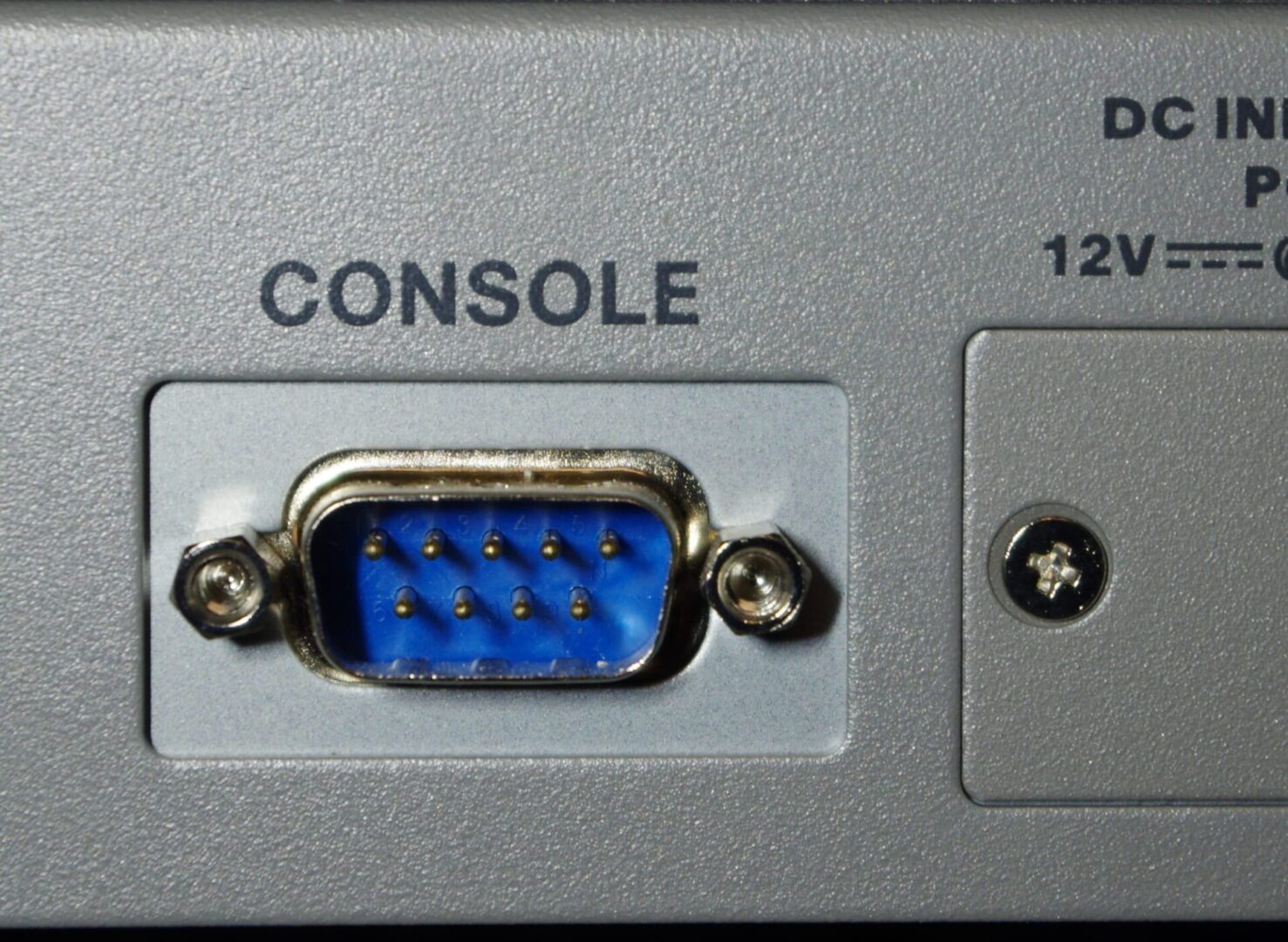
Serial console redirection involves sending a server’s keyboard and video signals through the serial port as well as the normal endpoints (USB and video), allowing them to be used in headless mode. It gives administrators remote access to pre-boot functions, such as the BIOS menu, that are typically unavailable to them with software-based remote access solutions. This is important because it allows remote teams to install new operating systems, troubleshoot hung servers, and perform other critical hardware management tasks without costly on-site visits. It also means administrators can control remote servers with out-of-band (OOB) serial consoles, devices that streamline remote infrastructure management and improve network resilience.

Why enable serial console redirection?

The primary reason to redirect keyboard control over the serial port is to gain remote access to pre-boot menus and functions. Typically, systems administrators remotely manage servers using a software-based remote access client that only works while the OS is running. While this is sufficient for most remote administration workflows, it means that admins can’t do anything with the server until it has booted to the operating system, which poses several problems:

  1. Administrators cannot remotely install the OS on a new or recovered server without someone on-site to physically enter commands and select options with a keyboard and mouse. This is especially problematic when the OS needs to be reinstalled after a crash or ransomware breach, because it forces companies to send teams on-site or pay for expensive managed services, driving up the cost and duration of outages.
  2. Remote teams are powerless to intervene if the server hangs during a reboot or update. Again, they have to either travel on-site or pay for managed services just to press a few keys or access troubleshooting tools.
  3. Remotely installing new UEFI/BIOS versions or making any configuration changes can be tricky. Many server vendors provide software utilities that allow admins to push out BIOS updates over the network, but it can be very difficult to troubleshoot any problems that arise. In multi-vendor environments, teams may also find it tedious to coordinate updates across multiple tools with different interfaces and commands.

There are also IPMI-based (intelligent platform management interface) remote management tools that provide full remote control but add another component to the tech stack that must be maintained and secured, creating additional complexity.

Serial console redirection and out-of-band management

Another major advantage of serial console redirection is that it enables out-of-band (OOB) management. OOB creates an entirely separate network that runs parallel with your production (or in-band) network but doesn’t rely on the same network infrastructure or services. OOB management allows administrators to remotely manage servers and other infrastructure on a dedicated connection, such as secondary fiber or cellular LTE, that will remain available even if the in-band network goes down from an equipment failure, ISP outage, or ransomware attack.

OOB serial consoles

hotos of the Nodegrid Serial Console server solution.

The Nodegrid Serial Console Plus provides unified serial console management for many servers and infrastructure devices.

Serial console redirection also allows teams to manage servers with serial consoles, also known as console servers, console server switches, or terminal servers. One of these devices can be used to manage several pieces of data center equipment, so sysadmins don’t need to connect to each server individually.

The management interface for the Nodegrid Serial Console Plus allows admins to manage many servers and infrastructure devices from one convenient location.

The management interface for the Nodegrid Serial Console Plus allows admins to manage many servers and infrastructure devices from one convenient location.

Serial consoles also create an OOB network without the need to deploy a bunch of redundant devices and services. Solutions like the Nodegrid Serial Console from ZPE Systems provide additional functionality like power control, giving remote teams the ability to power-cycle a hung device or turn systems back on after a power failure. OOB serial consoles help improve management efficiency and overall resilience without driving up costs or complexity.

How to configure serial console redirection

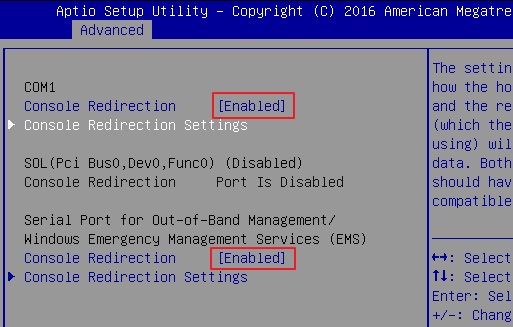
Serial console redirection is typically configured in the server’s UEFI (Unified Extensible Firmware Interface) or BIOS (Basic Input/Output System) settings. As such, it’s important to consult the vendor-provided documentation for instructions on how to enable it for your server hardware.

Serial console redirection enabled in BIOS. Source:

Serial console redirection enabled in BIOS. Source: ASRock Rack

Additionally, some Windows and Linux-based operating systems need to be configured for serial console management. It’s best to look up the OS-specific instructions on the vendor’s website, but here are a few links to get you started:

Why choose the Nodegrid Serial Console solution

Configuring serial console redirection is relatively straightforward, and it allows sysadmins to remotely control and troubleshoot servers even when the OS isn’t available. It also enables the use of OOB serial consoles like the Nodegrid solution from ZPE Systems, which streamlines remote management workflows and reduces the business impact of system failures.

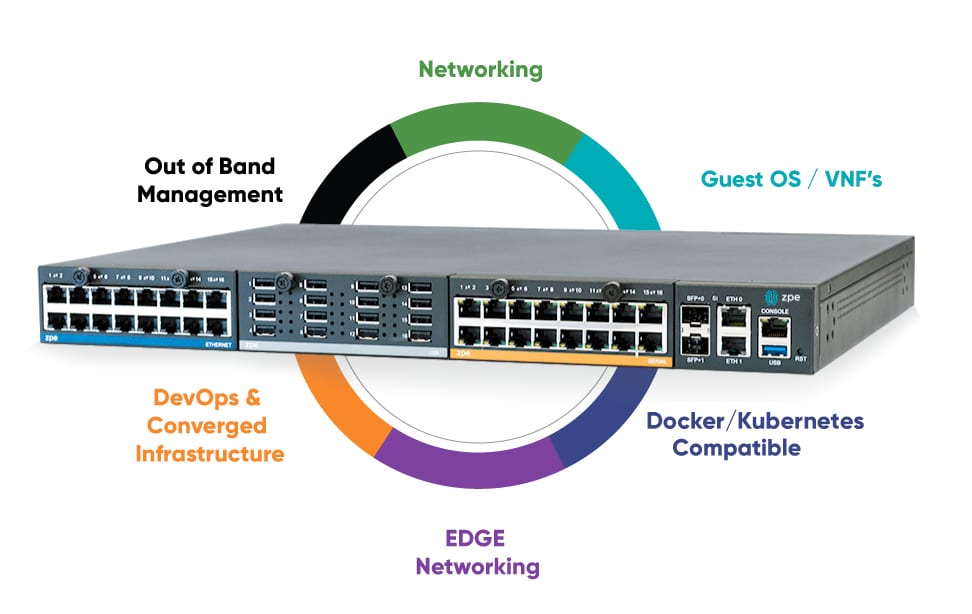
Nodegrid consolidates a sysadmin’s entire management tech stack into a single appliance for greater operational efficiency.

A diagram showing all the capabilities of a Gen 3 serial console interface.

Nodegrid consolidates a sysadmin’s entire management tech stack into a single appliance for greater operational efficiency.

Nodegrid is a Gen 3 out-of-band management platform that provides vendor-neutral control over mixed-vendor infrastructure. It can integrate or directly host third-party applications for automation, security, and much more, consolidating an entire tech stack into a single, cost-efficient solution.

Serial console redirection with Nodegrid improves operational efficiency and network resilience. Schedule a demo to see a Nodegrid Serial Console in action!