Providing Out-of-Band Connectivity to Mission-Critical IT Resources

Home » Serial Consoles » Page 3

Out-of-Band vs. Isolated Management Infrastructure: What’s the Difference?
Out-of-band vs IMI
To stay ahead of network outages, cyberattacks, and unexpected infrastructure failures, IT teams rely on remote access tools. Out-of-band (OOB) management is traditionally used for quick access to troubleshoot and resolve issues when the main network goes down. But in the past decade, hyperscalers and leading enterprises have developed a more advanced approach called Isolated Management Infrastructure (IMI). Although IMI incorporates OOB, it’s important to understand the distinction between the two, especially when designing infrastructure to be resilient and scalable.

What is Out-of-Band Management?

Out-of-Band Management has been around for decades. It gives IT administrators remote access to network equipment through an independent channel, serving as a lifeline when the primary network is down.
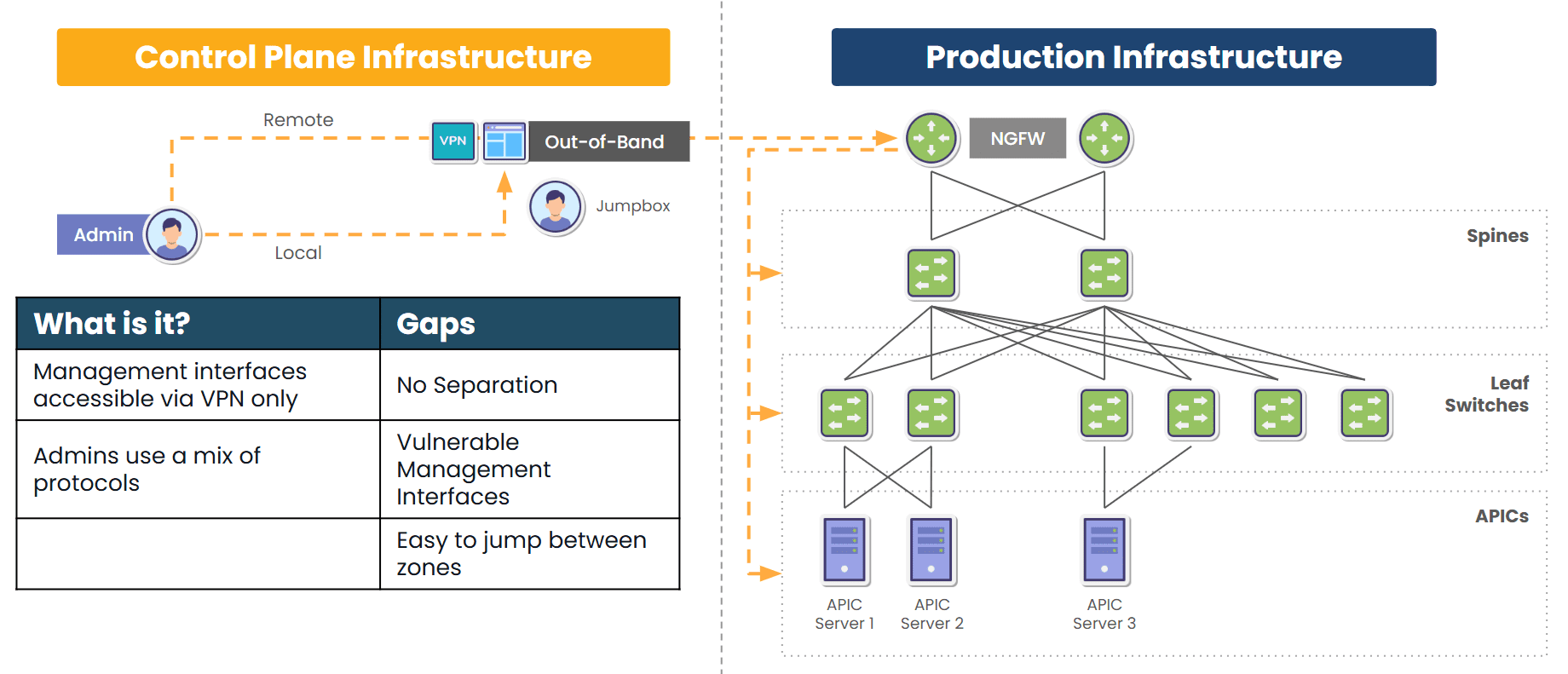
Traditional out-of-band provides a secondary path to production equipment

Image: Traditional out-of-band solutions provide a secondary path to production infrastructure, but still rely in part on production equipment.

Most OOB solutions are like a backup entrance: if the main network is compromised, locked, or unavailable, OOB provides a way to “go around the front door” and fix the problem from the outside.

Key Characteristics:

  • Separate Path: Usually uses dedicated serial ports, USB consoles, or cellular links.
  • Primary Use Cases: Though OOB can be used for regular maintenance and updates, it’s typically used for emergency access, remote rebooting, BIOS/firmware-level diagnostics, and sometimes initial provisioning.
  • Tools Involved: Console servers, terminal servers, or devices with embedded OOB ports (e.g., BMC/IPMI for servers).

Business Impact:

From a business standpoint, traditional OOB solutions offer reactive resilience that helps resolve outages faster and without costly site visits. It also reduces Mean Time to Repair (MTTR) and enhances the ability to manage remote or unmanned locations.

However, solutions like ZPE Systems’ Nodegrid provide robust capability that evolves out-of-band to a new level. This comprehensive, next-gen OOB is called Isolated Management Infrastructure.

What is Isolated Management Infrastructure?

Isolated Management Infrastructure furthers the concept of resilience and is a natural evolution of out-of-band. IMI does two things:

  1. Rather than just providing a secondary path into production devices, IMI creates a completely separate management plane that does not rely on any production device.
  2. IMI incorporates its own switches, routers, servers, and jumpboxes to support additional critical IT functions like networking, computing, security, and automation.
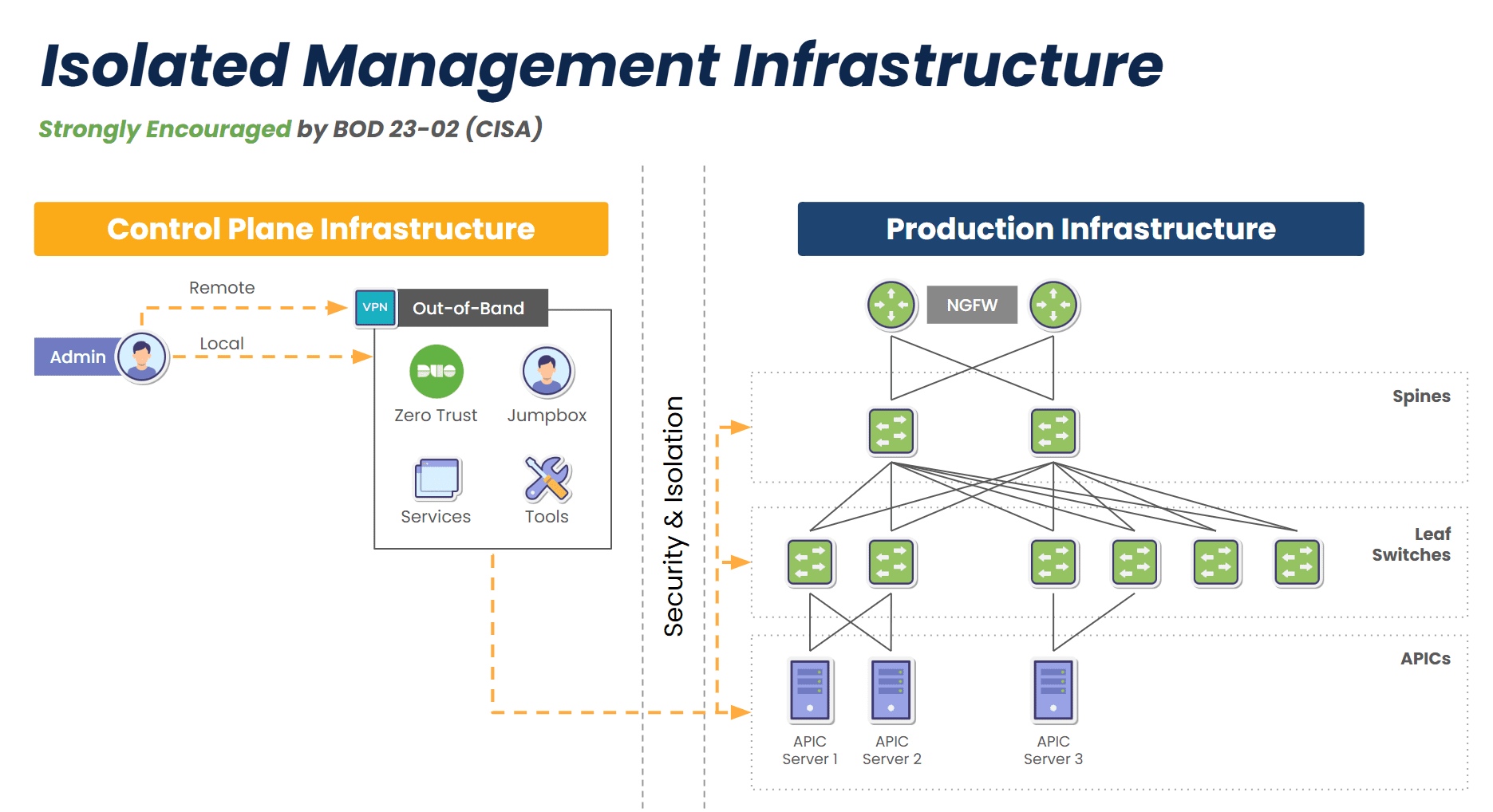
Isolated management infrastructure provides a fully separate management path

Image: Isolated Management Infrastructure creates a completely separate management plane and full-stack platform for maintaining critical services even during disruptions, and is strongly encouraged by CISA BOD 23-02.

IMI doesn’t just provide access during a crisis – it creates a separate layer of control and serves as a resilience system that keeps core services running no matter what. This gives organizations proactive resilience from simple upgrade errors and misconfigurations, to ransomware attacks and global disruptions like 2024’s CrowdStrike outage.

Key Characteristics:

  • Fully Isolated Design: The management plane is physically and logically isolated from the production network, with console access to all production devices via a variety of interfaces including RS-232, Ethernet, USB, and IPMI.
  • Backup Links: Uses two or more backup links for reliable access, such as 5G, Starlink, and others.
  • Multi-Functionality: Hosts network monitoring, DNS, DHCP, automation engines, virtual firewalls, and all tools and functions to support critical services during disruptions.
  • Automation: Provides a safe environment for teams to build, test, and integrate automation workflows, with the ability to automatically revert back to a golden image in case of errors.
  • Ransomware Recovery: Hosts all tools, apps, and services to deploy the Gartner-recommended Secure Isolated Recovery Environments (SIRE).
  • Zero Trust and Compliance Ready: Built to minimize blast radius and support regulated environments, with segmentation and zero trust security features such as MFA and Role-Based Access Controls (RBAC).

Business Impact:

IMI enables operational continuity in the face of cyberattacks, misconfigurations, or outages. It aligns with zero-trust principles and regulatory frameworks like NIST 800-207, making it ideal for government, finance, and healthcare. It also provides a foundation for modern DevSecOps and AI-driven automation strategies.

Comparing Reactive vs. Proactive Resilience


Purpose
Deployment
Services Hosted
Typical Vendors
Best For
Out-of-Band
Recover access when production is down
Console servers or cellular-based devices
None (access only)
Opengear, Lantronix
Legacy networks, branch recovery
IMI
Maintain operations even when production is down
Full-stack platform (compute, network, storage)
Firewalls, monitoring, DNS, etc.
ZPE Systems (Nodegrid), custom-built IMI
Modern, zero-trust, AI-driven environments

Why Businesses Should Care

For CIOs and CTOs

IMI is more than a management tool – it’s a strategic shift in infrastructure design. It minimizes dependency on the production network for critical IT functions and gives teams a layered defense. For organizations using AI, hybrid-cloud architectures, or edge computing, IMI is strongly encouraged and should be incorporated into the initial design.

For Network Architects and Engineers

IMI significantly reduces manual intervention during incidents. Instead of scrambling to access firewalls or core switches when something breaks, teams can rely on an isolated environment that remains fully operational. It also enables advanced automation workflows (e.g., self-healing, dynamic traffic rerouting) that just aren’t possible in traditional OOB environments.

Get a Demo of IMI

Set up a 15-minute demo to see IMI in action. Our experts will show you how to automatically provision devices, recover failed equipment, and combat ransomware. Use the button to set up your demo now.

Watch How IMI Improves Security

Rene Neumann (Director of Solution Engineering) gives a 10-minute presentation on IMI and how it enhances security.
Cisco Live 2024 – Securing the Network Backbone

Overcoming the Challenges of PDU Management in Modern IT Environments

Overcoming PDU Management Challenges

Power Distribution Units (PDUs) are the unsung heroes of reliable IT operations. They provide the one thing that nobody pays attention to unless it’s gone: stable, uninterrupted power. Despite their essential role in hyperscale data centers, colocations, and remote edge sites, PDU management often remains one of the least optimized and most overlooked areas in IT operations. As organizations grow and expand their infrastructure footprints, the challenges associated with PDU management multiply to create inefficiencies, drive up costs, and expose critical systems to unnecessary downtime.

Why PDU Management is a Growing Concern

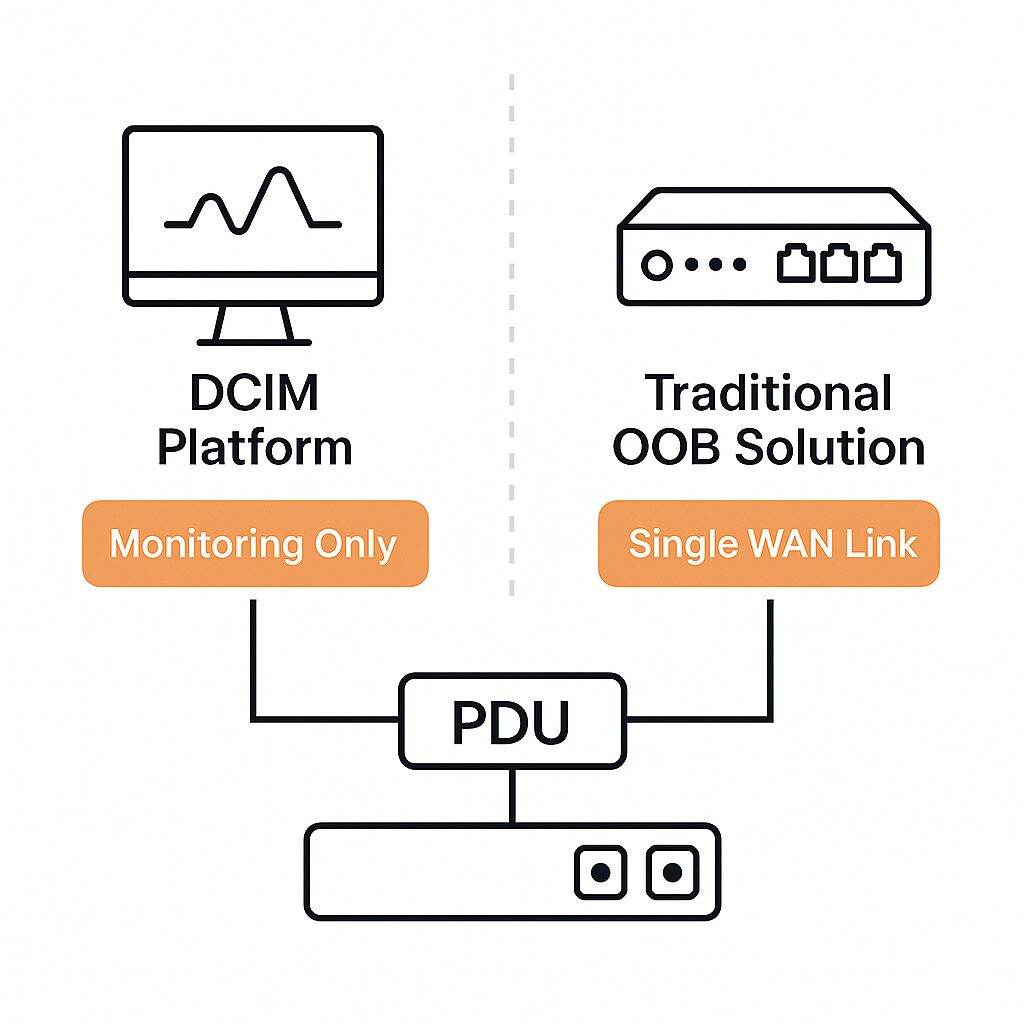
For enterprises that have adopted traditional Data Center Infrastructure Management (DCIM) platforms or out-of-band (OOB) solutions, it might seem like power infrastructure is already covered. However, these tools fall short when it comes to giving teams granular control of PDUs. Many only support SNMP-based monitoring, which means teams can see status data but can’t push configurations, perform power cycling, or recover unresponsive devices. OOB solutions also rely on a single WAN link, which can fail and cut off admin access.

DCIM and OOB solutions lack PDU Management capabilities

This lack of control results in IT teams still having to perform routine power management tasks on-site, even in supposedly modernized environments.

The Three Major Challenges of PDU Management

1. Operational Inefficiencies

Most PDUs still require manual interaction for updates, configuration changes, or outlet-level power cycling. If a PDU becomes unresponsive, or if firmware updates fail mid-process, SNMP interfaces become useless and recovery options are limited. In these cases, IT personnel must physically travel to the site – sometimes covering long distances – just to perform a simple reboot or plug in a crash cart. This not only introduces unnecessary downtime but also drains IT resources and slows incident resolution.

2. Slow Scaling

As businesses grow, so does the number of PDUs deployed across their infrastructure. Yet when it comes to providing network capabilities, power systems are not designed with scalability in mind. Even network-connected PDUs lack support for modern automation frameworks like Ansible, Terraform, or Python. Without REST APIs, scripting interfaces, or integration with infrastructure-as-code platforms, IT teams are left managing each unit individually through outdated web GUIs or vendor-specific software. This manual approach doesn’t scale and leads to costly delays, especially during site rollouts or large-scale upgrades.

3. High Administrative Overhead

Enterprises managing hundreds or thousands of PDUs across distributed environments face overwhelming complexity. Without centralized visibility, tracking the health, configuration status, or firmware version of each device becomes impossible. When each PDU requires its own login, manual updates, and independent troubleshooting processes, power management becomes reactive, not strategic. This overhead not only wastes time but also increases the risk of misconfigurations, security gaps, and service disruptions.

Best Practices for Modern PDU Management

To move beyond these limitations, organizations must rethink their approach. The goal is to eliminate on-site dependencies, enable remote control, and consolidate management across all PDUs. This is where Isolated Management Infrastructure (IMI) comes into play.

1. Enable Remote Power Management

Connect PDUs to a dedicated management network, ideally through both Ethernet and serial interfaces. This allows for complete remote access, from initial provisioning to ongoing troubleshooting, even if the primary network link goes down.

2. Automate Everything

Adopt solutions that support infrastructure-as-code, automation scripts, and third-party integrations. By automating tasks like firmware updates, power cycling, and configuration pushes, organizations can drastically reduce manual workloads and improve accuracy.

3. Centralize Administration

Deploy a unified platform that can manage all PDUs, regardless of vendor or model, from a single interface. Centralization enables consistent policies, rapid issue resolution, and streamlined operations across all environments.

Learn from the Experts: Download the Best Practices Guide

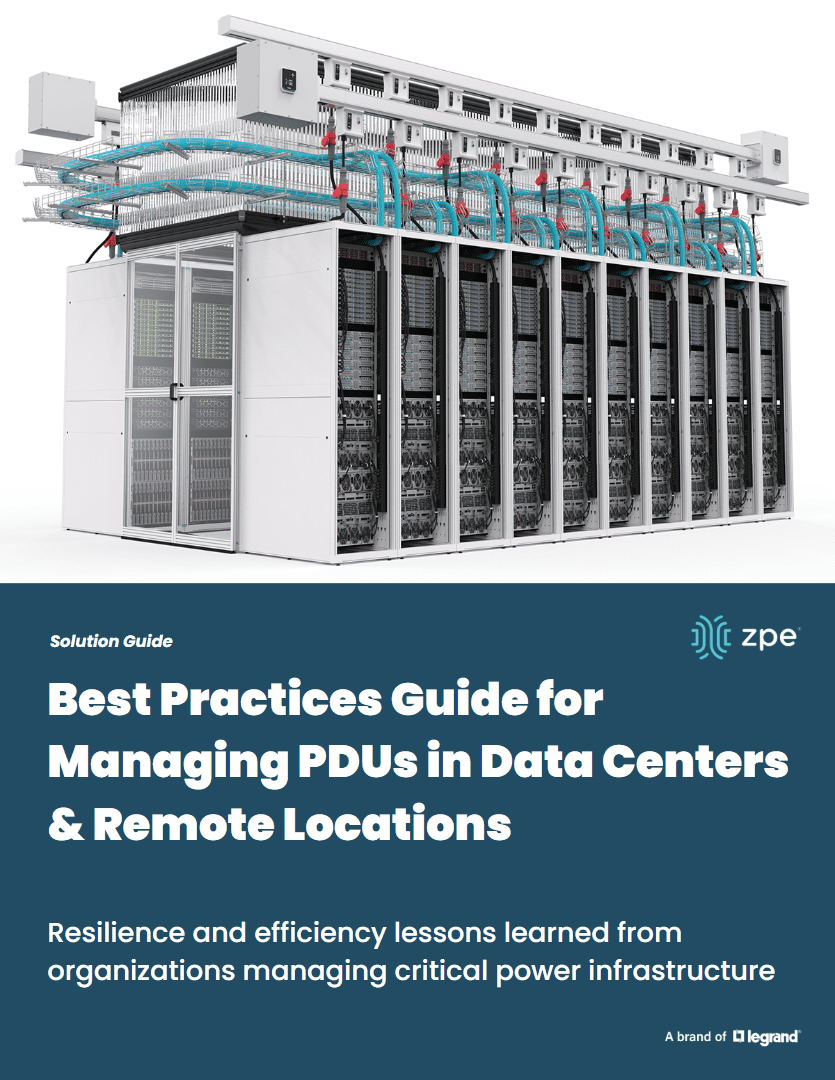
ZPE Systems has worked with some of the world’s largest data center operators and remote IT teams to refine their power management strategies. IMI is their foundation for resilient, scalable, and efficient infrastructure operations. Our latest whitepaper, Best Practices for Managing Power Distribution Units in Data Centers & Remote Locations, dives deep into proven strategies for remote management, automation, and centralized control.

What you’ll learn:

  • How to eliminate manual, on-site work with remote power management
  • How to scale PDU operations using automation and zero-touch provisioning
  • How to simplify administration across thousands of PDUs using an open-architecture platform

Download the guide now to take the next step toward smarter, more sustainable IT operations.

Get in Touch for a Demo of Remote PDU Management

Our engineers are ready to show you how to manage your global PDU fleet and give you a demo of these best practices. Click below to set up a demo.

KVM Switch vs. Serial Console: Understanding the Key Differences and Best Use Cases

KVM Switch vs Serial Console

In IT infrastructure management, two essential tools often come into play: KVM switches and serial consoles. While they may seem similar at first glance, understanding their distinct functionalities is crucial for system administrators. In this guide, we’ll break down their differences, use cases, and how they can work together for optimal infrastructure management.

What is a KVM Switch?

A KVM (Keyboard, Video, Mouse) switch is a hardware device that allows users to control multiple computers from a single keyboard, monitor, and mouse. This setup eliminates the need for multiple peripherals, streamlining IT operations.

Benefits of using a KVM switch:

  • Centralized Management: Control multiple servers from one console.
  • Space & Cost Efficiency: Reduces clutter and hardware costs in server rooms.
  • Graphical Interface Access: Enables GUI-based management for various operating systems.
  • Remote Management: Some KVM switches offer IP-based remote access for IT teams.

KVM switches are ideal for data centers, server management, and IT environments where GUI access is necessary.

What is a Serial Console?

A serial console, also called a console server, provides remote access to devices via serial ports. It is primarily used to manage network equipment such as routers, switches, and firewalls — especially when network access is unavailable.

Key advantages of serial consoles:

  • Out-of-Band Management: Provides access even when the primary network is down.
  • Command-Line Interface (CLI) Support: Essential for configuring network devices.
  • Improved Security: Enables remote troubleshooting without exposing devices to the main network.
  • Multi-Vendor Support: Works with various networking and industrial hardware.

Serial consoles are indispensable for network management, disaster recovery, and remote troubleshooting of mission-critical systems. They provide low-level access to equipment and serve as an administrative lifeline when the primary network is not working properly.

KVM Switch vs. Serial Console: A Side-By-Side Comparison

Feature
Access Type
Primary Use Case
Connectivity
Best For
Network Dependency
KVM Switch
Graphical (GUI) access
Managing multiple computers
Video & USB interfaces
Servers, desktops, workstations
Requires active network/IP-based models available
Serial Console
Command-line (CLI) access
Managing network devices
Serial ports (RS-232, USB)
Routers, switches, firewalls
Works without network access

When to Use a KVM Switch vs. Serial Console

Choose a KVM switch if:

  • You need to manage multiple servers with a graphical interface.
  • Your IT infrastructure includes Windows, Linux, or other GUI-based systems.
  • Remote desktop-style management is required.

Choose a serial console if:

  • You need to configure network hardware like routers and firewalls.
  • Out-of-band management is crucial for your IT setup.
  • You need access when the primary network fails.

Combining KVM Switches and Serial Consoles for More Capability

Many IT environments benefit from using both KVM switches and serial consoles in tandem. This setup allows IT teams to efficiently manage both graphical and command-line-based systems, ensuring comprehensive remote access and troubleshooting capabilities. The drawback to this is that it requires deploying more devices, which not only increases costs, but also increases complexity and workloads for IT teams.

Simplify IT Management with ZPE Systems’ Nodegrid Devices

Why choose between a KVM switch and a serial console when you can have both in a single device? ZPE Systems’ Nodegrid solutions combine KVM and serial console functionality into an all-in-one platform, simplifying IT infrastructure management.

Why choose Nodegrid?

  • Unified Management: Access servers, routers, switches, and more from one interface.
  • Enhanced Security: Secure out-of-band management with built-in Zero Trust architecture.
  • Remote Access: Control your entire infrastructure from anywhere, even during network failures.
  • Scalability: Streamline operations for edge, branch, and data center environments.

Upgrade your IT management with the versatile, secure, and efficient out-of-band solution. Browse our collection of products that combine KVM and serial console functionalities, and get in touch for a free demo.

See KVM & Serial Console Functionality in This Tech Demo

Jordan Baker (Tech Writer) shows how to migrate your existing solution to Nodegrid, and gives a 5-minute tech demo of what it’s like to manage serial connections, PDUs, and KVM switches, all from one interface. Watch now and visit our serial console migration page for special offers.

Out-of-Band Monitoring: What it is and Why You Need It

Out-of-band monitoring what it is and why you need it

Network reliability and security are mission-critical for organizations. Yet, relying solely on in-band networks for monitoring and management creates a significant risk. When the primary network experiences an outage or breach, IT teams need to scramble to regain control. Out-of-band monitoring offers a dedicated pathway for monitoring and managing devices, so teams have reliable, always-available access to ensure resilience. But, how does out-of-band monitoring work? What can it monitor? Why is it essential to a network resilience strategy? Let’s find out.

What is Out-of-Band Monitoring and How Does it Work?

Out-of-band monitoring is a network management strategy that uses a dedicated management network, separate from the production network, to monitor and manage critical infrastructure. Whereas in-band monitoring relies on the same data network used by users and applications, out-of-band monitoring remains isolated and operational even if the main network is down.

How does out-of-band monitoring connect to devices?

  • Console Access via Serial Ports: Out-of-band monitoring uses serial console ports on routers, switches, firewalls, and servers to provide direct access to the device’s command-line interface (CLI). This connection bypasses the primary network entirely.
  • Dedicated Management Interfaces: Many modern devices come with a dedicated management Ethernet port (e.g., Cisco’s management interface or HP iLO for servers). These ports are linked to an out-of-band network, allowing secure remote access.
  • Secure Remote Access Gateways: Centralized console servers or remote access gateways aggregate connections to multiple devices, making it easy to manage a large number of endpoints from a single interface.

Teams can gain remote access to out-of-band console servers via dedicated cellular, ISP, Starlink, or other connection that is separate from the main network.

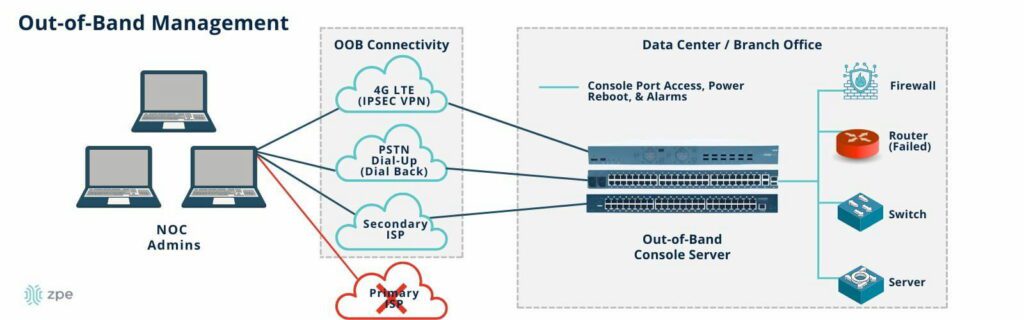
Network diagram showing how out-of-band management works

Image: An out-of-band network provides dedicated connectivity that’s separate from the main network. NOC admins can gain access to out-of-band console servers via cellular, dial-up, ISP, or other connection, and manage all data center/branch devices connected to the console servers.

What can out-of-band monitor and manage?

  • Network Device Status: Real-time monitoring of routers, switches, and firewalls for availability, performance, and errors.
  • Power Systems: Monitoring and managing power distribution units (PDUs) to ensure stable power, perform remote power cycling, and maintain updated firmware.
  • Server Health: Tracking CPU, memory, disk usage, and hardware diagnostics for servers through out-of-band management interfaces like IPMI, Dell iDRAC, or HP iLO.
  • Environmental Conditions: Temperature, humidity, and physical security sensors can be monitored to detect and respond to environmental threats in data centers and remote sites.
  • Network Connectivity: Ensures WAN links, including primary and backup connections (cellular or satellite), are functioning properly.

How Out-of-Band Monitoring Improves Resilience

Out-of-band monitoring significantly enhances network resilience by providing independent access to critical infrastructure. With transparency into device health, network performance, and other systems, teams can stem issues before they have a chance to develop into outages or security breaches. If any problems do occur on the main network, this out-of-band lifeline lets teams instantly respond rather than forcing them to dispatch on-site technicians.

  1. Always-On Access
    Out-of-band networks operate independently from production traffic, ensuring that administrators can maintain visibility and control even when the primary network is congested or down.
  2. Incident Recovery and Diagnostics
    When the primary network is compromised, out-of-band allows IT teams to perform root cause analysis, reconfigure devices, and restore services without relying on affected in-band connectivity.
    • Example: During a DDoS attack, out-of-band provides a clean path to troubleshoot and block the attack at the firewall.
    • Example: If a firmware update causes a network device to become unresponsive, the out-of-band console allows administrators to roll back changes or restore from backup.
  3. Secure and Segmented Access
    Out-of-band isolates management traffic from business data, reducing the attack surface and preventing lateral movement by attackers. Combined with multi-factor authentication (MFA), access control lists (ACLs), and encrypted tunnels, out-of-band becomes a secure channel for managing sensitive infrastructure.
  4. Proactive Monitoring and Automation
    Advanced OOB solutions enable proactive monitoring of device health and predictive failure analysis. Integrated automation tools can trigger alerts, backups, or failover mechanisms when certain thresholds are reached.

Secure Out-of-Band Monitoring with ZPE Systems’ Nodegrid Platform

When implementing out-of-band monitoring, ZPE Systems’ Nodegrid platform offers a secure, vendor-agnostic solution designed for modern IT environments.

Why Nodegrid Stands Out:

  • Universal Compatibility: Nodegrid supports a wide range of network devices and servers, integrating with Cisco, Juniper, Dell, Palo Alto Networks, and more.
  • Consolidated Devices: Nodegrid is a multi-function, drop-in solution that replaces six or more traditional management devices, including servers, routers, switches, cellular, and others.
  • Built-In Cellular and Starlink Failover: Ensure remote sites stay connected through cellular 4G/5G or satellite (Starlink) connections when traditional WAN links fail.
  • Centralized Management: Nodegrid provides a unified management interface that enables IT teams to monitor, manage, and automate infrastructure from a single dashboard.
  • Security First: Nodegrid and ZPE Cloud are the industry’s most secure platform, with features like role-based access control (RBAC), network segmentation, and encrypted communications to safeguard management traffic.

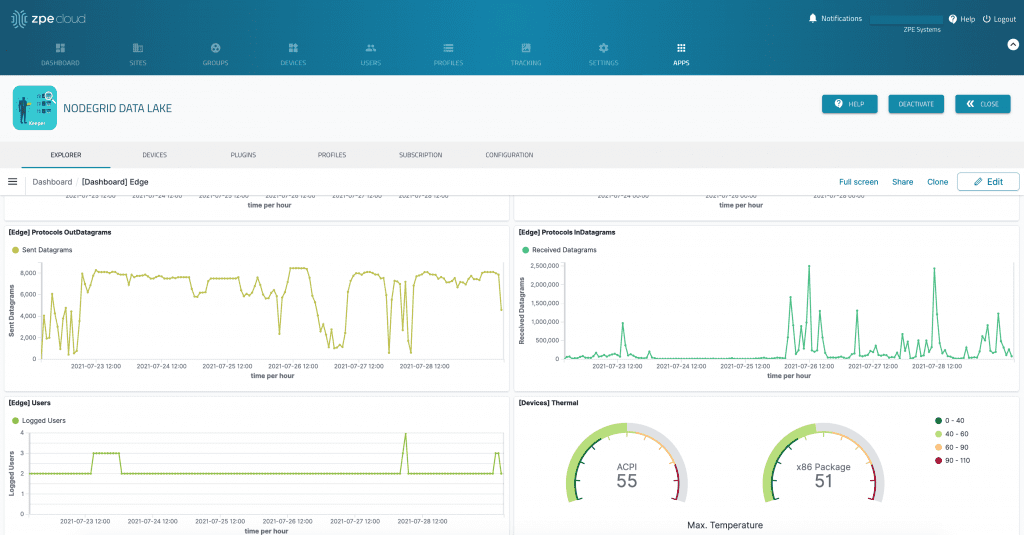
Nodegrid Data Lake interface visualizing data points using graphs and meters.

Image: ZPE Cloud enables data collection and analyses for out-of-band monitoring, allowing users to monitor infrastructure metrics, visualize trends, and take a proactive approach to maintaining uptime.

Out-of-band monitoring is essential for any organization prioritizing uptime and security. The Nodegrid platform by ZPE Systems offers secure, scalable solutions like the 96-port Nodegrid Serial Console Plus for hyperscale data centers and the Nodegrid Gate SR for remote sites. With support for automation, APIs, and custom alerts, Nodegrid simplifies out-of-band monitoring for complex networks while ensuring continuous control, even during outages.

Explore Nodegrid for Drop-In Out-of-Band Monitoring

See why Nodegrid is the drop-in out-of-band monitoring solution trusted by hyperscalers, telecom, retail, and hundreds of global organizations. Request a demo today.

Out-of-Band Deployment Guide
Out-of-band management (OOBM) is a network resilience strategy that involves moving the control plane of critical infrastructure, such as routers, switches, and servers, to a separate network. Doing so isolates the control plane from the production network so it won’t be negatively affected by equipment failures, ISP outages, or ransomware attacks. 

This guide describes two out-of-band deployment types and highlights three key best practices to maximize network resilience.

Out-of-band deployment types

Deployment Type
End-of-Row
Top-of-Rock
Description
Deploying OOBM devices at the end of every row in the data center
Deploying OOBM devices at the top of every rack in the data center
Pros and Cons
Requires fewer OOBM switches
Lower cost
Reduced management complexity
EoR device is a single point of failure for the row
Cable management is messier
Less flexibility
Cables stay in the rack
Eliminates a single point of failure
Provides greater flexibility to modify, upgrade, or scale
Requires more OOBM switches
Additional switches could affect throughput, power draw, and cost
Increases management complexity

End-of-row OOBM deployments

ZPE Graphic Request IR Nov 4

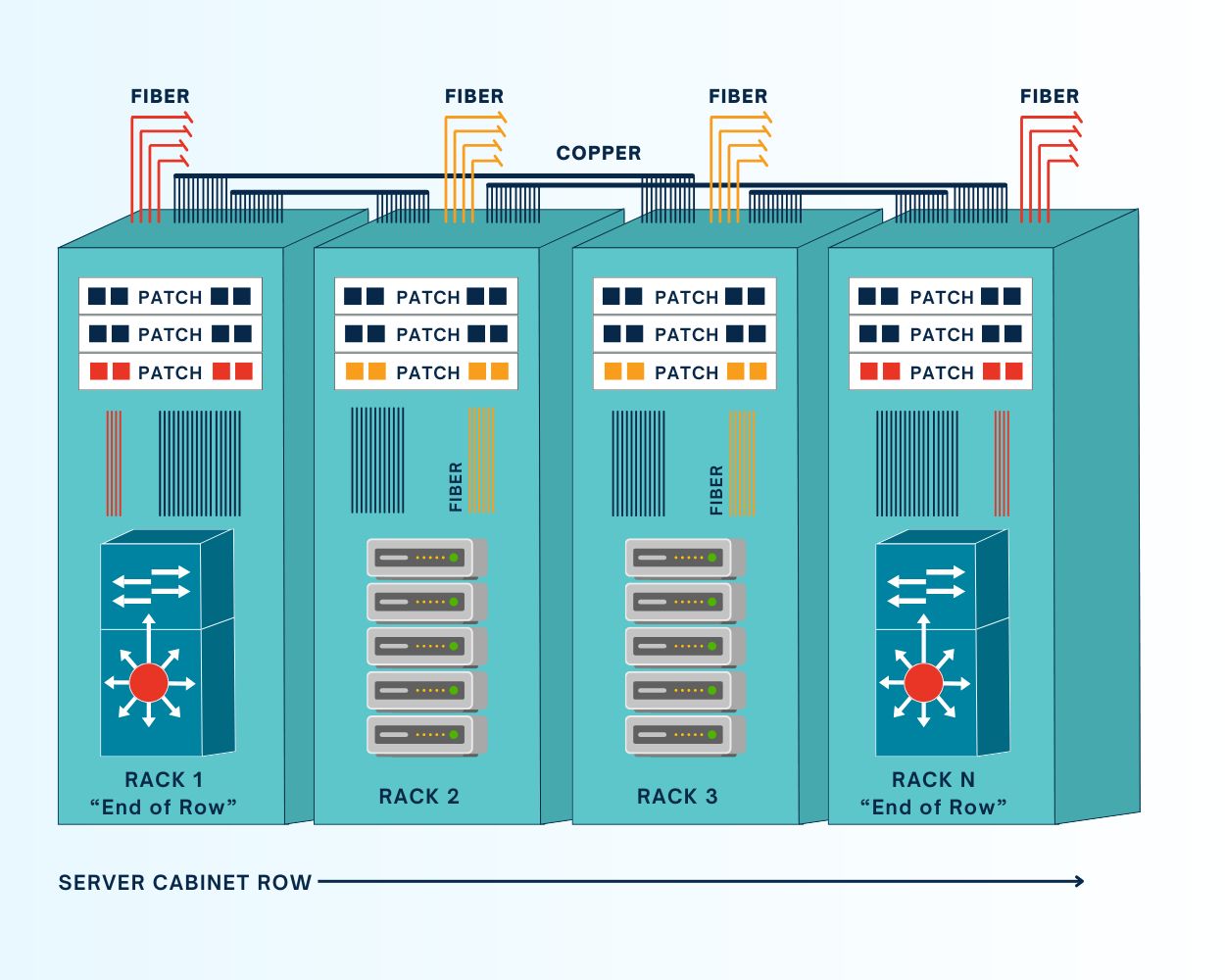
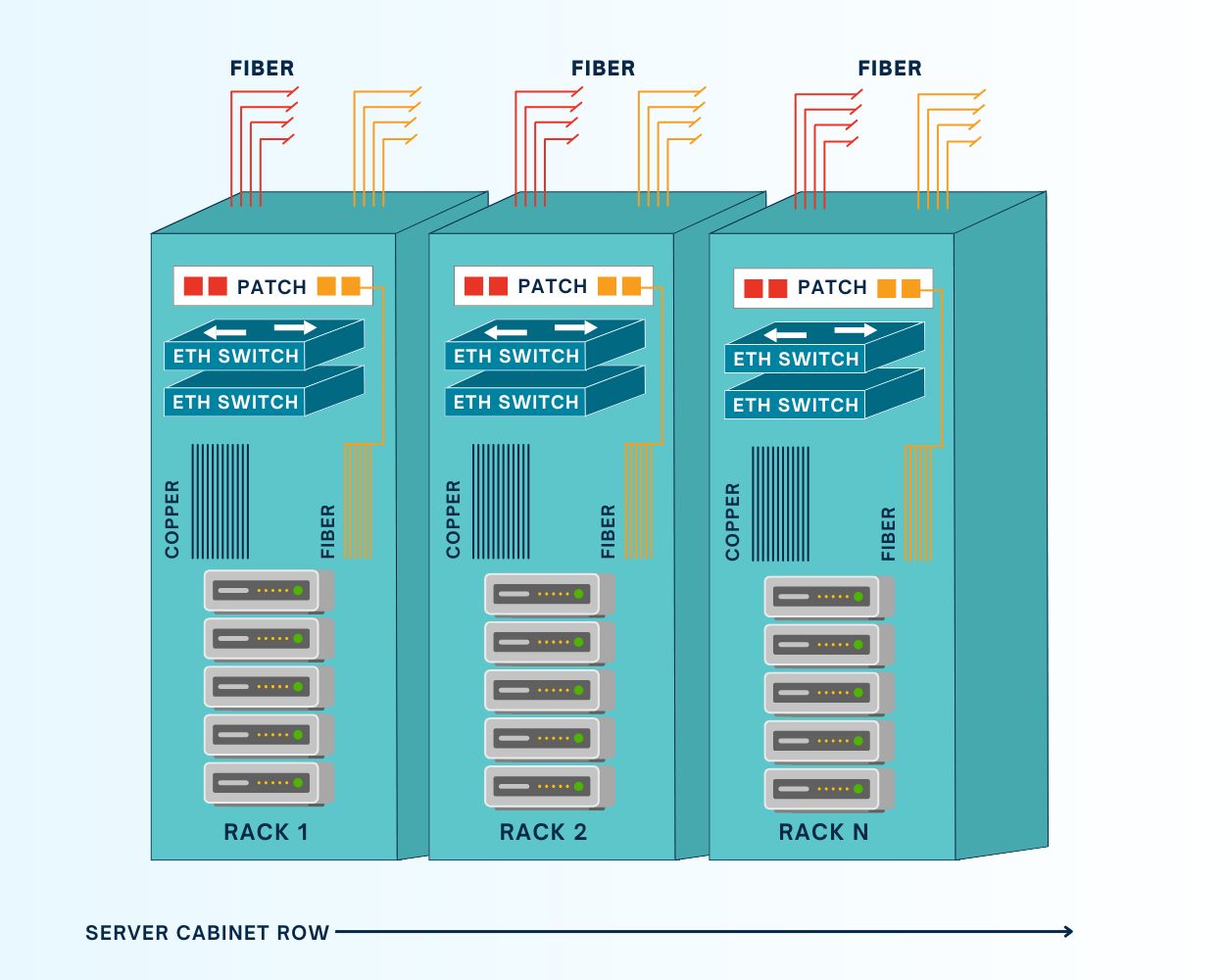
In an end-of-row (EoR) out-of-band deployment, one or more OOBM switches are installed in every row of data center infrastructure, rather than in every single rack. All the serial cables for infrastructure devices in a particular row are run to wherever the OOBM switch (also known as a serial console or console server) is located, which is typically at the end of the row.

An EoR deployment requires fewer OOBM devices than a ToR deployment, which reduces costs and management complexity. It also simplifies scaling, as new racks full of infrastructure could be added to the row without requiring additional OOBM serial consoles.

On the other hand, that one serial console becomes a single point of failure for the entire row’s OOBM functionality. If that device becomes unavailable because of a botched update or malware attack, management teams lose OOBM access to the entire row. Cable management is also more difficult because serial cables must run from every device in every cabinet to the EoR console server. Plus, EoR deployments are less flexible, because upgrading or swapping out a single OOBM device affects an entire row of infrastructure.  

Top-of-rack OOBM deployments

ZPE Graphic Request IR Nov 4 (1)

In a top-of-rack (ToR) out-of-band deployment, one or more OOBM switches are installed in every single rack in the data center. This keeps all serial cables inside the rack, which simplifies cable management. Instead of a single point of failure for the whole row, each serial console only affects one rack, enhancing resilience. Teams can also upgrade or swap out devices without worrying about what’ll happen to the entire row, making ToR deployments a little more flexible. 

The main drawback of a top-of-rack deployment is that it requires more OOBM console servers than an EoR architecture. This makes OOBM deployments more expensive and adds more devices for teams to manage and monitor. It also increases the power draw in the data center, further driving up costs (and carbon footprints), and adds more network hops to local traffic, which could affect throughput.

Multi-layered OOBM deployments

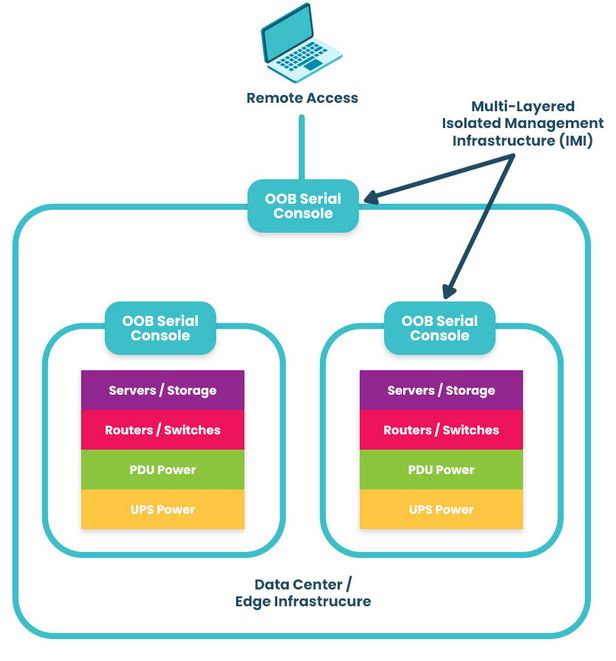
ZPE Systems – A diagram showing a multi-layered, out-of-band, isolated management infrastructure

A third, less common approach is to deploy OOBM devices both top-of-rack and end-of-row. This makes the OOBM network highly resilient to both outages and ransomware attacks, providing a completely isolated management environment while maintaining the flexibility of a ToR deployment. 

Out-of-band deployment best practices

The following best practices can help improve the flexibility, security, scalability, and resilience of out-of-band deployments.

Vendor-neutral platforms

Using vendor-neutral OOBM console servers helps consolidate data center management in a single platform. These devices can manage infrastructure from any vendor and integrate with third-party solutions for security, automation, troubleshooting, and more. Vendor-neutral OOBM deployments reduce management complexity and costs, while ensuring easy scalability.

OOBM security

OOBM devices and networks must be protected against compromise to keep bad actors from commandeering the control plane. The best practice is to use OOBM switches with strong hardware security, SAML integrations for multi-factor authentication (MFA) and single sign-on (SSO), embedded firewalls, and frequent firmware/software updates to patch new vulnerabilities. 

Infrastructure automation

OOBM serial consoles should support automation to improve scalability and efficiency, while reducing complexity and recovery times. At a minimum, they need zero-touch provisioning (ZTP) to automatically configure new infrastructure devices over the network. Advanced solutions like the Nodegrid Serial Console Plus can also host or integrate third-party automation for things like configuration management, security monitoring, troubleshooting, and even AIOps.

Streamline your out-of-band deployment with Nodegrid

Nodegrid OOBM switches can be deployed top-of-rack, end-of-row, or both to improve the resilience of any data center architecture. They have an open architecture that can integrate and host other vendors’ software and virtualized network functions for security, automation, and much more. Nodegrid serial consoles and all connected devices can be remotely managed from a single, on-premises or cloud-based software platform, significantly reducing management complexity. Plus, Nodegrid is frequently patched and comes back with security features like BIOS protection, UEFI Secure Boot, self-encrypted disk (SED), Trusted Platform Module (TPM) 2.0, an embedded firewall, and SAML 2.0 integrations.

Reach out to ZPE Systems for more help comparing end-of-row vs. top-of-rack deployments or to see a demo of the Nodegrid platform in action.

Opengear Lighthouse Appliances: Alternative Options

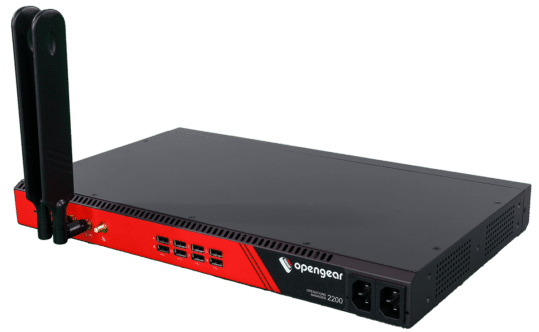
The Opengear OM2200 Lighthouse Appliance.


Lighthouse appliances are Opengear’s out-of-band management (OOBM) solutions for data center and branch deployments. Lighthouse refers to the on-premises software application used to monitor and control Opengear-connected infrastructure devices.

Opengear Lighthouse appliances are good second-generation solutions, but they suffer from a few major limitations that prevent organizations from fully automating and securing the control plane. This guide explains why you might consider Lighthouse alternatives before providing third-generation OOBM options from ZPE Systems that improve upon the four most popular Opengear models.

Why consider Lighthouse alternatives?

Lighthouse appliances are second-generation (or Gen 2) out-of-band management solutions that suffer from three major limitations:

  1. Much of their automation capabilities, such as Docker container hosting and Python scripts, are locked behind an upgraded version of Lighthouse.
  2. They do not support two-factor authentication (2FA) or SAML 2.0 authentication.
  3. Lighthouse appliances are not truly vendor-neutral, only supporting certain integrations and requiring software license upgrades for some capabilities.

These factors prevent teams from fully automating and securing their control plane. A lack of automation, security, and the ability to host third-party tools on the OOB network also limits an organization’s network resilience.

The Nodegrid platform from ZPE Systems fills these gaps with an open, Gen 3 architecture that enables end-to-end automation using powerful, all-in-one devices protected with robust on-board security features.

Nodegrid alternatives for Lighthouse appliances

ZPE Systems offers a wide range of Nodegrid appliances to meet almost any business need or use case. This guide highlights four Nodegrid models that serve as direct replacements for – or alternatives to – Opengear Lighthouse appliances.

Opengear CM8100 alternative: Nodegrid Serial Console Plus

The CM8100 is Opengear’s high-density appliance for large data center deployments. The Nodegrid Serial Console Plus (NSCP) improves upon the CM8100 in several key ways:

  • The NSCP provides up to 96 managed serial ports in a 1U appliance, unlike the CM8100’s 96-port model which takes up two units of rack space.
  • Its Intel x86 CPU and 4GB of RAM provide enough processing power to easily run 3rd-party Docker and VM apps while supporting 1,000+ concurrent serial sessions, beating out the CM8100’s ARM CPU and 2GB of RAM.
  • It supports automation out of the box and extends zero-touch provisioning and other automation to legacy and mixed-vendor infrastructure, unlike Lighthouse which requires an enhanced license for most automation.
  • Several NSCP models have dual-SIM cellular slots for failover and OOBM, but none of the CM8100 models support cellular.
  • It supports a wide range of USB environmental monitoring sensors to help control conditions in remote data centers.
  • Unlike the CM8100, it comes with robust security features like BIOS protection and GPS geofencing and also supports SAML 2.0 authentication.

Comparison Table: CM8100 Lighthouse Appliance vs. Nodegrid Serial Console Plus


Nodegrid NSCP Opengear CM8100
Serial Ports 16 / 32 / 48 / 96x RS-232 16 / 32 / 48 / 96x RS-232
Network Interfaces 2x SFP+

2x ETH

1x Wi-Fi (optional)

2x Dual SIM LTE (optional)

2x ETH
Additional Interfaces 1x RS-232 console

2x USB 3.0 Type A

1x HDMI Output

1x RS-232 console

2x USB 3.0

CPU Intel x86_64 Quad-Core ARM Cortex-A9 1.6 GHz Dual-Core
Storage 32GB SSD (upgrades available) 32GB eMMC
RAM 4GB DDR4 (upgrades available) 2GB DDR4
Environmental Monitoring Any USB sensors
Form Factor 1U Rack Mounted 1U Rack Mounted (up to 48 ports)

2U Rack Mounted (96 ports)

Opengear OM2200 alternative: Nodegrid Serial Console S Series

The OM2200 console server has software-selectable serial ports that allow administrators to manage devices with straight or rolled RS-232 pinouts for mixed legacy and modern infrastructures. The Nodegrid Serial Console S Series serves as a direct alternative that offers a few key advantages:

  • The S Series has auto-sensing ports, further streamlining the management of mixed architectures.
  • It comes with 14 high-speed managed USB ports, compared to the OM2200’s 8 USB ports.
  • As with the NSCP, it supports automation out of the box, has cellular options (via USB connections to cellular modems), can use USB environmental sensors, and provides comprehensive security for the control plane.

Comparison Table: OM2200 Lighthouse Appliance vs. Nodegrid Serial Console S Series


Nodegrid S Series

Opengear OM2200

Serial Ports

16 / 32 / 48x Software Selectable RS-232

14x USB-A serial

16 / 32 / 48x Software Selectable RS-232

8x USB 2.0 serial

(OM2224-24E) 24x Software Selectable RS-232 and 24x Managed Ethernet

Network Interfaces

2x1Gbps or 2x ETH

2x SFP+ or 2x ETH

1x V.92 modem (select models)

Additional Interfaces

1x RS-232 console

1x USB 3.0 Type A

1x HDMI Output

1x RS-232 console

1x Micro USB

2x USB 3.0

CPU

Intel x86_64 Dual-Core

AMD GX-412TC 1.4 GHz Quad-Core

Storage

32GB SSD (upgrades available)

64GB SSD

RAM

4GB DDR4 (upgrades available)

8GB DDR3

Environmental Monitoring

Any USB sensors

Form Factor

1U Rack Mounted

1U Rack Mounted 

Opengear CM7100 alternative: Nodegrid Serial Console Core Edition

The CM7100 is the previous generation of the CM8100 appliance, and it comes with several price-saving options (like smaller storage and RAM configurations) that make it popular for simple break-fix OOBM access to remotely troubleshoot and recover from issues.

ZPE Systems offers the NSCP Core Edition, a more stripped-down version of the Nodegrid Serial Console Plus. It improves upon the CM7100 in a few important ways:

  • The NSCP-CE comes with analog modem and dual-SIM cellular options for network failover and OOBM, unlike the CM7100.
  • Like the other Nodegrid models, it supports a wide range of environmental sensors, while the CM7100 supports specific sensors for smoke, water leaks, and vibration.
  • As with the other Nodegrid models, it supports automation via ZPE Cloud, has cellular options, and provides comprehensive security for the control plane.

Comparison Table: CM7100 Lighthouse Appliance vs. Nodegrid Serial Console Core Edition


Nodegrid NSCP-CE Opengear CM7100
Serial Ports 16 / 32 / 48 / RS-232 16 / 32 / 48 / 96x RS-232
Network Interfaces 2x SFP ETH
1x Analog modem (optional)


2x 5G/4G LTE (optional)

2x ETH
Additional Interfaces 1x RS-232 console

2x USB 3.0 Type A

1x RS-232 console

2x USB 2.0

CPU Intel x86_64 Dual-Core Armada 370 ARMv7 800 MHz
Storage 16GB Flash (upgrades available) 4-64GB storage
RAM 4GB DDR4 (upgrades available) 256MB-2GB DDR3
Environmental Monitoring Any USB sensors Smoke, water leak, vibration
Form Factor 1U Rack Mounted 1U Rack Mounted (up to 48 ports)

2U Rack Mounted (96 ports)

Opengear ACM7000 alternative: Nodegrid Gate Services Router

The ACM7000 Resilience Gateway provides gateway routing and OOBM for smaller deployments in branch and edge locations. The Nodegrid platform includes six multi-functional branch services routers available in various form factors and configurations to meet the needs of any organization. The Gate SR in particular makes an excellent replacement for the ACM7000 because it offers:

  • Up to 4TB of storage to run up to 3 Guest OSes or 4 Docker applications.
  • Optional dual-SIM 5G/4G cellular, while the ACM7000 only supports 4G LTE.
  • The option for an embedded Nvidia Jetson Nano processor capable of running AI workloads, like those for computer vision, alongside traditional applications.
  • Support for a wide range of environmental sensors, while the ACM7000 supports specific sensors for external water, smoke, and dry contact.
  • Support for automation out of the box as well as comprehensive control plane security.

Comparison Table: ACM7000 Lighthouse Appliance vs. Nodegrid Gate Services Router


Nodegrid Gate SR

Opengear ACM7000

Serial Ports

8x RS-232

4 / 8x RS-232

Network Interfaces

2x SFP ETH

1x Wi-Fi (optional)

2x Dual SIM LTE (optional)

2 / 4x ETH

1x Single SIM LTE

Additional Interfaces

1x RS-232 console

4x ETH Switch

4x PoE ETH Switch

2x USB 3.0 Type A

2x USB 2.0 Type A

1x RS-232 console

4x USB 2.0

CPU

Intel x86_64 Dual-Core

Armada 370 ARMv7 800 MHz

Storage

16GB Flash (upgrades available)

4GB storage

RAM

4GB DDR4 (upgrades available)

256MB DDR3

Environmental Monitoring

Any USB sensors

Smoke, water leak, vibration

Form Factor

1U Rack Mounted

1U Rack Mounted

Ready to upgrade to a Gen 3 OOBM appliance?

The Nodegrid platform from ZPE Systems offers third-generation automation, control, and security for the ultimate network resilience, improving upon Opengear’s outdated architecture. But we know that replacing Lighthouse appliances and other console servers takes a lot of effort. That’s why ZPE now offers a complete package of budget-friendly products and engineering services to help. Click here to see how we simplify the upgrade process.