Providing Out-of-Band Connectivity to Mission-Critical IT Resources

7 Security Benefits of Implementing FIPS 140-3 for Out-of-Band Management
ZPE Systems -FIPS 140-3

Out-of-band (OOB) management is essential for maintaining control over critical network infrastructure, especially during outages or cyberattacks. This separate management network enables administrators to remotely access, troubleshoot, and recover production equipment. However, managing network devices outside the main data path also brings unique security challenges, as these channels often carry sensitive control data and system access credentials.

Implementing FIPS 140-3-certified encryption within OOB systems can help organizations secure this vital access path to ensure that management data can’t be intercepted or manipulated by unauthorized actors. Here’s how FIPS 140-3 certification can enhance the security, reliability, and compliance of your out-of-band management.

What is FIPS 140-3 Certification?

FIPS (Federal Information Processing Standard) 140-3 is a high-level security standard developed by the National Institute of Standards and Technology (NIST). It specifies rigorous requirements for cryptographic modules used to protect sensitive data. FIPS 140-3 certification covers everything from data encryption to user authentication and physical security. For out-of-band management, FIPS 140-3 certification ensures that cryptographic components in hardware, software, and firmware meet stringent data security standards.

By implementing FIPS-certified solutions, organizations can ensure their OOB management is resilient against modern cyber threats, protecting both the control channels and the sensitive data they carry. Here are seven security benefits of implementing FIPS 140-3 for out-of-band management.

7 Security Benefits of Implementing FIPS 140-3 for Out-of-Band Management

1. Secure Encryption of Management Traffic

OOB management often involves remote access to routers, switches, servers and other critical devices. FIPS 140-3 certification guarantees that all cryptographic modules used in these systems have been rigorously tested to secure data in transit. Encrypting management traffic is crucial to prevent interception or manipulation by unauthorized users, particularly for tasks such as command execution, configuration updates, and device monitoring.

With FIPS-certified encryption, companies can protect OOB traffic between management devices and network components, so that only authorized administrators have access to sensitive system commands and device settings.

2. Enhanced Authentication and Access Control

OOB management solutions typically support different user roles, each with its own access privileges. FIPS 140-3-certified modules, like ZPE Systems’ Nodegrid, feature multi-factor authentication (MFA) to control who can initiate OOB management sessions. Certified solutions also include secure key management practices that prevent unauthorized access, ensuring that only verified users can control and modify network devices.

These protections mean FIPS-certified solutions help mitigate the risk of unauthorized users accessing high-value assets. This is especially important during ransomware recovery efforts, when teams need to launch a secure, Isolated Recovery Environment to combat an active attack in a compromised environment.

3. Protection Against Tampering and Physical Attacks

Many organizations deploy IT infrastructure in locations where physical device security is lacking. For example, remote colocations, unmonitored drilling sites, or rural health clinics can easily expose network infrastructure to device tampering. FIPS 140-3 certification mandates tamper-evident and tamper-resistant features to protect the cryptographic modules used in OOB systems. OOB solutions like ZPE Systems’ Nodegrid provide robust protection against tampering, with features including:

  • UEFI secure boot: Prevents the execution of unauthorized software during the boot process.
  • TPM 2.0: Ensures secure key generation and storage, so only authorized software can run.
  • Secure erase: Allows for deletion of all data from storage, so no data can be recovered from devices that have been tampered with.

These features prevent unauthorized individuals from physically accessing OOB equipment to intercept or modify management traffic. In remote and edge locations, FIPS-certified cryptographic modules provide robust protection against physical attacks, making it harder for adversaries to compromise OOB management pathways.

4. Compliant and Secure Logging of Access Activities

Because OOB management systems provide access to critical equipment, organizations need transparency into OOB users and their management activities. This means logging and auditing are essential to maintaining security and compliance. FIPS 140-3-certified modules support secure logging of all management activities, creating a clear audit trail of access attempts and security events. These logs are stored securely to prevent unauthorized users from altering or erasing them, providing valuable insights for security monitoring and incident response.

Secure logging is not only critical for monitoring access but also necessary for meeting regulatory compliance. FIPS 140-3 ensures that OOB management systems can satisfy audit requirements, making compliance easier and protecting organizations from potential regulatory penalties.

5. Meeting Regulatory Requirements in Sensitive Environments

Many industries handle sensitive data, especially government, healthcare, and finance. For organizations in these industries, it’s often mandatory to use FIPS-certified cryptographic solutions. FIPS 140-3 certification helps OOB management systems align with federal security regulations and standards like HIPAA and PCI-DSS. By deploying FIPS-certified encryption, organizations can comply with these standards, streamline audits, reduce the risk of regulatory penalties, and reinforce trust with customers.

6. Consistent Security Across Main and OOB Networks

It’s easy for organizations to focus mostly on securing the main network, while overlooking the security protections that they employ on their out-of-band network. FIPS-certified solutions help establish consistent security standards across both paths. This is especially important in protecting against lateral attacks, where hackers infiltrate one network and are then able to jump to the other. In cases where attackers gain access to one segment of the network, matching security protocols across the main and OOB networks prevents them from moving laterally into sensitive management channels.

Using FIPS 140-3-certified encryption across both networks also strengthens the organization’s ability to monitor, manage, and control devices, even when the primary network is under threat.

7. Securing Remote and Edge Devices

For organizations with remote infrastructure, such as telecom and retail, OOB management is critical for managing network devices in distant locations. However, these environments often lack the physical security of centralized data centers, making them vulnerable to tampering. FIPS-certified solutions ensure that all communication with remote OOB devices is encrypted, which protects management data from unauthorized access.

FIPS 140-3 certification also supports the resilience of IoT and edge devices, which often require OOB management for secure monitoring, patching, and configuration.

Implement the Most Secure Out-of-Band Management with ZPE Systems
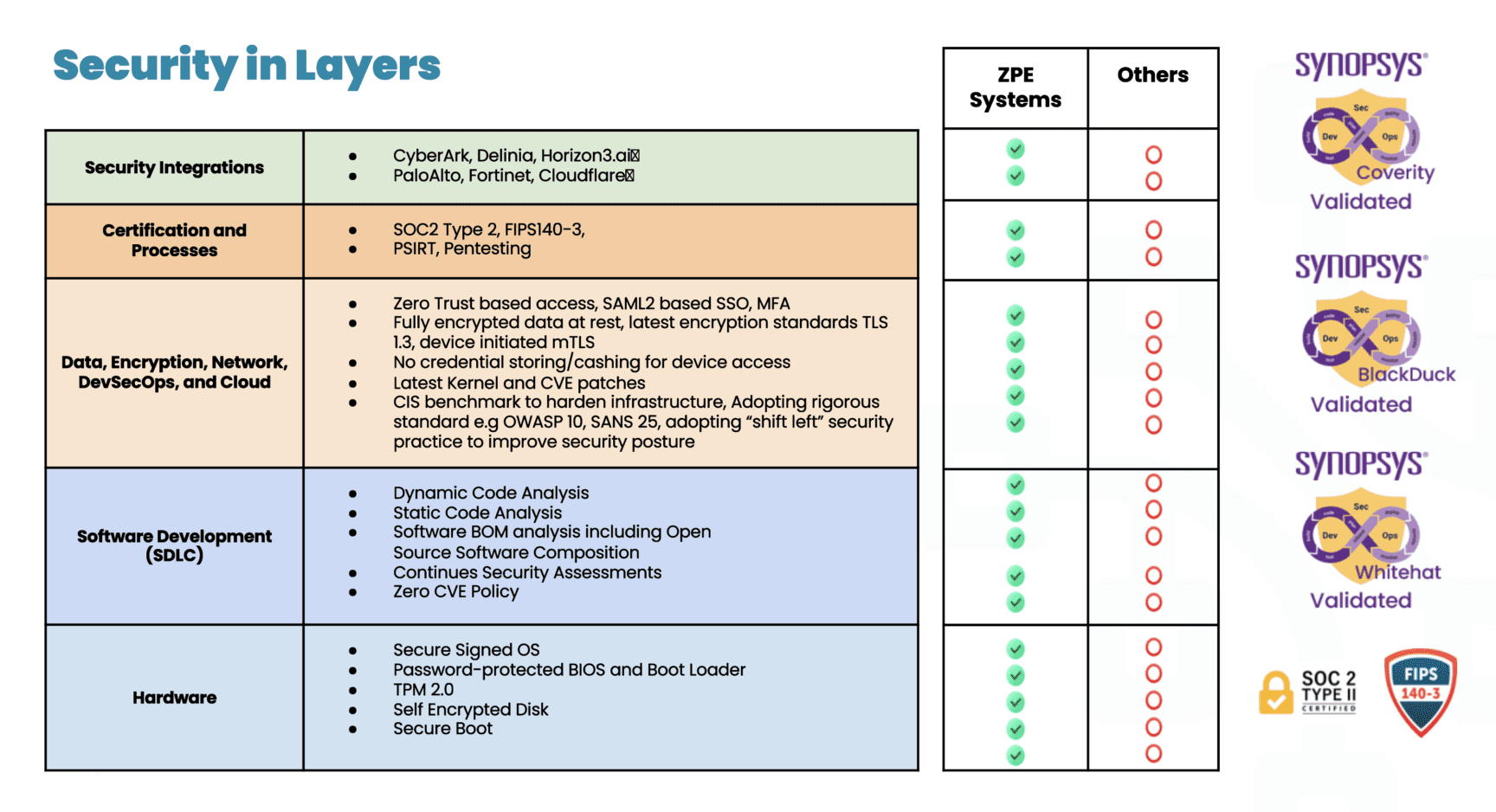
Security in Layers

ZPE Systems’ Nodegrid is the industry’s most secure out-of-band management solution. Not only do we carry FIPS 140-3, SOC 2 Type 2, and ISO27001 certifications, but we also feature a Synopsys-validated codebase and dozens of security features across the hardware, software, and cloud layers. These are all part of a multi-layered, secure-by-design approach that ensures the strongest physical and cyber safeguards.

Download our pdf to explore more of our security assurance.

See FIPS-Certified Out-of-Band in Action

Our engineers are ready to walk you through our industry-leading out-of-band management. Use the button below to set up a 15-minute demo and explore FIPS 140-3 security features first-hand.

American Water Cyberattack: Another Wake-Up Call for Critical Infrastructure

Industrial water treatment plant with water
The October 2024 cyberattack on American Water, one of the largest water and wastewater utility companies in the U.S., signals yet another wake-up call for critical infrastructure security. Because millions of people rely on this critical service for safe drinking water and sanitation, this attack highlights why it’s so important to address cyber vulnerabilities.

Let’s trace the timeline of the attack, how it likely started, and the best practice architecture that could have mitigated or prevented the American Water cyberattack.

Timeline of the October 2024 American Water Cyberattack

  • Initial Intrusion (October 5, 2024)
    The attack on American Water was first detected in early October, when cybersecurity monitoring tools flagged suspicious activity within the company’s IT systems. Employees reported an unusual system slowdown, and automated alerts indicated possible unauthorized access.
  • Rapid Escalation (October 6-7, 2024)
    Within 24 hours of detection, the attackers had moved deeper into the company’s IT environment. In response, American Water initiated emergency protocols, including isolating key systems to prevent further damage. To contain the breach, critical operational technology (OT) systems — responsible for managing water treatment and distribution — were temporarily shut down
  • Public Notification and Response (October 8, 2024)
    American Water notified federal authorities, including the Cybersecurity and Infrastructure Security Agency (CISA), state regulators, and the public. The company reassured customers that water quality had not been compromised, but certain automated operations had been affected, leading to temporary disruptions in water distribution.
  • Ongoing Recovery (October 2024 – Present)
    As the investigation continued, third-party cybersecurity firms were brought in to assess the extent of the breach and assist in recovery. Manual operations were implemented in areas where automated systems were impacted. While the threat was contained, the company faced a lengthy process of system restoration and reconfiguration.

Impact of the Attack

The impact of the American Water cyberattack appears minimal. A class-action lawsuit was recently filed seeking $5-million in damages on behalf of affected customers, but this is the typical fallout that results from a breach. American Water did not shut down any treatment plants, and although they were forced to temporarily shut down their customer portal, pause billing, and revert to some manual processes, there were no water contamination or public health risks that came out of the attack. Per American Water’s FAQ page, it seems business is nearly back to normal.

However, this shouldn’t diminish the need for utilities providers to shore-up their defenses and ensure resilience of their IT architectures. The Oldsmar, Florida incident is an example of how an error or breach can change water treatment chemistry (in this case, adding too much lye to the water supply) and poison a population. There have also been many attempts by U.S. adversaries in which attackers were able to change water chemistry or disrupt automated operations.

Government agencies like the EPA have been warning that attacks on water treatment utilities are increasing. Lawmakers are also calling for inspections of IT systems, such as to ensure best practices are being followed for managing passwords and keeping remote access from Internet exposure, and considering civil and criminal penalties for those who don’t comply.

How the Attack Likely Happened

The American Water cyberattack is still under investigation. Specifics of how it occurred haven’t been released, but several likely scenarios have emerged based on trends in similar attacks:

  • Phishing or Social Engineering:
    Employees may have unknowingly opened a malicious email attachment or clicked a harmful link, allowing attackers access to the internal network, similar to 2023’s Ragnar Locker attacks. Water utilities and other public services often have large workforces, which makes them susceptible to phishing campaigns.
  • Ransomware:
    There are indications that ransomware may have encrypted key files and systems, similar to what happened during the MGM hack. Ransomware attacks on critical infrastructure have increased in recent years, with attackers locking companies out of their own data and demanding payment to restore access.
  • IT/OT Integration Vulnerabilities:
    Water utilities often rely on a hybrid network where both information technology (IT) systems and operational technology (OT) systems are integrated to monitor and control water purification, distribution, and wastewater management. While this setup improves efficiency, it can also create additional vulnerabilities if the two environments are not properly segregated. Once attackers gain access to the IT network, they can use it as a bridge to reach OT systems, which are typically less secure.
  • Internet-Facing Systems:
    In the past, the Chinese-sponsored hacker group Volt Typhoon took advantage of firewalls that were connected both to the internet and to critical control systems. This approach also takes advantage of a lack of control plane segregation, as hackers can remote-in via internet-facing systems and gain management access to critical systems.

The Solution: Isolated Management Infrastructure (IMI)

As with the global CrowdStrike outage, the most important takeaway from the American Water cyberattack is that organizations need the ability to recover fast. Remote access solutions help with this, but it matters how these solutions are architected and which capabilities they offer.

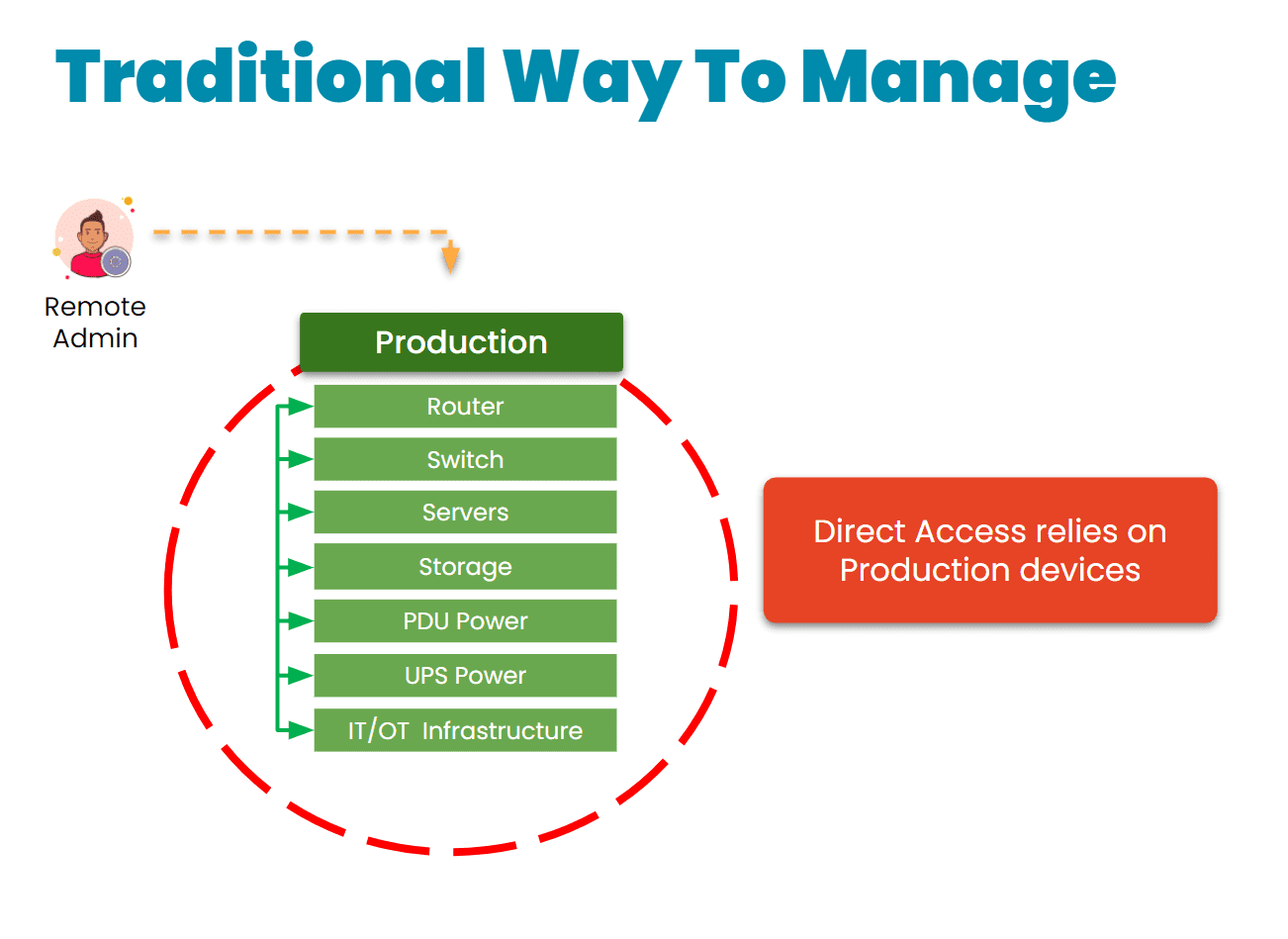
The traditional approach is to gain remote access via a direct link to the affected systems. The problem with this is that when these systems are breached, encrypted, or offline, it’s impossible to remote-into them. This requires teams to physically connect to and revive systems (as with the CrowdStrike incident), or worse – completely replace their infrastructure, as Merck did during the 2017 NotPetya breach.

Traditional remote management via direct link
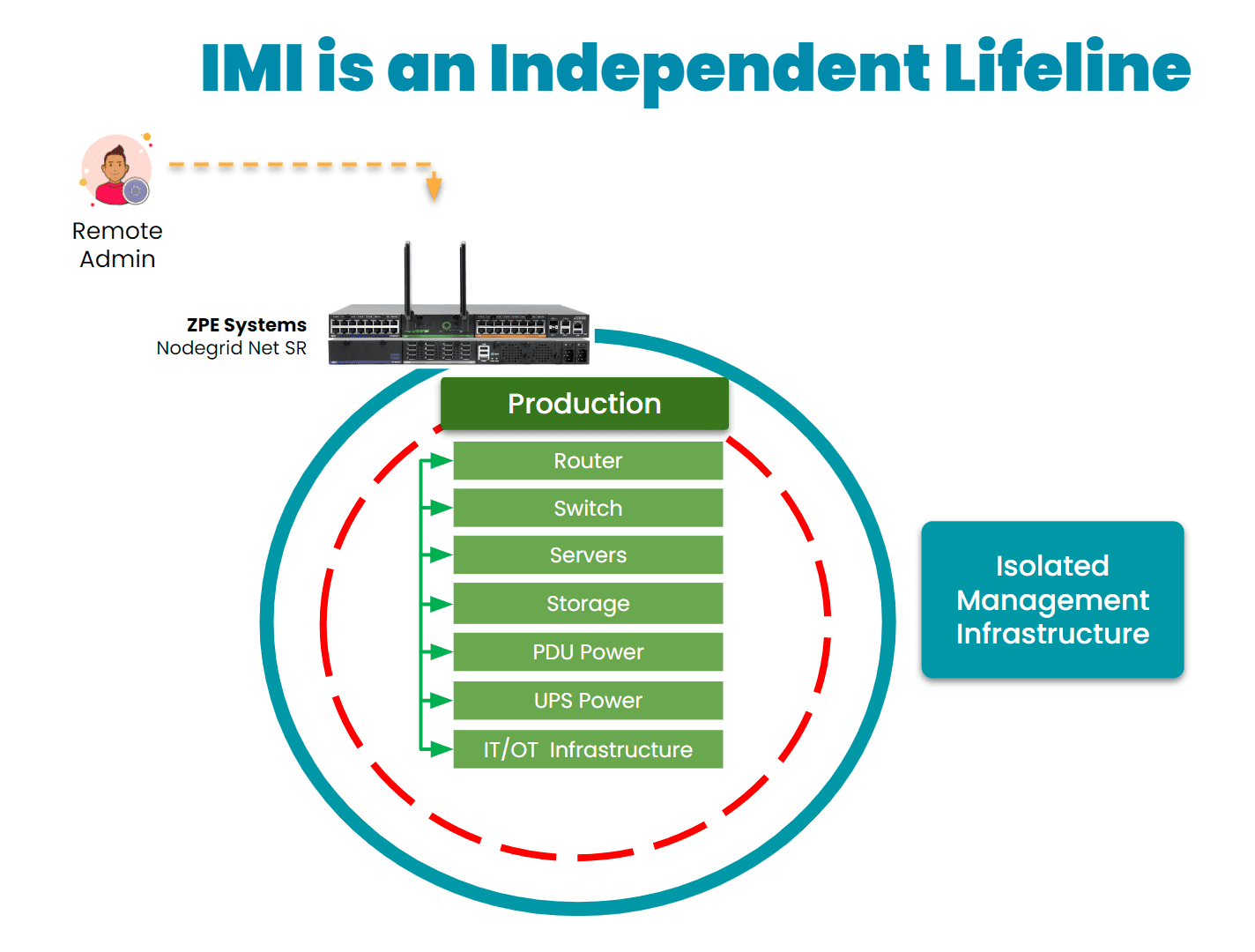
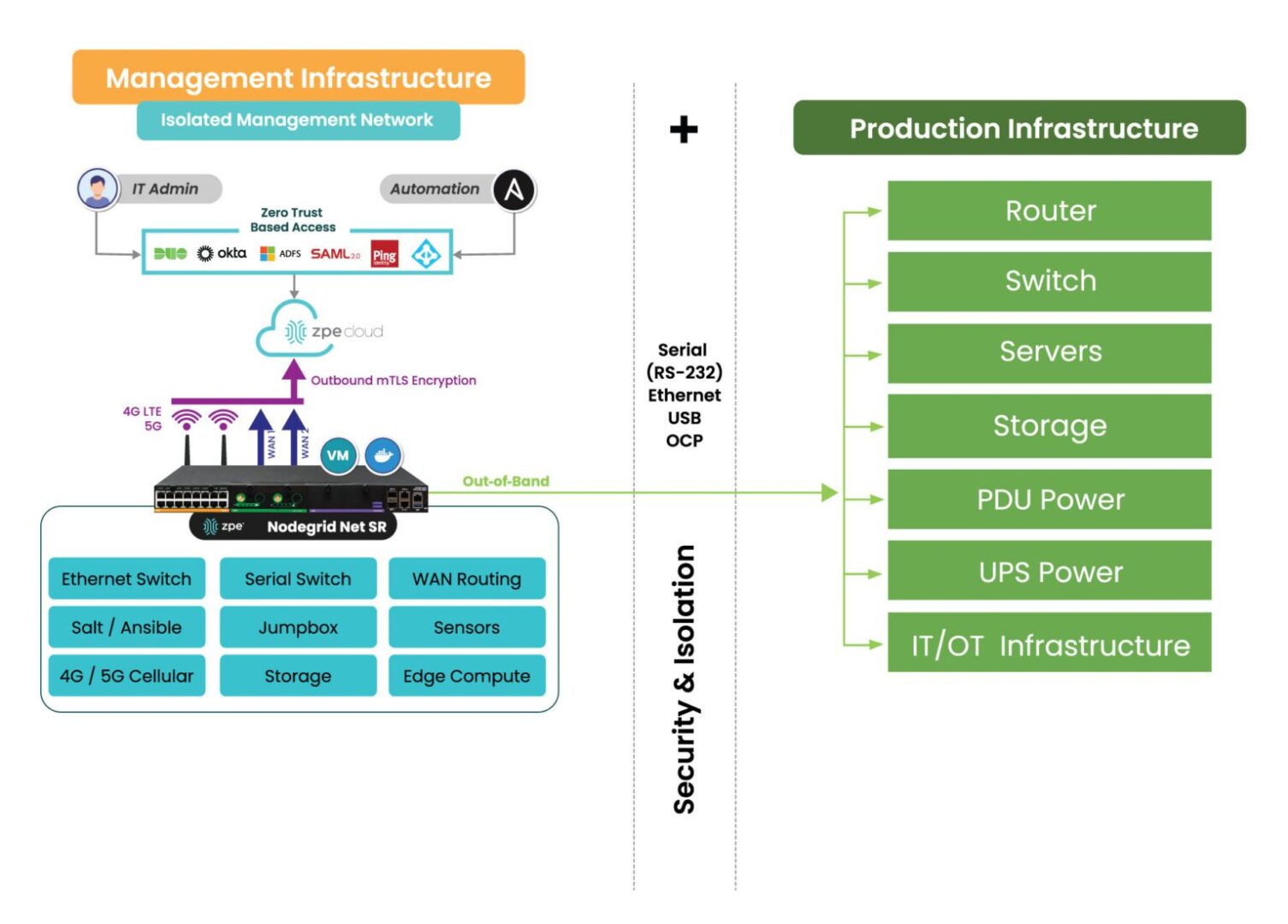
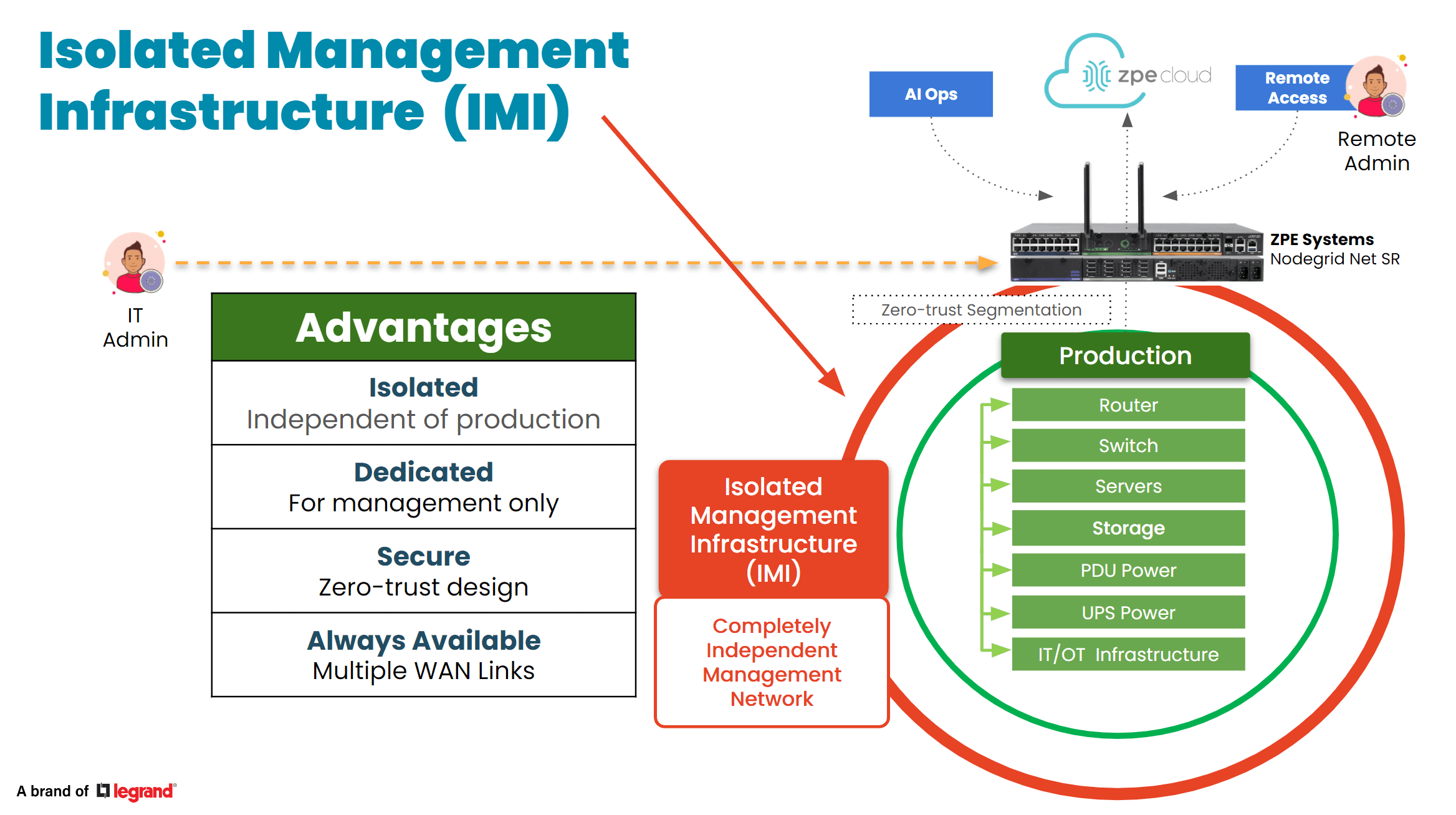
Instead, organizations are turning to a best practice architecture that has been used by hyperscalers and large enterprises for years. This solution is called Isolated Management Infrastructure. IMI creates a management network that is connected to but completely independent of production network equipment, an architecture that resembles out-of-band (OOB) management. This gives teams a lifeline to their main IT and OT systems, including servers, switches, sensors, controllers, and other critical assets, even when their main systems are offline.
IMI is a lifeline to production assets

Here’s how IMI and out-of-band management could have helped mitigate the effects of the American Water attack:

  • Enhanced Containment: By isolating the network used for system control and monitoring, OOB management could have ensured that even if the primary network was compromised, attackers would not have been able to access or disable key operational systems. This would have limited the need to shut down OT systems and prevented widespread operational disruption.
  • Faster Recovery: With isolated management infrastructure, administrators would have been able to access critical systems remotely, even during the attack. This capability enables faster diagnosis of the issue and restoration of services without relying on compromised networks. In the case of a ransomware attack, for example, OOB management can help initiate recovery operations from backups, minimizing downtime.
  • Reduced Attack Surface: By creating an independent network with fewer access points and stricter controls, OOB infrastructure reduces the chances of attackers exploiting vulnerabilities. It’s an additional layer of security that complicates attempts to breach sensitive control systems.
IMI with Nodegrid2

30-year cybersecurity expert James Cabe recently published a walkthrough of how to do this. Read his article, What to do if you’re ransomware’d, to see how to deploy the Gartner-recommended Isolated Recovery Environment that lets you fight through an active attack.

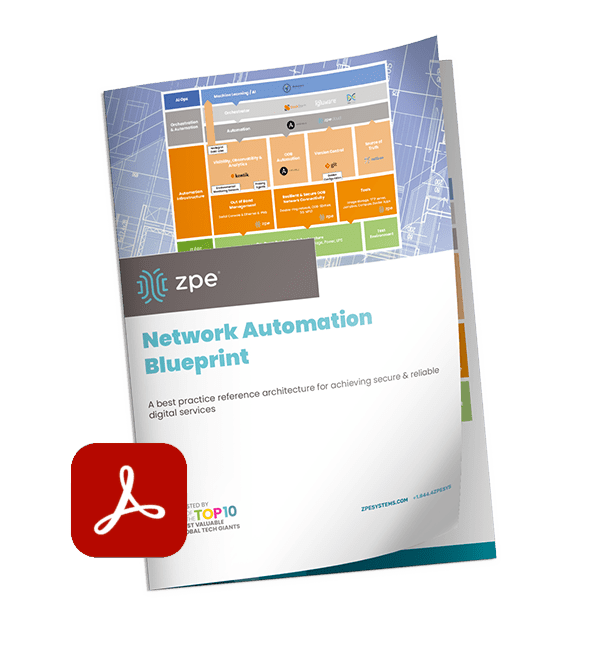
Get the Blueprint for Building IMI

The American Water cyberattack is another wake-up call for critical infrastructure providers to rethink their cybersecurity strategies. Isolated Management Infrastructure is the key approach to retaining control during an attack, but requires the robust capabilities of Generation 3 out-of-band to ensure rapid recovery. To help utilities and essential services fortify their infrastructure, ZPE Systems recently created a blueprint for building IMI. Download the blueprint now to follow the best practices architecture and become resilient against cyberattacks.

Top 5 Data Center Mistakes and How To Avoid Them

Top 5 Data Center Mistakes and How To Avoid Them

Data center deployments require careful planning and execution. The sheer complexity makes it easy to stumble into common pitfalls that can compromise uptime, security, and scalability. After talking with hundreds of customers, we’ve compiled the top five data center mistakes organizations often make during deployments, with tips on how to avoid them.

1. Overlooking Isolated Management Infrastructure

In the data center, the focus is bringing production infrastructure online, including power, cabling, racks, servers, and network gear. But many project managers and architects say they wished they’d given more attention to setting up proper management infrastructure. This oversight usually leads to business challenges down the line, especially when management access relies on the production infrastructure. When a device fails or goes offline, there’s no choice but to go on-site to manually troubleshoot and recover. Many professionals admit to making this data center mistake and wish that they had considered this early in the planning process. Incorporating something called Isolated Management Infrastructure from the start can avoid this challenge, since it provides a dedicated management plane through which teams can access production gear without relying on the production network. 

Tip: Make management infrastructure a priority in your initial planning stages. This proactive approach can prevent complications later.

IMI

2. Neglecting Automation for Configuration and Scaling

Many data center implementors focus heavily on the “rack and stack” initial setup, but fail to automate processes for configuration and scaling operations. This data center mistake often leads to days’ or weeks’ worth of manual, repetitive work, while also exposing the organization to human error. A lot of people we talked to wish they’d invested just a few weeks into automating essential tasks such as switch setup, VLAN configurations, and IP address assignments, which would have saved them lots of time later on and likely helped to prevent errors. Additionally, if rearchitecting is needed, automated systems allow for quick reimplementation, minimizing the time and complexity involved. 

Tip: Dedicate time to automating routine processes. This investment will pay off in enhanced operational efficiency and reduced human error.

3. Inadequate Out-of-Band Management

When people think of out-of-band (OOB) management, a common misconception is that it is solely about Ethernet switches. However, it’s crucial not to overlook the importance of having management access to your entire device stack. Low-level access can be essential for system recovery and management. The recent CrowdStrike outage is a perfect example – when the failed devices needed to be reimaged, typical out-of-band management solutions were inadequate at providing this type of low-level access. Generation three out-of-band serial consoles, like the Nodegrid Net SR, give Ethernet, serial, and USB access, allowing teams to remote-in at the BIOS level to revive failed devices. Using this kind of comprehensive out-of-band – on a fully isolated management plane – helps teams remotely recover and confidently automate processes.

Tip: Ensure that your OOB strategy includes robust serial console access to enhance system reliability and recovery capabilities.

IMI with Nodegrid2

4. Ignoring Security Best Practices

Zero trust security is no longer just advisable, it’s essential. The typical approach is to establish direct connectivity to devices to configure, troubleshoot, upgrade, etc. But this comes with unnecessary risks, often exposing management ports to the Internet and leaving you at risk of attack. Without a fully isolated management plane and zero trust security controls, how would you recover if you were ransomware’d? This is why it’s essential to implement security controls like role-based access and multi-factor authentication, and ensure complete separation of management and production networks. 

Tip: Prioritize security by adopting a zero-trust approach and implementing rigorous access controls to safeguard your data center.

5. Cutting Corners on Out-of-Band Management

In the race for implementing AI, it’s crucial to invest in AI data center infrastructure. But organizations often cut corners on their ability to manage the underlying infrastructure that powers AI. Management access should not stop at ethernet switches; it should extend to encompass serial console access, PDUs, jump boxes, 5G connectivity, routing, WAN links, and a centralized cloud hub with secure tunnels to colocation sites. Using a comprehensive and centralized platform like Nodegrid consolidates many management devices into one while giving remote control to optimize AI’s underlying infrastructure. Aside from enhancing efficiency, this approach minimizes waste and energy consumption, which addresses environmental, social, and governance (ESG) concerns. 

Tip: Avoid the partial out-of-band management deployment. A complete system not only supports resilience and security but also contributes to sustainability goals.


Addressing these common data center mistakes can significantly enhance operational efficiency, security, and scalability. By prioritizing management infrastructure, automating processes, ensuring adequate out-of-band access, implementing robust security measures, and investing wisely in management systems, organizations can build resilient data centers equipped to meet the demands of today and the future.

See ZPE Cloud in action with this video demo

Senior Sales Engineer Marcel van Zwienen gives you a hands-on demo of ZPE Cloud in this video. Watch Marcel take you from signing in to gaining remote access for troubleshooting, to showing how to apply configuration changes automatically across device fleets. Watch now at the link below.

Use Our Blueprint to Avoid Data Center Mistakes

Our blueprint shows how to deploy an isolated management infrastructure, which gives you secure remote access to recover from outages and automate operations. Download now for the complete guide.

Perle Console Server Replacement Options

NCSP Back side

Perle offers two console server solutions for out-of-band (OOB) management of data center infrastructure: the IOLAN SCG and the IOLAN SCR. The SCG is available in both fixed and modular form factors, while the SCR comes in four models with different combinations of 56 managed ports, allowing companies to choose the OOB management hardware that best suits their environment. Unfortunately, IOLAN solutions suffer from hardware and software limitations that can curb scalability and limit agility. This guide discusses Perle console server replacement options that enable streamlined growth through automation capabilities and vendor freedom.


Key takeaways

  • Perle IOLAN SCG appliances offer out-of-band console server management for up to 48 devices in a fixed or modular form factor. Perle IOLAN SCR console servers come with four different managed port configurations for added flexibility.
  • Perle console servers offer some automation capabilities, like auto-discovery and zero-touch provisioning, as well as comprehensive firewall functionality. However, their underpowered hardware and closed management software prevent Guest OS hosting or third-party infrastructure automation and orchestration.
  • The Nodegrid platform from ZPE Systems overcomes these limitations with robust CPU, RAM, and storage, as well as vendor-neutral software. It enables data center scalability by providing high-density serial port configurations and supporting 3rd-party automation.
  • Nodegrid can also run networking, security, edge computing, AIOps, and more, consolidating the data center tech stack and improving operational efficiency.


Perle IOLAN console server overview

Perle IOLAN SCG console servers provide out-of-band management for up to 48 infrastructure devices. Fixed-form-factor models use copper Ethernet for networking and OOB, while the modular version has options for Wi-Fi, cellular, and dial-up. The modular series also has three expansion bays that support any combination of 16-port RS-232 or USB serial modules.

Perle IOLAN SCR console servers come in four different models with up to 56 managed serial, USB, and Ethernet ports, as well as optional cellular integration.

Click here to compare Perle console server tech specs.

Perle console servers have automatic LLDP (Link Layer Discovery Protocol) discovery and can extend zero-touch provisioning (ZTP) to end-devices. They come with an embedded firewall, OpenVPN and IPSec VPN, and AES encryption. The PerleVIEW cloud-based management software provides centralized monitoring and control of all connected data center infrastructure.


Why consider Perle console server alternatives

IOLAN console servers have an underpowered 500 MHz core 32-bit ARM processor, 4GB of flash storage, and 1GB RAM. This hardware may be sufficient for basic infrastructure management workflows and ZTP, but it prevents Guest OS hosting and more advanced automation. The Perle platform also doesn’t integrate with any third-party automation or orchestration solutions.

An inability to fully automate infrastructure management workflows – or to orchestrate those tasks that can be automated – ultimately limits operational efficiency and data center scalability. Consequently, IT teams can’t effectively support the needs of the growing business, adapt to strategy changes, or focus on revenue-driving innovations like artificial intelligence and machine learning (AI/ML).

What’s needed is an open platform that can manage any device, automate any workflow, and work with third-party software to provide a fully integrated infrastructure orchestration experience.


Perle console server replacement options from ZPE Systems

Nodegrid is a family of vendor-neutral console server solutions from ZPE Systems. It comes in four models:

  1. The Nodegrid Serial Console Plus (NSCP) is a robust platform offering up to 96 managed serial ports in a 1U rack-mounted form factor for hyperscale data centers and cloud service providers.
  2. The Nodegrid Serial Console S Series provides up to 48 auto-sensing ports to unify management of legacy, modern, and multi-vendor data center environments.
  3. The Nodegrid Net Services Router (NSR) is a modular solution that can be customized with a range of serial, networking, storage, and compute cards to adapt to any use case.
  4. The Nodegrid Serial Console Plus Core Edition (NSCP-CE) is ideal for break-fix deployments while providing more robust security capabilities than comparable solutions.

Nodegrid devices come with Intel x86-32 bit processors, robust (and upgradable) internal storage and RAM options, and a Linux-based Nodegrid OS. The NSCP, S Series, and NSR support Guest OS and Docker containers for third-party applications. That means they can directly host infrastructure automation and orchestration (like Ansible, Puppet, and Chef), security (like Palo Alto’s next-generation firewalls), and much more. Plus, it can extend this automation to legacy and mixed-vendor devices that otherwise wouldn’t support it.

All Nodegrid models can use a wide range of USB environmental monitoring sensors to help remote teams maintain optimal conditions in the data center. Nodegrid hardware protects the control plane with advanced security features like BIOS protection, UEFI Secure Boot, self-encrypted disk (SED), Trusted Platform Module (TPM) 2.0, and a multi-site VPN using IPSec, WireGuard, and OpenSSL protocols. The Nodegrid OS and the ZPE Cloud management software are also Synopsys-validated as achieving industry-leading security.


Which Nodegrid serial console is right for you?

Use Cases
Serial
Network
CPU
Guest OS
Docker Apps
Storage
RAM
Wi-Fi
Cellular
Power
Data Sheet
Nodegrid NSCP
Hyperscale data centers and cloud service providers
16 / 32 / 48 / 96
2 SFP+ & 2 ETH
Intel x86_64 quad core
1
1-2
32GB SSD
4GB DDR4
Optional
Optional
Single or Dual AC

Dual DC

Nodegrid NSC S Series
Mixed legacy, modern, and multi-vendor environments
16 / 32 / 48
2 SFP+ or 2 ETH
Intel x86_64 dual core
1
1-2
32GB SSD
4GB DDR3
Optional
Optional
Single or Dual AC

Dual DC

Nodegrid NSR
Modular and adaptable to any use case
16 / 32 / 48 / 64 / 80
2 SFP+ & 2 ETH
Intel x86_64 quad core or 8-core
1-6
1-4
32GB – 128GB
8GB DDR4
Optional
Optional
Single or Dual AC

Dual DC

Nodegrid NSCP-CE
Break-fix solution for data centers, colocations, and branches
16 / 32 / 48
2 SFP & 2 ETH
Intel x86_64 dual core
0
0
16GB SSD
4GB DDR4
Optional
Optional
Dual AC

Dual DC

Future-proof your data center with Nodegrid

Perle console servers deliver unified, out-of-band management of remote data center infrastructure with some basic automation capabilities, but their closed architecture and underpowered hardware limit extensibility and scalability. Nodegrid improves upon outdated console server solutions with a vendor-neutral platform that supports unlimited innovation and growth with less management complexity.

To learn more about Perle console server replacement options, schedule a demo of the vendor-neutral Nodegrid platform.


Perle IOLAN console server tech specs

Use Cases
Serial
Network
CPU
Guest OS
Docker Apps
Storage
RAM
Wi-Fi
Cellular
Power
IOLAN SCG (Fixed)
Data centers
16 / 32 / 48
1 ETH
ARM 32-bit 500MHz single core
0
0
4GB Flash
1GB
No
No
Single AC
IOLAN SCG (Modular)
Multiple
Up to 50
2 SFP or 2 ETH
ARM 32-bit 500MHz single core
0
0
4GB Flash
1GB
Optional
Optional
Dual AC

Dual AC

IOLAN SCG (Modular)
Large data centers
24 / 32 / 40 / 56
2 SFP (SCR256)

2 SFP & 2 ETH (SCR226, 242, 258)

ARM 32-bit 500MHz single core
0
0
4GB Flash
1GB
Optional
Optional
Dual AC

Ready to replace your outdated Perle console server?


We know that replacing outdated, EOL devices takes a lot of effort. That’s why ZPE now offers a complete package of budget-friendly products and engineering services to help streamline the process.

Click here to see how we make it easy to upgrade to next-gen out-of-band management.

Comparing Console Server Hardware

Console servers – also known as serial consoles, console server switches, serial console servers, serial console routers, or terminal servers – are critical for data center infrastructure management. They give administrators a single point of control for devices like servers, switches, and power distribution units (PDUs) so they don’t need to log in to each piece of equipment individually. It also uses multiple network interfaces to provide out-of-band (OOB) management, which creates an isolated network dedicated to infrastructure orchestration and troubleshooting. This OOB network remains accessible during production network outages, offering remote teams a lifeline to recover systems without costly and time-consuming on-site visits. 

Console server hardware can vary significantly across different vendors and use cases. This guide compares console server hardware from the three top vendors and examines four key categories: large data centers, mixed environments, break-fix deployments, and modular solutions.

Console server hardware for large data center deployments

Large and hyperscale data centers can include hundreds or even thousands of individual devices to manage. Teams typically use infrastructure automation, like infrastructure as code (IaC), because managing devices at such a large scale is impossible to do manually. The best console server hardware for high-density data centers will include plenty of managed serial ports, support hundreds of concurrent sessions, and provide support for infrastructure automation.

Click here to compare the hardware specs of the top providers, or read below for more information.

Nodegrid Serial Console Plus (NSCP)

The Nodegrid Serial Console Plus (NSCP) from ZPE Systems is the only console server providing up to 96 RS-232 serial ports in a 1U rack-mounted form factor. Its quad-core Intel processor and robust (as well as upgradable) internal storage and RAM options, as well as its Linux-based Nodegrid OS, support Guest OS and Docker containers for third-party applications. That means the NSCP can directly host infrastructure automation (like Ansible, Puppet, and Chef), security (like Palo Alto’s next-generation firewalls and Secure Access Service Edge), and much more. Plus, it can extend zero-touch provisioning (ZTP) to legacy and mixed-vendor devices that otherwise wouldn’t support automation.

The NSCP also comes packed with hardware security features including BIOS protection, UEFI Secure Boot, self-encrypted disk (SED), Trusted Platform Module (TPM) 2.0, and a multi-site VPN using IPSec, WireGuard, and OpenSSL protocols. Plus, it supports a wide range of USB environmental monitoring sensors to help remote teams control conditions in the data center or colocation facility.

Advantages:

  • Up to 96 managed serial ports in a 1U appliance
  • Intel x86 CPU and 4GB of RAM for 3rd-party Docker and VM apps
  • Extends ZTP and automation to legacy and mixed-vendor infrastructure
  • Robust on-board security features like BIOS protection and TPM 2.0
  • Supports a wide range of USB environmental monitoring sensors
  • Wi-Fi and 5G/4G LTE options available
  • Supports over 1,000 concurrent sessions

Disadvantages:

  • USB ports limited on 96-port model

Opengear CM8100

The Opengear CM8100 comes in two models: the 1G version includes up to 48 managed serial ports, while the 10G version supports up to 96 serial ports in a 2U form factor. Both models have a dual-core ARM Cortex processor and 2GB of RAM, allowing for some automation support with upgraded versions of the Lighthouse management software. They also come with an embedded firewall, IPSec and OpenVPN protocols for a single-site VPN, and TPM 2.0 security.

Advantages:

  • 10G model comes with software-selectable serial ports
  • Supports OpenVPN and IPSec VPNs
  • Fast port speeds

Disadvantages:

  • Automation and ZTP require Lighthouse software upgrade
  • No cellular or Wi-Fi options
  • 96-port model requires 2U of rack space

Perle IOLAN SCG (fixed)

The IOLAN SCG is Perle’s fixed-form-factor console server solution. It supports up to 48 managed serial ports and can extend ZTP to end devices. It comes with onboard security features including an embedded firewall, OpenVPN and IPSec VPN, and AES encryption. However, the IOLAN SCG’s underpowered single-core ARM processor, 1GB of RAM, and 4GB of storage limit its automation capabilities, and it does not integrate with any third-party automation or orchestration solutions. 

Advantages:

  • Supports ZTP for end devices
  • Comprehensive firewall functionality

Disadvantages

  • Very limited CPU, RAM, and flash storage
  • Does not support third-party automation

Comparison Table: Console Server Hardware for Large Data Centers

Nodegrid NSCP Opengear CM8100 Perle IOLAN SCG
Serial Ports 16 / 32 / 48 / 96x RS-232 16 / 32 / 48 / 96x RS-232 16 / 32 / 48x RS-232
Max Port Speed 230,400 bps 230,400 bps 230,000 bps
Network Interfaces

2x SFP+ 

2x ETH

1x Wi-Fi (optional)

2x Dual SIM LTE (optional)

2x ETH 1x ETH
Additional Interfaces

1x RS-232 console

2x USB 3.0 Type A

1x HDMI Output

1x RS-232 console

2x USB 3.0

1x RS-232 console

1x Micro USB w/DB9 Adapter

Environmental Monitoring Any USB sensors
CPU Intel x86_64 Quad-Core ARM Cortex-A9 1.6 GHz Dual-Core ARM 32-bit 500MHz Single-Core
Storage 32GB SSD (upgrades available) 32GB eMMC 4GB Flash
RAM 4GB DDR4 (upgrades available) 2GB DDR4 1GB
Power

Single or Dual AC

Dual DC

Dual AC

Dual DC

Single AC
Form Factor 1U Rack Mounted

1U Rack Mounted (up to 48 ports)

2U Rack Mounted (96 ports)

1U Rack Mounted
Data Sheet Download

CM8100 1G

CM8100 10G

Download

Console server hardware for mixed environments

Data center deployments that include a mix of legacy and modern solutions from multiple vendors benefit from console server hardware that includes software-selectable serial ports. This feature allows administrators to manage devices with straight or rolled RS-232 pinouts from the same console server. 

Click here to compare the hardware specs of the top providers, or read below for more information.

Nodegrid Serial Console S Series

The Nodegrid Serial Console S Series has up to 48 auto-sensing RS-232 serial ports and 14 high-speed managed USB ports, allowing for the control of up to 62 devices. Like the NSCP, the S Series has a quad-core Intel CPU and upgradeable storage and RAM, supporting third-party VMs and containers for automation, orchestration, security, and more. It also comes with the same robust security features to protect the management network.

Advantages:

  • Includes 14 high-speed managed USB ports
  • Intel x86 CPU and 4GBof RAM for 3rd-party Docker and VM apps
  • Supports a wide range of USB environmental monitoring sensors
  • Extends ZTP and automation to legacy and mixed-vendor infrastructure
  • Robust on-board security features like BIOS protection and TPM 2.0
  • Supports 250+ concurrent sessions

Disadvantages

  • Only offers 1Gbps and Ethernet connectivity for OOB

Opengear OM2200

The Opengear OM2200 comes with 16, 32, or 48 software-selectable RS-232 ports, or, with the OM2224-24E model, 24 RS-232 and 24 managed Ethernet ports. It also includes 8 managed USB ports and the option for a V.92 analog modem. It has impressive storage space and 8GB of DDR4 RAM for automated workflows, though, as with all Opengear solutions, the upgraded version of the Lighthouse management software is required for ZTP and NetOps automation support.

Advantages:

  • Optional managed Ethernet ports
  • Optional V.92 analog modem for OOB
  • 64GB of storage and 8GB DDR4 RAM

Disadvantages:

  • Automation and ZTP require Lighthouse software upgrade
  • No cellular or Wi-Fi options

Comparison Table: Console Server Hardware for Mixed Environments

  Nodegrid S Series Opengear OM2200
Serial Ports

16 / 32 / 48x Software Selectable RS-232

14x USB-A serial

16 / 32 / 48x Software Selectable RS-232
8x USB 2.0 serial


(OM2224-24E) 24x Software Selectable RS-232 and 24x Managed Ethernet

Max Port Speed

230,400 bps (RS-232)

921,600 bps (USB)

230,400 bps
Network Interfaces 2x1Gbps or 2x ETH

2x SFP+ or 2x ETH

1x V.92 modem (select models)

Additional Interfaces

1x RS-232 console

1x USB 3.0 Type A

1x HDMI Output

1x RS-232 console

1x Micro USB

2x USB 3.0

Environmental Monitoring Any USB sensors
CPU Intel x86_64 Dual-Core AMD GX-412TC 1.4 GHz Quad-Core
Storage 32GB SSD (upgrades available) 64GB SSD
RAM 4GB DDR4 (upgrades available) 8GB DDR3
Power

Single or Dual AC

Dual DC

Dual AC

Dual DC

Form Factor 1U Rack Mounted 1U Rack Mounted
Data Sheet Download Download

Console server hardware for break-fix deployments

A full-featured console server solution may be too complicated and expensive for certain use cases, especially for organizations just looking for “break-fix” OOB access to remotely troubleshoot and recover from issues. The best console server hardware for this type of deployment provides fast and reliable network access to managed devices without extra features that increase the price and complexity.

Click here to compare the hardware specs of the top providers, or read below for more information.

Nodegrid Serial Console Core Edition (NSCP-CE)

The Nodegrid Serial Console Core Edition (NSCP-CE) provides the same hardware and security features as the NSCP, as well as ZTP, but without the advanced automation capabilities. Its streamlined management and affordable price tag make it ideal for lean, budget-conscious IT departments. And, like all Nodegrid solutions, it comes with the most comprehensive hardware security features in the industry. 

Advantages:

  • Up to 48 managed serial ports in a 1U appliance
  • Extends ZTP and automation to legacy and mixed-vendor infrastructure
  • Robust on-board security features like BIOS protection and TPM
  • Supports a wide range of USB environmental monitoring sensors
  • Analog modem and 5G/4G LTE options available
  • Supports over 100 concurrent sessions

Disadvantages

  •  Supports automation only via ZPE Cloud

Opengear CM7100

The Opengear CM7100 is the previous generation of the CM8100 solution. Its serial and network interface options are the same, but it comes with a weaker, Armada 800 MHz CPU, and there are options for smaller storage and RAM configurations to reduce the price. As with all Opengear console servers, the CM7100 doesn’t support ZTP without paying for an upgraded Lighthouse license, however.

Advantages:

  • Can reduce storage and RAM to save money
  • Supports OpenVPN and IPSec VPNs
  • Fast port speeds

Disadvantages:

  • Automation and ZTP require Lighthouse software upgrade
  • No cellular or Wi-Fi options
  • 96-port model requires 2U of rack space

Comparison Table: Console Server Hardware for Break-Fix Deployments

  Nodegrid NSCP-CE Opengear CM7100
Serial Ports 16 / 32 / 48 / RS-232 16 / 32 / 48 / 96x RS-232
Max Port Speed 230,400 bps 230,400 bps
Network Interfaces

2x SFP ETH

1x Analog modem (optional)

2x 5G/4G LTE (optional)

2x ETH
Additional Interfaces

1x RS-232 console

2x USB 3.0 Type A

1x RS-232 console

2x USB 2.0

Environmental Monitoring Any USB sensors Smoke, water leak, vibration
CPU Intel x86_64 Dual-Core Armada 370 ARMv7 800 MHz
Storage 16GB Flash (upgrades available) 4-64GB storage
RAM 4GB DDR4 (upgrades available) 256MB-2GB DDR3
Power

Dual AC

Dual DC

Single or Dual AC
Form Factor 1U Rack Mounted

1U Rack Mounted (up to 48 ports)

2U Rack Mounted (96 ports)

Data Sheet Download Download

Modular console server hardware for flexible deployments

Modular console servers allow organizations to create customized solutions tailored to their specific deployment and use case. They also support easy scaling by allowing teams to add more managed ports as the network grows, and provide the flexibility to swap-out certain capabilities and customize their hardware and software as the needs of the business change. 

Click here to compare the hardware specs of the top providers, or read below for more information.

Nodegrid Net Services Router (NSR)

The Nodegrid Net Services Router (NSR) has up to five expansion bays that can support any combination of 16 RS-232 or 16 USB serial modules. In addition to managed ports, there are NSR modules for Ethernet (with or without PoE – Power over Ethernet) switch ports, Wi-Fi and dual-SIM cellular, additional SFP ports, extra storage, and compute. 

The NSR comes with an eight-core Intel CPU and 8GB DDR4 RAM, offering the same vendor-neutral Guest OS/Docker support and onboard security features as the NSCP. It can also run virtualized network functions to consolidate an entire networking stack in a single device. This makes the NSR adaptable to nearly any deployment scenario, including hyperscale data centers, edge computing sites, and branch offices.

Advantages:

  • Up to 5 expansion bays provide support for up to 80 managed devices
  • 8GB of DDR4 RAM
  • Robust on-board security features like BIOS protection and TPM 2.0
  • Supports a wide range of USB environmental monitoring sensors
  • Wi-Fi and 5G/4G LTE options available
  • Optional modules for various interfaces, extra storage, and compute

Disadvantages

  • No V.92 modem support

Perle IOLAN SCG L/W/M

The Perle IOLAN SCG modular series is customizable with cellular LTE, Wi-Fi, a V.92 analog modem, or any combination of the three. It also has three expansion bays that support any combination of 16-port RS-232 or 16-port USB modules. Otherwise, this version of the IOLAN SCG comes with the same security features and hardware limitations as the fixed form factor models.

Advantages:

  • Cellular, Wi-Fi, and analog modem options
  • Supports ZTP for end devices
  • Comprehensive firewall functionality

Disadvantages

  • Very limited CPU, RAM, and flash storage
  • Does not support third-party automation

Comparison Table: Modular Console Server Hardware

  Nodegrid NSR Perle IOLAN SCG R/U
Serial Ports

16 / 32 / 48 / 64 / 80x RS-232 with up to 5 serial modules

16 / 32 / 48 / 64 / 80x USB with up to 5 serial modules

Up to 50x RS-232/422/485

Up to 50x USB

Max Port Speed 230,400 bps 230,000 bps
Network Interfaces

1x SFP+ 

1x ETH with PoE in

1x Wi-Fi (optional)

1x Dual SIM LTE (optional)

2x SFP or 2x ETH
Additional Interfaces

1x RS-232 console

2x USB 2.0 Type A

2x GPIO

2x Digital Out

1x VGA

Optional Modules (up to 5):

16x ETH

8x PoE+

16x SFP

8x SFP+

16x USB OCP Debug

1x RS-232 console

1x Micro USB w/DB9 adapter


Environmental Monitoring Any USB sensors
CPU Intel x86_64 Quad- or Eight-Core ARM 32-bit 500MHz Single-Core
Storage 32GB SSD (upgrades available) 4GB Flash
RAM 8GB DDR4 (upgrades available 1GB
Power

Dual AC

Dual DC

Dual AC

Dual DC

Form Factor 1U Rack Mounted 1U Rack Mounted
Data Sheet Download Download

Get the best console server hardware for your deployment with Nodegrid

The vendor-neutral Nodegrid platform provides solutions for any use case, deployment size, and pain points. Schedule a free Nodegrid demo to learn more.

Want to see Nodegrid in action?

Watch a demo of the Nodegrid Gen 3 out-of-band management solution to see how it can improve scalability for your data center architecture.

Watch a demo

Data Center Scalability Tips & Best Practices

Data center scalability is the ability to increase or decrease workloads cost-effectively and without disrupting business operations. Scalable data centers make organizations agile, enabling them to support business growth, meet changing customer needs, and weather downturns without compromising quality. This blog describes various methods for achieving data center scalability before providing tips and best practices to make scalability easier and more cost-effective to implement.

How to achieve data center scalability

There are four primary ways to scale data center infrastructure, each of which has advantages and disadvantages.


4 Data center scaling methods

Method Description Pros and Cons
1. Adding more servers Also known as scaling out or horizontal scaling, this involves adding more physical or virtual machines to the data center architecture. Can support and distribute more workloads

Eliminates hardware constraints

Deployment and replication take time

Requires more rack space

Higher upfront and operational costs

2. Virtualization Dividing physical hardware into multiple virtual machines (VMs) or virtual network functions (VNFs) to support more workloads per device. Supports faster provisioning

Uses resources more efficiently

Reduces scaling costs

Transition can be expensive and disruptive

Not supported by all hardware and software

3. Upgrading existing hardware Also known as scaling up or vertical scaling, this involves adding more processors, memory, or storage to upgrade the capabilities of existing systems. Implementation is usually quick and non-disruptive

More cost-effective than horizontal scaling

Requires less power and rack space

Scalability limited by server hardware constraints

Increases reliance on legacy systems

4. Using cloud services Moving some or all workloads to the cloud, where resources can be added or removed on-demand to meet scaling requirements. Allows on-demand or automatic scaling

Better support for new and emerging technologies

Reduces data center costs

Migration is often extremely disruptive

Auto-scaling can lead to ballooning monthly bills

May not support legacy software

It’s important for companies to analyze their requirements and carefully consider the advantages and disadvantages of each method before choosing a path forward. 

Best practices for data center scalability

The following tips can help organizations ensure their data center infrastructure is flexible enough to support scaling by any of the above methods.

Run workloads on vendor-neutral platforms

Vendor lock-in, or a lack of interoperability with third-party solutions, can severely limit data center scalability. Using vendor-neutral platforms ensures that teams can add, expand, or integrate data center resources and capabilities regardless of provider. These platforms make it easier to adopt new technologies like artificial intelligence (AI) and machine learning (ML) while ensuring compatibility with legacy systems.

Use infrastructure automation and AIOps

Infrastructure automation technologies help teams provision and deploy data center resources quickly so companies can scale up or out with greater efficiency. They also ensure administrators can effectively manage and secure data center infrastructure as it grows in size and complexity. 

For example, zero-touch provisioning (ZTP) automatically configures new devices as soon as they connect to the network, allowing remote teams to deploy new data center resources without on-site visits. Automated configuration management solutions like Ansible and Chef ensure that virtualized system configurations stay consistent and up-to-date while preventing unauthorized changes. AIOps (artificial intelligence for IT operations) uses machine learning algorithms to detect threats and other problems, remediate simple issues, and provide root-cause analysis (RCA) and other post-incident forensics with greater accuracy than traditional automation. 

Isolate the control plane with Gen 3 serial consoles

Serial consoles are devices that allow administrators to remotely manage data center infrastructure without needing to log in to each piece of equipment individually. They use out-of-band (OOB) management to separate the data plane (where production workflows occur) from the control plane (where management workflows occur). OOB serial console technology – especially the third-generation (or Gen 3) – aids data center scalability in several ways:

  1. Gen 3 serial consoles are vendor-neutral and provide a single software platform for administrators to manage all data center devices, significantly reducing management complexity as infrastructure scales out.
  2. Gen 3 OOB can extend automation capabilities like ZTP to mixed-vendor and legacy devices that wouldn’t otherwise support them.
  3. OOB management moves resource-intensive infrastructure automation workflows off the data plane, improving the performance of production applications and workflows.
  4. Serial consoles move the management interfaces for data center infrastructure to an isolated control plane, which prevents malware and cybercriminals from accessing them if the production network is breached. Isolated management infrastructure (IMI) is a security best practice for data center architectures of any size.

How Nodegrid simplifies data center scalability

Nodegrid is a Gen 3 out-of-band management solution that streamlines vertical and horizontal data center scalability. 

The Nodegrid Serial Console Plus (NSCP) offers 96 managed ports in a 1RU rack-mounted form factor, reducing the number of OOB devices needed to control large-scale data center infrastructure. Its open, x86 Linux-based OS can run VMs, VNFs, and Docker containers so teams can run virtualized workloads without deploying additional hardware. Nodegrid can also run automation, AIOps, and security on the same platform to further reduce hardware overhead.

Nodegrid OOB is also available in a modular form factor. The Net Services Router (NSR) allows teams to add or swap modules for additional compute, storage, memory, or serial ports as the data center scales up or down.

Want to see Nodegrid in action?

Watch a demo of the Nodegrid Gen 3 out-of-band management solution to see how it can improve scalability for your data center architecture.

Watch a demo