Providing Out-of-Band Connectivity to Mission-Critical IT Resources

ZPE Systems – Supply Chain Security Assurance

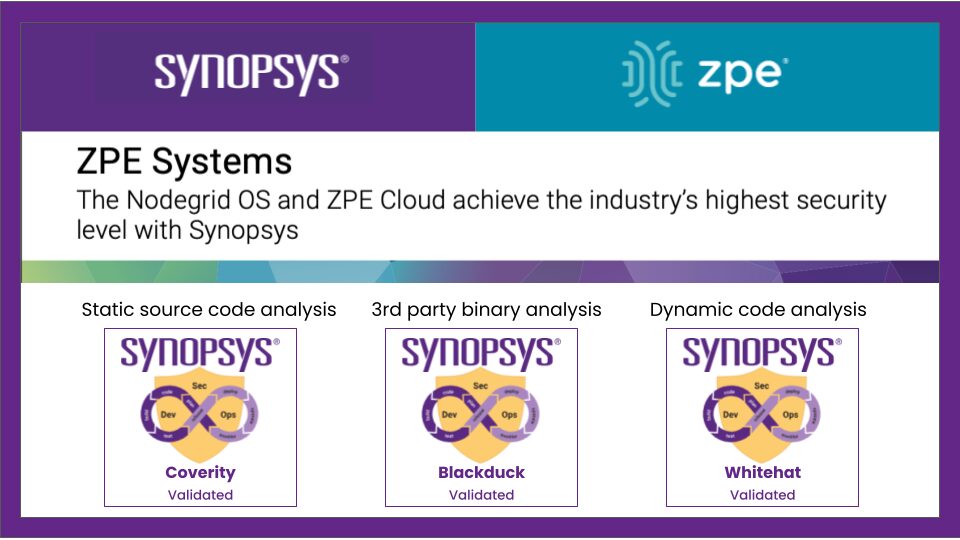
Synopsys and ZPE validation

Summary

At ZPE Systems, we take the security of our supply chain very seriously. While we do not publicly disclose specific details about the members of our supply chain, we ensure that every step of our product lifecycle—whether it involves hardware, software, or cloud offerings—is safeguarded through a comprehensive, layered security approach. We strictly adhere to compliance with government regulations, including any restrictions on the use of technology by enterprises due to regulatory mandates.

Our value chain security is designed with the following key objectives:

  • Secure Development, Manufacturing, and Deployment: ZPE Systems solutions are developed, manufactured, and deployed within securely controlled environments. We use only ZPE Systems-approved
    processes, tools, and components throughout these stages to ensure the integrity of our solutions.
  • Prevention of Malware and Rogue Materials: Our processes are designed to prevent the introduction of any malware or unauthorized raw materials that could compromise the functionality of our products.
  • Counterfeit Prevention: Our build and deployment processes are structured to make it extremely difficult for malicious actors to produce counterfeit solutions. By securing every stage of development, we protect our products from being altered or replicated in unauthorized ways.

Read the full 3-page guide now for a comprehensive look at ZPE’s supply chain security.

Data Center Scalability Tips & Best Practices

Data center scalability is the ability to increase or decrease workloads cost-effectively and without disrupting business operations. Scalable data centers make organizations agile, enabling them to support business growth, meet changing customer needs, and weather downturns without compromising quality. This blog describes various methods for achieving data center scalability before providing tips and best practices to make scalability easier and more cost-effective to implement.

How to achieve data center scalability

There are four primary ways to scale data center infrastructure, each of which has advantages and disadvantages.


4 Data center scaling methods

Method Description Pros and Cons
1. Adding more servers Also known as scaling out or horizontal scaling, this involves adding more physical or virtual machines to the data center architecture. Can support and distribute more workloads

Eliminates hardware constraints

Deployment and replication take time

Requires more rack space

Higher upfront and operational costs

2. Virtualization Dividing physical hardware into multiple virtual machines (VMs) or virtual network functions (VNFs) to support more workloads per device. Supports faster provisioning

Uses resources more efficiently

Reduces scaling costs

Transition can be expensive and disruptive

Not supported by all hardware and software

3. Upgrading existing hardware Also known as scaling up or vertical scaling, this involves adding more processors, memory, or storage to upgrade the capabilities of existing systems. Implementation is usually quick and non-disruptive

More cost-effective than horizontal scaling

Requires less power and rack space

Scalability limited by server hardware constraints

Increases reliance on legacy systems

4. Using cloud services Moving some or all workloads to the cloud, where resources can be added or removed on-demand to meet scaling requirements. Allows on-demand or automatic scaling

Better support for new and emerging technologies

Reduces data center costs

Migration is often extremely disruptive

Auto-scaling can lead to ballooning monthly bills

May not support legacy software

It’s important for companies to analyze their requirements and carefully consider the advantages and disadvantages of each method before choosing a path forward. 

Best practices for data center scalability

The following tips can help organizations ensure their data center infrastructure is flexible enough to support scaling by any of the above methods.

Run workloads on vendor-neutral platforms

Vendor lock-in, or a lack of interoperability with third-party solutions, can severely limit data center scalability. Using vendor-neutral platforms ensures that teams can add, expand, or integrate data center resources and capabilities regardless of provider. These platforms make it easier to adopt new technologies like artificial intelligence (AI) and machine learning (ML) while ensuring compatibility with legacy systems.

Use infrastructure automation and AIOps

Infrastructure automation technologies help teams provision and deploy data center resources quickly so companies can scale up or out with greater efficiency. They also ensure administrators can effectively manage and secure data center infrastructure as it grows in size and complexity. 

For example, zero-touch provisioning (ZTP) automatically configures new devices as soon as they connect to the network, allowing remote teams to deploy new data center resources without on-site visits. Automated configuration management solutions like Ansible and Chef ensure that virtualized system configurations stay consistent and up-to-date while preventing unauthorized changes. AIOps (artificial intelligence for IT operations) uses machine learning algorithms to detect threats and other problems, remediate simple issues, and provide root-cause analysis (RCA) and other post-incident forensics with greater accuracy than traditional automation. 

Isolate the control plane with Gen 3 serial consoles

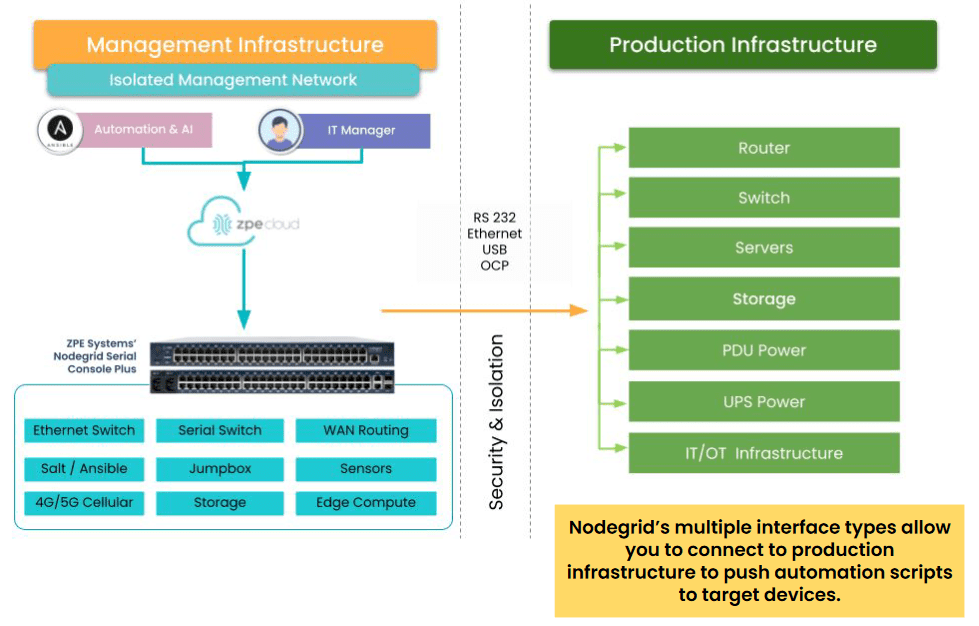
Serial consoles are devices that allow administrators to remotely manage data center infrastructure without needing to log in to each piece of equipment individually. They use out-of-band (OOB) management to separate the data plane (where production workflows occur) from the control plane (where management workflows occur). OOB serial console technology – especially the third-generation (or Gen 3) – aids data center scalability in several ways:

  1. Gen 3 serial consoles are vendor-neutral and provide a single software platform for administrators to manage all data center devices, significantly reducing management complexity as infrastructure scales out.
  2. Gen 3 OOB can extend automation capabilities like ZTP to mixed-vendor and legacy devices that wouldn’t otherwise support them.
  3. OOB management moves resource-intensive infrastructure automation workflows off the data plane, improving the performance of production applications and workflows.
  4. Serial consoles move the management interfaces for data center infrastructure to an isolated control plane, which prevents malware and cybercriminals from accessing them if the production network is breached. Isolated management infrastructure (IMI) is a security best practice for data center architectures of any size.

How Nodegrid simplifies data center scalability

Nodegrid is a Gen 3 out-of-band management solution that streamlines vertical and horizontal data center scalability. 

The Nodegrid Serial Console Plus (NSCP) offers 96 managed ports in a 1RU rack-mounted form factor, reducing the number of OOB devices needed to control large-scale data center infrastructure. Its open, x86 Linux-based OS can run VMs, VNFs, and Docker containers so teams can run virtualized workloads without deploying additional hardware. Nodegrid can also run automation, AIOps, and security on the same platform to further reduce hardware overhead.

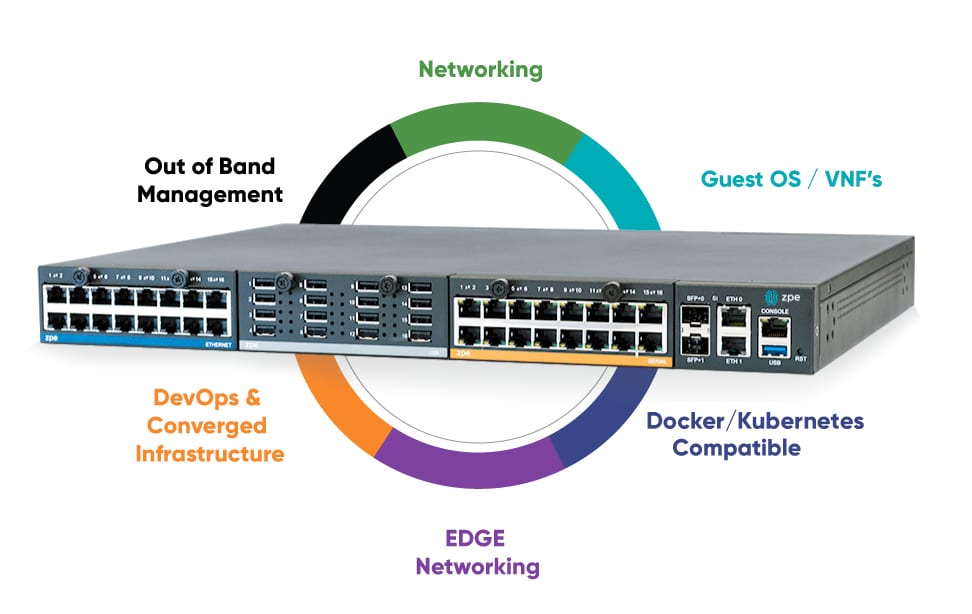
Nodegrid OOB is also available in a modular form factor. The Net Services Router (NSR) allows teams to add or swap modules for additional compute, storage, memory, or serial ports as the data center scales up or down.

Want to see Nodegrid in action?

Watch a demo of the Nodegrid Gen 3 out-of-band management solution to see how it can improve scalability for your data center architecture.

Watch a demo

Understanding Serial Console Interfaces

A serial console (also known as a console server or terminal server) is a device that allows admins to manage critical network infrastructure like servers, routers, switches, and power distribution units (PDUs) without needing to log in to each piece of equipment individually. It also provides out-of-band (OOB) management, which creates an isolated network dedicated to infrastructure orchestration and troubleshooting. Serial console interfaces help improve management efficiency, accelerate recovery from outages and cyberattacks, and isolate the control plane from malicious actors. 

This blog defines serial console interfaces and describes their technological evolution before discussing the benefits of using a modern serial console solution. 

What is a serial console interface?

The term serial console interface could mean different things depending on the context and who’s saying it.

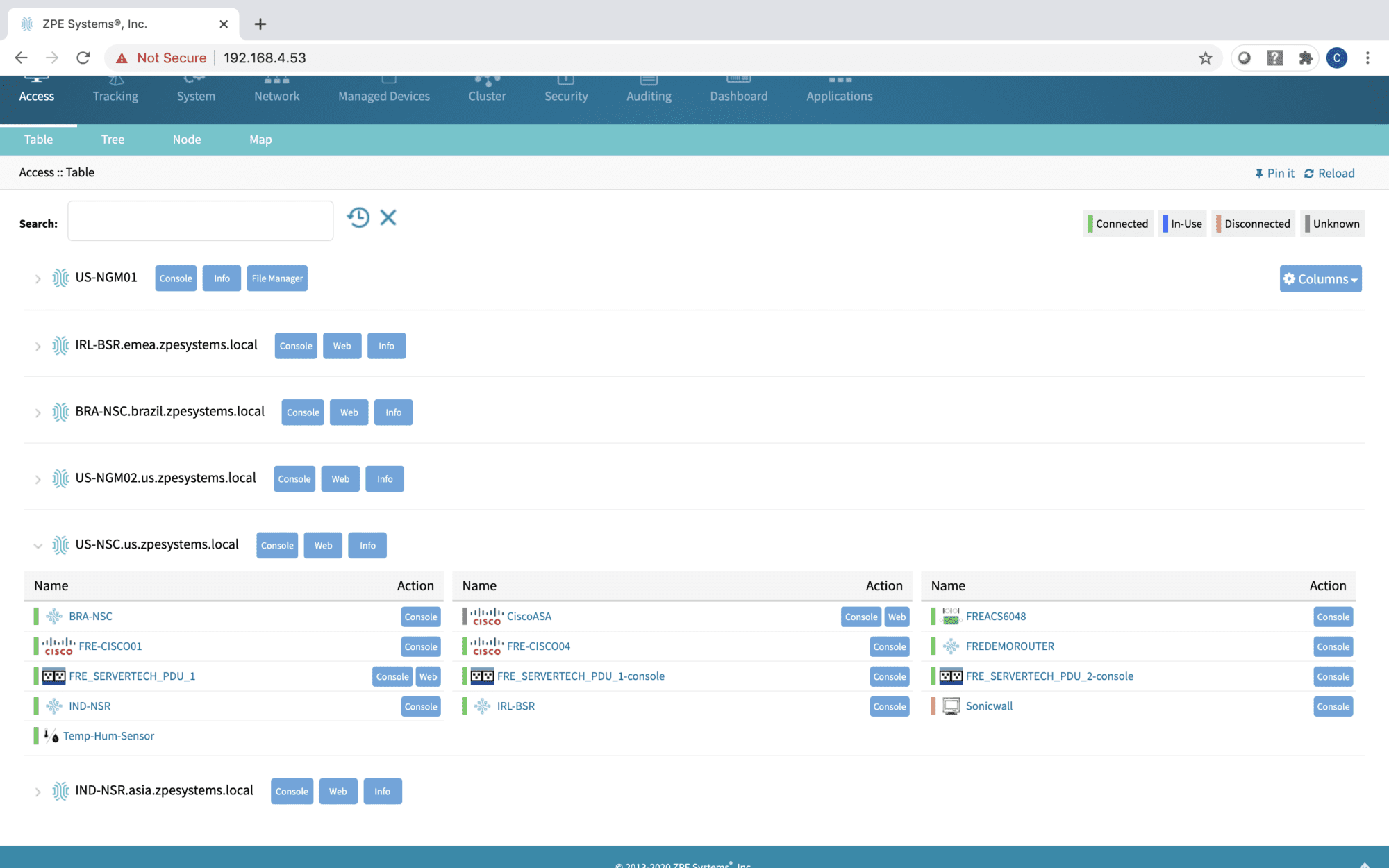
1. Some people use this term to refer to the serial console’s management GUI (graphical user interface), which administrators use to view and control data center devices.

Clusters 2000×1250 (1)

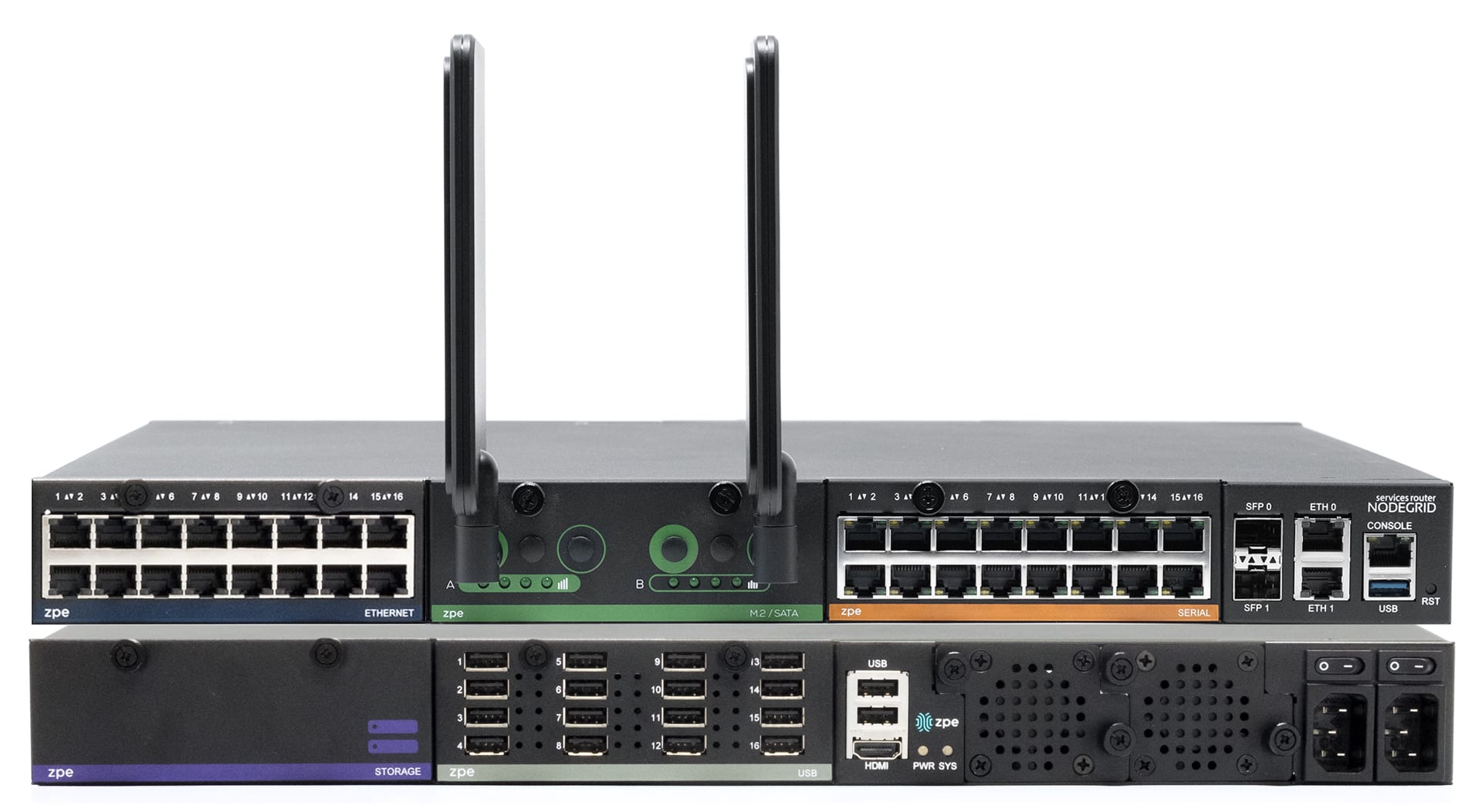
2. Others use this term to refer to the individual connections between a serial console and each managed data center device. In addition to traditional RS-232 serial interfaces, a serial console may support RJ45, KVM (keyboard, video, mouse), IPMI (intelligent platform management interface), and USB (universal serial bus) interfaces.

NSRSTACK2-1 1920×1052

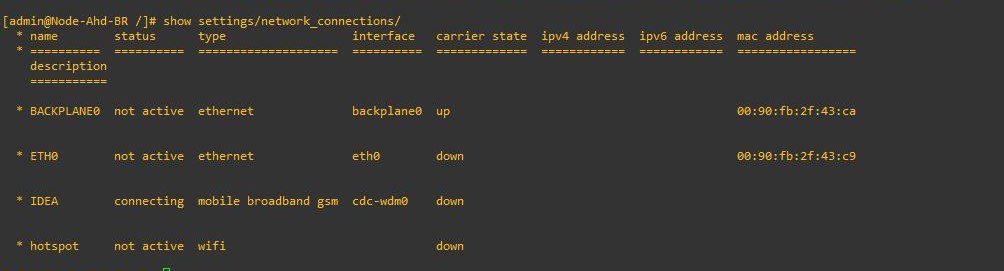
3. Another potential (but less common) use of the term is for the text-based console interface (also known as a CLI, or command-line interface) used to configure and manage data center devices without a GUI. The console interface could be accessed in several ways, such as through a serial console’s GUI, or via a Telnet or SSH (secure shell) client like PuTTY.

Console 2

4. Finally, it’s quite common to use the term serial console interface to describe the entire serial console solution, from the hardware itself to its managed ports, GUI, and CLI. The serial console acts as an interface between the production network (a.k.a., the data plane) and the management network (a.k.a., the control plane). 

For the purposes of this discussion, we will use this fourth definition of serial console interfaces.

The evolution of serial console interfaces

First-generation

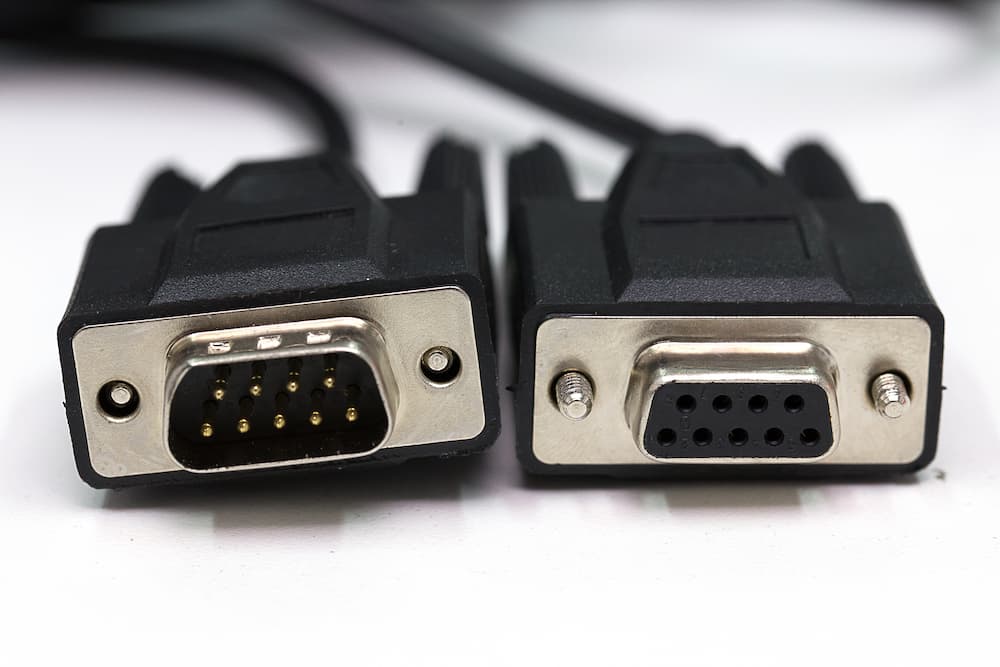
The first generation of serial consoles provides the basics: unified management of multiple data center devices, and an OOB network connection (such as a dial-up modem or cellular SIM card) so management workflows don’t rely on the main production network. A Gen 1 serial console interface allows administrators to access the CLI for each connected device even if the production network goes down from an ISP outage, equipment failure, or cyberattack. However, these serial consoles lack many of the advanced features required for modern network infrastructures, such as hardware encryption, third-party integrations, and automation capabilities. They typically only support standard RS-232 serial interfaces using a specific pinout.

ZPE Systems Review Serial Console (1)

Second-generation

The second generation added built-in security features, advanced authentication methods, and the ability to manage multi-vendor devices. Some vendors also added support for Python scripts and other automation, as well as zero-touch provisioning (ZTP) for supported end devices. However, Gen 2 serial console interfaces have closed architectures that prevent full automation of multi-vendor infrastructure. Their management GUIs are also typically only available as an on-premises virtual machine (VM), so remote administrators must be on the enterprise network or connected via VPN to access them.

Third-generation

Third-generation serial consoles are completely vendor-neutral, so they can control – and extend automation to – every physical and virtual asset in your environment. They use high-speed OOB network interfaces such as 5G cellular, and offer cloud-based management software so teams can manage and troubleshoot remote infrastructure from anywhere in the world. Gen 3 serial console interfaces are built on an open, x86 Linux-based architecture that supports third-party integrations and can run other vendors’ software. They accommodate legacy pinouts to control a variety of devices, such as PDUs, IPMI devices, and environmental monitoring sensors, and also feature modules that allow you to customize or modify interface types.

NSR Diagram

Gen 3 serial consoles have enterprise-grade security features like an encrypted disk and TPM 2.0 security. They also support integrations with Zero Trust providers for multi-factor authentication (MFA) and single sign-on (SSO). The third generation enables end-to-end network infrastructure automation using third-party tools like Ansible, Chef, and Puppet, as well as customer-built tools in VMs, Docker, or Kubernetes. Gen 3 serial console interfaces are essentially infrastructure multi-tools capable of running and deploying any solution, at any time, from anywhere.

The benefits of a Gen 3 serial console interface

The latest generation of serial consoles provides three major advantages:

  • Improved management efficiency. A vendor-neutral serial console allows administrators to manage infrastructure workflows and automation for large, complex network architectures from a single pane of glass. Teams can also extend automation to every infrastructure device, even legacy solutions that wouldn’t support it otherwise.
  • Reduced network downtime. With fast, reliable Gen 3 OOB, infrastructure teams have a lifeline to troubleshoot and recover remote infrastructure when the WAN (wide area network) or LAN (local area network) goes down. They can remotely power-cycle frozen devices, view environmental monitoring logs, and automatically provision replacement equipment without the time or expense of on-site visits. 
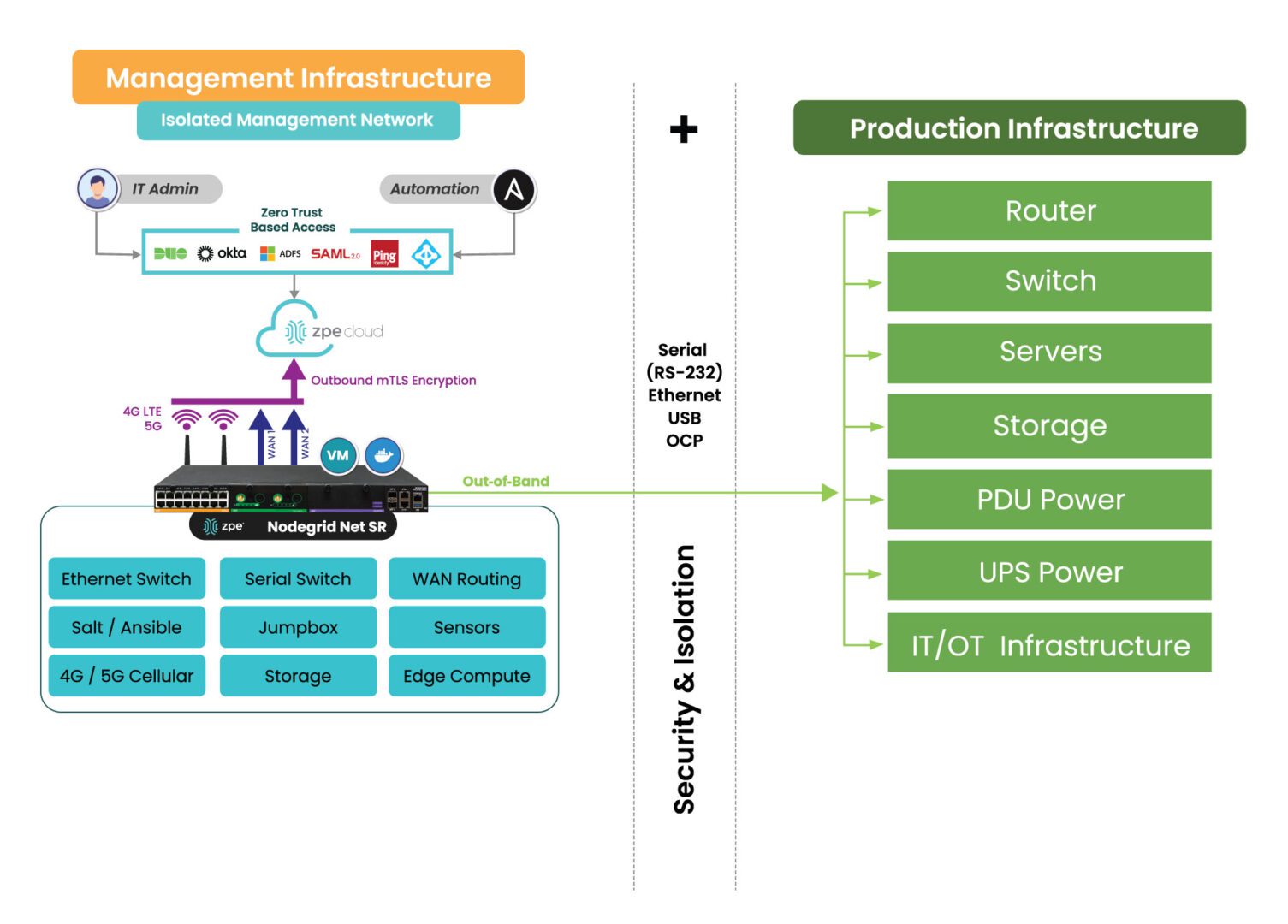
  • Isolated management infrastructure (IMI). Gen 3 OOB creates an isolated control plane for network infrastructure, which helps protect management interfaces from malicious actors who have breached the production network. It also helps establish an isolated recovery environment (IRE) where teams can rebuild and restore systems without risking re-infection or re-compromise. 

IMI with NSCP

Want to learn more about serial consoles?

Gen 3 serial console interfaces like the Nodegrid Serial Console (NSC) from ZPE Systems use vendor-neutral architectures and end-to-end automation capabilities to help companies improve operational efficiency and network resilience. To learn more about how a Gen 3 solution can help with your biggest infrastructure pain points, watch a Nodegrid demo.

Watch a demo

Edge Computing Use Cases in Banking

financial services

The banking and financial services industry deals with enormous, highly sensitive datasets collected from remote sites like branches, ATMs, and mobile applications. Efficiently leveraging this data while avoiding regulatory, security, and reliability issues is extremely challenging when the hardware and software resources used to analyze that data reside in the cloud or a centralized data center.

Edge computing decentralizes computing resources and distributes them at the network’s “edges,” where most banking operations take place. Running applications and leveraging data at the edge enables real-time analysis and insights, mitigates many security and compliance concerns, and ensures that systems remain operational even if Internet access is disrupted. This blog describes four edge computing use cases in banking, lists the benefits of edge computing for the financial services industry, and provides advice for ensuring the resilience, scalability, and efficiency of edge computing deployments.

4 Edge computing use cases in banking

1. AI-powered video surveillance

PCI DSS requires banks to monitor key locations with video surveillance, review and correlate surveillance data on a regular basis, and retain videos for at least 90 days. Constantly monitoring video surveillance feeds from bank branches and ATMs with maximum vigilance is nearly impossible for humans, but machines excel at it. Financial institutions are beginning to adopt artificial intelligence solutions that can analyze video feeds and detect suspicious activity with far greater vigilance and accuracy than human security personnel.

When these AI-powered surveillance solutions are deployed at the edge, they can analyze video feeds in real time, potentially catching a crime as it occurs. Edge computing also keeps surveillance data on-site, reducing bandwidth costs and network latency while mitigating the security and compliance risks involved with storing videos in the cloud.

2. Branch customer insights

Banks collect a lot of customer data from branches, web and mobile apps, and self-service ATMs. Feeding this data into AI/ML-powered data analytics software can provide insights into how to improve the customer experience and generate more revenue. By running analytics at the edge rather than from the cloud or centralized data center, banks can get these insights in real-time, allowing them to improve customer interactions while they’re happening.

For example, edge-AI/ML software can help banks provide fast, personalized investment advice on the spot by analyzing a customer’s financial history, risk preferences, and retirement goals and recommending the best options. It can also use video surveillance data to analyze traffic patterns in real-time and ensure tellers are in the right places during peak hours to reduce wait times.

3. On-site data processing

Because the financial services industry is so highly regulated, banks must follow strict security and privacy protocols to protect consumer data from malicious third parties. Transmitting sensitive financial data to the cloud or data center for processing increases the risk of interception and makes it more challenging to meet compliance requirements for data access logging and security controls.

Edge computing allows financial institutions to leverage more data on-site, within the network security perimeter. For example, loan applications contain a lot of sensitive and personally identifiable information (PII). Processing these applications on-site significantly reduces the risk of third-party interception and allows banks to maintain strict control over who accesses data and why, which is more difficult in cloud and colocation data center environments.

4. Enhanced AIOps capabilities

Financial institutions use AIOps (artificial intelligence for IT operations) to analyze monitoring data from IT devices, network infrastructure, and security solutions and get automated incident management, root-cause analysis (RCA), and simple issue remediation. Deploying AIOps at the edge provides real-time issue detection and response, significantly shortening the duration of outages and other technology disruptions. It also ensures continuous operation even if an ISP outage or network failure cuts a branch off from the cloud or data center, further helping to reduce disruptions and remote sites.

Additionally, AIOps and other artificial intelligence technology tend to use GPUs (graphics processing units), which are more expensive than CPUs (central processing units), especially in the cloud. Deploying AIOps on small, decentralized, multi-functional edge computing devices can help reduce costs without sacrificing functionality. For example, deploying an array of Nvidia A100 GPUs to handle AIOps workloads costs at least $10k per unit; comparable AWS GPU instances can cost between $2 and $3 per unit per hour. By comparison, a Nodegrid Gate SR costs under $5k and also includes remote serial console management, OOB, cellular failover, gateway routing, and much more.

The benefits of edge computing for banking

Edge computing can help the financial services industry:

  • Reduce losses, theft, and crime by leveraging artificial intelligence to analyze real-time video surveillance data.
  • Increase branch productivity and revenue with real-time insights from security systems, customer experience data, and network infrastructure.
  • Simplify regulatory compliance by keeping sensitive customer and financial data on-site within company-owned infrastructure.
  • Improve resilience with real-time AIOps capabilities like automated incident remediation that continues operating even if the site is cut off from the WAN or Internet
  • Reduce the operating costs of AI and machine learning applications by deploying them on small, multi-function edge computing devices. 
  • Mitigate the risk of interception by leveraging financial and IT data on the local network and distributing the attack surface.

Edge computing best practices

Isolating the management interfaces used to control network infrastructure is the best practice for ensuring the security, resilience, and efficiency of edge computing deployments. CISA and PCI DSS 4.0 recommend implementing isolated management infrastructure (IMI) because it prevents compromised accounts, ransomware, and other threats from laterally moving from production resources to the control plane.

IMI with Nodegrid(2)

Using vendor-neutral platforms to host, connect, and secure edge applications and workloads is the best practice for ensuring the scalability and flexibility of financial edge architectures. Moving away from dedicated device stacks and taking a “platformization” approach allows financial institutions to easily deploy, update, and swap out applications and capabilities on demand. Vendor-neutral platforms help reduce hardware overhead costs to deploy new branches and allow banks to explore different edge software capabilities without costly hardware upgrades.

Edge-Management-980×653

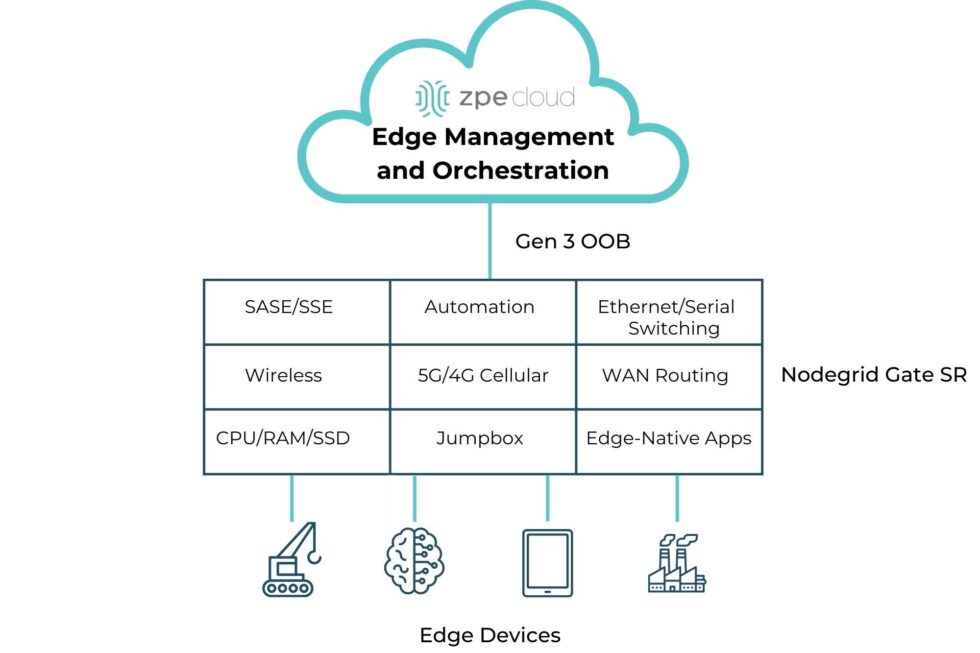
Additionally, using a centralized, cloud-based edge management and orchestration (EMO) platform is the best practice for ensuring remote teams have holistic oversight of the distributed edge computing architecture. This platform should be vendor-agnostic to ensure complete coverage over mixed and legacy architectures, and it should use out-of-band (OOB) management to provide continuous remote access to edge infrastructure even during a major service outage.

How Nodegrid streamlines edge computing for the banking industry

Nodegrid is a vendor-neutral edge networking platform that consolidates an entire edge tech stack into a single, cost-effective device. Nodegrid has a Linux-based OS that supports third-party VMs and Docker containers, allowing banks to run edge computing workloads, data analytics software, automation, security, and more. 

The Nodegrid Gate SR is available with an Nvidia Jetson Nano card that’s optimized for artificial intelligence workloads. This allows banks to run AI surveillance software, ML-powered recommendation engines, and AIOps at the edge alongside networking and infrastructure workloads rather than purchasing expensive, dedicated GPU resources. Plus, Nodegrid’s Gen 3 OOB management ensures continuous remote access and IMI for improved branch resilience.

Get Nodegrid for your edge computing use cases in banking

Nodegrid’s flexible, vendor-neutral platform adapts to any use case and deployment environment. Watch a demo to see Nodegrid’s financial network solutions in action.

Watch a demo

AI Data Center Infrastructure

ZPE Systems – AI Data Center Infrastructure
Artificial intelligence is transforming business operations across nearly every industry, with the recent McKinsey global survey finding that 72% of organizations had adopted AI, and 65% regularly use generative AI (GenAI) tools specifically. GenAI and other artificial intelligence technologies are extremely resource-intensive, requiring more computational power, data storage, and energy than traditional workloads. AI data center infrastructure also requires high-speed, low-latency networking connections and unified, scalable management hardware to ensure maximum performance and availability. This post describes the key components of AI data center infrastructure before providing advice for overcoming common pitfalls to improve the efficiency of AI deployments.

AI data center infrastructure components

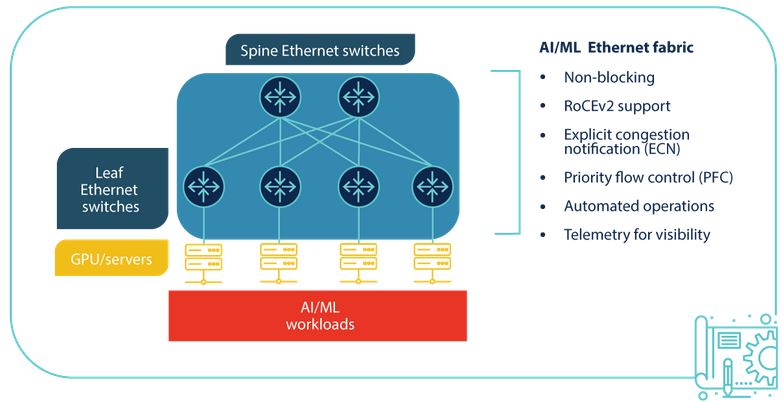
A diagram of AI data center infrastructure.

Computing

Generative AI and other artificial intelligence technologies require significant processing power. AI workloads typically run on graphics processing units (GPUs), which are made up of many smaller cores that perform simple, repetitive computing tasks in parallel. GPUs can be clustered together to process data for AI much faster than CPUs.

Storage

AI requires vast amounts of data for training and inference. On-premises AI data centers typically use object storage systems with solid-state disks (SSDs) composed of multiple sections of flash memory (a.k.a., flash storage). Storage solutions for AI workloads must be modular so additional capacity can be added as data needs grow, through either physical or logical (networking) connections between devices.

Networking

AI workloads are often distributed across multiple computing and storage nodes within the same data center. To prevent packet loss or delays from affecting the accuracy or performance of AI models, nodes must be connected with high-speed, low-latency networking. Additionally, high-throughput WAN connections are needed to accommodate all the data flowing in from end-users, business sites, cloud apps, IoT devices, and other sources across the enterprise.

Power

AI infrastructure uses significantly more power than traditional data center infrastructure, with a rack of three or four AI servers consuming as much energy as 30 to 40 standard servers. To prevent issues, these power demands must be accounted for in the layout design for new AI data center deployments and, if necessary, discussed with the colocation provider to ensure enough power is available.

Management

Data center infrastructure, especially at the scale required for AI, is typically managed with a jump box, terminal server, or serial console that allows admins to control multiple devices at once. The best practice is to use an out-of-band (OOB) management device that separates the control plane from the data plane using alternative network interfaces. An OOB console server provides several important functions:

  1. It provides an alternative path to data center infrastructure that isn’t reliant on the production ISP, WAN, or LAN, ensuring remote administrators have continuous access to troubleshoot and recover systems faster, without an on-site visit.
  2. It isolates management interfaces from the production network, preventing malware or compromised accounts from jumping over from an infected system and hijacking critical data center infrastructure.
  3. It helps create an isolated recovery environment where teams can clean and rebuild systems during a ransomware attack or other breach without risking reinfection.

An OOB serial console helps minimize disruptions to AI infrastructure. For example, teams can use OOB to remotely control PDU outlets to power cycle a hung server. Or, if a networking device failure brings down the LAN, teams can use a 5G cellular OOB connection to troubleshoot and fix the problem. Out-of-band management reduces the need for costly, time-consuming site visits, which significantly improves the resilience of AI infrastructure.

AI data center challenges

Artificial intelligence workloads, and the data center infrastructure needed to support them, are highly complex. Many IT teams struggle to efficiently provision, maintain, and repair AI data center infrastructure at the scale and speed required, especially when workflows are fragmented across legacy and multi-vendor solutions that may not integrate. The best way to ensure data center teams can keep up with the demands of artificial intelligence is with a unified AI orchestration platform. Such a platform should include:

  • Automation for repetitive provisioning and troubleshooting tasks
  • Unification of all AI-related workflows with a single, vendor-neutral platform
  • Resilience with cellular failover and Gen 3 out-of-band management.

To learn more, read AI Orchestration: Solving Challenges to Improve AI Value

Improving operational efficiency with a vendor-neutral platform

Nodegrid is a Gen 3 out-of-band management solution that provides the perfect unification platform for AI data center orchestration. The vendor-neutral Nodegrid platform can integrate with or directly run third-party software, unifying all your networking, management, automation, security, and recovery workflows. A single, 1RU Nodegrid Serial Console Plus (NSCP) can manage up to 96 data center devices, and even extend automation to legacy and mixed-vendor solutions that wouldn’t otherwise support it. Nodegrid Serial Consoles enable the fast and cost-efficient infrastructure scaling required to support GenAI and other artificial intelligence technologies.

Make Nodegrid your AI data center orchestration platform

Request a demo to learn how Nodegrid can improve the efficiency and resilience of your AI data center infrastructure.
 Contact Us