Retail organizations must constantly adapt to meet changing customer expectations, mitigate external economic forces, and stay ahead of the competition. Technologies like the Internet of Things (IoT), artificial intelligence (AI), and other forms of automation help companies improve the customer experience and deliver products at the pace demanded in the age of one-click shopping and two-day shipping. However, connecting individual retail locations to applications in the cloud or centralized data center increases network latency, security risks, and bandwidth utilization costs.
Edge computing mitigates many of these challenges by decentralizing cloud and data center resources and distributing them at the network’s “edges,” where most retail operations take place. Running applications and processing data at the edge enables real-time analysis and insights and ensures that systems remain operational even if Internet access is disrupted by an ISP outage or natural disaster. This blog describes five potential edge computing use cases in retail and provides more information about the benefits of edge computing for the retail industry.
5 Edge computing use cases in retail
.
1. Security video analysis
Security cameras are crucial to loss prevention, but constantly monitoring video surveillance feeds is tedious and difficult for even the most experienced personnel. AI-powered video surveillance systems use machine learning to analyze video feeds and detect suspicious activity with greater vigilance and accuracy. Edge computing enhances AI surveillance by allowing solutions to analyze video feeds in real-time, potentially catching shoplifters in the act and preventing inventory shrinkage.
2. Localized, real-time insights
Retailers have a brief window to meet a customer’s needs before they get frustrated and look elsewhere, especially in a brick-and-mortar store. A retail store can use an edge computing application to learn about customer behavior and purchasing activity in real-time. For example, they can use this information to rotate the products featured on aisle endcaps to meet changing demand, or staff additional personnel in high-traffic departments at certain times of day. Stores can also place QR codes on shelves that customers scan if a product is out of stock, immediately alerting a nearby representative to provide assistance.
3. Enhanced inventory management
Effective inventory management is challenging even for the most experienced retail managers, but ordering too much or too little product can significantly affect sales. Edge computing applications can improve inventory efficiency by making ordering recommendations based on observed purchasing patterns combined with real-time stocking updates as products are purchased or returned. Retailers can use this information to reduce carrying costs for unsold merchandise while preventing out-of-stocks, improving overall profit margins. .
Using IoT devices to monitor and control building functions such as HVAC, lighting, doors, power, and security can help retail organizations reduce the need for on-site facilities personnel, and make more efficient use of their time. Data analysis software helps automatically optimize these systems for efficiency while ensuring a comfortable customer experience. Running this software at the edge allows automated processes to respond to changing conditions in real-time, for example, lowering the A/C temperature or routing more power to refrigerated cases during a heatwave.
5. Warehouse automation
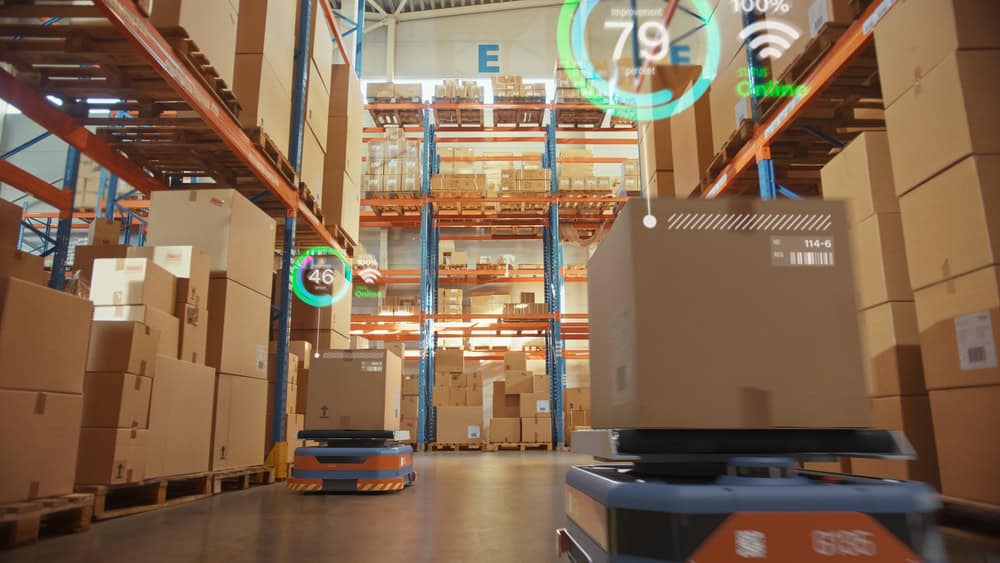
The retail industry uses warehouse automation systems to improve the speed and efficiency at which goods are delivered to stores or directly to users. These systems include automated storage and retrieval systems, robotic pickers and transporters, and automated sortation systems. Companies can use edge computing applications to monitor, control, and maintain warehouse automation systems with minimal latency. These applications also remain operational even if the site loses internet access, improving resilience.
Edge computing decreases the number of network hops between devices and the applications they rely on, reducing latency and improving the speed and reliability of retail technology at the edge.
Real-time insights
Edge computing can analyze data in real-time and provide actionable insights to improve the customer experience before a sale is lost or reduce waste before monthly targets are missed.
Improved resilience
Edge computing applications can continue functioning even if the site loses Internet or WAN access, enabling continuous operations and reducing the costs of network downtime.
Risk mitigation
Keeping sensitive internal data like personnel records, sales numbers, and customer loyalty information on the local network mitigates the risk of interception and distributes the attack surface.
Edge computing can also help retail companies lower their operational costs at each site by reducing bandwidth utilization on expensive MPLS links and decreasing expenses for cloud data storage and computing. Another way to lower costs is by using consolidated, vendor-neutral solutions to run, connect, and secure edge applications and workloads.
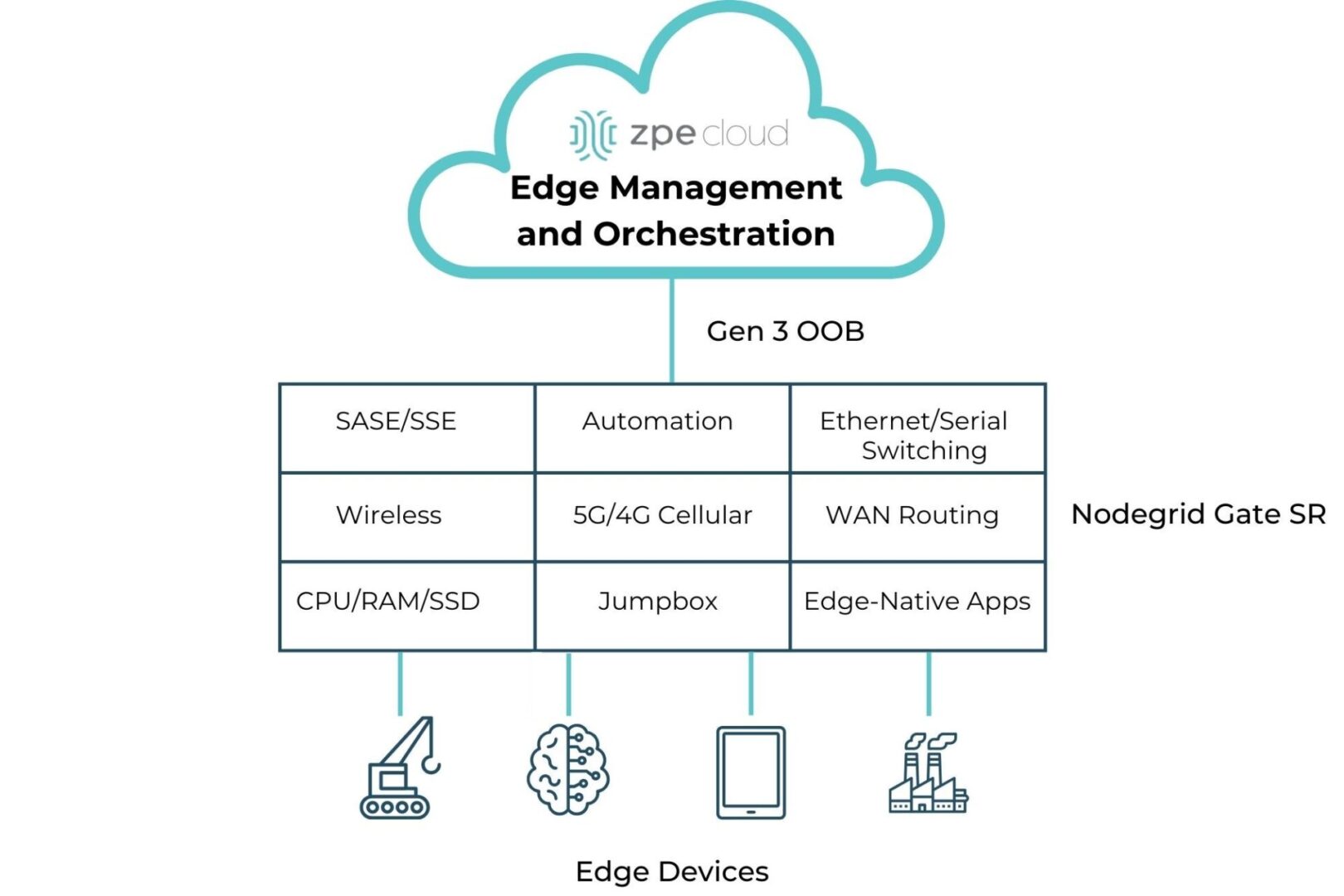
For example, the Nodegrid Gate SR integrated branch services router delivers an entire stack of edge networking, infrastructure management, and computing technologies in a single, streamlined device. The open, Linux-based Nodegrid OS supports VMs and Docker containers for third-party edge computing applications, security solutions, and more. The Gate SR is also available with an Nvidia Jetson Nano card that’s optimized for AI workloads to help retail organizations reduce the hardware overhead costs of deploying artificial intelligence at the edge.
Consolidated edge computing with Nodegrid
Nodegrid’s flexible, scalable platform adapts to all edge computing use cases in retail. Watch a demo to see Nodegrid’s retail network solutions in action.
The world as we know it is connected to IT, and IT relies on its underlying infrastructure. Organizations must prioritize maintaining this infrastructure; otherwise, any disruption or breach has a ripple effect that takes services offline for millions of users (take 2024’s CrowdStrike outage, for example). A big part of this maintenance is ensuring that all hardware components, including console servers, are up-to-date and secure. Most console servers reach end-of-life (EOL) and need to be replaced, but for many reasons, whether budgetary concerns or the “if it isn’t broken” mentality, IT teams often keep their EOL devices. Let’s look at the risks of using EOL console servers, and why replacing them goes hand-in-hand with securing IT.
The Risks of Using End-of-Life Console Servers
End-of-life console servers can undermine the security and functionality of IT systems. These risks include:
1. Lack of Security Features and Updates
Aging console servers lack adequate hardware and management security features, meaning they can’t support a zero trust approach. On top of this, once a console server reaches EOL, the manufacturer stops providing security patches and updates. The device then becomes vulnerable to newly discovered CVEs and complex cyberattacks (like the MOVEit and Ragnar Locker breaches). Cybercriminals often target outdated hardware because they know that these devices are no longer receiving updates, making them easy entry points for launching attacks.
2. Compliance Issues
Many industries have stringent regulatory requirements regarding data security and IT infrastructure. DORA, NIS2 (EU), NIST2 (US), PCI 4.0 (finance), and CER Directive are just a few of the updated regulations that are cracking down on how organizations architect IT, including the management layer. Using EOL hardware can lead to non-compliance, resulting in fines and legal repercussions. Regulatory bodies expect organizations to use up-to-date and secure equipment to protect sensitive information.
3. Prolonged Recovery
EOL console servers are prone to failures and inefficiencies. As these devices age, their performance deteriorates, leading to increased downtime and disruptions. Most console servers are Gen 2, meaning they offer basic remote troubleshooting (to address break/fix scenarios) and limited automation capabilities. When there is a severe disruption, such as a ransomware attack, hackers can easily access and encrypt these devices to lock out admin access. Organizations then must endure prolonged recovery (like the CrowdStrike outage, or 2023’s MGM attack) because they need to physically decommission and restore their infrastructure.
The Importance of Replacing EOL Console Servers
Here’s why replacing EOL console servers is essential to securing IT:
1. Modern Security Approach
Zero trust is an approach that uses segmentation across IT assets. This ensures that only authorized users can access resources necessary for their job function. This approach requires SAML, SSO, MFA/2FA, and role-based access controls, which are only supported by modern console servers. Modern devices additionally feature advanced security through encryption, signed OS, and tampering detection. This ensures a complete cyber and physical approach to security.
2. Protection Against New Threats
New CVEs and evolving threats can easily take advantage of EOL devices that no longer receive updates. Modern console servers benefit from ongoing support in the form of firmware upgrades and security patches. Upgrading with a security-focused device vendor can drastically shrink the attack surface, by addressing supply chain security risks, codebase integrity, and CVE patching.
3. Ease of Compliance
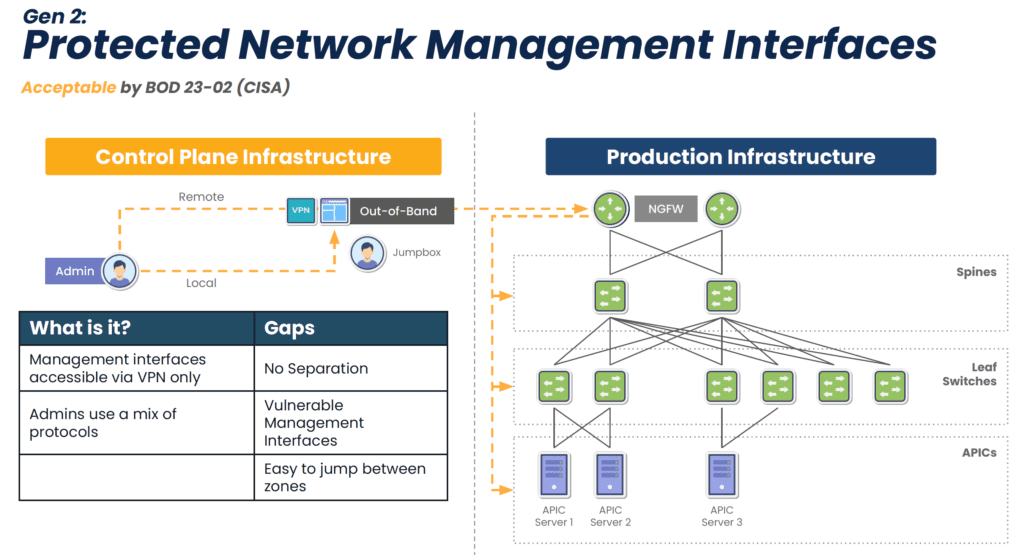
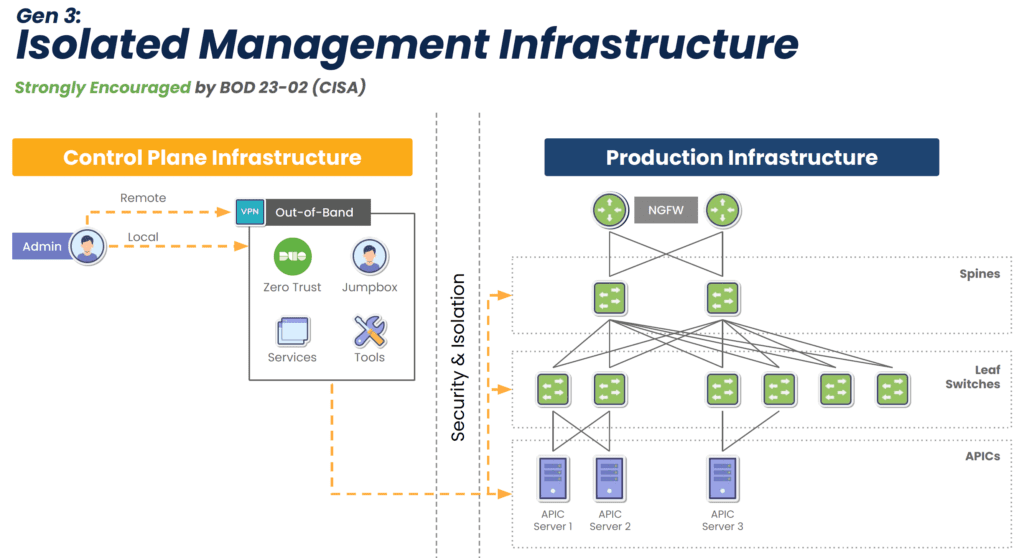
EOL devices lack modern security features, but this isn’t the only reason why they make it difficult or impossible to comply with regulations. They also lack the ability to isolate the control plane from the production network (see Diagram 1 below), meaning attackers can easily move between the two in order to launch ransomware and steal sensitive information. Watchdog agencies and new legislation are stipulating that organizations follow the latest best practice of separating the control plane from production, called Isolated Management Infrastructure (IMI). Modern console servers make this best practice simple to achieve by offering drop-in out-of-band that is completely isolated from production assets (see Diagram 2 below). This means that the organization is always in control of its IT assets and sensitive data.
Diagram 1: Though an acceptable approach, Gen 2 out-of-band lacks isolation and leaves management interfaces vulnerable to the internet.
Diagram 2: Gen 3 out-of-band fully isolates the control plane to guarantee organizations retain control of their IT assets and sensitive info.
4. Faster Recovery
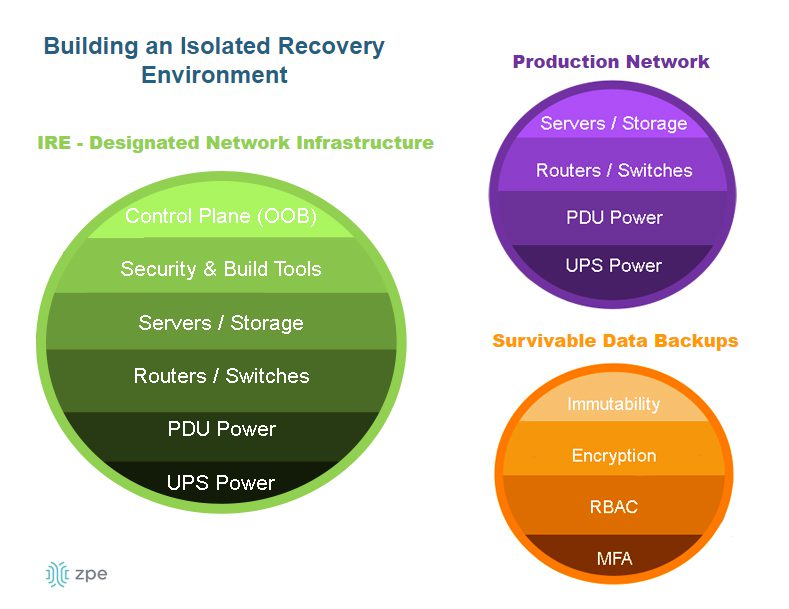
New console servers are designed to handle more workloads and functions, which eliminates single-purpose devices and shrinks the attack surface. They can also run VMs and Docker containers to host applications. This enables what Gartner calls the Isolated Recovery Environment (IRE) (see Diagram 3 below), which is becoming essential for faster recovery from ransomware. Since the IMI component prohibits attackers from accessing the control plane, admins retain control during an attack. They can use the IMI to deploy their IRE and the necessary applications — remotely — to decommission, cleanse, and restore their infected infrastructure. This means that they don’t have to roll trucks week after week when there’s an attack; they just need to log into their management infrastructure to begin assessing and responding immediately, which significantly reduces recovery times.
Diagram 3: The Isolated Recovery Environment allows for a comprehensive and rapid response to ransomware attacks.
Get a Walkthrough of IMI and IRE
Let’s cover what IMI and IRE would look like in your environment and walk through some outage recovery scenarios. Use the link below to set up a technical discussion.
Visit booth C10 at Cisco Live Amsterdam to chat about IMI, IRE, and replacing end-of-life console servers. You can also catch my 10-minute presentation on Wednesday, February 11 at 1:50pm in the Speakers Corner. I’ll cover From Pilot Projects to Global Rollouts: Why Out-of-Band Management is Crucial for Scaling AI Infrastructure, with more concepts and network diagrams showing how to achieve true resilience. Visit our Cisco Live page below to let me know you’re coming. See you at the show!
The healthcare industry enthusiastically adopted Internet of Things (IoT) technology to improve diagnostics, health monitoring, and overall patient outcomes. The data generated by healthcare IoT devices is processed and used by sophisticated data analytics and artificial intelligence applications, which traditionally live in the cloud or a centralized data center. Transmitting all this sensitive data back and forth is inefficient and increases the risk of interception or compliance violations.
Edge computing deploys data analytics applications and computing resources around the edges of the network, where much of the most valuable data is created. This significantly reduces latency and mitigates many security and compliance risks. In a healthcare setting, edge computing enables real-time medical insights and interventions while keeping HIPAA-regulated data within the local security perimeter. This blog describes six potential edge computing use cases in healthcare that take advantage of the speed and security of an edge computing architecture.
6 Edge computing use cases in healthcare
Edge computing use cases for EMS
Mobile emergency medical services (EMS) teams need to make split-second decisions regarding patient health without the benefit of a doctorate and, often, with spotty Internet connections preventing access to online drug interaction guides and other tools. Installing edge computing resources on cellular edge routers gives EMS units real-time health analysis capabilities as well as a reliable connection for research and communications. Potential use cases include: .
Use cases
Description
1. Real-time health analysis en route
Edge computing applications can analyze data from health monitors in real-time and access available medical records to help medics prevent allergic reactions and harmful medication interactions while administering treatment.
2. Prepping the ER with patient health insights
Some edge computing devices use 5G/4G cellular to livestream patient data to the receiving hospital, so ER staff can make the necessary arrangements and begin the proper treatment as soon as the patient arrives.
Edge computing use cases in hospitals & clinics
Hospitals and clinics use IoT devices to monitor vitals, dispense medications, perform diagnostic tests, and much more. Sending all this data to the cloud or data center takes time, delaying test results or preventing early intervention in a health crisis, especially in rural locations with slow or spotty Internet access. Deploying applications and computing resources on the same local network enables faster analysis and real-time alerts. Potential use cases include: .
Use cases
Description
3. AI-powered diagnostic analysis
Edge computing allows healthcare teams to use AI-powered tools to analyze imaging scans and other test results without latency or delays, even in remote clinics with limited Internet infrastructure.
4. Real-time patient monitoring alerts
Edge computing applications can analyze data from in-room monitoring devices like pulse oximeters and body thermometers in real-time, spotting early warning signs of medical stress and alerting staff before serious complications arise.
Edge computing use cases for wearable medical devices
Wearable medical devices give patients and their caregivers greater control over health outcomes. With edge computing, health data analysis software can run directly on the wearable device, providing real-time results even without an Internet connection. Potential use cases include: .
Use cases
Description
5. Continuous health monitoring
An edge-native application running on a system-on-chip (SoC) in a wearable insulin pump can analyze levels in real-time and provide recommendations on how to correct imbalances before they become dangerous.
6. Real-time emergency alerts
Edge computing software running on an implanted heart-rate monitor can give a patient real-time alerts when activity falls outside of an established baseline, and, in case of emergency, use cellular and ATT FirstNet connections to notify medical staff.
The benefits of edge computing for healthcare
Using edge computing in a healthcare setting as described in the use cases above can help organizations:
Improve patient care in remote settings, where a lack of infrastructure limits the ability to use cloud-based technology solutions.
Process and analyze patient health data faster and more reliably, leading to earlier interventions.
Increase efficiency by assisting understaffed medical teams with diagnostics, patient monitoring, and communications.
Mitigate security and compliance risks by keeping health data within the local security perimeter.
Edge computing can also help healthcare organizations lower their operational costs at the edge by reducing bandwidth utilization and cloud data storage expenses. Another way to reduce costs is by using consolidated, vendor-neutral solutions to host, connect, and secure edge applications and workloads.
For example, the Nodegrid Gate SR is an integrated branch services router that delivers an entire stack of edge networking, infrastructure management, and computing technologies in a single, streamlined device. Nodegrid’s open, Linux-based OS supports VMs and Docker containers for third-party edge applications, security solutions, and more. Plus, an onboard Nvidia Jetson Nano card is optimized for AI workloads at the edge, significantly reducing the hardware overhead costs of using artificial intelligence at remote healthcare sites. Nodegrid’s flexible, scalable platform adapts to all edge computing use cases in healthcare, future-proofing your edge architecture.
Streamline your edge deployment with Nodegrid
The vendor-neutral Nodegrid platform consolidates an entire edge technology stack into a unified, streamlined solution. Watch a demo to see Nodegrid’s healthcare network solutions in action.
On July 19, 2024, CrowdStrike, a leading cybersecurity firm renowned for its advanced endpoint protection and threat intelligence solutions, experienced a significant outage that disrupted operations for many of its clients. This outage, triggered by a software upgrade, resulted in crashes for Windows PCs, creating a wave of operational challenges for banks, airports, enterprises, and organizations worldwide. This blog post explores what transpired during this incident, what caused the outage, and the broader implications for the cybersecurity industry.
What happened?
The incident began on the morning of July 19, 2024, when numerous CrowdStrike customers started reporting issues with their Windows PCs. Users experienced the BSOD (blue screen of death), which is when Windows crashes and renders devices unusable. As the day went on, it became evident that the problem was widespread and directly linked to a recent software upgrade deployed by CrowdStrike.
Timeline of Events
Initial Reports: Early in the day, airports, hospitals, and critical infrastructure operators began experiencing unexplained crashes on their Windows PCs. The issue was quickly reported to CrowdStrike’s support team.
Incident Acknowledgement: CrowdStrike acknowledged the issue via their social media channels and direct communications with affected clients, confirming that they were investigating the cause of the crashes.
Root Cause Analysis: CrowdStrike’s engineering team worked diligently to identify the root cause of the problem. They soon determined that a software upgrade released the previous night was responsible for the crashes.
Mitigation Efforts: Upon isolating the faulty software update, CrowdStrike issued guidance on how to roll back the update and provided patches to fix the issue.
What caused the CrowdStrike outage?
The root cause of the outage was a software upgrade intended to enhance the functionality and security of CrowdStrike’s Falcon sensor endpoint protection platform. However, this upgrade contained a bug that conflicted with certain configurations of Windows PCs, leading to system crashes. Several factors contributed to the incident:
Insufficient Testing: The software update did not undergo adequate testing across all possible configurations of Windows PCs. This oversight meant that the bug was not detected before the update was deployed to customers.
Complex Interdependencies: The incident highlights the complex interdependencies between software components and operating systems. Even minor changes can have unforeseen impacts on system stability.
Rapid Deployment: In the cybersecurity industry, quick responses to emerging threats are crucial. However, the pressure to deploy updates rapidly can sometimes lead to insufficient testing and quality assurance processes.
We need to remember one important fact: whether software is written by humans or AI, there will be mistakes in coding and testing. When an issue slips through the cracks, the customer lab is the last resort to catch it. Usually, this can be done with a controlled rollout, where the IT team first upgrades their lab equipment, performs further testing, puts in place a rollback plan, and pushes the update to a less critical site. But in a cloud-connected SaaS world, the customer is no longer in control. That’s why they sign waivers stating that if such an incident occurs, the company that caused the problem is not liable. Experts are saying the only way to address this challenge is to have an infrastructure that’s designed, deployed, and operated for resilience. We discuss this architecture further down in this article.
How to recover from the CrowdStrike outage
CrowdStrike gives two options for recovering:
Option 1: Reboot in Safe Mode – Reboot the affected device in Safe Mode, locate and delete the file “C-00000291*.sys”, and then restart the device.
Option 2: Re-image – Download and configure the recovery utility to create a new Windows image, add this image to a USB drive, and then insert this USB drive into the target device. The utility will automatically find and delete the file that’s causing the crash.
The biggest obstacle that is costing organizations a lot of time and money is that with either of these recovery methods, IT staff need to be physically present to work on each affected device. They need to go one by one manually remediating via Safe Mode or physically inserting the USB drive. What makes this more difficult is that many organizations use physical and software/management security controls to limit access. Locked device cabinets slow down physical access to devices, and things like role-based access policies and disk encryption can make Safe Mode unusable. Because this outage is affecting more than 8.5 million computers, this kind of work won’t scale efficiently. That’s why organizations are turning to Isolated Management Infrastructure (IMI) and the Isolated Recovery Environment (IRE).
How IMI and IRE help you recover faster
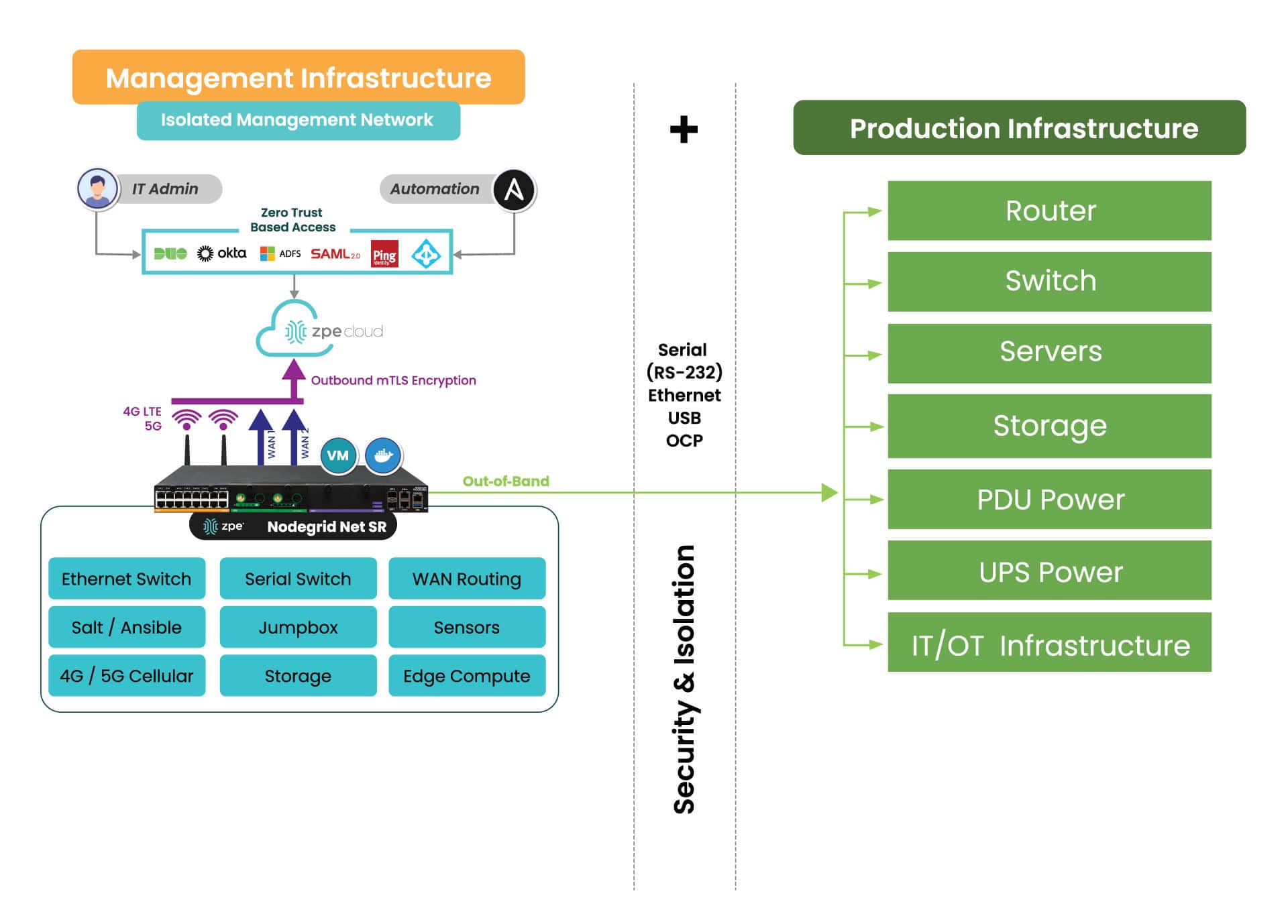
IMI is a dedicated control plane network that’s meant for administration and recovery of IT systems, including Windows PCs affected by the CrowdStrike outage. It uses the concept of out-of-band management, where you deploy a management device that is connected to dedicated management ports of your IT infrastructure (e.g., serial ports, IPMI ports, and other ethernet management ports). IMI also allows you to deploy recovery services for your digital estate that is immutable and near-line when recovery needs to take place.
IMI does not rely at all on the production assets, as it has its own dedicated remote access via WAN links like 4G/5G, and can contain and encrypt recovery keys and tools with zero trust.
IMI gives teams remote, low-level access to devices so they can recover their systems remotely without the need to visit sites. Organizations that employ IMI are able to revert back to a golden image through automation, or deploy bootable tools to all the computers at the site to rescue them without data loss.
The dedicated out-of-band access to serial/IPMI and management ports gives automation software the same abilities as if a physical crash cart was pulled up to the servers. ZPE Systems’ Nodegrid (now a brand of Legrand) enables this architecture as explained next. Using Nodegrid and ZPE Cloud, teams can use either option to recoverfrom the CrowdStrike outage:
Option 1: Reboot in Pre-Execution Environment Software – Nodegrid gives low-level network access to connected Windows as if teams were sitting directly in front of the affected device. This means they can remote-in, reboot to a network image, remote into the booted image, delete the faulty file, and restart the system.
Option 2: Re-image – ZPE Cloud serves as a file repository and orchestration engine. Teams can upload their working Windows image, and then automatically push this across their global fleet of affected devices. This option speeds up recovery times exponentially.
Option 3: – Run Windows Deployment server on the IMI device at the location and re-image servers and workstations if a good backup of the data has been located. This backup can be made available through the IMI after the initial image has been deployed. The IMI can provide dedicated secure access to the InTune services in your M365 cloud, and the backups do not have to transit the entire internet for all workstations at the time, speeding up recovery many times over.
All of these options can be performed at scale or even automated. Server recovery with large backups, although it may take a couple of hours, can be delivered locally and tracked for performance and consistency.
But what about the risk of making mistakes when you have to repeat these tasks? Won’t this cause more damage and data loss?
Any team can make a mistake repeating these recovery tasks over a large footprint, and cause further damage or loss of data, slowing the recovery further. Automated recovery through the IMI addresses this, and can provide reliable recording and reporting to ensure that the restoration is complete and trusted.
What does IMI look like?
Here’s a simplified view of Isolated Management Infrastructure. You can see that ZPE’s Nodegrid device is needed, which sits beside production infrastructure and provides the platform for hosting all the tools necessary for fast recovery.
What you need to deploy IMI for recovery:
Out-of-band appliance with serial, USB, ethernet interfaces (e.g., ZPE’s Nodegrid Net SR)
Switchable PDU: Legrand Server Tech or Raritan PDU
Windows PXE Boot image
Here’s the order of operations for a faster CrowdStrike outage recovery:
Option 1 – Recover
IMI deployed with a ZPE Nodegrid device that will start Pre-Execution Environment (PXE) which are Windows boot images that the Nodegrid will push to the computers when they boot up
Send recovery keys from Intune to IMI remote storage over ZPE Cloud’s zero trust platform easily available in cloud or air-gapped through Nodegrid Manager
Enable PXE service (automated across entire enterprise) and define the PXE recovery image
Use serial or IP control of power to the computers, or if possible Intel vPro or IPMI capable machines, to reboot all machines
All machines will boot and check in to a control tower for PXE, or be made available to remote into using stored passwords on the PXE environment, Windows AD, or other Privileged Access Management (PAM)
Delete Files
Reboot
Option 2 – Lean re-image
IMI deployed with a Windows Pre-Execution boot image running PXE service
Enable access to cloud and Azure Intune to the IMI remote storage for the local image for the PC
Enable PXE service (automated across entire enterprise) and define the PXE recovery image
Use serial or IP control of power to the computers, or if possible, Intel vPro or IPMI capable machines, to reboot all machines
Machines will boot and check in to Intune either through the IMI or through normal Internet access and finish imaging
Once the machine completes the InTune tasks, InTune will signal backups to come down to the machines. If these backups are offsite, they can be staged on the IMI through backup software running on a virtual machine located on the IMI appliance to speed up recovery and not impede the Internet connection at the remote site
Pre-stage backups onto local storage, push recovery from the virtual machine on the IMI
Option 3 – Windows controlled re-image
Windows Deployment Server (WDS) installed as a virtual machine running on the IMI appliance (offline to prevent issues or online but under a slowed deployment cycle in case there was an issue)
Send recovery keys from Intune to IMI remote storage over a zero trust interface in cloud or air-gapped
Use serial or IP control of power to the computers, or if possible, Intel vPro or IPMI capable machines, to reboot all machines
Machines will boot and check in to the WDS for re-imaging
Machines will boot and check in to Intune either through the IMI or through normal Internet access and finish imaging
Once the machine completes the InTune tasks, InTune will signal backups to come down to the machines. If these backups are offsite, they can be staged on the IMI through backup software running on a virtual machine located on the IMI appliance to speed up recovery and not impede the Internet connection at the remote site
Pre-stage backups onto local storage, push recovery from the virtual machine on the IMI
Deploy IMI to avoid the next outage
Get in touch for help choosing the right size IMI deployment for your organization. Nodegrid and ZPE Cloud are the drop-in solution to recovering from outages, with plenty of device options to fit any budget and environment size. Contact ZPE Sales now or download the blueprint to help you begin implementing IMI.
Edge computing delivers data processing and analysis capabilities to the network’s “edge,” at remote sites like branch offices, warehouses, retail stores, and manufacturing plants. It involves deploying computing resources and lightweight applications very near the devices that generate data, reducing the distance and number of network hops between them. In doing so, edge computing reduces latency and bandwidth costs while mitigating risk, enhancing edge resilience, and enabling real-time insights. This blog discusses the five biggest benefits of edge computing, providing examples and additional resources for companies beginning their edge journey. .
5 benefits of edge computing
Edge Computing:
Description
Reduces latency
Leveraging data at the edge reduces network hops and latency to improve speed and performance.
Mitigates risk
Keeping data on-site at distributed edge locations reduces the chances of interception and limits the blast radius of breaches.
Lowers bandwidth costs
Reducing edge data transmissions over expensive MPLS lines helps keep branch costs low.
Enhances edge resilience
Analyzing data on-site ensures that edge operations can continue uninterrupted during ISP outages and natural disasters.
Enables real-time insights
Eliminating off-site processing allows companies to use and extract value from data as soon as it’s generated.
1. Reduces latency
Edge computing leverages data on the same local network as the devices that generate it, cutting down on edge data transmissions over the WAN or Internet. Reducing the number of network hops between devices and applications significantly decreases latency, improving the speed and performance of business intelligence apps, AIOps, equipment health analytics, and other solutions that use edge data.
Some edge applications run on the devices themselves, completely eliminating network hops and facilitating real-time, lag-free analysis. For example, an AI-powered surveillance application installed on an IoT security camera at a walk-up ATM can analyze video feeds in real-time and alert security personnel to suspicious activity as it occurs.
Edge computing mitigates security and compliance risks by distributing an organization’s sensitive data and reducing off-site transmission. Large, centralized data stores in the cloud or data center are prime targets for cybercriminals because the sheer volume of data involved increases the chances of finding something valuable. Decentralizing data in much smaller edge storage solutions makes it harder for hackers to find the most sensitive information and also limits how much data they can access at one time.
Keeping data at the edge also reduces the chances of interception in transit to cloud or data center storage. Plus, unlike in the cloud, an organization maintains complete control over who and what has access to sensitive data, aiding in compliance with regulations like the GDPR and PCI DSS 4.0. .
Many organizations use MPLS (multi-protocol label switching) links to securely connect edge sites to the enterprise network. MPLS bandwidth is much more expensive than regular Internet lines, which makes transmitting edge data to centralized data processing applications extremely costly. Plus, it can take months to provision MPLS at a new site, delaying launches and driving up overhead expenses.
Edge computing significantly reduces MPLS bandwidth utilization by running data-hungry applications on the local network, reserving the WAN for other essential traffic. Combining edge computing with SD-WAN (software-defined wide area networking) and SASE (secure access service edge) technologies can markedly decrease the reliance on MPLS links, allowing organizations to accelerate branch openings and see faster edge ROIs. .
Since edge computing applications run on the same LAN as the devices generating data, they can continue to function even if the site loses Internet access due to an ISP outage, natural disaster, or other adverse event. This also allows uninterrupted edge operations in locations with inconsistent (or no) Internet coverage, like offshore oil rigs, agricultural sites, and health clinics in isolated rural communities. Edge computing ensures that organizations don’t miss any vital health or safety alerts and facilitates technological innovation using AI and other data analytics tools in challenging environments..
.
Sending data from the edge to a cloud or on-premises data lake for processing, transformation, and ingestion by analytics or AI/ML tools takes time, preventing companies from acting on insights at the moment when they’re most useful. Edge computing applications start using data as soon as it’s generated, so organizations can extract value from it right away. For example, a retail store can use edge computing to gain actionable insights on purchasing activity and customer behavior in real-time, so they can move in-demand products to aisle endcaps or staff extra cashiers as needed. .
To learn more about the potential uses of edge computing technology, read Edge Computing Examples.
Simplify your edge computing deployment with Nodegrid
The best way to achieve the benefits of edge computing described above without increasing management complexity or hardware overhead is to use consolidated, vendor-neutral solutions to host, connect, and secure edge workloads. For example, the Nodegrid Gate SR from ZPE Systems delivers an entire stack of edge networking and infrastructure management technologies in a single, streamlined device. The open, Linux-based Nodegrid OS supports VMs and containers for third-party applications, with an Nvidia Jetson Nano card capable of running AI workloads alongside non-AI data analytics for ultimate efficiency.
Improve your edge computing deployment with Nodegrid
Nodegrid consolidates edge computing deployments to improve operational efficiency without sacrificing performance or functionality. Schedule a free demo to see Nodegrid in action.
The continuing trend of enterprise network decentralization to support Internet of Things (IoT) deployments, automation, and edge computing is resulting in rapid growth for the edge security market. Recent research predicts it will reach $82.4 billion by 2031 at a compound annual growth rate (CAGR) of 19.7% from 2024.
Edge security solutions decentralize the enterprise security stack, delivering key firewall capabilities to the network’s edges. This prevents companies from funneling all edge traffic through a centralized data center firewall, reducing latency and improving overall performance.
This guide compares the most popular edge security solutions and offers recommendations for choosing the right vendor for your use case.
Executive summary
There are six single-vendor SASE solutions offering the best combination of features and capabilities for their targeted use cases. .
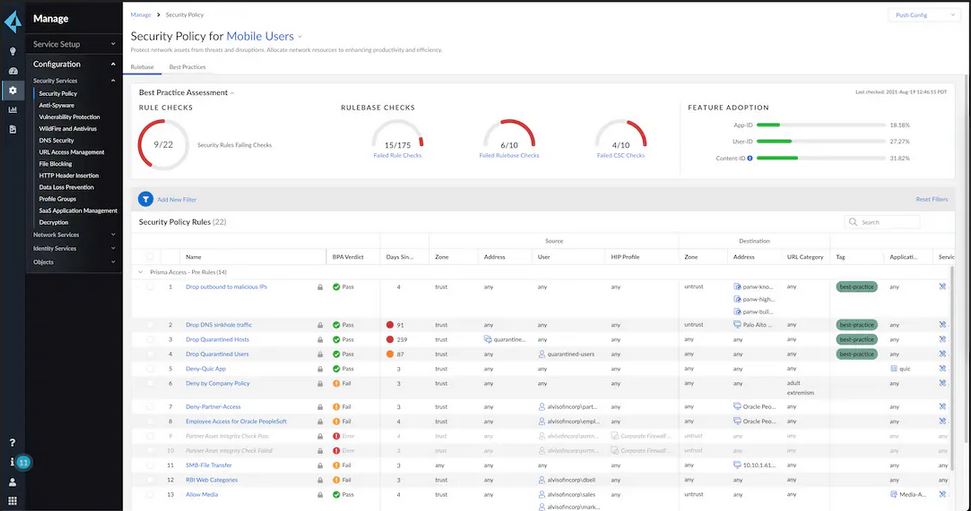
Prisma SASE’s advanced feature set, high price tag, and granular controls make it well-suited to larger enterprises with highly distributed networks, complex edge operations, and personnel with previous SSE and SD-WAN experience.
Zscaler offers fewer security features than some of the other vendors on the list, but its capabilities and feature roadmap align well with the requirements of many enterprises, especially those with large IoT and operational technology (OT) deployments.
Netskope ONE’s flexible options allow mid-sized companies to take advantage of advanced SASE features without paying a premium for the services they don’t need, though the learning curve may be a bit steep for inexperienced teams.
Cisco Secure Connect makes SASE more accessible to smaller, less experienced IT teams, though its high price tag could be prohibitive to these companies. Cisco’s unmanaged SASE solutions integrate easily with existing Cisco infrastructures, but they offer less flexibility in the choice of features than other options on this list.
Forcepoint’s data-focused platform and deep visibility make it well-suited for organizations with complicated data protection needs, such as those operating in the heavily regulated healthcare, finance, and defense industries. However, Forcepoint ONE has a steep learning curve, and integrating other services can be challenging.
FortiSASE provides comprehensive edge security functionality for large enterprises hoping to consolidate their security operations with a single platform. However, the speed of some dashboards and features – particularly those associated with the FortiMonitor DEM software – could be improved for a better administrative experience.
The best edge security solution for Gen 3 out-of-band (OOB) management, which is critical for infrastructure isolation, resilience, and operational efficiency, is Nodegrid from ZPE Systems. Nodegrid provides secure hardware and software to host other vendors’ tools on a secure, Gen 3 OOB network. It creates a control plane for edge infrastructure that’s completely isolated from breaches on the production network and consolidates an entire edge networking stack into a single solution. Disclaimer: This comparison was written by a third party in collaboration with ZPE Systems using publicly available information gathered from data sheets, admin guides, and customer reviews on sites like Gartner Peer Insights, as of 6/09/2024. Please email us if you have corrections or edits, or want to review additional attributes, at matrix@zpesystems.com.
What are edge security solutions?
Edge security solutions primarily fall into one (or both) of two categories:
Security Service Edge (SSE) solutions deliver core security features as a managed service. SSE does not come with any networking capabilities, so companies still need a way to securely route edge traffic through the (often cloud-based) security stack. This usually involves software-defined wide area networking (SD-WAN), which was traditionally a separate service that had to be integrated with the SSE stack.
Secure Access Service Edge (SASE) solutions package SSE together with SD-WAN, preventing companies from needing to deploy and manage multiple vendor solutions.
All the top SSE providers now offer fully integrated SASE solutions with SD-WAN. SASE’s main tech stack is in the cloud, but organizations must install SD-WAN appliances at each branch or edge data center. SASE also typically uses software agents deployed at each site and, in some cases, on all edge devices. Some SASE vendors also sell physical appliances, while others only provide software licenses for virtualized SD-WAN solutions. A third category of edge security solutions offers a secure platform to run other vendors’ SD-WAN and SASE software. These solutions also provide an important edge security capability: management network isolation. This feature ensures that ransomware, viruses, and malicious actors can’t jump from compromised IoT devices to the management interfaces used to control vital edge infrastructure.
Comparing edge security solutions
Palo Alto Prisma SASE
Palo Alto Prisma was named a Leader in Gartner’s 2023 SSE Magic Quadrant for its ability to deliver best-in-class security features. Prisma SASE is a cloud-native, AI-powered solution with the industry’s first native Autonomous Digital Experience Management (ADEM) service. Prisma’s ADEM has built-in AIOps for automatic incident detection, diagnosis, and remediation, as well as self-guided remediation to streamline the end-user experience. Prisma SASE’s advanced feature set, high price tag, and granular controls make it well-suited to larger enterprises with highly distributed networks, complex edge operations, and personnel with previous SSE and SD-WAN experience.
Palo Alto Prisma SASE Capabilities:
Zero Trust Network Access (ZTNA) 2.0 – Automated app discovery, fine-grained access controls, continuous trust verification, and deep security inspection.
Cloud Secure Web Gateway (SWG) – Inline visibility and control of web and SaaS traffic.
Next-Gen Cloud Access Security Broker (CASB) – Inline and API-based security controls and contextual policies.
Remote Browser Isolation (RBI) – Creates a secure isolation channel between users and remote browsers to prevent web threats from executing on their devices.
App acceleration – Application-aware routing to improve “first-mile” connection performance.
Prisma Access Browser – Policy management for edge devices.
Firewall as a Service (FWaaS) – Advanced threat protection, URL filtering, DNS security, and other next-generation firewall (NGFW) features.
Prisma SD-WAN – Elastic networks, app-defined fabric, and Zero Trust security.
Zscaler Zero Trust SASE
Zscaler is another 2023 SSE Magic Quadrant Leader offering a robust single-vendor SASE solution based on its Zero Trust ExchangeTM platform. Zscaler SASE uses artificial intelligence to boost its SWG, firewall, and DEM capabilities. It also offers IoT device management and OT privileged access management, allowing companies to secure unmanaged devices and provide secure remote access to industrial automation systems and other operational technology. Zscaler offers fewer security features than some of the other vendors on the list, but its capabilities and future roadmap align well with the requirements of many enterprises, especially those with large IoT and operational technology deployments.
Zscaler Zero Trust SASE Capabilities:
Zscaler Internet AccessTM (ZIA)– SWG cyberthreat protection and zero-trust access to SaaS apps and the web.
Zscaler Private AccessTM (ZPA)– ZTNA connectivity to private apps and OT devices.
Zscaler Digital ExperienceTM (ZDX) – DEM with Microsoft Copilot AI to streamline incident management.
Zscaler Data Protection– CASB/DLP secures edge data across platforms.
IoT device visibility – IoT device, server, and unmanaged user device discovery, monitoring, and management.
Privileged OT access – Secure access management for third-party vendors and remote user connectivity to OT systems.
Zero Trust SD-WAN – Works with the Zscaler Zero Trust Exchange platform to secure edge and branch traffic.
Netskope ONE
Netskope is the only 2023 SSE Magic Quadrant Leader to offer a single-vendor SASE targeted to mid-market companies with smaller budgets as well as larger enterprises. The Netskope ONE platform provides a variety of security features tailored to different deployment sizes and requirements, from standard SASE offerings like ZTNA and CASB to more advanced capabilities such as AI-powered threat detection and user and entity behavior analytics (UEBA). Netskope ONE’s flexible options allow mid-sized companies to take advantage of advanced SASE features without paying a premium for the services they don’t need, though the learning curve may be a bit steep for inexperienced teams.
Netskope ONE Capabilities:
Next-Gen SWG– Protection for cloud services, applications, websites, and data.
CASB– Security for both managed and unmanaged cloud applications.
ZTNA Next – ZTNA with integrated software-only endpoint SD-WAN.
Netskope Cloud Firewall (NCF)– Outbound network traffic security across all ports and protocols.
RBI – Isolation for uncategorized and risky websites.
SkopeAI – AI-powered threat detection, UEBA, and DLP
Public Cloud Security – Visibility, control, and compliance for multi-cloud environments.
Advanced analytics – 360-degree risk analysis.
Cloud Exchange – Multi-cloud integration tools.
DLP – Sensitive data discovery, monitoring, and protection.
Device intelligence – Zero trust device discovery, risk assessment, and management.
Proactive DEM – End-to-end visibility and real-time insights.
SaaS security posture management – Continuous monitoring and enforcement of SaaS security settings, policies, and best practices.
Borderless SD-WAN – Zero trust connectivity for edge, branch, cloud, remote users, and IoT devices.
Cisco
Cisco is one of the only edge security vendors to offer SASE as a managed service for companies with lean IT operations and a lack of edge networking experience. Cisco Secure Connect SASE-as-a-service includes all the usual SSE capabilities, such as ZTNA, SWG, and CASB, as well as native Meraki SD-WAN integration and a generative AI assistant. Cisco also provides traditional SASE by combining Cisco Secure Access SSE – which includes the Cisco Umbrella Secure Internet Gateway (SIG) – with Catalyst SD-WAN. Cisco Secure Connect makes SASE more accessible to smaller, less experienced IT teams, though its high price tag could be prohibitive to these companies. Cisco’s unmanaged SASE solutions integrate easily with existing Cisco infrastructures, but they offer less flexibility in the choice of features than other options on this list.
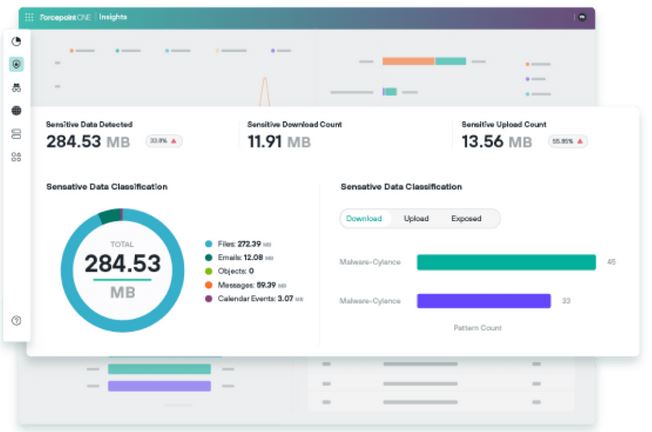
Forcepoint ONE is a cloud-native single-vendor SASE solution placing a heavy emphasis on edge and multi-cloud visibility. Forcepoint ONE aggregates live telemetry from all Forcepoint security solutions and provides visualizations, executive summaries, and deep insights to help companies improve their security posture. Forcepoint also offers what they call data-first SASE, focusing on protecting data across edge and cloud environments while enabling seamless access for authorized users from anywhere in the world. Forcepoint’s data-focused platform and deep visibility make it well-suited for organizations with complicated data protection needs, such as those operating in the heavily regulated healthcare, finance, and defense industries. However, Forcepoint ONE has a steep learning curve, and integrating other services can be challenging.
Forcepoint ONE Capabilities:
CASB – Access control and data security for over 800,000 cloud apps on managed and unmanaged devices.
ZTNA – Secure remote access to private web apps.
SWG – Includes RBI, content disarm & reconstruction (CDR), and a cloud firewall.
Data Security – A cloud-native DLP to help enforce compliance across clouds, apps, emails, and endpoints.
Insights – Real-time analysis of live telemetry data from Forcepoint ONE security products.
FlexEdge SD-WAN – Secure access for branches and remote edge sites.
Fortinet FortiSASE
Fortinet’s FortiSASE platform combines feature-rich, AI-powered NGFW security functionality with SSE, digital experience monitoring, and a secure SD-WAN solution. Fortinet’s SASE offering includes the FortiGate NGFW delivered as a service, providing access to FortiGuard AI-powered security services like antivirus, application control, OT security, and anti-botnet protection. FortiSASE also integrates with the FortiMonitor DEM SaaS platform to help organizations optimize endpoint application performance. FortiSASE provides comprehensive edge security functionality for large enterprises hoping to consolidate their security operations with a single platform. However, the speed of some dashboards and features – particularly those associated with the FortiMonitor DEM software – could be improved for a better administrative experience.
Fortinet FortiSASE Capabilities:
Antivirus – Protection from the latest polymorphic attacks, ransomware, viruses, and other threats.
DLP – Prevention of intentional and accidental data leaks.
AntiSpam – Multi-layered spam email filtering.
Application Control – Policy creation and management for enterprise and cloud-based applications.
Attack Surface Security – Security Fabric infrastructure assessments based on major security and compliance frameworks.
CASB – Inline and API-based cloud application security.
DNS Security – DNS traffic visibility and filtering.
IPS – Deep packet inspection (DPI) and SSL inspection of network traffic.
OT Security – IPS for OT systems including ICS and SCADA protocols.
AI-Based Inline Malware Prevention – Real-time protection against zero-day exploits and sophisticated, novel threats.
URL Filtering – AI-powered behavior analysis and correlation to block malicious URLs.
Anti-Botnet and C2 – Prevention of unauthorized communication attempts from compromised remote servers.
FortiMonitor DEM – SaaS-based digital experience monitoring.
Secure SD-WAN – On-premises and cloud-based SD-WAN integrated into the same OS as the SSE security solutions.
Edge isolation and security with ZPE Nodegrid
The Nodegrid platform from ZPE Systems is a different type of edge security solution, providing secure hardware and software to host other vendors’ tools on a secure, Gen 3 out-of-band (OOB) management network. Nodegrid integrated branch services routers use alternative network interfaces (including 5G/4G LTE) and serial console technology to create a control plane for edge infrastructure that’s completely isolated from breaches on the production network. It uses hardware security features like secure boot and geofencing to prevent physical tampering, and it supports strong authentication methods and SAML integrations to protect the management network. Nodegrid’s OOB also ensures remote teams have 24/7 access to manage, troubleshoot, and recover edge deployments even during a major network outage or ransomware infection. Plus, Nodegrid’s ability to host Guest OS, including Docker containers and VNFs, allows companies to consolidate an entire edge networking stack in a single platform. Nodegrid devices like the Gate SR with Nvidia Jetson Nano can even run edge computing and AI/ML workloads alongside SASE. .
ZPE Nodegrid Edge Security Capabilities
Vendor-neutral platform – Hosting for third-party applications and services, including Docker containers and virtualized network functions.
Gen 3 OOB – Management interface isolation and 24/7 remote access during outages and breaches.
Branch networking – Routing and switching, VNFs, and software-defined branch networking (SD-Branch).
Secure boot – Password-protected BIO/Grub and signed software.
Latest kernel & cryptographic modules – 64-bit OS with current encryption and frequent security patches.
SSO with SAML, 2FA, & remote authentication – Support for Duo, Okta, Ping, and ADFS.
Geofencing – GPS tracking with perimeter crossing detection.
Tampering protection – Configuration checksum and change detection with a configuration ‘reset’ button.
TPM encrypted storage – Software encryption for SSD hardware storage.
Deploy edge security solutions on the vendor-neutral Nodegrid OOB platform
Nodegrid’s secure hardware and vendor-neutral OS make it the perfect platform for hosting other vendors’ SSE, SD-WAN, and SASE solutions. Reach out today to schedule a free demo.
ZPE Systems delivers innovative solutions to simplify infrastructure managment at the datacenter, branch, and edge.
Learn how our Zero Pain Ecosystem can solve your biggest network orchestration pain points.





 Nodegrid’s OOB also ensures remote teams have 24/7 access to manage, troubleshoot, and recover edge deployments even during a major network outage or ransomware infection. Plus, Nodegrid’s ability to host Guest OS, including Docker containers and VNFs, allows companies to consolidate an entire edge networking stack in a single platform. Nodegrid devices like the