Providing Out-of-Band Connectivity to Mission-Critical IT Resources

Out-of-Band Monitoring: What it is and Why You Need It

Out-of-band monitoring what it is and why you need it

Network reliability and security are mission-critical for organizations. Yet, relying solely on in-band networks for monitoring and management creates a significant risk. When the primary network experiences an outage or breach, IT teams need to scramble to regain control. Out-of-band monitoring offers a dedicated pathway for monitoring and managing devices, so teams have reliable, always-available access to ensure resilience. But, how does out-of-band monitoring work? What can it monitor? Why is it essential to a network resilience strategy? Let’s find out.

What is Out-of-Band Monitoring and How Does it Work?

Out-of-band monitoring is a network management strategy that uses a dedicated management network, separate from the production network, to monitor and manage critical infrastructure. Whereas in-band monitoring relies on the same data network used by users and applications, out-of-band monitoring remains isolated and operational even if the main network is down.

How does out-of-band monitoring connect to devices?

  • Console Access via Serial Ports: Out-of-band monitoring uses serial console ports on routers, switches, firewalls, and servers to provide direct access to the device’s command-line interface (CLI). This connection bypasses the primary network entirely.
  • Dedicated Management Interfaces: Many modern devices come with a dedicated management Ethernet port (e.g., Cisco’s management interface or HP iLO for servers). These ports are linked to an out-of-band network, allowing secure remote access.
  • Secure Remote Access Gateways: Centralized console servers or remote access gateways aggregate connections to multiple devices, making it easy to manage a large number of endpoints from a single interface.

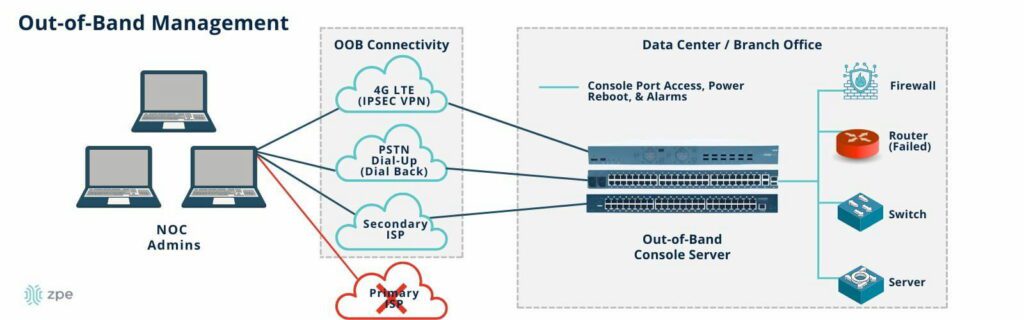
Teams can gain remote access to out-of-band console servers via dedicated cellular, ISP, Starlink, or other connection that is separate from the main network.

Network diagram showing how out-of-band management works

Image: An out-of-band network provides dedicated connectivity that’s separate from the main network. NOC admins can gain access to out-of-band console servers via cellular, dial-up, ISP, or other connection, and manage all data center/branch devices connected to the console servers.

What can out-of-band monitor and manage?

  • Network Device Status: Real-time monitoring of routers, switches, and firewalls for availability, performance, and errors.
  • Power Systems: Monitoring and managing power distribution units (PDUs) to ensure stable power, perform remote power cycling, and maintain updated firmware.
  • Server Health: Tracking CPU, memory, disk usage, and hardware diagnostics for servers through out-of-band management interfaces like IPMI, Dell iDRAC, or HP iLO.
  • Environmental Conditions: Temperature, humidity, and physical security sensors can be monitored to detect and respond to environmental threats in data centers and remote sites.
  • Network Connectivity: Ensures WAN links, including primary and backup connections (cellular or satellite), are functioning properly.

How Out-of-Band Monitoring Improves Resilience

Out-of-band monitoring significantly enhances network resilience by providing independent access to critical infrastructure. With transparency into device health, network performance, and other systems, teams can stem issues before they have a chance to develop into outages or security breaches. If any problems do occur on the main network, this out-of-band lifeline lets teams instantly respond rather than forcing them to dispatch on-site technicians.

  1. Always-On Access
    Out-of-band networks operate independently from production traffic, ensuring that administrators can maintain visibility and control even when the primary network is congested or down.
  2. Incident Recovery and Diagnostics
    When the primary network is compromised, out-of-band allows IT teams to perform root cause analysis, reconfigure devices, and restore services without relying on affected in-band connectivity.
    • Example: During a DDoS attack, out-of-band provides a clean path to troubleshoot and block the attack at the firewall.
    • Example: If a firmware update causes a network device to become unresponsive, the out-of-band console allows administrators to roll back changes or restore from backup.
  3. Secure and Segmented Access
    Out-of-band isolates management traffic from business data, reducing the attack surface and preventing lateral movement by attackers. Combined with multi-factor authentication (MFA), access control lists (ACLs), and encrypted tunnels, out-of-band becomes a secure channel for managing sensitive infrastructure.
  4. Proactive Monitoring and Automation
    Advanced OOB solutions enable proactive monitoring of device health and predictive failure analysis. Integrated automation tools can trigger alerts, backups, or failover mechanisms when certain thresholds are reached.

Secure Out-of-Band Monitoring with ZPE Systems’ Nodegrid Platform

When implementing out-of-band monitoring, ZPE Systems’ Nodegrid platform offers a secure, vendor-agnostic solution designed for modern IT environments.

Why Nodegrid Stands Out:

  • Universal Compatibility: Nodegrid supports a wide range of network devices and servers, integrating with Cisco, Juniper, Dell, Palo Alto Networks, and more.
  • Consolidated Devices: Nodegrid is a multi-function, drop-in solution that replaces six or more traditional management devices, including servers, routers, switches, cellular, and others.
  • Built-In Cellular and Starlink Failover: Ensure remote sites stay connected through cellular 4G/5G or satellite (Starlink) connections when traditional WAN links fail.
  • Centralized Management: Nodegrid provides a unified management interface that enables IT teams to monitor, manage, and automate infrastructure from a single dashboard.
  • Security First: Nodegrid and ZPE Cloud are the industry’s most secure platform, with features like role-based access control (RBAC), network segmentation, and encrypted communications to safeguard management traffic.

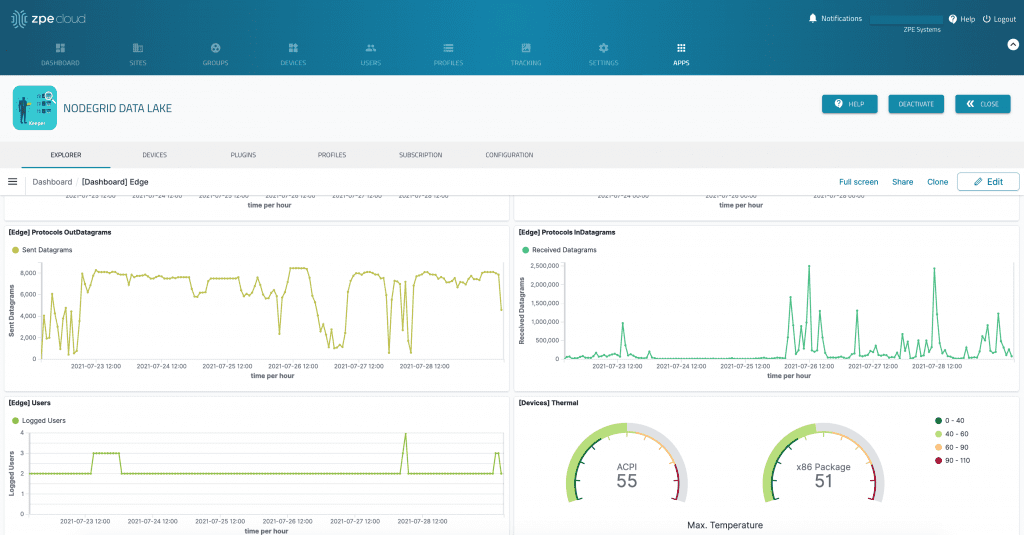
Nodegrid Data Lake interface visualizing data points using graphs and meters.

Image: ZPE Cloud enables data collection and analyses for out-of-band monitoring, allowing users to monitor infrastructure metrics, visualize trends, and take a proactive approach to maintaining uptime.

Out-of-band monitoring is essential for any organization prioritizing uptime and security. The Nodegrid platform by ZPE Systems offers secure, scalable solutions like the 96-port Nodegrid Serial Console Plus for hyperscale data centers and the Nodegrid Gate SR for remote sites. With support for automation, APIs, and custom alerts, Nodegrid simplifies out-of-band monitoring for complex networks while ensuring continuous control, even during outages.

Explore Nodegrid for Drop-In Out-of-Band Monitoring

See why Nodegrid is the drop-in out-of-band monitoring solution trusted by hyperscalers, telecom, retail, and hundreds of global organizations. Request a demo today.

The Future of Data Centers: Overcoming the Challenges of Lights-Out Operations

Future of lights-out data centers

In a recent article, Y Combinator announced its search for startups aiming to eliminate human intervention in data center development and operation. While one half of this vision seems focused on automating the design and construction of data centers, the other half – focused on fully automating operations (a.k.a. “lights-out”) – is already a reality. ZPE Systems and Legrand are enabling enterprises to achieve this kind of operation by providing the best practices that are already in use in hyperscale data centers for lights-out management.

The Need for Lights-Out Data Centers

The growth of cloud computing, edge deployments, and AI-driven workloads means data centers need to be as efficient, scalable, and resilient as possible. The challenge is that because there is so much infrastructure to manage, the buildout and operation of these data centers becomes very costly and time consuming.

Diane Hu, a YC group partner who previously worked in augmented reality and data science, says, “Hyperscale data center projects take many years to complete. We need more data centers that are created faster and cheaper to build out the infrastructure needed for AI progress. Whether it be in power infrastructure, cooling, procurement of all materials, or project management.”

Dalton Caldwell, a YC managing director who also cofounded App.net, adds, “Software is going to handle all aspects of planning and building a new data center or warehouse. This can include site selection, construction, set up, and ongoing management. They’re going to be what’s called lights-out. There’s going to be robots, autonomously operating 24/7. We want to fund startups to help create this vision.”

In terms of ongoing management and operations, bringing this vision to life will require organizations to overcome several significant problems:

  1. Rising Operational Costs: Staffing and maintaining on-site engineers 24/7 is costly. Labor expenses, training, and turnover increase operational overhead.
  2. Human Error and Downtime: Human error is the leading cause of downtime, so having manual processes often leads to costly outages caused by typos, misconfigurations, and slow response times.
  3. Security Threats: Physical access to data centers increases the risk of insider threats, breaches, and unauthorized interventions.
  4. Remote Site Management: Managing geographically distributed data centers and edge locations requires staff to be on-site. What’s needed is a scalable and efficient solution that lets staff remotely perform every job, outside of physically installing equipment.
  5. Sustainability and Energy Efficiency: On-site workers have specific heating/cooling needs that must be met in order to comfortably perform their jobs. Reducing human presence in data centers enables better energy management, which can lower carbon footprints and reduce cooling requirements.

The Roadblocks to Lights-Out Data Centers

Despite the obvious benefits, organizations struggle to implement fully autonomous data center operations. The obstacles include:

  • Legacy Infrastructure: Many enterprises still rely on outdated equipment that lacks the necessary integrations for automation and remote control. Adding functions or capabilities typically means deploying more physical boxes, which increases costs and complexity.
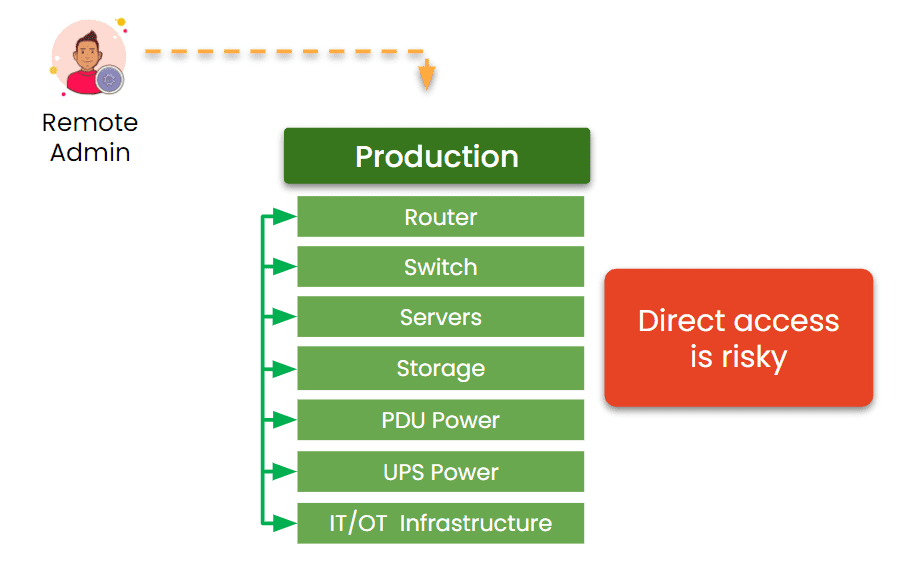
  • Network Resilience and Connectivity: Traditional in-band network management fails during outages, making it difficult to troubleshoot and recover remotely. Without complete separation of the management network from production networks, organizations are unable to achieve true resilience from errors, outages, and breaches.
  • Integration Challenges: Implementing AI-driven automation, OOB management, and cybersecurity protections requires seamless interoperability between different vendors’ solutions.
  • Security Concerns: A fully automated data center must have robust access controls, zero-trust security frameworks, and remote threat mitigation capabilities.
  • Skill Gaps: The shift to automation necessitates retraining IT staff, who may be unfamiliar with the latest technologies required to maintain a hands-off data center.

Direct remote access is risky

Image: The traditional management approach relies on production assets. This makes it impossible to achieve resilience, because production failures cut off remote admin access.

How ZPE Systems is Powering Lights-Out Operations

ZPE Systems is already helping companies overcome these challenges and transition to lights-out data center operations. As part of Legrand, ZPE is a key component in a total solution offering that includes everything from cabinets and containment to power distribution and remote access. By leveraging out-of-band management, intelligent automation, and zero-trust security, ZPE enables enterprises to manage their infrastructure remotely and securely.

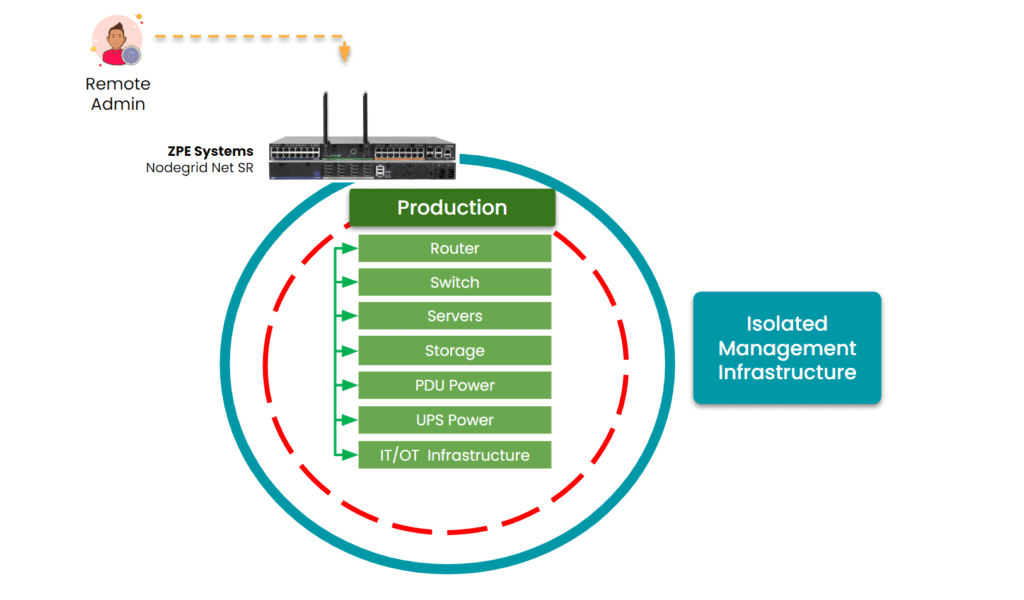
Isolated Management Infrastructure is critical to lights-out data center operations.

Image: ZPE Systems’ Nodegrid creates an Isolated Management Infrastructure. This gives admins secure remote access, even when the production network fails or suffers an attack.

Key benefits of this management infrastructure include:

  • Reliable Remote Access: ZPE’s OOB solutions ensure secure access to critical infrastructure even when primary networks fail. This is made possible by ZPE’s Isolated Management Infrastructure (IMI), which creates a fully separate management network. This single-box solution helps organizations achieve lights-out operations without device sprawl.
  • Automated Remediation: ZPE’s platform hosts third party applications, Docker containers, and AI and automation solutions. Organizations can leverage data about device health, telemetry, environmentals, and in-band performance, to resolve issues fast and prevent downtime.
  • Hardened Security: ZPE’s solutions are built with security in mind, from local MFA, to self-encrypted disk and signed OS. ZPE also has the most security certifications and validations, including SOC2 Type 2, FIPS 140-3, and ISO27001. Read our full supply chain security assurance pdf.
  • Multi-Vendor Integration: ZPE is the only drop-in solution that works across diverse environments, regardless of which vendor solutions are already in place. This makes it easy to deploy IMI and the resilience architecture necessary for achieving lights-out operations.
  • Comprehensive Data Center Solutions: With Legrand’s full suite of data center infrastructure, organizations benefit from a fully integrated approach that ensures efficiency, scalability, and resilience.

Lights-out data centers are an achievable reality. By addressing the key challenges and leveraging advanced remote management solutions, enterprises can reduce operational costs, enhance security, and improve efficiency. As part of Legrand, ZPE Systems continues to lead the charge in enabling this transformation for organizations across the globe.

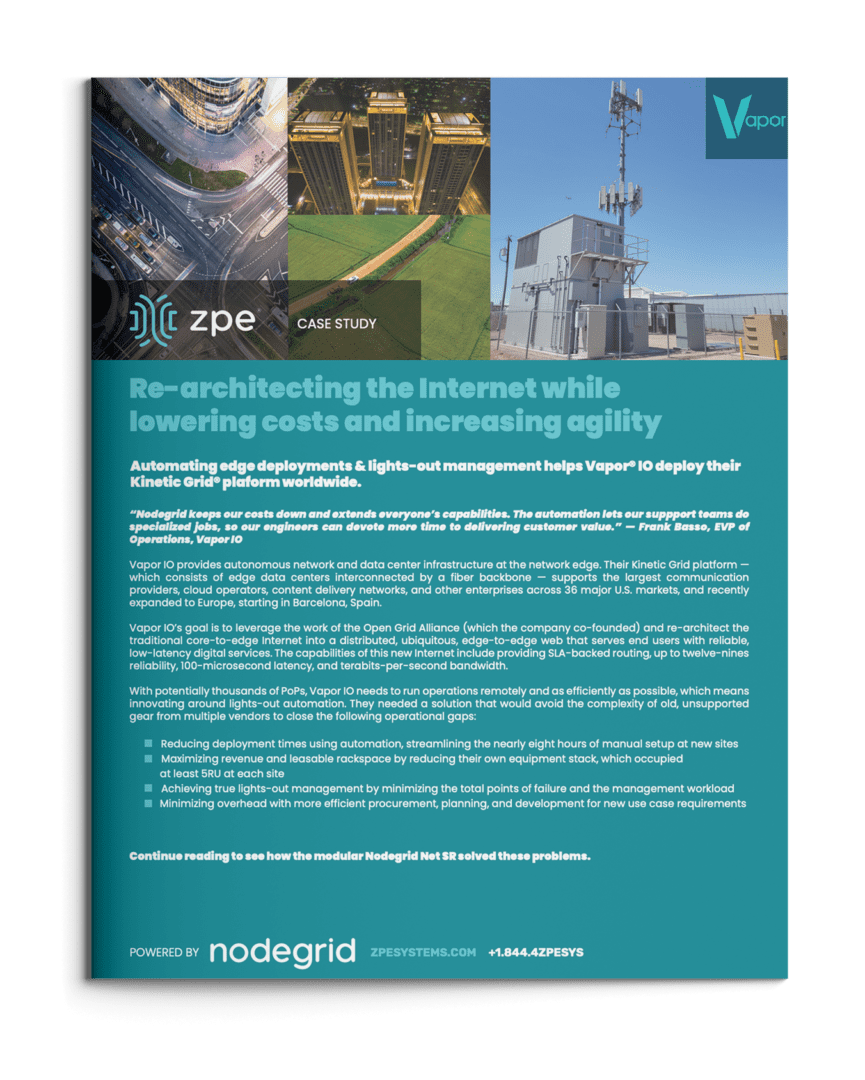
See How Vapor IO Achieved Lights-Out Operations with ZPE Systems

Vapor IO is re-architecting the internet. They deploy micro data centers at the network edge, serving markets across the U.S. and Europe. When they needed to achieve true lights-out operations, they chose ZPE Systems’ Nodegrid. Find out how this solution reduced deployment times to just one hour and delivered additional time and cost savings. Download the full case study below.

Get in Touch for a Demo of Lights-Out Data Center Operations

Our engineers are ready to walk you through lights-out operations. Click below to set up a demo.

Comparing Console Server Hardware

Console servers – also known as serial consoles, console server switches, serial console servers, serial console routers, or terminal servers – are critical for data center infrastructure management. They give administrators a single point of control for devices like servers, switches, and power distribution units (PDUs) so they don’t need to log in to each piece of equipment individually. It also uses multiple network interfaces to provide out-of-band (OOB) management, which creates an isolated network dedicated to infrastructure orchestration and troubleshooting. This OOB network remains accessible during production network outages, offering remote teams a lifeline to recover systems without costly and time-consuming on-site visits. 

Console server hardware can vary significantly across different vendors and use cases. This guide compares console server hardware from the three top vendors and examines four key categories: large data centers, mixed environments, break-fix deployments, and modular solutions.

Console server hardware for large data center deployments

Large and hyperscale data centers can include hundreds or even thousands of individual devices to manage. Teams typically use infrastructure automation, like infrastructure as code (IaC), because managing devices at such a large scale is impossible to do manually. The best console server hardware for high-density data centers will include plenty of managed serial ports, support hundreds of concurrent sessions, and provide support for infrastructure automation.

Click here to compare the hardware specs of the top providers, or read below for more information.

Nodegrid Serial Console Plus (NSCP)

The Nodegrid Serial Console Plus (NSCP) from ZPE Systems is the only console server providing up to 96 RS-232 serial ports in a 1U rack-mounted form factor. Its quad-core Intel processor and robust (as well as upgradable) internal storage and RAM options, as well as its Linux-based Nodegrid OS, support Guest OS and Docker containers for third-party applications. That means the NSCP can directly host infrastructure automation (like Ansible, Puppet, and Chef), security (like Palo Alto’s next-generation firewalls and Secure Access Service Edge), and much more. Plus, it can extend zero-touch provisioning (ZTP) to legacy and mixed-vendor devices that otherwise wouldn’t support automation.

The NSCP also comes packed with hardware security features including BIOS protection, UEFI Secure Boot, self-encrypted disk (SED), Trusted Platform Module (TPM) 2.0, and a multi-site VPN using IPSec, WireGuard, and OpenSSL protocols. Plus, it supports a wide range of USB environmental monitoring sensors to help remote teams control conditions in the data center or colocation facility.

Advantages:

  • Up to 96 managed serial ports in a 1U appliance
  • Intel x86 CPU and 4GB of RAM for 3rd-party Docker and VM apps
  • Extends ZTP and automation to legacy and mixed-vendor infrastructure
  • Robust on-board security features like BIOS protection and TPM 2.0
  • Supports a wide range of USB environmental monitoring sensors
  • Wi-Fi and 5G/4G LTE options available
  • Supports over 1,000 concurrent sessions

Disadvantages:

  • USB ports limited on 96-port model

Opengear CM8100

The Opengear CM8100 comes in two models: the 1G version includes up to 48 managed serial ports, while the 10G version supports up to 96 serial ports in a 2U form factor. Both models have a dual-core ARM Cortex processor and 2GB of RAM, allowing for some automation support with upgraded versions of the Lighthouse management software. They also come with an embedded firewall, IPSec and OpenVPN protocols for a single-site VPN, and TPM 2.0 security.

Advantages:

  • 10G model comes with software-selectable serial ports
  • Supports OpenVPN and IPSec VPNs
  • Fast port speeds

Disadvantages:

  • Automation and ZTP require Lighthouse software upgrade
  • No cellular or Wi-Fi options
  • 96-port model requires 2U of rack space

Perle IOLAN SCG (fixed)

The IOLAN SCG is Perle’s fixed-form-factor console server solution. It supports up to 48 managed serial ports and can extend ZTP to end devices. It comes with onboard security features including an embedded firewall, OpenVPN and IPSec VPN, and AES encryption. However, the IOLAN SCG’s underpowered single-core ARM processor, 1GB of RAM, and 4GB of storage limit its automation capabilities, and it does not integrate with any third-party automation or orchestration solutions. 

Advantages:

  • Supports ZTP for end devices
  • Comprehensive firewall functionality

Disadvantages

  • Very limited CPU, RAM, and flash storage
  • Does not support third-party automation

Comparison Table: Console Server Hardware for Large Data Centers

Nodegrid NSCP Opengear CM8100 Perle IOLAN SCG
Serial Ports 16 / 32 / 48 / 96x RS-232 16 / 32 / 48 / 96x RS-232 16 / 32 / 48x RS-232
Max Port Speed 230,400 bps 230,400 bps 230,000 bps
Network Interfaces

2x SFP+ 

2x ETH

1x Wi-Fi (optional)

2x Dual SIM LTE (optional)

2x ETH 1x ETH
Additional Interfaces

1x RS-232 console

2x USB 3.0 Type A

1x HDMI Output

1x RS-232 console

2x USB 3.0

1x RS-232 console

1x Micro USB w/DB9 Adapter

Environmental Monitoring Any USB sensors
CPU Intel x86_64 Quad-Core ARM Cortex-A9 1.6 GHz Dual-Core ARM 32-bit 500MHz Single-Core
Storage 32GB SSD (upgrades available) 32GB eMMC 4GB Flash
RAM 4GB DDR4 (upgrades available) 2GB DDR4 1GB
Power

Single or Dual AC

Dual DC

Dual AC

Dual DC

Single AC
Form Factor 1U Rack Mounted

1U Rack Mounted (up to 48 ports)

2U Rack Mounted (96 ports)

1U Rack Mounted
Data Sheet Download

CM8100 1G

CM8100 10G

Download

Console server hardware for mixed environments

Data center deployments that include a mix of legacy and modern solutions from multiple vendors benefit from console server hardware that includes software-selectable serial ports. This feature allows administrators to manage devices with straight or rolled RS-232 pinouts from the same console server. 

Click here to compare the hardware specs of the top providers, or read below for more information.

Nodegrid Serial Console S Series

The Nodegrid Serial Console S Series has up to 48 auto-sensing RS-232 serial ports and 14 high-speed managed USB ports, allowing for the control of up to 62 devices. Like the NSCP, the S Series has a quad-core Intel CPU and upgradeable storage and RAM, supporting third-party VMs and containers for automation, orchestration, security, and more. It also comes with the same robust security features to protect the management network.

Advantages:

  • Includes 14 high-speed managed USB ports
  • Intel x86 CPU and 4GBof RAM for 3rd-party Docker and VM apps
  • Supports a wide range of USB environmental monitoring sensors
  • Extends ZTP and automation to legacy and mixed-vendor infrastructure
  • Robust on-board security features like BIOS protection and TPM 2.0
  • Supports 250+ concurrent sessions

Disadvantages

  • Only offers 1Gbps and Ethernet connectivity for OOB

Opengear OM2200

The Opengear OM2200 comes with 16, 32, or 48 software-selectable RS-232 ports, or, with the OM2224-24E model, 24 RS-232 and 24 managed Ethernet ports. It also includes 8 managed USB ports and the option for a V.92 analog modem. It has impressive storage space and 8GB of DDR4 RAM for automated workflows, though, as with all Opengear solutions, the upgraded version of the Lighthouse management software is required for ZTP and NetOps automation support.

Advantages:

  • Optional managed Ethernet ports
  • Optional V.92 analog modem for OOB
  • 64GB of storage and 8GB DDR4 RAM

Disadvantages:

  • Automation and ZTP require Lighthouse software upgrade
  • No cellular or Wi-Fi options

Comparison Table: Console Server Hardware for Mixed Environments

  Nodegrid S Series Opengear OM2200
Serial Ports

16 / 32 / 48x Software Selectable RS-232

14x USB-A serial

16 / 32 / 48x Software Selectable RS-232
8x USB 2.0 serial


(OM2224-24E) 24x Software Selectable RS-232 and 24x Managed Ethernet

Max Port Speed

230,400 bps (RS-232)

921,600 bps (USB)

230,400 bps
Network Interfaces 2x1Gbps or 2x ETH

2x SFP+ or 2x ETH

1x V.92 modem (select models)

Additional Interfaces

1x RS-232 console

1x USB 3.0 Type A

1x HDMI Output

1x RS-232 console

1x Micro USB

2x USB 3.0

Environmental Monitoring Any USB sensors
CPU Intel x86_64 Dual-Core AMD GX-412TC 1.4 GHz Quad-Core
Storage 32GB SSD (upgrades available) 64GB SSD
RAM 4GB DDR4 (upgrades available) 8GB DDR3
Power

Single or Dual AC

Dual DC

Dual AC

Dual DC

Form Factor 1U Rack Mounted 1U Rack Mounted
Data Sheet Download Download

Console server hardware for break-fix deployments

A full-featured console server solution may be too complicated and expensive for certain use cases, especially for organizations just looking for “break-fix” OOB access to remotely troubleshoot and recover from issues. The best console server hardware for this type of deployment provides fast and reliable network access to managed devices without extra features that increase the price and complexity.

Click here to compare the hardware specs of the top providers, or read below for more information.

Nodegrid Serial Console Core Edition (NSCP-CE)

The Nodegrid Serial Console Core Edition (NSCP-CE) provides the same hardware and security features as the NSCP, as well as ZTP, but without the advanced automation capabilities. Its streamlined management and affordable price tag make it ideal for lean, budget-conscious IT departments. And, like all Nodegrid solutions, it comes with the most comprehensive hardware security features in the industry. 

Advantages:

  • Up to 48 managed serial ports in a 1U appliance
  • Extends ZTP and automation to legacy and mixed-vendor infrastructure
  • Robust on-board security features like BIOS protection and TPM
  • Supports a wide range of USB environmental monitoring sensors
  • Analog modem and 5G/4G LTE options available
  • Supports over 100 concurrent sessions

Disadvantages

  •  Supports automation only via ZPE Cloud

Opengear CM7100

The Opengear CM7100 is the previous generation of the CM8100 solution. Its serial and network interface options are the same, but it comes with a weaker, Armada 800 MHz CPU, and there are options for smaller storage and RAM configurations to reduce the price. As with all Opengear console servers, the CM7100 doesn’t support ZTP without paying for an upgraded Lighthouse license, however.

Advantages:

  • Can reduce storage and RAM to save money
  • Supports OpenVPN and IPSec VPNs
  • Fast port speeds

Disadvantages:

  • Automation and ZTP require Lighthouse software upgrade
  • No cellular or Wi-Fi options
  • 96-port model requires 2U of rack space

Comparison Table: Console Server Hardware for Break-Fix Deployments

  Nodegrid NSCP-CE Opengear CM7100
Serial Ports 16 / 32 / 48 / RS-232 16 / 32 / 48 / 96x RS-232
Max Port Speed 230,400 bps 230,400 bps
Network Interfaces

2x SFP ETH

1x Analog modem (optional)

2x 5G/4G LTE (optional)

2x ETH
Additional Interfaces

1x RS-232 console

2x USB 3.0 Type A

1x RS-232 console

2x USB 2.0

Environmental Monitoring Any USB sensors Smoke, water leak, vibration
CPU Intel x86_64 Dual-Core Armada 370 ARMv7 800 MHz
Storage 16GB Flash (upgrades available) 4-64GB storage
RAM 4GB DDR4 (upgrades available) 256MB-2GB DDR3
Power

Dual AC

Dual DC

Single or Dual AC
Form Factor 1U Rack Mounted

1U Rack Mounted (up to 48 ports)

2U Rack Mounted (96 ports)

Data Sheet Download Download

Modular console server hardware for flexible deployments

Modular console servers allow organizations to create customized solutions tailored to their specific deployment and use case. They also support easy scaling by allowing teams to add more managed ports as the network grows, and provide the flexibility to swap-out certain capabilities and customize their hardware and software as the needs of the business change. 

Click here to compare the hardware specs of the top providers, or read below for more information.

Nodegrid Net Services Router (NSR)

The Nodegrid Net Services Router (NSR) has up to five expansion bays that can support any combination of 16 RS-232 or 16 USB serial modules. In addition to managed ports, there are NSR modules for Ethernet (with or without PoE – Power over Ethernet) switch ports, Wi-Fi and dual-SIM cellular, additional SFP ports, extra storage, and compute. 

The NSR comes with an eight-core Intel CPU and 8GB DDR4 RAM, offering the same vendor-neutral Guest OS/Docker support and onboard security features as the NSCP. It can also run virtualized network functions to consolidate an entire networking stack in a single device. This makes the NSR adaptable to nearly any deployment scenario, including hyperscale data centers, edge computing sites, and branch offices.

Advantages:

  • Up to 5 expansion bays provide support for up to 80 managed devices
  • 8GB of DDR4 RAM
  • Robust on-board security features like BIOS protection and TPM 2.0
  • Supports a wide range of USB environmental monitoring sensors
  • Wi-Fi and 5G/4G LTE options available
  • Optional modules for various interfaces, extra storage, and compute

Disadvantages

  • No V.92 modem support

Perle IOLAN SCG L/W/M

The Perle IOLAN SCG modular series is customizable with cellular LTE, Wi-Fi, a V.92 analog modem, or any combination of the three. It also has three expansion bays that support any combination of 16-port RS-232 or 16-port USB modules. Otherwise, this version of the IOLAN SCG comes with the same security features and hardware limitations as the fixed form factor models.

Advantages:

  • Cellular, Wi-Fi, and analog modem options
  • Supports ZTP for end devices
  • Comprehensive firewall functionality

Disadvantages

  • Very limited CPU, RAM, and flash storage
  • Does not support third-party automation

Comparison Table: Modular Console Server Hardware

  Nodegrid NSR Perle IOLAN SCG R/U
Serial Ports

16 / 32 / 48 / 64 / 80x RS-232 with up to 5 serial modules

16 / 32 / 48 / 64 / 80x USB with up to 5 serial modules

Up to 50x RS-232/422/485

Up to 50x USB

Max Port Speed 230,400 bps 230,000 bps
Network Interfaces

1x SFP+ 

1x ETH with PoE in

1x Wi-Fi (optional)

1x Dual SIM LTE (optional)

2x SFP or 2x ETH
Additional Interfaces

1x RS-232 console

2x USB 2.0 Type A

2x GPIO

2x Digital Out

1x VGA

Optional Modules (up to 5):

16x ETH

8x PoE+

16x SFP

8x SFP+

16x USB OCP Debug

1x RS-232 console

1x Micro USB w/DB9 adapter


Environmental Monitoring Any USB sensors
CPU Intel x86_64 Quad- or Eight-Core ARM 32-bit 500MHz Single-Core
Storage 32GB SSD (upgrades available) 4GB Flash
RAM 8GB DDR4 (upgrades available 1GB
Power

Dual AC

Dual DC

Dual AC

Dual DC

Form Factor 1U Rack Mounted 1U Rack Mounted
Data Sheet Download Download

Get the best console server hardware for your deployment with Nodegrid

The vendor-neutral Nodegrid platform provides solutions for any use case, deployment size, and pain points. Schedule a free Nodegrid demo to learn more.

Want to see Nodegrid in action?

Watch a demo of the Nodegrid Gen 3 out-of-band management solution to see how it can improve scalability for your data center architecture.

Watch a demo

Data Center Scalability Tips & Best Practices

Data center scalability is the ability to increase or decrease workloads cost-effectively and without disrupting business operations. Scalable data centers make organizations agile, enabling them to support business growth, meet changing customer needs, and weather downturns without compromising quality. This blog describes various methods for achieving data center scalability before providing tips and best practices to make scalability easier and more cost-effective to implement.

How to achieve data center scalability

There are four primary ways to scale data center infrastructure, each of which has advantages and disadvantages.


4 Data center scaling methods

Method Description Pros and Cons
1. Adding more servers Also known as scaling out or horizontal scaling, this involves adding more physical or virtual machines to the data center architecture. Can support and distribute more workloads

Eliminates hardware constraints

Deployment and replication take time

Requires more rack space

Higher upfront and operational costs

2. Virtualization Dividing physical hardware into multiple virtual machines (VMs) or virtual network functions (VNFs) to support more workloads per device. Supports faster provisioning

Uses resources more efficiently

Reduces scaling costs

Transition can be expensive and disruptive

Not supported by all hardware and software

3. Upgrading existing hardware Also known as scaling up or vertical scaling, this involves adding more processors, memory, or storage to upgrade the capabilities of existing systems. Implementation is usually quick and non-disruptive

More cost-effective than horizontal scaling

Requires less power and rack space

Scalability limited by server hardware constraints

Increases reliance on legacy systems

4. Using cloud services Moving some or all workloads to the cloud, where resources can be added or removed on-demand to meet scaling requirements. Allows on-demand or automatic scaling

Better support for new and emerging technologies

Reduces data center costs

Migration is often extremely disruptive

Auto-scaling can lead to ballooning monthly bills

May not support legacy software

It’s important for companies to analyze their requirements and carefully consider the advantages and disadvantages of each method before choosing a path forward. 

Best practices for data center scalability

The following tips can help organizations ensure their data center infrastructure is flexible enough to support scaling by any of the above methods.

Run workloads on vendor-neutral platforms

Vendor lock-in, or a lack of interoperability with third-party solutions, can severely limit data center scalability. Using vendor-neutral platforms ensures that teams can add, expand, or integrate data center resources and capabilities regardless of provider. These platforms make it easier to adopt new technologies like artificial intelligence (AI) and machine learning (ML) while ensuring compatibility with legacy systems.

Use infrastructure automation and AIOps

Infrastructure automation technologies help teams provision and deploy data center resources quickly so companies can scale up or out with greater efficiency. They also ensure administrators can effectively manage and secure data center infrastructure as it grows in size and complexity. 

For example, zero-touch provisioning (ZTP) automatically configures new devices as soon as they connect to the network, allowing remote teams to deploy new data center resources without on-site visits. Automated configuration management solutions like Ansible and Chef ensure that virtualized system configurations stay consistent and up-to-date while preventing unauthorized changes. AIOps (artificial intelligence for IT operations) uses machine learning algorithms to detect threats and other problems, remediate simple issues, and provide root-cause analysis (RCA) and other post-incident forensics with greater accuracy than traditional automation. 

Isolate the control plane with Gen 3 serial consoles

Serial consoles are devices that allow administrators to remotely manage data center infrastructure without needing to log in to each piece of equipment individually. They use out-of-band (OOB) management to separate the data plane (where production workflows occur) from the control plane (where management workflows occur). OOB serial console technology – especially the third-generation (or Gen 3) – aids data center scalability in several ways:

  1. Gen 3 serial consoles are vendor-neutral and provide a single software platform for administrators to manage all data center devices, significantly reducing management complexity as infrastructure scales out.
  2. Gen 3 OOB can extend automation capabilities like ZTP to mixed-vendor and legacy devices that wouldn’t otherwise support them.
  3. OOB management moves resource-intensive infrastructure automation workflows off the data plane, improving the performance of production applications and workflows.
  4. Serial consoles move the management interfaces for data center infrastructure to an isolated control plane, which prevents malware and cybercriminals from accessing them if the production network is breached. Isolated management infrastructure (IMI) is a security best practice for data center architectures of any size.

How Nodegrid simplifies data center scalability

Nodegrid is a Gen 3 out-of-band management solution that streamlines vertical and horizontal data center scalability. 

The Nodegrid Serial Console Plus (NSCP) offers 96 managed ports in a 1RU rack-mounted form factor, reducing the number of OOB devices needed to control large-scale data center infrastructure. Its open, x86 Linux-based OS can run VMs, VNFs, and Docker containers so teams can run virtualized workloads without deploying additional hardware. Nodegrid can also run automation, AIOps, and security on the same platform to further reduce hardware overhead.

Nodegrid OOB is also available in a modular form factor. The Net Services Router (NSR) allows teams to add or swap modules for additional compute, storage, memory, or serial ports as the data center scales up or down.

Want to see Nodegrid in action?

Watch a demo of the Nodegrid Gen 3 out-of-band management solution to see how it can improve scalability for your data center architecture.

Watch a demo

Data Center Migration Checklist

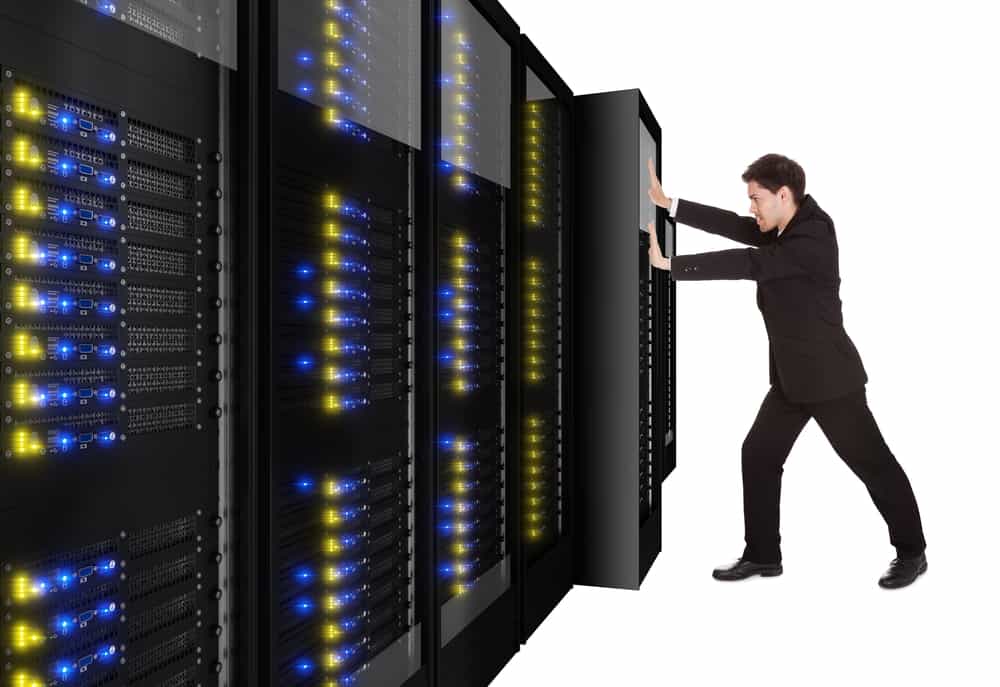
A data center migration is represented by a person physically pushing a rack of data center infrastructure into place
Various reasons may prompt a move to a new data center, like finding a different provider with lower prices, or the added security of relocating assets from an on-premises location to a colocation facility or private cloud.

Despite the potential benefits, data center migrations are often tough on enterprises, both internally and from the client side of things. Data center managers, systems administrators, and network engineers must cope with the logistical difficulties of planning, executing, and supporting the move. End-users may experience service disruptions and performance issues that make their jobs harder. Migrations also tend to reveal any weaknesses in the actual infrastructure that’s moved, which means systems that once worked perfectly may require extra support during and after the migration.

The best way to limit headaches and business disruptions is to plan every step of a data center migration meticulously. This guide provides a basic data center migration checklist to help with planning and includes additional resources for streamlining your move.

Data center migration checklist

Data center migrations are always complex and unique to each organization, but there are typically two major approaches:

  • Lift-and-shift. You physically move infrastructure from one data center to another. In some ways, this is the easiest approach because all components are known, but it can limit your potential benefits if gear remains in racks for easy transport to the new location rather than using the move as an opportunity to improve or upgrade certain parts.
  • New build. You replace some or all of your infrastructure with different solutions in a new data center. This approach is more complex because services and dependencies must be migrated to new environments, but it also permits organizations to simultaneously improve operational processes, cut costs, and update existing tech stacks.

The following data center migration checklist will help guide your planning for either approach and ensure you’re asking the right questions to prepare for any potential problems.

Quick Data Center Migration Checklist

  • Conduct site surveys of the current and the new data centers to determine the existing limitations and available resources, like space, power, cooling, cable management, and security.

  • Locate – or create – documentation for infrastructure requirements such as storage, compute, networking, and applications.

  • Outline the dependencies and ancillary systems from the current data center environment that you must replicate in the new data center.

  • Plan the physical layout and overall network topology of the new environment, including physical cabling, out-of-band management, network, storage, power, rack layout, and cooling.

  • Plan your management access, both for the deployment and for ongoing maintenance, and determine how to assist the rollout (for example, with remote access and automation).

  • Determine your networking requirements (e.g., VLANs, IP addresses, DNS, MPLS) and make an implementation plan.

  • Plan out the migration itself and include disaster recovery options and checkpoints in case something changes or issues arise.

  • Determine who is responsible for which aspects of the move and communicate all expectations and plans.

  • Assign a dedicated triage team to handle end-user support requests if there are issues during or immediately after the move.

  • Create a list of vendor contacts for each migrated component so it’s easier to contact support if something goes wrong.

  • If possible, use a lab environment to simulate key steps of the data center migration to identify potential issues or gaps.

  • Have a testing plan ready to execute once the move is complete to ensure infrastructure integrity, performance, and reliability in the new data center environment.

1.  Site surveys

The first step is to determine your physical requirements – how much space, power, cooling, cable management, etc., you’ll need in the new data center. Then, conduct site surveys of the new environment to identify existing limitations and available resources. For example, you’ll want to make sure the HVAC system can provide adequate climate control – specific to the new locale – for your incoming hardware. You may need to verify that your power supply can support additional chillers or dehumidifiers, if necessary, to maintain optimal temperature ranges. In addition to physical infrastructure requirements, factors like security and physical accessibility are important considerations for your new location.

2. Infrastructure documentation

At a bare minimum, you need an accurate list of all the physical and virtual infrastructure you’re moving to the new data center. You should also collect any existing documentation on your application and system requirements for storage, compute, networking, and security to ensure you cover all these bases in the migration. If that documentation doesn’t exist, now’s the time to create it. Having as much documentation as possible will streamline many of the following steps in your data center move.

3. Dependencies and ancillary services

Aside from the infrastructure you’re moving, hundreds or thousands of other services will likely be affected by the change. It’s important to map out these dependencies and ancillary services to learn how the migration will affect them and what you can do to smooth the transition. For example, if an application or service relies on a legacy database, you may need to upgrade both the database and its hardware to ensure end-users have uninterrupted access. As an added benefit, creating this map also aids in implementing micro-segmentation for Zero Trust security.

4. Layout and topology

The next step is to plan the physical layout of the new data center infrastructure. Where will network, storage, and power devices sit in the rack and cabinets? How will you handle cable management? Will your planned layout provide enough airflow for cooling? This is also the time to plan the network topology – how traffic will flow to, from, and within the new data center infrastructure.

5. Management access

You must determine how your administrators will deploy and manage the new data center infrastructure. Will you enable remote access? If so, how will you ensure continuous availability during migration or when issues arise? Do you plan to automate your deployment with zero touch provisioning?

6. Network planning

If you didn’t cover this in your infrastructure documentation, you’ll need specific documentation for your data center networking requirements – both WAN (wide area networking) and LAN (local area networking). This is a good time to determine whether you want to exactly replicate your existing network environment or make any network infrastructure upgrades. Then, create a detailed implementation plan covering everything from VLANs to IP address provisioning, DNS migrations, and ordering MPLS circuits.

7. Migration & build planning

Next, plan out each step of the move or build itself – the actions your team will perform immediately before, during, and after the migration. It’s important to include disaster recovery options in case critical services break, or unforeseen changes cause delays. Implementing checkpoints at key stages of the move will help ensure any issues are fixed before they impact subsequent migration steps.

8. Assembling a team

At this stage, you likely have a team responsible for planning the data center migration, but you also need to identify who’s responsible for every aspect of the move itself. It’s critical to do this as early as possible so you have time to set expectations, communicate the plan, and handle any required pre-migration training or support. Additionally, ensure this team includes dedicated support staff who can triage end-user requests if any issues arise during or after the migration.

9. Vendor support

Any experienced sysadmin will tell you that anything that could go wrong with a data center migration probably will, so you should plan for the worst but hope for the best. That means collecting a list of vendor contacts for each hardware and software component you’re migrating so it will be easier to contact support if something goes awry. For especially critical systems, you may even want to alert your vendor POCs prior to the move so they can be on hand (or near their phones) on the day of the move.

10. Lab simulation

This step may not be feasible for every organization, but ideally, you’ll use a lab environment to simulate key stages of the data center migration before you actually move. Running a virtualized simulation can help you identify potential hiccups with connection settings or compatibility issues. It can also highlight gaps in your planning – like forgetting to restore user access and security rules after building new firewalls – so you can address them before they affect production services.

11. Post-migration testing

Finally, you need to create a post-migration testing plan that’s ready to implement as soon as the move is complete. Testing will validate the integrity, performance, and reliability of infrastructure in the new environment, allowing teams to proactively resolve issues instead of waiting for monitoring notifications or end-user complaints.

Streamlining your data center migration

Using this data center migration checklist to create a comprehensive plan will help reduce setbacks on the day of the move. To further streamline the migration process and set yourself up for success in your new environment, consider upgrading to a vendor-neutral data center orchestration platform. Such a platform will provide a unified tool for administrators and engineers to monitor, deploy, and manage modern, multi-vendor, and legacy data center infrastructure. Reducing the number of individual solutions you need to access and manage during migration will decrease complexity and speed up the move, so you can start reaping the benefits of your new environment sooner.

Want to learn more about Data Center migration?

For a complete data center migration checklist, including in-depth guidance and best practices for moving day, click here to download our Complete Guide to Data Center Migrations or contact ZPE Systems today to learn more.
Contact Us Download Now

Network Automation Cost Savings Calculator

automation cost savings calculator
Many organizations feel continuous financial pressure to cut costs and streamline operations due to economic factors like the ongoing threat of a recession and global supply chain interruptions. Network automation can help companies across all industries save money during lean financial times. A recent Cisco and ACG Research study found that network automation can reduce OPEX by 55% by streamlining workflows such as device provisioning and service ticket management. Though they aren’t mentioned in the study, additional savings are generated by using automation to avoid outages and accelerate recovery efforts.

This post discusses how to save money through automation and provides a network automation cost savings calculator for a more customized estimate of your potential ROI.


Table of contents

How network automation provides cost savings

Network automation reduces costs by streamlining operations, preventing outages, and aiding in backup and recovery workflows.

Network automation saves money by solving problems

Problem: High OPEX

Solution: Automation tackles repetitive tasks like new installs and ticketing operations, which helps you generate revenue sooner and reduce the time and resources spent on maintaining operations.

Problem: Too many outages

Solution: Automation allows teams to be proactive by leveraging critical data to identify potential problems before they cause outages, freeing them from the typical break/fix approach.

Problem: Slow recovery

Solution: Automation speeds up processes like backups, snapshotting, and device re-imaging, which makes networks more resilient by accelerating recovery from outages and ransomware.

Reduces OPEX

The focus of the Cisco/ACG study was the economic benefits of streamlining network operations through automation. For example, the OPEX (operational expenditure) involved in spinning up a new branch is too high because deployments require so much work, time, and staff. Using automation to provision and deploy new resources can significantly reduce the time it takes to spin up a new branch, which means the site could start generating revenue much sooner. Using automation to monitor device health and environmental conditions could extend the life expectancy of critical (and expensive) equipment while reducing the number of on-site staff needed to maintain that equipment.

Network automation reduces OPEX by increasing the efficiency of repetitive or tedious tasks like new installs, incident management, and device monitoring. Crucially, automation does so without reducing the quality of service for end users and often only improves the speed, reliability, and overall experience.

Prevents outages

Network downtime is an expense that cash-strapped businesses can’t afford to bear. According to a recent ITIC survey, a single hour of downtime costs most organizations (91%) over $300,000 in lost business, with 44% of enterprises reporting outage costs exceeding $1 million. However, preventing downtime is difficult when most network teams are caught in a reactive break/fix cycle because they lack the staffing, resources, and technology required to maintain visibility and identify issues before they occur.

Network automation solves this problem using advanced machine learning algorithms to analyze monitoring data and identify potential issues before they cause outages. For example, AIOps (artificial intelligence for IT operations) solutions provide real-time analysis of infrastructure, network, and security logs. AIOps is adept at recognizing patterns and detecting anomalies in data so that it can identify issues before they affect the performance or reliability of the network.

Accelerates recovery

While network automation helps to reduce downtime, it can’t eliminate outages altogether. When outages do occur, recovery is often a long, drawn-out process involving a lot of manual work, during which time revenue and customer faith may be lost. Network resilience is the ability to quickly recover from ransomware, equipment failures, and other causes of downtime with as little impact as possible on end users and business revenue. Automation speeds up recovery efforts in a few critical ways:

  • Streamlined backups – Automation makes performing regular backups and snapshots easier, reducing the risk of gaps or inaccuracies.
  • Reduced imaging delays – Automatic provisioning ensures that clean systems are spun up quickly so that business can resume as soon as possible.
  • Faster failover – Automatic network failover and routing technologies can reroute traffic around downed nodes before a human admin has time to respond, providing a more seamless end-user experience.

Network automation is a direct source of cost savings because it reduces OPEX without negatively impacting the business or customer experience. Automation also indirectly saves money by helping organizations avoid outages through proactive monitoring and maintenance. In addition, network automation technologies make businesses more resilient by speeding up recovery efforts when breaches and failures do occur.

Network automation cost savings calculator

ZPE Systems provides network and infrastructure automation solutions for any use case, pain point, or technological need. ZPE’s vendor-neutral platform allows you to extend automation to every device on your network, including legacy and mixed-vendor solutions, so that you can achieve true end-to-end automation (a.k.a. hyperautomation). For a customized estimation of how much money you can save by automating your network operations with ZPE Systems, check out our network automation cost savings calculator.

Ready to Learn More?

For help with the network automation cost savings calculator or to learn more about automating your network operations, contact ZPE Systems today.

Contact Us