Providing Out-of-Band Connectivity to Mission-Critical IT Resources

End of Row vs Top of Rack Deployments

End of Row vs Top of Rack Deployments

The terms end-of-row and top-of-rack refer to two different approaches to data center architecture design. Both approaches have advantages and disadvantages that make them suited to different use cases or teams, with neither being the clear “winner” overall. This blog compares end-of-row vs. top-of-rack deployments based on crucial factors like cost, management complexity, scalability, and resilience to help organizations choose the right approach for their environment.


What is an end-of-row (EoR) deployment?
ZPE Graphic Request IR Nov 4
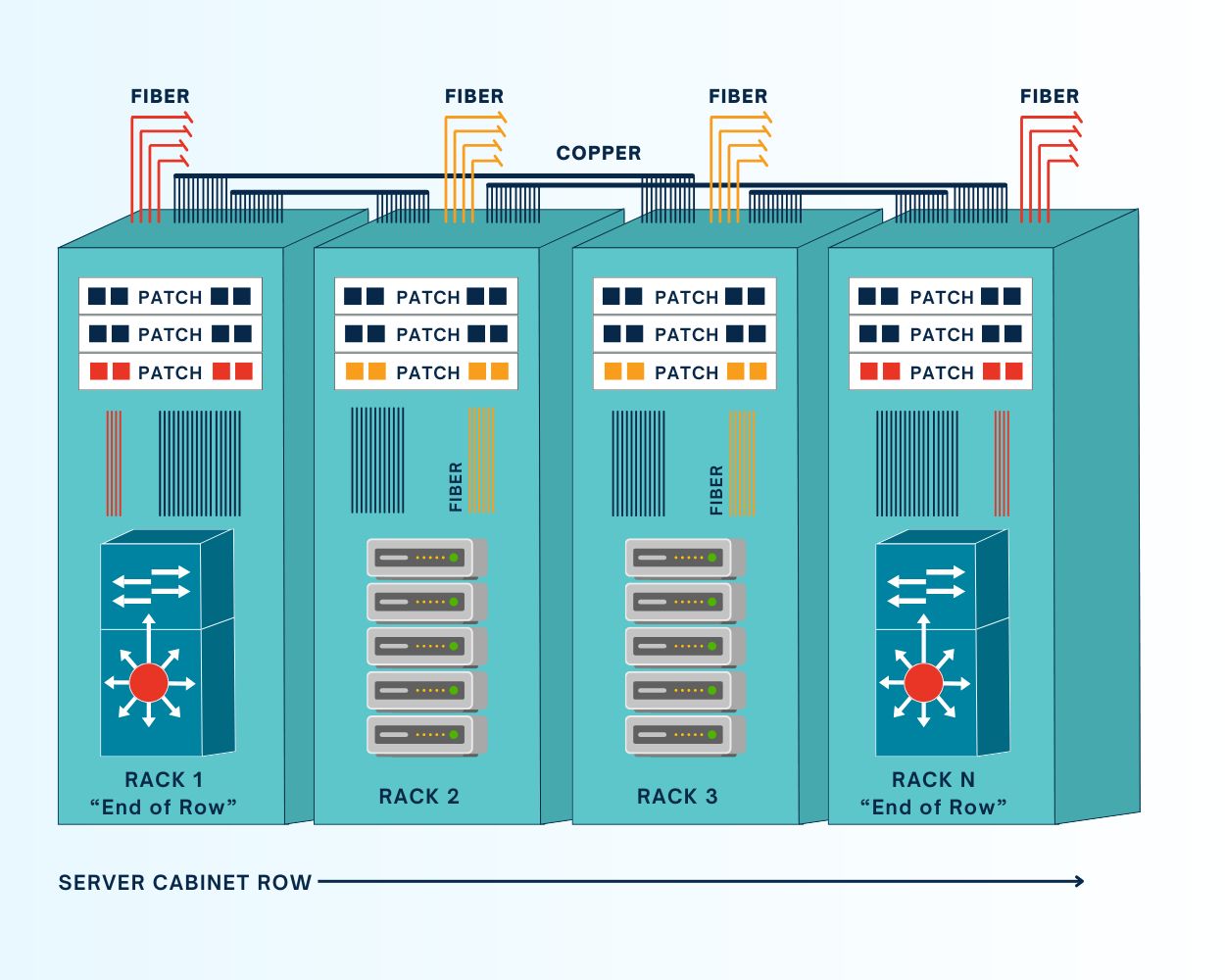
In data center deployments consisting of multiple rows of racks or cabinets, it’s common for teams to consolidate all the networking for each row in one physical location, rather than deploying switches in every single rack. All patch cables for the devices in a particular row are run to the dedicated networking cabinet, which is typically (but not always) at the end of the row. An end-of-row (or EoR) architecture requires fewer switches than a ToR deployment, which helps reduce costs and management complexity while enabling easier scaling.

One of the main drawbacks of this architecture is that the EoR switch is a single point of failure for the entire row. If that switch fails due to a botched update, ransomware attack, or other adverse event, the whole row loses network access. Running cables from each cabinet to the EoR can also get messy very quickly, especially at scale. In the long run, it’s also a less flexible architecture that forces teams to consider an entire row of infrastructure every time they want to change or upgrade networking components.


What is a top-of-rack (ToR) deployment?
ZPE Graphic Request IR Nov 4 (1)
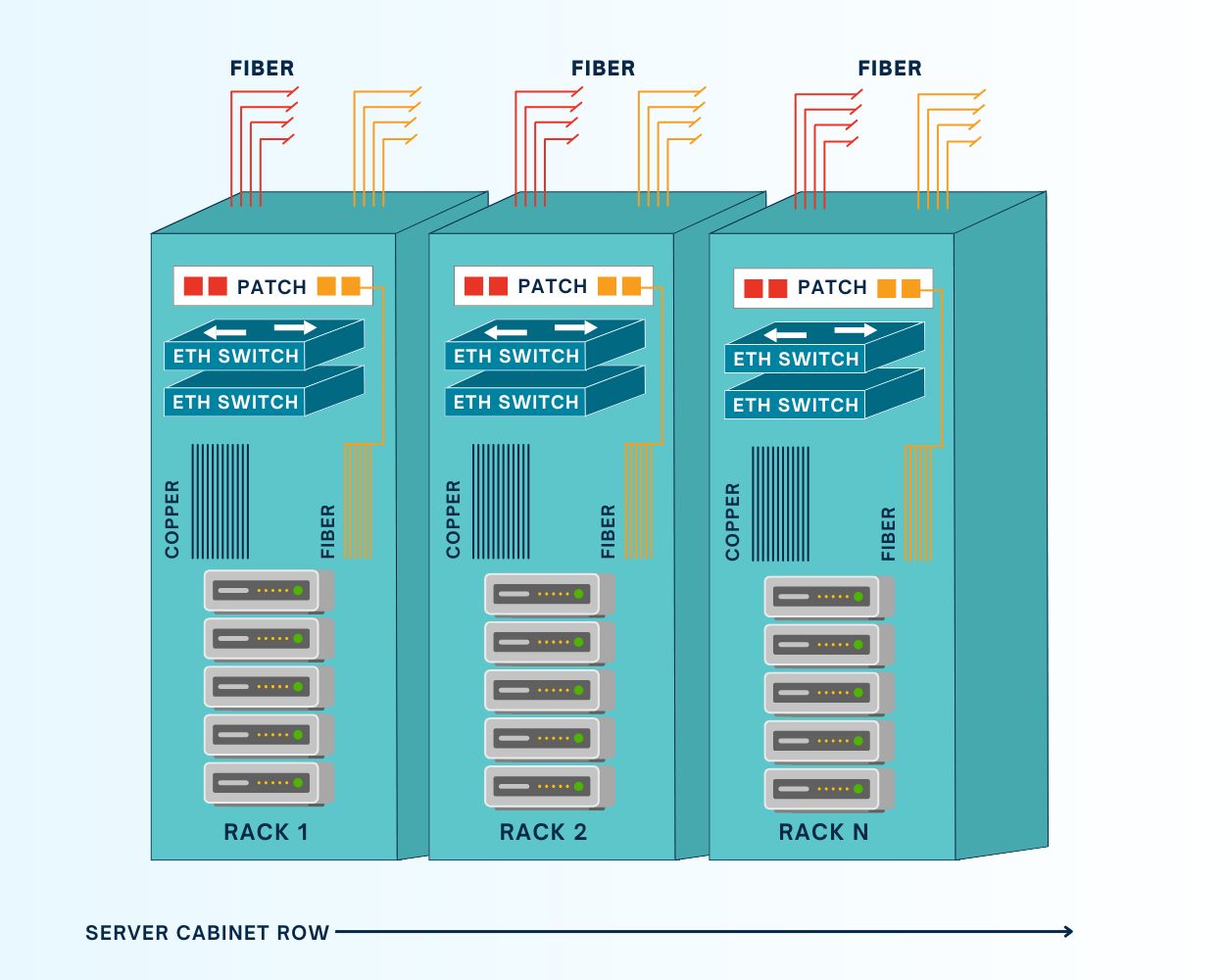
In a top-of-rack data center architecture, DC teams install one or more switches in every rack of their deployment; despite the name, the switch doesn’t need to actually be at the very top of the rack. A ToR deployment keeps copper/Ethernet patch cables inside the rack, which helps with cable management. It also eliminates the single-point-of-failure that an EoR switch represents – if one ToR switch goes down for some reason, only the devices within that rack are affected, vs. the entire row. Another major benefit of EoR deployments is that each rack becomes a modular unit that DC teams can modify, upgrade, or scale without necessarily affecting other racks in the row.

On the other hand, a ToR deployment requires more switches than an EoR deployment, which can increase costs and complexity. More switches equate to more power draw, and they add an extra network hop to local traffic that could possibly affect throughput. Each switch must also be monitored, secured, and regularly patched, potentially creating more work for infrastructure teams. As a result, ToR deployments are also more challenging to scale, as each new rack added to the data center requires an additional ToR switch.

Comparing end-of-row vs top-of-rack deployments: Which should you choose?


End-of-Row Top-of-Rack
Number of switches One or more per row One or more per rack
Cable management Requires patch cables running along the entire row Keeps patch cables within the rack or cabinet
Cost Fewer switches and lower power draw keeps costs down More switches and higher power draw gets more expensive
Complexity Fewer switches to secure, manage, and troubleshoot More devices to manage
Ease of scaling Can deploy an entire new row with only one networking cabinet Each new rack requires one or more switches
Flexibility Inflexible; networking changes affect entire row Each rack is a modular unit that can be changed without affecting others
Resilience EoR switch is a single point of failure for the entire row One rack’s switch can go down without affecting any other racks


Both EoR and ToR architectures have advantages and disadvantages, with neither being the clear-cut winner for every possible use case.

End-of-row deployments are more cost-effective and easier to manage and scale, so they’re often favored by smaller, leaner IT teams or, on the opposite end of the spectrum, very large (or hyperscale) data centers. For example, a large cloud provider might prefer EoR to cut down on the number of switches to purchase, deploy, and manage at their hubs.

Top-of-rack deployments are modular, flexible, and resilient, which makes them a great choice for DevOps teams that need the ability to add or change components at any time without affecting the entire architecture. For example, managed service providers might prefer ToR so they can easily customize or update one customer’s rack without worrying about how the changes will impact others.

How Nodegrid improves resilience for EoR and ToR deployments

Nodegrid serial console switches can be deployed top-of-rack or end-of-row to improve the resilience of either architecture. Nodegrid switches connect to the serial port on data center devices to provide out-of-band (OOB) management, allowing teams to remotely manage and troubleshoot DC equipment even when the primary network is down. They isolate the management interfaces for data center infrastructure, making them inaccessible to malware or malicious actors on the production network. Plus, Nodegrid also provides network failover to keep business-critical services running during adverse events.

Nodegrid serial consoles have an open architecture that can integrate and host other vendors’ software and virtualized network functions. That means a single Nodegrid box could theoretically replace an entire rack of networking hardware, streamlining EoR deployments and making ToR architectures more feasible for lean, budget-strapped IT teams. Plus, Nodegrid switches and all connected devices can be remotely managed from a single, on-premises or cloud-based software platform, significantly reducing management complexity for either deployment.

Reach out to ZPE Systems for more help comparing end-of-row vs. top-of-rack deployments or to see a demo of the Nodegrid platform in action.

Data Center Environmental Sensors: Everything You Need to Know

According to a recent Uptime Institute survey, severe outages can cost more than $1 million USD and lead to reputational loss as well as business and customer disruption. Humidity, air particulates, and other problems could shorten the lifetime of critical equipment or cause outages. Unfortunately, much of a business’s critical digital infrastructure and services are housed in remote data centers, making it difficult for busy IT teams to keep eyes on the environmental conditions.

Data center environmental sensors can help teams prevent downtime by monitoring conditions in remote infrastructure deployments and alerting administrators to any problems before they lead to equipment failure. This blog explains how environmental sensors work and describes the ideal environmental monitoring solution for minimizing outages.

How data center environmental sensors reduce downtime

Data center environmental sensors are deployed around the rack, cabinet, or cage to collect information about various conditions that could negatively affect equipment like routers, servers, and switches. 

Mitigating environmental risks with data center environmental sensors

Environmental Risk Description How Environmental Sensors Help
Temperature All data center equipment has an optimal operating temperature range, as well as a max temp threshold above which devices may overheat. Environmental sensors monitor ambient temperatures and trigger automated alerts when it gets too hot or too cold in the data center.
Humidity If the air in the data center gets too humid, moisture may collect on the internal components of devices and cause corrosion, shorts, or other failures. Environmental sensors monitor the relative humidity in the DC and alert administrators when there’s a danger of moisture accumulation.
Fire A fire in the data center could burn equipment, raise the ambient temperature beyond acceptable limits, or activate automatic fire suppression controls that damage devices. Environmental sensors detect the heat and smoke from fires, giving DC teams time to shut down systems before they’re damaged.
Tampering A malicious actor who’s able to get past data center security (such as an inside threat) could potentially tamper with equipment to damage or breach it. Tamper detection sensors alert remote teams when data center cabinet doors are opened or a device is physically moved.
Air Particulates Smoke, ozone, and other air particulates could potentially damage data center infrastructure by oxidizing components or clogging vents. Environmental sensors monitor air quality and automatically alert teams when particulates are detected.

These sensors report back to monitoring software that’s either deployed on-premises in the data center or hosted in the cloud. Administrators use this software to view real-time conditions or to configure automated alerts.

Environmental monitoring sensors help reduce outages by giving remote IT teams advance warning that something is wrong with conditions in the data center, enabling them to potentially fix the problem before any systems go down. However, traditional monitoring solutions suffer from a number of limitations.

  1. They need a stable internet connection to allow remote access, so if there’s an ISP outage or unknown failure, teams lose their ability to monitor the situation.
  2. Many of them use on-premises software that requires administrators to connect via VPN to monitor or manage the solution, creating security risks and management hurdles.
  3. Most environmental monitoring systems don’t easily integrate with other remote management tools, leaving administrators with a disjointed patchwork of platforms to wrestle with.

The ideal data center environmental monitoring solution

The Nodegrid data center environmental monitoring platform overcomes these challenges with a combination of out-of-band management, cloud-based software, and a vendor-agnostic architecture.

Nodegrid environmental sensors work with Nodegrid serial consoles to provide remote teams with a virtual presence in the data center. These devices create an instant out-of-band network that uses a dedicated internet connection to provide continuous remote access to all connected sensors and infrastructure. This network doesn’t rely on the primary ISP or production network resources, giving administrators a lifeline to monitor and recover remote data center devices during an outage. The addition of Nodegrid Data Lake also allows teams to collect environmental monitoring data, discover trends and insights, and create better automation to address issues.

Nodegrid’s data center environmental monitoring and infrastructure management software is available on-premises or in the cloud, allowing teams to access critical equipment and respond to alerts from anywhere in the world. Plus, all Nodegrid hardware and software is vendor-neutral, supporting seamless integrations with third-party tools for automation, security, and more.

Schedule a free Nodegrid demo to see our data center environmental sensors and vendor-neutral management platform in action!

American Water Cyberattack: Another Wake-Up Call for Critical Infrastructure

Industrial water treatment plant with water
The October 2024 cyberattack on American Water, one of the largest water and wastewater utility companies in the U.S., signals yet another wake-up call for critical infrastructure security. Because millions of people rely on this critical service for safe drinking water and sanitation, this attack highlights why it’s so important to address cyber vulnerabilities.

Let’s trace the timeline of the attack, how it likely started, and the best practice architecture that could have mitigated or prevented the American Water cyberattack.

Timeline of the October 2024 American Water Cyberattack

  • Initial Intrusion (October 5, 2024)
    The attack on American Water was first detected in early October, when cybersecurity monitoring tools flagged suspicious activity within the company’s IT systems. Employees reported an unusual system slowdown, and automated alerts indicated possible unauthorized access.
  • Rapid Escalation (October 6-7, 2024)
    Within 24 hours of detection, the attackers had moved deeper into the company’s IT environment. In response, American Water initiated emergency protocols, including isolating key systems to prevent further damage. To contain the breach, critical operational technology (OT) systems — responsible for managing water treatment and distribution — were temporarily shut down
  • Public Notification and Response (October 8, 2024)
    American Water notified federal authorities, including the Cybersecurity and Infrastructure Security Agency (CISA), state regulators, and the public. The company reassured customers that water quality had not been compromised, but certain automated operations had been affected, leading to temporary disruptions in water distribution.
  • Ongoing Recovery (October 2024 – Present)
    As the investigation continued, third-party cybersecurity firms were brought in to assess the extent of the breach and assist in recovery. Manual operations were implemented in areas where automated systems were impacted. While the threat was contained, the company faced a lengthy process of system restoration and reconfiguration.

Impact of the Attack

The impact of the American Water cyberattack appears minimal. A class-action lawsuit was recently filed seeking $5-million in damages on behalf of affected customers, but this is the typical fallout that results from a breach. American Water did not shut down any treatment plants, and although they were forced to temporarily shut down their customer portal, pause billing, and revert to some manual processes, there were no water contamination or public health risks that came out of the attack. Per American Water’s FAQ page, it seems business is nearly back to normal.

However, this shouldn’t diminish the need for utilities providers to shore-up their defenses and ensure resilience of their IT architectures. The Oldsmar, Florida incident is an example of how an error or breach can change water treatment chemistry (in this case, adding too much lye to the water supply) and poison a population. There have also been many attempts by U.S. adversaries in which attackers were able to change water chemistry or disrupt automated operations.

Government agencies like the EPA have been warning that attacks on water treatment utilities are increasing. Lawmakers are also calling for inspections of IT systems, such as to ensure best practices are being followed for managing passwords and keeping remote access from Internet exposure, and considering civil and criminal penalties for those who don’t comply.

How the Attack Likely Happened

The American Water cyberattack is still under investigation. Specifics of how it occurred haven’t been released, but several likely scenarios have emerged based on trends in similar attacks:

  • Phishing or Social Engineering:
    Employees may have unknowingly opened a malicious email attachment or clicked a harmful link, allowing attackers access to the internal network, similar to 2023’s Ragnar Locker attacks. Water utilities and other public services often have large workforces, which makes them susceptible to phishing campaigns.
  • Ransomware:
    There are indications that ransomware may have encrypted key files and systems, similar to what happened during the MGM hack. Ransomware attacks on critical infrastructure have increased in recent years, with attackers locking companies out of their own data and demanding payment to restore access.
  • IT/OT Integration Vulnerabilities:
    Water utilities often rely on a hybrid network where both information technology (IT) systems and operational technology (OT) systems are integrated to monitor and control water purification, distribution, and wastewater management. While this setup improves efficiency, it can also create additional vulnerabilities if the two environments are not properly segregated. Once attackers gain access to the IT network, they can use it as a bridge to reach OT systems, which are typically less secure.
  • Internet-Facing Systems:
    In the past, the Chinese-sponsored hacker group Volt Typhoon took advantage of firewalls that were connected both to the internet and to critical control systems. This approach also takes advantage of a lack of control plane segregation, as hackers can remote-in via internet-facing systems and gain management access to critical systems.

The Solution: Isolated Management Infrastructure (IMI)

As with the global CrowdStrike outage, the most important takeaway from the American Water cyberattack is that organizations need the ability to recover fast. Remote access solutions help with this, but it matters how these solutions are architected and which capabilities they offer.

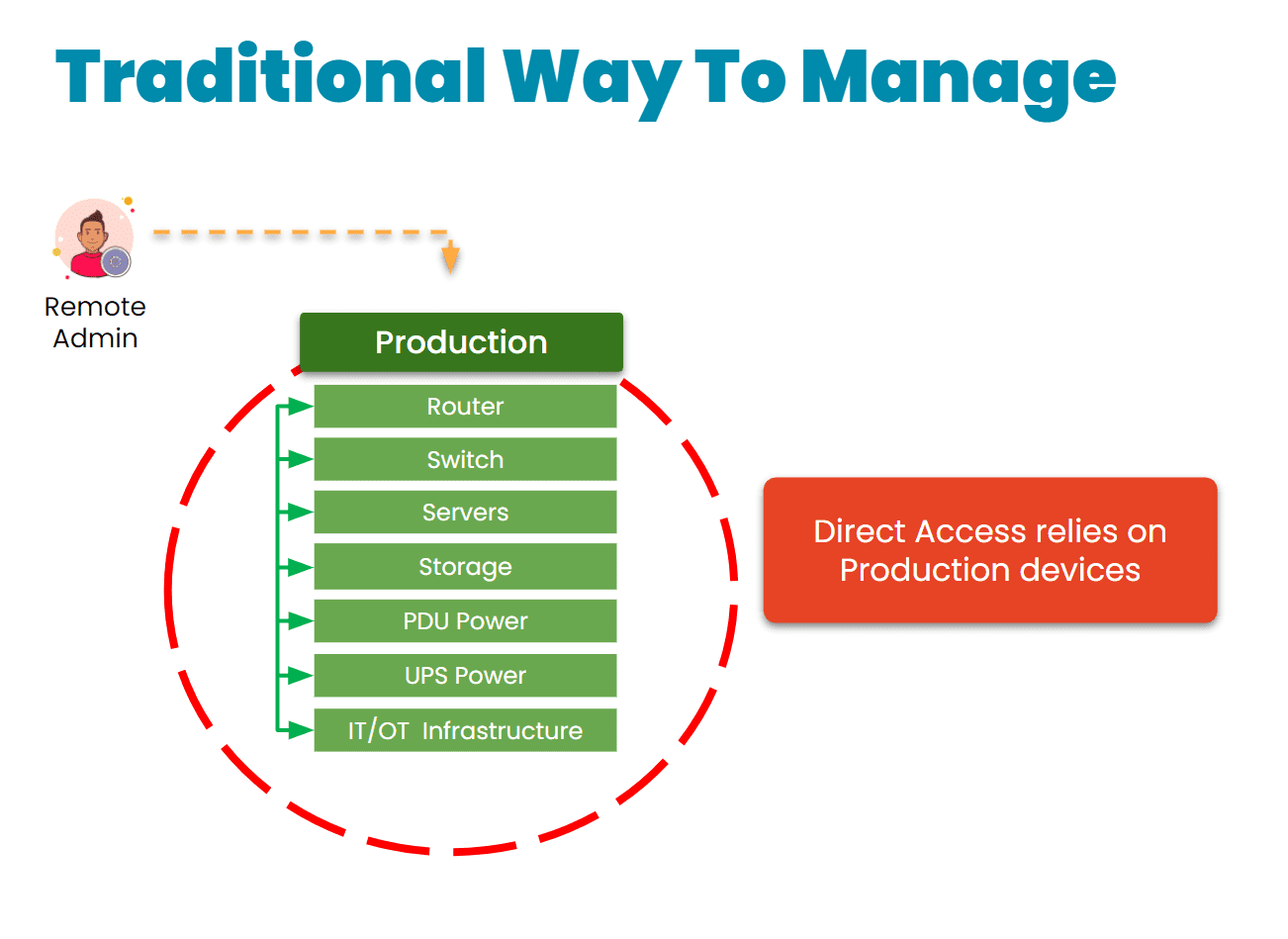
The traditional approach is to gain remote access via a direct link to the affected systems. The problem with this is that when these systems are breached, encrypted, or offline, it’s impossible to remote-into them. This requires teams to physically connect to and revive systems (as with the CrowdStrike incident), or worse – completely replace their infrastructure, as Merck did during the 2017 NotPetya breach.

Traditional remote management via direct link
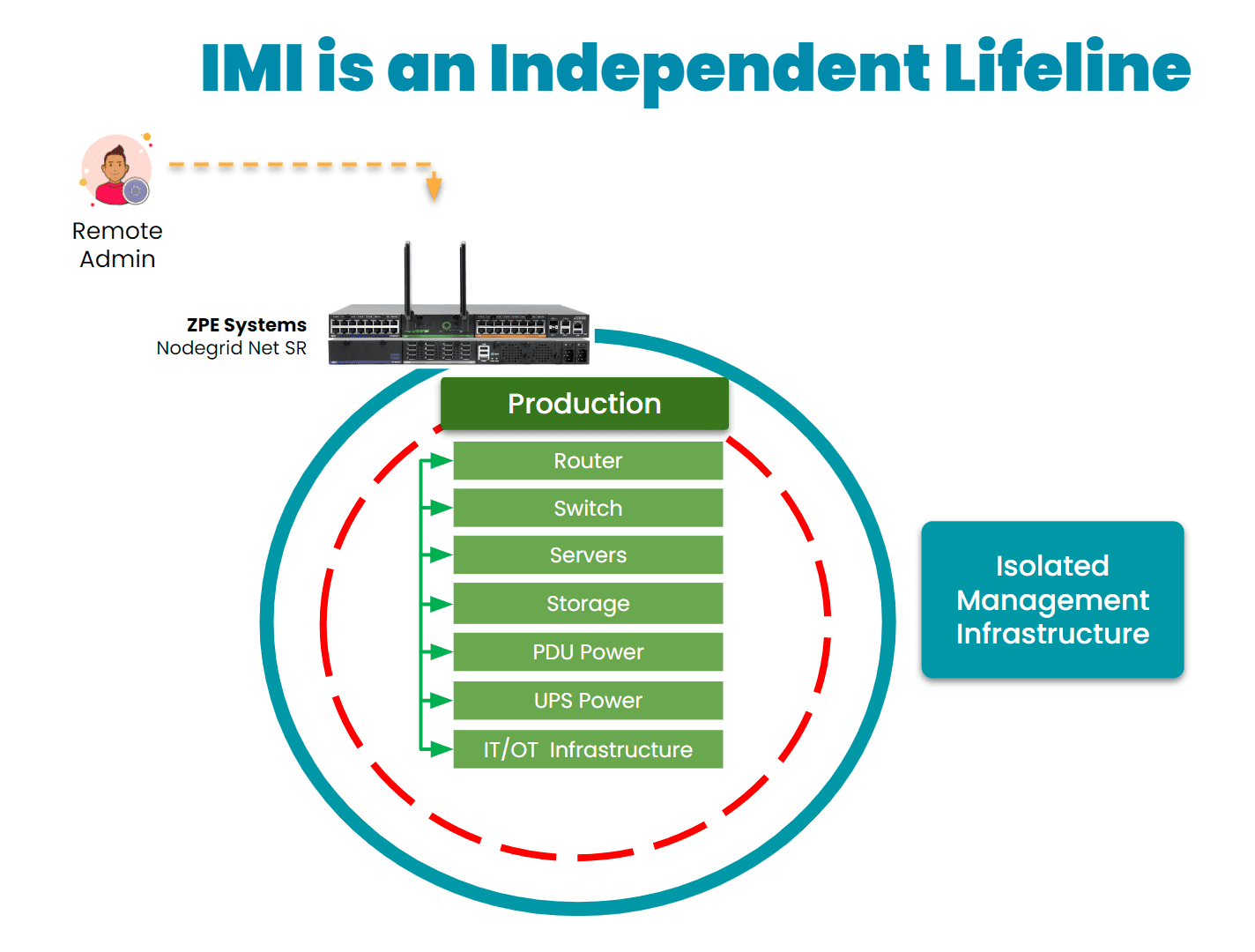
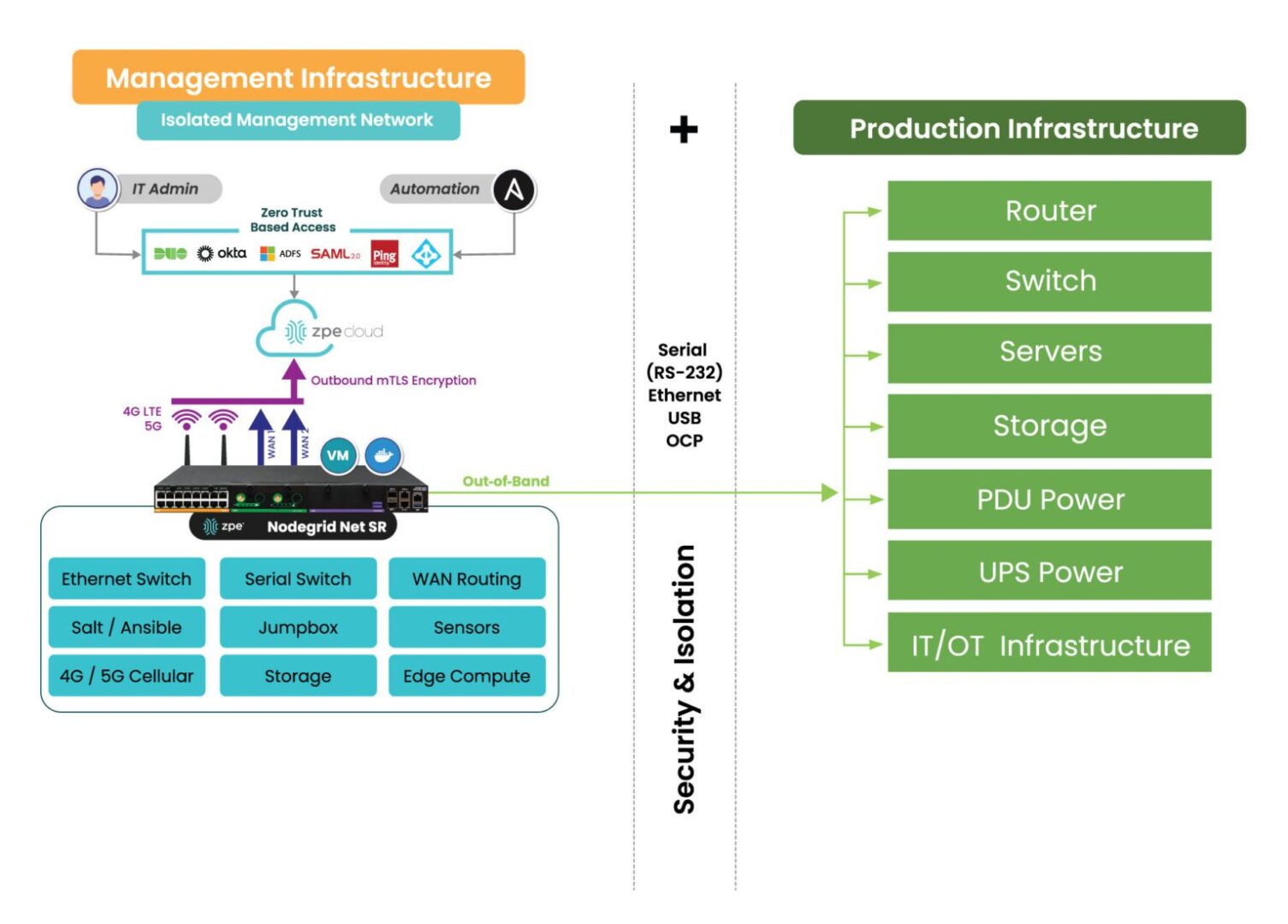
Instead, organizations are turning to a best practice architecture that has been used by hyperscalers and large enterprises for years. This solution is called Isolated Management Infrastructure. IMI creates a management network that is connected to but completely independent of production network equipment, an architecture that resembles out-of-band (OOB) management. This gives teams a lifeline to their main IT and OT systems, including servers, switches, sensors, controllers, and other critical assets, even when their main systems are offline.
IMI is a lifeline to production assets

Here’s how IMI and out-of-band management could have helped mitigate the effects of the American Water attack:

  • Enhanced Containment: By isolating the network used for system control and monitoring, OOB management could have ensured that even if the primary network was compromised, attackers would not have been able to access or disable key operational systems. This would have limited the need to shut down OT systems and prevented widespread operational disruption.
  • Faster Recovery: With isolated management infrastructure, administrators would have been able to access critical systems remotely, even during the attack. This capability enables faster diagnosis of the issue and restoration of services without relying on compromised networks. In the case of a ransomware attack, for example, OOB management can help initiate recovery operations from backups, minimizing downtime.
  • Reduced Attack Surface: By creating an independent network with fewer access points and stricter controls, OOB infrastructure reduces the chances of attackers exploiting vulnerabilities. It’s an additional layer of security that complicates attempts to breach sensitive control systems.
IMI with Nodegrid2

30-year cybersecurity expert James Cabe recently published a walkthrough of how to do this. Read his article, What to do if you’re ransomware’d, to see how to deploy the Gartner-recommended Isolated Recovery Environment that lets you fight through an active attack.

Get the Blueprint for Building IMI

The American Water cyberattack is another wake-up call for critical infrastructure providers to rethink their cybersecurity strategies. Isolated Management Infrastructure is the key approach to retaining control during an attack, but requires the robust capabilities of Generation 3 out-of-band to ensure rapid recovery. To help utilities and essential services fortify their infrastructure, ZPE Systems recently created a blueprint for building IMI. Download the blueprint now to follow the best practices architecture and become resilient against cyberattacks.

PDU Remote Management

PDU Remote Management

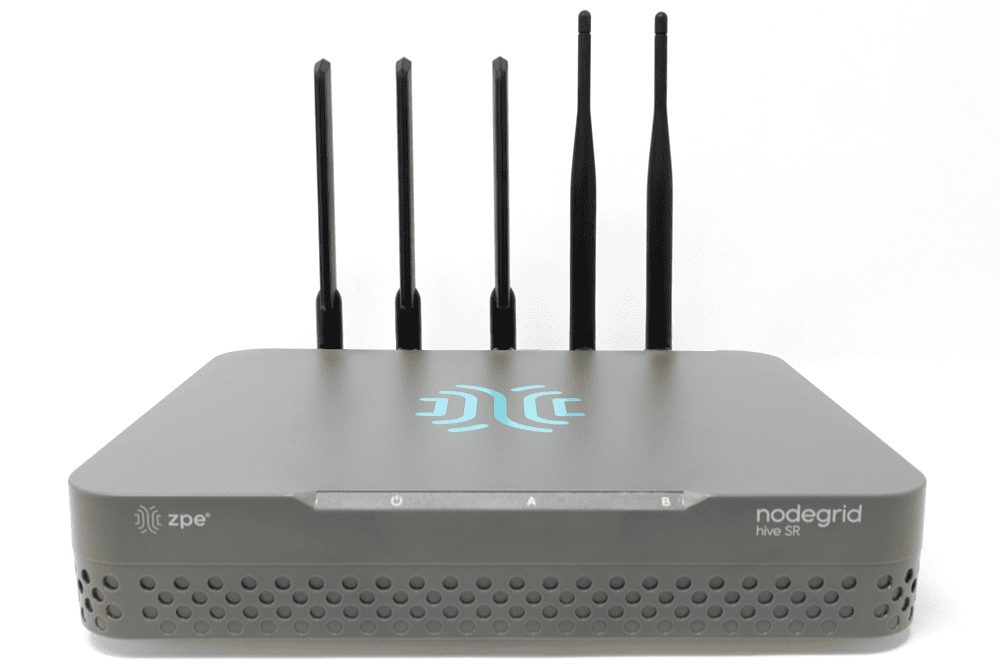
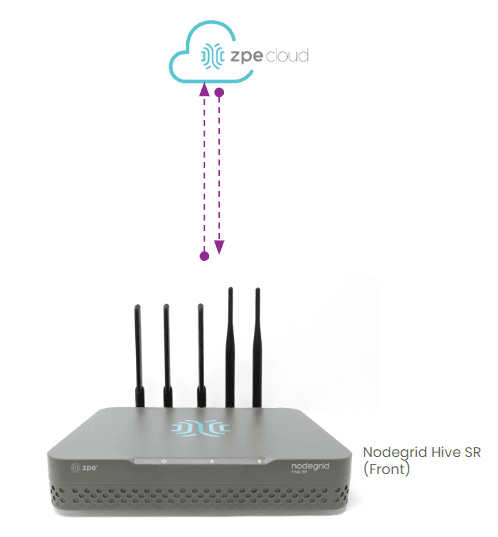
The Hive SR PDU remote management solution from ZPE Systems.

PDUs (power distribution units) and busways are critical network infrastructure devices that control and optimize how power flows to equipment like servers, routers, firewalls, and switches. They’re difficult to manage remotely, so configuring and updating new devices or fixing problems typically requires tedious, on-site work. This difficulty is magnified in complex, distributed networks with hundreds of individual power devices that must be managed one at a time. What’s needed is a PDU remote management solution that unifies control over distributed devices. It should also streamline infrastructure management with an open architecture that supports third-party power software and automation.

The problem: PDU management is cumbersome for large, distributed networks

PDUs and busways are deployed across remote and distributed locations beyond the central data center, including edge computing sites, automated manufacturing plants, and colocations. They typically aren’t network-connected and do not come with up-to-date firmware at deployment time, requiring on-site technicians for maintenance. Upgrading and managing thousands of PDUs and busways requires hundreds of work hours from on-site IT teams who must manually connect to each unit.

The current solution: PDU remote management with jump boxes or serial consoles

Since most PDUs and busways can’t connect to the network, the only way to remotely manage them is to physically connect them via serial (a.k.a., RS-232) cable to a device that can be remotely accessed, such as an Intel NUC jump box or a serial console.

Unfortunately, jump boxes usually aren’t set up to manage more than one serial connection at a time, so they only solve the remote access problem without providing any centralized management of multiple PDUs or multiple sites. Jump boxes are often deployed without antivirus or other security software installed and with insecure, unpatched operating systems containing potential vulnerabilities, leaving branch networks exposed.

On the other hand, serial consoles can manage multiple serial devices at once and provide remote access, but they often don’t integrate with PDU/busway software and only support a few chosen vendors, which limits their control capabilities and may prevent remote firmware updates. They’re also usually single-purpose devices that take up valuable rack space in remote sites with limited real estate and don’t interoperate with third-party software for automation, monitoring, and security.

The Hive SR + ZPE Cloud: A next-gen PDU remote management solution

The ZPE Cloud and Nodegrid Hive SR solutions for PDU remote management.
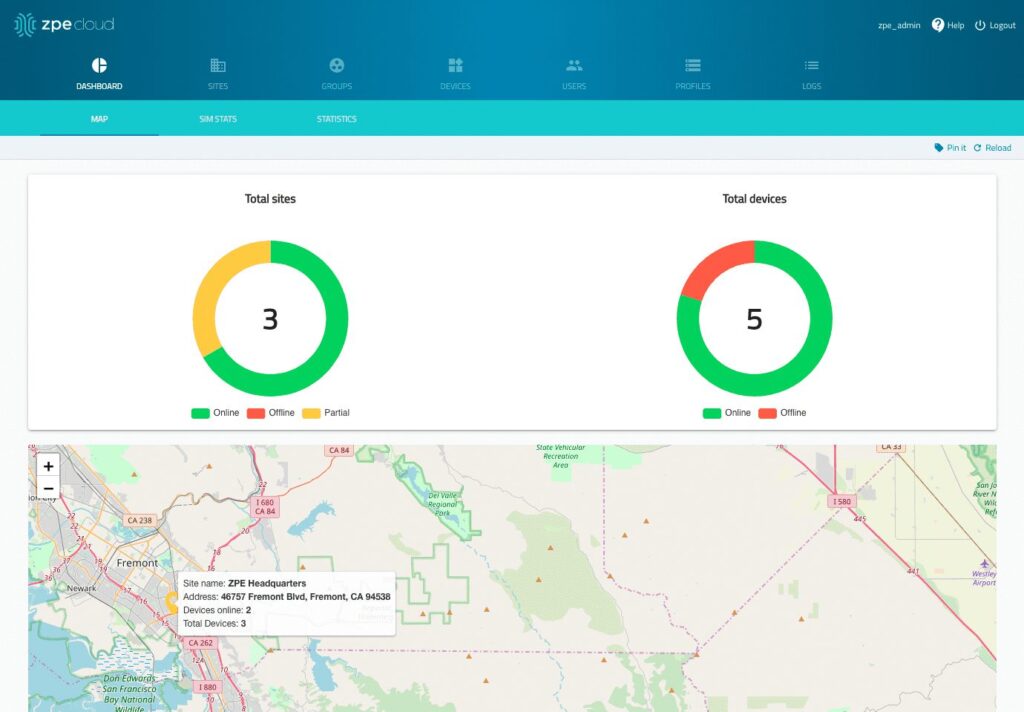
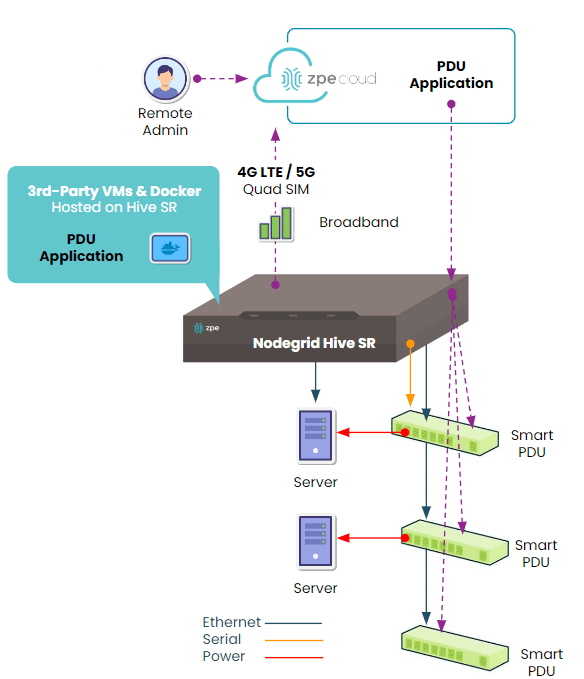
The Hive SR is an integrated branch services router from the Nodegrid family of vendor-neutral infrastructure management solutions offered by ZPE Systems. The Hive automatically discovers power devices and provides secure remote access, eliminating the need to manage PDUs and busways on-site. The ZPE Cloud management platform gives IT teams centralized control over power devices and other infrastructure at all distributed locations so they can update or roll-back firmware, configure and power-cycle equipment, and see monitoring alerts.

The ZPE Cloud PDU remote management solution from ZPE Systems.

In addition to integrated branch networking capabilities like gateway routing, switching, firewall, Wi-Fi access point, 5G/4G cellular WAN failover, and centralized infrastructure control, the Hive SR and ZPE Cloud also deliver vendor-neutral out-of-band (OOB) management. ZPE’s Gen 3 OOB solution creates an isolated management network that doesn’t rely on production resources and, as such, remains remotely accessible during major outages, ransomware infections, and other adverse events. This gives IT teams a lifeline to perform remote recovery actions, including rolling-back PDU firmware updates, power-cycling hung devices, and rebuilding infected systems, without the time and expense of an on-site visit.

A diagram showing how the Nodegrid Hive SR can be deployed for PDU remote management.

The Hive and ZPE Cloud have open architectures that can host or integrate other vendors’ software for PDU/busway management, NetOps automation, zero-trust and SASE security, and more. Administrators get a single, unified, cloud-based platform to orchestrate both automated and manual workflows for PDUs, busways, and any other Nodegrid-connected infrastructure at all distributed business sites. Plus, all ZPE solutions are frequently patched and protected by industry-leading security features to defend your critical branch infrastructure.


Download our Automated PDU Provisioning and Configuration solution guide to learn more about vendor-neutral PDU remote management with Nodegrid devices like the Hive SR.
Download

Download our Centralized IT Infrastructure Management and Orchestration solution guide to learn how ZPE Cloud can improve your operational efficiency and resilience.
Download

3 Reasons to Use Starlink for Out-of-Band (and How to Set it Up)

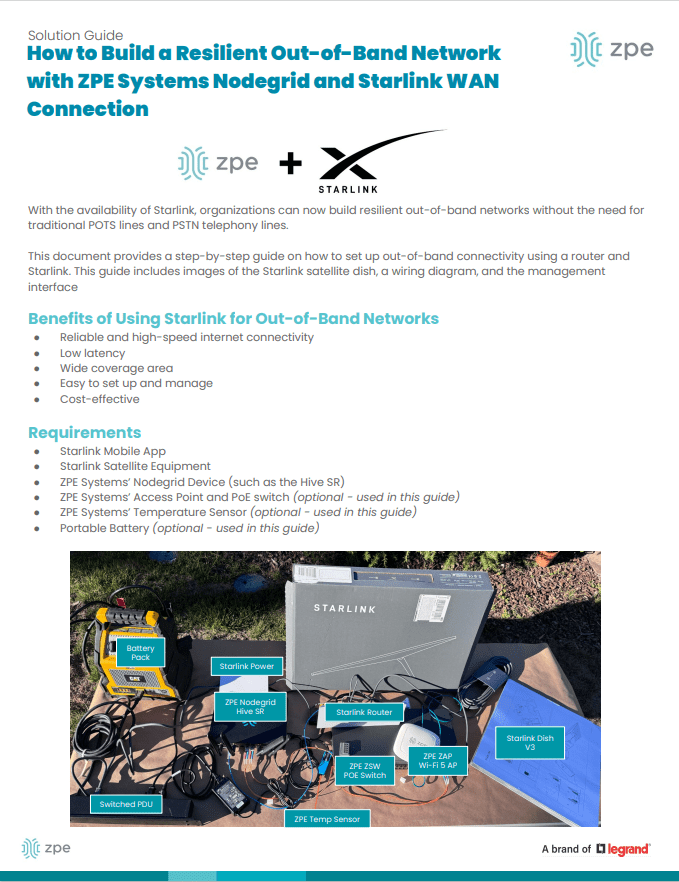
ZPE Systems and Starlink setup guide

Most organizations rely on critical IT in order to serve their essential business functions. A reliable method to maintain critical IT is to use dedicated out-of-band (OOB) management networks, which traditionally have relied on plain old telephone service (POTS) lines or dedicated telephony circuits for remote access. However, these traditional links come with high costs, lots of complexity, and slow performance, which make them difficult to deploy and maintain.

Enter Starlink, a satellite-based Internet service that offers a cost-effective and scalable alternative for out-of-band remote access. This post discusses how Starlink solves these common problems and gives you a free guide that walks you through the setup process.


Problem: POTS and Telephony Lines Are Expensive

For decades, IT professionals have relied on POTS and telephony lines for OOB management, mainly because these lines remain operational even when the primary data network goes down. A major problem is that POTS lines are increasingly expensive to install and maintain, particularly in remote or rural areas. Additionally, 4G/5G LTE options aren’t always available due to coverage limitations or large enough data plans. The shift towards VoIP (Voice over IP) and digital communications has made POTS lines even less relevant, with many service providers phasing out support. This leaves businesses with fewer options and higher costs for maintaining these legacy systems.

Solution: Starlink is Cost-Effective

Starlink offers a much more cost-effective solution. You can use off-the-shelf routers to set up an OOB management network for a fraction of the cost of traditional methods. Starlink also has a relatively low monthly subscription fee and straightforward pricing model, which make it easy to budget and plan IT expenditures. If components fail or break, you can typically repair or replace them yourself to get back up and running quickly.

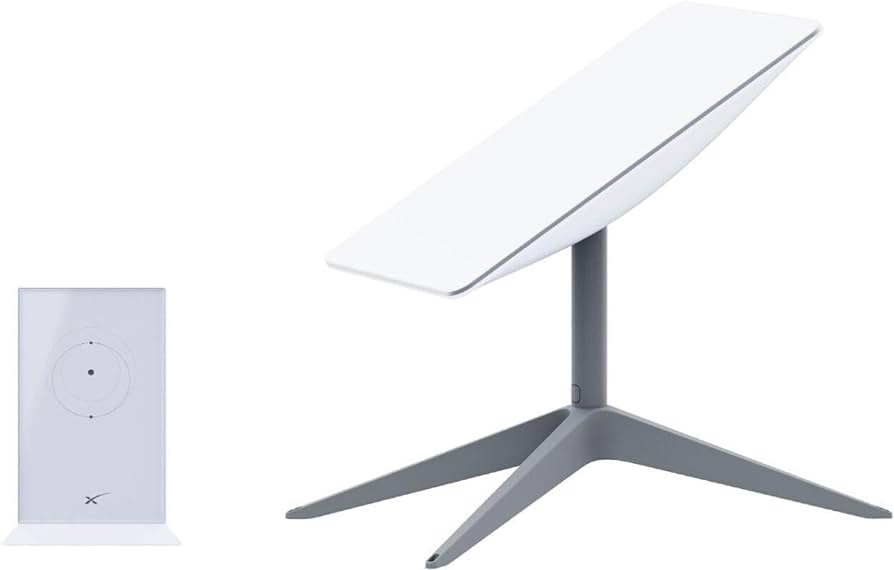
An image of a Starlink dish

Figure 1: Starlink requires only a dish, router, and few other components, making it a cost-effective alternative to expensive POTS lines.

Problem: Traditional Lines Are Difficult To Scale

Traditional POTS-based systems are notoriously difficult to scale, often requiring significant infrastructure investments and complex configurations. Copper wiring is expensive to install and maintain, and as more connections come online, switching systems must be upgraded. On top of this, POTS lines are being phased out, which means there are fewer resources being devoted to scaling and maintaining them.

Solution: Starlink is Simple to Set Up and Scale

Starlink entirely eliminates the need for telephony lines, and is a simple and scalable solution for OOB remote access. You can find the full list of components in our setup guide below, but with a Starlink terminal, compatible router, and minimal configuration, you can scale your OOB network wherever you have Starlink coverage. This ease-of-use extends to day-to-day management as well. Starlink’s satellite service offers global coverage, meaning you can manage your network devices, servers, and other critical infrastructure from virtually anywhere in the world.

The setup process for Starlink includes simple instructions that you can follow on your smartphone

Figure 2: Starlink comes with a straightforward out-of-box experience and step-by-step instructions. You can set up an out-of-band network in about one hour.

Problem: POTS Lines Lack Performance

POTS is designed primarily for voice communication and offers extremely limited bandwidth. It can’t support modern data services (such as video or high-speed internet) efficiently. As out-of-band management advances with data and video monitoring capabilities (such as AI computer vision), POTS infrastructure just doesn’t have the bandwidth to keep up.

Solution: Starlink Meets Modern Performance Requirements

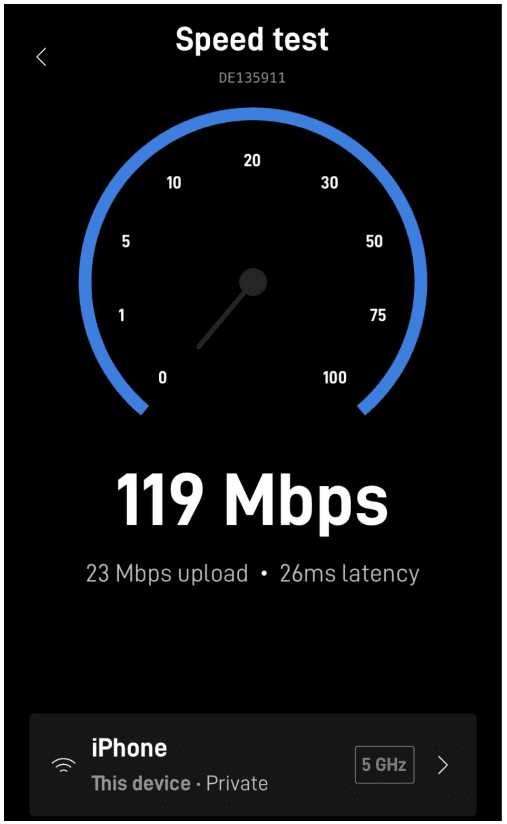
Starlink provides high-speed internet, at speeds that typically range from 50 to 200Mbps. The connection handles much larger volumes of data than POTS lines are capable of, and Starlink’s low-Earth orbit satellites reduce latency to as low at 25ms compared to the typical 150ms of POTS lines. Out-of-band using Starlink means that IT teams can manage more systems and data, and have a more responsive experience, whether they’re managing edge routers across their bank branches or monitoring the cooling systems in their distributed colocations.

Image of the Starlink speed test performed on a smartphone

Figure 3: Starlink provides high-speed connectivity, with speeds ranging from 50 to 200Mbps.

Get Started With Starlink Using Our Setup Guide

We created this step-by-step walkthrough that shows how to set up Starlink for out-of-band. It instructs how to connect the components according to a wiring diagram, configure your ZPE Nodegrid hardware, and test your connection performance using free tools. Read it now using the button below.

Get Starlink Setup Guide

Starlink setup guide

Opengear Alternatives for the OM2200 and OM1200

NSRSTACK2-1
The Opengear Operations Manager is a series of NetOps console servers providing out-of-band remote access to manage remote network infrastructure in data center, edge, and branch deployments. There are a few reasons to consider alternative options, including a lack of 3rd-party integrations, 5G support, and gateway routing capabilities. This blog goes over the pros and cons of the Operations Manager solutions before discussing Opengear alternatives that provide greater automation, orchestration, and security features as well as all-in-one branch networking capabilities.

Executive summary

  • Opengear’s Operations Manager (OM) appliances are NetOps console servers providing out-of-band (OOB) management for remote network infrastructure.
  • While OM appliances provide some automation capabilities, especially with the upgraded Automation Edition, they offer limited third-party integrations and end-device automation features.
  • The OM2200 and OM1200 both lack integrated branch gateway functionality and have limited security features overall.
  • The Nodegrid platform from ZPE Systems overcomes these limitations with vendor-neutral OOB serial consoles and branch services routers.
  • Nodegrid enables end-to-end automation through end-device ZTP and unlimited third-party integrations with leading tools like Ansible and Chef.
  • Nodegrid also consolidates data center and branch networking functionality like gateway routing, 5G cellular failover, and security to provide all-in-one solutions.

Reviewing the Opengear Operations Manager platform

Operations Manager (or OM) is Opengear’s line of NetOps console servers. OM appliances come with Smart OOBTM for out-of-band management, including automated port discovery and VLAN support. Opengear’s x86 Lighthouse platform supports Python scripts and Docker container deployments for NetOps automation. Lighthouse also supports over 100 power vendors’ equipment, allowing it to monitor and control UPS batteries, PDU outlets, and power load balancing. It’s important to note that, while the standard (Enterprise) edition of Lighthouse supports Python and Docker, customers must upgrade to the Automation edition for zero-touch provisioning (ZTP) or other third-party automation integrations. Additionally, OM solutions do not support 2FA or SAML authentication.

Opengear OM2200

The Opengear OM2200 Operations Manager model is designed for data center and high-density use cases. It features 16, 32, 48 serial and 24 serial/Ethernet mixed port configuration options, with an optional global LTE-A Pro cellular module. The OM2200 provides five regional options for dual AC power as well as a dual DC power cord model.

Click here to see a complete Opengear OM2200 Operations Manager product SKUs list.

OM2200 Pros:

  • Plenty of RAM and storage space
  • Many options for power and serial port configurations
  • Uniquely broad support for 3rd-party power equipment
  • Some NetOps automation capabilities

OM2200 Cons:

  • Requires upgraded software licenses for ZTP and most 3rd-party automation
  • No 2FA or SAML 2.0 support
  • No managed USB serial ports
  • No 5G support

Opengear OM1200

The Opengear OM1200 Operations Manager model is meant for small edge deployments. The compact chassis supports 4 serial, 8 serial, and 8 serial/8 Ethernet port combinations. It provides OOB and failover access via dual Ethernet (SFP Fiber is available on the 4E and 8E models) as well as an optional global LTE-A Pro cellular module.

Click here to see a full list of Opengear OM1200 Operations Manager product SKUs.

OM1200 Pros:

  • Compact size
  • Cost-effective range of port configurations
  • Supports 3rd-party power equipment, Docker, and Python

OM1200 Cons:

  • Requires upgraded software licenses for ZTP and most 3rd-party automation
  • No 2FA or SAML 2.0 support
  • It doesn’t have gateway routing/SD-WAN capabilities
  • No 5G support

Opengear Operations Manager limitations

Both the OM2200 and OM1200 models suffer from similar limitations regarding automation, especially with the base version of the Lighthouse software. Even the upgraded Automation Edition, which unlocks ZTP and RESTful APIs, doesn’t provide much automation for end devices beyond running Python playbooks. This limits operational efficiency, slows down new deployments, and impedes the team’s ability to quickly rebuild core infrastructure after a failure or ransomware attack. Another issue with the OM1200, in particular, is that while its compact size will save space in your edge data center and branch office rack, it’s still a single-purpose device. That means you still need to purchase separate solutions for gateway routing, switching, and/or edge compute. These additional devices take up space, cost extra money, and require time to configure and manage.

Opengear alternatives from ZPE Systems

ZPE Systems provides an alternative option for NetOps-enabled OOB console servers called the Nodegrid solution. All Nodegrid devices run on the open, Linux-based, x86 Nodegrid OS which supports VMs and Docker containers to run your choice of third-party automation, software-defined networking/SD-WAN, and security applications. Nodegrid’s robust, onboard security protects lost or stolen devices with features like TPM 2.0, encrypted SSD, UEFI BIOS, secure boot, and geofencing. Nodegrid can also extend ZTP and other automation to legacy and mixed-vendor end devices for end-to-end network infrastructure automation. Try ZPE’s product selector to see which of Nodegrid’s serial consoles or integrated branch routers is right for your deployment. Below, we review the two models that serve as direct replacements for the Opengear OM1200 and OM2200 solutions.

Nodegrid Serial Console Plus (NSCP)

The Nodegrid Serial Console Plus (NSCP) is an alternative to the OM2200 for data center and high-density deployments. The NSCP connects 16, 32, 48, or 96 (Patent No. 9,905,980) serial devices, all in a standard 1U rackmount chassis. Dual SFP+, dual Gigabit Ethernet, and optional Wi-FI and 4G/5G LTE modules provide secure Gen 3 OOB management access and failover, ensuring blazing fast speeds and high performance. Plus, the NSCP comes with two managed USB 3.0 ports for additional flexibility.

Click here to see a complete list of Nodegrid NSCP product SKUs.

Nodegrid Net Services Router (NSR)

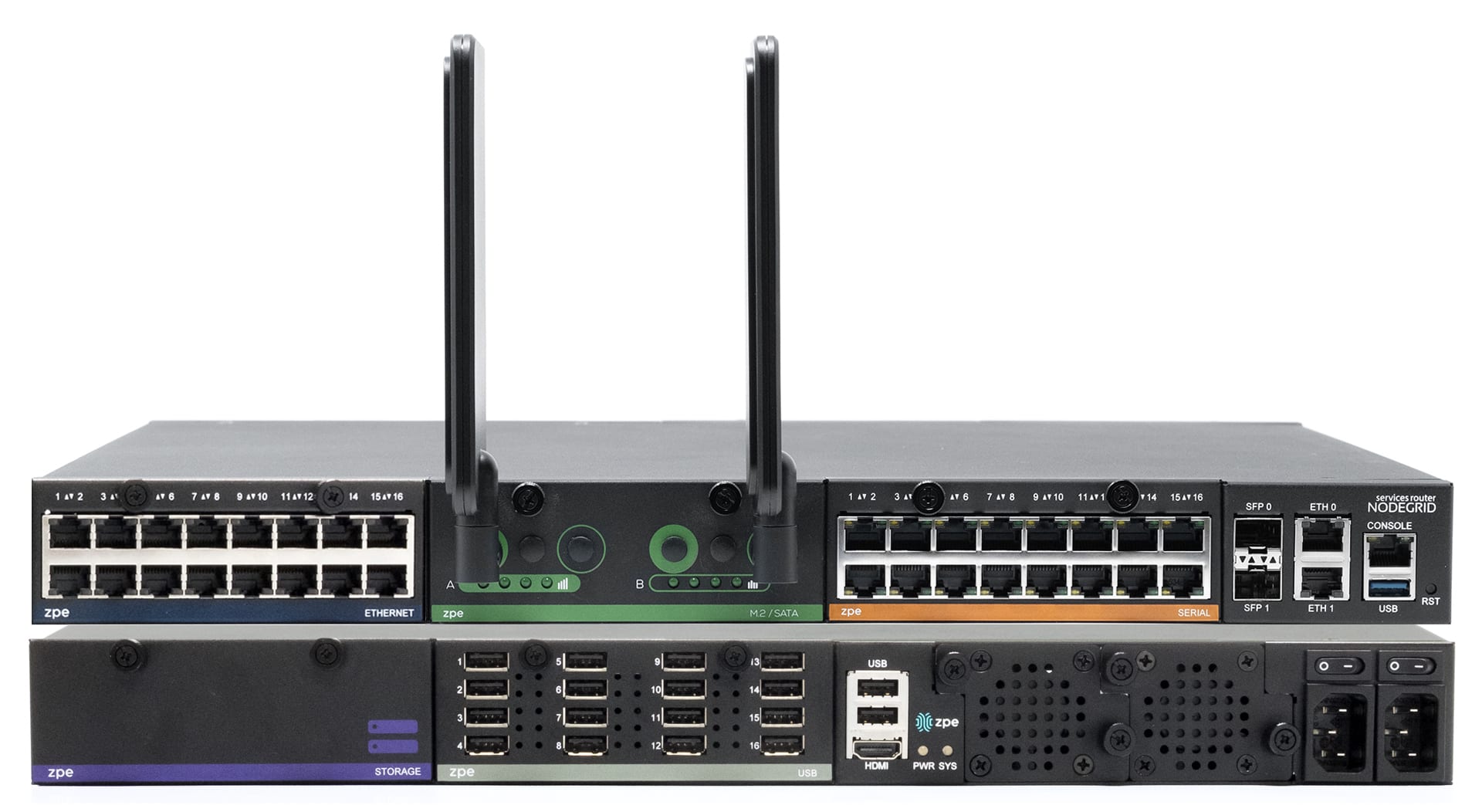
The Nodegrid Net Services Router (NSR) is an alternative to the OM1200 for edge data center and branch office use cases. The NSR is a modular, compact device that can deliver gateway routing, switching, serial console, and compute capabilities all in a single appliance. Gen 3 OOB and network failover are provided out of the box via dual SFP+ and dual Gigabit Ethernet ports, with optional modules for WiFi and dual-SIM 5G/4G LTE. Additional NSR modules include:

  • 16-port GbE Ethernet
  • Storage
  • 16-port Serial (for console server capabilities)
  • 16-port USB serial
  • Compute
  • 8-port PoE+
  • M.2 Cellular/Wi-Fi/SATA
  • 16-port GbE Ethernet SFP
  • 8-port Ethernet SFP+

Click here to see a complete list of Nodegrid NSCP product SKUs.

Key takeaways:

While the OM1200 and OM2200 provide OOB management with some automation, they have serious limitations that negatively impact operational efficiency. Nodegrid is an Opengear alternative providing a vendor-neutral OOB management platform that delivers unlimited automation, enhanced security, and all-in-one networking for ultimate operational efficiency.

Trade in to get a discount on Opengear alternatives

If you’re ready to replace end-of-life devices from Opengear or other vendors, now’s your chance to get a discount. Visit our trade-in page to get your trade-in offer.
Get Trade-In Offer

See Nodegrid’s Opengear Alternatives in action

Reach out today to view a demo of Nodegrid’s Opengear alternatives in action.
Request a Demo

Opengear OM2200 – Product SKU’s:

OM2216

16 x Serial, 8GB RAM, 64GB SSD, 8 x USB 2.0, 2 x GbE/SFP Fiber

OM2216-AU

Dual AC – Australian power cord

OM2216-EU

Dual AC – European Union power cord

OM2216-JP

Dual AC – Japanese power cord

OM2216-UK

Dual AC – United Kingdom power cord

OM2216-US

Dual AC – United States power cord

OM2216-DDC

Dual DC power

OM2216-L-AU

Global 4G LTE-A Pro cellular module, Dual AC – AU power cord

OM2216-L-EU

Global 4G LTE-A Pro cellular module, Dual AC – EU power cord

OM2216-L-JP

Global 4G LTE-A Pro cellular module, Dual AC – JP power cord

OM2216-L-UK

Global 4G LTE-A Pro cellular module, Dual AC – UK power cord

OM2216-L-US

Global 4G LTE-A Pro cellular module, Dual AC – US power cord

OM-2216-DDC-L

Global 4G LTE-A Pro cellular module, Dual DC power


OM2224-24E

24 x Serial, 24 x GbE, 8GB RAM, 64GB Flash

OM2224-24E-AU

1 x GbE/SFP, Dual AC – Australian power cord

OM2224-24E-EU

1 x GbE/SFP, Dual AC – European Union power cord

OM2224-24E-JP

1 x GbE/SFP, Dual AC – Japanese power cord

OM2224-24E-UK

1 x GbE/SFP, Dual AC – United Kingdom power cord

OM2224-24E-US

1 x GbE/SFP, Dual AC – United States power cord

OM2224-24E-DDC

1 x GbE/SFP, Dual DC power

OM2224-24E-L-AU

1 x GbE/SFP, Global 4G LTE-A Pro cellular module, Dual AC – AU power cord

OM2224-24E-L-EU

1 x GbE/SFP, Global 4G LTE-A Pro cellular module, Dual AC – EU power cord

OM2224-24E-L-JP

1 x GbE/SFP, Global 4G LTE-A Pro cellular module, Dual AC – JP power cord

OM2224-24E-L-UK

1 x GbE/SFP, Global 4G LTE-A Pro cellular module, Dual AC – UK power cord

OM2224-24E-L-US

1 x GbE/SFP, Global 4G LTE-A Pro cellular module, Dual AC – US power cord

OM2224-24E-DDC-L

1 x GbE/SFP, Global 4G LTE-A Pro cellular module, Dual DC power

OM2224-24E-10G-AU

10 x GbE/SFP, Dual AC – AU power cord

OM2224-24E-10G-EU

10 x GbE/SFP, Dual AC – EU power cord

OM2224-24E-10G-JP

10 x GbE/SFP, Dual AC – JP power cord

OM2224-24E-10G-UK

10 x GbE/SFP, Dual AC – UK power cord

OM2224-24E-10G-US

10 x GbE/SFP, Dual AC – US power cord

OM2224-24E-10G-DDC

10 x GbE/SFP, Dual DC power

OM2224-24E-10G-L-AU

10 x GbE/SFP, Global 4G LTE-A Pro cellular module, Dual AC – AU power cord

OM2224-24E-10G-L-EU

10 x GbE/SFP, Global 4G LTE-A Pro cellular module, Dual AC – EU power cord

OM2224-24E-10G-L-JP

10 x GbE/SFP, Global 4G LTE-A Pro cellular module, Dual AC – JP power cord

OM2224-24E-10G-L-UK

10 x GbE/SFP, Global 4G LTE-A Pro cellular module, Dual AC – UK power cord

OM2224-24E-10G-L-US

10 x GbE/SFP, Global 4G LTE-A Pro cellular module, Dual AC – US power cord

OM2224-24E-10G-DDC-L

10 x GbE/SFP, Global 4G LTE-A Pro cellular module, Dual DC power


OM2232

32 x Serial, 8GB RAM, 64GB SSD, 2 x GbE/SFP Fiber

OM2232-AU

Dual AC – Australian power cord

OM2232-EU

Dual AC – European Union power cord

OM2232-JP

Dual AC – Japanese power cord

OM2232-UK

Dual AC – United Kingdom power cord

OM2232-US

Dual AC – United States power cord

OM2232-DDC

Dual DC power

OM2232-L-AU

Global 4G LTE-A Pro cellular module, Dual AC – AU power cord

OM2232-L-EU

Global 4G LTE-A Pro cellular module, Dual AC – EU power cord

OM2232-L-JP

Global 4G LTE-A Pro cellular module, Dual AC – JP power cord

OM2232-L-UK

Global 4G LTE-A Pro cellular module, Dual AC – UK power cord

OM2232-L-US

Global 4G LTE-A Pro cellular module, Dual AC – US power cord

OM2232-DDC-L

Global 4G LTE-A Pro cellular module, Dual DC power


OM2248

48 x Serial, 8GB RAM, 64GB SSD

OM2248-AU

2 x GbE/SFP, Dual AC – Australian power cord

OM2248-EU

2 x GbE/SFP, Dual AC – European Union power cord

OM2248-JP

2 x GbE/SFP, Dual AC – Japanese power cord

OM2248-UK

2 x GbE/SFP, Dual AC – United Kingdom power cord

OM2248-US

2 x GbE/SFP, Dual AC – United States power cord

OM2248-DDC

2 x GbE/SFP, Dual DC power

OM2248-L-AU

2 x GbE/SFP, Global 4G LTE-A Pro cellular module, Dual AC – AU power cord

OM2248-L-EU

2 x GbE/SFP, Global 4G LTE-A Pro cellular module, Dual AC – EU power cord

OM2248-L-JP

2 x GbE/SFP, Global 4G LTE-A Pro cellular module, Dual AC – JP power cord

OM2248-L-UK

2 x GbE/SFP, Global 4G LTE-A Pro cellular module, Dual AC – UK power cord

OM2248-L-US

2 x GbE/SFP, Global 4G LTE-A Pro cellular module, Dual AC – US power cord

OM2248-DDC-L

2 x GbE/SFP, Global 4G LTE-A Pro cellular module, Dual DC power

OM2248-10G-AU

10 x GbE/SFP, Dual AC – AU power cord

OM2248-10G-EU

10 x GbE/SFP, Dual AC – EU power cord

OM2248-10G-JP

10 x GbE/SFP, Dual AC – JP power cord

OM2248-10G-UK

10 x GbE/SFP, Dual AC – UK power cord

OM2248-10G-US

10 x GbE/SFP, Dual AC – US power cord

OM2248-10G-DDC

10 x GbE/SFP, Dual DC power

OM2248-10G-L-AU

10 x GbE/SFP, Global 4G LTE-A Pro cellular module, Dual AC – AU power cord

OM2248-10G-L-EU

10 x GbE/SFP, Global 4G LTE-A Pro cellular module, Dual AC – EU power cord

OM2248-10G-L-JP

10 x GbE/SFP, Global 4G LTE-A Pro cellular module, Dual AC – JP power cord

OM2248-10G-L-UK

10 x GbE/SFP, Global 4G LTE-A Pro cellular module, Dual AC – UK power cord

OM2248-10G-L-US

10 x GbE/SFP, Global 4G LTE-A Pro cellular module, Dual AC – US power cord

OM2248-10G-DDC-L

10 x GbE/SFP, Global 4G LTE-A Pro cellular module, Dual DC power

Opengear OM1200 – Product SKU’s

OM1204

4 x Serial, 2GB RAM, 16GB Flash, 1 x GbE

OM1204-L

4 x Serial, 2GB RAM, 16GB Flash, 1 x GbE, Global 4G LTE

OM1204-4E

4 x Serial, 4 x GbE, 4GB RAM, 16GB Flash, 1 x GbE SFP 

OM1204-4E-L

4 x Serial, 4 x GbE, 4GB RAM, 16GB Flash, 1 x GbE SFP, Global 4G LTE 

OM1208

8 x Serial, 2GB RAM, 16GB Flash, 1 x GbE

OM1208-L

8 x Serial, 2GB RAM, 16GB Flash, 1 x GbE, Global 4G LTE

OM1208-8E

8 x Serial straight X2 pinout, 8 x GbE switch, 4GB RAM, 16GB SSD, 2 x USB 2.0, 2 x GbE/SFP Fiber

OM1208-8E-L

8 x Serial straight X2 pinout, 8 x GbE switch, 4GB RAM, 16GB SSD, 2 x USB 2.0, 2 x GbE/SFP Fiber, Global 4G LTE

Nodegrid Serial Console Plus – Product SKU’s

Nodegrid Serial Console Plus (NSCP)

4-Core Intel CPU, 4GB DDR4 RAM, 32GB SSD, 2 x SFP+, 2 x GbE, 2 x USB 3.0, 1 x HDMI, 1 x Console

NSCP-T16R-STND-SAC

16 x Cisco Rolled Serial, Single AC power

NSCP-T16R-STND-DAC

16 x Cisco Rolled Serial, Dual AC power

NSCP-T16R-STND-DDC

16 x Cisco Rolled Serial, Dual AC power

NSCP-T32R-STND-SAC

32 x Cisco Rolled Serial, Single AC power

NSCP-T32R-STND-DAC

32 x Cisco Rolled Serial, Dual AC power

NSCP-T32R-STND-DDC

32 x Cisco Rolled Serial, Dual DC power

NSCP-T48R-STND-SAC

48 x Cisco Rolled Serial, Single AC power

NSCP-T48R-STND-DAC

48 x Cisco Rolled Serial, Dual AC power

NSCP-T48R-STND-DDC

48 x Cisco Rolled Serial, Dual DC power

NSCP-T96R-STND-SAC

96 x Cisco Rolled Serial, Single AC power

NSCP-T96R-STND-DAC

96 x Cisco Rolled Serial, Dual AC power

NSCP-T96R-STND-DDC

96 x Cisco Rolled Serial, Dual DC power

Nodegrid Net SR – Product SKU’s

Nodegrid Net Services Router (NSR)

Multi-Core Intel CPU, On-board Switch, 8GB DDR4 RAM, 32GB MSATA, Hot-Swappable Fans, 2 x SFP+, 2 x GbE

NSR-TOP1-DAC

Dual AC power, 5 Slots support

NSR-BASE-DAC

Dual AC power, 3 Slots support

NSR-TOP1-SAC

Single AC power, 5 Slots support

NSR-BASE-SAC

Single AC power, 3 Slots support

NSR-TOP1-SAC-POE

Single AC and PoE, 5 Slots support

NSR-BASE-SAC-POE

Single AC and PoE, 3 Slots support

Expansion Cards

NSR-16ETH-EXPN

16 x GbE Ethernet expansion card

NSR-8ETH-POE-EXPN

8 x GbE Ethernet with PoE+ expansion card

NSR-16SRL-EXPN

16 x RJ45 Serial Rolled expansion card

NSR-16USB-EXPN

16 x USB Type A expansion card

NSR-8SFP-EXPN

8 x 10GbE SFP expansion card

NSR-DISK-EXPN

Storage expansion card

NSR-COMP-EXPN

Compute 4-core, 8GB DDR4, 32GB SATA expansion card

NSR-M2-EXPN

M.2/SATA Expansion Card