Providing Out-of-Band Connectivity to Mission-Critical IT Resources

IT Infrastructure Management Best Practices

A small team uses IT infrastructure management best practices to manage an enterprise network

A single hour of downtime costs organizations more than $300,000 in lost business, making network and service reliability critical to revenue. The biggest challenge facing IT infrastructure teams is ensuring network resilience, which is the ability to continue operating and delivering services during equipment failures, ransomware attacks, and other emergencies. This guide discusses IT infrastructure management best practices for creating and maintaining more resilient enterprise networks.
.

What is IT infrastructure management? It’s a collection of all the workflows involved in deploying and maintaining an organization’s network infrastructure. 

IT infrastructure management best practices

The following IT infrastructure management best practices help improve network resilience while streamlining operations. Click the links on the left for a more detailed look at the technologies and processes involved with each.

Isolated Management Infrastructure (IMI)

• Protects management interfaces in case attackers hack the production network

• Ensures continuous access using OOB (out-of-band) management

• Provides a safe environment to fight through and recover from ransomware

Network and Infrastructure Automation

• Reduces the risk of human error in network configurations and workflows

• Enables faster deployments so new business sites generate revenue sooner

• Accelerates recovery by automating device provisioning and deployment

• Allows small IT infrastructure teams to effectively manage enterprise networks

Vendor-Neutral Platforms

• Reduces technical debt by allowing the use of familiar tools

• Extends OOB, automation, AIOps, etc. to legacy/mixed-vendor infrastructure

• Consolidates network infrastructure to reduce complexity and human error

• Eliminates device sprawl and the need to sacrifice features

AIOps

• Improves security detection to defend against novel attacks

• Provides insights and recommendations to improve network health for a better end-user experience

• Accelerates incident resolution with automatic triaging and root-cause analysis (RCA)

Isolated management infrastructure (IMI)

Management interfaces provide the crucial path to monitoring and controlling critical infrastructure, like servers and switches, as well as crown-jewel digital assets like intellectual property (IP). If management interfaces are exposed to the internet or rely on the production network, attackers can easily hijack your critical infrastructure, access valuable resources, and take down the entire network. This is why CISA released a binding directive that instructs organizations to move management interfaces to a separate network, a practice known as isolated management infrastructure (IMI).

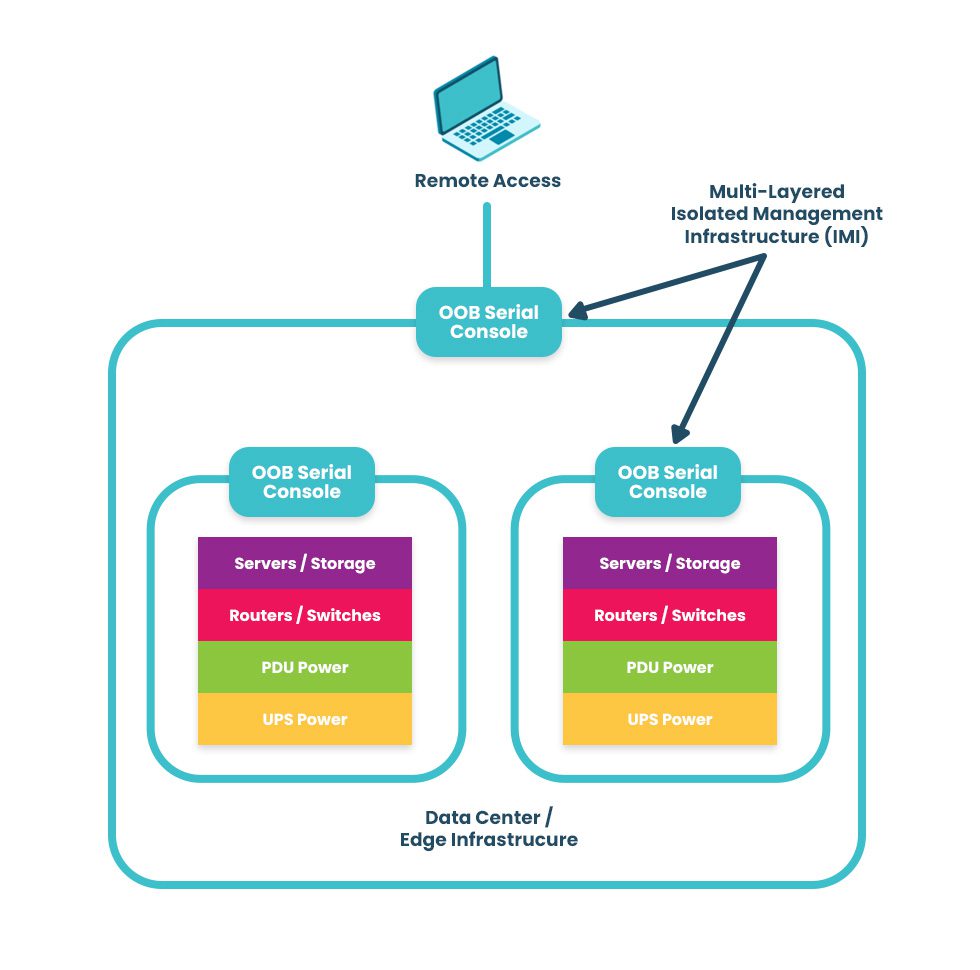
The best practice for building an IMI is to use Gen 3 out-of-band (OOB) serial consoles, which unify the management of all connected devices and ensure continuous remote access via alternative network interfaces (such as 4G/5G cellular). OOB management gives IT teams a lifeline to troubleshoot and recover remote infrastructure during equipment failures and outages on the production network. The key is to ensure that OOB serial consoles are fully isolated from production and can run the applications, tools, and services needed to fight through a ransomware attack or outage without taking critical infrastructure offline for extended periods. This essentially allows you to instantly create a virtual War Room for coordinated recovery efforts to get you back online in a matter of hours instead of days or weeks. A diagram showing a multi-layered isolated management infrastructure. An IMI using out-of-band serial consoles also provides a safe environment to recover from ransomware attacks. The pervasive nature of ransomware and its tendency to re-infect cleaned systems mean it can take companies between 1 and 6 months to fully recover from an attack, with costs and revenue losses mounting with every day of downtime. The best practice is to use OOB serial consoles to create an isolated recovery environment (IRE) where teams can restore and rebuild without risking reinfection.
.

Network and infrastructure automation

As enterprise network architectures grow more complex to support technologies like microservices applications, edge computing, and artificial intelligence, teams find it increasingly difficult to manually monitor and manage all the moving parts. Complexity increases the risk of configuration mistakes, which cause up to 35% of cybersecurity incidents. Network and infrastructure automation handles many tedious, repetitive tasks prone to human error, improving resilience and giving admins more time to focus on revenue-generating projects.

Additionally, automated device provisioning tools like zero-touch provisioning (ZTP) and configuration management tools like RedHat Ansible make it easier for teams to recover critical infrastructure after a failure or attack. Network and infrastructure automation help organizations reduce the duration of outages and allow small IT infrastructure teams to manage large enterprise networks effectively, improving resilience and reducing costs.

For an in-depth look at network and infrastructure automation, read the Best Network Automation Tools and What to Use Them For

Vendor-neutral platforms

Most enterprise networks bring together devices and solutions from many providers, and they often don’t interoperate easily. This box-based approach creates vendor lock-in and technical debt by preventing admins from using the tools or scripting languages they’re familiar with, and it makes a fragmented, complex architecture of management solutions that are difficult to operate efficiently. Organizations also end up compromising on features, ending up with a lot of stuff they don’t need and too little of what they do need.

A vendor-neutral IT infrastructure management platform allows teams to unify all their workflows and solutions. It integrates your administrators’ favorite tools to reduce technical debt and provides a centralized place to deploy, orchestrate, and monitor the entire network. It also extends technologies like OOB, automation, and AIOps to otherwise unsupported legacy and mixed-vendor solutions. Such a platform is revolutionary in the same way smartphones were – instead of needing a separate calculator, watch, pager, phone, etc., everything was combined in a single device. A vendor-neutral management platform allows you to run all the apps, services, and tools you need without buying a bunch of extra hardware. It’s a crucial IT infrastructure management best practice for resilience because it consolidates and unifies network architectures to reduce complexity and prevent human error.

Learn more about the benefits of a vendor-neutral IT infrastructure management platform by reading How To Ensure Network Scalability, Reliability, and Security With a Single Platform

AIOps

AIOps applies artificial intelligence technologies to IT operations to maximize resilience and efficiency. Some AIOps use cases include:

  • Security detection: AIOps security monitoring solutions are better at catching novel attacks (those using methods never encountered or documented before) than traditional, signature-based detection methods that rely on a database of known attack vectors.
  • Data analysis: AIOps can analyze all the gigabytes of logs generated by network infrastructure and provide health visualizations and recommendations for preventing potential issues or optimizing performance.
  • Root-cause analysis (RCA): Ingesting infrastructure logs allows AIOps to identify problems on the network, perform root-cause analysis to determine the source of the issues, and create & prioritize service incidents to accelerate remediation.

AIOps is often thought of as “intelligent automation” because, while most automation follows a predetermined script or playbook of actions, AIOps can make decisions on-the-fly in response to analyzed data. AIOps and automation work together to reduce management complexity and improve network resilience.

Want to find out more about using AIOps and automation to create a more resilient network? Read Using AIOps and Machine Learning To Manage Automated Network Infrastructure

IT infrastructure management best practices for maximum resilience

Network resilience is one of the top IT infrastructure management challenges facing modern enterprises. These IT infrastructure management best practices ensure resilience by isolating management infrastructure from attackers, reducing the risk of human error during configurations and other tedious workflows, breaking vendor lock-in to decrease network complexity, and applying artificial intelligence to the defense and maintenance of critical infrastructure.

Need help getting started with these practices and technologies? ZPE Systems can help simplify IT infrastructure management with the vendor-neutral Nodegrid platform. Nodegrid’s OOB serial consoles and integrated branch routers allow you to build an isolated management infrastructure that supports your choice of third-party solutions for automation, AIOps, and more.

Want to learn how to make IT infrastructure management easier with Nodegrid?

To learn more about implementing IT infrastructure management best practices for resilience with Nodegrid, download our Network Automation Blueprint

Request a Demo

Collaboration in DevOps: Strategies and Best Practices

Collaboration in DevOps is illustrated by two team members working together in front of the DevOps infinity logo.
The DevOps methodology combines the software development and IT operations teams into a highly collaborative unit. In a DevOps environment, team members work simultaneously on the same code base, using automation and source control to accelerate releases. The transformation from a traditional, siloed organizational structure to a streamlined, fast-paced DevOps company is rewarding yet challenging. That’s why it’s important to have the right strategy, and in this guide to collaboration in DevOps, you’ll discover tips and best practices for a smooth transition.

Collaboration in DevOps: Strategies and best practices

A successful DevOps implementation results in a tightly interwoven team of software and infrastructure specialists working together to release high-quality applications as quickly as possible. This transition tends to be easier for developers, who are already used to working with software code, source control tools, and automation. Infrastructure teams, on the other hand, sometimes struggle to work at the velocity needed to support DevOps software projects and lack experience with automation technologies, causing a lot of frustration and delaying DevOps initiatives. The following strategies and best practices will help bring Dev and Ops together while minimizing friction.

Turn infrastructure and network configurations into software code

Infrastructure and network teams can’t keep up with the velocity of DevOps software development if they’re manually configuring, deploying, and troubleshooting resources using the GUI (graphical user interface) or CLI (command line interface). The best practice in a DevOps environment is to use software abstraction to turn all configurations and networking logic into code.

Infrastructure as Code (IaC)

Infrastructure as Code (IaC) tools allow teams to write configurations as software code that provisions new resources automatically with the click of a button. IaC configurations can be executed as often as needed to deploy DevOps infrastructure very rapidly and at a large scale.

Software-Defined Networking (SDN) 

Software-defined networking (SDN) and Software-defined wide-area networking (SD-WAN) use software abstraction layers to manage networking logic and workflows. SDN allows networking teams to control, monitor, and troubleshoot very large and complex network architectures from a centralized platform while using automation to optimize performance and prevent downtime.

Software abstraction helps accelerate resource provisioning, reducing delays and friction between Dev and Ops. It can also be used to bring networking teams into the DevOps fold with automated, software-defined networks, creating what’s known as a NetDevOps environment.

Use common, centralized tools for software source control

Collaboration in DevOps means a whole team of developers or sysadmins may work on the same code base simultaneously. This is highly efficient — but risky. Development teams have used software source control tools like GitHub for years to track and manage code changes and prevent overwriting each other’s work. In a DevOps organization using IaC and SDN, the best practice is to incorporate infrastructure and network code into the same source control system used for software code.

Managing infrastructure configurations using a tool like GitHub ensures that sysadmins can’t make unauthorized changes to critical resources. For example, administrators initiate many ransomware attacks and other major outages by directly changing infrastructure configurations without testing or approval. This happened in a high-profile MGM cyberattack when an IT staff member fell victim to social engineering and granted elevated Okta privileges to an attacker without having to get approval from a second pair of eyes.

Using DevOps source control, all infrastructure changes must be reviewed and approved by a second party in the IT department to ensure they don’t introduce vulnerabilities or malicious code into production. Sysadmins can work quickly and creatively, knowing there’s a safety net to catch mistakes, reducing Ops delays, and fostering a more collaborative environment.

Consolidate and integrate DevOps tools with a vendor-neutral platform

An enterprise DevOps deployment usually involves dozens – if not hundreds – of different tools to automate and streamline the many workflows involved in a software development project. Having so many individual DevOps tools deployed around the enterprise increases the management complexity, which can have the following consequences.

  • Human error – The harder it is to stay on top of patch releases, security bulletins, and monitoring logs, the more likely it is that an issue will slip between the cracks until it causes an outage or breach.
  • Security complexity – Every additional DevOps tool added to the architecture makes integrating and implementing a consistent security model more complex and challenging, increasing the risk of coverage gaps.
  • Spiraling costs – With many different solutions handling individual workflows around the enterprise, the likelihood of buying redundant services or paying for unneeded features increases, which can impact ROI.
  • Reduced efficiency – DevOps aims to increase operational efficiency, but having to work across so many disparate tools can slow teams down, especially when those tools don’t interoperate.

The best practice is consolidating your DevOps tools with a centralized, vendor-neutral platform. For example, the Nodegrid Services Delivery Platform from ZPE Systems can host and integrate 3rd-party DevOps tools, unifying them under a single management umbrella. Nodegrid gives IT teams single-pane-of-glass control over the entire DevOps architecture, including the underlying network infrastructure, which reduces management complexity, increases efficiency, and improves ROI.

Maximize DevOps success

DevOps collaboration can improve operational efficiency and allow companies to release software at the velocity required to stay competitive in the market. Using software abstraction, centralized source code control, and vendor-neutral management platforms reduces friction on your DevOps journey. The best practice is to unify your DevOps environment with a vendor-neutral platform like Nodegrid to maximize control, cost-effectiveness, and productivity.

Want to Simplify collaboration in DevOps with the Nodegrid platform?

Reach out to ZPE Systems today to learn more about how the Nodegrid Services Delivery Platform can help you simplify collaboration in DevOps.


Contact Us

Terminal Servers: Uses, Benefits, and Examples

NSCStack
Terminal servers are network management devices providing remote access to and control over remote infrastructure. They typically connect to infrastructure devices via serial ports (hence their alternate names, serial consoles, console servers, serial console routers, or serial switches). IT teams use terminal servers to consolidate remote device management and create an out-of-band (OOB) control plane for remote network infrastructure. Terminal servers offer several benefits over other remote management solutions, such as better performance, resilience, and security. This guide answers all your questions about terminal servers, discussing their uses and benefits before describing what to look for in the best terminal server solution.

What is a terminal server?

A terminal server is a networking device used to manage other equipment. It directly connects to servers, switches, routers, and other equipment using management ports, which are typically (but not always) serial ports. Network administrators remotely access the terminal server and use it to manage all connected devices in the data center rack or branch where it’s installed.

What are the uses for terminal servers?

Network teams use terminal servers for two primary functions: remote infrastructure management consolidation and out-of-band management.

  1. Terminal servers unify management for all connected devices, so administrators don’t need to log in to each separate solution individually. Terminal servers save significant time and effort, which reduces the risk of fatigue and human error that could take down the network.
  2. Terminal servers provide remote out-of-band (OOB) management, creating a separate, isolated network dedicated to infrastructure management and troubleshooting. OOB allows administrators to troubleshoot and recover remote infrastructure during equipment failures, network outages, and ransomware attacks.

Learn more about using OOB terminal servers to recover from ransomware attacks by reading How to Build an Isolated Recovery Environment (IRE).

What are the benefits of terminal servers?

There are other ways to gain remote OOB management access to remote infrastructure, such as using Intel NUC jump boxes. Despite this, terminal servers are the better option for OOB management because they offer benefits including:

The benefits of terminal servers

Centralized management

Remote recovery

Even with a jump box, administrators typically must access the CLI of each infrastructure solution individually. Each jump box is also separately managed and accessed. A terminal server provides a single management platform to access and control all connected devices. That management platform works across all terminal servers from the same vendor, allowing teams to monitor and manage infrastructure across all remote sites from a single portal. 

When a jump box crashes or loses network access, there’s usually no way to recover it remotely, necessitating costly and time-consuming truck rolls before diagnostics can even begin. Terminal servers use OOB connection options like 5G/4G LTE to ensure continuous access to remote infrastructure even during major network outages. Out-of-band management gives remote teams a lifeline to troubleshoot, rebuild, and recover infrastructure fast.

Improved performance

Stronger security

Network and infrastructure management workflows can use a lot of bandwidth, especially when organizations use automation tools and orchestration platforms, potentially impacting end-user performance. Terminal servers create a dedicated OOB control plane where teams can execute as many resource-intensive automation workflows as needed without taking bandwidth away from production applications and users. 

Jump boxes often lack the security features and oversight of other enterprise network resources, which makes them vulnerable to exploitation by malicious actors. Terminal servers are secured by onboard hardware Roots of Trust (e.g., TPM), receive patches from the vendor like other enterprise-grade solutions, and can be onboarded with cybersecurity monitoring tools and Zero Trust security policies to defend the management network. 

Examples of terminal servers

Examples of popular terminal server solutions include the Opengear CM8100, the Avocent ACS8000, and the Nodegrid Serial Console Plus. The Opengear and Avocent solutions are second-generation, or Gen 2, terminal servers, which means they provide some automation support but suffer from vendor lock-in. The Nodegrid solution is the only Gen 3 terminal server, offering unlimited integration support for 3rd-party automation, security, SD-WAN, and more.

What to look for in the best terminal server

Terminal servers have evolved, so there is a wide range of options with varying capabilities and features. Some key characteristics of the best terminal server include:

  • 5G/4G LTE and Wi-Fi options for out-of-band access and network failover
  • Support for legacy devices without costly adapters or complicated configuration tweaks
  • Advanced authentication support, including two-factor authentication (2FA) and SAML 2.0
  • Robust onboard hardware security features like a self-encrypted SSD and UEFI Secure Boot
  • An open, Linux-based OS that supports Guest OS and Docker containers for third-party software
  • Support for zero-touch provisioning (ZTP), custom scripts, and third-party automation tools
  • A vendor-neutral, centralized management and orchestration platform for all connected solutions

These characteristics give organizations greater resilience, enabling them to continue operating and providing services in a degraded fashion while recovering from outages and ransomware. In addition, vendor-neutral support for legacy devices and third-party automation enables companies to scale their operations efficiently without costly upgrades.

Why choose Nodegrid terminal servers?

Only one terminal server provides all the features listed above on a completely vendor-neutral platform – the Nodegrid solution from ZPE Systems.

The Nodegrid S Series terminal server uses auto-sensing ports to discover legacy and mixed-vendor infrastructure solutions and bring them under one unified management umbrella.

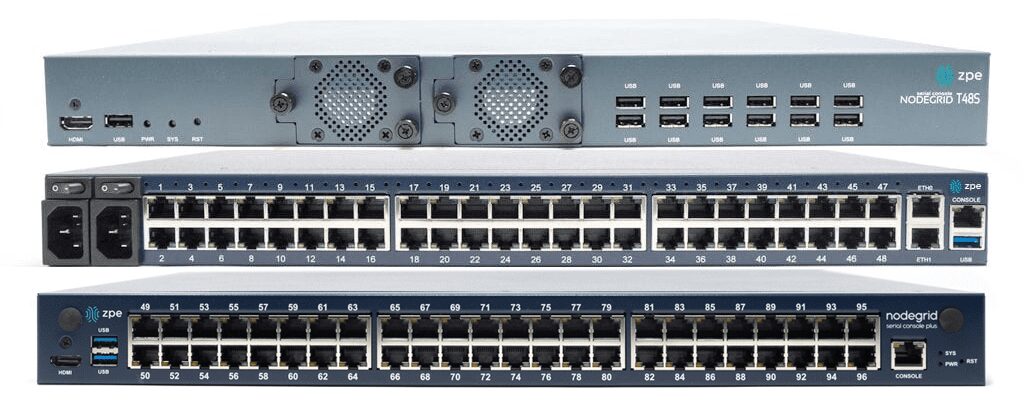
The Nodegrid Serial Console Plus (NSCP) is the first terminal server to offer 96 management ports on a 1U rack-mounted device (Patent No. 9,905,980).

ZPE also offers integrated branch/edge services routers with terminal server functionality, so you can consolidate your infrastructure while extending your capabilities.

All Nodegrid devices offer a variety of OOB and failover options to ensure maximum speed and reliability. They’re protected by comprehensive onboard security features like TPM 2.0, self-encrypted disk (SED), BIOS protection, Signed OS, and geofencing to keep malicious actors off the management network. They also run the open, Linux-based Nodegrid OS, supporting Guest OS and Docker containers so you can host third-party applications for automation, security, AIOps, and more. Nodegrid extends automation, security, and control to all the legacy and mixed-vendor devices on your network and unifies them with a centralized, vendor-neutral management platform for ultimate scalability, resilience, and efficiency.

Want to learn more about Nodegrid terminal servers?

ZPE Systems offers terminal server solutions for data center, branch, and edge deployments. Schedule a free demo to see Nodegrid terminal servers in action.

Request a Demo

Living Spaces Furniture: Scaling to 50 sites with only 3 network staff

Collapsing the stack and centralizing management helps Living Spaces accelerate scaling across the U.S.

Blake Johnson – Living Spaces Furniture Network Architect

“We’ve quadrupled business, but Nodegrid is actually shrinking our workload, especially as we implement new automation. It’s a gamechanger for network folks. Period.” — Blake Johnson, Network Architect, Living Spaces Furniture

Living Spaces is a prominent furniture retailer in the United States. Their store locations include large showrooms, where customers can view furnishings for indoor and outdoor spaces, and plenty of warehouse space for storing on-hand inventory. These locations must serve customers with responsive shopping experiences, which depend on the network infrastructure.

Increasing demand helped Living Spaces grow out of its home state of California, into states including Arizona, Colorado, Oklahoma, Texas, and others. Their out-of-band infrastructure was crucial to spinning up new locations and maintaining operations. But they faced a significant problem: this infrastructure was incredibly complex and costly, requiring many dedicated cellular and out-of-band devices at each location. See why their three-person network team needed a solution that could:

  • Reduce costs and eliminate the need for $300,000 per year in SIM contracts
  • Reduce workloads and risks, by centralizing management and minimizing entry points
  • Accelerate deployments by allowing automation

ISP Network Architecture

An engineer installs fiber optic patch cables at a customer site that’s part of an ISP network architecture.
Internet service providers (ISPs) are the backbone of modern society, responsible for connecting businesses, services, and people to the Internet and to each other. ISP networks are vast, distributed, and complex, making them challenging to manage effectively. However, failing to do so has major consequences. For example, in July of 2022, Rogers Communications in Canada suffered a network system failure after a maintenance update, causing an outage that lasted more than 15 hours and took down emergency services and other critical infrastructure.

An ISP network architecture must be designed for resilience to prevent major incidents from occurring that affect consumers, communities, and the provider’s reputation. But significant challenges stand in the way, including a reliance on legacy infrastructure, and an inability to troubleshoot and recover failed gear remotely. This post discusses why these challenges exist and what ISPs can do to overcome them.

ISP network architecture challenges

Many ISP networks lack resilience because providers are failing to adapt to a rapidly changing landscape. With networks growing larger and more complex every day, new technologies like AI (artificial intelligence) and software-defined networking are needed to manage infrastructure efficiently and deliver innovative services. Additionally, providers get stuck in a break-fix cycle that leaves teams struggling to maintain service level agreements or focus on innovation. Let’s look at the causes of these challenges and discuss how to build more resilient ISP network architectures.

Legacy infrastructure creates technical debt and hampers growth

The challenge:

The solution:

Reliance on legacy systems creates technical debt and prevents ISPs from implementing new technologies

Vendor-neutral platforms like Gen 3 serial consoles extend automation, software-defined networking, and other advanced technologies to legacy infrastructure until it can be replaced.

Internet service providers often have a network architecture that’s a mix of new and legacy infrastructure. However, engineers with the experience to support older solutions are no longer working in the field, either because they’ve been promoted to leadership positions or retired. When legacy hardware fails, inexperienced engineers need time to overcome this skills gap, and ISPs may even need to bring in consultants. This increases the cost of failures, creating what’s known as “technical debt” – when a solution is more expensive to support than the value it brings to the organization.

In addition, ISPs can improve network resilience and provide better service to customers, by adopting new technologies like AI, 5G, software-defined networking (SDN), and Network as a Service (NaaS). But legacy hardware hampers the ability to adopt these technologies. For example, NaaS abstracts the need for MPLS circuits and customer-premises gear, making architectures more cost-effective and improving the customer experience. NaaS brings SDN concepts like programmable networking and API-based operations to WAN & LAN services, hybrid cloud, Private Network Interconnect, and internet exchange points. It optimizes resource allocation by considering network and computing resources as a unified whole and attempts to automate as much as possible. The trouble is, ISPs struggle to implement NaaS and other beneficial new technologies because their legacy hardware simply can’t support it.

Solution: Legacy modernization with a vendor-neutral platform

The ideal solution is to replace legacy infrastructure with modern hardware and software that supports the latest technologies. But for many ISPs, an overhaul like this is too costly and intensive. The next-best option is to bridge the gap with a vendor-neutral network modernization platform that extends automation, AI, and 5G connectivity to otherwise unsupported systems.

For example, serial consoles (also known as terminal servers, console servers, and serial console switches) provide remote management access to network infrastructure. The newest generation of these devices, known as Gen 3, are vendor-neutral by design so that they can control third-party and legacy hardware. Through a combination of built-in features and integrations, Gen 3 serial consoles can use technology like zero-touch provisioning (ZTP), AIOps, and automated configuration management to control connected hardware that otherwise wouldn’t support it. Some solutions, such as the Nodegrid platform from ZPE Systems, can even directly host SDN and NaaS software from other vendors, so ISPs can start implementing network improvements right away while they gradually replace their outdated infrastructure.

Physical infrastructure is difficult to manage and troubleshoot remotely

The challenge:

The solution:

ISP network admins can’t respond to changing environmental conditions or recover failed hardware remotely

Environmental monitoring connected to an out-of-band (OOB) management solution ensures continuous remote access on a dedicated, isolated network that enables fast and cost-effective recovery.

ISP network architectures involve a great deal of physical infrastructure, which is often deployed in remote edge sites and customer premises. Even with software- or service-based network solutions, hardware is needed to host that software, and the physical environment for that hardware is often less than ideal. Drastic weather changes, power outages, and other unexpected scenarios can happen without notice and rapidly bring down an ISP network. These events often cut off remote management access as well, making troubleshooting and recovery difficult, time-consuming, and expensive. In fact, supporting this physical infrastructure often consumes so much time and effort that it prevents ISPs from focusing on delivering better services and software to their customers.

Solution: Out-of-band management with environmental monitoring

The first part of the solution involves monitoring the environment that houses remote, physical infrastructure. An environmental monitoring system uses sensors to detect changes in airflow, temperature, humidity, and other conditions that affect the operation of network hardware. These sensors give ISPs a virtual presence in edge deployments and customer sites so they can quickly respond to changing conditions before systems overheat or circuitry corrodes.

The second part involves providing management teams with reliable remote access to physical infrastructure that won’t go down if there’s a production network outage. Out-of-band (OOB) management solutions use serial consoles with dedicated network interfaces used just for management access. This creates a parallel, out-of-band network that’s completely isolated from production network services and infrastructure. Additionally, many serial consoles use cellular connectivity via 4G or 5G to OOB access, providing a wireless lifeline to connect, troubleshoot, and restore remote infrastructure. OOB management allows ISPs to troubleshoot and recover failed hardware remotely, even during total network outages, so they can get services back up and running faster and less expensively.

The environmental monitoring system should run on the OOB network so remote admins can continue to monitor conditions while they recover failed hardware. The out-of-band management solution also needs to be vendor-neutral so ISPs can deploy third-party automation, AI, and NaaS on the OOB network. For example, Nodegrid Gen 3 serial consoles provide OOB, environmental monitoring, and a vendor-neutral platform to host third-party software at the edge. Nodegrid even enables fully automated responses to changing environmental conditions in those edge environments before admins are aware of a problem.

To learn more about building a resilient, automated network infrastructure with Nodegrid, download the Network Automation Blueprint.

Download Now

ISP network architecture resilience with Nodegrid

ISP network architectures must be resilient, meaning service providers must find a way to bridge the gap between legacy and modern systems while ensuring continuous remote access to manage, troubleshoot, and recover hardware at the edge. The Nodegrid ISP network infrastructure solution  from ZPE Systems is a vendor-neutral, Gen 3 platform that delivers legacy modernization, environmental monitoring, out-of-band management, and much more.

Nodegrid delivers ISP network architecture resilience in a single platform

Request a free demo to see Nodegrid ISP network architecture solutions in action.

Watch a Demo

What is a radio access network (RAN)?

This post provides an introduction to radio access networks (RAN) before discussing 5G RAN challenges, solutions, and use cases.
5G cellular technology is used for internet of things (IoT) deployments and operational technology (OT) automation across many different kinds of organizations, including city governments, global logistics companies, and healthcare providers. 5G access is provided by a radio access network (RAN) using mobile towers and small cells, but deploying these networks is challenging due to numerous factors, including poor public opinion. This post provides an introduction to radio access networks before discussing 5G RAN challenges, solutions, and use cases.

Table of Contents:

What is a Radio Access Network (RAN)?

A radio access network (RAN) is the portion of a cellular network that connects smartphones and other end-user devices to the internet. Information is communicated back and forth between smartphones and the RAN’s transceivers via radio waves. Those wireless signals are translated into digital form, passed to the core network, and then to the global internet.

What is 5G RAN?

Every cellular generation has its own associated RAN technology. 4G RAN was the first generation based entirely on the internet protocol (IP) rather than older circuit-based technology. The newest generation, 5G, supports faster speeds, great capacity, and lower latency than previous generations. However, there are significant challenges in the way of 5G implementation.

5G Radio Access Network (RAN) challenges

There are three major hurdles to 5G implementation:

  1. Public opinion – Thanks in part to misinformation and conspiracy theories, there has been a lot of resistance to 5G implementations. While many people already use smartphones with 5G technology, they tend to balk at the idea of giant cell towers and masts going up in their town or city.
  2. mmWave limitations – Wireless frequencies in the mmWave (millimeter wave) spectrum provide the speed and capacity required for 5G, but they have a shorter range and difficulty penetrating walls. That makes 5G tricky in industrial settings and office buildings.
  3. Remote recovery – A 5G RAN typically operates in cramped spaces without a continuous human presence, and administrators monitor and manage the equipment remotely over the cellular network. However, if that cell link goes down due to equipment failure or natural disaster, teams are cut off, and a truck must be rolled to fix the issue, adding significant costs and downtime.

Addressing these hurdles is complicated, as the solutions often create additional challenges. For example, the first two points can be addressed with 5G small cell technology. Small cells are typically compact enough to deploy on top of buildings or street furniture to extend 5G coverage into densely populated areas without a full-size mobile mast. This makes 5G small cell networks more palatable to city officials and the general public alike. However, small cells are still subject to planning restrictions, and the absence of a common 5G small cell framework makes the application process difficult and time-consuming.

In addition, some small cells are tiny enough to deploy indoors, improving 5G propagation and coverage in buildings. However, operators would need to deploy dozens or hundreds of small cells to achieve the speed and reliability needed for industrial IoT and high-tech use cases. Each one requires significant power resources as well as a fiber or wireless backhaul, and due to a lack of standardization, operators may even have to submit many individual planning applications. Plus, a small cell network of that size is complex to monitor and manage, requiring additional hardware and software solutions that add even more costs and complexity.

Addressing the third point requires an out-of-band network connection to 5G RAN deployments. For example, a 4G/LTE serial console provides an alternative internet connection so teams can remotely access RAN equipment during 5G outages. A serial console directly connects to radio access network infrastructure so remote administrators can do things like reboot a hung device or refresh DHCP even if the local network is down.

However, many serial consoles suffer from vendor lock-in, meaning they don’t connect to all devices or support third-party management, troubleshooting, and recovery tools. This either limits an administrator’s ability to remotely recover from outages or forces them to deploy additional hardware and software solutions to gain all the remote functionality required, adding to the expense and complexity of 5G RAN deployments.

A new approach to 5G deployments

The upgrade from 4G to 5G is proving to be more fraught than previous transitions between generations, so it’s clear that a new approach is needed. Small cell technology is a good start, but a lack of standardization severely hampers its adoption. Help is on the way, though – a group called the Small Cell Forum (SCF), which is made up of wireless leaders like AT&T, Cisco, Qualcomm, and Samsung, is working to establish a set of common definitions and recommendations to help the industry standardize 5G small cell networks.

In their definitional report, the SCF highlights the need for vendor-neutral hardware that’s customizable and swappable for various 5G use cases. Architectural design and planning applications are simpler when all of a small cell network’s equipment supports the same common 5G interface. Multi-functional devices combining networking, out-of-band access, and third-party application hosting significantly reduce expenses and management complexity.

Let’s examine some potential 5G use cases that could benefit from this new approach.

Smart cities

A smart city is the ideal use case for a 5G small cell network. Since wireless clients are packed into densely populated areas, an array of 5G small cells should provide sufficient coverage without the need for a full-sized mast. Deploying a small, vendor-neutral, multi-functional device like the Nodegrid Mini Services Router alongside small cells provides flexible backhaul options, out-of-band remote management, and application hosting. Installing small cells and Mini SRs on streetlamps, parking structures, and other public infrastructure gives teams everything they need to remotely monitor, operate, and recover 5G smart city infrastructure without adding more complexity to the network.

Global asset tracking and logistics

The internet of things (IoT) makes it possible for large, global enterprises to streamline asset tracking and supply chain logistics. Organizations use IoT-enabled devices to handle inventory management, fulfillment, shipment tracking, quality control, and more. 5G small cell technology provides the necessary speed, coverage, and bandwidth, but the sheer number of devices – and their global distribution – creates a lot of management complexity.

All-in-one solutions like Nodegrid reduce the tech stack by combining networking, management, and application hosting in a single box. Plus, Nodegrid provides a centralized management platform that can unify all connected devices, apps, and services in a single place. Administrators get a single pane of glass to monitor, control, troubleshoot, and automate the entire global architecture, reducing costs and streamlining operations.

Building automation

Many large property management companies rely on building automation systems that use operational technology (OT) to control door locks, lighting, HVAC, and more with very little human intervention. 5G’s improved speed and lower latency open up even greater automation capabilities, especially in warehouses and manufacturing plants.

Nodegrid’s compact, vendor-neutral solutions give remote operators a reliable, out-of-band connection to automated building systems to keep businesses running 24/7, even during 5G outages or LAN failures. You can deploy the Mini SR in cramped or semi-outdoor spaces to extend monitoring, security, and management coverage to every part of the 5G deployment. Nodegrid enables end-to-end building automation and makes 5G networks more resilient to failure.

Simplifying 5G with Nodegrid

A 5G radio access network (RAN) provides internet access to 5G-enabled systems, such as smartphones and IoT devices. While 5G deployments are proving complicated and fraught with issues, these challenges are overcome using small cell technology and vendor-neutral, multi-function devices like Nodegrid. Nodegrid’s integrated services routers deliver all-in-one networking, out-of-band management, backhauling, and application hosting capabilities to simplify 5G deployments without compromise.

Learn how Nodegrid can help deliver simplified 5G with out-of-band management!

Request a free Nodegrid demo to see how vendor-neutral solutions simplify 5G radio access network (RAN) deployments.

Contact Us