Providing Out-of-Band Connectivity to Mission-Critical IT Resources

99.999% Uptime for a Top-10 Engineering School

Providing low-level remote access and automation saves hundreds of hours per month for the university’s small IT team

One of the largest universities in the United States fosters academics and research for nearly 40,000 students, staff, and researchers. The university sits among the top 10 schools for engineering, and heavily integrates technology into all disciplines, including engineering, computer sciences, and agricultural studies.

The university received a grant to expand, update, and connect their network of campuses, while enhancing infrastructure and mobility, resiliency, and campus amenities.  But having more than 200 on-campus buildings presents a challenge. The campus is home to academic facilities as well as a hospital, airport, 60,000-seat sports stadium, and dozens of leased spaces for local businesses. This makes the university equivalent to a small city, and its network infrastructure is what keeps it all connected.

Their small IT team was responsible for maintaining more than 10,000 management devices, most of which were long past EOL and frequently failing. They needed a refresh, but with a solution that could also reduce the hundreds of hours they spent every month on travel and on-site work. To maximize their day-to-day efficiency, they required a solution that could overcome these operational gaps:

  • Reducing the 100-150 hours of monthly travel times, by giving engineers the ability to fully access their stack remotely
  • Reducing the 80-120 hours of monthly on-site work required to maintain the 99.999% SLA, by automating manual jobs such as patching and firmware upgrades
  • Expanding their management headroom and use-case adaptability, by migrating to IPv6 and reducing the existing 6RU device stack

Download the full case study to see how ZPE’s Nodegrid hardware and software solved these problems.

EngineeringSchoolCover

Download the full case study

Problems and Gaps

The university is one of the largest in the United States. It sits among the nation’s top 50 schools for research expenditures, and heavily integrates technology into all disciplines, including engineering. Its main campus is home to more than 200 buildings that sit on over 2,500 acres of land. The campus is essentially a small city, and the university’s network infrastructure keeps it all connected.

This network infrastructure, however, was well beyond EOL and in disrepair. But rather than simply upgrade to newer devices, the university’s small IT team wanted to improve the overall quality of life well into the future. This meant addressing three gaps:

  • Inefficient management at scale — Each engineer spent an average of ten hours per month on travel alone, just to traverse the campus’ wide footprint and get to each MDF/IDF closet.
  • Too much focus on ops — The aging infrastructure was on the brink of collapse and required each engineer to spend eight hours per month in on-site work, just to keep devices running.
  • Too many devices — The infrastructure includes roughly 10,000 devices to manage, which was exhausting IP on their limited IPv4 network and too rigid to fit in tight spaces, like their remote farm closets and research labs.

Solution

The university deployed the full lineup of Nodegrid devices, including the Nodegrid Serial Console, Nodegrid Services Routers, and Nodegrid Manager. These allowed them to overcome all three gaps using remote management, automation, and consolidated functionality, to save engineers hundreds of hours every month. Download the full case study to see the complete solution and benefits.

Need Help Replacing End-of-Life Gear?

Check out our complete products and services package to make your EOL transition seamless. Choose from a variety of Synopsys-validated devices, get a generous trade-in discount, and let our engineers install and configure into your environment. Click below to explore this offer and more customer case studies.

Network Automation Cost Savings Calculator

automation cost savings calculator
Many organizations feel continuous financial pressure to cut costs and streamline operations due to economic factors like the ongoing threat of a recession and global supply chain interruptions. Network automation can help companies across all industries save money during lean financial times. A recent Cisco and ACG Research study found that network automation can reduce OPEX by 55% by streamlining workflows such as device provisioning and service ticket management. Though they aren’t mentioned in the study, additional savings are generated by using automation to avoid outages and accelerate recovery efforts.

This post discusses how to save money through automation and provides a network automation cost savings calculator for a more customized estimate of your potential ROI.


Table of contents

How network automation provides cost savings

Network automation reduces costs by streamlining operations, preventing outages, and aiding in backup and recovery workflows.

Network automation saves money by solving problems

Problem: High OPEX

Solution: Automation tackles repetitive tasks like new installs and ticketing operations, which helps you generate revenue sooner and reduce the time and resources spent on maintaining operations.

Problem: Too many outages

Solution: Automation allows teams to be proactive by leveraging critical data to identify potential problems before they cause outages, freeing them from the typical break/fix approach.

Problem: Slow recovery

Solution: Automation speeds up processes like backups, snapshotting, and device re-imaging, which makes networks more resilient by accelerating recovery from outages and ransomware.

Reduces OPEX

The focus of the Cisco/ACG study was the economic benefits of streamlining network operations through automation. For example, the OPEX (operational expenditure) involved in spinning up a new branch is too high because deployments require so much work, time, and staff. Using automation to provision and deploy new resources can significantly reduce the time it takes to spin up a new branch, which means the site could start generating revenue much sooner. Using automation to monitor device health and environmental conditions could extend the life expectancy of critical (and expensive) equipment while reducing the number of on-site staff needed to maintain that equipment.

Network automation reduces OPEX by increasing the efficiency of repetitive or tedious tasks like new installs, incident management, and device monitoring. Crucially, automation does so without reducing the quality of service for end users and often only improves the speed, reliability, and overall experience.

Prevents outages

Network downtime is an expense that cash-strapped businesses can’t afford to bear. According to a recent ITIC survey, a single hour of downtime costs most organizations (91%) over $300,000 in lost business, with 44% of enterprises reporting outage costs exceeding $1 million. However, preventing downtime is difficult when most network teams are caught in a reactive break/fix cycle because they lack the staffing, resources, and technology required to maintain visibility and identify issues before they occur.

Network automation solves this problem using advanced machine learning algorithms to analyze monitoring data and identify potential issues before they cause outages. For example, AIOps (artificial intelligence for IT operations) solutions provide real-time analysis of infrastructure, network, and security logs. AIOps is adept at recognizing patterns and detecting anomalies in data so that it can identify issues before they affect the performance or reliability of the network.

Accelerates recovery

While network automation helps to reduce downtime, it can’t eliminate outages altogether. When outages do occur, recovery is often a long, drawn-out process involving a lot of manual work, during which time revenue and customer faith may be lost. Network resilience is the ability to quickly recover from ransomware, equipment failures, and other causes of downtime with as little impact as possible on end users and business revenue. Automation speeds up recovery efforts in a few critical ways:

  • Streamlined backups – Automation makes performing regular backups and snapshots easier, reducing the risk of gaps or inaccuracies.
  • Reduced imaging delays – Automatic provisioning ensures that clean systems are spun up quickly so that business can resume as soon as possible.
  • Faster failover – Automatic network failover and routing technologies can reroute traffic around downed nodes before a human admin has time to respond, providing a more seamless end-user experience.

Network automation is a direct source of cost savings because it reduces OPEX without negatively impacting the business or customer experience. Automation also indirectly saves money by helping organizations avoid outages through proactive monitoring and maintenance. In addition, network automation technologies make businesses more resilient by speeding up recovery efforts when breaches and failures do occur.

Network automation cost savings calculator

ZPE Systems provides network and infrastructure automation solutions for any use case, pain point, or technological need. ZPE’s vendor-neutral platform allows you to extend automation to every device on your network, including legacy and mixed-vendor solutions, so that you can achieve true end-to-end automation (a.k.a. hyperautomation). For a customized estimation of how much money you can save by automating your network operations with ZPE Systems, check out our network automation cost savings calculator.

Ready to Learn More?

For help with the network automation cost savings calculator or to learn more about automating your network operations, contact ZPE Systems today.

Contact Us

Best Intel NUC Alternatives

Intel NUC Alternatives

Service providers often struggle with the hybrid nature of their business. Even as they transition more towards a consumable service-based model that’s decoupled from traditional hardware solutions, there’s still a need for some sort of box to be deployed physically at a customer’s premises. Providers frequently rely on COTS (Common Off The Shelf) hardware to reduce costs and simplify the deployment process.

One commonly used COTS device is the Intel NUC, or “Next Unit of Computing,” which is a small appliance-like mini computer. Some service providers utilize Intel NUC devices as jump boxes, while others use them as a platform to deploy their services on-site. While these mini-computers are relatively inexpensive and easy to install, they create added security risks and management headaches that service providers need to be aware of.

This post highlights the challenges and security risks involved in relying on Intel NUC devices before discussing enterprise-grade Intel NUC alternatives that solve these problems.

Table of contents:


Why is Intel NUC so popular in IT infrastructure?

Managed Service Providers (MSPs) and Managed Security Service Providers (MSSPs) often use Intel NUC jump boxes to remotely access the control plane of critical client infrastructure. These mini PCs typically run bare bones software to reduce licensing costs, which means they are unpatched, unmonitored, and unsecured. This lack of oversight and management makes Intel NUCs popular access points for hackers to breach client networks.

Why consider Intel NUC alternatives?

Service providers like to use Intel NUC boxes because they’re cheaper, faster to install, and take up less space than a full PC or server. NUCs are often deployed without antivirus, monitoring agents, or other security software installed, which excludes them from the service provider’s security coverage. Plus, clients are frequently unaware that these devices are in their racks accessing their infrastructure, so they don’t access them in security and compliance audits. Other Intel NUC challenges include:

  • Lack of centralized management – Each Intel NUC is an island that’s managed and accessed individually, which makes it impossible to efficiently deploy updates, install new tools, or monitor for problems.
  • Insecure, unpatched OS – Operating systems and software contain thousands of potential vulnerabilities that hackers can exploit, so a lack of monitoring and patch management creates a huge security risk.
  • No hardware security – Intel NUC boxes lack any hardware security, which means someone could steal the device and use it to deploy malware or access client resources – or even just pawn the hardware.
  • Regulatory issues – When providers use unmanaged jump boxes to access client infrastructure, they expose their customers to potential noncompliance with privacy laws like HIPAA that require strict data access controls.
  • Affects insurance eligibility – Using an unsecured Intel NUC may also disqualify customers from receiving cybersecurity insurance benefits in the event of a successful breach.

While Intel NUCs are a quick and inexpensive way for MSPs, MSSPs, and other service providers to remotely access client infrastructure, they also make it easier for cybercriminals to breach enterprise networks. To reduce the attack surface without increasing the cost, hassle, or footprint of deploying jump boxes, you need an enterprise-grade solution that combines networking functions, security, and remote out-of-band access to the control plane to eliminate the need for a separate device.

Intel NUC alternatives from ZPE Systems

The Nodegrid product line from ZPE Systems simplifies the tech stack in data centers and network closets with all-in-one infrastructure management solutions. Nodegrid devices roll up gateway routing, switching, Wi-Fi, and 5G/4G/LTE out-of-band management to cut down on the number of boxes in the rack. They’re also enterprise solutions, which means they can be onboarded with your security team and covered by your monitoring, intrusion detection, antivirus, and other security controls.

In addition, all Nodegrid boxes are protected by hardware security features such as BIOS protection, self-encrypted disk (SED), UEFI Secure Boot, and Signed OS. Plus, Nodegrid’s hardware and software are completely vendor-neutral, allowing easy integrations with third-party security solutions and SAML 2.0 authentication. Nodegrid can even directly host other vendors’ security software to further reduce your tech stack.

Key Nodegrid features


All Nodegrid Devices Include:

Key features

Strong Out-of-band management integration

Extensible applications with virtualization and containers

Zero Touch Provisioning (ZTP) over the WAN

Vendor-neutral, unified management via ZPE Cloud/Nodegrid Manager

Modern x86-64bit Linux Kernel

Extended automation based on actionable data

Failover to 4G/5G/LTE & Wi-Fi

Power control and monitoring

Orchestration support via Puppet, Chef, Ansible, RESTful

Security

BIOS protection

TPM 2.0

UEFI Secure Boot

Signed OS

Self-Encrypted Disk (SED)

Geofencing

X.509 SSH certificate support, 4096-bit encryption keys

Selectable cryptographic protocols for SSH and HTTPS (TLSv1.3)

Selectable cypher suite levels: high, medium, low, custom

SSL VPN (Client and Server)

IPSec, Wireguard, and Strongswan with support for multi-sites

Local, AD/LDAP, RADIUS, TACACS+, Kerberos, authentication

SAML support via DUO, OKTA, Ping Identity

Local, backup-user authentication support

User-access lists per port

Group/role-based authorization: AD/LDAP, RADIUS, TACACS+

Fine grain and role-based access control

Firewall – IP packet and security filtering, IP forwarding support

MD5 / SHA System Configuration Checksum™

System event syslog

Custom security settings

Strong password enforcement

Two-Factor Authentication with RSA and DUO

Networking

IPv4 / IPv6 Support

Embedded Layer 2 switching

VLAN

Layer 3 Routing

BGP

OSFP

RIP

QoS

DHCP (Client and Server)

RIPv1, RIPv2

VXLAN

DDNS

NTP

To learn more about the benefits of Nodegrid’s Intel NUC alternatives, contact ZPE Systems.

Nodegrid product comparison

The Nodegrid family of network edge routers delivers secure, Gen 3 OOB management for reliable remote access to distributed customer sites like branch offices or manufacturing centers.

Nodegrid Service Delivery Platform Family


Link SR

Bold SR

Hive SR

Gate SR

Net SR

Mini SR

CPU

X86-64bit Intel 

X86-64bit Intel

X86-64bit Intel 

X86-64bit Intel 

X86-64bit Intel 

X86-64bit Intel 

Cores

2

4 or 8

4 or 8

2, 4 or 8

2, 4, 8 or 16

4

Guest VM

1

1

1-2

1-3

1-6

1

Guest Docker

2+

2+

2+

2+

2+

2+

Storage

16GB – 128GB

32GB – 128GB

16GB – 128GB

32GB – 128GB

32GB – 128GB

14GB SED

Additional Storage

Up to 4TB

Up to 4TB

Up to 4TB

Up to 4TB

Up to 4TB

Wi-Fi

Yes

Yes

Yes

Yes

Yes

Yes

Cellular modem

1

1-2

1-2

1-2

1-6

1

5G

Yes

Dual 5G

Dual 5G

6x 5G

Sim slots

2

4

4

4

12

1

Serial Console Switch

1

8

Via USB

8

16-80

Via USB

Network

1x Gb ETH 1x SFP

5x Gb ETH

2x GbE ETH 2x 10 Gbps

4x 10/100/1000/2.5 Gbps RJ-45

2x SFP 5x Gb ETH

4x 1Gb ETH PoE+

2x 1Gb ETH 2x SFP+ Multiple expansion cards

2x 1Gb ETH

Data Sheet

Download

Download

Download

Download

Download

Download

The Nodegrid family of Intel NUC alternatives from ZPE Systems can help MSPs and MSSPs ensure secure, reliable remote management access to customer infrastructure without increasing costs.

Ready for a Demo?

To see one of ZPE’s Intel NUC alternatives in action, request a free Nodegrid demo! Request a Demo

Zero Touch Deployment Cheat Sheet

A zero touch deployment cheat sheet is visualized as a literal cheat sheet used by a student during an exam

Zero touch deployment is meant to make admins’ lives easier by automatically provisioning new devices. However, many teams find the reality of zero touch deployment much more frustrating than manual device configurations. For example, zero touch deployment isn’t always compatible with legacy systems, can be difficult to scale, and is often error-prone and difficult to remotely troubleshoot. This post provides a “cheat sheet” of solutions to the most common zero touch deployment challenges to help organizations streamline their automatic device provisioning.

Zero touch deployment cheat sheet

Zero touch deployment – also known as zero touch provisioning (ZTP) – uses software scripts or definition files to automatically configure new devices. The goal is for a team to be able to ship a new-in-box device to a remote branch where a non-technical user can plug in the device’s power and network cables, at which point the device automatically downloads its configuration from a centralized repository via the branch DHCP server.

In practice, however, there are a variety of common issues that force admins to intervene in the “zero touch” deployment. This guide discusses these challenges and advises how to overcome them to achieve truly zero touch deployments.

Zero touch deployment challenge: The solution:
Legacy systems don’t have native support for zero touch Extending zero touch to legacy systems using a vendor-neutral platform
Deployment errors result in costly truck-rolls Recovering from errors remotely with Gen 3 out-of-band (OOB) management
Securing remote deployments causes firewall bottlenecks Moving security to the edge with Zero trust gateways and Secure Access Service Edge (SASE)
Automating deployments at scale increases management complexity Maintaining control through centralized, vendor-neutral orchestration with version control

Extend zero touch to legacy systems with a vendor-neutral platform

Challenge Solution

While many new systems and networking solutions support zero touch deployment, sometimes there’s still a need to repurpose or reconfigure legacy systems that don’t come with native ZTP support.

Pre-staging these devices before shipping them to the branch is a security risk because the system could be intercepted in transit; plus, they’re likely already deployed at remote sites and need to be reconfigured in place. Without a way to extend zero touch deployment capabilities to those legacy systems, companies often have to pay for admins to travel to remote branches, negating any cost savings they were hoping to gain from reusing older devices.

One way to extend zero touch to legacy systems is with a vendor-neutral management platform. For example, a vendor-neutral serial console switch with auto-sensing ports can connect to modern and legacy infrastructure solutions in a heterogeneous branch deployment so they can all be managed from a single place.

From that unified management platform, admins can write and deploy configuration scripts to connected devices, including legacy systems that don’t support zero touch. Technically, this isn’t zero touch deployment because the system doesn’t automatically download and run its configuration file, but it’s still a way to turn an on-site, manual process into one that’s remotely activated and mostly automated.

Recover from deployment errors with Gen 3 OOB management

Challenge Solution

A new branch deployment almost never goes completely according to plan, and this is especially true when teams are using zero touch for the first time, or aren’t completely comfortable with software-defined infrastructure and networking. In the best-case scenario, when there’s a configuration error, the zero touch deployment aborts, and an admin is able to correct the problem and restart the process.

However, sometimes the deployment hiccup causes the device to hang, freeze, or get stuck in a reboot cycle. Or, even worse, an unnoticed error in the configuration could allow the deployment to finish successfully but then go on to affect other production dependencies and bring the entire branch network down. Either way, organizations must again deal with the expenses involved in sending a tech out to troubleshoot and fix the problem.

The best way to ensure continuous access to remote infrastructure is with out-of-band (OOB) management. An OOB solution, such as a serial console or all-in-one branch gateway, connects to the management ports on infrastructure devices so admins can remotely monitor and control every device from a single place without IP addresses.

This creates a separate (out-of-band) network that’s dedicated to management and troubleshooting, making it possible for teams to remotely recover devices that have failed the zero touch deployment process or brought down production LAN dependencies. Plus, the OOB gateway uses independent, redundant network interfaces to ensure admins still have remote access even if the production WAN or ISP link goes down.

To ensure full OOB management coverage of a heterogenous, mixed-vendor environment, the out-of-band solution should be completely vendor-neutral. An open OOB device also supports integrations with third-party solutions for automation, orchestration, and security. This kind of out-of-band platform is known as Gen 3 OOB. Gen 3 OOB management ensures that teams can remotely recover from zero touch deployment errors no matter what device is affected or how the production network is impacted.

Secure remote deployments with zero trust gateways and SASE

Challenge Solution

Organizations need to secure all devices at all remote sites using consistent policies and security controls. However, for smaller branches and IoT sites, it usually isn’t cost-effective to deploy a security appliance in each location.

Plus, adding more firewalls also adds more management complexity. That means traffic is usually backhauled through the main data center firewall, creating bottlenecks and causing network latency for the entire enterprise.

Using zero trust gateways and cloud-based security services, companies can move security to the branch without the cost and complexity of additional firewalls. An all-in-one, zero trust gateway solution combines SD-WAN, gateway routing, and OOB management in a single device. It also supports zero trust authentication technologies like SAML 2.0 and 2FA. A zero trust gateway also needs to support network micro-segmentation, which will allow the use of highly specific security policies and targeted security controls. Plus, by enabling software-defined wide area networking (SD-WAN), a zero trust gateway facilitates the use of SASE.

Secure Access Service Edge (SASE) is a cloud-based service that combines several enterprise security solutions into a single platform. Zero trust gateways use SD-WAN’s intelligent routing capabilities to detect branch traffic that’s destined for the cloud or web. This traffic is directed through the SASE stack for firewall inspection and security policy application, allowing it to bypass the main security appliance entirely. SASE helps reduce the load on the enterprise firewall, reducing bottlenecks and improving performance without sacrificing security.

Scale zero touch deployments with centralized orchestration

Challenge Solution
Zero touch deployments occur (at least in theory) without any admin intervention, but they still need to be monitored for failures. Keeping track of a handful of automatic deployments may seem easy enough, but as the number and frequency increases, it becomes more challenging. This is especially true when companies kick off large-scale expansions, deploying dozens of devices at once, all of which could be plugged in at any time to begin the automated provisioning process. Plus, different devices need different configuration files, and admins need a way to work together without overwriting each other’s code or duplicating each other’s efforts. A vendor-neutral orchestration platform provides a central hub for network and infrastructure automation across the entire enterprise. This platform uses the serial consoles and OOB gateways in each remote location to gain control over all the connected devices, so network teams can monitor and deploy all their zero touch configurations from one place. An orchestration platform is the single source of truth for all automation, so it needs to support version control. This ensures that admins can see who created or changed a configuration file and revert to a previous version when there’s a mistake.

Simplifying zero touch deployment with Nodegrid

Zero touch deployment can be a hassle, but using vendor-neutral management systems, Gen 3 OOB management, zero trust gateways, and centralized orchestration can help organizations overcome the most common hurdles. For example, a vendor-neutral Nodegrid branch gateway deployed at each remote site helps you extend automation to legacy systems, provides fast and reliable out-of-band access to recover from issues, enables zero trust security & SASE, and gives you unified orchestration through the Nodegrid Manager (on premises) and ZPE Cloud software.

Ready to learn more about zero touch deployment?

Nodegrid has a solution for every zero touch deployment challenge. Schedule a demo to see how Nodegrid’s vendor-neutral platform can simplify zero touch deployment for your enterprise.

Contact Us

Streamlining Remote Data Center Management

Streamlining Remote Data Center Management

With the tech industry in turmoil and an ongoing recession forcing cutbacks, many sysadmins and engineers are struggling to efficiently manage their data center infrastructure. Overworked admins are more likely to make mistakes and issues are more likely to fall between the cracks, making the enterprise network less resilient. In the current economy, businesses can’t afford to lose revenue due to data center outages, and that’s why it’s crucial to invest in the tools teams need to efficiently manage and monitor remote infrastructure.

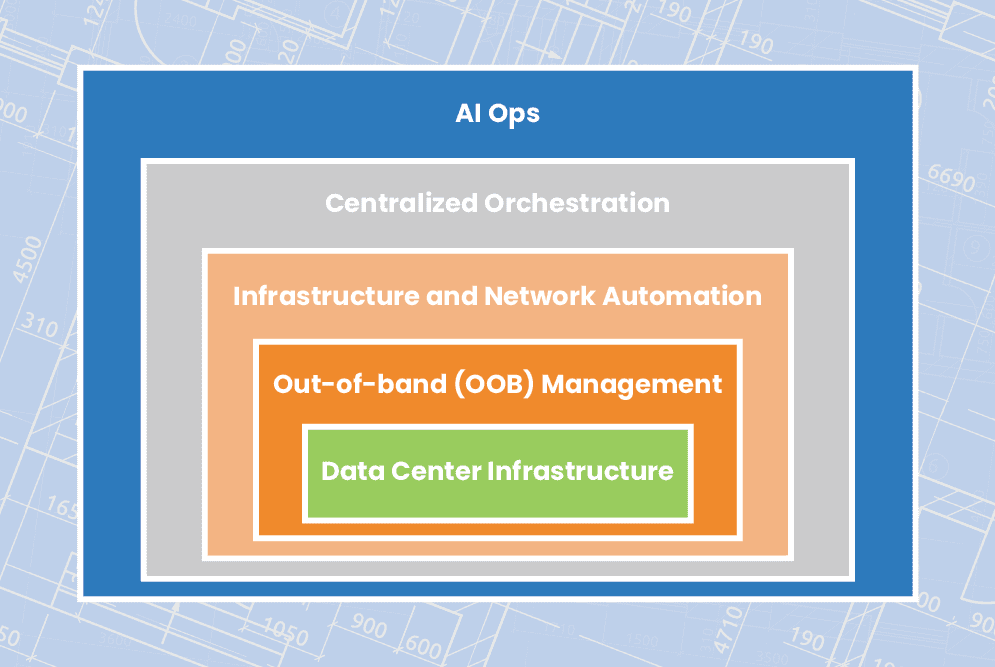
This blog explains how to streamline remote data center management using technologies like out-of-band (OOB) management, automation, orchestration, and AIOps to ensure network resiliency.

How to streamline remote data center management

Out-of-band management

Organizations commonly deploy redundant internet connections at their data centers to provide network failover, ensuring business continuity in case the primary ISP suffers an outage. However, if the data center WAN or LAN goes down due to an equipment failure, configuration mistake, or security breach, network failover won’t help admins solve the problem. If remote data center devices are unable to get an IP address, then they’ll be unreachable on the production network, leaving remote teams without a way to diagnose and fix the issue. That means expensive truck rolls or on-site managed services, plus the revenue and reputation costs of extended downtime.

What’s needed to ensure business continuity and reduce the cost of outages is an out-of-band (OOB) management network that doesn’t rely on any production infrastructure. The most efficient way to accomplish this is with Gen 3 OOB serial consoles. These systems include redundant network interfaces – often using cellular – to ensure continuous remote access even if the production ISP or MPLS link goes down. An OOB serial console directly connects to data center infrastructure devices via the serial port, which means remote admins can access and manage them without an IP address. The result is that remote data center management teams can diagnose and fix problems without traveling on-site, saving money on recovery costs as well as reducing the duration and business impact of outages.

Plus, an OOB management network can be used to execute resource-intensive automation and orchestration workflows without using valuable MPLS bandwidth or affecting production network performance. Gen 3 serial consoles are vendor-neutral and support the use of third-party automation scripts and playbooks, giving remote data center teams a centralized orchestration platform for more streamlined infrastructure and network management.

Infrastructure and network automation

Staff cutbacks have left data center teams stretched paper-thin, and reduced budgets mean they’re being asked to do more with less. When admins are overworked with many tedious, manual tasks, they’re more likely to make mistakes. These mistakes are a major cybersecurity threat, with Microsoft estimating that up to 80% of ransomware attacks are caused by misconfigured devices, applications, and security systems.

Automation helps remediate human error by taking over the repetitive, tedious workflows that computers are best at, leaving admins and engineers free to handle the creative, intuitive work that only humans can accomplish. For example, teams can use infrastructure as code (IaC) and zero touch provisioning (ZTP) to turn data center device configurations into software scripts that are deployed and executed automatically. Automated configuration management tools can then monitor these devices for changes that might introduce a security vulnerability and then automatically roll-back to the last known good configuration. Teams can also use software-defined networking (SDN) and software-defined wide area networking (SD-WAN) to automate traffic management and optimization, load balancing, access control list (ACL) updates, and other network management workflows.

Automation makes it possible for small network operation centers (NOCs) and data center teams to efficiently control large and distributed enterprise deployments. While network automation hasn’t quite caught up to infrastructure automation in terms of adoption and tool maturity, the use of vendor-neutral devices and platforms allows teams to use their existing IaC and configuration management tools to deploy and control network devices like routers, switches, load balancers, and security appliances. Vendor-neutral solutions also make it easier to implement centralized orchestration to manage automation workflows across the entire network architecture.

Centralized orchestration

Automation’s goal is to streamline data center management, but when it’s not handled correctly, it can easily wind up overcomplicating things instead. If admins aren’t monitoring their automated workflows, there could be changes occurring without any human oversight, leading to potential security risks and making it harder to perform root-cause analysis (RCA) when issues arise. In addition, without an organized, centralized repository for network automation scripts and configurations, engineers could end up duplicating each other’s work and negating any productivity gains. Plus, having a fragmented automation architecture makes it impossible for admins and security analysts to holistically monitor and manage the enterprise network.

Centralized orchestration provides a single platform from which to deploy, monitor, and manage automation across data center deployments and distributed network architectures. A data center infrastructure orchestration platform should include:

  • Source code version control – A centralized repository for automation scripts that tracks changes and acts as a single source of truth for the entire automated infrastructure.
  • Vendor-neutral orchestrator – A tool that controls all of the automated workflows in a data center deployment, essentially automating the automation.
  • ⮕Visibility & analytics – Dashboards where admins can monitor automated workflows, view current device health and network performance, and gain insights from their AIOps and big data tools.

To ensure optimal coverage and efficiency, the source code repository must be compatible with the chosen scripting language(s), the orchestrator must support any IaC playbooks, and the visibility tools must be able to hook into all systems, applications, and devices in the data center. That means the orchestration platform should be vendor-neutral.

AIOps

Data center infrastructure, and the platforms used to monitor and manage it, all generate a lot of logs. The data contained in these logs can provide valuable insights about the health, performance, and security of that infrastructure, but only if teams have the ability to collect and analyze it. Unfortunately, human beings aren’t very adept at parsing vast quantities of data to spot and predict patterns. However, humans have designed artificial intelligence to pick up the slack.

Artificial intelligence for IT operations – or AIOps – uses technologies like machine learning (ML) and natural language processing (NLP) to analyze logs from data centers and network infrastructure. AIOps pulls data from sources such as monitoring and orchestration platforms, environmental monitoring sensors, and firewall logs, then utilizes that data to provide business insights, predict future outcomes, and make decisions to solve problems.

AIOps is a relatively new technology and as such its capabilities continue to evolve. However, data center teams are currently using AIOps for things like enhanced threat modeling, automatic root cause analysis, and intelligent performance monitoring. For overworked and understaffed data center teams, AIOps essentially acts as an extra brain devoted to the monitoring and analysis of automated infrastructure.

Streamlining remote data center management with ZPE Systems

A resilient enterprise network uses out-of-band (OOB) management, automation, orchestration, and AIOps to streamline remote data center management and ensure business continuity. The backbone of such an architecture is vendor-neutral solutions, such as the Nodegrid platform from ZPE Systems. Nodegrid serial consoles provide Gen 3 OOB management with complete vendor freedom, so you can control any device, deploy your choice of automation scripts and playbooks, host third-party security and AIOps solutions, and unify the management of all of the above with a single orchestration platform.


Ready to learn more about data center management?

To learn more about remote data center management with Nodegrid, contact ZPE Systems today.

Contact Us

Need an in-depth guide to building a more resilient network infrastructure? Fill out the form below to download the Network Automation Blueprint from ZPE Systems.

Cloud-Delivered Branch: Simplifying Remote Management

BranchDiagram
Modern enterprises must grow to remain competitive, but this expansion makes WAN management more challenging. Spinning up a new branch or edge computing site with traditional WAN infrastructure can be time-consuming and expensive, with network solutions needing to be purchased and installed and new MPLS links taking weeks or even months to activate. Each branch has infrastructure that admins need to manage remotely, which means accessing many different jump boxes and remembering many different configuration schemas. Essentially, it’s like each branch has its own unique toolkit. That means every additional branch increases the management complexity, making it more likely that mistakes or inefficiencies will occur.

The cloud-delivered branch is a relatively new concept that provides branch networking, security, and management solutions as a cloud-based service. The idea is to simplify remote management by reducing the number of individual solutions deployed at each branch and allowing admins to monitor and control all of their branches from a single place. This is like giving teams one single toolkit that can service every branch.

This post describes the three cloud-based services involved in a cloud-delivered branch, and gives an example of how to implement a cloud-delivered branch using the Nodegrid platform from ZPE Systems.

To see examples of a cloud-delivered branch in action, request a free demo of the Nodegrid platform.

Request a Demo

How a cloud-delivered branch simplifies remote management

There are three key components of a cloud-delivered branch: cloud-based infrastructure management, cloud-based network management, and cloud-based cybersecurity. Let’s discuss the technologies used in each component.

Cloud-managed branch gateways

A branch gateway is a networking device that lives in the branch and provides access to the enterprise WAN as well as cloud resources and the internet. A gateway that’s optimized for branch networking will usually combine multiple network functionalities in one to save rack space and reduce complexity. For the purposes of the cloud-delivered branch, one of these features should be device management, i.e. serial console/console server technology. This functionality means that any infrastructure component connected to the gateway, whether it’s via RJ-45 or Wi-Fi, can be remotely managed by simply logging into the gateway’s software, reducing the need for a jump box or dedicated management hardware. Of course, what makes it a cloud-managed branch gateway is that admins manage it (and all connected infrastructure) from a cloud platform instead of directly connecting to the gateway over the WAN. This means that admins have management access from anywhere in the world, without needing to be on the enterprise network.

Software-defined wide area networking (SD-WAN)

SD-WAN, or software-defined wide area networking, simplifies WAN management by decoupling control functions from the underlying hardware and making them available as software. Essentially, SD-WAN splits a WAN architecture into two layers: the physical hardware that connects branches to the enterprise network (e.g., cloud-managed branch gateways), and the networking logic that orchestrates WAN traffic (e.g., routing rules and load balancing). In a cloud-delivered branch, SD-WAN’s software lives in the cloud, giving network teams a centralized place from which to monitor and control the entire WAN architecture, no matter how many branches are involved.

Secure Access Service Edge (SASE)

SASE (pronounced “sassy”) is a solution that combines multiple enterprise security technologies into a single stack that’s delivered as a cloud-based service. SASE uses SD-WAN technology to directly connect branch users and devices to enterprise resources in the cloud, first passing that traffic through the SASE stack to ensure that security policies and controls are applied. That means this traffic doesn’t need to go through a traditional firewall, which reduces bottlenecks at the central data center without requiring a security appliance at each branch. Eliminating firewalls at most branches decreases management complexity for network admins, and reducing the load on a centralized data center firewall improves performance for the entire enterprise.

How to implement a cloud-delivered branch with Nodegrid

A cloud-delivered branch uses cloud-based infrastructure management, network management, and security to simplify remote branch management. The best practices for building infrastructure to support a cloud-delivered branch include:

Best practices: Benefits:
Using vendor-neutral hardware and software solutions Reduces the number of infrastructure devices that need to be deployed

Enables unified, centralized infrastructure management

Supports third-party apps and automation

Implementing out-of-band (OOB) management at each site Provides an alternative path to critical remote infrastructure during WAN/LAN outages

Reduces the frequency and cost of truck-rolls

Ensures that resource-intensive automation workflows don’t cause production latency

Incorporating branch LAN management into the cloud-management umbrella Extends software-defined networking control into the branch LAN

Unifies branch WAN and LAN management behind a single pane of glass

Increases efficiency and ensures holistic coverage

Let’s walk through an example of how these best practices are implemented using the Nodegrid platform from ZPE Systems.

Vendor-neutral branch gateways and cloud management

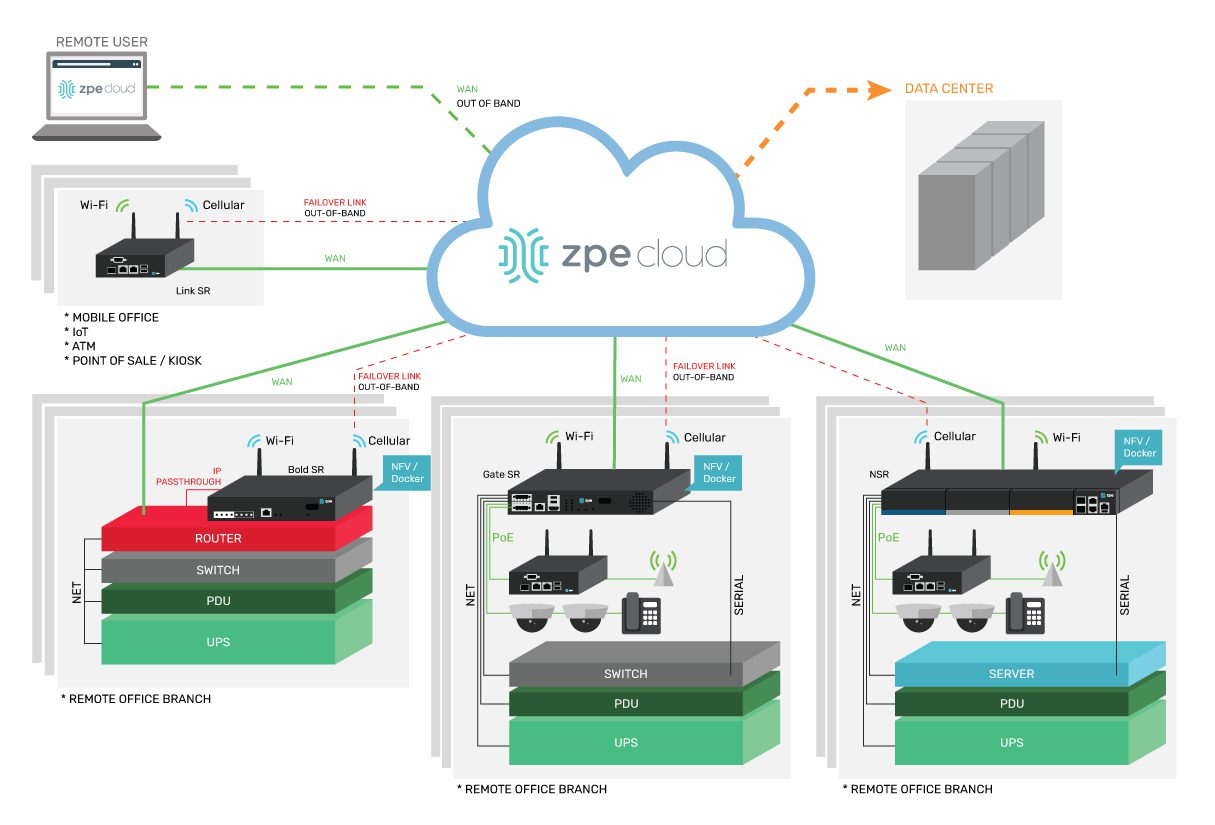
A Nodegrid branch gateway such as the Bold Services Router is installed at each branch to provide WAN and internet access. These all-in-one networking solutions provide routing, switching, and console server management functionality, reducing the number of infrastructure devices that need to be deployed. All Nodegrid devices are completely vendor-neutral, which means you can use them to host your SD-WAN, SASE, or edge computing applications, saving you from buying and installing additional hardware. In addition, vendor-neutral Nodegrid gateways unify branch infrastructure management through the ZPE Cloud software. Any infrastructure connected to a Nodegrid device at any branch is available to manage through ZPE’s centralized, cloud-based platform, simplifying remote management and providing greater opportunities for optimization and automation. Plus, ZPE Cloud software is also vendor-neutral, meaning you can integrate third-party apps and tools to create a fully customizable infrastructure and network orchestration platform.

Gen 3 out-of-band management

One of the most challenging aspects of remote branch management is recovering from network outages without any technical staff on-site to reboot devices or refresh IP addresses. Out-of-band (OOB) management solves this problem by providing an alternative path to critical remote infrastructure that doesn’t rely on the production WAN or LAN. Teams use OOB management to troubleshoot and fix problems and recover from outages, reducing the need for costly truck-rolls. Nodegrid branch gateways provide Gen 3 OOB management capabilities, the most advanced form of OOB technology. Nodegrid gateways are considered Gen 3 because they support third-party infrastructure and network automation via the OOB network. That means teams can use their preferred scripting languages and tools to execute resource-intensive automation workflows on a management network that’s completely separate from the production network. For example, admins can run AIOps root-cause analysis tools to fix problems, or orchestrate automation device provisioning, without taking up valuable MPLS bandwidth or creating additional latency on the production LAN. Additionally, companies typically need a jump box at every branch to host all their troubleshooting, remediation, and automation tools. The benefit of vendor-neutral Nodegrid devices is that they become a one-stop shop for OOB as well as all the services and tools you’d normally install on a jump box. This eliminates the need for separate out-of-band management and jump box appliances.

Branch LAN management with SD-Branch

SD-WAN provides software abstraction and cloud management for WAN architectures, but it typically stops at the edge of the branch, meaning admins use a different solution to manage the internal branch LANs. Nodegrid gateways extend software-defined networking control into the branch LAN using technology called SD-Branch. That means teams can use the same ZPE Cloud platform to control every aspect of branch networking, creating a streamlined management environment that increases efficiency and ensures holistic coverage. Using a Nodegrid device for your cloud-delivered branch reduces the number of network solutions deployed at each site, standardizes branch network management, and increases your automation and orchestration capabilities. Deploying fewer boxes decreases the cost to spin up a new branch, while standardization and automation helps to reduce operating expenses and increase operational efficiency.

Ready to learn more about implementing a cloud-delivered branch?

To learn more about implementing a cloud-delivered branch with Nodegrid, contact ZPE Systems today.

Contact Us