Providing Out-of-Band Connectivity to Mission-Critical IT Resources

Healthcare Network Design

Edge Computing in Healthcare
In a healthcare organization, IT’s goal is to ensure network and system stability to improve both patient outcomes and ROI. The National Institutes of Health (NIH) provides many recommendations for how to achieve these goals, and they place a heavy focus on resilience engineering (RE). Resilience engineering enables a healthcare organization to resist and recover from unexpected events, such as surges in demand, ransomware attacks, and network failures. Resilient architectures allow the organization to continue operating and serving patients during major disruptions and to recover critical systems rapidly.

This guide to healthcare network design describes the core technologies comprising a resilient network architecture before discussing how to take resilience engineering to the next level with automation, edge computing, and isolated recovery environments.

Core healthcare network resilience technologies

A resilient healthcare network design includes resilience systems that perform critical functions while the primary systems are down. The core technologies and capabilities required for resilience systems include:

  • Full-stack networking – Routing, switching, Wi-Fi, voice over IP (VoIP), virtualization, and the network overlay used in software-defined networking (SDN) and software-defined wide area networking (SD-WAN)
  • Full compute capabilities – The virtual machines (VMs), containers, and/or bare metal servers needed to run applications and deliver services
  • Storage – Enough to recover systems and applications as well as deliver content while primary systems are down

These are the main technologies that allow healthcare IT teams to reduce disruptions and streamline recovery. Once organizations achieve this base level of resilience, they can evolve by adding more automation, edge computing, and isolated recovery infrastructure.

Extending automated control over healthcare networks

Automation is one of the best tools healthcare teams have to reduce human error, improve efficiency, and ensure network resilience. However, automation can be hard to learn, and scripts take a long time to write, so having systems are easily deployable with low technical debt is critical. Tools like ZTP (zero-touch provisioning), and the integration of technology like Infrastructure as Code (IaC), accelerate recovery by automating device provisioning. Healthcare organizations can use automation technologies such as AIOps with resilience systems technologies like out-of-band (OOB) management to monitor, maintain, and troubleshoot critical infrastructure.

Using automation to observe and control healthcare networks helps prevent failures from occuring, but when trouble does actually happen, resilience systems ensure infrastructure and services are quickly returned to health or rerouted when needed.

Improving performance and security with edge computing

The healthcare industry is one of the biggest adopters of IoT (Internet of Things) technology. Remote, networked medical devices like pacemakers, insulin pumps, and heart rate monitors collect a large volume of valuable data that healthcare teams use to improve patient care. Transmitting that data to a software application in a data center or cloud adds latency and increases the chances of interception by malicious actors. Edge computing for healthcare eliminates these problems by relocating applications closer to the source of medical data, at the edges of the healthcare network. Edge computing significantly reduces latency and security risks, creating a more resilient healthcare network design.

Note that teams also need a way to remotely manage and service edge computing technologies. Find out more in our blog Edge Management & Orchestration.

Increasing resilience with isolated recovery environments

Ransomware is one of the biggest threats to network resilience, with attacks occurring so frequently that it’s no longer a question of ‘if’ but ‘when’ a healthcare organization will be hit.

Recovering from ransomware is especially difficult because of how easily malicious code can spread from the production network into backup data and systems. The best way to protect your resilience systems and speed up ransomware recovery is with an isolated recovery environment (IRE) that’s fully separated from the production infrastructure.
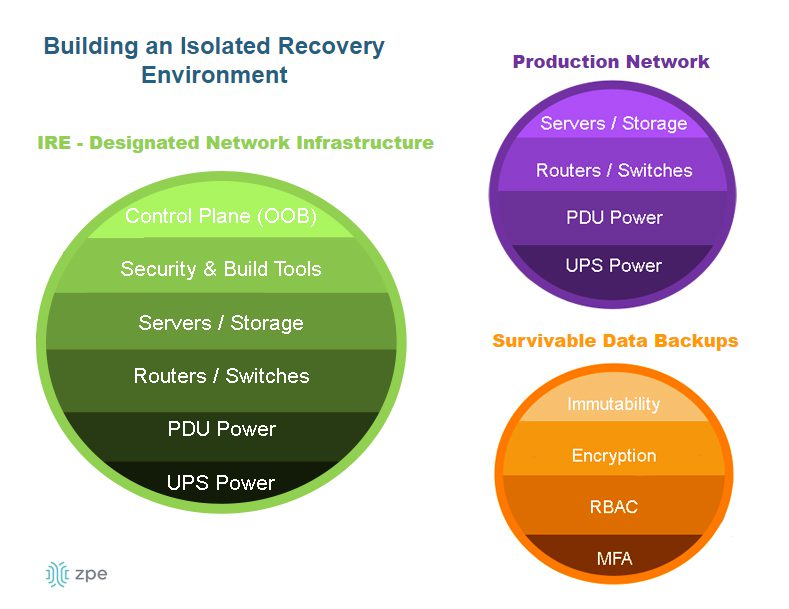
 

A diagram showing the components of an isolated recovery environment.

An IRE ensures that IT teams have a dedicated environment in which to rebuild and restore critical services during a ransomware attack, as well as during other disruptions or disasters. An IRE does not replace a traditional backup solution, but it does provide a safe environment that’s inaccessible to attackers, allowing response teams to conduct remediation efforts without being detected or interrupted by adversaries. Isolating your recovery architecture improves healthcare network resilience by reducing the time it takes to restore critical systems and preventing reinfection.

To learn more about how to recover from ransomware using an isolated recovery environment, download our whitepaper, 3 Steps to Ransomware Recovery.

Resilient healthcare network design with Nodegrid

A resilient healthcare network design is resistant to failures thanks to resilience systems that perform critical functions while the primary systems are down. Healthcare organizations can further improve resilience by implementing additional automation, edge computing, and isolated recovery environments (IREs).

Nodegrid healthcare network solutions from ZPE Systems simplify healthcare resilience engineering by consolidating the technologies and services needed to deploy and evolve your resilience systems. Nodegrid’s serial console servers and integrated branch/edge routers deliver full-stack networking, combining cellular, Wi-Fi, fiber, and copper into software-driven networking that also includes compute capabilities, storage, vendor-neutral application & automation hosting, and cellular failover required for basic resilience. Nodegrid also uses out-of-band (OOB) management to create an isolated management and recovery environment without the cost and hassle of deploying an entire redundant infrastructure.

Ready to see how Nodegrid can improve your network’s resilience?

Nodegrid streamlines resilient healthcare network design with consolidated, vendor-neutral solutions. Request a free demo to see Nodegrid in action.

Request a Demo

Best DevOps Tools

A glowing interface of DevOps tools and concepts hover above a laptop.
DevOps is all about streamlining software development and delivery through automation and collaboration. Many workflows are involved in a DevOps software development lifecycle, but they can be broadly broken down into the following categories: development, resource provisioning and management, integration, testing, deployment, and monitoring. The best DevOps tools streamline and automate these key aspects of the DevOps lifecycle. This blog discusses what role these tools play and highlights the most popular offerings in each category.

The best DevOps tools

Categorizing the Best DevOps Tools

Version Control Tools

Track and manage all the changes made to a code base.

IaC Build Tools

Provision infrastructure automatically with software code.

Configuration Management Tools

Prevent unauthorized changes from compromising security.

CI/CD Tools

Automatically build, test, integrate, and deploy software.

Testing Tools

Automatically test and validate software to streamline delivery.

Container Tools

Create, deploy, and manage containerized resources for microservice applications.

Monitoring & Incident Response Tools

Detect and resolve issues while finding opportunities to optimize.

DevOps version control

In a DevOps environment, a whole team of developers may work on the same code base simultaneously for maximum efficiency. DevOps version control tools like GitHub allow you to track and manage all the changes made to a code base, providing visibility into who’s making what changes at what time. Version control prevents devs from overwriting each other’s work or making unauthorized changes. For example, a developer may come up with a way to improve the performance of a feature by changing the existing code, but doing so inadvertently creates a vulnerability in the software or interferes with other application functions. DevOps version control prevents unauthorized code changes from integrating with the rest of source code and tracks who’s responsible for making the request, improving the stability and security of the software.

  •  Best DevOps version control tool: Github

Infrastructure as Code (IaC)

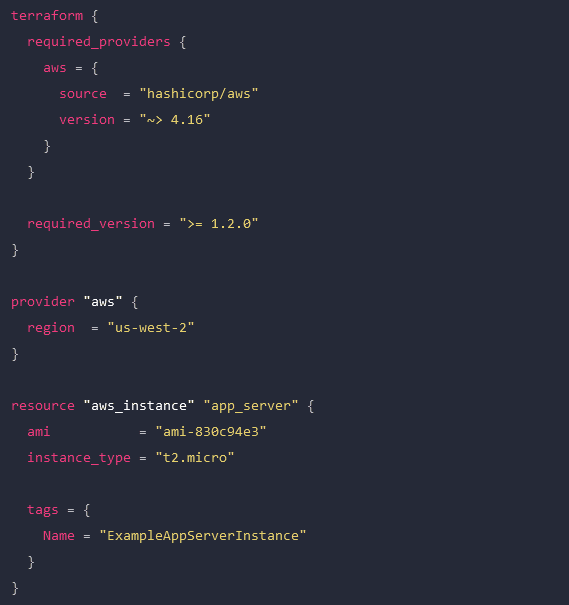
Infrastructure as Code (IaC) streamlines the Operations side of a DevOps environment by abstracting server, VM, and container configurations as software code. IaC build tools like HashiCorp Terraform allow Ops teams to write infrastructure configurations as declarative or imperative code, which is used to provision resources automatically. With IaC, teams can deploy infrastructure at the velocity required by DevOps development cycles. A screenshot of a Terraform configuration for AWS infrastructure.

An example Terraform configuration for IaC.

Configuration management

Configuration management involves monitoring infrastructure and network devices to make sure no unauthorized changes are made while systems are in production. Unmonitored changes could introduce security vulnerabilities that the organization is unaware of, especially in a fast-paced DevOps environment. In addition, as systems are patched and updated over time, configuration drift becomes a concern, leading to additional quality and security issues. DevOps configuration management tools like RedHat Ansible automatically monitor configurations and roll back unauthorized modifications. Some IaC build tools, like Terraform, also include configuration management.

Continuous Integration/Continuous Delivery (CI/CD)

Continuous Integration/Continuous Delivery (CI/CD) is a software development methodology that goes hand-in-hand with DevOps. In CI/CD, software code is continuously updated and integrated with the main code base, allowing a continuous delivery of new features and improvements. CI/CD tools like Jenkins automate every step of the CI/CD process, including software building, testing, integrating, and deployment. This allows DevOps organizations to continuously innovate and optimize their products to stay competitive in the market.

Software testing

Not all DevOps teams utilize CI/CD, and even those that do may have additional software testing needs that aren’t addressed by their CI/CD platform. In DevOps, app development is broken up into short sprints so manageable chunks of code can be tested and integrated as quickly as possible. Manual testing is slow and tedious, introducing delays that prevent teams from achieving the rapid delivery schedules required by DevOps organizations. DevOps software testing tools like Selenium automatically validate software to streamline the process and allow testing to occur early and often in the development cycle. That means high-quality apps and features get out to customers sooner, improving the ROI of software projects.

  •  Best software testing tool: Selenium

Container management

In DevOps, containers are lightweight, virtualized resources used in the development of microservice applications. Microservice applications are extremely agile, breaking up software into individual services that can be developed, deployed, managed, and destroyed without affecting other parts of the app. Docker is the de facto standard for basic container creation and management. Kubernetes takes things a step further by automating the orchestration of large-scale container deployments to enable an extremely efficient and streamlined infrastructure.

Monitoring & incident management

Continuous improvement is a core tenet of the DevOps methodology. Software and infrastructure must be monitored so potential issues can be resolved before they affect software performance or availability. Additionally, monitoring data should be analyzed for opportunities to improve the quality, speed, and usability of applications and systems. DevOps monitoring and incident response tools like Cisco’s AppDynamics provide full-stack visibility, automatic alerts, automated incident response and remediation, and in-depth analysis so DevOps teams can make data-driven decisions to improve their products.

Deploy the best DevOps tools with Nodegrid

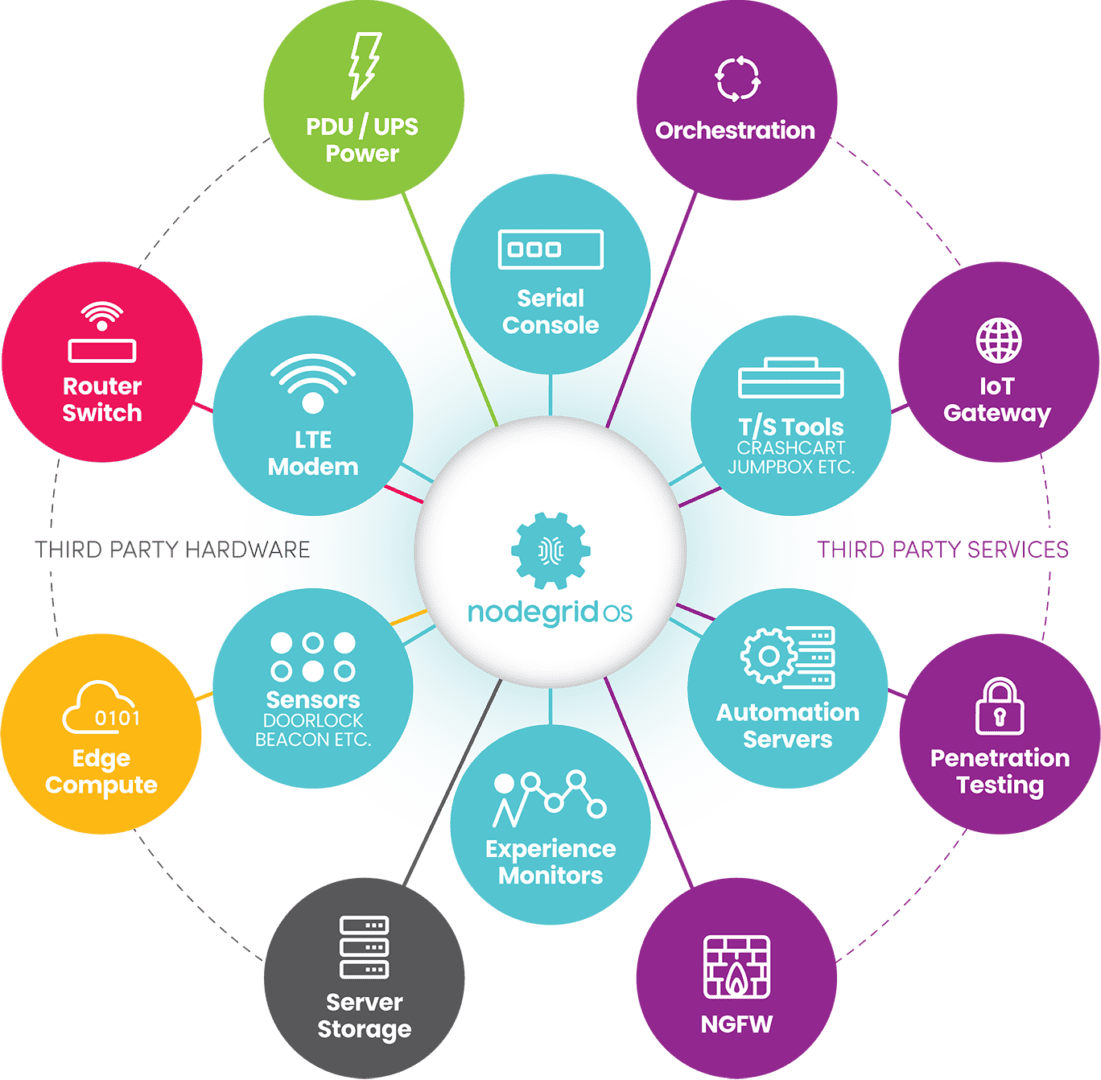
DevOps is all about agility, speed, and efficiency. The best DevOps tools use automation to streamline key workflows so teams can deliver high-quality software faster. With so many individual tools to manage, there’s a real risk of DevOps tech sprawl driving costs up and inhibiting efficiency. One of the best ways to reduce tech sprawl (without giving up all the tools you love) is by using vendor-neutral platforms to consolidate your solutions. For example, the Nodegrid Services Delivery Platform from ZPE Systems can host and integrate 3rd-party DevOps tools, reducing the need to deploy additional virtual or hardware resources for each solution. Nodegrid utilizes integrated services routers, such as the Gate SR or Net SR, to provide branch/edge gateway routing, in-band networking, out-of-band (OOB) management, cellular failover, and more. With a Nodegrid SR, you can combine all your network functions and DevOps tools into a single integrated solution, consolidating your tech stack and streamlining operations.

A major benefit of using Nodegrid is that the Linux-based Nodegrid OS is Synopsys secure, meaning every line of source code is checked during our SDLC. This significantly reduces CVEs and other vulnerabilities that are likely present in other vendors’ software.

Learn more about efficient DevOps management with vendor-neutral solutions

With the vendor-neutral Nodegrid Services Delivery Platform, you can deploy the best DevOps tools while reducing tech sprawl. Watch a free Nodegrid demo to learn more.

Request a Demo

Edge Management and Orchestration

shutterstock_2264235201(1)

Organizations prioritizing digital transformation by adopting IoT (Internet of Things) technologies generate and process an unprecedented amount of data. Traditionally, the systems used to process that data live in a centralized data center or the cloud. However, IoT devices are often deployed around the edges of the enterprise in remote sites like retail stores, manufacturing plants, and oil rigs. Transferring so much data back and forth creates a lot of latency and uses valuable bandwidth. Edge computing solves this problem by moving processing units closer to the sources that generate the data.

IBM estimates there are over 15 billion edge devices already in use. While edge computing has rapidly become a vital component of digital transformation, many organizations focus on individual use cases and lack a cohesive edge computing strategy. According to a recent Gartner report, the result is what’s known as “edge sprawl”: many individual edge computing solutions deployed all over the enterprise without any centralized control or visibility. Organizations with disjointed edge computing deployments are less efficient and more likely to hit roadblocks that stifle digital transformation.

The report provides guidance on building an edge computing strategy to combat sprawl, and the foundation of that strategy is edge management and orchestration (EMO). Below, this post summarizes the key findings from the Gartner report and discusses some of the biggest edge computing challenges before explaining how to solve them with a centralized EMO platform.

Key findings from the Gartner report

Many organizations already use edge computing technology for specific projects and use cases – they have an individual problem to solve, so they deploy an individual solution. Since the stakeholders in these projects usually aren’t architects, they aren’t building their own edge computing machines or writing software for them. Typically, these customers buy pre-assembled solutions or as-a-service offerings that meet their specific needs.

However, a piecemeal approach to edge computing projects leaves organizations with disjointed technologies and processes, contributing to edge sprawl and shadow IT. Teams can’t efficiently manage or secure all the edge computing projects occurring in the enterprise without centralized control and visibility. Gartner urges I&O (infrastructure & operations) leaders to take a more proactive approach by developing a comprehensive edge computing strategy encompassing all use cases and addressing the most common challenges.

Edge computing challenges

Gartner identifies six major edge computing challenges to focus on when developing an edge computing strategy:

Gartner’s 6 edge computing challenges to overcome

Enabling extensibility so edge computing solutions are adaptable to the changing needs of the business.

Extracting value from edge data with business analytics, AIOps, and machine learning training.

Governing edge data to meet storage constraints without losing valuable data in the process.

Supporting edge-native applications using specialized containers and clustering without increasing the technical debt.

Securing the edge when computing nodes are highly distributed in environments without data center security mechanisms.

Edge management and orchestration that supports business resilience requirements and improves operational efficiency.

Let’s discuss these challenges and their solutions in greater depth.

  • Enabling extensibility – Many organizations deploy purpose-built edge computing solutions for their specific use case and can’t adapt when workloads change or grow.  The goal is to attempt to predict future workloads based on planned initiatives and create an edge computing strategy that leaves room for that growth. However, no one can really predict the future, so the strategy should account for unknowns by utilizing common, vendor-neutral technologies that allow for expansion and integration.
  • Extracting value from edge data – The generation of so much IoT and sensor data gives organizations the opportunity to extract additional value in the form of business insights, predictive analysis, and machine learning training. Quickly extracting that value is challenging when most data analysis and AI applications still live in the cloud. To effectively harness edge data, organizations should look for ways to deploy artificial intelligence training and data analytics solutions alongside edge computing units.
  • Governing edge data – Edge computing deployments often have more significant data storage constraints than central data centers, so quickly distinguishing between valuable data and destroyable junk is critical to edge ROIs. With so much data being generated, it’s often challenging to make this determination on the fly, so it’s important to address data governance during the planning process. There are automated data governance solutions that can help, but these must be carefully configured and managed to avoid data loss.
  • Supporting edge-native applications – Edge applications aren’t just data center apps lifted and shifted to the edge; they’re designed for edge computing from the bottom up. Like cloud-native software, edge apps often use containers, but clustering and cluster management are different beasts outside the cloud data center. The goal is to deploy platforms that support edge-native applications without increasing the technical debt, which means they should use familiar container management technologies (like Docker) and interoperate with existing systems (like OT applications and VMs).
  • Securing the edge – Edge deployments are highly distributed in locations that may lack many physical security features in a traditional data center, such as guarded entries and biometric locks, which adds risk and increases the attack surface. Organizations must protect edge computing nodes with a multi-layered defense that includes hardware security (such as TPM), frequent patches, zero-trust policies, strong authentication (e.g., RADIUS and 2FA), and network micro-segmentation.
  • Edge management and orchestration – Moving computing out of the climate-controlled data center creates environmental and power challenges that are difficult to mitigate without an on-site technical staff to monitor and respond. When equipment failure, configuration errors, or breaches take down the network, remote teams struggle to meet resilience requirements to keep business operations running 24/7. The sheer number and distribution area of edge computing units make them challenging to manage efficiently, increasing the likelihood of mistakes, issues, or threat indicators slipping between the cracks. Addressing this challenge requires centralized edge management and orchestration (EMO) with environmental monitoring and out-of-band (OOB) connectivity.

    A centralized EMO platform gives administrators a single-pane-of-glass view of all edge deployments and the supporting infrastructure, streamlining management workflows and serving as the control panel for automation, security, data governance, cluster management, and more. The EMO must integrate with the technologies used to automate edge management workflows, such as zero-touch provisioning (ZTP) and configuration management (e.g., Ansible or Chef), to help improve efficiency while reducing the risk of human error. Integrating environmental sensors will help remote technicians monitor heat, humidity, airflow, and other conditions affecting critical edge equipment’s performance and lifespan. Finally, remote teams need OOB access to edge infrastructure and computing nodes, so the EMO should use out-of-band serial console technology that provides a dedicated network path that doesn’t rely on production resources.

Gartner recommends focusing your edge computing strategy on overcoming the most significant risks, challenges, and roadblocks. An edge management and orchestration (EMO) platform is the backbone of a comprehensive edge computing strategy because it serves as the hub for all the processes, workflows, and solutions used to solve those problems.

Edge management and orchestration (EMO) with Nodegrid

Nodegrid is a vendor-neutral edge management and orchestration (EMO) platform from ZPE Systems. Nodegrid uses Gen 3 out-of-band technology that provides 24/7 remote management access to edge deployments while freely interoperating with third-party applications for automation, security, container management, and more. Nodegrid environmental sensors give teams a complete view of temperature, humidity, airflow, and other factors from anywhere in the world and provide robust logging to support data-driven analytics.

The open, Linux-based Nodegrid OS supports direct hosting of containers and edge-native applications, reducing the hardware overhead at each edge deployment. You can also run your ML training, AIOps, data governance, or data analytics applications from the same box to extract more value from your edge data without contributing to sprawl.

In addition to hardware security features like TPM and geofencing, Nodegrid supports strong authentication like 2FA, integrates with leading zero-trust providers like Okta and PING, and can run third-party next-generation firewall (NGFW) software to streamline deployments further.

The Nodegrid platform brings all the components of your edge computing strategy under one management umbrella and rolls it up with additional core networking and infrastructure management features. Nodegrid consolidates edge deployments and streamlines edge management and orchestration, providing a foundation for a Gartner-approved edge computing strategy.

Want to learn more about how Nodegrid can help you overcome your biggest edge computing challenges?

Contact ZPE Systems for a free demo of the Nodegrid edge management and orchestration platform.

Contact Us

Data Center Migration Checklist

A data center migration is represented by a person physically pushing a rack of data center infrastructure into place
Various reasons may prompt a move to a new data center, like finding a different provider with lower prices, or the added security of relocating assets from an on-premises location to a colocation facility or private cloud.

Despite the potential benefits, data center migrations are often tough on enterprises, both internally and from the client side of things. Data center managers, systems administrators, and network engineers must cope with the logistical difficulties of planning, executing, and supporting the move. End-users may experience service disruptions and performance issues that make their jobs harder. Migrations also tend to reveal any weaknesses in the actual infrastructure that’s moved, which means systems that once worked perfectly may require extra support during and after the migration.

The best way to limit headaches and business disruptions is to plan every step of a data center migration meticulously. This guide provides a basic data center migration checklist to help with planning and includes additional resources for streamlining your move.

Data center migration checklist

Data center migrations are always complex and unique to each organization, but there are typically two major approaches:

  • Lift-and-shift. You physically move infrastructure from one data center to another. In some ways, this is the easiest approach because all components are known, but it can limit your potential benefits if gear remains in racks for easy transport to the new location rather than using the move as an opportunity to improve or upgrade certain parts.
  • New build. You replace some or all of your infrastructure with different solutions in a new data center. This approach is more complex because services and dependencies must be migrated to new environments, but it also permits organizations to simultaneously improve operational processes, cut costs, and update existing tech stacks.

The following data center migration checklist will help guide your planning for either approach and ensure you’re asking the right questions to prepare for any potential problems.

Quick Data Center Migration Checklist

  • Conduct site surveys of the current and the new data centers to determine the existing limitations and available resources, like space, power, cooling, cable management, and security.

  • Locate – or create – documentation for infrastructure requirements such as storage, compute, networking, and applications.

  • Outline the dependencies and ancillary systems from the current data center environment that you must replicate in the new data center.

  • Plan the physical layout and overall network topology of the new environment, including physical cabling, out-of-band management, network, storage, power, rack layout, and cooling.

  • Plan your management access, both for the deployment and for ongoing maintenance, and determine how to assist the rollout (for example, with remote access and automation).

  • Determine your networking requirements (e.g., VLANs, IP addresses, DNS, MPLS) and make an implementation plan.

  • Plan out the migration itself and include disaster recovery options and checkpoints in case something changes or issues arise.

  • Determine who is responsible for which aspects of the move and communicate all expectations and plans.

  • Assign a dedicated triage team to handle end-user support requests if there are issues during or immediately after the move.

  • Create a list of vendor contacts for each migrated component so it’s easier to contact support if something goes wrong.

  • If possible, use a lab environment to simulate key steps of the data center migration to identify potential issues or gaps.

  • Have a testing plan ready to execute once the move is complete to ensure infrastructure integrity, performance, and reliability in the new data center environment.

1.  Site surveys

The first step is to determine your physical requirements – how much space, power, cooling, cable management, etc., you’ll need in the new data center. Then, conduct site surveys of the new environment to identify existing limitations and available resources. For example, you’ll want to make sure the HVAC system can provide adequate climate control – specific to the new locale – for your incoming hardware. You may need to verify that your power supply can support additional chillers or dehumidifiers, if necessary, to maintain optimal temperature ranges. In addition to physical infrastructure requirements, factors like security and physical accessibility are important considerations for your new location.

2. Infrastructure documentation

At a bare minimum, you need an accurate list of all the physical and virtual infrastructure you’re moving to the new data center. You should also collect any existing documentation on your application and system requirements for storage, compute, networking, and security to ensure you cover all these bases in the migration. If that documentation doesn’t exist, now’s the time to create it. Having as much documentation as possible will streamline many of the following steps in your data center move.

3. Dependencies and ancillary services

Aside from the infrastructure you’re moving, hundreds or thousands of other services will likely be affected by the change. It’s important to map out these dependencies and ancillary services to learn how the migration will affect them and what you can do to smooth the transition. For example, if an application or service relies on a legacy database, you may need to upgrade both the database and its hardware to ensure end-users have uninterrupted access. As an added benefit, creating this map also aids in implementing micro-segmentation for Zero Trust security.

4. Layout and topology

The next step is to plan the physical layout of the new data center infrastructure. Where will network, storage, and power devices sit in the rack and cabinets? How will you handle cable management? Will your planned layout provide enough airflow for cooling? This is also the time to plan the network topology – how traffic will flow to, from, and within the new data center infrastructure.

5. Management access

You must determine how your administrators will deploy and manage the new data center infrastructure. Will you enable remote access? If so, how will you ensure continuous availability during migration or when issues arise? Do you plan to automate your deployment with zero touch provisioning?

6. Network planning

If you didn’t cover this in your infrastructure documentation, you’ll need specific documentation for your data center networking requirements – both WAN (wide area networking) and LAN (local area networking). This is a good time to determine whether you want to exactly replicate your existing network environment or make any network infrastructure upgrades. Then, create a detailed implementation plan covering everything from VLANs to IP address provisioning, DNS migrations, and ordering MPLS circuits.

7. Migration & build planning

Next, plan out each step of the move or build itself – the actions your team will perform immediately before, during, and after the migration. It’s important to include disaster recovery options in case critical services break, or unforeseen changes cause delays. Implementing checkpoints at key stages of the move will help ensure any issues are fixed before they impact subsequent migration steps.

8. Assembling a team

At this stage, you likely have a team responsible for planning the data center migration, but you also need to identify who’s responsible for every aspect of the move itself. It’s critical to do this as early as possible so you have time to set expectations, communicate the plan, and handle any required pre-migration training or support. Additionally, ensure this team includes dedicated support staff who can triage end-user requests if any issues arise during or after the migration.

9. Vendor support

Any experienced sysadmin will tell you that anything that could go wrong with a data center migration probably will, so you should plan for the worst but hope for the best. That means collecting a list of vendor contacts for each hardware and software component you’re migrating so it will be easier to contact support if something goes awry. For especially critical systems, you may even want to alert your vendor POCs prior to the move so they can be on hand (or near their phones) on the day of the move.

10. Lab simulation

This step may not be feasible for every organization, but ideally, you’ll use a lab environment to simulate key stages of the data center migration before you actually move. Running a virtualized simulation can help you identify potential hiccups with connection settings or compatibility issues. It can also highlight gaps in your planning – like forgetting to restore user access and security rules after building new firewalls – so you can address them before they affect production services.

11. Post-migration testing

Finally, you need to create a post-migration testing plan that’s ready to implement as soon as the move is complete. Testing will validate the integrity, performance, and reliability of infrastructure in the new environment, allowing teams to proactively resolve issues instead of waiting for monitoring notifications or end-user complaints.

Streamlining your data center migration

Using this data center migration checklist to create a comprehensive plan will help reduce setbacks on the day of the move. To further streamline the migration process and set yourself up for success in your new environment, consider upgrading to a vendor-neutral data center orchestration platform. Such a platform will provide a unified tool for administrators and engineers to monitor, deploy, and manage modern, multi-vendor, and legacy data center infrastructure. Reducing the number of individual solutions you need to access and manage during migration will decrease complexity and speed up the move, so you can start reaping the benefits of your new environment sooner.

Want to learn more about Data Center migration?

For a complete data center migration checklist, including in-depth guidance and best practices for moving day, click here to download our Complete Guide to Data Center Migrations or contact ZPE Systems today to learn more.
Contact Us Download Now

What is an Application Delivery Platform?

An illustration showing a breakout of various software application components to highlight the need for an application delivery platform

Modern software architectures are highly complex and often very difficult to maintain and operate. A single enterprise application comprises hundreds (or even thousands) of individual services, technologies, and toolchains while requiring a lot of underlying infrastructure, such as servers, routing and load balancing rules, and security controls. All of this complexity increases overhead costs and adds to the ever-growing workloads of software, network, and infrastructure teams, especially when you multiply this effort across dozens or hundreds of software deployments.

Platform engineering is a new discipline introduced by Gartner to address these challenges by reducing the complexity of software engineering, network operations, and application delivery. The platforms built by these engineers are known by several names, including internal developer platforms, internal developer portals, and application delivery platforms. This guide defines an application delivery platform, discusses the underlying technology, and highlights a leading platform engineering solution.
.

Table of Contents:
  1. What is an application delivery platform?
  2. What is the importance of an application delivery platform?
  3. What technology makes up an application delivery platform?
  4. Introducing ZPE Systems’ Services Delivery Platform

What is an application delivery platform?

An application delivery platform is a suite of technologies that handles all the services that support an application, including security, traffic management, load balancing, and data management. Platform engineers combine all these services into a common toolset used to deploy applications at customer sites, so there’s no need to build a new architecture every time. This streamlined experience makes application delivery cost-effective by significantly reducing workloads and deployment timelines.

What is the importance of an application delivery platform?

The goal of an application delivery platform is to reduce deployment and management complexity. Deployment complexity leads to a greater risk of human error when configuring things like security controls and access policies, and any mistakes are likely to be found and exploited by cybercriminals. Management complexity makes it harder to stay on top of patch schedules. Unpatched software often contains vulnerabilities that are exploited by cybercriminals; for example, known ransomware groups targeted unpatched IBM software earlier this year.

By reducing complexity, an application delivery platform also reduces the attack surface, improving an organization’s overall security posture.

What technology makes up an application delivery platform?

By its very nature, an application delivery platform is highly customized to fit the needs of the applications being supported. Here are some examples of the services and technologies that are often included.

  • Server storage & compute: The platform needs storage (usually solid-state) and processing units (CPUs or GPUs) to run the applications and store necessary data. Ideally, the OS and computing architecture will support containers (e.g., Docker) for microservices applications.
  •  
  • Automation tools: A key feature of application delivery platforms is the ability to automatically provision and deploy new environments, apps, and network services as well activate services licenses and service chaining. That means the platform should host automation tools for configuration management, code delivery, and software-defined networking (SDN).
  •  
  • Security: The ideal platform makes it possible to deliver applications without configuring security every time. That means it provides unified management and repeatable deployments for security services like firewall traffic inspection, access control lists, and advanced authentication.
  •  
  • Routing & load balancing: A lot of backend networking goes into the typical application deployment to ensure traffic is routed correctly and optimized for performance. An application delivery platform should support network functions virtualization (NFVs) and SDN so standard network configurations can be easily deployed alongside the applications being delivered.
  • Management tools: Engineers need a way to remotely access, manage, and troubleshoot application deployments, even (and especially) during major service disruptions. The ideal platform includes out-of-band serial console management and supports third-party troubleshooting tools so remote teams can quickly recover systems and applications without an expensive on-site visit.

While this list is far from exhaustive, it covers the foundational technology that supports an application delivery platform. Platform engineering is still in its infancy, and many organizations struggle to efficiently execute it because of how many moving pieces need to be considered. The goal is to find a solution that provides the best framework of hardware and software capabilities that platform engineers can build upon, so they can create a fully customized application delivery platform without reinventing the wheel.

Introducing ZPE Systems’ Services Delivery Platform

Zero Pain Ecosysteme

The Services Delivery Platform from ZPE Systems is the perfect foundation for any platform engineering initiative. Nodegrid edge routers serve as the hardware backbone, providing networking and failover capabilities, OOB serial console management, and plenty of memory, storage, and CPU headroom for additional apps and services. You can build a fully customized hardware platform with the modular Net Services Router (NSR), extending your storage or compute capabilities or adding more ports to support your application deployment.

The vendor-neutral, Linux-based Nodegrid OS can run your custom applications as well as third-party automation, security, DevOps, and management tools. Plus, Nodegrid unifies all connected services and applications under a single management umbrella, allowing teams to oversee and orchestrate all of their deployments from one convenient portal.


Ready to Learn More?

The Services Delivery Platform from ZPE Systems simplifies platform engineering with powerful, multipurpose hardware and an open, vendor-neutral OS. Contact us today to learn more about using Nodegrid for your application delivery platform!

Contact Us

How to Implement Zero Trust for OT

zero trust for ot
Enterprise security teams traditionally focus on IT networks, but operational technology (OT) security is just as important. OT comprises equipment that interacts with the physical world, such as sensors, temperature gauges, and motors, as well as the systems used to control that technology. Attacks on OT systems have a huge impact on business operations and customers, often causing more devastation than an IT breach. For example, an attack on an oil pipeline’s control systems could shut down production for weeks and affect millions of people in the region.

“Zero trust” is a security methodology designed to reduce the risk of attack through network segmentation, granular access policies, and advanced security technologies. Many organizations use zero trust to protect their IT networks, but it’s just as critical to the safeguarding of operational technology. This post defines zero trust security before explaining how to implement zero trust for OT.

Table of Contents:

What is zero trust for OT?

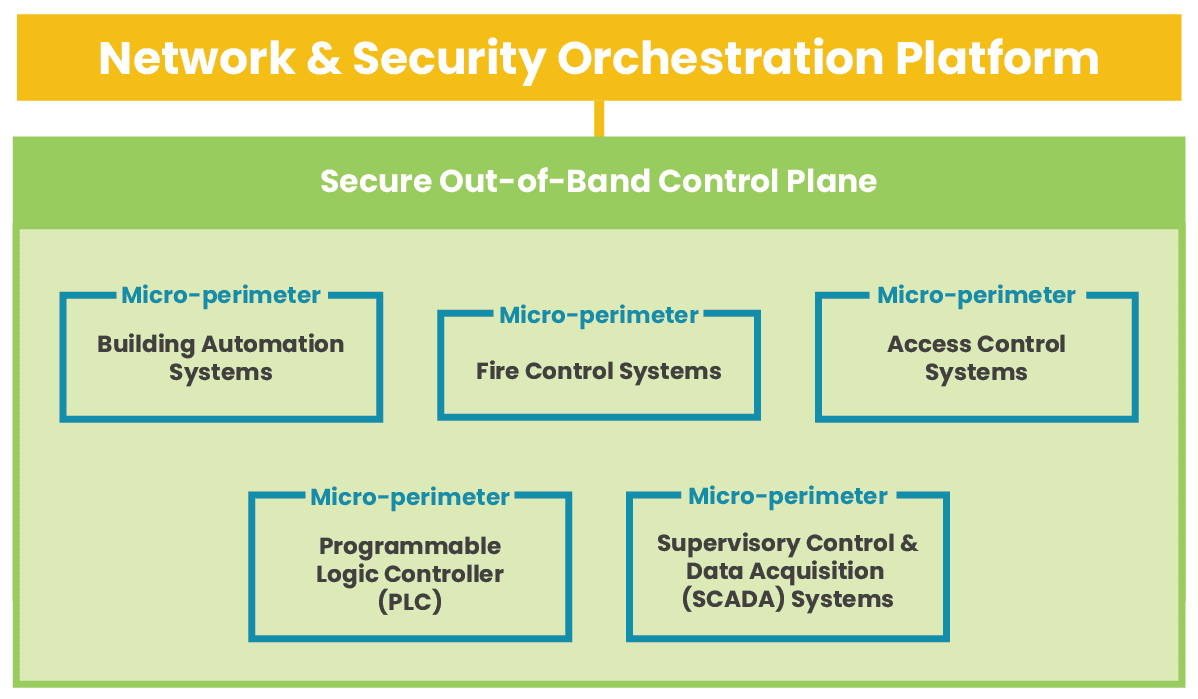
According to recent research by Barracuda Networks, more than 90 percent of manufacturing organizations saw cyberattacks hit their production or energy supply in 2021 alone. OT is a frequent target because of how devastating an attack can be on business operations and because it often lacks the same security policies and controls that protect IT infrastructure. To solve this problem, teams need to apply zero trust security principles, policies, and technology to their OT networks. The zero trust security methodology follows the motto “never trust, always verify.” That means operating under the assumption that no users or devices should be trusted, even if they’re logging in from within the main office. Achieving a zero-trust architecture means segmenting IT and OT networks and creating micro-perimeters of highly specific security policies and controls to protect each segment. Zero trust often uses advanced security technologies like AIOps and machine learning to enforce those policies, identify subtle signs of compromise, and quickly resolve security incidents.

How to implement zero trust for OT

Let’s discuss the requirements and best practices for implementing zero trust for OT.

Isolate critical systems with segmentation

Zero trust requires custom-tailored security policies and controls to protect specific network resources. That means network teams must logically segment the network based on which resources need to be protected by which policies and technologies, a practice known as micro-segmentation.

OT is often grouped together into a single micro-segment under the assumption that all OT needs the same protection. However, not all OT is created equally, especially in the eyes of a would-be attacker. For example, a programmable logic controller (PLC) gives cybercriminals control over manufacturing processes, but compromising an access control system lets them physically infiltrate the building. Some organizations take zero trust even further by using nano-segmentation to isolate individual systems, applications, or containers to create extremely effective micro-perimeters to address specific vulnerabilities.

Micro- and nano-segmentation are the backbone of a zero-trust architecture, enabling the creation of micro-perimeters using granular access policies and security controls customized for the protected resources.

Create and enforce strong security policies

Zero trust security policies determine who can pass through each micro-perimeter and who can access each OT resource. These policies should follow a least-privilege approach, meaning everyone gets the bare minimum privileges required to complete their workflows and nothing more. The best practice is to use role-based access control (RBAC), categorizing individual accounts based on their role (e.g., system administrators or machine operators) and giving each role least-privilege access to the resources required for that job.

The best way to create and enforce zero trust security policies is with an identity and access management (IAM) solution. A zero-trust IAM solution monitors each micro-perimeter to verify the identities of all accounts requesting access and attempts to establish an account’s trustworthiness using methods like two-factor authentication (2FA). Some advanced IAM solutions even use machine learning technology like user and entity behavior analytics (UEBA) to monitor account activity on the network and spot anomalous behavior that could indicate compromise.

  • IAM = Identity and Access Management: Creates and deploys policies, verifies identities, and establishes trustworthiness.
  • 2FA = Two-Factor Authentication: Requires an additional form of identity verification (besides the username and password), such as a code sent to an authorized mobile device.
  • UEBA = User and Entity Behavior Analytics: Uses machine learning to monitor account activity, creates baselines for normal behavior, and identifies anomalies that could mean an account is compromised.

Strong, granular security policies and zero-trust IAM solutions help protect OT by limiting account privileges and preventing compromised accounts from accessing network resources.

Leverage advanced security technologies

There are additional security technologies that support or enhance zero trust for OT. For example, a next-generation firewall (NGFW) makes network segmentation easier and includes advanced features such as application-aware filtering and deep-packet inspection. Secure access service edge (SASE) delivers zero trust security solutions to the network edge, safeguarding OT at remote branch sites with the same policies and controls as the central enterprise network. AIOps uses artificial intelligence for better threat detection and faster incident recovery.

Organizations use advanced security technologies to fortify micro-perimeters, extend zero trust to the edge, and gain enhanced detection and recovery capabilities.

Implement zero trust for OT with Nodegrid

Zero trust security protects operational technology using network segmentation to create micro-perimeters of strong security policies and advanced security technologies custom-tailored to each individual resource’s requirements and vulnerabilities. Achieving zero trust is typically a long and tedious process because of how many solutions and devices you must deploy.

The Nodegrid solution from ZPE Systems alleviates this challenge by providing a vendor neutral platform capable of hosting and deploying all your zero trust security technologies. For example, Nodegrid network edge routers deliver all the networking capabilities required to spin up an OT branch and can directly host your choice of third-party security solutions. Nodegrid reduces hardware expenses by consolidating network functionality onto fewer devices while unifying network and security management under a single umbrella for greater operational efficiency.

In fact, Nodegrid is an entire Services Delivery Platform that you can deploy anywhere in your network architecture to host your critical third-party SaaS (software as a service) solutions. That means you can create a customized branch-in-a-box that combines gateway routing, switching, out-of-band (OOB) management, NGFW, SASE, infrastructure automation, and more in a single device.

Ready to Learn More?

Contact ZPE Systems to learn more about implementing and enhancing zero trust for OT with the Nodegrid Services Delivery Platform.

Contact Us