Providing Out-of-Band Connectivity to Mission-Critical IT Resources

Home » Archives for July 2021

How to Implement a Zero Trust Security Strategy in an Enterprise Environment

shutterstock_1913848855

Large enterprises may be hesitant to adopt zero trust security because it may seem too disruptive to their business. However, cyberattacks on businesses continue to increase, costing affected enterprises an average of $3.92 million per breach, so it’s clear that traditional security strategies aren’t working anymore.

Even the President has addressed the need for heightened cybersecurity in an executive order explicitly requiring federal agencies to implement zero trust security policies and recommending that other organizations do the same.

The good news is, implementing a zero trust security strategy doesn’t require the dramatic, expensive network overhaul that many enterprises fear. Adopting a zero trust architecture is a gradual (and frequently cost-efficient) process that, when done correctly, requires minimal downtime and business disruption. Let’s look at the implementation process step-by-step and discuss some tips and best practices to ensure a smooth transition to zero trust security.


How to implement a zero trust security strategy in an enterprise environment

The foundation of zero trust security is the principle of “never trust, always verify.” Rather than creating a security perimeter around your network and assuming that everyone within that perimeter is safe, with zero trust security, you must verify everyone (and everything) that tries to connect to a resource, whether they’re inside or outside.

Implementing a zero trust security strategy in an enterprise environment is iterative, not something you should try to do all at once. Breaking your strategy into a series of small, repeatable steps allows you to improve upon the process as you and your team gain experience with zero trust principles and technologies.

Step 1: Define a protect surface

Older cybersecurity strategies usually focus on defining and defending an attack surface—the sum of all the potential points where an attacker could breach the network. This involves creating a security perimeter around your entire network and trying to keep sensitive data and vulnerable systems as far away from that perimeter as possible. The problem with this approach is that our networks are growing more extensive and more complex, increasing the attack surface and making it more challenging to identify and define every potential entry point.

In a zero trust security strategy, you should instead focus on defining a protect surface or each specific item that needs to be safeguarded from attack. A protect surface should include the data, applications, assets, and services—known as DAAS—that are most critical for your enterprise to protect from attack.

  • Data: You should identify and classify your data based on how important it is to your organization, how valuable it would be to hackers, and whether it’s subject to regulations like HIPAA or PCI.
  • Applications: You need to determine which applications use sensitive data or proprietary code that may be of value to an attacker.
  • Assets: You must create a detailed inventory of all your devices—not just laptops and cell phones, but also point-of-sale terminals, manufacturing equipment, IoT devices, and other network-connected assets—so you know what to include in your protect surface.
  • Services: You should identify all business-critical network services that need to be protected, such as Active Directory, DHCP, and email.

Rather than having one large attack surface to protect, you will have multiple smaller protect surfaces to focus on. Remember, implementing a zero trust security strategy is an iterative process, so it’s best to focus on one protect surface at a time. Once you define a protect surface, you will be able to move the required zero trust security controls as close as possible to create a micro-perimeter.

Doing so allows you to create individual security policies and procedures that are limited in scope to the specific requirements of that data, application, asset, or service. You can use network segmentation to granularly control and monitor traffic to a micro-perimeter and strictly limit which users and resources can request access. Defining a protect surface is thus an essential first step for implementing a zero trust security strategy for your enterprise’s DAAS.

Step 2: Map DAAS interdependencies

Once you’ve defined a protect surface, you need to map its traffic flows and interdependencies. You should document how specific resources interact with each other so that you can work these interdependencies into the security policies and controls of the micro-perimeter. Essentially, mapping your DAAS interdependencies allows you to safeguard a protect surface without accidentally breaking any related applications, services, or workflows.

Step 3: Construct the zero trust network architecture

There isn’t a perfect zero trust network design that you should strive to achieve—each zero trust network is customized completely around the protect surfaces. So, after you have defined a protect surface and documented traffic flows and interdependencies, you can build out your zero trust network architecture.

This involves implementing a micro-perimeter using the security controls you planned out in the previous steps. For example, you could use a next-generation firewall to segment your network based on a defined protect surface, create a micro-perimeter around that segment, and monitor traffic and enforce access control on all layers on the OSI model. This model is also known as the Open Systems Interconnection model and is a reference model for how applications communicate over a network. A traditional firewall only protects layers one through four (physical, data link, network, and transport). In contrast, a next-generation firewall also protects your upper stack (session, presentation, and application).

Step 4: Establish zero trust policies

Once you have implemented your zero trust architecture, you need to create zero trust security policies for the protect surface. You should use the “Kipling Method” to determine access, which means asking the following questions:

  1. Who should have access to this resource?
  2. What application is being used to access this resource?
  3. When is the resource being accessed?
  4. Where is this resource located?
  5. Why does the resource need to be accessed?
  6. How should you allow access to this resource?

Remember, you’re creating zero trust security policies for each protect surface and micro-perimeter, so you want to get as granular as possible to ensure only safe, known traffic and communication are permitted.

Step 5: Monitor and optimize

The final step is to monitor the protect surface and conduct frequent log reviews to ensure zero trust operations run smoothly. You should continuously monitor all user and device communication into and out of your new micro perimeter. This will allow you to detect and remediate potential latency, performance issues, and bugs, as well as create baselines for normal behavior. These baselines will make it easier in the future for your security teams and threat detection tools to spot unusual activity that could indicate a breach.

You’ll use the information you gain from monitoring and logging to improve the next iteration of your zero trust security implementation, as well as to continuously optimize your zero trust architecture. By focusing on one protect surface at a time, you can gradually expand your zero trust strategy to iteratively encompass more data, applications, assets, and services until you’ve transitioned your entire network to a zero trust security strategy with minimal disruption to your enterprise.


Additional tips for implementing a zero trust security strategy


shutterstock_1678402276

Assess your zero trust security capabilities

One of the most significant benefits of zero trust security is that it doesn’t require an expensive or disruptive technology overhaul to achieve. Instead, the goal is to augment your existing network architecture as much as possible using zero trust tools, policies, and procedures. Because of this, it is recommended that you start by assessing the zero trust capabilities of your existing architecture and tools, so you can identify the gaps in your zero trust readiness and avoid spending money on solutions you don’t need or already have.

Identity and access management

Many enterprises find that their zero trust readiness is hampered by deficient identity and access management (IAM). It is challenging to implement a zero trust security strategy without investing in a unified IAM solution that specifically supports zero trust principles and security controls. You should look for a centralized platform that supports zero trust IAM requirements like single sign-on (SSO), multi-factor authentication (MFA), and passwordless authentication, like Okta, for example.

Data discovery and classification.

Identifying the data that needs to be protected as part of your DAAS is much easier when you use the data discovery and classification tool. No matter what business you’re in, your enterprise is likely processing a vast amount of data every day, making it very challenging to manually identify, locate, and prioritize the data you need to protect. There are various specialized data discovery and classification tools that work across multiple industries, but you may find that one of your existing technology solutions already includes data discovery features, such as Azure Data Protection.


Implementing the ideal zero trust security strategy

Your enterprise’s transition to a zero trust architecture will be a gradual process, and it will need to be repeated every time you add a new protect surface to your network. Every time you expand your zero trust architecture, you should refine and optimize the implementation process which will help your security grow progressively stronger.

By following this iterative process and implementing the right tools and technologies, your enterprise can implement a zero trust security strategy that supports your business goals and keeps your network protected.

Want to learn more?

Contact us to learn more about how ZPE Systems can simplify your zero trust security strategy with Nodegrid’s Zero Trust framework.

Contact Us

The Top 4 Network Management Issues Your Company Needs to Be Aware Of

Two engineers dealing with network management issues at a server rack in a data center

Managing today’s enterprise network is more challenging than ever before. Most network infrastructure is no longer centralized, and we frequently need to incorporate cloud, SaaS, and other third-party services and technologies into our network architecture and management strategies. Plus, almost all business operations rely on the availability and performance of network services, which means any latency or downtime can lead to severe business losses.

Let’s take a closer look at the top network management issues that enterprise IT teams face, and discuss practical tools and methodologies you can use to overcome them.


Top 4 network management issues and how to overcome them

1. Network security

Security remains one of the most significant issues in enterprise network management, and it continues to grow more challenging every day. Every new device you connect increases your attack surface, giving hackers another potential access point to your network.

Your enterprise will soon find that attempting to reduce or defend an ever-increasing attack surface is no longer a feasible network security strategy. Instead, you should focus on identifying your protect surface – the business-critical data, applications, assets, and services (or DAAS, for short) that are most valuable to hackers and most important to your enterprise. Then, you can implement a “micro-perimeter” of security controls,and policies around each protect surface. By focusing on small, limited protect surfaces instead of one large attack surface, you can ensure that your DAAS are identified and protected by the security policies and controls that are best suited to the job

Another network security issue is that cyberattacks are becoming more sophisticated and difficult to detect. Old signature-based firewalls and anti-malware programs are now less effective due to an increase in zero-day exploits and other novel malware that doesn’t fit established patterns. Luckily, network security tools and appliances are evolving to address these types of threats. For example, some intrusion detection and prevention systems and next-generation firewalls use neural networks and other machine learning technologies to monitor network traffic, analyze user and device behavior, and detect and respond to signs of a breach.

It’s important to remember that security tools are only part of the equation—you also need comprehensive security policies and user guidelines, as well as a robust set of plans and procedures in place. Hence, your teams know what to do in the event of a breach.


2. Visibility control

It’s impossible to successfully manage a complex network without complete visibility on all of your network devices, users, data, and applications. For large enterprises, this becomes extra challenging when some or all your network infrastructure resides in the cloud. Different cloud providers offer different monitoring levels and visibility on their platforms. Without visibility of your entire network, your risk of performance issues, outages, and security breaches increases.

To overcome this issue, you need a comprehensive network monitoring solution that can automatically detect and add any new users, devices, or software that connect to your network, so you have immediate visibility. Your monitoring tools should also allow you to examine all network traffic and transactions so any unusual or suspicious behavior can be flagged, investigated, and mediated before any real damage is done. Suppose you’re running a cloud, hybrid, or multi-cloud infrastructure. In that case, you should ensure your network monitoring solution can integrate with and provide complete visibility on all your cloud environments, rather than patching together multiple tools.

Implementing a platform-agnostic network monitoring solution with automation functionality will simplify your network management and ensure no parts of your infrastructure are left in the dark.


3. Network performance

Businesses can’t run efficiently unless their networks are operating at peak performance. However, today’s networks need to handle traffic from more devices while being available 24/7. Plus, network devices are processing more data and performing complex operations to meet market demands.

The key for large enterprises with complex network infrastructures is automation. Companies can efficiently automate many network performance monitoring tasks, alarms, and mitigation tools to ensure issues are detected and resolved as quickly as possible without any risk of human error. Some examples of network infrastructure automation tools include Ansible, Chef, and Puppet.

When implementing an automated solution, it’s essential to establish your environment’s unique network performance baselines and set priority levels for specific performance metrics that are more or less important to your organization. Your network isn’t the same as anyone else’s, so optimal performance for your enterprise may not look the same as anyone else’s either.


4. Configuration management

Every new device and account connected to your network must be configured correctly to avoid performance issues and security vulnerabilities. Configuration management is easy enough on a small local area network (LAN) with a handful of devices, but modern enterprise networks are significantly more complicated.

Misconfigured network devices and accounts can introduce significant risks to your network. A recent study in Europe found that 82% of security vulnerabilities were caused by misconfiguration of user accounts, firewalls, and other network objects. However, as our network infrastructure becomes more convoluted, it’s difficult for engineers to learn and remember the specific configurations for all of our accounts and devices. Just like performance monitoring, enterprises are also turning to automation to help overcome this network management issue.

Automated configuration management tools allow engineers to apply configurations to new devices with a single button press, removing human error from the equation. Automated identity and access management (IAM) solutions give you the same capabilities and user accounts, and access permissions.

In addition, many DevOps teams are turning to infrastructure as code (IaC) methodologies and tools. Infrastructure configurations are written as automated code deployed to devices as needed, eliminating the need for complicated documentation and manual setups.

You can use network automation tools to execute simple management tasks. However, if you’re interested in applying automation to entire processes and workloads, you need to consider orchestration. Network orchestration, also known as software-defined networking (SDN), uses a network controller to “orchestrate” the automatic configuration and management of network devices, applications, and services. Network orchestration simplifies network management for IT teams and provides a more seamless end-user experience.


Discover the right solutions for your network management issues

As your networks grow more complex, managing issues escalates as well. Large and growing enterprises must be aware of the most common network management issues to discover the right solutions for any specific complication they need to prevent.

An automated and comprehensive network monitoring solution is crucial for overcoming network performance, management, visibility, and security complications. ZPE Systems Nodegrid is an innovative network management solution that can help you address the most common vulnerabilities.

Want to learn more about ZPE Systems

Contact us today or visit our products page for more information on how ZPE Systems Nodegrid can help solve any network management issues you need to tackle.

Contact Us

Zero Trust Security for IoT: How to Secure Your Network

Zero trust and IoT concepts connected in an optical network

The internet of things (IoT) is driving companies to rethink how they secure their networks. When you introduce unmanaged, internet-connected smart devices to your network, you’re also introducing many new potential access points for malicious actors to breach your security.

  • For example, hackers frequently target IoT smart devices like security cameras, printers, or even smart coffee machines that are forgotten about or left unsecured, then use those devices as a gateway to the rest of your network. That’s where zero trust security for IoT can help.

Zero trust is a relatively new security model based on the principle of “never trust, always verify.” Unlike a traditional castle-and-moat security architecture, in which the users and devices within a network’s perimeter are automatically trusted, zero trust requires the verification of all users and devices every single time they connect, even from inside the “moat.”

Some enterprises have already adopted zero trust security for their users, but it can also apply to IoT devices. Here are the best practices and considerations for implementing zero trust security for IoT.

Best practices of implementing Zero Trust Security for IoT

There are essential practices, challenges, and considerations you need to be aware of before implementing zero trust security for IoT, including:

Starting with the basics

Before you apply zero trust to IoT smart devices, you need a solid foundation in the basics of zero trust security for users. These are the fundamental requirements for managing zero trust security for users:

  • First, implementing a zero trust methodology requires a culture shift within your organization, which can be a gradual process. You will need to create and apply robust administrative policies governing network access and permissions and train your IT teams and end-users on following those policies.
  • Second, you need to implement the tools and technologies required to verify user identities, obtain visibility on any devices those users connect to the network and make automatic access decisions using real-time risk analysis.

Expanding Zero Trust Security to IoT

After establishing zero trust security for your users and their devices, you need to expand it to include unmanaged, non-user devices. To do so, you need zero trust identity management tools to register devices and issue credentials automatically and to provide passwordless authentication.

Device visibility

To successfully employ zero trust security for IoT, you need complete visibility into all your devices. First, you need to discover and inventory all your IoT devices, including those at remote branch locations. You should track device information such as serial numbers, software and firmware versions, and operating system configurations. You also need to assess and log the security risk profile of each IoT device that connects to your network, so you know which security controls to apply.

When performance issues or bugs start to occur frequently, it could be a sign of malware or a security breach; additionally, a device that’s not functioning properly could be more vulnerable to attack. To establish and maintain zero trust security for IoT, you need device health monitoring that can automatically detect issues and flag them for remediation. Some advanced solutions can also automatically block an affected device from further connection attempts or automatically execute remediation tasks without human intervention.

Many IoT device management platforms offer device visibility functionality – for example, Azure, Google, and AWS all include discovery and monitoring features as part of their IoT offerings. Some endpoint security solutions,, include IoT device monitoring and security features, so you may want to evaluate your current security platform to see if you can add or activate this functionality. Or, since you’re implementing an entirely new security methodology to your IoT environment, you may want to look into a zero trust security and monitoring solution that’s designed specifically for IoT, such as Palo Alto Networks IoT Security.

Principle of least privilege (PoLP)

Zero trust security is used frequently in conjunction with the principle of least privilege (PoLP), which states that any user or device should only receive the bare minimum access privileges required to complete their job functions. To implement PoLP for IoT, you must determine the minimum amount of network access needed for each device to perform its functions and then limit its potential privileges accordingly. One way to achieve this is by implementing identity and access management (IAM) tools and policies that support zero trust and PoLP for devices.

In addition to PoLP, zero trust security frequently uses device segmentation. Essentially, you fence IoT devices into zones, only allowing them to request access to network resources within their assigned zone. Additionally, segmenting your IoT devices will enable you to create micro-perimeters, another cornerstone of zero trust security.

Essentially, each network segment gets a specific set of security controls and policies designed around the individual needs and risk profile of the IoT devices in that zone. Those controls and policies create a micro-perimeter that protects your IoT devices and limits their network access. This means you’re also limiting the amount of damage that hackers can cause to your network if one of those devices is compromised. One popular tool for creating network segments, establishing micro-perimeters, and monitoring and controlling access requests and network traffic is a next-generation firewall.

Security monitoring

Last but certainly not least, you need security monitoring for all of your IoT devices. With unmanaged smart devices, you need to ensure that security issues can be detected and remediated automatically. It might be days or weeks before a human comes into contact with one of those devices. For example, several years ago, attackers could breach a casino’s network security by hacking a smart sensor in a fish tank – the kind of device that employees don’t usually think about or work with regularly.

There are various zero trust security monitoring solutions designed specifically for IoT, like Palo Alto Networks’ IoT Security mentioned earlier. You can also use devices such as intrusion detection and prevention systems (IDS/IPS) or next-generation firewalls to monitor devices and network traffic. In addition to monitoring, your zero trust security solution for IoT needs to incorporate as much automation as possible so threats can be detected, isolated, and remediated even if nobody’s around to push a button or unplug a device manually.

The challenge of implementing Zero Trust Security for IoT

One of the biggest reasons zero trust security initiatives eventually fail is that adherence tends to drop off as soon as it becomes inconvenient. This is especially true for zero trust security with IoT. Maintaining zero trust for remote, unmanaged devices can be logistically challenging.

That’s why so many of the best practices involve using specialized tools to automate and simplify the management of zero trust security for IoT. In conclusion, the simpler it is to manage, the more likely you are to maintain it.

ZPE Systems Nodegrid can help you overcome the challenges of zero trust security for IoT.

Want to learn more? Contact us today or visit our products page for more information on how ZPE Systems Nodegrid can simplify your zero trust security for IoT deployments.

Contact Us

3 Ways Your Critical Remote Infrastructure Is Costing You

It’s easy to imagine all the ways that downtime can throw a wrench into your critical remote infrastructure operations. Things like scaling, service outages, and tedious management are just part of the job. No matter how much these stand in the way of business, there’s not much that you can do about them, right?

Not quite. In this post, we’ll explore three reasons your complex critical remote infrastructure is costing you, and how Nodegrid is the simple solution that helps you save.

If you’re short on time, here’s a two-minute video explaining how you can cut through the complexity of managing your network.

Deploying critical remote infrastructure

You’re probably familiar with long deployment times for your critical remote infrastructure. Manually provisioning and setting up networks consumes a lot of time and resources. The obvious costs here are the staff wages and device shipping expenses; however, the not-so-obvious cost is the business opportunity that you miss. The longer it takes you to deploy, the longer your location goes without meeting demand or generating revenue.

How can you minimize this cost? By using zero touch provisioning.

Zero touch provisioning uses automation to automatically configure and build your networks. Instead of putting staff on site to manually set up each device in your stack, you can instruct even unskilled staff to simply plug in and boot your devices. Zero touch provisioning does the rest of the work and can bring you online in hours.

Not all zero touch provisioning is the same, though. Most vendors only allow you to use it for their devices or products, which means unless you standardize on their offerings, you’re going to be limited in terms of what systems and services you can automatically deploy. On top of this, you still need to pre-configure devices and put sensitive info at risk, as well as perform manual orchestration and firmware updates.

This is where Nodegrid sets itself apart. Because it features the vendor-neutral Nodegrid OS, it allows you to use your choice of automation tools as well as build custom scripts to orchestrate across devices and environments. This means you can use true zero touch provisioning that extends to every part of your infrastructure — from configuring end devices from different vendors, to bootstrapping VMs, activating service licenses, and setting up your entire network. It offers airtight security as well, because you can completely provision bare-metal devices via ZPE Cloud.

When it comes to your critical remote infrastructure, Nodegrid is your go-to solution for fast, complete, and secure network deployments.

Keeping critical remote infrastructure online

How often does your critical remote infrastructure go offline? When it does, you can suffer losses at a rate of $5,000 or more per minute, according to Gartner. And this only covers the monetary portion. You also need to consider the reputation damage, degradation of trust, and decreased customer satisfaction that result from sudden outages.

If you’re familiar with redundant solutions, you know that these can be a life saver — but on the other hand, they come with two times the number of solutions that you need to purchase, deploy, and manage.

You typically need to deploy two boxes for each function you wish to add redundancy to, and connect them in a high availability configuration. In other words, two firewalls, two routers, two SD-WAN boxes, etc. All this means the initial and ongoing burden of redundancy can be…off-putting.

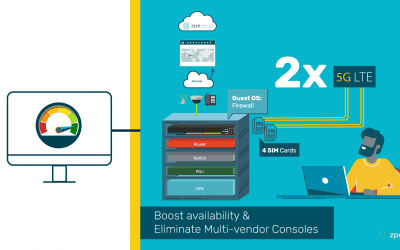
However, Nodegrid devices feature a powerful hypervisor that allows you to deploy virtualized network functions (VNFs). The onboard, multi-core Intel CPU and Linux-based Nodegrid OS provide you with enough resources to spin up VMs, guest operating systems, applications, and Docker containers directly on Nodegrid appliances. Instead of spending tons of money on more devices that clutter your infrastructure and management efforts, you can host firewalls, virtual routers, SD-WAN solutions, and custom and third-party solutions on one box. You can easily shrink a redundant setup of six devices into two Nodegrid boxes.

Beyond covering your network services with redundancy, Nodegrid also gives you built-in 5G/4G LTE connectivity available via two and four SIM cards, respectively. You don’t have to worry about a main line outage taking down an entire office or store location. Nodegrid automatically switches to your backup cellular connections, so you can keep critical remote infrastructure online and operations running.

Responding to critical remote infrastructure problems

It can be difficult to manage critical remote infrastructure because it’s, well, remote. You may have store locations that are very far away from any skilled IT staff. Or you may operate in an industry such as utilities or oil and gas, where you have critical components distributed across power grids or offshore drilling platforms.

Unless you have a robust remote management tool in place, you’re losing time and money responding to problems. This also means the user experience suffers and is difficult to optimize.

For your business, the losses can start to pile up even before an issue is reported. Your efforts are pulled into managing and dispatching IT teams for on-site support, while users and customers put up with poor network performance or even complete outages.

But when you use Nodegrid and ZPE Cloud, you gain in-depth management capabilities that allow you to fully support your network from a distance. You can save significantly on operational costs by reducing or eliminating the need to roll support trucks. That’s because ZPE Cloud gives you a complete view of your distributed infrastructure, and gives you convenient remote access to manage all your solutions. Use your browser to securely connect without a VPN. You can instantly troubleshoot issues and even reboot devices from thousands of miles away.

Want more tactics to help you reduce downtime?

Watch our free webinar to see how you can cut downtime 50% or more using a Fortune 500 strategy.