Providing Out-of-Band Connectivity to Mission-Critical IT Resources

Home » Archives for September 2020

ZPE Systems and 128 Technology Announce Strategic Partnership

Fremont, CA, September 17, 2020 – Today, ZPE Systems, Inc., a leading provider of network infrastructure management solutions, and 128 Technology, Inc. (128T), a leading provider of software-defined networking solutions, announced a strategic partnership to offer combined networking and out-of-band management capabilities. As a result of the agreement, customers will experience faster and smarter designs, deployments, and support for their networking solutions.

ZPE Systems’ Nodegrid hardware and software directly host 128T’s SD-WAN offerings, such as their Session Smart™ routing application, for an all-in-one platform that vastly improves branch networking. Nodegrid’s strong capabilities are enhanced by this tight integration with 128T, to deliver a powerful combined solution that’s easier to deploy and support.

“ZPE has a very strong communications channel with 128T,” says ZPE Systems’ CEO and Cofounder Arnaldo Zimmermann. “With this partnership, our customers can benefit from an always-ready OOB platform with SD-WAN and cellular failover. In addition, they no longer need to worry about the handoff during support — they get direct assistance with both their Nodegrid appliances and their 128T solution.”

“The evolution to software-defined networking is delivering breakthroughs across several quantifiable areas and giving enterprises newfound freedom and business agility.  However, because most networks today are a heterogenous mix of solutions from several vendors, the complexity of managing today’s enterprise networks has increased significantly as well,” said Ritesh Mukherjee, Vice President of Product Management, 128 Technology.  “ZPE Systems has established itself as an innovator in the area of network management. Through this partnership we are taking steps to ensure our customers can experience the benefits of software-defined routing, while also maintaining the highest levels of visibility, management and control of their networks.”

Both companies are intimately familiar with each other’s products, which makes for an ideal offering for customers looking to consolidate their infrastructure, cut costs, and meet the demands of their branch networks. This all-in-one solution is further improved by Nodegrid’s remote out-of-band capabilities. Nodegrid’s out-of-band is supported through separate WAN links as well as through major cellular networks. This gives customers reliable access to their critical systems and high-availability environments, even during outages and service disruptions.

Together, ZPE Systems and 128T pledge to deliver the highest quality support, and have already demonstrated their strong partnership for a top utilities provider. When this customer required help with their proof-of-concept (POC), ZPE and 128T came together to assist with creating a streamlined and efficient design for the customer’s required implementation.

Read the official press release here.

About ZPE Systems, Inc.

ZPE Systems is rethinking the way networks are built and managed by providing software-defined, vendor-neutral infrastructure management and networking solutions.

ZPE Systems’ Nodegrid® platform consolidates, organizes, and simplifies the need for a complete remote access and control solution; Nodegrid solutions address the OOB management needs of the data center, unifies edge networking environments, manages converged infrastructure and provides intelligent automation. ZPE’s smart, consolidated IT management solutions reduce downtime, deliver OPEX savings, and extend the reach of IT workforces.

ZPE’s global headquarters is located in Fremont, California with offices throughout the US and globally in Ireland, India, Brazil and Japan.

ZPE Systems, the ZPE logo and Nodegrid are registered trademarks of ZPE Systems, Inc.

To learn more, visit www.zpesystems.com.

About 128 Technology

We’re relentless in our commitment to creating a world where the network is no longer following changes in the computing environment—it’s leading.

We are serial entrepreneurs, die-hard technologists, and principled pragmatists. But most of all, we’re purists—when there’s an important problem to solve, we do it right, or we don’t do it at all. The world needs more than yet another temporary solution. It needs a radical redesign of the core network building block—the router—and that’s what we’ve done. We took our innovation down to the IP layer to solve for every connected session because when the underlay works, the overlay goes away—and so does the accumulation of technical debt.

To learn more, visit www.128technology.com.

How Nodegrid Improves Network Automation in the Test Lab

Is Your Test Lab Lacking Network Automation? Is Manual Testing Still Taking Up Resources?

Without network automation, you’re familiar with having to spend time and resources on manual testing. You need highly technical staff to be on-hand, who then spend days or weeks going through testing procedures. Even with basic automation, you’re left with limited capabilities and plenty of time-consuming, manual work. Here’s a look at different lab environments showing how manual testing compares to automated processes.

The Automation-Free Test Lab

If you haven’t implemented any automation solutions, your test lab eats up your time and resources. Every procedure must be performed manually. Because of this, you constantly face issues like:

  • Having to invest lots of time — Each test must be initiated manually, which means many working hours spent in the lab. This can take days or weeks (or even longer) depending on your network needs.
  • Having to tie up critical staff — You can’t just assign unspecialized staff to follow through with testing. With manual procedures, you need to put your most knowledgeable people on the job, which pulls them away from more critical functions.
  • Being vulnerable to human error — A simple typo can result in catastrophe (i.e. Amazon AWS outage of 2017). Human error is more prominent than you’d think, and is actually the biggest contributor to downtime. Without automation, you’re vulnerable to human-induces mistakes both big and small.
  • Lacking analysis — When errors occur, you need to log data for analysis. Because this needs to be done manually, you might not prioritize this task, leaving issues without analyses. If you do store this data, you’re open to human errors that could affect any analyses you perform.

The Somewhat Automated Test Lab

If you have implemented some automation solutions, you’re on your way to a more efficient lab experience. However, there are still issues you may face, like:

  • Lacking concurrent sessions — Legacy console servers aren’t capable of handling many concurrent sessions, which reduces the number of devices and connections you can support during testing.
  • Crashing — Your console servers have serial ports that can’t use high baud rates (such as 115200bps) in all ports. As more sessions are established, users experience slowdowns due to limited session capacity. Ultimately, the solution crashes.
  • Frequent tweaking — Without a full automation solution, you need to tweak scripts regularly to accommodate any changes you make. Delays and disruptions can occur when, say, you need to replace devices or add new hardware.
  • Unsupported scripting — Some offerings only support certain scripting languages, leaving you to adapt. You either need to spend time and money to learn the supported languages, or add new team members who are familiar with the supported tools.

Ask yourself: Does your automation solution require you to monitor script/command execution? If so, can you really call it ‘automation’?


The Advanced Test Lab Using Nodegrid

For network automation you dream of, Nodegrid delivers without compromise. The Nodegrid hardware and software support unlimited automation, testing, and data collection.

  • Save time — Nodegrid allows you to push configurations, software/firmware upgrades, and tests in bulk. And for a little extra time savings, Nodegrid devices boot more than a minute faster than competitor appliances.
  • Make deployments effortless — Use zero touch provisioning to automate the deployment process.
  • Get full automation — The Linux OS running on Intel x86 64-bit architecture means faster processing, support for Docker & Kubernetes applications, and support for common scripting languages like Python, Bash, Perl, and others.
  • Handle many concurrent sessions — You can support 20 concurrent sessions per port in all 48 ports, or 10 sessions per port in all 96 ports. And the reservation system allows users to reserve ports.
  • Tailor port settings — You can customize serial port settings so connecting is easy (i.e. require no additional text information or authentication).
  • Get full analyses — For data logging and auditing, you can capture and save serial data logs to a local file, NFS file, and/or Syslog server.
  • Set up groups — Create authorization permissions for certain groups, so they can efficiently access their own devices.

Download our ebook to learn more: How Automation is Transforming the Datacenter Landscape

Are you ready to let Nodegrid work for you? Schedule a demo today and see how you can benefit from network automation in your test lab.

Automation: Reducing Costs and Improving Efficiency

Network Automation

As networks and data centers grow and become more advanced, the time and maintenance required to keep them operating at peak efficiency also increases. This leads to more engineers working more hours which greatly increases your company’s overhead costs and cuts into your profit margin. Is there a way to pursue an aggressive growth strategy while also increasing efficiency?

Out-of-Band Solutions

Implementing an effective out-of-band (OOB) solution is the first critical step to improving any networking environment. With a well positioned OOB management plan in place, engineers across multiple time zones can access your critical infrastructure from anywhere, anytime. This alone can greatly reduce travel costs and potential overtime payouts by freeing up more local resources who can then focus on other tasks.

Not all OOB solutions are created equal. To reap the full benefits they can provide, you need to ensure that the solution you choose offers all of the tools and services you need to make the most of everything you already have in place. The last thing you want is to add another complex system spanning multiple vendors with multiple new interfaces to learn, or worse, to be locked into a vendor specific platform that does not offer any flexibility to build on to.

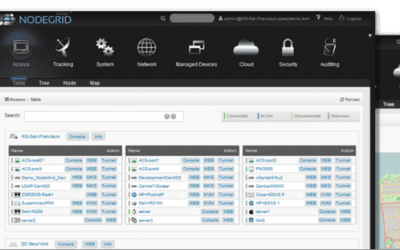
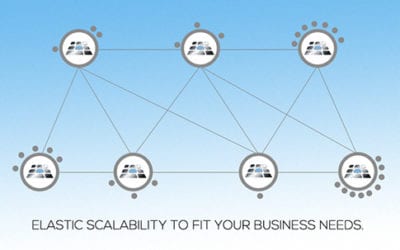
ZPE’s Nodegrid solutions consolidate and virtualize all your network functions onto one platform, no matter which vendors you use. You get a smaller stack that’s more powerful and easy to manage. With features such as flexible network interface options, dual cellular fail-over with dual SIM, a modern and secure Nodegrid OS, OOB management, cloud orchestration and add-on virtualized applications for SASE and SD-BRANCH, Nodegrid has you covered.

Automating Repetitive Processes

The next order of business is to begin analyzing your processes to see where improvements can be made. Most IT professionals spend countless hours on simple, repetitive tasks that could easily be completed without any human input. These can include simple tasks such as logging data, upgrading or patching, and monitoring system health metrics, or even more complex activities such as provisioning new equipment. This is where automation can come into play to increase efficiency and productivity by allowing certain tasks to be completed on their own.

Most organizations today have plans in place to invest in automation with the goal being to streamline processes in order to reduce costs and errors. When your processes are properly configured and tested, they can be expanded throughout your network. No need to worry about inconsistencies or potential human errors which can lead to downtime and wasted man hours troubleshooting issues.

Automated Scaling with Zero Touch Provisioning (ZTP)

Beyond repetitive day to day tasks, automation can also help your business scale quickly and securely to ensure you can keep up with today’s ever growing demand. Manually configuring devices takes time and personnel away from other areas where it may be better spent. It may also lead to more human errors which can leave your network vulnerable to security threats and potential downtime and data loss. Thanks to Zero Touch Provisioning (ZTP), all of these worries can be a thing of the past. Scaling with ZTP is always fast and consistent across every location, on every deployment.

ZTP is a feature that automates the building process (configuration and provisioning) of network hardware and applications. This is typically achieved by pointing devices to a local configuration repository where they can retrieve the required settings. With ZTP, IT professionals can drastically reduce the amount of time consuming labor that comes with manual configuration, which frees up more resources that can be dedicated to other tasks. Since settings are managed and provisioned from the cloud via templates, engineers may even perform configurations and updates from remote locations (once basic racking and network connectivity are established at the new location). Check out our other articles to learn more about ZTP.

Automating Your Test Lab

Another area that can greatly benefit from automation is your test lab environment. Without automation, each test scenario must be initiated manually. This requires engineering resources to be on hand for each run which adds to costs and can take critical personnel away from other projects. Human error can also be a factor, as a missed test, error, or configuration mistake can lead to disastrous results later down the road.

ZPE’s Nodegrid family of products brings you automation without compromise. Nodegrid addresses the pain points common to test labs with the ability to automate, test, and collect data without limits. Queue commands and scripts from beginning to end. Learn more about how Nodegrid can help you automate your test lab.

For more information on ZPE’s full product line, please visit our products page.
Have a specific question or want to experience a live demonstration for yourself? Reach out to us via our contact page. We’re here for you!

SD-Branch for a Digital Security Leader

SD-Branch delivers some major advantages over traditional SD-WAN capabilities. Where typical software-defined approaches fall short at the branch level, SD-Branch picks up the slack to help you see and do much more.

In case you need to catch up, here’s a 90-second video showing some ways you can benefit from using SD-Branch.

If you’re super short on time, the advantages boil down like this:

  • SD-Branch lets you see inside your branch locations, by combining SD-WAN, routing, security, and all your network functions
  • You can see & control on a granular level, including activity for IoT devices, cameras, laptops, & all clients on your branch networks
  • You get more operational agility with a system that centralizes your infrastructure management & lets you take control remotely

Now that you’re caught up, you might be wondering…

How does Nodegrid make SD-Branch better?

Nodegrid gives you SD-Branch capabilities and a lot more. All-in-one Nodegrid devices, like the Nodegrid Services Router (NSR), reduce your stack thanks to the ability to handle many network functions in a single box. Support for automation and containerization via tools like Puppet, Ansible, Docker, and Kubernetes takes your orchestration and management capabilities to an entirely new level. It gets even better with out-of-band management that you can use even during an outage (thanks to cellular failover). Nodegrid hardware and software are vendor neutral, too, which means you can adapt your network to your changing business needs.

Sounds Pretty Awesome. But How Does it Work in the Real World?

See What SD-Branch Brings to a Leading Digital Security Company

Cellular-Failover-Diagram-628LI

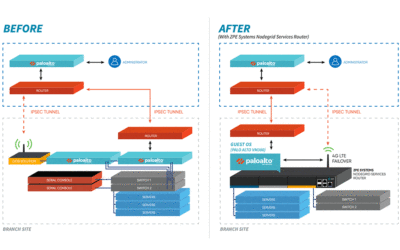
When a digital security enterprise, whose offices span the globe, needed help with their complex network infrastructure, they chose ZPE Systems’ Nodegrid. The powerful NSR solution relieved many of their branch network headaches, and even extended additional benefits to their data center operations. Their large, cumbersome stacks were replaced by a streamlined, all-in-one solution that made management easy, provided reliable backup via cellular, and leveraged the world-class security of Palo Alto Networks’ next-gen firewalls. Ready for the details?

Your Application Hosting & Guest OS Checklist

Follow these simple steps to get started setting up your virtual network environment

Checklist-App

Application Hosting and Guest OS Alleviate Many Problems for NetOps Teams.

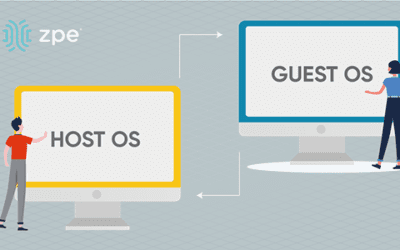
You typically need to install and manage applications on local devices. This is challenging because each appliance has its own operating system, which is compatible with some applications but not others. You need to alter your stack in order to make changes or updates, while on-site support keeps costing you time, money, and valuable resources. With application hosting, you virtualize your environment and deliver applications via server. It’s an SaaS model that allows you to distribute the network apps you need — when and where you need them. You don’t have to deal with the tedious tasks that come with managing localized apps. And using guest OS, you further streamline your environment by deploying virtualized operating systems on VMs, eliminating OS incompatibilities across the edge.

  • Instead of waiting, you can deploy applications on demand
  • You don’t need on-site support — virtualization lets NetOps manage from anywhere
  • You get consistent peace of mind at the edge, with the latest updates and fixes

Put application hosting and guest OS to work and streamline your operations. Here’s how to get started:


Deploy Your Physical System

Set up your server and other necessary infrastructure components, such as databases or repositories. Use the Nodegrid Services Router for all-in-one functionality. The NSR provides server, compute, storage, and other capabilities in one device. You save space and power consumption.


Load a Hypervisor-Capable OS

To make the most of application hosting and keep your stack compact using guest OS, you need to install an operating system that’s capable of being a hypervisor. This is the layer that’s capable of interacting with both your VM/application layer, and your hardware. Nodegrid OS is capable of being a hypervisor, and supports out-of-band and cloud connectivity. This versatile software is built into every Nodegrid device, and is also available as a standalone package.


Deploy VMs and Guest OSes

With your hardware and software set up, you can deploy your virtual machines (VMs) and guest OSes. These allow you to virtualize and diversity the OS layer of your infrastructure. You don’t have to clutter your stack with many specialized devices each running a unique OS. Just spin up an appropriate VM with compatible guest OS, and it’s easy to deploy the applications you need. The NSR can directly host guest OSes, third-party and custom applications, and Docker and Kubernetes containers.


Maintain Port & IP Addresses

To keep your infrastructure properly connected and traffic flowing, you need to configure and maintain your network port and IP addresses. This means adjusting NAT settings to allow application requests and deny unsecured traffic. With the NSR, you can host network ports and IP addresses, making management even easier. For more information about application hosting, guest OS, or how to set up your environment, get in touch with ZPE Systems.