Today, businesses depend highly on IT, and they cannot afford to experience downtime. That’s why they need robust IT infrastructure. Robust IT infrastructure can ensure businesses do not experience downtime and prevent financial losses resulting from the inability to communicate and process payments, and prevent loss of sensitive information. Robust IT infrastructure is not the preserve of only large companies. Small businesses need it, too, since 43% of cyber-attacks target them. Whether small or big, all businesses can benefit from having robust IT systems in place.
A serial console server is essential to a robust system as it helps maintain uptime and prevent losses.
What is a Serial Console Server?
A serial console server, also known as a console server, enables IT and network administrators to access, manage, and monitor networking devices such as switches, routers, and servers.
Why Businesses Need Serial Console Servers
Does your business use serial console servers? If not, here’s why your business needs to start using them:
1. Faster Troubleshooting
When devices go offline, IT technicians may need to reboot them so that they work again. Commuting to remote sites where networking devices are located to reboot them can prove costly and time-consuming. Serial console servers can resolve this. With serial console servers, IT technicians don’t need to travel long distances to reboot devices. They can be rebooted remotely.
2. Better Security
With security breaches on the rise, businesses cannot afford to take security for granted. Serial console servers provide enhanced security. First, serial console servers grant specific people the ability to monitor and manage the network. These authorized people can restrict access to the network and bolster security. Moreover, because serial console servers enable centralized data management, access to the network is limited and thus more secure.
3. Easier Management
More equipment adds to a network’s complexity. A serial console server can cut down on the equipment needed to manage a network. By storing server information in one central place, serial console servers make it easier for IT technicians to manage the network.
4. Reduce Costs
Downtime is costly. Businesses lose about $26.5 billion annually, thanks to it. Your business cannot afford to lose money due to downtime. Serial console servers can mitigate losses and maintain uptime. If a disruption happens, IT technicians can connect to networking devices, diagnose the problem and resolve it remotely. Thus, serial console servers can significantly cut down on downtime.
5. Enhanced Monitoring
Several networking problems can be prevented if they are identified early. Serial console servers monitor networking devices and enable network administrators to detect critical issues in real-time and resolve them before they get out of hand. For example, a serial console server can detect extreme temperatures in a server rack. Consequently, the network administrator can resolve the issue before it escalates.
Businesses need robust IT infrastructure. Serial console servers are a key component of a robust system. They can enable you to take control of your network and prevent unauthorized access. Additionally, they can enable easier management, improve monitoring, save your business money, and prevent downtime, making them a worthwhile investment.
Want to experience these benefits? Contact ZPE Systems for specialized assistance.
The IT industry is rapidly growing. In 2020, spending on IT services reached almost $952 billion worldwide, with software accounting for the largest percentage of spending. However, while companies spend more on software, there’s one key thing they need to spend on — out-of-band connectivity and management.
In-Band vs. Out-of-Band Management
In-Band Management entails managing network devices via the LAN, HTTPS, or the web browser. Out-of-band management (OOBM), on the other hand, does not rely on LAN. Instead, it uses a secure and solitary network to ensure networking devices such as switches and routers stay connected.
Why Your Business Needs OOBM
In-Band Management is inexpensive and easy to implement since it only requires one network. Conversely, out-of-band connectivity and management can be costly and more complex to implement. So why should you consider OOBM over in-band?
1. Cheaper Over Time
The initial cost of OOBM can be relatively high, but it may be cheaper in the long term. While in-band management is cheaper to implement, it is more prone to outages. System outages are costly. Moreover, they are often time-consuming to sort out since technicians may be required on-site. OOBM networks are less prone to system outages. As a result, they can save your business a significant amount of money in the long run.
2. Enforced Security
Security breaches are on the rise. In 2020, it was estimated that companies lost an average of $3.86 million thanks to them. Many times, they happen due to cyberattacks from hackers. Networks that use in-band management are at a higher risk of getting compromised because if a hacker infiltrates the network, the whole network is at risk. Out-of-band connectivity and management, on the other hand, offer better network security. Unlike in-band, OOBM enables specific administrators to manage networking devices without disrupting the normal workflow. Administrators can manage devices and restrict access to the network to prevent security breaches.
3. Limit Access
If you’ve outsourced a third party to manage some of your network devices, you should consider out-of-band connectivity and management. With OOBM, you’ll be able to take control of your network and prevent the third party from accessing sensitive information on it.
4. Maintain Uptime
In-band networks are more susceptible to downtime. Downtime is costly. An hour of it can cost an average of $260,000. Your business cannot afford to lose that much money. Out-of-band connectivity and management can ensure your business does not experience downtime. Unlike in-band, OOBM can give you the ability to restart devices that have gone offline remotely. Overall, it’s better for troubleshooting and network automation.
Your business cannot afford downtime. Dispatching technicians to data centers to address downtime issues is costly and time-consuming. You cannot afford to allow hackers to access or destroy sensitive information either. That’s why you need to invest in out-of-band connectivity and management. While it may be expensive at first, the long-term benefits make it a worthwhile investment. Are you considering investing in OOBM for your business or making the switch to it? For professional assistance, contact ZTE Systems to learn more.
Without zero touch provisioning (ZTP), setting up a new data center or branch location takes work. You know that along with all your new hardware comes plenty of manual input and configuration before things can function properly. After unboxing and racking your switches, servers, and routers, and making all the necessary physical connections to each, you need to bring these devices online to serve your network.
But when you use zero touch provisioning, you automate all of these necessary tasks so that devices become configured and operational — with little or no user input. Of course, ZTP is not a turnkey solution offering total plug-n-play simplicity, but it does significantly reduce your workload when provisioning and deploying new locations.
What Goes Into Zero Touch Provisioning?
Even though zero touch provisioning automates and simplifies scaling, it still requires you to make preparations to get devices up and running. These preparations can include things like predetermining console port assignments and ethernet management ports. Also, you need to test and adjust configuration settings in your test environment, so that your devices are configured properly when it comes time to deploy.
ZTP requires you to put forth effort up front, but it pays off later when scaling with new data center and branch locations. With your preparations in place, ZTP eliminates the need for repetitive manual work, and instead gives you streamlined, consistent provisioning.
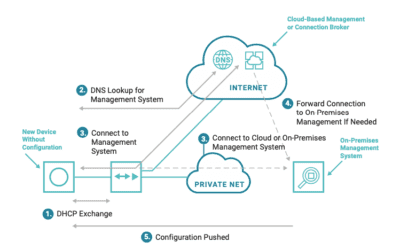
Several companies are also including zero touch provisioning features in their hardware, through DHCP, Preboot Execution Environment (PXE), and other custom services and apps. For example, some hardware vendors now have devices that, when unable to find a startup configuration, automatically enter zero touch provisioning mode, which allows them to execute the proper scripts for configuration.
Devices that come with ZTP features can help to further reduce your workload. But even when you use them, best practices call for you to have:
The right scripting and automation tools
A properly designed ZTP workflow
Adequate scripting and automation tools are just as important as the hardware you choose to deploy. This not only helps with ZTP, but also helps you avoid vendor lock-in down the road when performing additional management and scaling. For example, using an open infrastructure platform such as ZPE Systems’ Nodegrid allows you to employ the tools of your choice, while also giving you serial console accessibility via SSH. Use Puppet, Chef, Ansible, and others as needed. Nodegrid also extends ZTP capabilities to connected devices, regardless of vendor.
Along with having an environment that supports the right tools, zero touch provisioning works best when you develop a preparations workflow. You want every deployment to go smoothly, and this workflow helps you strive to achieve a more streamlined provisioning process. It starts with having a plan even before your hardware goes in the rack. Here’s a top-level overview of what should be part of your plan:
Ensure your devices are configured for ZTP.
Inventory your devices so that you know what hardware is at each location. A manufacturer or vendor-provided list can help you document MAC addresses, model & serial numbers, and other critical device data.
Add your device inventory to your device database, so that data can be handled and configured during provisioning.
Use your test environment to configure ZTP scripts, and then script and automate to your device database.
How Does Nodegrid Improve Zero Touch Provisioning?
Whether for your data center or branch locations, Nodegrid can help you with zero touch provisioning that’s open and flexible.
Not only can Nodegrid devices leverage existing ZTP features of your infrastructure, using capabilities such as SSH to serial consoles, but they can also serve as the local configuration repository if you’re preconfiguring and shipping devices. They can store, deploy, and archive configurations, allowing you to extend ZTP to other appliances, including those that don’t come with ZTP features.
For more distributed and remote sites, Nodegrid supports 4G/LTE cellular connectivity that allows you to deploy ZTP from anywhere through ZPE Cloud. You can ship bare-metal devices and stay protected knowing that sensitive data can’t get lost or stolen. Once these devices reach their appropriate destination, you can use ZPE Cloud to download and run all your automation scripts, for automatic and consistent provisioning.
Don’t miss out!
Now that you know more about zero touch provisioning and how it helps you scale, make sure you stay up to date for all the latest about ZTP. Subscribe for updates and be the first to see new, helpful content.
COVID-19 meant even the largest companies had to figure out remote work. And they had to adjust fast, not only to stay afloat and maintain business continuity, but also to establish a “new normal” that made them more responsive to change.
Aside from adapting their networks to accommodate a distributed workforce, most companies were left to contemplate one crucial component: best practices for managing a remote team.
We sat down with ZPE Co-Founder and VP of Engineering, Livio Ceci. Livio has more than 15 years of experience managing teams spread across the globe, and he’s offered some important advice you can use right now.
Stay Human
Because of COVID-19, every business interaction we have is through the computer screen. It might seem easy to become somewhat detached from your teams, but maintaining emotional intelligence is more important than ever with a remote workforce.
Apart from adjusting to any new cultural or language barriers you’re faced with, remember to help employees achieve a healthy work/life balance. Especially now, things are a little heavy on the life side, but your staff members want to continue to contribute and provide value to your company. Show employees that you sympathize with them, and in return, they’ll prove their commitment to you.
Here are a few things to keep in mind:
Establish trust — Remote or not, keeping promises goes a long way when it comes to establishing good relationships. When you say you’re going to do something, follow through by doing it. Send those account details on time, start sourcing the additional help you promised, and make sure everyone gets the new software you purchased.
Communicate clearly — Now there’s more standing between you and your teams, so miscommunication is more likely to happen. Make sure you and your employees are asking enough questions so that nothing gets lost in translation.
Talk about life — Of course you want to be as efficient as possible with your time. But part of establishing strong relationships is talking about what’s going on in people’s lives. Ask Marisol how her kids are adjusting to school at home, check in on Farook’s emergency roof repair, and celebrate Rajiv’s fifth anniversary.
Cover the Basics
If you’re new to working remotely, you’re probably well aware of the differences between the office and your home environment. There can be a ton of distractions at home, from the TV, to family, to chores, and it might be difficult for you to be productive. Before you can manage your distributed teams, you need to be able to focus, which means taking care of these work-from-home basics:
Set up a dedicated workspace — Limit distractions by setting up a space designated as your office. Use a room that is away from high-traffic areas in your home, so that you can focus on your tasks throughout the day.
Make sure your Wi-Fi is strong — Connectivity is crucial to remote work, but you might find it’s limited in certain areas of your home — including where you set up your workspace. Double-check your connection speed and strength to make sure it holds up, and consider upgrading or extending your Wi-Fi if necessary. The last thing you want is to suddenly drop off during an important video conference.
Block background noise — If you live near others or with family, you know that noise happens. One of the easiest ways block it out is by investing in a decent headset and microphone. You can also change your office by adding noise-blocking foam or insulation. Once you are able to cancel out noisy distractions, you and your team will be able to focus on your work.
Have the right hardware & software — From a laptop to a webcam, to mission-critical software, you need adequate tools to do your job effectively. Make sure you have everything you need so that you can be as productive as you used to be from the regular office.
Use the Right Tools
Going off the previous point, using the right tools is essential to managing a remote team. Not only do you need the right hardware and software, but you also need everyone to be on the same page for efficient, productive work. Communication and collaboration are key to business continuity.
There are many communication platforms available, and you’ll likely use a combination of tools because each has its own strengths. You’ll have different needs depending on your organization, but your ability to perform relies heavily on how you stay in touch with your teams every day. Instant messaging tools such as Slack can help you stay organized and chat with the right people, while video conferencing platforms like Zoom allow you to have meetings and conference calls.
In the office, you may have used a physical board to collaborate and track productivity. Now that you’re doing it all in a virtual environment, consider using tools like Jira or Asana to keep tabs on work. These allow you to easily manage tasks, set priorities, and delegate responsibilities.
Sharing tools are also invaluable to working remotely. These include file sharing platforms like SharePoint and knowledge base programs like Confluence, which allow you to easily collaborate on files and documents. And if software development is a large part of your organization, you’re probably already aware of the benefits that something like GitHub brings to the table. In a remote work environment, it’s now more crucial than ever and provides the version control hosting you need.
Pro tip: Keep your company’s info secure
Having the right tools in place helps you stay productive. But you also need to make sure your company’s info stays safe.
Use proper security measures to protect your data, and implement backup protocols that help you restore data in case issues arise.
Keep your code and other intellectual property on-prem to minimize vulnerabilities.
For your employees, give them only the minimum number of permissions necessary to do their job.
At ZPE, one of the ways we securely access our data and infrastructure is by using ZPE Cloud. Existing customers are eligible to get a free 3-month trial.
Focus on Goals
From everyday meetings, to task-specific goals, being able to focus greatly improves your ability to manage. But when you’re in charge of steering the ship while your crew is spread across the globe, it’s challenging. You might struggle to assign priorities, and deliverables might be vastly different than what you expected. Complicating things even more is the anxiety that can come with not being able to check in on what everyone is doing. You might feel like you’re not in control.
All you need to do is adjust your thinking. Just because you’re no longer in the office and can’t see the work getting done in front of you, doesn’t mean it’s not getting done. So, focus on the goals — not the activity.
When you consider everything that goes into working remotely — from time zone differences, to technical issues or sudden emergencies — it’s not effective to keep wondering, “Is Tabitha working right now on the latest feature we discussed?” Not only does it distract you from your own tasks, but it can lead you toward micro-managing, whichlowers trust and morale.
Instead, focusing on the goals and outcomes allows you to exercise the trust that you and your teams have established.
Here are some tips from Livio to help you and others focus on your goals:
Set expectations — Communicate what’s to be expected, so that everyone has a clear picture of what to shoot for. And when things change, make sure to update everyone involved. This goes for everything from meetings to deliverables, to big-picture stuff like new releases and prototypes. Are the presentation materials due Wednesday at 5pm Pacific? Which features should be released with version 1.4? Will the new admin start on Tuesday or Thursday? Check in regularly to make sure that everyone is on the same page.
Prioritize — Obviously, more important things should be at the top of everyone’s priority list, while minor things should be assigned a lower priority. This helps to keep expectations clear and make sure the focus remains on the appropriate goal.
Assign smaller deliverables — This one’s mostly for engineering teams, but can also be applied across various disciplines. By assigning smaller deliverables (and shorter sprints), near-term goals are easier to focus on and accomplish, which ultimately contribute to the end goal.
Hold regular meetings — Frequently go over expectations, deliverables, announcements, and other important topics, either via conference call or video chat.
Have an agenda — When it comes to business, and especially focusing on goals, make sure you have an agenda that you can share with others. Having a clear agenda makes for efficient use of everyone’s time, keeps the focus on appropriate tasks and outcomes, and limits distractions, whether you’re preparing for a meeting or finishing up the week’s sprint.
Pro tip: Set priorities straight
When considering expectations and task priorities for remote teams, ask, “How does this contribute to the end goal?” This helps you break down each piece of work into smaller chunks, so that you can delegate appropriately.
Stay Committed
Do you know what’s driving timelines? Answer: your commitment.
Whether your projects are short-term, long-term, or both, your commitment to them is what will keep you and your teams on track to reach your goals. When it comes to software development projects, Livio shares a few best practices:
Make two major releases per year (give or take one, depending on the project scope).
Develop a cycle that calls for a short time-to-market, with one small release per month.
Test, test, test! Set yourself up for continuous integration that ensures only stable code is committed.
Pro tip: What about the unexpected?
Over the years, Livio has found that the unexpected is the biggest disruptor to even the most meticulous plans. Whether it’s a critical bug or an urgent, last-minute request from the client, unforeseen hurdles always complicate the development process. To combat this, Livio suggests building in extra time from the beginning. This helps you adjust to abrupt changes or issues without having to alter more (or all) of your plans.
No matter how permanent our new normal may be, you can make the most of managing a remote team. If it’s a pandemic, natural disaster, or human error that threatens continuity, take this advice to keep business running even with a distributed workforce.
There’s More to Come
We’ve got one goal: to help you transform your business’ network into a value center. Sign up for news and updates for more free tips and advice about out-of-band, SASE, SD-everything, and more!
3 Ways the Cloud Improves Out-Of-Band Management at the Branch
For decades, out-of-band management (OOB) has been supporting business continuity needs for organizations of all sizes. It’s a crucial tool for deploying new locations, setting traffic rules, optimizing connectivity, and so much more. OOB offers an exclusive path to your network so you can control your infrastructure without relying on production networks.
But modern technology advancements have allowed the scope of networking to expand well beyond the data center. This means that the enterprise infrastructure is more distributed than ever, with branch locations throughout the globe. One problem that organizations face is how to manage such a widely distributed network.
This is where the cloud comes in. Not only does it provide better OOB in data center environments, but also for managing your entire network, even at the branch level.
Here’s How the Cloud Delivers Better Out-Of-Band Management at the Branch:
Deploy Faster and More Secure
The cloud accommodates zero touch provisioning (ZTP), which essentially offers scaling with little or no human intervention. Instead of shipping preconfigured devices that require manual setup and extensive user input, you can ship plain-vanilla devices that can be automatically configured. Not only does this keep you safe from potential security threats (as unconfigured devices don’t contain any data to be stolen), but also allows you to have plug-n-play simplicity when scaling. Just connect your devices to the network, and the cloud does the rest.
Get a Full Network View
A cloud-based environment can provide a 360-degree view of your network. This can include even your most remote branch locations. Aside from offering more convenient scaling, the cloud gives you in-depth visibility of devices connected to your network, even if they’re across the globe. If you implement a robust SD-Branch solution as well, you can also see the activity inside each branch — including for connected IoT devices, cameras, laptops, and others.
Take More Control
On top of faster, more secure scaling and in-depth branch network visibility, the cloud provides remote access to your out-of-band management path. Once you’ve successfully provisioned and deployed a new location, you can use the cloud for maintenance, troubleshooting, and management. You can adjust access policies, tailor QoS settings, block specific domains, and much more, all from the safety of your network operations center (NOC). Additionally, cellular connectivity can provide you with reliable backup to your OOB network, so you can manage your infrastructure even during an outage.
Use Nodegrid With ZPE Cloud
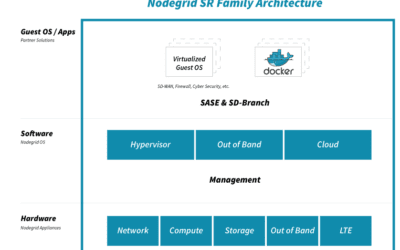
Nodegrid’s consolidated devices give you complete control of your network, with out-of-band capabilities you’ve never seen before. One of Nodegrid’s biggest strengths is that it offers all of these cloud benefits using ZPE Cloud.
Deploy quickly with zero touch provisioning, and manage all of your devices with the help of a strong cloud platform. The reliability of 4G/LTE cellular failover keeps your business running, and an innovative ‘Reset’ button lets you reconnect devices to ZPE Cloud without hassle.
Read the full tech brief if you want to explore more benefits of using the cloud with your out-of-band management strategy.
ZPE Systems delivers innovative solutions to simplify infrastructure managment at the datacenter, branch, and edge.
Learn how our Zero Pain Ecosystem can solve your biggest network orchestration pain points.