Providing Out-of-Band Connectivity to Mission-Critical IT Resources

Home » Archives for January 2024

Out-of-Band Management: What It Is and Why You Need It

Rows of data center racks in a typical out-of-band management deployment

This scenario is every IT professional’s worst nightmare: it’s the middle of the night, a remote site on the other side of the country has gone offline, and nobody knows why. A single minute of downtime can cost anywhere from several hundred dollars to tens of thousands of dollars, and the nearest tech is a six-hour plane ride away. Consider 2024’s CrowdStrike outage and the devastation caused for banks, airports, and many other organizations.

A bar chart showing the average hourly cost of downtime by industry.
Data Source: SolarWinds

Out-of-band management offers the solution: a way for teams to access critical remote infrastructure during outages and breaches without “out-of-chair” expenses. Out-of-band management allows organizations to recover remote infrastructure faster, reducing the duration and expense of downtime.

This guide to out-of-band management answers critical questions about what this technology is, why you need it, and how to choose the right solution.

What is out-of-band management?

Out-of-band management (OOBM) involves controlling network infrastructure and workflows on an out-of-band network. An out-of-band network is an entirely separate network that runs parallel with your production (or in-band) network but doesn’t rely on any of the same infrastructure or services. OOBM allows teams to administer network infrastructure remotely on a dedicated connection, such as secondary Fiber or cellular LTE, that will remain available even if the in-band network goes down from an equipment failure, ISP outage, or ransomware attack.

A diagram showing how out-of-band management works.

The biggest reason to use out-of-band management is to ensure continuous, uninterrupted access to critical remote infrastructure even when the primary network is down. OOBM allows teams to recover from outages and cyberattacks faster and more cost-efficiently because they can access, troubleshoot, and restore systems without rolling trucks or hiring on-site services.

Out-of-band management provides a lifeline for teams to access critical remote infrastructure when the production network is offline. It allows them to immediately begin troubleshooting and repairing the issue to restore services ASAP. With OOBM, companies save money on recovery expenses, and minimize the duration and business impact of downtime.

What is an OOBM serial console?

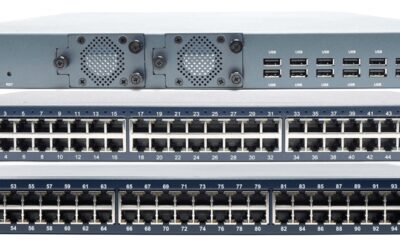
Front and back views of the Nodegrid out-of-band management serial console.

Some organizations use OOBM jump boxes (or jump servers) that are connected to both the in-band and out-of-band networks, allowing administrators to “jump” from one network to the other for management. Examples of low-cost jump boxes include the Intel NUC and the Raspberry Pi. However, OOBM jump boxes are security risks because they do not effectively isolate the management infrastructure, plus they require an entire duplicate infrastructure of devices and services to create the out-of-band network. The best practice for security, resilience, and efficiency is to deploy an all-in-one, out-of-band management solution.

An out-of-band management solution uses hardware devices known as serial consoles, which connect to infrastructure devices via their management port (usually RS232 Serial, Ethernet, or USB). Serial consoles are known by lots of other names, including terminal servers, console servers, console server switches, serial routers, and serial switches.

The serial console has dedicated network interfaces to provide an Internet connection for remote management access, often fiber or 4G/5G cellular LTE, so they don’t connect to or rely upon the primary production network at all. This gives teams the ability to continuously monitor and administer critical remote infrastructure even during an ISP or WAN outage that would make a jump box inaccessible.


Administrators remotely access an OOBM serial console via this dedicated link and, from there, can view and manage all connected infrastructure from a single, convenient software platform. This software is typically deployed on-premises and runs as a VM (virtual machine)  either on the serial console itself or on a separate machine, but there are some cloud-based OOBM network management software tools.

Out-of-band management software varies from provider to provider, with most offering second-generation (or Gen 2) solutions that provide some built-in automation capabilities but do not support vendor-neutral integrations with third-party tools. Newer, third-generation (or Gen 3) solutions use an open, x86 Linux-based operating system to allow easy integrations with other vendors’ software for automation, orchestration, security, monitoring, and more.

The benefits of out-of-band management

Out-of-band management can help you:

  • Improve network performance: Performing resource-intensive management, automation, and orchestration workflows on the out-of-band network reduces the strain on the production network for better speed and reliability.
  • Accelerate ransomware recovery: The OOBM network can be used to create an isolated recovery environment (IRE) where teams can safely rebuild and recover from ransomware attacks without the risk of reinfection, reducing the duration and expense of ransomware-related outages.
  • Streamline repairs and rebuilds: OOBM provides the ability to deploy the tools and applications needed to isolate, cleanse, rebuild, and restore services that have been affected by failures and ransomware.

The security and resilience benefits of out-of-band management are discussed further below.

How does out-of-band management improve security and resilience?

Network breaches and ransomware attacks occur so frequently that most businesses know it’s no longer a question of “if,” but “when” they’ll be hit. Once cybercriminals compromise a device or account and can move around the network, it’s only a matter of time before they find the management interfaces and take complete control over critical infrastructure.

OOBM and management infrastructure isolation

Serial consoles create an out-of-band network by directly connecting to the management port of infrastructure devices and moving all control functions off of the production LAN. This isolates the management plane from the data plane, which is part of a cybersecurity best practice known as isolated management infrastructure (IMI). An IMI further segments the management network and routes management ports to terminate on top-of-rack, OOBM serial switches, creating multiple layers of isolated management. The isolated management plane is always remotely accessible to engineers via the OOBM connection, but it remains hidden from any cybercriminals who may breach the production network.

Out-of-Band Management: What It Is and Why You Need It


OOBM and ransomware recovery

Out-of-band management also improves security and resilience by aiding in ransomware recovery. According to a Sophos survey, 70% of companies hit by ransomware take longer than two weeks to recover, due in no small part to the pervasive nature of the malware used and how frequently rebuilt systems and recovered data get reinfected. Today’s ransomware attacks are now pre-packaged and move at machine speed – meaning instantly – across infrastructure, bringing entire businesses down before they’ve even realized they’re under attack. The longer the business is offline, the more revenue (and customer trust) is lost, causing recovery costs to skyrocket.

An IMI using out-of-band management gives teams an isolated recovery environment (IRE) where they can recover data and rebuild systems without the risk of reinfection. The IRE allows organizations to get services back online faster to reduce the financial and reputational consequences of ransomware attacks.

A diagram showing the components of an isolated recovery environment.

Resilience is defined as the ability to continuously operate and deliver services, if in a degraded fashion, even while undergoing major failures and breaches. Out-of-band management improves resilience by ensuring that teams have continuous access to critical remote infrastructure no matter what’s going wrong with the production environment. OOBM serial consoles also isolate the management infrastructure to protect it from attackers on the primary network and provide a safe environment for teams to recover from ransomware.


Why choose Nodegrid for out-of-band management?

Many network teams think of out-of-band as being a huge expense and time sink. Setting up  proper infrastructure for OOBM and IMI typically requires 6 or more boxes at each business site for routing, switching, firewall, storage, cellular access, and a jump box. The Nodegrid platform from ZPE Systems reduces the cost and headache of out-of-band management by combining all these functions and more into a single box. Teams can easily drop a Nodegrid box in each site at a fraction of the cost of deploying a traditional OOBM network.

A diagram showing ZPE’s multi-function capabilities for IMI in branch and edge sites.

The first Gen 3 OOBM solution

Nodegrid is the first and only Gen 3 out-of-band management solution. Nodegrid OOBM devices use the x86 Linux-based NodegridOS, which is capable of running VMs and Docker containers to host your choice of third-party applications for automation, orchestration, security, SD-WAN, and more. Nodegrid’s ability to host other vendors’ software ensures that teams have access to all the tools they need to troubleshoot and recover infrastructure from within the IMI environment, making it the perfect network resilience multi-tool.

Nodegrid OOBM software is available as an on-premises solution or a highly scalable cloud-based app, and both support easy integrations with tools for monitoring, automated configuration management, and more. This enables teams to consolidate and streamline their workflows, maximizing efficiency while reducing the risk of human error.

Nodegrid’s other key features include:

  • Built-in 5G/4G LTE and Wi-Fi options for OOB and network failover
  • OOB support over IPMI, ILO, DRAC, CIMC, vSerial, and KVM
  • Robust hardware security like BIOS protection, UEFI Secure Boot, and an encrypted solid-state disk
  • SAML 2.0 and two-factor authentication (2FA)
  • Support for legacy and mixed-vendor infrastructure without expensive adapters

ZPE Systems offers a wide range of out-of-band management devices to fit any deployment size and use case, including the 96-port Nodegrid Serial Console Plus (NSCP) for large and hyperscale data centers, and the Nodegrid Gate SR, which combines branch gateway routing and OOB serial console functionality for remote business sites like retail stores and manufacturing plants.


Nodegrid OOB serial console comparison


Nodegrid Serial Console S Series

Nodegrid Serial Console Plus (NSCP)

Guest OS

1

1

Docker Apps

1-2

1-2

Wi-Fi

No

Yes

Cellular (Dual-SIM)

1

1

Serial Ports

16, 32, or 48

16, 32, 48, or 96

Data Sheet

Download

Download

Nodegrid OOB network edge router comparison


Nodegrid Link SR

Nodegrid Bold SR

Nodegrid Hive SR

Nodegrid Gate SR

Nodegrid Net SR

Nodegrid Mini SR

Guest OS

1

1

1-2

1-3

1-6

1

Docker Apps

1-2

1-2

1-3

1-4

1-4

1-2

Wi-Fi

Yes

Yes

Yes

Yes

Yes

Yes

Cellular (Dual-SIM)

1

1-2

1-2

1-2

1-4

1

Serial Ports

1

8

8

8

16-80

Via USB

Data Sheet

Download

Download

Download

Download

Download

Download

Get scalable network resilience with the only Gen 3 out-of-band management solution

Only Nodegrid OOBM delivers network control, security, automation, and resilience with a completely vendor-neutral platform. To see Nodegrid out-of-band management in action, request a free demo.

Request a Demo

Why network resilience requires Isolated Management Infrastructure

Isolated Management Infrastructure

Summary

Business relies on network resilience. But network management now requires more than a ‘break/fix’ approach. Decentralized and growing architectures are spread across cloud, premises, and large IoT footprints. For shrinking IT teams, this presents resilience problems, as many are unaware of the best practice to help them care for their vast digital estate, maintain complex and delicate architecture, and recover quickly in case of attack. This gap means the network is a source of anxiety.

Big Tech solved these problems 10+ years ago, by doubling down on their management architectures. This best practice, which is now recommended by CISA, involves fully separating management networks from production networks into what’s called Isolated Management Infrastructure. IMI goes far beyond serial console and out-of-band access, providing the management and service delivery capabilities teams need to reduce on-site upkeep, stabilize delicate architecture, and accelerate ransomware recovery.

Big Tech’s network resilience secret lies in ZPE Systems’ Nodegrid hardware and software. Nodegrid is the only network resilience platform, delivering the Gen 3 capabilities that are required to build IMI. Now, organizations in every industry benefit from the best practices that have been trusted to run the public cloud for over a decade. Download the solution guide to get your step-by-step walkthrough on building IMI for network resilience.

Network Resilience Doesn’t Mean What it Did 20 Years Ago

Network resilience requirements have changed

This article was co-authored by James Cabe, CISSP, a 30-year cybersecurity expert who’s helped major companies including Microsoft and Fortinet.

Enterprise networks are like air. When they’re running smoothly, it’s easy to take them for granted, as business users and customers are able to go about their normal activities. But when customer service reps are suddenly cut off from their ticketing system, or family movie night turns into a game of “Is it my router, or the network?”, everyone notices. This is why network resilience is critical.

But, what exactly does resilience mean today? Let’s find out by looking at some recent real-world examples, the history of network architectures, and why network resilience doesn’t mean what it did 20 years ago.

Why does network resilience matter?

There’s no shortage of real-world examples showing why network resilience matters. The takeaway is that network resilience is directly tied to business, which means that it impacts revenue, costs, and risks. Here is a brief list of resilience-related incidents that occurred in 2023 alone:

  • FAA (Federal Aviation Administration) – An overworked contractor unintentionally deleted files, which delayed flights nationwide for an entire day.
  • Southwest Airlines – A firewall configuration change caused 16,000 flight cancellations and cost the company about $1 billion.
  • MOVEit FTP exploit – Thousands of global organizations fell victim to a MOVEit vulnerability, which allowed attackers to steal personal data for millions.
  • MGM Resorts – A human exploit and lack of recovery systems let an attack persist for weeks, causing millions in losses per day.
  • Ragnar Locker attacks – Several large organizations were locked out of IT systems for days, which slowed or halted customer operations worldwide.

What does network resilience mean?

Based on the examples above, it might seem that network resilience could mean different things. It might mean having backups of golden configs that you could easily restore in case of a mistake. It might mean beefing up your security and/or replacing outdated systems. It might mean having recovery processes in place.

So, which is it?

The answer is, it’s all of these and more.

Donald Firesmith (Carnegie Mellon) defines resilience this way: “A system is resilient if it continues to carry out its mission in the face of adversity (i.e., if it provides required capabilities despite excessive stresses that can cause disruptions).”

Network resilience means having a network that continues to serve its essential functions despite adversity. Adversity can stem from human error, system outages, cyberattacks, and even natural disasters that threaten to degrade or completely halt normal network operations. Achieving network resilience requires the ability to quickly address issues ranging from device failures and misconfigurations, to full-blown ISP outages and ransomware attacks.

The problem is, this is now much more difficult than it used to be.

How did network resilience become so complicated?

Twenty years ago, IT teams managed a centralized architecture. The data center was able to serve end-users and customers with the minimal services they needed. Being “constantly connected” wasn’t a concern for most people. For the business, achieving resilience was as simple as going on-site or remoting-in via serial console to fix issues at the data center.

Network architecture showing simplicity of data center connected via MPLS to branch office

Then in the mid-2000s, the advent of the cloud changed everything. Infrastructure, data, and computing became decentralized into a distributed mix of on-prem and cloud solutions. Users could connect from anywhere, and on-demand services allowed people to be plugged in around-the-clock. Services for work, school, and entertainment could be delivered anytime, no matter where users were.

Network architecture showing complexity of data center, CDN, remote user, branch office, all connected via many paths

Behind the scenes, this explosion of architecture created three problems for achieving network resilience, which a simple serial could no longer fix:

Too Much Work

Infrastructure, data, and computing are widely distributed. Systems inevitably break and require work, but teams don’t have the staff to keep up.

Too Much Complexity

Pairing cloud and box-based stacks creates complex networks. Teams leave systems outdated, because they don’t want to break this delicate architecture.

Too Much Risk

Unpatched, outdated systems are prime targets for packaged attacks that move at machine speed. Defense requires recovery tools that teams don’t have.

Enabling businesses to be resilient in the modern age requires an approach that’s different than simply deploying a serial console for remote troubleshooting. Gen 1 and 2 serial consoles, which have dominated the market for 20 years, were designed to solve basic issues by offering limited remote access and some automation. The problem is, these still leave teams lacking the confidence to answer questions like:

  • “How can we guarantee access to fix stuff that breaks, without rolling trucks?”
  • “Can we automate change management, without fear of breaking the network?”
  • “Attacks are inevitable — How do we stop hackers from cutting off our access?”

Hyperscalers, Internet Service Providers, Big Tech, and even the military have a resilience model that they’ve proven over the last decade. Their approach involves fully isolating command and control from data and user environments. This allows them to not only gain low-level remote access to maintain and fix systems, but also to “defend the hill” and maintain control if systems are compromised or destroyed.

This approach uses something called Isolated Management Infrastructure (IMI).

Isolated Management Infrastructure is the best practice for network resilience

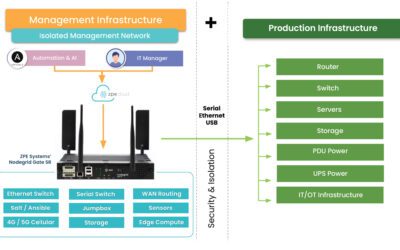
Isolated Management Infrastructure is the practice of creating a management network that is completely separate from the production network. Most IT teams are familiar with out-of-band management as this network; IMI, however, provides many capabilities that can’t be hosted on a traditional serial console or OOB network. And with increasing vulnerabilities, CISA issued a binding directive specifically calling for organizations to implement IMI.

Isolated Management Infrastructure using Gen 3 serial consoles, like ZPE Systems’ Nodegrid devices, provides more than simple remote access and automation. Similar to a proper out-of-band network, IMI is completely isolated from production assets. This means there are no dependencies on production devices or connections, and management interfaces are not exposed to the internet or production gear. In the event of an outage or attack, teams retain management access, and this is just the beginning of the benefits of having IMI.

A network architecture diagram showing Isolated Management Infrastructure next to production infrastructure

IMI includes more than nine functions that are required for teams to fully service their production assets. These include:

  • Low-level access to all management interfaces, including serial, Ethernet, USB, IPMI, and others, to guarantee remote access to the entire environment
  • Open, edge-native automation to ensure services can continue operating in the event of outages or change errors
  • Computing, storage, and jumpbox capabilities that can natively host the apps and tools to deploy an IRE, to ensure fast, effective recovery from attacks

Get the guide to build IMI

ZPE Systems has worked alongside Big Tech to fulfill their requirements for IMI. In doing so, we created the Network Automation blueprint as a technical guide to help any organization build their own Isolated Management Infrastructure. Download the blueprint now to get started.

Discuss IMI with James Cabe, CISSP

Get in touch with 30-year cybersecurity and networking veteran James Cabe, CISSP, for more tips on IMI and how to get started.

ZPE Systems – James Cabe

Centralized Fleet Management with Device Clustering – Tech Talk Tuesday from ZPE Systems

Home » Archives for January 2024

Explainers & How-to’s

Centralized Fleet Management with Device Clustering – Tech Talk Tuesday from ZPE Systems

Todd Atherton (Channel Sales Director) and Marc Westberg (Channel Sales Engineer) walk you through Nodegrid’s device clustering capabilities that let you get convenient, centralized management of your distributed fleet.

Got a bunch of branch locations? You no longer need to spend so much time managing each individual device at every site. Just deploy Nodegrid Serial Consoles or Services Routers on top of your stack for all the benefits.

Streamline licensing
You don’t have to inflate complexity with individual device licensing. Unify your branches using the Nodegrid clustering license.

Stop juggling spreadsheets
You don’t have to manually track device IPs and login credentials. Connect your entire stack to Nodegrid — regardless of vendor — for point-and-click visibility and management.

Save time and reduce errors
Upgrading individual devices is time-consuming and increases the risk of errors. Nodegrid serves as the cluster coordinator, allowing you to push upgrades across your fleet with the click of a button.

Ready to get started? Check out one of our best-selling branch devices, the Nodegrid Gate SR, and start saving time with device clustering https://zpesystems.com/products/branc…

Are You a Partner Interested in Attending?

Visit the Tech Talk Tuesdays Page

ZPE Systems delivers innovative solutions to simplify infrastructure managment at the datacenter, branch, and edge.

Learn how our Zero Pain Ecosystem can solve your biggest network orchestration pain points.

Watch a Demo Contact Us

Video Wall

Edge Computing Requirements

Edge computing requirements displayed in a digital interface wheel.

The Internet of Things (IoT) and remote work capabilities have allowed many organizations to conduct critical business operations at the enterprise network’s edges. Wearable medical sensors, automated industrial machinery, self-service kiosks, and other edge devices must transmit data to and from software applications, machine learning training systems, and data warehouses in centralized data centers or the cloud. Those transmissions eat up valuable MPLS bandwidth and are attractive targets for cybercriminals.

Edge computing involves moving data processing systems and applications closer to the devices that generate the data at the network’s edges. Edge computing can reduce WAN traffic to save on bandwidth costs and improve latency. It can also reduce the attack surface by keeping edge data on the local network or, in some cases, on the same device.

Running powerful data analytics and artificial intelligence applications outside the data center creates specific challenges. For example, space is usually limited at the edge, and devices might be outdoors where power and climate control are more complex. This guide discusses the edge computing requirements for hardware, networking, availability, security, and visibility to address these concerns.

Edge computing requirements

The primary requirements for edge computing are:

1. Compute

As the name implies, edge computing requires enough computing power to run the applications that process edge data. The three primary concerns are:

  • Processing power: CPUs (central processing units), GPUs (graphics processing units), or SoCs (systems on chips)
  • Memory: RAM (random access memory)
  • Storage: SSDs (solid state drives), SCM (storage class memory), or Flash memory
  • Coprocessors: Supplemental processing power needed for specific tasks, such as DPUs (data processing units) for AI

The specific edge computing requirements for each will vary, as it’s essential to match the available compute resources with the needs of the edge applications.

2. Small, ruggedized chassis

Space is often quite limited in edge sites, and devices may not be treated as delicately as they would be in a data center. Edge computing devices must be small enough to squeeze into tight spaces and rugged enough to handle the conditions they’ll be deployed in. For example, smart cities connect public infrastructure and services using IoT and networking devices installed in roadside cabinets, on top of streetlights, and in other challenging deployment sites. Edge computing devices in other applications might be subject to constant vibrations from industrial machinery, the humidity of an offshore oil rig, or even the vacuum of outer space.

3. Power

In some cases, edge deployments can use the same PDUs (power distribution units) and UPSes (uninterruptible power supplies) as a data center deployment. Non-traditional implementations, which might be outdoors, underground, or underwater, may require energy-efficient edge computing devices using alternative power sources like batteries or solar.

4. Wired & wireless connectivity

Edge computing systems must have both wired and wireless network connectivity options because organizations might deploy them somewhere without access to an Ethernet wall jack. Cellular connectivity via 4G/5G adds more flexibility and ideally provides network failover/out-of-band capabilities.

5. Out-of-band (OOB) management

Many edge deployment sites don’t have any IT staff on hand, so teams manage the devices and infrastructure remotely. If something happens to take down the network, such as an equipment failure or ransomware attack, IT is completely cut off and must dispatch a costly and time-consuming truck roll to recover. Out-of-band (OOB) management creates an alternative path to remote systems that doesn’t rely on any production infrastructure, ensuring teams have continuous access to edge computing sites even during outages.

6. Security

Edge computing reduces some security risks but can create new ones. Security teams carefully monitor and control data center solutions, but systems at the edge are often left out. Edge-centric security platforms such as SSE (Security Service Edge) help by applying enterprise Zero Trust policies and controls to edge applications, devices, and users. Edge security solutions often need hardware to host agent-based software, which should be factored into edge computing requirements and budgets. Additionally, edge devices should have secure Roots of Trust (RoTs) that provide cryptographic functions, key management, and other features that harden device security.

7. Visibility

Because of a lack of IT presence at the edge, it’s often difficult to catch problems like high humidity, overheating fans, or physical tampering until they affect the performance or availability of edge computing systems. This leads to a break/fix approach to edge management, where teams spend all their time fixing issues after they occur rather than focusing on improvements and innovations. Teams need visibility into environmental conditions, device health, and security at the edge to fix issues before they cause outages or breaches.

Streamlining edge computing requirements

An edge computing deployment designed around these seven requirements will be more cost-effective while avoiding some of the biggest edge hurdles. Another way to streamline edge deployments is with consolidated, vendor-neutral devices that combine core networking and computing capabilities with the ability to integrate and unify third-party edge solutions. For example, the Nodegrid platform from ZPE Systems delivers computing power, wired & wireless connectivity, OOB management, environmental monitoring, and more in a single, small device. ZPE’s integrated edge routers use the open, Linux-based Nodegrid OS capable of running Guest OSes and Docker containers for your choice of third-party AI/ML, data analytics, SSE, and more. Nodegrid also allows you to extend automated control to the edge with Gen 3 out-of-band management for greater efficiency and resilience.

Want to learn more about how Nodegrid makes edge computing easier and more cost-effective?

To learn more about consolidating your edge computing requirements with the vendor-neutral Nodegrid platform, schedule a free demo!

Request a Demo