Providing Out-of-Band Connectivity to Mission-Critical IT Resources

Home » Archives for October 2020

6 IT Solutions to Implement Right Now for More Effective Remote Work

ZPE Systems Blog Photo- Header

Many companies have found it difficult to adjust to remote work. In the face of drastic changes brought on by pandemics, natural disasters, and other challenges, untethering your workforce from the office can be a big ask. Your success relies on one crucial component: your network.

Keeping your enterprise connected – both internally and to customers – is the only way to maintain business continuity and customer satisfaction. Unfortunately, traditional networking solutions were built for the office. Not only does this slow down your transition to working remotely, but also makes everyday operations anything but efficient.

The good news is, our experts have pinpointed six IT solutions that will make your company more effective at remote work, using a network that accommodates distributed business better than ever.

ZPE Systems Blog Photo- Body Image

1. Give Network Staff Convenient Access With Advanced Out-of-Band

Out-of-band (OOB) management is not a new technology. But taking advantage of this tool has traditionally proven cumbersome and inefficient.

It’s not uncommon for businesses to treat their OOB network as an afterthought, something they might use once in a while when an update or fix is needed. Phone lines, modems, and dedicated OOB devices make management a chore, even for tasks like resetting passwords, rebooting devices, and other routine work.

Remote access via DSL or dial-up is too slow, which takes time, puts your security at risk, and forces you to juggle delicate admin protocols. Putting staff on site is another option, but also eats up time and binds specialized IT personnel to specific locations.

Fortunately, you can take advantage of advanced out-of-band, which lets you perform network management tasks from anywhere.

An advanced out-of-band solution gives you a secure management path that’s completely separate from all other networks. Not only do you stay protected from unwanted traffic and attacks, but you can also get blazing fast access to your management network via broadband connection.

This means that for issues large and small, you can slash response times and put your best people on the job – even if they’re across the globe. And if your main connection suffers an outage, you can remote-in to your out-of-band network via cellular failover backup.

Advanced out-of-band makes network management convenient and efficient.

2. Protect Business From Costly Downtime Thanks to Cellular Failover

If one of your critical locations suddenly goes offline, your business could lose up to thousands of dollars per hour. Restoring your main connection can take hours or days, while your employee and customer interactions come to a standstill. Business stops, and your reputation plummets alongside customer satisfaction.

However, cellular failover is a simple solution that can prevent all of this, so you can leave downtime in the past. When your main connection drops, your failover-equipped network automatically switches to 3G, 4G, or even 5G cellular to give employees and customers a seamless experience.

Capable cellular solutions give you freedom of choice, allowing you to determine which wireless carriers you use, as well as letting you take advantage of multiple backups. It’s like an insurance policy for your connectivity, with most cellular providers sporting over 99% reliability.

When you need to deploy a new location, cellular failover can even help you bring critical systems online – before your main connection is established. It’s a wireless solution that lets you scale on demand and helps you increase your business’ agility.

3. Keep Staff Connected Using Secure Access Service Edge

Accommodating remote work usually involves a slow, stringent process. You need to purchase and configure laptops and other equipment, create users and groups, and adjust other hardware- and network-specific settings. All of this just to allow staff to work away from the office.

ZPE Systems - SASE Image

On top of this, all traffic likely gets routed through your main enterprise firewall. This degrades performance and speed for every user, and can bring business operations to a grinding halt.

But Secure Access Service Edge, or SASE, is a transformative technology that does away with the traditional hassles of setting up for remote work, and instead puts networking and security into the cloud. This allows safe connectivity to be delivered close to users no matter where they are. And because SASE uses an identity-driven model, your employees don’t have to rely on special hardware. They can access your network using their smartphone, tablet, desktop, or other device.

SASE gives your employees flexible network access, and also frees your main enterprise connection for more business-critical traffic. You can deploy your SASE solution and get a network that keeps your staff connected.

4. Fully Optimize Using a Vendor-Neutral System

Typical networking solutions cause vendor lock-in. This is when you’re limited to choosing specific hardware and software products that are compatible only with each other. Vendor lock-in forces you to make sacrifices during implementation, so you end up with a solution that doesn’t entirely satisfy your requirements.

But with a vendor-neutral management platform, you can boost efficiency even on your existing network.

A vendor-neutral system means you don’t have to worry about over-buying or under-serving, and can instead connect the physical and virtual assets of your choice. You can optimize your network with SD-WAN, firewall, routing, and other solutions that perfectly suit your needs.

Some providers even offer a unified management tool that consolidates control of your network solutions, regardless of which vendors they’re from. Your IT staff no longer need to jump from one unique UI to another, because everything can be controlled under a simple management umbrella. You can update firmware, change traffic priorities, monitor devices, and more from one clean interface.

With a vendor-neutral system in place, you can turn your network into a powerful asset that supports your global enterprise.

5. Streamline with virtualization

You’re probably used to having dedicated, single-purpose devices for your network functions. Even if these deliver all the capabilities you need, you’ll inevitably find it difficult to scale and manage due to large stacks of hardware & software solutions.

But you can significantly reduce your physical stack and your management efforts by using virtualization.

With the right devices, you can consolidate and virtualize your network functions to streamline every part of infrastructure management.

And the more guest operating systems you can run, the better. With virtualization, you can host custom or third-party applications, so instead of deploying separate appliances for SD-WAN, routing, failover, and firewall functions, you can use fewer devices capable of handling it all. This means smaller stacks, tighter solution integrations, and easier management of network functions.

6. Use Automation to Take Work off Your Hands

You spend a lot of time and money just to keep your network running. Routine tasks and configuration management are some of your biggest challenges, simply because they pull critical resources away from more urgent business needs. Moreover, you’re left vulnerable to human error that can cause interruptions and downtime.

 This is where automation comes into play, which helps by doing some (or all) of the work for you.

For everything from routine fixes, to provisioning, to configuration updates and rollbacks, automation helps you achieve autonomous networking. Use your favorite tools like Ansible, Chef, and Python to create workflows that carry out themselves, and set up zero touch provisioning for push-button deployments. Automation is the only solution that helps you replicate and scale with consistency, so you can avoid costly errors while keeping specialized staff focused on the core of your business.

Take advantage of automation capabilities for more efficient and productive enterprise networking.

Remote work can be difficult to accommodate, especially when your business is distributed across the globe. But you can help your entire organization operate more effectively through networking.

At ZPE Systems, we’re leading the remote-work initiative with comprehensive offerings for all six of these IT solutions. From advanced out-of-band, to virtualized, vendor-neutral infrastructure and management, our hardware & software help your business work better from anywhere.

To take advantage of these solutions, get in touch today!

Secure Access Service Edge For an Oil & Gas Provider

Secure Access Service Edge is a new concept that’s transforming the edge network. SASE delivers more flexible and secure network access, so your business can adapt to drastic changes and accommodate a distributed workforce.

Want to see it in action? Here’s a 90-second explainer video to help you visualize business with SASE.

In a nutshell, SASE delivers a ton of benefits:

  • SASE combines networking and security in a cloud environment. This means you don’t have to backhaul traffic through your main enterprise firewall, which causes slowdowns and degraded performance. Instead, you can deliver safe network access directly to users, which makes it easy to connect from anywhere. At the same time, this lets your main network breathe so business can continue without interruptions or lagging network speeds.
  • SASE is identity-driven. This means network connectivity is tied to users instead of to specific devices or access points. So when changes force you to accommodate remote work or distributed staff, your IT teams don’t have to be burdened configuring countless laptops, smartphones, tablets, etc. Your workers can simply pick up and go, and connect to your network even using their own devices or public access points.
  • SASE converges network functions for secure and easy management. Accommodating a more agile edge network used to require adding purpose-built solutions to your stack. This made a nightmare out of deploying and scaling, and management became more complex because each solution came with its own UI, architecture, requirements, etc. With SASE, you can virtualize all your essential functions. This helps reduce your stack to make scaling simple, and centralizes functions so IT staff can manage your network in one place.

Why is SASE better with Nodegrid?

Nodegrid provides a SASE platform that’s unlike other solutions on the market. This owes to all-in-one devices and the 64-bit, Linux-based Nodegrid OS. With more speed and compute power, Nodegrid offers even more flexibility through virtualization, capable of running multiple guest operating systems (guest OS) and directly hosting your choice of applications.

Nodegrid also supports automation and zero touch provisioning. In order to deploy new locations, just install your Nodegrid devices, and then provisioning can be executed automatically. This significantly increases security, since you can ship 100% unconfigured devices and then provision only when they’re under your control. This also saves on deployment resources, because you don’t have to send specialized IT staff to each site for time-consuming, manual setup tasks.

How does Nodegrid deliver SASE in the real world?

A global oil & gas provider needed to streamline their edge networking solutions.

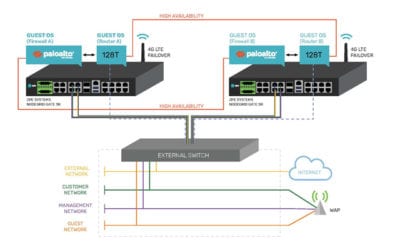
Their hardware stack consisted of many devices that were difficult to deploy and manage. This was a major hurdle for the company, considering their remote sites were very limited by physical space constraints. Additionally, support costs continued to rise and IT staff were dispatched to fix even minor issues.

The company needed a streamlined solution that was more space- and energy-efficient, and that could also maintain a high availability environment. Nodegrid was the only platform that could meet all their needs.

Want to learn how the company cut their stack in half, maintained a secure & highly-available environment, and saved on support?

What is FCAPS?

What is FCAPS?

Successful businesses rely heavily on their network infrastructure to keep up with demand and to allow work to flow smoothly. When outages occur, whole operations can come to a standstill which equates to wasted time & money, and most importantly, unhappy customers. As networks continue to grow and become more complex, so does the amount of effort and resources needed to keep them running at optimal efficiency. The goal is to migrate away from a reactive form of management and move to a proactive approach that can allow administrators to identify and correct issues before they become problems.  

Industry leaders are constantly searching for enterprise grade tools and solutions that allow them to take more control of their infrastructure, and the best of them follow the FCAPS model and framework for network management.  

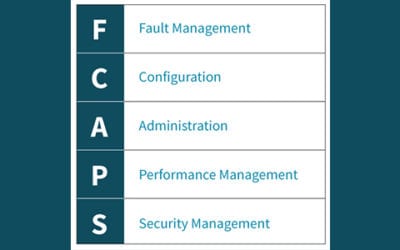
FCAPS is the ISO Telecommunications Management Network model and framework for network management. The term itself is an acronym for the five areas of function within the model: 

ZPE’s Nodegrid solutions consolidate and virtualize all your network functions onto one platform, no matter which vendors you use. Nodegrid makes it easy for you to monitor, configure, administer and secure your network from one centralized location while also providing you with the metrics and data you need to make smarter business decisions. Of course, Nodegrid meets all aspects of the FCAPS framework. 


Fault Management 

Network faults happen, so catching them before they can cause serious issues is critical. The ability to identify, isolate, log, and correct them is a necessary component to every network. Further, the ability to review historical fault data in order to identify trends allows you to take proactive measures that can greatly improve network stability.  

Nodegrid’s tracking features provide information about the system and connected devices such as Open Sessions, Routing Table, System Usage, Discovery Logs, LLDP and Serial Statistics. The Event List feature provides statistical information on all system events occurrences which can help you to quickly visualize your data.  


Configuration 

Configuration management plays a substantial role within your network. From deployments to upkeep, everything must be centralized and tracked in order to keep everything running smoothly. For optimal ease of use, a great system should: 

  • Centralized storage of configurations 
  • Simplify device configurations and provisioning 
  • Track changes 
  • Allow for future expansion 

Nodegrid makes managing and configuring devices simple and easy. With Zero Touch Provisioning (ZTP), deploying new devices while maintaining consistency and reducing errors is a snap. Nodegrid can even leverage the existing ZTP features of your infrastructure and extend ZTP to other appliances, including those that don’t come with ZTP features. Nodegrid’s Auditing tool allows you to track everything from one location, ensuring that nothing gets lost in the shuffle.


Administration 

Administration allows you to configure users and groups based on permissions allocated to them within the systems. Access should be restricted to ensure that only authorized users can make significant changes to critical systems.  

Nodegrid offers you the ability to create various groups and users with specific permissions to meet your needs. More specific profile settings can also be configured, such as sudo permissions, custom session timeouts, and default startup applications.  


Performance Management 

Ensuring that network performance is consistently operating within optimal levels is another key aspect to successful network management. Tools should be available that allow you to monitor performance and troubleshoot issues while being easy to access and use on a regular basis. Data should also be readily accessible to allow for the identification of trends which can assist with future planning.  

Nodegrid offers a dashboard tool to visually see Event Details, Managed Device details, and Monitoring Data from the system and all Managed Devices. It gives you the flexibility to create several dashboards for different purposes and monitor data points such as Power Consumption, Voltage (V), Current (A), Temperature, Fan speed, and many more. It provides options to show data from a different period of times such as the last 15 minutes, the last hour, the last day, this week, this month, or the last 5 years. Nodegrid also offers a full suite of Network Tools which allow you to run various tests in real time. 


Security Management 

Security management is all about limiting and controlling access to assets located within the network. User authentication, ACLs, and encryption all add layers to secure your network against threats and malicious attacks. 

Nodegrid offers a robust security suite to ensure that your network stays secure. From a built-in firewall, customizable users and groups, configurable password complexity and expiration, as well as standard SSH and SSL protocols, you are in full control. Nodegrid offers the option to use 2-factor authentication for an extra layer of security. Single Sign-On (SSO) is also available and can be used with Duo, Okta, G Suite, or other custom SAML Identity Providers.  


Want to learn more?

For more information on ZPE’s full product line, please visit our products page. 

Have a specific question or want to experience a live demonstration for yourself? Reach out to us via our contact page. We’re here for you! 

Help NetOps Teams Using Application Hosting & Guest OS

Application hosting helps your business become more flexible. This virtualization approach is a perfect solution if you’re looking to reduce your networking stack, make critical services more globally available, and ensure that your network is always up to date.

If you’re not familiar with application hosting, read our other blog post to get acquainted.

Application hosting helps your business become more flexible. This virtualization approach is a perfect solution if you’re looking to reduce your networking stack, make critical services more globally available, and ensure that your network is always up to date.

If you’re not familiar with application hosting, read our other blog post to get acquainted.

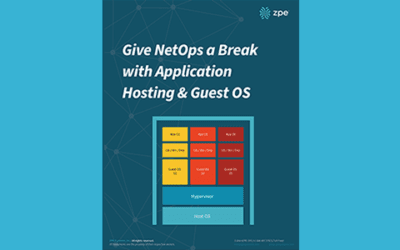
Give NetOps a Break with Application Hosting & Guest OS

For a quick recap, here are some things to know:

  • Application hosting means creating a cloud-based model (SaaS) through which to deliver your applications. One of the biggest benefits is that you don’t have to install and manage applications locally, and can instead keep them centralized on a server and bring them to clients anywhere in your organization.
  • To use application hosting, you need a virtual machine (VM) and something called a ‘Guest OS’.
  • Running on a VM, a guest OS can be Windows, Linux, Ubuntu, or other common operating system, and it’s this operating system that determines what applications you can run.
  • In between your device’s operating system (or host OS) and the guest OS is something called a hypervisor. A hypervisor is able to create VMs and tell the hardware how to allocate resources for VMs. This is an essential component of virtualization and application hosting.

How Does Application Hosting Help NetOps?

Modern business moves faster than ever, and to reach your goals, your NetOps teams need a modernized network that moves fast, too. But this can be difficult to achieve, since your network is likely made up of many different hardware & software systems, and admin protocols. There’s just so much to juggle that it seems like your network his holding back operations.

The good news is, application hosting and virtualization can alleviate many of the obstacles standing in the way of your network. Let’s compare how you manage your solutions before and after application hosting.

NetOps the Old Way

To boil it down, NetOps the old way is slow and cumbersome. This is mainly due to having many physical devices that you have to manage, which puts time consuming on-site support at the top of your priorities. This becomes even more complicated when you have many branch and remote networks.

Without application hosting, you need to install applications locally. Your only option is to put IT staff on site for this task. From there, the job can take days to complete, especially if your stack consists of many devices. And this is all part of a best-case scenario, which unfortunately isn’t the norm.

Another problem can arise — hardware & software incompatibilities. Suppose you try to install or update applications, and once you connect to a device you discover that the latest OS doesn’t support your software. Now what? Since you recently updated the OS for devices at every location, you have to roll back configurations or find a workaround for your application’s new release.

All of this can quickly become complex and difficult to track. Having to locally manage your edge environment leaves your network open to human errors. Your peace of mind is merely wishful thinking, because your physical & virtual assets aren’t as consistent, secure, or reliable as you’d hoped.

NetOps with Application Hosting

When you introduce application hosting, NetOps becomes fast and agile. Putting all your applications in the cloud means you can deliver them right where they’re needed, and thanks to guest OS, you don’t have to worry about incompatibilities.

Put your applications in a centralized server, and you no longer need to worry about on-site support. Your NetOps teams can tap into your server to install, update, and manage applications no matter where they are. This means faster releases and shorter time-to-market, so you can support your business alongside demand.

If you choose a powerful platform like Nodegrid, you can further help NetOps with even more capabilities. The Nodegrid Services Router can pack all your network functions into a single box, with add-on compute modules that allow you to run many guest OSes. Not only does this cut your stack, but it also gives your NetOps teams reliable remote access via out-of-band.

See how you can streamline NetOps with application hosting and Nodegrid.