Providing Out-of-Band Connectivity to Mission-Critical IT Resources

Home » Archives for September 2023

Edge Management and Orchestration

shutterstock_2264235201(1)

Organizations prioritizing digital transformation by adopting IoT (Internet of Things) technologies generate and process an unprecedented amount of data. Traditionally, the systems used to process that data live in a centralized data center or the cloud. However, IoT devices are often deployed around the edges of the enterprise in remote sites like retail stores, manufacturing plants, and oil rigs. Transferring so much data back and forth creates a lot of latency and uses valuable bandwidth. Edge computing solves this problem by moving processing units closer to the sources that generate the data.

IBM estimates there are over 15 billion edge devices already in use. While edge computing has rapidly become a vital component of digital transformation, many organizations focus on individual use cases and lack a cohesive edge computing strategy. According to a recent Gartner report, the result is what’s known as “edge sprawl”: many individual edge computing solutions deployed all over the enterprise without any centralized control or visibility. Organizations with disjointed edge computing deployments are less efficient and more likely to hit roadblocks that stifle digital transformation.

The report provides guidance on building an edge computing strategy to combat sprawl, and the foundation of that strategy is edge management and orchestration (EMO). Below, this post summarizes the key findings from the Gartner report and discusses some of the biggest edge computing challenges before explaining how to solve them with a centralized EMO platform.

Key findings from the Gartner report

Many organizations already use edge computing technology for specific projects and use cases – they have an individual problem to solve, so they deploy an individual solution. Since the stakeholders in these projects usually aren’t architects, they aren’t building their own edge computing machines or writing software for them. Typically, these customers buy pre-assembled solutions or as-a-service offerings that meet their specific needs.

However, a piecemeal approach to edge computing projects leaves organizations with disjointed technologies and processes, contributing to edge sprawl and shadow IT. Teams can’t efficiently manage or secure all the edge computing projects occurring in the enterprise without centralized control and visibility. Gartner urges I&O (infrastructure & operations) leaders to take a more proactive approach by developing a comprehensive edge computing strategy encompassing all use cases and addressing the most common challenges.

Edge computing challenges

Gartner identifies six major edge computing challenges to focus on when developing an edge computing strategy:

Gartner’s 6 edge computing challenges to overcome

Enabling extensibility so edge computing solutions are adaptable to the changing needs of the business.

Extracting value from edge data with business analytics, AIOps, and machine learning training.

Governing edge data to meet storage constraints without losing valuable data in the process.

Supporting edge-native applications using specialized containers and clustering without increasing the technical debt.

Securing the edge when computing nodes are highly distributed in environments without data center security mechanisms.

Edge management and orchestration that supports business resilience requirements and improves operational efficiency.

Let’s discuss these challenges and their solutions in greater depth.

  • Enabling extensibility – Many organizations deploy purpose-built edge computing solutions for their specific use case and can’t adapt when workloads change or grow.  The goal is to attempt to predict future workloads based on planned initiatives and create an edge computing strategy that leaves room for that growth. However, no one can really predict the future, so the strategy should account for unknowns by utilizing common, vendor-neutral technologies that allow for expansion and integration.
  • Extracting value from edge data – The generation of so much IoT and sensor data gives organizations the opportunity to extract additional value in the form of business insights, predictive analysis, and machine learning training. Quickly extracting that value is challenging when most data analysis and AI applications still live in the cloud. To effectively harness edge data, organizations should look for ways to deploy artificial intelligence training and data analytics solutions alongside edge computing units.
  • Governing edge data – Edge computing deployments often have more significant data storage constraints than central data centers, so quickly distinguishing between valuable data and destroyable junk is critical to edge ROIs. With so much data being generated, it’s often challenging to make this determination on the fly, so it’s important to address data governance during the planning process. There are automated data governance solutions that can help, but these must be carefully configured and managed to avoid data loss.
  • Supporting edge-native applications – Edge applications aren’t just data center apps lifted and shifted to the edge; they’re designed for edge computing from the bottom up. Like cloud-native software, edge apps often use containers, but clustering and cluster management are different beasts outside the cloud data center. The goal is to deploy platforms that support edge-native applications without increasing the technical debt, which means they should use familiar container management technologies (like Docker) and interoperate with existing systems (like OT applications and VMs).
  • Securing the edge – Edge deployments are highly distributed in locations that may lack many physical security features in a traditional data center, such as guarded entries and biometric locks, which adds risk and increases the attack surface. Organizations must protect edge computing nodes with a multi-layered defense that includes hardware security (such as TPM), frequent patches, zero-trust policies, strong authentication (e.g., RADIUS and 2FA), and network micro-segmentation.
  • Edge management and orchestration – Moving computing out of the climate-controlled data center creates environmental and power challenges that are difficult to mitigate without an on-site technical staff to monitor and respond. When equipment failure, configuration errors, or breaches take down the network, remote teams struggle to meet resilience requirements to keep business operations running 24/7. The sheer number and distribution area of edge computing units make them challenging to manage efficiently, increasing the likelihood of mistakes, issues, or threat indicators slipping between the cracks. Addressing this challenge requires centralized edge management and orchestration (EMO) with environmental monitoring and out-of-band (OOB) connectivity.

    A centralized EMO platform gives administrators a single-pane-of-glass view of all edge deployments and the supporting infrastructure, streamlining management workflows and serving as the control panel for automation, security, data governance, cluster management, and more. The EMO must integrate with the technologies used to automate edge management workflows, such as zero-touch provisioning (ZTP) and configuration management (e.g., Ansible or Chef), to help improve efficiency while reducing the risk of human error. Integrating environmental sensors will help remote technicians monitor heat, humidity, airflow, and other conditions affecting critical edge equipment’s performance and lifespan. Finally, remote teams need OOB access to edge infrastructure and computing nodes, so the EMO should use out-of-band serial console technology that provides a dedicated network path that doesn’t rely on production resources.

Gartner recommends focusing your edge computing strategy on overcoming the most significant risks, challenges, and roadblocks. An edge management and orchestration (EMO) platform is the backbone of a comprehensive edge computing strategy because it serves as the hub for all the processes, workflows, and solutions used to solve those problems.

Edge management and orchestration (EMO) with Nodegrid

Nodegrid is a vendor-neutral edge management and orchestration (EMO) platform from ZPE Systems. Nodegrid uses Gen 3 out-of-band technology that provides 24/7 remote management access to edge deployments while freely interoperating with third-party applications for automation, security, container management, and more. Nodegrid environmental sensors give teams a complete view of temperature, humidity, airflow, and other factors from anywhere in the world and provide robust logging to support data-driven analytics.

The open, Linux-based Nodegrid OS supports direct hosting of containers and edge-native applications, reducing the hardware overhead at each edge deployment. You can also run your ML training, AIOps, data governance, or data analytics applications from the same box to extract more value from your edge data without contributing to sprawl.

In addition to hardware security features like TPM and geofencing, Nodegrid supports strong authentication like 2FA, integrates with leading zero-trust providers like Okta and PING, and can run third-party next-generation firewall (NGFW) software to streamline deployments further.

The Nodegrid platform brings all the components of your edge computing strategy under one management umbrella and rolls it up with additional core networking and infrastructure management features. Nodegrid consolidates edge deployments and streamlines edge management and orchestration, providing a foundation for a Gartner-approved edge computing strategy.

Want to learn more about how Nodegrid can help you overcome your biggest edge computing challenges?

Contact ZPE Systems for a free demo of the Nodegrid edge management and orchestration platform.

Contact Us

Dissecting the MGM Cyberattack: Lions, Tigers, & Bears, Oh My!

Dissecting the MGM Cyberattack

This article was written by James Cabe, CISSP, whose cybersecurity expertise has helped major companies including Microsoft and Fortinet.

The recent MGM cyberattack reportedly caused the company to lose millions in revenue per day. The successful kill chain attack — originally a military tactic used to accomplish a particular objective — granted inside access to the attackers, who encrypted and held for ransom some of MGM’s most prized assets. These ‘crown jewel’ assets, as they’re called in the cybersecurity realm, are most critical to the accomplishment of an organization’s mission. Because ransomware attacks persist in corporate networks until fully cleared, organizations must be ready to “fight through” an attack using resilient systems and effective procedures. This should involve identifying these crown jewels and designing them in a way that ensures they can operate through attacks.

When these types of large-profile attacks occur, many cast their eyes at cybersecurity leaders for failing to fend off the bad guys. The reality is these leaders struggle to get budget, corporate buy-in, and digital assets that are required to build a strong defense for business continuity. For MGM, it’s likely they also faced difficulty operationalizing current assets across a gigantic digital estate, and ultimately lacked a plan to recover from a total outage of crown jewel assets.

From the attacker’s perspective, an exceptional level of intelligence and preparation are required in order to understand a target’s internal operations and architecture and execute a successful kill chain. Successfully attacking a sophisticated organization like MGM requires rapid information stealing to capture and leverage cloud credentials, as well as to lock up those resources and lock out the most important support staff in an organization. This is the crux of the issue: infostealers and ransomware automate the mass grabbing of resources and quickly set up a denial of services for the stakeholders that are responsible for fixing these systems.

How did the MGM cyberattack start? After MGM discovered the breach, how did the attacker stay one step ahead? What approach should organizations take to ensure they can recover if they’re targeted?

Who Started The MGM Cyberattack, and How?

The MGM cyberattack began after an adversary group named “Scattered Spider” used phishing over the phone, an approach called ‘vishing,’ to convince MGM’s customer support rep into granting them access with elevated privileges. Scattered Spider is the same group responsible for the SIM-swapping campaign that happened a few months ago, where they successfully subverted multifactor authentication. Their primary tactic involves social engineering, which they use to steal personal information from employees.  

MGM and many other casinos currently use advanced Zero Trust identity security from Okta. However, the attacker was able to trick the service desk into resetting a password to gain access into the network. Even with newer Zero Trust identity solutions, most organizations unravel once attackers get to the real chewy center” of the network: the humans operating them

Spider Bug Insect graphic

Okta is quoted saying, “In recent weeks, multiple US-based Okta customers have reported a consistent pattern of social engineering attacks against their IT service desk personnel, in which the caller’s strategy was to convince service desk personnel to reset all multi-factor authentication (MFA) factors enrolled by highly privileged users.” Okta further warned, “The attackers then leveraged their compromise of highly privileged Okta Super Administrator accounts to abuse legitimate identity federation features that enabled them to impersonate users within the compromised organization.” 

The MGM cyberattack and those like it are more about processes than technology. Let’s explore how the attack progressed, and how the criminals were successful at staying persistent and ultimately hitting their goal. 

How Did A Simple Authentication Attack Morph Into a Complex Attack?

The Scattered Spider threat actors use a platform written by UNC3944 or AlphaV (known by several names). This is a middleware developer for attack platforms that allow criminals to follow a specific set of instructions (a kill chain) to gain access and ultimately encrypt and exfiltrate data from a targeted company. AlphaV’s platform is called BlackCat, which they use to establish a foothold, establish Command and Control (C2) for the malware, and exfiltrate data, to ultimately get paid.

With elevated Okta privileges at MGM, Scattered Spider deployed a file containing a Java-based remote access trojan, which became a “vending machine” for other remote access trojans (RATs) that sought out other nearby machines to spread quickly. The AlphaV RAT would ‘pwn‘ MGM’s Azure virtual servers to gain access, then sniff for more user passwords and create dummy accounts.  

These RATs leveraged a built-in tool called “POORTRY,” the Microsoft Serial Console driver turned malicious, to terminate selected processes on Windows systems (e.g., Endpoint Detection and Response (EDR) agents on endpoints). AlphaV, the platform maintainer, signed the POORTRY driver with a Microsoft Windows Hardware Compatibility Authenticode signature. This helped the malware to evade most Endpoint Detection software. 

This tool was used to get elevated and persistent access to the Okta Proxy servers that were in the scope of the attack and accessible remotely by the attacker. This attack can evade a lot of detection tools. This access allowed them to capture AM\IAM accounts that allowed them greater access to the organization. This stealing of credentials from the Okta Proxy servers was confirmed by Okta responders as well as the threat actor on their blog. This is called a “living off the land” attack. 

Alphv statement on MGM

How Did MGM Discover the Cyberattack?

The first notification of the hack was dropped on the VXUnderground forums. The staff there verified through chat contact with the threat group UNC3944\AlphaV, who works in conjunction with the Scattered Spider threat actor, The attacker also confirmed this on their blog on the darknets.

On September 11, 2023, anyone attempting to visit MGM’s website was greeted by a message stating that the website was currently unavailable. The attack also stopped hotel card readers, gaming machines, and other equipment critical to MGM’s day-to-day operations and revenue generating activities. 

Screenshot showing MGM casino's website down.

How Did the Attacker Maintain Control?

The initial attack allowed AlphaV, who runs the C2 (Command and Control) networks for the RattyRat trojan, to have remote access to the VMware server farm that services the guest systems, the gaming control platforms, and possibly the payment processing systems. They maintained control despite all of MGM’s attempts to mitigate the problem, because they were able to establish elevated access in places the organization could not easily remove them from without removing access to the whole organization. They established something called “persistence.”

From the attacker’s blog on the darknet, “MGM made the hasty decision to shut down every one of their Okta Sync servers after learning that we had been lurking on their Okta Agent servers sniffing passwords of people whose passwords couldn’t be cracked from their domain controller hash dumps. At this point MGM being completely locked out of their local environment. Meanwhile the attacker continued having super administrator privileges to their Okta, along with Global Administrator privileges to their Azure tenant. They made an attempt to evict us after discovering that we had access to their Okta environment, but things did not go according to plan. On Sunday night, MGM implemented conditional restrictions that barred all access to their Okta (MGMResorts.okta.com) environment due to inadequate administrative capabilities and weak incident response playbooks. Their network has been infiltrated since Friday. Due to their network engineers’ lack of understanding of how the network functions, network access was problematic on Saturday. They then made the decision to ‘take offline’ seemingly important components of their infrastructure on Sunday. After waiting a day, we successfully launched ransomware attacks against more than 100 ESXi hypervisors in their environment on September 11th after trying to get in touch but failing.“

MGM tried many things to remove access into their network. However, because of an advanced attack that installed a shadow identity provider in their own Identity Solution, they were able to maintain access long enough to redeploy access to most of the assets they found to be the backbone of the company. AlphaV was then able to encrypt most of the crown jewels of MGM’s operations network.

Is There a Way to Stop These Types of Attacks? 

The MGM cyberattack required physical reconnaissance, patience, and a lot of planning to set up the kill chain. Playbooks that can protect against this kind of attack are hard to create, because it can mean taking all guest services offline for a period, which requires very high authority in the organization. One of the comments from the attacker was that the organization did not act fast enough to take all remote access offline to their management framework that consisted of Okta Proxy Servers. When they did, the adversary was then able to lock them out by submitting a Multifactor Authentication Reset. To stall the attacker, they would have had to induce a full outage of their crown jewels while a formal assessment of all assets could be performed. Taking assets offline requires buy-in at the board level and executive level, which are difficult to come by even if an organization emphasizes its operational excellence, detection, and defense.

Organizations should have a plan to quickly recover from a total loss of a site, outside of backups (which can be lost) and disaster recovery sites. Organizations need to be properly hard-segmented into a full IMI (Isolated Management Infrastructure). Keeping crown jewels safe from an attacker that targets the chewiest part of an organization should be top of any list going from 2023 budget to 2024 planning.

The following is a light version of what can be done in a fully-automated response that can take mere hours instead of days for an outage (a full operations blueprint will be out in the near future).

Isolated Management Infrastructure diagram

An IMI can host an IRE (Isolated Recovery Environment), which is used to cut off all user data and remote access (except for OOB) to an entire infected site. A properly implemented recovery environment should automate most of these activities to speed up the recovery. One of the first considerations is the requirement for a secondary organization in your IAM that is not attached to normal operations. This is what is known as a set of “Break the Glass” accounts. These are known in military circles but have made it into formal practice as part of a strong playbook for ransomware. Once you do this, you can instantiate selected Zero Trust remote access to the site using credentials that are not in the scope of the attack, and then bring up a communications channel for a virtual war room using software like Rocket Chat, Jitsi, Slack, or other standalone communications tools that are installable on the IRE environment. 

Avoiding normal authentication methods or IAM and normal communication channels is required for the integrity of the recovery and strengthens the recovery playbook. During this time, no email may be used that is associated directly with the organization. Ideally, email should never touch an account that is associated with it either.

The next step is to create a new set of clean side networks that do not directly connect to the main backbone or put it behind another firewall for triage good/bad. Using a sniffer software running on the IRE, the recovery team can then run a passive scan or an active scanner against all machines continuing to try to send email to exchange\M365. You can give access to people that are deemed good (not sending traffic) but lock off (with an EDR) the ability to open Outlook for a while, while keeping them on the web email. From there, continue working through to find all the sending drivers to see if they have a good backup. If not, back up the infected drive for offline data retrieval for later. Then reimage while scanning the UEFI BIOS during boot (if needed, run an IPMI scan). If the site has a list of assets that are considered crown jewels, prioritize these.

Once you have a segmented “clean side” established with all the network services required to operate the site (DNS, IAM, DHCP), then Internet access can be restored to this site on a limited basis; which means only out-bound communications, nothing in-bound. Restorative operations can continue apace. making sure that the infected side assets are captured in backup for later forensics following chain-of-custody if damages exceeding insurance limits are found to be the case. This is decided in the war room.

Get the Blueprint for Isolated Management Infrastructure

Maintaining control of critical systems is something security practitioners deal with in the Operational Technology (Industrial Control Systems) side of an organization. For them, the critical and most impactful part of the problem is the loss of control rather than the loss of data, a problem highlighted by the MGM cyberattack. Operational Technology Safety and Security teams set up and maintain Safety Systems as a fallback measure in case of any kind of disaster. This automation allows fallback of services safely, from which point they can recover operations. In 2023, most of our business is done on computers and networks. It is how to plan for business continuity. Now is the time that IT started following this safety system blueprint as well. 

Download the Network Automation Blueprint now, which helps you lay the groundwork for your IMI so you can recover from any attack.

Get in touch with me!

True security can only be achieved through resilience, and that’s my mission. If you want help shoring up your defenses, building an IMI, and implementing a Resilience System, get in touch with me. Here are links to my social media accounts:

Intel NUC Use Cases

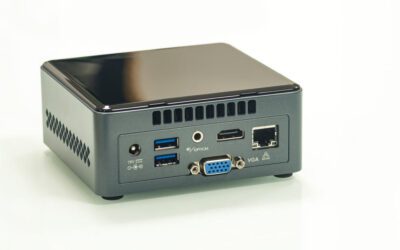
A mini-PC similar to an Intel NUC.

The Intel NUC, or “Next Unit of Computing,” is a small, appliance-like minicomputer that’s widely used across a variety of industries and applications. They’re tiny and relatively inexpensive, so you’ll often find them inside IoT devices and ruggedized cases. They’re also frequently deployed as jump boxes or service delivery appliances. However, Intel NUCs create added security risks, technical debt, and management headaches. Plus, Intel recently announced the discontinuation of all NUC product lines. This post describes some of the most common Intel NUC use cases, explains the security and management issues that caused its discontinuation, and provides superior replacement options.

Table of Contents

  1. Intel NUC use cases
  2. Intel NUC EOL products
  3. Why is Intel EOL-ing the NUC?
  4. Intel NUC replacement options from ZPE Systems
  5. Nodegrid product comparison
  6. Intel NUC replacement SKUs

Intel NUC use cases

While Intel NUCs have a dedicated fanbase among home enthusiasts, they’re primarily used by professional IT teams. Some popular Intel NUC use cases include:

  • Reducing carbon footprints: As investors place more importance on an organization’s environmental, social, and governance (ESG) practices, it becomes necessary to improve sustainability and reduce greenhouse gas emissions. Replacing inefficient PC towers with Intel NUCs can help reduce carbon footprints and improve ESG ratings.
  • Security and surveillance systems: An Intel NUC can run a wide range of security applications for things like entry control and surveillance cameras, eliminating the need for dedicated servers. Some IoT (Internet of Things) security devices have embedded Intel NUCs for greater mobility and efficiency.
  • Application delivery: Some service providers use Intel NUCs as platforms to deploy their software on-site to reduce hardware overhead costs. For example, a provider can install a NUC in their customer’s server room to deliver artificial intelligence (AI) or Software-as-a-Service (SaaS) applications.
  • Jump boxes: Managed Service Providers (MSPs) and Managed Security Service Providers (MSSPs) often deploy Intel NUCs at customer sites to act as “jump boxes” used to remotely access client infrastructure without taking up rack space.
  • Rugged computing: When services are needed out in the field, such as in military or construction applications, a traditional laptop may not be heavy-duty enough to withstand operating conditions. Some organizations solve this problem by running their services on Intel NUCs installed inside rugged cases designed for the environment.
  • Customized appliance computing: For specialized applications requiring a high degree of physical customization, such as law enforcement surveillance systems, an Intel NUC is often used because it’s small enough to fit nearly any case.

Intel NUC EOL products

Intel recently announced it’s discontinuing all NUC products, with specific dates for end-of-sale, end-of-support, and end-of-security-support varying by product. ASUS agreed to take over manufacturing and support of NUC product lines, but it’s unclear what the transition will look like or how ASUS will develop the NUC in the future.

Click here to view a list of all Intel NUC end-of-life SKUs as well as direct replacement options.

Why is Intel EOL-ing the NUC?

Despite all the exciting enterprise use cases listed above, the Intel NUC was never intended to be used as an appliance. It has numerous security and management limitations that make it challenging for Intel (and ASUS, in the future) to support the NUC for enterprise applications, including:

  • There’s no dedicated platform to deploy or secure NUC applications
  • Each Intel NUC is managed and accessed individually with no centralized management
  • Intel NUCs create a lot of technical debt because they require a lot of coding, API knowledge, and other specialized skills to work with
  • NUC operating systems are usually left out of patch schedules, leaving vulnerabilities critically exposed
  • There is usually no ability to recover a non-responsive NUC remotely, requiring expensive on-site visits any time there’s a network hiccup or OS crash
  • NUCs often don’t have the onboard hardware Roots of Trust (e.g., TPM) needed to secure them properly
  • The hardware NUCs are embedded in often have unclear or undocumented supply chains
  • There’s no ability for bidirectional authentication to the cloud with unique certificates
  • The production data and applications are on the same plane as management processes, leaving management ports exposed

Intel NUCs are a quick and inexpensive way to deploy applications, jump boxes, and digital services, which is what makes them so popular in enterprises. However, due to a lack of security features and centralized management, NUCs are also popular with cybercriminals looking for an easy target to exploit. With Intel discontinuing all NUC product lines, it’s the perfect opportunity to look for a replacement option that delivers the same cost-efficient flexibility but with enterprise-grade security and management features built in.

Intel NUC replacement options from ZPE Systems

Nodegrid is a family of all-in-one networking, application delivery, and infrastructure management devices from ZPE Systems. Nodegrid was built with security in mind, taking a three-pronged approach that includes:

  1. Hardware security – Onboard security features like TPM 2.0 and self-encrypted disk (SED) protect your device even if it falls into the wrong hands.
  2. Software security – Nodegrid protects its software using features such as BIOS protection and Signed OS, and it can host third-party security applications for an even stronger defense.
  3. Management security – Nodegrid keeps the management plane isolated from the data plane and uses strong zero-trust authentication methods to protect your management interfaces.

Nodegrid reduces management headaches without reducing security or functionality. ZPE provides enterprise-level support for all Nodegrid products with a responsive engineering team and 24-hour CVE (common vulnerabilities and exposures) patching. Nodegrid also lowers the technical debt and can meet teams at their skill level. You can deploy Nodegrid and use it to manage solutions that are already in place without any specialized programming or API knowledge.

Plus, Nodegrid uses out-of-band (OOB) management and serial connectivity to ensure continuous remote access to the control plane, making it a superior choice to an Intel NUC jump box for MSPs and MSSPs. With OOB connection options like 5G/4G LTE, teams can remotely troubleshoot and recover systems, services, and applications, even during major network outages. Management of all Nodegrid-connected infrastructure is unified by a single platform for streamlined control at any scale.

Due to its size, cost, and open, Linux-based operating system, Nodegrid is just as flexible and efficient as an Intel NUC while delivering the centralized management, robust security, and responsive support needed in enterprise deployments.

Learn more about replacing mini-computers with enterprise solutions:

Nodegrid product comparison

The entire family of Nodegrid edge solutions provides reliable OOB management and flexible service delivery capabilities protected by enterprise-grade security features. The Nodegrid Mini SR, Bold SR, and Gate SR are direct replacements for EOL Intel NUC models but offer so much more. Nodegrid is an entire Services Delivery Platform designed to streamline operations at any scale.


Mini SR

Bold SR

Hive SR

Gate SR

CPU

X86-64bit Intel 

X86-64bit Intel


X86-64bit Intel 

Cores

4

4 or 8

4 or 8

2, 4 or 8

Guest VM

1

1

1-3

1-3

Guest Docker

2+

2+

2+

2+

Storage

14GB SED

32GB – 128GB

32GB – 128GB

32GB – 128GB

Additional Storage

Up to 4TB

512GB

Up to 4TB

Wi-Fi

Yes

Yes

Yes

Yes

Cellular modem

1

1-2

1-2

1-2

5G

Yes

Dual 5G

Dual 5G

Sim slots

1

4

4

4

Serial Console Switch

Via USB

8

Via USB

8

Network

2x 1Gb ETH

5x Gb ETH

2x WAN (ETH/SFP)
2x SFP

4x 2.5Gb ETH

2x SFP
5x Gb ETH

4x 1Gb ETH PoE+

Data Sheet

Download

Download

Download

Download

To see first-hand why Nodegrid edge solutions are a superior choice for Intel NUC use cases, request a demo from ZPE Systems today.

Schedule a Demo

Intel NUC replacement SKUs

Intel NUC EOL SKU

In scope features

ZPE replacement product

Intel® NUC 11 Performance Kit NUC11PAHI70900

(Lenovo)

Multi-core Intel processor, expandable memory & SSD storage, Wi-Fi

ZPE-MSR24-W5

ZPE-MSR24-4G-W5

ZPE-MSR24-W5-EXT

ZPE-MSR24-4G-W5-EXT

ZPE-BSR-24a-W5

ZPE-BSR-24-4G-W5

ZPE-BSR-24-4G-W5-D128G

ZPE-BSR-48-W5

ZPE-BSR-48-4G-W5

ZPE-BSR-48-4G-W5-D128G

ZPE-GSR-48-W5

ZPE-GSR-48-4G-W5

ZPE-GSR-48-4G-W5-D128G

ZPE-GSR-816-W5

ZPE-GSR-816-4G-W5

ZPE-GSR-816-4G-W5-D128G

Intel® NUC 11 Pro Kit NUC11TNKv5

Intel® NUC 11 Pro Board NUC11TNBv5

Intel® NUC 11 Pro Board NUC11TNBv7

Intel® NUC 11 Pro Kit NUC11TNHv50L

Intel® NUC 11 Pro Kit NUC11TNKv7

Intel® NUC 11 Pro Kit NUC11TNHv7

Intel® NUC 11 Pro Kit NUC11TNHv70L

Intel® NUC 11 Pro Board NUC11TNBi3

Intel® NUC 11 Pro Board NUC11TNBi5

Intel® NUC 11 Pro Board NUC11TNBi7

Intel® NUC 11 Pro Kit NUC11TNKi3

Intel® NUC 11 Pro Kit NUC11TNKi5

Intel® NUC 11 Pro Kit NUC11TNKi7

Intel® NUC 11 Pro Kit NUC11TNHi30L

Intel® NUC 11 Pro Kit NUC11TNHi50L

Intel® NUC 11 Pro Kit NUC11TNHi70L

Intel® NUC 11 Pro Kit NUC11TNHi3

Intel® NUC 11 Pro Kit NUC11TNHi5

Intel® NUC 11 Pro Kit NUC11TNHi7

Intel® NUC 11 Pro Kit NUC11TNHi30P

Intel® NUC 11 Pro Kit NUC11TNHi50W

Intel® NUC 11 Pro Kit NUC11TNHi70Q

Intel® NUC 11 Pro Board NUC11TNBi30Z

Intel® NUC 11 Pro Board NUC11TNBi50Z

Intel® NUC 11 Pro Board NUC11TNBi70Z

Intel® NUC 11 Pro Kit NUC11TNKi30Z

Intel® NUC 11 Pro Kit NUC11TNKi50Z

Intel® NUC 11 Pro Kit NUC11TNKi70Z

Intel® NUC 11 Pro Kit NUC11TNKv50Z

Intel® NUC Kit, NUC11PAHi30Z

Intel® NUC Kit, NUC11PAHi50Z

Intel® NUC Kit, NUC11PAHi70Z

Intel® NUC 11 Enterprise Edge Compute NUC11TNHv50L

Intel® NUC 11 Enterprise Edge Compute NUC11TNHv70L

Intel® NUC 11 Pro Kit NUC11TNHi50Z

Multi-core Intel processor, expandable memory & SSD storage, Wi-Fi

ZPE-MSR24-W5

ZPE-MSR24-4G-W5

ZPE-MSR24-W5-EXT

ZPE-MSR24-4G-W5-EXT

ZPE-BSR-24a-W5

ZPE-BSR-24-4G-W5

ZPE-BSR-24-4G-W5-D128G

ZPE-BSR-48-W5

ZPE-BSR-48-4G-W5

ZPE-BSR-48-4G-W5-D128G

ZPE-GSR-48-W5

ZPE-GSR-48-4G-W5

ZPE-GSR-48-4G-W5-D128G

ZPE-GSR-816-W5

ZPE-GSR-816-4G-W5

ZPE-GSR-816-4G-W5-D128G

Intel® NUC Kit, NUC10i5FNHN

     (no cord, US cord, EU cord, AU cord, IN cord)

Intel® NUC Kit, NUC10i5FNKN

     (no cord, US cord, EU cord, AU cord, IN cord)

Intel® NUC Kit, NUC10i3FNHN

     (no cord, US cord, EU cord, AU cord, IN cord)

Multi-core Intel processor, expandable memory & SSD storage, Wi-Fi

ZPE-MSR24-W5

ZPE-MSR24-4G-W5

ZPE-MSR24-W5-EXT

ZPE-MSR24-4G-W5-EXT

ZPE-BSR-24a-W5

ZPE-BSR-24-4G-W5

ZPE-BSR-24-4G-W5-D128G

ZPE-BSR-48-W5

ZPE-BSR-48-4G-W5

ZPE-BSR-48-4G-W5-D128G

ZPE-GSR-48-W5

ZPE-GSR-48-4G-W5

ZPE-GSR-48-4G-W5-D128G

ZPE-GSR-816-W5

ZPE-GSR-816-4G-W5

ZPE-GSR-816-4G-W5-D128G

Intel® NUC11 Enthusiast Kit, NUC11PHKi7C, with Core™ i7, RTX 2060

     (no cord, US cord, EU cord, UK cord, AU cord, CN cord)

Multi-core Intel processor, expandable memory & SSD storage, Wi-Fi

ZPE-MSR24-W5

ZPE-MSR24-4G-W5

ZPE-MSR24-W5-EXT

ZPE-MSR24-4G-W5-EXT

ZPE-BSR-24a-W5

ZPE-BSR-24-4G-W5

ZPE-BSR-24-4G-W5-D128G

ZPE-BSR-48-W5

ZPE-BSR-48-4G-W5

ZPE-BSR-48-4G-W5-D128G

ZPE-GSR-48-W5

ZPE-GSR-48-4G-W5

ZPE-GSR-48-4G-W5-D128G

ZPE-GSR-816-W5

ZPE-GSR-816-4G-W5

ZPE-GSR-816-4G-W5-D128G

Intel® NUC Kit, NUC10i5FNHN

Intel® NUC Kit, NUC10i3FNHN

Multi-core Intel processor, expandable memory & SSD storage, Wi-Fi

ZPE-MSR24-W5

ZPE-MSR24-4G-W5

ZPE-MSR24-W5-EXT

ZPE-MSR24-4G-W5-EXT

ZPE-BSR-24a-W5

ZPE-BSR-24-4G-W5

ZPE-BSR-24-4G-W5-D128G

ZPE-BSR-48-W5

ZPE-BSR-48-4G-W5

ZPE-BSR-48-4G-W5-D128G

ZPE-GSR-48-W5

ZPE-GSR-48-4G-W5

ZPE-GSR-48-4G-W5-D128G

ZPE-GSR-816-W5

ZPE-GSR-816-4G-W5

ZPE-GSR-816-4G-W5-D128G

Intel® NUC Board NUC7PJYBN

Multi-core Intel processor, expandable memory & SSD storage, Wi-Fi

ZPE-MSR24-W5

ZPE-MSR24-4G-W5

ZPE-MSR24-W5-EXT

ZPE-MSR24-4G-W5-EXT

ZPE-BSR-24a-W5

ZPE-BSR-24-4G-W5

ZPE-BSR-24-4G-W5-D128G

ZPE-BSR-48-W5

ZPE-BSR-48-4G-W5

ZPE-BSR-48-4G-W5-D128G

ZPE-GSR-48-W5

ZPE-GSR-48-4G-W5

ZPE-GSR-48-4G-W5-D128G

ZPE-GSR-816-W5

ZPE-GSR-816-4G-W5

ZPE-GSR-816-4G-W5-D128G

Intel® NUC 11 Enthusiast Mini PC, w/ Core™

i7, RTX 2060, Optane™ Mem H10 

(32GB+512GB) Solid State Storage, 16G 

RAM, Windows® 10

     (No cord, US Cord, EU Cord, CN cord)

Multi-core Intel processor, expandable memory & SSD storage, Wi-Fi

ZPE-MSR24-W5

ZPE-MSR24-4G-W5

ZPE-MSR24-W5-EXT

ZPE-MSR24-4G-W5-EXT

ZPE-BSR-24a-W5

ZPE-BSR-24-4G-W5

ZPE-BSR-24-4G-W5-D128G

ZPE-BSR-48-W5

ZPE-BSR-48-4G-W5

ZPE-BSR-48-4G-W5-D128G

ZPE-GSR-48-W5

ZPE-GSR-48-4G-W5

ZPE-GSR-48-4G-W5-D128G

ZPE-GSR-816-W5

ZPE-GSR-816-4G-W5

ZPE-GSR-816-4G-W5-D128G

Intel® NUC 8 Rugged Kit NUC8CCHKRN (All SKUs)

Intel® NUC 8 Rugged Board NUC8CCHBN (All SKUs)

Multi-core Intel processor, expandable memory & SSD storage, Wi-Fi

ZPE-MSR24-W5

ZPE-MSR24-4G-W5

ZPE-MSR24-W5-EXT

ZPE-MSR24-4G-W5-EXT

ZPE-BSR-24a-W5

ZPE-BSR-24-4G-W5

ZPE-BSR-24-4G-W5-D128G

ZPE-BSR-48-W5

ZPE-BSR-48-4G-W5

ZPE-BSR-48-4G-W5-D128G

ZPE-GSR-48-W5

ZPE-GSR-48-4G-W5

ZPE-GSR-48-4G-W5-D128G

ZPE-GSR-816-W5

ZPE-GSR-816-4G-W5

ZPE-GSR-816-4G-W5-D128G

Intel® NUC Kit – NUC10i7FNHN

Intel® NUC Kit – NUC10i7FNKN

Multi-core Intel processor, expandable memory & SSD storage, Wi-Fi

ZPE-MSR24-W5

ZPE-MSR24-4G-W5

ZPE-MSR24-W5-EXT

ZPE-MSR24-4G-W5-EXT

ZPE-BSR-24a-W5

ZPE-BSR-24-4G-W5

ZPE-BSR-24-4G-W5-D128G

ZPE-BSR-48-W5

ZPE-BSR-48-4G-W5

ZPE-BSR-48-4G-W5-D128G

ZPE-GSR-48-W5

ZPE-GSR-48-4G-W5

ZPE-GSR-48-4G-W5-D128G

ZPE-GSR-816-W5

ZPE-GSR-816-4G-W5

ZPE-GSR-816-4G-W5-D128G

Intel® NUC Kit – NUC7CJYHN (All SKUs)

Intel® NUC Kit – NUC7PJYHN (All SKUs)

Multi-core Intel processor, expandable memory & SSD storage, Wi-Fi

ZPE-MSR24-W5

ZPE-MSR24-4G-W5

ZPE-MSR24-W5-EXT

ZPE-MSR24-4G-W5-EXT

ZPE-BSR-24a-W5

ZPE-BSR-24-4G-W5

ZPE-BSR-24-4G-W5-D128G

ZPE-BSR-48-W5

ZPE-BSR-48-4G-W5

ZPE-BSR-48-4G-W5-D128G

ZPE-GSR-48-W5

ZPE-GSR-48-4G-W5

ZPE-GSR-48-4G-W5-D128G

ZPE-GSR-816-W5

ZPE-GSR-816-4G-W5

ZPE-GSR-816-4G-W5-D128G

Intel® NUC 9 Pro Kit – NUC9VXQNX

Intel® NUC 9 Pro Compute Element – NUC9VXQNB

Intel® NUC 9 Pro Compute Element – NUC9V7QNB

Multi-core Intel processor, expandable memory & SSD storage, Wi-Fi

ZPE-MSR24-W5

ZPE-MSR24-4G-W5

ZPE-MSR24-W5-EXT

ZPE-MSR24-4G-W5-EXT

ZPE-BSR-24a-W5

ZPE-BSR-24-4G-W5

ZPE-BSR-24-4G-W5-D128G

ZPE-BSR-48-W5

ZPE-BSR-48-4G-W5

ZPE-BSR-48-4G-W5-D128G

ZPE-GSR-48-W5

ZPE-GSR-48-4G-W5

ZPE-GSR-48-4G-W5-D128G

ZPE-GSR-816-W5

ZPE-GSR-816-4G-W5

ZPE-GSR-816-4G-W5-D128G

Intel® NUC 12 Pro Kit NUC12WSKi50Z

Intel® NUC 12 Pro Kit NUC12WSHi50Z

Intel® NUC 12 Pro Kit NUC12WSKi70Z

Intel® NUC 12 Pro Kit NUC12WSHi70Z

Multi-core Intel processor, expandable memory & SSD storage, Wi-Fi

ZPE-MSR24-W5

ZPE-MSR24-4G-W5

ZPE-MSR24-W5-EXT

ZPE-MSR24-4G-W5-EXT

ZPE-BSR-24a-W5

ZPE-BSR-24-4G-W5

ZPE-BSR-24-4G-W5-D128G

ZPE-BSR-48-W5

ZPE-BSR-48-4G-W5

ZPE-BSR-48-4G-W5-D128G

ZPE-GSR-48-W5

ZPE-GSR-48-4G-W5

ZPE-GSR-48-4G-W5-D128G

ZPE-GSR-816-W5

ZPE-GSR-816-4G-W5

ZPE-GSR-816-4G-W5-D128G

Intel® NUC 9 Extreme Kit – NUC9i5QNX

Intel® NUC 9 Extreme Kit – NUC9i7QNX

Intel® NUC 9 Extreme Kit – NUC9i9QNX

Multi-core Intel processor, expandable memory & SSD storage, Wi-Fi

ZPE-MSR24-W5

ZPE-MSR24-4G-W5

ZPE-MSR24-W5-EXT

ZPE-MSR24-4G-W5-EXT

ZPE-BSR-24a-W5

ZPE-BSR-24-4G-W5

ZPE-BSR-24-4G-W5-D128G

ZPE-BSR-48-W5

ZPE-BSR-48-4G-W5

ZPE-BSR-48-4G-W5-D128G

ZPE-GSR-48-W5

ZPE-GSR-48-4G-W5

ZPE-GSR-48-4G-W5-D128G

ZPE-GSR-816-W5

ZPE-GSR-816-4G-W5

ZPE-GSR-816-4G-W5-D128G

Want to learn more about replacing your Intel NUC with Nodegrid?

Ready to replace your Intel NUC with a Nodegrid alternative? Call ZPE Systems today at 1-844-4ZPE-SYS or contact us online.

Contact Us

What is Zero Trust Security?

Data,Protection,Cyber,Security,Privacy,Business,Internet,Technology,Concept

As enterprise networks increase in complexity and distribution, and the frequency and severity of cybersecurity incidents also continue to grow, organizations must rethink traditional approaches to network security. That’s where the zero-trust methodology comes in.

What is zero trust security, you ask? This post defines the term and discusses its history before providing a guide to implementing zero trust security in your organization.

Table of Contents

  1. What is zero trust security?
  2. The history of zero trust security: A timeline
  3. Zero trust security benefits
  4. Zero trust security use cases and examples
  5. How to implement zero trust security
  6. Zero trust on the control plane
  7. Zero trust security simplified

What is zero trust security?

Zero trust is a network security protocol that embraces two main principles. The first lends its name and stipulates that networks must “never trust, always verify” any device or account, including those already within the network perimeter. As a result, a zero trust security framework requires any entity accessing network resources to successfully authenticate through a root-of-trust and strong authentication method (e.g., one-time passwords or 2-factor authentication).

The second pillar of a zero trust network is micro-segmentation. Instead of a singular, all-encompassing security perimeter, a zero trust approach uses the same strong authentication and highly specific security policies to establish trust at checkpoints along smaller, segmented perimeters. This combination limits the lateral movement of compromised accounts, which minimizes the impact of breaches and aids in protection, governance, and compliance.

The history of zero trust security

The history of zero trust securing a timeline

The NIST publication answered the question, “What is zero trust security?” using seven core tenets.

7 tenets of zero trust security
  1. All data sources, devices, computing services, and applications are considered resources.
  2. All network communication is secured regardless of where it originates from, even within the network perimeter.
  3. Access to individual resources is granted on a per-session basis, so trust can be re-evaluated upon each request.
  4. Trust is determined by dynamic policies that continuously assess client identity, behavioral patterns, location, time, and other
    attributes.
  5. The integrity and security posture of all enterprise assets are continuously monitored, with no asset inherently trusted.
  6. Access policies are strictly enforced using strong authentication every time a resource is requested.
  7. The network and infrastructure are continuously monitored, and the collected data is used to improve the overall security posture.

Zero trust security benefits

One of networking’s fundamental goals is to allow information to flow between computers, people, and organizations. However, that information is more decentralized now than ever before and must be relayed through various applications, partners, and third-party channels, increasing risk. Plus, the frequency of ransomware attacks and other highly sophisticated cybercrimes makes it a near certainty that a breach will occur even with the best protection strategies.

The zero trust security model operates under the assumption that a breach is already in progress, meaning an account or device is already compromised and accessing the network. It works to restrict an attacker’s movement on the network by erecting security checkpoints around each potential target and forcing them to re-establish trust. Limiting the blast radius of a cyberattack decreases the duration and cost of recovery operations so organizations can minimize the impact on their revenue and reputation.

4 benefits of zero trust security
  1. Zero trust limits how much an attacker can move around the network and how much data they can access before getting caught.
  2. Zero trust monitoring tools provide a high level of visibility into networks, which teams can use to streamline and optimize operations.
  3. Zero trust helps organizations identify malicious actors promptly so they can respond to incidents more quickly and decrease recovery times.
  4. Zero trust aids in compliance with data privacy and security regulations like FedRAMP and HIPAA.

Zero trust security use cases and examples

Organizations across any industry can benefit from the zero trust approach to network security. For example:

  • Ransomware often exploits vulnerabilities in unpatched software to compromise enterprise systems and move around the network, encrypting critical resources along the way. Establishing zero trust checkpoints at each micro-perimeter can help identify compromised resources and prevent their lateral movement, limiting the impact of ransomware and expediting recovery.
  • Operational Technology (OT) is used to automate machines that interact with the real world, such as HVAC systems or industrial robotics, which makes OT-related cyberattacks uniquely devastating. With recent reports indicating these attacks are on the rise, many organizations are using zero trust policies and controls to secure both their OT and their IT networks.
  • Many organizations use Internet of Things (IoT) devices to collect data, provide mobile services, automate critical operations, and more. However, these devices are a huge cybersecurity risk if not managed properly, especially in the financial sector and the medical industry. Zero trust security helps mitigate the risk by making it easier to identify compromised IoT devices and deny access to sensitive resources.

How to implement zero trust security

With an understanding of what zero trust security is, where it came from, and how it can be used, you can create an implementation plan that includes all the tools and processes you must deploy to achieve the zero trust model. There are four key questions to answer:

  1. How will we establish trust?
  2. How will we control and secure user access to resources?
  3. How will we identify and manage our attack surface?
  4. How will we enforce zero trust and detect attackers on the network?

Let’s discuss the best way to answer each of these questions and the natural progression to establishing a zero trust implementation plan.

1. Establishing trust

As the core of the zero trust strategy, this must be addressed before moving on to any subsequent steps. Establishing trust requires four things, implemented in this order:

  • Roots of Trust (RoTs) – Roots of Trust are hardware security mechanisms that provide cryptographic functions, key management, and other important features. An example would be a Trusted Platform Module (TPM). RoTs are inherently trusted and provide the foundation on which to build a zero trust security architecture, so it’s critical to choose solutions that provide the best and most up-to-date security features.
  • Identity and Access Management (IAM) – An IAM solution provides policy creation and deployment, identity verification, and trust assessment functionality. It acts as the gateway at each micro-perimeter, forcing accounts to verify their identity and re-establish trust before accessing enterprise resources.
  • Strong authentication – A password alone isn’t enough to prove someone’s identity, so strong authentication requires a secondary form of proof. Examples include one-time passwords (OTPs), authentication app keys, physical keys like USBs or smart cards, and biometric scans.
  • Privileged Access Management (PAM) – Similar to IAM, privileged access management focuses specifically on accounts with special access rights, such as sysadmin or service accounts.

2. Controlling access to resources

The next step is to establish control over who can access network resources and ensure that access is secured. The four areas to focus on, in order, are:

  • Access control policies – Zero trust requires highly specific policies that are custom-tailored to the resources being protected. The best practice is to use role-based access control (RBAC) instead of assigning individualized permissions to each account.
  • Threat intelligence – Threat intelligence refers to the information used by organizations and cybersecurity vendors to learn about threats to the network. This knowledge is used to determine which security solutions and controls are needed to defend specific network micro-perimeters.
  • Risk management – Risk management involves using threat intelligence and other sources of information to determine how risky it is to deploy particular technology solutions, work with specific third-party partners, or allow access to particular areas of the network.
  • Zero Trust Network Access (ZTNA)ZTNA provides secure remote access to enterprise resources, similar to (but better than) a VPN. ZTNA connects remote users directly with the specific resource they’re requesting to access without letting them see or interact with anything else on the enterprise network.

3. Managing the attack surface

Creating effective micro-perimeters is impossible without a clear understanding of what’s being protected and what the potential risks are. This involves four components:

  • Asset management – You must have a total accounting of all the assets on the network, including information about software versioning, patch schedules, hardware security capabilities, and location.
  • Vulnerability management – Vulnerability management involves monitoring, discovering, reporting, and resolving software vulnerabilities. A robust vulnerability management strategy is required to prevent malicious actors from using software exploits (like the unpatched Accellion vulnerability) to bypass zero trust security controls.
  • Software Bill of Materials (SBOM) – A software bill of materials lists all the various third-party and open-source components present in a given software product. An SBOM is required to gain a full understanding of the risks associated with a particular solution and determine which policies and controls are required to defend it.
  • Attack surface management – Attack surface management involves identifying all the potential targets of a cyberattack, implementing policies and controls to defend those targets, and continuously monitoring for new threats. Effective attack surface management requires robust asset & vulnerability management as well as SBOMs for all software, so all previous processes must already be in place prior to this step.

4. Enforcing zero trust and detecting attacks

The final stage of zero trust implementation involves enforcing policies, detecting threats on the network, and dealing with those threats. These processes, in order, include:

  • Zero trust enforcement – You enforce zero trust policies using all the tools, processes, and information from previous steps. Many organizations adopt artificial intelligence (AI) and machine learning (ML) technologies for greater visibility into account activity. For example, User and Entity Behavior Analytics (UEBA) solutions monitor and analyze behavior so they can better detect anomalous account activity.
  • Threat detection – Threat detection involves monitoring the network to identify signs of attack, like malware execution, data exfiltration, repeated failed access requests, and unapproved registry changes.
  • Deception – Zero trust deception technology uses an overlay of “false” attack targets to lure malicious actors into revealing themselves and their motives without allowing them access to any real resources.

A NIST diagram of a zero trust architecture.

Source: NIST Special Publication 800-207 (Zero Trust Architecture)

It’s important to note that all of the steps and processes listed above must be followed chronologically because each successive stage builds upon the one before. It isn’t until all these steps are complete that an organization has achieved the zero trust security model.

Zero trust on the control plane

The management interfaces used by administrators to control network infrastructure are often excluded from zero trust implementation plans because end-users don’t typically access them. That means a compromised sysadmin account could potentially hijack the control plane and bring down critical infrastructure.

Organizations must apply zero trust security principles, policies, and controls to management infrastructure. The best practice, according to a recent CISA directive, is to keep the control plane on an isolated, out-of-band (OOB) network – also known as an Isolated Management Infrastructure (IMI). Isolating the management interfaces on a dedicated network prevents lateral movement to or from the production LAN. It also gives administrators a safe environment in which to recover from ransomware or other cyberattacks without risking reinfection; this is known as an isolated recovery environment (IRE).

The easiest and most effective way to implement an IMI is with OOB serial console servers. Ideally, these devices should have robust Root of Trust technology like TPM 2.0, use alternative network interfaces like 5G/4G cellular to ensure isolation and continuous access, and integrate with zero trust solutions such as IAM and PAM for consistent policy enforcement.

Zero trust security simplified

What is zero trust security? It’s both a mindset and a set of innovative technologies and cybersecurity methods that address the current threat landscape of frequent, sophisticated, and disruptive attacks on networks of all sizes. By following the principle of “never trust, always verify,” and using the implementation steps outlined above, you can defend your network and streamline recovery operations.

Are you looking for a way to simplify zero trust without sacrificing security? The Nodegrid platform from ZPE Systems includes a range of all-in-one solutions that combine LAN/WAN/Branch networking, out-of-band (OOB) management, zero touch provisioning (ZTP), and more. Nodegrid solutions are vendor-neutral and can run or integrate your choice of third-party zero trust solutions like IAM and ZTNA, reducing the number of security devices to deploy at each office or branch. Nodegrid boxes are protected by strong Root of Trust technology like TPM 2.0 and employ innovative security features like geofencing to form a robust foundation for your zero trust implementation.

What is zero trust security?

Learn more or request a demo of the Nodegrid solution by contacting ZPE Systems today.

Contact Us

IT Infrastructure Management Challenges

Stop,Falling.,Save,Falling,Economy,Business,Vector,Illustration.

Modern IT infrastructure management is defined by the struggle to keep an increasingly complex architecture of critical business services running 24/7 without interruption. According to a recent report from Siemens, a single hour of unplanned downtime could cost businesses anywhere from $39,000 to $2 million. The ability to maintain continuous business operations and recover from outages with minimal disruption is known as network resilience, and it should be the top priority for any organization. Infrastructure teams face numerous challenges on their path to creating resilience, including management complexity, cybersecurity threats, vendor lock-in, bloated tech stacks, and poorly supported legacy devices. This post analyzes the top 5 IT infrastructure management challenges while providing potential solutions and additional resources.

Table of Contents

The top 5 IT infrastructure management challenges & solutions:

1. Challenge: Increasing complexity

As organizations evolve their capabilities and service offerings with advanced technology like artificial intelligence (AI), the supporting infrastructure grows more complex. For example, microservice applications are extremely agile and allow software teams to deliver advanced, high-performance products very quickly and efficiently. Building and maintaining the containerized environments, network logic, and security architecture to host and support those applications is difficult and prone to human error. A lot of human error occurs during tedious, repetitive tasks like device security configurations. These mistakes are the cause of up to 35% of cybersecurity incidents, so minimizing human error is critical to network resilience.

Solution: Network automation

Tedious IT infrastructure and network management workflows are perfect candidates for automation. For example, zero touch provisioning (ZTP) turns network device configurations into software code, allowing admins to pre-write configuration files that can be tested and verified before deployment. Teams can ship factory-condition devices to remote data centers and branches, where a non-expert plugs the device into power and networking. As soon as the device connects to DHCP, it downloads its ZTP configuration file and automatically configures itself. ZTP significantly reduces human intervention in the deployment process, which minimizes the risk of errors. Devices with accurate security configurations are less likely to contain vulnerabilities. In addition, automating tasks like patch management will further reduce vulnerabilities, improving network resilience.

Back to Top

To learn how ZTP and automated deployments can shrink deployment times, download this Vapor IO case study.

Download Now

2. Challenge: Ransomware

Ransomware attacks on businesses are so frequent that many organizations consider them inevitable, and Gartner calls ransomware the modern disaster. Standard ransomware takes over the network and encrypts all of an organization’s data until the ransom is paid, bringing operations to a screeching halt. Newer attacks, such as the Cl0p MOVEit breach currently affecting Shell and other major energy companies, use randomware tactics to harvest sensitive data for ransom. Ransomware attacks often start with social engineering tactics that are difficult to prevent with security technology alone. Once the network is infected, ransomware is nearly impossible to stop and difficult to recover from without reinfecting backup data and systems. While there are many other types of cybersecurity threats, ransomware’s frequency and business impact make it one of the biggest IT infrastructure management challenges.

Solution: Isolated management infrastructure

Network micro-segmentation, Zero Trust security policies, advanced authentication methods, and other security controls help prevent some attacks and can limit the blast radius of others. However, there’s no way to ensure 100% protection, so organizations should focus instead on building a comprehensive recovery architecture to decrease downtime and reduce the risk of reinfection. This can be done using something called Isolated Management Infrastructure (IMI). An isolated management infrastructure using out-of-band (OOB) serial consoles gives teams a dedicated control plane that’s separate from the production network. This creates an isolated recovery environment where they can rebuild systems, restore data, and perform security validation without the risk of reinfection undoing their efforts. It also takes management interfaces off the production network as mandated by a recent CISA binding directive. An IMI improves resilience by speeding up recovery times so business can resume faster.

Back to Top

For more help building ransomware resilience, download our 3 Steps to Ransomware Recovery whitepaper.

Download Now

3. Challenge: Lack of integration & vendor freedom

Most IT infrastructure is a mix of features and services provided by different vendors, each with its own software and interface used to manage them. Some IT infrastructure management teams compromise on features, security, redundancy, etc., to stay in their vendor’s ecosystem, which makes it difficult to build a custom-fit network. Many teams opt instead to manage each vendor solution separately with little interoperability. This lack of integration makes centralized orchestration especially challenging. A fragmented view of networks and infrastructure makes it difficult to spot systemic issues or signs of compromise. Managing solutions individually is inefficient and tedious, which increases the risk of human error. In fact, organizations wait an average of 205 days to patch systems because they’re afraid an update will break their operations. Vendor lock-in is a significant hurdle on the path to network resilience.

Solution: Vendor-neutral platforms

Flexibility and agility are key here; enterprises need to adopt a network infrastructure that can accommodate their exact needs and adapt when those needs change. Teams also need centralized orchestration of the entire multi-vendor architecture. This requires a vendor-neutral infrastructure management platform that can dig its hooks into any solution on your network. For example, OOB serial consoles running open, Linux-based operating systems offer unified management of mixed-vendor infrastructure. Some solutions can even host third-party software for SASE, NGFWs, and other network and security services. Administrators get a single centralized management platform that provides 360-degree visibility and control, improving security coverage and reducing human error. This OOB platform also creates the isolated management infrastructure described above. The IMI itself is a vendor-neutral platform that allows for safe management, including applying patches and deploying automation. This platform also provides an “undo button” in case mistakes are made. That way, teams don’t need to be afraid of breaking their own systems while applying necessary updates.

Back to Top

4. Challenge: Overwhelming tech stacks

IT managers working with an enterprise network have a massive variety of equipment and software to work with to make their networks function efficiently. These solutions often include, but are not limited to,

  • Servers, switches, and routers
  • Out-of-band management hardware
  • Firewalls and other security solutions
  • Data backup and configuration devices
  • Cellular failover boxes

Each new solution added to the network must be secured, monitored, maintained, and patched. Keeping track of vulnerabilities and patch schedules for so many devices and applications is challenging, but unpatched infrastructure is risky to network security and resilience. All these moving parts are potential points of failure, so keeping them functioning and optimally performing is critical. Still, it’s difficult to be proactive about maintenance with so many disparate solutions to keep track of.

Solution: Consolidated infrastructure

There are three ways to overcome this IT infrastructure management challenge. In the previous section, we discussed how a vendor-neutral platform streamlines the management of multi-vendor devices, which also helps infrastructure teams stay on top of patch schedules and maintenance. Before that, we mentioned automation as a way to reduce complexity, but it also helps reduce maintenance workloads. For example, automated infrastructure monitoring solutions keep track of software versioning information and alert teams when vendors announce vulnerabilities or release patches. Some solutions also employ machine learning and artificial intelligence to analyze monitoring data, predict potential issues, and suggest optimal maintenance schedules. The third method uses converged infrastructure solutions that combine many different functions in a single device or platform. For example, you can deploy an integrated branch router that rolls up network functions, out-of-band management, security, and cellular failover in a single box. Some vendor-neutral solutions let you host third-party software as well, so you can add application delivery, SASE, configuration management, and more.

A 3-pronged approach to simplifying tech stacks
  1. Vendor-neutral management platforms
  2. Automated infrastructure monitoring & maintenance
  3. Converged infrastructure solutions

This three-pronged approach to infrastructure management helps streamline the tech stack to improve network performance and resilience.

Back to Top

5. Challenge: Legacy infrastructure

As providers modernize and upgrade their service offerings, older devices fall out of support. These “legacy devices” are outdated and incapable of integrating with modern software by themselves. As a result, they slow down workflows and inhibit automation efforts. Legacy devices pose significant security risks since the vendor no longer patches new vulnerabilities. Despite their inherent flaws, enterprises insist on using legacy systems, citing staff familiarity, high replacement costs, and potential service disruptions as reasons for keeping them around. For example, 53% of healthcare devices still operate on Windows 7, which Microsoft no longer supports. Unless those devices are updated, they cannot be properly secured.

Solution: Legacy modernization platforms

When replacing legacy devices is impossible, the next best option is to bring them on board your modern IT management platform. For example, some serial consoles use auto-sensing ports to automatically detect legacy devices and integrate them under the same management umbrella as newer systems. A vendor-neutral legacy modernization platform like Nodegrid can even push automation to older devices that otherwise wouldn’t be supported. This reduces the friction created by older infrastructure, so administrators can incorporate them into their automated workflows. Nodegrid also extends security coverage – including modern Zero Trust solutions and automated security monitoring – to legacy devices to ensure there are no gaps. Legacy modernization with the Nodegrid platform improves network resilience without the disruption of an infrastructure upgrade.

Back to Top

Solving IT infrastructure management challenges with ZPE Systems

All the biggest IT infrastructure management challenges revolve around network resilience. Automation, security solutions, vendor-neutral platforms, and legacy modernization help reduce the frequency of outages, but for true resilience, organizations must be able to recover from the outages that do occur and get services up and running as quickly and possible to minimize the impact of downtime on revenue and reputation. An isolated management infrastructure using Gen 3 out-of-band serial consoles provides a dedicated control plane for troubleshooting and recovery operations. For example, using Nodegrid OOB management solutions from ZPE Systems, teams get 24/7 access to remote infrastructure even during network outages and ransomware attacks. This OOB network provides a safe environment to restore and rebuild systems, applications, and data without the risk of reinfection. Nodegrid is a vendor-neutral infrastructure orchestration platform that brings all your mixed-vendor and legacy systems together under a single management umbrella. Nodegrid’s Linux-based OS extends automation and security coverage to outdated equipment to streamline workflows and provide a 360-degree view of the entire architecture.

Need more help to overcome Solving IT infrastructure?

To learn more about how the Nodegrid platform solves your IT infrastructure management challenges, contact ZPE Systems today. Contact Us