Providing Out-of-Band Connectivity to Mission-Critical IT Resources

Home » Archives for February 2024

Zero Trust Edge Solutions: Continuing the Zero Trust Journey

A glowing shield with a 0 on it overlays a glowing map of the world to represent zero trust at the edge.

The zero trust security methodology follows the principle of “never trust, always verify,” which assumes that any account or device could be compromised and should be forced to continuously establish trustworthiness. This sounds like an extreme approach, but with the frequency of high-profile data breaches and ransomware attacks steadily increasing, security teams must pivot their approach away from prevention and toward damage mitigation and recovery. Zero trust security limits the lateral movement of compromised accounts on the network by establishing micro-perimeters around network resources that continually assess an account’s behavior for suspicious activity.

Organizations also must extend zero trust security policies and controls to remote business sites at their network’s edges, such as branches, Internet of Things (IoT) deployments, and home offices. Zero trust edge solutions are software platforms that provide networking, access, and security capabilities designed specifically for the edge. This guide explains what zero trust edge solutions do and the challenges involved in using them before discussing how to build a unified ZTE platform.

What are zero trust edge solutions?

A zero trust edge solution combines edge-centric security functionality with remote access and networking capabilities. ZTE’s core feature is zero trust network access (ZTNA), which securely connects remote users to enterprise applications and resources, similar to a VPN. ZTNA is more secure than VPNs because it only allows users to authenticate to one resource at a time and prevents them from seeing or accessing anything else until they re-establish their identity and credentials. ZTE’s other features and capabilities vary depending on the vendor and deployment type. ZTE solutions come in three different forms:

  • As a service: Companies can purchase ZTE functionality as a cloud-based, vendor-managed service. Remote users connect to regional points of presence (POPs) to reach the ZTE stack in the cloud before being routed to enterprise resources. This deployment style is easier to deploy for organizations with lots of users in the field but few (if any) physical edge locations to host security or networking solutions.
    .
  • With SD-WAN: Some ZTE providers combine zero-trust features with software-defined wide area networking (SD-WAN) capabilities. SD-WAN creates a virtual network overlay that’s decoupled from the underlying WAN infrastructure, enabling centralized control and automation. Packaging ZTE and SD-WAN together helps organizations consolidate their tech stack at physical edge sites like branches, warehouses, and manufacturing plants while still offering ZTNA to work-from-home and field employees.
    .
  • Build your own: Since there are very few mature ZTE providers on the market, and it can be difficult to find pre-made solutions with all the features needed for complex, distributed edge networks, many teams opt to build their own platform by combining tools from multiple vendors. Typically, these organizations have physical branches with existing WAN infrastructure that they use as regional POPs to host ZTNA and other security solutions.

Why build your own ZTE solution?

If pre-made solutions exist, why would companies go through the hassle of creating their own zero trust edge platform? Presently, there aren’t any “complete” ZTE solutions that offer full, zero-trust protection for branches and other physical edge sites.

For example, many ZTE platforms don’t protect management ports on the control plane, leaving critical edge infrastructure like servers, switches, and power distribution units (PDUs) exposed to cybercriminals. Additionally, branch ZTE solutions rely upon production network infrastructure, so if there’s an outage or ransomware attack, remote management teams are completely cut off from troubleshooting and recovery. These solutions also lack helpful edge networking features like fleet management and automation, and their closed ecosystems limit the ability to extend their capabilities.

Building your own zero trust edge platform allows you to combine all the security, networking, and management functionality you need to get full security coverage and streamline branch operations. The key to creating a robust and efficient ZTE solution is starting with a vendor-neutral platform that can unify the entire security architecture.

How Nodegrid simplifies ZTE

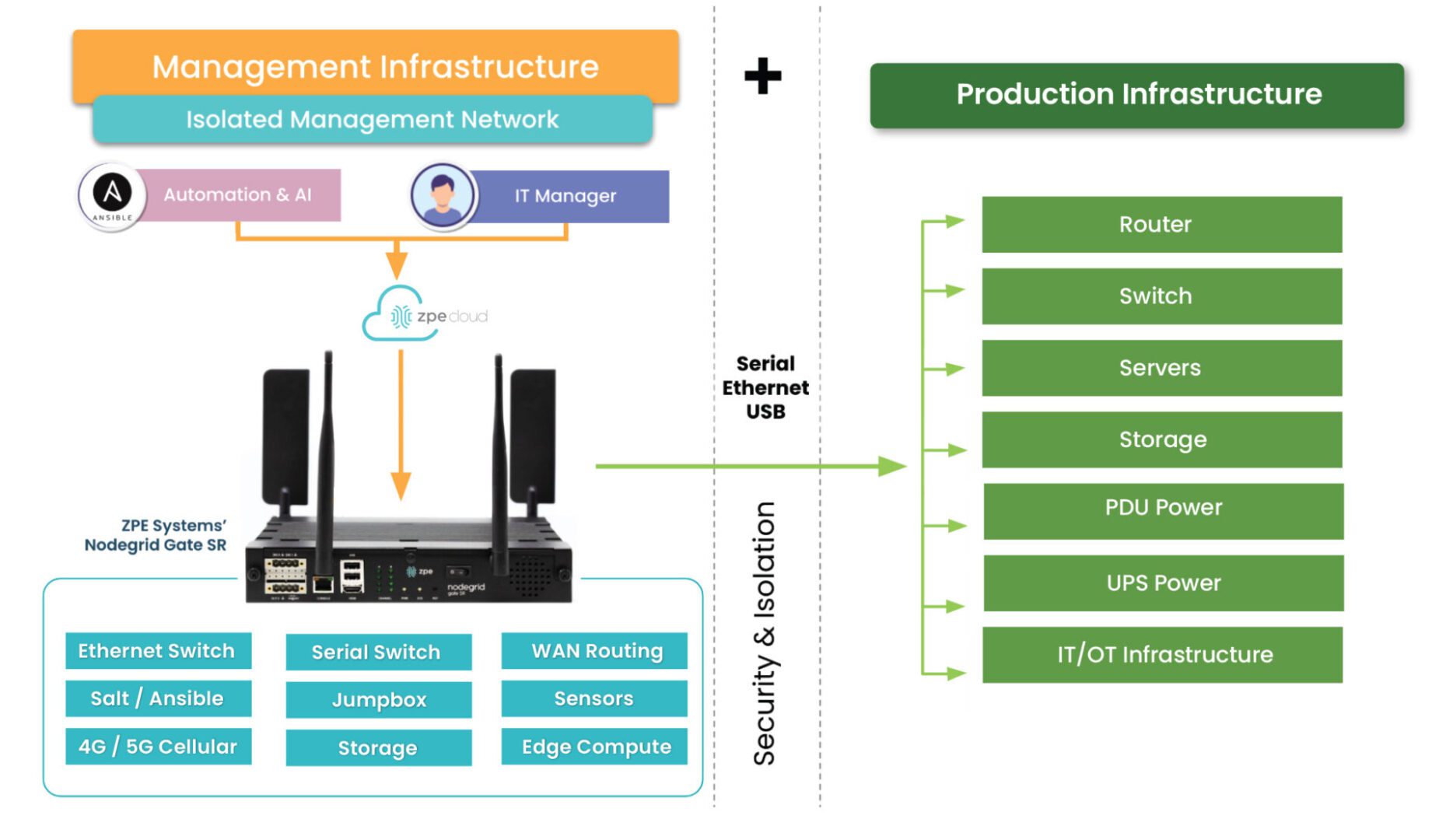
Nodegrid edge networking solutions from ZPE Systems provide the perfect vendor-neutral platform for integrated zero trust edge deployments. All-in-one edge gateway routers deliver a full stack of branch networking capabilities, including out-of-band (OOB) management. OOB creates a dedicated control plane on an isolated network so remote teams have continuous access to manage, troubleshoot, and repair edge infrastructure.

Nodegrid protects the management interfaces on the OOB network with robust, zero trust security processes and controls. For example, the encryption keys for each Nodegrid device are destroyed after provisioning so that only the public key is accessible when needed for authentication to our cloud. Nodegrid devices also use the Trusted Platform Module (TPM) as a hardware security module to prevent cybercriminals from tampering with the configuration or storage.

Our platform runs on the Linux-based, x86 Nodegrid OS, which supports VMs and Docker containers for third-party applications. That means you can deploy ZTNA, SD-WAN, and other zero trust edge solutions without purchasing or managing additional hardware at each branch. Nodegrid’s OOB and failover functionality ensure those security and access solutions remain operational during ISP outages, ransomware attacks, and other disruptions. Teams can also run their favorite tools for automation, troubleshooting, and recovery on the Nodegrid platform, streamlining edge operations and ensuring their toolbox is available on the OOB network. Nodegrid also simplifies fleet management with true zero-touch provisioning to securely and automatically deploy configurations at edge business sites.

Want to unify your zero trust edge solutions with Nodegrid?

Nodegrid provides a robust, vendor-neutral platform to unify and extend your zero trust edge capabilities. Request a free demo to see Nodegrid in action. Watch Demo
What to do if You’re Ransomware’d: A Healthcare Example

What to do if youre ransomwared

This article was written by James Cabe, CISSP, a 30-year cybersecurity expert who’s helped major companies including Microsoft and Fortinet.

Ransomware gangs target the innocent and vulnerable. They hit a Chicago hospital in December 2023, a London hospital in October the same year, and schools and hospitals in New Jersey as recently as January 2024. This is one of the biggest reasons I’m committed to stopping these criminals by educating organizations on how to re-think and re-architect their approach to cybersecurity.

In previous articles, I discussed IMI (Isolated Management Infrastructure) and IRE (Isolated Recovery Environments), and how they could have quickly altered outcomes for MGM, Ragnar Locker victims, and organizations affected by the MOVEit vulnerability. Using IMI and IRE, organizations find that the key to not only speedy recovery, but also to limiting the blast radius and attack persistence, is isolation.

Why is isolation (not segmentation) key to ransomware recovery?

The NIST framework for incident response has five steps: Identify, Protect, Detect, Respond, and Recover. It’s missing a crucial step, however: Isolate. Stay tuned for a full breakdown of this in my next article. But the reason this is so critical is because attacks move at machine speed, and are very pervasive and persistent. If your management network is not fully isolated from production assets, the infection spreads to everything. Suddenly, you’re locked out completely and looking at months of tedious recovery. For healthcare providers, this jeopardizes everything from patient care to regulatory compliance.

Isolation is integral to building a resilience system, or in other words, a system that gives you more than basic serial console/out-of-band access and instead provides an entire infrastructure dedicated to keeping you in control of your systems — be it during a ransomware attack, ISP outage, natural disaster, etc. Because this infrastructure is physically and virtually isolated from production (no dependencies on production switches/routers, no open management ports, etc.), it’s nearly impossible for attackers to lock you out.

So, what really should you do if you’re ransomware’d? Let’s walk through an example attack on a healthcare system, and compare the traditional DR (Disaster Recovery) response to the IMI/IRE approach.

Ransomware in Healthcare: Disaster Recovery vs Isolated Recovery

Suppose you’re in charge of a hospital’s network. MDIoT, patient databases, and DICOM storage are the crown jewels of your infrastructure. Suddenly, you discover ransomware has encrypted patient records and is likely spreading quickly to other crown jewel assets. The risks and potential fallout can’t be understated. Millions of people are depending on you to protect their sensitive info, while the hospital is depending on you to help them avoid regulatory/legal penalties and ensure they can continue operating.

The problem with Disaster Recovery

Though the word ‘recovery’ is in the name, the DR approach is limited in its capacity to recover systems during an attack. Disaster Recovery typically employs a couple things:

  • Backups, which are copies of data, configurations, and code that are used to restore a production system when it fails.
  • Redundancy, which involves duplicating critical systems, services, and applications as a failsafe in the event that primaries go down (think cellular failover devices, secondary firewalls, etc.).

What happens when you activate your DR processes? It’s highly likely that you won’t be able to, and that’s because the typical DR setup relies on the production network. There’s no isolation.

Think about it this way: your backup servers need direct access to the data they’re backing up. If your file servers get pwned, your backup servers will, too. If your primary firewall gets hacked, your secondary will, too. The problem with backup and redundancy systems — and any system, for that matter — is that when they depend on the underlying infrastructure to remain operational, they’re just as susceptible to outages and attacks. It’s like having a reserve parachute that depends on the main parachute.

And what about the rest of your systems? You just discovered the attack has encrypted your servers and is quickly bringing operations to a crawl. How are you going to get in and fight back? What if you try to log into your management network, only to find that you’re locked out? All of your tools, configurations, and capabilities have been compromised.

This is why CISA, the FBI, US Navy, and other agencies recommend implementing Isolated Management Infrastructure.

IMI and IRE guarantee you can fight back against ransomware

You discover that the ransomware has spread. Not only has it encrypted data and stopped operations, but it has also locked you out of your own management network and is affecting the software configurations throughout the hospital. This is where IMI (Isolated Management Infrastructure) and IRE (Isolated Recovery Environment) come in.

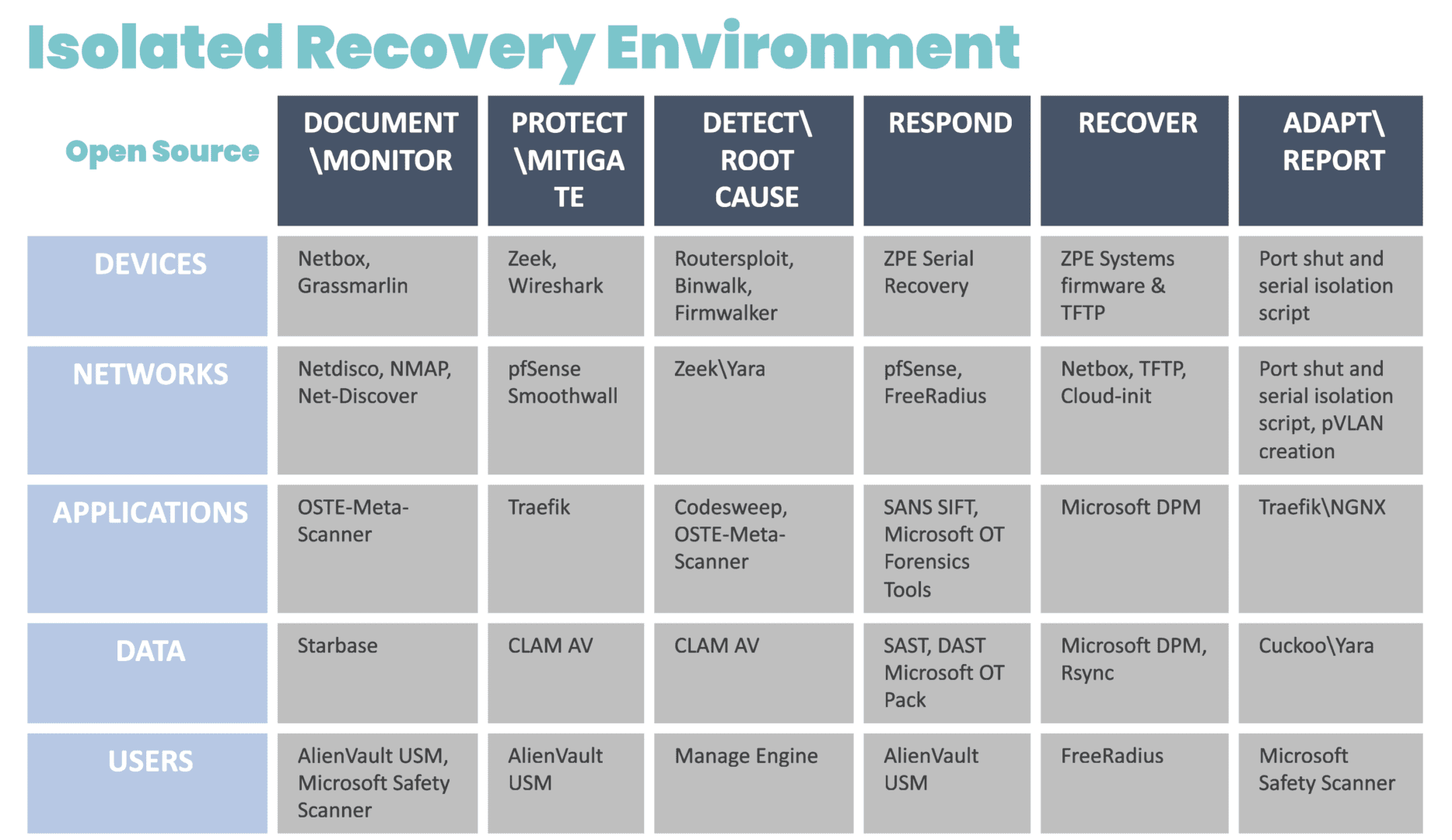
Because IMI is physically separate from affected systems, it guarantees management access so teams can set up communication and a temporary ‘war room’ for incident response. The IRE can then be created using a combination of cellular, compute, connectivity, and power control (see diagram for design and steps). Docker containers should be used to bring up each step.

Diagram showing a chart containing the systems and open-source tools that can be deployed for an Isolated Recovery Environment

Image: The infrastructure and incident response protocol involved in the Isolated Recovery Environment. These products were chosen from free or open source projects that have proven to be very useful in each of these stages of recovery. These can be automated in pieces for each phase, and then be brought down via Docker container to eliminate the risk of leakage or risk during each phase.

Without diving too far into the technicalities, the IRE enables you to recover survivable data, restore software configurations, and prevent reinfection. Here are some things you can do (and should do) in this scenario, courtesy of the IRE:

Establish your war room

You can’t fight ransomware if you can’t securely communicate with your team. Use the IRE to create offline, break-the-glass accounts that are not attached to email. This allows you to communicate and set up ticketing for forensics purposes.

Isolate affected systems

There’s no use running antivirus if reinfection can occur. Use the IRE to take offline the switch that connects the backup and file servers. Isolate these servers from each other and shut down direct backup ports. Then, you can remote-in (KVM, iKVM, iDRAC) to run antivirus and EDR (Endpoint Detection and Response).

Restore data and device images

The key is to have backup data at its most current, both for patient data and device/software configurations. Because the IRE provides an isolated environment, and you’ve already pulled your backups offline, you can gradually restore data, re-image devices, and restore configurations without risking reinfection. The IRE ensures devices “keep away” from each other until they can be cleansed and recovered.

Things You’ll Need To Build The IMI and IRE

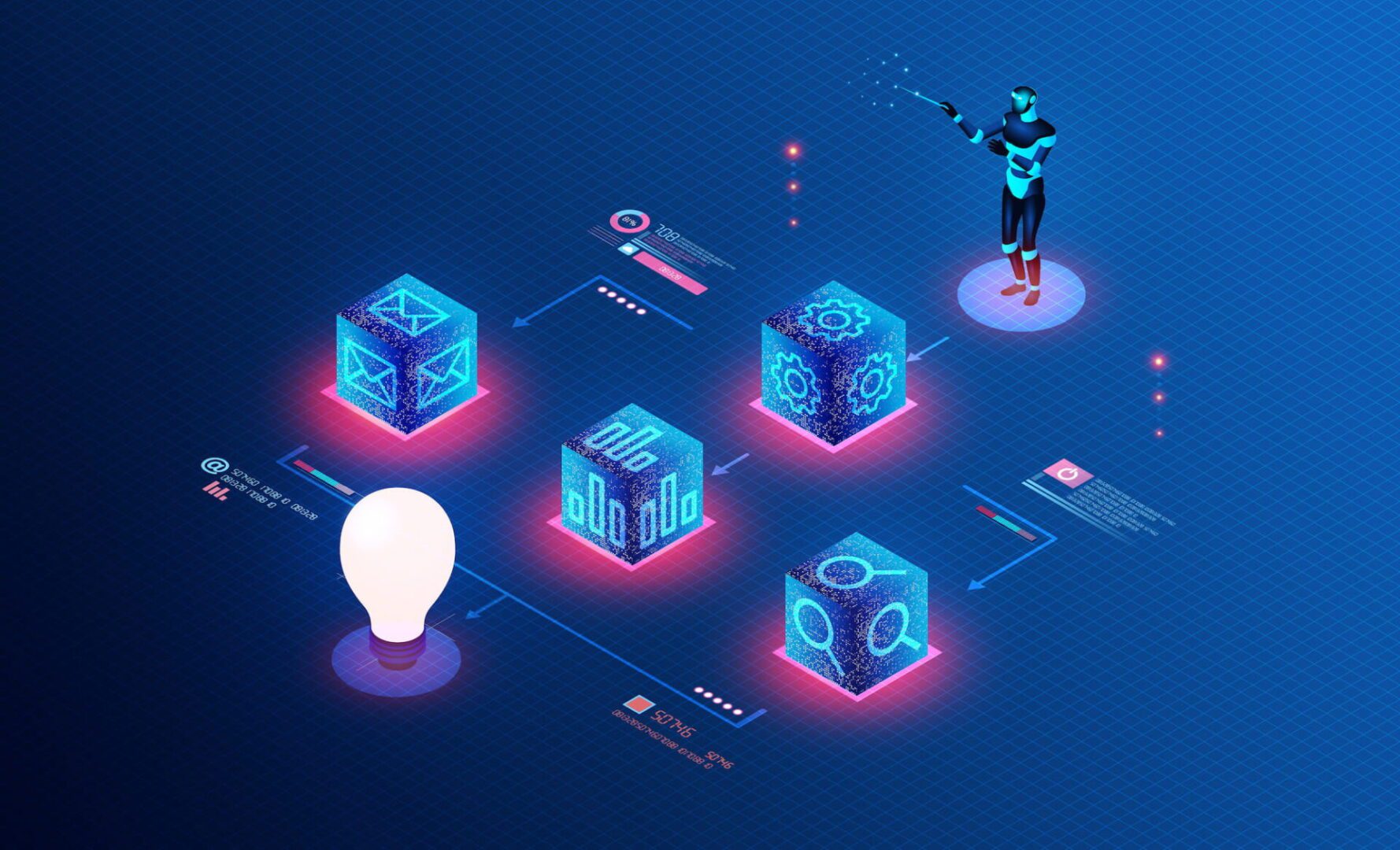
Network Automation Blueprint

We’ve created a comprehensive blueprint that shows how to implement the architecture for IMI and IRE. Don’t let the name fool you. The Network Automation Blueprint covers everything from establishing a dedicated management network, to automating deployment of services for ransomware recovery. Get your PDF copy now at the link below.

Gen 3 Console Servers To Replace End-of-Life Gear

It’s nearly impossible to build the IMI or deploy the IRE using older console servers. That’s because these only give you basic remote access and a hint of automation capabilities. You’ll still need the ability to run VMs and containers. Gen 3 console servers let you do all of the things for IMI and IRE, like full control plane/data plane separation, hosting apps, and deploying VMs/containers on-demand. They’ve also been validated by Synopsys and have built-in security features I’ve been talking about for years. Check out the link below for resources about Gen 3 and how we’ll help you upgrade.

Get in touch with me!

I’d love to talk with you about IMI, IRE, and resilience systems. These are becoming more crucial to operational resilience and ransomware recovery, and countries are passing new regulations that will require these approaches. Get in touch with me via social media to talk about this!

IT Automation vs Orchestration: What’s the Difference?

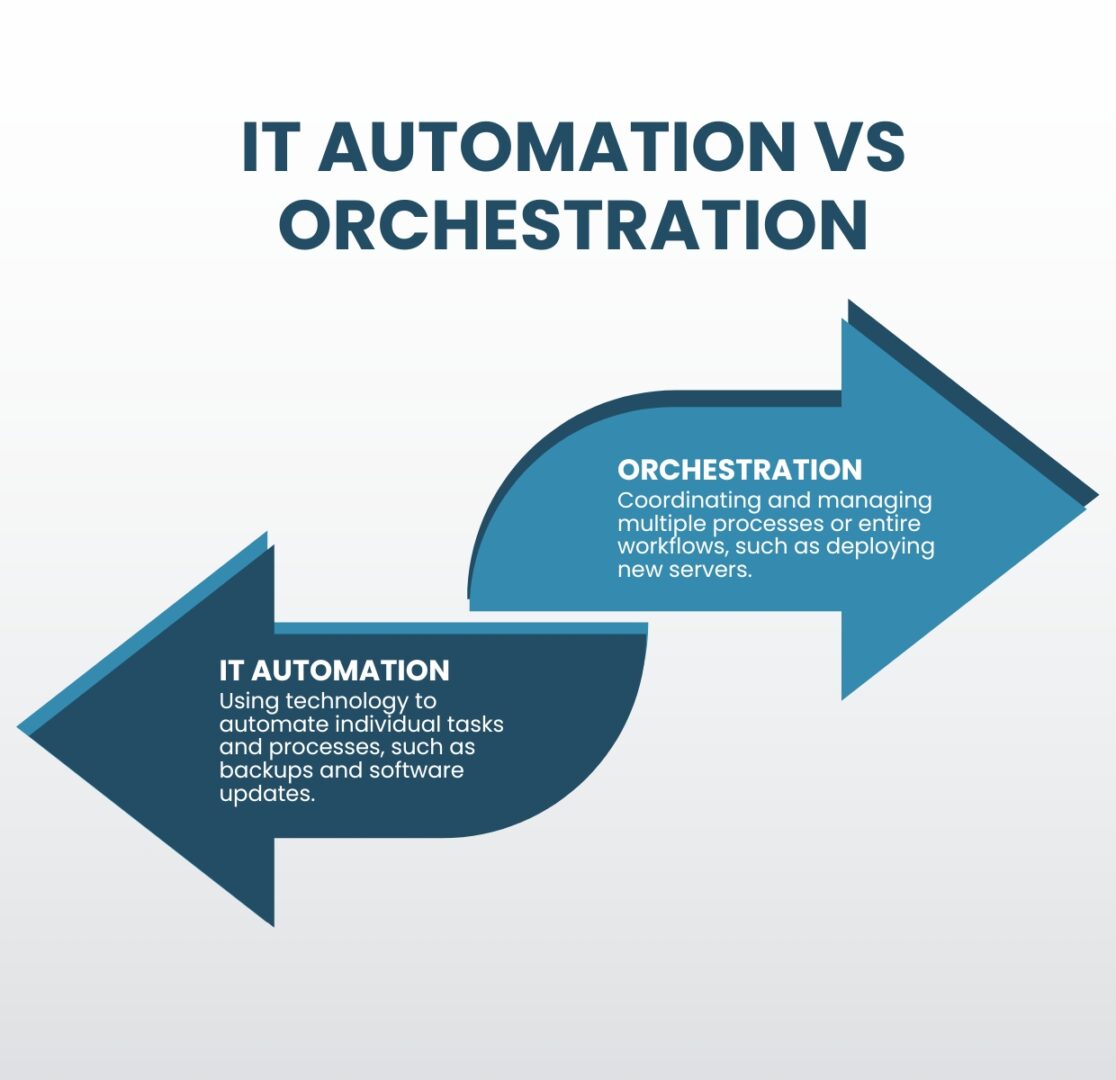
it-automation-vs-orchestration

IT automation and orchestration are two important concepts in the field of information technology that are often used interchangeably but are actually quite different. IT automation focuses on individual tasks, whereas orchestration encompasses multiple tasks or even entire workflows. Each approach produces different results and helps teams meet different goals. They also have their own benefits and challenges that must be considered. This guide compares IT automation vs orchestration to clear up misconceptions and help organizations choose the right approach to streamlining their IT operations.

IT Automation vs Orchestration: What’s the Difference?

IT Automation vs Orchestration

IT automation refers to the use of technology to automate repetitive tasks and processes, including things like automated backups, software updates, and monitoring systems. The goal of IT automation is to free up time and resources for IT professionals by automating routine tasks, allowing them to focus on more strategic initiatives.

Orchestration, on the other hand, is the coordination and management of multiple processes or entire workflows. This can include things like configuring and deploying new servers, managing network connections, and monitoring the performance of many different systems. The goal of orchestration is to improve the overall efficiency of IT operations, reducing costs and enabling greater scalability.

The benefits of IT automation vs orchestration

Benefits of IT Automation vs Orchestration

IT Automation

  • Saves time
  • Reduces human error
  • Improves compliance

Orchestration

  • Increases operational efficiency
  • Improves network scalability
  • Ensures IT system reliability

One of the main benefits of IT automation is that it can save time and resources for IT professionals. By automating routine tasks, IT teams can focus on more strategic initiatives and projects. Additionally, automation helps reduce human error and increases the accuracy, speed, and efficiency of tasks. Automation also improves compliance, as automated processes are less prone to human negligence and are easier to audit.

Orchestration, on the other hand, helps improve the overall efficiency and effectiveness of IT operations. By automating the coordination and management of multiple tasks, orchestration helps ensure that different systems and processes work together seamlessly. Additionally, orchestration helps improve the scalability and reliability of IT systems by ensuring different components are configured and deployed correctly.

The challenges of IT automation and orchestration

IT Automation and Orchestration Challenges

IT Complexity

Teams can’t effectively automate IT operations unless they thoroughly understand all the tasks, systems, and workflows comprising a highly complex network.

Automation Skills Gap

A high demand for automation engineers makes it difficult and expensive to recruit, train, and retain qualified IT automation and orchestration professionals.

Supporting Infrastructure

Effective automation and orchestration deployments require a robust underlying infrastructure of specialized hardware and software solutions.

One of the main challenges of automation and orchestration is the complexity of IT systems. As organizations rely more heavily on specialized technology and grow both in size and in number of business sites, IT systems become increasingly complex and difficult to manage. Automation and orchestration help reduce complexity by automating routine tasks and coordinating the management of different systems. However, teams must understand those tasks and systems well enough to know how to automate them effectively; otherwise, mistakes will proliferate or there will be gaps in automated workflows.

Another IT automation and orchestration challenge is the need for skilled professionals to deploy and manage these solutions. As automation and orchestration become more prevalent, the demand for skilled professionals has increased, making it harder (and more expensive) to recruit and retain qualified automation engineers. The alternative is for organizations to spend time and resources training existing IT staff to work with automation and orchestration.

Additionally, organizations need to invest in the technology and infrastructure necessary to support automation and orchestration. Some examples of these automation infrastructure components include:

  • Gen 3 out-of-band (OOB) serial consoles, which allow teams to deploy third-party automation on an OOB network that doesn’t rely on production infrastructure, improving security and resilience. Gen 3 OOB also moves bandwidth-hogging orchestration workflows off the production network, which reduces latency for better performance.
  • Software-defined networking, which virtualizes the control and management processes and abstracts them from underlying LAN and WAN hardware. SDN, SD-WAN, and SD-Branch technologies enable a high degree of automation for networking workflows such as load balancing, application-aware routing, and failover.
  • Infrastructure as Code (IaC), which turns infrastructure configurations into software code. IaC enables the use of version control, zero-touch deployments, automatic configuration management, automated security testing, and other tools and processes that support automation and improve network resilience.
  • Orchestrator software, which controls all of the automated workflows on a network. The orchestrator is the central hub for teams to create, deploy, monitor, and troubleshoot automated workflows and infrastructure.
  • AIOps, or artificial intelligence for IT operations, which analyzes all the logs and data pulled from automated infrastructure devices and security appliances. AIOps provides predictive maintenance insights, automatic root-cause analysis (RCA), enhanced threat detection, and other functionality to help support a complex, automated network infrastructure.

Tips for overcoming IT automation and orchestration challenges

While every organization will face unique IT automation and orchestration hurdles, there are two basic tips to help simplify any deployment. Using consolidated network hardware and vendor-neutral platforms can help reduce the complexity of network infrastructure, the need to hire additional staff, and the cost to deploy automation infrastructure.

  • Consolidated network hardware, such as all-in-one branch/edge gateway routers, significantly reduces the number of devices deployed at each business site. Fewer devices to automate means less complexity, and organizations save money on deployment costs like hardware overhead and automation license seats.
  • Vendor-neutral platforms, such as the Nodegrid infrastructure management platform from ZPE Systems, allow teams to use the automation and orchestration tools they’re most comfortable with regardless of provider, reducing the skills gap. Open platforms ensure seamless interoperability between all the various automated components to decrease management complexity. Vendor-neutral hardware also allows organizations to run software from multiple vendors on a single device, enabling even greater network consolidation to reduce the complexity and cost of automated infrastructure deployments.

Choosing IT automation vs orchestration

IT automation and orchestration are interconnected concepts that are frequently, but incorrectly, used interchangeably. Automation focuses on individual tasks, while orchestration manages multiple tasks and entire workflows. Both automation and orchestration can help improve the efficiency and effectiveness of IT operations, but they have their unique benefits and challenges. Organizations must carefully consider their IT systems and needs when deciding which approach to use.

IT automation vs orchestration simplified

The network automation experts at ZPE Systems have helped Big Tech brands like Amazon and Uber improve operational efficiency and resilience with IT automation and orchestration. Learn how to use these best practices to streamline your IT operations by downloading our Network Automation Blueprint.

Download the Blueprint

Edge Computing vs On-Premises: A Comparison

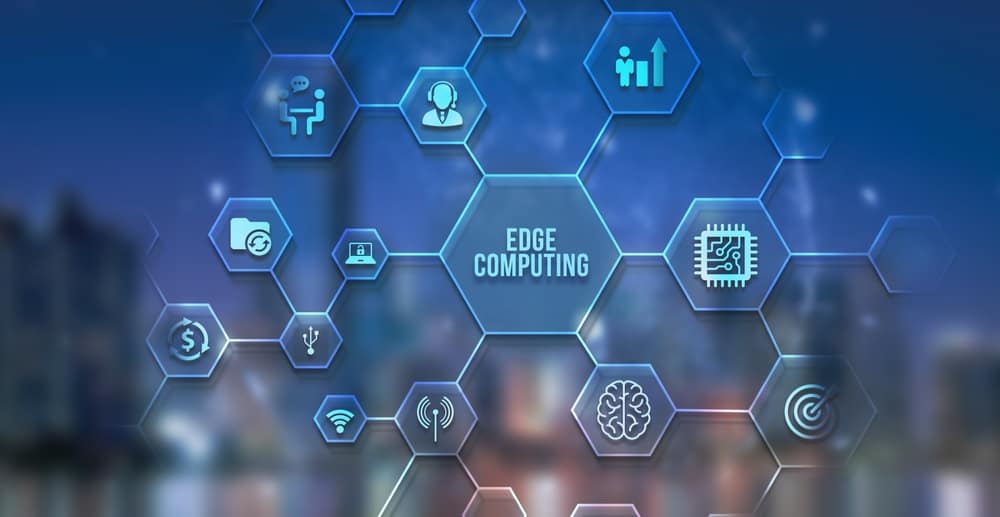
Edge Computing is at the center of a network of hexagons containing icons of edge computing concepts.
Organizations across industries are expanding their digital capabilities and global reach by deploying Internet of Things (IoT) devices, automated operational technology (OT) sites, branch offices, and other tech at the network’s edges. Edge technology transmits vast quantities of data to and from data warehouses, machine learning training systems, and software applications. Traditionally, organizations host some or all of these services in centralized data centers, which is known as on-premises computing.

This approach creates challenges that impact the efficiency and safety of edge operations. As edge data volumes grow, so do MPLS bandwidth costs. Large data transmissions to and from the edge are also at risk of interception by malicious actors. The best way to solve this problem is with edge computing, which moves data processing applications and systems to the edges of the network to run alongside the devices that generate most of the edge data.

This guide defines edge computing vs on-premises computing in detail before analyzing the advantages and challenges involved with each approach.

Defining edge computing vs on-premises computing

On-premises computing systems are physical or virtual resources that live in a traditional data center. Despite the name, these systems don’t necessarily reside in the same physical premises as the main business, with many companies using colocation data centers owned by third parties. Organizations have complete control over the physical and virtual infrastructure, unlike in private or public cloud deployments. The defining characteristic of on-premises computing is that most or all enterprise applications and digital services reside in a centralized location, with most network traffic and data transmissions flowing through it.

Edge computing systems are physical and virtual data processing resources that companies deploy alongside the edge devices that generate the most data. Examples include installing machine learning software at a remote manufacturing site to gain maintenance insights into remote SCADA (supervisory control and data acquisition) systems, or running a data analytics app on a chip installed in a wearable medical sensor to provide patients with real-time health feedback. Edge computing has many potential use cases and deployment models, but the defining characteristic is proximity to the sources of edge-generated data.

Edge Computing vs. On-Premises Computing

Edge Computing

On-Premises Computing

  • Deployed at the edges of the network

  • Processes data on-site

  • Decentralizes enterprise network traffic

  • Deployed in centralized data centers

  • Processes data off-site

  • Requires network traffic and data to flow through a single location

The advantages of edge computing vs on-premises

The benefits of edge computing compared to on-premises include:

  • Improved workload efficiency – Edge computing reduces network traffic bottlenecks and latency because data stays on the local network or even on the same device. This improves the overall speed, performance, and efficiency of all enterprise applications and services.
  • Bandwidth cost reduction – Edge computing reduces the volume of data transmitted over MPLS links between edge sites and the central data center. The cost for MPLS bandwidth is typically very high, so edge computing decreases operational costs at branch offices and other edge business sites.
  • Better data security – Any time companies transmit data off-site, there’s a risk of interception by cybercriminals. Edge computing reduces the attack surface by keeping valuable data on the local network, which improves data security and simplifies data privacy compliance.

The challenges of edge computing vs on-premises

The challenges of edge computing compared to on-premises include:

  • Data storage restraints – The typical edge deployment is much smaller than a centralized data center and has fewer data storage resources, making it difficult to hold on to data long enough to process it with edge applications.
  • Fewer security controls – Edge deployments often lack the robust physical security controls utilized by data centers, such as security guards and biometric door locks, creating the need for edge-specific security solutions to protect data and devices.
  • Edge management and orchestration – Edge sites are difficult for centralized IT operations teams to monitor and troubleshoot, especially if an equipment failure, ransomware attack, or natural disaster takes down the network.

Comparing edge computing vs on-premises


The Pros and Cons of Edge Computing vs On-Premises Computing

Pros of Edge Computing

Cons of Edge Computing

  • Reduces network bottlenecks and latency for greater workload efficiency across the enterprise

  • Decreases MPLS bandwidth usage to make edge sites more cost-effective

  • Keeps edge data on the local network to prevent interception

  • Edge deployments have less data storage capacity

  • Edge sites lack the physical security provided by a data center

  • Network outages prevent remote teams from accessing edge infrastructure.

Edge computing solves many of the challenges involved in processing data at the edges of the network, but it also creates new problems. The best way to ensure edge computing success is to start with a comprehensive strategy that identifies potential hurdles and the technology and operational practices needed to overcome them. For example, zero trust security policies, proactive patch management, and isolated management infrastructure (IMI) help organizations defend edge deployments without the benefit of secure data center facilities. Environmental monitoring, out-of-band (OOB) management, and edge management and orchestration (EMO) platforms all give teams greater control over remote edge infrastructure.

ZPE Systems provides edge network solutions to help you overcome your biggest challenges. Nodegrid integrated edge routers support VM and Docker hosting for your choice of third-party edge computing and security applications, allowing you to devote more hardware budget (and rack space) to data storage and other critical infrastructure. Robust onboard security features like TPM and geofencing defend Nodegrid hardware from tampering and compromise for better edge security coverage.

All Nodegrid devices provide OOB management to give teams continuous remote access to edge infrastructure, allowing them to quickly recover from outages, equipment failures, and cyberattacks. Plus, our vendor-neutral management software seamlessly integrates all your edge solutions to create a unified EMO platform that streamlines edge operations.

Want to learn more about how Nodegrid simplifies your network edge?

Request a free demo to learn how Nodegrid can help you overcome the challenges of edge computing vs on-premises computing.

Watch Demo

Zero Trust Security Benefits

A 3D illustration of the words Zero Trust

Network security has become more challenging for companies whose employees, devices, and applications no longer reside within one easily defended perimeter. Additionally, cyber attacks like ransomware constantly threaten networks, forcing organizations to operate under the assumption that systems are already breached.

Zero trust security is a methodology that helps companies limit the blast radius of an attack to prevent the exfiltration of sensitive and valuable data. Zero trust assumes that every user, device, and application is unsafe until proven otherwise, following the principle of “never trust, always verify.” This guide discusses how zero trust security benefits organizations by increasing network visibility, reducing the scope of cyber attacks, and providing precise security coverage.

Zero trust security benefits

The Top 3 Zero Trust Security Benefits

Improves Network Control

Zero trust visibility tools improve network control and efficiency by enabling preventative maintenance, faster incident response, and automation.

Reduces Attack Radius

Zero trust security limits the lateral movement of attackers on the network to reduce the duration of and damage caused by successful breaches.

Provides Precise Security Coverage

Zero trust uses highly specific security policies and controls, ensuring the best possible protection for each resource without any coverage gaps.

1. Improves network control

Implementing zero trust security requires knowing exactly what devices, users, applications, and services access the network, where they reside, and their potential vulnerabilities. Additionally, you must monitor all traffic on the network to identify unusual activity that could indicate compromise, and react to potential breaches. Zero trust teams deploy tools such as SIEM (security information and event management) and inventory discovery and assessment solutions to achieve this level of granular visibility.

While these tools are necessary to implement zero trust, the visibility they provide has side benefits that improve network management control and efficiency. Having insight into the health status of every network resource enables preventative maintenance and speedy responses to issues that could affect performance or availability if left unchecked. Many zero-trust solutions also use automation tools, such as automatic device/app discovery or AI threat detection, to cut back on the time your administrators spend on tedious, day-to-day management and monitoring tasks.

2. Reduces attack radius

Many traditional cybersecurity methodologies focus almost entirely on prevention, but once an attacker breaches the network, teams lack the tools to find or stop them. Zero trust security assumes a breach is already occurring. It provides the tools and techniques needed to stop it, reducing the attack radius and limiting the damage caused to your organization.

Zero trust uses network micro-segmentation and precise security policies to create perimeters around individual resources, requiring users to continuously prove their identity and “trustworthiness” as they move around the network. Each checkpoint provides another opportunity for multi-factor authentication (MFA) or security monitoring tools to catch and lock out the account.

Zero trust security reduces the duration of attacks, which limits data exfiltration, downtime, and other business impacts.

3. Provides precise security coverage

Traditional security models create one large perimeter of controls and policies that must address every potential vulnerability on the network. This approach leads to a bloated patchwork of appliances and solutions that may not cover all bases, leaving gaps in your security that could expose critical vulnerabilities.

Conversely, zero trust security creates micro-perimeters around individual resources, allowing you to implement the exact policies and controls required to protect each component. Tools like next-generation firewalls (NGFWs) enable teams to micro-segment the network, create micro-perimeters, and enforce access controls. Zero trust identity and access management (IAM) solutions also provide a centralized place to create, deploy, manage, and monitor highly specific security policies to protect individual resources.

Zero trust security shrinks your perimeter to smaller network segments, allowing teams to apply the best security policies and controls to protect each micro-perimeter. As a result, you don’t have to worry about any weak points or gaps in your network security.

How to take advantage of zero trust security benefits

Zero trust security benefits organizations by increasing their overall network visibility, reducing the scope and impact of attacks, and enabling more precise security controls and access policies.

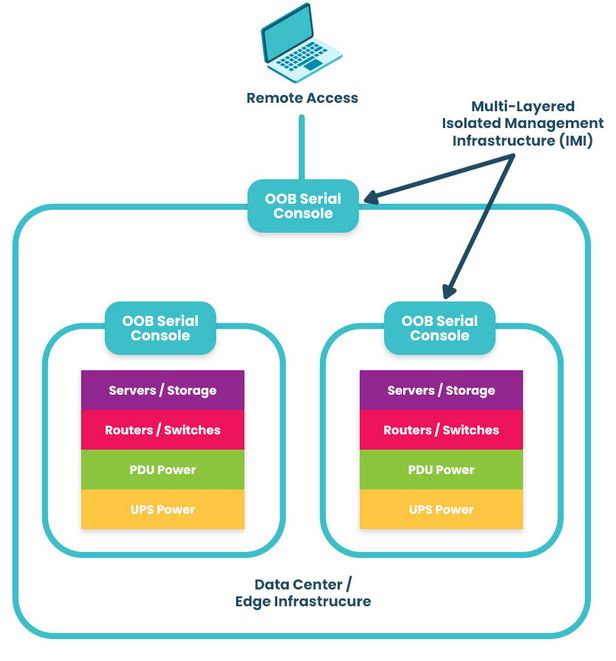
One important thing to consider is that you must apply zero trust to both production network resources and management interfaces on the control plane. The best practice is to move management interfaces to an isolated, out-of-band (OOB) network using Nodegrid OOB devices to help create an isolated management infrastructure (IMI) that’s micro-segmented with zero trust policies and controls. A zero-trust IMI prevents attackers from jumping from production resources to the control plane for “crown jewels” infrastructure, significantly improving your security posture.

Isolated Management Infrastructure

Additionally, achieving zero trust is easier with an open, flexible, vendor-neutral platform that integrates all your tools, features, and controls into one simplified interface. For example, the Nodegrid platform from ZPE Systems serves as a single security gateway with seamless integrations with third-party services like Okta and Palo Alto Panorama. Nodegrid allows you to take advantage of zero trust security benefits with a customized solution that supports your organization’s unique goals and requirements.

Want to learn more about how to simplify zero trust security with Nodegrid?

ZPE Systems can help your company realize these zero trust security benefits with our secure out-of-band management solutions and vendor-neutral platform. Schedule a free Nodegrid demo to learn more.

Watch Demo