Providing Out-of-Band Connectivity to Mission-Critical IT Resources

Edge Management and Orchestration

shutterstock_2264235201(1)

Organizations prioritizing digital transformation by adopting IoT (Internet of Things) technologies generate and process an unprecedented amount of data. Traditionally, the systems used to process that data live in a centralized data center or the cloud. However, IoT devices are often deployed around the edges of the enterprise in remote sites like retail stores, manufacturing plants, and oil rigs. Transferring so much data back and forth creates a lot of latency and uses valuable bandwidth. Edge computing solves this problem by moving processing units closer to the sources that generate the data.

IBM estimates there are over 15 billion edge devices already in use. While edge computing has rapidly become a vital component of digital transformation, many organizations focus on individual use cases and lack a cohesive edge computing strategy. According to a recent Gartner report, the result is what’s known as “edge sprawl”: many individual edge computing solutions deployed all over the enterprise without any centralized control or visibility. Organizations with disjointed edge computing deployments are less efficient and more likely to hit roadblocks that stifle digital transformation.

The report provides guidance on building an edge computing strategy to combat sprawl, and the foundation of that strategy is edge management and orchestration (EMO). Below, this post summarizes the key findings from the Gartner report and discusses some of the biggest edge computing challenges before explaining how to solve them with a centralized EMO platform.

Key findings from the Gartner report

Many organizations already use edge computing technology for specific projects and use cases – they have an individual problem to solve, so they deploy an individual solution. Since the stakeholders in these projects usually aren’t architects, they aren’t building their own edge computing machines or writing software for them. Typically, these customers buy pre-assembled solutions or as-a-service offerings that meet their specific needs.

However, a piecemeal approach to edge computing projects leaves organizations with disjointed technologies and processes, contributing to edge sprawl and shadow IT. Teams can’t efficiently manage or secure all the edge computing projects occurring in the enterprise without centralized control and visibility. Gartner urges I&O (infrastructure & operations) leaders to take a more proactive approach by developing a comprehensive edge computing strategy encompassing all use cases and addressing the most common challenges.

Edge computing challenges

Gartner identifies six major edge computing challenges to focus on when developing an edge computing strategy:

Gartner’s 6 edge computing challenges to overcome

Enabling extensibility so edge computing solutions are adaptable to the changing needs of the business.

Extracting value from edge data with business analytics, AIOps, and machine learning training.

Governing edge data to meet storage constraints without losing valuable data in the process.

Supporting edge-native applications using specialized containers and clustering without increasing the technical debt.

Securing the edge when computing nodes are highly distributed in environments without data center security mechanisms.

Edge management and orchestration that supports business resilience requirements and improves operational efficiency.

Let’s discuss these challenges and their solutions in greater depth.

  • Enabling extensibility – Many organizations deploy purpose-built edge computing solutions for their specific use case and can’t adapt when workloads change or grow.  The goal is to attempt to predict future workloads based on planned initiatives and create an edge computing strategy that leaves room for that growth. However, no one can really predict the future, so the strategy should account for unknowns by utilizing common, vendor-neutral technologies that allow for expansion and integration.
  • Extracting value from edge data – The generation of so much IoT and sensor data gives organizations the opportunity to extract additional value in the form of business insights, predictive analysis, and machine learning training. Quickly extracting that value is challenging when most data analysis and AI applications still live in the cloud. To effectively harness edge data, organizations should look for ways to deploy artificial intelligence training and data analytics solutions alongside edge computing units.
  • Governing edge data – Edge computing deployments often have more significant data storage constraints than central data centers, so quickly distinguishing between valuable data and destroyable junk is critical to edge ROIs. With so much data being generated, it’s often challenging to make this determination on the fly, so it’s important to address data governance during the planning process. There are automated data governance solutions that can help, but these must be carefully configured and managed to avoid data loss.
  • Supporting edge-native applications – Edge applications aren’t just data center apps lifted and shifted to the edge; they’re designed for edge computing from the bottom up. Like cloud-native software, edge apps often use containers, but clustering and cluster management are different beasts outside the cloud data center. The goal is to deploy platforms that support edge-native applications without increasing the technical debt, which means they should use familiar container management technologies (like Docker) and interoperate with existing systems (like OT applications and VMs).
  • Securing the edge – Edge deployments are highly distributed in locations that may lack many physical security features in a traditional data center, such as guarded entries and biometric locks, which adds risk and increases the attack surface. Organizations must protect edge computing nodes with a multi-layered defense that includes hardware security (such as TPM), frequent patches, zero-trust policies, strong authentication (e.g., RADIUS and 2FA), and network micro-segmentation.
  • Edge management and orchestration – Moving computing out of the climate-controlled data center creates environmental and power challenges that are difficult to mitigate without an on-site technical staff to monitor and respond. When equipment failure, configuration errors, or breaches take down the network, remote teams struggle to meet resilience requirements to keep business operations running 24/7. The sheer number and distribution area of edge computing units make them challenging to manage efficiently, increasing the likelihood of mistakes, issues, or threat indicators slipping between the cracks. Addressing this challenge requires centralized edge management and orchestration (EMO) with environmental monitoring and out-of-band (OOB) connectivity.

    A centralized EMO platform gives administrators a single-pane-of-glass view of all edge deployments and the supporting infrastructure, streamlining management workflows and serving as the control panel for automation, security, data governance, cluster management, and more. The EMO must integrate with the technologies used to automate edge management workflows, such as zero-touch provisioning (ZTP) and configuration management (e.g., Ansible or Chef), to help improve efficiency while reducing the risk of human error. Integrating environmental sensors will help remote technicians monitor heat, humidity, airflow, and other conditions affecting critical edge equipment’s performance and lifespan. Finally, remote teams need OOB access to edge infrastructure and computing nodes, so the EMO should use out-of-band serial console technology that provides a dedicated network path that doesn’t rely on production resources.

Gartner recommends focusing your edge computing strategy on overcoming the most significant risks, challenges, and roadblocks. An edge management and orchestration (EMO) platform is the backbone of a comprehensive edge computing strategy because it serves as the hub for all the processes, workflows, and solutions used to solve those problems.

Edge management and orchestration (EMO) with Nodegrid

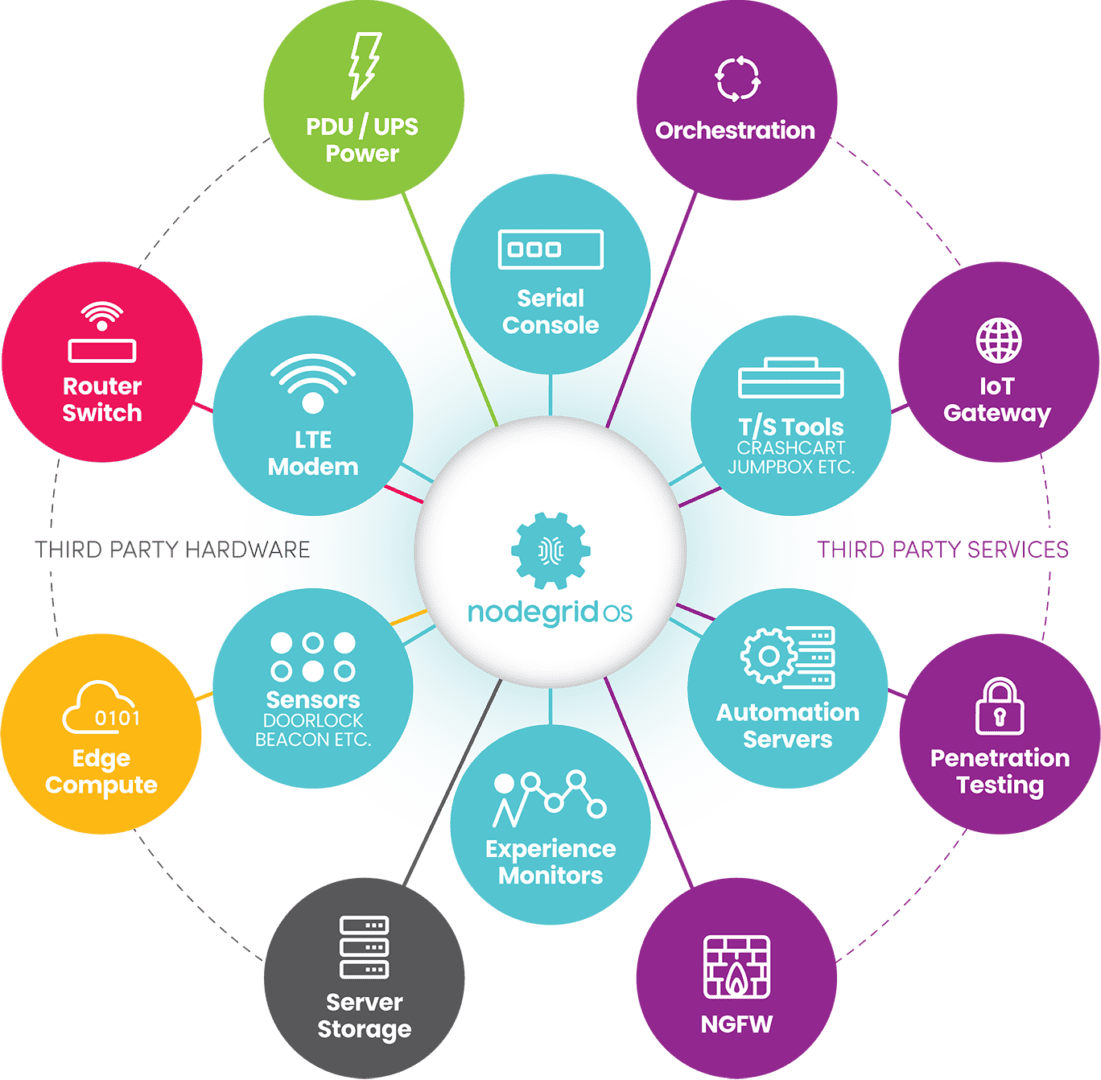
Nodegrid is a vendor-neutral edge management and orchestration (EMO) platform from ZPE Systems. Nodegrid uses Gen 3 out-of-band technology that provides 24/7 remote management access to edge deployments while freely interoperating with third-party applications for automation, security, container management, and more. Nodegrid environmental sensors give teams a complete view of temperature, humidity, airflow, and other factors from anywhere in the world and provide robust logging to support data-driven analytics.

The open, Linux-based Nodegrid OS supports direct hosting of containers and edge-native applications, reducing the hardware overhead at each edge deployment. You can also run your ML training, AIOps, data governance, or data analytics applications from the same box to extract more value from your edge data without contributing to sprawl.

In addition to hardware security features like TPM and geofencing, Nodegrid supports strong authentication like 2FA, integrates with leading zero-trust providers like Okta and PING, and can run third-party next-generation firewall (NGFW) software to streamline deployments further.

The Nodegrid platform brings all the components of your edge computing strategy under one management umbrella and rolls it up with additional core networking and infrastructure management features. Nodegrid consolidates edge deployments and streamlines edge management and orchestration, providing a foundation for a Gartner-approved edge computing strategy.

Want to learn more about how Nodegrid can help you overcome your biggest edge computing challenges?

Contact ZPE Systems for a free demo of the Nodegrid edge management and orchestration platform.

Contact Us

What is an Application Delivery Platform?

An illustration showing a breakout of various software application components to highlight the need for an application delivery platform

Modern software architectures are highly complex and often very difficult to maintain and operate. A single enterprise application comprises hundreds (or even thousands) of individual services, technologies, and toolchains while requiring a lot of underlying infrastructure, such as servers, routing and load balancing rules, and security controls. All of this complexity increases overhead costs and adds to the ever-growing workloads of software, network, and infrastructure teams, especially when you multiply this effort across dozens or hundreds of software deployments.

Platform engineering is a new discipline introduced by Gartner to address these challenges by reducing the complexity of software engineering, network operations, and application delivery. The platforms built by these engineers are known by several names, including internal developer platforms, internal developer portals, and application delivery platforms. This guide defines an application delivery platform, discusses the underlying technology, and highlights a leading platform engineering solution.
.

Table of Contents:
  1. What is an application delivery platform?
  2. What is the importance of an application delivery platform?
  3. What technology makes up an application delivery platform?
  4. Introducing ZPE Systems’ Services Delivery Platform

What is an application delivery platform?

An application delivery platform is a suite of technologies that handles all the services that support an application, including security, traffic management, load balancing, and data management. Platform engineers combine all these services into a common toolset used to deploy applications at customer sites, so there’s no need to build a new architecture every time. This streamlined experience makes application delivery cost-effective by significantly reducing workloads and deployment timelines.

What is the importance of an application delivery platform?

The goal of an application delivery platform is to reduce deployment and management complexity. Deployment complexity leads to a greater risk of human error when configuring things like security controls and access policies, and any mistakes are likely to be found and exploited by cybercriminals. Management complexity makes it harder to stay on top of patch schedules. Unpatched software often contains vulnerabilities that are exploited by cybercriminals; for example, known ransomware groups targeted unpatched IBM software earlier this year.

By reducing complexity, an application delivery platform also reduces the attack surface, improving an organization’s overall security posture.

What technology makes up an application delivery platform?

By its very nature, an application delivery platform is highly customized to fit the needs of the applications being supported. Here are some examples of the services and technologies that are often included.

  • Server storage & compute: The platform needs storage (usually solid-state) and processing units (CPUs or GPUs) to run the applications and store necessary data. Ideally, the OS and computing architecture will support containers (e.g., Docker) for microservices applications.
  •  
  • Automation tools: A key feature of application delivery platforms is the ability to automatically provision and deploy new environments, apps, and network services as well activate services licenses and service chaining. That means the platform should host automation tools for configuration management, code delivery, and software-defined networking (SDN).
  •  
  • Security: The ideal platform makes it possible to deliver applications without configuring security every time. That means it provides unified management and repeatable deployments for security services like firewall traffic inspection, access control lists, and advanced authentication.
  •  
  • Routing & load balancing: A lot of backend networking goes into the typical application deployment to ensure traffic is routed correctly and optimized for performance. An application delivery platform should support network functions virtualization (NFVs) and SDN so standard network configurations can be easily deployed alongside the applications being delivered.
  • Management tools: Engineers need a way to remotely access, manage, and troubleshoot application deployments, even (and especially) during major service disruptions. The ideal platform includes out-of-band serial console management and supports third-party troubleshooting tools so remote teams can quickly recover systems and applications without an expensive on-site visit.

While this list is far from exhaustive, it covers the foundational technology that supports an application delivery platform. Platform engineering is still in its infancy, and many organizations struggle to efficiently execute it because of how many moving pieces need to be considered. The goal is to find a solution that provides the best framework of hardware and software capabilities that platform engineers can build upon, so they can create a fully customized application delivery platform without reinventing the wheel.

Introducing ZPE Systems’ Services Delivery Platform

Zero Pain Ecosysteme

The Services Delivery Platform from ZPE Systems is the perfect foundation for any platform engineering initiative. Nodegrid edge routers serve as the hardware backbone, providing networking and failover capabilities, OOB serial console management, and plenty of memory, storage, and CPU headroom for additional apps and services. You can build a fully customized hardware platform with the modular Net Services Router (NSR), extending your storage or compute capabilities or adding more ports to support your application deployment.

The vendor-neutral, Linux-based Nodegrid OS can run your custom applications as well as third-party automation, security, DevOps, and management tools. Plus, Nodegrid unifies all connected services and applications under a single management umbrella, allowing teams to oversee and orchestrate all of their deployments from one convenient portal.


Ready to Learn More?

The Services Delivery Platform from ZPE Systems simplifies platform engineering with powerful, multipurpose hardware and an open, vendor-neutral OS. Contact us today to learn more about using Nodegrid for your application delivery platform!

Contact Us

Atsign: Why Choose ZPE Systems to Host IoT Security?

Colin

A Conversation with Atsign CTO & Co-Founder, Colin Constable

This is a guest post composed by Atsign, creators of zero-attack-surface solutions including atProtocol.

We recently sat down with our CTO and Mariposa Rotary Club extraordinaire, Colin Constable, to discuss our partnership with our friends over at ZPE Systems. Let’s explore the driving force behind this powerful partnership, and how together we’re securing IoT devices and the data shared between them.

Why is this partnership strategically important?

We are a software company that helps people connect beyond the edge of the Internet. And as a software company, we need to have hardware to run our software on. After looking at a number of hardware platforms, ZPE stood out as an organization that provides a strong array of network connectivity options. Our software running on ZPE’s hardware serves as an edge platform that gives customers reliable access to edge-generated data.

What are some of the synergies between Atsign and ZPE?

First and foremost, ZPE’s hardware was designed from scratch to provide the openness and flexibility that we were looking for in a hardware platform. If I were going to design something like this myself, it would look very much like a ZPE box! It is incredibly easy to drop our Docker containers straight onto the platform, and they just simply work, which is quite a joy. To have a Docker container environment on an edge box is really the thing that makes ZPE stand out as a platform. Combine that with the fact that ZPE boxes are running x86, which makes things easy–plus actually having dual SIM cards–we can work with our MVNO partners to provide constant connectivity; even if hardlines go down, there’s cellular backup. The thing we can offer ZPE and their customers is if the box can see the Internet, then you’ll be able to address it, get data to and from it, and actually even log into it, and get hold of the built-in UI on the box.

Tell us about ZPE’s Docker Container support

Our docker containers literally just ran perfectly on the ZPE hardware. I went into the UI, selected my docker container, and it just ran. It doesn’t get much easier than that. Plus, there’s the promise of being able to have the docker container talk to connected devices like V.24 cables to provide connectivity to IoT devices.

Once IoT devices become directly addressable, then it opens up all kinds of opportunities for more efficient delivery or sharing of information that can save customers tons of money by eliminating a lot of the current infrastructure they currently use to do that job.

What are some real-world use cases for Atsign and ZPE Systems?

Because ZPE boxes have lots of connectivity options (e.g. serial ports, 4/5G backhaul, and ethernet–with more coming!) for connecting IoT devices, then you can have always-on devices at the edge, and be able to address and get data to and from them. For example, a radio station that has DSL connectivity, and cellular backup would be able to just automatically move over to cellular backup, notify the radio station that it’s on cellular backup, but use that connectivity until the ADSL line comes back online and at all times be able to get information from the equipment at the radio station. This is critical for radio stations, as it eliminates “dead air,” that moment when the transmitter is not transmitting. Sponsors rely on radio stations to put out notifications for what their businesses are doing, so having constant, uninterrupted connectivity is essential.

Do Atsign & ZPE Systems improve sustainability?

Traditional solutions would have you installing many different boxes. What we really like about the ZPE platform is that although the hardware provides lots of connectivity options–that reduces the footprint for starters–there’s no need to have different modems and firewalls, and any other services can be added via docker containers, so you actually have an environment where you have a single box, and it can do multiple functions at the edge.

What are your final thoughts on the partnership between Atsign and ZPE Systems?

As a software company, we need hardware to deploy on. We especially need hardware that can sit on the edge with all the right connectivity points. Atsign and ZPE Systems is really a perfect combination of great software and great hardware at the edge.

Bonus: What is Colin’s favorite firewall configuration for a ZPE box?

My favorite firewall rule is the one that costs the least money, and is ultimately the most secure firewall ruleset: Deny All. If you’ve got Deny All, that means that you don’t have to deal with the pain and complexities of firewall rules in order to address devices, which is what the real cost of networking is these days; it’s not necessarily the hardware, it’s actually having people to administer firewall rulesets. Having zero network attack surfaces, having a Deny All ruleset, just means you don’t have to have people changing rulesets all the time, which is a good thing.

99.999% Uptime for a Top-10 Engineering School

Providing low-level remote access and automation saves hundreds of hours per month for the university’s small IT team

One of the largest universities in the United States fosters academics and research for nearly 40,000 students, staff, and researchers. The university sits among the top 10 schools for engineering, and heavily integrates technology into all disciplines, including engineering, computer sciences, and agricultural studies.

The university received a grant to expand, update, and connect their network of campuses, while enhancing infrastructure and mobility, resiliency, and campus amenities.  But having more than 200 on-campus buildings presents a challenge. The campus is home to academic facilities as well as a hospital, airport, 60,000-seat sports stadium, and dozens of leased spaces for local businesses. This makes the university equivalent to a small city, and its network infrastructure is what keeps it all connected.

Their small IT team was responsible for maintaining more than 10,000 management devices, most of which were long past EOL and frequently failing. They needed a refresh, but with a solution that could also reduce the hundreds of hours they spent every month on travel and on-site work. To maximize their day-to-day efficiency, they required a solution that could overcome these operational gaps:

  • Reducing the 100-150 hours of monthly travel times, by giving engineers the ability to fully access their stack remotely
  • Reducing the 80-120 hours of monthly on-site work required to maintain the 99.999% SLA, by automating manual jobs such as patching and firmware upgrades
  • Expanding their management headroom and use-case adaptability, by migrating to IPv6 and reducing the existing 6RU device stack

Download the full case study to see how ZPE’s Nodegrid hardware and software solved these problems.

EngineeringSchoolCover

Download the full case study

Problems and Gaps

The university is one of the largest in the United States. It sits among the nation’s top 50 schools for research expenditures, and heavily integrates technology into all disciplines, including engineering. Its main campus is home to more than 200 buildings that sit on over 2,500 acres of land. The campus is essentially a small city, and the university’s network infrastructure keeps it all connected.

This network infrastructure, however, was well beyond EOL and in disrepair. But rather than simply upgrade to newer devices, the university’s small IT team wanted to improve the overall quality of life well into the future. This meant addressing three gaps:

  • Inefficient management at scale — Each engineer spent an average of ten hours per month on travel alone, just to traverse the campus’ wide footprint and get to each MDF/IDF closet.
  • Too much focus on ops — The aging infrastructure was on the brink of collapse and required each engineer to spend eight hours per month in on-site work, just to keep devices running.
  • Too many devices — The infrastructure includes roughly 10,000 devices to manage, which was exhausting IP on their limited IPv4 network and too rigid to fit in tight spaces, like their remote farm closets and research labs.

Solution

The university deployed the full lineup of Nodegrid devices, including the Nodegrid Serial Console, Nodegrid Services Routers, and Nodegrid Manager. These allowed them to overcome all three gaps using remote management, automation, and consolidated functionality, to save engineers hundreds of hours every month. Download the full case study to see the complete solution and benefits.

Need Help Replacing End-of-Life Gear?

Check out our complete products and services package to make your EOL transition seamless. Choose from a variety of Synopsys-validated devices, get a generous trade-in discount, and let our engineers install and configure into your environment. Click below to explore this offer and more customer case studies.

Network Automation Cost Savings Calculator

automation cost savings calculator
Many organizations feel continuous financial pressure to cut costs and streamline operations due to economic factors like the ongoing threat of a recession and global supply chain interruptions. Network automation can help companies across all industries save money during lean financial times. A recent Cisco and ACG Research study found that network automation can reduce OPEX by 55% by streamlining workflows such as device provisioning and service ticket management. Though they aren’t mentioned in the study, additional savings are generated by using automation to avoid outages and accelerate recovery efforts.

This post discusses how to save money through automation and provides a network automation cost savings calculator for a more customized estimate of your potential ROI.


Table of contents

How network automation provides cost savings

Network automation reduces costs by streamlining operations, preventing outages, and aiding in backup and recovery workflows.

Network automation saves money by solving problems

Problem: High OPEX

Solution: Automation tackles repetitive tasks like new installs and ticketing operations, which helps you generate revenue sooner and reduce the time and resources spent on maintaining operations.

Problem: Too many outages

Solution: Automation allows teams to be proactive by leveraging critical data to identify potential problems before they cause outages, freeing them from the typical break/fix approach.

Problem: Slow recovery

Solution: Automation speeds up processes like backups, snapshotting, and device re-imaging, which makes networks more resilient by accelerating recovery from outages and ransomware.

Reduces OPEX

The focus of the Cisco/ACG study was the economic benefits of streamlining network operations through automation. For example, the OPEX (operational expenditure) involved in spinning up a new branch is too high because deployments require so much work, time, and staff. Using automation to provision and deploy new resources can significantly reduce the time it takes to spin up a new branch, which means the site could start generating revenue much sooner. Using automation to monitor device health and environmental conditions could extend the life expectancy of critical (and expensive) equipment while reducing the number of on-site staff needed to maintain that equipment.

Network automation reduces OPEX by increasing the efficiency of repetitive or tedious tasks like new installs, incident management, and device monitoring. Crucially, automation does so without reducing the quality of service for end users and often only improves the speed, reliability, and overall experience.

Prevents outages

Network downtime is an expense that cash-strapped businesses can’t afford to bear. According to a recent ITIC survey, a single hour of downtime costs most organizations (91%) over $300,000 in lost business, with 44% of enterprises reporting outage costs exceeding $1 million. However, preventing downtime is difficult when most network teams are caught in a reactive break/fix cycle because they lack the staffing, resources, and technology required to maintain visibility and identify issues before they occur.

Network automation solves this problem using advanced machine learning algorithms to analyze monitoring data and identify potential issues before they cause outages. For example, AIOps (artificial intelligence for IT operations) solutions provide real-time analysis of infrastructure, network, and security logs. AIOps is adept at recognizing patterns and detecting anomalies in data so that it can identify issues before they affect the performance or reliability of the network.

Accelerates recovery

While network automation helps to reduce downtime, it can’t eliminate outages altogether. When outages do occur, recovery is often a long, drawn-out process involving a lot of manual work, during which time revenue and customer faith may be lost. Network resilience is the ability to quickly recover from ransomware, equipment failures, and other causes of downtime with as little impact as possible on end users and business revenue. Automation speeds up recovery efforts in a few critical ways:

  • Streamlined backups – Automation makes performing regular backups and snapshots easier, reducing the risk of gaps or inaccuracies.
  • Reduced imaging delays – Automatic provisioning ensures that clean systems are spun up quickly so that business can resume as soon as possible.
  • Faster failover – Automatic network failover and routing technologies can reroute traffic around downed nodes before a human admin has time to respond, providing a more seamless end-user experience.

Network automation is a direct source of cost savings because it reduces OPEX without negatively impacting the business or customer experience. Automation also indirectly saves money by helping organizations avoid outages through proactive monitoring and maintenance. In addition, network automation technologies make businesses more resilient by speeding up recovery efforts when breaches and failures do occur.

Network automation cost savings calculator

ZPE Systems provides network and infrastructure automation solutions for any use case, pain point, or technological need. ZPE’s vendor-neutral platform allows you to extend automation to every device on your network, including legacy and mixed-vendor solutions, so that you can achieve true end-to-end automation (a.k.a. hyperautomation). For a customized estimation of how much money you can save by automating your network operations with ZPE Systems, check out our network automation cost savings calculator.

Ready to Learn More?

For help with the network automation cost savings calculator or to learn more about automating your network operations, contact ZPE Systems today.

Contact Us

Cisco 2900 EOL: Replacement Options

cisco 2900 eol

The Cisco ISR 2900 series of branch routers went EOS (end-of-sale) on the 9th of December 2017, and Cisco concluded support on the 31st of December 2022. In this guide, we’ll compare migration options for the Cisco ISR 2900 EOL models to help you select a solution that supports your business use case, deployment size, and future growth.

Disclaimer: This comparison was written by a third party in collaboration with ZPE Systems using data gathered from publicly available data sheets and admin guides, as of 5/12/2023. Please email us if you have corrections or edits, or want to review additional attributes: Matrix@zpesystems.com


Table of Contents

Cisco ISR 2900 overview

The Cisco ISR 2900 is a line of enterprise gateway routers designed for branch and edge networking. It’s a modular solution that can be expanded with optional Network Interface Modules (NIMs) and Service Modules (SMs) for more functionality. There are two primary use cases for the 2900:

Converged branch networking – The ISR 2900 easily integrates with Cisco’s SD-WAN, SD-Branch, cloud security, and DNA network management software, can be extended with optional modules for added hardware capabilities, and supports NFV (network functions virtualization) for all-in-one branch networking.

Out-of-band (OOB) management – Using serial port modules, the ISR 2900 turns into an out-of-band (OOB) serial console solution that provides remote management access to the control plane of branch infrastructure.

The ISR 2900 is officially EOL as of the 31st of December 2022. The EOL models include all 2901, 2911, 2921, and 2951 ISR product SKUs.

Looking for replacement options for your other Cisco ISR EOL products? Read our guide to Cisco ISR EOL Replacement Options.


Cisco 2900 EOL replacement options

The discontinuation of the Cisco 2900 has left many organizations looking for migration options. Let’s compare two direct replacements from Cisco before discussing alternative options that deliver better branch management capabilities and greater opportunities for automation.

Cisco ISR 1100

Cisco ISR 1100 is a series of enterprise branch routers, though in this comparison we’re only looking at the models that support SD-WAN and thus serve as direct replacements for the discontinued 2900 models. The capabilities of the 1100 series vary, mostly because only some of the models are modular. For example, the fixed form-factor 1100-4G/4G LTE models have cellular functionality but offer fewer networking and security features. Conversely, the 1161X-8P and 112x-8P models are modular and can be extended with optional modules (like cellular for the 1161X or terminal server ports for the 112x-8P).

Even with these expansions, the compact ISR 1100s are best suited for smaller deployments in branch offices or small, provider-managed edge data centers. If your organization uses the ISR 2900 for converged branch networking, the 1100s are the closest Cisco replacement, though it supports OOB serial modules as well.

Cisco Catalyst C8300

The Cisco Catalyst C8300 series is a modular branch and edge networking solution, though due to its large size, it’s sometimes used as a primary on-premises gateway router. There are four models to choose from – two 2RU units with 2 SM and 2 NIM slots, and two 1RU units with 1 SM and 1 NIM slot. Each chassis comes with 6 embedded Layer3 Ethernet ports (1 Gbps and/or 10 Gbps) as well as a console port and USB port. All other port configurations and capabilities come via Cisco expansion modules, including options for 5G/4G cellular.

The Catalyst C8300 is a big, robust solution that’s designed for medium to large deployments such as campuses, colocation sites, and AI/machine learning data centers. The C8300 is primarily a converged branch networking solution like the ISR 1100 series, but it provides OOB management with optional serial cards.

Cisco 2900 replacement option comparison table


Cisco ISR 2900 (EOL)

Cisco ISR 1100

Cisco Catalyst 8300

Nodegrid Net SR

Nodegrid Serial Console Plus

Form Factor

1-2 RU

Desktop-1RU

1-2 RU

1 RU

1 RU

Max IPsec Throughput

Not defined

Up to 18.8 Gbps

Up to 18.8 Gbps

600 Mbps – 1.2 Gbps

600Mbps

Total Onboard WAN or LAN 10/100/1000 Ports

2-3

4-6

4-6

2

2

Total Onboard WAN or LAN 10Gbps Ports

0

0

0-2

2

2

WAN Ports

2-3

0-6

2-6

1+, configurable

0-4

LAN Ports

2-3

0-6

2-6

4-84

0-4

Slots

2-3

0-1

2-4

5

0

Default Memory

512 MB

4 GB

8 GB

8 GB

4 GB

Max Memory

2 GB

8 GB

32 GB

64 GB

16 GB

Compute

–

–

UCS-E Card

On-board, Compute card

On-board

OOB Capabilities

Requires Serial Card

Requires Serial Card

Requires Serial Card

Included

Included

Environmental Monitoring

N/A

N/A

N/A

Included

Included

For users looking for a Cisco solution to replace their EOL ISR 2900, the ISR 1100 series and Catalyst C8300 are the closest direct replacements. However, both product lines suffer from a major limitation – they aren’t vendor-neutral.

While Cisco routers integrate with some third-party partners, they do not support custom or third-party applications for automation and orchestration, which limits you to the automation offered by Cisco’s software. This lack of open integrations increases the chances that a Cisco solution won’t be able to hook into all the hardware and software components of a distributed and multi-vendor network architecture.

For example, if you utilize different SD-WAN and next-generation firewall (NGFW) vendors at some of your remote sites, Cisco’s automation may not extend to these devices. That means you’ll need to send out technicians to all remote sites (which could number in the dozens or hundreds) just to set up these services when you otherwise could have deployed them automatically.

Want to learn more about breaking free of locked ecosystems? Read The Benefits of Vendor Agnostic Platforms in Network Management

When network solutions like the Cisco 2900 go EOL, it’s the perfect opportunity to look for alternative options that provide the functionality you need without locking you into an ecosystem or limiting your automation capabilities.

Cisco 2900 direct replacement options from ZPE Systems

ZPE Systems provides a line of vendor-neutral solutions for branch and edge networking called Nodegrid. The Nodegrid Net Services Router (NSR) and Nodegrid Serial Console Plus (NSCP) serve as direct replacements for Cisco 2900 EOL products.

Nodegrid Net Services Router (NSR)

The Nodegrid NSR is a modular branch networking solution that you can customize to increase your terminal server ports, storage space, processing power, or switch ports. The NSR delivers converged branch networking capabilities like SD-WAN, SD-Branch, and NFVs, plus it can host your choice of custom and third-party applications for automation, security, and more.

While the NSR is the perfect converged branch solution to replace the Cisco ISR 2900, it also provides 3rd generation (or Gen 3) OOB management. That means Nodegrid’s OOB network is completely vendor-neutral and can extend automation capabilities to all your legacy and mixed-vendor infrastructure for efficient deployments, management, and orchestration.

Want to see the Nodegrid converged branch networking solution in action? Watch a Demo

Nodegrid Serial Console Plus (NSCP)

The NSCP is a robust, scalable branch networking and out-of-band serial console solution. The NSCP comes in 16-, 32-, 48-, and 96-port models, so you can choose the solution that’s right-sized to your deployment and use case. Plus, you can get built-in 5G/4G LTE and Wi-Fi options for failover and out-of-band.

Like the NSR, the NSCP is also an open platform that can run your choice of software to expand your capabilities and reduce your tech stack. Like the NSR, the NSCP delivers Gen 3 OOB management of all connected infrastructure, enabling true end-to-end automation in data centers, branches, and other remote sites. The NSCP is the perfect replacement for enterprises utilizing the Cisco 2900 for out-of-band management, though it also provides converged branch networking capabilities at any scale.

All Nodegrid devices run the open, Linux-based Nodegrid OS which can host your choice of third-party or custom applications, freeing you from vendor lock-in. You can even integrate infrastructure orchestration tools like Puppet, Chef, and Ansible to extend automation to end devices, regardless of vendor. This is what makes Nodegrid the world’s first Gen 3 branch networking solution.

Want to see how Nodegrid stacks up against Cisco’s replacement options? Click here to download the services routers comparative matrix.

Global support and supply chain

Leaving a trusted ecosystem behind to adopt alternative options can be risky, so it’s important to find a vendor that offers the support you need to make the transition and keep your operations running smoothly. ZPE Systems offers global product support using the “follow the sun” model, which means you get support when you need it, regardless of your timezone. You also won’t have to worry about supply chain issues causing stock shortages – ZPE supplies hyperscalers in 10K+ units per quarter and has great, consistent supply chain control.

Need to replace your Cisco 2900 EOL?

To learn more about replacing your Cisco 2900 EOL solution with the vendor-neutral Nodegrid platform and our shipping in as little as two weeks, contact ZPE Systems today. Contact Us

Cisco 2900 EOL product tables with migration SKUs

Cisco 2900 EOL Model

In Scope Features

Replacement Product (modular form factor)

Cisco ISR 2901

Cisco ISR 2911

Cisco ISR 2921

Cisco ISR 2951

Serial Console Module, Routing, 16 serial ports

ZPE-NSR-816-DAC with 1 x 16 port serial module 1 x ZPE-NSR-16SRL-EXPN

Cisco ISR 2901

Cisco ISR 2911

Cisco ISR 2921

Cisco ISR 2951

Serial Console Module, Routing, 32 serial ports

ZPE-NSR-816-DAC with 2×16 port serial module 2x ZPE-NSR-16SRL-EXPN

Cisco ISR 2901

Cisco ISR 2911

Cisco ISR 2921

Cisco ISR 2951

Serial Console Module, Routing, 48 serial ports

ZPE-NSR-816-DAC with 3×16 port serial module 3x ZPE-NSR-16SRL-EXPN

Cisco ISR 2901

Cisco ISR 2911

Cisco ISR 2921

Cisco ISR 2951

Serial Console Module, Routing, 60 serial ports

ZPE-NSR-816-DAC with 4×16 port serial module 4x ZPE-NSR-16SRL-EXPN

80 serial port option – no Cisco equivalent

Serial Console Module, Routing, 80 serial ports

ZPE-NSR-816-DAC with 5×16 port serial module 5x ZPE-NSR-16SRL-EXPN


Cisco 2900 EOL Model

In Scope Features

Replacement Product (fixed form factor)

Cisco ISR 2901

Cisco ISR 2911

Cisco ISR 2921

Cisco ISR 2951

Serial Console Module, Routing, 16 serial ports

ZPE-NSCP-T16R-STND-DAC

Cisco ISR 2901

Cisco ISR 2911

Cisco ISR 2921

Cisco ISR 2951

Serial Console Module, Routing, 32 serial ports

ZPE-NSCP-T32R-STND-DAC

Cisco ISR 2901

Cisco ISR 2911

Cisco ISR 2921

Cisco ISR 2951

Serial Console Module, Routing, 48 serial ports

ZPE-NSCP-T48R-STND-DAC

96 serial port option – no Cisco equivalent

Serial Console Module, Routing, 96 serial ports

ZPE-NSCP-T96R-STND-DAC

Want to see how Nodegrid compares to other serial console solutions?