The healthcare industry enthusiastically adopted Internet of Things (IoT) technology to improve diagnostics, health monitoring, and overall patient outcomes. The data generated by healthcare IoT devices is processed and used by sophisticated data analytics and artificial intelligence applications, which traditionally live in the cloud or a centralized data center. Transmitting all this sensitive data back and forth is inefficient and increases the risk of interception or compliance violations.
Edge computing deploys data analytics applications and computing resources around the edges of the network, where much of the most valuable data is created. This significantly reduces latency and mitigates many security and compliance risks. In a healthcare setting, edge computing enables real-time medical insights and interventions while keeping HIPAA-regulated data within the local security perimeter. This blog describes six potential edge computing use cases in healthcare that take advantage of the speed and security of an edge computing architecture.
6 Edge computing use cases in healthcare
Edge computing use cases for EMS
Mobile emergency medical services (EMS) teams need to make split-second decisions regarding patient health without the benefit of a doctorate and, often, with spotty Internet connections preventing access to online drug interaction guides and other tools. Installing edge computing resources on cellular edge routers gives EMS units real-time health analysis capabilities as well as a reliable connection for research and communications. Potential use cases include: .
Use cases
Description
1. Real-time health analysis en route
Edge computing applications can analyze data from health monitors in real-time and access available medical records to help medics prevent allergic reactions and harmful medication interactions while administering treatment.
2. Prepping the ER with patient health insights
Some edge computing devices use 5G/4G cellular to livestream patient data to the receiving hospital, so ER staff can make the necessary arrangements and begin the proper treatment as soon as the patient arrives.
Edge computing use cases in hospitals & clinics
Hospitals and clinics use IoT devices to monitor vitals, dispense medications, perform diagnostic tests, and much more. Sending all this data to the cloud or data center takes time, delaying test results or preventing early intervention in a health crisis, especially in rural locations with slow or spotty Internet access. Deploying applications and computing resources on the same local network enables faster analysis and real-time alerts. Potential use cases include: .
Use cases
Description
3. AI-powered diagnostic analysis
Edge computing allows healthcare teams to use AI-powered tools to analyze imaging scans and other test results without latency or delays, even in remote clinics with limited Internet infrastructure.
4. Real-time patient monitoring alerts
Edge computing applications can analyze data from in-room monitoring devices like pulse oximeters and body thermometers in real-time, spotting early warning signs of medical stress and alerting staff before serious complications arise.
Edge computing use cases for wearable medical devices
Wearable medical devices give patients and their caregivers greater control over health outcomes. With edge computing, health data analysis software can run directly on the wearable device, providing real-time results even without an Internet connection. Potential use cases include: .
Use cases
Description
5. Continuous health monitoring
An edge-native application running on a system-on-chip (SoC) in a wearable insulin pump can analyze levels in real-time and provide recommendations on how to correct imbalances before they become dangerous.
6. Real-time emergency alerts
Edge computing software running on an implanted heart-rate monitor can give a patient real-time alerts when activity falls outside of an established baseline, and, in case of emergency, use cellular and ATT FirstNet connections to notify medical staff.
The benefits of edge computing for healthcare
Using edge computing in a healthcare setting as described in the use cases above can help organizations:
Improve patient care in remote settings, where a lack of infrastructure limits the ability to use cloud-based technology solutions.
Process and analyze patient health data faster and more reliably, leading to earlier interventions.
Increase efficiency by assisting understaffed medical teams with diagnostics, patient monitoring, and communications.
Mitigate security and compliance risks by keeping health data within the local security perimeter.
Edge computing can also help healthcare organizations lower their operational costs at the edge by reducing bandwidth utilization and cloud data storage expenses. Another way to reduce costs is by using consolidated, vendor-neutral solutions to host, connect, and secure edge applications and workloads.
For example, the Nodegrid Gate SR is an integrated branch services router that delivers an entire stack of edge networking, infrastructure management, and computing technologies in a single, streamlined device. Nodegrid’s open, Linux-based OS supports VMs and Docker containers for third-party edge applications, security solutions, and more. Plus, an onboard Nvidia Jetson Nano card is optimized for AI workloads at the edge, significantly reducing the hardware overhead costs of using artificial intelligence at remote healthcare sites. Nodegrid’s flexible, scalable platform adapts to all edge computing use cases in healthcare, future-proofing your edge architecture.
Streamline your edge deployment with Nodegrid
The vendor-neutral Nodegrid platform consolidates an entire edge technology stack into a unified, streamlined solution. Watch a demo to see Nodegrid’s healthcare network solutions in action.
On July 19, 2024, CrowdStrike, a leading cybersecurity firm renowned for its advanced endpoint protection and threat intelligence solutions, experienced a significant outage that disrupted operations for many of its clients. This outage, triggered by a software upgrade, resulted in crashes for Windows PCs, creating a wave of operational challenges for banks, airports, enterprises, and organizations worldwide. This blog post explores what transpired during this incident, what caused the outage, and the broader implications for the cybersecurity industry.
What happened?
The incident began on the morning of July 19, 2024, when numerous CrowdStrike customers started reporting issues with their Windows PCs. Users experienced the BSOD (blue screen of death), which is when Windows crashes and renders devices unusable. As the day went on, it became evident that the problem was widespread and directly linked to a recent software upgrade deployed by CrowdStrike.
Timeline of Events
Initial Reports: Early in the day, airports, hospitals, and critical infrastructure operators began experiencing unexplained crashes on their Windows PCs. The issue was quickly reported to CrowdStrike’s support team.
Incident Acknowledgement: CrowdStrike acknowledged the issue via their social media channels and direct communications with affected clients, confirming that they were investigating the cause of the crashes.
Root Cause Analysis: CrowdStrike’s engineering team worked diligently to identify the root cause of the problem. They soon determined that a software upgrade released the previous night was responsible for the crashes.
Mitigation Efforts: Upon isolating the faulty software update, CrowdStrike issued guidance on how to roll back the update and provided patches to fix the issue.
What caused the CrowdStrike outage?
The root cause of the outage was a software upgrade intended to enhance the functionality and security of CrowdStrike’s Falcon sensor endpoint protection platform. However, this upgrade contained a bug that conflicted with certain configurations of Windows PCs, leading to system crashes. Several factors contributed to the incident:
Insufficient Testing: The software update did not undergo adequate testing across all possible configurations of Windows PCs. This oversight meant that the bug was not detected before the update was deployed to customers.
Complex Interdependencies: The incident highlights the complex interdependencies between software components and operating systems. Even minor changes can have unforeseen impacts on system stability.
Rapid Deployment: In the cybersecurity industry, quick responses to emerging threats are crucial. However, the pressure to deploy updates rapidly can sometimes lead to insufficient testing and quality assurance processes.
We need to remember one important fact: whether software is written by humans or AI, there will be mistakes in coding and testing. When an issue slips through the cracks, the customer lab is the last resort to catch it. Usually, this can be done with a controlled rollout, where the IT team first upgrades their lab equipment, performs further testing, puts in place a rollback plan, and pushes the update to a less critical site. But in a cloud-connected SaaS world, the customer is no longer in control. That’s why they sign waivers stating that if such an incident occurs, the company that caused the problem is not liable. Experts are saying the only way to address this challenge is to have an infrastructure that’s designed, deployed, and operated for resilience. We discuss this architecture further down in this article.
How to recover from the CrowdStrike outage
CrowdStrike gives two options for recovering:
Option 1: Reboot in Safe Mode – Reboot the affected device in Safe Mode, locate and delete the file “C-00000291*.sys”, and then restart the device.
Option 2: Re-image – Download and configure the recovery utility to create a new Windows image, add this image to a USB drive, and then insert this USB drive into the target device. The utility will automatically find and delete the file that’s causing the crash.
The biggest obstacle that is costing organizations a lot of time and money is that with either of these recovery methods, IT staff need to be physically present to work on each affected device. They need to go one by one manually remediating via Safe Mode or physically inserting the USB drive. What makes this more difficult is that many organizations use physical and software/management security controls to limit access. Locked device cabinets slow down physical access to devices, and things like role-based access policies and disk encryption can make Safe Mode unusable. Because this outage is affecting more than 8.5 million computers, this kind of work won’t scale efficiently. That’s why organizations are turning to Isolated Management Infrastructure (IMI) and the Isolated Recovery Environment (IRE).
How IMI and IRE help you recover faster
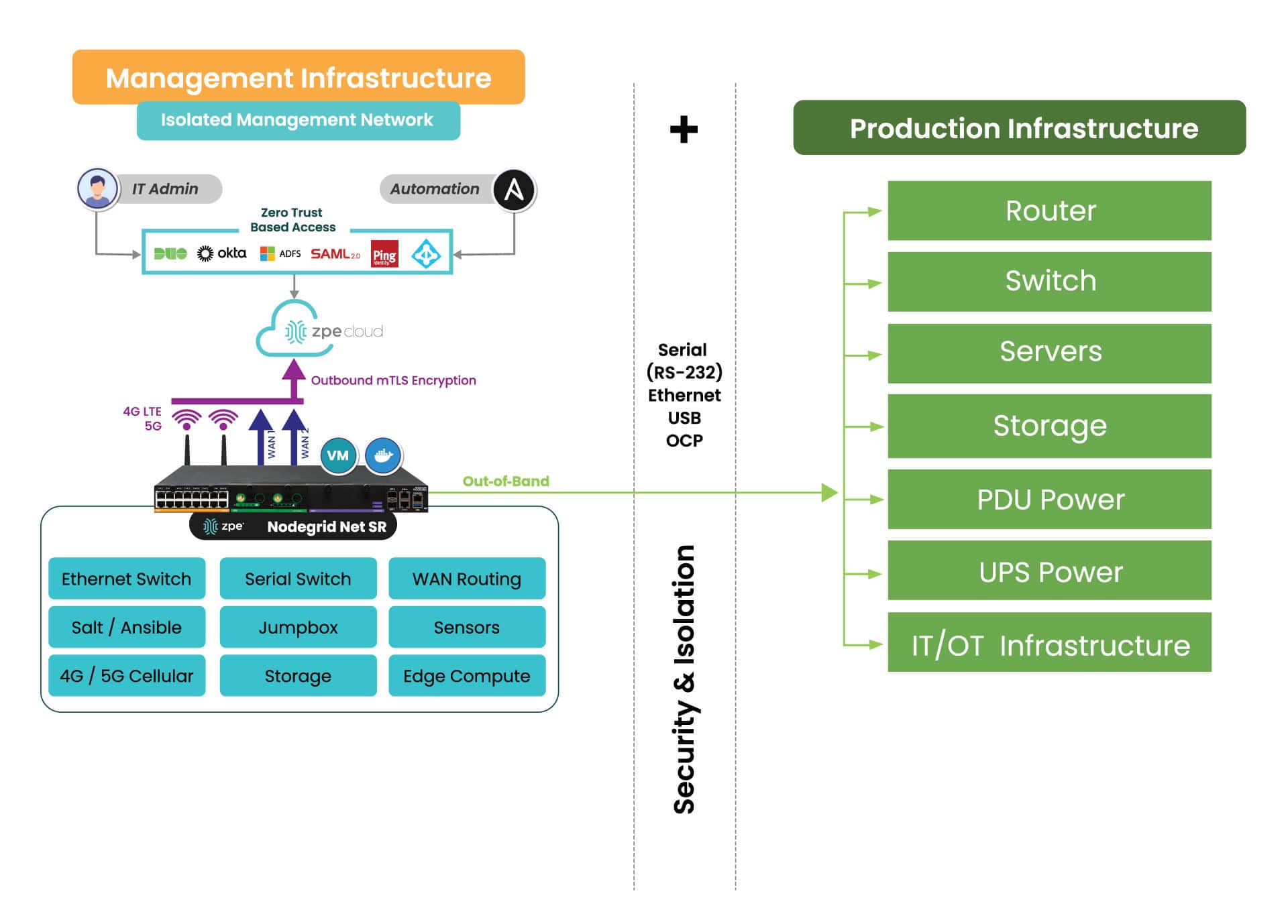
IMI is a dedicated control plane network that’s meant for administration and recovery of IT systems, including Windows PCs affected by the CrowdStrike outage. It uses the concept of out-of-band management, where you deploy a management device that is connected to dedicated management ports of your IT infrastructure (e.g., serial ports, IPMI ports, and other ethernet management ports). IMI also allows you to deploy recovery services for your digital estate that is immutable and near-line when recovery needs to take place.
IMI does not rely at all on the production assets, as it has its own dedicated remote access via WAN links like 4G/5G, and can contain and encrypt recovery keys and tools with zero trust.
IMI gives teams remote, low-level access to devices so they can recover their systems remotely without the need to visit sites. Organizations that employ IMI are able to revert back to a golden image through automation, or deploy bootable tools to all the computers at the site to rescue them without data loss.
The dedicated out-of-band access to serial/IPMI and management ports gives automation software the same abilities as if a physical crash cart was pulled up to the servers. ZPE Systems’ Nodegrid (now a brand of Legrand) enables this architecture as explained next. Using Nodegrid and ZPE Cloud, teams can use either option to recoverfrom the CrowdStrike outage:
Option 1: Reboot in Pre-Execution Environment Software – Nodegrid gives low-level network access to connected Windows as if teams were sitting directly in front of the affected device. This means they can remote-in, reboot to a network image, remote into the booted image, delete the faulty file, and restart the system.
Option 2: Re-image – ZPE Cloud serves as a file repository and orchestration engine. Teams can upload their working Windows image, and then automatically push this across their global fleet of affected devices. This option speeds up recovery times exponentially.
Option 3: – Run Windows Deployment server on the IMI device at the location and re-image servers and workstations if a good backup of the data has been located. This backup can be made available through the IMI after the initial image has been deployed. The IMI can provide dedicated secure access to the InTune services in your M365 cloud, and the backups do not have to transit the entire internet for all workstations at the time, speeding up recovery many times over.
All of these options can be performed at scale or even automated. Server recovery with large backups, although it may take a couple of hours, can be delivered locally and tracked for performance and consistency.
But what about the risk of making mistakes when you have to repeat these tasks? Won’t this cause more damage and data loss?
Any team can make a mistake repeating these recovery tasks over a large footprint, and cause further damage or loss of data, slowing the recovery further. Automated recovery through the IMI addresses this, and can provide reliable recording and reporting to ensure that the restoration is complete and trusted.
What does IMI look like?
Here’s a simplified view of Isolated Management Infrastructure. You can see that ZPE’s Nodegrid device is needed, which sits beside production infrastructure and provides the platform for hosting all the tools necessary for fast recovery.
What you need to deploy IMI for recovery:
Out-of-band appliance with serial, USB, ethernet interfaces (e.g., ZPE’s Nodegrid Net SR)
Switchable PDU: Legrand Server Tech or Raritan PDU
Windows PXE Boot image
Here’s the order of operations for a faster CrowdStrike outage recovery:
Option 1 – Recover
IMI deployed with a ZPE Nodegrid device that will start Pre-Execution Environment (PXE) which are Windows boot images that the Nodegrid will push to the computers when they boot up
Send recovery keys from Intune to IMI remote storage over ZPE Cloud’s zero trust platform easily available in cloud or air-gapped through Nodegrid Manager
Enable PXE service (automated across entire enterprise) and define the PXE recovery image
Use serial or IP control of power to the computers, or if possible Intel vPro or IPMI capable machines, to reboot all machines
All machines will boot and check in to a control tower for PXE, or be made available to remote into using stored passwords on the PXE environment, Windows AD, or other Privileged Access Management (PAM)
Delete Files
Reboot
Option 2 – Lean re-image
IMI deployed with a Windows Pre-Execution boot image running PXE service
Enable access to cloud and Azure Intune to the IMI remote storage for the local image for the PC
Enable PXE service (automated across entire enterprise) and define the PXE recovery image
Use serial or IP control of power to the computers, or if possible, Intel vPro or IPMI capable machines, to reboot all machines
Machines will boot and check in to Intune either through the IMI or through normal Internet access and finish imaging
Once the machine completes the InTune tasks, InTune will signal backups to come down to the machines. If these backups are offsite, they can be staged on the IMI through backup software running on a virtual machine located on the IMI appliance to speed up recovery and not impede the Internet connection at the remote site
Pre-stage backups onto local storage, push recovery from the virtual machine on the IMI
Option 3 – Windows controlled re-image
Windows Deployment Server (WDS) installed as a virtual machine running on the IMI appliance (offline to prevent issues or online but under a slowed deployment cycle in case there was an issue)
Send recovery keys from Intune to IMI remote storage over a zero trust interface in cloud or air-gapped
Use serial or IP control of power to the computers, or if possible, Intel vPro or IPMI capable machines, to reboot all machines
Machines will boot and check in to the WDS for re-imaging
Machines will boot and check in to Intune either through the IMI or through normal Internet access and finish imaging
Once the machine completes the InTune tasks, InTune will signal backups to come down to the machines. If these backups are offsite, they can be staged on the IMI through backup software running on a virtual machine located on the IMI appliance to speed up recovery and not impede the Internet connection at the remote site
Pre-stage backups onto local storage, push recovery from the virtual machine on the IMI
Deploy IMI to avoid the next outage
Get in touch for help choosing the right size IMI deployment for your organization. Nodegrid and ZPE Cloud are the drop-in solution to recovering from outages, with plenty of device options to fit any budget and environment size. Contact ZPE Sales now or download the blueprint to help you begin implementing IMI.
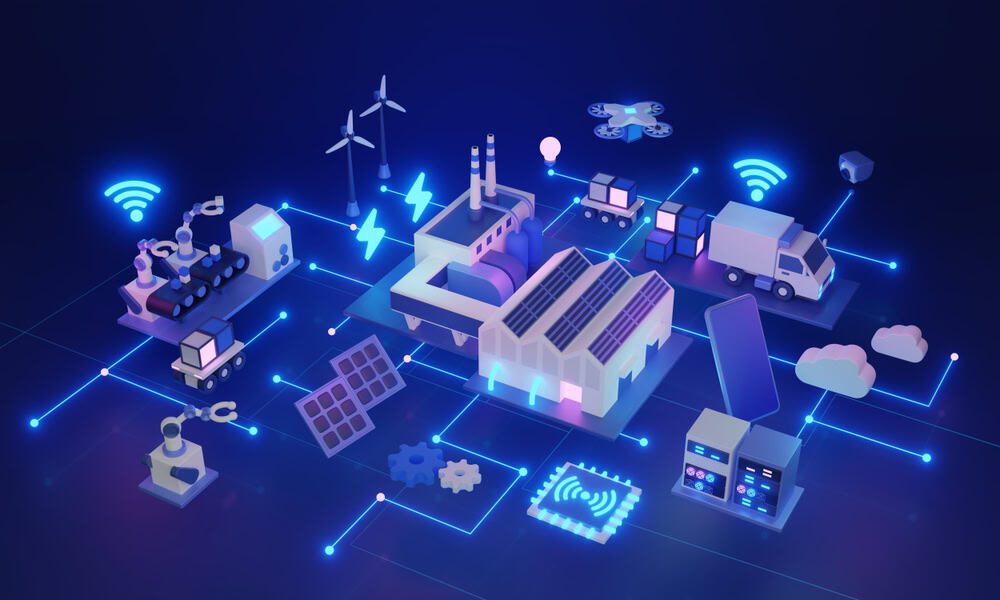
Edge computing delivers data processing and analysis capabilities to the network’s “edge,” at remote sites like branch offices, warehouses, retail stores, and manufacturing plants. It involves deploying computing resources and lightweight applications very near the devices that generate data, reducing the distance and number of network hops between them. In doing so, edge computing reduces latency and bandwidth costs while mitigating risk, enhancing edge resilience, and enabling real-time insights. This blog discusses the five biggest benefits of edge computing, providing examples and additional resources for companies beginning their edge journey. .
5 benefits of edge computing
Edge Computing:
Description
Reduces latency
Leveraging data at the edge reduces network hops and latency to improve speed and performance.
Mitigates risk
Keeping data on-site at distributed edge locations reduces the chances of interception and limits the blast radius of breaches.
Lowers bandwidth costs
Reducing edge data transmissions over expensive MPLS lines helps keep branch costs low.
Enhances edge resilience
Analyzing data on-site ensures that edge operations can continue uninterrupted during ISP outages and natural disasters.
Enables real-time insights
Eliminating off-site processing allows companies to use and extract value from data as soon as it’s generated.
1. Reduces latency
Edge computing leverages data on the same local network as the devices that generate it, cutting down on edge data transmissions over the WAN or Internet. Reducing the number of network hops between devices and applications significantly decreases latency, improving the speed and performance of business intelligence apps, AIOps, equipment health analytics, and other solutions that use edge data.
Some edge applications run on the devices themselves, completely eliminating network hops and facilitating real-time, lag-free analysis. For example, an AI-powered surveillance application installed on an IoT security camera at a walk-up ATM can analyze video feeds in real-time and alert security personnel to suspicious activity as it occurs.
Edge computing mitigates security and compliance risks by distributing an organization’s sensitive data and reducing off-site transmission. Large, centralized data stores in the cloud or data center are prime targets for cybercriminals because the sheer volume of data involved increases the chances of finding something valuable. Decentralizing data in much smaller edge storage solutions makes it harder for hackers to find the most sensitive information and also limits how much data they can access at one time.
Keeping data at the edge also reduces the chances of interception in transit to cloud or data center storage. Plus, unlike in the cloud, an organization maintains complete control over who and what has access to sensitive data, aiding in compliance with regulations like the GDPR and PCI DSS 4.0. .
Many organizations use MPLS (multi-protocol label switching) links to securely connect edge sites to the enterprise network. MPLS bandwidth is much more expensive than regular Internet lines, which makes transmitting edge data to centralized data processing applications extremely costly. Plus, it can take months to provision MPLS at a new site, delaying launches and driving up overhead expenses.
Edge computing significantly reduces MPLS bandwidth utilization by running data-hungry applications on the local network, reserving the WAN for other essential traffic. Combining edge computing with SD-WAN (software-defined wide area networking) and SASE (secure access service edge) technologies can markedly decrease the reliance on MPLS links, allowing organizations to accelerate branch openings and see faster edge ROIs. .
Since edge computing applications run on the same LAN as the devices generating data, they can continue to function even if the site loses Internet access due to an ISP outage, natural disaster, or other adverse event. This also allows uninterrupted edge operations in locations with inconsistent (or no) Internet coverage, like offshore oil rigs, agricultural sites, and health clinics in isolated rural communities. Edge computing ensures that organizations don’t miss any vital health or safety alerts and facilitates technological innovation using AI and other data analytics tools in challenging environments..
.
Sending data from the edge to a cloud or on-premises data lake for processing, transformation, and ingestion by analytics or AI/ML tools takes time, preventing companies from acting on insights at the moment when they’re most useful. Edge computing applications start using data as soon as it’s generated, so organizations can extract value from it right away. For example, a retail store can use edge computing to gain actionable insights on purchasing activity and customer behavior in real-time, so they can move in-demand products to aisle endcaps or staff extra cashiers as needed. .
To learn more about the potential uses of edge computing technology, read Edge Computing Examples.
Simplify your edge computing deployment with Nodegrid
The best way to achieve the benefits of edge computing described above without increasing management complexity or hardware overhead is to use consolidated, vendor-neutral solutions to host, connect, and secure edge workloads. For example, the Nodegrid Gate SR from ZPE Systems delivers an entire stack of edge networking and infrastructure management technologies in a single, streamlined device. The open, Linux-based Nodegrid OS supports VMs and containers for third-party applications, with an Nvidia Jetson Nano card capable of running AI workloads alongside non-AI data analytics for ultimate efficiency.
Improve your edge computing deployment with Nodegrid
Nodegrid consolidates edge computing deployments to improve operational efficiency without sacrificing performance or functionality. Schedule a free demo to see Nodegrid in action.
The current cyber threat landscape is daunting, with attacks occurring so frequently that security experts recommend operating under the assumption that your network is already breached. Major cyber attacks – and the disruptions they cause – frequently make news headlines. The MGM hack, LendingTree breach, and CDK Global attack are just a few examples that affected thousands of people per incident and now have many organizations rethinking their resilience strategies.
The zero trust security methodology outlines the best practices for limiting the blast radius of a successful breach by preventing malicious actors from moving laterally through the network and accessing the most valuable or sensitive resources. Many organizations have already begun their zero trust journey by implementing role-based access controls (RBAC), multi-factor authentication (MFA), and other security solutions, but still struggle with coverage gaps that result in ransomware attacks and other disruptive breaches. This blog provides advice for improving your zero trust security posture with a multi-layered strategy that mitigates weaknesses for complete coverage.
Use edge-centric solutions like SASE to extend zero trust policies and controls to remote network traffic, devices, and users.
Gain a full understanding of your protect surface
Many security strategies focus on defending the network’s “attack surface,” or all the potential vulnerabilities an attacker could exploit to breach the network. However, zero trust is all about defending the “protect surface,” or all the data, assets, applications, and services that an attacker could potentially try to access. The key difference is that zero trust doesn’t ask you to try to cover any possible weakness in a network, which is essentially impossible. Instead, it wants you to look at the resources themselves to determine what has the most value to an attacker, and then implement security controls that are tailored accordingly.
Gaining a full understanding of all the resources on your network can be extraordinarily challenging, especially with the proliferation of SaaS apps, mobile devices, and remote workforces. There are automated tools that can help IT teams discover all the data, apps, and devices on the network. Application discovery and dependency mapping (ADDM) tools help identify all on-premises software and third-party dependencies; cloud application discovery tools do the same for cloud-hosted apps by monitoring network traffic to cloud domains. Sensitive data discovery tools scan all known on-premises or cloud-based resources for personally identifiable information (PII) and other confidential data, and there are various device management solutions to detect network-connected hardware, including IoT devices. ,
Tip: This step can’t be completed one time and then forgotten – teams should execute discovery processes on a regular, scheduled basis to limit gaps in protection.
Micro-segment your network with micro-perimeters
Micro-segmentation is a cornerstone of zero-trust networks. It involves logically separating all the data, applications, assets, and services according to attack value, access needs, and interdependencies. Then, teams implement granular security policies and controls tailored to the needs of each segment, establishing what are known as micro-perimeters. Rather than trying to account for every potential vulnerability with one large security perimeter, teams can just focus on the tools and policies needed to cover the specific vulnerabilities of a particular micro-segment.
Network micro-perimeters help improve your zero trust security posture with:
Granular access policies granting the least amount of privileges needed for any given workflow. Limiting the number of accounts with access to any given resource, and limiting the number of privileges granted to any given account, significantly reduces the amount of damage a compromised account (or malicious actor) is capable of inflicting.
Targeted security controls addressing the specific risks and vulnerabilities of the resources in a micro-segment. For example, financial systems need stronger encryption, strict data governance monitoring, and multiple methods of trust verification, whereas an IoT lighting system requires simple monitoring and patch management, so the security controls for these micro-segments should be different.
Trust verification using context-aware policies to catch accounts exhibiting suspicious behavior and prevent them from accessing sensitive resources. If a malicious outsider compromises an authorized user account and MFA device – or a disgruntled employee uses their network privileges to harm the company – it can be nearly impossible to prevent data exposure. Context-aware policies can stop a user from accessing confidential resources outside of typical operating hours, or from unfamiliar IP addresses, for example. Additionally, user entity and behavior analytics (UEBA) solutions use machine learning to detect other abnormal and risky behaviors that could indicate malicious intent.
Isolate and defend your management infrastructure
For zero trust to be effective, organizations must apply consistently strict security policies and controls to every component of their network architecture, including the management interfaces used to control infrastructure. Otherwise, a malicious actor could use a compromised sysadmin account to hijack the control plane and bring down the entire network.
According to a recent CISA directive, the best practice is to isolate the network’s control plane so that management interfaces are inaccessible from the production network. Many new cybersecurity regulations, including PCI DSS 4.0, DORA, NIS2, and the CER Directive, also either strongly recommend or require management infrastructure isolation.
Isolated management infrastructure (IMI) prevents compromised accounts, ransomware, and other threats from moving laterally to or from the production LAN. It gives teams a safe environment to recover from ransomware or other cyberattacks without risking reinfection, which is known as an isolated recovery environment (IRE). Management interfaces and the IRE should also be protected by granular, role-based access policies, multi-factor authentication, and strong hardware roots of trust to further mitigate risk.
The easiest and most secure way to implement IMI is with Gen 3 out-of-band (OOB) serial console servers, like the Nodegrid solution from ZPE Systems. These devices use alternative network interfaces like 5G/4G LTE cellular to ensure complete isolation and 24/7 management access even during outages. They’re protected by hardware security features like TPM 2.0 and GPS geofencing, and they integrate with zero trust solutions like identity and access management (IAM) and UEBA to enable consistent policy enforcement.
Defend your cloud resources
The vast majority of companies host some or all of their workflows in the cloud, which significantly expands and complicates the attack surface while making it more challenging to identify and defend the protect surface. Some organizations also lack a complete understanding of the shared responsibility model for varying cloud services, increasing the chances of coverage gaps. Additionally, many orgs struggle with “shadow IT,” which occurs when individual business units implement cloud applications without going through onboarding, preventing security teams from applying zero trust controls.
The first step toward improving your zero trust security posture in the cloud is to ensure you understand where your cloud service provider’s responsibilities end and yours begin. For instance, most SaaS providers handle all aspects of security except IAM and data protection, whereas IaaS (Infrastructure-as-a-Service) providers are only responsible for protecting their physical and virtual infrastructure.
It’s also vital that security teams have a complete picture of all the cloud services in use by the organization and a way to deploy and enforce zero trust policies in the cloud. For example, a cloud access security broker (CASB) is a solution that discovers all the cloud services in use by an organization and allows teams to monitor and manage security for the entire cloud architecture. A CASB provides capabilities like data governance, malware detection, and adaptive access controls, so organizations can protect their cloud resources with the same techniques used in the on-premises environment. .
Example Cloud Access Security Broker Capabilities
Visibility
Compliance
Threat protection
Data security
Cloud service discovery
Monitoring and reporting
User authentication and authorization
Data governance and loss prevention
Malware (e.g., virus, ransomware) detection
User and entity behavior analytics (UEBA)
Data encryption and tokenization
Data leak prevention
Extend zero trust to the edge
Modern enterprise networks are highly decentralized, with many business operations taking place at remote branches, Internet of Things (IoT) deployment sites, and end-users’ homes. Extending security controls to the edge with on-premises zero trust solutions is very difficult without backhauling all remote traffic through a centralized firewall, which creates bottlenecks that affect performance and reliability. Luckily, the market for edge security solutions is rapidly growing and evolving to help organizations overcome these challenges.
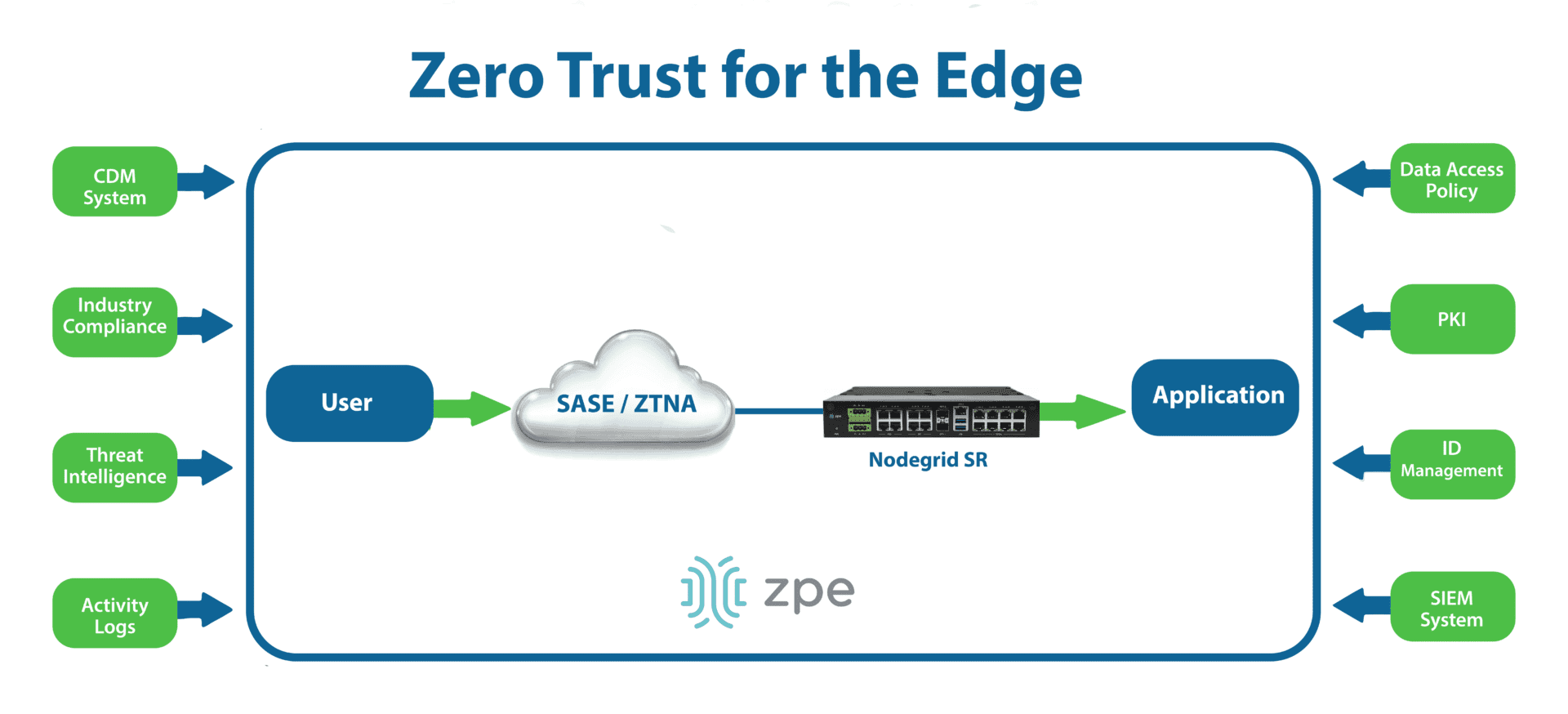
Security Access Service Edge (SASE) is a type of security platform that delivers core capabilities as a managed, typically cloud-based service for the edge. SASE uses software-defined wide area networking (SD-WAN) to intelligently and securely route edge traffic through the SASE tech stack, allowing the application and enforcement of zero trust controls. In addition to CASB and next-generation firewall (NGFW) features, SASE usually includes zero trust network access (ZTNA), which offers VPN-like functionality to connect remote users to enterprise resources from outside the network. ZTNA is more secure than a VPN because it only grants access to one app at a time, requiring separate authorization requests and trust verification attempts to move to different resources.
Accelerating the zero trust journey
Zero trust is not a single security solution that you can implement once and forget about – it requires constant analysis of your security posture to identify and defend weaknesses as they arise. The best way to ensure adaptability is by using vendor-agnostic platforms to host and orchestrate zero trust security. This will allow you to add and change security services as needed without worrying about interoperability issues.
For example, the Nodegrid platform from ZPE Systems includes vendor-neutral serial consoles and integrated branch services routers that can host third-party software such as SASE and NGFWs. These devices also provide Gen 3 out-of-band management for infrastructure isolation and network resilience. Nodegrid protects management interfaces with strong hardware roots-of-trust, embedded firewalls, SAML 2.0 integrations, and other zero trust security features. Plus, with Nodegrid’s cloud-based or on-premises management platform, teams can orchestrate networking, infrastructure, and security workflows across the entire enterprise architecture.
Improve your zero trust security posture with Nodegrid
Using Nodegrid as the foundation for your zero trust network infrastructure ensures maximum agility while reducing management complexity. Watch a Nodegrid demo to learn more.
Both edge computing and cloud computing involve moving computational resources – such as CPUs (central processing units), GPUs (graphics processing units), RAM (random access memory), and data storage – out of the centralized, on-premises data center. As such, both represent massive shifts in enterprise network designs and how companies deploy, manage, secure, and use computing resources. Edge and cloud computing also create new opportunities for data processing, which is sorely needed as companies generate more data than ever before, thanks in no small part to an explosion in Internet of Things (IoT) and artificial intelligence (AI) adoption. This year, IoT devices alone are predicted to generate 80 zettabytes of data, much of it decentralized around the edges of the network. AI, machine learning, and other data analytics applications, meanwhile, require vast quantities of data (and highly scalable infrastructure) to provide accurate insights. This guide compares edge computing vs cloud computing to help organizations choose the right deployment model for their use case.
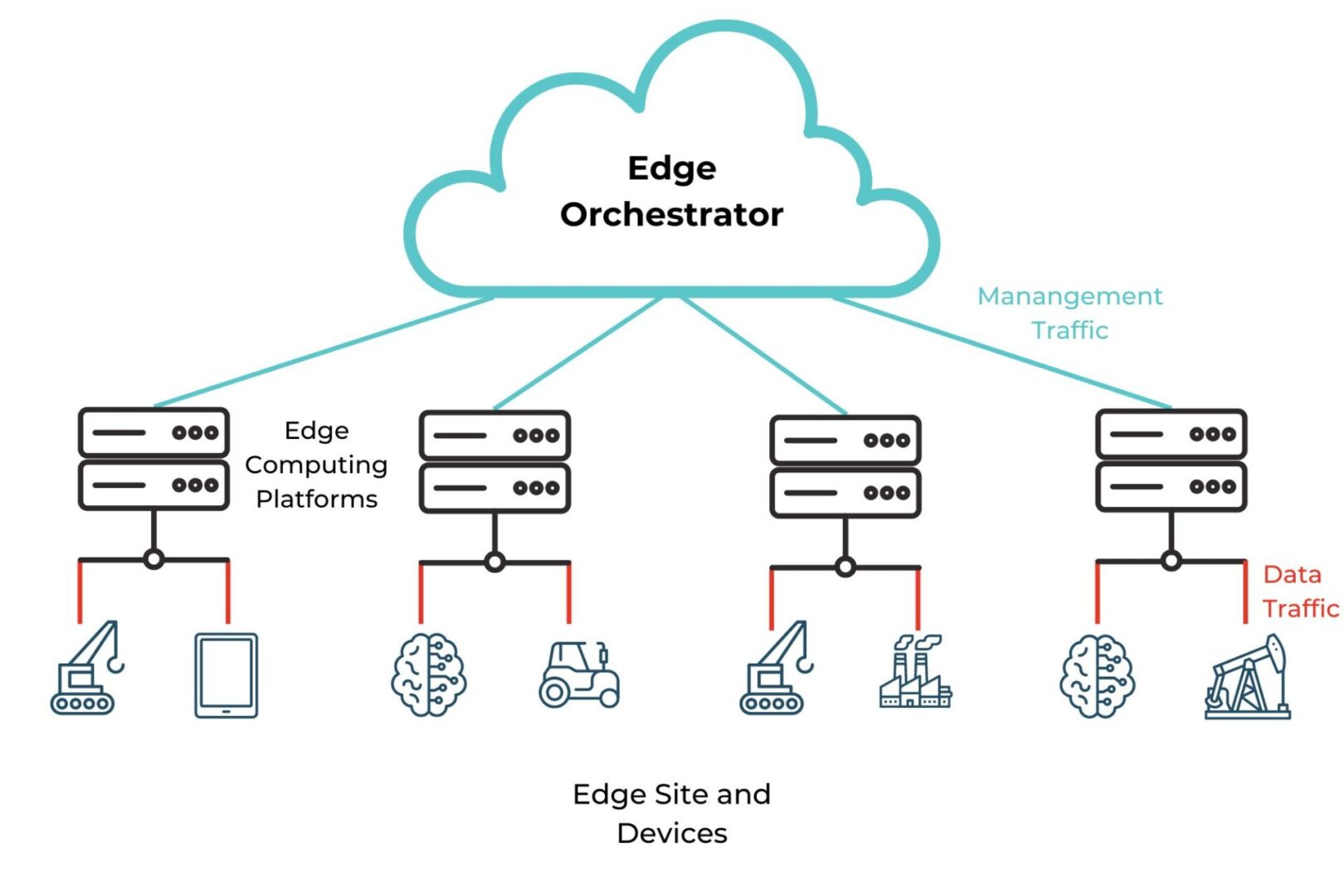
Edge computing involves deploying computing capabilities to the network’s edges to enable on-site data processing for Internet of Things (IoT) sensors, operational technology (OT), automated infrastructure, and other edge devices and services. Edge computing deployments are highly distributed across remote sites far from the network core, such as oil & gas rigs, automated manufacturing plants, and shipping warehouses. Ideally, organizations use a centralized (usually cloud-based) orchestrator to oversee and conduct operations across the distributed edge computing architecture.
Diagram showing an example edge computing architecture controlled by a cloud-based edge orchestrator.
Reducing the number of network hops between edge devices and the applications that process and use edge data enables real-time data processing, reduces MPLS bandwidth costs, improves performance, and keeps private data within the security micro-perimeter. Cloud computing involves using remote computing resources over the Internet to run applications, process and store data, and more. Cloud service providers manage the physical infrastructure and allow companies to easily scale their virtual computing resources with the click of a button, significantly reducing operational costs and complexity over on-premises and edge computing deployments.
Examples of edge computing vs cloud computing
Edge computing works best for workloads requiring real-time data processing using fairly lightweight applications, especially in locations with inconsistent or unreliable Internet access or where privacy/compliance is a major concern. Example edge computing use cases include:
Cloud computing is well-suited to workloads requiring extensive computational resources that can scale on-demand, but that aren’t time-sensitive. Example use cases include:
Running large artificial intelligence and machine learning solutions
Centralizing collaboration tools like source code version control
The advantages of edge computing over cloud computing
Using cloud-based applications to process edge device data involves transmitting that data from the network’s edges to the cloud provider’s data center, and vice versa. Transmitting data over the open Internet is too risky, so most organizations route the traffic through a security appliance such as a firewall to encrypt and protect the data. Often these security solutions are off-site, in the company’s central data center, or, best-case scenario, a SASE point-of-presence (PoP), adding more network hops between edge devices and the cloud applications that service them. This process increases bandwidth usage and introduces latency, preventing real-time data processing and negatively affecting performance, which is one of the main reasons why organizations are repatriating workloads from the cloud to on-prem.
Edge computing moves data processing resources closer to the source, eliminating the need to transmit this data over the Internet. This improves performance by reducing (or even removing) network hops and preventing network bottlenecks at the centralized firewall. Edge computing also lets companies use their valuable edge data in real time, enabling faster insights and greater operational efficiencies.
Edge computing mitigates the risk involved in storing and processing sensitive or highly regulated data in a third-party computing environment, giving companies complete control over their data infrastructure. It can also help reduce bandwidth costs by eliminating the need to route edge data through VPNs or MPLS links to apply security controls.
Edge computing advantages:
Improves network and application performance
Enables real-time data processing and insights
Simplifies security and compliance
Reduces MPLS bandwidth costs
The disadvantages of edge computing compared to cloud computing
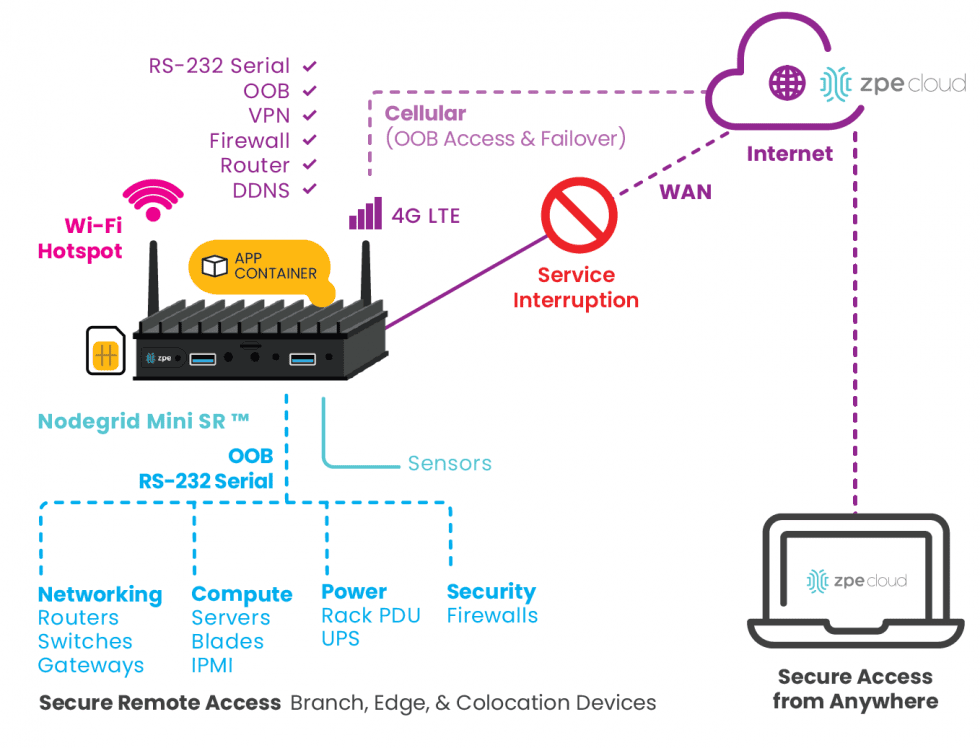
Cloud computing resources are highly scalable, allowing organizations to meet rapidly changing requirements without the hassle of purchasing, installing, and maintaining additional hardware and software licenses. Edge computing still involves physical, on-premises infrastructure, making it far less scalable than the cloud. However, it’s possible to improve edge agility and flexibility by using vendor-neutral platforms to run and manage edge resources. An open platform like Nodegrid allows teams to run multiple edge computing applications from different vendors on the same box, swap out services as business needs evolve, and deploy automation to streamline multi-vendor edge device provisioning from a single orchestrator.
Diagram showing how the Nodegrid Mini SR combines edge computing and networking capabilities on a small, affordable, flexible platform.
Organizations often deploy edge computing in less-than-ideal operating environments, such as closets and other cramped spaces that lack the strict HVAC controls that maintain temperature and humidity in cloud data centers. These environments also typically lack the physical security controls that prevent unauthorized individuals from tampering with equipment, such as guarded entryways, security cameras, and biometric locks. The best way to mitigate this disadvantage is with an environmental monitoring system that uses sensors to detect temperature and humidity changes that could cause equipment failures as well as proximity alarms to notify administrators when someone gets too close. It’s also advisable to use hermetically sealed edge computing devices capable of operating in extreme temperatures and with built-in security features making them tamper-proof.
Cloud computing is often more resilient than edge computing because cloud service providers must maintain a certain level of continuous uptime to meet service level agreements (SLAs). Edge computing operations could be disrupted by network equipment failures, ISP outages, ransomware attacks, and other adverse events, so it’s essential to implement resilience measures that keep services running (if in a degraded state) and allow remote teams to fix problems without having to be on site. Edge resilience measures include Gen 3 out-of-band management, control plane/data plane separation (also known as isolated management infrastructure or IMI), and isolated recovery environments (IRE).
Edge computing disadvantages:
Less scalable than cloud infrastructure
Lack of environmental and security controls
Requires additional resilience measures
Edge-native applications vs cloud-native applications
Edge-native applications and cloud-native applications are similar in that they use containers and microservices architectures, as well as CI/CD (continuous integration/continuous delivery) and other DevOps principles.
Cloud-native applications leverage centralized, scalable resources to perform deep analysis of long-lived data in long-term hot storage environments. Edge-native applications are built to leverage limited resources distributed around the network’s edges to perform real-time analysis of ephemeral data that’s constantly moving. Typically, edge-native applications are highly contextualized for a specific use case, whereas cloud-native applications offer broader, standardized capabilities. Another defining characteristic of edge-native applications is the ability to operate independently when needed while still integrating seamlessly with the cloud, upstream resources, remote management, and centralized orchestration.
Both edge computing and cloud computing have unique advantages and disadvantages that make them well-suited for different workloads and use cases. Factors like increasing data privacy regulations, newsworthy cloud provider outages, greater reliance on human-free IoT and OT deployments, and an overall trend toward decentralizing business operations are pushing organizations to adopt edge computing. However, most companies still rely heavily on cloud resources and will continue to do so, making it crucial to ensure seamless interoperability between the edge and the cloud.
The best way to ensure integration is by using vendor-neutral platforms. For example, Nodegrid integrated services routers like the Gate SR provide multi-vendor out-of-band serial console management for edge infrastructure and devices, using an embedded Jetson Nano card to support edge computing and AI workloads. The ZPE Cloud management platform unifies orchestration for the entire Nodegrid-connected architecture, delivering 360-degree control over complex and highly distributed networks. Plus, Nodegrid easily integrates – or even directly hosts – other vendors’ solutions for edge data processing, IT automation, SASE, and more, making edge operations more cost-effective. Nodegrid also provides the complete control plane/data plane separation needed to ensure edge resilience.
Get edge efficiency and resilience with Nodegrid
The Nodegrid platform from ZPE Systems helps companies across all industries streamline their edge operations with resilient, vendor-neutral, Gen 3 out-of-band management. Request a free Nodegrid demo to learn more.REQUEST A DEMO
Edge computing is rapidly gaining popularity as more organizations see the benefits of decentralizing data processing for Internet of Things (IoT) deployments, machine learning applications, operational technology (OT), AI and machine learning, and other edge use cases. This guide defines edge computing and edge-native applications, highlights a few key use cases, describes the typical components of an edge deployment, and provides additional resources for building your own edge computing architecture.
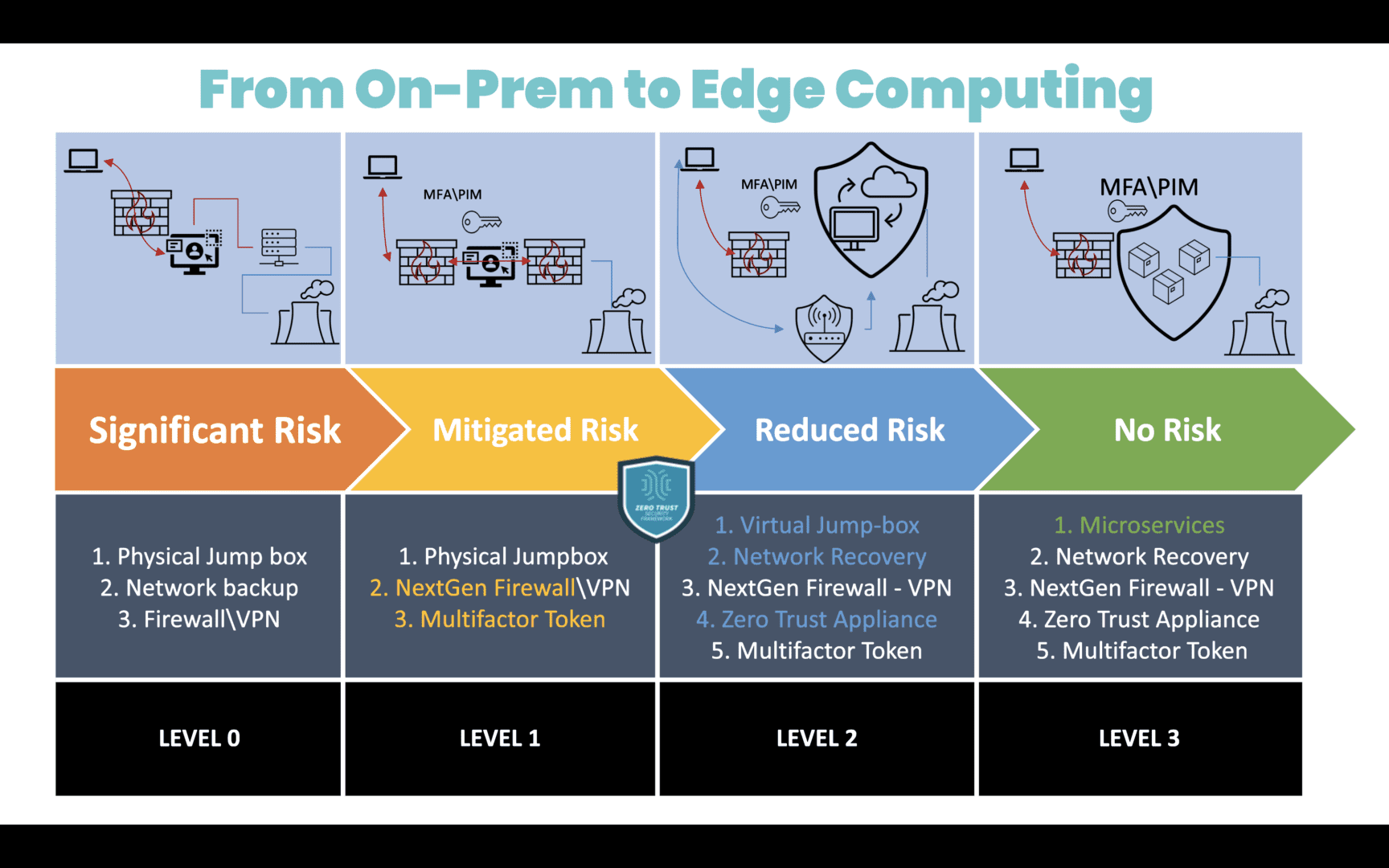
The Open Glossary of Edge Computing defines it as deploying computing capabilities to the edges of a network to improve performance, reduce operating costs, and increase resilience. Edge computing reduces the number of network hops between data-generating devices and the applications that process and use that data, mitigating latency, bandwidth, and security concerns compared to cloud or on-premises computing.
Image: A diagram showing the migration path from on-premises computing to edge computing, along with the associated level of security risk.
Edge-native applications
Edge-native applications are built from the ground up to harness edge computing’s unique capabilities while mitigating the limitations. They leverage some cloud-native principles, such as containers, microservices, and CI/CD (continuous integration/continuous delivery), with several key differences.
Edge-Native vs. Cloud-Native Applications
Edge-Native
Cloud-Native
Topology
Distributed
Centralized
Compute
Real-time processing with limited resources
Deep processing with scalable resources
Data
Constantly changing and moving
Long-lived and at rest in a centralized location
Capabilities
Contextualized
Standardized
Location
Anywhere
Cloud data center
Source: Gartner
Edge-native applications integrate seamlessly with the cloud, upstream resources, remote management, and centralized orchestration, but can also operate independently as needed. Crucially, they allow organizations to actually leverage their edge data in real-time, rather than just collecting it for later processing.
Edge computing use cases
Nearly every industry has potential use cases for edge computing, including:
Industry
Edge Computing Use Cases
Healthcare
Mitigating security, privacy, and HIPAA compliance concerns with local data processing
Improving patient health outcomes with real-time alerts that don’t require Internet access
Enabling emergency mobile medical intervention while reducing mistakes
Finance
Reducing security and regulatory risks through local computing and edge infrastructure isolation
Getting fast, localized business insights to improve revenue and customer service
Deploying AI-powered surveillance and security solutions without network bottlenecks
Energy
Enabling network access and real-time data processing for airgapped and isolated environments
Improving efficiency with predictive maintenance recommendations and other insights
Proactively identifying and remediating safety, quality, and compliance issues
Manufacturing
Getting real-time, data-driven insights to improve manufacturing efficiency and product quality
Reducing the risk of confidential production data falling into the wrong hands in transit
Ensuring continuous operations during network outages and other adverse events
Using AI with computer vision to ensure worker safety and quality control of fabricated components/products
Utilities/Public Services
Using IoT technology to deliver better services, improve public safety, and keep communities connected
Reducing the fleet management challenges involved in difficult deployment environments
Aiding in disaster recovery and resilience with distributed redundant edge resources
Click here to learn more about the infrastructure, networking, management, and security components of an edge computing architecture.
How to build an edge computing architecture with Nodegrid
Nodegrid is a Gen 3 out-of-band management platform that streamlines edge computing with vendor-neutral solutions and a centralized, cloud-based orchestrator.
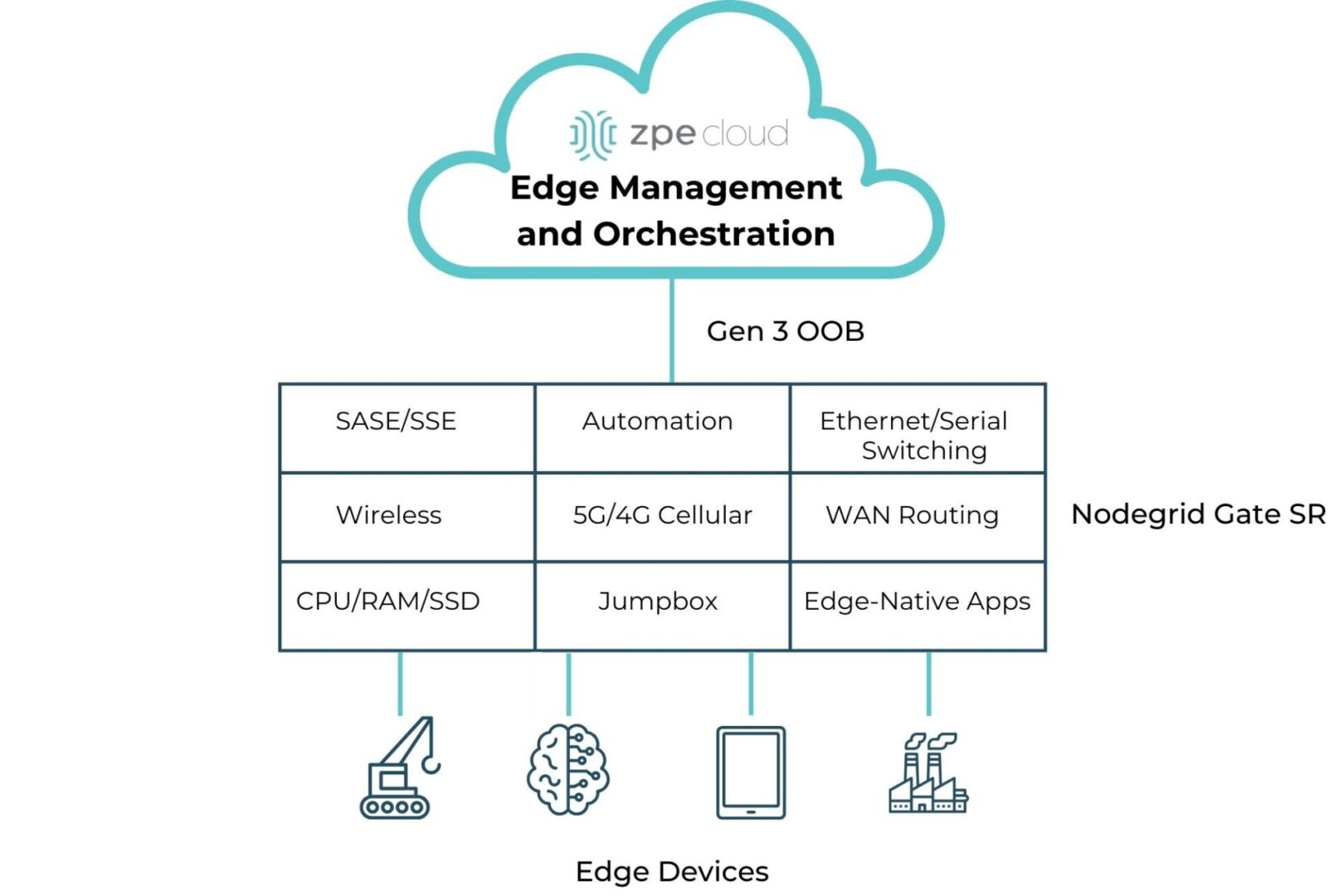
Image: A diagram showing all the edge computing and networking capabilities provided by the Nodegrid Gate SR.
Nodegrid integrated services routers deliver all-in-one edge computing and networking functionality while taking up 1RU or less. A Nodegrid box like the Gate SR provides Ethernet and Serial switching, serial console/jumpbox management, WAN routing, wireless networking, and 5G/4G cellular for network failover or out-of-band management. It includes enough CPU, memory, and encrypted SSD storage to run edge computing workflows, and the x86-64bit Linux-based Nodegrid OS supports virtualized network functions, VMs, and containers for edge-native applications, even those from other vendors. The new Gate SR also comes with an embedded NVIDIA Jetson Orin NanoTM module featuring dual CPUs for EMO of AI workloads and infrastructure isolation.
Nodegrid SRs can also host SASE, SSE, and other security solutions, as well as third-party automation from top vendors like Redhat and Salt. Remote teams use the centralized, vendor-neutral ZPE Cloud platform (an on-premises version is available) to deploy, monitor, and orchestrate the entire edge architecture. Management, automation, and orchestration workflows occur over the Gen 3 OOB control plane, which is separated and isolated from the production network. Nodegrid OOB uses fast, reliable network interfaces like 5G cellular to enable end-to-end automation and ensure 24/7 remote access even during major outages, significantly improving edge resilience.
Streamline your edge deployment
The Nodegrid platform from ZPE Systems reduces the cost and complexity of building an edge computing architecture with vendor-neutral, all-in-one devices and centralized EMO. Request a free Nodegrid demo to learn more.
ZPE Systems delivers innovative solutions to simplify infrastructure managment at the datacenter, branch, and edge.
Learn how our Zero Pain Ecosystem can solve your biggest network orchestration pain points.