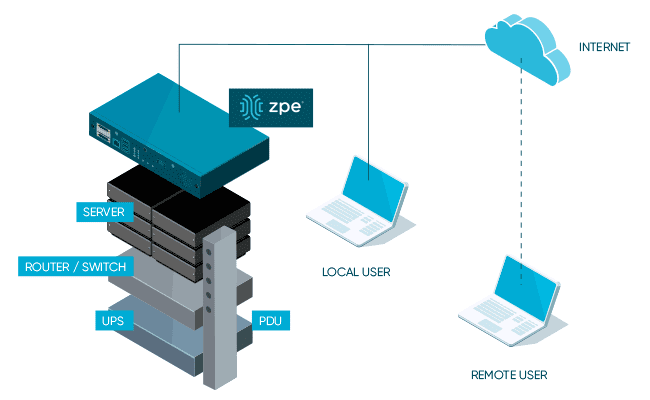
uCPE stands for universal Customer Premises Equipment. A uCPE box is a general purpose networking device used to run virtual network functions, or VNFs. VNFs are essentially software versions of network devices such as routers, switches, and firewalls. That means you can consolidate an entire networking tech stack into a single uCPE box, saving money and reducing management complexity.
Despite the promise of uCPE, the technology has been slow to catch on. In this article, we’ll explore the reasons for the lack of popularity of early uCPE before discussing how newer generations overcome these issues to deliver cost savings, simplified management, and other benefits to enterprise customers.
The shortcomings of gen 1 uCPE
Early uCPE devices were generally provided by telecoms and ISPs to host their specific networking software. Customers didn’t get to choose the software or virtualization solutions—they had to use whatever the vendor gave them. That meant enterprises didn’t have the flexibility to swap out VNFs and software to get the specific features or pricing they wanted, and they couldn’t continue using existing solutions that they really liked.
However, the larger issue was that the virtualization technology itself was ahead of its time. Many organizations still didn’t have use cases that justified the business disruption and expense of swapping out networking infrastructure with virtualized solutions. Plus, software-based networking was so new that many network administrators and engineers didn’t have the skills and experience needed to configure, deploy, and manage fully virtualized tech stacks.
Due to these limitations, enterprises showed minimal interest in uCPE for a long time, leading many to believe that the technology would die out entirely. Instead, forward-thinking hardware and software vendors continued to improve uCPE technology to overcome these shortcomings. In addition, enterprises have been pushing their computing and business operations out to remote locations at the network edge, resulting in the rapid adoption of SD-WAN (software-based wide-area networking) solutions for distributed network management. A greater interest in software-based networking technology, and a need for hardware capable of running that software, has led to a renewed enthusiasm for uCPE.
The next evolution of uCPE
The current generation of uCPE focuses on delivering a truly universal, vendor-neutral platform from which to host, manage, and troubleshoot an entire consolidated tech stack. This is provided in two parts:
The device itself, which runs on an open, Linux-based operating system and supports multiple pinout standards.
An orchestration platform which consolidates the monitoring and management of all uCPE solutions behind a single pane of glass.
Through its a vendor-agnostic hardware, software, and orchestration platform, uCPE benefits enterprise customers in numerous ways, including:
Vendor freedom
Next-gen uCPE devices are capable of hosting any software or virtualization solution from any vendor. This gives enterprise customers the ability to shop around for the best features and pricing for their particular use case. If customers already have a software-based networking solution that works well for them, they can simply migrate it to the uCPE with minimal hassle.
Tech consolidation
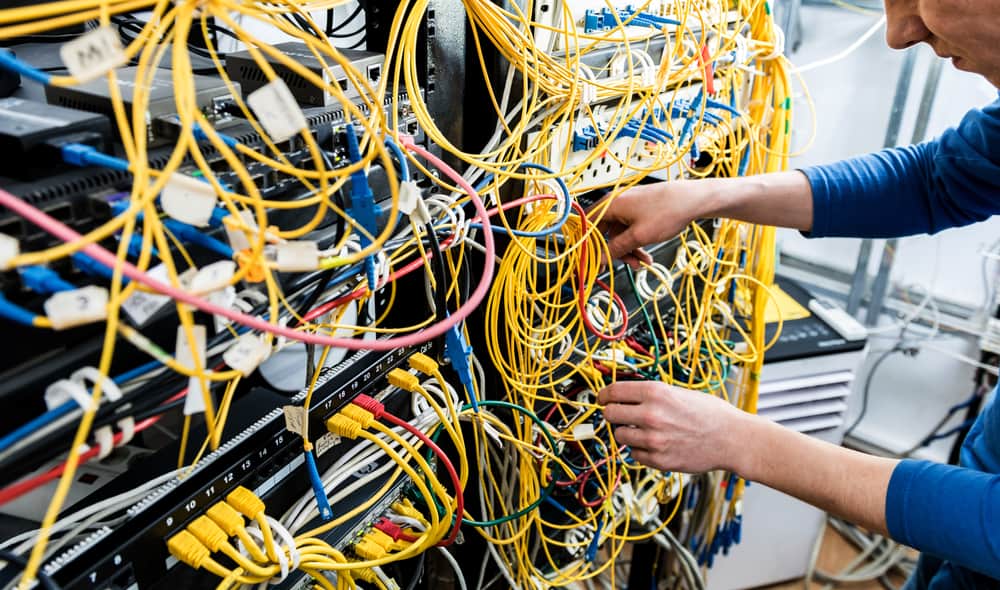
A single uCPE box can take the place of an entire rack of networking equipment, reducing the number of devices to install, license, and maintain. This is especially vital for organizations that want to expand their operations to branch offices, edge data centers, and even hard-to-reach locations like oil rigs and research stations. Tech consolidation reduces the time and expense required to deploy remote infrastructure.
Centralized management
The current generation of uCPE includes an orchestration platform capable of observing and controlling the entire distributed network of uCPE boxes and connected infrastructure. Enterprises can deploy hundreds or even thousands of uCPE boxes to locations all over the globe, but they only need to log in to one platform to manage them all. uCPE gives organizations the ability to orchestrate network functions, monitor remote infrastructure, and troubleshoot and respond to issues from behind a single pane of glass, which results in simplified and optimized network management.
SD-WAN capabilities
As organizations have sped up their SD-WAN adoption plans in response to the rise of remote work, edge computing, and distributed network management, the need for universal networking hardware has also quickly increased. Next-gen uCPE devices are the perfect hosts for SD-WAN software solutions because they allow for easy integration with the underlying WAN infrastructure, which run as VNFs on the same box. That means enterprises don’t need to invest in new SD-WAN-capable routers and gateways for each remote site. Plus, with a uCPE orchestration platform, it is easier to view and control the entire SD-WAN architecture.
To take advantage of the benefits promised by uCPE technology, you need to ensure that you choose a platform that’s truly vendor-neutral to support your choice of SD-WAN and VNF solutions. The hardware also needs to be powerful enough to run your entire edge networking stack from a single box.
Universal network management with Nodegrid
Nodegrid is a next-gen uCPE platform that delivers universal infrastructure orchestration for enterprise customers. Nodegrid’s flexible hardware and open OS give you the freedom to bring your choice of networking devices, SD-WAN solutions, and VNFs. Nodegrid devices are built with CPU and memory headroom and expansive storage options so you can run your entire branch from a single box. Plus, the ZPE Cloud infrastructure orchestration platform gives you complete control over your distributed network, including third-party automation playbooks and workflows.
Ready to learn more?
To learn more about Nodegrid next-gen uCPE, contact ZPE Systems today.
Outdated network infrastructure poses a significant risk to the security and continuity of business operations. According to NTT’s “2020 Global Network Insights Report,” obsolete devices contain nearly twice as many security vulnerabilities as currently supported solutions. Outdated network hardware is also more likely to fail, and the ability to recover from a failure is severely hampered by a lack of vendor support. However, network upgrades can be highly disruptive, so many organizations delay network upgrades to avoid business interruption. They don’t realize that their outdated devices are like ticking time bombs that could bring down their network at any moment. In this post, we’ll provide advice that helps answer the question: How do I upgrade network infrastructure without disrupting business operations?
Why and when to upgrade network infrastructure
Obsolete network infrastructure no longer receives updates and security patches from the vendor. That means any vulnerabilities that exist on the device will remain open, giving cybercriminals time to find and exploit them. In addition, older network solutions often lack the advanced security features like SSO and MFA, which are required for Zero Trust.
Even supported legacy devices suffer from limitations that can prevent a business from achieving its technological goals. For instance, legacy devices may not support automation, making it difficult to achieve NetDevOps transformation. Plus, as enterprise networks grow more distributed, there’s a need for solutions that support SD-WAN and SD-Branch technology.
Sometimes the solutions themselves aren’t terribly outdated, it’s just that business requirements have changed in such a way that the existing infrastructure can’t support. For example, an organization may migrate some applications and systems to the cloud, so they need networking solutions that support hybrid environments. In addition, the mix of old and new devices and cloud and on-premises resources increases management complexity and prevents teams from effectively leveraging network orchestration.
Obsolete devices, outdated security, limited automation support, and changing business requirements are all important reasons to upgrade network infrastructure. However, these upgrades must be approached with a thoughtful strategy to reduce the impact on the performance and availability of business resources.
How to upgrade network infrastructure with minimal business interruption
Vendor agnostic platforms are the key to smooth network infrastructure upgrades. Vendor agnostic (a.k.a. vendor neutral) network management platforms support integrations with all or most viable and established network solutions, including legacy devices.
Vendor-neutral management devices, such as the Nodegrid Serial Console, support both legacy and modern Cisco pinouts. That means Nodegrid provides a single, unified platform from which to manage all the outdated devices you already have as well as any new solutions you add to your infrastructure. This reduces management complexity for network administrators, giving them more time to focus on optimizing performance and planning future network upgrades.
Additionally, a vendor-neutral network orchestration platform can use that management device to extend modern automation and orchestration to legacy hardware. A truly vendor-agnostic platform, such as Nodegrid Manager (for on-premises and private cloud deployments) or ZPE Cloud (for public cloud and hybrid deployments) can run third-party automation playbooks and custom Python scripts. This gives network administrators the unprecedented ability to implement a fully-automated NetOps environment even while still rolling out infrastructure upgrades.
The final piece of the puzzle is vendor-neutral Zero Touch Provisioning (ZTP). ZTP gives you the ability to deploy new devices efficiently and securely in remote data centers, branch offices, and edge compute sites. ZTP devices are provisioned automatically over the network, reducing the need for onsite deployments or pre-staging. A vendor-neutral ZTP solution like Nodegrid can extend ZTP to other vendors’ devices so you can quickly deploy upgraded infrastructure.
Nodegrid delivers vendor-neutral management, orchestration, and ZTP so you can upgrade network infrastructure with minimal business interruption.
Need Help Upgrading Your Network Infrastructure?
Contact ZPE Systems to learn how to upgrade your network infrastructure with Nodegrid.
Software-defined wide area networking, or SD-WAN, has made it possible to efficiently control highly distributed WAN architectures using software abstraction and automation. SD-WAN adoption is increasing, partially due to the rise in remote work during the pandemic, with experts predicting a compound annual growth rate (CAGR) of 26.2% between 2022 and 2028. However, while SD-WAN solves a lot of remote, edge, and branch networking problems, it also introduces security concerns that must be addressed. This definitive SD-WAN security checklist highlights the most important challenges and provides solutions for overcoming them.
The definitive SD-WAN security checklist
Keeping an SD-WAN architecture secure requires several features to be successful. It’s vital to consider this comprehensive list.
1. Frequent security patching
Outdated operating systems create a significant security risk. According to a 2016 Voke Media survey, about 80% of breaches or failed audits could have been prevented by patching outdated software or updating device configurations. An SD-WAN router with an outdated OS is more likely to have vulnerabilities, and the longer it goes unpatched, the more likely a hacker is to find and exploit those vulnerabilities.
However, SD-WAN architectures are often multi-vendor and highly distributed, making it challenging for administrators to monitor for vulnerabilities and stay on top of patch schedules. There are two primary ways to overcome this difficulty:
Centralized SD-WAN management platforms provide a single pane of glass from which to monitor and update device software. The right platform is vendor-agnostic, so administrators can easily patch any and all vendor devices from one common interface.
Automated patch management software helps keep OSes up to date by automatically applying new updates based on a predetermined schedule. Some solutions even perform automatic vulnerability scans or can monitor environments for missing patches and apply new updates that fall outside of the usual patch schedule.
Your ability to keep SD-WAN device software secure ultimately depends on the vendor’s patch schedule. Some providers are sluggish to patch known vulnerabilities in their software, either because they think they can keep said vulnerabilities a secret or because they don’t want to dedicate the time and resources needed to keep the OS up to date. That’s why you should look for SD-WAN hardware and software vendors who are transparent about vulnerabilities and who work diligently to release frequent patches and updates.
2. Zero Trust Provisioning
SD-WAN platforms are software-based, but they still require underlying networking hardware at each remote site for connecting to the enterprise network. Deploying this hardware can be difficult, especially when SD-WAN sites are in hard-to-reach locations such as offshore oil rigs, remote weather stations, or nations experiencing disasters or active conflicts. Often, organizations opt to pre-stage devices in their home office and then ship them to remote sites so they can avoid costly or dangerous travel.
Pre-staging creates a security risk because a pre-configured device could be intercepted by hackers and used to access the enterprise network. Zero Touch Provisioning (ZTP) reduces the need for pre-staging by deploying new device configurations over the network. ZTP-enabled devices provision themselves by using DHCP or TFTP to find and download configuration files, which means administrators can ship factory-default hardware that doesn’t contain any exploitable information about the enterprise network.
However, ZTP also introduces some additional security challenges. Once they’ve created the configuration file, administrators generally don’t monitor the entire automatic provisioning process, so there’s a chance that a mistake in the configuration file could create a security vulnerability that goes unnoticed. And, since one ZTP configuration file is usually applied to multiple devices, a potential security vulnerability could affect several systems or locations without anyone knowing. In addition, hackers could intercept the transmission of the configuration file over the network if the connection isn’t strongly encrypted.
These challenges are overcome with a secure ZTP solution that follows zero trust security principles. This type of solution is often referred to as “Zero Trust Provisioning,” and it includes hardware-based security like TPM, BIOS protection, encryption modules, and an onboard firewall which protects the software layer (secure boot) and management layer (two-factor authentication). In addition, the ideal Zero Trust Provisioning solution supports integrations with automated configuration management tools like Chef and Ansible which can be set up to test and monitor ZTP configurations for mistakes and security vulnerabilities.
Zero Trust Provisioning is a key part of the SD-WAN security checklist because it prevents branch networking hardware from being intercepted and used in a cyberattack. It also ensures that automatic provisioning occurs over a secure, encrypted network connection, and allows integration with configuration management tools to prevent errors from introducing additional vulnerabilities.
3. Secure out-of-band access
Many organizations use out-of-band (OOB) management to configure, control, and troubleshoot remote network infrastructure. OOB management uses a separate management plane, so resource-intensive network management and orchestration workflows don’t affect the performance or reliability of the production network. This may involve using a jump box to access an OOB network, which is an entirely separate management network architecture that runs parallel to the production network. However, a simpler solution is to use an OOB console server to achieve the same goal without the hassle of deploying a separate architecture.
OOB management improves the performance and reliability of production networks, and provides an alternative path to remote infrastructure (typically via cellular modem) in the event of an ISP outage or a network device failure. The issue with OOB management is that jump boxes and console servers are attractive targets to hackers. If a malicious actor manages to compromise the OOB network, they’ll gain complete control over the remote infrastructure.
To keep SD-WAN devices and other remote infrastructure secure, it’s best to use an OOB console server with advanced encryption for both the hardware and the management connections. In addition, the OOB solution should include Zero Trust features like MFA (multi-factor authentication) and RBAC (role-based access control). Just like the SD-WAN hardware, the OOB device(s) should run a fully patched OS and support Zero Trust Provisioning. For even greater protection, choose an OOB solution that supports integrations with third-party security solutions like next-generation firewalls (NGFW).
A secure out-of-band management solution gives network administrators 24/7 access to remote infrastructure on a dedicated, encrypted network connection using hardened OOB console server devices. This ensures that hackers can’t use the OOB network to hijack production infrastructure while also giving administrators the ability to quickly recover from outages, hardware failures, and cyberattacks.
4. Cloud-based security technology
As we’ve discussed above, it’s possible to run SD-WAN solutions on hardware with onboard firewall features. However, these basic firewalls often lack the advanced functionality needed to protect enterprise networks from sophisticated cyberattacks, which is why most organizations also use some form of stateful firewall or NGFW that resides in a central data center. This works well for a single, centralized enterprise network, but the addition of remote sites can create performance issues.
For the centralized firewall to inspect and protect SD-WAN traffic, that traffic must be backhauled through the central data center, even if the request is ultimately destined for the web. This inefficient routing causes bottlenecks, performance issues, and even dropped connections for on-premises and remote users alike. The obvious solution to this problem would be installing physical or virtual firewalls in each remote location, but this is expensive and disruptive and creates more management complexity for network administrators.
A better way to protect remote traffic while improving performance is through the use of cloud-based security solutions, such as Security Service Edge (SSE). SSE relies on SD-WAN’s intelligent routing capabilities to separate remote traffic that’s destined for web, cloud, and SaaS resources. This traffic bypasses the firewall and is instead routed through a cloud-based security stack, reducing the load on the enterprise network.
Ideally, the SD-WAN solution will tightly integrate with the SSE platform. This combination of SSE security with an SD-WAN on-ramp creates what’s known as SASE, or Secure Access Service Edge. This is most easily achieved using vendor-neutral branch networking platforms which can host or integrate with a wide variety of SD-WAN and SSE solutions. An integrated SASE architecture ensures comprehensive security while providing remote users and systems with fast, reliable access to cloud resources.
Nodegrid checks every box on your SD-WAN security checklist
Only one remote network management solution provides everything you need to keep your SD-WAN architecture secure: the Nodegrid platform from ZPE Systems. Nodegrid’s vendor-neutral routers, such as the 5-in-1 Hive SR branch gateway, can directly host or integrate with your chosen SD-WAN solution. Whether you enable SD-WAN with a Nodegrid device or by using ZPE Cloud’s SD-WAN application, you’ll get seamless access, centralized management, and state-of-the-art security.
1. Secure, up-to-date SD-WAN device OS
Nodegrid’s branch gateway routers run on the vendor-neutral, x86 Linux-based Nodegrid OS, which is constantly monitored for vulnerabilities and frequently patched to ensure security. Plus, with the ZPE Cloud orchestration platform, you can monitor and update all your SD-WAN devices from one convenient management portal—even if that hardware comes from another vendor.
2. Zero Trust Provisioning for branch networks
All Nodegrid devices support Zero Trust Provisioning, and they can extend this capability to any third-party devices managed by Nodegrid. That means administrators can securely configure all the multi-vendor devices in a remote branch network without the need for travel or pre-staging. Nodegrid ZTP is considered Zero Trust because it protects the hardware, software, and management layers with advanced security features like:
Password-protected BIOS
Current cryptographic modules
SSO with SAML (Duo, Okta, Ping, and ADFS), MFA, and remote authentication
Geofence perimeter crossing detection
Onboard firewall, IPSec, and Fail2Ban intrusion protection
Fine grain RBAC with strong password enforcement
Nodegrid also supports integrations with automated configuration management solutions like Ansible, Chef, and Puppet, so you can ensure every device is provisioned correctly.
3. Gen 3 secure out-of-band management
Nodegrid services routers provide reliable, Gen 3 OOB management access to any connected devices, including those from other vendors. This access is protected by a patched OS, onboard hardware security features, and current encryption modules. Plus, Nodegrid’s hardware and software can host or integrate with third-party security solutions like NGFWs for comprehensive OOB security.
4. An SD-WAN onramp to SSE
The Nodegrid branch networking solution provides the ideal SD-WAN on-ramp to leading Security Service Edge providers. That’s because Nodegrid is a completely open platform that can host or integrate with any SSE and SD-WAN offering to provide a single, unified SASE solution. This gives administrators complete control over every aspect of branch network management and SD-WAN security from one convenient portal, reducing complexity and improving your security posture at the same time.
Wondering how ZPE’s Nodegrid solution checks all the boxes on your SD-WAN security checklist?
With inflation and supply chain issues causing hardware prices to surge, and a winter recession looming on the horizon, every organization is looking for ways to cut technology costs. Though colocation hosting is often much less expensive than building and maintaining an on-premises data center, factors like physical space usage, power and bandwidth consumption, and remote support can cause your monthly colo bill to spiral out of control. This blog examines some of the most common reasons for colocation data center pricing increases and offers advice on how to keep these costs in check.
Colocation data center pricing considerations
First, here are four common factors that could cause your colocation data center pricing to increase.
1. Physical space
One of the major elements determining colocation pricing is the amount of physical space being rented. Some facilities charge by the rack unit and others by square footage (i.e., how much floor space is taken up by your racks). Costs for colocation space are typically calculated based on your portion of the facility’s operating expenses, which include things like physical security, building maintenance, and energy for cooling.
2. Power consumption
Power usage also heavily affects colocation data center pricing. While some facilities offer flat-rate power pricing, it’s more common to see pricing based on kilowatt usage. The price of data center power usage depends on many factors, such as electricity costs in the region, how energy-efficient the facility is, and how much energy it takes to cool your equipment.
3. Bandwidth consumption
Bandwidth is another usage-based expense that affects data center pricing. Organizations usually purchase bandwidth from the ISP, not directly from the facility, although some data centers do offer colo packages that also include internet access and bandwidth. That means that bandwidth pricing varies significantly from organization to organization.
4. Remote hands
Though colocation data centers handle many aspects of building and facility maintenance, customers are typically responsible for deploying and maintaining their own equipment. Most organizations do so via remote DCIM (data center infrastructure management) solutions, so they do not need to maintain a physical presence in the colocation facility. However, sometimes hardware failures or other issues make remote troubleshooting impossible, so they need to use on-site managed services, sometimes referred to as “remote hands.” Some colocation facilities include an allotted time for remote hands services in their pricing, but more often this is an added fee that’s paid for as needed.
There are many other factors contributing to the cost of colocation data center hosting—such as the location of the facility, the cost of your hardware, and the uptime promised by the provider. However, these four factors are relatively easy for you to change and control without needing to completely overhaul your infrastructure or move to a different facility.
Four ways to keep colocation data center pricing in check
Now, let’s discuss how to decrease your physical footprint, lower your power and bandwidth consumption, and minimize your reliance on managed support services.
Consolidated devices
Replacing bulky, outdated, single-purpose hardware with consolidated, high-density devices is a great way to reduce your colocation data center footprint without sacrificing functionality or performance. For example, the Nodegrid Serial Console Plus (NSCP) provides out-of-band management, routing, and switching for up to 96 devices in a single, 1U rackmount appliance. The NSCP helps reduce the number of serial consoles, KVM switches, or jump boxes in your colocation data center, allowing you to save money or use the extra space for new equipment.
Another option is the Nodegrid Net Services Router (NSR), a modular appliance that can replace up to six other devices in your rack. The NSR provides routing and switching with network failover and out-of-band management, with expansion modules for Docker & Kubernetes container hosting, Guest OS & VNF hosting, and more. The NSR is an ideal solution for small colocation deployments because it can reduce the number of computing and storage devices in your rack. For example, the NSR can reduce your footprint from 4U to 1U, allowing you to cut costs and reduce the complexity of your remote infrastructure.
Remote DCIM power management
As mentioned above, most organizations use remote DCIM solutions to manage colocation infrastructure. Power management is an important aspect of remote DCIM for keeping colocation data center costs in check. Remote DCIM power management allows you to visualize power consumption, both at the individual device level and at a big-picture level. If you can see where you’re using power inefficiently, you can correct the problem (for instance, by replacing a faulty UPS or simply redistributing the load) before costs spiral out of control.
For power cost savings, you should use remote management DCIM that supports automation, such as Nodegrid Manager. This vendor-neutral platform allows seamless integrations with third-party or self-developed automation tools and scripts. That means you can use Nodegrid to automatically monitor for and correct inefficient power load distribution to ensure consistent usage and prevent overage fees. Plus, Nodegrid supports end-to-end automation for all your network and infrastructure management workflows, helping to reduce the overall manual workload for your administrators.
Software-defined networking
Traditionally, administrators set and monitor bandwidth usage by accessing the CLI (command line interface) or GUI (graphical user interface) on individual, hardware-based network devices like switches and routers. For complex and distributed network architectures using many switches in many locations (including remote colocation facilities), manual bandwidth control is so time-consuming and inefficient that organizations end up with a “set it and forget it” approach. That means bandwidth usage is free to fluctuate as much as it wants within certain thresholds, and organizations just eat the overage costs.
Software-defined networking, or SDN, decouples network routing and management workflows from the underlying hardware. This allows organizations to centrally control and automate their entire network architecture, which includes bandwidth management for remote colocation infrastructure. Centralized SDN management gives administrators a single interface from which to control all the networking devices and workflows, so they don’t need to jump from device to device to monitor and manage bandwidth usage.
The application of SDN technology to WAN management is known as SD-WAN, and when that extends into the remote LAN it’s known as SD-Branch. SDN, SD-WAN, and SD-Branch technology use intelligent routing to ensure efficient bandwidth usage and network load balancing. That means you can keep your colocation data center bandwidth costs in check while significantly reducing the amount of work involved for your network administrators.
Out-of-band management
Out-of-band management, or OOBM, separates your management network from your production network, allowing you to remotely manage, troubleshoot, and orchestrate your colocation data center infrastructure on a dedicated connection. This has numerous benefits, including:
Resource-intensive network orchestration workflows won’t affect the bandwidth or performance of the production network.
Administrators can still access remote infrastructure even if the primary ISP link goes down.
Administrators gain the ability to remotely troubleshoot even when a hardware failure or configuration mistake causes a production network outage.
OOBM can help reduce your reliance on colocation data center managed services because your administrators have an alternative path to critical infrastructure even during an outage. A Gen 3 OOB solution like Nodegrid can further reduce your colocation data center pricing in several ways:
OOB management is built into all Nodegrid devices, so you don’t need to purchase any additional hardware (or rent additional rack space) to enable out-of-band management.
Nodegrid OOB integrates with the vendor-agnostic Nodegrid Manager platform, which means you’ll have reliable 24/7 remote access to monitor and orchestrate power load distribution to ensure cost-efficiency.
Nodegrid OOB devices can directly host your software-defined networking, SD-WAN, and SD-Branch solutions so you don’t need to purchase additional hardware. You can also integrate SDN, SD-WAN, and SD-Branch software with the Nodegrid Manager platform for unified control.
The Nodegrid solution from ZPE Systems can help you keep colocation data center pricing in check through consolidated devices, remote DCIM orchestration, software-defined networking support, and Gen 3 out-of-band management.
Want to find out more about reducing colocation data center pricing with Nodegrid?
Secure Access Service Edge, or SASE, is a cloud-based service that combines software-defined wide area networking (SD-WAN) with critical network security technologies like CASB, ZTNA, SWG, and FWaaS. SASE technology connects remote, branch office, and edge computing resources directly to web and cloud services, reducing the load on the main firewall while extending enterprise security policies and controls to protect this traffic. In this article, we’ll dive into the specific technology that SASE uses to defend your network edge.
How SASE technology defends your network edge
SASE protects network edge traffic by rolling up an entire network security technology stack into a single, cloud-delivered service. The key security components of a SASE solution include CASB, ZTNA, SWG, and FWaaS.
CASB
A cloud access security broker, or CASB, is a software service that sits between your main enterprise network and your cloud-based infrastructure. A CASB allows you to extend your enterprise security policies to the traffic flowing between your WAN and the cloud so you can ensure consistent protection. A CASB is actually a collection of multiple security technologies, such as:
User and Entity Behavior Analytics (UEBA) – Monitors the behavior of users and devices on the network to detect suspicious activity and enforce security policies.
Cloud application discovery – Identifies all cloud applications and services in use by the organization and analyzes relative risk levels.
Data Loss Prevention (DLP) – Applies data governance policies to prevent the exfiltration of sensitive and proprietary information.
Adaptive access control – Uses session context (e.g., originating location, time, behavior) to determine whether to grant access.
Malware detection – Scans traffic between the enterprise and the cloud to detect and block viruses and other malware.
ZTNA
Zero trust network access, or ZTNA, connects remote users and devices to enterprise network resources, similar to a VPN. Unlike a VPN, however, ZTNA creates a direct connection to the specific resources requested by the user, rather than granting full access to the network. This prevents remote users from seeing or interacting with any network resources outside of the specific service they’ve explicitly authenticated to.
ZTNA follows the zero trust motto of “never trust, always verify.” It uses technologies like context and role-based identity verification and two-factor authentication (2FA) to prevent unauthorized access. And, since users need to re-authenticate to every enterprise resource, ZTNA is able to prevent malicious actors from discovering valuable systems and data or moving laterally on the enterprise network.
SWG
A secure web gateway, or SWG, is a service that sits between your enterprise network and the public internet. All web-destined traffic passes through the SWG, where enterprise web filtering and application control policies are applied. Traditionally, an SWG is a hardware device that sits in the data center, which means all remote, branch, and edge traffic needs to be backhauled through a single appliance. As part of a SASE solution, an SWG sits in the cloud instead, so remote traffic doesn’t need to pass through the data center. This improves overall network performance, reduces or eliminates bottlenecks, and ensures consistent application of acceptable use policies and application security controls.
FWaaS
Firewall-as-a-Service, or FWaaS, delivers next-generation firewall technology as a cloud-based service. That means remote and cloud-destined traffic can bypass the firewall in your data center, reducing bottlenecks and performance issues. At the same time, FWaaS provides the same level of security and protection as an NGFW, including features like URL filtering, intrusion detection and prevention, and deep packet inspection (DPI). FWaaS gives SASE solutions the ability to protect remote, edge, and cloud-destined traffic with the same policies and controls as the main enterprise network to ensure consistent security and optimal performance.
SASE technology uses CASB, ZTNA, SWG, and FWaaS to defend your network edge. However, you still need a way to direct remote, branch office, and edge traffic to your SASE security stack. That’s where SD-WAN technology comes in.
Accessing SASE technology with SD-WAN
While it’s possible to use standard WAN architectures to connect to SASE technology, the most reliable and efficient way to access SASE is with SD-WAN. SD-WAN uses software abstraction to create a virtual overlay management network on top of your WAN hardware. This virtual management network enables the use of automation and orchestration to manage the remote network traffic.
In a SASE deployment, SD-WAN uses intelligent routing to separate all remote traffic that’s destined for the cloud. Instead of backhauling this traffic through the enterprise firewall, SD-WAN routes it through the SASE technology stack, significantly reducing the load on your data center infrastructure. This improves network and application performance for your entire enterprise without sacrificing security.
SD-WAN solutions may sit on top of traditional WAN infrastructure, or they may replace that hardware entirely, using SD-WAN routers provided by the vendor. However, rather than investing in specialized vendor hardware, an even better approach is to use vendor-neutral network management devices that can host or integrate with every piece of your SASE and SD-WAN technology stack.
For example, the Nodegrid line of vendor-neutral serial consoles and network edge routers are the perfect on-ramp for your SASE solution. Nodegrid can directly host or integrate with third-party SD-WAN solutions like Palo Alto Networks’ Prisma SD-WAN, or you can use ZPE Cloud’s SD-WAN app. Nodegrid also supports seamless integrations with your choice of SASE provider, giving you a unified, centralized SD-WAN and SASE orchestration platform.
Hybrid cloud deployments allow you to combine the best features of public cloud, private cloud, and on-premises infrastructure. But what exactly goes into hybrid cloud infrastructure, and how is it achieved? In this blog, we’ll compare the expectations of a hybrid cloud to the realities of implementation and provide advice on overcoming these challenges.
What is hybrid cloud infrastructure?
Hybrid cloud infrastructure involves using a combination of public cloud, private cloud, and on-premises data center environments. True hybrid cloud architecture allows you to move workloads back and forth among these environments safely and securely.
A public cloud is what most people think of when they hear cloud computing. Public cloud services are decoupled from the underlying infrastructure and delivered as a web-based application or platform. The actual compute resources are shared amongst many other customers. Examples of a public cloud include Microsoft 365 and Google Apps.
Private cloud infrastructure is owned and managed by a third-party provider, but other customers do not share the hardware you use. You rent dedicated storage and compute resources, but have no physical access to or control over the infrastructure. Examples of a private cloud include Microsoft Azure and Amazon Virtual Private Cloud (VPC).
An on-premises data center is a data center that your organization has complete control over. It may or may not be on the same premises as your headquarters office. Not all hybrid cloud infrastructures include on-premises environments—only public and private clouds are required.
The public cloud offers many benefits for enterprises, such as scalability and cost savings. However, organizations frequently need greater control over certain data and resources. For example, any company working with healthcare information, or providing services to the federal government, must follow strict privacy and security regulations. That’s why many organizations opt to keep some of their resources in on-premises data centers or private clouds.
That said, keeping these resources isolated from your public cloud services, applications, and data is not always feasible. There’s a need for interoperability and orchestration of workloads among mixed architectures. In a hybrid cloud infrastructure, there is a virtual service that acts as a managed “bridge” between different environments. This allows you to move workloads, applications, data, and other resources around as needed to ensure peak performance without compromising security.
Hybrid cloud infrastructure: expectations vs. reality
The expectation for hybrid cloud infrastructure is that all of your systems, services, and applications will work together seamlessly. Your data and other resources will be portable, so you can move them from one cloud to another without compatibility issues or other headaches. Most importantly, you’ll have a centralized, web-based platform to orchestrate workloads across your heterogenous environment. The reality of hybrid cloud, however, is often much more complicated.
Vendor lock-in
One major hurdle to implementing a hybrid network environment is closed ecosystems. Vendor lock-in can prevent your legacy on-premises solutions from interoperating with cloud hardware and software, and vice-versa. Data and applications designed for traditional infrastructure may be incompatible with cloud platforms. And not only do these systems all need to communicate and work together, but you also need an orchestration platform that can dig its hooks into disparate vendor solutions and control them equally.
Issues with vendor interoperability could force you to rebuild your entire stack just to enable hybrid orchestration. To get around this expensive and time-consuming challenge, you need a hybrid cloud infrastructure orchestration platform that’s based on an open architecture for true vendor neutrality. This will allow you to manage workloads across cloud and legacy environments without replacing the systems and software already in place.
Infrastructure complexity
Hybrid cloud infrastructure reduces the number of physical servers and storage devices you’re responsible for, so you might assume this will reduce the complexity of your network operations. This isn’t necessarily the case. The virtual and physical hardware responsibility is shifted to the cloud vendor, but your team will still need to know how to configure, monitor, and maintain all your cloud services.
In a hybrid cloud infrastructure, there are often many different platforms from different vendors. That means you need people who are experts in all these systems. Plus, you’ll also need a more complex network architecture to support a seamless hybrid cloud environment. That often means purchasing more boxes from more vendors, which your team must also learn to configure and maintain.
One way to reduce the complexity of your hybrid cloud infrastructure is by consolidating your networking stack. For example, you can use high-density serial console switches that provide out-of-band (OOB) management interfaces, network failover, environmental monitoring, and network switching. Similarly, you can look for modular, multi-function devices that allow you to create a custom box that includes all the specific hardware and functionality you need.This will reduce the number of devices in your rack and provide administrators with a single platform to manage all this functionality.
Spiraling costs
Cloud services are often less expensive to deploy and scale than on-premises infrastructure. Instead of a large up-front cost to purchase and install new hardware solutions, you typically pay a smaller recurring fee. When you need more resources, you simply upgrade your services for additional cost without needing to buy and configure more hardware.
The issue is that these recurring fees can begin to snowball over time, especially if you keep increasing your contract. Many cloud services often come in bundles or packages, meaning you can’t just pick and choose the functionality you need a la carte. So, you could end up paying for features you don’t even need.
Plus, you’ll incur additional costs if you need to rebuild part or all of your on-premises stack to enable hybrid cloud orchestration. The same goes for the networking technology that’s required for hybrid integrations. These expenses can be reduced by following the advice above—using a completely vendor-neutral hybrid cloud orchestration platform. Plus, consolidating and streamlining your infrastructure in as many ways as possible, such as with the hardware itself, but also with the software and management layers. For example, an OS allows you to easily/seamlessly integrate many different solutions, and a management platform allows you to manage everything from a normalized UI—rather than having to spend money on many different specialists.
Implementing a hybrid cloud infrastructure is often more challenging than organizations expect. However, by using vendor-neutral solutions and consolidating your tech stack, you can avoid vendor lock-in, reduce the complexity of your infrastructure, and keep costs in check.
Ready to simplify hybrid cloud infrastructure?
The Nodegrid infrastructure management solution from ZPE Systems enables true hybrid cloud orchestration. Nodegrid’s open architecture and vendor-neutral hardware can get its hooks into all your legacy, on-premises, and cloud solutions, so you have total control over your hybrid environment. With the ZPE Cloud management platform, you can monitor and orchestrate your entire infrastructure from behind one pane of glass.
Plus, Nodegrid’s consolidated networking hardware can help you reduce the complexity of your tech stack while still delivering all the features and functionality you need. Some of the world’s biggest tech companies are benefiting from this, by using Nodegrid to deploy and manage their hybrid infrastructures.
What is hybrid cloud infrastructure, and how can Nodegrid help you achieve it?
ZPE Systems delivers innovative solutions to simplify infrastructure managment at the datacenter, branch, and edge.
Learn how our Zero Pain Ecosystem can solve your biggest network orchestration pain points.