Providing Out-of-Band Connectivity to Mission-Critical IT Resources

OOB Network Management Software Tools

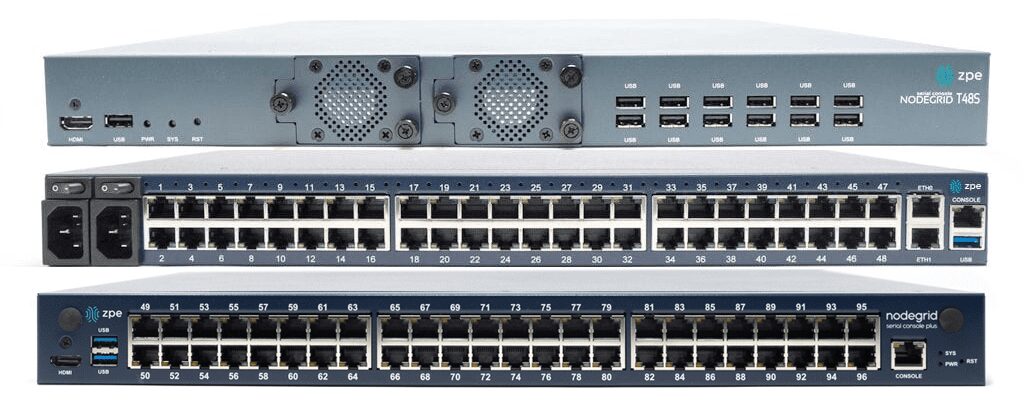
ZPE – Comparison-2(1)

Network management software tools enable administrators to provision, monitor, and maintain networks and network infrastructure without manually touching each individual device or service. We’ve previously covered the best network management software for both cloud-based and hardware-based networks. This post dives deeper into the hardware-based network management tools deployed in on-premises or private cloud environments via serial consoles (a.k.a. console servers, serial console servers, serial console routers, or serial switches).

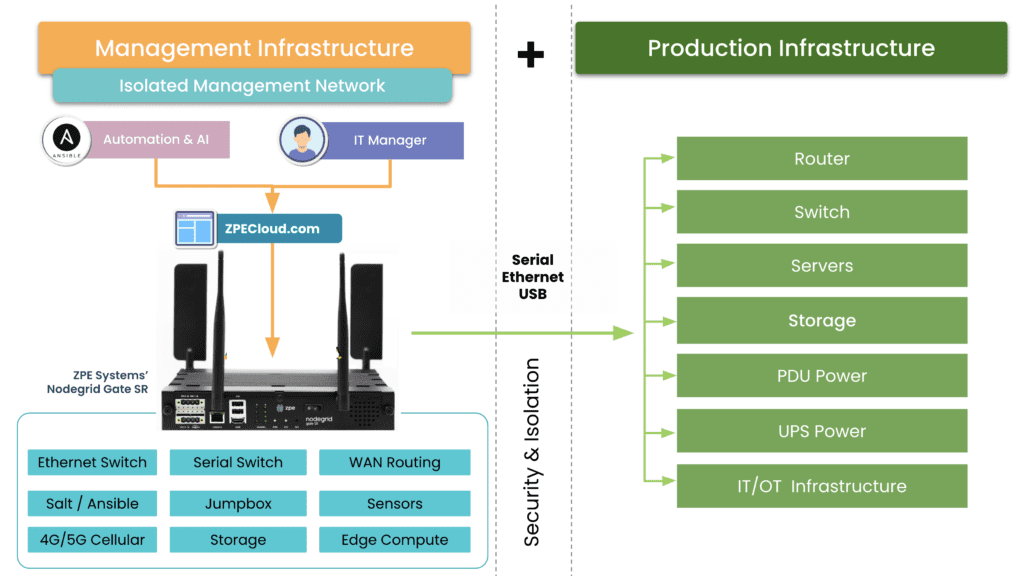
These network management software tools provide out-of-band (OOB) management access to connected network infrastructure in data centers and remote sites. Serial consoles directly interface with network systems and devices, creating an isolated management network that doesn’t depend on the production LAN, WAN, or ISP. OOB management ensures continuous remote access even during major outages, so teams can troubleshoot and recover branch offices, edge computing sites, and other remote environments without costly truck rolls or managed service support. OOB console servers also unify management of all connected infrastructure, giving administrators a single platform to monitor, control, and automate the entire distributed network architecture.

Looking for a new out-of-band network management device? Read our guide:

Comparing the Best Out-of-Band Management Devices

We compare offerings from the four best OOB network management software tool providers and discuss the features, advantages, and disadvantages of each to help network teams make the best choice for their environment.

The best OOB network management software tools

Platform

Key Features

ZPE Systems Nodegrid Manager/ZPE Cloud

  • 5G/4G LTE, Wi-Fi, POTS, or fiber OOB and failover support

  • On-premises or cloud-based software options

  • Robust hardware and software security including 2FA and SAML 2.0

  • x86 CPU and Linux-based Nodegrid OS support Guest OS and Docker containers

  • Vendor-neutral software integrates with third-party tools like Ansible, Chef, Python, and Ruby

  • Extends ZTP and other automation to legacy and mixed-vendor infrastructure

  • OOB support over IPMI, ILO, DRAC, CIMC, vSerial, and KVM

  • Device auto-discovery via network scan and custom probes

  • Power management integrated with serial session

  • Supports full range of environmental monitoring sensors

Vertiv Avocent DSView

  • 4G LTE OOB and failover support

  • HTML5 KVM and Serial viewers

  • Telnet/PuTTY serial interfaces

  • Session log, report, and archive

  • Data Center Zone definitions

  • ZTP, SOAP API, Python, Perl, PDU, and UPS automation

  • Schedule and on-demand firmware management

  • Web secure 2048 SSL certificate

  • Two-factor authentication (2FA)

PerleVIEW

  • 4G LTE, Wi-Fi, POTS, or fiber OOB and failover support

  • Health monitoring and event handling

  • Integrates with SNMP NMS

  • Automated device discovery

  • Device CLI scripting

  • Configuration backup, firmware, and change management

  • Single sign-on for in-band connections

  • Device PING tool

  • Audit trail log

Opengear Lighthouse

  • 4G LTE or fiber for OOB and failover

  •  x86 processor can run Guest OSes and automation

  • Supports over 100 power vendors’ equipment

  •  Automatic port discovery

  • Lighthouse playbooks for streamlined automation

  • Integrated SAML and AAA authentication

  • Opengear NetOps modules support Bash, Docker, Pearl, Python, and Ruby

  • SSH direct to consoles

  • Keystroke logging 

Disclaimer: This comparison was written by a 3rd party in collaboration with ZPE Systems using data gathered from publicly available data sheets and admin guides, as of 10/13/2023. Please email us if you have corrections or edits, or want to review additional attributes: Matrix@zpesystems.com

ZPE Systems Nodegrid Manager/ZPE Cloud

ZPE Systems offers two network management software tools based on their Nodegrid line of serial consoles and integrated edge routers. Nodegrid Manager is on-premises software, and ZPE Cloud is a cloud-based tool, but both provide out-of-band management access to on-premises infrastructure in data centers, branches, private clouds, and other remote sites. Nodegrid hardware offers a variety of connectivity options for OOB, failover, and WAN, including Wi-Fi and 5G. Nodegrid also supports a full range of environmental monitoring sensors for greater control over conditions in remote deployments.

Nodegrid solutions are protected by robust hardware and software security features, including UEFI Secure Boot, an embedded firewall with selectable cryptographic protocols, and 2FA and SAML 2.0 authentication. The x86 CPU architecture and Linux-based OS support Guest OSes and Docker containers, so Nodegrid boxes can directly host third-party software for security, automation, orchestration. Both Nodegrid Manager and ZPE Cloud are also completely vendor-neutral, supporting third-party automation scripts and tools including RedHat Ansible, Chef, Python, Ruby, and more. Nodegrid can even extend ZTP and other automation to legacy infrastructure that otherwise wouldn’t support it.

Nodegrid’s open platform essentially makes it a customizable network management multi-tool that’s capable of consolidating many different software solutions and network services. The primary limitation to this vendor-neutrality is that some other providers may require the purchase of additional licenses to run their tools on the Nodegrid platform.

For a real-world example of Nodegrid’s ability to streamline network management, read our case study, Vapor IO: Re-architecting the Internet.
.

Pros

Cons

  • 5G/4G LTE, Wi-Fi, POTS, or fiber OOB and failover support

  • On-premises or cloud-based software options

  • Robust hardware and software security including 2FA and SAML 2.0

  • x86 CPU and Linux-based OS support Guest OS and Docker containers

  • Vendor-neutral software integrates with third-party tools like Ansible, Chef, Python, and Ruby

  • Extends ZTP and other automation to legacy and mixed-vendor infrastructure 

  • Other vendors may require additional licenses to run VNFs and other tools on Nodegrid

Vertiv Avocent DSView

The DSViewTM network management software works with Vertiv Avocent out-of-band serial consoles, the ACS 800 and ACS 8000, which use 4G LTE cellular for out-of-band management and failover. Like the other options on this list, DSView consolidates the management of connected network infrastructure in a single web-based platform. In addition to serial port control, this software also provides keyboard/video/mouse (KVM) and MIB-based (Management Information Base) controls. It also supports environmental monitoring via sensors, but ACS8000 serial console servers only come with one sensor port – and the ACS800 doesn’t have one at all.

DSView management software includes automation support for Zero Touch Provisioning (ZTP), SOAP API, Python, and Perl scripts, and automated PDU (power distribution unit) and UPS (uninterruptible power supply) management. It also provides console event logging and notifications, such as “dying gasp” alarms when systems unexpectedly lose power. However, the software is not extensible with third-party automation or orchestration integrations, and the ACS800 and ACS8000 serial console hardware solutions run on an ARM CPU architecture that can’t support VMs or Docker.
.

Pros

Cons

  • 4G LTE OOB and failover support
  • Environmental monitoring sensor support
  • ZTP, SOAP API, Python, Perl, PDU, and UPS automation
  • Serial, KVM, and MIB-based controls
  • FIPS 410-2 cryptography and 2FA security
  • No support for third-party automation or orchestration
  • Doesn’t run VMs or Docker containers
  • Serial console lacks an embedded firewall

PerleVIEW

PerleVIEW network management software tools are based on Perle’s IOLAN SCG & SCR OOB console servers. The platform includes automated device discovery, automatic event handling, device scripting, ZTP, and collection of device statistics and health statuses. Perle focuses on meeting the FCAPS network management framework created by the International Organization for Standardization (ISO). FCAPS standards for Fault management, Configuration, Administration, Performance management, and Security management, and PerleVIEW’s features target each of these areas. For example, fault management is streamlined through automated event handling with customizable alerts and SNMP probes.

However, the software does not support any third-party integrations, limiting its automation and security capabilities. Aside from automated device discovery and event handling, PerleVIEW doesn’t offer any automation for end devices. It also doesn’t support two-factor authentication (2FA), and only supports single sign-on (SSO) for in-band connections.
.

Pros

Cons

  • 4G LTE, Wi-Fi, POTS, or fiber OOB and failover support
  • Automated device discovery, event handling, health and device log collection, and device scripting
  • Integrates with SNMP NMS (network management station)
  • Single sign-on for in-band connections only
  • Follows FCAPS standards
  • No support for third-party automation or orchestration
  • Doesn’t run VMs or Docker containers
  • Lacks support for environmental monitoring sensors

Opengear Lighthouse

Lighthouse is a network management platform that works with Opengear console servers, such as the OM2200 Operations Manager and the CM8100. The base version of Lighthouse provides out-of-band management access, integrated SAML and AAA authentication, and integrations with third-party notification and alert systems. Lighthouse supports over 100 power vendors’ equipment to streamline PDU and UPS management, and the x86 processor can run Guest OSes and automation.

With additional licenses, Lighthouse software is extensible with Opengear NetOps modules that provide greater automation capabilities with support for Bash, Docker, Pearl, Python, and Ruby. The upgraded Automation edition also includes ZTP for end devices and RESTful APIs. Beyond that, however, automation and orchestration abilities are limited because Lighthouse isn’t vendor-neutral, and Opengear has a limited ecosystem of integrations.
.

Pros

Cons

  • 4G LTE or fiber for OOB and failover
  • Integrated SAML and AAA authentication
  • Supports over 100 power vendors’ equipment
  • x86 processor can run Guest OSes and automation
  • Opengear NetOps modules and ZTP available for automation
  • Only upgraded Automation edition supports ZTP for end devices
  • NetOps modules require additional licenses
  • Limited integration ecosystem

Key takeaways

All four options on this list provide out-of-band (OOB) access to remote network infrastructure, giving teams a lifeline in case of production failures or outages. Vertiv Avocent’s DSView software provides some automation capabilities and environmental monitoring, but doesn’t support third-party automation, VMs, or Docker containers. PerleVIEW focuses on meeting FCAPS network management standards but has very limited automation and security capabilities. Opengear Lighthouse is extensible with NetOps modules and other automation features, but they require additional licenses or fees, and you’re limited to Opengear’s ecosystem of integrations.

ZPE Systems offers Nodegrid Manager as an on-premises application or ZPE Cloud as a cloud-based tool. Both options use vendor-neutral hardware and software to create an open platform you can customize with your favorite third-party apps and integrations. ZPE’s OOB network management software tools enable end-to-end automation over a highly secure and reliable out-of-band control plane for a more resilient network infrastructure.


Deploy the best OOB network management software tools with ZPE Systems

Reach out to ZPE to learn how to build a resilient network with Nodegrid OOB network management software tools. Contact Us

Living Spaces Furniture: Scaling to 50 sites with only 3 network staff

Collapsing the stack and centralizing management helps Living Spaces accelerate scaling across the U.S.

Blake Johnson – Living Spaces Furniture Network Architect

“We’ve quadrupled business, but Nodegrid is actually shrinking our workload, especially as we implement new automation. It’s a gamechanger for network folks. Period.” — Blake Johnson, Network Architect, Living Spaces Furniture

Living Spaces is a prominent furniture retailer in the United States. Their store locations include large showrooms, where customers can view furnishings for indoor and outdoor spaces, and plenty of warehouse space for storing on-hand inventory. These locations must serve customers with responsive shopping experiences, which depend on the network infrastructure.

Increasing demand helped Living Spaces grow out of its home state of California, into states including Arizona, Colorado, Oklahoma, Texas, and others. Their out-of-band infrastructure was crucial to spinning up new locations and maintaining operations. But they faced a significant problem: this infrastructure was incredibly complex and costly, requiring many dedicated cellular and out-of-band devices at each location. See why their three-person network team needed a solution that could:

  • Reduce costs and eliminate the need for $300,000 per year in SIM contracts
  • Reduce workloads and risks, by centralizing management and minimizing entry points
  • Accelerate deployments by allowing automation

ISP Network Architecture

An engineer installs fiber optic patch cables at a customer site that’s part of an ISP network architecture.
Internet service providers (ISPs) are the backbone of modern society, responsible for connecting businesses, services, and people to the Internet and to each other. ISP networks are vast, distributed, and complex, making them challenging to manage effectively. However, failing to do so has major consequences. For example, in July of 2022, Rogers Communications in Canada suffered a network system failure after a maintenance update, causing an outage that lasted more than 15 hours and took down emergency services and other critical infrastructure.

An ISP network architecture must be designed for resilience to prevent major incidents from occurring that affect consumers, communities, and the provider’s reputation. But significant challenges stand in the way, including a reliance on legacy infrastructure, and an inability to troubleshoot and recover failed gear remotely. This post discusses why these challenges exist and what ISPs can do to overcome them.

ISP network architecture challenges

Many ISP networks lack resilience because providers are failing to adapt to a rapidly changing landscape. With networks growing larger and more complex every day, new technologies like AI (artificial intelligence) and software-defined networking are needed to manage infrastructure efficiently and deliver innovative services. Additionally, providers get stuck in a break-fix cycle that leaves teams struggling to maintain service level agreements or focus on innovation. Let’s look at the causes of these challenges and discuss how to build more resilient ISP network architectures.

Legacy infrastructure creates technical debt and hampers growth

The challenge:

The solution:

Reliance on legacy systems creates technical debt and prevents ISPs from implementing new technologies

Vendor-neutral platforms like Gen 3 serial consoles extend automation, software-defined networking, and other advanced technologies to legacy infrastructure until it can be replaced.

Internet service providers often have a network architecture that’s a mix of new and legacy infrastructure. However, engineers with the experience to support older solutions are no longer working in the field, either because they’ve been promoted to leadership positions or retired. When legacy hardware fails, inexperienced engineers need time to overcome this skills gap, and ISPs may even need to bring in consultants. This increases the cost of failures, creating what’s known as “technical debt” – when a solution is more expensive to support than the value it brings to the organization.

In addition, ISPs can improve network resilience and provide better service to customers, by adopting new technologies like AI, 5G, software-defined networking (SDN), and Network as a Service (NaaS). But legacy hardware hampers the ability to adopt these technologies. For example, NaaS abstracts the need for MPLS circuits and customer-premises gear, making architectures more cost-effective and improving the customer experience. NaaS brings SDN concepts like programmable networking and API-based operations to WAN & LAN services, hybrid cloud, Private Network Interconnect, and internet exchange points. It optimizes resource allocation by considering network and computing resources as a unified whole and attempts to automate as much as possible. The trouble is, ISPs struggle to implement NaaS and other beneficial new technologies because their legacy hardware simply can’t support it.

Solution: Legacy modernization with a vendor-neutral platform

The ideal solution is to replace legacy infrastructure with modern hardware and software that supports the latest technologies. But for many ISPs, an overhaul like this is too costly and intensive. The next-best option is to bridge the gap with a vendor-neutral network modernization platform that extends automation, AI, and 5G connectivity to otherwise unsupported systems.

For example, serial consoles (also known as terminal servers, console servers, and serial console switches) provide remote management access to network infrastructure. The newest generation of these devices, known as Gen 3, are vendor-neutral by design so that they can control third-party and legacy hardware. Through a combination of built-in features and integrations, Gen 3 serial consoles can use technology like zero-touch provisioning (ZTP), AIOps, and automated configuration management to control connected hardware that otherwise wouldn’t support it. Some solutions, such as the Nodegrid platform from ZPE Systems, can even directly host SDN and NaaS software from other vendors, so ISPs can start implementing network improvements right away while they gradually replace their outdated infrastructure.

Physical infrastructure is difficult to manage and troubleshoot remotely

The challenge:

The solution:

ISP network admins can’t respond to changing environmental conditions or recover failed hardware remotely

Environmental monitoring connected to an out-of-band (OOB) management solution ensures continuous remote access on a dedicated, isolated network that enables fast and cost-effective recovery.

ISP network architectures involve a great deal of physical infrastructure, which is often deployed in remote edge sites and customer premises. Even with software- or service-based network solutions, hardware is needed to host that software, and the physical environment for that hardware is often less than ideal. Drastic weather changes, power outages, and other unexpected scenarios can happen without notice and rapidly bring down an ISP network. These events often cut off remote management access as well, making troubleshooting and recovery difficult, time-consuming, and expensive. In fact, supporting this physical infrastructure often consumes so much time and effort that it prevents ISPs from focusing on delivering better services and software to their customers.

Solution: Out-of-band management with environmental monitoring

The first part of the solution involves monitoring the environment that houses remote, physical infrastructure. An environmental monitoring system uses sensors to detect changes in airflow, temperature, humidity, and other conditions that affect the operation of network hardware. These sensors give ISPs a virtual presence in edge deployments and customer sites so they can quickly respond to changing conditions before systems overheat or circuitry corrodes.

The second part involves providing management teams with reliable remote access to physical infrastructure that won’t go down if there’s a production network outage. Out-of-band (OOB) management solutions use serial consoles with dedicated network interfaces used just for management access. This creates a parallel, out-of-band network that’s completely isolated from production network services and infrastructure. Additionally, many serial consoles use cellular connectivity via 4G or 5G to OOB access, providing a wireless lifeline to connect, troubleshoot, and restore remote infrastructure. OOB management allows ISPs to troubleshoot and recover failed hardware remotely, even during total network outages, so they can get services back up and running faster and less expensively.

The environmental monitoring system should run on the OOB network so remote admins can continue to monitor conditions while they recover failed hardware. The out-of-band management solution also needs to be vendor-neutral so ISPs can deploy third-party automation, AI, and NaaS on the OOB network. For example, Nodegrid Gen 3 serial consoles provide OOB, environmental monitoring, and a vendor-neutral platform to host third-party software at the edge. Nodegrid even enables fully automated responses to changing environmental conditions in those edge environments before admins are aware of a problem.

To learn more about building a resilient, automated network infrastructure with Nodegrid, download the Network Automation Blueprint.

Download Now

ISP network architecture resilience with Nodegrid

ISP network architectures must be resilient, meaning service providers must find a way to bridge the gap between legacy and modern systems while ensuring continuous remote access to manage, troubleshoot, and recover hardware at the edge. The Nodegrid ISP network infrastructure solution  from ZPE Systems is a vendor-neutral, Gen 3 platform that delivers legacy modernization, environmental monitoring, out-of-band management, and much more.

Nodegrid delivers ISP network architecture resilience in a single platform

Request a free demo to see Nodegrid ISP network architecture solutions in action.

Watch a Demo

Dissecting the MGM Cyberattack: Lions, Tigers, & Bears, Oh My!

Dissecting the MGM Cyberattack

This article was written by James Cabe, CISSP, whose cybersecurity expertise has helped major companies including Microsoft and Fortinet.

The recent MGM cyberattack reportedly caused the company to lose millions in revenue per day. The successful kill chain attack — originally a military tactic used to accomplish a particular objective — granted inside access to the attackers, who encrypted and held for ransom some of MGM’s most prized assets. These ‘crown jewel’ assets, as they’re called in the cybersecurity realm, are most critical to the accomplishment of an organization’s mission. Because ransomware attacks persist in corporate networks until fully cleared, organizations must be ready to “fight through” an attack using resilient systems and effective procedures. This should involve identifying these crown jewels and designing them in a way that ensures they can operate through attacks.

When these types of large-profile attacks occur, many cast their eyes at cybersecurity leaders for failing to fend off the bad guys. The reality is these leaders struggle to get budget, corporate buy-in, and digital assets that are required to build a strong defense for business continuity. For MGM, it’s likely they also faced difficulty operationalizing current assets across a gigantic digital estate, and ultimately lacked a plan to recover from a total outage of crown jewel assets.

From the attacker’s perspective, an exceptional level of intelligence and preparation are required in order to understand a target’s internal operations and architecture and execute a successful kill chain. Successfully attacking a sophisticated organization like MGM requires rapid information stealing to capture and leverage cloud credentials, as well as to lock up those resources and lock out the most important support staff in an organization. This is the crux of the issue: infostealers and ransomware automate the mass grabbing of resources and quickly set up a denial of services for the stakeholders that are responsible for fixing these systems.

How did the MGM cyberattack start? After MGM discovered the breach, how did the attacker stay one step ahead? What approach should organizations take to ensure they can recover if they’re targeted?

Who Started The MGM Cyberattack, and How?

The MGM cyberattack began after an adversary group named “Scattered Spider” used phishing over the phone, an approach called ‘vishing,’ to convince MGM’s customer support rep into granting them access with elevated privileges. Scattered Spider is the same group responsible for the SIM-swapping campaign that happened a few months ago, where they successfully subverted multifactor authentication. Their primary tactic involves social engineering, which they use to steal personal information from employees.  

MGM and many other casinos currently use advanced Zero Trust identity security from Okta. However, the attacker was able to trick the service desk into resetting a password to gain access into the network. Even with newer Zero Trust identity solutions, most organizations unravel once attackers get to the real chewy center” of the network: the humans operating them

Spider Bug Insect graphic

Okta is quoted saying, “In recent weeks, multiple US-based Okta customers have reported a consistent pattern of social engineering attacks against their IT service desk personnel, in which the caller’s strategy was to convince service desk personnel to reset all multi-factor authentication (MFA) factors enrolled by highly privileged users.” Okta further warned, “The attackers then leveraged their compromise of highly privileged Okta Super Administrator accounts to abuse legitimate identity federation features that enabled them to impersonate users within the compromised organization.” 

The MGM cyberattack and those like it are more about processes than technology. Let’s explore how the attack progressed, and how the criminals were successful at staying persistent and ultimately hitting their goal. 

How Did A Simple Authentication Attack Morph Into a Complex Attack?

The Scattered Spider threat actors use a platform written by UNC3944 or AlphaV (known by several names). This is a middleware developer for attack platforms that allow criminals to follow a specific set of instructions (a kill chain) to gain access and ultimately encrypt and exfiltrate data from a targeted company. AlphaV’s platform is called BlackCat, which they use to establish a foothold, establish Command and Control (C2) for the malware, and exfiltrate data, to ultimately get paid.

With elevated Okta privileges at MGM, Scattered Spider deployed a file containing a Java-based remote access trojan, which became a “vending machine” for other remote access trojans (RATs) that sought out other nearby machines to spread quickly. The AlphaV RAT would ‘pwn‘ MGM’s Azure virtual servers to gain access, then sniff for more user passwords and create dummy accounts.  

These RATs leveraged a built-in tool called “POORTRY,” the Microsoft Serial Console driver turned malicious, to terminate selected processes on Windows systems (e.g., Endpoint Detection and Response (EDR) agents on endpoints). AlphaV, the platform maintainer, signed the POORTRY driver with a Microsoft Windows Hardware Compatibility Authenticode signature. This helped the malware to evade most Endpoint Detection software. 

This tool was used to get elevated and persistent access to the Okta Proxy servers that were in the scope of the attack and accessible remotely by the attacker. This attack can evade a lot of detection tools. This access allowed them to capture AM\IAM accounts that allowed them greater access to the organization. This stealing of credentials from the Okta Proxy servers was confirmed by Okta responders as well as the threat actor on their blog. This is called a “living off the land” attack. 

Alphv statement on MGM

How Did MGM Discover the Cyberattack?

The first notification of the hack was dropped on the VXUnderground forums. The staff there verified through chat contact with the threat group UNC3944\AlphaV, who works in conjunction with the Scattered Spider threat actor, The attacker also confirmed this on their blog on the darknets.

On September 11, 2023, anyone attempting to visit MGM’s website was greeted by a message stating that the website was currently unavailable. The attack also stopped hotel card readers, gaming machines, and other equipment critical to MGM’s day-to-day operations and revenue generating activities. 

Screenshot showing MGM casino's website down.

How Did the Attacker Maintain Control?

The initial attack allowed AlphaV, who runs the C2 (Command and Control) networks for the RattyRat trojan, to have remote access to the VMware server farm that services the guest systems, the gaming control platforms, and possibly the payment processing systems. They maintained control despite all of MGM’s attempts to mitigate the problem, because they were able to establish elevated access in places the organization could not easily remove them from without removing access to the whole organization. They established something called “persistence.”

From the attacker’s blog on the darknet, “MGM made the hasty decision to shut down every one of their Okta Sync servers after learning that we had been lurking on their Okta Agent servers sniffing passwords of people whose passwords couldn’t be cracked from their domain controller hash dumps. At this point MGM being completely locked out of their local environment. Meanwhile the attacker continued having super administrator privileges to their Okta, along with Global Administrator privileges to their Azure tenant. They made an attempt to evict us after discovering that we had access to their Okta environment, but things did not go according to plan. On Sunday night, MGM implemented conditional restrictions that barred all access to their Okta (MGMResorts.okta.com) environment due to inadequate administrative capabilities and weak incident response playbooks. Their network has been infiltrated since Friday. Due to their network engineers’ lack of understanding of how the network functions, network access was problematic on Saturday. They then made the decision to ‘take offline’ seemingly important components of their infrastructure on Sunday. After waiting a day, we successfully launched ransomware attacks against more than 100 ESXi hypervisors in their environment on September 11th after trying to get in touch but failing.“

MGM tried many things to remove access into their network. However, because of an advanced attack that installed a shadow identity provider in their own Identity Solution, they were able to maintain access long enough to redeploy access to most of the assets they found to be the backbone of the company. AlphaV was then able to encrypt most of the crown jewels of MGM’s operations network.

Is There a Way to Stop These Types of Attacks? 

The MGM cyberattack required physical reconnaissance, patience, and a lot of planning to set up the kill chain. Playbooks that can protect against this kind of attack are hard to create, because it can mean taking all guest services offline for a period, which requires very high authority in the organization. One of the comments from the attacker was that the organization did not act fast enough to take all remote access offline to their management framework that consisted of Okta Proxy Servers. When they did, the adversary was then able to lock them out by submitting a Multifactor Authentication Reset. To stall the attacker, they would have had to induce a full outage of their crown jewels while a formal assessment of all assets could be performed. Taking assets offline requires buy-in at the board level and executive level, which are difficult to come by even if an organization emphasizes its operational excellence, detection, and defense.

Organizations should have a plan to quickly recover from a total loss of a site, outside of backups (which can be lost) and disaster recovery sites. Organizations need to be properly hard-segmented into a full IMI (Isolated Management Infrastructure). Keeping crown jewels safe from an attacker that targets the chewiest part of an organization should be top of any list going from 2023 budget to 2024 planning.

The following is a light version of what can be done in a fully-automated response that can take mere hours instead of days for an outage (a full operations blueprint will be out in the near future).

Isolated Management Infrastructure diagram

An IMI can host an IRE (Isolated Recovery Environment), which is used to cut off all user data and remote access (except for OOB) to an entire infected site. A properly implemented recovery environment should automate most of these activities to speed up the recovery. One of the first considerations is the requirement for a secondary organization in your IAM that is not attached to normal operations. This is what is known as a set of “Break the Glass” accounts. These are known in military circles but have made it into formal practice as part of a strong playbook for ransomware. Once you do this, you can instantiate selected Zero Trust remote access to the site using credentials that are not in the scope of the attack, and then bring up a communications channel for a virtual war room using software like Rocket Chat, Jitsi, Slack, or other standalone communications tools that are installable on the IRE environment. 

Avoiding normal authentication methods or IAM and normal communication channels is required for the integrity of the recovery and strengthens the recovery playbook. During this time, no email may be used that is associated directly with the organization. Ideally, email should never touch an account that is associated with it either.

The next step is to create a new set of clean side networks that do not directly connect to the main backbone or put it behind another firewall for triage good/bad. Using a sniffer software running on the IRE, the recovery team can then run a passive scan or an active scanner against all machines continuing to try to send email to exchange\M365. You can give access to people that are deemed good (not sending traffic) but lock off (with an EDR) the ability to open Outlook for a while, while keeping them on the web email. From there, continue working through to find all the sending drivers to see if they have a good backup. If not, back up the infected drive for offline data retrieval for later. Then reimage while scanning the UEFI BIOS during boot (if needed, run an IPMI scan). If the site has a list of assets that are considered crown jewels, prioritize these.

Once you have a segmented “clean side” established with all the network services required to operate the site (DNS, IAM, DHCP), then Internet access can be restored to this site on a limited basis; which means only out-bound communications, nothing in-bound. Restorative operations can continue apace. making sure that the infected side assets are captured in backup for later forensics following chain-of-custody if damages exceeding insurance limits are found to be the case. This is decided in the war room.

Get the Blueprint for Isolated Management Infrastructure

Maintaining control of critical systems is something security practitioners deal with in the Operational Technology (Industrial Control Systems) side of an organization. For them, the critical and most impactful part of the problem is the loss of control rather than the loss of data, a problem highlighted by the MGM cyberattack. Operational Technology Safety and Security teams set up and maintain Safety Systems as a fallback measure in case of any kind of disaster. This automation allows fallback of services safely, from which point they can recover operations. In 2023, most of our business is done on computers and networks. It is how to plan for business continuity. Now is the time that IT started following this safety system blueprint as well. 

Download the Network Automation Blueprint now, which helps you lay the groundwork for your IMI so you can recover from any attack.

Get in touch with me!

True security can only be achieved through resilience, and that’s my mission. If you want help shoring up your defenses, building an IMI, and implementing a Resilience System, get in touch with me. Here are links to my social media accounts:

What is a radio access network (RAN)?

This post provides an introduction to radio access networks (RAN) before discussing 5G RAN challenges, solutions, and use cases.
5G cellular technology is used for internet of things (IoT) deployments and operational technology (OT) automation across many different kinds of organizations, including city governments, global logistics companies, and healthcare providers. 5G access is provided by a radio access network (RAN) using mobile towers and small cells, but deploying these networks is challenging due to numerous factors, including poor public opinion. This post provides an introduction to radio access networks before discussing 5G RAN challenges, solutions, and use cases.

Table of Contents:

What is a Radio Access Network (RAN)?

A radio access network (RAN) is the portion of a cellular network that connects smartphones and other end-user devices to the internet. Information is communicated back and forth between smartphones and the RAN’s transceivers via radio waves. Those wireless signals are translated into digital form, passed to the core network, and then to the global internet.

What is 5G RAN?

Every cellular generation has its own associated RAN technology. 4G RAN was the first generation based entirely on the internet protocol (IP) rather than older circuit-based technology. The newest generation, 5G, supports faster speeds, great capacity, and lower latency than previous generations. However, there are significant challenges in the way of 5G implementation.

5G Radio Access Network (RAN) challenges

There are three major hurdles to 5G implementation:

  1. Public opinion – Thanks in part to misinformation and conspiracy theories, there has been a lot of resistance to 5G implementations. While many people already use smartphones with 5G technology, they tend to balk at the idea of giant cell towers and masts going up in their town or city.
  2. mmWave limitations – Wireless frequencies in the mmWave (millimeter wave) spectrum provide the speed and capacity required for 5G, but they have a shorter range and difficulty penetrating walls. That makes 5G tricky in industrial settings and office buildings.
  3. Remote recovery – A 5G RAN typically operates in cramped spaces without a continuous human presence, and administrators monitor and manage the equipment remotely over the cellular network. However, if that cell link goes down due to equipment failure or natural disaster, teams are cut off, and a truck must be rolled to fix the issue, adding significant costs and downtime.

Addressing these hurdles is complicated, as the solutions often create additional challenges. For example, the first two points can be addressed with 5G small cell technology. Small cells are typically compact enough to deploy on top of buildings or street furniture to extend 5G coverage into densely populated areas without a full-size mobile mast. This makes 5G small cell networks more palatable to city officials and the general public alike. However, small cells are still subject to planning restrictions, and the absence of a common 5G small cell framework makes the application process difficult and time-consuming.

In addition, some small cells are tiny enough to deploy indoors, improving 5G propagation and coverage in buildings. However, operators would need to deploy dozens or hundreds of small cells to achieve the speed and reliability needed for industrial IoT and high-tech use cases. Each one requires significant power resources as well as a fiber or wireless backhaul, and due to a lack of standardization, operators may even have to submit many individual planning applications. Plus, a small cell network of that size is complex to monitor and manage, requiring additional hardware and software solutions that add even more costs and complexity.

Addressing the third point requires an out-of-band network connection to 5G RAN deployments. For example, a 4G/LTE serial console provides an alternative internet connection so teams can remotely access RAN equipment during 5G outages. A serial console directly connects to radio access network infrastructure so remote administrators can do things like reboot a hung device or refresh DHCP even if the local network is down.

However, many serial consoles suffer from vendor lock-in, meaning they don’t connect to all devices or support third-party management, troubleshooting, and recovery tools. This either limits an administrator’s ability to remotely recover from outages or forces them to deploy additional hardware and software solutions to gain all the remote functionality required, adding to the expense and complexity of 5G RAN deployments.

A new approach to 5G deployments

The upgrade from 4G to 5G is proving to be more fraught than previous transitions between generations, so it’s clear that a new approach is needed. Small cell technology is a good start, but a lack of standardization severely hampers its adoption. Help is on the way, though – a group called the Small Cell Forum (SCF), which is made up of wireless leaders like AT&T, Cisco, Qualcomm, and Samsung, is working to establish a set of common definitions and recommendations to help the industry standardize 5G small cell networks.

In their definitional report, the SCF highlights the need for vendor-neutral hardware that’s customizable and swappable for various 5G use cases. Architectural design and planning applications are simpler when all of a small cell network’s equipment supports the same common 5G interface. Multi-functional devices combining networking, out-of-band access, and third-party application hosting significantly reduce expenses and management complexity.

Let’s examine some potential 5G use cases that could benefit from this new approach.

Smart cities

A smart city is the ideal use case for a 5G small cell network. Since wireless clients are packed into densely populated areas, an array of 5G small cells should provide sufficient coverage without the need for a full-sized mast. Deploying a small, vendor-neutral, multi-functional device like the Nodegrid Mini Services Router alongside small cells provides flexible backhaul options, out-of-band remote management, and application hosting. Installing small cells and Mini SRs on streetlamps, parking structures, and other public infrastructure gives teams everything they need to remotely monitor, operate, and recover 5G smart city infrastructure without adding more complexity to the network.

Global asset tracking and logistics

The internet of things (IoT) makes it possible for large, global enterprises to streamline asset tracking and supply chain logistics. Organizations use IoT-enabled devices to handle inventory management, fulfillment, shipment tracking, quality control, and more. 5G small cell technology provides the necessary speed, coverage, and bandwidth, but the sheer number of devices – and their global distribution – creates a lot of management complexity.

All-in-one solutions like Nodegrid reduce the tech stack by combining networking, management, and application hosting in a single box. Plus, Nodegrid provides a centralized management platform that can unify all connected devices, apps, and services in a single place. Administrators get a single pane of glass to monitor, control, troubleshoot, and automate the entire global architecture, reducing costs and streamlining operations.

Building automation

Many large property management companies rely on building automation systems that use operational technology (OT) to control door locks, lighting, HVAC, and more with very little human intervention. 5G’s improved speed and lower latency open up even greater automation capabilities, especially in warehouses and manufacturing plants.

Nodegrid’s compact, vendor-neutral solutions give remote operators a reliable, out-of-band connection to automated building systems to keep businesses running 24/7, even during 5G outages or LAN failures. You can deploy the Mini SR in cramped or semi-outdoor spaces to extend monitoring, security, and management coverage to every part of the 5G deployment. Nodegrid enables end-to-end building automation and makes 5G networks more resilient to failure.

Simplifying 5G with Nodegrid

A 5G radio access network (RAN) provides internet access to 5G-enabled systems, such as smartphones and IoT devices. While 5G deployments are proving complicated and fraught with issues, these challenges are overcome using small cell technology and vendor-neutral, multi-function devices like Nodegrid. Nodegrid’s integrated services routers deliver all-in-one networking, out-of-band management, backhauling, and application hosting capabilities to simplify 5G deployments without compromise.

Learn how Nodegrid can help deliver simplified 5G with out-of-band management!

Request a free Nodegrid demo to see how vendor-neutral solutions simplify 5G radio access network (RAN) deployments.

Contact Us

Data Center Migration Checklist

A data center migration is represented by a person physically pushing a rack of data center infrastructure into place
Various reasons may prompt a move to a new data center, like finding a different provider with lower prices, or the added security of relocating assets from an on-premises location to a colocation facility or private cloud.

Despite the potential benefits, data center migrations are often tough on enterprises, both internally and from the client side of things. Data center managers, systems administrators, and network engineers must cope with the logistical difficulties of planning, executing, and supporting the move. End-users may experience service disruptions and performance issues that make their jobs harder. Migrations also tend to reveal any weaknesses in the actual infrastructure that’s moved, which means systems that once worked perfectly may require extra support during and after the migration.

The best way to limit headaches and business disruptions is to plan every step of a data center migration meticulously. This guide provides a basic data center migration checklist to help with planning and includes additional resources for streamlining your move.

Data center migration checklist

Data center migrations are always complex and unique to each organization, but there are typically two major approaches:

  • Lift-and-shift. You physically move infrastructure from one data center to another. In some ways, this is the easiest approach because all components are known, but it can limit your potential benefits if gear remains in racks for easy transport to the new location rather than using the move as an opportunity to improve or upgrade certain parts.
  • New build. You replace some or all of your infrastructure with different solutions in a new data center. This approach is more complex because services and dependencies must be migrated to new environments, but it also permits organizations to simultaneously improve operational processes, cut costs, and update existing tech stacks.

The following data center migration checklist will help guide your planning for either approach and ensure you’re asking the right questions to prepare for any potential problems.

Quick Data Center Migration Checklist

  • Conduct site surveys of the current and the new data centers to determine the existing limitations and available resources, like space, power, cooling, cable management, and security.

  • Locate – or create – documentation for infrastructure requirements such as storage, compute, networking, and applications.

  • Outline the dependencies and ancillary systems from the current data center environment that you must replicate in the new data center.

  • Plan the physical layout and overall network topology of the new environment, including physical cabling, out-of-band management, network, storage, power, rack layout, and cooling.

  • Plan your management access, both for the deployment and for ongoing maintenance, and determine how to assist the rollout (for example, with remote access and automation).

  • Determine your networking requirements (e.g., VLANs, IP addresses, DNS, MPLS) and make an implementation plan.

  • Plan out the migration itself and include disaster recovery options and checkpoints in case something changes or issues arise.

  • Determine who is responsible for which aspects of the move and communicate all expectations and plans.

  • Assign a dedicated triage team to handle end-user support requests if there are issues during or immediately after the move.

  • Create a list of vendor contacts for each migrated component so it’s easier to contact support if something goes wrong.

  • If possible, use a lab environment to simulate key steps of the data center migration to identify potential issues or gaps.

  • Have a testing plan ready to execute once the move is complete to ensure infrastructure integrity, performance, and reliability in the new data center environment.

1.  Site surveys

The first step is to determine your physical requirements – how much space, power, cooling, cable management, etc., you’ll need in the new data center. Then, conduct site surveys of the new environment to identify existing limitations and available resources. For example, you’ll want to make sure the HVAC system can provide adequate climate control – specific to the new locale – for your incoming hardware. You may need to verify that your power supply can support additional chillers or dehumidifiers, if necessary, to maintain optimal temperature ranges. In addition to physical infrastructure requirements, factors like security and physical accessibility are important considerations for your new location.

2. Infrastructure documentation

At a bare minimum, you need an accurate list of all the physical and virtual infrastructure you’re moving to the new data center. You should also collect any existing documentation on your application and system requirements for storage, compute, networking, and security to ensure you cover all these bases in the migration. If that documentation doesn’t exist, now’s the time to create it. Having as much documentation as possible will streamline many of the following steps in your data center move.

3. Dependencies and ancillary services

Aside from the infrastructure you’re moving, hundreds or thousands of other services will likely be affected by the change. It’s important to map out these dependencies and ancillary services to learn how the migration will affect them and what you can do to smooth the transition. For example, if an application or service relies on a legacy database, you may need to upgrade both the database and its hardware to ensure end-users have uninterrupted access. As an added benefit, creating this map also aids in implementing micro-segmentation for Zero Trust security.

4. Layout and topology

The next step is to plan the physical layout of the new data center infrastructure. Where will network, storage, and power devices sit in the rack and cabinets? How will you handle cable management? Will your planned layout provide enough airflow for cooling? This is also the time to plan the network topology – how traffic will flow to, from, and within the new data center infrastructure.

5. Management access

You must determine how your administrators will deploy and manage the new data center infrastructure. Will you enable remote access? If so, how will you ensure continuous availability during migration or when issues arise? Do you plan to automate your deployment with zero touch provisioning?

6. Network planning

If you didn’t cover this in your infrastructure documentation, you’ll need specific documentation for your data center networking requirements – both WAN (wide area networking) and LAN (local area networking). This is a good time to determine whether you want to exactly replicate your existing network environment or make any network infrastructure upgrades. Then, create a detailed implementation plan covering everything from VLANs to IP address provisioning, DNS migrations, and ordering MPLS circuits.

7. Migration & build planning

Next, plan out each step of the move or build itself – the actions your team will perform immediately before, during, and after the migration. It’s important to include disaster recovery options in case critical services break, or unforeseen changes cause delays. Implementing checkpoints at key stages of the move will help ensure any issues are fixed before they impact subsequent migration steps.

8. Assembling a team

At this stage, you likely have a team responsible for planning the data center migration, but you also need to identify who’s responsible for every aspect of the move itself. It’s critical to do this as early as possible so you have time to set expectations, communicate the plan, and handle any required pre-migration training or support. Additionally, ensure this team includes dedicated support staff who can triage end-user requests if any issues arise during or after the migration.

9. Vendor support

Any experienced sysadmin will tell you that anything that could go wrong with a data center migration probably will, so you should plan for the worst but hope for the best. That means collecting a list of vendor contacts for each hardware and software component you’re migrating so it will be easier to contact support if something goes awry. For especially critical systems, you may even want to alert your vendor POCs prior to the move so they can be on hand (or near their phones) on the day of the move.

10. Lab simulation

This step may not be feasible for every organization, but ideally, you’ll use a lab environment to simulate key stages of the data center migration before you actually move. Running a virtualized simulation can help you identify potential hiccups with connection settings or compatibility issues. It can also highlight gaps in your planning – like forgetting to restore user access and security rules after building new firewalls – so you can address them before they affect production services.

11. Post-migration testing

Finally, you need to create a post-migration testing plan that’s ready to implement as soon as the move is complete. Testing will validate the integrity, performance, and reliability of infrastructure in the new environment, allowing teams to proactively resolve issues instead of waiting for monitoring notifications or end-user complaints.

Streamlining your data center migration

Using this data center migration checklist to create a comprehensive plan will help reduce setbacks on the day of the move. To further streamline the migration process and set yourself up for success in your new environment, consider upgrading to a vendor-neutral data center orchestration platform. Such a platform will provide a unified tool for administrators and engineers to monitor, deploy, and manage modern, multi-vendor, and legacy data center infrastructure. Reducing the number of individual solutions you need to access and manage during migration will decrease complexity and speed up the move, so you can start reaping the benefits of your new environment sooner.

Want to learn more about Data Center migration?

For a complete data center migration checklist, including in-depth guidance and best practices for moving day, click here to download our Complete Guide to Data Center Migrations or contact ZPE Systems today to learn more.
Contact Us Download Now