Providing Out-of-Band Connectivity to Mission-Critical IT Resources

Best DevOps Tools

A glowing interface of DevOps tools and concepts hover above a laptop.
DevOps is all about streamlining software development and delivery through automation and collaboration. Many workflows are involved in a DevOps software development lifecycle, but they can be broadly broken down into the following categories: development, resource provisioning and management, integration, testing, deployment, and monitoring. The best DevOps tools streamline and automate these key aspects of the DevOps lifecycle. This blog discusses what role these tools play and highlights the most popular offerings in each category.

The best DevOps tools

Categorizing the Best DevOps Tools

Version Control Tools

Track and manage all the changes made to a code base.

IaC Build Tools

Provision infrastructure automatically with software code.

Configuration Management Tools

Prevent unauthorized changes from compromising security.

CI/CD Tools

Automatically build, test, integrate, and deploy software.

Testing Tools

Automatically test and validate software to streamline delivery.

Container Tools

Create, deploy, and manage containerized resources for microservice applications.

Monitoring & Incident Response Tools

Detect and resolve issues while finding opportunities to optimize.

DevOps version control

In a DevOps environment, a whole team of developers may work on the same code base simultaneously for maximum efficiency. DevOps version control tools like GitHub allow you to track and manage all the changes made to a code base, providing visibility into who’s making what changes at what time. Version control prevents devs from overwriting each other’s work or making unauthorized changes. For example, a developer may come up with a way to improve the performance of a feature by changing the existing code, but doing so inadvertently creates a vulnerability in the software or interferes with other application functions. DevOps version control prevents unauthorized code changes from integrating with the rest of source code and tracks who’s responsible for making the request, improving the stability and security of the software.

  •  Best DevOps version control tool: Github

Infrastructure as Code (IaC)

Infrastructure as Code (IaC) streamlines the Operations side of a DevOps environment by abstracting server, VM, and container configurations as software code. IaC build tools like HashiCorp Terraform allow Ops teams to write infrastructure configurations as declarative or imperative code, which is used to provision resources automatically. With IaC, teams can deploy infrastructure at the velocity required by DevOps development cycles. A screenshot of a Terraform configuration for AWS infrastructure.
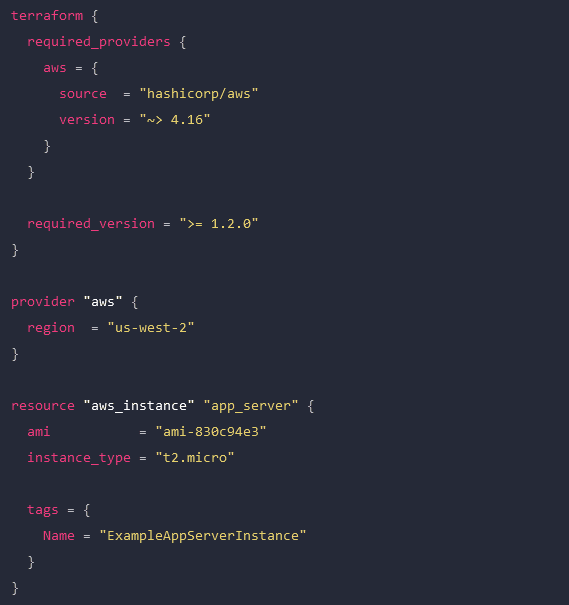
An example Terraform configuration for IaC.

Configuration management

Configuration management involves monitoring infrastructure and network devices to make sure no unauthorized changes are made while systems are in production. Unmonitored changes could introduce security vulnerabilities that the organization is unaware of, especially in a fast-paced DevOps environment. In addition, as systems are patched and updated over time, configuration drift becomes a concern, leading to additional quality and security issues. DevOps configuration management tools like RedHat Ansible automatically monitor configurations and roll back unauthorized modifications. Some IaC build tools, like Terraform, also include configuration management.

Continuous Integration/Continuous Delivery (CI/CD)

Continuous Integration/Continuous Delivery (CI/CD) is a software development methodology that goes hand-in-hand with DevOps. In CI/CD, software code is continuously updated and integrated with the main code base, allowing a continuous delivery of new features and improvements. CI/CD tools like Jenkins automate every step of the CI/CD process, including software building, testing, integrating, and deployment. This allows DevOps organizations to continuously innovate and optimize their products to stay competitive in the market.

Software testing

Not all DevOps teams utilize CI/CD, and even those that do may have additional software testing needs that aren’t addressed by their CI/CD platform. In DevOps, app development is broken up into short sprints so manageable chunks of code can be tested and integrated as quickly as possible. Manual testing is slow and tedious, introducing delays that prevent teams from achieving the rapid delivery schedules required by DevOps organizations. DevOps software testing tools like Selenium automatically validate software to streamline the process and allow testing to occur early and often in the development cycle. That means high-quality apps and features get out to customers sooner, improving the ROI of software projects.

  •  Best software testing tool: Selenium

Container management

In DevOps, containers are lightweight, virtualized resources used in the development of microservice applications. Microservice applications are extremely agile, breaking up software into individual services that can be developed, deployed, managed, and destroyed without affecting other parts of the app. Docker is the de facto standard for basic container creation and management. Kubernetes takes things a step further by automating the orchestration of large-scale container deployments to enable an extremely efficient and streamlined infrastructure.

Monitoring & incident management

Continuous improvement is a core tenet of the DevOps methodology. Software and infrastructure must be monitored so potential issues can be resolved before they affect software performance or availability. Additionally, monitoring data should be analyzed for opportunities to improve the quality, speed, and usability of applications and systems. DevOps monitoring and incident response tools like Cisco’s AppDynamics provide full-stack visibility, automatic alerts, automated incident response and remediation, and in-depth analysis so DevOps teams can make data-driven decisions to improve their products.

Deploy the best DevOps tools with Nodegrid

DevOps is all about agility, speed, and efficiency. The best DevOps tools use automation to streamline key workflows so teams can deliver high-quality software faster. With so many individual tools to manage, there’s a real risk of DevOps tech sprawl driving costs up and inhibiting efficiency. One of the best ways to reduce tech sprawl (without giving up all the tools you love) is by using vendor-neutral platforms to consolidate your solutions. For example, the Nodegrid Services Delivery Platform from ZPE Systems can host and integrate 3rd-party DevOps tools, reducing the need to deploy additional virtual or hardware resources for each solution. Nodegrid utilizes integrated services routers, such as the Gate SR or Net SR, to provide branch/edge gateway routing, in-band networking, out-of-band (OOB) management, cellular failover, and more. With a Nodegrid SR, you can combine all your network functions and DevOps tools into a single integrated solution, consolidating your tech stack and streamlining operations.

A major benefit of using Nodegrid is that the Linux-based Nodegrid OS is Synopsys secure, meaning every line of source code is checked during our SDLC. This significantly reduces CVEs and other vulnerabilities that are likely present in other vendors’ software.

Learn more about efficient DevOps management with vendor-neutral solutions

With the vendor-neutral Nodegrid Services Delivery Platform, you can deploy the best DevOps tools while reducing tech sprawl. Watch a free Nodegrid demo to learn more.


Request a Demo

Edge Management and Orchestration

shutterstock_2264235201(1)

Organizations prioritizing digital transformation by adopting IoT (Internet of Things) technologies generate and process an unprecedented amount of data. Traditionally, the systems used to process that data live in a centralized data center or the cloud. However, IoT devices are often deployed around the edges of the enterprise in remote sites like retail stores, manufacturing plants, and oil rigs. Transferring so much data back and forth creates a lot of latency and uses valuable bandwidth. Edge computing solves this problem by moving processing units closer to the sources that generate the data.

IBM estimates there are over 15 billion edge devices already in use. While edge computing has rapidly become a vital component of digital transformation, many organizations focus on individual use cases and lack a cohesive edge computing strategy. According to a recent Gartner report, the result is what’s known as “edge sprawl”: many individual edge computing solutions deployed all over the enterprise without any centralized control or visibility. Organizations with disjointed edge computing deployments are less efficient and more likely to hit roadblocks that stifle digital transformation.

The report provides guidance on building an edge computing strategy to combat sprawl, and the foundation of that strategy is edge management and orchestration (EMO). Below, this post summarizes the key findings from the Gartner report and discusses some of the biggest edge computing challenges before explaining how to solve them with a centralized EMO platform.

Key findings from the Gartner report

Many organizations already use edge computing technology for specific projects and use cases – they have an individual problem to solve, so they deploy an individual solution. Since the stakeholders in these projects usually aren’t architects, they aren’t building their own edge computing machines or writing software for them. Typically, these customers buy pre-assembled solutions or as-a-service offerings that meet their specific needs.

However, a piecemeal approach to edge computing projects leaves organizations with disjointed technologies and processes, contributing to edge sprawl and shadow IT. Teams can’t efficiently manage or secure all the edge computing projects occurring in the enterprise without centralized control and visibility. Gartner urges I&O (infrastructure & operations) leaders to take a more proactive approach by developing a comprehensive edge computing strategy encompassing all use cases and addressing the most common challenges.

Edge computing challenges

Gartner identifies six major edge computing challenges to focus on when developing an edge computing strategy:

Gartner’s 6 edge computing challenges to overcome

Enabling extensibility so edge computing solutions are adaptable to the changing needs of the business.

Extracting value from edge data with business analytics, AIOps, and machine learning training.

Governing edge data to meet storage constraints without losing valuable data in the process.

Supporting edge-native applications using specialized containers and clustering without increasing the technical debt.

Securing the edge when computing nodes are highly distributed in environments without data center security mechanisms.

Edge management and orchestration that supports business resilience requirements and improves operational efficiency.

Let’s discuss these challenges and their solutions in greater depth.

  • Enabling extensibility – Many organizations deploy purpose-built edge computing solutions for their specific use case and can’t adapt when workloads change or grow.  The goal is to attempt to predict future workloads based on planned initiatives and create an edge computing strategy that leaves room for that growth. However, no one can really predict the future, so the strategy should account for unknowns by utilizing common, vendor-neutral technologies that allow for expansion and integration.
  • Extracting value from edge data – The generation of so much IoT and sensor data gives organizations the opportunity to extract additional value in the form of business insights, predictive analysis, and machine learning training. Quickly extracting that value is challenging when most data analysis and AI applications still live in the cloud. To effectively harness edge data, organizations should look for ways to deploy artificial intelligence training and data analytics solutions alongside edge computing units.
  • Governing edge data – Edge computing deployments often have more significant data storage constraints than central data centers, so quickly distinguishing between valuable data and destroyable junk is critical to edge ROIs. With so much data being generated, it’s often challenging to make this determination on the fly, so it’s important to address data governance during the planning process. There are automated data governance solutions that can help, but these must be carefully configured and managed to avoid data loss.
  • Supporting edge-native applications – Edge applications aren’t just data center apps lifted and shifted to the edge; they’re designed for edge computing from the bottom up. Like cloud-native software, edge apps often use containers, but clustering and cluster management are different beasts outside the cloud data center. The goal is to deploy platforms that support edge-native applications without increasing the technical debt, which means they should use familiar container management technologies (like Docker) and interoperate with existing systems (like OT applications and VMs).
  • Securing the edge – Edge deployments are highly distributed in locations that may lack many physical security features in a traditional data center, such as guarded entries and biometric locks, which adds risk and increases the attack surface. Organizations must protect edge computing nodes with a multi-layered defense that includes hardware security (such as TPM), frequent patches, zero-trust policies, strong authentication (e.g., RADIUS and 2FA), and network micro-segmentation.
  • Edge management and orchestration – Moving computing out of the climate-controlled data center creates environmental and power challenges that are difficult to mitigate without an on-site technical staff to monitor and respond. When equipment failure, configuration errors, or breaches take down the network, remote teams struggle to meet resilience requirements to keep business operations running 24/7. The sheer number and distribution area of edge computing units make them challenging to manage efficiently, increasing the likelihood of mistakes, issues, or threat indicators slipping between the cracks. Addressing this challenge requires centralized edge management and orchestration (EMO) with environmental monitoring and out-of-band (OOB) connectivity.

    A centralized EMO platform gives administrators a single-pane-of-glass view of all edge deployments and the supporting infrastructure, streamlining management workflows and serving as the control panel for automation, security, data governance, cluster management, and more. The EMO must integrate with the technologies used to automate edge management workflows, such as zero-touch provisioning (ZTP) and configuration management (e.g., Ansible or Chef), to help improve efficiency while reducing the risk of human error. Integrating environmental sensors will help remote technicians monitor heat, humidity, airflow, and other conditions affecting critical edge equipment’s performance and lifespan. Finally, remote teams need OOB access to edge infrastructure and computing nodes, so the EMO should use out-of-band serial console technology that provides a dedicated network path that doesn’t rely on production resources.

Gartner recommends focusing your edge computing strategy on overcoming the most significant risks, challenges, and roadblocks. An edge management and orchestration (EMO) platform is the backbone of a comprehensive edge computing strategy because it serves as the hub for all the processes, workflows, and solutions used to solve those problems.

Edge management and orchestration (EMO) with Nodegrid

Nodegrid is a vendor-neutral edge management and orchestration (EMO) platform from ZPE Systems. Nodegrid uses Gen 3 out-of-band technology that provides 24/7 remote management access to edge deployments while freely interoperating with third-party applications for automation, security, container management, and more. Nodegrid environmental sensors give teams a complete view of temperature, humidity, airflow, and other factors from anywhere in the world and provide robust logging to support data-driven analytics.

The open, Linux-based Nodegrid OS supports direct hosting of containers and edge-native applications, reducing the hardware overhead at each edge deployment. You can also run your ML training, AIOps, data governance, or data analytics applications from the same box to extract more value from your edge data without contributing to sprawl.

In addition to hardware security features like TPM and geofencing, Nodegrid supports strong authentication like 2FA, integrates with leading zero-trust providers like Okta and PING, and can run third-party next-generation firewall (NGFW) software to streamline deployments further.

The Nodegrid platform brings all the components of your edge computing strategy under one management umbrella and rolls it up with additional core networking and infrastructure management features. Nodegrid consolidates edge deployments and streamlines edge management and orchestration, providing a foundation for a Gartner-approved edge computing strategy.

Want to learn more about how Nodegrid can help you overcome your biggest edge computing challenges?

Contact ZPE Systems for a free demo of the Nodegrid edge management and orchestration platform.

Contact Us

What is a radio access network (RAN)?

This post provides an introduction to radio access networks (RAN) before discussing 5G RAN challenges, solutions, and use cases.
5G cellular technology is used for internet of things (IoT) deployments and operational technology (OT) automation across many different kinds of organizations, including city governments, global logistics companies, and healthcare providers. 5G access is provided by a radio access network (RAN) using mobile towers and small cells, but deploying these networks is challenging due to numerous factors, including poor public opinion. This post provides an introduction to radio access networks before discussing 5G RAN challenges, solutions, and use cases.

Table of Contents:

What is a Radio Access Network (RAN)?

A radio access network (RAN) is the portion of a cellular network that connects smartphones and other end-user devices to the internet. Information is communicated back and forth between smartphones and the RAN’s transceivers via radio waves. Those wireless signals are translated into digital form, passed to the core network, and then to the global internet.

What is 5G RAN?

Every cellular generation has its own associated RAN technology. 4G RAN was the first generation based entirely on the internet protocol (IP) rather than older circuit-based technology. The newest generation, 5G, supports faster speeds, great capacity, and lower latency than previous generations. However, there are significant challenges in the way of 5G implementation.

5G Radio Access Network (RAN) challenges

There are three major hurdles to 5G implementation:

  1. Public opinion – Thanks in part to misinformation and conspiracy theories, there has been a lot of resistance to 5G implementations. While many people already use smartphones with 5G technology, they tend to balk at the idea of giant cell towers and masts going up in their town or city.
  2. mmWave limitations – Wireless frequencies in the mmWave (millimeter wave) spectrum provide the speed and capacity required for 5G, but they have a shorter range and difficulty penetrating walls. That makes 5G tricky in industrial settings and office buildings.
  3. Remote recovery – A 5G RAN typically operates in cramped spaces without a continuous human presence, and administrators monitor and manage the equipment remotely over the cellular network. However, if that cell link goes down due to equipment failure or natural disaster, teams are cut off, and a truck must be rolled to fix the issue, adding significant costs and downtime.

Addressing these hurdles is complicated, as the solutions often create additional challenges. For example, the first two points can be addressed with 5G small cell technology. Small cells are typically compact enough to deploy on top of buildings or street furniture to extend 5G coverage into densely populated areas without a full-size mobile mast. This makes 5G small cell networks more palatable to city officials and the general public alike. However, small cells are still subject to planning restrictions, and the absence of a common 5G small cell framework makes the application process difficult and time-consuming.

In addition, some small cells are tiny enough to deploy indoors, improving 5G propagation and coverage in buildings. However, operators would need to deploy dozens or hundreds of small cells to achieve the speed and reliability needed for industrial IoT and high-tech use cases. Each one requires significant power resources as well as a fiber or wireless backhaul, and due to a lack of standardization, operators may even have to submit many individual planning applications. Plus, a small cell network of that size is complex to monitor and manage, requiring additional hardware and software solutions that add even more costs and complexity.

Addressing the third point requires an out-of-band network connection to 5G RAN deployments. For example, a 4G/LTE serial console provides an alternative internet connection so teams can remotely access RAN equipment during 5G outages. A serial console directly connects to radio access network infrastructure so remote administrators can do things like reboot a hung device or refresh DHCP even if the local network is down.

However, many serial consoles suffer from vendor lock-in, meaning they don’t connect to all devices or support third-party management, troubleshooting, and recovery tools. This either limits an administrator’s ability to remotely recover from outages or forces them to deploy additional hardware and software solutions to gain all the remote functionality required, adding to the expense and complexity of 5G RAN deployments.

A new approach to 5G deployments

The upgrade from 4G to 5G is proving to be more fraught than previous transitions between generations, so it’s clear that a new approach is needed. Small cell technology is a good start, but a lack of standardization severely hampers its adoption. Help is on the way, though – a group called the Small Cell Forum (SCF), which is made up of wireless leaders like AT&T, Cisco, Qualcomm, and Samsung, is working to establish a set of common definitions and recommendations to help the industry standardize 5G small cell networks.

In their definitional report, the SCF highlights the need for vendor-neutral hardware that’s customizable and swappable for various 5G use cases. Architectural design and planning applications are simpler when all of a small cell network’s equipment supports the same common 5G interface. Multi-functional devices combining networking, out-of-band access, and third-party application hosting significantly reduce expenses and management complexity.

Let’s examine some potential 5G use cases that could benefit from this new approach.

Smart cities

A smart city is the ideal use case for a 5G small cell network. Since wireless clients are packed into densely populated areas, an array of 5G small cells should provide sufficient coverage without the need for a full-sized mast. Deploying a small, vendor-neutral, multi-functional device like the Nodegrid Mini Services Router alongside small cells provides flexible backhaul options, out-of-band remote management, and application hosting. Installing small cells and Mini SRs on streetlamps, parking structures, and other public infrastructure gives teams everything they need to remotely monitor, operate, and recover 5G smart city infrastructure without adding more complexity to the network.

Global asset tracking and logistics

The internet of things (IoT) makes it possible for large, global enterprises to streamline asset tracking and supply chain logistics. Organizations use IoT-enabled devices to handle inventory management, fulfillment, shipment tracking, quality control, and more. 5G small cell technology provides the necessary speed, coverage, and bandwidth, but the sheer number of devices – and their global distribution – creates a lot of management complexity.

All-in-one solutions like Nodegrid reduce the tech stack by combining networking, management, and application hosting in a single box. Plus, Nodegrid provides a centralized management platform that can unify all connected devices, apps, and services in a single place. Administrators get a single pane of glass to monitor, control, troubleshoot, and automate the entire global architecture, reducing costs and streamlining operations.

Building automation

Many large property management companies rely on building automation systems that use operational technology (OT) to control door locks, lighting, HVAC, and more with very little human intervention. 5G’s improved speed and lower latency open up even greater automation capabilities, especially in warehouses and manufacturing plants.

Nodegrid’s compact, vendor-neutral solutions give remote operators a reliable, out-of-band connection to automated building systems to keep businesses running 24/7, even during 5G outages or LAN failures. You can deploy the Mini SR in cramped or semi-outdoor spaces to extend monitoring, security, and management coverage to every part of the 5G deployment. Nodegrid enables end-to-end building automation and makes 5G networks more resilient to failure.

Simplifying 5G with Nodegrid

A 5G radio access network (RAN) provides internet access to 5G-enabled systems, such as smartphones and IoT devices. While 5G deployments are proving complicated and fraught with issues, these challenges are overcome using small cell technology and vendor-neutral, multi-function devices like Nodegrid. Nodegrid’s integrated services routers deliver all-in-one networking, out-of-band management, backhauling, and application hosting capabilities to simplify 5G deployments without compromise.

Learn how Nodegrid can help deliver simplified 5G with out-of-band management!

Request a free Nodegrid demo to see how vendor-neutral solutions simplify 5G radio access network (RAN) deployments.

Contact Us

The Importance of Remote Site Monitoring for Network Resilience

remote site monitoring

Enterprise networks are huge and complex, with infrastructure hosted in many different facilities across a wide geographic area. Though most network infrastructure isn’t housed in the same location as the core business, it’s still vital to the business’s continual operation. Remote site monitoring gives network admins a virtual presence in remote sites like data centers, manufacturing facilities, electrical substations, water treatment plants, and oil pipelines.

Most organizations already have some form of remote infrastructure monitoring, but traditional solutions come with major limitations that make it difficult for networking teams to maintain 24/7 uptime. In this blog, we’ll discuss the importance of remote site monitoring, analyze the limitations of traditional solutions, and explain how the ideal remote monitoring platform improves network resilience.

The importance of remote site monitoring

Many organizations have reduced their IT staff due to the economic recession, leaving networking and infrastructure teams stretched too thin. When there aren’t enough eyes on remote infrastructure, enterprise networks are more vulnerable to breaches, hardware failures, and other major causes of network outages. With the average cost of downtime rising above $100k in 2022, and cyberattacks causing major disruptions to oil pipelines in recent years, this is a problem that’s too expensive to ignore.

The limitations of traditional remote site monitoring solutions

Many organizations rely on remote site monitoring solutions that are fragmented and vendor-specific. Admins have to log in to one platform to view monitoring data for a remote site’s wireless access points, for example, and a different platform to monitor IoT devices in the warehouse. These complex and repetitive tasks can lead to fatigue and negligence, especially for overworked and understaffed networking teams. At an even higher level, this makes it difficult to see the relationships between different systems and solutions or get a complete picture of the overall health of the enterprise network.

Another limitation of traditional solutions is that they’re often affected by the same issues as the infrastructure they’re monitoring. For example, if the LAN goes down in a remote office and the on-premises security appliance can’t get an IP address, then admins won’t be able to remotely access that appliance to view the monitoring logs. This can significantly delay or even prevent remote diagnostic and recovery efforts, leading to expensive truck rolls.

The problem gets even worse if the remote site is inaccessible due to natural disasters, conflicts, or other external factors. Network teams need a way to get eyes on the problem, diagnose the root cause, and deploy fixes without physically seeing or touching the affected infrastructure.

The ideal remote site monitoring solution

To avoid these limitations and ensure network resilience, the ideal remote site monitoring solution should consider the following factors:

Vendor-neutral and centralized

A vendor-neutral monitoring platform can collect and analyze logs from every component of your infrastructure. This gives admins complete coverage, so nothing falls between the cracks.

Another benefit of vendor neutrality is that it enables unified, centralized monitoring. That means networking teams only need to log in to a single portal to observe the entire distributed enterprise architecture.

Out-of-band

Deploying remote site monitoring on an out-of-band (OOB) network means that it won’t rely on production LAN, WAN, or ISP infrastructure. This ensures that admins always have access to vital monitoring data even during an outage, making it easier to remotely diagnose the issue.

Plus, using an OOB management solution for monitoring improves network resilience even further by giving admins a direct connection to remote infrastructure that doesn’t require an IP address. That means they can still access and fix remote devices during an outage.

Automated

Automated monitoring solutions help to ensure that admins are quickly notified of potential issues and that possible remediation steps are taken even if nobody is available right away. Some solutions can, for example, automatically refresh DHCP on a device that lost its IP address or re-direct traffic to a secondary resource when the primary server stops responding.

Automated monitoring solutions help to reduce the workload on understaffed networking teams without sacrificing resilience.

Building network resilience with ZPE Systems

A centralized, vendor-neutral remote site monitoring solution with out-of-band management and automation support helps to ensure network resilience even when IT staff is reduced or remote sites become inaccessible. The Network Automation Blueprint from ZPE Systems provides a reference architecture for achieving network resilience with OOB, automation, monitoring, and more.

Ready to learn more?

To learn more about remote site monitoring and network resilience, contact ZPE Systems today.

Contact Us

Implementing a Network Modernization Strategy for Large-Scale Organizations

Two engineers plan a network modernization strategy from a platform overlooking racks of data center infrastructurea
The COVID-19 pandemic forced many large-scale organizations to decentralize their business operations to enable remote work, which shined a spotlight on how outdated their enterprise networks are. As other world events like wars, a recession, and virus resurgences continue to impact business, organizations must modernize their network infrastructure if they want to survive. However, their survival is also contingent on their ability to meet SLAs and maintain 24/7 availability, so it’s crucial to minimize the disruption caused by infrastructure upgrades. This blog provides advice to large-scale organizations on how to implement a network modernization strategy that minimizes disruptions while leaving room for future growth and innovation.

The importance of network modernization

Network infrastructure updates are expensive and can be disruptive, leaving many large companies wondering if the payoff is worth the risks. However, when COVID-19 struck, these organizations were left scrambling to replace their outdated and insecure VPN solutions with more robust remote connectivity technology. Similarly, in the current recession, enterprises that put off network modernization in the past are now finding themselves without the remote management and orchestration capabilities they need to keep their infrastructure running optimally with reduced staff. Even without the looming threat of major world disruptions, outdated network infrastructure poses a risk to large-scale organizations. Obsolete devices are no longer patched by the vendor, which means any vulnerabilities that exist will remain open for hackers to exploit. Older equipment is also more likely to break, and may not be supported by the provider, making it more difficult and expensive to recover from a failure. Plus, outdated infrastructure hampers an enterprise’s ability to innovate with new technologies to stay competitive in the market. Upgrading network infrastructure is expensive, time-consuming, and requires careful planning to prevent business interruption. However, investing in network modernization now will save you from more costly disruptions in the future.

A network modernization strategy for large-scale organizations

Enterprises need to carefully plan their path to network modernization to ensure they can meet their customer SLAs by avoiding outages and performance degradation. Here are some tips for implementing a network modernization strategy that minimizes disruption while leaving room for future growth.

Bridge the gap with a vendor-agnostic platform

To ensure a smooth upgrade process, organizations will gradually upgrade their infrastructure by replacing individual solutions one at a time. There’s typically an extended window of time in which there are both legacy and modern devices that need to be monitored, managed, and supported. This creates additional complexity for administrators who need to learn how to use the new solutions, integrate them with the existing infrastructure, and ensure there’s little-to-no impact on end users. It’s especially challenging when they need to use different management platforms to access and control each solution. That’s why it’s important to implement a vendor-agnostic network management platform that supports legacy and multi-vendor solutions. A vendor-agnostic platform gives administrators a single pane of glass from which to control the entire heterogeneous network architecture, simplifying day-to-day management and allowing them to focus on optimizing performance and implementing future upgrades. Plus, a unified platform makes it possible to extend new technological capabilities (like remote OOB management and automation) to older infrastructure, accelerating network modernization efforts.

Reduce downtime with remote out-of-band management

Any experienced admin knows that installations and updates are risky procedures. Even with the best-laid plan, errors can occur that prevent new systems from coming online, cause integration issues with existing infrastructure, or even take down dependent network services. The risk is even greater when the upgrades occur remotely without any technicians on-site to power cycle devices or reconfigure systems offline. What if there’s an outage or severe disruption, but COVID lockdowns or natural disasters prevent staff from entering these locations? Remote out-of-band (OOB) management creates an alternative path that admins use to access remote infrastructure. It creates an out-of-band network that’s dedicated to infrastructure management and orchestration and that doesn’t rely on the availability of the production network. That means administrators can access and troubleshoot offline devices remotely, reducing the duration and impact of downtime. Remote OOB management makes it safer for large-scale organizations to implement a network modernization strategy and ensures the continued stability and availability of enterprise infrastructure.

Streamline deployments with automation

Even when new infrastructure deployments run smoothly, they take considerable time and effort on the part of network administrators. Large, global organizations have complex and highly distributed network architectures with thousands of moving parts that need to be upgraded or replaced. Just configuring and installing all of these new solutions can add significant delays to the network modernization process. Plus, configuring so many devices is tedious and prone to human error, causing more delays as admins troubleshoot and fix deployment failures. For example, a typo in an IP address on one device could prevent dependent services from deploying correctly, forcing teams to retrace their steps and waste time identifying the error. Automation is the key to streamlining device deployments and reducing configuration errors. For example, Zero Touch Provisioning (ZTP) allows admins to provision new devices automatically over the network using definition files. These files can be reused as many times as needed to deploy many identical solutions across the enterprise network, significantly reducing the time and effort required to modernize infrastructure. Plus, configuration files can be tested pre-deployment to ensure there are no errors or security vulnerabilities. Vendor-agnostic network management platforms, OOB management, and automation are crucial components of a smooth network modernization strategy. Implementing this strategy is easier if you choose a management solution that integrates all these capabilities into a single, unified platform.

Make Nodegrid a part of your network modernization strategy

The Nodegrid platform from ZPE Systems delivers vendor-agnostic control, Gen 3 OOB management, and end-to-end network automation capabilities in a single box. Nodegrid has helped large-scale organizations like the Internet Association of Australia update their network infrastructure without disrupting business. Nodegrid serial consoles support both legacy and modern Cisco pinouts, allowing them to dig their hooks into any device in your network infrastructure. That means you can use the ZPE Cloud solution to extend automation and orchestration to your entire heterogeneous architecture, supercharging your network modernization efforts. Nodegrid uses high-speed OOB interfaces (e.g., 5G/4G cellular) to provide admins with a fast and reliable connection for remote upgrades, management, and orchestration. Nodegrid allows you to power cycle devices, enter BIOS menus, manage power load distribution, and more from anywhere in the world with an internet connection. This makes it easier and safer for large-scale organizations to remotely upgrade their network infrastructure and ensures continuous management availability to prevent downtime in the future. The vendor-agnostic Nodegrid platform also allows you to extend automation features like ZTP to both legacy and modern solutions in your network infrastructure. Nodegrid supports integrations with your choice of third-party automation tools, or you can use Nodegrid hardware to directly host custom scripts and automation apps. This both streamlines the network modernization process and gives you the ability to grow and evolve your network with emerging automation technologies like AIOps. Nodegrid streamlines network modernization strategies by providing vendor-agnostic management, remote OOB management, and end-to-end automation support in a single platform. 

Want to learn more about Nodegrid’s role in enterprise?

To learn more about Nodegrid’s role in an enterprise network modernization strategy, contact ZPE Systems today. Contact Us

Using AIOps and Machine Learning To Manage Automated Network Infrastructure

shutterstock_1825096265(1)

Automation is the key to maintaining optimal network performance and availability during tumultuous times. A resilient, automated network keeps functioning even if administrators can’t physically access the infrastructure or when a recession forces companies to reduce their IT workforce. A network automation framework includes all the tools, technologies, and practices required to build a resilient and fully automated enterprise network infrastructure.

The four building blocks of a resilient network automation framework include:

  1. IT/OT production infrastructure
  2. Automation infrastructure
  3. Orchestration infrastructure
  4. AIOps

In previous blogs, we focused on the building blocks that enable network automation and orchestration. In this blog, we’ll discuss how AIOps and machine learning help teams manage their automation and orchestration—and the massive amounts of data produced by their automated systems—more efficiently.

What is AIOps?

AIOps—artificial intelligence for IT operations—was originally introduced by Gartner in 2017. It uses AI technologies like machine learning (ML) and natural language processing (NLP) to analyze IT operations data. This data is pulled in from many different sources, including monitoring and visibility platforms, environmental monitoring sensors, event logs, and firewalls. AIOps utilizes that data to automate tasks like event correlation, anomaly detection, and root cause analysis (RCA) as well as to predict future outcomes and provide valuable business insights.

What’s the difference between AI and machine learning?

Before we delve any deeper into the specific uses for and benefits of AIOps, it’s important to clarify what we mean when we talk about technologies like AI and machine learning.

AI stands for artificial intelligence, which is defined as a computer’s ability to display human-like intelligence through behaviors like learning from new data, drawing conclusions based on that data, and coming up with solutions to problems.

Machine learning, on the other hand, describes a computer’s ability to process large quantities of data and learn from it. Learning is a major requirement for AI, which means that all machine learning applications could be considered AI. However, not all AI is machine learning—artificial intelligence uses additional technology to make decisions, solve problems, and perform other automated functions.

Essentially, AI describes a broad range of technologies, whereas machine learning is a more specific subset of technologies included in the AI umbrella. In the context of AIOps, however, machine learning is often the only artificial intelligence technology in use.

Using AIOps and machine learning to manage automated network infrastructure

In an automated enterprise network, AIOps and machine learning use advanced algorithms to provide in-depth analysis of all the data collected from production infrastructure, automation components, and orchestration systems. AIOps solutions can even take things a step further by making decisions and solving problems based on the results of that data analysis.

Some examples of how AIOps and machine learning can be used to manage automated network infrastructure include:

Security

Cyberattacks and data breaches are major threats to the reliability and performance of network infrastructure. In addition to the financial losses caused by sensitive data exfiltration and reputation loss, security breaches are also a leading cause of downtime, which directly impacts business revenue. According to the ITIC’s 2022 Global Server Hardware Security survey, 76% of enterprises cited security breaches as the top cause of downtime. That means network security is paramount to the resilience of an automated infrastructure.

For many years, network security relied on signature-based detection for jobs like intrusion prevention, antivirus, and spam filtering. Signature-based detection involves comparing an incoming request to a database of known threats to see if it matches—if not, it’s assumed to be safe and allowed into the network. This approach only works if the database is kept up to date and if all incoming threats have been identified in the past. Signature-based detection often fails to catch zero-day exploits or novel malware that it hasn’t seen before, plus it tends to generate a lot of false positives.

AIOps security solutions overcome this problem by learning from past experiences. Machine learning is able to extract information from past threats and then develop algorithms to recognize, predict, and categorize a new threat that it’s never seen before. This makes AIOps adept at preventing new threats as well as detecting ones already on the network.

You can also use AIOps to analyze data from infrastructure logs and other security solutions to spot the more subtle signs of a breach that’s already happened or that’s currently taking place. For example, AIOps and machine learning may detect an unusually large amount of data leaving the network, which could indicate that a malicious actor is exfiltrating sensitive information. Another security use for AI is called User and Entity Behavior Analytics (UEBA), which inspects account activity on a network and reports anomalous behavior that could indicate an account has been compromised.

AIOps improves upon automated network security solutions by using adaptive learning and predictive analysis to detect new and unusual threats with a greater degree of accuracy. It also takes advantage of the massive amounts of data produced by security appliances and network infrastructure to identify the subtle clues left behind by sophisticated cybercriminals. This makes AIOps a valuable tool for maintaining the security and availability of an automated network infrastructure.

Monitoring

An automated network infrastructure generates a massive quantity of logs that can be used to assess health and performance as well as to identify potential issues before they cause any outages or downtime. However, humans aren’t very good at sifting through large amounts of data to figure out what’s relevant and what isn’t.

Many monitoring solutions use basic automation to help weed out important data, for example by letting admins set performance thresholds that generate automatic alerts when devices fall out of the optimal operating range. However, this kind of automation creates a lot of false positives, which are tedious to sort through and could lead to admin neglect or complacency. It can also only detect specific symptoms and issues that fall within the scope of the monitoring thresholds programmed by a sysadmin, which means it can’t adapt to changing circumstances or predict new problems that weren’t anticipated by the admin in advance.

An AIOps monitoring solution collects all the logs produced by automated infrastructure and analyzes them in real time. Sysadmins can still set performance thresholds and program automatic alerts, but AIOps also uses machine learning to “think outside the box” by recognizing patterns and detecting anomalies it wasn’t programmed to look for. That means issues are identified faster, potentially before they cause any noticeable problems for end-users.

Machine learning also gives AIOps monitoring solutions the ability to track performance over time and predict future outcomes based on historical data. For example, organizations can use AIOps analysis to plan infrastructure upgrade schedules based on when device performance is predicted to start degrading, or in advance of a predicted spike in demand for a particular location. This gives CIOs and IT managers the ability to make smarter decisions about where and when to invest money and how to prioritize new initiatives.

AIOps monitoring solutions work well with data lakes, which are large repositories for unstructured data. Data lakes are an efficient way to process large quantities of data, such as monitoring and security logs. This enables the data to be used by AIOps and other big data tools.

AIOps transforms the flood of logs generated by complex, automated network infrastructures into actionable data. Enterprises can use AIOps and machine learning to catch subtle issues before they turn into major problems, improving the performance and availability of network resources. AIOps also provides valuable business intelligence that organizations can use to make smarter and more cost-effective decisions during recessions and other tumultuous events.

Root cause analysis (RCA)

When there’s an outage or other business interruption, the main priority is fixing whatever is preventing systems from operating normally so that systems can get back online. Often, this means fixing the symptoms of some deeper underlying problem. If that core problem isn’t addressed, it’s likely to cause another outage in the future. That means administrators must perform a root cause analysis (RCA) to discover the source, come up with a fix, and document everything for future reference.

Root cause analysis involves digging through devices, applications, and service logs, which human engineers can’t do as efficiently as AI solutions. AIOps can comb through all the relevant logs to determine the most likely cause of the problem as well as recommend the best solution to fix it. Incidents are automatically generated, prioritized, and assigned to the correct team for resolution, ensuring the core problem is quickly and thoroughly fixed to prevent future outages.

Some AIOps solutions can even automatically resolve some issues without waiting for a human engineer to receive an alert, log in to the system, identify the problem, and implement a solution. This can significantly reduce the mean time to resolution (MTTR) and minimize expensive business interruptions.

Sorting through data is what AIOps does best, which makes it the perfect tool for RCA. AIOps can determine the root cause of automated infrastructure failures much faster than human admins, making it easier to fix these underlying problems before they cause future downtime. AI can even proactively implement fixes while issues are ongoing, allowing businesses to recover faster and reduce the cost of outages.

Implementing AIOps and machine learning in a resilient network automation framework

AIOps is the final layer of the network automation framework because it reduces the management complexity involved in monitoring, troubleshooting, and optimizing automated network infrastructure. Because AIOps needs to collect logs from every single component of the network automation framework, it must be a vendor-neutral solution that has access to your orchestration platform as well as all your management hardware and software. This will be much easier if your orchestration, automation infrastructure, and IT/OT management infrastructure are also vendor-neutral.

For example, the Nodegrid platform from ZPE Systems includes management devices like Gen 3 OOB serial consoles and integrated network edge routers that can bring your entire mixed-vendor environment under a single management umbrella. Nodegrid hardware is truly vendor-neutral, which means it can directly host your AIOps applications to help consolidate devices in your rack. The ZPE Cloud infrastructure orchestration platform also supports integrations with third-party and cloud-based AIOps solutions. Either way, you get network infrastructure management, monitoring, automation, orchestration, and AIOps in a single platform.

ZPE’s Network Automation Blueprint

AIOps works together with IT/OT production infrastructure, automation infrastructure, and orchestration to ensure network resiliency during uncertain times. The Network Automation Blueprint from ZPE Systems provides a reference architecture for achieving Gartner’s definition of hyperautomation as well as meeting the Open Networking User Group (ONUG) Orchestration and Automation recommendations.

Download the Network Automation Blueprint today and see how all these building blocks fit together to ensure network resiliency.

Ready to learn more about implementing AIOps and machine learning?

To learn more about implementing AIOps and machine learning with Nodegrid, contact ZPE Systems today.

Contact Us