Providing Out-of-Band Connectivity to Mission-Critical IT Resources

A Guide to Infrastructure Orchestration and Automation
infrastructure orchestration and automation
As the recession continues to affect businesses across all industries, enterprise network resilience has never been more critical. The typical outage costs at least $100,000—a price tag that most companies can’t easily absorb in the current economic climate. However, decreasing business revenues have caused many companies, especially in the tech industry, to lay off large portions of their key IT staff. That means there are fewer administrators to monitor and manage network infrastructure and fewer engineers available to respond to issues and recover from outages.

Network automation is the key to ensuring 24/7 availability and optimal performance with less human interaction. A network automation framework provides all the tools and guidance needed to create a fully-automated network infrastructure that’s resilient to failure.

The four building blocks of a resilient network automation framework include:

  1. IT/OT production infrastructure
  2. Automation infrastructure
  3. Orchestration infrastructure
  4. AIOps

In previous blogs we discussed the role of IT/OT production infrastructure in network automation and how an IT/OT convergence strategy accelerates network automation. We also described the automation infrastructure components that enable end-to-end network automation. In this post, we’ll explain how infrastructure orchestration and automation build upon the previous two layers to enable streamlined, hyperautomated network resiliency. Our final blog in the series will conclude with a guide to using AIOps and other machine learning technologies to complete the network automation framework.

What is infrastructure orchestration and automation?

The infrastructure orchestration and automation layer contains the tools and paradigms used to efficiently manage and control that automation. The core components of infrastructure orchestration and automation include:

Version control

The automation infrastructure layer uses infrastructure as code (IaC) to decouple device configurations from the underlying hardware so they can be written as scripts or definition files that automatically provision network resources. In addition, this layer uses software-defined networking (SDN) to create a virtual control plane that overlays the production network infrastructure, allowing network management and optimization tasks to be written as automated scripts.

The goal of IaC and SDN is to reduce human error, speed up device provisioning, and build a more streamlined and resilient network infrastructure. However, IaC and SDN programming can be very complex, and not all sysadmins and network administrators are expert coders. In addition, an automated enterprise network has hundreds or even thousands of these definition files and scripts to store, manage, and deploy.

This is why a network automation framework should include version control in the orchestration and automation layer. Version control is a very familiar concept to programmers, especially in DevOps environments, but not all network and infrastructure teams have used it before. Version control involves storing all code in a centralized repository and then tracking and managing changes to that code.

Let’s say one administrator is responsible for configuring and maintaining the IaC definition file used to provision a particular model of Meraki AP. Here are some examples of how that workflow could break down when that one admin is out of the office for an extended period of time due to COVID-19 or gets laid off due to cutbacks in the organization:

  • Twenty new Meraki APs need to be deployed to a new site with identical configurations.
  • The existing definition needs to be updated and pushed out ASAP to patch a security vulnerability.
  • Someone discovers an error in the current version and they need to roll back to a previous configuration.

A version control system for IaC and SDN acts as the single source of truth for the entire automated infrastructure. All automation scripts and definition files are stored in one centralized location, so anyone with authorization can deploy identical devices with the push of a button. When an admin needs to change the code, those changes are tracked and can be rolled back at any time if a mistake is made. Version control systems even allow admins to leave notes explaining the reasoning or logic behind individual changes, so other team members can pick up where they left off, or in their absence, identify the root cause of issues.

Another key benefit of version control is that it facilitates the use of automated testing. QA and security analysts can run automated scans on code in the version control repository pre-production, so any misconfigurations or security vulnerabilities are identified and fixed before deployment. This reduces the risk of human error and improves the security and resiliency of the automated network infrastructure.

Version control is a core component of infrastructure orchestration and automation because it serves as the single source of truth for the entire automated network architecture.

Orchestrator

Automation is meant to make life easier, but it can be very complicated to manage on a large scale. Modern enterprise network architectures include thousands of moving parts in locations around the world and in the cloud. Automating each of these workflows means writing, testing, deploying, managing, and troubleshooting many different definition files and automation scripts. Doing all of that manually adds more work to overloaded and under-resourced network infrastructure teams, which increases the risk of something going wrong. Simply put, organizations need a way to automate their automation.

An orchestrator is a tool used to control all of the automated workflows on an enterprise network, just like a conductor orchestrates many different instruments and musicians into one cohesive symphony. An orchestrator uses management devices, like Gen 3 OOB serial consoles and SD-WAN gateway routers, to gain control over the physical and virtual network infrastructure. Administrators program the orchestrator to automatically deploy definition files or networking scripts (which it pulls from the version control system) in response to certain triggers. That means admins could potentially automate every step in every workflow, removing the need for human intervention and reducing the chance of errors.

Plus, an orchestrator can react to events much faster than even the best administrator. For example, if a spike in demand is overloading resources at one regional data center, the orchestrator can instantly deploy automated load-balancing workflows to reroute traffic before end-users notice any performance issues. This allows enterprises to maintain 24/7 network availability and performance even with reduced IT staff.

As part of a resilient network automation framework, the orchestrator should be vendor-agnostic (vendor-neutral). It needs to be compatible with all of the automation infrastructure components, as well as the production IT/OT solutions. It also needs to support all of the major third-party automation vendors, such as Ansible and Gluware, to give infrastructure teams the flexibility to use the tools they’re most comfortable with and that work best in their enterprise’s unique environment. Finally, the orchestrator needs to integrate with other tools within the orchestration and automation layer, including the version control system and the monitoring and analytics platform.

The orchestrator is what gives the “orchestration and automation” layer its name. It provides admins with the ability to automatically manage all the automated workflows that make up a resilient network infrastructure. An orchestrator reduces the risk of outages caused by human error and can automatically respond to and prevent potential issues.

Visibility & insights

It’s tempting to think of infrastructure orchestration and automation as a “set it and forget it” solution that can perfectly manage an enterprise network without any human oversight, but the technology isn’t quite there yet. Administrators need a way to monitor all the automated workflows, identify problems the orchestrator may have missed, and analyze the health and performance of the network infrastructure.

A visibility and insights platform collects logs from all the various components of the automated network infrastructure and aggregates the data in one centralized location. It provides visualizations of current device health and network performance, and may even include predictive analysis to power business insights. This gives administrators a big-picture overview of distributed, complex, and automated network architectures so they can ensure continuous availability and optimal performance.

As with the version control system and the orchestrator, the visibility and insights solution needs to be vendor-agnostic so it can dig into every single hardware and software solution in the automated network infrastructure. In a resilient network automation framework, the vendor-neutral version control, orchestrator, and visibility solutions are all combined in a single platform.

Infrastructure orchestration and automation with a single platform

A unified infrastructure orchestration and automation platform like ZPE Cloud simplifies the control and management of a fully-automated enterprise network. ZPE Cloud uses Nodegrid hardware—such as Gen 3 OOB serial consoles and integrated network edge routers—to deliver orchestration and automation to large, distributed, multi-vendor network infrastructures. The ZPE Cloud management app supports integrations with your choice of third-party version control and infrastructure automation solutions, or you can use Nodegrid hardware to directly host your automation software.

With ZPE Cloud, you also get comprehensive monitoring data on all connected infrastructure, plus, you can use Nodegrid environmental monitor sensors to gain insights on conditions in remote data centers and network closets.

ZPE’s Network Automation Blueprint

Infrastructure orchestration and automation works together with IT/OT production infrastructure, automation infrastructure, and AIOps to ensure network resiliency during uncertain times. The Network Automation Blueprint from ZPE Systems provides a reference architecture for achieving Gartner’s definition of hyperautomation as well as meeting the Open Networking User Group (ONUG) Orchestration and Automation recommendations.

In a future blog post, we’ll discuss the remaining building block of the Network Automation Blueprint in depth. In the meantime, you can read about IT/OT production infrastructure and automation infrastructure, or click here to get a sneak peek of the blueprint, which includes a 10-step checklist to get started with automation now.

Ready to learn more about infrastructure orchestration and automation?

To learn more about infrastructure orchestration and automation with ZPE Cloud and Nodegrid, contact ZPE Systems today.

Contact Us

Key Automation Infrastructure Components That Enable End-to-End Network Automation

A resilient network containing automation infrastructure components and concepts overlays a busy industrial plant that uses OT automation.

As inflation rises, new business declines, and another COVID-19 surge looms on the horizon, many organizations are bracing for a recession. CIOs and IT managers are having to do more with less—less staff, less budget for upgrades and repairs, and less access to on-site infrastructure. Despite these restrictions, they still need to ensure the 24/7 availability and optimal performance of enterprise network resources as any amount of downtime could severely impact business revenue.

The ability to continue providing digital services in less-than-ideal situations is known as network resiliency. Network automation is a key tool for ensuring resiliency during staffing shortages and lockdowns, and a network automation framework provides the tools and methodologies needed to create a fully-automated network infrastructure.

The four building blocks of a resilient network automation framework include:

  1. IT/OT production infrastructure
  2. Automation infrastructure
  3. Orchestration infrastructure
  4. AIOps

We’ve previously discussed the role of IT/OT production infrastructure in network automation and how an IT/OT convergence strategy accelerates network automation. In this post, we’ll describe the automation infrastructure components that enable end-to-end network automation. Future blogs will explain how the orchestration infrastructure layer and AIOps layer build upon these components to ensure business resiliency.

What is automation infrastructure?

Automation infrastructure is composed of all the hardware and software solutions that enable automation to occur. These solutions target the IT and OT production infrastructure and automate some or all of their workflows.

Key automation infrastructure components

There are a variety of hardware and software solutions that provide automation capabilities for specific workflows, use cases, and deployment models. As part of a resilient network automation framework, the most important automation infrastructure components include:

Gen 3 OOB serial consoles

Serial consoles are typically installed in data centers and used to manage other devices over a serial cable connection. They create an out-of-band management (OOBM) network that’s dedicated to troubleshooting, management, and orchestration traffic, and which is accessible via a secondary internet connection (often using cellular). This secondary connection ensures administrators always have remote management access to critical data center infrastructure even when the primary ISP, WAN link, or production LAN goes down. That means businesses can recover from outages faster and without dispatching expensive truck rolls.

The latest generation of serial consoles, Gen 3, gives administrators the ability to automate workflows on all data center infrastructure. Gen 3 serial consoles are vendor-neutral, which means they can extend their automated management capabilities to any vendor’s device. That vendor neutrality also means that Gen 3 serial consoles support custom scripts and third-party automation tools in addition to whatever automation capabilities are built-in.

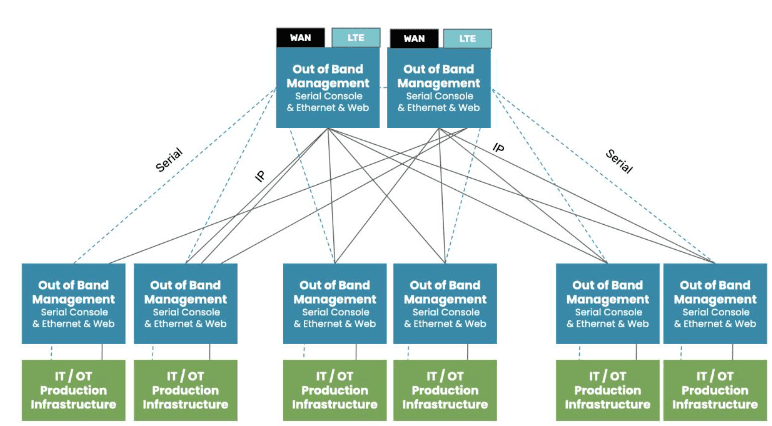
For peak resiliency, data center deployments should follow a two-tier OOB architecture. That means each rack of IT/OT production infrastructure should connect to its own Gen 3 serial console, which provides OOB management access and automation. These top-of-rack serial consoles should then connect to an OOB appliance in the middle or end of the row. This ensures OOBM access for the top-of-rack appliances and creates an additional layer of redundancy and resiliency.

Screenshot 2022-12-05 202130
Another important aspect of Gen 3 serial consoles is security. Since serial consoles provide comprehensive management access to critical infrastructure, they’re a tempting target for cybercriminals. A secure Gen 3 OOBM solution includes:

  • Integration support for third-party security solutions like next-generation firewalls (NGFWs), security service edge (SSE), and SAML 2.0
  • An up-to-date operating system (OS) kernel that’s frequently patched by the vendor when vulnerabilities are identified
  • Onboard firewall functionality to inspect traffic on both the OOB network and the production network
  • Hardware security features like encrypted boot sequences and BIOS protection to prevent unauthorized access on stolen serial consoles

Gen 3 OOB serial consoles are the automation infrastructure components that enable automation and resiliency for data center deployments at the core of enterprise networks.

SD-WAN gateway routers

A gateway router is used to connect a LAN infrastructure to the internet and the enterprise WAN architecture. As part of a resilient network automation framework, all gateway routers should support SD-WAN (software-defined wide area networking).

SD-WAN separates the control and management processes from underlying WAN hardware and virtualizes them as software. SD-WAN uses features like application awareness and guaranteed minimum bandwidth to automatically optimize network performance. An SD-WAN solution can also use automatic load balancing and failover to ensure continuous availability in the event of a localized failure or data center outage.

SD-WAN is usually a cloud-based service that delivers centralized management and orchestration of automated workflows. This service runs on top of the gateway routers deployed at each site.

An SD-WAN gateway router is a key automation infrastructure component for the main office, data center, branch, and edge deployments because it enables automated WAN management and orchestration. An all-in-one cloud-managed gateway router is particularly useful for OT automation in remote facilities like warehouses and factories because it provides SD-WAN capabilities, OOBM, and routing in one multi-function device.

Monitoring, visibility, and analytics

Monitoring and visibility solutions give administrators virtual eyes and ears on remote network infrastructure. As part of a resilient network automation framework, a visibility solution should be vendor neutral so it can dig its probes into any device in a mixed vendor environment. It should also include environmental monitoring sensors that collect data on conditions in the rack.

Device monitoring and environmental sensors give administrators the ability to detect potential issues and respond quickly to prevent outages. Monitoring and visibility solutions also collect valuable data that can feed into the AIOps building block of the network automation framework.

Infrastructure as Code

Infrastructure as Code, or IaC, uses software abstraction to decouple infrastructure configurations from the underlying hardware. Configurations are written as scripts or definition files that automatically provision virtual machines (VMs), containers, or software-defined networking (SDN) devices. An IaC definition file can be deployed repeatedly, which means many identical resources can be spun up quickly while ensuring consistent configurations. An IaC config can also undergo automatic security testing before it’s deployed to any devices to prevent vulnerabilities from affecting production.

Another important aspect of IaC is automatic configuration management. Configuration management solutions like RedHat Ansible allow administrators to define the desired state of a system or network resource. The configuration management tool continuously monitors the resource to detect unauthorized changes, which might be made by a careless sysadmin or could be a sign of a malware infection. As soon as the change is detected, the configuration management solution uses a programmatic playbook to take whatever actions are needed to restore the system to its proper state.

IaC helps ensure network resiliency by reducing human error in device configurations and updates, as well as by enabling the use of pre-production automated security vulnerability scanning and configuration management. Infrastructure as Code also facilitates another key automation infrastructure component—immutable infrastructure.

Immutable infrastructure

In-place system and device updates are a common cause of hangs or failures which can be challenging to resolve remotely. Immutable infrastructure resolves this problem by eliminating updates and configuration changes altogether. Immutable infrastructure refers to virtual systems and network resources that are never changed in place. If an immutable resource has an issue or vulnerability, or if its OS is out of date, an entirely new resource is spun up and the old one is simply deleted.

IaC is an immutable infrastructure best practice because it gives administrators the ability to provision many devices very quickly and with identical configurations. Immutable infrastructure is secure, easy to deploy, and resilient to failure, making it an important part of the network automation framework.

Why Nodegrid is a key automation infrastructure component

The automation infrastructure building block of the network automation framework relies on vendor-neutral OOBM devices like gateway routers and Gen 3 serial consoles that extend automation to converged IT/OT production infrastructure. These devices must also support monitoring and visibility solutions, Infrastructure as Code with configuration management, and immutable infrastructure.

For example, the Nodegrid platform from ZPE Systems includes OOB management hardware for a variety of data centers, branch, and edge deployments. Nodegrid serial consoles, such as the NSCP, can dig their hooks into any device in your data center to enable end-to-end network automation. A Nodegrid Gen 3 OOB serial console can even extend IaC and immutable practices to legacy devices to ensure resiliency without expensive forklift upgrades.

Nodegrid services routers, such as the Mini SR, are compact edge gateways that deliver SD-WAN support, OOBM, and cloud management capabilities to IT/OT infrastructure in smaller branch office and edge data center deployments. Nodegrid SRs can help you consolidate an entire rack of branch infrastructure into a single device to reduce management complexity, CapEx, and OpEx.

Nodegrid out-of-band is delivered via WiFi, Ethernet, or 5G/4G LTE to ensure administrators have fast and reliable access to remote infrastructure. All Nodegrid OOB devices are protected by robust hardware security features like BIOS protection, UEFI Secure Boot, geofencing, disk encryption, and TPM 2.0. Plus, Nodegrid supports integrations with Zero Trust Security solutions like identity and access management (IAM) and SAML 2.0, as well as providing an on-ramp to SSE.

Nodegrid serial consoles and services routers also include interfaces for environmental monitoring sensors to collect crucial data about conditions in your rack. These sensors, as well as any other connected devices, can all be observed and managed from a single, centralized monitoring and reporting platform.

What makes Nodegrid a crucial element of automation infrastructure is its ability to directly host Infrastructure as Code and automated configuration solutions, including Ansible, Chef, Puppet, SaltStack, Monit, and Docker. Nodegrid appliances can then extend the capabilities of the IaC solution to any of the modern, legacy, and mixed-vendor devices it manages.

ZPE’s Network Automation Blueprint

Automation infrastructure works together with IT/OT production infrastructure, orchestration, and AIOps to ensure network resiliency during uncertain times. The Network Automation Blueprint from ZPE Systems provides a reference architecture for achieving Gartner’s definition of hyperautomation as well as meeting the Open Networking User Group (ONUG) Orchestration and Automation recommendations.

In future blog posts, we’ll discuss the remaining two building blocks of the Network Automation Blueprint in depth. In the meantime, you can read about IT/OT production infrastructure or click here to get a sneak peek of the blueprint, which includes a 10-step checklist to get started with automation now.

Want to learn more about key automation infrastructure?

To learn more about Nodegrid as a key automation infrastructure component, contact ZPE Systems today.

Contact Us

How an IT/OT Convergence Strategy Accelerates Network Automation

An ITOT convergence strategy visualized with many digital services organized together in a data center.
In the face of a looming recession, Covid-19 uncertainty, global political instability, and an increasing frequency of natural disasters, network resiliency should be on every organization’s mind. Network resiliency is the ability to continue providing services and connectivity even during disruptions, such as when buildings are locked down or layoffs reduce the number of staff available to maintain or operate the technology. Network automation is the key to ensuring continuous, consistent, and streamlined management during tumultuous times.

A network automation framework provides all the tools and processes needed to create an efficient, resilient, fully automated network infrastructure. The four building blocks of a resilient network automation framework include:

  1. IT/OT production infrastructure
  2. Automation infrastructure
  3. Orchestration infrastructure
  4. AIOps

In this blog, we’ll discuss why an IT/OT convergence strategy is critical for forming the foundation of a network automation framework. Future posts will discuss the other three building blocks and how they work together to ensure business resiliency.

What is IT/OT convergence?

IT/OT convergence is exactly what it sounds like—bringing your information technology (IT) and operational technology together under unified management.

Operational technology, or OT, controls equipment interacting with the physical world, such as industrial machinery or HVAC systems. OT automation runs on specialized industrial computers, such as programmable logic controllers (PLCs) and supervisory control and data acquisition systems (SCADAs). Those computers are usually completely isolated from IT networks, which means operators have no way to access them remotely. If operators can’t get onsite, whether due to a Covid-19 lockdown or natural disaster, they lose the ability to manage OT.

For example, Southern California is home to many high tech manufacturing plants, especially in the aerospace and defense industries. Due to the effects of climate change, there’s been an increase in the frequency and severity of wildfires in this region, leading to more frequent evacuation orders and plant closures. That means operators can’t access their computer systems to control and monitor OT devices, forcing these businesses to pause their operations.

In addition, OT control systems aren’t usually within the purview of IT management because they use specialized computers and automation software that needs to be operated and supported by OT experts. That means IT infrastructure automation and OT infrastructure automation are siloed, which can lead to cost and management inefficiencies. With recession anxieties running high, many organizations are looking for ways to reduce such inefficiencies by converging their IT and OT infrastructure.

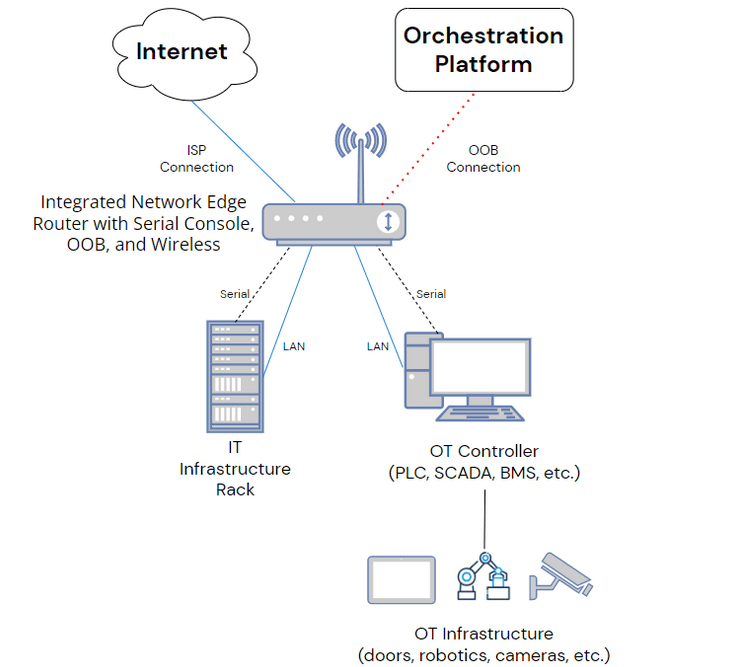
IT/OT convergence involves bringing your operational technology under the same management and automation umbrella as your IT network infrastructure. In a converged IT/OT infrastructure, OT control systems like PLCs and SCADAs connect to the same management hardware (e.g., serial consoles or cloud-managed gateway routers) as IT servers and network devices. This gives administrators a single platform from which to orchestrate automation across both IT and OT infrastructure.

What does IT/OT convergence look like?

IT and OT equipment being managed
First, you have the IT and OT equipment being managed. On the IT side, this includes things like servers, storage, security appliances, and SD-WAN devices. On the OT side, you have devices like environmental sensors, cameras, and power distribution units, as well as industrial computers used to monitor and control physical equipment. Some examples of those industrial systems include:

  • Programmable logic controllers (PLCs), which control industrial machines, robotic devices, and other manufacturing processes.
  • Supervisory control and data acquisition (SCADA), which is a control system for high-level supervision of industrial processes, including PLCs.
  • Building management systems (BMSs) which manage building equipment such as HVAC, fire suppression, lighting, and automatic doors.

These IT devices and OT computers all connect to common management hardware. For large deployments, these might be high-density serial consoles; in smaller deployments, these might be network edge routers with integrated serial console management functionality. This management hardware then connects to an orchestration platform that’s used to monitor, deploy, and manage automation across the converged IT/OT infrastructure.

How an IT/OT convergence strategy accelerates network automation

Bringing operational technology onto IT networks makes it possible for operators to remotely access their OT systems when they’re unable to come onsite. That means that your business can continue to function even during pandemic lockdowns, extreme weather events, or wars that prevent your staff from entering the building.

IT/OT convergence also allows you to bring operational technology under the same management umbrella as IT, so you can use the automation tools you’re already familiar with on the IT side to automate your OT. This reduces the overall management complexity of the IT/OT infrastructure and facilitates holistic orchestration of a fully automated—or even hyperautomated—enterprise network. This level of automation can help organizations reduce wasteful processes, eliminate redundancies, and increase operational efficiency so they can weather recessions and other economic difficulties.

Building IT/OT convergence into a resilient network automation framework

Your IT and OT infrastructure represent the target devices that are automated as part of a network automation framework. For maximum resiliency, your IT/OT convergence strategy should include:

Out-of-band (OOB) connectivity

Out-of-band (OOB) connectivity provides an alternative path to remote IT and OT infrastructure when the primary ISP connection goes down. In addition, OOB management devices (like serial consoles) directly connect to IT/OT devices, so administrators can manage them without an IP address or LAN connectivity. While OOB is not itself a component of IT/OT infrastructure, it’s a crucial element of the management devices and orchestration solution you’ll use to converge your IT and OT infrastructure.

Wired and wireless connectivity

Your converged IT/OT management solution also needs to support a variety of wired and wireless connectivity options to ensure resilience and flexibility. For example, if the ISP’s wired network infrastructure is disrupted due to extreme weather or warfare, you should be able to fail over to a 5G or 4G cellular connection. Or you may have some devices that lack RJ-45 ports, which means you need a management solution that supports USB. The goal is for your management solution to be adaptable to any scenario so that sudden changes or unforeseen issues don’t cripple your network operations.

Power control with UPS backup

As a remote network infrastructure, one of the most frustrating issues to deal with is a device that locks up after a system crash or failed firmware update. Often, a power cycle is all that’s needed to fix the problem, but that requires an on-site technician, which means an expensive and time-consuming truck roll. To ensure network resiliency while reducing the incidence of truck rolls, you need an IT/OT management solution that includes rack PDUs and IPMI options to facilitate remote power control of all connected devices.

In addition, an uninterruptible power supply (UPS) improves resiliency by providing backup power in case of an outage. This gives network teams time to investigate the problem and (hopefully) implement a fix before losing power. As part of the network resilience framework, all UPS units should hook into the management solution to allow for automated monitoring, optimization, and troubleshooting.

Environmental Sensors

Environmental sensors are used to monitor conditions in the location where IT and OT infrastructure is deployed. Traditionally, these sensors monitor racks in remote data centers, but they’re especially critical for IT/OT infrastructure that resides in less-ideal locations. For example, environmental sensors can provide data on the temperature and humidity levels in remote warehouses, offshore oil rigs, outdoor “smart city” deployments, and other locations when environmental conditions can’t be controlled.

Environmental sensors alert administrators when conditions grow too extreme for IT/OT equipment to function optimally. That means that teams can respond quickly and prevent equipment failures from bringing down critical resources. In addition, your infrastructure orchestration solution can analyze the data from these sensors to predict future issues or recommend optimizations to improve efficiency and resiliency.

How Nodegrid accelerates IT/OT convergence

The most successful IT/OT convergence strategy relies on vendor-agnostic platforms that can connect to both IT and OT infrastructure. For example, the Nodegrid solution includes management hardware that can connect to modern and legacy devices in a mixed vendor IT/OT infrastructure, such as the Nodegrid Serial Console Plus (NSCP) for large and hyperscale data center deployments and the Nodegrid Net Services Router (NSR) for flexible edge and branch deployments. These devices allow you to use the ZPE Cloud management platform to extend automation and orchestration to all your IT and OT targets to create a unified, efficient, and resilient converged network infrastructure.

ZPE’s Network Automation Blueprint

IT/OT production infrastructure works together with automation infrastructure, orchestration, and AIOps to ensure network resiliency during uncertain times. The Network Automation Blueprint from ZPE Systems provides a reference architecture for achieving Gartner’s definition of hyperautomation as well as meeting the Open Networking User Group (ONUG) Orchestration and Automation recommendations.

In future blog posts, we’ll discuss the remaining three building blocks of the Network Automation Blueprint in depth. In the meantime, click here to get a sneak peek of the blueprint, which includes a 10-step checklist to get started with automation now.

Ready to learn more about implementing an IT/OT convergence strategy?

To learn more about implementing an IT/OT convergence strategy with Nodegrid, contact ZPE Systems today.

Contact Us

What Is Edge Computing for Machine Learning?

Edge computing for machine learning is visualized as an artificial brain on the monitor of a remote industrial machine
Edge computing and machine learning technologies are helping organizations use their data more efficiently and effectively. In this blog, we’ll explain what edge computing is and discuss how it’s used with machine learning to improve performance and keep data secure. We’ll also explore two different edge computing deployment models for machine learning and provide advice on how to manage them.

What is edge computing?

For many modern enterprises, most of their data is no longer generated in a centralized data center or office building. These days, that data comes from IoT devices, “smart” industrial systems, and other remote locations around the globe. Transferring all that data to and from a central data center for processing can introduce latency and negatively impact performance. Transmitting sensitive data over the internet also increases the risk of interception by hackers.

Edge computing moves computational power closer to the source of data so that data doesn’t need to be sent to a separate location for processing. The benefit of edge computing is that data doesn’t need to travel as far, which translates to less latency and improved application performance. Plus, the data stays behind the firewall on the local network, reducing security risks.

What is edge computing for machine learning?

Machine learning (ML) is powered by data, and with data moving to the edge of enterprise networks, machine learning needs to decentralize as well. Edge computing for machine learning places ML applications closer to remote sources of data. The benefits of edge computing for machine learning are the same for edge computing in general, just supercharged.

Machine learning requires data to make intelligent predictions and decisions. In many cases, that data originates from the edge of the network. For example, the healthcare industry uses ML algorithms to analyze health data from smart devices in hospitals and clinics around the world, sometimes in hard-to-reach and politically unstable regions.

Getting patient health data from these remote facilities back to a centralized data center for machine learning processing can be very challenging, especially if the internet infrastructure is outdated or inconsistent. In addition, this data is personal and sensitive, and healthcare organizations are obligated to ensure its protection, so transferring it over uncertain internet connections is too risky.

Instead, organizations can install the ML algorithm on servers in each remote facility, or even on the smart devices themselves. This drastically reduces their reliance on outside network infrastructure for running machine learning workloads, which improves performance and ensures patient health data stays private.

How to deploy edge computing for machine learning

There are two basic deployment models for machine learning at the edge.

A traditional edge machine learning deployment uses one or more racks of heavy-duty servers with high-performance machine learning processing units. This deployment model is best suited to large ML workloads that process massive amounts of edge data.

A “thin” or “nano” edge machine learning deployment runs on smaller servers or multi-purpose devices that share rack space with other edge infrastructure. This deployment model is more cost-effective and works best for smaller ML workloads in buildings where space is limited.

For either deployment model, you need a solution in place for remote management so administrators can maintain and troubleshoot edge infrastructure without traveling on-site. The best way to ensure reliable management access is through out-of-band (OOB) management. OOB management creates a separate network dedicated to remote management and troubleshooting, and that  provides an alternative path to remote infrastructure (typically via cellular LTE) in case the primary ISP or WAN link goes down.

Through that OOB management network, you can orchestrate workloads, push out security patches, and monitor the health and performance of edge infrastructure.

Deploy and manage edge computing machine learning infrastructure with Nodegrid

The Nodegrid Net Services Router (NSR) from ZPE Systems supports both traditional and nano edge computing machine learning deployment models. The NSR is a modular and customizable solution that delivers OOB management, cellular failover, edge routing and switching, and automation in a single device.

You can use the NSR’s serial console modules to monitor, manage, and orchestrate an entire rack of edge machine learning servers. For less intensive workloads, you can use the edge compute module to host ML applications, virtual machines, and Docker images.

Either way, you can take advantage of 5G/4G LTE to ensure fast and reliable OOB access and cellular failover. The NSR is also secured by Zero Trust features like SAML 2.0 integration and BIOS protection to keep edge machine learning data protected.

Ready to learn more about 5G/4G LTE to ensure fast and reliable OOB access?

To learn more about edge computing for machine learning with Nodegrid, contact ZPE Systems today.
Contact Us

Comparing Cellular Failover Router, Gateway & Bridge for Business Continuity

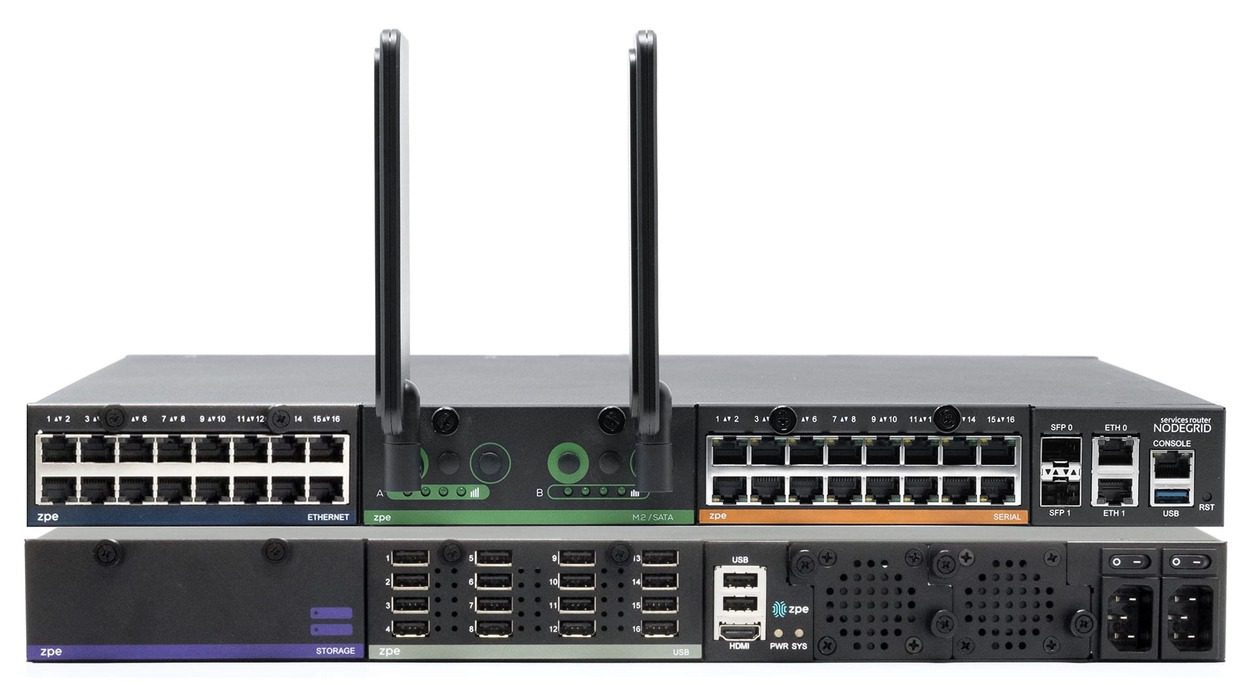
NSRSTACK2-1(1)
Cellular failover is critical for business continuity because it ensures uninterrupted internet access even if the primary ISP connection goes down. When looking for an enterprise cellular failover solution, you’re likely to see the terms “cellular failover router,” “cellular failover bridge,” and “cellular failover gateway” used somewhat interchangeably. These three types of devices offer similar (and often overlapping) capabilities, which can make it difficult to tell which is the best option for your particular use case. In this post, we’ll define and compare these different cellular failover devices before discussing the best option for business continuity.

Cellular failover router vs. cellular failover bridge vs. cellular failover gateway

Let’s define the network functions provided by these devices and describe how cellular failover fits in. We’ll start with bridges, which provide the least amount of functionality.

What is a cellular failover router?

This router connects multiple LANs together but can also forward traffic to and from locations outside the domain. It forwards packets on the network layer of the OSI model (layer 3) using IP addresses. A basic router does not provide access to the internet—it must route traffic through a modem to forward packets outside of the LAN.

A cellular failover router provides a secondary internet connection over which traffic can be routed if the primary ISP link goes down. It includes a cellular modem for internet access as well as IP routing capabilities, giving it more functionality than a cellular failover bridge. Since cellular failover routers combine a modem and router into a single device, they’re often referred to as cellular failover gateways.

What is a cellular failover bridge?

A network bridge connects multiple local area networks (LANs) into a single domain but is not capable of moving data outside of the domain. It forwards frames on the data link layer of the OSI model (layer 2) using MAC addresses (also known as physical or hardware addresses).

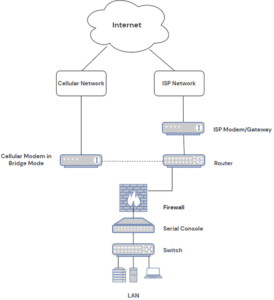
A cellular failover bridge is essentially a device that connects the primary network to the cellular failover network so LAN devices can access that network if the ISP connection goes down. Usually, these come in the form of cellular modems configured in bridge mode. A cellular modem in bridge mode provides internet access via the cellular LTE network and gives devices on the LAN a link (or “bridge”) to cross over to that cellular network. It does not provide routing functionality itself, however, so it needs the primary router for that.

A basic network topology using a cellular modem in bridge mode for failover.

Fig. 1: A basic network topology using a cellular modem in bridge mode for failover.

What is a cellular failover gateway?

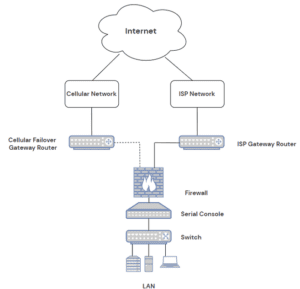
A gateway is a device that connects multiple networks with different transmission protocols together. All traffic flowing into and out of an enterprise network must pass through a gateway. Network gateways combine the functionality of a modem and a router, so they provide both an internet connection and the ability to route packets to and from IP addresses. That’s why cellular failover routers—which combine a cellular internet connection and IP routing—are frequently called cellular failover gateways.

A basic network topology using a cellular failover gateway router

Fig. 2: A basic network topology using a cellular failover gateway router

Cellular failover routers/gateways also function as cellular failover bridges, but the reverse is not true. A cellular failover bridge must rely on an external router for IP-based packet forwarding.

Why choose an integrated cellular failover device?

Generally speaking, the terms cellular failover router, bridge, or gateway refer to standalone devices. Often, they’re designed to provide simple cellular connectivity and rely on the primary router/gateway in order to function, such as Cradlepoint cellular failover adapters. Another option is to get a standalone cellular gateway, such as a Meraki, that you deploy alongside your primary router and fail traffic over to when the primary connection goes down.

In both cases, you’re investing in a single-purpose cellular failover device that must be purchased, installed, and managed in addition to the primary gateway router, network switches, serial consoles, etc. While this may not seem like a big deal in a single-site, centralized enterprise LAN, it grows much more onerous in a large and distributed network with many remote sites and a complicated SD-WAN architecture.

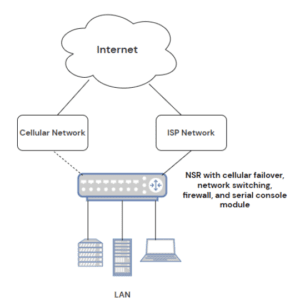
A much better option is to buy an all-in-one device that combines many networking capabilities into one, such as a Nodegrid Services Router. Nodegrid devices include production gateway, routing, and switching functionality in addition to cellular failover, remote out-of-band (OOB) management over serial, and more.

A basic network topology using a Nodegrid Net Services Router with integrated networking, cellular failover, hosted firewall solution, and a serial console module.

Fig. 3: A basic network topology using a Nodegrid Net Services Router with integrated networking, cellular failover, hosted firewall solution, and a serial console module.

The Nodegrid solution is highly customizable, with six integrated routers to choose from depending on your deployment size and use case. The most flexible option is the Nodegrid Net Services Router (NSR) with a modular design that lets you swap out expansion modules to get the exact functionality you need without paying for extras that you don’t. A single Nodegrid device can replace an entire rack of networking equipment, simplifying deployments in branch offices, edge computing data centers, manufacturing plants, and other remote sites.

Plus, Nodegrid’s vendor-neutral hardware and software allow you to consolidate infrastructure management behind a single pane of glass. You can use Nodegrid to orchestrate cellular failover, SD-WAN, DCIM, and more over a dedicated, reliable, and blazing-fast OOB management network.

Ready to learn more about Nodegrid cellular failover router connectivity?

To learn more or see a demo of Nodegrid in action, contact ZPE Systems today.

Contact Us

The Growing Role of Hybrid Cloud in Digital Transformation

cloud in digital transformation

Digital transformation is a broad term for the act of changing and improving your business processes through the implementation of new technologies. The cloud plays a major role in digital transformation because it provides a flexible, scalable, and accessible environment that’s ideal for a wide range of business applications. However, there are still many processes that are better suited for a traditional, on-prem data center or colocation infrastructure due to cost, security, or performance concerns.

Combining public cloud platforms with private infrastructure is known as hybrid cloud infrastructure, and it allows organizations to map their business processes and applications to the environments best suited to run them. In this post, we’ll discuss the role of hybrid cloud in digital transformation and provide tips for managing and orchestrating a hybrid infrastructure.

The importance of hybrid cloud in digital transformation

While the public cloud offers many advantages, there are a variety of reasons why an organization would want or need to keep some services private.

For example, a company doing business in an industry that’s subject to strict data privacy regulations—like finance, defense, or healthcare—may want to keep sensitive data in an on-premises data center so they can maintain complete control over the security and access control measures. At the same time, they might have other processes and applications that aren’t as high-risk and could benefit from the flexibility of cloud infrastructure.

Sometimes, an organization will migrate a workload to the cloud, only to bring it back in-house later. For instance, cloud services can reduce costs for certain applications but can increase costs for others. Most public cloud providers charge extra for data egress—transferring data of their systems and to another cloud or on-premises. That means applications that require a lot of data egress can be much more expensive to run in the cloud. That cost increase may be worthwhile in the long run to achieve optimal scalability and flexibility, but with a recession looming, many organizations are sacrificing those big picture goals to cut costs for short-term survival.

One of the biggest use cases for hybrid cloud in digital transformation is a gradual cloud migration. Digital transformation is a journey, and along the way, many organizations end up in a hybrid state because they’ve successfully moved some of their processes to the cloud but have others that still live in the data center. For example, a business may send some of their data analysis workflows to a business intelligence application in the cloud but then have an on-premises DCIM tool analyzing the same data in the data center. They eventually transition from hybrid cloud to a pure cloud or multi-cloud environment once they’ve finished migrating all their workloads to the cloud.

Hybrid cloud is one of the most popular enterprise infrastructure models because it’s flexible and affordable, allowing organizations to make the digital transformation journey at their own pace and in their own way.

Tips for managing hybrid cloud infrastructure

The most effective hybrid cloud deployment provides a single, seamless digital environment for business applications and resources, with centralized workload and infrastructure orchestration that works across all platforms and data centers. Let’s discuss how to achieve this ideal hybrid cloud deployment.

Vendor-agnostic platforms

To create a seamless environment in which workflows move effortlessly between the cloud and the data center to deliver a simple and unified experience to end-users, you need all your public cloud, private cloud, and data center solutions to work together. The best way to ensure this is by only using vendor-agnostic (vendor-neutral) hardware and software from the very beginning, but for most organizations that ship has already sailed. The next best option is to use a vendor-agnostic management platform that’s able to hook into all those closed solutions and control them equally. These solutions allow you to orchestrate workloads across public cloud, private cloud, and legacy environments without needing to replace all the systems and software already in place.

SD-WAN

A hybrid cloud deployment can create some networking challenges because of the need to orchestrate WAN (wide area networking) connections across multiple clouds and data centers, each of which may have a different networking infrastructure in place. Software-defined wide area networking, or SD-WAN, helps to reduce the complexity of hybrid cloud networking by separating the control and management processes from the underlying WAN hardware.

SD-WAN virtualizes network management functions as software or script-based configurations, which enables centralized and automated deployment. With the aid of a vendor-agnostic management platform, SD-WAN benefits hybrid cloud infrastructure by consolidating control behind a single pane of glass. This gives administrators the ability to easily orchestrate, optimize, and secure the entire distributed network.

Automation

Automation plays a key role in digital transformation because it can speed up workflows while reducing the risk of human error. For example, using automation to deploy new infrastructure means administrators can provision many resources in a short amount of time while ensuring consistent configurations.

Automation also improves security, both by reducing the rate of misconfigurations and by ensuring all infrastructure is patched as soon as possible. Unpatched infrastructure leaves you vulnerable to hacks and ransomware, but keeping track of updates for so many vendor solutions in so many different places can be challenging. Automation can help by ensuring patches are pushed out to hybrid cloud infrastructure solutions as soon as they become available. 

Vendor agnostic platforms, SD-WAN, and automation are key tools that help organizations more effectively utilize a hybrid cloud in their digital transformation journey.

The role of ZPE Systems in digital transformation

ZPE Systems offers a range of vendor-agnostic network management solutions to help your organization achieve digital transformation. The Nodegrid platform can dig its hooks into your legacy and mixed-vendor infrastructure to provide a common interface from which to manage and orchestrate your entire network architecture. Plus, Nodegrid can host or integrate with your choice of SD-WAN solutions to help you consolidate your tech stack while delivering optimized performance and security.

Contact ZPE Systems today

To learn more about the role of hybrid cloud in digital transformation.

Contact Us