Providing Out-of-Band Connectivity to Mission-Critical IT Resources

Home » Serial Consoles » Page 6

Understanding Serial Console Interfaces

A serial console (also known as a console server or terminal server) is a device that allows admins to manage critical network infrastructure like servers, routers, switches, and power distribution units (PDUs) without needing to log in to each piece of equipment individually. It also provides out-of-band (OOB) management, which creates an isolated network dedicated to infrastructure orchestration and troubleshooting. Serial console interfaces help improve management efficiency, accelerate recovery from outages and cyberattacks, and isolate the control plane from malicious actors. 

This blog defines serial console interfaces and describes their technological evolution before discussing the benefits of using a modern serial console solution. 

What is a serial console interface?

The term serial console interface could mean different things depending on the context and who’s saying it.

1. Some people use this term to refer to the serial console’s management GUI (graphical user interface), which administrators use to view and control data center devices.
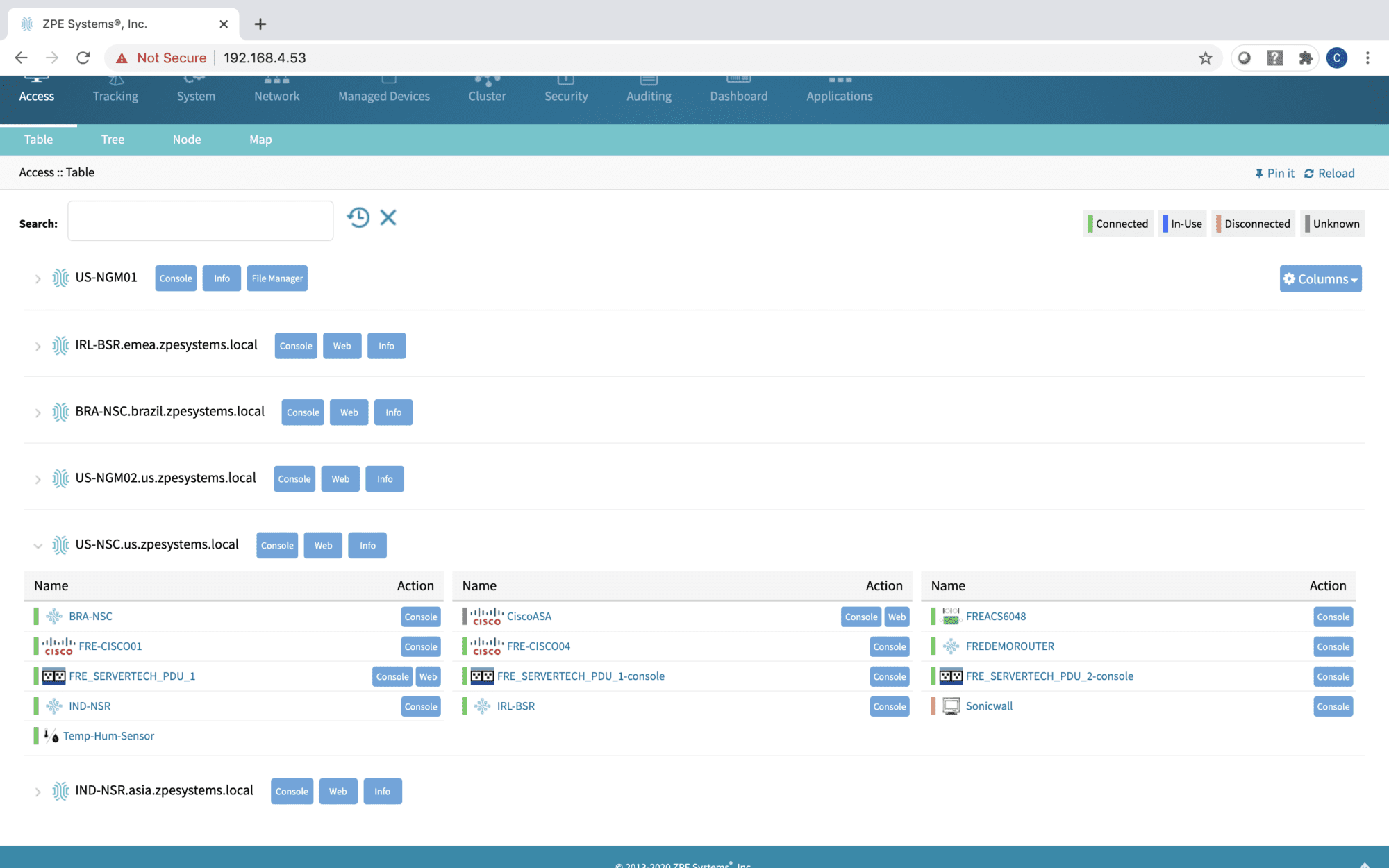
Clusters 2000×1250 (1)

2. Others use this term to refer to the individual connections between a serial console and each managed data center device. In addition to traditional RS-232 serial interfaces, a serial console may support RJ45, KVM (keyboard, video, mouse), IPMI (intelligent platform management interface), and USB (universal serial bus) interfaces.
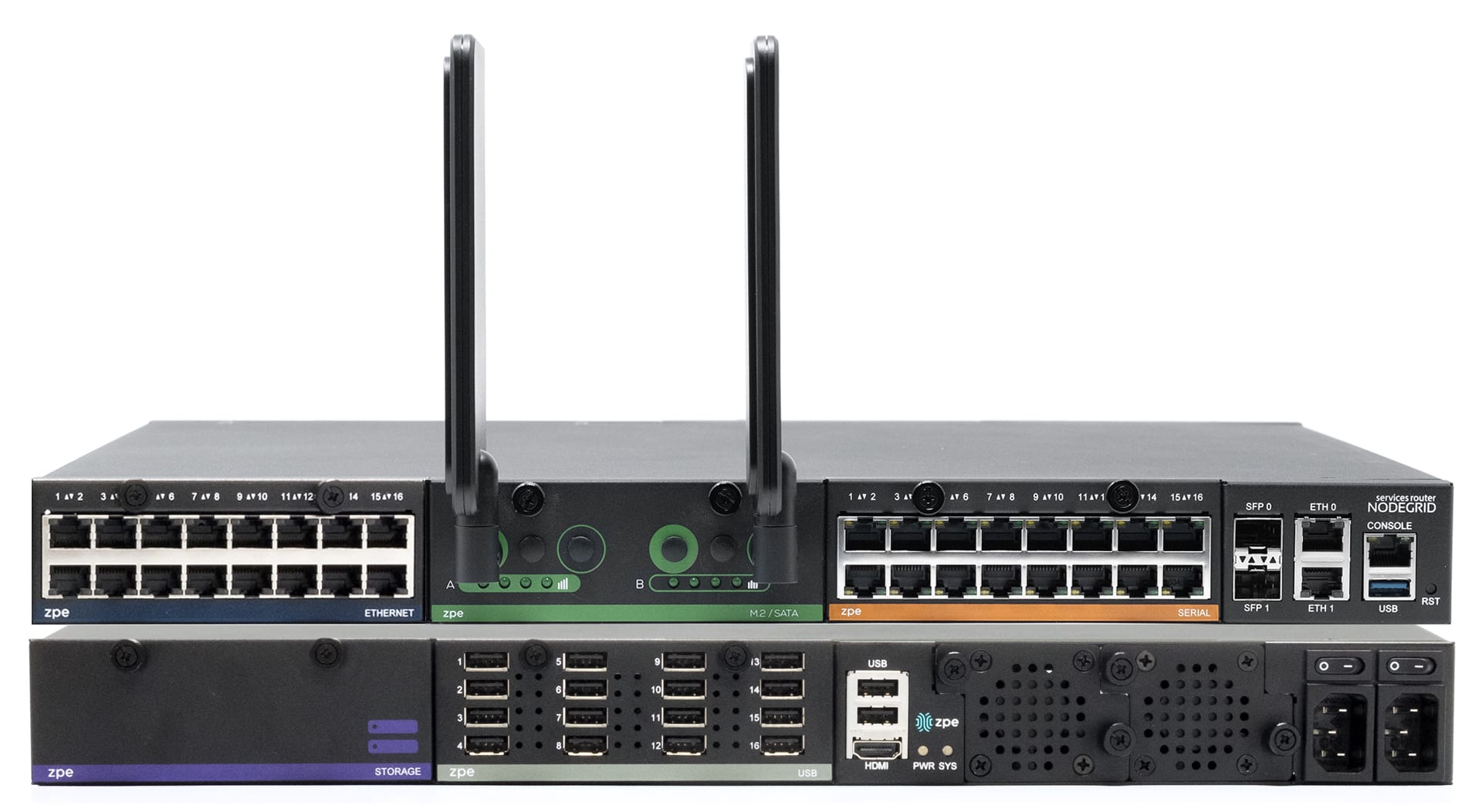
NSRSTACK2-1 1920×1052

3. Another potential (but less common) use of the term is for the text-based console interface (also known as a CLI, or command-line interface) used to configure and manage data center devices without a GUI. The console interface could be accessed in several ways, such as through a serial console’s GUI, or via a Telnet or SSH (secure shell) client like PuTTY.
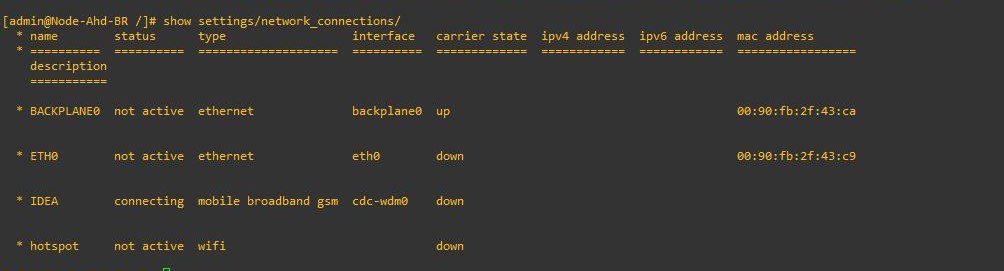
Console 2

4. Finally, it’s quite common to use the term serial console interface to describe the entire serial console solution, from the hardware itself to its managed ports, GUI, and CLI. The serial console acts as an interface between the production network (a.k.a., the data plane) and the management network (a.k.a., the control plane). 

For the purposes of this discussion, we will use this fourth definition of serial console interfaces.

The evolution of serial console interfaces

First-generation

The first generation of serial consoles provides the basics: unified management of multiple data center devices, and an OOB network connection (such as a dial-up modem or cellular SIM card) so management workflows don’t rely on the main production network. A Gen 1 serial console interface allows administrators to access the CLI for each connected device even if the production network goes down from an ISP outage, equipment failure, or cyberattack. However, these serial consoles lack many of the advanced features required for modern network infrastructures, such as hardware encryption, third-party integrations, and automation capabilities. They typically only support standard RS-232 serial interfaces using a specific pinout.
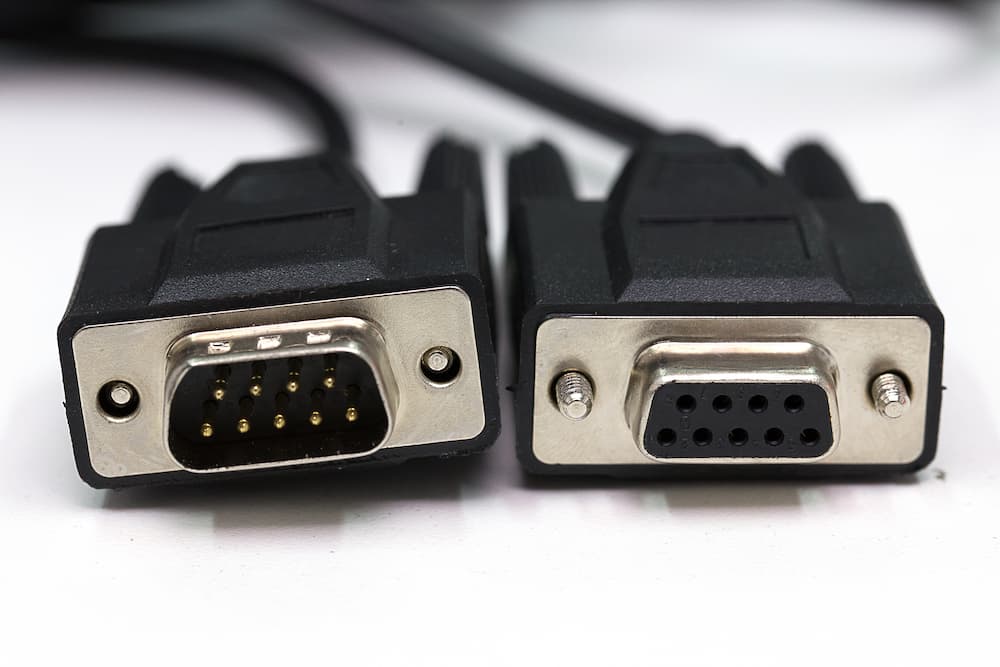
ZPE Systems Review Serial Console (1)

Second-generation

The second generation added built-in security features, advanced authentication methods, and the ability to manage multi-vendor devices. Some vendors also added support for Python scripts and other automation, as well as zero-touch provisioning (ZTP) for supported end devices. However, Gen 2 serial console interfaces have closed architectures that prevent full automation of multi-vendor infrastructure. Their management GUIs are also typically only available as an on-premises virtual machine (VM), so remote administrators must be on the enterprise network or connected via VPN to access them.

Third-generation

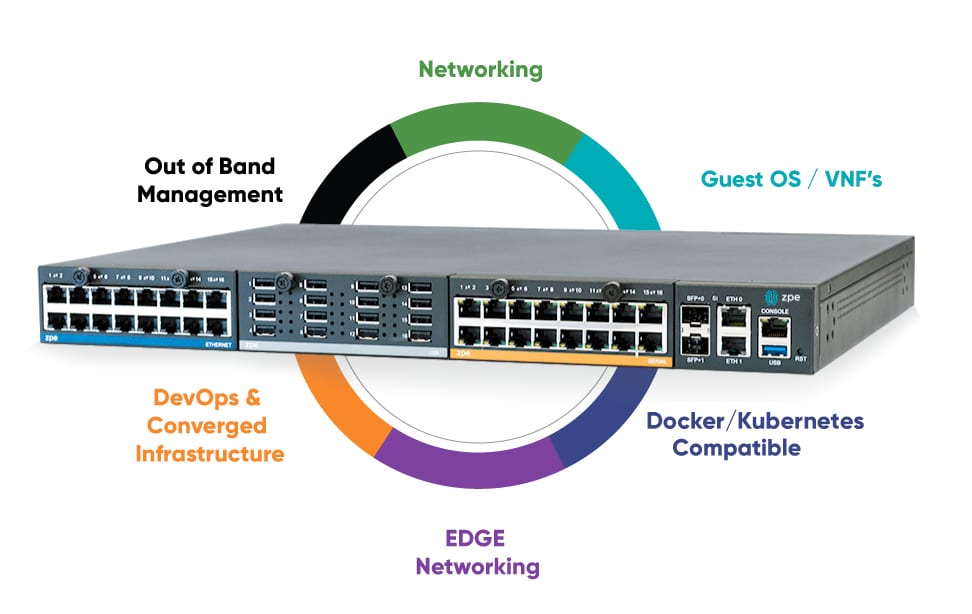
Third-generation serial consoles are completely vendor-neutral, so they can control – and extend automation to – every physical and virtual asset in your environment. They use high-speed OOB network interfaces such as 5G cellular, and offer cloud-based management software so teams can manage and troubleshoot remote infrastructure from anywhere in the world. Gen 3 serial console interfaces are built on an open, x86 Linux-based architecture that supports third-party integrations and can run other vendors’ software. They accommodate legacy pinouts to control a variety of devices, such as PDUs, IPMI devices, and environmental monitoring sensors, and also feature modules that allow you to customize or modify interface types.
NSR Diagram

Gen 3 serial consoles have enterprise-grade security features like an encrypted disk and TPM 2.0 security. They also support integrations with Zero Trust providers for multi-factor authentication (MFA) and single sign-on (SSO). The third generation enables end-to-end network infrastructure automation using third-party tools like Ansible, Chef, and Puppet, as well as customer-built tools in VMs, Docker, or Kubernetes. Gen 3 serial console interfaces are essentially infrastructure multi-tools capable of running and deploying any solution, at any time, from anywhere.

The benefits of a Gen 3 serial console interface

The latest generation of serial consoles provides three major advantages:

  • Improved management efficiency. A vendor-neutral serial console allows administrators to manage infrastructure workflows and automation for large, complex network architectures from a single pane of glass. Teams can also extend automation to every infrastructure device, even legacy solutions that wouldn’t support it otherwise.
  • Reduced network downtime. With fast, reliable Gen 3 OOB, infrastructure teams have a lifeline to troubleshoot and recover remote infrastructure when the WAN (wide area network) or LAN (local area network) goes down. They can remotely power-cycle frozen devices, view environmental monitoring logs, and automatically provision replacement equipment without the time or expense of on-site visits. 
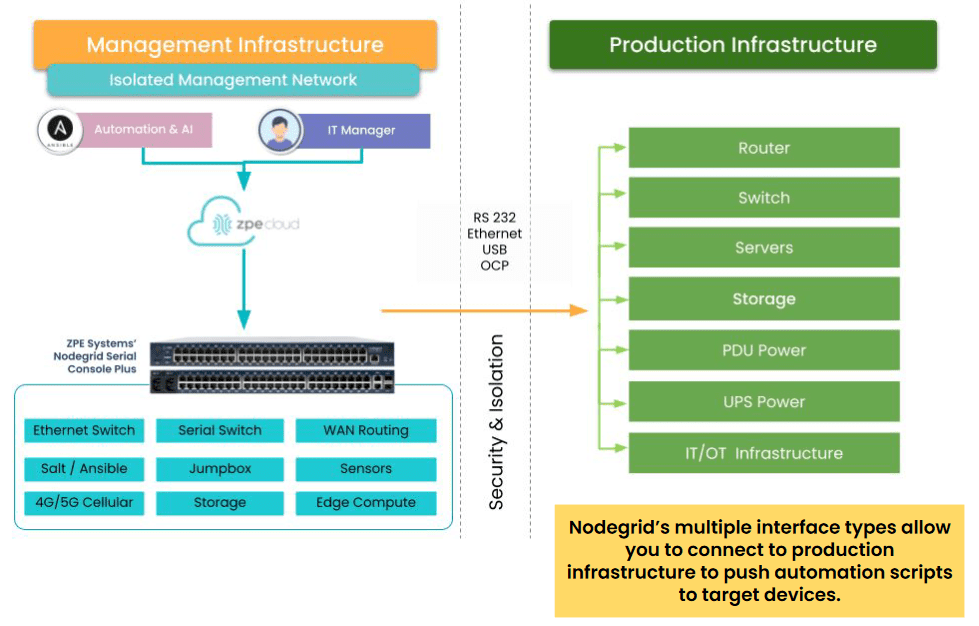
  • Isolated management infrastructure (IMI). Gen 3 OOB creates an isolated control plane for network infrastructure, which helps protect management interfaces from malicious actors who have breached the production network. It also helps establish an isolated recovery environment (IRE) where teams can rebuild and restore systems without risking re-infection or re-compromise. 
IMI with NSCP

Want to learn more about serial consoles?

Gen 3 serial console interfaces like the Nodegrid Serial Console (NSC) from ZPE Systems use vendor-neutral architectures and end-to-end automation capabilities to help companies improve operational efficiency and network resilience. To learn more about how a Gen 3 solution can help with your biggest infrastructure pain points, watch a Nodegrid demo.

Watch a demo

AI Data Center Infrastructure

ZPE Systems – AI Data Center Infrastructure
Artificial intelligence is transforming business operations across nearly every industry, with the recent McKinsey global survey finding that 72% of organizations had adopted AI, and 65% regularly use generative AI (GenAI) tools specifically. GenAI and other artificial intelligence technologies are extremely resource-intensive, requiring more computational power, data storage, and energy than traditional workloads. AI data center infrastructure also requires high-speed, low-latency networking connections and unified, scalable management hardware to ensure maximum performance and availability. This post describes the key components of AI data center infrastructure before providing advice for overcoming common pitfalls to improve the efficiency of AI deployments.

AI data center infrastructure components

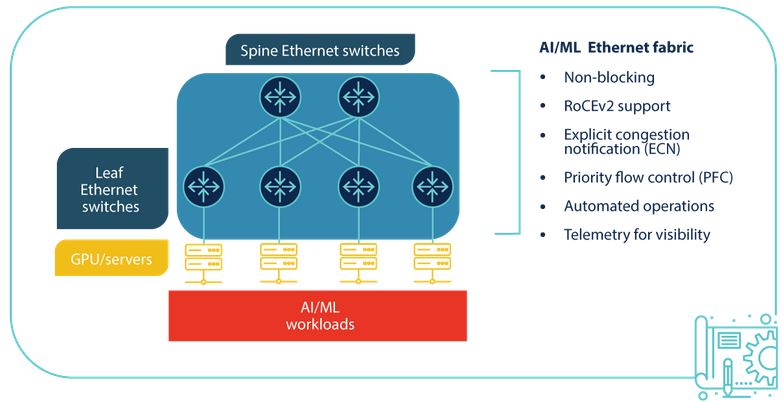
A diagram of AI data center infrastructure.

Computing

Generative AI and other artificial intelligence technologies require significant processing power. AI workloads typically run on graphics processing units (GPUs), which are made up of many smaller cores that perform simple, repetitive computing tasks in parallel. GPUs can be clustered together to process data for AI much faster than CPUs.

Storage

AI requires vast amounts of data for training and inference. On-premises AI data centers typically use object storage systems with solid-state disks (SSDs) composed of multiple sections of flash memory (a.k.a., flash storage). Storage solutions for AI workloads must be modular so additional capacity can be added as data needs grow, through either physical or logical (networking) connections between devices.

Networking

AI workloads are often distributed across multiple computing and storage nodes within the same data center. To prevent packet loss or delays from affecting the accuracy or performance of AI models, nodes must be connected with high-speed, low-latency networking. Additionally, high-throughput WAN connections are needed to accommodate all the data flowing in from end-users, business sites, cloud apps, IoT devices, and other sources across the enterprise.

Power

AI infrastructure uses significantly more power than traditional data center infrastructure, with a rack of three or four AI servers consuming as much energy as 30 to 40 standard servers. To prevent issues, these power demands must be accounted for in the layout design for new AI data center deployments and, if necessary, discussed with the colocation provider to ensure enough power is available.

Management

Data center infrastructure, especially at the scale required for AI, is typically managed with a jump box, terminal server, or serial console that allows admins to control multiple devices at once. The best practice is to use an out-of-band (OOB) management device that separates the control plane from the data plane using alternative network interfaces. An OOB console server provides several important functions:

  1. It provides an alternative path to data center infrastructure that isn’t reliant on the production ISP, WAN, or LAN, ensuring remote administrators have continuous access to troubleshoot and recover systems faster, without an on-site visit.
  2. It isolates management interfaces from the production network, preventing malware or compromised accounts from jumping over from an infected system and hijacking critical data center infrastructure.
  3. It helps create an isolated recovery environment where teams can clean and rebuild systems during a ransomware attack or other breach without risking reinfection.

An OOB serial console helps minimize disruptions to AI infrastructure. For example, teams can use OOB to remotely control PDU outlets to power cycle a hung server. Or, if a networking device failure brings down the LAN, teams can use a 5G cellular OOB connection to troubleshoot and fix the problem. Out-of-band management reduces the need for costly, time-consuming site visits, which significantly improves the resilience of AI infrastructure.

AI data center challenges

Artificial intelligence workloads, and the data center infrastructure needed to support them, are highly complex. Many IT teams struggle to efficiently provision, maintain, and repair AI data center infrastructure at the scale and speed required, especially when workflows are fragmented across legacy and multi-vendor solutions that may not integrate. The best way to ensure data center teams can keep up with the demands of artificial intelligence is with a unified AI orchestration platform. Such a platform should include:

  • Automation for repetitive provisioning and troubleshooting tasks
  • Unification of all AI-related workflows with a single, vendor-neutral platform
  • Resilience with cellular failover and Gen 3 out-of-band management.

To learn more, read AI Orchestration: Solving Challenges to Improve AI Value

Improving operational efficiency with a vendor-neutral platform

Nodegrid is a Gen 3 out-of-band management solution that provides the perfect unification platform for AI data center orchestration. The vendor-neutral Nodegrid platform can integrate with or directly run third-party software, unifying all your networking, management, automation, security, and recovery workflows. A single, 1RU Nodegrid Serial Console Plus (NSCP) can manage up to 96 data center devices, and even extend automation to legacy and mixed-vendor solutions that wouldn’t otherwise support it. Nodegrid Serial Consoles enable the fast and cost-efficient infrastructure scaling required to support GenAI and other artificial intelligence technologies.

Make Nodegrid your AI data center orchestration platform

Request a demo to learn how Nodegrid can improve the efficiency and resilience of your AI data center infrastructure.
 Contact Us

Why Securing IT Means Replacing End-of-Life Console Servers

Rene Neumann – Why Securing IT Means Replacing End of Life Console Servers


The world as we know it is connected to IT, and IT relies on its underlying infrastructure. Organizations must prioritize maintaining this infrastructure; otherwise, any disruption or breach has a ripple effect that takes services offline for millions of users (take 2024’s CrowdStrike outage, for example). A big part of this maintenance is ensuring that all hardware components, including console servers, are up-to-date and secure. Most console servers reach end-of-life (EOL) and need to be replaced, but for many reasons, whether budgetary concerns or the “if it isn’t broken” mentality, IT teams often keep their EOL devices. Let’s look at the risks of using EOL console servers, and why replacing them goes hand-in-hand with securing IT.

The Risks of Using End-of-Life Console Servers

End-of-life console servers can undermine the security and functionality of IT systems. These risks include:

1. Lack of Security Features and Updates

Aging console servers lack adequate hardware and management security features, meaning they can’t support a zero trust approach. On top of this, once a console server reaches EOL, the manufacturer stops providing security patches and updates. The device then becomes vulnerable to newly discovered CVEs and complex cyberattacks (like the MOVEit and Ragnar Locker breaches). Cybercriminals often target outdated hardware because they know that these devices are no longer receiving updates, making them easy entry points for launching attacks.

2. Compliance Issues

Many industries have stringent regulatory requirements regarding data security and IT infrastructure. DORA, NIS2 (EU), NIST2 (US), PCI 4.0 (finance), and CER Directive are just a few of the updated regulations that are cracking down on how organizations architect IT, including the management layer. Using EOL hardware can lead to non-compliance, resulting in fines and legal repercussions. Regulatory bodies expect organizations to use up-to-date and secure equipment to protect sensitive information.

3. Prolonged Recovery

EOL console servers are prone to failures and inefficiencies. As these devices age, their performance deteriorates, leading to increased downtime and disruptions. Most console servers are Gen 2, meaning they offer basic remote troubleshooting (to address break/fix scenarios) and limited automation capabilities. When there is a severe disruption, such as a ransomware attack, hackers can easily access and encrypt these devices to lock out admin access. Organizations then must endure prolonged recovery (like the CrowdStrike outage, or 2023’s MGM attack) because they need to physically decommission and restore their infrastructure.


The Importance of Replacing EOL Console Servers

Here’s why replacing EOL console servers is essential to securing IT:

1. Modern Security Approach

Zero trust is an approach that uses segmentation across IT assets. This ensures that only authorized users can access resources necessary for their job function. This approach requires SAML, SSO, MFA/2FA, and role-based access controls, which are only supported by modern console servers. Modern devices additionally feature advanced security through encryption, signed OS, and tampering detection. This ensures a complete cyber and physical approach to security.

2. Protection Against New Threats

New CVEs and evolving threats can easily take advantage of EOL devices that no longer receive updates. Modern console servers benefit from ongoing support in the form of firmware upgrades and security patches. Upgrading with a security-focused device vendor can drastically shrink the attack surface, by addressing supply chain security risks, codebase integrity, and CVE patching.

3. Ease of Compliance

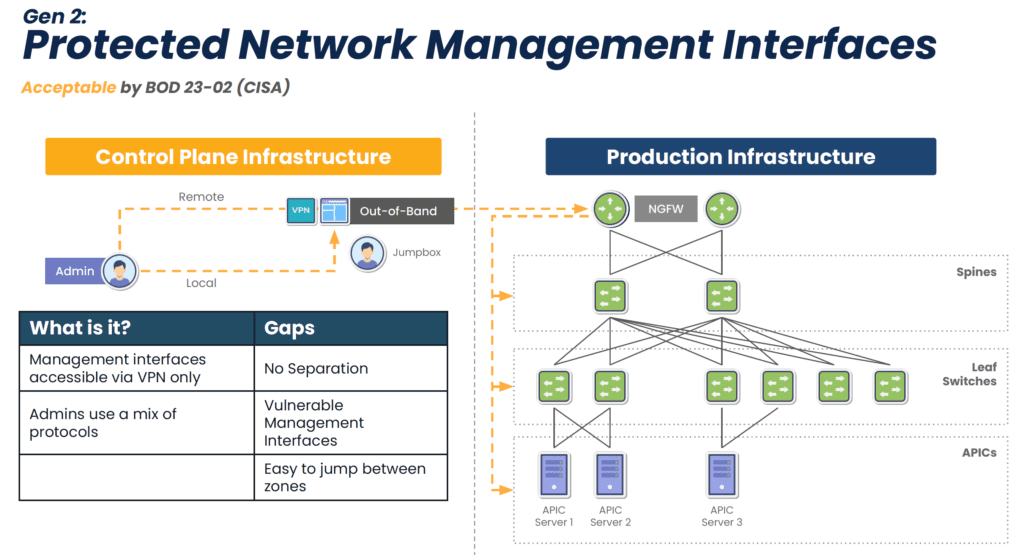
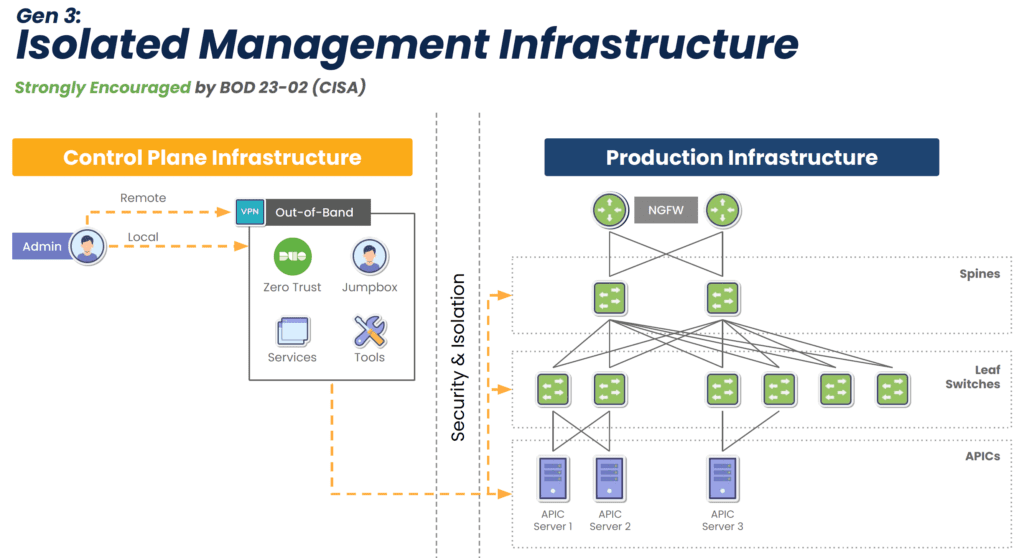
EOL devices lack modern security features, but this isn’t the only reason why they make it difficult or impossible to comply with regulations. They also lack the ability to isolate the control plane from the production network (see Diagram 1 below), meaning attackers can easily move between the two in order to launch ransomware and steal sensitive information. Watchdog agencies and new legislation are stipulating that organizations follow the latest best practice of separating the control plane from production, called Isolated Management Infrastructure (IMI). Modern console servers make this best practice simple to achieve by offering drop-in out-of-band that is completely isolated from production assets (see Diagram 2 below). This means that the organization is always in control of its IT assets and sensitive data.

A network diagram showing Gen 2 out-of-band is vulnerable to the internet

Diagram 1: Though an acceptable approach, Gen 2 out-of-band lacks isolation and leaves management interfaces vulnerable to the internet.

A network diagram showing how Gen 3 out-of-band secures network and management interfaces.

Diagram 2: Gen 3 out-of-band fully isolates the control plane to guarantee organizations retain control of their IT assets and sensitive info.

4. Faster Recovery

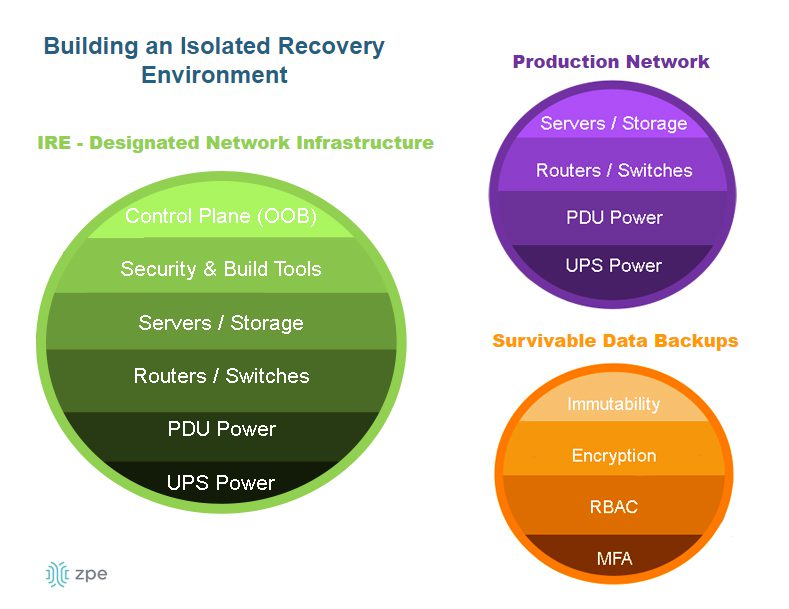
New console servers are designed to handle more workloads and functions, which eliminates single-purpose devices and shrinks the attack surface. They can also run VMs and Docker containers to host applications. This enables what Gartner calls the Isolated Recovery Environment (IRE) (see Diagram 3 below), which is becoming essential for faster recovery from ransomware. Since the IMI component prohibits attackers from accessing the control plane, admins retain control during an attack. They can use the IMI to deploy their IRE and the necessary applications — remotely — to decommission, cleanse, and restore their infected infrastructure. This means that they don’t have to roll trucks week after week when there’s an attack; they just need to log into their management infrastructure to begin assessing and responding immediately, which significantly reduces recovery times.

A diagram showing the components of an isolated recovery environment.

Diagram 3: The Isolated Recovery Environment allows for a comprehensive and rapid response to ransomware attacks.

Get a Walkthrough of IMI and IRE

Let’s cover what IMI and IRE would look like in your environment and walk through some outage recovery scenarios. Use the link below to set up a technical discussion.

Meet Me at Cisco Live Amsterdam 2026

Visit booth C10 at Cisco Live Amsterdam to chat about IMI, IRE, and replacing end-of-life console servers. You can also catch my 10-minute presentation on Wednesday, February 11 at 1:50pm in the Speakers Corner. I’ll cover From Pilot Projects to Global Rollouts: Why Out-of-Band Management is Crucial for Scaling AI Infrastructure, with more concepts and network diagrams showing how to achieve true resilience. Visit our Cisco Live page below to let me know you’re coming. See you at the show!

Rene Neumann presents at Cisco Live Amsterdam 2026

The CrowdStrike Outage: How to Recover Fast and Avoid the Next Outage

CrowdStrike Outage BSOD


On July 19, 2024, CrowdStrike, a leading cybersecurity firm renowned for its advanced endpoint protection and threat intelligence solutions, experienced a significant outage that disrupted operations for many of its clients. This outage, triggered by a software upgrade, resulted in crashes for Windows PCs, creating a wave of operational challenges for banks, airports, enterprises, and organizations worldwide. This blog post explores what transpired during this incident, what caused the outage, and the broader implications for the cybersecurity industry.

What happened?

The incident began on the morning of July 19, 2024, when numerous CrowdStrike customers started reporting issues with their Windows PCs. Users experienced the BSOD (blue screen of death), which is when Windows crashes and renders devices unusable. As the day went on, it became evident that the problem was widespread and directly linked to a recent software upgrade deployed by CrowdStrike.

Timeline of Events

  1. Initial Reports: Early in the day, airports, hospitals, and critical infrastructure operators began experiencing unexplained crashes on their Windows PCs. The issue was quickly reported to CrowdStrike’s support team.
  2. Incident Acknowledgement: CrowdStrike acknowledged the issue via their social media channels and direct communications with affected clients, confirming that they were investigating the cause of the crashes.
  3. Root Cause Analysis: CrowdStrike’s engineering team worked diligently to identify the root cause of the problem. They soon determined that a software upgrade released the previous night was responsible for the crashes.
  4. Mitigation Efforts: Upon isolating the faulty software update, CrowdStrike issued guidance on how to roll back the update and provided patches to fix the issue.

What caused the CrowdStrike outage?

The root cause of the outage was a software upgrade intended to enhance the functionality and security of CrowdStrike’s Falcon sensor endpoint protection platform. However, this upgrade contained a bug that conflicted with certain configurations of Windows PCs, leading to system crashes. Several factors contributed to the incident:

  1. Insufficient Testing: The software update did not undergo adequate testing across all possible configurations of Windows PCs. This oversight meant that the bug was not detected before the update was deployed to customers.
  2. Complex Interdependencies: The incident highlights the complex interdependencies between software components and operating systems. Even minor changes can have unforeseen impacts on system stability.
  3. Rapid Deployment: In the cybersecurity industry, quick responses to emerging threats are crucial. However, the pressure to deploy updates rapidly can sometimes lead to insufficient testing and quality assurance processes.

We need to remember one important fact: whether software is written by humans or AI, there will be mistakes in coding and testing. When an issue slips through the cracks, the customer lab is the last resort to catch it. Usually, this can be done with a controlled rollout, where the IT team first upgrades their lab equipment, performs further testing, puts in place a rollback plan, and pushes the update to a less critical site. But in a cloud-connected SaaS world, the customer is no longer in control. That’s why they sign waivers stating that if such an incident occurs, the company that caused the problem is not liable. Experts are saying the only way to address this challenge is to have an infrastructure that’s designed, deployed, and operated for resilience. We discuss this architecture further down in this article.

How to recover from the CrowdStrike outage

CrowdStrike gives two options for recovering:

  • Option 1: Reboot in Safe Mode – Reboot the affected device in Safe Mode, locate and delete the file “C-00000291*.sys”, and then restart the device.
  • Option 2: Re-image – Download and configure the recovery utility to create a new Windows image, add this image to a USB drive, and then insert this USB drive into the target device. The utility will automatically find and delete the file that’s causing the crash.

The biggest obstacle that is costing organizations a lot of time and money is that with either of these recovery methods, IT staff need to be physically present to work on each affected device. They need to go one by one manually remediating via Safe Mode or physically inserting the USB drive. What makes this more difficult is that many organizations use physical and software/management security controls to limit access. Locked device cabinets slow down physical access to devices, and things like role-based access policies and disk encryption can make Safe Mode unusable. Because this outage is affecting more than 8.5 million computers, this kind of work won’t scale efficiently. That’s why organizations are turning to Isolated Management Infrastructure (IMI) and the Isolated Recovery Environment (IRE).

How IMI and IRE help you recover faster

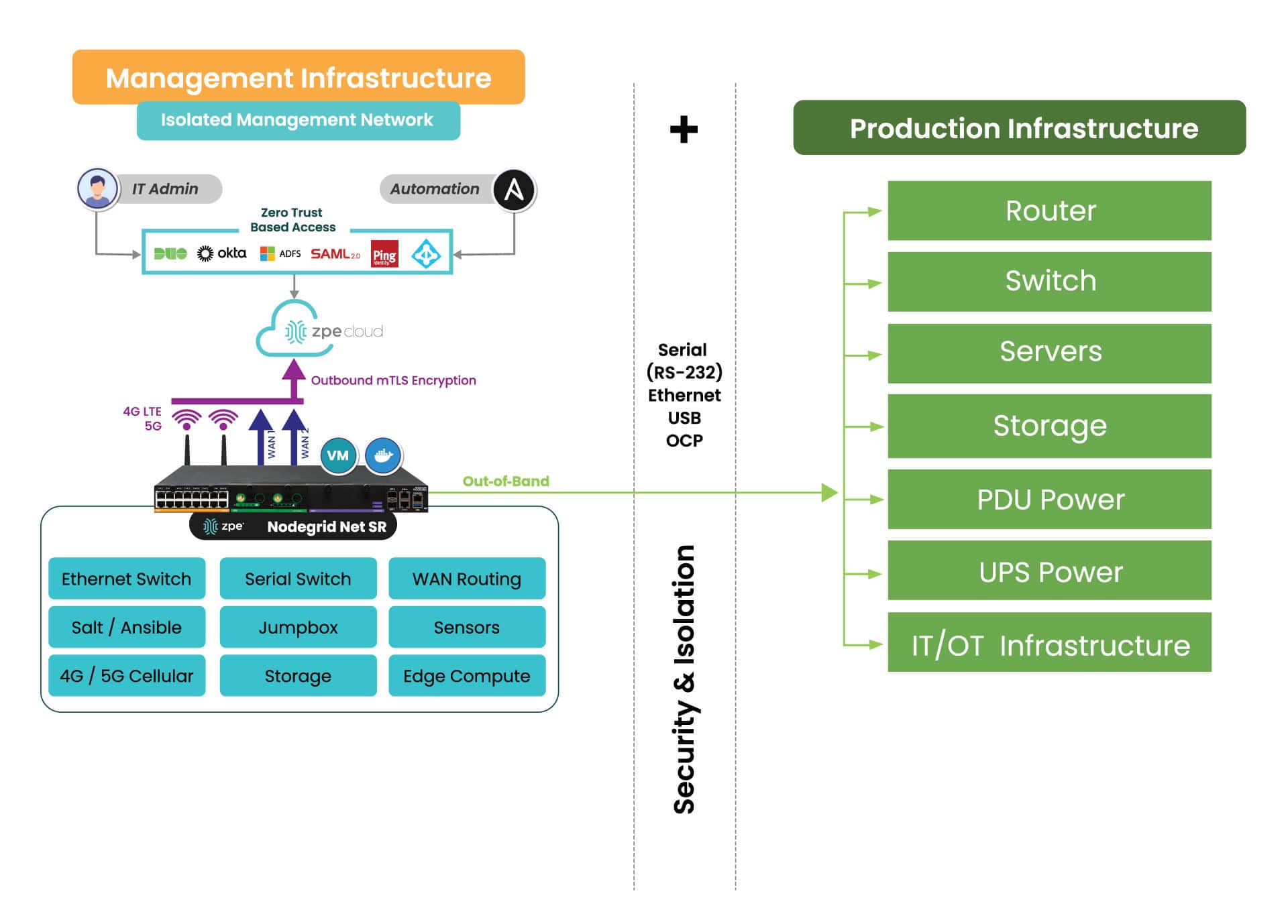
IMI is a dedicated control plane network that’s meant for administration and recovery of IT systems, including Windows PCs affected by the CrowdStrike outage. It uses the concept of out-of-band management, where you deploy a management device that is connected to dedicated management ports of your IT infrastructure (e.g., serial ports, IPMI ports, and other ethernet management ports). IMI also allows you to deploy recovery services for your digital estate that is immutable and near-line when recovery needs to take place.

IMI does not rely at all on the production assets, as it has its own dedicated remote access via WAN links like 4G/5G, and can contain and encrypt recovery keys and tools with zero trust.

IMI gives teams remote, low-level access to devices so they can recover their systems remotely without the need to visit sites. Organizations that employ IMI are able to revert back to a golden image through automation, or deploy bootable tools to all the computers at the site to rescue them without data loss.

The dedicated out-of-band access to serial/IPMI and management ports gives automation software the same abilities as if a physical crash cart was pulled up to the servers. ZPE Systems’ Nodegrid (now a brand of Legrand) enables this architecture as explained next. Using Nodegrid and ZPE Cloud, teams can use either option to recover from the CrowdStrike outage:

  • Option 1: Reboot in Pre-Execution Environment Software – Nodegrid gives low-level network access to connected Windows as if teams were sitting directly in front of the affected device. This means they can remote-in, reboot to a network image, remote into the booted image, delete the faulty file, and restart the system.
  • Option 2: Re-image – ZPE Cloud serves as a file repository and orchestration engine. Teams can upload their working Windows image, and then automatically push this across their global fleet of affected devices. This option speeds up recovery times exponentially.
  • Option 3: – Run Windows Deployment server on the IMI device at the location and re-image servers and workstations if a good backup of the data has been located. This backup can be made available through the IMI after the initial image has been deployed. The IMI can provide dedicated secure access to the InTune services in your M365 cloud, and the backups do not have to transit the entire internet for all workstations at the time, speeding up recovery many times over.

All of these options can be performed at scale or even automated. Server recovery with large backups, although it may take a couple of hours, can be delivered locally and tracked for performance and consistency.

But what about the risk of making mistakes when you have to repeat these tasks? Won’t this cause more damage and data loss?

Any team can make a mistake repeating these recovery tasks over a large footprint, and cause further damage or loss of data, slowing the recovery further. Automated recovery through the IMI addresses this, and can provide reliable recording and reporting to ensure that the restoration is complete and trusted. 

What does IMI look like?

Here’s a simplified view of Isolated Management Infrastructure. You can see that ZPE’s Nodegrid device is needed, which sits beside production infrastructure and provides the platform for hosting all the tools necessary for fast recovery.

A diagram showing how to use Nodegrid Gen 3 OOB to enable IMI.

What you need to deploy IMI for recovery:

  1. Out-of-band appliance with serial, USB, ethernet interfaces (e.g., ZPE’s Nodegrid Net SR)
  2. Switchable PDU: Legrand Server Tech or Raritan PDU
  3. Windows PXE Boot image

Here’s the order of operations for a faster CrowdStrike outage recovery:

  • Option 1 – Recover
    1. IMI deployed with a ZPE Nodegrid device that will start Pre-Execution Environment (PXE) which are Windows boot images that the Nodegrid will push to the computers when they boot up
    2. Send recovery keys from Intune to IMI remote storage over ZPE Cloud’s zero trust platform easily available in cloud or air-gapped through Nodegrid Manager
    3. Enable PXE service (automated across entire enterprise) and define the PXE recovery image
    4. Use serial or IP control of power to the computers, or if possible Intel vPro or IPMI capable machines, to reboot all machines
    5. All machines will boot and check in to a control tower for PXE, or be made available to remote into using stored passwords on the PXE environment, Windows AD, or other Privileged Access Management (PAM)
    6. Delete Files
    7. Reboot


  • Option 2 – Lean re-image
    1. IMI deployed with a Windows Pre-Execution boot image running PXE service
    2. Enable access to cloud and Azure Intune to the IMI remote storage for the local image for the PC
    3. Enable PXE service (automated across entire enterprise) and define the PXE recovery image
    4. Use serial or IP control of power to the computers, or if possible, Intel vPro or IPMI capable machines, to reboot all machines
    5. Machines will boot and check in to Intune either through the IMI or through normal Internet access and finish imaging
    6. Once the machine completes the InTune tasks, InTune will signal backups to come down to the machines. If these backups are offsite, they can be staged on the IMI through backup software running on a virtual machine located on the IMI appliance to speed up recovery and not impede the Internet connection at the remote site
    7. Pre-stage backups onto local storage, push recovery from the virtual machine on the IMI


  • Option 3 – Windows controlled re-image
    1. Windows Deployment Server (WDS) installed as a virtual machine running on the IMI appliance (offline to prevent issues or online but under a slowed deployment cycle in case there was an issue) 
    2. Send recovery keys from Intune to IMI remote storage over a zero trust interface in cloud or air-gapped
    3. Use serial or IP control of power to the computers, or if possible, Intel vPro or IPMI capable machines, to reboot all machines
    4. Machines will boot and check in to the WDS for re-imaging
    5. Machines will boot and check in to Intune either through the IMI or through normal Internet access and finish imaging
    6. Once the machine completes the InTune tasks, InTune will signal backups to come down to the machines. If these backups are offsite, they can be staged on the IMI through backup software running on a virtual machine located on the IMI appliance to speed up recovery and not impede the Internet connection at the remote site
    7. Pre-stage backups onto local storage, push recovery from the virtual machine on the IMI

Deploy IMI to avoid the next outage

Get in touch for help choosing the right size IMI deployment for your organization. Nodegrid and ZPE Cloud are the drop-in solution to recovering from outages, with plenty of device options to fit any budget and environment size. Contact ZPE Sales now or download the blueprint to help you begin implementing IMI.

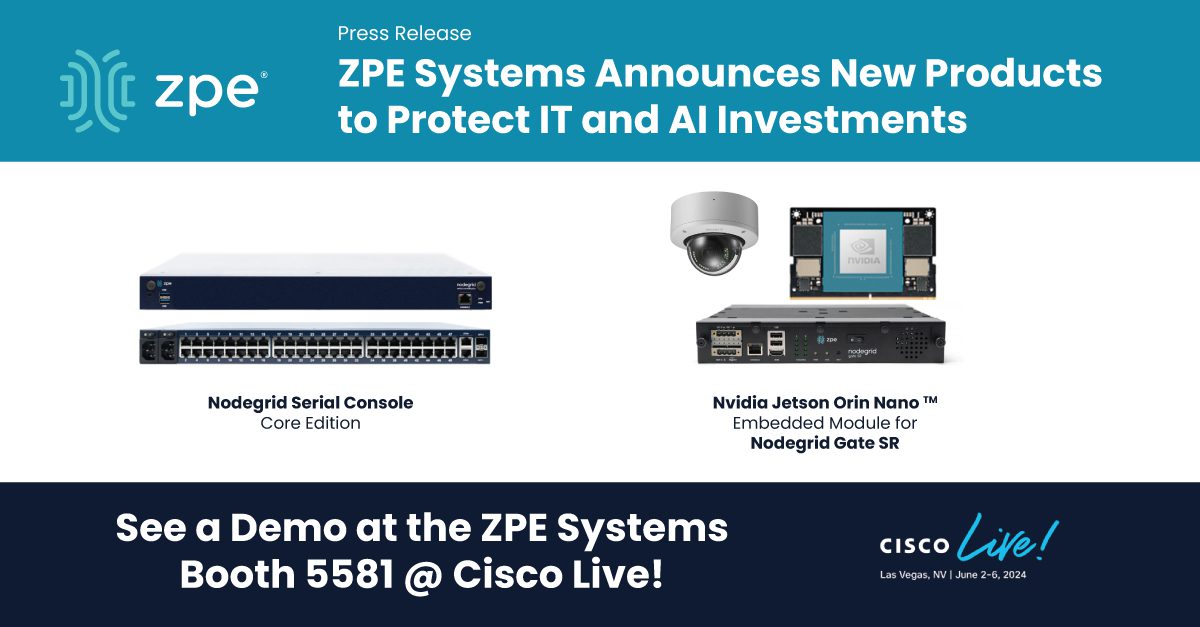
ZPE Systems Unveils IT Resilience Products at Cisco Live, Including Solution to Protect AI Investments

NSC Core Edition and Gate SR with Jetson module

Budget-friendly console server product and dual-CPU NVIDIA platform help organizations protect their infrastructure and AI investments.

Fremont, CA — May 28, 2024 — ZPE Systems, a leader in network infrastructure and management solutions that is now part of Legrand, launches two new products at Cisco Live Las Vegas: the Nodegrid Serial Console Core Edition and the Nodegrid Gate SR platform with embedded NVIDIA Jetson Orin Nano™ module. These innovative products will empower organizations to better protect their vital IT infrastructure and NVIDIA AI investments from the growing risks of cyber-attacks.

The Nodegrid Serial Console Core Edition is a cost-effective third generation console server that resolves the vulnerabilities left by legacy console servers. It leverages drop-in Isolated Management Infrastructure (IMI) to fully separate management traffic from production networks. The creation of a separate management network provides physical and logical isolation from unauthorized users and cyber threats.  

“The first step in cybersecurity resiliency is proper IT hygiene, starting with the right architecture to remove anxiety from automated patching and recovery,” said Koroush Saraf, VP of Products and Marketing at ZPE Systems. “The Core Edition simplifies IMI, providing secure, isolated management access from any branch office or remote location via any LAN or WAN link type, including cellular connections. This gives customers a safe environment for patching or configuration rollback even during an outage or cyberattack.” 

Though IMI has been used primarily by hyperscalers and big tech brands, the Core Edition enables businesses of all sizes to build their own IMI networks and reap the benefits of a layered security approach at an affordable price. 

“With the NSCP Core Edition, our goal is to make big tech’s resilience practices accessible and affordable for all organizations,” emphasizes Arnaldo Zimmermann, Cofounder of ZPE and VP/GM at Legrand. “Now, anyone can drop in our Gen 3 console server, create their IMI, and close those vulnerabilities created by their outdated devices.” 

ZPE is also releasing the Nodegrid Gate SR with embedded Jetson module. This new platform internally hosts the NVIDIA Jetson Orin Nano™ module, serving as an out-of-band device for initial bring-up, patching, and upgrading when running NVIDIA workloads. ZPE’s Gate SR with embedded Jetson module offers a dual-CPU platform that uses the same IMI concept for provisioning AI workloads via out-of-band path and allows customers to deploy, manage, and upgrade remotely via ZPE Cloud. This new Nodegrid platform enables organizations to improve industrial floor safety, campus security, and manufacturing quality control, by deploying 3rd party computer vision software at the edge. Organizations can now add resilience and recovery to the fleet of their NVIDIA AI workloads with ZPE embedded or external AI hardware devices.

To learn more, visit the Core Edition page or meet us in booth 5581 at Cisco Live. 

PCI DSS 4.0 Requirements

Businessman,Using,Virtual,Touch,Screen,Clicks,Abbreviation:,Pci,Dss.,Concept
The Security Standards Council (SSC) of the Payment Card Industry (PCI) released the version 4.0 update of the Data Security Standard (DSS) in March 2022. PCI DSS 4.0 applies to any organization in any country that accepts, handles, stores, or transmits cardholder data. This standard defines cardholder data as any personally identifiable information (PII) associated with someone’s credit or debit card. The risks for PCI DSS 4.0 noncompliance include fines, reputational damage, and potentially lost business, so organizations must stay up to date with all recent changes.

The new requirements cover everything from protecting cardholder data to implementing user access controls, zero trust security measures, and frequent penetration (pen) testing. Each major requirement defined in the updated PCI DSS 4.0 is summarized below, with tables breaking down the specific compliance stipulations and providing tips or best practices for meeting them.

Citation: The PCI DSS v4.0

PCI DSS 4.0 requirements and best practices

Every PCI DSS 4.0 requirement starts with a stipulation that the processes and mechanisms for implementation are clearly defined and understood. The best practice involves updating policy and process documents as soon as possible after changes occur, such as when business goals or technologies evolve, and communicating changes across all relevant business units.

Jump to the other requirements below:

Build and maintain a secure network and systems

Requirement 1: Install and maintain network security controls

Network security controls include firewalls and other security solutions that inspect and control network traffic. PCI DSS 4.0 requires organizations to install and properly configure network security controls to protect payment card data.

Stipulations for Compliance

Best Practices

Network security controls (NSCs) are configured and maintained.

Validate network security configurations before deployment and use configuration management to track changes and prevent configuration drift.

Network access to and from the cardholder data environment (CDE) is restricted.

Monitor all inbound traffic to the CDE, even from trusted networks, and, when possible, use explicit “deny all” firewall rules to prevent accidental gaps.

Network connections between trusted and untrusted networks are controlled.

Implement a DMZ that manages connections between untrusted networks and public-facing resources on the trusted network.

Risks to the CDE from computing devices that can connect to both untrusted networks and the CDE are mitigated.

Use security controls like endpoint protection and firewalls to protect devices from Internet-based attacks and zero-trust and network segmentation to prevent lateral movement to CDEs.

Requirement 2: Apply secure configurations to all system components

Attackers often compromise systems using known default passwords or old, forgotten services. PCI DSS 4.0 requires organizations to properly configure system security settings and reduce the attack surface by turning off unnecessary software, services, and accounts.

Stipulations for Compliance

Best Practices

System components are configured and managed securely.

Continuously check for vendor-default user accounts and security configurations and ensure all administrative access is encrypted using strong cryptographic protocols.

Wireless environments are configured and managed securely.

Apply the same security standards consistently across wired and wireless environments, and change wireless encryption keys whenever someone leaves the organization.

Protect account data

Requirement 3: Protect stored account data

Any payment account data an organization stores must be protected by methods such as encryption and hashing. Organizations should also limit account data storage unless it’s necessary and, when possible, truncate cardholder data.

Stipulations for Compliance

Best Practices

Storage of account data is kept to a minimum.

Use data retention and disposal policies to configure an automated, programmatic procedure to locate and remove unnecessary account data.

Sensitive authentication data (SAD) is not stored after authorization.

Review data sources to ensure that the full contents of any track, card verification code, and PIN/PIN blocks are not retained after the authorization process is completed.

Access to displays of full primary account number (PAN) and ability to copy cardholder data are restricted.

Use role-based access control (RBAC) to limit PAN access to individuals with a defined need and use the masking approach to display only the number of digits needed for a specific function.

PAN is secured wherever it is stored.

Render PAN unreadable using one-way hashing with a randomly generated secret key, truncation, index tokens, and strong cryptography with secure key management.

Cryptographic keys used to protect stored account data are secured.

Manage cryptographic keys with a centralized key management system that’s PCI DSS 4.0 compliant to restrict access to key-encrypting keys and store them separately from data-encrypting keys.

Where cryptography is used to protect stored account data, key management processes and procedures covering all aspects of the key lifecycle are defined and implemented.

Use a key management solution that simplifies or automates key replacement for old or compromised keys.

Requirement 4: Protect cardholder data with strong cryptography during transmission over open, public networks

While requirement 3 applies to stored card data, requirement 4 outlines stipulations for protecting cardholder data in transit.

Stipulations for Compliance

Best Practices

PAN is protected with strong cryptography during transmission.

Encrypt PAN over both public and internal networks and apply strong cryptography at both the data level and the session level.

Maintain a vulnerability management program

Requirement 5: Protect all systems and networks from malicious software

Organizations must take steps to prevent malicious software (a.k.a., malware) from infecting the network and potentially exposing cardholder data.

Stipulations for Compliance

Best Practices

Malware is prevented, or detected and addressed.

Use a combination of network-based controls, host-based controls, and endpoint security solutions; supplement signature-based tools with AI/ML-powered detection.

Anti-malware mechanisms and processes are active, maintained, and monitored.

Update tools and signature databases as soon as possible and prevent end-users from disabling or altering anti-malware controls.

Anti-phishing mechanisms protect users against phishing attacks.

Use a combination of anti-phishing approaches, including anti-spoofing controls, link scrubbers, and server-side anti-malware.

Requirement 6: Develop and maintain secure systems and software

Development teams should follow PCI-compliant processes when writing and validating code. Additionally, install all appropriate security patches immediately to prevent malicious actors from exploiting known vulnerabilities in systems and software.

Stipulations for Compliance

Best Practices

Bespoke and custom software are developed securely.

Use manual or automatic code reviews to search for undocumented features, validate that third-party libraries are used securely, analyze insecure code structures, and check for logical vulnerabilities.

Security vulnerabilities are identified and addressed.

Use a centralized patch management solution to automatically notify teams of known vulnerabilities and pending updates.

Public-facing web applications are protected against attacks.

Use automatic vulnerability security assessment tools that include specialized web scanners that analyze web application protection.

Changes to all system components are managed securely.

Use a centralized source code version management solution to track, approve, and roll back changes.

Implement strong access control measures

Requirement 7: Restrict access to system components and cardholder data by business need-to-know

This PCI DSS 4.0 requirement aims to limit who and what has access to sensitive cardholder data and CDEs to prevent malicious actors from gaining access through a compromised, over-provisioned account. “Need to know” means that only accounts with a specific need should have access to sensitive resources; it’s often applied using the “least-privilege” approach, which means only granting accounts the specific privileges needed to perform a job role.

Stipulations for Compliance

Best Practices

Access to system components and data is appropriately defined and assigned.

Use RBAC to provide accounts with access privileges based on their job functions (e.g., ‘customer service agent’ or ‘warehouse manager’) rather than on an individual basis.

Access to system components and data is managed via an access control system.

Use a centralized identity and access management (IAM) system to manage access across the enterprise, including branches, edge computing sites, and the cloud.

Requirement 8: Identify users and authenticate access to system components

Organizations must establish and prove the identity of any users attempting to access CDEs or sensitive data. This requirement is core to the zero trust security methodology which is designed to limit the scope of data access and theft once an attacker has already compromised an account or system.

Stipulations for Compliance

Best Practices

User identification and related accounts for users and administrators are strictly managed throughout an account’s lifecycle.

Use an account lifecycle management solution to streamline account discovery, provisioning, monitoring, and deactivation.

Strong authentication for users and administrators is established and managed.

Replace relatively weak passwords/passphrases with stronger authentication factors like hardware tokens or biometrics.

Multi-factor authentication (MFA) is implemented to secure access into the CDE.

MFA should also protect access to management interfaces on isolated management infrastructure (IMI) to prevent attackers from controlling the CDE.

MFA systems are configured to prevent misuse.

Secure the MFA system itself with strong authentication and validate MFA configurations before deployment to ensure it requires two different forms of authentication and does not allow any access without a second factor.

Use of application and system accounts and associated authentication factors is strictly managed.

Whenever possible, disable interactive login on system and application accounts to prevent malicious actors from logging in with them.

Requirement 9: Restrict physical access to cardholder data

Malicious actors could gain access to cardholder data by physically interacting with payment devices or tampering with the hardware infrastructure that stores and processes that data. These PCI DSS 4.0 requirements outline how to prevent physical data access.

Stipulations for Compliance

Best Practices

Physical access controls manage entry into facilities and systems containing cardholder data.

Use logical or physical controls to prevent unauthorized users from connecting to network jacks and wireless access points within the CDE facility.

Physical access for personnel and visitors is authorized and managed.

Require visitor badges and an authorized escort for any third parties accessing the CDE facility, and keep an accurate log of when they enter and exit the building.

Media with cardholder data is securely stored, accessed, distributed, and destroyed.

Do not allow portable media containing cardholder data to leave the secure facility unless absolutely necessary.

Point of interaction (POI) devices are protected from tampering and unauthorized substitution.

Use a centralized, vendor-neutral asset management system to automatically discover and track all POI devices in use across the organization.

Use of application and system accounts and associated authentication factors is strictly managed.

Whenever possible, disable interactive login on system and application accounts to prevent malicious actors from logging in with them.

Regularly monitor and test networks

Requirement 10: Log and monitor all access to system components and cardholder data

User activity logging and monitoring will help prevent, detect, and mitigate CDE breaches. PCI DSS 4.0 requires organizations to collect, protect, and review audit logs of all user activities in the CDE.

Stipulations for Compliance

Best Practices

Audit logs are implemented to support the detection of anomalies and suspicious activity, and the forensic analysis of events.

Use a user and entity behavior analytics (UEBA) solution to monitor user activity and detect suspicious behavior with machine learning algorithms.

Audit logs are protected from destruction and unauthorized modifications.

Never store audit logs in public-accessible locations; use strong RBAC and least-privilege policies to limit access.

Audit logs are reviewed to identify anomalies or suspicious activity.

Use an AIOps tool to analyze audit logs, detect anomalous activity, and automatically triage and notify teams of issues.

Audit log history is retained and available for analysis.

Retain audit logs for at least 12 months in a secure storage location; keep the last three months of logs immediately accessible to aid in breach resolution.

Time-synchronization mechanisms support consistent time settings across all systems.

Use NTP to synchronize clocks across all systems to help with breach mitigation and post-incident forensics.

Failures of critical security control systems are detected, reported, and responded to promptly.

Use AIOps to automatically detect, triage, and respond to security incidents. AIOps also provides automatic root-cause analysis (RCA) for faster incident resolution.

Requirement 11: Test security of systems and network regularly

Researchers and attackers continuously discover new vulnerabilities in systems and software, so organizations must frequently test network components, applications, and processes to ensure that in-place security controls are still adequate. ge changes; ensure alerts are monitored.

Stipulations for Compliance

Best Practices

Wireless access points are identified and monitored, and unauthorized wireless access points are addressed.

Use a wireless analyzer to detect rogue access points.

External and internal vulnerabilities are regularly identified, prioritized, and addressed.

PCI DSS 4.0 requires internal and external vulnerability scans at least once every three months, but performing them more often is encouraged if your network is complex or changes frequently.

External and internal penetration testing is regularly performed, and exploitable vulnerabilities and security weaknesses are corrected.

Work with a PCI DSS-approved vendor to perform external and internal penetration testing; conduct pen testing on network segmentation controls.

Network intrusions and unexpected file changes are detected and responded to.

Use AI-powered, next-generation firewalls (NGFWs) with enhanced detection algorithms and automatic incident response capabilities.

Unauthorized changes on payment pages are detected and responded to.

Use anti-skimming technology like file integrity monitoring (FIM) to detect unauthorized payment page changes; ensure alerts are monitored.

Maintain an information security policy

Requirement 12: Support information security with organizational policies and programs

The final requirement is to implement information security policies and programs to support the processes described above and get everyone on the same page about their responsibilities regarding cardholder data privacy.

Stipulations for Compliance

Best Practices

Acceptable use policies for end-user technologies are defined and implemented.

Enforce usage policies with technical controls capable of locking users out of systems, applications, or devices if they violate these policies.

Risks to the cardholder data and environment are formally identified, evaluated, and managed.

Use a centralized patch management system to monitor firmware and software versions, detect changes that may increase risk, and deploy updates to fix vulnerabilities.

PCI DSS compliance is managed.

Service providers must assign executive responsibility for managing PCI DSS 4.0 compliance.

PCI DSS scope is documented and validated.

Frequently validate PCI DSS scope by evaluating the CDE and all connected systems to determine if coverage should be expanded.

Security awareness education is an ongoing activity.

Require all users to take security awareness training upon hire and every year afterwards; it’s also recommended to provide refresher training when someone transfers into a role with more access to sensitive data.

Personnel are screened to reduce risks from insider threats.

In addition to screening new hires, conduct additional screening when someone moves into a role with greater access to the CDE.

Risk to information assets associated with third-party service provider (TPSP) relationships is managed.

Thoroughly analyze the risk of working with third-parties based on their reporting practices, breach history, incident response procedures, and PCI DSS validation.

Third-party service providers (TPSPs) support their customers’ PCI DSS compliance.

Require TPSPs to provide their PCI DSS Attestation of Compliance (AOC) to demonstrate their compliance status.

Suspected and confirmed security incidents that could impact the CDE are responded to immediately.

Create a comprehensive incident response plan that designates roles to key stakeholders.

Isolate your CDE and management infrastructure with Nodegrid

The Nodegrid out-of-band (OOB) management platform from ZPE Systems isolates your control plane and provides a safe environment for cardholder data, management infrastructure, and ransomware recovery. Our vendor-neutral, Gen 3 OOB solution allows you to host third-party tools for automation, security, troubleshooting, and more for ultimate efficiency.

Ready to know more about PCI DSS 4.0 Requirements?

Learn how to meet PCI DSS 4.0 requirements for network segmentation and security by downloading our isolated management infrastructure (IMI) solution guide.
Download the Guide