Providing Out-of-Band Connectivity to Mission-Critical IT Resources

Home » Serial Consoles » Page 7

Opengear Alternatives for the OM2200 and OM1200
NSRSTACK2-1
The Opengear Operations Manager is a series of NetOps console servers providing out-of-band remote access to manage remote network infrastructure in data center, edge, and branch deployments. There are a few reasons to consider alternative options, including a lack of 3rd-party integrations, 5G support, and gateway routing capabilities. This blog goes over the pros and cons of the Operations Manager solutions before discussing Opengear alternatives that provide greater automation, orchestration, and security features as well as all-in-one branch networking capabilities.

Executive summary

  • Opengear’s Operations Manager (OM) appliances are NetOps console servers providing out-of-band (OOB) management for remote network infrastructure.
  • While OM appliances provide some automation capabilities, especially with the upgraded Automation Edition, they offer limited third-party integrations and end-device automation features.
  • The OM2200 and OM1200 both lack integrated branch gateway functionality and have limited security features overall.
  • The Nodegrid platform from ZPE Systems overcomes these limitations with vendor-neutral OOB serial consoles and branch services routers.
  • Nodegrid enables end-to-end automation through end-device ZTP and unlimited third-party integrations with leading tools like Ansible and Chef.
  • Nodegrid also consolidates data center and branch networking functionality like gateway routing, 5G cellular failover, and security to provide all-in-one solutions.

Reviewing the Opengear Operations Manager platform

Operations Manager (or OM) is Opengear’s line of NetOps console servers. OM appliances come with Smart OOBTM for out-of-band management, including automated port discovery and VLAN support. Opengear’s x86 Lighthouse platform supports Python scripts and Docker container deployments for NetOps automation. Lighthouse also supports over 100 power vendors’ equipment, allowing it to monitor and control UPS batteries, PDU outlets, and power load balancing. It’s important to note that, while the standard (Enterprise) edition of Lighthouse supports Python and Docker, customers must upgrade to the Automation edition for zero-touch provisioning (ZTP) or other third-party automation integrations. Additionally, OM solutions do not support 2FA or SAML authentication.

Opengear OM2200

The Opengear OM2200 Operations Manager model is designed for data center and high-density use cases. It features 16, 32, 48 serial and 24 serial/Ethernet mixed port configuration options, with an optional global LTE-A Pro cellular module. The OM2200 provides five regional options for dual AC power as well as a dual DC power cord model.

Click here to see a complete Opengear OM2200 Operations Manager product SKUs list.

OM2200 Pros:

  • Plenty of RAM and storage space
  • Many options for power and serial port configurations
  • Uniquely broad support for 3rd-party power equipment
  • Some NetOps automation capabilities

OM2200 Cons:

  • Requires upgraded software licenses for ZTP and most 3rd-party automation
  • No 2FA or SAML 2.0 support
  • No managed USB serial ports
  • No 5G support

Opengear OM1200

The Opengear OM1200 Operations Manager model is meant for small edge deployments. The compact chassis supports 4 serial, 8 serial, and 8 serial/8 Ethernet port combinations. It provides OOB and failover access via dual Ethernet (SFP Fiber is available on the 4E and 8E models) as well as an optional global LTE-A Pro cellular module.

Click here to see a full list of Opengear OM1200 Operations Manager product SKUs.

OM1200 Pros:

  • Compact size
  • Cost-effective range of port configurations
  • Supports 3rd-party power equipment, Docker, and Python

OM1200 Cons:

  • Requires upgraded software licenses for ZTP and most 3rd-party automation
  • No 2FA or SAML 2.0 support
  • It doesn’t have gateway routing/SD-WAN capabilities
  • No 5G support

Opengear Operations Manager limitations

Both the OM2200 and OM1200 models suffer from similar limitations regarding automation, especially with the base version of the Lighthouse software. Even the upgraded Automation Edition, which unlocks ZTP and RESTful APIs, doesn’t provide much automation for end devices beyond running Python playbooks. This limits operational efficiency, slows down new deployments, and impedes the team’s ability to quickly rebuild core infrastructure after a failure or ransomware attack. Another issue with the OM1200, in particular, is that while its compact size will save space in your edge data center and branch office rack, it’s still a single-purpose device. That means you still need to purchase separate solutions for gateway routing, switching, and/or edge compute. These additional devices take up space, cost extra money, and require time to configure and manage.

Opengear alternatives from ZPE Systems

ZPE Systems provides an alternative option for NetOps-enabled OOB console servers called the Nodegrid solution. All Nodegrid devices run on the open, Linux-based, x86 Nodegrid OS which supports VMs and Docker containers to run your choice of third-party automation, software-defined networking/SD-WAN, and security applications. Nodegrid’s robust, onboard security protects lost or stolen devices with features like TPM 2.0, encrypted SSD, UEFI BIOS, secure boot, and geofencing. Nodegrid can also extend ZTP and other automation to legacy and mixed-vendor end devices for end-to-end network infrastructure automation. Try ZPE’s product selector to see which of Nodegrid’s serial consoles or integrated branch routers is right for your deployment. Below, we review the two models that serve as direct replacements for the Opengear OM1200 and OM2200 solutions.

Nodegrid Serial Console Plus (NSCP)

The Nodegrid Serial Console Plus (NSCP) is an alternative to the OM2200 for data center and high-density deployments. The NSCP connects 16, 32, 48, or 96 (Patent No. 9,905,980) serial devices, all in a standard 1U rackmount chassis. Dual SFP+, dual Gigabit Ethernet, and optional Wi-FI and 4G/5G LTE modules provide secure Gen 3 OOB management access and failover, ensuring blazing fast speeds and high performance. Plus, the NSCP comes with two managed USB 3.0 ports for additional flexibility.

Click here to see a complete list of Nodegrid NSCP product SKUs.

Nodegrid Net Services Router (NSR)

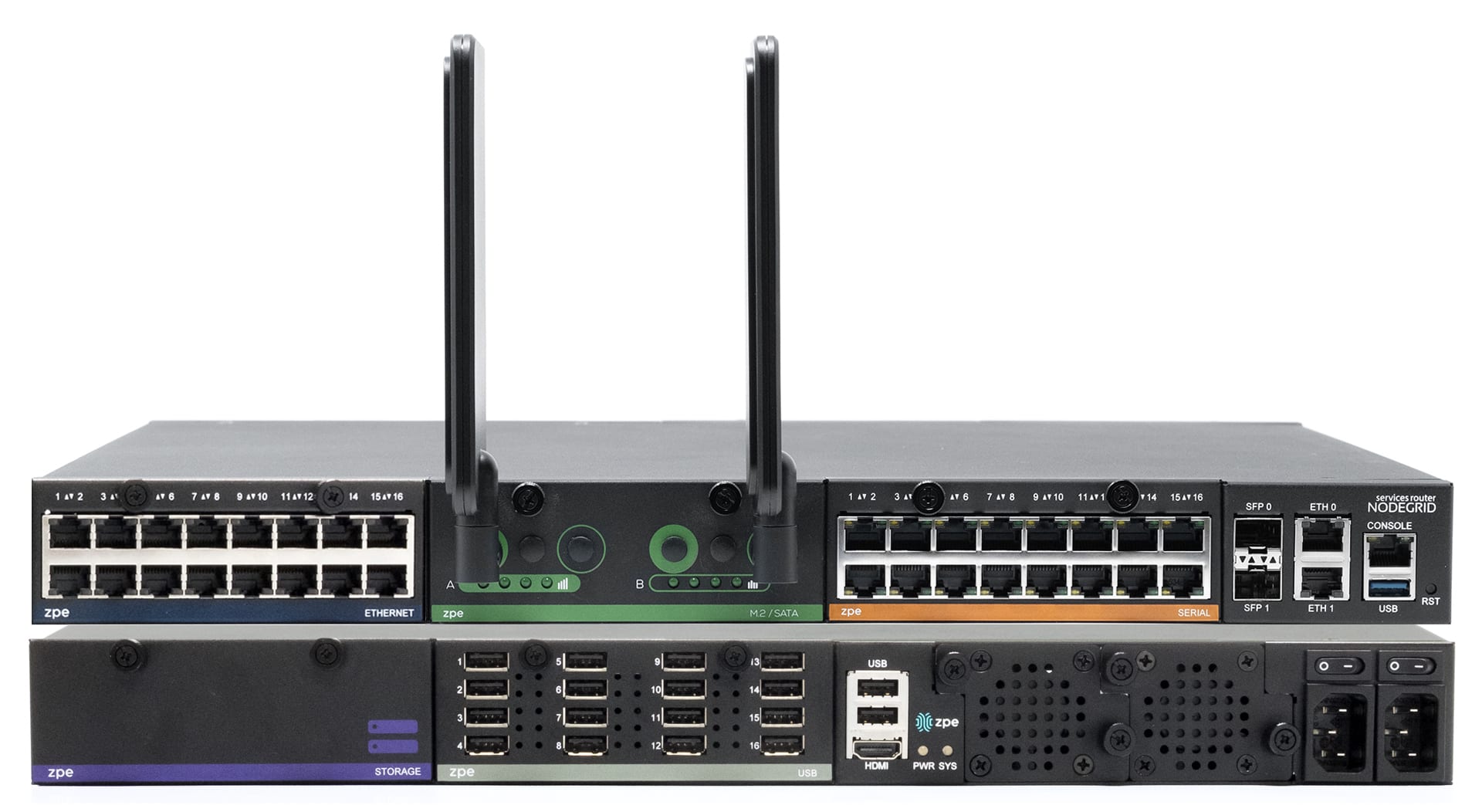
The Nodegrid Net Services Router (NSR) is an alternative to the OM1200 for edge data center and branch office use cases. The NSR is a modular, compact device that can deliver gateway routing, switching, serial console, and compute capabilities all in a single appliance. Gen 3 OOB and network failover are provided out of the box via dual SFP+ and dual Gigabit Ethernet ports, with optional modules for WiFi and dual-SIM 5G/4G LTE. Additional NSR modules include:

  • 16-port GbE Ethernet
  • Storage
  • 16-port Serial (for console server capabilities)
  • 16-port USB serial
  • Compute
  • 8-port PoE+
  • M.2 Cellular/Wi-Fi/SATA
  • 16-port GbE Ethernet SFP
  • 8-port Ethernet SFP+

Click here to see a complete list of Nodegrid NSCP product SKUs.

Key takeaways:

While the OM1200 and OM2200 provide OOB management with some automation, they have serious limitations that negatively impact operational efficiency. Nodegrid is an Opengear alternative providing a vendor-neutral OOB management platform that delivers unlimited automation, enhanced security, and all-in-one networking for ultimate operational efficiency.

Trade in to get a discount on Opengear alternatives

If you’re ready to replace end-of-life devices from Opengear or other vendors, now’s your chance to get a discount. Visit our trade-in page to get your trade-in offer.
Get Trade-In Offer

See Nodegrid’s Opengear Alternatives in action

Reach out today to view a demo of Nodegrid’s Opengear alternatives in action.
Request a Demo

Opengear OM2200 – Product SKU’s:

OM2216

16 x Serial, 8GB RAM, 64GB SSD, 8 x USB 2.0, 2 x GbE/SFP Fiber

OM2216-AU

Dual AC – Australian power cord

OM2216-EU

Dual AC – European Union power cord

OM2216-JP

Dual AC – Japanese power cord

OM2216-UK

Dual AC – United Kingdom power cord

OM2216-US

Dual AC – United States power cord

OM2216-DDC

Dual DC power

OM2216-L-AU

Global 4G LTE-A Pro cellular module, Dual AC – AU power cord

OM2216-L-EU

Global 4G LTE-A Pro cellular module, Dual AC – EU power cord

OM2216-L-JP

Global 4G LTE-A Pro cellular module, Dual AC – JP power cord

OM2216-L-UK

Global 4G LTE-A Pro cellular module, Dual AC – UK power cord

OM2216-L-US

Global 4G LTE-A Pro cellular module, Dual AC – US power cord

OM-2216-DDC-L

Global 4G LTE-A Pro cellular module, Dual DC power


OM2224-24E

24 x Serial, 24 x GbE, 8GB RAM, 64GB Flash

OM2224-24E-AU

1 x GbE/SFP, Dual AC – Australian power cord

OM2224-24E-EU

1 x GbE/SFP, Dual AC – European Union power cord

OM2224-24E-JP

1 x GbE/SFP, Dual AC – Japanese power cord

OM2224-24E-UK

1 x GbE/SFP, Dual AC – United Kingdom power cord

OM2224-24E-US

1 x GbE/SFP, Dual AC – United States power cord

OM2224-24E-DDC

1 x GbE/SFP, Dual DC power

OM2224-24E-L-AU

1 x GbE/SFP, Global 4G LTE-A Pro cellular module, Dual AC – AU power cord

OM2224-24E-L-EU

1 x GbE/SFP, Global 4G LTE-A Pro cellular module, Dual AC – EU power cord

OM2224-24E-L-JP

1 x GbE/SFP, Global 4G LTE-A Pro cellular module, Dual AC – JP power cord

OM2224-24E-L-UK

1 x GbE/SFP, Global 4G LTE-A Pro cellular module, Dual AC – UK power cord

OM2224-24E-L-US

1 x GbE/SFP, Global 4G LTE-A Pro cellular module, Dual AC – US power cord

OM2224-24E-DDC-L

1 x GbE/SFP, Global 4G LTE-A Pro cellular module, Dual DC power

OM2224-24E-10G-AU

10 x GbE/SFP, Dual AC – AU power cord

OM2224-24E-10G-EU

10 x GbE/SFP, Dual AC – EU power cord

OM2224-24E-10G-JP

10 x GbE/SFP, Dual AC – JP power cord

OM2224-24E-10G-UK

10 x GbE/SFP, Dual AC – UK power cord

OM2224-24E-10G-US

10 x GbE/SFP, Dual AC – US power cord

OM2224-24E-10G-DDC

10 x GbE/SFP, Dual DC power

OM2224-24E-10G-L-AU

10 x GbE/SFP, Global 4G LTE-A Pro cellular module, Dual AC – AU power cord

OM2224-24E-10G-L-EU

10 x GbE/SFP, Global 4G LTE-A Pro cellular module, Dual AC – EU power cord

OM2224-24E-10G-L-JP

10 x GbE/SFP, Global 4G LTE-A Pro cellular module, Dual AC – JP power cord

OM2224-24E-10G-L-UK

10 x GbE/SFP, Global 4G LTE-A Pro cellular module, Dual AC – UK power cord

OM2224-24E-10G-L-US

10 x GbE/SFP, Global 4G LTE-A Pro cellular module, Dual AC – US power cord

OM2224-24E-10G-DDC-L

10 x GbE/SFP, Global 4G LTE-A Pro cellular module, Dual DC power


OM2232

32 x Serial, 8GB RAM, 64GB SSD, 2 x GbE/SFP Fiber

OM2232-AU

Dual AC – Australian power cord

OM2232-EU

Dual AC – European Union power cord

OM2232-JP

Dual AC – Japanese power cord

OM2232-UK

Dual AC – United Kingdom power cord

OM2232-US

Dual AC – United States power cord

OM2232-DDC

Dual DC power

OM2232-L-AU

Global 4G LTE-A Pro cellular module, Dual AC – AU power cord

OM2232-L-EU

Global 4G LTE-A Pro cellular module, Dual AC – EU power cord

OM2232-L-JP

Global 4G LTE-A Pro cellular module, Dual AC – JP power cord

OM2232-L-UK

Global 4G LTE-A Pro cellular module, Dual AC – UK power cord

OM2232-L-US

Global 4G LTE-A Pro cellular module, Dual AC – US power cord

OM2232-DDC-L

Global 4G LTE-A Pro cellular module, Dual DC power


OM2248

48 x Serial, 8GB RAM, 64GB SSD

OM2248-AU

2 x GbE/SFP, Dual AC – Australian power cord

OM2248-EU

2 x GbE/SFP, Dual AC – European Union power cord

OM2248-JP

2 x GbE/SFP, Dual AC – Japanese power cord

OM2248-UK

2 x GbE/SFP, Dual AC – United Kingdom power cord

OM2248-US

2 x GbE/SFP, Dual AC – United States power cord

OM2248-DDC

2 x GbE/SFP, Dual DC power

OM2248-L-AU

2 x GbE/SFP, Global 4G LTE-A Pro cellular module, Dual AC – AU power cord

OM2248-L-EU

2 x GbE/SFP, Global 4G LTE-A Pro cellular module, Dual AC – EU power cord

OM2248-L-JP

2 x GbE/SFP, Global 4G LTE-A Pro cellular module, Dual AC – JP power cord

OM2248-L-UK

2 x GbE/SFP, Global 4G LTE-A Pro cellular module, Dual AC – UK power cord

OM2248-L-US

2 x GbE/SFP, Global 4G LTE-A Pro cellular module, Dual AC – US power cord

OM2248-DDC-L

2 x GbE/SFP, Global 4G LTE-A Pro cellular module, Dual DC power

OM2248-10G-AU

10 x GbE/SFP, Dual AC – AU power cord

OM2248-10G-EU

10 x GbE/SFP, Dual AC – EU power cord

OM2248-10G-JP

10 x GbE/SFP, Dual AC – JP power cord

OM2248-10G-UK

10 x GbE/SFP, Dual AC – UK power cord

OM2248-10G-US

10 x GbE/SFP, Dual AC – US power cord

OM2248-10G-DDC

10 x GbE/SFP, Dual DC power

OM2248-10G-L-AU

10 x GbE/SFP, Global 4G LTE-A Pro cellular module, Dual AC – AU power cord

OM2248-10G-L-EU

10 x GbE/SFP, Global 4G LTE-A Pro cellular module, Dual AC – EU power cord

OM2248-10G-L-JP

10 x GbE/SFP, Global 4G LTE-A Pro cellular module, Dual AC – JP power cord

OM2248-10G-L-UK

10 x GbE/SFP, Global 4G LTE-A Pro cellular module, Dual AC – UK power cord

OM2248-10G-L-US

10 x GbE/SFP, Global 4G LTE-A Pro cellular module, Dual AC – US power cord

OM2248-10G-DDC-L

10 x GbE/SFP, Global 4G LTE-A Pro cellular module, Dual DC power

Opengear OM1200 – Product SKU’s

OM1204

4 x Serial, 2GB RAM, 16GB Flash, 1 x GbE

OM1204-L

4 x Serial, 2GB RAM, 16GB Flash, 1 x GbE, Global 4G LTE

OM1204-4E

4 x Serial, 4 x GbE, 4GB RAM, 16GB Flash, 1 x GbE SFP 

OM1204-4E-L

4 x Serial, 4 x GbE, 4GB RAM, 16GB Flash, 1 x GbE SFP, Global 4G LTE 

OM1208

8 x Serial, 2GB RAM, 16GB Flash, 1 x GbE

OM1208-L

8 x Serial, 2GB RAM, 16GB Flash, 1 x GbE, Global 4G LTE

OM1208-8E

8 x Serial straight X2 pinout, 8 x GbE switch, 4GB RAM, 16GB SSD, 2 x USB 2.0, 2 x GbE/SFP Fiber

OM1208-8E-L

8 x Serial straight X2 pinout, 8 x GbE switch, 4GB RAM, 16GB SSD, 2 x USB 2.0, 2 x GbE/SFP Fiber, Global 4G LTE

Nodegrid Serial Console Plus – Product SKU’s

Nodegrid Serial Console Plus (NSCP)

4-Core Intel CPU, 4GB DDR4 RAM, 32GB SSD, 2 x SFP+, 2 x GbE, 2 x USB 3.0, 1 x HDMI, 1 x Console

NSCP-T16R-STND-SAC

16 x Cisco Rolled Serial, Single AC power

NSCP-T16R-STND-DAC

16 x Cisco Rolled Serial, Dual AC power

NSCP-T16R-STND-DDC

16 x Cisco Rolled Serial, Dual AC power

NSCP-T32R-STND-SAC

32 x Cisco Rolled Serial, Single AC power

NSCP-T32R-STND-DAC

32 x Cisco Rolled Serial, Dual AC power

NSCP-T32R-STND-DDC

32 x Cisco Rolled Serial, Dual DC power

NSCP-T48R-STND-SAC

48 x Cisco Rolled Serial, Single AC power

NSCP-T48R-STND-DAC

48 x Cisco Rolled Serial, Dual AC power

NSCP-T48R-STND-DDC

48 x Cisco Rolled Serial, Dual DC power

NSCP-T96R-STND-SAC

96 x Cisco Rolled Serial, Single AC power

NSCP-T96R-STND-DAC

96 x Cisco Rolled Serial, Dual AC power

NSCP-T96R-STND-DDC

96 x Cisco Rolled Serial, Dual DC power

Nodegrid Net SR – Product SKU’s

Nodegrid Net Services Router (NSR)

Multi-Core Intel CPU, On-board Switch, 8GB DDR4 RAM, 32GB MSATA, Hot-Swappable Fans, 2 x SFP+, 2 x GbE

NSR-TOP1-DAC

Dual AC power, 5 Slots support

NSR-BASE-DAC

Dual AC power, 3 Slots support

NSR-TOP1-SAC

Single AC power, 5 Slots support

NSR-BASE-SAC

Single AC power, 3 Slots support

NSR-TOP1-SAC-POE

Single AC and PoE, 5 Slots support

NSR-BASE-SAC-POE

Single AC and PoE, 3 Slots support

Expansion Cards

NSR-16ETH-EXPN

16 x GbE Ethernet expansion card

NSR-8ETH-POE-EXPN

8 x GbE Ethernet with PoE+ expansion card

NSR-16SRL-EXPN

16 x RJ45 Serial Rolled expansion card

NSR-16USB-EXPN

16 x USB Type A expansion card

NSR-8SFP-EXPN

8 x 10GbE SFP expansion card

NSR-DISK-EXPN

Storage expansion card

NSR-COMP-EXPN

Compute 4-core, 8GB DDR4, 32GB SATA expansion card

NSR-M2-EXPN

M.2/SATA Expansion Card

Zero Trust Edge Solutions: Continuing the Zero Trust Journey

A glowing shield with a 0 on it overlays a glowing map of the world to represent zero trust at the edge.

The zero trust security methodology follows the principle of “never trust, always verify,” which assumes that any account or device could be compromised and should be forced to continuously establish trustworthiness. This sounds like an extreme approach, but with the frequency of high-profile data breaches and ransomware attacks steadily increasing, security teams must pivot their approach away from prevention and toward damage mitigation and recovery. Zero trust security limits the lateral movement of compromised accounts on the network by establishing micro-perimeters around network resources that continually assess an account’s behavior for suspicious activity.

Organizations also must extend zero trust security policies and controls to remote business sites at their network’s edges, such as branches, Internet of Things (IoT) deployments, and home offices. Zero trust edge solutions are software platforms that provide networking, access, and security capabilities designed specifically for the edge. This guide explains what zero trust edge solutions do and the challenges involved in using them before discussing how to build a unified ZTE platform.

What are zero trust edge solutions?

A zero trust edge solution combines edge-centric security functionality with remote access and networking capabilities. ZTE’s core feature is zero trust network access (ZTNA), which securely connects remote users to enterprise applications and resources, similar to a VPN. ZTNA is more secure than VPNs because it only allows users to authenticate to one resource at a time and prevents them from seeing or accessing anything else until they re-establish their identity and credentials. ZTE’s other features and capabilities vary depending on the vendor and deployment type. ZTE solutions come in three different forms:

  • As a service: Companies can purchase ZTE functionality as a cloud-based, vendor-managed service. Remote users connect to regional points of presence (POPs) to reach the ZTE stack in the cloud before being routed to enterprise resources. This deployment style is easier to deploy for organizations with lots of users in the field but few (if any) physical edge locations to host security or networking solutions.
    .
  • With SD-WAN: Some ZTE providers combine zero-trust features with software-defined wide area networking (SD-WAN) capabilities. SD-WAN creates a virtual network overlay that’s decoupled from the underlying WAN infrastructure, enabling centralized control and automation. Packaging ZTE and SD-WAN together helps organizations consolidate their tech stack at physical edge sites like branches, warehouses, and manufacturing plants while still offering ZTNA to work-from-home and field employees.
    .
  • Build your own: Since there are very few mature ZTE providers on the market, and it can be difficult to find pre-made solutions with all the features needed for complex, distributed edge networks, many teams opt to build their own platform by combining tools from multiple vendors. Typically, these organizations have physical branches with existing WAN infrastructure that they use as regional POPs to host ZTNA and other security solutions.

Why build your own ZTE solution?

If pre-made solutions exist, why would companies go through the hassle of creating their own zero trust edge platform? Presently, there aren’t any “complete” ZTE solutions that offer full, zero-trust protection for branches and other physical edge sites.

For example, many ZTE platforms don’t protect management ports on the control plane, leaving critical edge infrastructure like servers, switches, and power distribution units (PDUs) exposed to cybercriminals. Additionally, branch ZTE solutions rely upon production network infrastructure, so if there’s an outage or ransomware attack, remote management teams are completely cut off from troubleshooting and recovery. These solutions also lack helpful edge networking features like fleet management and automation, and their closed ecosystems limit the ability to extend their capabilities.

Building your own zero trust edge platform allows you to combine all the security, networking, and management functionality you need to get full security coverage and streamline branch operations. The key to creating a robust and efficient ZTE solution is starting with a vendor-neutral platform that can unify the entire security architecture.

How Nodegrid simplifies ZTE

Nodegrid edge networking solutions from ZPE Systems provide the perfect vendor-neutral platform for integrated zero trust edge deployments. All-in-one edge gateway routers deliver a full stack of branch networking capabilities, including out-of-band (OOB) management. OOB creates a dedicated control plane on an isolated network so remote teams have continuous access to manage, troubleshoot, and repair edge infrastructure.

Nodegrid protects the management interfaces on the OOB network with robust, zero trust security processes and controls. For example, the encryption keys for each Nodegrid device are destroyed after provisioning so that only the public key is accessible when needed for authentication to our cloud. Nodegrid devices also use the Trusted Platform Module (TPM) as a hardware security module to prevent cybercriminals from tampering with the configuration or storage.

Our platform runs on the Linux-based, x86 Nodegrid OS, which supports VMs and Docker containers for third-party applications. That means you can deploy ZTNA, SD-WAN, and other zero trust edge solutions without purchasing or managing additional hardware at each branch. Nodegrid’s OOB and failover functionality ensure those security and access solutions remain operational during ISP outages, ransomware attacks, and other disruptions. Teams can also run their favorite tools for automation, troubleshooting, and recovery on the Nodegrid platform, streamlining edge operations and ensuring their toolbox is available on the OOB network. Nodegrid also simplifies fleet management with true zero-touch provisioning to securely and automatically deploy configurations at edge business sites.

Want to unify your zero trust edge solutions with Nodegrid?

Nodegrid provides a robust, vendor-neutral platform to unify and extend your zero trust edge capabilities. Request a free demo to see Nodegrid in action. Watch Demo

IT Automation vs Orchestration: What’s the Difference?

it-automation-vs-orchestration

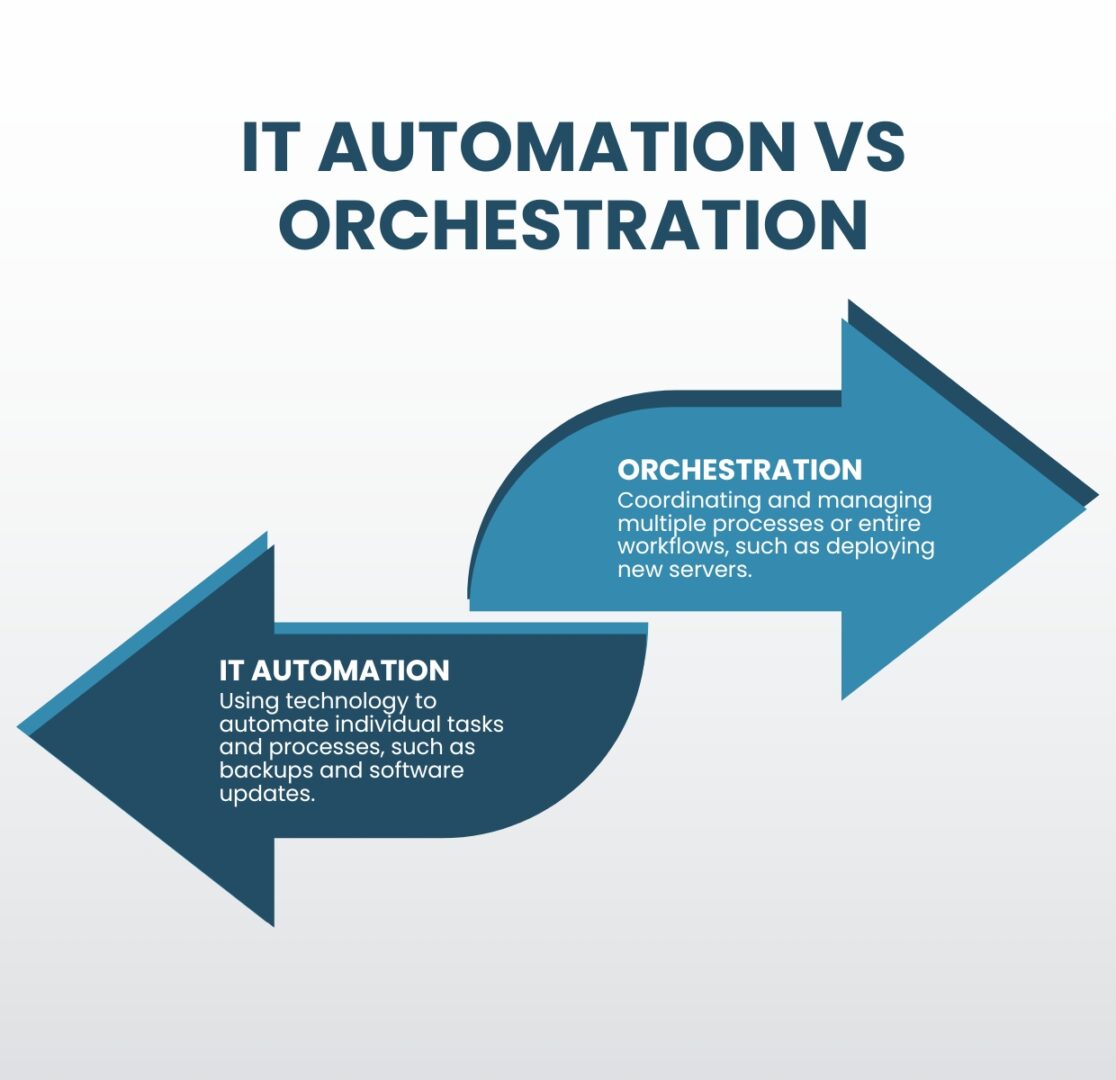
IT automation and orchestration are two important concepts in the field of information technology that are often used interchangeably but are actually quite different. IT automation focuses on individual tasks, whereas orchestration encompasses multiple tasks or even entire workflows. Each approach produces different results and helps teams meet different goals. They also have their own benefits and challenges that must be considered. This guide compares IT automation vs orchestration to clear up misconceptions and help organizations choose the right approach to streamlining their IT operations.

IT Automation vs Orchestration: What’s the Difference?

IT Automation vs Orchestration

IT automation refers to the use of technology to automate repetitive tasks and processes, including things like automated backups, software updates, and monitoring systems. The goal of IT automation is to free up time and resources for IT professionals by automating routine tasks, allowing them to focus on more strategic initiatives.

Orchestration, on the other hand, is the coordination and management of multiple processes or entire workflows. This can include things like configuring and deploying new servers, managing network connections, and monitoring the performance of many different systems. The goal of orchestration is to improve the overall efficiency of IT operations, reducing costs and enabling greater scalability.

The benefits of IT automation vs orchestration

Benefits of IT Automation vs Orchestration

IT Automation

  • Saves time
  • Reduces human error
  • Improves compliance

Orchestration

  • Increases operational efficiency
  • Improves network scalability
  • Ensures IT system reliability

One of the main benefits of IT automation is that it can save time and resources for IT professionals. By automating routine tasks, IT teams can focus on more strategic initiatives and projects. Additionally, automation helps reduce human error and increases the accuracy, speed, and efficiency of tasks. Automation also improves compliance, as automated processes are less prone to human negligence and are easier to audit.

Orchestration, on the other hand, helps improve the overall efficiency and effectiveness of IT operations. By automating the coordination and management of multiple tasks, orchestration helps ensure that different systems and processes work together seamlessly. Additionally, orchestration helps improve the scalability and reliability of IT systems by ensuring different components are configured and deployed correctly.

The challenges of IT automation and orchestration

IT Automation and Orchestration Challenges

IT Complexity

Teams can’t effectively automate IT operations unless they thoroughly understand all the tasks, systems, and workflows comprising a highly complex network.

Automation Skills Gap

A high demand for automation engineers makes it difficult and expensive to recruit, train, and retain qualified IT automation and orchestration professionals.

Supporting Infrastructure

Effective automation and orchestration deployments require a robust underlying infrastructure of specialized hardware and software solutions.

One of the main challenges of automation and orchestration is the complexity of IT systems. As organizations rely more heavily on specialized technology and grow both in size and in number of business sites, IT systems become increasingly complex and difficult to manage. Automation and orchestration help reduce complexity by automating routine tasks and coordinating the management of different systems. However, teams must understand those tasks and systems well enough to know how to automate them effectively; otherwise, mistakes will proliferate or there will be gaps in automated workflows.

Another IT automation and orchestration challenge is the need for skilled professionals to deploy and manage these solutions. As automation and orchestration become more prevalent, the demand for skilled professionals has increased, making it harder (and more expensive) to recruit and retain qualified automation engineers. The alternative is for organizations to spend time and resources training existing IT staff to work with automation and orchestration.

Additionally, organizations need to invest in the technology and infrastructure necessary to support automation and orchestration. Some examples of these automation infrastructure components include:

  • Gen 3 out-of-band (OOB) serial consoles, which allow teams to deploy third-party automation on an OOB network that doesn’t rely on production infrastructure, improving security and resilience. Gen 3 OOB also moves bandwidth-hogging orchestration workflows off the production network, which reduces latency for better performance.
  • Software-defined networking, which virtualizes the control and management processes and abstracts them from underlying LAN and WAN hardware. SDN, SD-WAN, and SD-Branch technologies enable a high degree of automation for networking workflows such as load balancing, application-aware routing, and failover.
  • Infrastructure as Code (IaC), which turns infrastructure configurations into software code. IaC enables the use of version control, zero-touch deployments, automatic configuration management, automated security testing, and other tools and processes that support automation and improve network resilience.
  • Orchestrator software, which controls all of the automated workflows on a network. The orchestrator is the central hub for teams to create, deploy, monitor, and troubleshoot automated workflows and infrastructure.
  • AIOps, or artificial intelligence for IT operations, which analyzes all the logs and data pulled from automated infrastructure devices and security appliances. AIOps provides predictive maintenance insights, automatic root-cause analysis (RCA), enhanced threat detection, and other functionality to help support a complex, automated network infrastructure.

Tips for overcoming IT automation and orchestration challenges

While every organization will face unique IT automation and orchestration hurdles, there are two basic tips to help simplify any deployment. Using consolidated network hardware and vendor-neutral platforms can help reduce the complexity of network infrastructure, the need to hire additional staff, and the cost to deploy automation infrastructure.

  • Consolidated network hardware, such as all-in-one branch/edge gateway routers, significantly reduces the number of devices deployed at each business site. Fewer devices to automate means less complexity, and organizations save money on deployment costs like hardware overhead and automation license seats.
  • Vendor-neutral platforms, such as the Nodegrid infrastructure management platform from ZPE Systems, allow teams to use the automation and orchestration tools they’re most comfortable with regardless of provider, reducing the skills gap. Open platforms ensure seamless interoperability between all the various automated components to decrease management complexity. Vendor-neutral hardware also allows organizations to run software from multiple vendors on a single device, enabling even greater network consolidation to reduce the complexity and cost of automated infrastructure deployments.

Choosing IT automation vs orchestration

IT automation and orchestration are interconnected concepts that are frequently, but incorrectly, used interchangeably. Automation focuses on individual tasks, while orchestration manages multiple tasks and entire workflows. Both automation and orchestration can help improve the efficiency and effectiveness of IT operations, but they have their unique benefits and challenges. Organizations must carefully consider their IT systems and needs when deciding which approach to use.

IT automation vs orchestration simplified

The network automation experts at ZPE Systems have helped Big Tech brands like Amazon and Uber improve operational efficiency and resilience with IT automation and orchestration. Learn how to use these best practices to streamline your IT operations by downloading our Network Automation Blueprint.

Download the Blueprint

Network Resilience: What is a Resilience System?

A digital web of interconnected network resilience concepts being selected by a business person in a suit.

Network resilience means being able to withstand or recover from adversity, service degradation, and complete outages with minimal business disruption. The longer business-critical services are down, or systems are breached, the greater the risk of significant financial, reputational, and legal consequences. A resilience system is a set of technologies that enable an organization to continue operating while teams work to repair failures and recover from cyberattacks. But what exactly is a resilience system, and what does it look like? This guide to network resilience defines resilience systems, provides example use cases, compares them to related technologies like backups and redundant systems, and describes the key components required to build them.

What is a resilience system?

A resilience system provides all the infrastructure, tools, and services necessary to continue operating, if in a degraded state, during major incidents. It also includes everything needed to recover data, rebuild systems, perform security testing, and continue delivering core business functionality. A resilience system is typically isolated from the production network, preventing cybercriminals from finding and compromising it and ensuring teams have continuous access even if the primary network goes down.

Resilience system use cases

Some examples of the challenges that resilience systems help overcome include:

1. Ransomware recovery

In a ransomware attack, cybercriminals infect systems with malware that spreads throughout the network and encrypts any data it encounters. Modern ransomware now uses packaged attacks that move at machine speed, instantly incapacitating entire networks. Organizations completely lose access to critical systems and data until they pay a ransom, often in untraceable cryptocurrency. Ransomware is an exceptionally tenacious form of malware and tends to reinfect backup data and rebuilt systems, significantly hampering recovery efforts and increasing the duration and cost of the attack. The best practice for resilience systems is to isolate them on an out-of-band (OOB) network, inaccessible to hackers who have breached the production in-band network. Doing so creates a safe, isolated recovery environment (IRE) where teams can restore critical data and systems without the risk of reinfection. The resilience system includes all the tools and hardware needed to restore critical business services and infrastructure. An IRE significantly accelerates ransomware recovery and minimizes downtime, so businesses can avoid paying ransoms and reduce the overall cost of attacks.

2. Network outages

Enterprise network architectures and supply chains are highly complex, with lots of moving parts that rely on external vendors to maintain availability. Just one of those vendors dropping the ball could take the entire organization offline, severely impacting network resilience. For example, in 2023, an expired cryptographic certificate caused Cisco’s Viptela SD-WAN appliances to fail on reboot, completely taking down affected networks until the issue was resolved. With a resilience system, Viptela customers could have potentially avoided this downtime by failing over to alternative network resources. For example, a resilience system with integrated cellular failover allows branches to continue connecting to and delivering critical business services while also providing a lifeline for remote teams to access and recover failed systems. A resilience system also provides observability and automatic notifications so teams are instantly alerted to issues like certificate expirations and can respond quickly to recover critical services.

3. Shift to remote work

Incidents like ransomware attacks and equipment failures happen frequently enough that companies can create detailed plans and proactively implement solutions to minimize their impact, but not all adverse events are so predictable. When the COVID-19 pandemic struck, the massive shift to remote work strained the network resources of most organizations. Instead of maintaining a limited number of branch offices, teams suddenly had to treat every employee as a new branch, leading to performance degradation and outages as they scrambled to reinforce the business’s remote capabilities. A resilience system gives teams the tools and resources they need to provision additional infrastructure, manage networking logic, deploy new security solutions, and more, even while the primary network is offline or under a heavy load. A resilience system is the key to quickly adjusting network performance and security to adapt to sudden changes like a transition to fully remote operations.

Do backups and redundancy equate to network resilience?

The short answer is no; backups and redundancy do not equate to network resilience, though they do contribute to making systems more resilient.

  • Backups are copies of data, configurations, and application code used to do a hot or cold restore when a production system fails. The underlying infrastructure must remain operational for teams to access and use backups, and unless additional resilience measures are taken, it’s easy for backups to become infected or compromised, severely hampering recovery efforts.
  • Redundancy involves duplicating critical systems, services, and applications as a failsafe in case the primaries go down. Organizations can “fail over” to the redundancies to continue critical business operations during outages. However, redundant systems are just as susceptible to failures and infections without additional resilience measures like out-of-band management and isolated management infrastructure.

Backups and redundancy are part of network resilience but alone are not enough to ensure business continuity. Resilience systems focus on maintaining the architecture of the production network while adding the ability to recover or adapt to adversity. The next section discusses all the tools and technologies that make up network resilience systems.

What does a resilience system look like?

There are four key components that go into a resilience system.

Key Components of a Resilience System

Alternative Networking

Full-stack routing and switching, Wi-Fi, VoIP, virtualization, software-defined network overlays for SDN & SD-WAN

Alternative Compute

Full-stack compute, containers, virtual machines, and any other resources needed to run applications and deliver services

Storage & Storage Recovery

Enough storage to recover systems and applications as well as support content delivery

Automation

Tools like zero-touch provisioning (ZTP) to facilitate speedy recovery while minimizing human error

Alternative networking and compute resources ensure the organization can failover in the event of a network failure or continue delivering services when production servers are unavailable. Teams also need enough storage to restore backup data, build new systems, and support the content delivery network (CDN). Automation solutions like zero-touch provisioning (ZTP), configuration management, and security validation tools accelerate the recovery process while mitigating the risk of human error. Combined, these components enable teams to reduce the frequency, severity, and duration of outages, improving overall network resilience.

Network resilience with ZPE Systems

A resilient network will continue delivering critical business services in the face of any challenge, whether from cybercriminals, supply chain issues, global events, or even plain human error. A resilience system is isolated from the production network to ensure security and availability, and it consists of all the tools and technologies needed to troubleshoot, recover, and deliver your most crucial data, applications, and infrastructure. The Nodegrid platform from ZPE Systems is the perfect foundation for a resilience system. Nodegrid is a vendor-neutral, out-of-band management solution capable of running your choice of third-party software. Nodegrid allows you to build a highly customizable IRE containing all the tools needed to safely recover from ransomware. You can even use Nodegrid to deliver services while the primary network or systems are down, making it your all-in-one network resilience multi-tool.

Want to ensure network resilience by accelerating ransomware recovery?

Minimize the business impact of ransomware with the help of our whitepaper, 3 Steps to Ransomware Recovery. Learn how to follow Gartner’s best practices to build an Isolated Recovery Environment

Download Whitepaper

Out-of-Band Management: What It Is and Why You Need It

Thumbnail – What is out-of-band management

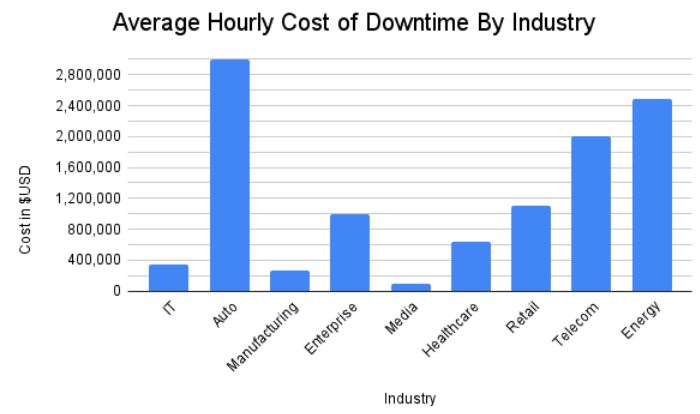
This scenario is every IT professional’s worst nightmare: it’s the middle of the night, a remote site on the other side of the country has gone offline, and nobody knows why. A single minute of downtime can cost anywhere from several hundred dollars to tens of thousands of dollars, and the nearest tech is a six-hour plane ride away. Consider 2024’s CrowdStrike outage and the devastation caused for banks, airports, and many other organizations.

A bar chart showing the average hourly cost of downtime by industry.
Data Source: SolarWinds

Out-of-band management offers the solution: a way for teams to access critical remote infrastructure during outages and breaches without “out-of-chair” expenses. Out-of-band management allows organizations to recover remote infrastructure faster, reducing the duration and expense of downtime.

This guide to out-of-band management answers critical questions about what this technology is, why you need it, and how to choose the right solution.

What is out-of-band management?

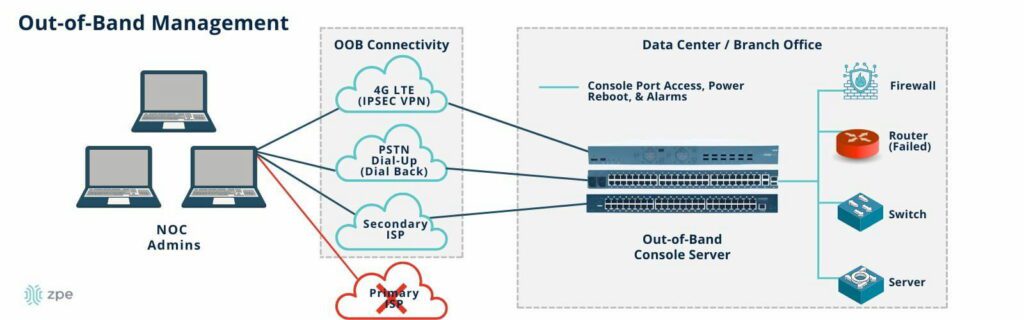
Out-of-band management (OOBM) involves controlling network infrastructure and workflows on an out-of-band network. An out-of-band network is an entirely separate network that runs parallel with your production (or in-band) network but doesn’t rely on any of the same infrastructure or services. OOBM allows teams to administer network infrastructure remotely on a dedicated connection, such as secondary Fiber or cellular LTE, that will remain available even if the in-band network goes down from an equipment failure, ISP outage, or ransomware attack.

A diagram showing how out-of-band management works.

The biggest reason to use out-of-band management is to ensure continuous, uninterrupted access to critical remote infrastructure even when the primary network is down. OOBM allows teams to recover from outages and cyberattacks faster and more cost-efficiently because they can access, troubleshoot, and restore systems without rolling trucks or hiring on-site services.

Out-of-band management provides a lifeline for teams to access critical remote infrastructure when the production network is offline. It allows them to immediately begin troubleshooting and repairing the issue to restore services ASAP. With OOBM, companies save money on recovery expenses, and minimize the duration and business impact of downtime.

What is an OOBM serial console?

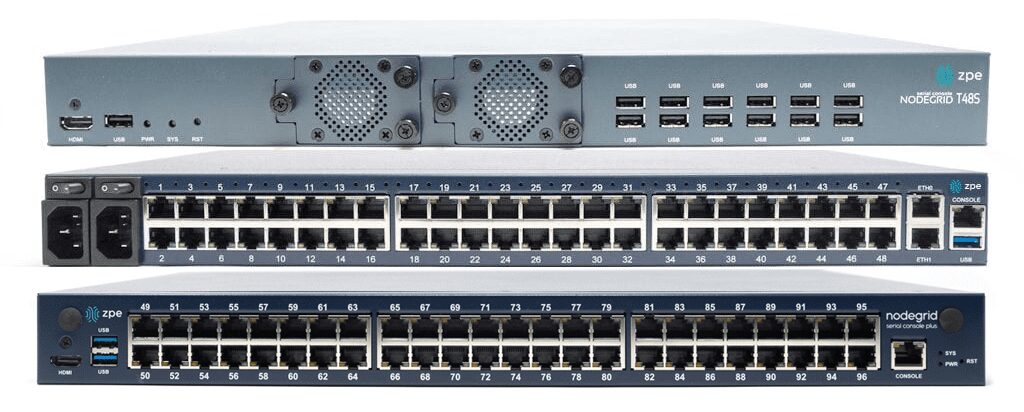
Front and back views of the Nodegrid out-of-band management serial console.

Some organizations use OOBM jump boxes (or jump servers) that are connected to both the in-band and out-of-band networks, allowing administrators to “jump” from one network to the other for management. Examples of low-cost jump boxes include the Intel NUC and the Raspberry Pi. However, OOBM jump boxes are security risks because they do not effectively isolate the management infrastructure, plus they require an entire duplicate infrastructure of devices and services to create the out-of-band network. The best practice for security, resilience, and efficiency is to deploy an all-in-one, out-of-band management solution.

An out-of-band management solution uses hardware devices known as serial consoles, which connect to infrastructure devices via their management port (usually RS232 Serial, Ethernet, or USB). Serial consoles are known by lots of other names, including terminal servers, console servers, console server switches, serial routers, and serial switches.

The serial console has dedicated network interfaces to provide an Internet connection for remote management access, often fiber or 4G/5G cellular LTE, so they don’t connect to or rely upon the primary production network at all. This gives teams the ability to continuously monitor and administer critical remote infrastructure even during an ISP or WAN outage that would make a jump box inaccessible.

 Administrators remotely access an OOBM serial console via this dedicated link and, from there, can view and manage all connected infrastructure from a single, convenient software platform. This software is typically deployed on-premises and runs as a VM (virtual machine)  either on the serial console itself or on a separate machine, but there are some cloud-based OOBM network management software tools.

Out-of-band management software varies from provider to provider, with most offering second-generation (or Gen 2) solutions that provide some built-in automation capabilities but do not support vendor-neutral integrations with third-party tools. Newer, third-generation (or Gen 3) solutions use an open, x86 Linux-based operating system to allow easy integrations with other vendors’ software for automation, orchestration, security, monitoring, and more.

The benefits of out-of-band management

Out-of-band management can help you:

  • Improve network performance: Performing resource-intensive management, automation, and orchestration workflows on the out-of-band network reduces the strain on the production network for better speed and reliability.
  • Accelerate ransomware recovery: The OOBM network can be used to create an isolated recovery environment (IRE) where teams can safely rebuild and recover from ransomware attacks without the risk of reinfection, reducing the duration and expense of ransomware-related outages.
  • Streamline repairs and rebuilds: OOBM provides the ability to deploy the tools and applications needed to isolate, cleanse, rebuild, and restore services that have been affected by failures and ransomware.

The security and resilience benefits of out-of-band management are discussed further below.

How does out-of-band management improve security and resilience?

Network breaches and ransomware attacks occur so frequently that most businesses know it’s no longer a question of “if,” but “when” they’ll be hit. Once cybercriminals compromise a device or account and can move around the network, it’s only a matter of time before they find the management interfaces and take complete control over critical infrastructure.

OOBM and management infrastructure isolation

Serial consoles create an out-of-band network by directly connecting to the management port of infrastructure devices and moving all control functions off of the production LAN. This isolates the management plane from the data plane, which is part of a cybersecurity best practice known as isolated management infrastructure (IMI). An IMI further segments the management network and routes management ports to terminate on top-of-rack, OOBM serial switches, creating multiple layers of isolated management. The isolated management plane is always remotely accessible to engineers via the OOBM connection, but it remains hidden from any cybercriminals who may breach the production network.

Multi Layered OOB IMI – ZPE Systems


OOBM and ransomware recovery

Out-of-band management also improves security and resilience by aiding in ransomware recovery. According to a Sophos survey, 70% of companies hit by ransomware take longer than two weeks to recover, due in no small part to the pervasive nature of the malware used and how frequently rebuilt systems and recovered data get reinfected. Today’s ransomware attacks are now pre-packaged and move at machine speed – meaning instantly – across infrastructure, bringing entire businesses down before they’ve even realized they’re under attack. The longer the business is offline, the more revenue (and customer trust) is lost, causing recovery costs to skyrocket.

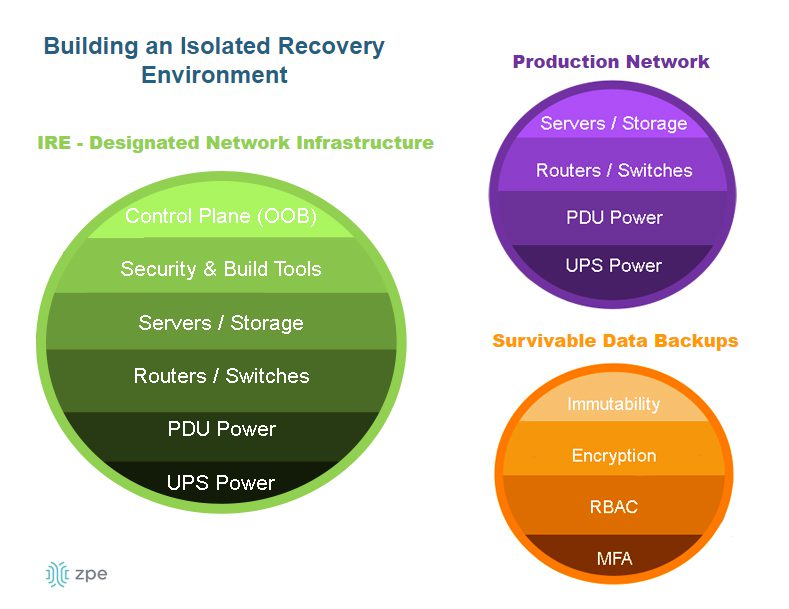
An IMI using out-of-band management gives teams an isolated recovery environment (IRE) where they can recover data and rebuild systems without the risk of reinfection. The IRE allows organizations to get services back online faster to reduce the financial and reputational consequences of ransomware attacks.

A diagram showing the components of an isolated recovery environment.

Resilience is defined as the ability to continuously operate and deliver services, if in a degraded fashion, even while undergoing major failures and breaches. Out-of-band management improves resilience by ensuring that teams have continuous access to critical remote infrastructure no matter what’s going wrong with the production environment. OOBM serial consoles also isolate the management infrastructure to protect it from attackers on the primary network and provide a safe environment for teams to recover from ransomware.

Why choose Nodegrid for out-of-band management?

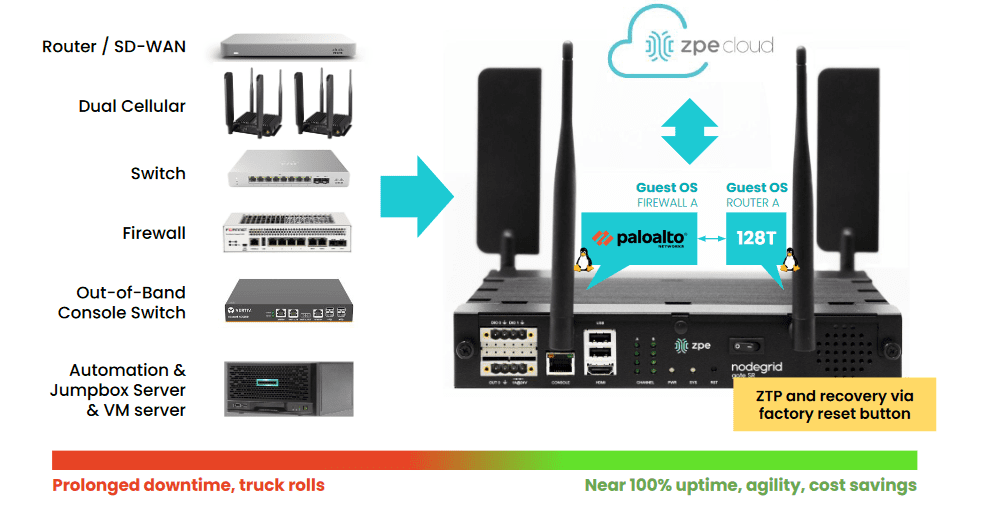
Many network teams think of out-of-band as being a huge expense and time sink. Setting up  proper infrastructure for OOBM and IMI typically requires 6 or more boxes at each business site for routing, switching, firewall, storage, cellular access, and a jump box. The Nodegrid platform from ZPE Systems reduces the cost and headache of out-of-band management by combining all these functions and more into a single box. Teams can easily drop a Nodegrid box in each site at a fraction of the cost of deploying a traditional OOBM network.

A diagram showing ZPE’s multi-function capabilities for IMI in branch and edge sites.

The first Gen 3 OOBM solution

Nodegrid is the first and only Gen 3 out-of-band management solution. Nodegrid OOBM devices use the x86 Linux-based NodegridOS, which is capable of running VMs and Docker containers to host your choice of third-party applications for automation, orchestration, security, SD-WAN, and more. Nodegrid’s ability to host other vendors’ software ensures that teams have access to all the tools they need to troubleshoot and recover infrastructure from within the IMI environment, making it the perfect network resilience multi-tool.

Nodegrid OOBM software is available as an on-premises solution or a highly scalable cloud-based app, and both support easy integrations with tools for monitoring, automated configuration management, and more. This enables teams to consolidate and streamline their workflows, maximizing efficiency while reducing the risk of human error.

Nodegrid’s other key features include:

  • Built-in 5G/4G LTE and Wi-Fi options for OOB and network failover
  • OOB support over IPMI, ILO, DRAC, CIMC, vSerial, and KVM
  • Robust hardware security like BIOS protection, UEFI Secure Boot, and an encrypted solid-state disk
  • SAML 2.0 and two-factor authentication (2FA)
  • Support for legacy and mixed-vendor infrastructure without expensive adapters

ZPE Systems offers a wide range of out-of-band management devices to fit any deployment size and use case, including the 96-port Nodegrid Serial Console Plus (NSCP) for large and hyperscale data centers, and the Nodegrid Gate SR, which combines branch gateway routing and OOB serial console functionality for remote business sites like retail stores and manufacturing plants.

Nodegrid OOB serial console comparison


Guest OS
Docker Apps
Wi-Fi
Cellular (Dual-SIM)
Serial Ports
Data Sheet
Nodegrid Serial Console S Series
1
1-2
No
1
16, 32 or 48
Nodegrid Serial Console Plus (NSCP)
1
1-2
Yes
1
16, 32, 48 or 96

Nodegrid OOB network edge router comparison


Guest OS
Docker Apps
Wi-Fi
Cellular (Dual-SIM)
Serial Ports
Data Sheet
Nodegrid Link SR
1
1-2
Yes
1
1
Nodegrid Bold SR
1
1-2
Yes
1-2
8
Nodegrid Hive SR
1-2
1-3
Yes
1-2
8
Nodegrid Gate SR
1-3
1-4
Yes
1-2
8
Nodegrid Net SR
1-6
1-4
Yes
1-4
16-80
Nodegrid Mini SR
1
1-2
Yes
1
Via USB

Get scalable network resilience with the only Gen 3 out-of-band management solution

Only Nodegrid OOBM delivers network control, security, automation, and resilience with a completely vendor-neutral platform. To see Nodegrid out-of-band management in action, request a free demo.

Request a Demo

Opengear EOL: IM7200 Alternative Options

Opengear alternatives

The Opengear IM7200 is a line of out-of-band (OOB) serial consoles, also known as terminal servers, console servers, serial console servers, serial console routers, and serial console switches. The Infrastructure Manager (IM) solution provides consolidated remote management of data center infrastructure. The IM7200 is EOL as of the 31st of March, 2023, with an end-of-sale date of the 30th of September 2023 – click here to see a full list of affected product SKUs. In this blog, we’ll discuss replacement options for the IM7200, including Opengear alternatives that deliver unlimited automation capabilities and complete vendor freedom.


Table of contents:

Opengear IM7200 overview

The Opengear IM7200 is a line of serial console solutions that provide out-of-band (OOB) management for 8-48 devices. It’s designed to give administrators a dedicated control plane from which to access and manage remote infrastructure in data centers and large IT deployments.

With the IM7200 now EOL, Opengear recommends migrating to the OM2200 series. Let’s take a look at the features, specifications, and limitations of the Opengear OM2200 before discussing some alternative options.


Looking for replacement options for other discontinued serial consoles and branch routers? Try:

Opengear migration options: OM2200

The Opengear OM2200 Operations Manager console server solution provides OOB management for up to 48 devices over serial and/or Ethernet. OOB and failover use dual fiber ports, with an optional LTE-A Pro cellular module available. One of the OM2200’s biggest strengths is its power management capabilities, uniquely supporting over 100 power vendors’ equipment.

The OM series is Opengear’s line of NetOps console servers, which means they support Opengear’s automation modules as well as Python scripts and Docker container deployments. However, Zero Touch Provisioning (ZTP) and RESTful APIs are locked behind an upgraded version of Opengear’s Lighthouse software. In addition, the OM2200 is what’s known as a 2nd generation or “Gen 2” serial console, which means it isn’t vendor-neutral and can’t integrate or host third-party applications for automation or security.

Opengear OM2200 Features & Tech Specs

Notable Serial Console Features

• SSH direct to consoles

• Keystroke logging

• Alert on cable disconnects

• Text pattern match

• Multiple concurrent sessions

• Automatic device name discovery

OOB Managed Interfaces

• 16, 32, 48 ports

Hardware

• AMD X86, 64-bit CPU

• 8 GB DRAM

• 64 GB SSD

Automation

• Opengear NetOps modules

• Docker

• Python

• Perl and bash support

• Ruby

Automation for End Devices

• Can run playbooks

• Python

• Lighthouse

Guest OS

• Docker support

Power Management

• Monitor UPS battery status

• Automate routine maintenance and load testing

• Control PDU outlets via serial, USB, and Ethernet

• Enforce remote power permissions and map managed consoles to outlets

• Minimize MTTR with out-of-band power control

• Uniquely supports over 100 power vendors’ equipment

Hardware Security

• TPM 2.0

• Embedded firewall

Form Factor

Fixed 1RU


Opengear OM2200 limitations

The OM2200 is a good Gen 2 serial console switch that offers some major improvements over the IM7200, but it still falls short of delivering Gen 3 OOB console server functionality in the following ways.

  • Vendor lock-in: The X86 CPU and Linux-based OS makes the OM2200 programmable and extensible, but Opengear’s Lighthouse management software is not truly vendor-neutral. That means your third-party integration capabilities will be limited to specific supported solutions. If you have a hybrid, distributed, or multi-vendor infrastructure, this limitation could leave gaps in your management and orchestration coverage.
  • Limited automation: The OM2200 improves upon the 7200 by supporting Opengear NetOps modules and allowing scripting and ZTP within the Lighthouse Automation edition. However, this automation only extends to certain supported end-devices, which means you’ll either need to stay within Opengear’s ecosystem, or manually provision and deploy the rest of your infrastructure.
  • Lack of security: The OM2200 includes TPM 2.0 security, SAML 2.0 support, and an embedded firewall. However, it does not include additional hardware security like geofencing, BIOS protection, or UEFI secure boot. This increases the risk that a stolen serial console could be used by cybercriminals to breach your OOB management network.


Both the Opengear IM7200 and OM2200 are Gen 2 serial console servers, which means they provide OOB management access as well as some automation functionality to simplify individual network management workflows. However, due to vendor lock-in and minimal hardware security, the OM series falls short of the end-to-end automation and security required for a Gen 3 serial console solution.

Opengear alternative options from ZPE Systems

Another migration option for EOL Opengear console servers is the Nodegrid solution from ZPE Systems. This Gen 3 OOB management platform includes a wide range of serial console servers and integrated branch services routers to choose from, with the Nodegrid Serial Console Plus (NSCP), the Nodegrid Serial Console S Series, and the Noderid Net Services Router (NSR) serving as direct replacements for the IM7200.

Nodegrid Serial Console Plus (NSCP)

The high-density Nodegrid Serial Console Plus comes in 16, 32, 48, and 96 serial RJ45 port configurations as well as providing 2 USB 3.0 ports for a total of 98 managed devices on a single 1RU solution. That means a single NSCP could replace up to 12 Opengear IM7200 serial consoles, saving on hardware costs and optimizing rack space.

Nodegrid Serial Console S Series

The Nodegrid S series, which comes in 16, 32, or 48-port configurations, uses auto-sensing ports to provide seamless management of modern, legacy, and mixed-vendor infrastructure. The S Series RS232 serial console switch is the perfect legacy modernization platform because it allows you to extend automation to end devices that otherwise wouldn’t support it.

Nodegrid Net Services Router (NSR)

The Nodegrid Net Services Router (NSR) is an all-in-one branch networking solution that delivers OOB, SD-WAN, and more in a single box. The NSR has a modular design that lets you customize your solution with extra terminal server capabilities, storage, processing power, or GbE Ethernet ports.

All Nodegrid devices are secured with on-board features like BIOS protection, geofencing, TPM 2.0, and UEFI Secure Boot. An embedded firewall provides additional functionality like multi-site IPSec VPN, advanced authentication, and 2FA and SAML 2.0.

Nodegrid’s hardware can also directly host VMs, Docker containers, and third-party security and automation applications. Plus, the Linux-based Nodegrid OS supports NetOps automation and orchestration via integrations with tools like Docker, Chef, Puppet, and Ansible. In addition, ZPE’s management software, which is available as an on-premises or web-based solution, provides vendor-neutral visibility and orchestration of all your data center and cloud infrastructure behind one pane of glass.

Nodegrid features & tech specs


Nodegrid NSCP

Nodegrid S Series

Nodegrid NSR

Notable Serial Console Features

• SSH direct to consoles

• Keystroke logging

• Logging to ZPE Cloud, NFS, Local

• Alert on cable disconnects

• Text pattern match with scriptable actions

• Multiple concurrent sessions

• Automatic device name discovery

• Session sharing for collaboration

• IP address per serial port

• Secure session logout enforcement

• Power control hotkey on serial port

• Configurable icon per serial port

• SSH direct to consoles

• Keystroke logging

• Logging to ZPE Cloud, NFS, Local

• Alert on cable disconnects

• Text pattern match with scriptable actions

• Multiple concurrent sessions

• Automatic device name discovery

• Session sharing for collaboration

• IP address per serial port

• Secure session logout enforcement

• Power control hotkey on serial port

• Configurable icon per serial port

• SSH direct to consoles

• Keystroke logging

• Logging to ZPE Cloud, NFS, Local

• Alert on cable disconnects

• Text pattern match with scriptable actions

• Multiple concurrent sessions

• Automatic device name discovery

• Session sharing for collaboration

• IP address per serial port

• Secure session logout enforcement

• Power control hotkey on serial port

• Configurable icon per serial port

OOB Managed Interfaces

• 16, 32, 48, 96 ports (1RU)

• 16, 32, 48 ports

• Up to 5 x 16-port RJ-45 Serial modules

Hardware

• Intel X86, 64-bit CPU optimized for running VMs and automation tools

• Dual-SIM 5G/4G/LTE, Wi-Fi, and V.02 modem for OOB/Failover

• Intel X86, 64-bit CPU optimized for running VMs and automation tools

• Dual-SIM 5G/4G/LTE, Wi-Fi, and V.02 modem for OOB/Failover

• Intel X86, 64-bit CPU optimized for running VMs and automation tools

• Dual-SIM 5G/4G/LTE, Wi-Fi, and V.02 modem for OOB/Failover

Automation

• ZPE Cloud

• Chef

• Docker

• Puppet

• Python

• Ruby

• ShellScript

• Node.js JavaScript

• Red Hat Ansible

• KVM Hypervisor

• ZPE Cloud

• Chef

• Docker

• Puppet

• Python

• Ruby

• ShellScript

• Node.js JavaScript

• Red Hat Ansible

• KVM Hypervisor

• ZPE Cloud

• Chef

• Docker

• Puppet

• Python

• Ruby

• ShellScript

• Node.js JavaScript

• Red Hat Ansible

• KVM Hypervisor

Automation for End Devices

• ZPE Cloud

• Chef

• Docker

• Puppet

• Python

• Ruby

• ShellScript

• Node.js JavaScript

• Red Hat Ansible

• KVM Hypervisor

• ZPE Cloud

• Chef

• Docker

• Puppet

• Python

• Ruby

• ShellScript

• Node.js JavaScript

• Red Hat Ansible

• KVM Hypervisor

• ZPE Cloud

• Chef

• Docker

• Puppet

• Python

• Ruby

• ShellScript

• Node.js JavaScript

• Red Hat Ansible

• KVM Hypervisor

Guest OS

• VMs, Docker, Kubernetes, LXC

• VMs, Docker, Kubernetes, LXC

• VMs, Docker, Kubernetes, LXC

Power Management

• Supports major power strips manufacturers

• Power management integrated with serial session (escape sequence in the serial session or power buttons in web serial session)

• Power control of VMs

• Access rights for users & user groups

• Supports major power strips manufacturers

• Power management integrated with serial session (escape sequence in the serial session or power buttons in web serial session)

• Power control of VMs

• Access rights for users & user groups

• Supports major power strips manufacturers

• Power management integrated with serial session (escape sequence in the serial session or power buttons in web serial session)

• Power control of VMs

• Access rights for users & user groups

Hardware Security

• TPM 2.0

• Encrypted solid-state disk

• UEFI BIOS with protection

• Secure Boot (signed OS

• Geofencing

• TPM 2.0

• Encrypted solid-state disk

• UEFI BIOS with protection

• Secure Boot (signed OS

• Geofencing

• TPM 2.0

• Encrypted solid-state disk

• UEFI BIOS with protection

• Secure Boot (signed OS

• Geofencing

Form Factor

Fixed 1RU

Fixed 1RU

Modular 1RU

The Nodegrid Gen 3 serial console solution is an Opengear alternative that serves as a direct replacement for the IM7200 while delivering enhanced automation capabilities and complete vendor freedom.

Watch a free Nodegrid demo to see a Gen 3 console server solution in action.

Watch the Video

Opengear IM7200 migration SKUs:

Opengear IM7200 EOL SKU

In Scope Features

ZPE Replacement Product

IM7208-2-DAC

IM7208-2-DDC

8 Serial ports, OOB management

Fixed Form Factor:

ZPE-NSCP-T16R-STND-DAC

ZPE-NSC-T16S-STND-DAC

ZPE-NSCP-T16R-STND-DDC

ZPE-NSC-T16S-STND-DDC


Modular Form Factor:

ZPE-NSR-816-DAC with 1 x 16 port serial module 1 x ZPE-NSR-16SRL-EXPN

ZPE-NSR-816-DDC with 1 x 16 port serial module 1 x ZPE-NSR-16SRL-EXPN

IM7216-2-DAC

IM7216-2-DDC

16 Serial ports, OOB management

Fixed Form Factor:

ZPE-NSCP-T16R-STND-DAC

ZPE-NSC-T16S-STND-DAC

ZPE-NSCP-T16R-STND-DDC

ZPE-NSC-T16S-STND-DDC


Modular Form Factor:

ZPE-NSR-816-DAC with 1 x 16 port serial module 1 x ZPE-NSR-16SRL-EXPN

ZPE-NSR-816-DDC with 1 x 16 port serial module 1 x ZPE-NSR-16SRL-EXPN

IM7232-2-DAC

IM7232-2-DDC

32 Serial ports, OOB management

Fixed Form Factor:

ZPE-NSCP-T32R-STND-DAC

ZPE-NSC-T32S-STND-DAC

ZPE-NSCP-T32R-STND-DDC

ZPE-NSC-T32S-STND-DDC


Modular Form Factor:

ZPE-NSR-816-DAC with 2 x 16 port serial module 2 x ZPE-NSR-16SRL-EXPN

ZPE-NSR-816-DDC with 2 x 16 port serial module 2 x ZPE-NSR-16SRL-EXPN

IM7248-2-DAC

IM7248-2-DDC

48 Serial ports, OOB management

Fixed Form Factor:

ZPE-NSCP-T48R-STND-DAC

ZPE-NSC-T48S-STND-DAC

ZPE-NSCP-T48R-STND-DDC

ZPE-NSC-T48S-STND-DDC


Modular Form Factor:

ZPE-NSR-816-DAC with 3 x 16 port serial module 3 x ZPE-NSR-16SRL-EXPN

ZPE-NSR-816-DDC with 3 x 16 port serial module 3 x ZPE-NSR-16SRL-EXPN

96 port not available in IM or OM series

96 Serial ports, OOB management

ZPE-NSCP-T96R-STND-DAC

ZPE-NSCP-T96R-STND-DDC

Ready to replace your EOL Opengear IM7200 with a Gen 3 out-of-band serial console solution?

Call ZPE Systems today at 1-844-4ZPE-SYS for a special trade-in promotion.

Contact Us