Providing Out-of-Band Connectivity to Mission-Critical IT Resources

Collaboration in DevOps: Strategies and Best Practices

Collaboration in DevOps is illustrated by two team members working together in front of the DevOps infinity logo.
The DevOps methodology combines the software development and IT operations teams into a highly collaborative unit. In a DevOps environment, team members work simultaneously on the same code base, using automation and source control to accelerate releases. The transformation from a traditional, siloed organizational structure to a streamlined, fast-paced DevOps company is rewarding yet challenging. That’s why it’s important to have the right strategy, and in this guide to collaboration in DevOps, you’ll discover tips and best practices for a smooth transition.

Collaboration in DevOps: Strategies and best practices

A successful DevOps implementation results in a tightly interwoven team of software and infrastructure specialists working together to release high-quality applications as quickly as possible. This transition tends to be easier for developers, who are already used to working with software code, source control tools, and automation. Infrastructure teams, on the other hand, sometimes struggle to work at the velocity needed to support DevOps software projects and lack experience with automation technologies, causing a lot of frustration and delaying DevOps initiatives. The following strategies and best practices will help bring Dev and Ops together while minimizing friction.

Turn infrastructure and network configurations into software code

Infrastructure and network teams can’t keep up with the velocity of DevOps software development if they’re manually configuring, deploying, and troubleshooting resources using the GUI (graphical user interface) or CLI (command line interface). The best practice in a DevOps environment is to use software abstraction to turn all configurations and networking logic into code.

Infrastructure as Code (IaC)

Infrastructure as Code (IaC) tools allow teams to write configurations as software code that provisions new resources automatically with the click of a button. IaC configurations can be executed as often as needed to deploy DevOps infrastructure very rapidly and at a large scale.

Software-Defined Networking (SDN) 

Software-defined networking (SDN) and Software-defined wide-area networking (SD-WAN) use software abstraction layers to manage networking logic and workflows. SDN allows networking teams to control, monitor, and troubleshoot very large and complex network architectures from a centralized platform while using automation to optimize performance and prevent downtime.

Software abstraction helps accelerate resource provisioning, reducing delays and friction between Dev and Ops. It can also be used to bring networking teams into the DevOps fold with automated, software-defined networks, creating what’s known as a NetDevOps environment.

Use common, centralized tools for software source control

Collaboration in DevOps means a whole team of developers or sysadmins may work on the same code base simultaneously. This is highly efficient — but risky. Development teams have used software source control tools like GitHub for years to track and manage code changes and prevent overwriting each other’s work. In a DevOps organization using IaC and SDN, the best practice is to incorporate infrastructure and network code into the same source control system used for software code.

Managing infrastructure configurations using a tool like GitHub ensures that sysadmins can’t make unauthorized changes to critical resources. For example, administrators initiate many ransomware attacks and other major outages by directly changing infrastructure configurations without testing or approval. This happened in a high-profile MGM cyberattack when an IT staff member fell victim to social engineering and granted elevated Okta privileges to an attacker without having to get approval from a second pair of eyes.

Using DevOps source control, all infrastructure changes must be reviewed and approved by a second party in the IT department to ensure they don’t introduce vulnerabilities or malicious code into production. Sysadmins can work quickly and creatively, knowing there’s a safety net to catch mistakes, reducing Ops delays, and fostering a more collaborative environment.

Consolidate and integrate DevOps tools with a vendor-neutral platform

An enterprise DevOps deployment usually involves dozens – if not hundreds – of different tools to automate and streamline the many workflows involved in a software development project. Having so many individual DevOps tools deployed around the enterprise increases the management complexity, which can have the following consequences.

  • Human error – The harder it is to stay on top of patch releases, security bulletins, and monitoring logs, the more likely it is that an issue will slip between the cracks until it causes an outage or breach.
  • Security complexity – Every additional DevOps tool added to the architecture makes integrating and implementing a consistent security model more complex and challenging, increasing the risk of coverage gaps.
  • Spiraling costs – With many different solutions handling individual workflows around the enterprise, the likelihood of buying redundant services or paying for unneeded features increases, which can impact ROI.
  • Reduced efficiency – DevOps aims to increase operational efficiency, but having to work across so many disparate tools can slow teams down, especially when those tools don’t interoperate.

The best practice is consolidating your DevOps tools with a centralized, vendor-neutral platform. For example, the Nodegrid Services Delivery Platform from ZPE Systems can host and integrate 3rd-party DevOps tools, unifying them under a single management umbrella. Nodegrid gives IT teams single-pane-of-glass control over the entire DevOps architecture, including the underlying network infrastructure, which reduces management complexity, increases efficiency, and improves ROI.

Maximize DevOps success

DevOps collaboration can improve operational efficiency and allow companies to release software at the velocity required to stay competitive in the market. Using software abstraction, centralized source code control, and vendor-neutral management platforms reduces friction on your DevOps journey. The best practice is to unify your DevOps environment with a vendor-neutral platform like Nodegrid to maximize control, cost-effectiveness, and productivity.

Want to Simplify collaboration in DevOps with the Nodegrid platform?

Reach out to ZPE Systems today to learn more about how the Nodegrid Services Delivery Platform can help you simplify collaboration in DevOps.


Contact Us

Terminal Servers: Uses, Benefits, and Examples

NSCStack
Terminal servers are network management devices providing remote access to and control over remote infrastructure. They typically connect to infrastructure devices via serial ports (hence their alternate names, serial consoles, console servers, serial console routers, or serial switches). IT teams use terminal servers to consolidate remote device management and create an out-of-band (OOB) control plane for remote network infrastructure. Terminal servers offer several benefits over other remote management solutions, such as better performance, resilience, and security. This guide answers all your questions about terminal servers, discussing their uses and benefits before describing what to look for in the best terminal server solution.

What is a terminal server?

A terminal server is a networking device used to manage other equipment. It directly connects to servers, switches, routers, and other equipment using management ports, which are typically (but not always) serial ports. Network administrators remotely access the terminal server and use it to manage all connected devices in the data center rack or branch where it’s installed.

What are the uses for terminal servers?

Network teams use terminal servers for two primary functions: remote infrastructure management consolidation and out-of-band management.

  1. Terminal servers unify management for all connected devices, so administrators don’t need to log in to each separate solution individually. Terminal servers save significant time and effort, which reduces the risk of fatigue and human error that could take down the network.
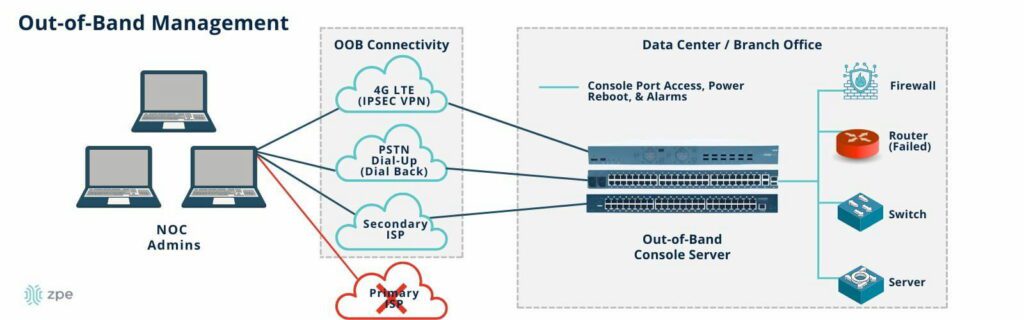
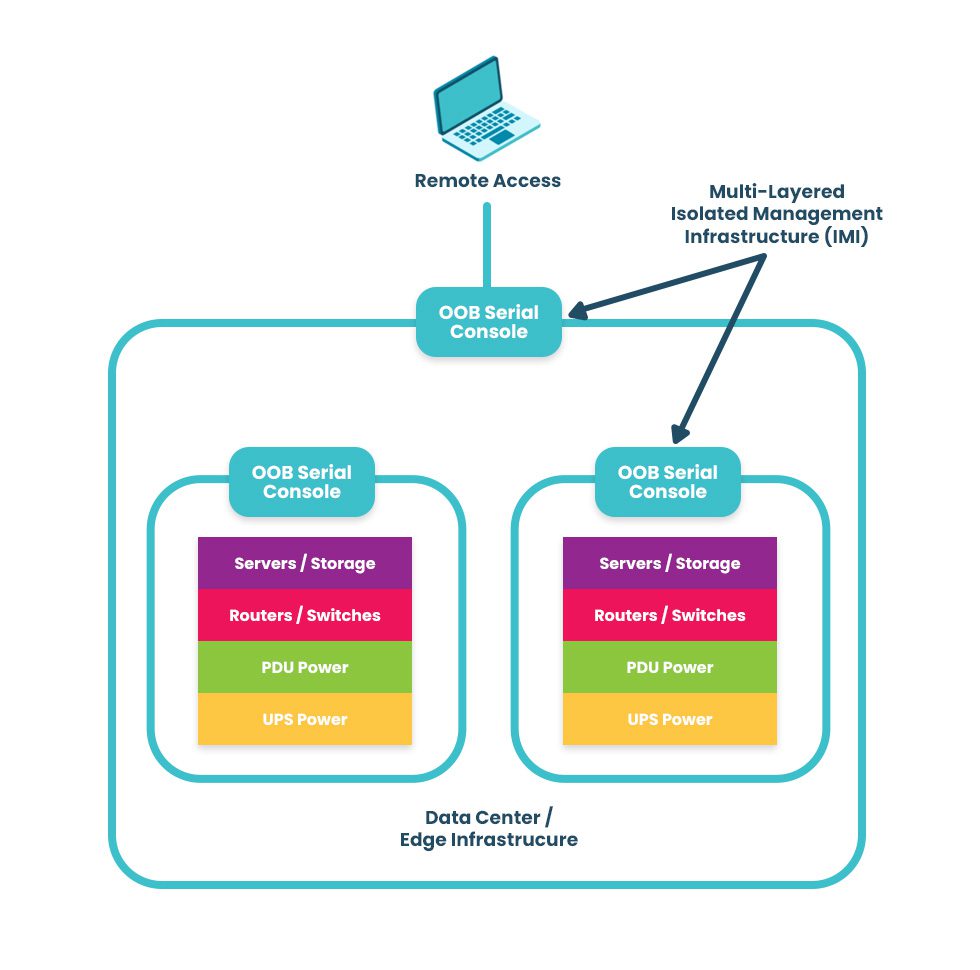
  2. Terminal servers provide remote out-of-band (OOB) management, creating a separate, isolated network dedicated to infrastructure management and troubleshooting. OOB allows administrators to troubleshoot and recover remote infrastructure during equipment failures, network outages, and ransomware attacks.

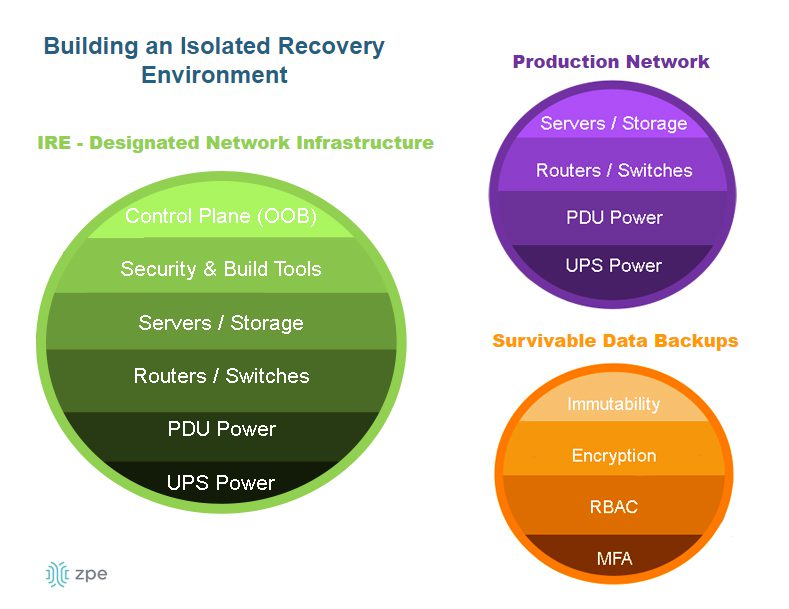
Learn more about using OOB terminal servers to recover from ransomware attacks by reading How to Build an Isolated Recovery Environment (IRE).

What are the benefits of terminal servers?

There are other ways to gain remote OOB management access to remote infrastructure, such as using Intel NUC jump boxes. Despite this, terminal servers are the better option for OOB management because they offer benefits including:

The benefits of terminal servers

Centralized management

Remote recovery

Even with a jump box, administrators typically must access the CLI of each infrastructure solution individually. Each jump box is also separately managed and accessed. A terminal server provides a single management platform to access and control all connected devices. That management platform works across all terminal servers from the same vendor, allowing teams to monitor and manage infrastructure across all remote sites from a single portal. 

When a jump box crashes or loses network access, there’s usually no way to recover it remotely, necessitating costly and time-consuming truck rolls before diagnostics can even begin. Terminal servers use OOB connection options like 5G/4G LTE to ensure continuous access to remote infrastructure even during major network outages. Out-of-band management gives remote teams a lifeline to troubleshoot, rebuild, and recover infrastructure fast.

Improved performance

Stronger security

Network and infrastructure management workflows can use a lot of bandwidth, especially when organizations use automation tools and orchestration platforms, potentially impacting end-user performance. Terminal servers create a dedicated OOB control plane where teams can execute as many resource-intensive automation workflows as needed without taking bandwidth away from production applications and users. 

Jump boxes often lack the security features and oversight of other enterprise network resources, which makes them vulnerable to exploitation by malicious actors. Terminal servers are secured by onboard hardware Roots of Trust (e.g., TPM), receive patches from the vendor like other enterprise-grade solutions, and can be onboarded with cybersecurity monitoring tools and Zero Trust security policies to defend the management network. 

Examples of terminal servers

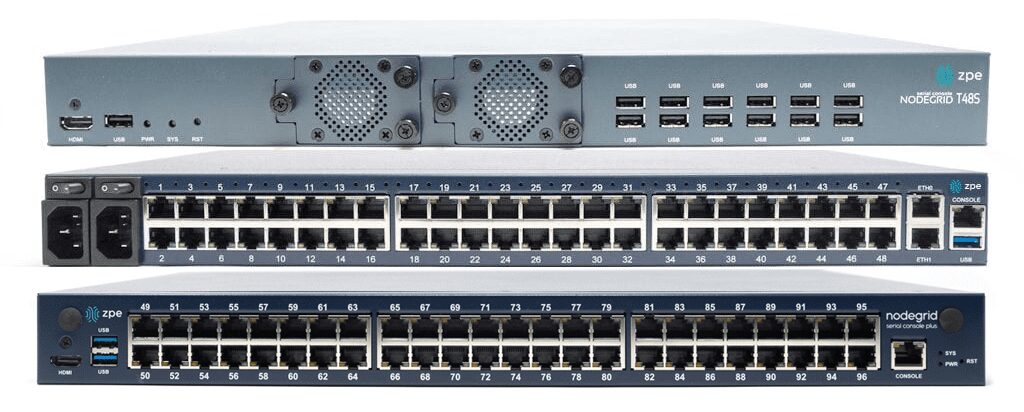
Examples of popular terminal server solutions include the Opengear CM8100, the Avocent ACS8000, and the Nodegrid Serial Console Plus. The Opengear and Avocent solutions are second-generation, or Gen 2, terminal servers, which means they provide some automation support but suffer from vendor lock-in. The Nodegrid solution is the only Gen 3 terminal server, offering unlimited integration support for 3rd-party automation, security, SD-WAN, and more.

What to look for in the best terminal server

Terminal servers have evolved, so there is a wide range of options with varying capabilities and features. Some key characteristics of the best terminal server include:

  • 5G/4G LTE and Wi-Fi options for out-of-band access and network failover
  • Support for legacy devices without costly adapters or complicated configuration tweaks
  • Advanced authentication support, including two-factor authentication (2FA) and SAML 2.0
  • Robust onboard hardware security features like a self-encrypted SSD and UEFI Secure Boot
  • An open, Linux-based OS that supports Guest OS and Docker containers for third-party software
  • Support for zero-touch provisioning (ZTP), custom scripts, and third-party automation tools
  • A vendor-neutral, centralized management and orchestration platform for all connected solutions

These characteristics give organizations greater resilience, enabling them to continue operating and providing services in a degraded fashion while recovering from outages and ransomware. In addition, vendor-neutral support for legacy devices and third-party automation enables companies to scale their operations efficiently without costly upgrades.

Why choose Nodegrid terminal servers?

Only one terminal server provides all the features listed above on a completely vendor-neutral platform – the Nodegrid solution from ZPE Systems.

The Nodegrid S Series terminal server uses auto-sensing ports to discover legacy and mixed-vendor infrastructure solutions and bring them under one unified management umbrella.

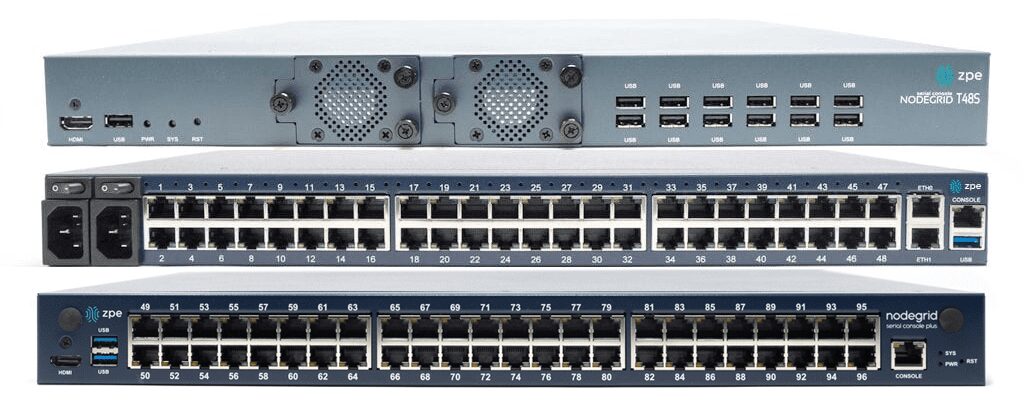
The Nodegrid Serial Console Plus (NSCP) is the first terminal server to offer 96 management ports on a 1U rack-mounted device (Patent No. 9,905,980).

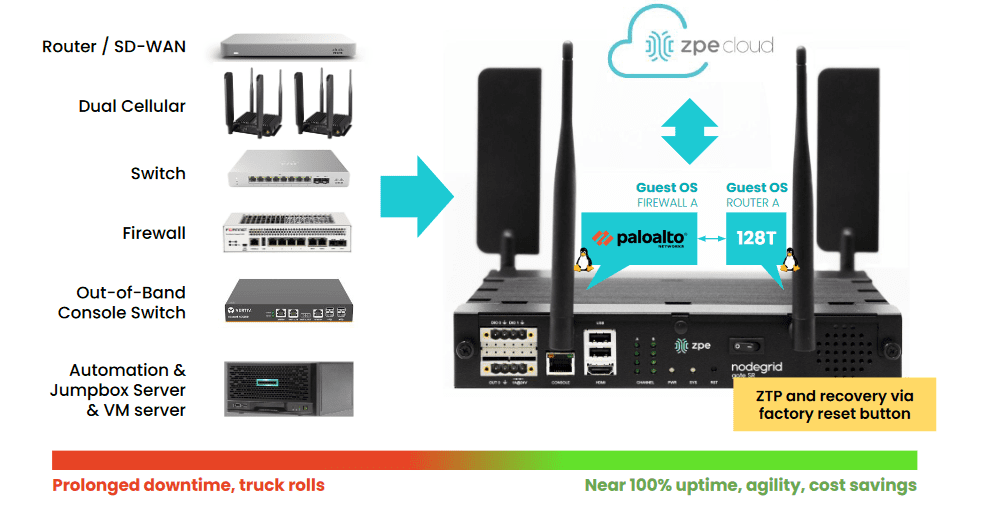
ZPE also offers integrated branch/edge services routers with terminal server functionality, so you can consolidate your infrastructure while extending your capabilities.

All Nodegrid devices offer a variety of OOB and failover options to ensure maximum speed and reliability. They’re protected by comprehensive onboard security features like TPM 2.0, self-encrypted disk (SED), BIOS protection, Signed OS, and geofencing to keep malicious actors off the management network. They also run the open, Linux-based Nodegrid OS, supporting Guest OS and Docker containers so you can host third-party applications for automation, security, AIOps, and more. Nodegrid extends automation, security, and control to all the legacy and mixed-vendor devices on your network and unifies them with a centralized, vendor-neutral management platform for ultimate scalability, resilience, and efficiency.

Want to learn more about Nodegrid terminal servers?

ZPE Systems offers terminal server solutions for data center, branch, and edge deployments. Schedule a free demo to see Nodegrid terminal servers in action.

Request a Demo

Data Center Migration Checklist

A data center migration is represented by a person physically pushing a rack of data center infrastructure into place
Various reasons may prompt a move to a new data center, like finding a different provider with lower prices, or the added security of relocating assets from an on-premises location to a colocation facility or private cloud.

Despite the potential benefits, data center migrations are often tough on enterprises, both internally and from the client side of things. Data center managers, systems administrators, and network engineers must cope with the logistical difficulties of planning, executing, and supporting the move. End-users may experience service disruptions and performance issues that make their jobs harder. Migrations also tend to reveal any weaknesses in the actual infrastructure that’s moved, which means systems that once worked perfectly may require extra support during and after the migration.

The best way to limit headaches and business disruptions is to plan every step of a data center migration meticulously. This guide provides a basic data center migration checklist to help with planning and includes additional resources for streamlining your move.

Data center migration checklist

Data center migrations are always complex and unique to each organization, but there are typically two major approaches:

  • Lift-and-shift. You physically move infrastructure from one data center to another. In some ways, this is the easiest approach because all components are known, but it can limit your potential benefits if gear remains in racks for easy transport to the new location rather than using the move as an opportunity to improve or upgrade certain parts.
  • New build. You replace some or all of your infrastructure with different solutions in a new data center. This approach is more complex because services and dependencies must be migrated to new environments, but it also permits organizations to simultaneously improve operational processes, cut costs, and update existing tech stacks.

The following data center migration checklist will help guide your planning for either approach and ensure you’re asking the right questions to prepare for any potential problems.

Quick Data Center Migration Checklist

  • Conduct site surveys of the current and the new data centers to determine the existing limitations and available resources, like space, power, cooling, cable management, and security.

  • Locate – or create – documentation for infrastructure requirements such as storage, compute, networking, and applications.

  • Outline the dependencies and ancillary systems from the current data center environment that you must replicate in the new data center.

  • Plan the physical layout and overall network topology of the new environment, including physical cabling, out-of-band management, network, storage, power, rack layout, and cooling.

  • Plan your management access, both for the deployment and for ongoing maintenance, and determine how to assist the rollout (for example, with remote access and automation).

  • Determine your networking requirements (e.g., VLANs, IP addresses, DNS, MPLS) and make an implementation plan.

  • Plan out the migration itself and include disaster recovery options and checkpoints in case something changes or issues arise.

  • Determine who is responsible for which aspects of the move and communicate all expectations and plans.

  • Assign a dedicated triage team to handle end-user support requests if there are issues during or immediately after the move.

  • Create a list of vendor contacts for each migrated component so it’s easier to contact support if something goes wrong.

  • If possible, use a lab environment to simulate key steps of the data center migration to identify potential issues or gaps.

  • Have a testing plan ready to execute once the move is complete to ensure infrastructure integrity, performance, and reliability in the new data center environment.

1.  Site surveys

The first step is to determine your physical requirements – how much space, power, cooling, cable management, etc., you’ll need in the new data center. Then, conduct site surveys of the new environment to identify existing limitations and available resources. For example, you’ll want to make sure the HVAC system can provide adequate climate control – specific to the new locale – for your incoming hardware. You may need to verify that your power supply can support additional chillers or dehumidifiers, if necessary, to maintain optimal temperature ranges. In addition to physical infrastructure requirements, factors like security and physical accessibility are important considerations for your new location.

2. Infrastructure documentation

At a bare minimum, you need an accurate list of all the physical and virtual infrastructure you’re moving to the new data center. You should also collect any existing documentation on your application and system requirements for storage, compute, networking, and security to ensure you cover all these bases in the migration. If that documentation doesn’t exist, now’s the time to create it. Having as much documentation as possible will streamline many of the following steps in your data center move.

3. Dependencies and ancillary services

Aside from the infrastructure you’re moving, hundreds or thousands of other services will likely be affected by the change. It’s important to map out these dependencies and ancillary services to learn how the migration will affect them and what you can do to smooth the transition. For example, if an application or service relies on a legacy database, you may need to upgrade both the database and its hardware to ensure end-users have uninterrupted access. As an added benefit, creating this map also aids in implementing micro-segmentation for Zero Trust security.

4. Layout and topology

The next step is to plan the physical layout of the new data center infrastructure. Where will network, storage, and power devices sit in the rack and cabinets? How will you handle cable management? Will your planned layout provide enough airflow for cooling? This is also the time to plan the network topology – how traffic will flow to, from, and within the new data center infrastructure.

5. Management access

You must determine how your administrators will deploy and manage the new data center infrastructure. Will you enable remote access? If so, how will you ensure continuous availability during migration or when issues arise? Do you plan to automate your deployment with zero touch provisioning?

6. Network planning

If you didn’t cover this in your infrastructure documentation, you’ll need specific documentation for your data center networking requirements – both WAN (wide area networking) and LAN (local area networking). This is a good time to determine whether you want to exactly replicate your existing network environment or make any network infrastructure upgrades. Then, create a detailed implementation plan covering everything from VLANs to IP address provisioning, DNS migrations, and ordering MPLS circuits.

7. Migration & build planning

Next, plan out each step of the move or build itself – the actions your team will perform immediately before, during, and after the migration. It’s important to include disaster recovery options in case critical services break, or unforeseen changes cause delays. Implementing checkpoints at key stages of the move will help ensure any issues are fixed before they impact subsequent migration steps.

8. Assembling a team

At this stage, you likely have a team responsible for planning the data center migration, but you also need to identify who’s responsible for every aspect of the move itself. It’s critical to do this as early as possible so you have time to set expectations, communicate the plan, and handle any required pre-migration training or support. Additionally, ensure this team includes dedicated support staff who can triage end-user requests if any issues arise during or after the migration.

9. Vendor support

Any experienced sysadmin will tell you that anything that could go wrong with a data center migration probably will, so you should plan for the worst but hope for the best. That means collecting a list of vendor contacts for each hardware and software component you’re migrating so it will be easier to contact support if something goes awry. For especially critical systems, you may even want to alert your vendor POCs prior to the move so they can be on hand (or near their phones) on the day of the move.

10. Lab simulation

This step may not be feasible for every organization, but ideally, you’ll use a lab environment to simulate key stages of the data center migration before you actually move. Running a virtualized simulation can help you identify potential hiccups with connection settings or compatibility issues. It can also highlight gaps in your planning – like forgetting to restore user access and security rules after building new firewalls – so you can address them before they affect production services.

11. Post-migration testing

Finally, you need to create a post-migration testing plan that’s ready to implement as soon as the move is complete. Testing will validate the integrity, performance, and reliability of infrastructure in the new environment, allowing teams to proactively resolve issues instead of waiting for monitoring notifications or end-user complaints.

Streamlining your data center migration

Using this data center migration checklist to create a comprehensive plan will help reduce setbacks on the day of the move. To further streamline the migration process and set yourself up for success in your new environment, consider upgrading to a vendor-neutral data center orchestration platform. Such a platform will provide a unified tool for administrators and engineers to monitor, deploy, and manage modern, multi-vendor, and legacy data center infrastructure. Reducing the number of individual solutions you need to access and manage during migration will decrease complexity and speed up the move, so you can start reaping the benefits of your new environment sooner.

Want to learn more about Data Center migration?

For a complete data center migration checklist, including in-depth guidance and best practices for moving day, click here to download our Complete Guide to Data Center Migrations or contact ZPE Systems today to learn more.
Contact Us Download Now

99.999% Uptime for a Top-10 Engineering School

Providing low-level remote access and automation saves hundreds of hours per month for the university’s small IT team

One of the largest universities in the United States fosters academics and research for nearly 40,000 students, staff, and researchers. The university sits among the top 10 schools for engineering, and heavily integrates technology into all disciplines, including engineering, computer sciences, and agricultural studies.

The university received a grant to expand, update, and connect their network of campuses, while enhancing infrastructure and mobility, resiliency, and campus amenities.  But having more than 200 on-campus buildings presents a challenge. The campus is home to academic facilities as well as a hospital, airport, 60,000-seat sports stadium, and dozens of leased spaces for local businesses. This makes the university equivalent to a small city, and its network infrastructure is what keeps it all connected.

Their small IT team was responsible for maintaining more than 10,000 management devices, most of which were long past EOL and frequently failing. They needed a refresh, but with a solution that could also reduce the hundreds of hours they spent every month on travel and on-site work. To maximize their day-to-day efficiency, they required a solution that could overcome these operational gaps:

  • Reducing the 100-150 hours of monthly travel times, by giving engineers the ability to fully access their stack remotely
  • Reducing the 80-120 hours of monthly on-site work required to maintain the 99.999% SLA, by automating manual jobs such as patching and firmware upgrades
  • Expanding their management headroom and use-case adaptability, by migrating to IPv6 and reducing the existing 6RU device stack

Download the full case study to see how ZPE’s Nodegrid hardware and software solved these problems.

EngineeringSchoolCover

Download the full case study

Problems and Gaps

The university is one of the largest in the United States. It sits among the nation’s top 50 schools for research expenditures, and heavily integrates technology into all disciplines, including engineering. Its main campus is home to more than 200 buildings that sit on over 2,500 acres of land. The campus is essentially a small city, and the university’s network infrastructure keeps it all connected.

This network infrastructure, however, was well beyond EOL and in disrepair. But rather than simply upgrade to newer devices, the university’s small IT team wanted to improve the overall quality of life well into the future. This meant addressing three gaps:

  • Inefficient management at scale — Each engineer spent an average of ten hours per month on travel alone, just to traverse the campus’ wide footprint and get to each MDF/IDF closet.
  • Too much focus on ops — The aging infrastructure was on the brink of collapse and required each engineer to spend eight hours per month in on-site work, just to keep devices running.
  • Too many devices — The infrastructure includes roughly 10,000 devices to manage, which was exhausting IP on their limited IPv4 network and too rigid to fit in tight spaces, like their remote farm closets and research labs.

Solution

The university deployed the full lineup of Nodegrid devices, including the Nodegrid Serial Console, Nodegrid Services Routers, and Nodegrid Manager. These allowed them to overcome all three gaps using remote management, automation, and consolidated functionality, to save engineers hundreds of hours every month. Download the full case study to see the complete solution and benefits.

Need Help Replacing End-of-Life Gear?

Check out our complete products and services package to make your EOL transition seamless. Choose from a variety of Synopsys-validated devices, get a generous trade-in discount, and let our engineers install and configure into your environment. Click below to explore this offer and more customer case studies.

Network Automation Cost Savings Calculator

automation cost savings calculator
Many organizations feel continuous financial pressure to cut costs and streamline operations due to economic factors like the ongoing threat of a recession and global supply chain interruptions. Network automation can help companies across all industries save money during lean financial times. A recent Cisco and ACG Research study found that network automation can reduce OPEX by 55% by streamlining workflows such as device provisioning and service ticket management. Though they aren’t mentioned in the study, additional savings are generated by using automation to avoid outages and accelerate recovery efforts.

This post discusses how to save money through automation and provides a network automation cost savings calculator for a more customized estimate of your potential ROI.


Table of contents

How network automation provides cost savings

Network automation reduces costs by streamlining operations, preventing outages, and aiding in backup and recovery workflows.

Network automation saves money by solving problems

Problem: High OPEX

Solution: Automation tackles repetitive tasks like new installs and ticketing operations, which helps you generate revenue sooner and reduce the time and resources spent on maintaining operations.

Problem: Too many outages

Solution: Automation allows teams to be proactive by leveraging critical data to identify potential problems before they cause outages, freeing them from the typical break/fix approach.

Problem: Slow recovery

Solution: Automation speeds up processes like backups, snapshotting, and device re-imaging, which makes networks more resilient by accelerating recovery from outages and ransomware.

Reduces OPEX

The focus of the Cisco/ACG study was the economic benefits of streamlining network operations through automation. For example, the OPEX (operational expenditure) involved in spinning up a new branch is too high because deployments require so much work, time, and staff. Using automation to provision and deploy new resources can significantly reduce the time it takes to spin up a new branch, which means the site could start generating revenue much sooner. Using automation to monitor device health and environmental conditions could extend the life expectancy of critical (and expensive) equipment while reducing the number of on-site staff needed to maintain that equipment.

Network automation reduces OPEX by increasing the efficiency of repetitive or tedious tasks like new installs, incident management, and device monitoring. Crucially, automation does so without reducing the quality of service for end users and often only improves the speed, reliability, and overall experience.

Prevents outages

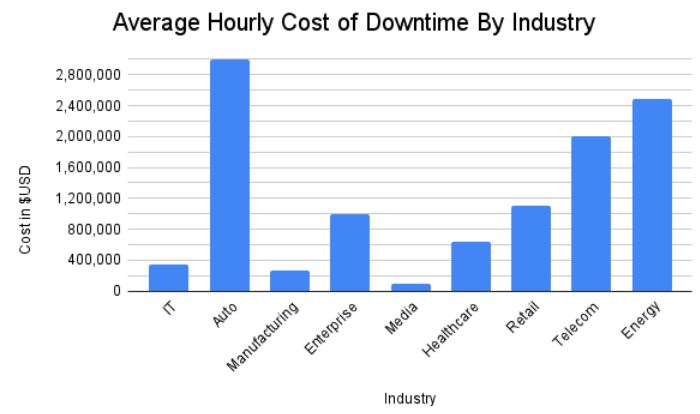
Network downtime is an expense that cash-strapped businesses can’t afford to bear. According to a recent ITIC survey, a single hour of downtime costs most organizations (91%) over $300,000 in lost business, with 44% of enterprises reporting outage costs exceeding $1 million. However, preventing downtime is difficult when most network teams are caught in a reactive break/fix cycle because they lack the staffing, resources, and technology required to maintain visibility and identify issues before they occur.

Network automation solves this problem using advanced machine learning algorithms to analyze monitoring data and identify potential issues before they cause outages. For example, AIOps (artificial intelligence for IT operations) solutions provide real-time analysis of infrastructure, network, and security logs. AIOps is adept at recognizing patterns and detecting anomalies in data so that it can identify issues before they affect the performance or reliability of the network.

Accelerates recovery

While network automation helps to reduce downtime, it can’t eliminate outages altogether. When outages do occur, recovery is often a long, drawn-out process involving a lot of manual work, during which time revenue and customer faith may be lost. Network resilience is the ability to quickly recover from ransomware, equipment failures, and other causes of downtime with as little impact as possible on end users and business revenue. Automation speeds up recovery efforts in a few critical ways:

  • Streamlined backups – Automation makes performing regular backups and snapshots easier, reducing the risk of gaps or inaccuracies.
  • Reduced imaging delays – Automatic provisioning ensures that clean systems are spun up quickly so that business can resume as soon as possible.
  • Faster failover – Automatic network failover and routing technologies can reroute traffic around downed nodes before a human admin has time to respond, providing a more seamless end-user experience.

Network automation is a direct source of cost savings because it reduces OPEX without negatively impacting the business or customer experience. Automation also indirectly saves money by helping organizations avoid outages through proactive monitoring and maintenance. In addition, network automation technologies make businesses more resilient by speeding up recovery efforts when breaches and failures do occur.

Network automation cost savings calculator

ZPE Systems provides network and infrastructure automation solutions for any use case, pain point, or technological need. ZPE’s vendor-neutral platform allows you to extend automation to every device on your network, including legacy and mixed-vendor solutions, so that you can achieve true end-to-end automation (a.k.a. hyperautomation). For a customized estimation of how much money you can save by automating your network operations with ZPE Systems, check out our network automation cost savings calculator.

Ready to Learn More?

For help with the network automation cost savings calculator or to learn more about automating your network operations, contact ZPE Systems today.

Contact Us

3 Gaps That Will Leave IT Teams Scrambling

Today’s IT teams must maintain a growing infrastructure of on-prem and cloud solutions. These range from physical routers, out-of-band devices, and firewalls, to Zero Trust Security solutions, micro-segmentation tools, and network automation integrations. Despite an abundance of physical and virtual solutions meant to help keep digital services online, many organizations face an overwhelming number of tasks just to sustain everyday operations. 

With the rising risk of recession, organizations will be forced to cut back on resources including staff, training, and tools. This will only worsen the existing challenges teams face in their efforts to maintain their distributed infrastructure. 

In this blog, we’ll explore three gaps that will leave IT teams scrambling and show you several practical approaches to cope during recession. 

Gap 1: Lack of staff

IT teams have been historically understaffed, and most people can remember at least one significant tech worker hiring campaign from the past decade. Today’s CIOs may in fact be facing the biggest talent gap since 2008. For example, in the cybersecurity sector alone, the 2021 (ISC)2 Cybersecurity Workforce Study reported that despite adding 700,000 cybersecurity professionals to the workforce in 2021, there’s still a gap of more than 2.7 million workers globally, 377,000 of which are needed in the United States. 

Trained staff are a must for managing an organization’s distributed sites, especially as team silos disappear and workers are required to have a breadth of skills. Business leaders increasingly need people who are proficient in networking and programming, so they can maintain normal operations while progressing their digital transformation initiatives such as hyperautomation. It’s a challenge that often comes down to hiring new talent or increasing the skills of existing employees, and both of these approaches require plenty of time and money. 

This issue will only worsen with the coming recession as companies begin to tighten their belts and slash budgets. Major brands have already shed thousands of workers this year, leaving IT teams to make due with existing staff numbers or even reduced headcounts. In the simplest terms, the coming recession will leave companies much less willing or able to invest in staff. 

Gap 2: Lack of tools to reduce workloads

Today’s infrastructure incorporates solutions from many different vendors, but the problem is these often come with their own unique tools that are meant to serve only a specific function. Managing SD-WAN, SASE, ZTNA, orchestration, and out-of-band solutions means jumping between disparate tools, many of which lack integration with one another. This complexity leaves operational teams stuck in a reactionary break/fix posture trying to climb mountains of never-ending support tickets. 

To address this challenge, many Big Tech companies empower their IT teams through digital transformation initiatives, such as using automation to achieve a proactive approach. But this requires additional investments in upskilling staff and acquiring adequate automation infrastructure/tools. For many organizations, a lack of money and resources makes this difficult during normal economic conditions, and will only become exacerbated with the coming recession. IT teams will continue scrambling with their inflated workloads.

Gap 3: Lack of trust in automation

Automation can greatly reduce the risk of human error (and subsequent outages) by handling simple workloads, such as device provisioning and firmware updates. However, companies that do have the resources to implement automation also recognize its limitations. Automation solutions that aren’t optimized leave IT teams with mundane tasks like managing, scheduling, and restarting bots. But to even reach this level of automation requires training staff who typically don’t have a background in programming or development. 

These teams will be unfamiliar with NetOps/DevOps concepts. In order to develop essential automation practices, these employees will need to learn through trial and error. This is a problem because most organizations lack the proper automation infrastructure and tools that allow their IT teams to recover from mistakes. Operational teams in charge of keeping infrastructure running often fear automation for this exact reason — if they make one error, there’s the potential that it will bring down the network, lead to unhappy customers, and cost them their job. 


BlueprintPDF

Close these gaps with the Network Automation Blueprint

You can close these gaps for good using out-of-band, jump boxes, and tools you already have. After years of working directly with tech giants, we’ve created a best practice reference architecture any company can use to automate their network. This Network Automation Blueprint has been proven by global enterprises to increase capabilities and reduce workloads through trustworthy automation.