Providing Out-of-Band Connectivity to Mission-Critical IT Resources

Edge Management and Orchestration

shutterstock_2264235201(1)

Organizations prioritizing digital transformation by adopting IoT (Internet of Things) technologies generate and process an unprecedented amount of data. Traditionally, the systems used to process that data live in a centralized data center or the cloud. However, IoT devices are often deployed around the edges of the enterprise in remote sites like retail stores, manufacturing plants, and oil rigs. Transferring so much data back and forth creates a lot of latency and uses valuable bandwidth. Edge computing solves this problem by moving processing units closer to the sources that generate the data.

IBM estimates there are over 15 billion edge devices already in use. While edge computing has rapidly become a vital component of digital transformation, many organizations focus on individual use cases and lack a cohesive edge computing strategy. According to a recent Gartner report, the result is what’s known as “edge sprawl”: many individual edge computing solutions deployed all over the enterprise without any centralized control or visibility. Organizations with disjointed edge computing deployments are less efficient and more likely to hit roadblocks that stifle digital transformation.

The report provides guidance on building an edge computing strategy to combat sprawl, and the foundation of that strategy is edge management and orchestration (EMO). Below, this post summarizes the key findings from the Gartner report and discusses some of the biggest edge computing challenges before explaining how to solve them with a centralized EMO platform.

Key findings from the Gartner report

Many organizations already use edge computing technology for specific projects and use cases – they have an individual problem to solve, so they deploy an individual solution. Since the stakeholders in these projects usually aren’t architects, they aren’t building their own edge computing machines or writing software for them. Typically, these customers buy pre-assembled solutions or as-a-service offerings that meet their specific needs.

However, a piecemeal approach to edge computing projects leaves organizations with disjointed technologies and processes, contributing to edge sprawl and shadow IT. Teams can’t efficiently manage or secure all the edge computing projects occurring in the enterprise without centralized control and visibility. Gartner urges I&O (infrastructure & operations) leaders to take a more proactive approach by developing a comprehensive edge computing strategy encompassing all use cases and addressing the most common challenges.

Edge computing challenges

Gartner identifies six major edge computing challenges to focus on when developing an edge computing strategy:

Gartner’s 6 edge computing challenges to overcome

Enabling extensibility so edge computing solutions are adaptable to the changing needs of the business.

Extracting value from edge data with business analytics, AIOps, and machine learning training.

Governing edge data to meet storage constraints without losing valuable data in the process.

Supporting edge-native applications using specialized containers and clustering without increasing the technical debt.

Securing the edge when computing nodes are highly distributed in environments without data center security mechanisms.

Edge management and orchestration that supports business resilience requirements and improves operational efficiency.

Let’s discuss these challenges and their solutions in greater depth.

  • Enabling extensibility – Many organizations deploy purpose-built edge computing solutions for their specific use case and can’t adapt when workloads change or grow.  The goal is to attempt to predict future workloads based on planned initiatives and create an edge computing strategy that leaves room for that growth. However, no one can really predict the future, so the strategy should account for unknowns by utilizing common, vendor-neutral technologies that allow for expansion and integration.
  • Extracting value from edge data – The generation of so much IoT and sensor data gives organizations the opportunity to extract additional value in the form of business insights, predictive analysis, and machine learning training. Quickly extracting that value is challenging when most data analysis and AI applications still live in the cloud. To effectively harness edge data, organizations should look for ways to deploy artificial intelligence training and data analytics solutions alongside edge computing units.
  • Governing edge data – Edge computing deployments often have more significant data storage constraints than central data centers, so quickly distinguishing between valuable data and destroyable junk is critical to edge ROIs. With so much data being generated, it’s often challenging to make this determination on the fly, so it’s important to address data governance during the planning process. There are automated data governance solutions that can help, but these must be carefully configured and managed to avoid data loss.
  • Supporting edge-native applications – Edge applications aren’t just data center apps lifted and shifted to the edge; they’re designed for edge computing from the bottom up. Like cloud-native software, edge apps often use containers, but clustering and cluster management are different beasts outside the cloud data center. The goal is to deploy platforms that support edge-native applications without increasing the technical debt, which means they should use familiar container management technologies (like Docker) and interoperate with existing systems (like OT applications and VMs).
  • Securing the edge – Edge deployments are highly distributed in locations that may lack many physical security features in a traditional data center, such as guarded entries and biometric locks, which adds risk and increases the attack surface. Organizations must protect edge computing nodes with a multi-layered defense that includes hardware security (such as TPM), frequent patches, zero-trust policies, strong authentication (e.g., RADIUS and 2FA), and network micro-segmentation.
  • Edge management and orchestration – Moving computing out of the climate-controlled data center creates environmental and power challenges that are difficult to mitigate without an on-site technical staff to monitor and respond. When equipment failure, configuration errors, or breaches take down the network, remote teams struggle to meet resilience requirements to keep business operations running 24/7. The sheer number and distribution area of edge computing units make them challenging to manage efficiently, increasing the likelihood of mistakes, issues, or threat indicators slipping between the cracks. Addressing this challenge requires centralized edge management and orchestration (EMO) with environmental monitoring and out-of-band (OOB) connectivity.

    A centralized EMO platform gives administrators a single-pane-of-glass view of all edge deployments and the supporting infrastructure, streamlining management workflows and serving as the control panel for automation, security, data governance, cluster management, and more. The EMO must integrate with the technologies used to automate edge management workflows, such as zero-touch provisioning (ZTP) and configuration management (e.g., Ansible or Chef), to help improve efficiency while reducing the risk of human error. Integrating environmental sensors will help remote technicians monitor heat, humidity, airflow, and other conditions affecting critical edge equipment’s performance and lifespan. Finally, remote teams need OOB access to edge infrastructure and computing nodes, so the EMO should use out-of-band serial console technology that provides a dedicated network path that doesn’t rely on production resources.

Gartner recommends focusing your edge computing strategy on overcoming the most significant risks, challenges, and roadblocks. An edge management and orchestration (EMO) platform is the backbone of a comprehensive edge computing strategy because it serves as the hub for all the processes, workflows, and solutions used to solve those problems.

Edge management and orchestration (EMO) with Nodegrid

Nodegrid is a vendor-neutral edge management and orchestration (EMO) platform from ZPE Systems. Nodegrid uses Gen 3 out-of-band technology that provides 24/7 remote management access to edge deployments while freely interoperating with third-party applications for automation, security, container management, and more. Nodegrid environmental sensors give teams a complete view of temperature, humidity, airflow, and other factors from anywhere in the world and provide robust logging to support data-driven analytics.

The open, Linux-based Nodegrid OS supports direct hosting of containers and edge-native applications, reducing the hardware overhead at each edge deployment. You can also run your ML training, AIOps, data governance, or data analytics applications from the same box to extract more value from your edge data without contributing to sprawl.

In addition to hardware security features like TPM and geofencing, Nodegrid supports strong authentication like 2FA, integrates with leading zero-trust providers like Okta and PING, and can run third-party next-generation firewall (NGFW) software to streamline deployments further.

The Nodegrid platform brings all the components of your edge computing strategy under one management umbrella and rolls it up with additional core networking and infrastructure management features. Nodegrid consolidates edge deployments and streamlines edge management and orchestration, providing a foundation for a Gartner-approved edge computing strategy.

Want to learn more about how Nodegrid can help you overcome your biggest edge computing challenges?

Contact ZPE Systems for a free demo of the Nodegrid edge management and orchestration platform.

Contact Us

Data Center Migration Checklist

A data center migration is represented by a person physically pushing a rack of data center infrastructure into place
Various reasons may prompt a move to a new data center, like finding a different provider with lower prices, or the added security of relocating assets from an on-premises location to a colocation facility or private cloud.

Despite the potential benefits, data center migrations are often tough on enterprises, both internally and from the client side of things. Data center managers, systems administrators, and network engineers must cope with the logistical difficulties of planning, executing, and supporting the move. End-users may experience service disruptions and performance issues that make their jobs harder. Migrations also tend to reveal any weaknesses in the actual infrastructure that’s moved, which means systems that once worked perfectly may require extra support during and after the migration.

The best way to limit headaches and business disruptions is to plan every step of a data center migration meticulously. This guide provides a basic data center migration checklist to help with planning and includes additional resources for streamlining your move.

Data center migration checklist

Data center migrations are always complex and unique to each organization, but there are typically two major approaches:

  • Lift-and-shift. You physically move infrastructure from one data center to another. In some ways, this is the easiest approach because all components are known, but it can limit your potential benefits if gear remains in racks for easy transport to the new location rather than using the move as an opportunity to improve or upgrade certain parts.
  • New build. You replace some or all of your infrastructure with different solutions in a new data center. This approach is more complex because services and dependencies must be migrated to new environments, but it also permits organizations to simultaneously improve operational processes, cut costs, and update existing tech stacks.

The following data center migration checklist will help guide your planning for either approach and ensure you’re asking the right questions to prepare for any potential problems.

Quick Data Center Migration Checklist

  • Conduct site surveys of the current and the new data centers to determine the existing limitations and available resources, like space, power, cooling, cable management, and security.

  • Locate – or create – documentation for infrastructure requirements such as storage, compute, networking, and applications.

  • Outline the dependencies and ancillary systems from the current data center environment that you must replicate in the new data center.

  • Plan the physical layout and overall network topology of the new environment, including physical cabling, out-of-band management, network, storage, power, rack layout, and cooling.

  • Plan your management access, both for the deployment and for ongoing maintenance, and determine how to assist the rollout (for example, with remote access and automation).

  • Determine your networking requirements (e.g., VLANs, IP addresses, DNS, MPLS) and make an implementation plan.

  • Plan out the migration itself and include disaster recovery options and checkpoints in case something changes or issues arise.

  • Determine who is responsible for which aspects of the move and communicate all expectations and plans.

  • Assign a dedicated triage team to handle end-user support requests if there are issues during or immediately after the move.

  • Create a list of vendor contacts for each migrated component so it’s easier to contact support if something goes wrong.

  • If possible, use a lab environment to simulate key steps of the data center migration to identify potential issues or gaps.

  • Have a testing plan ready to execute once the move is complete to ensure infrastructure integrity, performance, and reliability in the new data center environment.

1.  Site surveys

The first step is to determine your physical requirements – how much space, power, cooling, cable management, etc., you’ll need in the new data center. Then, conduct site surveys of the new environment to identify existing limitations and available resources. For example, you’ll want to make sure the HVAC system can provide adequate climate control – specific to the new locale – for your incoming hardware. You may need to verify that your power supply can support additional chillers or dehumidifiers, if necessary, to maintain optimal temperature ranges. In addition to physical infrastructure requirements, factors like security and physical accessibility are important considerations for your new location.

2. Infrastructure documentation

At a bare minimum, you need an accurate list of all the physical and virtual infrastructure you’re moving to the new data center. You should also collect any existing documentation on your application and system requirements for storage, compute, networking, and security to ensure you cover all these bases in the migration. If that documentation doesn’t exist, now’s the time to create it. Having as much documentation as possible will streamline many of the following steps in your data center move.

3. Dependencies and ancillary services

Aside from the infrastructure you’re moving, hundreds or thousands of other services will likely be affected by the change. It’s important to map out these dependencies and ancillary services to learn how the migration will affect them and what you can do to smooth the transition. For example, if an application or service relies on a legacy database, you may need to upgrade both the database and its hardware to ensure end-users have uninterrupted access. As an added benefit, creating this map also aids in implementing micro-segmentation for Zero Trust security.

4. Layout and topology

The next step is to plan the physical layout of the new data center infrastructure. Where will network, storage, and power devices sit in the rack and cabinets? How will you handle cable management? Will your planned layout provide enough airflow for cooling? This is also the time to plan the network topology – how traffic will flow to, from, and within the new data center infrastructure.

5. Management access

You must determine how your administrators will deploy and manage the new data center infrastructure. Will you enable remote access? If so, how will you ensure continuous availability during migration or when issues arise? Do you plan to automate your deployment with zero touch provisioning?

6. Network planning

If you didn’t cover this in your infrastructure documentation, you’ll need specific documentation for your data center networking requirements – both WAN (wide area networking) and LAN (local area networking). This is a good time to determine whether you want to exactly replicate your existing network environment or make any network infrastructure upgrades. Then, create a detailed implementation plan covering everything from VLANs to IP address provisioning, DNS migrations, and ordering MPLS circuits.

7. Migration & build planning

Next, plan out each step of the move or build itself – the actions your team will perform immediately before, during, and after the migration. It’s important to include disaster recovery options in case critical services break, or unforeseen changes cause delays. Implementing checkpoints at key stages of the move will help ensure any issues are fixed before they impact subsequent migration steps.

8. Assembling a team

At this stage, you likely have a team responsible for planning the data center migration, but you also need to identify who’s responsible for every aspect of the move itself. It’s critical to do this as early as possible so you have time to set expectations, communicate the plan, and handle any required pre-migration training or support. Additionally, ensure this team includes dedicated support staff who can triage end-user requests if any issues arise during or after the migration.

9. Vendor support

Any experienced sysadmin will tell you that anything that could go wrong with a data center migration probably will, so you should plan for the worst but hope for the best. That means collecting a list of vendor contacts for each hardware and software component you’re migrating so it will be easier to contact support if something goes awry. For especially critical systems, you may even want to alert your vendor POCs prior to the move so they can be on hand (or near their phones) on the day of the move.

10. Lab simulation

This step may not be feasible for every organization, but ideally, you’ll use a lab environment to simulate key stages of the data center migration before you actually move. Running a virtualized simulation can help you identify potential hiccups with connection settings or compatibility issues. It can also highlight gaps in your planning – like forgetting to restore user access and security rules after building new firewalls – so you can address them before they affect production services.

11. Post-migration testing

Finally, you need to create a post-migration testing plan that’s ready to implement as soon as the move is complete. Testing will validate the integrity, performance, and reliability of infrastructure in the new environment, allowing teams to proactively resolve issues instead of waiting for monitoring notifications or end-user complaints.

Streamlining your data center migration

Using this data center migration checklist to create a comprehensive plan will help reduce setbacks on the day of the move. To further streamline the migration process and set yourself up for success in your new environment, consider upgrading to a vendor-neutral data center orchestration platform. Such a platform will provide a unified tool for administrators and engineers to monitor, deploy, and manage modern, multi-vendor, and legacy data center infrastructure. Reducing the number of individual solutions you need to access and manage during migration will decrease complexity and speed up the move, so you can start reaping the benefits of your new environment sooner.

Want to learn more about Data Center migration?

For a complete data center migration checklist, including in-depth guidance and best practices for moving day, click here to download our Complete Guide to Data Center Migrations or contact ZPE Systems today to learn more.
Contact Us Download Now

3 Gaps That Will Leave IT Teams Scrambling

Today’s IT teams must maintain a growing infrastructure of on-prem and cloud solutions. These range from physical routers, out-of-band devices, and firewalls, to Zero Trust Security solutions, micro-segmentation tools, and network automation integrations. Despite an abundance of physical and virtual solutions meant to help keep digital services online, many organizations face an overwhelming number of tasks just to sustain everyday operations. 

With the rising risk of recession, organizations will be forced to cut back on resources including staff, training, and tools. This will only worsen the existing challenges teams face in their efforts to maintain their distributed infrastructure. 

In this blog, we’ll explore three gaps that will leave IT teams scrambling and show you several practical approaches to cope during recession. 

Gap 1: Lack of staff

IT teams have been historically understaffed, and most people can remember at least one significant tech worker hiring campaign from the past decade. Today’s CIOs may in fact be facing the biggest talent gap since 2008. For example, in the cybersecurity sector alone, the 2021 (ISC)2 Cybersecurity Workforce Study reported that despite adding 700,000 cybersecurity professionals to the workforce in 2021, there’s still a gap of more than 2.7 million workers globally, 377,000 of which are needed in the United States. 

Trained staff are a must for managing an organization’s distributed sites, especially as team silos disappear and workers are required to have a breadth of skills. Business leaders increasingly need people who are proficient in networking and programming, so they can maintain normal operations while progressing their digital transformation initiatives such as hyperautomation. It’s a challenge that often comes down to hiring new talent or increasing the skills of existing employees, and both of these approaches require plenty of time and money. 

This issue will only worsen with the coming recession as companies begin to tighten their belts and slash budgets. Major brands have already shed thousands of workers this year, leaving IT teams to make due with existing staff numbers or even reduced headcounts. In the simplest terms, the coming recession will leave companies much less willing or able to invest in staff. 

Gap 2: Lack of tools to reduce workloads

Today’s infrastructure incorporates solutions from many different vendors, but the problem is these often come with their own unique tools that are meant to serve only a specific function. Managing SD-WAN, SASE, ZTNA, orchestration, and out-of-band solutions means jumping between disparate tools, many of which lack integration with one another. This complexity leaves operational teams stuck in a reactionary break/fix posture trying to climb mountains of never-ending support tickets. 

To address this challenge, many Big Tech companies empower their IT teams through digital transformation initiatives, such as using automation to achieve a proactive approach. But this requires additional investments in upskilling staff and acquiring adequate automation infrastructure/tools. For many organizations, a lack of money and resources makes this difficult during normal economic conditions, and will only become exacerbated with the coming recession. IT teams will continue scrambling with their inflated workloads.

Gap 3: Lack of trust in automation

Automation can greatly reduce the risk of human error (and subsequent outages) by handling simple workloads, such as device provisioning and firmware updates. However, companies that do have the resources to implement automation also recognize its limitations. Automation solutions that aren’t optimized leave IT teams with mundane tasks like managing, scheduling, and restarting bots. But to even reach this level of automation requires training staff who typically don’t have a background in programming or development. 

These teams will be unfamiliar with NetOps/DevOps concepts. In order to develop essential automation practices, these employees will need to learn through trial and error. This is a problem because most organizations lack the proper automation infrastructure and tools that allow their IT teams to recover from mistakes. Operational teams in charge of keeping infrastructure running often fear automation for this exact reason — if they make one error, there’s the potential that it will bring down the network, lead to unhappy customers, and cost them their job. 


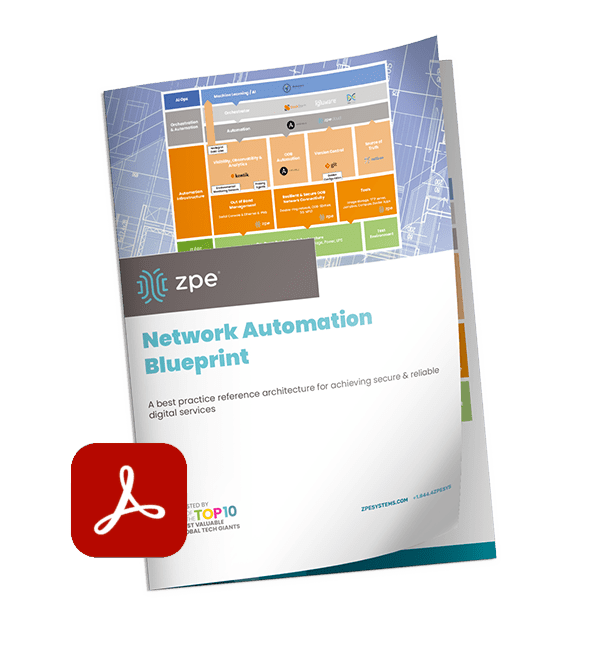
BlueprintPDF

Close these gaps with the Network Automation Blueprint

You can close these gaps for good using out-of-band, jump boxes, and tools you already have. After years of working directly with tech giants, we’ve created a best practice reference architecture any company can use to automate their network. This Network Automation Blueprint has been proven by global enterprises to increase capabilities and reduce workloads through trustworthy automation.

The Growing Role of Hybrid Cloud in Digital Transformation

cloud in digital transformation

Digital transformation is a broad term for the act of changing and improving your business processes through the implementation of new technologies. The cloud plays a major role in digital transformation because it provides a flexible, scalable, and accessible environment that’s ideal for a wide range of business applications. However, there are still many processes that are better suited for a traditional, on-prem data center or colocation infrastructure due to cost, security, or performance concerns.

Combining public cloud platforms with private infrastructure is known as hybrid cloud infrastructure, and it allows organizations to map their business processes and applications to the environments best suited to run them. In this post, we’ll discuss the role of hybrid cloud in digital transformation and provide tips for managing and orchestrating a hybrid infrastructure.

The importance of hybrid cloud in digital transformation

While the public cloud offers many advantages, there are a variety of reasons why an organization would want or need to keep some services private.

For example, a company doing business in an industry that’s subject to strict data privacy regulations—like finance, defense, or healthcare—may want to keep sensitive data in an on-premises data center so they can maintain complete control over the security and access control measures. At the same time, they might have other processes and applications that aren’t as high-risk and could benefit from the flexibility of cloud infrastructure.

Sometimes, an organization will migrate a workload to the cloud, only to bring it back in-house later. For instance, cloud services can reduce costs for certain applications but can increase costs for others. Most public cloud providers charge extra for data egress—transferring data of their systems and to another cloud or on-premises. That means applications that require a lot of data egress can be much more expensive to run in the cloud. That cost increase may be worthwhile in the long run to achieve optimal scalability and flexibility, but with a recession looming, many organizations are sacrificing those big picture goals to cut costs for short-term survival.

One of the biggest use cases for hybrid cloud in digital transformation is a gradual cloud migration. Digital transformation is a journey, and along the way, many organizations end up in a hybrid state because they’ve successfully moved some of their processes to the cloud but have others that still live in the data center. For example, a business may send some of their data analysis workflows to a business intelligence application in the cloud but then have an on-premises DCIM tool analyzing the same data in the data center. They eventually transition from hybrid cloud to a pure cloud or multi-cloud environment once they’ve finished migrating all their workloads to the cloud.

Hybrid cloud is one of the most popular enterprise infrastructure models because it’s flexible and affordable, allowing organizations to make the digital transformation journey at their own pace and in their own way.

Tips for managing hybrid cloud infrastructure

The most effective hybrid cloud deployment provides a single, seamless digital environment for business applications and resources, with centralized workload and infrastructure orchestration that works across all platforms and data centers. Let’s discuss how to achieve this ideal hybrid cloud deployment.

Vendor-agnostic platforms

To create a seamless environment in which workflows move effortlessly between the cloud and the data center to deliver a simple and unified experience to end-users, you need all your public cloud, private cloud, and data center solutions to work together. The best way to ensure this is by only using vendor-agnostic (vendor-neutral) hardware and software from the very beginning, but for most organizations that ship has already sailed. The next best option is to use a vendor-agnostic management platform that’s able to hook into all those closed solutions and control them equally. These solutions allow you to orchestrate workloads across public cloud, private cloud, and legacy environments without needing to replace all the systems and software already in place.

SD-WAN

A hybrid cloud deployment can create some networking challenges because of the need to orchestrate WAN (wide area networking) connections across multiple clouds and data centers, each of which may have a different networking infrastructure in place. Software-defined wide area networking, or SD-WAN, helps to reduce the complexity of hybrid cloud networking by separating the control and management processes from the underlying WAN hardware.

SD-WAN virtualizes network management functions as software or script-based configurations, which enables centralized and automated deployment. With the aid of a vendor-agnostic management platform, SD-WAN benefits hybrid cloud infrastructure by consolidating control behind a single pane of glass. This gives administrators the ability to easily orchestrate, optimize, and secure the entire distributed network.

Automation

Automation plays a key role in digital transformation because it can speed up workflows while reducing the risk of human error. For example, using automation to deploy new infrastructure means administrators can provision many resources in a short amount of time while ensuring consistent configurations.

Automation also improves security, both by reducing the rate of misconfigurations and by ensuring all infrastructure is patched as soon as possible. Unpatched infrastructure leaves you vulnerable to hacks and ransomware, but keeping track of updates for so many vendor solutions in so many different places can be challenging. Automation can help by ensuring patches are pushed out to hybrid cloud infrastructure solutions as soon as they become available. 

Vendor agnostic platforms, SD-WAN, and automation are key tools that help organizations more effectively utilize a hybrid cloud in their digital transformation journey.

The role of ZPE Systems in digital transformation

ZPE Systems offers a range of vendor-agnostic network management solutions to help your organization achieve digital transformation. The Nodegrid platform can dig its hooks into your legacy and mixed-vendor infrastructure to provide a common interface from which to manage and orchestrate your entire network architecture. Plus, Nodegrid can host or integrate with your choice of SD-WAN solutions to help you consolidate your tech stack while delivering optimized performance and security.

Contact ZPE Systems today

To learn more about the role of hybrid cloud in digital transformation.

Contact Us

Network Engineers: 5 Must-Have Tools During a Slow Economy

Network Engineers: 5 Must-Have Tools During a Slow Economy

Network engineers need powerful tools to keep digital services online and customers happy. This is especially true during economic downturn, when organizations must freeze hiring and put more strain on existing staff. Revenue relies on network availability, and with experts predicting a recession this winter, significant operational challenges are inevitable for most organizations.

The burden of overcoming these challenges falls on network engineers. Success means maintaining reliable services and reaping any professional benefits (salary increases, promotions, etc.). Failure, on the other hand, means the very realistic possibility of major business losses and job cuts, including yours.

In order to make sure you don’t fall into the latter scenario, here are five must-have tools and techniques to help network engineers overcome these challenges.

Tool 1. OOBI-LAN™

Out-of-band (OOB) management is an essential part of a network engineer’s toolkit. At the conceptual level, out-of-band is meant to provide management access to production equipment, even if the production equipment is offline.

One major problem is that many organizations invest a lot of time and money into their production infrastructure, but not into any dedicated OOB infrastructure. In other words, they deploy OOB solutions that rely in part on their production equipment, such as OOB VLANs connected to in-band switches. All it takes is a mistake, misconfiguration, or attack to bring down the production and management networks, leaving network engineers to rebuild the entire system from scratch while their services remain offline to customers. This is simply not acceptable in a slow economy, where the business’ resources and revenue are already too thin.

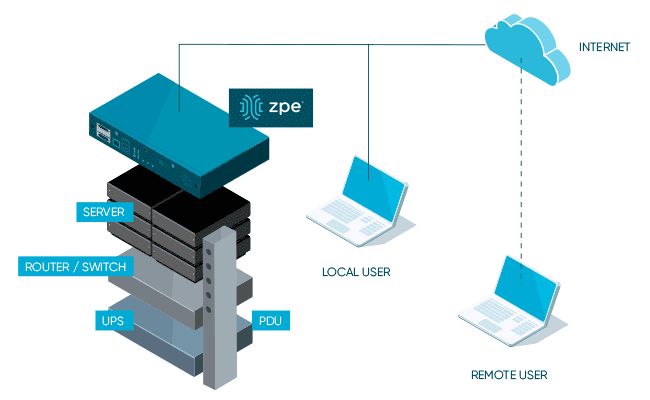
From the pandemic lockdowns, organizations have learned that they need a way to more quickly recover their network locations. According to the Uptime Institute’s 2022 Outage Analysis, outages lasting longer than 24 hours increased to nearly 30% in 2021. This has led many to build dedicated OOB infrastructure for the LAN (OOBI-LAN). They deploy a serial console locally to establish connectivity to the management ports of their sensitive equipment. Network engineers must use this serial console to access their production infrastructure. This serial console minimizes the attack surface since it’s the only device connected to the Internet, and allows network engineers to restore services even if production equipment is down.

Tool 2. OOBI-WAN™

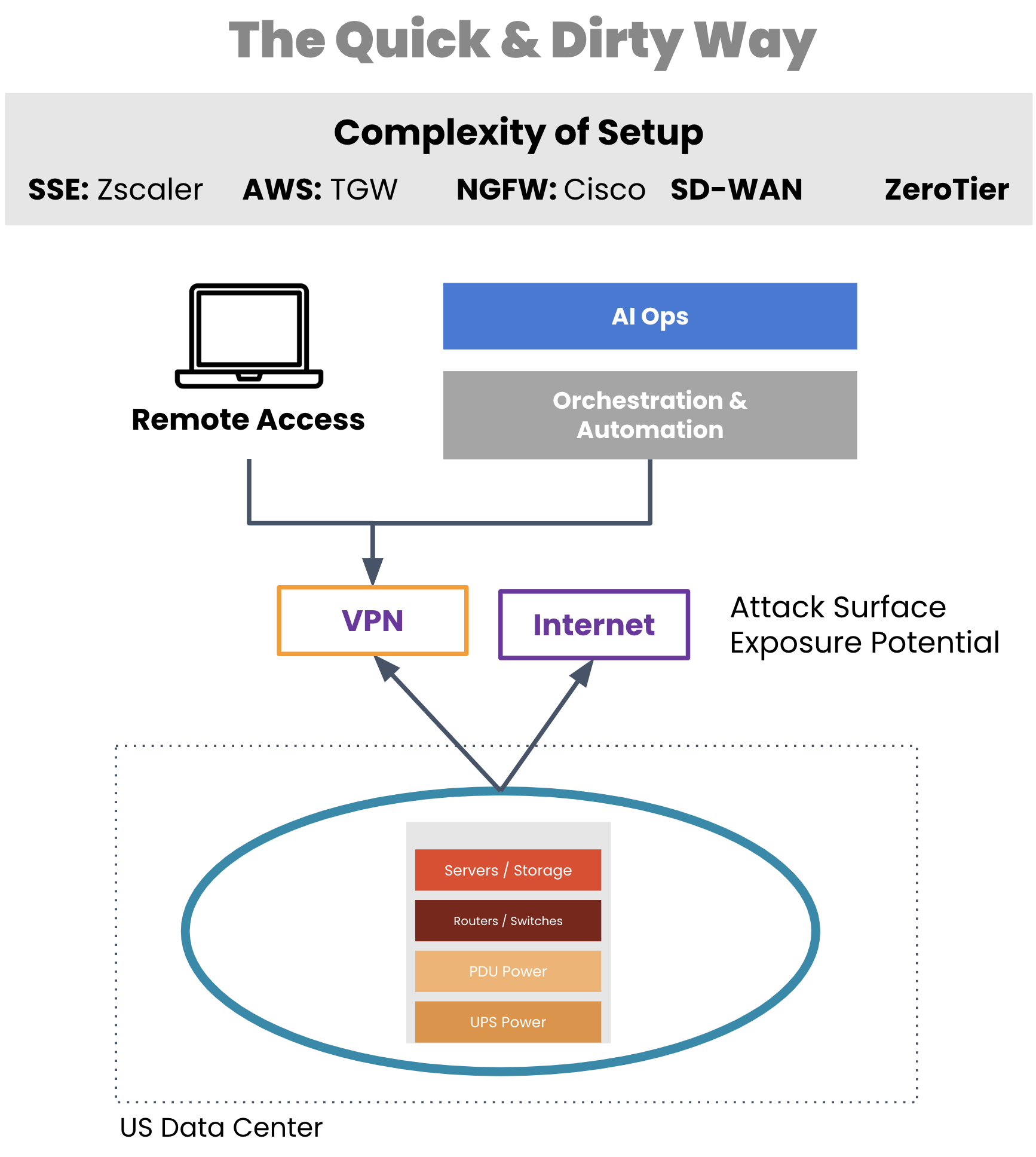
A critical tool for network engineers is out-of-band that enables remote WAN management. But typically, organizations employ a WAN management strategy that also relies on their production infrastructure, such as for creating VPN tunnels for management traffic. If a VPN tunnel becomes broken or the production gear fails, network engineers are suddenly left without remote access to their equipment.

Aside from a lack of availability, traditional OOB access comes with real security risks. Exposing LTE modems to the Internet, leveraging untrusted third-party VPN services, using OOB hardware that’s old and unpatched, and worse — exposing the management port of devices to public Internet. All of these are attack surfaces, any of which can give access to your infrastructure and be used as the pivot point to get to the rest of the infrastructure.

traditional WAN management approach

Image: Management access depends on production equipment to establish VPN tunnels. 

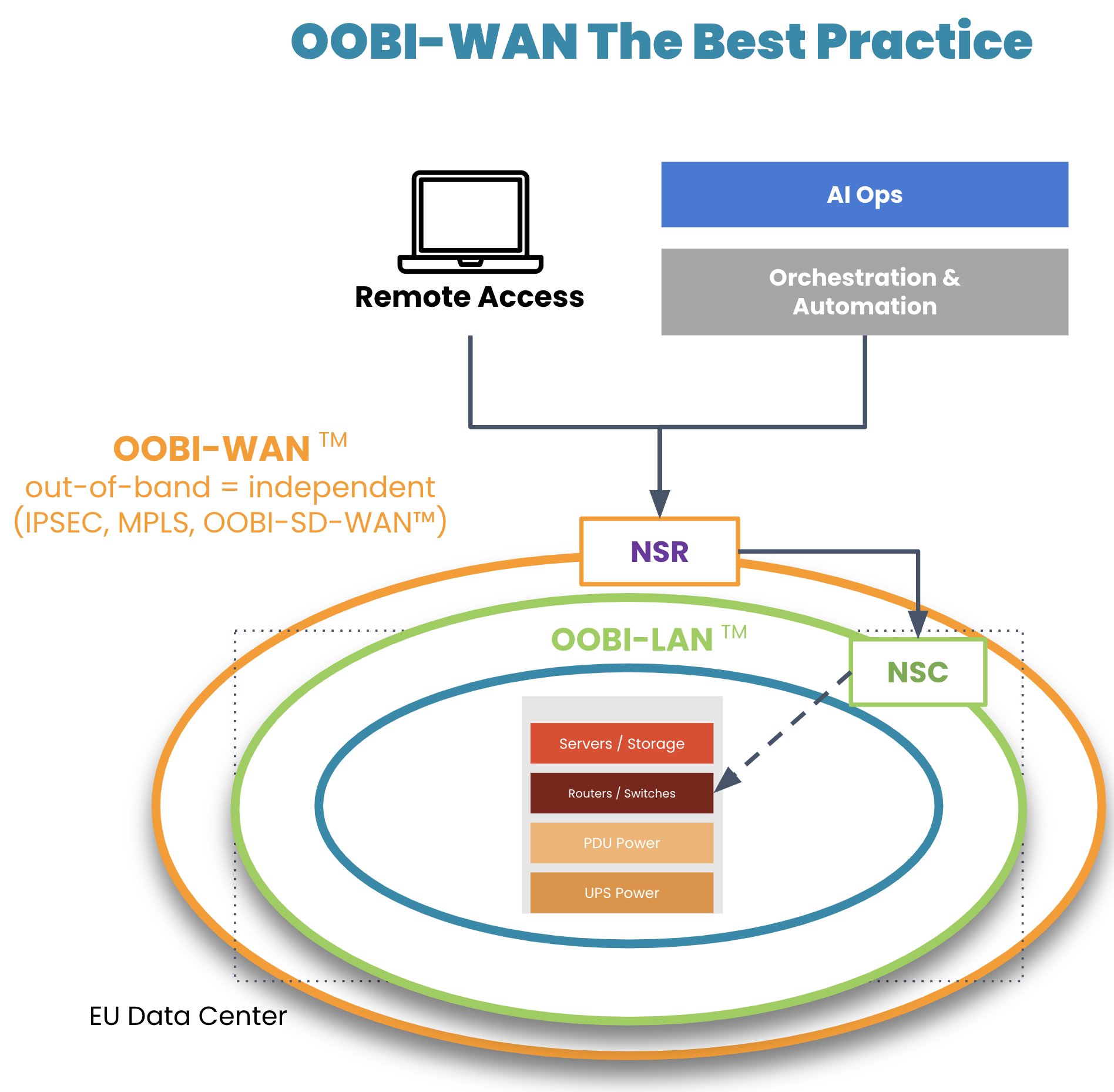
On top of their OOBI-LAN, organizations have built dedicated OOB infrastructure for the WAN (OOBI-WAN – there’s a Star Wars reference somewhere in there) for added resilience against these scenarios.

OOBI-WAN is the WAN best practice

Image: OOBI-WAN and OOBI-LAN create a fully separate out-of-band infrastructure that can be used to completely rebuild production infrastructure. 

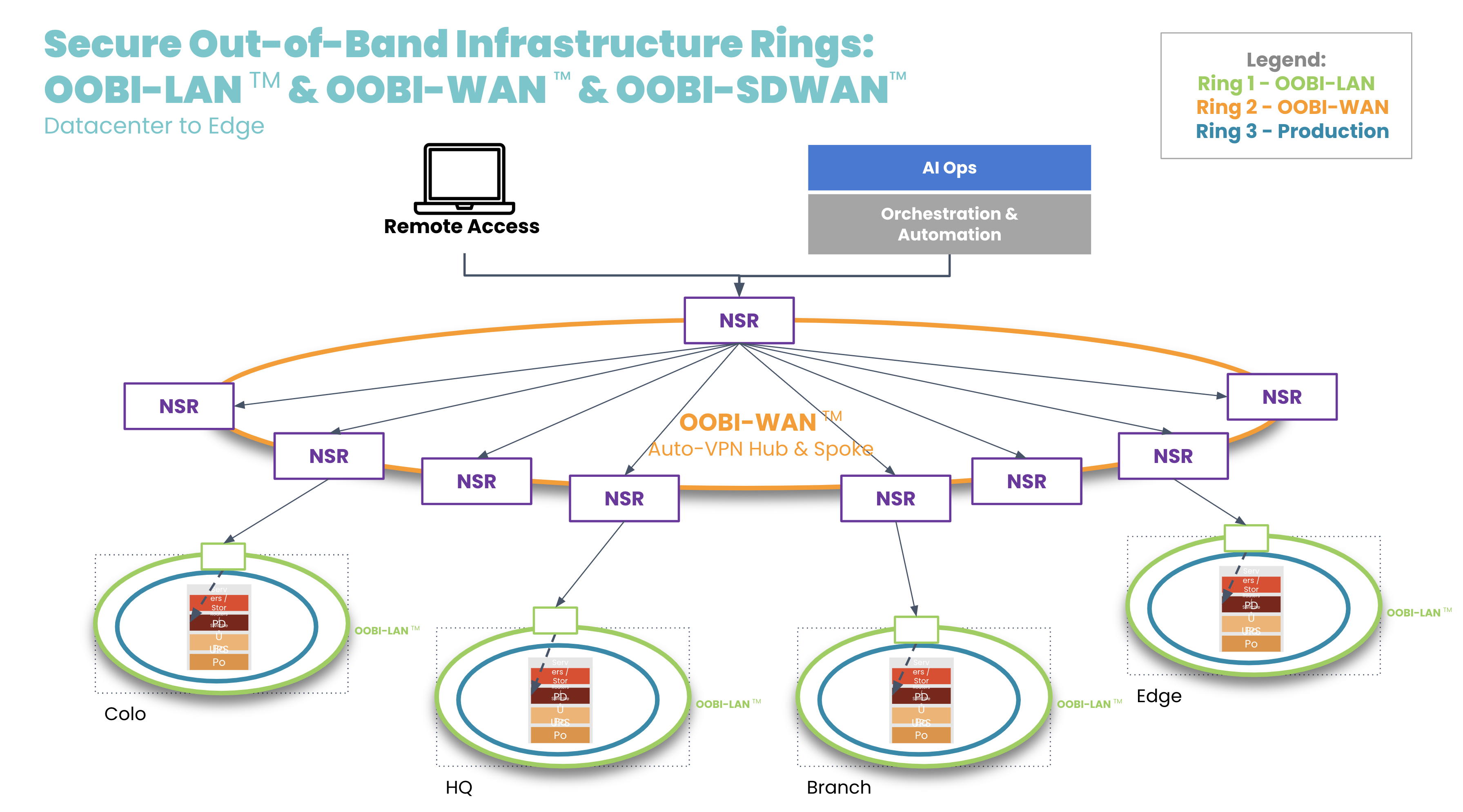
OOBI-WAN uses MPLS, IPsec, or SD-WAN links to create an overlay network dedicated specifically to management traffic. This gives network engineers private access to their infrastructure for management and troubleshooting, essentially creating a completely separate OOB network that does not rely on any part of the production network. OOBI-WAN lets network engineers use their WAN connection to remotely access their OOBI-LAN and fully rebuild their distributed networks, regardless of the state of their production infrastructure.  

A key part of OOBI-WAN is the inherent security that is built at all layers. To build secure OOBI-WAN, the best practice is to use OOBI-SDWAN™ which automates the building of VPN tunnels between all the nodes that need to be managed. OOBI-SDWAN provides the expected auto-VPN feature which means VPN encryption keys remain secure, as they don’t need to be copied/pasted/typed into multiple third-party devices. OOBI-SDWAN also ensures that an SLA is provided on the OOBI network along with observability dashboards of connectivity and the access state of the network. The combination of OOBI-SDWAN with a zero trust security framework is the best way to gain reliability in a way that reduces your risk.

OOBI-WAN hub and spoke

Tool 3. Fully independent automation infrastructure

Another tool that network engineers are becoming familiar with is automation. Network automation codifies repetitive tasks to reduce workloads for configuration management, compliance, and troubleshooting. During a slow economy, being able to scale an IT team’s efforts is especially valuable to business operations and end customers.

There is one major concern, however: having automation that runs loose and begins destroying the network, much like a bull in a China shop. Network engineers typically must learn new automation tools and programming languages, which requires trial and error. And because there is a lack of a best practice reference architecture, teams don’t know any better than to automate directly on the production network. This causes anxiety, as one mistake could bring down the network, cause catastrophic losses, and leave network engineers without an efficient way to recover.

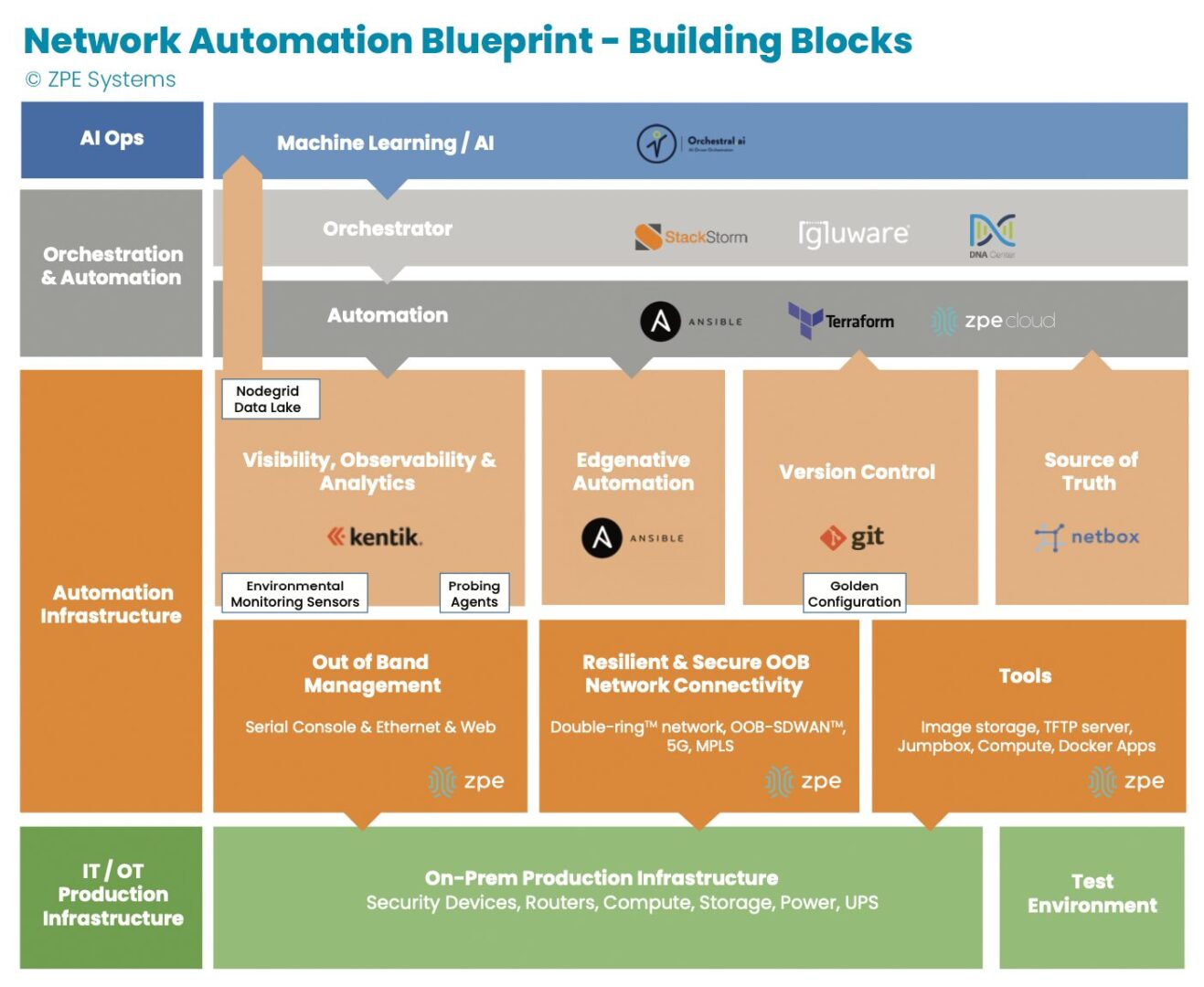
Image: The orange section describes dedicated automation infrastructure used for safely implementing automation.

In recent years, teams have been deploying automation on dedicated infrastructure like their OOB network. This automation infrastructure sits between the production infrastructure and the orchestration infrastructure, and serves as a safe way to build an automation pipeline. Open, Linux-based appliances like the Nodegrid Net SR combine a variety of functions and can host automation tools, like those for observability and analytics, version control, and source of truth. This independent automation infrastructure allows network engineers to ensure the integrity of configuration changes, software updates, and remediation protocols in an out-of-band manner, rather than testing directly on the production network. They can scale their capabilities, and in case of errors, roll back to a golden configuration that keeps services online.

Tool 4. Remote access to local jump box

Network engineers have another tool at their disposal: the jump box (a.k.a. jump server, jump host). A jump box hosts tools for maintaining operations, and these include file servers, image storage, configuration management tools, and troubleshooting commands. The jump box is a valuable asset for normal operations and for restoring services, such as when a device fails and needs its image rebuilt.

The issue with jump boxes is that they are typically a separate device that requires power, cooling, rack space, and maintenance. Some jump boxes also require on-site technicians to physically connect to the equipment needing repair.

Many organizations have adapted by upgrading their OOB infrastructure with appliances that can run full virtual machines (VMs). These can run all the tools mentioned above as well as with Docker containers, while consolidating power consumption, cooling resources, and rack space. The OOB appliance can double as a jump box. Combined with OOBI-LAN and OOBI-WAN, network engineers get remote access to re-image a device, diagnose DNS/routing issues, and perform any other necessary tasks. Key point is that discrete jump boxes – Like the Intel NUC — to be converted to virtual jump boxes running on a secure OOB platform like the Nodegrid Service routers.

Tool 5. Smart hands

A final way that network engineers get help through a slow economy is by outsourcing to so-called ‘smart hands.’ Employing smart hands means involving a third-party expert who can take on some of the IT workload. It’s a viable strategy, especially for teams feeling crushed by corporate belt tightening and the resulting mountain of tasks.

Companies who take this approach must be aware that the skills of smart hands varies greatly, as does the cost. This means it’s essential to strike a balance between which tasks to outsource, and which tasks to keep in house. For example, many organizations use smart hands for simple jobs such as replacing hardware and installing equipment at new sites. For more specialized jobs that require deeper knowledge of the environment, such as fixing a misconfigured IP address or route, teams use in-house personnel. This balance helps organizations get the support they need to keep operations running.

Get a cheat sheet to implement these tools fast

Some companies thrive during economic downturn, because they’ve intelligently placed these tools within their network architecture. Over the past decade, we’ve worked with these companies — including the largest tech giants — to describe in painstaking detail how they set up their infrastructure. We just released all 40+ pages of this validated reference architecture, complete with implementation diagrams and examples.

It’s called the network automation blueprint and it combines all of these tools. Network engineers can confidently answer questions like:

  • How do we meet SLAs with a smaller workforce?
  • How can we keep sites operating without physical access to equipment?
  • How can we perform weekly updates/patching without breaking things?

The blueprint is your cheat sheet to implementing a more resilient network, and fast. Click the button below to download your copy now.

Upgrade Network Infrastructure With Minimal Business Interruption

upgrade network infrastructure

Outdated network infrastructure poses a significant risk to the security and continuity of business operations. According to NTT’s “2020 Global Network Insights Report,” obsolete devices contain nearly twice as many security vulnerabilities as currently supported solutions. Outdated network hardware is also more likely to fail, and the ability to recover from a failure is severely hampered by a lack of vendor support. However, network upgrades can be highly disruptive, so many organizations delay network upgrades to avoid business interruption. They don’t realize that their outdated devices are like ticking time bombs that could bring down their network at any moment. In this post, we’ll provide advice that helps answer the question: How do I upgrade network infrastructure without disrupting business operations?

Why and when to upgrade network infrastructure

Obsolete network infrastructure no longer receives updates and security patches from the vendor. That means any vulnerabilities that exist on the device will remain open, giving cybercriminals time to find and exploit them. In addition, older network solutions often lack the advanced security features like SSO and MFA, which are required for Zero Trust.

Even supported legacy devices suffer from limitations that can prevent a business from achieving its technological goals. For instance, legacy devices may not support automation, making it difficult to achieve NetDevOps transformation. Plus, as enterprise networks grow more distributed, there’s a need for solutions that support SD-WAN and SD-Branch technology.

Sometimes the solutions themselves aren’t terribly outdated, it’s just that business requirements have changed in such a way that the existing infrastructure can’t support. For example, an organization may migrate some applications and systems to the cloud, so they need networking solutions that support hybrid environments. In addition, the mix of old and new devices and cloud and on-premises resources increases management complexity and prevents teams from effectively leveraging network orchestration.

Obsolete devices, outdated security, limited automation support, and changing business requirements are all important reasons to upgrade network infrastructure. However, these upgrades must be approached with a thoughtful strategy to reduce the impact on the performance and availability of business resources.

How to upgrade network infrastructure with minimal business interruption

Vendor agnostic platforms are the key to smooth network infrastructure upgrades. Vendor agnostic (a.k.a. vendor neutral) network management platforms support integrations with all or most viable and established network solutions, including legacy devices.

Vendor-neutral management devices, such as the Nodegrid Serial Console, support both legacy and modern Cisco pinouts. That means Nodegrid provides a single, unified platform from which to manage all the outdated devices you already have as well as any new solutions you add to your infrastructure. This reduces management complexity for network administrators, giving them more time to focus on optimizing performance and planning future network upgrades.

Additionally, a vendor-neutral network orchestration platform can use that management device to extend modern automation and orchestration to legacy hardware. A truly vendor-agnostic platform, such as Nodegrid Manager (for on-premises and private cloud deployments) or ZPE Cloud (for public cloud and hybrid deployments) can run third-party automation playbooks and custom Python scripts. This gives network administrators the unprecedented ability to implement a fully-automated NetOps environment even while still rolling out infrastructure upgrades.

The final piece of the puzzle is vendor-neutral Zero Touch Provisioning (ZTP). ZTP gives you the ability to deploy new devices efficiently and securely in remote data centers, branch offices, and edge compute sites. ZTP devices are provisioned automatically over the network, reducing the need for onsite deployments or pre-staging. A vendor-neutral ZTP solution like Nodegrid can extend ZTP to other vendors’ devices so you can quickly deploy upgraded infrastructure.

Nodegrid delivers vendor-neutral management, orchestration, and ZTP so you can upgrade network infrastructure with minimal business interruption.

Need Help Upgrading Your Network Infrastructure?

Contact ZPE Systems to learn how to upgrade your network infrastructure with Nodegrid.

Contact Us