Providing Out-of-Band Connectivity to Mission-Critical IT Resources

SSE Magic Quadrant: Key Takeaways of the 2023 Report

The SSE Magic Quadrant describes top cloud security service vendors, conceptualized as a cloud with glowing network nodes and a padlock.

Gartner’s SSE Magic Quadrant for 2023 identifies 10 key vendors currently providing secure service edge capabilities for the enterprise market. In this guide, we’ll summarize the common factors shared among leading SSE vendors, discuss what separates them from niche players, and share advice for connecting your edge network to SSE solutions via an SD-WAN on-ramp.

Table of Contents:
  1. What is Security Service Edge (SSE)?
  2. What is the need for SSE?
  3. What is the SSE Magic Quadrant?
  4. What has changed since the 2022 SSE Magic Quadrant?
  5. Key takeaways from the 2023 SSE Magic Quadrant
  6. SD-WAN: An on-ramp for SSE
  7. What to look for in an ideal SSE on-ramp
  8. Why Nodegrid is the ideal SSE on-ramp

What is Security Service Edge (SSE)?

Security service edge (SSE) is a cloud-centric security methodology for protecting edge network traffic. It rolls up technologies like Firewall-as-a-Service (FWaaS), Zero Trust Network Access (ZTNA), and Cloud Access Security Brokers (CASB) into a single service. These technologies offer threat protection, security monitoring, access control, and data governance.

What is the need for SSE?

With the frequency and severity of ransomware attacks and other cybercrimes increasing daily, security is a major priority for any organization. To protect your enterprise from cyber threats, you need to be able to extend your security policies and controls to all the remote and geographically distributed systems at your network edge. Historically, that meant backhauling all remote traffic through your primary firewall, which would inevitably cause performance issues for everyone on the network. This is frustrating and can greatly impact the business when much of your remote traffic is destined for cloud and web resources that aren’t even on your enterprise network.

SSE solves this problem by taking advanced enterprise security technologies and making them available as a cloud-based service. You can use SD-WAN with intelligent routing (more on that later) to send remote and branch office traffic through your SSE stack. This allows you to apply consistent policies and controls to your enterprise and edge traffic while reducing bottlenecks and increasing overall network performance.
.

Learn more about SSE:

Gartner’s 2023 SSE Magic Quadrant Summarized

Challengers

Leaders

Cisco (SIG)

Netskope
Zscaler
Palo Alto Networks (Prisma Access)

Niche Players

Visionaries

Broadcom
iboss
Cloudflare

Skyhigh Security
Forcepoint (Bitglass)
Lookout

There are many reasons why an SSE vendor would be considered a niche player, including that the market hasn’t caught on to them yet due to poor marketing or sales strategies. However, one common caution among niche players is a failure to fully integrate SSE components, which means customers must use multiple dashboards to manage a single SSE solution. Another common issue is poor support during sales, implementation, and operation, leading to frustration among enterprises with less experience in edge networking and security.

On the other hand, the leaders of the SSE Magic Quadrant share a few common characteristics as well. For one, they have strong marketing and sales outreach, a clear vision, and a roadmap for the future. This vision is essential because it allows enterprises to ensure their goals and strategies align with where their SSE vendor is headed.

In addition, these solutions’ components are tightly integrated with a single, unified management platform for more accessible and efficient operation. Magic Quadrant leaders invest in and implement new security features frequently, bug-free, and with adequate documentation and support. That means customers can stay ahead of emerging security threats without worrying about breaking their existing setups.

What has changed since the 2022 SSE Magic Quadrant?

There are three major changes to Magic Quadrant this year.

  • Palo Alto Networks moves from Challenger to Leader: In 2022, Palo Alto extended its Prisma Access SSE solution to better integrate with Prisma SD-WAN, enhance its proxy and ZTNA components, and add SaaS Security Posture Management (SSPM).
  • McAfee splits its cloud business into Skyhigh Security: Early in 2022, McAfee enterprise split into two, with its cloud business now known as Skyhigh Security. This split disrupted Skyhigh’s growth and market share and moved this SSE offering from the Leaders quadrant to the Visionaries quadrant.
  • Versa leaves the SSE Magic Quadrant: Versa no longer ranks in the top 20 organizations in Gartner’s market momentum index (MMI), so it isn’t included in the 2023 Magic Quadrant.

Key takeaways from the 2023 SSE Magic Quadrant

  • Most vendors prioritized improving their core capabilities and better integrating their product, rather than focusing on new features and other innovations.
  • Vendors who fail to fully integrate their SSE offering into a unified platform are quickly losing market share.
  • WFH traffic is less of a concern for enterprises than branch/edge sites, so SD-WAN access and integrations are critical.

Overall, the biggest takeaway from the SSE Magic Quadrant is the importance of a seamlessly-integrated platform. A consolidated platform ensures complete visibility and control over your security service edge solution without needing to learn and operate multiple consoles.

On top of this, to use SSE’s cloud-delivered solution, you need a reliable way to send traffic from your branch and edge locations to the SSE stack. That means part of the architecture needs to include an access solution that can tunnel traffic from these locations to the cloud, such as SD-WAN. The access solution serves as an on-ramp to SSE, and requires a physical appliance for on-premises installations. This framework combining SD-WAN access with SSE is how SASE (secure access service edge) is built.

SD-WAN: An on-ramp to SSE

Security service edge provides the technology to protect your edge-based cloud-destined traffic, but you still need a way to get that traffic to your SSE platform. This is known as an SSE on-ramp, and it’s not included in any of the SSE Magic Quadrant solutions. However, one of Gartner’s selection criteria was the ability to integrate with SD-WAN technology.

An SSE on-ramp uses SD-WAN (software-defined wide area network) technology to route remote and branch office traffic to your SSE stack in the cloud. SD-WAN separates the control and management processes from your underlying WAN hardware and virtualizes them as software, making it possible to centrally control and orchestrate even very complex and distributed WANs. With SD-WAN, you can use intelligent and application-aware routing to connect your edge users directly to the SSE platform, cloud, and web resources.

What to look for in an ideal SSE on-ramp

The ideal on-ramp to SSE will support seamless integration with your SSE platform, and vice-versa. In addition, the right solution will provide additional capabilities like the ones listed below.

Features of an ideal SSE on-ramp include:

Versatile tunneling

Physical hardware that’s easy to provision with a versatile tunnel mechanism to SSE, including IPsec and WireGuard, with simple cloud management. Ideally this tunneling mechanism uses application-aware traffic steering to make it an effective part of an SD-WAN on-ramp.

Integrated L3/L4 firewall

Integrated Layer 3/Layer 4 firewall technology to secure incoming traffic to your remote and branch locations, including VPN support. The ideal on-ramp has local segmentation capabilities and zero-trust, since SSE can’t do local segmentation on its own without help from on-premises equipment, agents, or VMs.

Out-of-band (OOB) management

OOB management for a direct, dedicated network connection to the SD-WAN on-ramp that doesn’t rely on cloud-based in-band connectivity. OOB access and provisioning are ideal to gain greater control over remote networking infrastructure on a dedicated connection.

Multiple WAN interfaces

Flexible and redundant WAN interfaces to ensure 24/7 availability. At least one of these should include a 5G/4G LTE modem with 2 SIM slots for high-speed cellular failover and out-of-band access when the primary WAN link is down.

Terminal server

Terminal server/serial console/”jump box” port management for easy remote management of edge infrastructure. This should include the ability to host third-party troubleshooting tools so admins can easily recover from outages without going on-site.

Computing power

Compute capabilities to run third-party apps and Docker containers right at the network edge. With built-in compute it’s easier to extend the functionality of SSE with additional applications that may not be part of the SSE stack or need an edge Docker footprint, like vulnerability scanning or user experience monitoring agents.

Centralized automation

Unified management of automation like Zero Touch Provisioning (ZTP) to automatically spin-up edge devices and connect them to SSE. Automation can significantly speed up branch deployments while reducing the risk of human error.

Why Nodegrid is the ideal SSE on-ramp

The Nodegrid branch and edge networking solution from ZPE Systems combines all the capabilities of the ideal SSE on-ramp in a single platform. For example, the Nodegrid Net Services Router (NSR) is a customizable, all-in-one device with available modules for storage, compute, serial console management, and more. The vendor-neutral NSR can host your preferred SD-WAN solution and supports easy integrations with SSE Magic Quadrant Leaders like Palo Alto Prisma Access, or you can use ZPE Cloud’s integrated SD-WAN app.

Thanks to the open-architecture, Linux-based Nodegrid OS, you can also extend Nodegrid’s capabilities with your choice of custom and third-party applications for security, monitoring, automation, and more. Plus, every device, application, and integration connected to the Nodegrid platform is brought under a single management umbrella for a unified and efficient orchestration experience. 

The Nodegrid platform from ZPE Systems rolls up everything you need in an SSE on-ramp and delivers it in one powerful, unified edge networking solution.

Learn how Nodegrid easily hosts and integrates Gartner’s picks for the 2023 SSE Magic Quadrant!

Contact ZPE Systems today!

Contact Us

99.999% Uptime for a Top-10 Engineering School

Providing low-level remote access and automation saves hundreds of hours per month for the university’s small IT team

One of the largest universities in the United States fosters academics and research for nearly 40,000 students, staff, and researchers. The university sits among the top 10 schools for engineering, and heavily integrates technology into all disciplines, including engineering, computer sciences, and agricultural studies.

The university received a grant to expand, update, and connect their network of campuses, while enhancing infrastructure and mobility, resiliency, and campus amenities.  But having more than 200 on-campus buildings presents a challenge. The campus is home to academic facilities as well as a hospital, airport, 60,000-seat sports stadium, and dozens of leased spaces for local businesses. This makes the university equivalent to a small city, and its network infrastructure is what keeps it all connected.

Their small IT team was responsible for maintaining more than 10,000 management devices, most of which were long past EOL and frequently failing. They needed a refresh, but with a solution that could also reduce the hundreds of hours they spent every month on travel and on-site work. To maximize their day-to-day efficiency, they required a solution that could overcome these operational gaps:

  • Reducing the 100-150 hours of monthly travel times, by giving engineers the ability to fully access their stack remotely
  • Reducing the 80-120 hours of monthly on-site work required to maintain the 99.999% SLA, by automating manual jobs such as patching and firmware upgrades
  • Expanding their management headroom and use-case adaptability, by migrating to IPv6 and reducing the existing 6RU device stack

Download the full case study to see how ZPE’s Nodegrid hardware and software solved these problems.

EngineeringSchoolCover

Download the full case study

Problems and Gaps

The university is one of the largest in the United States. It sits among the nation’s top 50 schools for research expenditures, and heavily integrates technology into all disciplines, including engineering. Its main campus is home to more than 200 buildings that sit on over 2,500 acres of land. The campus is essentially a small city, and the university’s network infrastructure keeps it all connected.

This network infrastructure, however, was well beyond EOL and in disrepair. But rather than simply upgrade to newer devices, the university’s small IT team wanted to improve the overall quality of life well into the future. This meant addressing three gaps:

  • Inefficient management at scale — Each engineer spent an average of ten hours per month on travel alone, just to traverse the campus’ wide footprint and get to each MDF/IDF closet.
  • Too much focus on ops — The aging infrastructure was on the brink of collapse and required each engineer to spend eight hours per month in on-site work, just to keep devices running.
  • Too many devices — The infrastructure includes roughly 10,000 devices to manage, which was exhausting IP on their limited IPv4 network and too rigid to fit in tight spaces, like their remote farm closets and research labs.

Solution

The university deployed the full lineup of Nodegrid devices, including the Nodegrid Serial Console, Nodegrid Services Routers, and Nodegrid Manager. These allowed them to overcome all three gaps using remote management, automation, and consolidated functionality, to save engineers hundreds of hours every month. Download the full case study to see the complete solution and benefits.

Need Help Replacing End-of-Life Gear?

Check out our complete products and services package to make your EOL transition seamless. Choose from a variety of Synopsys-validated devices, get a generous trade-in discount, and let our engineers install and configure into your environment. Click below to explore this offer and more customer case studies.

Cisco 2900 EOL: Replacement Options

cisco 2900 eol

The Cisco ISR 2900 series of branch routers went EOS (end-of-sale) on the 9th of December 2017, and Cisco concluded support on the 31st of December 2022. In this guide, we’ll compare migration options for the Cisco ISR 2900 EOL models to help you select a solution that supports your business use case, deployment size, and future growth.

Disclaimer: This comparison was written by a third party in collaboration with ZPE Systems using data gathered from publicly available data sheets and admin guides, as of 5/12/2023. Please email us if you have corrections or edits, or want to review additional attributes: Matrix@zpesystems.com


Table of Contents

Cisco ISR 2900 overview

The Cisco ISR 2900 is a line of enterprise gateway routers designed for branch and edge networking. It’s a modular solution that can be expanded with optional Network Interface Modules (NIMs) and Service Modules (SMs) for more functionality. There are two primary use cases for the 2900:

Converged branch networking – The ISR 2900 easily integrates with Cisco’s SD-WAN, SD-Branch, cloud security, and DNA network management software, can be extended with optional modules for added hardware capabilities, and supports NFV (network functions virtualization) for all-in-one branch networking.

Out-of-band (OOB) management – Using serial port modules, the ISR 2900 turns into an out-of-band (OOB) serial console solution that provides remote management access to the control plane of branch infrastructure.

The ISR 2900 is officially EOL as of the 31st of December 2022. The EOL models include all 2901, 2911, 2921, and 2951 ISR product SKUs.

Looking for replacement options for your other Cisco ISR EOL products? Read our guide to Cisco ISR EOL Replacement Options.


Cisco 2900 EOL replacement options

The discontinuation of the Cisco 2900 has left many organizations looking for migration options. Let’s compare two direct replacements from Cisco before discussing alternative options that deliver better branch management capabilities and greater opportunities for automation.

Cisco ISR 1100

Cisco ISR 1100 is a series of enterprise branch routers, though in this comparison we’re only looking at the models that support SD-WAN and thus serve as direct replacements for the discontinued 2900 models. The capabilities of the 1100 series vary, mostly because only some of the models are modular. For example, the fixed form-factor 1100-4G/4G LTE models have cellular functionality but offer fewer networking and security features. Conversely, the 1161X-8P and 112x-8P models are modular and can be extended with optional modules (like cellular for the 1161X or terminal server ports for the 112x-8P).

Even with these expansions, the compact ISR 1100s are best suited for smaller deployments in branch offices or small, provider-managed edge data centers. If your organization uses the ISR 2900 for converged branch networking, the 1100s are the closest Cisco replacement, though it supports OOB serial modules as well.

Cisco Catalyst C8300

The Cisco Catalyst C8300 series is a modular branch and edge networking solution, though due to its large size, it’s sometimes used as a primary on-premises gateway router. There are four models to choose from – two 2RU units with 2 SM and 2 NIM slots, and two 1RU units with 1 SM and 1 NIM slot. Each chassis comes with 6 embedded Layer3 Ethernet ports (1 Gbps and/or 10 Gbps) as well as a console port and USB port. All other port configurations and capabilities come via Cisco expansion modules, including options for 5G/4G cellular.

The Catalyst C8300 is a big, robust solution that’s designed for medium to large deployments such as campuses, colocation sites, and AI/machine learning data centers. The C8300 is primarily a converged branch networking solution like the ISR 1100 series, but it provides OOB management with optional serial cards.

Cisco 2900 replacement option comparison table


Cisco ISR 2900 (EOL)

Cisco ISR 1100

Cisco Catalyst 8300

Nodegrid Net SR

Nodegrid Serial Console Plus

Form Factor

1-2 RU

Desktop-1RU

1-2 RU

1 RU

1 RU

Max IPsec Throughput

Not defined

Up to 18.8 Gbps

Up to 18.8 Gbps

600 Mbps – 1.2 Gbps

600Mbps

Total Onboard WAN or LAN 10/100/1000 Ports

2-3

4-6

4-6

2

2

Total Onboard WAN or LAN 10Gbps Ports

0

0

0-2

2

2

WAN Ports

2-3

0-6

2-6

1+, configurable

0-4

LAN Ports

2-3

0-6

2-6

4-84

0-4

Slots

2-3

0-1

2-4

5

0

Default Memory

512 MB

4 GB

8 GB

8 GB

4 GB

Max Memory

2 GB

8 GB

32 GB

64 GB

16 GB

Compute

UCS-E Card

On-board, Compute card

On-board

OOB Capabilities

Requires Serial Card

Requires Serial Card

Requires Serial Card

Included

Included

Environmental Monitoring

N/A

N/A

N/A

Included

Included

For users looking for a Cisco solution to replace their EOL ISR 2900, the ISR 1100 series and Catalyst C8300 are the closest direct replacements. However, both product lines suffer from a major limitation – they aren’t vendor-neutral.

While Cisco routers integrate with some third-party partners, they do not support custom or third-party applications for automation and orchestration, which limits you to the automation offered by Cisco’s software. This lack of open integrations increases the chances that a Cisco solution won’t be able to hook into all the hardware and software components of a distributed and multi-vendor network architecture.

For example, if you utilize different SD-WAN and next-generation firewall (NGFW) vendors at some of your remote sites, Cisco’s automation may not extend to these devices. That means you’ll need to send out technicians to all remote sites (which could number in the dozens or hundreds) just to set up these services when you otherwise could have deployed them automatically.

Want to learn more about breaking free of locked ecosystems? Read The Benefits of Vendor Agnostic Platforms in Network Management

When network solutions like the Cisco 2900 go EOL, it’s the perfect opportunity to look for alternative options that provide the functionality you need without locking you into an ecosystem or limiting your automation capabilities.

Cisco 2900 direct replacement options from ZPE Systems

ZPE Systems provides a line of vendor-neutral solutions for branch and edge networking called Nodegrid. The Nodegrid Net Services Router (NSR) and Nodegrid Serial Console Plus (NSCP) serve as direct replacements for Cisco 2900 EOL products.

Nodegrid Net Services Router (NSR)

The Nodegrid NSR is a modular branch networking solution that you can customize to increase your terminal server ports, storage space, processing power, or switch ports. The NSR delivers converged branch networking capabilities like SD-WAN, SD-Branch, and NFVs, plus it can host your choice of custom and third-party applications for automation, security, and more.

While the NSR is the perfect converged branch solution to replace the Cisco ISR 2900, it also provides 3rd generation (or Gen 3) OOB management. That means Nodegrid’s OOB network is completely vendor-neutral and can extend automation capabilities to all your legacy and mixed-vendor infrastructure for efficient deployments, management, and orchestration.

Want to see the Nodegrid converged branch networking solution in action? Watch a Demo

Nodegrid Serial Console Plus (NSCP)

The NSCP is a robust, scalable branch networking and out-of-band serial console solution. The NSCP comes in 16-, 32-, 48-, and 96-port models, so you can choose the solution that’s right-sized to your deployment and use case. Plus, you can get built-in 5G/4G LTE and Wi-Fi options for failover and out-of-band.

Like the NSR, the NSCP is also an open platform that can run your choice of software to expand your capabilities and reduce your tech stack. Like the NSR, the NSCP delivers Gen 3 OOB management of all connected infrastructure, enabling true end-to-end automation in data centers, branches, and other remote sites. The NSCP is the perfect replacement for enterprises utilizing the Cisco 2900 for out-of-band management, though it also provides converged branch networking capabilities at any scale.

All Nodegrid devices run the open, Linux-based Nodegrid OS which can host your choice of third-party or custom applications, freeing you from vendor lock-in. You can even integrate infrastructure orchestration tools like Puppet, Chef, and Ansible to extend automation to end devices, regardless of vendor. This is what makes Nodegrid the world’s first Gen 3 branch networking solution.

Want to see how Nodegrid stacks up against Cisco’s replacement options? Click here to download the services routers comparative matrix.

Global support and supply chain

Leaving a trusted ecosystem behind to adopt alternative options can be risky, so it’s important to find a vendor that offers the support you need to make the transition and keep your operations running smoothly. ZPE Systems offers global product support using the “follow the sun” model, which means you get support when you need it, regardless of your timezone. You also won’t have to worry about supply chain issues causing stock shortages – ZPE supplies hyperscalers in 10K+ units per quarter and has great, consistent supply chain control.

Need to replace your Cisco 2900 EOL?

To learn more about replacing your Cisco 2900 EOL solution with the vendor-neutral Nodegrid platform and our shipping in as little as two weeks, contact ZPE Systems today. Contact Us

Cisco 2900 EOL product tables with migration SKUs

Cisco 2900 EOL Model

In Scope Features

Replacement Product (modular form factor)

Cisco ISR 2901

Cisco ISR 2911

Cisco ISR 2921

Cisco ISR 2951

Serial Console Module, Routing, 16 serial ports

ZPE-NSR-816-DAC with 1 x 16 port serial module 1 x ZPE-NSR-16SRL-EXPN

Cisco ISR 2901

Cisco ISR 2911

Cisco ISR 2921

Cisco ISR 2951

Serial Console Module, Routing, 32 serial ports

ZPE-NSR-816-DAC with 2×16 port serial module 2x ZPE-NSR-16SRL-EXPN

Cisco ISR 2901

Cisco ISR 2911

Cisco ISR 2921

Cisco ISR 2951

Serial Console Module, Routing, 48 serial ports

ZPE-NSR-816-DAC with 3×16 port serial module 3x ZPE-NSR-16SRL-EXPN

Cisco ISR 2901

Cisco ISR 2911

Cisco ISR 2921

Cisco ISR 2951

Serial Console Module, Routing, 60 serial ports

ZPE-NSR-816-DAC with 4×16 port serial module 4x ZPE-NSR-16SRL-EXPN

80 serial port option – no Cisco equivalent

Serial Console Module, Routing, 80 serial ports

ZPE-NSR-816-DAC with 5×16 port serial module 5x ZPE-NSR-16SRL-EXPN


Cisco 2900 EOL Model

In Scope Features

Replacement Product (fixed form factor)

Cisco ISR 2901

Cisco ISR 2911

Cisco ISR 2921

Cisco ISR 2951

Serial Console Module, Routing, 16 serial ports

ZPE-NSCP-T16R-STND-DAC

Cisco ISR 2901

Cisco ISR 2911

Cisco ISR 2921

Cisco ISR 2951

Serial Console Module, Routing, 32 serial ports

ZPE-NSCP-T32R-STND-DAC

Cisco ISR 2901

Cisco ISR 2911

Cisco ISR 2921

Cisco ISR 2951

Serial Console Module, Routing, 48 serial ports

ZPE-NSCP-T48R-STND-DAC

96 serial port option – no Cisco equivalent

Serial Console Module, Routing, 96 serial ports

ZPE-NSCP-T96R-STND-DAC

Want to see how Nodegrid compares to other serial console solutions?

Raspberry Pi Alternatives for Business

Raspberry Pi alternatives
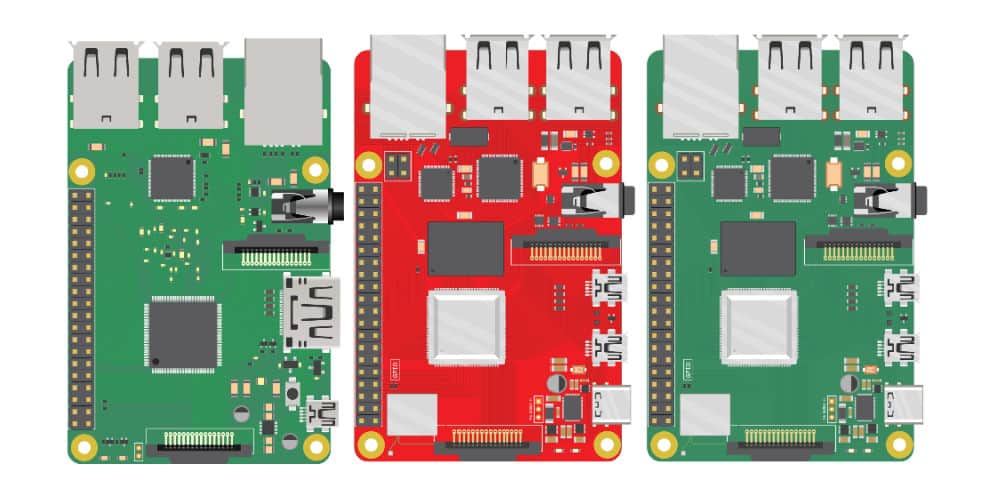
Many businesses use Raspberry Pi devices as jump boxes to remotely access the control plane of critical infrastructure. By their very nature, these devices usually aren’t correctly managed or vetted by the security team. This creates a security challenge known as Shadow IT. Shadow IT is a situation that arises when an organization has devices in use that are not known to, or securely managed by, the IT or Information Security department. These unmanaged devices are vulnerable to attack, and Raspberry Pi jump boxes are particularly tempting targets to cybercriminals because they provide access to important remote infrastructure. This blog discusses the security risks of using Raspberry Pi jump boxes and provides solutions in the form of secure, enterprise-grade Raspberry Pi alternatives.

Why consider Raspberry Pi alternatives?

Unmanaged Raspberry Pi devices don’t receive patches, aren’t visible to change management systems, and are excluded from security audits. These unsecured devices are used to access critical remote infrastructure, which creates a number of security risks.

Raspberry Pi security risks

  • Malware vulnerability – Deploying Raspberry Pi devices without onboarding them with IT means they’re not protected by enterprise antimalware solutions, leaving them exposed to viruses and ransomware attacks.
  • Undetected misconfigurations – Since unmanaged Raspberry Pi devices aren’t monitored by security or change management systems, it’s more likely that misconfigurations and vulnerabilities will remain undetected, leaving a potential backdoor open for cybercriminals.
  • Lack of IAM – A Raspberry Pi jump box that isn’t covered by enterprise IAM (Identity and Access Management) is susceptible to attack because security teams can’t extend Zero Trust security policies or controls to protect it (e.g., multi-factor authentication, role-based access control, and single sign-on).
  • Non-compliance – For organizations in regulated industries, a Raspberry Pi jump box could expose them to potential liability, because the org can’t monitor who’s using that device to access what data, resulting in non-compliance with privacy laws like HIPAA.
  • Lack of centralized Fleet Management – Organizations who have hundreds or thousands of these jump boxes have no way to centrally manage them, which makes upgrades, app deployments, licensing, patch management, and other tasks more time-consuming.
  • Lack of secure OS – Operating systems and software contain thousands of common  vulnerabilities, and there’s no way to automatically apply security patches or OS upgrades to unmanaged Raspberry Pi devices.
  • Lack of secure HW – Raspberry Pi storage disks often aren’t encrypted and lack any sort of secure boot sequence or other onboard security features, which means a stolen device could be used to breach the network or introduce malware.

Ultimately, Raspberry Pi devices expand a company’s attack surface because they fall outside of enterprise security policies, controls, solutions, and monitoring. However, many organizations use a Raspberry Pi to avoid the expense of deploying another fully managed device as a jump box in every site that houses critical infrastructure. Overcoming this challenge requires an enterprise-grade networking solution that includes remote out-of-band access to the control plane to eliminate the need for a jump box altogether.

Looking for alternative options for your Intel NUC jump boxes? Read Best Intel NUC Alternatives

Raspberry Pi alternatives from ZPE Systems

The Nodegrid product line from ZPE Systems helps organizations avoid Shadow IT by simplifying the tech stack with all-in-one network management solutions. In addition to data center and branch networking functionality like gateway routing, switching, and Wi-Fi, all Nodegrid devices provide out-of-band (OOB) management access over 5G/4G LTE.

Nodegrid is more secure than a Raspberry Pi jump box because it’s an enterprise solution that’s onboarded with IT and covered by all your security policies, controls, and solutions. In addition, Nodegrid boxes themselves are protected by enterprise security features such as BIOS protection, Signed OS, UEFI Secure Boot, and self-encrypted disk (SED).

Plus, all Nodegrid devices are completely vendor-neutral, which means they easily integrate with third-party Zero Trust security solutions and can even directly host other vendors’ security software to further reduce your tech stack.

Key Nodegrid features

All Nodegrid Devices Include:

Key features

Strong Out-of-band management integration

Extensible applications with virtualization and containers

Zero Touch Provisioning (ZTP) over the WAN

Vendor-neutral, unified management via ZPE Cloud/Nodegrid Manager

Modern x86-64bit Linux Kernel

Extended automation based on actionable data

Failover to 4G/5G/LTE & Wi-Fi

Power control and monitoring

Orchestration support via Puppet, Chef, Ansible, RESTful

Security

BIOS protection

TPM 2.0

UEFI Secure Boot

Signed OS

Self-Encrypted Disk (SED)

Geofencing

X.509 SSH certificate support, 4096-bit encryption keys

Selectable cryptographic protocols for SSH and HTTPS (TLSv1.3)

Selectable cypher suite levels: high, medium, low, custom

SSL VPN (Client and Server)

IPSec, Wireguard, and Strongswan with support for multi-sites

Local, AD/LDAP, RADIUS, TACACS+, Kerberos, authentication

SAML support via DUO, OKTA, Ping Identity

Local, backup-user authentication support

User-access lists per port

Group/role-based authorization: AD/LDAP, RADIUS, TACACS+

Fine grain and role-based access control

Firewall – IP packet and security filtering, IP forwarding support

MD5 / SHA System Configuration Checksum™

System event syslog

Custom security settings

Strong password enforcement

Two-Factor Authentication with RSA and DUO

Networking

IPv4 / IPv6 Support

Embedded Layer 2 switching

VLAN

Layer 3 Routing

BGP

OSFP

RIP

QoS

DHCP (Client and Server)

RIPv1, RIPv2

VXLAN

DDNS

NTP

To learn more about the security benefits of Nodegrid’s Raspberry Pi alternatives, contact ZPE Systems.

Nodegrid product comparison

The Nodegrid product line includes serial console servers (also known as RS232 serial switches) for data center deployments, as well as network edge routers for distributed branch and campus sites. Each solution delivers Gen 3 OOB management and all-in-one networking in a variety of sizes and configurations to suit any use case.

Nodegrid Serial Consoles

Nodegrid Serial Console Plus

Nodegrid Serial Console S Series

CPU

X86-64bit Intel 

X86-64bit Intel

Guest Docker

1-2

1-2

Storage

32GB

32GB

Wi-Fi

Yes

Yes

Cellular (Dual-SIM)

2

None

Serial

16 – 96

Auto-sensing

Network

2x Gb ETH 2x SFP+

2x SFP

Data Sheet

Download

Download


Nodegrid Network Edge Routers

Link SR

Bold SR

Hive SR

Gate SR

Net SR

Mini SR

CPU

X86-64bit Intel 

X86-64bit Intel

X86-64bit Intel 

X86-64bit Intel 

X86-64bit Intel 

X86-64bit Intel 

Cores

2

4 or 8

4 or 8

2, 4 or 8

2, 4, 8 or 16

4

Guest VM

1

1

1-2

1-3

1-6

1

Guest Docker

2+

2+

2+

2+

2+

2+

Storage

16GB – 128GB

32GB – 128GB

16GB – 128GB

32GB – 128GB

32GB – 128GB

14GB SED

Additional Storage

Up to 4TB

Up to 4TB

Up to 4TB

Up to 4TB

Up to 4TB

Wi-Fi

Yes

Yes

Yes

Yes

Yes

Yes

Cellular modem

1

1-2

1-2

1-2

1-6

1

5G

Yes

Dual 5G

Dual 5G

6x 5G

Sim slots

2

4

4

4

12

1

Serial Console Switch

1

8

Via USB

8

16-80

Via USB

Network

1x Gb ETH 1x SFP

5x Gb ETH

2x GbE ETH 2x 10 Gbps

4x 10/100/1000/2.5 Gbps RJ-45

2x SFP 5x Gb ETH

4x 1Gb ETH PoE+

2x 1Gb ETH 2x SFP+ Multiple expansion cards

2x 1Gb ETH

Data Sheet

Download

Download

Download

Download

Download

Download

The Nodegrid line of Raspberry Pi alternatives from ZPE Systems can help your organization prevent Shadow IT to reduce your attack surface and improve your security posture without increasing costs.

Ready for a Raspberry Pi alternative?

Want to see one of ZPE’s Raspberry Pi alternatives in action? Request a free Nodegrid demo! Request a Demo

Zero Touch Deployment Cheat Sheet

A zero touch deployment cheat sheet is visualized as a literal cheat sheet used by a student during an exam

Zero touch deployment is meant to make admins’ lives easier by automatically provisioning new devices. However, many teams find the reality of zero touch deployment much more frustrating than manual device configurations. For example, zero touch deployment isn’t always compatible with legacy systems, can be difficult to scale, and is often error-prone and difficult to remotely troubleshoot. This post provides a “cheat sheet” of solutions to the most common zero touch deployment challenges to help organizations streamline their automatic device provisioning.

Zero touch deployment cheat sheet

Zero touch deployment – also known as zero touch provisioning (ZTP) – uses software scripts or definition files to automatically configure new devices. The goal is for a team to be able to ship a new-in-box device to a remote branch where a non-technical user can plug in the device’s power and network cables, at which point the device automatically downloads its configuration from a centralized repository via the branch DHCP server.

In practice, however, there are a variety of common issues that force admins to intervene in the “zero touch” deployment. This guide discusses these challenges and advises how to overcome them to achieve truly zero touch deployments.

Zero touch deployment challenge: The solution:
Legacy systems don’t have native support for zero touch Extending zero touch to legacy systems using a vendor-neutral platform
Deployment errors result in costly truck-rolls Recovering from errors remotely with Gen 3 out-of-band (OOB) management
Securing remote deployments causes firewall bottlenecks Moving security to the edge with Zero trust gateways and Secure Access Service Edge (SASE)
Automating deployments at scale increases management complexity Maintaining control through centralized, vendor-neutral orchestration with version control

Extend zero touch to legacy systems with a vendor-neutral platform

Challenge Solution

While many new systems and networking solutions support zero touch deployment, sometimes there’s still a need to repurpose or reconfigure legacy systems that don’t come with native ZTP support.

Pre-staging these devices before shipping them to the branch is a security risk because the system could be intercepted in transit; plus, they’re likely already deployed at remote sites and need to be reconfigured in place. Without a way to extend zero touch deployment capabilities to those legacy systems, companies often have to pay for admins to travel to remote branches, negating any cost savings they were hoping to gain from reusing older devices.

One way to extend zero touch to legacy systems is with a vendor-neutral management platform. For example, a vendor-neutral serial console switch with auto-sensing ports can connect to modern and legacy infrastructure solutions in a heterogeneous branch deployment so they can all be managed from a single place.

From that unified management platform, admins can write and deploy configuration scripts to connected devices, including legacy systems that don’t support zero touch. Technically, this isn’t zero touch deployment because the system doesn’t automatically download and run its configuration file, but it’s still a way to turn an on-site, manual process into one that’s remotely activated and mostly automated.

Recover from deployment errors with Gen 3 OOB management

Challenge Solution

A new branch deployment almost never goes completely according to plan, and this is especially true when teams are using zero touch for the first time, or aren’t completely comfortable with software-defined infrastructure and networking. In the best-case scenario, when there’s a configuration error, the zero touch deployment aborts, and an admin is able to correct the problem and restart the process.

However, sometimes the deployment hiccup causes the device to hang, freeze, or get stuck in a reboot cycle. Or, even worse, an unnoticed error in the configuration could allow the deployment to finish successfully but then go on to affect other production dependencies and bring the entire branch network down. Either way, organizations must again deal with the expenses involved in sending a tech out to troubleshoot and fix the problem.

The best way to ensure continuous access to remote infrastructure is with out-of-band (OOB) management. An OOB solution, such as a serial console or all-in-one branch gateway, connects to the management ports on infrastructure devices so admins can remotely monitor and control every device from a single place without IP addresses.

This creates a separate (out-of-band) network that’s dedicated to management and troubleshooting, making it possible for teams to remotely recover devices that have failed the zero touch deployment process or brought down production LAN dependencies. Plus, the OOB gateway uses independent, redundant network interfaces to ensure admins still have remote access even if the production WAN or ISP link goes down.

To ensure full OOB management coverage of a heterogenous, mixed-vendor environment, the out-of-band solution should be completely vendor-neutral. An open OOB device also supports integrations with third-party solutions for automation, orchestration, and security. This kind of out-of-band platform is known as Gen 3 OOB. Gen 3 OOB management ensures that teams can remotely recover from zero touch deployment errors no matter what device is affected or how the production network is impacted.

Secure remote deployments with zero trust gateways and SASE

Challenge Solution

Organizations need to secure all devices at all remote sites using consistent policies and security controls. However, for smaller branches and IoT sites, it usually isn’t cost-effective to deploy a security appliance in each location.

Plus, adding more firewalls also adds more management complexity. That means traffic is usually backhauled through the main data center firewall, creating bottlenecks and causing network latency for the entire enterprise.

Using zero trust gateways and cloud-based security services, companies can move security to the branch without the cost and complexity of additional firewalls. An all-in-one, zero trust gateway solution combines SD-WAN, gateway routing, and OOB management in a single device. It also supports zero trust authentication technologies like SAML 2.0 and 2FA. A zero trust gateway also needs to support network micro-segmentation, which will allow the use of highly specific security policies and targeted security controls. Plus, by enabling software-defined wide area networking (SD-WAN), a zero trust gateway facilitates the use of SASE.

Secure Access Service Edge (SASE) is a cloud-based service that combines several enterprise security solutions into a single platform. Zero trust gateways use SD-WAN’s intelligent routing capabilities to detect branch traffic that’s destined for the cloud or web. This traffic is directed through the SASE stack for firewall inspection and security policy application, allowing it to bypass the main security appliance entirely. SASE helps reduce the load on the enterprise firewall, reducing bottlenecks and improving performance without sacrificing security.

Scale zero touch deployments with centralized orchestration

Challenge Solution
Zero touch deployments occur (at least in theory) without any admin intervention, but they still need to be monitored for failures. Keeping track of a handful of automatic deployments may seem easy enough, but as the number and frequency increases, it becomes more challenging. This is especially true when companies kick off large-scale expansions, deploying dozens of devices at once, all of which could be plugged in at any time to begin the automated provisioning process. Plus, different devices need different configuration files, and admins need a way to work together without overwriting each other’s code or duplicating each other’s efforts. A vendor-neutral orchestration platform provides a central hub for network and infrastructure automation across the entire enterprise. This platform uses the serial consoles and OOB gateways in each remote location to gain control over all the connected devices, so network teams can monitor and deploy all their zero touch configurations from one place. An orchestration platform is the single source of truth for all automation, so it needs to support version control. This ensures that admins can see who created or changed a configuration file and revert to a previous version when there’s a mistake.

Simplifying zero touch deployment with Nodegrid

Zero touch deployment can be a hassle, but using vendor-neutral management systems, Gen 3 OOB management, zero trust gateways, and centralized orchestration can help organizations overcome the most common hurdles. For example, a vendor-neutral Nodegrid branch gateway deployed at each remote site helps you extend automation to legacy systems, provides fast and reliable out-of-band access to recover from issues, enables zero trust security & SASE, and gives you unified orchestration through the Nodegrid Manager (on premises) and ZPE Cloud software.

Ready to learn more about zero touch deployment?

Nodegrid has a solution for every zero touch deployment challenge. Schedule a demo to see how Nodegrid’s vendor-neutral platform can simplify zero touch deployment for your enterprise.

Contact Us

Streamlining Remote Data Center Management

Streamlining Remote Data Center Management

With the tech industry in turmoil and an ongoing recession forcing cutbacks, many sysadmins and engineers are struggling to efficiently manage their data center infrastructure. Overworked admins are more likely to make mistakes and issues are more likely to fall between the cracks, making the enterprise network less resilient. In the current economy, businesses can’t afford to lose revenue due to data center outages, and that’s why it’s crucial to invest in the tools teams need to efficiently manage and monitor remote infrastructure.

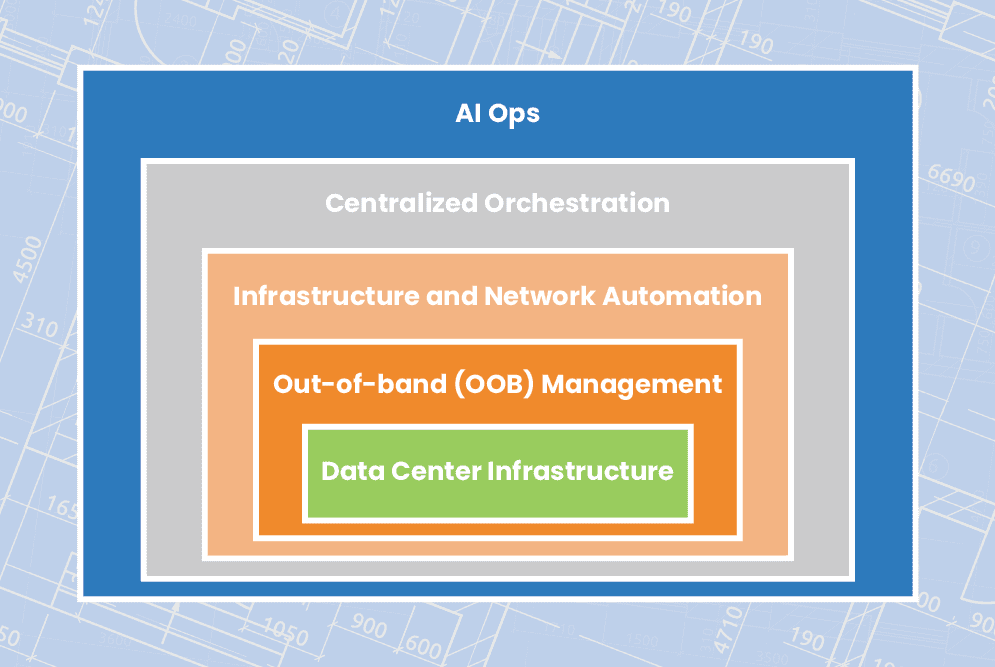
This blog explains how to streamline remote data center management using technologies like out-of-band (OOB) management, automation, orchestration, and AIOps to ensure network resiliency.

How to streamline remote data center management

Out-of-band management

Organizations commonly deploy redundant internet connections at their data centers to provide network failover, ensuring business continuity in case the primary ISP suffers an outage. However, if the data center WAN or LAN goes down due to an equipment failure, configuration mistake, or security breach, network failover won’t help admins solve the problem. If remote data center devices are unable to get an IP address, then they’ll be unreachable on the production network, leaving remote teams without a way to diagnose and fix the issue. That means expensive truck rolls or on-site managed services, plus the revenue and reputation costs of extended downtime.

What’s needed to ensure business continuity and reduce the cost of outages is an out-of-band (OOB) management network that doesn’t rely on any production infrastructure. The most efficient way to accomplish this is with Gen 3 OOB serial consoles. These systems include redundant network interfaces – often using cellular – to ensure continuous remote access even if the production ISP or MPLS link goes down. An OOB serial console directly connects to data center infrastructure devices via the serial port, which means remote admins can access and manage them without an IP address. The result is that remote data center management teams can diagnose and fix problems without traveling on-site, saving money on recovery costs as well as reducing the duration and business impact of outages.

Plus, an OOB management network can be used to execute resource-intensive automation and orchestration workflows without using valuable MPLS bandwidth or affecting production network performance. Gen 3 serial consoles are vendor-neutral and support the use of third-party automation scripts and playbooks, giving remote data center teams a centralized orchestration platform for more streamlined infrastructure and network management.

Infrastructure and network automation

Staff cutbacks have left data center teams stretched paper-thin, and reduced budgets mean they’re being asked to do more with less. When admins are overworked with many tedious, manual tasks, they’re more likely to make mistakes. These mistakes are a major cybersecurity threat, with Microsoft estimating that up to 80% of ransomware attacks are caused by misconfigured devices, applications, and security systems.

Automation helps remediate human error by taking over the repetitive, tedious workflows that computers are best at, leaving admins and engineers free to handle the creative, intuitive work that only humans can accomplish. For example, teams can use infrastructure as code (IaC) and zero touch provisioning (ZTP) to turn data center device configurations into software scripts that are deployed and executed automatically. Automated configuration management tools can then monitor these devices for changes that might introduce a security vulnerability and then automatically roll-back to the last known good configuration. Teams can also use software-defined networking (SDN) and software-defined wide area networking (SD-WAN) to automate traffic management and optimization, load balancing, access control list (ACL) updates, and other network management workflows.

Automation makes it possible for small network operation centers (NOCs) and data center teams to efficiently control large and distributed enterprise deployments. While network automation hasn’t quite caught up to infrastructure automation in terms of adoption and tool maturity, the use of vendor-neutral devices and platforms allows teams to use their existing IaC and configuration management tools to deploy and control network devices like routers, switches, load balancers, and security appliances. Vendor-neutral solutions also make it easier to implement centralized orchestration to manage automation workflows across the entire network architecture.

Centralized orchestration

Automation’s goal is to streamline data center management, but when it’s not handled correctly, it can easily wind up overcomplicating things instead. If admins aren’t monitoring their automated workflows, there could be changes occurring without any human oversight, leading to potential security risks and making it harder to perform root-cause analysis (RCA) when issues arise. In addition, without an organized, centralized repository for network automation scripts and configurations, engineers could end up duplicating each other’s work and negating any productivity gains. Plus, having a fragmented automation architecture makes it impossible for admins and security analysts to holistically monitor and manage the enterprise network.

Centralized orchestration provides a single platform from which to deploy, monitor, and manage automation across data center deployments and distributed network architectures. A data center infrastructure orchestration platform should include:

  • Source code version control – A centralized repository for automation scripts that tracks changes and acts as a single source of truth for the entire automated infrastructure.
  • Vendor-neutral orchestrator – A tool that controls all of the automated workflows in a data center deployment, essentially automating the automation.
  • ⮕Visibility & analytics – Dashboards where admins can monitor automated workflows, view current device health and network performance, and gain insights from their AIOps and big data tools.

To ensure optimal coverage and efficiency, the source code repository must be compatible with the chosen scripting language(s), the orchestrator must support any IaC playbooks, and the visibility tools must be able to hook into all systems, applications, and devices in the data center. That means the orchestration platform should be vendor-neutral.

AIOps

Data center infrastructure, and the platforms used to monitor and manage it, all generate a lot of logs. The data contained in these logs can provide valuable insights about the health, performance, and security of that infrastructure, but only if teams have the ability to collect and analyze it. Unfortunately, human beings aren’t very adept at parsing vast quantities of data to spot and predict patterns. However, humans have designed artificial intelligence to pick up the slack.

Artificial intelligence for IT operations – or AIOps – uses technologies like machine learning (ML) and natural language processing (NLP) to analyze logs from data centers and network infrastructure. AIOps pulls data from sources such as monitoring and orchestration platforms, environmental monitoring sensors, and firewall logs, then utilizes that data to provide business insights, predict future outcomes, and make decisions to solve problems.

AIOps is a relatively new technology and as such its capabilities continue to evolve. However, data center teams are currently using AIOps for things like enhanced threat modeling, automatic root cause analysis, and intelligent performance monitoring. For overworked and understaffed data center teams, AIOps essentially acts as an extra brain devoted to the monitoring and analysis of automated infrastructure.

Streamlining remote data center management with ZPE Systems

A resilient enterprise network uses out-of-band (OOB) management, automation, orchestration, and AIOps to streamline remote data center management and ensure business continuity. The backbone of such an architecture is vendor-neutral solutions, such as the Nodegrid platform from ZPE Systems. Nodegrid serial consoles provide Gen 3 OOB management with complete vendor freedom, so you can control any device, deploy your choice of automation scripts and playbooks, host third-party security and AIOps solutions, and unify the management of all of the above with a single orchestration platform.

Ready to learn more about data center management?

To learn more about remote data center management with Nodegrid, contact ZPE Systems today.

Contact Us

Need an in-depth guide to building a more resilient network infrastructure? Fill out the form below to download the Network Automation Blueprint from ZPE Systems.