Providing Out-of-Band Connectivity to Mission-Critical IT Resources

IT Automation vs Orchestration: What’s the Difference?

it-automation-vs-orchestration

IT automation and orchestration are two important concepts in the field of information technology that are often used interchangeably but are actually quite different. IT automation focuses on individual tasks, whereas orchestration encompasses multiple tasks or even entire workflows. Each approach produces different results and helps teams meet different goals. They also have their own benefits and challenges that must be considered. This guide compares IT automation vs orchestration to clear up misconceptions and help organizations choose the right approach to streamlining their IT operations.

IT Automation vs Orchestration: What’s the Difference?

IT Automation vs Orchestration

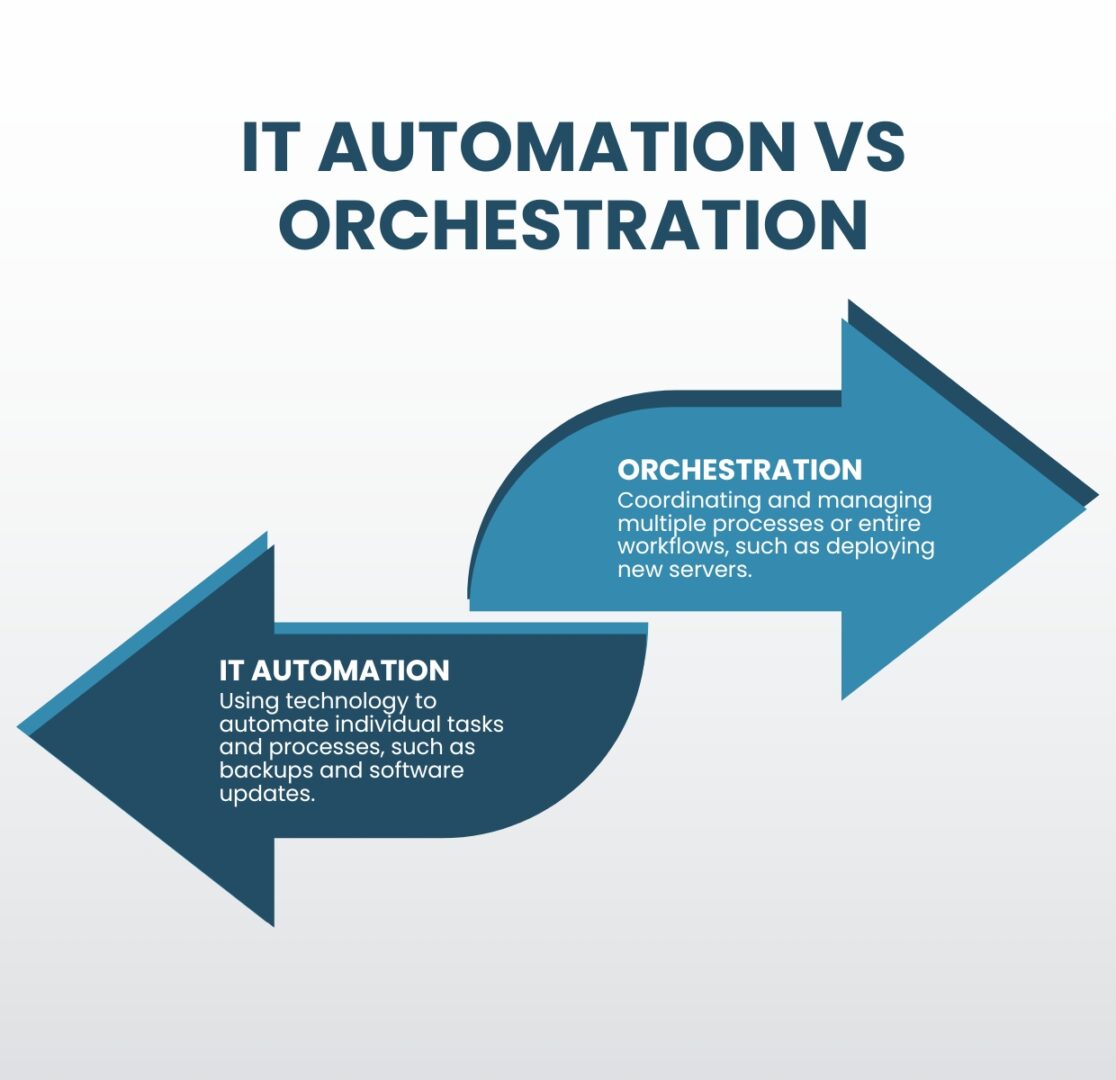
IT automation refers to the use of technology to automate repetitive tasks and processes, including things like automated backups, software updates, and monitoring systems. The goal of IT automation is to free up time and resources for IT professionals by automating routine tasks, allowing them to focus on more strategic initiatives.

Orchestration, on the other hand, is the coordination and management of multiple processes or entire workflows. This can include things like configuring and deploying new servers, managing network connections, and monitoring the performance of many different systems. The goal of orchestration is to improve the overall efficiency of IT operations, reducing costs and enabling greater scalability.

The benefits of IT automation vs orchestration

Benefits of IT Automation vs Orchestration

IT Automation

  • Saves time
  • Reduces human error
  • Improves compliance

Orchestration

  • Increases operational efficiency
  • Improves network scalability
  • Ensures IT system reliability

One of the main benefits of IT automation is that it can save time and resources for IT professionals. By automating routine tasks, IT teams can focus on more strategic initiatives and projects. Additionally, automation helps reduce human error and increases the accuracy, speed, and efficiency of tasks. Automation also improves compliance, as automated processes are less prone to human negligence and are easier to audit.

Orchestration, on the other hand, helps improve the overall efficiency and effectiveness of IT operations. By automating the coordination and management of multiple tasks, orchestration helps ensure that different systems and processes work together seamlessly. Additionally, orchestration helps improve the scalability and reliability of IT systems by ensuring different components are configured and deployed correctly.

The challenges of IT automation and orchestration

IT Automation and Orchestration Challenges

IT Complexity

Teams can’t effectively automate IT operations unless they thoroughly understand all the tasks, systems, and workflows comprising a highly complex network.

Automation Skills Gap

A high demand for automation engineers makes it difficult and expensive to recruit, train, and retain qualified IT automation and orchestration professionals.

Supporting Infrastructure

Effective automation and orchestration deployments require a robust underlying infrastructure of specialized hardware and software solutions.

One of the main challenges of automation and orchestration is the complexity of IT systems. As organizations rely more heavily on specialized technology and grow both in size and in number of business sites, IT systems become increasingly complex and difficult to manage. Automation and orchestration help reduce complexity by automating routine tasks and coordinating the management of different systems. However, teams must understand those tasks and systems well enough to know how to automate them effectively; otherwise, mistakes will proliferate or there will be gaps in automated workflows.

Another IT automation and orchestration challenge is the need for skilled professionals to deploy and manage these solutions. As automation and orchestration become more prevalent, the demand for skilled professionals has increased, making it harder (and more expensive) to recruit and retain qualified automation engineers. The alternative is for organizations to spend time and resources training existing IT staff to work with automation and orchestration.

Additionally, organizations need to invest in the technology and infrastructure necessary to support automation and orchestration. Some examples of these automation infrastructure components include:

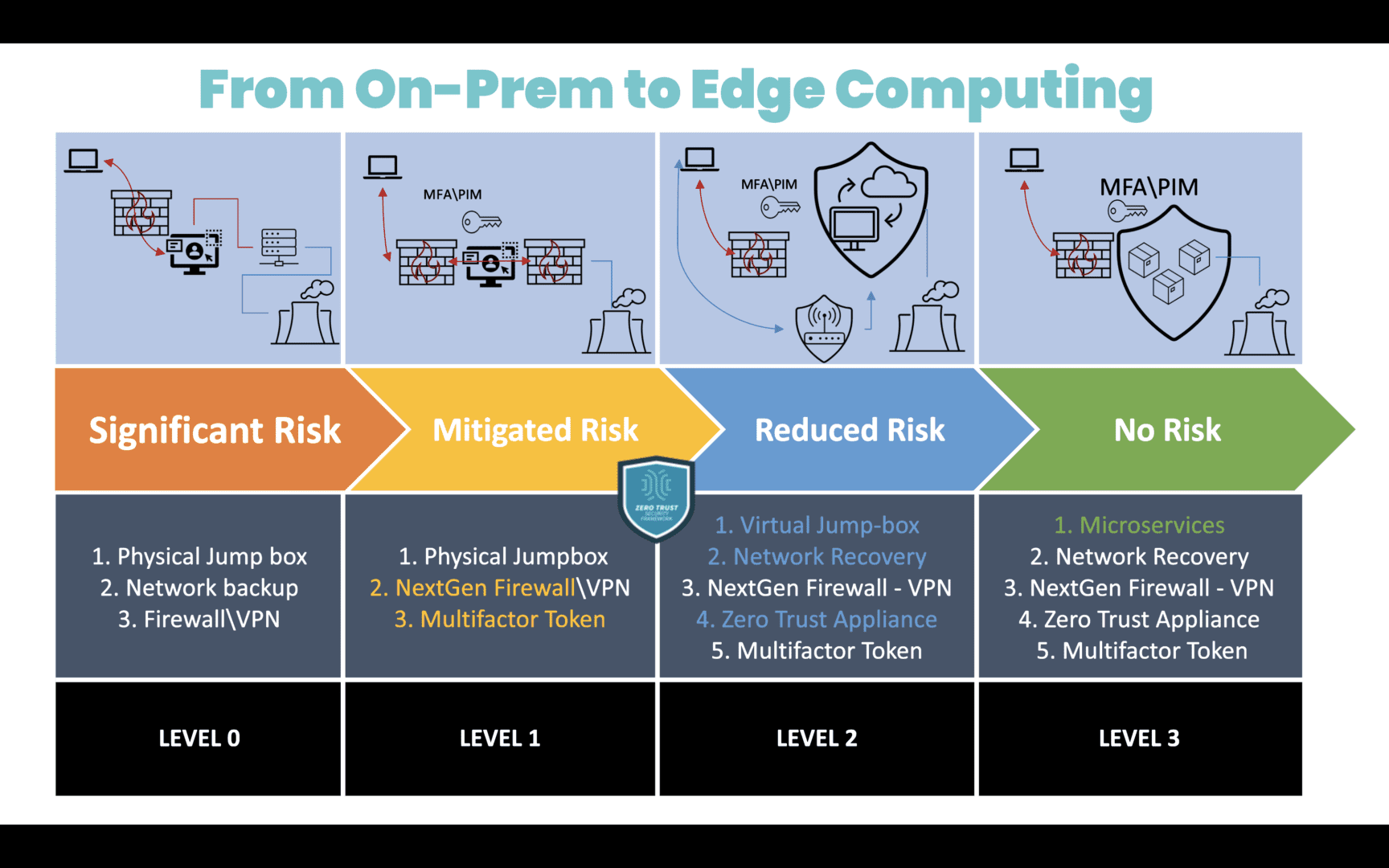
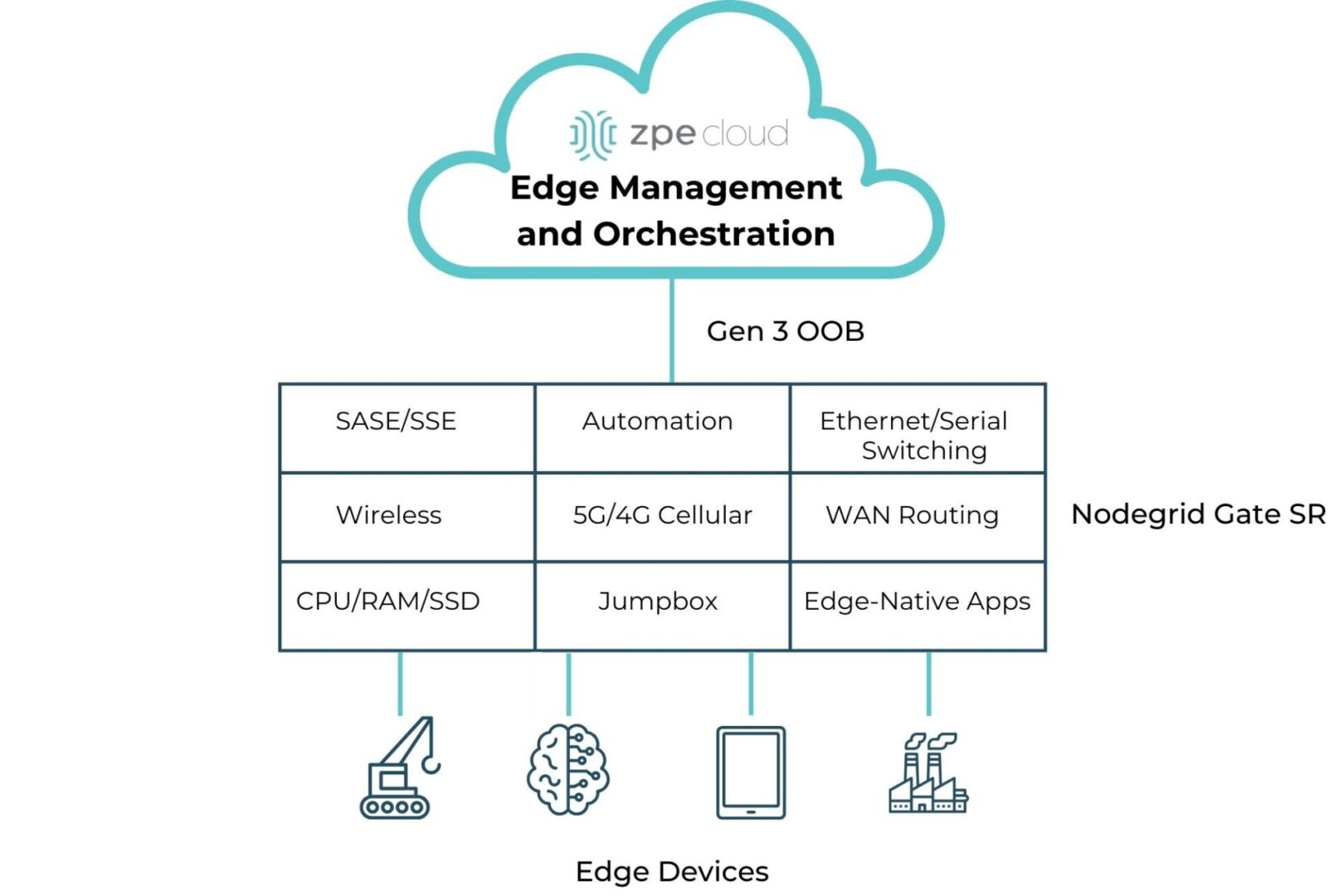
  • Gen 3 out-of-band (OOB) serial consoles, which allow teams to deploy third-party automation on an OOB network that doesn’t rely on production infrastructure, improving security and resilience. Gen 3 OOB also moves bandwidth-hogging orchestration workflows off the production network, which reduces latency for better performance.
  • Software-defined networking, which virtualizes the control and management processes and abstracts them from underlying LAN and WAN hardware. SDN, SD-WAN, and SD-Branch technologies enable a high degree of automation for networking workflows such as load balancing, application-aware routing, and failover.
  • Infrastructure as Code (IaC), which turns infrastructure configurations into software code. IaC enables the use of version control, zero-touch deployments, automatic configuration management, automated security testing, and other tools and processes that support automation and improve network resilience.
  • Orchestrator software, which controls all of the automated workflows on a network. The orchestrator is the central hub for teams to create, deploy, monitor, and troubleshoot automated workflows and infrastructure.
  • AIOps, or artificial intelligence for IT operations, which analyzes all the logs and data pulled from automated infrastructure devices and security appliances. AIOps provides predictive maintenance insights, automatic root-cause analysis (RCA), enhanced threat detection, and other functionality to help support a complex, automated network infrastructure.

Tips for overcoming IT automation and orchestration challenges

While every organization will face unique IT automation and orchestration hurdles, there are two basic tips to help simplify any deployment. Using consolidated network hardware and vendor-neutral platforms can help reduce the complexity of network infrastructure, the need to hire additional staff, and the cost to deploy automation infrastructure.

  • Consolidated network hardware, such as all-in-one branch/edge gateway routers, significantly reduces the number of devices deployed at each business site. Fewer devices to automate means less complexity, and organizations save money on deployment costs like hardware overhead and automation license seats.
  • Vendor-neutral platforms, such as the Nodegrid infrastructure management platform from ZPE Systems, allow teams to use the automation and orchestration tools they’re most comfortable with regardless of provider, reducing the skills gap. Open platforms ensure seamless interoperability between all the various automated components to decrease management complexity. Vendor-neutral hardware also allows organizations to run software from multiple vendors on a single device, enabling even greater network consolidation to reduce the complexity and cost of automated infrastructure deployments.

Choosing IT automation vs orchestration

IT automation and orchestration are interconnected concepts that are frequently, but incorrectly, used interchangeably. Automation focuses on individual tasks, while orchestration manages multiple tasks and entire workflows. Both automation and orchestration can help improve the efficiency and effectiveness of IT operations, but they have their unique benefits and challenges. Organizations must carefully consider their IT systems and needs when deciding which approach to use.

IT automation vs orchestration simplified

The network automation experts at ZPE Systems have helped Big Tech brands like Amazon and Uber improve operational efficiency and resilience with IT automation and orchestration. Learn how to use these best practices to streamline your IT operations by downloading our Network Automation Blueprint.

Download the Blueprint

Network Resilience: What is a Resilience System?

A digital web of interconnected network resilience concepts being selected by a business person in a suit.

Network resilience means being able to withstand or recover from adversity, service degradation, and complete outages with minimal business disruption. The longer business-critical services are down, or systems are breached, the greater the risk of significant financial, reputational, and legal consequences. A resilience system is a set of technologies that enable an organization to continue operating while teams work to repair failures and recover from cyberattacks. But what exactly is a resilience system, and what does it look like? This guide to network resilience defines resilience systems, provides example use cases, compares them to related technologies like backups and redundant systems, and describes the key components required to build them.

What is a resilience system?

A resilience system provides all the infrastructure, tools, and services necessary to continue operating, if in a degraded state, during major incidents. It also includes everything needed to recover data, rebuild systems, perform security testing, and continue delivering core business functionality. A resilience system is typically isolated from the production network, preventing cybercriminals from finding and compromising it and ensuring teams have continuous access even if the primary network goes down.

Resilience system use cases

Some examples of the challenges that resilience systems help overcome include:

1. Ransomware recovery

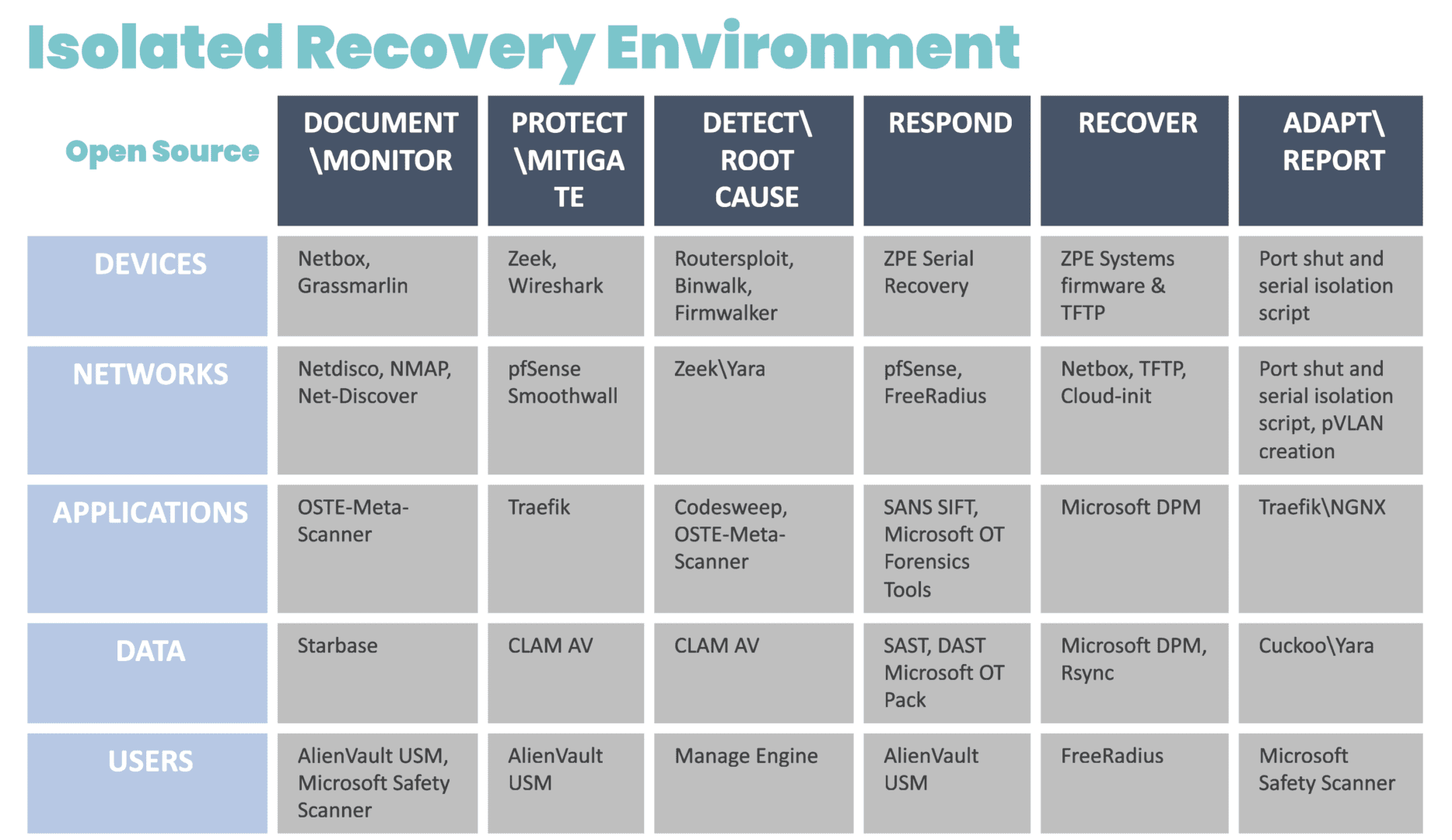
In a ransomware attack, cybercriminals infect systems with malware that spreads throughout the network and encrypts any data it encounters. Modern ransomware now uses packaged attacks that move at machine speed, instantly incapacitating entire networks. Organizations completely lose access to critical systems and data until they pay a ransom, often in untraceable cryptocurrency. Ransomware is an exceptionally tenacious form of malware and tends to reinfect backup data and rebuilt systems, significantly hampering recovery efforts and increasing the duration and cost of the attack. The best practice for resilience systems is to isolate them on an out-of-band (OOB) network, inaccessible to hackers who have breached the production in-band network. Doing so creates a safe, isolated recovery environment (IRE) where teams can restore critical data and systems without the risk of reinfection. The resilience system includes all the tools and hardware needed to restore critical business services and infrastructure. An IRE significantly accelerates ransomware recovery and minimizes downtime, so businesses can avoid paying ransoms and reduce the overall cost of attacks.

2. Network outages

Enterprise network architectures and supply chains are highly complex, with lots of moving parts that rely on external vendors to maintain availability. Just one of those vendors dropping the ball could take the entire organization offline, severely impacting network resilience. For example, in 2023, an expired cryptographic certificate caused Cisco’s Viptela SD-WAN appliances to fail on reboot, completely taking down affected networks until the issue was resolved. With a resilience system, Viptela customers could have potentially avoided this downtime by failing over to alternative network resources. For example, a resilience system with integrated cellular failover allows branches to continue connecting to and delivering critical business services while also providing a lifeline for remote teams to access and recover failed systems. A resilience system also provides observability and automatic notifications so teams are instantly alerted to issues like certificate expirations and can respond quickly to recover critical services.

3. Shift to remote work

Incidents like ransomware attacks and equipment failures happen frequently enough that companies can create detailed plans and proactively implement solutions to minimize their impact, but not all adverse events are so predictable. When the COVID-19 pandemic struck, the massive shift to remote work strained the network resources of most organizations. Instead of maintaining a limited number of branch offices, teams suddenly had to treat every employee as a new branch, leading to performance degradation and outages as they scrambled to reinforce the business’s remote capabilities. A resilience system gives teams the tools and resources they need to provision additional infrastructure, manage networking logic, deploy new security solutions, and more, even while the primary network is offline or under a heavy load. A resilience system is the key to quickly adjusting network performance and security to adapt to sudden changes like a transition to fully remote operations.

Do backups and redundancy equate to network resilience?

The short answer is no; backups and redundancy do not equate to network resilience, though they do contribute to making systems more resilient.

  • Backups are copies of data, configurations, and application code used to do a hot or cold restore when a production system fails. The underlying infrastructure must remain operational for teams to access and use backups, and unless additional resilience measures are taken, it’s easy for backups to become infected or compromised, severely hampering recovery efforts.
  • Redundancy involves duplicating critical systems, services, and applications as a failsafe in case the primaries go down. Organizations can “fail over” to the redundancies to continue critical business operations during outages. However, redundant systems are just as susceptible to failures and infections without additional resilience measures like out-of-band management and isolated management infrastructure.

Backups and redundancy are part of network resilience but alone are not enough to ensure business continuity. Resilience systems focus on maintaining the architecture of the production network while adding the ability to recover or adapt to adversity. The next section discusses all the tools and technologies that make up network resilience systems.

What does a resilience system look like?

There are four key components that go into a resilience system.

Key Components of a Resilience System

Alternative Networking

Full-stack routing and switching, Wi-Fi, VoIP, virtualization, software-defined network overlays for SDN & SD-WAN

Alternative Compute

Full-stack compute, containers, virtual machines, and any other resources needed to run applications and deliver services

Storage & Storage Recovery

Enough storage to recover systems and applications as well as support content delivery

Automation

Tools like zero-touch provisioning (ZTP) to facilitate speedy recovery while minimizing human error

Alternative networking and compute resources ensure the organization can failover in the event of a network failure or continue delivering services when production servers are unavailable. Teams also need enough storage to restore backup data, build new systems, and support the content delivery network (CDN). Automation solutions like zero-touch provisioning (ZTP), configuration management, and security validation tools accelerate the recovery process while mitigating the risk of human error. Combined, these components enable teams to reduce the frequency, severity, and duration of outages, improving overall network resilience.

Network resilience with ZPE Systems

A resilient network will continue delivering critical business services in the face of any challenge, whether from cybercriminals, supply chain issues, global events, or even plain human error. A resilience system is isolated from the production network to ensure security and availability, and it consists of all the tools and technologies needed to troubleshoot, recover, and deliver your most crucial data, applications, and infrastructure. The Nodegrid platform from ZPE Systems is the perfect foundation for a resilience system. Nodegrid is a vendor-neutral, out-of-band management solution capable of running your choice of third-party software. Nodegrid allows you to build a highly customizable IRE containing all the tools needed to safely recover from ransomware. You can even use Nodegrid to deliver services while the primary network or systems are down, making it your all-in-one network resilience multi-tool.

Want to ensure network resilience by accelerating ransomware recovery?

Minimize the business impact of ransomware with the help of our whitepaper, 3 Steps to Ransomware Recovery. Learn how to follow Gartner’s best practices to build an Isolated Recovery Environment

Download Whitepaper

Network Resilience Doesn’t Mean What it Did 20 Years Ago

Network resilience requirements have changed

Enterprise networks are like air. When they’re running smoothly, it’s easy to take them for granted, as business users and customers are able to go about their normal activities. But when customer service reps are suddenly cut off from their ticketing system, or family movie night turns into a game of “Is it my router, or the network?”, everyone notices. This is why network resilience is critical.

But, what exactly does resilience mean today? Let’s find out by looking at some recent real-world examples, the history of network architectures, and why network resilience doesn’t mean what it did 20 years ago.

Why does network resilience matter?

There’s no shortage of real-world examples showing why network resilience matters. The takeaway is that network resilience is directly tied to business, which means that it impacts revenue, costs, and risks. Here is a brief list of resilience-related incidents that occurred in 2023 alone:

  • FAA (Federal Aviation Administration) – An overworked contractor unintentionally deleted files, which delayed flights nationwide for an entire day.
  • Southwest Airlines – A firewall configuration change caused 16,000 flight cancellations and cost the company about $1 billion.
  • MOVEit FTP exploit – Thousands of global organizations fell victim to a MOVEit vulnerability, which allowed attackers to steal personal data for millions.
  • MGM Resorts – A human exploit and lack of recovery systems let an attack persist for weeks, causing millions in losses per day.
  • Ragnar Locker attacks – Several large organizations were locked out of IT systems for days, which slowed or halted customer operations worldwide.

What does network resilience mean?

Based on the examples above, it might seem that network resilience could mean different things. It might mean having backups of golden configs that you could easily restore in case of a mistake. It might mean beefing up your security and/or replacing outdated systems. It might mean having recovery processes in place.

So, which is it?

The answer is, it’s all of these and more.

Donald Firesmith (Carnegie Mellon) defines resilience this way: “A system is resilient if it continues to carry out its mission in the face of adversity (i.e., if it provides required capabilities despite excessive stresses that can cause disruptions).”

Network resilience means having a network that continues to serve its essential functions despite adversity. Adversity can stem from human error, system outages, cyberattacks, and even natural disasters that threaten to degrade or completely halt normal network operations. Achieving network resilience requires the ability to quickly address issues ranging from device failures and misconfigurations, to full-blown ISP outages and ransomware attacks.

The problem is, this is now much more difficult than it used to be.

How did network resilience become so complicated?

Twenty years ago, IT teams managed a centralized architecture. The data center was able to serve end-users and customers with the minimal services they needed. Being “constantly connected” wasn’t a concern for most people. For the business, achieving resilience was as simple as going on-site or remoting-in via serial console to fix issues at the data center.

Network architecture showing simplicity of data center connected via MPLS to branch office

Then in the mid-2000s, the advent of the cloud changed everything. Infrastructure, data, and computing became decentralized into a distributed mix of on-prem and cloud solutions. Users could connect from anywhere, and on-demand services allowed people to be plugged in around-the-clock. Services for work, school, and entertainment could be delivered anytime, no matter where users were.

Network architecture showing complexity of data center, CDN, remote user, branch office, all connected via many paths

Behind the scenes, this explosion of architecture created three problems for achieving network resilience, which a simple serial could no longer fix:

Too Much Work

Infrastructure, data, and computing are widely distributed. Systems inevitably break and require work, but teams don’t have the staff to keep up.

Too Much Complexity

Pairing cloud and box-based stacks creates complex networks. Teams leave systems outdated, because they don’t want to break this delicate architecture.

Too Much Risk

Unpatched, outdated systems are prime targets for packaged attacks that move at machine speed. Defense requires recovery tools that teams don’t have.

Enabling businesses to be resilient in the modern age requires an approach that’s different than simply deploying a serial console for remote troubleshooting. Gen 1 and 2 serial consoles, which have dominated the market for 20 years, were designed to solve basic issues by offering limited remote access and some automation. The problem is, these still leave teams lacking the confidence to answer questions like:

  • “How can we guarantee access to fix stuff that breaks, without rolling trucks?”
  • “Can we automate change management, without fear of breaking the network?”
  • “Attacks are inevitable — How do we stop hackers from cutting off our access?”

Hyperscalers, Internet Service Providers, Big Tech, and even the military have a resilience model that they’ve proven over the last decade. Their approach involves fully isolating command and control from data and user environments. This allows them to not only gain low-level remote access to maintain and fix systems, but also to “defend the hill” and maintain control if systems are compromised or destroyed.

This approach uses something called Isolated Management Infrastructure (IMI).

Isolated Management Infrastructure is the best practice for network resilience

Isolated Management Infrastructure is the practice of creating a management network that is completely separate from the production network. Most IT teams are familiar with out-of-band management as this network; IMI, however, provides many capabilities that can’t be hosted on a traditional serial console or OOB network. And with increasing vulnerabilities, CISA issued a binding directive specifically calling for organizations to implement IMI.

Isolated Management Infrastructure using Gen 3 serial consoles, like ZPE Systems’ Nodegrid devices, provides more than simple remote access and automation. Similar to a proper out-of-band network, IMI is completely isolated from production assets. This means there are no dependencies on production devices or connections, and management interfaces are not exposed to the internet or production gear. In the event of an outage or attack, teams retain management access, and this is just the beginning of the benefits of having IMI.

A network architecture diagram showing Isolated Management Infrastructure next to production infrastructure

IMI includes more than nine functions that are required for teams to fully service their production assets. These include:

  • Low-level access to all management interfaces, including serial, Ethernet, USB, IPMI, and others, to guarantee remote access to the entire environment
  • Open, edge-native automation to ensure services can continue operating in the event of outages or change errors
  • Computing, storage, and jumpbox capabilities that can natively host the apps and tools to deploy an IRE, to ensure fast, effective recovery from attacks

Get the guide to build IMI

ZPE Systems has worked alongside Big Tech to fulfill their requirements for IMI. In doing so, we created the Network Automation blueprint as a technical guide to help any organization build their own Isolated Management Infrastructure. Download the blueprint now to get started.

Edge Computing Requirements

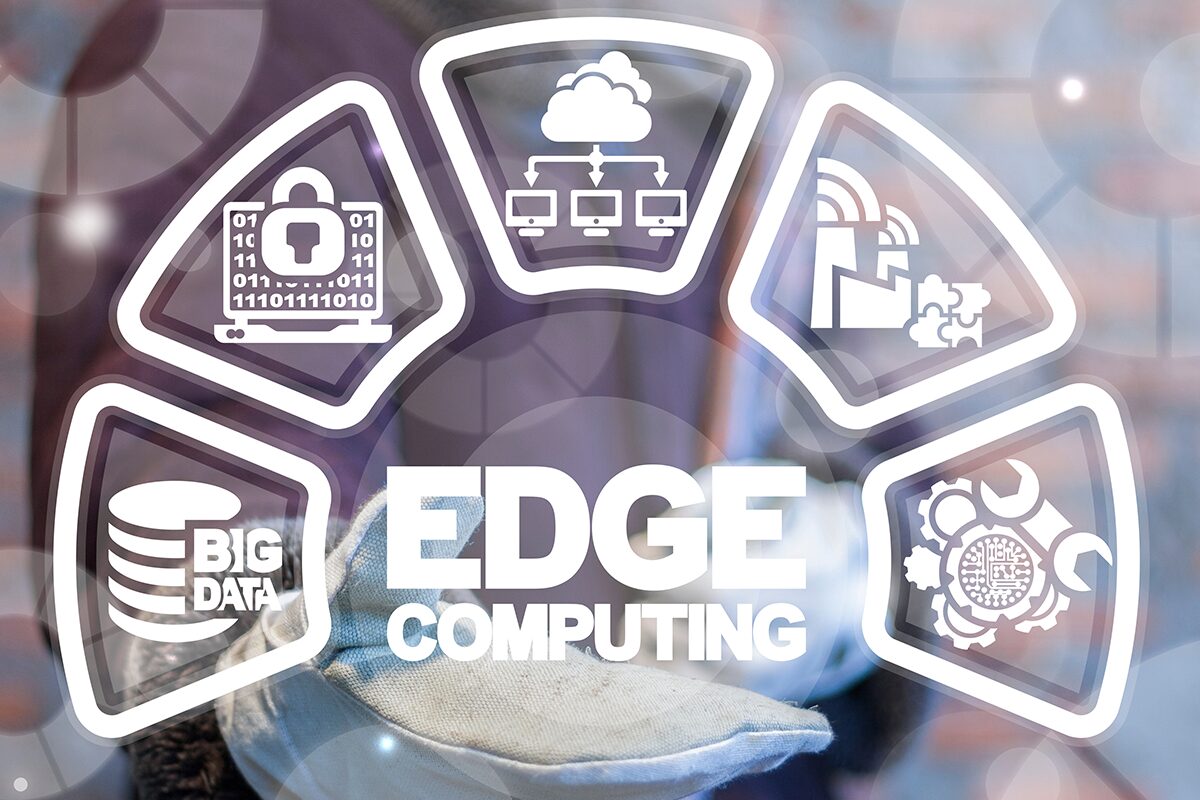
Edge computing requirements displayed in a digital interface wheel.

The Internet of Things (IoT) and remote work capabilities have allowed many organizations to conduct critical business operations at the enterprise network’s edges. Wearable medical sensors, automated industrial machinery, self-service kiosks, and other edge devices must transmit data to and from software applications, machine learning training systems, and data warehouses in centralized data centers or the cloud. Those transmissions eat up valuable MPLS bandwidth and are attractive targets for cybercriminals.

Edge computing involves moving data processing systems and applications closer to the devices that generate the data at the network’s edges. Edge computing can reduce WAN traffic to save on bandwidth costs and improve latency. It can also reduce the attack surface by keeping edge data on the local network or, in some cases, on the same device.

Running powerful data analytics and artificial intelligence applications outside the data center creates specific challenges. For example, space is usually limited at the edge, and devices might be outdoors where power and climate control are more complex. This guide discusses the edge computing requirements for hardware, networking, availability, security, and visibility to address these concerns.

Edge computing requirements

The primary requirements for edge computing are:

1. Compute

As the name implies, edge computing requires enough computing power to run the applications that process edge data. The three primary concerns are:

  • Processing power: CPUs (central processing units), GPUs (graphics processing units), or SoCs (systems on chips)
  • Memory: RAM (random access memory)
  • Storage: SSDs (solid state drives), SCM (storage class memory), or Flash memory
  • Coprocessors: Supplemental processing power needed for specific tasks, such as DPUs (data processing units) for AI

The specific edge computing requirements for each will vary, as it’s essential to match the available compute resources with the needs of the edge applications.

2. Small, ruggedized chassis

Space is often quite limited in edge sites, and devices may not be treated as delicately as they would be in a data center. Edge computing devices must be small enough to squeeze into tight spaces and rugged enough to handle the conditions they’ll be deployed in. For example, smart cities connect public infrastructure and services using IoT and networking devices installed in roadside cabinets, on top of streetlights, and in other challenging deployment sites. Edge computing devices in other applications might be subject to constant vibrations from industrial machinery, the humidity of an offshore oil rig, or even the vacuum of outer space.

3. Power

In some cases, edge deployments can use the same PDUs (power distribution units) and UPSes (uninterruptible power supplies) as a data center deployment. Non-traditional implementations, which might be outdoors, underground, or underwater, may require energy-efficient edge computing devices using alternative power sources like batteries or solar.

4. Wired & wireless connectivity

Edge computing systems must have both wired and wireless network connectivity options because organizations might deploy them somewhere without access to an Ethernet wall jack. Cellular connectivity via 4G/5G adds more flexibility and ideally provides network failover/out-of-band capabilities.

5. Out-of-band (OOB) management

Many edge deployment sites don’t have any IT staff on hand, so teams manage the devices and infrastructure remotely. If something happens to take down the network, such as an equipment failure or ransomware attack, IT is completely cut off and must dispatch a costly and time-consuming truck roll to recover. Out-of-band (OOB) management creates an alternative path to remote systems that doesn’t rely on any production infrastructure, ensuring teams have continuous access to edge computing sites even during outages.

6. Security

Edge computing reduces some security risks but can create new ones. Security teams carefully monitor and control data center solutions, but systems at the edge are often left out. Edge-centric security platforms such as SSE (Security Service Edge) help by applying enterprise Zero Trust policies and controls to edge applications, devices, and users. Edge security solutions often need hardware to host agent-based software, which should be factored into edge computing requirements and budgets. Additionally, edge devices should have secure Roots of Trust (RoTs) that provide cryptographic functions, key management, and other features that harden device security.

7. Visibility

Because of a lack of IT presence at the edge, it’s often difficult to catch problems like high humidity, overheating fans, or physical tampering until they affect the performance or availability of edge computing systems. This leads to a break/fix approach to edge management, where teams spend all their time fixing issues after they occur rather than focusing on improvements and innovations. Teams need visibility into environmental conditions, device health, and security at the edge to fix issues before they cause outages or breaches.

Streamlining edge computing requirements

An edge computing deployment designed around these seven requirements will be more cost-effective while avoiding some of the biggest edge hurdles. Another way to streamline edge deployments is with consolidated, vendor-neutral devices that combine core networking and computing capabilities with the ability to integrate and unify third-party edge solutions. For example, the Nodegrid platform from ZPE Systems delivers computing power, wired & wireless connectivity, OOB management, environmental monitoring, and more in a single, small device. ZPE’s integrated edge routers use the open, Linux-based Nodegrid OS capable of running Guest OSes and Docker containers for your choice of third-party AI/ML, data analytics, SSE, and more. Nodegrid also allows you to extend automated control to the edge with Gen 3 out-of-band management for greater efficiency and resilience.

Want to learn more about how Nodegrid makes edge computing easier and more cost-effective?

To learn more about consolidating your edge computing requirements with the vendor-neutral Nodegrid platform, schedule a free demo!

Request a Demo

IT Infrastructure Management Best Practices

A small team uses IT infrastructure management best practices to manage an enterprise network

A single hour of downtime costs organizations more than $300,000 in lost business, making network and service reliability critical to revenue. The biggest challenge facing IT infrastructure teams is ensuring network resilience, which is the ability to continue operating and delivering services during equipment failures, ransomware attacks, and other emergencies. This guide discusses IT infrastructure management best practices for creating and maintaining more resilient enterprise networks.
.

What is IT infrastructure management? It’s a collection of all the workflows involved in deploying and maintaining an organization’s network infrastructure. 

IT infrastructure management best practices

The following IT infrastructure management best practices help improve network resilience while streamlining operations. Click the links on the left for a more detailed look at the technologies and processes involved with each.

Isolated Management Infrastructure (IMI)

• Protects management interfaces in case attackers hack the production network

• Ensures continuous access using OOB (out-of-band) management

• Provides a safe environment to fight through and recover from ransomware

Network and Infrastructure Automation

• Reduces the risk of human error in network configurations and workflows

• Enables faster deployments so new business sites generate revenue sooner

• Accelerates recovery by automating device provisioning and deployment

• Allows small IT infrastructure teams to effectively manage enterprise networks

Vendor-Neutral Platforms

• Reduces technical debt by allowing the use of familiar tools

• Extends OOB, automation, AIOps, etc. to legacy/mixed-vendor infrastructure

• Consolidates network infrastructure to reduce complexity and human error

• Eliminates device sprawl and the need to sacrifice features

AIOps

• Improves security detection to defend against novel attacks

• Provides insights and recommendations to improve network health for a better end-user experience

• Accelerates incident resolution with automatic triaging and root-cause analysis (RCA)

Isolated management infrastructure (IMI)

Management interfaces provide the crucial path to monitoring and controlling critical infrastructure, like servers and switches, as well as crown-jewel digital assets like intellectual property (IP). If management interfaces are exposed to the internet or rely on the production network, attackers can easily hijack your critical infrastructure, access valuable resources, and take down the entire network. This is why CISA released a binding directive that instructs organizations to move management interfaces to a separate network, a practice known as isolated management infrastructure (IMI).

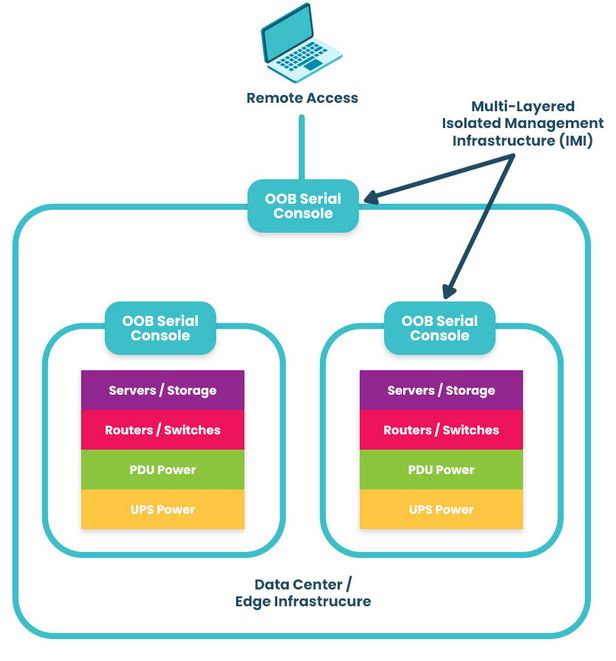
The best practice for building an IMI is to use Gen 3 out-of-band (OOB) serial consoles, which unify the management of all connected devices and ensure continuous remote access via alternative network interfaces (such as 4G/5G cellular). OOB management gives IT teams a lifeline to troubleshoot and recover remote infrastructure during equipment failures and outages on the production network. The key is to ensure that OOB serial consoles are fully isolated from production and can run the applications, tools, and services needed to fight through a ransomware attack or outage without taking critical infrastructure offline for extended periods. This essentially allows you to instantly create a virtual War Room for coordinated recovery efforts to get you back online in a matter of hours instead of days or weeks. A diagram showing a multi-layered isolated management infrastructure. An IMI using out-of-band serial consoles also provides a safe environment to recover from ransomware attacks. The pervasive nature of ransomware and its tendency to re-infect cleaned systems mean it can take companies between 1 and 6 months to fully recover from an attack, with costs and revenue losses mounting with every day of downtime. The best practice is to use OOB serial consoles to create an isolated recovery environment (IRE) where teams can restore and rebuild without risking reinfection.
.

Network and infrastructure automation

As enterprise network architectures grow more complex to support technologies like microservices applications, edge computing, and artificial intelligence, teams find it increasingly difficult to manually monitor and manage all the moving parts. Complexity increases the risk of configuration mistakes, which cause up to 35% of cybersecurity incidents. Network and infrastructure automation handles many tedious, repetitive tasks prone to human error, improving resilience and giving admins more time to focus on revenue-generating projects.

Additionally, automated device provisioning tools like zero-touch provisioning (ZTP) and configuration management tools like RedHat Ansible make it easier for teams to recover critical infrastructure after a failure or attack. Network and infrastructure automation help organizations reduce the duration of outages and allow small IT infrastructure teams to manage large enterprise networks effectively, improving resilience and reducing costs.

For an in-depth look at network and infrastructure automation, read the Best Network Automation Tools and What to Use Them For

Vendor-neutral platforms

Most enterprise networks bring together devices and solutions from many providers, and they often don’t interoperate easily. This box-based approach creates vendor lock-in and technical debt by preventing admins from using the tools or scripting languages they’re familiar with, and it makes a fragmented, complex architecture of management solutions that are difficult to operate efficiently. Organizations also end up compromising on features, ending up with a lot of stuff they don’t need and too little of what they do need.

A vendor-neutral IT infrastructure management platform allows teams to unify all their workflows and solutions. It integrates your administrators’ favorite tools to reduce technical debt and provides a centralized place to deploy, orchestrate, and monitor the entire network. It also extends technologies like OOB, automation, and AIOps to otherwise unsupported legacy and mixed-vendor solutions. Such a platform is revolutionary in the same way smartphones were – instead of needing a separate calculator, watch, pager, phone, etc., everything was combined in a single device. A vendor-neutral management platform allows you to run all the apps, services, and tools you need without buying a bunch of extra hardware. It’s a crucial IT infrastructure management best practice for resilience because it consolidates and unifies network architectures to reduce complexity and prevent human error.

Learn more about the benefits of a vendor-neutral IT infrastructure management platform by reading How To Ensure Network Scalability, Reliability, and Security With a Single Platform

AIOps

AIOps applies artificial intelligence technologies to IT operations to maximize resilience and efficiency. Some AIOps use cases include:

  • Security detection: AIOps security monitoring solutions are better at catching novel attacks (those using methods never encountered or documented before) than traditional, signature-based detection methods that rely on a database of known attack vectors.
  • Data analysis: AIOps can analyze all the gigabytes of logs generated by network infrastructure and provide health visualizations and recommendations for preventing potential issues or optimizing performance.
  • Root-cause analysis (RCA): Ingesting infrastructure logs allows AIOps to identify problems on the network, perform root-cause analysis to determine the source of the issues, and create & prioritize service incidents to accelerate remediation.

AIOps is often thought of as “intelligent automation” because, while most automation follows a predetermined script or playbook of actions, AIOps can make decisions on-the-fly in response to analyzed data. AIOps and automation work together to reduce management complexity and improve network resilience.

Want to find out more about using AIOps and automation to create a more resilient network? Read Using AIOps and Machine Learning To Manage Automated Network Infrastructure

IT infrastructure management best practices for maximum resilience

Network resilience is one of the top IT infrastructure management challenges facing modern enterprises. These IT infrastructure management best practices ensure resilience by isolating management infrastructure from attackers, reducing the risk of human error during configurations and other tedious workflows, breaking vendor lock-in to decrease network complexity, and applying artificial intelligence to the defense and maintenance of critical infrastructure.

Need help getting started with these practices and technologies? ZPE Systems can help simplify IT infrastructure management with the vendor-neutral Nodegrid platform. Nodegrid’s OOB serial consoles and integrated branch routers allow you to build an isolated management infrastructure that supports your choice of third-party solutions for automation, AIOps, and more.

Want to learn how to make IT infrastructure management easier with Nodegrid?

To learn more about implementing IT infrastructure management best practices for resilience with Nodegrid, download our Network Automation Blueprint

Request a Demo

Collaboration in DevOps: Strategies and Best Practices

Collaboration in DevOps is illustrated by two team members working together in front of the DevOps infinity logo.
The DevOps methodology combines the software development and IT operations teams into a highly collaborative unit. In a DevOps environment, team members work simultaneously on the same code base, using automation and source control to accelerate releases. The transformation from a traditional, siloed organizational structure to a streamlined, fast-paced DevOps company is rewarding yet challenging. That’s why it’s important to have the right strategy, and in this guide to collaboration in DevOps, you’ll discover tips and best practices for a smooth transition.

Collaboration in DevOps: Strategies and best practices

A successful DevOps implementation results in a tightly interwoven team of software and infrastructure specialists working together to release high-quality applications as quickly as possible. This transition tends to be easier for developers, who are already used to working with software code, source control tools, and automation. Infrastructure teams, on the other hand, sometimes struggle to work at the velocity needed to support DevOps software projects and lack experience with automation technologies, causing a lot of frustration and delaying DevOps initiatives. The following strategies and best practices will help bring Dev and Ops together while minimizing friction.

Turn infrastructure and network configurations into software code

Infrastructure and network teams can’t keep up with the velocity of DevOps software development if they’re manually configuring, deploying, and troubleshooting resources using the GUI (graphical user interface) or CLI (command line interface). The best practice in a DevOps environment is to use software abstraction to turn all configurations and networking logic into code.

Infrastructure as Code (IaC)

Infrastructure as Code (IaC) tools allow teams to write configurations as software code that provisions new resources automatically with the click of a button. IaC configurations can be executed as often as needed to deploy DevOps infrastructure very rapidly and at a large scale.

Software-Defined Networking (SDN) 

Software-defined networking (SDN) and Software-defined wide-area networking (SD-WAN) use software abstraction layers to manage networking logic and workflows. SDN allows networking teams to control, monitor, and troubleshoot very large and complex network architectures from a centralized platform while using automation to optimize performance and prevent downtime.

Software abstraction helps accelerate resource provisioning, reducing delays and friction between Dev and Ops. It can also be used to bring networking teams into the DevOps fold with automated, software-defined networks, creating what’s known as a NetDevOps environment.

Use common, centralized tools for software source control

Collaboration in DevOps means a whole team of developers or sysadmins may work on the same code base simultaneously. This is highly efficient — but risky. Development teams have used software source control tools like GitHub for years to track and manage code changes and prevent overwriting each other’s work. In a DevOps organization using IaC and SDN, the best practice is to incorporate infrastructure and network code into the same source control system used for software code.

Managing infrastructure configurations using a tool like GitHub ensures that sysadmins can’t make unauthorized changes to critical resources. For example, administrators initiate many ransomware attacks and other major outages by directly changing infrastructure configurations without testing or approval. This happened in a high-profile MGM cyberattack when an IT staff member fell victim to social engineering and granted elevated Okta privileges to an attacker without having to get approval from a second pair of eyes.

Using DevOps source control, all infrastructure changes must be reviewed and approved by a second party in the IT department to ensure they don’t introduce vulnerabilities or malicious code into production. Sysadmins can work quickly and creatively, knowing there’s a safety net to catch mistakes, reducing Ops delays, and fostering a more collaborative environment.

Consolidate and integrate DevOps tools with a vendor-neutral platform

An enterprise DevOps deployment usually involves dozens – if not hundreds – of different tools to automate and streamline the many workflows involved in a software development project. Having so many individual DevOps tools deployed around the enterprise increases the management complexity, which can have the following consequences.

  • Human error – The harder it is to stay on top of patch releases, security bulletins, and monitoring logs, the more likely it is that an issue will slip between the cracks until it causes an outage or breach.
  • Security complexity – Every additional DevOps tool added to the architecture makes integrating and implementing a consistent security model more complex and challenging, increasing the risk of coverage gaps.
  • Spiraling costs – With many different solutions handling individual workflows around the enterprise, the likelihood of buying redundant services or paying for unneeded features increases, which can impact ROI.
  • Reduced efficiency – DevOps aims to increase operational efficiency, but having to work across so many disparate tools can slow teams down, especially when those tools don’t interoperate.

The best practice is consolidating your DevOps tools with a centralized, vendor-neutral platform. For example, the Nodegrid Services Delivery Platform from ZPE Systems can host and integrate 3rd-party DevOps tools, unifying them under a single management umbrella. Nodegrid gives IT teams single-pane-of-glass control over the entire DevOps architecture, including the underlying network infrastructure, which reduces management complexity, increases efficiency, and improves ROI.

Maximize DevOps success

DevOps collaboration can improve operational efficiency and allow companies to release software at the velocity required to stay competitive in the market. Using software abstraction, centralized source code control, and vendor-neutral management platforms reduces friction on your DevOps journey. The best practice is to unify your DevOps environment with a vendor-neutral platform like Nodegrid to maximize control, cost-effectiveness, and productivity.

Want to Simplify collaboration in DevOps with the Nodegrid platform?

Reach out to ZPE Systems today to learn more about how the Nodegrid Services Delivery Platform can help you simplify collaboration in DevOps.


Contact Us