Providing Out-of-Band Connectivity to Mission-Critical IT Resources

IT Infrastructure Management Challenges

Stop,Falling.,Save,Falling,Economy,Business,Vector,Illustration.

Modern IT infrastructure management is defined by the struggle to keep an increasingly complex architecture of critical business services running 24/7 without interruption. According to a recent report from Siemens, a single hour of unplanned downtime could cost businesses anywhere from $39,000 to $2 million. The ability to maintain continuous business operations and recover from outages with minimal disruption is known as network resilience, and it should be the top priority for any organization. Infrastructure teams face numerous challenges on their path to creating resilience, including management complexity, cybersecurity threats, vendor lock-in, bloated tech stacks, and poorly supported legacy devices. This post analyzes the top 5 IT infrastructure management challenges while providing potential solutions and additional resources.

Table of Contents

The top 5 IT infrastructure management challenges & solutions:

1. Challenge: Increasing complexity

As organizations evolve their capabilities and service offerings with advanced technology like artificial intelligence (AI), the supporting infrastructure grows more complex. For example, microservice applications are extremely agile and allow software teams to deliver advanced, high-performance products very quickly and efficiently. Building and maintaining the containerized environments, network logic, and security architecture to host and support those applications is difficult and prone to human error. A lot of human error occurs during tedious, repetitive tasks like device security configurations. These mistakes are the cause of up to 35% of cybersecurity incidents, so minimizing human error is critical to network resilience.

Solution: Network automation

Tedious IT infrastructure and network management workflows are perfect candidates for automation. For example, zero touch provisioning (ZTP) turns network device configurations into software code, allowing admins to pre-write configuration files that can be tested and verified before deployment. Teams can ship factory-condition devices to remote data centers and branches, where a non-expert plugs the device into power and networking. As soon as the device connects to DHCP, it downloads its ZTP configuration file and automatically configures itself. ZTP significantly reduces human intervention in the deployment process, which minimizes the risk of errors. Devices with accurate security configurations are less likely to contain vulnerabilities. In addition, automating tasks like patch management will further reduce vulnerabilities, improving network resilience.

Back to Top

To learn how ZTP and automated deployments can shrink deployment times, download this Vapor IO case study.

Download Now

2. Challenge: Ransomware

Ransomware attacks on businesses are so frequent that many organizations consider them inevitable, and Gartner calls ransomware the modern disaster. Standard ransomware takes over the network and encrypts all of an organization’s data until the ransom is paid, bringing operations to a screeching halt. Newer attacks, such as the Cl0p MOVEit breach currently affecting Shell and other major energy companies, use randomware tactics to harvest sensitive data for ransom. Ransomware attacks often start with social engineering tactics that are difficult to prevent with security technology alone. Once the network is infected, ransomware is nearly impossible to stop and difficult to recover from without reinfecting backup data and systems. While there are many other types of cybersecurity threats, ransomware’s frequency and business impact make it one of the biggest IT infrastructure management challenges.

Solution: Isolated management infrastructure

Network micro-segmentation, Zero Trust security policies, advanced authentication methods, and other security controls help prevent some attacks and can limit the blast radius of others. However, there’s no way to ensure 100% protection, so organizations should focus instead on building a comprehensive recovery architecture to decrease downtime and reduce the risk of reinfection. This can be done using something called Isolated Management Infrastructure (IMI). An isolated management infrastructure using out-of-band (OOB) serial consoles gives teams a dedicated control plane that’s separate from the production network. This creates an isolated recovery environment where they can rebuild systems, restore data, and perform security validation without the risk of reinfection undoing their efforts. It also takes management interfaces off the production network as mandated by a recent CISA binding directive. An IMI improves resilience by speeding up recovery times so business can resume faster.

Back to Top

For more help building ransomware resilience, download our 3 Steps to Ransomware Recovery whitepaper.

Download Now

3. Challenge: Lack of integration & vendor freedom

Most IT infrastructure is a mix of features and services provided by different vendors, each with its own software and interface used to manage them. Some IT infrastructure management teams compromise on features, security, redundancy, etc., to stay in their vendor’s ecosystem, which makes it difficult to build a custom-fit network. Many teams opt instead to manage each vendor solution separately with little interoperability. This lack of integration makes centralized orchestration especially challenging. A fragmented view of networks and infrastructure makes it difficult to spot systemic issues or signs of compromise. Managing solutions individually is inefficient and tedious, which increases the risk of human error. In fact, organizations wait an average of 205 days to patch systems because they’re afraid an update will break their operations. Vendor lock-in is a significant hurdle on the path to network resilience.

Solution: Vendor-neutral platforms

Flexibility and agility are key here; enterprises need to adopt a network infrastructure that can accommodate their exact needs and adapt when those needs change. Teams also need centralized orchestration of the entire multi-vendor architecture. This requires a vendor-neutral infrastructure management platform that can dig its hooks into any solution on your network. For example, OOB serial consoles running open, Linux-based operating systems offer unified management of mixed-vendor infrastructure. Some solutions can even host third-party software for SASE, NGFWs, and other network and security services. Administrators get a single centralized management platform that provides 360-degree visibility and control, improving security coverage and reducing human error. This OOB platform also creates the isolated management infrastructure described above. The IMI itself is a vendor-neutral platform that allows for safe management, including applying patches and deploying automation. This platform also provides an “undo button” in case mistakes are made. That way, teams don’t need to be afraid of breaking their own systems while applying necessary updates.

Back to Top

4. Challenge: Overwhelming tech stacks

IT managers working with an enterprise network have a massive variety of equipment and software to work with to make their networks function efficiently. These solutions often include, but are not limited to,

  • Servers, switches, and routers
  • Out-of-band management hardware
  • Firewalls and other security solutions
  • Data backup and configuration devices
  • Cellular failover boxes

Each new solution added to the network must be secured, monitored, maintained, and patched. Keeping track of vulnerabilities and patch schedules for so many devices and applications is challenging, but unpatched infrastructure is risky to network security and resilience. All these moving parts are potential points of failure, so keeping them functioning and optimally performing is critical. Still, it’s difficult to be proactive about maintenance with so many disparate solutions to keep track of.

Solution: Consolidated infrastructure

There are three ways to overcome this IT infrastructure management challenge. In the previous section, we discussed how a vendor-neutral platform streamlines the management of multi-vendor devices, which also helps infrastructure teams stay on top of patch schedules and maintenance. Before that, we mentioned automation as a way to reduce complexity, but it also helps reduce maintenance workloads. For example, automated infrastructure monitoring solutions keep track of software versioning information and alert teams when vendors announce vulnerabilities or release patches. Some solutions also employ machine learning and artificial intelligence to analyze monitoring data, predict potential issues, and suggest optimal maintenance schedules. The third method uses converged infrastructure solutions that combine many different functions in a single device or platform. For example, you can deploy an integrated branch router that rolls up network functions, out-of-band management, security, and cellular failover in a single box. Some vendor-neutral solutions let you host third-party software as well, so you can add application delivery, SASE, configuration management, and more.

A 3-pronged approach to simplifying tech stacks
  1. Vendor-neutral management platforms
  2. Automated infrastructure monitoring & maintenance
  3. Converged infrastructure solutions

This three-pronged approach to infrastructure management helps streamline the tech stack to improve network performance and resilience.

Back to Top

5. Challenge: Legacy infrastructure

As providers modernize and upgrade their service offerings, older devices fall out of support. These “legacy devices” are outdated and incapable of integrating with modern software by themselves. As a result, they slow down workflows and inhibit automation efforts. Legacy devices pose significant security risks since the vendor no longer patches new vulnerabilities. Despite their inherent flaws, enterprises insist on using legacy systems, citing staff familiarity, high replacement costs, and potential service disruptions as reasons for keeping them around. For example, 53% of healthcare devices still operate on Windows 7, which Microsoft no longer supports. Unless those devices are updated, they cannot be properly secured.

Solution: Legacy modernization platforms

When replacing legacy devices is impossible, the next best option is to bring them on board your modern IT management platform. For example, some serial consoles use auto-sensing ports to automatically detect legacy devices and integrate them under the same management umbrella as newer systems. A vendor-neutral legacy modernization platform like Nodegrid can even push automation to older devices that otherwise wouldn’t be supported. This reduces the friction created by older infrastructure, so administrators can incorporate them into their automated workflows. Nodegrid also extends security coverage – including modern Zero Trust solutions and automated security monitoring – to legacy devices to ensure there are no gaps. Legacy modernization with the Nodegrid platform improves network resilience without the disruption of an infrastructure upgrade.

Back to Top

Solving IT infrastructure management challenges with ZPE Systems

All the biggest IT infrastructure management challenges revolve around network resilience. Automation, security solutions, vendor-neutral platforms, and legacy modernization help reduce the frequency of outages, but for true resilience, organizations must be able to recover from the outages that do occur and get services up and running as quickly and possible to minimize the impact of downtime on revenue and reputation. An isolated management infrastructure using Gen 3 out-of-band serial consoles provides a dedicated control plane for troubleshooting and recovery operations. For example, using Nodegrid OOB management solutions from ZPE Systems, teams get 24/7 access to remote infrastructure even during network outages and ransomware attacks. This OOB network provides a safe environment to restore and rebuild systems, applications, and data without the risk of reinfection. Nodegrid is a vendor-neutral infrastructure orchestration platform that brings all your mixed-vendor and legacy systems together under a single management umbrella. Nodegrid’s Linux-based OS extends automation and security coverage to outdated equipment to streamline workflows and provide a 360-degree view of the entire architecture.

Need more help to overcome Solving IT infrastructure?

To learn more about how the Nodegrid platform solves your IT infrastructure management challenges, contact ZPE Systems today. Contact Us


What is a radio access network (RAN)?

This post provides an introduction to radio access networks (RAN) before discussing 5G RAN challenges, solutions, and use cases.
5G cellular technology is used for internet of things (IoT) deployments and operational technology (OT) automation across many different kinds of organizations, including city governments, global logistics companies, and healthcare providers. 5G access is provided by a radio access network (RAN) using mobile towers and small cells, but deploying these networks is challenging due to numerous factors, including poor public opinion. This post provides an introduction to radio access networks before discussing 5G RAN challenges, solutions, and use cases.

Table of Contents:

What is a Radio Access Network (RAN)?

A radio access network (RAN) is the portion of a cellular network that connects smartphones and other end-user devices to the internet. Information is communicated back and forth between smartphones and the RAN’s transceivers via radio waves. Those wireless signals are translated into digital form, passed to the core network, and then to the global internet.

What is 5G RAN?

Every cellular generation has its own associated RAN technology. 4G RAN was the first generation based entirely on the internet protocol (IP) rather than older circuit-based technology. The newest generation, 5G, supports faster speeds, great capacity, and lower latency than previous generations. However, there are significant challenges in the way of 5G implementation.

5G Radio Access Network (RAN) challenges

There are three major hurdles to 5G implementation:

  1. Public opinion – Thanks in part to misinformation and conspiracy theories, there has been a lot of resistance to 5G implementations. While many people already use smartphones with 5G technology, they tend to balk at the idea of giant cell towers and masts going up in their town or city.
  2. mmWave limitations – Wireless frequencies in the mmWave (millimeter wave) spectrum provide the speed and capacity required for 5G, but they have a shorter range and difficulty penetrating walls. That makes 5G tricky in industrial settings and office buildings.
  3. Remote recovery – A 5G RAN typically operates in cramped spaces without a continuous human presence, and administrators monitor and manage the equipment remotely over the cellular network. However, if that cell link goes down due to equipment failure or natural disaster, teams are cut off, and a truck must be rolled to fix the issue, adding significant costs and downtime.

Addressing these hurdles is complicated, as the solutions often create additional challenges. For example, the first two points can be addressed with 5G small cell technology. Small cells are typically compact enough to deploy on top of buildings or street furniture to extend 5G coverage into densely populated areas without a full-size mobile mast. This makes 5G small cell networks more palatable to city officials and the general public alike. However, small cells are still subject to planning restrictions, and the absence of a common 5G small cell framework makes the application process difficult and time-consuming.

In addition, some small cells are tiny enough to deploy indoors, improving 5G propagation and coverage in buildings. However, operators would need to deploy dozens or hundreds of small cells to achieve the speed and reliability needed for industrial IoT and high-tech use cases. Each one requires significant power resources as well as a fiber or wireless backhaul, and due to a lack of standardization, operators may even have to submit many individual planning applications. Plus, a small cell network of that size is complex to monitor and manage, requiring additional hardware and software solutions that add even more costs and complexity.

Addressing the third point requires an out-of-band network connection to 5G RAN deployments. For example, a 4G/LTE serial console provides an alternative internet connection so teams can remotely access RAN equipment during 5G outages. A serial console directly connects to radio access network infrastructure so remote administrators can do things like reboot a hung device or refresh DHCP even if the local network is down.

However, many serial consoles suffer from vendor lock-in, meaning they don’t connect to all devices or support third-party management, troubleshooting, and recovery tools. This either limits an administrator’s ability to remotely recover from outages or forces them to deploy additional hardware and software solutions to gain all the remote functionality required, adding to the expense and complexity of 5G RAN deployments.

A new approach to 5G deployments

The upgrade from 4G to 5G is proving to be more fraught than previous transitions between generations, so it’s clear that a new approach is needed. Small cell technology is a good start, but a lack of standardization severely hampers its adoption. Help is on the way, though – a group called the Small Cell Forum (SCF), which is made up of wireless leaders like AT&T, Cisco, Qualcomm, and Samsung, is working to establish a set of common definitions and recommendations to help the industry standardize 5G small cell networks.

In their definitional report, the SCF highlights the need for vendor-neutral hardware that’s customizable and swappable for various 5G use cases. Architectural design and planning applications are simpler when all of a small cell network’s equipment supports the same common 5G interface. Multi-functional devices combining networking, out-of-band access, and third-party application hosting significantly reduce expenses and management complexity.

Let’s examine some potential 5G use cases that could benefit from this new approach.

Smart cities

A smart city is the ideal use case for a 5G small cell network. Since wireless clients are packed into densely populated areas, an array of 5G small cells should provide sufficient coverage without the need for a full-sized mast. Deploying a small, vendor-neutral, multi-functional device like the Nodegrid Mini Services Router alongside small cells provides flexible backhaul options, out-of-band remote management, and application hosting. Installing small cells and Mini SRs on streetlamps, parking structures, and other public infrastructure gives teams everything they need to remotely monitor, operate, and recover 5G smart city infrastructure without adding more complexity to the network.

Global asset tracking and logistics

The internet of things (IoT) makes it possible for large, global enterprises to streamline asset tracking and supply chain logistics. Organizations use IoT-enabled devices to handle inventory management, fulfillment, shipment tracking, quality control, and more. 5G small cell technology provides the necessary speed, coverage, and bandwidth, but the sheer number of devices – and their global distribution – creates a lot of management complexity.

All-in-one solutions like Nodegrid reduce the tech stack by combining networking, management, and application hosting in a single box. Plus, Nodegrid provides a centralized management platform that can unify all connected devices, apps, and services in a single place. Administrators get a single pane of glass to monitor, control, troubleshoot, and automate the entire global architecture, reducing costs and streamlining operations.

Building automation

Many large property management companies rely on building automation systems that use operational technology (OT) to control door locks, lighting, HVAC, and more with very little human intervention. 5G’s improved speed and lower latency open up even greater automation capabilities, especially in warehouses and manufacturing plants.

Nodegrid’s compact, vendor-neutral solutions give remote operators a reliable, out-of-band connection to automated building systems to keep businesses running 24/7, even during 5G outages or LAN failures. You can deploy the Mini SR in cramped or semi-outdoor spaces to extend monitoring, security, and management coverage to every part of the 5G deployment. Nodegrid enables end-to-end building automation and makes 5G networks more resilient to failure.

Simplifying 5G with Nodegrid

A 5G radio access network (RAN) provides internet access to 5G-enabled systems, such as smartphones and IoT devices. While 5G deployments are proving complicated and fraught with issues, these challenges are overcome using small cell technology and vendor-neutral, multi-function devices like Nodegrid. Nodegrid’s integrated services routers deliver all-in-one networking, out-of-band management, backhauling, and application hosting capabilities to simplify 5G deployments without compromise.

Learn how Nodegrid can help deliver simplified 5G with out-of-band management!

Request a free Nodegrid demo to see how vendor-neutral solutions simplify 5G radio access network (RAN) deployments.

Contact Us

Data Center Migration Checklist

A data center migration is represented by a person physically pushing a rack of data center infrastructure into place
Various reasons may prompt a move to a new data center, like finding a different provider with lower prices, or the added security of relocating assets from an on-premises location to a colocation facility or private cloud.

Despite the potential benefits, data center migrations are often tough on enterprises, both internally and from the client side of things. Data center managers, systems administrators, and network engineers must cope with the logistical difficulties of planning, executing, and supporting the move. End-users may experience service disruptions and performance issues that make their jobs harder. Migrations also tend to reveal any weaknesses in the actual infrastructure that’s moved, which means systems that once worked perfectly may require extra support during and after the migration.

The best way to limit headaches and business disruptions is to plan every step of a data center migration meticulously. This guide provides a basic data center migration checklist to help with planning and includes additional resources for streamlining your move.

Data center migration checklist

Data center migrations are always complex and unique to each organization, but there are typically two major approaches:

  • Lift-and-shift. You physically move infrastructure from one data center to another. In some ways, this is the easiest approach because all components are known, but it can limit your potential benefits if gear remains in racks for easy transport to the new location rather than using the move as an opportunity to improve or upgrade certain parts.
  • New build. You replace some or all of your infrastructure with different solutions in a new data center. This approach is more complex because services and dependencies must be migrated to new environments, but it also permits organizations to simultaneously improve operational processes, cut costs, and update existing tech stacks.

The following data center migration checklist will help guide your planning for either approach and ensure you’re asking the right questions to prepare for any potential problems.

Quick Data Center Migration Checklist

  • Conduct site surveys of the current and the new data centers to determine the existing limitations and available resources, like space, power, cooling, cable management, and security.

  • Locate – or create – documentation for infrastructure requirements such as storage, compute, networking, and applications.

  • Outline the dependencies and ancillary systems from the current data center environment that you must replicate in the new data center.

  • Plan the physical layout and overall network topology of the new environment, including physical cabling, out-of-band management, network, storage, power, rack layout, and cooling.

  • Plan your management access, both for the deployment and for ongoing maintenance, and determine how to assist the rollout (for example, with remote access and automation).

  • Determine your networking requirements (e.g., VLANs, IP addresses, DNS, MPLS) and make an implementation plan.

  • Plan out the migration itself and include disaster recovery options and checkpoints in case something changes or issues arise.

  • Determine who is responsible for which aspects of the move and communicate all expectations and plans.

  • Assign a dedicated triage team to handle end-user support requests if there are issues during or immediately after the move.

  • Create a list of vendor contacts for each migrated component so it’s easier to contact support if something goes wrong.

  • If possible, use a lab environment to simulate key steps of the data center migration to identify potential issues or gaps.

  • Have a testing plan ready to execute once the move is complete to ensure infrastructure integrity, performance, and reliability in the new data center environment.

1.  Site surveys

The first step is to determine your physical requirements – how much space, power, cooling, cable management, etc., you’ll need in the new data center. Then, conduct site surveys of the new environment to identify existing limitations and available resources. For example, you’ll want to make sure the HVAC system can provide adequate climate control – specific to the new locale – for your incoming hardware. You may need to verify that your power supply can support additional chillers or dehumidifiers, if necessary, to maintain optimal temperature ranges. In addition to physical infrastructure requirements, factors like security and physical accessibility are important considerations for your new location.

2. Infrastructure documentation

At a bare minimum, you need an accurate list of all the physical and virtual infrastructure you’re moving to the new data center. You should also collect any existing documentation on your application and system requirements for storage, compute, networking, and security to ensure you cover all these bases in the migration. If that documentation doesn’t exist, now’s the time to create it. Having as much documentation as possible will streamline many of the following steps in your data center move.

3. Dependencies and ancillary services

Aside from the infrastructure you’re moving, hundreds or thousands of other services will likely be affected by the change. It’s important to map out these dependencies and ancillary services to learn how the migration will affect them and what you can do to smooth the transition. For example, if an application or service relies on a legacy database, you may need to upgrade both the database and its hardware to ensure end-users have uninterrupted access. As an added benefit, creating this map also aids in implementing micro-segmentation for Zero Trust security.

4. Layout and topology

The next step is to plan the physical layout of the new data center infrastructure. Where will network, storage, and power devices sit in the rack and cabinets? How will you handle cable management? Will your planned layout provide enough airflow for cooling? This is also the time to plan the network topology – how traffic will flow to, from, and within the new data center infrastructure.

5. Management access

You must determine how your administrators will deploy and manage the new data center infrastructure. Will you enable remote access? If so, how will you ensure continuous availability during migration or when issues arise? Do you plan to automate your deployment with zero touch provisioning?

6. Network planning

If you didn’t cover this in your infrastructure documentation, you’ll need specific documentation for your data center networking requirements – both WAN (wide area networking) and LAN (local area networking). This is a good time to determine whether you want to exactly replicate your existing network environment or make any network infrastructure upgrades. Then, create a detailed implementation plan covering everything from VLANs to IP address provisioning, DNS migrations, and ordering MPLS circuits.

7. Migration & build planning

Next, plan out each step of the move or build itself – the actions your team will perform immediately before, during, and after the migration. It’s important to include disaster recovery options in case critical services break, or unforeseen changes cause delays. Implementing checkpoints at key stages of the move will help ensure any issues are fixed before they impact subsequent migration steps.

8. Assembling a team

At this stage, you likely have a team responsible for planning the data center migration, but you also need to identify who’s responsible for every aspect of the move itself. It’s critical to do this as early as possible so you have time to set expectations, communicate the plan, and handle any required pre-migration training or support. Additionally, ensure this team includes dedicated support staff who can triage end-user requests if any issues arise during or after the migration.

9. Vendor support

Any experienced sysadmin will tell you that anything that could go wrong with a data center migration probably will, so you should plan for the worst but hope for the best. That means collecting a list of vendor contacts for each hardware and software component you’re migrating so it will be easier to contact support if something goes awry. For especially critical systems, you may even want to alert your vendor POCs prior to the move so they can be on hand (or near their phones) on the day of the move.

10. Lab simulation

This step may not be feasible for every organization, but ideally, you’ll use a lab environment to simulate key stages of the data center migration before you actually move. Running a virtualized simulation can help you identify potential hiccups with connection settings or compatibility issues. It can also highlight gaps in your planning – like forgetting to restore user access and security rules after building new firewalls – so you can address them before they affect production services.

11. Post-migration testing

Finally, you need to create a post-migration testing plan that’s ready to implement as soon as the move is complete. Testing will validate the integrity, performance, and reliability of infrastructure in the new environment, allowing teams to proactively resolve issues instead of waiting for monitoring notifications or end-user complaints.

Streamlining your data center migration

Using this data center migration checklist to create a comprehensive plan will help reduce setbacks on the day of the move. To further streamline the migration process and set yourself up for success in your new environment, consider upgrading to a vendor-neutral data center orchestration platform. Such a platform will provide a unified tool for administrators and engineers to monitor, deploy, and manage modern, multi-vendor, and legacy data center infrastructure. Reducing the number of individual solutions you need to access and manage during migration will decrease complexity and speed up the move, so you can start reaping the benefits of your new environment sooner.

Want to learn more about Data Center migration?

For a complete data center migration checklist, including in-depth guidance and best practices for moving day, click here to download our Complete Guide to Data Center Migrations or contact ZPE Systems today to learn more.
Contact Us Download Now

Operational Technology Security

An engineer using a tablet to control robotic machinery illustrates a use case for operational technology security

Managing and securing operational technology (OT) is notoriously challenging because of stakeholder focus on continuity and safety. This is only becoming more difficult as OT systems and networks grow more complex and distributed. Operational technology is a rare but valuable target of cyberattacks due to the severe impact on business operations and a relative lack of cybersecurity monitoring due to physical security requirements and GRC. It is simply harder to blend cybersecurity into operational security when the stakes are high and availability and continuity are the prime focus.

Early attempts to apply IT-specific security controls to OT had mixed success. A particular tool may work well in one scenario, but fail in another project. Some solutions meant to simplify OT management, such as NMAP (or Network Mapper), could even turn into weapons in the wrong hands. For example, the AvosLocker ransomware variant uses NMAP NSE (NMAP Scripting Engine) to scan endpoints for the Log4shell vulnerability and select targets to exploit.

This guide defines OT, explains how to overcome some of the biggest operational technology security challenges, and discusses the importance of recovery in building resilience in OT.

Table of Contents:

What is operational technology (OT)?

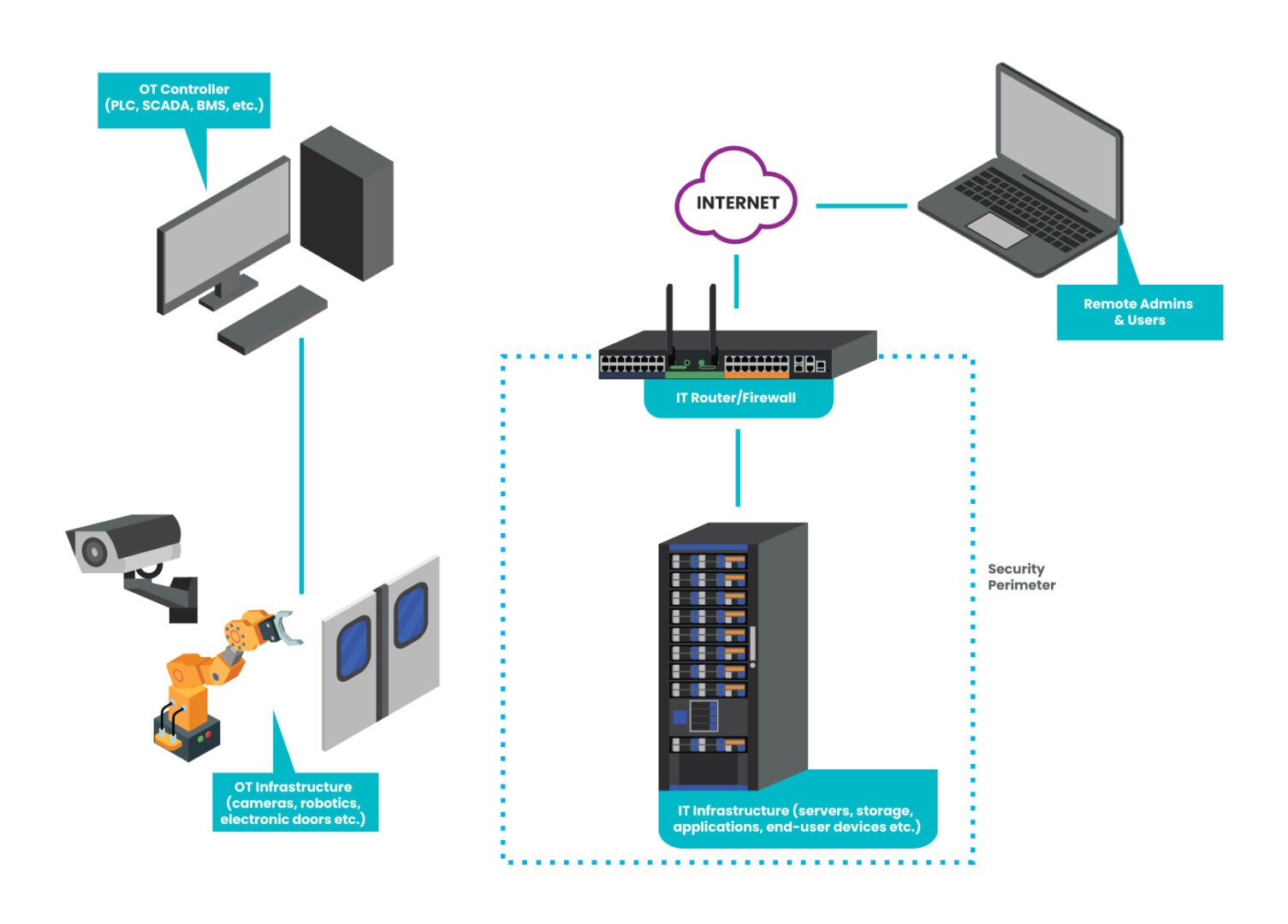
Operational technology (OT) includes any equipment interacting with the real world, as well as the systems that control such equipment. Some examples of OT equipment include HVAC systems, door controls, industrial machinery, fluid system sensors, and medical robotics. Examples of OT control systems include programmable logic controllers (PLC), supervisory control and data acquisition systems (SCADA), building management systems (BMS), and building automation systems (BAS). These control systems enable a high degree of automation in fields like industrial manufacturing, water and energy utilities, building management, and medicine.

 
OT-Security-Mockup(2)

Figure: An example of how a typical OT network is isolated from the IT network & security infrastructure.

Operational technology security challenges & solutions

It’s tempting to believe that operational technology is safe from cyberattacks because it’s often isolated from the IT network—the “security through obscurity” approach. However, OT is a very tempting target for malicious actors because it’s so critical to business operations. Recent research from Barracuda Networks found that over 90 percent of manufacturing organizations experienced cyber attacks on their production or energy supply in 2021. An OT attack can completely halt manufacturing lines, interrupt oil and gas supplies, or prevent life-saving procedures from taking place.

Operational technology security is a crucial focal point, but significant challenges exist.

Challenge: OT security tools are a double-edged sword

Network Mapper, or NMAP, is a widely-used network management tool. NMAP started as a simple scanner in 1997 but evolved over the years into a solid open-source tool for OS detection, software version detection, and other network discovery features. NMAP aids in OT security by mapping exposed operational technology controls for teams to patch and secure. However, in the wrong hands, this tool could be used in intelligence gathering to attack vulnerable, out-of-date systems.

The problem with tools like NMAP is that they only discover information about systems with open ports on the same network as the tool – usually the production network. If an authorized network admin can find OS versioning information on the production network, so can an unauthorized user with stolen credentials.

Security teams need an efficient way to discover, patch, and manage operational technology without exposing these systems to cybercriminals.

Solution: Out-of-band (OOB) OT management

An out-of-band (OOB) network uses dedicated network infrastructure to create a control plane that’s completely isolated from the production network. An out-of-band serial console is the most efficient way to create an OOB network. This device directly connects to OT equipment and control systems via management ports (e.g., RS232 Serial), allowing administrators to monitor and patch vulnerabilities without exposing OS/versioning information to production.

An OOB serial console also uses alternative network interfaces—such as LTE cellular or dial-up—to ensure this management network is always remotely accessible by administrators, even when the production ISP, WAN, or LAN goes down from a failure or breach. With this added redundancy, teams can recover and restore critical OT operations much faster, even when the outage occurs in a remote or hard-to-reach location.

An out-of-band OT management solution provides efficient patch management without exposing vulnerable systems to cybercriminals. OOB also streamlines OT recovery efforts to minimize the impact of successful attacks and other failures.

Challenge: OT isolation hinders disaster recovery and Zero Trust

Since operational technology is often isolated from the IT network on its own LAN, there usually isn’t any way to access the control systems remotely. Operators must be on-site to use SCADA or PLC systems to monitor and control industrial processes. If on-site access is impossible, for example, due to a global pandemic or natural disaster, OT operations completely shut down. For example, increased tornadoes, floods, and other natural disasters in the midwest have forced major companies like General Motors and Amazon to close regional plants and logistics centers. When workers are sent home, operations grind to a halt unless operators have a way to access their OT control system remotely.

In addition, this separation makes it difficult to extend Zero Trust to operational technology. Without strong authentication, granular security policies, and targeted protection, there’s a significant risk of breaches. Plus, a lack of Zero Trust makes it difficult to contain the lateral movement of a malicious actor who’s using stolen credentials, which increases the blast radius and business impact of cyber incidents. 

Organizations need a way to minimize operational disruptions from natural disasters and apply Zero Trust to OT networks if they want to improve their resilience.

Solution: IT/OT convergence with vendor-neutral platforms

IT/OT convergence involves bringing information technology and operational technology together under one management umbrella and securely bridging the gap between the two networks. 

An IT/OT convergence strategy improves business resilience in two ways:

  1. It brings OT onto the same enterprise network as IT systems which facilitates the use of remote tools (like VPNs or ZTNA), giving operators access to OT control systems from off-site
  2. It brings OT within the purview of Zero Trust security controls like multi-factor authentication (MFA), identity and access management (IAM), and deep packet inspection (DPI)

The easiest way to achieve IT/OT convergence without gaps is to use a vendor-neutral management and orchestration platform. For example, an OOB serial console with an open OS architecture that can dig its hooks into multi-vendor OT systems will give administrators a single-pane-of-glass view of the converged IT/OT infrastructure. A platform that can host or integrate 3rd party Zero Trust solutions will also enable unified orchestration of IT and OT security. 

By converging IT and OT, organizations can keep business running during natural disasters and limit the blast radius of breaches. A vendor-neutral platform also provides unified security orchestration for greater coverage and improved efficiency.

Operational technology security & resilience

A comprehensive operational technology security strategy will help improve resilience by preventing some cybersecurity incidents and reducing the impact of the rest. However, it’s impossible to ensure 100% protection, especially with ransomware attacks on the rise. That’s why it’s important to distinguish between security and resilience; security provides preventative measures, but resilience is your ability to withstand adversity and keep business flowing. 

One of the best measures of resilience is how quickly you can recover from outages caused by failures and attacks. And the best way to ensure a speedy recovery, according to the experts at Gartner and the CISA, is by using isolated management infrastructure such as OOB serial consoles to create an isolated recovery environment (IRE). This gives teams a dedicated environment, insulated from ransomware and production failures, where they can rebuild and restore critical services. 

Download our whitepaper 3 Steps to Ransomware Recovery for more guidance on streamlining IT/OT recovery and improving business resilience.


Building OT security & resilience with Nodegrid

The Nodegrid platform from ZPE Systems is a complete resilience solution that delivers OOB operational technology management and vendor-neutral IT/OT convergence. Using Nodegrid out-of-band solutions as your isolated management infrastructure ensures teams will have 24/7 remote access to monitor, patch, troubleshoot, and recover operational technology. The open, Linux-based Nodegrid OS supports VM and container hosting and easy integrations so you can deploy and control 3rd party applications for Zero Trust, OT management, and more from a single platform. Nodegrid can also host all the tools your team needs to recover and rebuild critical services — including to fully destroy and rebuild production networks — making it the perfect solution for building an isolated recovery environment.

Nodegrid can also run 3rd-party automation solutions such as software-defined networking (SDN)/software-defined wide area networking (SD-WAN), infrastructure as code (IaC), and artificial intelligence for IT operations (AIOps). Automating workloads helps reduce the risk of human error, while automating root-cause analysis (RCA) and security event analysis can significantly speed up recovery efforts, creating a more resilient network.

Learn how Nodegrid delivers unified orchestration and out-of-band management!

Nodegrid delivers unified orchestration and out-of-band management to help you build your zero trust security architecture. Contact ZPE Systems today to learn more.

Contact Us

Medical Devices Cybersecurity Risk

A hacker’s laptop connects to a stethoscope to represent medical devices cybersecurity risk

The healthcare industry is one of the largest adopters of “Internet of Things” (IoT) technology, using internet-enabled devices to monitor patient health, dispense lifesaving medication, perform medical procedures, and more. Some examples of IoT devices used in healthcare include insulin pumps, pacemakers, heart rate monitors, and intracardiac defibrillators. These devices allow healthcare teams to provide advanced care in bustling urban centers as well as remote or rural areas where frequent in-person visits are impossible.

However, these devices often run outdated software due to the difficulty of patch management and the time-intensive nature of updates, which end up getting bumped from the schedules of busy metropolitan teams. In addition, healthcare organizations and patients alike often sacrifice security hygiene for convenience, increasing the likelihood of stolen credentials and compromised devices. Plus, since these devices often operate in patient homes and other locations outside the organization’s network, security teams may not even know if an IoT device is stolen or compromised until it’s too late.

Many cybercriminals target IoT medical devices to harvest sensitive health data, but in the process could cause a pacemaker to crash and severely injure the patient. To address the growing threat of ransomware and other cyberattacks on patient health devices, the FDA recently issued a set of guidelines for securing medical devices. In this post, we’ll discuss the factors that make medical devices a cybersecurity risk before providing mitigation strategies to help healthcare organizations meet FDA requirements.

Table of Contents:

What makes medical devices a cybersecurity risk?

Every internet-enabled device expands an organization’s attack surface, giving cybercriminals something new to compromise and gain access to data and other resources. Medical devices are particularly risky for three reasons.

  • Outdated software – It’s difficult to update software on remote, wearable, or implanted medical devices without causing a (potentially dangerous) disruption to the patient. A recent FBI report showed that 53% of IoT medical devices had known, unpatched vulnerabilities in their software, making them more susceptible to cyberattacks.
  • Poor security hygiene – Teams often deploy medical devices with easy, insecure passwords for ease of use. While this may make operating and troubleshooting these devices easier for busy healthcare practitioners, it also significantly increases the cybersecurity risk.
  • Inadequate monitoring – Once medical devices leave the central network, it can be difficult for admins to monitor software versioning, account activity, device location, and other critical security metrics. That means they may not be aware of breaches or failures that put patient health at risk.

Medical device cybersecurity risk mitigation strategies

Due to the increased frequency of attacks and the potential to cause patient harm, the FDA released guidance earlier this year to address medical device cybersecurity risks. For the FDA to consider a medical device “secure,” there must be plans and processes in place to monitor, identify, and patch vulnerabilities, both on a routine schedule and as soon as possible in response to specific threats. There are also additional requirements to demonstrate that reasonable security measures are in place, including strong authentication.

This guidance is intentionally broad, giving general rules without detailing exactly how to achieve compliance. Let’s discuss three specific risk mitigation strategies that address the above mentioned risk factors and meet FDA guidelines.

Automated patch management

Medical device manufacturers and service providers must continuously monitor for vulnerabilities and release software patches on a regular schedule to comply with the FDA’s ruling. Automated monitoring, configuration management, and software delivery tools can all help teams stay on top of demanding patch schedules. On the consumer side, healthcare teams can use automated patch management solutions to ensure updates are installed as soon as they’re available, reducing manual workloads and improving device security.

Zero trust security

Zero trust security is a methodology that involves applying highly specific security policies and building checkpoints of security controls around individual network resources. Zero trust requires strong passwords and uses technology like multi-factor authentication (MFA) to prevent compromised accounts from accessing devices or data. Zero trust is difficult to achieve, and it can be challenging to get overworked healthcare providers or elderly patients to follow stricter password guidelines, but it’s quickly becoming standard practice for new medical devices and cloud services. Teams can help smooth the transition by providing additional training and support when deploying new healthcare technology.

Vendor-neutral monitoring

Administrators need to track device metrics to ensure the equipment functions correctly and identify any signs of compromise. Often, devices come with software monitoring solutions that are specific to a particular vendor, but most healthcare teams deploy a wide variety of equipment from multiple vendors. As a result, admins must log in to several different dashboards, all of which provide varying degrees of coverage and granularity. A vendor-neutral monitoring platform can unify all these disparate systems, making it easier to track device health and spot potential problems.

Medical device security, recovery, and resilience

Medical devices pose a significant cybersecurity risk, and the consequences of successful breaches could be deadly. The FDA urges medical device providers to follow guidelines for vulnerability monitoring, patch management, and overall cybersecurity. In addition, healthcare organizations can use automated patch management, zero trust security, and vendor-neutral monitoring platforms to improve their security posture.

It’s also vital that organizations have a plan for how to recover remote medical devices that are compromised by ransomware or other cyberattacks. The faster teams can restore, rebuild, or replace the device, the better the patient’s health outcomes. This combination of security and recovery planning makes healthcare networks more resilient to cyberattacks and failures.

For example, the Nodegrid platform from ZPE Systems allows healthcare teams to deploy automation, zero trust security, monitoring, recovery tools, and more from one unified system. Nodegrid’s out-of-band management solutions can also be used to build an isolated recovery environment where teams can rebuild and restore compromised systems with the risk of reinfection.

To learn more about recovering from ransomware and other medical device cybersecurity risks, download our whitepaper, 3 Steps to Ransomware Recovery.

Download the Whitepaper

Learn more about recovering from ransomware and other medical device cybersecurity risks!

Nodegrid allows healthcare teams to deploy automation, zero trust security, monitoring, recovery tools, and more from one unified system. 

Contact Us