Providing Out-of-Band Connectivity to Mission-Critical IT Resources

The Future of Edge Computing

The Future of Edge Computing
Edge computing moves computing resources and data processing applications out of the centralized data center or cloud, deploying them at the edges of the network and allowing companies to use their edge data in real-time. An explosion in edge data generated by Internet of Things (IoT) sensors, automated operational technology (OT), and other remote devices has created a high demand for edge computing solutions. A recent report from Grand View Research valued the edge computing market size at $16.45 billion in 2023 and predicted it to grow at a compound annual growth rate (CAGR) of 37.9% by 2030.

The current edge computing landscape comprises solutions focused on individual use cases,  lacking interoperability and central orchestration. The future of edge computing, as described by leading analysts at Gartner, depends on unifying the edge computing ecosystem with comprehensive strategies and centralized, vendor-neutral management and orchestration. This future relies on edge-native applications that integrate seamlessly with upstream resources, remote management, and orchestration while still being able to operate independently.

Where is edge computing now?

Many organizations already use edge computing technology to solve individual problems or handle specific workloads. For example, a manufacturing department may deploy an edge computing application to analyze log data and provide predictive maintenance recommendations for a single type of machine or assembly line. A single company may have a dozen or more disjointed edge computing solutions in use throughout the network, creating visibility and management headaches for IT teams. This piecemeal approach to edge computing results in what Gartner calls “edge sprawl”: many disparate solutions deployed without centralized control, security, or visibility. Edge sprawl increases management complexity and risk while decreasing operational efficiency, creating significant roadblocks for digital transformation initiatives.

Additionally, many organizations misunderstand edge computing by thinking it’s just about moving computing resources as close to the edge as possible to collect data. In reality, the true potential of the edge involves using edge data in real-time, gaining “cloud-in-a-box” capability that works in concert with the network’s upstream resources.

Anticipating the future of edge computing

At Gartner’s 2023 IT Infrastructure Operations & Cloud Strategies Conference, edge technology experts predicted that, by 2025, enterprises will create and process more than 50% of their data outside the centralized data center or cloud. Surging edge data volume will accelerate the challenges caused by a lack of strategy or orchestration.

Gartner’s 6 Edge Computing Challenges

Lack of extensibility

Many purpose-built edge computing solutions can’t adapt as use cases change or expand as the business scales, limiting agility and preventing efficient growth.

Inability to extract value from edge data

Much of the valuable data generated by edge sensors and devices gets left on the table, so to speak, because companies lack the resources needed to run all their data analytics and AI apps at the edge and are stuck simply collecting data rather than being able to do much with it.

Data storage constraints

Edge computing deployments are often smaller and have more data storage constraints than large data centers and cloud deployments, but quickly distinguishing between valuable data and destroyable junk is difficult with edge resources.

Knowledge debt from edge-native apps

Edge-native applications are designed for edge computing architectures from the ground up. Edge containers are similar to cloud-native apps, but clustering and cluster management work much differently, creating what’s known as “knowledge debt” and straining IT teams.

Lack of security controls, policies, & visibility

Edge deployments often lack many of the security features used in data centers, and sometimes other departments install edge computing solutions without onboarding them with IT for the application of security policies and monitoring agents, adding risk and increasing the attack surface.

Inability to remotely orchestrate, monitor, & troubleshoot

When equipment failures, configuration errors, or breaches take down edge networks, remote teams are often cut-off and unable to troubleshoot or recover without traveling on-site or paying for managed services, increasing the duration and cost of the outage. Current edge solutions are novel and don’t connect to or integrate with the full networking stack.

At the Gartner conference, analyst Thomas Bittman gave multiple presentations echoing his advice from the Building an Edge Computing Strategy report published earlier in the year. In preparing for the future of edge computing, Bittman urges companies to proactively develop a comprehensive edge computing strategy encompassing all potential use cases and addressing the challenges described above. His recommendations include:

  • Enabling extensibility by utilizing vendor-neutral platforms that allow for expansion and integration, which supports growth and agility at the edge.
  • Looking for opportunities to deploy artificial intelligence, data analytics, and machine learning alongside edge computing units, for example, with system-on-chip technology or all-in-one edge networking and computing devices.
  • Anticipating data storage and governance challenges at the edge by defining clear policies and deploying AI/ML data management solutions that dynamically determine data value.
  • Reducing knowledge debt by utilizing vendor-neutral platforms that support familiar container and cluster management technologies (like Docker and Kubernetes).
  • Securing the edge with a multi-layered defense, including hardware security, frequent patches, zero-trust policies, strong authentication, network micro-segmentation, and comprehensive security monitoring.
  • Centralizing edge management and orchestration (EMO) with a vendor-neutral platform that unifies control, supports environmental monitoring, and uses out-of-band (OOB) management while interoperating with automated edge management workflows (such as zero-touch provisioning and infrastructure configuration management).

Bittman’s recommended edge computing strategy uses the central EMO as a hub for all the technologies, processes, and workflows involved in operating and supporting the edge. This strategy will prepare companies for the future of edge computing and support efficient, agile growth and innovation.

Enter the future of edge computing with Nodegrid

Nodegrid is a vendor-neutral edge management and orchestration platform from ZPE Systems. Nodegrid easily interoperates with your choice of edge solutions and can directly run third-party AI, ML, data analytics, and data governance applications to help you extract more value from your edge data. The open, Linux-based Nodegrid OS can also host Docker containers and edge-native applications to reduce hardware overhead and knowledge debt.

Nodegrid devices protect your edge management interfaces with hardware security features like TPM and geofencing, support for strong authentication like 2FA, and integrations with leading zero-trust providers like Okta and PING. The Nodegrid OS and ZPE Cloud are Synopsys-validated to address security at every stage of the SDLC. Plus, you can run third-party security solutions for SASE, next-generation firewalls, and more.

Nodegrid edge networking solutions use out-of-band technology to give teams 24/7 remote visibility, management, and troubleshooting access to edge deployments. It freely interoperates with third-party solutions for infrastructure automation, monitoring, and recovery to support network resilience and operational efficiency. Nodegrid is like a cloud-in-a-box solution, incorporating edge computing and the full networking stack. Nodegrid’s edge management and orchestration platform provides single-pane-of-glass visibility, control, and resilience while supporting future edge growth.

Use Nodegrid for your Gartner-approved edge computing strategy

The Nodegrid EMO platform helps you anticipate the future of edge computing with vendor-neutral, single-pane-of-glass visibility and control. Watch a free Nodegrid demo to learn more.


Request a Demo

Edge Computing Requirements

Edge computing requirements displayed in a digital interface wheel.

The Internet of Things (IoT) and remote work capabilities have allowed many organizations to conduct critical business operations at the enterprise network’s edges. Wearable medical sensors, automated industrial machinery, self-service kiosks, and other edge devices must transmit data to and from software applications, machine learning training systems, and data warehouses in centralized data centers or the cloud. Those transmissions eat up valuable MPLS bandwidth and are attractive targets for cybercriminals.

Edge computing involves moving data processing systems and applications closer to the devices that generate the data at the network’s edges. Edge computing can reduce WAN traffic to save on bandwidth costs and improve latency. It can also reduce the attack surface by keeping edge data on the local network or, in some cases, on the same device.

Running powerful data analytics and artificial intelligence applications outside the data center creates specific challenges. For example, space is usually limited at the edge, and devices might be outdoors where power and climate control are more complex. This guide discusses the edge computing requirements for hardware, networking, availability, security, and visibility to address these concerns.

Edge computing requirements

The primary requirements for edge computing are:

1. Compute

As the name implies, edge computing requires enough computing power to run the applications that process edge data. The three primary concerns are:

  • Processing power: CPUs (central processing units), GPUs (graphics processing units), or SoCs (systems on chips)
  • Memory: RAM (random access memory)
  • Storage: SSDs (solid state drives), SCM (storage class memory), or Flash memory
  • Coprocessors: Supplemental processing power needed for specific tasks, such as DPUs (data processing units) for AI

The specific edge computing requirements for each will vary, as it’s essential to match the available compute resources with the needs of the edge applications.

2. Small, ruggedized chassis

Space is often quite limited in edge sites, and devices may not be treated as delicately as they would be in a data center. Edge computing devices must be small enough to squeeze into tight spaces and rugged enough to handle the conditions they’ll be deployed in. For example, smart cities connect public infrastructure and services using IoT and networking devices installed in roadside cabinets, on top of streetlights, and in other challenging deployment sites. Edge computing devices in other applications might be subject to constant vibrations from industrial machinery, the humidity of an offshore oil rig, or even the vacuum of outer space.

3. Power

In some cases, edge deployments can use the same PDUs (power distribution units) and UPSes (uninterruptible power supplies) as a data center deployment. Non-traditional implementations, which might be outdoors, underground, or underwater, may require energy-efficient edge computing devices using alternative power sources like batteries or solar.

4. Wired & wireless connectivity

Edge computing systems must have both wired and wireless network connectivity options because organizations might deploy them somewhere without access to an Ethernet wall jack. Cellular connectivity via 4G/5G adds more flexibility and ideally provides network failover/out-of-band capabilities.

5. Out-of-band (OOB) management

Many edge deployment sites don’t have any IT staff on hand, so teams manage the devices and infrastructure remotely. If something happens to take down the network, such as an equipment failure or ransomware attack, IT is completely cut off and must dispatch a costly and time-consuming truck roll to recover. Out-of-band (OOB) management creates an alternative path to remote systems that doesn’t rely on any production infrastructure, ensuring teams have continuous access to edge computing sites even during outages.

6. Security

Edge computing reduces some security risks but can create new ones. Security teams carefully monitor and control data center solutions, but systems at the edge are often left out. Edge-centric security platforms such as SSE (Security Service Edge) help by applying enterprise Zero Trust policies and controls to edge applications, devices, and users. Edge security solutions often need hardware to host agent-based software, which should be factored into edge computing requirements and budgets. Additionally, edge devices should have secure Roots of Trust (RoTs) that provide cryptographic functions, key management, and other features that harden device security.

7. Visibility

Because of a lack of IT presence at the edge, it’s often difficult to catch problems like high humidity, overheating fans, or physical tampering until they affect the performance or availability of edge computing systems. This leads to a break/fix approach to edge management, where teams spend all their time fixing issues after they occur rather than focusing on improvements and innovations. Teams need visibility into environmental conditions, device health, and security at the edge to fix issues before they cause outages or breaches.

Streamlining edge computing requirements

An edge computing deployment designed around these seven requirements will be more cost-effective while avoiding some of the biggest edge hurdles. Another way to streamline edge deployments is with consolidated, vendor-neutral devices that combine core networking and computing capabilities with the ability to integrate and unify third-party edge solutions. For example, the Nodegrid platform from ZPE Systems delivers computing power, wired & wireless connectivity, OOB management, environmental monitoring, and more in a single, small device. ZPE’s integrated edge routers use the open, Linux-based Nodegrid OS capable of running Guest OSes and Docker containers for your choice of third-party AI/ML, data analytics, SSE, and more. Nodegrid also allows you to extend automated control to the edge with Gen 3 out-of-band management for greater efficiency and resilience.

Want to learn more about how Nodegrid makes edge computing easier and more cost-effective?

To learn more about consolidating your edge computing requirements with the vendor-neutral Nodegrid platform, schedule a free demo!

Request a Demo

IT Infrastructure Management Best Practices

A small team uses IT infrastructure management best practices to manage an enterprise network

A single hour of downtime costs organizations more than $300,000 in lost business, making network and service reliability critical to revenue. The biggest challenge facing IT infrastructure teams is ensuring network resilience, which is the ability to continue operating and delivering services during equipment failures, ransomware attacks, and other emergencies. This guide discusses IT infrastructure management best practices for creating and maintaining more resilient enterprise networks.
.

What is IT infrastructure management? It’s a collection of all the workflows involved in deploying and maintaining an organization’s network infrastructure. 

IT infrastructure management best practices

The following IT infrastructure management best practices help improve network resilience while streamlining operations. Click the links on the left for a more detailed look at the technologies and processes involved with each.

Isolated Management Infrastructure (IMI)

• Protects management interfaces in case attackers hack the production network

• Ensures continuous access using OOB (out-of-band) management

• Provides a safe environment to fight through and recover from ransomware

Network and Infrastructure Automation

• Reduces the risk of human error in network configurations and workflows

• Enables faster deployments so new business sites generate revenue sooner

• Accelerates recovery by automating device provisioning and deployment

• Allows small IT infrastructure teams to effectively manage enterprise networks

Vendor-Neutral Platforms

• Reduces technical debt by allowing the use of familiar tools

• Extends OOB, automation, AIOps, etc. to legacy/mixed-vendor infrastructure

• Consolidates network infrastructure to reduce complexity and human error

• Eliminates device sprawl and the need to sacrifice features

AIOps

• Improves security detection to defend against novel attacks

• Provides insights and recommendations to improve network health for a better end-user experience

• Accelerates incident resolution with automatic triaging and root-cause analysis (RCA)

Isolated management infrastructure (IMI)

Management interfaces provide the crucial path to monitoring and controlling critical infrastructure, like servers and switches, as well as crown-jewel digital assets like intellectual property (IP). If management interfaces are exposed to the internet or rely on the production network, attackers can easily hijack your critical infrastructure, access valuable resources, and take down the entire network. This is why CISA released a binding directive that instructs organizations to move management interfaces to a separate network, a practice known as isolated management infrastructure (IMI).

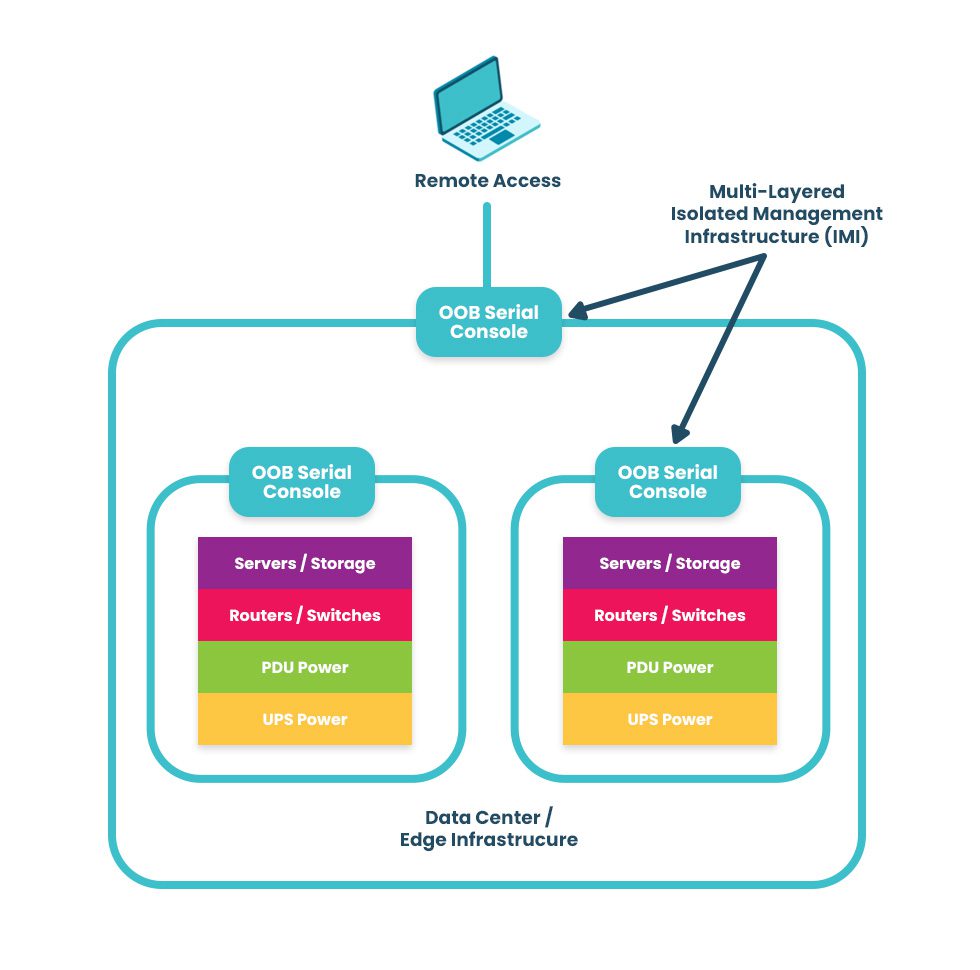
The best practice for building an IMI is to use Gen 3 out-of-band (OOB) serial consoles, which unify the management of all connected devices and ensure continuous remote access via alternative network interfaces (such as 4G/5G cellular). OOB management gives IT teams a lifeline to troubleshoot and recover remote infrastructure during equipment failures and outages on the production network. The key is to ensure that OOB serial consoles are fully isolated from production and can run the applications, tools, and services needed to fight through a ransomware attack or outage without taking critical infrastructure offline for extended periods. This essentially allows you to instantly create a virtual War Room for coordinated recovery efforts to get you back online in a matter of hours instead of days or weeks. A diagram showing a multi-layered isolated management infrastructure. An IMI using out-of-band serial consoles also provides a safe environment to recover from ransomware attacks. The pervasive nature of ransomware and its tendency to re-infect cleaned systems mean it can take companies between 1 and 6 months to fully recover from an attack, with costs and revenue losses mounting with every day of downtime. The best practice is to use OOB serial consoles to create an isolated recovery environment (IRE) where teams can restore and rebuild without risking reinfection.

.

Network and infrastructure automation

As enterprise network architectures grow more complex to support technologies like microservices applications, edge computing, and artificial intelligence, teams find it increasingly difficult to manually monitor and manage all the moving parts. Complexity increases the risk of configuration mistakes, which cause up to 35% of cybersecurity incidents. Network and infrastructure automation handles many tedious, repetitive tasks prone to human error, improving resilience and giving admins more time to focus on revenue-generating projects.

Additionally, automated device provisioning tools like zero-touch provisioning (ZTP) and configuration management tools like RedHat Ansible make it easier for teams to recover critical infrastructure after a failure or attack. Network and infrastructure automation help organizations reduce the duration of outages and allow small IT infrastructure teams to manage large enterprise networks effectively, improving resilience and reducing costs.

For an in-depth look at network and infrastructure automation, read the Best Network Automation Tools and What to Use Them For

Vendor-neutral platforms

Most enterprise networks bring together devices and solutions from many providers, and they often don’t interoperate easily. This box-based approach creates vendor lock-in and technical debt by preventing admins from using the tools or scripting languages they’re familiar with, and it makes a fragmented, complex architecture of management solutions that are difficult to operate efficiently. Organizations also end up compromising on features, ending up with a lot of stuff they don’t need and too little of what they do need.

A vendor-neutral IT infrastructure management platform allows teams to unify all their workflows and solutions. It integrates your administrators’ favorite tools to reduce technical debt and provides a centralized place to deploy, orchestrate, and monitor the entire network. It also extends technologies like OOB, automation, and AIOps to otherwise unsupported legacy and mixed-vendor solutions. Such a platform is revolutionary in the same way smartphones were – instead of needing a separate calculator, watch, pager, phone, etc., everything was combined in a single device. A vendor-neutral management platform allows you to run all the apps, services, and tools you need without buying a bunch of extra hardware. It’s a crucial IT infrastructure management best practice for resilience because it consolidates and unifies network architectures to reduce complexity and prevent human error.

Learn more about the benefits of a vendor-neutral IT infrastructure management platform by reading How To Ensure Network Scalability, Reliability, and Security With a Single Platform

AIOps

AIOps applies artificial intelligence technologies to IT operations to maximize resilience and efficiency. Some AIOps use cases include:

  • Security detection: AIOps security monitoring solutions are better at catching novel attacks (those using methods never encountered or documented before) than traditional, signature-based detection methods that rely on a database of known attack vectors.
  • Data analysis: AIOps can analyze all the gigabytes of logs generated by network infrastructure and provide health visualizations and recommendations for preventing potential issues or optimizing performance.
  • Root-cause analysis (RCA): Ingesting infrastructure logs allows AIOps to identify problems on the network, perform root-cause analysis to determine the source of the issues, and create & prioritize service incidents to accelerate remediation.

AIOps is often thought of as “intelligent automation” because, while most automation follows a predetermined script or playbook of actions, AIOps can make decisions on-the-fly in response to analyzed data. AIOps and automation work together to reduce management complexity and improve network resilience.

Want to find out more about using AIOps and automation to create a more resilient network? Read Using AIOps and Machine Learning To Manage Automated Network Infrastructure

IT infrastructure management best practices for maximum resilience

Network resilience is one of the top IT infrastructure management challenges facing modern enterprises. These IT infrastructure management best practices ensure resilience by isolating management infrastructure from attackers, reducing the risk of human error during configurations and other tedious workflows, breaking vendor lock-in to decrease network complexity, and applying artificial intelligence to the defense and maintenance of critical infrastructure.

Need help getting started with these practices and technologies? ZPE Systems can help simplify IT infrastructure management with the vendor-neutral Nodegrid platform. Nodegrid’s OOB serial consoles and integrated branch routers allow you to build an isolated management infrastructure that supports your choice of third-party solutions for automation, AIOps, and more.

Want to learn how to make IT infrastructure management easier with Nodegrid?

To learn more about implementing IT infrastructure management best practices for resilience with Nodegrid, download our Network Automation Blueprint

Request a Demo

Collaboration in DevOps: Strategies and Best Practices

Collaboration in DevOps is illustrated by two team members working together in front of the DevOps infinity logo.
The DevOps methodology combines the software development and IT operations teams into a highly collaborative unit. In a DevOps environment, team members work simultaneously on the same code base, using automation and source control to accelerate releases. The transformation from a traditional, siloed organizational structure to a streamlined, fast-paced DevOps company is rewarding yet challenging. That’s why it’s important to have the right strategy, and in this guide to collaboration in DevOps, you’ll discover tips and best practices for a smooth transition.

Collaboration in DevOps: Strategies and best practices

A successful DevOps implementation results in a tightly interwoven team of software and infrastructure specialists working together to release high-quality applications as quickly as possible. This transition tends to be easier for developers, who are already used to working with software code, source control tools, and automation. Infrastructure teams, on the other hand, sometimes struggle to work at the velocity needed to support DevOps software projects and lack experience with automation technologies, causing a lot of frustration and delaying DevOps initiatives. The following strategies and best practices will help bring Dev and Ops together while minimizing friction.

Turn infrastructure and network configurations into software code

Infrastructure and network teams can’t keep up with the velocity of DevOps software development if they’re manually configuring, deploying, and troubleshooting resources using the GUI (graphical user interface) or CLI (command line interface). The best practice in a DevOps environment is to use software abstraction to turn all configurations and networking logic into code.

Infrastructure as Code (IaC)

Infrastructure as Code (IaC) tools allow teams to write configurations as software code that provisions new resources automatically with the click of a button. IaC configurations can be executed as often as needed to deploy DevOps infrastructure very rapidly and at a large scale.

Software-Defined Networking (SDN) 

Software-defined networking (SDN) and Software-defined wide-area networking (SD-WAN) use software abstraction layers to manage networking logic and workflows. SDN allows networking teams to control, monitor, and troubleshoot very large and complex network architectures from a centralized platform while using automation to optimize performance and prevent downtime.

Software abstraction helps accelerate resource provisioning, reducing delays and friction between Dev and Ops. It can also be used to bring networking teams into the DevOps fold with automated, software-defined networks, creating what’s known as a NetDevOps environment.

Use common, centralized tools for software source control

Collaboration in DevOps means a whole team of developers or sysadmins may work on the same code base simultaneously. This is highly efficient — but risky. Development teams have used software source control tools like GitHub for years to track and manage code changes and prevent overwriting each other’s work. In a DevOps organization using IaC and SDN, the best practice is to incorporate infrastructure and network code into the same source control system used for software code.

Managing infrastructure configurations using a tool like GitHub ensures that sysadmins can’t make unauthorized changes to critical resources. For example, administrators initiate many ransomware attacks and other major outages by directly changing infrastructure configurations without testing or approval. This happened in a high-profile MGM cyberattack when an IT staff member fell victim to social engineering and granted elevated Okta privileges to an attacker without having to get approval from a second pair of eyes.

Using DevOps source control, all infrastructure changes must be reviewed and approved by a second party in the IT department to ensure they don’t introduce vulnerabilities or malicious code into production. Sysadmins can work quickly and creatively, knowing there’s a safety net to catch mistakes, reducing Ops delays, and fostering a more collaborative environment.

Consolidate and integrate DevOps tools with a vendor-neutral platform

An enterprise DevOps deployment usually involves dozens – if not hundreds – of different tools to automate and streamline the many workflows involved in a software development project. Having so many individual DevOps tools deployed around the enterprise increases the management complexity, which can have the following consequences.

  • Human error – The harder it is to stay on top of patch releases, security bulletins, and monitoring logs, the more likely it is that an issue will slip between the cracks until it causes an outage or breach.
  • Security complexity – Every additional DevOps tool added to the architecture makes integrating and implementing a consistent security model more complex and challenging, increasing the risk of coverage gaps.
  • Spiraling costs – With many different solutions handling individual workflows around the enterprise, the likelihood of buying redundant services or paying for unneeded features increases, which can impact ROI.
  • Reduced efficiency – DevOps aims to increase operational efficiency, but having to work across so many disparate tools can slow teams down, especially when those tools don’t interoperate.

The best practice is consolidating your DevOps tools with a centralized, vendor-neutral platform. For example, the Nodegrid Services Delivery Platform from ZPE Systems can host and integrate 3rd-party DevOps tools, unifying them under a single management umbrella. Nodegrid gives IT teams single-pane-of-glass control over the entire DevOps architecture, including the underlying network infrastructure, which reduces management complexity, increases efficiency, and improves ROI.

Maximize DevOps success

DevOps collaboration can improve operational efficiency and allow companies to release software at the velocity required to stay competitive in the market. Using software abstraction, centralized source code control, and vendor-neutral management platforms reduces friction on your DevOps journey. The best practice is to unify your DevOps environment with a vendor-neutral platform like Nodegrid to maximize control, cost-effectiveness, and productivity.

Want to Simplify collaboration in DevOps with the Nodegrid platform?

Reach out to ZPE Systems today to learn more about how the Nodegrid Services Delivery Platform can help you simplify collaboration in DevOps.


Contact Us

Terminal Servers: Uses, Benefits, and Examples

NSCStack
Terminal servers are network management devices providing remote access to and control over remote infrastructure. They typically connect to infrastructure devices via serial ports (hence their alternate names, serial consoles, console servers, serial console routers, or serial switches). IT teams use terminal servers to consolidate remote device management and create an out-of-band (OOB) control plane for remote network infrastructure. Terminal servers offer several benefits over other remote management solutions, such as better performance, resilience, and security. This guide answers all your questions about terminal servers, discussing their uses and benefits before describing what to look for in the best terminal server solution.

What is a terminal server?

A terminal server is a networking device used to manage other equipment. It directly connects to servers, switches, routers, and other equipment using management ports, which are typically (but not always) serial ports. Network administrators remotely access the terminal server and use it to manage all connected devices in the data center rack or branch where it’s installed.

What are the uses for terminal servers?

Network teams use terminal servers for two primary functions: remote infrastructure management consolidation and out-of-band management.

  1. Terminal servers unify management for all connected devices, so administrators don’t need to log in to each separate solution individually. Terminal servers save significant time and effort, which reduces the risk of fatigue and human error that could take down the network.
  2. Terminal servers provide remote out-of-band (OOB) management, creating a separate, isolated network dedicated to infrastructure management and troubleshooting. OOB allows administrators to troubleshoot and recover remote infrastructure during equipment failures, network outages, and ransomware attacks.

Learn more about using OOB terminal servers to recover from ransomware attacks by reading How to Build an Isolated Recovery Environment (IRE).

What are the benefits of terminal servers?

There are other ways to gain remote OOB management access to remote infrastructure, such as using Intel NUC jump boxes. Despite this, terminal servers are the better option for OOB management because they offer benefits including:

The benefits of terminal servers

Centralized management

Remote recovery

Even with a jump box, administrators typically must access the CLI of each infrastructure solution individually. Each jump box is also separately managed and accessed. A terminal server provides a single management platform to access and control all connected devices. That management platform works across all terminal servers from the same vendor, allowing teams to monitor and manage infrastructure across all remote sites from a single portal. 

When a jump box crashes or loses network access, there’s usually no way to recover it remotely, necessitating costly and time-consuming truck rolls before diagnostics can even begin. Terminal servers use OOB connection options like 5G/4G LTE to ensure continuous access to remote infrastructure even during major network outages. Out-of-band management gives remote teams a lifeline to troubleshoot, rebuild, and recover infrastructure fast.

Improved performance

Stronger security

Network and infrastructure management workflows can use a lot of bandwidth, especially when organizations use automation tools and orchestration platforms, potentially impacting end-user performance. Terminal servers create a dedicated OOB control plane where teams can execute as many resource-intensive automation workflows as needed without taking bandwidth away from production applications and users. 

Jump boxes often lack the security features and oversight of other enterprise network resources, which makes them vulnerable to exploitation by malicious actors. Terminal servers are secured by onboard hardware Roots of Trust (e.g., TPM), receive patches from the vendor like other enterprise-grade solutions, and can be onboarded with cybersecurity monitoring tools and Zero Trust security policies to defend the management network. 

Examples of terminal servers

Examples of popular terminal server solutions include the Opengear CM8100, the Avocent ACS8000, and the Nodegrid Serial Console Plus. The Opengear and Avocent solutions are second-generation, or Gen 2, terminal servers, which means they provide some automation support but suffer from vendor lock-in. The Nodegrid solution is the only Gen 3 terminal server, offering unlimited integration support for 3rd-party automation, security, SD-WAN, and more.

What to look for in the best terminal server

Terminal servers have evolved, so there is a wide range of options with varying capabilities and features. Some key characteristics of the best terminal server include:

  • 5G/4G LTE and Wi-Fi options for out-of-band access and network failover
  • Support for legacy devices without costly adapters or complicated configuration tweaks
  • Advanced authentication support, including two-factor authentication (2FA) and SAML 2.0
  • Robust onboard hardware security features like a self-encrypted SSD and UEFI Secure Boot
  • An open, Linux-based OS that supports Guest OS and Docker containers for third-party software
  • Support for zero-touch provisioning (ZTP), custom scripts, and third-party automation tools
  • A vendor-neutral, centralized management and orchestration platform for all connected solutions

These characteristics give organizations greater resilience, enabling them to continue operating and providing services in a degraded fashion while recovering from outages and ransomware. In addition, vendor-neutral support for legacy devices and third-party automation enables companies to scale their operations efficiently without costly upgrades.

Why choose Nodegrid terminal servers?

Only one terminal server provides all the features listed above on a completely vendor-neutral platform – the Nodegrid solution from ZPE Systems.

The Nodegrid S Series terminal server uses auto-sensing ports to discover legacy and mixed-vendor infrastructure solutions and bring them under one unified management umbrella.

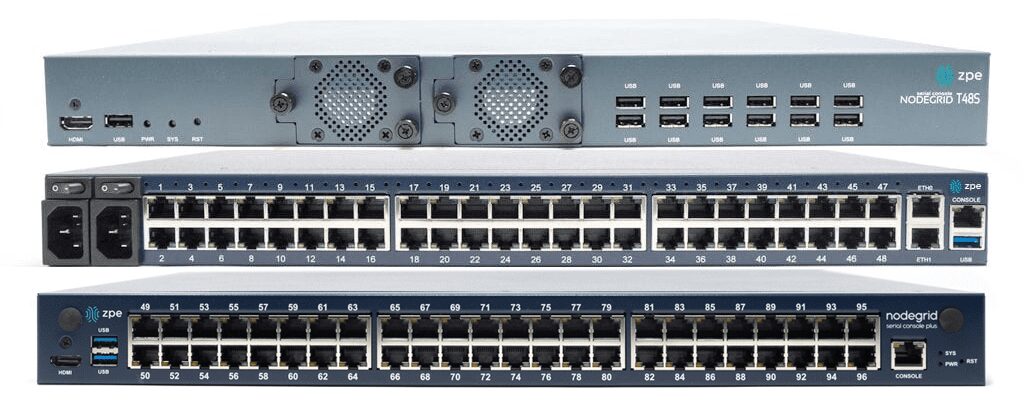
The Nodegrid Serial Console Plus (NSCP) is the first terminal server to offer 96 management ports on a 1U rack-mounted device (Patent No. 9,905,980).

ZPE also offers integrated branch/edge services routers with terminal server functionality, so you can consolidate your infrastructure while extending your capabilities.

All Nodegrid devices offer a variety of OOB and failover options to ensure maximum speed and reliability. They’re protected by comprehensive onboard security features like TPM 2.0, self-encrypted disk (SED), BIOS protection, Signed OS, and geofencing to keep malicious actors off the management network. They also run the open, Linux-based Nodegrid OS, supporting Guest OS and Docker containers so you can host third-party applications for automation, security, AIOps, and more. Nodegrid extends automation, security, and control to all the legacy and mixed-vendor devices on your network and unifies them with a centralized, vendor-neutral management platform for ultimate scalability, resilience, and efficiency.

Want to learn more about Nodegrid terminal servers?

ZPE Systems offers terminal server solutions for data center, branch, and edge deployments. Schedule a free demo to see Nodegrid terminal servers in action.

Request a Demo

Gartner Market Guide for Edge Computing

Edge-computing-strategy
In today’s highly distributed enterprise environment, a large portion of business data is generated by devices at the edges of the network. For example, many industries, from healthcare to finance, use IoT (Internet of Things) devices to collect essential and sensitive data. Transmitting this data back to a centralized data center for processing creates network latency and introduces security risks. 

Edge computing moves processing power and applications closer to the sources of data at the edges of the network, which improves performance and reduces risk. This approach is gaining popularity, with recent Gartner research finding that 69% of CIOs have already deployed edge technologies or would deploy by mid-2025. However, most edge deployments focus on individual use cases and lack a cohesive strategy, resulting in “edge sprawl”: many disparate solutions deployed all over the enterprise without centralized control or visibility.

“Edge computing without a strategy will eventually cause digital gridlock.” Thomas Bittman, Gartner Distinguished VP Analyst, in Building an Edge Computing Strategy

Edge sprawl increases complexity, reduces resilience, and ultimately hampers digital transformation. In a report published earlier this year titled “Building an Edge Computing Strategy,” Gartner provides recommendations for reducing edge sprawl with a comprehensive strategy. As we await the next Gartner Market Guide for Edge Computing, let’s discuss their recommendations for building a strategy to manage and orchestrate your edge solutions.

Building a Gartner-approved edge computing strategy

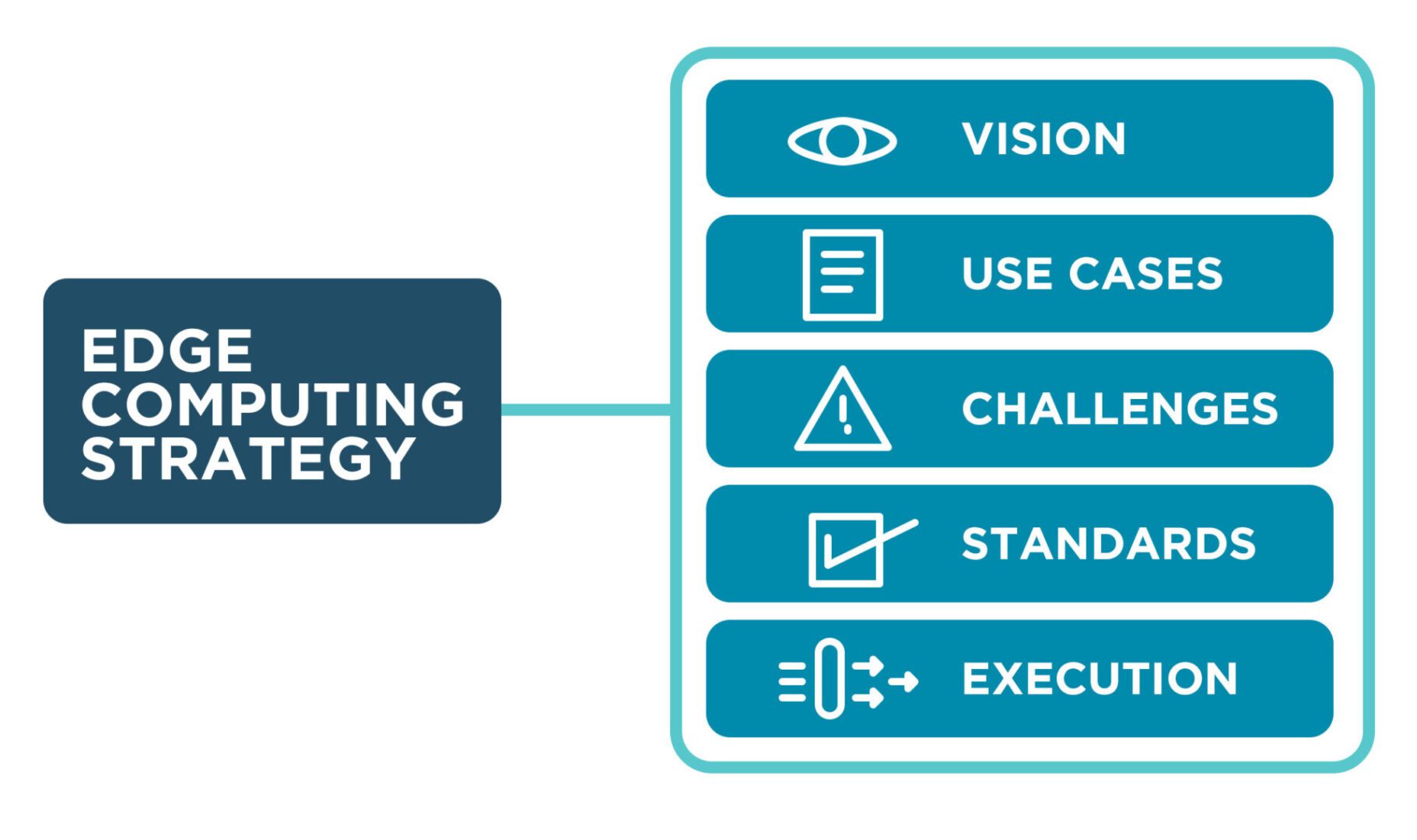
Gartner recommends building an edge computing strategy around five elements: vision, use cases, challenges, standards, and execution.

Edge computing vision

An edge computing vision describes the overall organizational goals and provides direction for teams and stakeholders. It should explain how edge computing supports and relates to other technology initiatives, such as cloud computing, IoT/OT devices, and artificial intelligence/machine learning, as well as how it fits into the overall digital transformation strategy.

Key components of an edge computing vision:

  • The business impact of edge computing in objective terms, such as the amount of money saved
  • How edge computing will accelerate digital transformation
  • A discussion of the digital experience improvements enabled by edge computing
  • The anticipated number of automation projects supported by edge computing
  • What edge computing use cases will be deployed
  • The targeted deployment agility in measurable terms, such as the time to deploy a new site

The edge computing vision provides the target your organization wants to reach in the next five years, and should be continuously updated as goals are met and strategies evolve. It’s crucial to clearly communicate the edge computing vision to get buy-in from executives and staff.

Edge computing use cases

There are often many edge computing use cases within an organization, and an effective edge computing strategy must identify and account for them all in order to avoid sprawl. There are three aspects to consider – the edge computing drivers, the existing edge computing use-case landscape, and potential edge computing use cases.

Edge computing drivers

Edge computing evolved to solve problems other computing architectures can’t handle. Understanding what those problems are will help you identify existing use cases and determine when edge computing should be pursued for a particular use case in the future. Gartner identifies four main edge computing drivers.

Gartner’s four edge computing drivers
Latency/Determinism
 A rapid response is required, or the response time needs to be predictable, and current latency is unacceptable 
Data/Bandwidth
 The cost of transmitting noisy, short-lived data is higher than the cost of moving compute to the edge 
Limited Autonomy
 Operations at the edge must continue even if the connection to the central data center or cloud is interrupted 
Privacy/Security
 The privacy and security risks of transmitting edge data are too high, or regulatory requirements prevent it 
An edge computing strategy should describe the organization’s specific needs and drivers that edge computing will address.

Existing edge computing use-case landscape

Many organizations already use edge computing in some form, even if they don’t call it by that name. Examples include operational technology (OT) deployments in the manufacturing industry and smart check-out systems in retail stores. An edge computing strategy must identify all existing solutions and discuss how they’ll be integrated with the chosen management technologies and best practices (more on those later).

Potential edge computing use cases

An effective edge computing strategy should also describe how the business will identify new use cases in the future. This proactive process should use the previously established edge computing drivers and involve collaboration between IT and the various business units within the organization. Gartner recommends creating a “clearinghouse” for new use case ideas, a structured process for identifying, reviewing, and prioritizing potential edge use cases.

Edge computing challenges

Even as edge computing solves business problems, it creates additional challenges that the strategy must address with new technologies and processes. Gartner identifies six major edge computing challenges to focus on while you develop an edge computing strategy.

  1. Enabling extensibility – Purpose-built edge computing solutions can’t adapt when workloads change or grow, so an edge computing strategy should leave room for growth by using extensible, vendor-neutral platforms that allow for expansion and integration.
  2. Extracting value from edge data – As edge devices generate more and more data, the difficulty of quickly extracting value from that data rises, so organizations should look for ways to deploy AI training and data analytics solutions alongside edge computing units.
  3. Governing edge data – Edge computing sites often have more significant data storage constraints than traditional data centers, so quickly distinguishing between valuable data and destroyable junk is critical to edge ROIs and requires careful governance.
  4. Securing the edge – Edge deployments are highly distributed in locations that lack many security features in a traditional data center, adding risk and increasing the attack surface, so organizations should protect edge computing nodes with a multi-layered defense including zero-trust policies, strong authentication, and network micro-segmentation. Orgs also need a way to take back control of edge infrastructure during ransomware attacks, such as an isolated recovery environment (IRE).
  5. Supporting edge-native applications – Edge-native applications are designed for the edge from the bottom up, so organizations should deploy platforms that support these applications without increasing the technical debt, meaning they should use familiar technologies and interoperate with existing systems.
  6. Managing and orchestrating the edge – Environmental issues, power failures, and network outages can cut technical teams off from critical edge infrastructure, so organizations need edge management and orchestration (EMO) with environmental monitoring and out-of-band (OOB) connectivity.

Gartner recommends focusing your edge computing strategy on mitigating the specific risks, challenges, and inhibitors.

Edge computing standards

Edge computing use cases are often highly diverse, even within a single organization, so it’s critical to establish a set of unifying standards and guidelines to reduce edge sprawl. Many organizations use a cloud center of excellence (CCOE) to govern their cloud computing architecture, so Gartner recommends establishing a similar edge center of excellence (ECOE) based on three pillars.

Gartner’s Edge Center of Excellence (ECOE)
Governance:
  • Maintain the edge computing strategy
  • Develop security, data, and adoption policies
  • Establish metrics to measure value and ROI
Technologies:
  • Reference architectures
  • Technology and architecture standards
  • Trusted vendor list
  • Vendor selection process
Best Practices/Skills:
  • Solutions consulting
  • Training and role definition
  • Expertise evangelization

For an effective edge computing strategy, Gartner recommends creating a unifying set of standards, guidelines, and best practices to be used across all edge computing deployments.

Edge computing execution

An edge computing strategy should include process documentation for the initial deployment of new edge rollouts. Gartner identifies six steps that help ensure successful edge computing launches.

  • Proof of Concept – Test edge deployments in non-production and get feedback from stakeholders
  • Proof of Production – Conduct a pilot to evaluate how you’ll operate, manage, and monitor an edge project at full scale
  • Phased Rollout – Have a phased deployment plan including scale, regions, and functionality
  • Surprises – Expect the unexpected by including guidelines in your edge computing strategy for monitoring and managing changes
  • Evolution – Edge projects frequently change direction based on evolving requirements or unexpected changes, so extensibility is crucial
  • Next-Best Action – Plans for the future frequently change direction, so have alternatives in your strategy to help guide these evolutions

An edge computing strategy that covers all six steps will streamline deployments and improve the agility of edge execution.

What to Expect from the Gartner Market Guide for Edge Computing

Last year, the Gartner Market Guide for Edge Computing discussed the issue of companies deploying individual edge solutions to handle individual use cases without any unified management and oversight. Part of the problem is that the edge computing market is still immature, and another hurdle is vendor lock-in. When edge computing solutions can’t interoperate with other vendors’ hardware and software, teams cannot deploy the universal hardware and unifying orchestration platforms to manage edge architectures efficiently.

Based on the market analysis provided in “Building an Edge Computing Strategy,” Gartner still heavily emphasizes the need to reduce edge sprawl with centralized, vendor-neutral edge management and orchestration (EMO). You can expect Gartner’s next market guide for edge computing to continue pushing for unified management and to highlight vendors with scalable, extensible, open edge computing solutions.

Building an edge computing strategy with Nodegrid

Nodegrid is a vendor-neutral edge infrastructure orchestration platform from ZPE Systems that can help you solve all six of Gartner’s edge computing challenges.

  • Enabling extensibility – Nodegrid’s modular, extensible devices are easy to scale and adapt to handle changing workloads. Nodegrid management hardware runs the open, Linux-based Nodegrid OS, which can host your choice of third-party edge computing applications, so you can deploy and change edge software without buying additional hardware.
  • Extracting value from edge data – Nodegrid’s powerful, extensible computing hardware can run data analysis, machine learning, and artificial intelligence applications to help extract additional value from the massive quantities of data at the edge.
  • Governing edge data – Nodegrid’s ZPE Cloud platform offers a data lake application that helps process and organize edge data.
  • Securing the edge – Nodegrid uses innovative hardware security and advanced, zero-trust authentication methods to defend edge networks, devices, and applications.
  • Supporting edge-native applications – Nodegrid supports Docker containers and other edge-native technologies, allowing teams to use their choice of software platforms to reduce technical debt.
  • Managing and orchestrating the edge – Nodegrid’s environmental monitoring sensors give remote teams real-time insights into conditions in edge deployment sites so they can respond to climate issues and power fluctuations as they occur. Nodegrid’s out-of-band (OOB) management creates an isolated management infrastructure that doesn’t rely on production network resources, giving teams a lifeline to troubleshoot and recover from outages, failures, and cyberattacks faster and more cost-effectively.

Nodegrid is a vendor-neutral Services Delivery Platform that brings all the components of your edge computing strategy under one management umbrella so you can overcome your biggest edge computing challenges.

Get streamlined edge computing with Nodegrid

To learn more about vendor-neutral edge management and orchestration (EMO) as described in the Gartner market guide for edge computing, contact ZPE Systems.

Request a Demo