Providing Out-of-Band Connectivity to Mission-Critical IT Resources

Collaboration in DevOps: Strategies and Best Practices

Collaboration in DevOps is illustrated by two team members working together in front of the DevOps infinity logo.
The DevOps methodology combines the software development and IT operations teams into a highly collaborative unit. In a DevOps environment, team members work simultaneously on the same code base, using automation and source control to accelerate releases. The transformation from a traditional, siloed organizational structure to a streamlined, fast-paced DevOps company is rewarding yet challenging. That’s why it’s important to have the right strategy, and in this guide to collaboration in DevOps, you’ll discover tips and best practices for a smooth transition.

Collaboration in DevOps: Strategies and best practices

A successful DevOps implementation results in a tightly interwoven team of software and infrastructure specialists working together to release high-quality applications as quickly as possible. This transition tends to be easier for developers, who are already used to working with software code, source control tools, and automation. Infrastructure teams, on the other hand, sometimes struggle to work at the velocity needed to support DevOps software projects and lack experience with automation technologies, causing a lot of frustration and delaying DevOps initiatives. The following strategies and best practices will help bring Dev and Ops together while minimizing friction.

Turn infrastructure and network configurations into software code

Infrastructure and network teams can’t keep up with the velocity of DevOps software development if they’re manually configuring, deploying, and troubleshooting resources using the GUI (graphical user interface) or CLI (command line interface). The best practice in a DevOps environment is to use software abstraction to turn all configurations and networking logic into code.

Infrastructure as Code (IaC)

Infrastructure as Code (IaC) tools allow teams to write configurations as software code that provisions new resources automatically with the click of a button. IaC configurations can be executed as often as needed to deploy DevOps infrastructure very rapidly and at a large scale.

Software-Defined Networking (SDN) 

Software-defined networking (SDN) and Software-defined wide-area networking (SD-WAN) use software abstraction layers to manage networking logic and workflows. SDN allows networking teams to control, monitor, and troubleshoot very large and complex network architectures from a centralized platform while using automation to optimize performance and prevent downtime.

Software abstraction helps accelerate resource provisioning, reducing delays and friction between Dev and Ops. It can also be used to bring networking teams into the DevOps fold with automated, software-defined networks, creating what’s known as a NetDevOps environment.

Use common, centralized tools for software source control

Collaboration in DevOps means a whole team of developers or sysadmins may work on the same code base simultaneously. This is highly efficient — but risky. Development teams have used software source control tools like GitHub for years to track and manage code changes and prevent overwriting each other’s work. In a DevOps organization using IaC and SDN, the best practice is to incorporate infrastructure and network code into the same source control system used for software code.

Managing infrastructure configurations using a tool like GitHub ensures that sysadmins can’t make unauthorized changes to critical resources. For example, administrators initiate many ransomware attacks and other major outages by directly changing infrastructure configurations without testing or approval. This happened in a high-profile MGM cyberattack when an IT staff member fell victim to social engineering and granted elevated Okta privileges to an attacker without having to get approval from a second pair of eyes.

Using DevOps source control, all infrastructure changes must be reviewed and approved by a second party in the IT department to ensure they don’t introduce vulnerabilities or malicious code into production. Sysadmins can work quickly and creatively, knowing there’s a safety net to catch mistakes, reducing Ops delays, and fostering a more collaborative environment.

Consolidate and integrate DevOps tools with a vendor-neutral platform

An enterprise DevOps deployment usually involves dozens – if not hundreds – of different tools to automate and streamline the many workflows involved in a software development project. Having so many individual DevOps tools deployed around the enterprise increases the management complexity, which can have the following consequences.

  • Human error – The harder it is to stay on top of patch releases, security bulletins, and monitoring logs, the more likely it is that an issue will slip between the cracks until it causes an outage or breach.
  • Security complexity – Every additional DevOps tool added to the architecture makes integrating and implementing a consistent security model more complex and challenging, increasing the risk of coverage gaps.
  • Spiraling costs – With many different solutions handling individual workflows around the enterprise, the likelihood of buying redundant services or paying for unneeded features increases, which can impact ROI.
  • Reduced efficiency – DevOps aims to increase operational efficiency, but having to work across so many disparate tools can slow teams down, especially when those tools don’t interoperate.

The best practice is consolidating your DevOps tools with a centralized, vendor-neutral platform. For example, the Nodegrid Services Delivery Platform from ZPE Systems can host and integrate 3rd-party DevOps tools, unifying them under a single management umbrella. Nodegrid gives IT teams single-pane-of-glass control over the entire DevOps architecture, including the underlying network infrastructure, which reduces management complexity, increases efficiency, and improves ROI.

Maximize DevOps success

DevOps collaboration can improve operational efficiency and allow companies to release software at the velocity required to stay competitive in the market. Using software abstraction, centralized source code control, and vendor-neutral management platforms reduces friction on your DevOps journey. The best practice is to unify your DevOps environment with a vendor-neutral platform like Nodegrid to maximize control, cost-effectiveness, and productivity.

Want to Simplify collaboration in DevOps with the Nodegrid platform?

Reach out to ZPE Systems today to learn more about how the Nodegrid Services Delivery Platform can help you simplify collaboration in DevOps.


Contact Us

Terminal Servers: Uses, Benefits, and Examples

NSCStack
Terminal servers are network management devices providing remote access to and control over remote infrastructure. They typically connect to infrastructure devices via serial ports (hence their alternate names, serial consoles, console servers, serial console routers, or serial switches). IT teams use terminal servers to consolidate remote device management and create an out-of-band (OOB) control plane for remote network infrastructure. Terminal servers offer several benefits over other remote management solutions, such as better performance, resilience, and security. This guide answers all your questions about terminal servers, discussing their uses and benefits before describing what to look for in the best terminal server solution.

What is a terminal server?

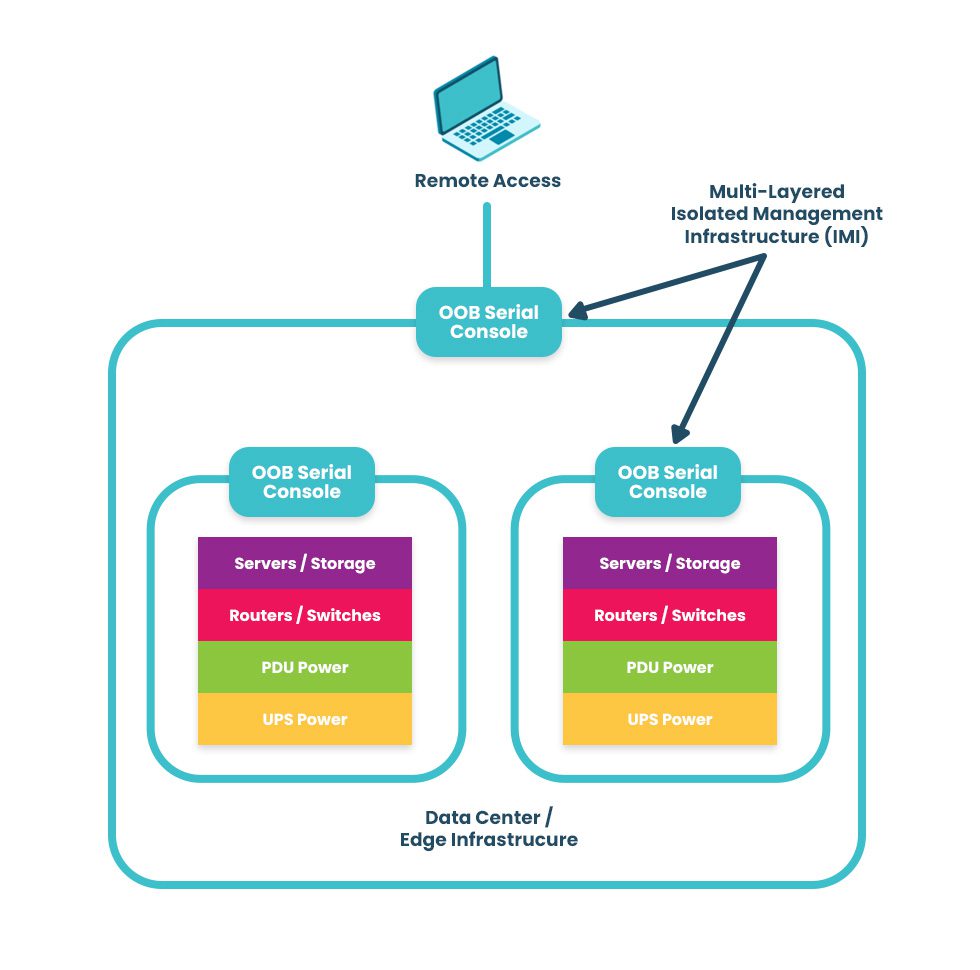
A terminal server is a networking device used to manage other equipment. It directly connects to servers, switches, routers, and other equipment using management ports, which are typically (but not always) serial ports. Network administrators remotely access the terminal server and use it to manage all connected devices in the data center rack or branch where it’s installed.

What are the uses for terminal servers?

Network teams use terminal servers for two primary functions: remote infrastructure management consolidation and out-of-band management.

  1. Terminal servers unify management for all connected devices, so administrators don’t need to log in to each separate solution individually. Terminal servers save significant time and effort, which reduces the risk of fatigue and human error that could take down the network.
  2. Terminal servers provide remote out-of-band (OOB) management, creating a separate, isolated network dedicated to infrastructure management and troubleshooting. OOB allows administrators to troubleshoot and recover remote infrastructure during equipment failures, network outages, and ransomware attacks.

Learn more about using OOB terminal servers to recover from ransomware attacks by reading How to Build an Isolated Recovery Environment (IRE).

What are the benefits of terminal servers?

There are other ways to gain remote OOB management access to remote infrastructure, such as using Intel NUC jump boxes. Despite this, terminal servers are the better option for OOB management because they offer benefits including:

The benefits of terminal servers

Centralized management

Remote recovery

Even with a jump box, administrators typically must access the CLI of each infrastructure solution individually. Each jump box is also separately managed and accessed. A terminal server provides a single management platform to access and control all connected devices. That management platform works across all terminal servers from the same vendor, allowing teams to monitor and manage infrastructure across all remote sites from a single portal. 

When a jump box crashes or loses network access, there’s usually no way to recover it remotely, necessitating costly and time-consuming truck rolls before diagnostics can even begin. Terminal servers use OOB connection options like 5G/4G LTE to ensure continuous access to remote infrastructure even during major network outages. Out-of-band management gives remote teams a lifeline to troubleshoot, rebuild, and recover infrastructure fast.

Improved performance

Stronger security

Network and infrastructure management workflows can use a lot of bandwidth, especially when organizations use automation tools and orchestration platforms, potentially impacting end-user performance. Terminal servers create a dedicated OOB control plane where teams can execute as many resource-intensive automation workflows as needed without taking bandwidth away from production applications and users. 

Jump boxes often lack the security features and oversight of other enterprise network resources, which makes them vulnerable to exploitation by malicious actors. Terminal servers are secured by onboard hardware Roots of Trust (e.g., TPM), receive patches from the vendor like other enterprise-grade solutions, and can be onboarded with cybersecurity monitoring tools and Zero Trust security policies to defend the management network. 

Examples of terminal servers

Examples of popular terminal server solutions include the Opengear CM8100, the Avocent ACS8000, and the Nodegrid Serial Console Plus. The Opengear and Avocent solutions are second-generation, or Gen 2, terminal servers, which means they provide some automation support but suffer from vendor lock-in. The Nodegrid solution is the only Gen 3 terminal server, offering unlimited integration support for 3rd-party automation, security, SD-WAN, and more.

What to look for in the best terminal server

Terminal servers have evolved, so there is a wide range of options with varying capabilities and features. Some key characteristics of the best terminal server include:

  • 5G/4G LTE and Wi-Fi options for out-of-band access and network failover
  • Support for legacy devices without costly adapters or complicated configuration tweaks
  • Advanced authentication support, including two-factor authentication (2FA) and SAML 2.0
  • Robust onboard hardware security features like a self-encrypted SSD and UEFI Secure Boot
  • An open, Linux-based OS that supports Guest OS and Docker containers for third-party software
  • Support for zero-touch provisioning (ZTP), custom scripts, and third-party automation tools
  • A vendor-neutral, centralized management and orchestration platform for all connected solutions

These characteristics give organizations greater resilience, enabling them to continue operating and providing services in a degraded fashion while recovering from outages and ransomware. In addition, vendor-neutral support for legacy devices and third-party automation enables companies to scale their operations efficiently without costly upgrades.

Why choose Nodegrid terminal servers?

Only one terminal server provides all the features listed above on a completely vendor-neutral platform – the Nodegrid solution from ZPE Systems.

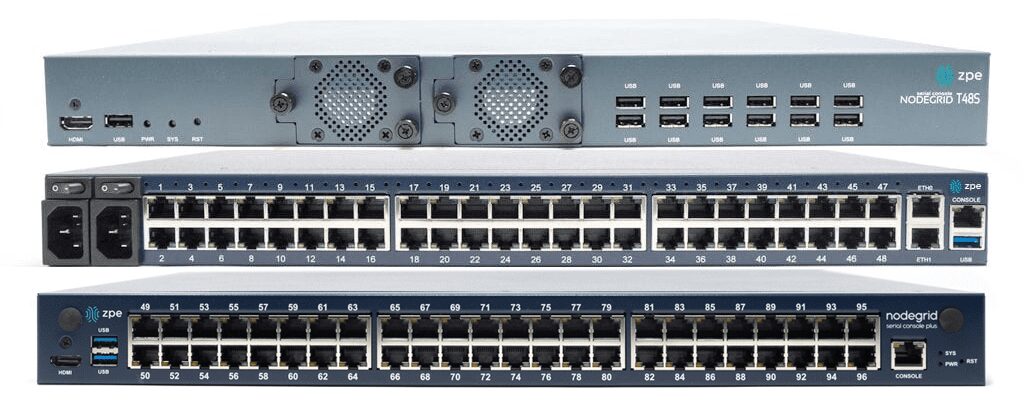
The Nodegrid S Series terminal server uses auto-sensing ports to discover legacy and mixed-vendor infrastructure solutions and bring them under one unified management umbrella.

The Nodegrid Serial Console Plus (NSCP) is the first terminal server to offer 96 management ports on a 1U rack-mounted device (Patent No. 9,905,980).

ZPE also offers integrated branch/edge services routers with terminal server functionality, so you can consolidate your infrastructure while extending your capabilities.

All Nodegrid devices offer a variety of OOB and failover options to ensure maximum speed and reliability. They’re protected by comprehensive onboard security features like TPM 2.0, self-encrypted disk (SED), BIOS protection, Signed OS, and geofencing to keep malicious actors off the management network. They also run the open, Linux-based Nodegrid OS, supporting Guest OS and Docker containers so you can host third-party applications for automation, security, AIOps, and more. Nodegrid extends automation, security, and control to all the legacy and mixed-vendor devices on your network and unifies them with a centralized, vendor-neutral management platform for ultimate scalability, resilience, and efficiency.

Want to learn more about Nodegrid terminal servers?

ZPE Systems offers terminal server solutions for data center, branch, and edge deployments. Schedule a free demo to see Nodegrid terminal servers in action.

Request a Demo

Gartner Market Guide for Edge Computing

Edge-computing-strategy
In today’s highly distributed enterprise environment, a large portion of business data is generated by devices at the edges of the network. For example, many industries, from healthcare to finance, use IoT (Internet of Things) devices to collect essential and sensitive data. Transmitting this data back to a centralized data center for processing creates network latency and introduces security risks. 

Edge computing moves processing power and applications closer to the sources of data at the edges of the network, which improves performance and reduces risk. This approach is gaining popularity, with recent Gartner research finding that 69% of CIOs have already deployed edge technologies or would deploy by mid-2025. However, most edge deployments focus on individual use cases and lack a cohesive strategy, resulting in “edge sprawl”: many disparate solutions deployed all over the enterprise without centralized control or visibility.

“Edge computing without a strategy will eventually cause digital gridlock.” Thomas Bittman, Gartner Distinguished VP Analyst, in Building an Edge Computing Strategy

Edge sprawl increases complexity, reduces resilience, and ultimately hampers digital transformation. In a report published earlier this year titled “Building an Edge Computing Strategy,” Gartner provides recommendations for reducing edge sprawl with a comprehensive strategy. As we await the next Gartner Market Guide for Edge Computing, let’s discuss their recommendations for building a strategy to manage and orchestrate your edge solutions.

Building a Gartner-approved edge computing strategy

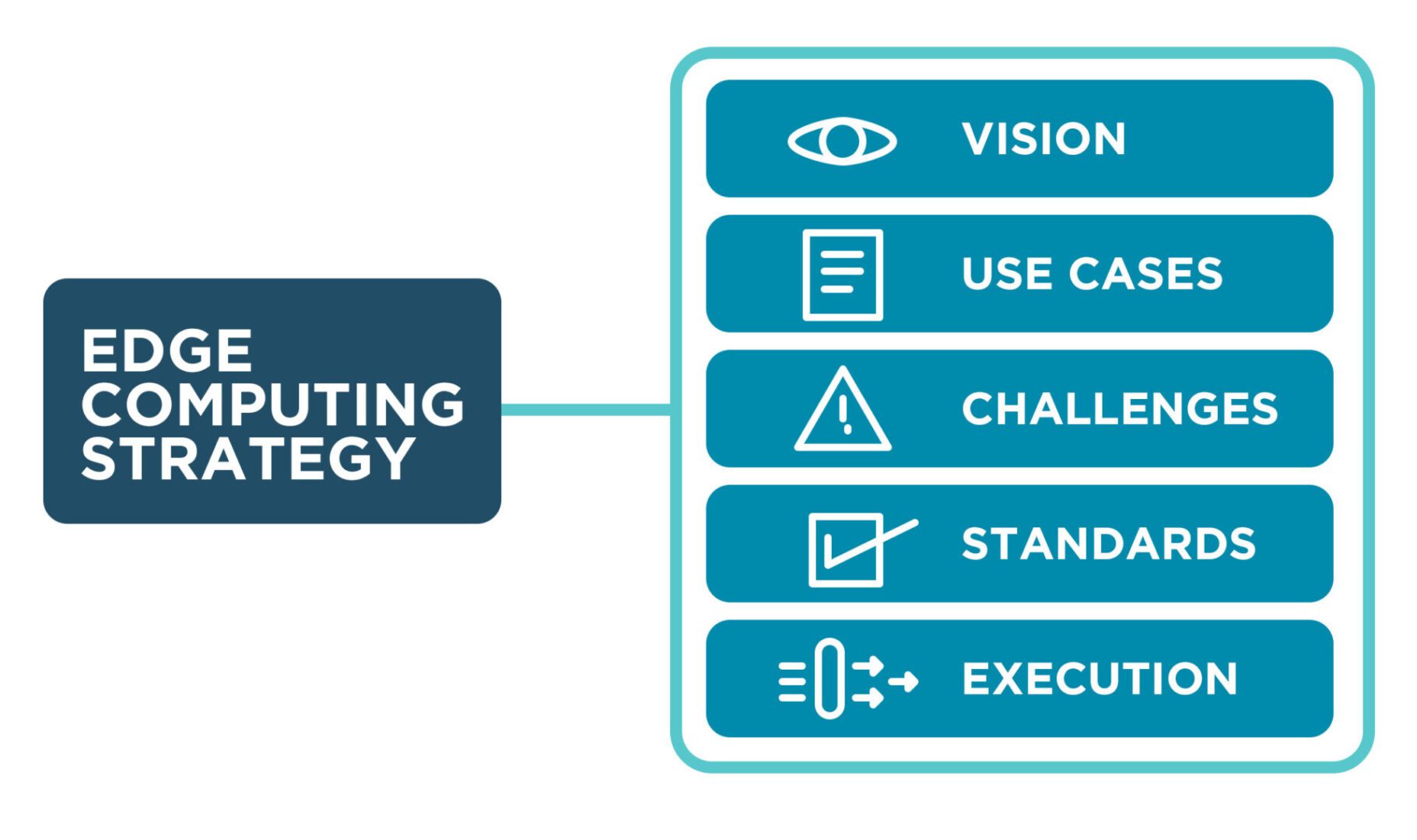
Gartner recommends building an edge computing strategy around five elements: vision, use cases, challenges, standards, and execution.

Edge computing vision

An edge computing vision describes the overall organizational goals and provides direction for teams and stakeholders. It should explain how edge computing supports and relates to other technology initiatives, such as cloud computing, IoT/OT devices, and artificial intelligence/machine learning, as well as how it fits into the overall digital transformation strategy.

Key components of an edge computing vision:

  • The business impact of edge computing in objective terms, such as the amount of money saved
  • How edge computing will accelerate digital transformation
  • A discussion of the digital experience improvements enabled by edge computing
  • The anticipated number of automation projects supported by edge computing
  • What edge computing use cases will be deployed
  • The targeted deployment agility in measurable terms, such as the time to deploy a new site

The edge computing vision provides the target your organization wants to reach in the next five years, and should be continuously updated as goals are met and strategies evolve. It’s crucial to clearly communicate the edge computing vision to get buy-in from executives and staff.

Edge computing use cases

There are often many edge computing use cases within an organization, and an effective edge computing strategy must identify and account for them all in order to avoid sprawl. There are three aspects to consider – the edge computing drivers, the existing edge computing use-case landscape, and potential edge computing use cases.

Edge computing drivers

Edge computing evolved to solve problems other computing architectures can’t handle. Understanding what those problems are will help you identify existing use cases and determine when edge computing should be pursued for a particular use case in the future. Gartner identifies four main edge computing drivers.

Gartner’s four edge computing drivers
Latency/Determinism
 A rapid response is required, or the response time needs to be predictable, and current latency is unacceptable 
Data/Bandwidth
 The cost of transmitting noisy, short-lived data is higher than the cost of moving compute to the edge 
Limited Autonomy
 Operations at the edge must continue even if the connection to the central data center or cloud is interrupted 
Privacy/Security
 The privacy and security risks of transmitting edge data are too high, or regulatory requirements prevent it 
An edge computing strategy should describe the organization’s specific needs and drivers that edge computing will address.

Existing edge computing use-case landscape

Many organizations already use edge computing in some form, even if they don’t call it by that name. Examples include operational technology (OT) deployments in the manufacturing industry and smart check-out systems in retail stores. An edge computing strategy must identify all existing solutions and discuss how they’ll be integrated with the chosen management technologies and best practices (more on those later).

Potential edge computing use cases

An effective edge computing strategy should also describe how the business will identify new use cases in the future. This proactive process should use the previously established edge computing drivers and involve collaboration between IT and the various business units within the organization. Gartner recommends creating a “clearinghouse” for new use case ideas, a structured process for identifying, reviewing, and prioritizing potential edge use cases.

Edge computing challenges

Even as edge computing solves business problems, it creates additional challenges that the strategy must address with new technologies and processes. Gartner identifies six major edge computing challenges to focus on while you develop an edge computing strategy.

  1. Enabling extensibility – Purpose-built edge computing solutions can’t adapt when workloads change or grow, so an edge computing strategy should leave room for growth by using extensible, vendor-neutral platforms that allow for expansion and integration.
  2. Extracting value from edge data – As edge devices generate more and more data, the difficulty of quickly extracting value from that data rises, so organizations should look for ways to deploy AI training and data analytics solutions alongside edge computing units.
  3. Governing edge data – Edge computing sites often have more significant data storage constraints than traditional data centers, so quickly distinguishing between valuable data and destroyable junk is critical to edge ROIs and requires careful governance.
  4. Securing the edge – Edge deployments are highly distributed in locations that lack many security features in a traditional data center, adding risk and increasing the attack surface, so organizations should protect edge computing nodes with a multi-layered defense including zero-trust policies, strong authentication, and network micro-segmentation. Orgs also need a way to take back control of edge infrastructure during ransomware attacks, such as an isolated recovery environment (IRE).
  5. Supporting edge-native applications – Edge-native applications are designed for the edge from the bottom up, so organizations should deploy platforms that support these applications without increasing the technical debt, meaning they should use familiar technologies and interoperate with existing systems.
  6. Managing and orchestrating the edge – Environmental issues, power failures, and network outages can cut technical teams off from critical edge infrastructure, so organizations need edge management and orchestration (EMO) with environmental monitoring and out-of-band (OOB) connectivity.

Gartner recommends focusing your edge computing strategy on mitigating the specific risks, challenges, and inhibitors.

Edge computing standards

Edge computing use cases are often highly diverse, even within a single organization, so it’s critical to establish a set of unifying standards and guidelines to reduce edge sprawl. Many organizations use a cloud center of excellence (CCOE) to govern their cloud computing architecture, so Gartner recommends establishing a similar edge center of excellence (ECOE) based on three pillars.

Gartner’s Edge Center of Excellence (ECOE)
Governance:
  • Maintain the edge computing strategy
  • Develop security, data, and adoption policies
  • Establish metrics to measure value and ROI
Technologies:
  • Reference architectures
  • Technology and architecture standards
  • Trusted vendor list
  • Vendor selection process
Best Practices/Skills:
  • Solutions consulting
  • Training and role definition
  • Expertise evangelization

For an effective edge computing strategy, Gartner recommends creating a unifying set of standards, guidelines, and best practices to be used across all edge computing deployments.

Edge computing execution

An edge computing strategy should include process documentation for the initial deployment of new edge rollouts. Gartner identifies six steps that help ensure successful edge computing launches.

  • Proof of Concept – Test edge deployments in non-production and get feedback from stakeholders
  • Proof of Production – Conduct a pilot to evaluate how you’ll operate, manage, and monitor an edge project at full scale
  • Phased Rollout – Have a phased deployment plan including scale, regions, and functionality
  • Surprises – Expect the unexpected by including guidelines in your edge computing strategy for monitoring and managing changes
  • Evolution – Edge projects frequently change direction based on evolving requirements or unexpected changes, so extensibility is crucial
  • Next-Best Action – Plans for the future frequently change direction, so have alternatives in your strategy to help guide these evolutions

An edge computing strategy that covers all six steps will streamline deployments and improve the agility of edge execution.

What to Expect from the Gartner Market Guide for Edge Computing

Last year, the Gartner Market Guide for Edge Computing discussed the issue of companies deploying individual edge solutions to handle individual use cases without any unified management and oversight. Part of the problem is that the edge computing market is still immature, and another hurdle is vendor lock-in. When edge computing solutions can’t interoperate with other vendors’ hardware and software, teams cannot deploy the universal hardware and unifying orchestration platforms to manage edge architectures efficiently.

Based on the market analysis provided in “Building an Edge Computing Strategy,” Gartner still heavily emphasizes the need to reduce edge sprawl with centralized, vendor-neutral edge management and orchestration (EMO). You can expect Gartner’s next market guide for edge computing to continue pushing for unified management and to highlight vendors with scalable, extensible, open edge computing solutions.

Building an edge computing strategy with Nodegrid

Nodegrid is a vendor-neutral edge infrastructure orchestration platform from ZPE Systems that can help you solve all six of Gartner’s edge computing challenges.

  • Enabling extensibility – Nodegrid’s modular, extensible devices are easy to scale and adapt to handle changing workloads. Nodegrid management hardware runs the open, Linux-based Nodegrid OS, which can host your choice of third-party edge computing applications, so you can deploy and change edge software without buying additional hardware.
  • Extracting value from edge data – Nodegrid’s powerful, extensible computing hardware can run data analysis, machine learning, and artificial intelligence applications to help extract additional value from the massive quantities of data at the edge.
  • Governing edge data – Nodegrid’s ZPE Cloud platform offers a data lake application that helps process and organize edge data.
  • Securing the edge – Nodegrid uses innovative hardware security and advanced, zero-trust authentication methods to defend edge networks, devices, and applications.
  • Supporting edge-native applications – Nodegrid supports Docker containers and other edge-native technologies, allowing teams to use their choice of software platforms to reduce technical debt.
  • Managing and orchestrating the edge – Nodegrid’s environmental monitoring sensors give remote teams real-time insights into conditions in edge deployment sites so they can respond to climate issues and power fluctuations as they occur. Nodegrid’s out-of-band (OOB) management creates an isolated management infrastructure that doesn’t rely on production network resources, giving teams a lifeline to troubleshoot and recover from outages, failures, and cyberattacks faster and more cost-effectively.

Nodegrid is a vendor-neutral Services Delivery Platform that brings all the components of your edge computing strategy under one management umbrella so you can overcome your biggest edge computing challenges.

Get streamlined edge computing with Nodegrid

To learn more about vendor-neutral edge management and orchestration (EMO) as described in the Gartner market guide for edge computing, contact ZPE Systems.

Request a Demo

What is a Hyperscale Data Center?

shutterstock_2204212039(1)

As today’s enterprises race toward digital transformation with cloud-based applications, software-as-a-service (SaaS), and artificial intelligence (AI), data center architectures are evolving. Organizations rely less on traditional server-based infrastructures, preferring the scalability, speed, and cost-efficiency of cloud and hybrid-cloud architectures using major platforms such as AWS and Google. These digital services are supported by an underlying infrastructure comprising thousands of servers, GPUs, and networking devices in what’s known as a hyperscale data center.

The size and complexity of hyperscale data centers present unique management, scaling, and resilience challenges that providers must overcome to ensure an optimal customer experience. This blog explains what a hyperscale data center is and compares it to a normal data center deployment before discussing the unique challenges involved in managing and supporting a hyperscale deployment.

What is a hyperscale data center?

As the name suggests, a hyperscale data center operates at a much larger scale than traditional enterprise data centers. A typical data center houses infrastructure for dozens of customers, each containing tens of servers and devices. A hyperscale data center deployment supports at least 5,000 servers dedicated to a single platform, such as AWS. These thousands of individual machines and services must seamlessly interoperate and rapidly scale on demand to provide a unified and streamlined user experience.

The biggest hyperscale data center challenges

Operating data center deployments on such a massive scale is challenging for several key reasons.


Hyperscale Data Center Challenges

Complexity

Hyperscale data center infrastructure is extensive and complex, with thousands of individual devices, applications, and services to manage. This infrastructure is distributed across multiple facilities in different geographic locations for redundancy, load balancing, and performance reasons. Efficiently managing these resources is impossible without a unified platform, but different vendor solutions and legacy systems may not interoperate, creating a fragmented control plane.

Scaling

Cloud and SaaS customers expect instant, streamlined scaling of their services, and demand can fluctuate wildly depending on the time of year, economic conditions, and other external factors. Many hyperscale providers use serverless, immutable infrastructure that’s elastic and easy to scale, but these systems still rely on a hardware backbone with physical limitations. Adding more compute resources also requires additional management and networking hardware, which increases the cost of scaling hyperscale infrastructure.

Resilience

Customers rely on hyperscale service providers for their critical business operations, so they expect reliability and continuous uptime. Failing to maintain service level agreements (SLAs) with uptime requirements can negatively impact a provider’s reputation. When equipment failures and network outages occur - as they always do, eventually - hyperscale data center recovery is difficult and expensive.

Overcoming hyperscale data center challenges requires unified, scalable, and resilient infrastructure management solutions, like the Nodegrid platform from ZPE Systems.

How Nodegrid simplifies hyperscale data center management

The Nodegrid family of vendor-neutral serial console servers and network edge routers streamlines hyperscale data center deployments. Nodegrid helps hyperscale providers overcome their biggest challenges with:

  • A unified, integrated management platform that centralizes control over multi-vendor, distributed hyperscale infrastructures.
  • Innovative, vendor-neutral serial console servers and network edge routers that extend the unified, automated control plane to legacy, mixed-vendor infrastructure.
  • The open, Linux-based Nodegrid OS which hosts or integrates your choice of third-party software to consolidate functions in a single box.
  • Fast, reliable out-of-band (OOB) management and 5G/4G cellular failover to facilitate easy remote recovery for improved resilience.

The Nodegrid platform gives hyperscale providers single-pane-of-glass control over multi-vendor, legacy, and distributed data center infrastructure for greater efficiency. With a device like the Nodegrid Serial Console Plus (NSCP), you can manage up to 96 devices with a single piece of 1RU rack-mounted hardware, significantly reducing scaling costs. Plus, the vendor-neutral Nodegrid OS can directly host other vendors’ software for monitoring, security, automation, and more, reducing the number of hardware solutions deployed in the data center.

Nodegrid’s out-of-band (OOB) management creates an isolated control plane that doesn’t rely on production network resources, giving teams a lifeline to recover remote infrastructure during outages, equipment failures, and ransomware attacks. The addition of 5G/4G LTE cellular failover allows hyperscale providers to keep vital services running during recovery operations so they can maintain customer SLAs.

Want to learn more about Nodegrid hyperscale data center solutions from ZPE Systems?

Nodegrid’s vendor-neutral hardware and software help hyperscale cloud providers streamline their operations with unified management, enhanced scalability, and resilient out-of-band management. Request a free Nodegrid demo to see our hyperscale data center solutions in action.

Request a Demo

Healthcare Network Design

Edge Computing in Healthcare
In a healthcare organization, IT’s goal is to ensure network and system stability to improve both patient outcomes and ROI. The National Institutes of Health (NIH) provides many recommendations for how to achieve these goals, and they place a heavy focus on resilience engineering (RE). Resilience engineering enables a healthcare organization to resist and recover from unexpected events, such as surges in demand, ransomware attacks, and network failures. Resilient architectures allow the organization to continue operating and serving patients during major disruptions and to recover critical systems rapidly.

This guide to healthcare network design describes the core technologies comprising a resilient network architecture before discussing how to take resilience engineering to the next level with automation, edge computing, and isolated recovery environments.

Core healthcare network resilience technologies

A resilient healthcare network design includes resilience systems that perform critical functions while the primary systems are down. The core technologies and capabilities required for resilience systems include:

  • Full-stack networking – Routing, switching, Wi-Fi, voice over IP (VoIP), virtualization, and the network overlay used in software-defined networking (SDN) and software-defined wide area networking (SD-WAN)
  • Full compute capabilities – The virtual machines (VMs), containers, and/or bare metal servers needed to run applications and deliver services
  • Storage – Enough to recover systems and applications as well as deliver content while primary systems are down

These are the main technologies that allow healthcare IT teams to reduce disruptions and streamline recovery. Once organizations achieve this base level of resilience, they can evolve by adding more automation, edge computing, and isolated recovery infrastructure.

Extending automated control over healthcare networks

Automation is one of the best tools healthcare teams have to reduce human error, improve efficiency, and ensure network resilience. However, automation can be hard to learn, and scripts take a long time to write, so having systems are easily deployable with low technical debt is critical. Tools like ZTP (zero-touch provisioning), and the integration of technology like Infrastructure as Code (IaC), accelerate recovery by automating device provisioning. Healthcare organizations can use automation technologies such as AIOps with resilience systems technologies like out-of-band (OOB) management to monitor, maintain, and troubleshoot critical infrastructure.

Using automation to observe and control healthcare networks helps prevent failures from occuring, but when trouble does actually happen, resilience systems ensure infrastructure and services are quickly returned to health or rerouted when needed.

Improving performance and security with edge computing

The healthcare industry is one of the biggest adopters of IoT (Internet of Things) technology. Remote, networked medical devices like pacemakers, insulin pumps, and heart rate monitors collect a large volume of valuable data that healthcare teams use to improve patient care. Transmitting that data to a software application in a data center or cloud adds latency and increases the chances of interception by malicious actors. Edge computing for healthcare eliminates these problems by relocating applications closer to the source of medical data, at the edges of the healthcare network. Edge computing significantly reduces latency and security risks, creating a more resilient healthcare network design.

Note that teams also need a way to remotely manage and service edge computing technologies. Find out more in our blog Edge Management & Orchestration.

Increasing resilience with isolated recovery environments

Ransomware is one of the biggest threats to network resilience, with attacks occurring so frequently that it’s no longer a question of ‘if’ but ‘when’ a healthcare organization will be hit.

Recovering from ransomware is especially difficult because of how easily malicious code can spread from the production network into backup data and systems. The best way to protect your resilience systems and speed up ransomware recovery is with an isolated recovery environment (IRE) that’s fully separated from the production infrastructure.


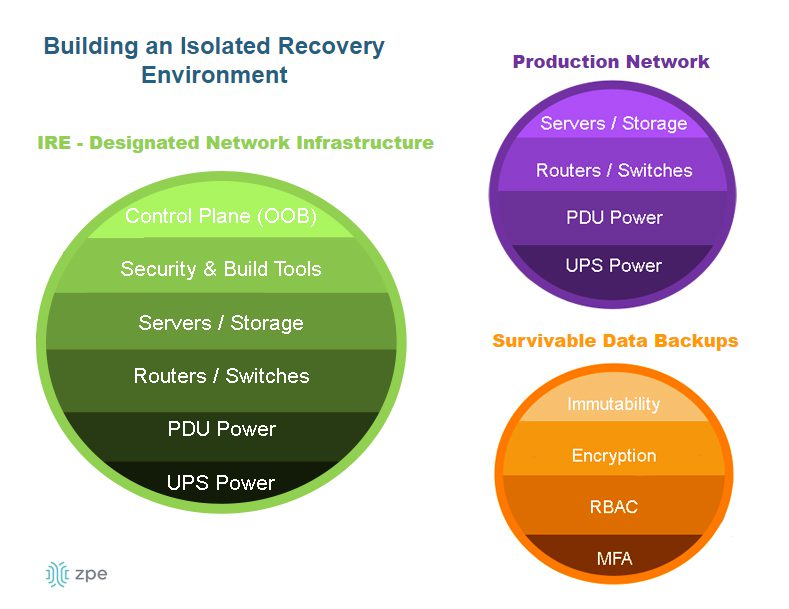
A diagram showing the components of an isolated recovery environment.

An IRE ensures that IT teams have a dedicated environment in which to rebuild and restore critical services during a ransomware attack, as well as during other disruptions or disasters. An IRE does not replace a traditional backup solution, but it does provide a safe environment that’s inaccessible to attackers, allowing response teams to conduct remediation efforts without being detected or interrupted by adversaries. Isolating your recovery architecture improves healthcare network resilience by reducing the time it takes to restore critical systems and preventing reinfection.

To learn more about how to recover from ransomware using an isolated recovery environment, download our whitepaper, 3 Steps to Ransomware Recovery.

Resilient healthcare network design with Nodegrid

A resilient healthcare network design is resistant to failures thanks to resilience systems that perform critical functions while the primary systems are down. Healthcare organizations can further improve resilience by implementing additional automation, edge computing, and isolated recovery environments (IREs).

Nodegrid healthcare network solutions from ZPE Systems simplify healthcare resilience engineering by consolidating the technologies and services needed to deploy and evolve your resilience systems. Nodegrid’s serial console servers and integrated branch/edge routers deliver full-stack networking, combining cellular, Wi-Fi, fiber, and copper into software-driven networking that also includes compute capabilities, storage, vendor-neutral application & automation hosting, and cellular failover required for basic resilience. Nodegrid also uses out-of-band (OOB) management to create an isolated management and recovery environment without the cost and hassle of deploying an entire redundant infrastructure.

Ready to see how Nodegrid can improve your network’s resilience?

Nodegrid streamlines resilient healthcare network design with consolidated, vendor-neutral solutions. Request a free demo to see Nodegrid in action.

Request a Demo

Best DevOps Tools

A glowing interface of DevOps tools and concepts hover above a laptop.
DevOps is all about streamlining software development and delivery through automation and collaboration. Many workflows are involved in a DevOps software development lifecycle, but they can be broadly broken down into the following categories: development, resource provisioning and management, integration, testing, deployment, and monitoring. The best DevOps tools streamline and automate these key aspects of the DevOps lifecycle. This blog discusses what role these tools play and highlights the most popular offerings in each category.

The best DevOps tools

Categorizing the Best DevOps Tools

Version Control Tools

Track and manage all the changes made to a code base.

IaC Build Tools

Provision infrastructure automatically with software code.

Configuration Management Tools

Prevent unauthorized changes from compromising security.

CI/CD Tools

Automatically build, test, integrate, and deploy software.

Testing Tools

Automatically test and validate software to streamline delivery.

Container Tools

Create, deploy, and manage containerized resources for microservice applications.

Monitoring & Incident Response Tools

Detect and resolve issues while finding opportunities to optimize.

DevOps version control

In a DevOps environment, a whole team of developers may work on the same code base simultaneously for maximum efficiency. DevOps version control tools like GitHub allow you to track and manage all the changes made to a code base, providing visibility into who’s making what changes at what time. Version control prevents devs from overwriting each other’s work or making unauthorized changes. For example, a developer may come up with a way to improve the performance of a feature by changing the existing code, but doing so inadvertently creates a vulnerability in the software or interferes with other application functions. DevOps version control prevents unauthorized code changes from integrating with the rest of source code and tracks who’s responsible for making the request, improving the stability and security of the software.

  •  Best DevOps version control tool: Github

Infrastructure as Code (IaC)

Infrastructure as Code (IaC) streamlines the Operations side of a DevOps environment by abstracting server, VM, and container configurations as software code. IaC build tools like HashiCorp Terraform allow Ops teams to write infrastructure configurations as declarative or imperative code, which is used to provision resources automatically. With IaC, teams can deploy infrastructure at the velocity required by DevOps development cycles. A screenshot of a Terraform configuration for AWS infrastructure.

An example Terraform configuration for IaC.

Configuration management

Configuration management involves monitoring infrastructure and network devices to make sure no unauthorized changes are made while systems are in production. Unmonitored changes could introduce security vulnerabilities that the organization is unaware of, especially in a fast-paced DevOps environment. In addition, as systems are patched and updated over time, configuration drift becomes a concern, leading to additional quality and security issues. DevOps configuration management tools like RedHat Ansible automatically monitor configurations and roll back unauthorized modifications. Some IaC build tools, like Terraform, also include configuration management.

Continuous Integration/Continuous Delivery (CI/CD)

Continuous Integration/Continuous Delivery (CI/CD) is a software development methodology that goes hand-in-hand with DevOps. In CI/CD, software code is continuously updated and integrated with the main code base, allowing a continuous delivery of new features and improvements. CI/CD tools like Jenkins automate every step of the CI/CD process, including software building, testing, integrating, and deployment. This allows DevOps organizations to continuously innovate and optimize their products to stay competitive in the market.

Software testing

Not all DevOps teams utilize CI/CD, and even those that do may have additional software testing needs that aren’t addressed by their CI/CD platform. In DevOps, app development is broken up into short sprints so manageable chunks of code can be tested and integrated as quickly as possible. Manual testing is slow and tedious, introducing delays that prevent teams from achieving the rapid delivery schedules required by DevOps organizations. DevOps software testing tools like Selenium automatically validate software to streamline the process and allow testing to occur early and often in the development cycle. That means high-quality apps and features get out to customers sooner, improving the ROI of software projects.

  •  Best software testing tool: Selenium

Container management

In DevOps, containers are lightweight, virtualized resources used in the development of microservice applications. Microservice applications are extremely agile, breaking up software into individual services that can be developed, deployed, managed, and destroyed without affecting other parts of the app. Docker is the de facto standard for basic container creation and management. Kubernetes takes things a step further by automating the orchestration of large-scale container deployments to enable an extremely efficient and streamlined infrastructure.

Monitoring & incident management

Continuous improvement is a core tenet of the DevOps methodology. Software and infrastructure must be monitored so potential issues can be resolved before they affect software performance or availability. Additionally, monitoring data should be analyzed for opportunities to improve the quality, speed, and usability of applications and systems. DevOps monitoring and incident response tools like Cisco’s AppDynamics provide full-stack visibility, automatic alerts, automated incident response and remediation, and in-depth analysis so DevOps teams can make data-driven decisions to improve their products.

Deploy the best DevOps tools with Nodegrid

DevOps is all about agility, speed, and efficiency. The best DevOps tools use automation to streamline key workflows so teams can deliver high-quality software faster. With so many individual tools to manage, there’s a real risk of DevOps tech sprawl driving costs up and inhibiting efficiency. One of the best ways to reduce tech sprawl (without giving up all the tools you love) is by using vendor-neutral platforms to consolidate your solutions. For example, the Nodegrid Services Delivery Platform from ZPE Systems can host and integrate 3rd-party DevOps tools, reducing the need to deploy additional virtual or hardware resources for each solution. Nodegrid utilizes integrated services routers, such as the Gate SR or Net SR, to provide branch/edge gateway routing, in-band networking, out-of-band (OOB) management, cellular failover, and more. With a Nodegrid SR, you can combine all your network functions and DevOps tools into a single integrated solution, consolidating your tech stack and streamlining operations.

A major benefit of using Nodegrid is that the Linux-based Nodegrid OS is Synopsys secure, meaning every line of source code is checked during our SDLC. This significantly reduces CVEs and other vulnerabilities that are likely present in other vendors’ software.

Learn more about efficient DevOps management with vendor-neutral solutions

With the vendor-neutral Nodegrid Services Delivery Platform, you can deploy the best DevOps tools while reducing tech sprawl. Watch a free Nodegrid demo to learn more.

Request a Demo