Providing Out-of-Band Connectivity to Mission-Critical IT Resources

SD-WAN Leaders Analysis Report
Logos for the six SD-WAN leaders with a vs. in the middle
Gartner’s most recent Magic Quadrant for SD-WAN identified six vendors as leaders in the market. These vendors qualify as leaders due to numerous factors, including their influence in the market, a demonstrated ability to adapt to changing customer requirements and innovate to anticipate future needs, and solid SD-WAN product offerings that serve most use cases and verticals. This report uses Gartner’s Magic Quadrant and independent analysis to compare the six SD-WAN leaders based on their features, security, versatility, and other key factors.

Comparing SD-WAN leaders

Leading SD-WAN Vendor

Key Takeaways

Cisco

    • Cisco Catalyst SD-WAN (formerly Viptela) and Cisco Meraki SD-WAN products include SD-WAN appliances, integrated security, and centralized management and orchestration

    • Cisco has a proven track record of aligning its SD-WAN feature roadmap with the ever-changing needs of enterprise customers

    • Catalyst and Meraki are different products with entirely separate management platforms, reducing scalability and versatility

Fortinet

    • Fortinet Secure SD-WAN includes physical and virtual NGFW appliances, multi-cloud on-ramp access, and centralized orchestration

    • Fortinet’s SD-WAN offering is extensible with the addition of AI-powered security bundles for a single-vendor SASE solution

    • Fortinet’s limited support for third-party integrations creates vendor lock-in and prevents companies from deploying a unified, multi-vendor SASE solution

HPE (Aruba)

    • HPE’s Aruba EdgeConnect SD-WAN and Aruba EdgeConnect SD-Branch products include physical and virtual appliances with centralized management and orchestration

    • Aruba SD-WAN offerings include performance optimization, cloud on-ramping, and enhanced operational capabilities

    • SD-WAN and SD-Branch offerings target different use cases, which could cause confusion, though both are managed by the same Aruba Central platform

Palo Alto Networks

    • Palo Alto Network’s Prisma SD-WAN includes Instant-On Network (ION) edge appliances and centralized orchestration, while the PAN-OS branch firewall can be upgraded with limited SD-WAN capabilities

    • Prisma provides robust SD-WAN features like cloud on-ramp access and autonomous digital experience management

    • Each product is managed separately and comes with limitations to either security or SD-WAN functionality

Versa Networks

    • Versa Networks offers the on-premises Secure SD-WAN and cloud-based Versa Titan products, which include physical or virtual appliances and centralized orchestration

    • Versa Networks offers a robust SD-WAN feature set, including strong routing and application steering, cloud on-ramping, and integrated security

    • Versa’s high price point and limited geographic presence make it unsuitable for customers in certain regions

VMware

    • VMware VeloCloud SD-WAN includes edge appliances, optional gateway points of presence (POPs), and a cloud-based orchestrator

    • VeloCloud SD-WAN integrates with VMware’s SASE platform as well as other products for cloud security and AIOps

    • VMware SD-WAN lacks native SD-Branch functionality and offers fewer integrated security features for the standalone SD-WAN product

Cisco

Cisco offers two different SD-WAN products: Cisco Catalyst SD-WAN (formerly Viptela), which targets enterprise customers, and Cisco Meraki SD-WAN, which targets mid-size organizations with lean IT operations. Each product is an entirely separate offering managed by different software platforms, making it difficult for a customer to mix-and-match products to adapt to new use cases or start with Meraki and then scale up to Catalyst during an aggressive growth period.

Catalyst SD-WAN is an advanced solution with integrated security, support for cloud on-ramp access, and integrations with ThousandEyes for monitoring and analytics as well as Cisco SSE products for a single-vendor SASE solution. Meraki SD-WAN is a more streamlined option, offering unified management of Meraki infrastructure with integrated security, zero-touch provisioning, and support for machine learning analytics.

Cisco SD-WAN - Pro's
  • Catalyst SD-WAN offers advanced features like multi-cloud on-ramp access and SSE integrations
  • Meraki SD-WAN provides a more streamlined experience with features like zero-touch provisioning to simplify lean IT operations
  • Cisco’s SD-WAN feature roadmap typically aligns with the current and future needs of enterprise customers
  • Cisco SD-WAN - Con's
    • Catalyst and Meraki are separate products with different management platforms, making it more challenging to use both
    • Based on Gartner’s reported client interactions, Cisco’s customer experience rating is lower than other vendors in this category
    • Fortinet

      Fortinet’s Secure SD-WAN solutions run on FortiGate physical and virtual NGFW (next-generation firewall) appliances, tightly integrating networking and security in a consolidated platform. In addition to a centralized orchestrator, Fortinet SD-WAN includes zero-touch provisioning and multi-cloud on-ramp access. It also enables single-vendor SASE with the addition of optional, AI-powered security bundles. However, Fortinet’s limited third-party integrations create vendor lock-in and prevent customers from building a unified, customized, multi-vendor SASE solution.

      Fortinet SD-WAN - Pro's
      • Fortinet combines SD-WAN functionality with NGFW appliances for a tightly integrated, consolidated experience
      • Fortinet offers zero-touch provisioning and multi-cloud on-ramp access to further streamline SD-WAN operations
      • Fortinet enables single-vendor SASE with options for AI-powered security bundles
      • Fortineet SD-WAN - Con's
        • Fortinet has limited integrations with third-party SSE vendors, preventing customers from unifying their multi-vendor SASE deployment
        • Gartner reports that Fortinet’s customer experience rating is below average compared to other SD-WAN vendors in the Magic Quadrant
        • HPE (Aruba)

          HPE (Aruba) has two SD-WAN offerings: EdgeConnect SD-WAN, which is a standalone SD-WAN product, and EdgeConnect SD-Branch, which builds upon the SD-WAN platform by adding software-defined management for wired and wireless branch LANs. Both products run on physical and virtual NGFW appliances for integrated security functionality, and both are managed by the same central orchestrator. Additional features include multi-cloud on-ramp access, unified management of Aruba networking solutions, and integrations with Aruba SSE products for single-vendor SASE.

          It’s notable that HPE (Aruba) is one of only two vendors named as Gartner SD-WAN leaders for all six years of the SD-WAN Magic Quadrant’s existence – the other is VMware.

          HPE (Aruba) SD-WAN - Pro's
          • Aruba offers two tightly integrated products combining SD-WAN and NGFW functionality for converged networking
          • Aruba’s SD-Branch solution extends software-defined control and zero-trust security to wired and wireless branch LANs
          • Aruba’s products include multi-cloud on-ramp access and integrations with Aruba SSE for single-vendor SASE
          • HPE (Aruba) SD-WAN - Con's
            • Aruba’s two different SD-WAN offerings may confuse customers who are unfamiliar with SD-Branch technology
            • Gartner noted that Aruba’s geographic strategy lacked details, so it may not reach customers in all locations
            • Palo Alto Networks

              Palo Alto Networks offers a dedicated SD-WAN product called Prisma SD-WAN, as well as an SD-WAN upgrade for its PAN-OS branch NGFW solution.

              Prisma SD-WAN is part of Palo Alto’s Prisma SASE platform, which was one of the industry’s first complete, single-vendor SASE solutions. The SD-WAN component uses Palo Alto’s Instant-On Network (ION) edge appliances that include integrated, cloud-delivered security, AIOps, SD-Branch, cloud on-ramp access, and autonomous digital experience management (ADEM).

              Palo Alto’s SD-WAN plugin integrates with PAN-OS branch firewalls to provide an SD-WAN overlay with centralized orchestration. It uses separate management software (called Panorama) from the Prisma platform. Essentially, each SD-WAN product targets different use cases and has different limitations. Prisma offers more advanced SD-WAN functionality but weaker on-premises security features (though this can be addressed by hosting Prisma on hardened third-party devices), whereas the PAN-OS platform offers strong branch security features but a more basic SD-WAN overlay.

              Palo Alto Networks SD-WAN Pros
              • Prisma SD-WAN offers advanced features like cloud-delivered security, AIOps, SD-Branch, cloud on-ramp access, and ADEM
              • Palo Alto’s SD-WAN plugin for PAN-OS provides a simpler upgrade path for existing NGFW customers
              • Based on Gartner’s reporting client interactions and Peer Insights data, Palo Alto has an above-average customer experience rating
              • Palo Alto Networks SD-WAN Cons
                • Palo Alto customers must choose between robust SD-WAN with limited branch security or advanced on-premises security functionality with limited SD-WAN
                • Gartner clients reported that Palo Alto Prisma SD-WAN has higher pricing compared to other vendors
                • Versa Networks

                  Versa Networks provides two SD-WAN options, Versa Secure SD-WAN and Versa Titan, which are entirely separate platforms with different orchestrators. Versa Secure SD-WAN offers a fully-featured SD-WAN overlay including advanced features such as multi-cloud on-ramp access, AIOps, a wide range of integrated security functionality like CASB and NGFW, and automated zero-touch provisioning.

                  Versa Titan is a cloud-managed, single-vendor SASE platform for leaner IT operations, providing a basic SD-WAN overlay that’s tightly integrated with cloud-based security features. Titan is an entirely separate product offering and platform targeting an entirely different use case. It offers a more streamlined experience, and it’s more affordable than Versa Secure SD-WAN, according to Gartner analyst assessment and Peer Insights data.

                  Versa Networks SD-WAN Pros
                  • Versa Secure SD-WAN is packed with advanced networking and security features like multi-cloud on-ramp access, AIOps, integrated security, and application steering
                  • Versa Titan offers a streamlined, unified SASE platform with a basic SD-WAN overlay for lean IT operations
                  • Gartner is optimistic about Versa Networks’ product roadmap and ability to meet changing customer requirements
                  • Versa Networks SD-WAN Cons
                    • Based on information from Gartner analysts and Peer Insights data, Versa Secure SD-WAN has a higher-then-average price point in the industry
                    • Versa Networks lacks a strong global presence and may not reach customers in all regions or countries
                    • VMware

                      VMware offers the VeloCloud SD-WAN product, which includes edge networking appliances (physical and virtual), optional gateway points of presence (POPs), and a centralized, cloud-based orchestrator. The VMware Edge Cloud Orchestrator software also integrates with other VMware products like VeloCloud Web Security and the VMware Edge Intelligence AIOps platform. VMware’s SD-WAN offering is also part of VMware’s VeloCloud SASE solution, which uses security functionality from Symantec (owned by Broadcom, the same parent company as VMware).

                      However, the VeloCloud SD-WAN product itself lacks many of the advanced features natively available in competing solutions, such as integrated security and SD-Branch. Despite these limitations, VMware is the only other vendor besides HPE (Aruba) to achieve Gartner SD-WAN leader status for six consecutive years.

                      VMware SD-WAN Pros
                      • VMware VeloCloud SD-WAN includes optional features like gateway POPs and integrations with other VMware products for security and AIOps
                      • VeloCloud SD-WAN is part of VMware’s VeloCloud SASE solution that uses Symantec security features to deliver unified SASE
                      • VMware has a strong customer experience rating based on Gartner client interactions and Peer Insights data
                      • VMware SD-WAN Cons
                        • VMware VeloCloud SD-WAN lacks many of the advanced features natively offered by competing vendors, such as multi-cloud on-ramp access and SD-Branch
                        • The standalone VeloCloud SD-WAN product has limited integrated security functionality unless expanded with additional services
                        • A peek into the future of SD-WAN

                          Gartner’s SD-WAN Magic Quadrant predicted that by 2026, 60% of new SD-WAN purchases will be part of a single-vendor SASE solution, an increase of 45% from 2023. However, extensibility and vendor choice still factored into Gartner’s ratings of current SD-WAN leaders. Closed ecosystems with limited integrations prevent organizations from adapting to new use cases and changing requirements with the speed and agility needed to stay competitive.

                          Companies can avoid vendor lock-in by deploying vendor-neutral edge infrastructure that supports third-party SD-WAN and SASE solutions. For example, the Nodegrid platform from ZPE Systems provides powerful, consolidated branch networking functionality that integrates (or even directly runs) other vendors’ software for SD-WAN, security, AIOps, and more. Plus, Nodegrid provides out-of-band (OOB) management to ensure 24/7 remote management access and network resilience.

                          Deploy SD-WAN leaders with Nodegrid

                          Nodegrid provides a powerful, vendor-neutral foundation to simplify SD-WAN deployment and enable unlimited extensibility, future-proofing branch network operations. Request a free Nodegrid demo to see how it works with your chosen SD-WAN solution.
                          Get a Demo

                          DORA Act: 5 Takeaways For The Financial Sector

                          Thumbnail – DORA Act 5 Takeaways for the Financial Sector

                          The Digital Operational Resilience Act (DORA) is a regulatory initiative within the European Union that aims to enhance the operational resilience of the financial sector. Its main goal is to prevent and mitigate cyber threats and operational disruptions. The DORA Act outlines regulatory requirements for the security of network and information systems “whereby all firms need to make sure they can withstand, respond to and recover from all types of ICT-related disruptions and threats” (DORA Act website).

                          Who and What Are Covered Under the DORA Act?

                          The DORA Act is a regulation that covers all financial entities within the European Union (EU). It recognizes the critical role of information and communication technology (ICT) systems in financial services. DORA applies to financial services including payments, securities, credit rating, algorithmic trading, lending, insurance, and back-office operations. It establishes a framework for ICT risk management through technical standards, which are being released in two phases, the first of which was published on January 17, 2024. The DORA Act will go into effect in its entirety on January 17, 2025.

                          With cyberattacks constantly in the news cycle, it’s no surprise that governing bodies are putting forth standards for operational resilience. But without combing through this lengthy piece of legislation, what should IT teams start thinking about from a practical standpoint? Here are 5 takeaways on what the DORA Act means for the financial sector.

                          DORA Act: 5 Takeaways for the Financial Sector

                          1. Shore-up your cybersecurity measures

                          The DORA Act emphasizes strengthening cybersecurity measures within the financial sector. It requires financial institutions, such as banks, stock exchanges, and financial infrastructure providers, to implement robust cybersecurity controls and protocols. These include adopting advanced authentication mechanisms, encryption standards, and network segmentation to protect sensitive financial data and critical infrastructure from cyber threats. Part of this will also require organizations to apply system patches and updates in a timely manner, which means automated patching will become necessary to every organization’s security posture.

                          2. Implement resilience systems

                          Operational resilience is a key focus area of the DORA Act, aiming to ensure the continuity of essential financial services in the face of cyber threats, natural disasters, and other operational disruptions. Financial institutions are required to develop comprehensive business continuity plans, establish redundant systems and backup facilities, and conduct regular stress tests to assess their ability to withstand and recover from various scenarios. Implementing a resilience system helps with this, as it provides all the infrastructure, tools, and services necessary to continue operating during major incidents.

                          3. Conduct regular scans for vulnerabilities

                          The DORA Act mandates financial institutions to implement robust risk management practices to identify, assess, and mitigate cyber risks and operational vulnerabilities. This includes conducting regular assessments, vulnerability scans, and penetration tests, and developing incident response procedures to quickly address threats. This is all part of taking a proactive approach to identify and mitigate cyber incidents, and reduce the impact that adverse events have on financial stability and consumer confidence.

                          4. Collaborate and share information with industry peers

                          The DORA Act encourages financial institutions to share cybersecurity threat intelligence, incident data, and best practices with industry peers, regulators, and law enforcement agencies. The ability to monitor systems and collect data will be crucial to this approach, and will require systems that can rapidly (and securely) deploy apps/services during ongoing incidents. This will help financial institutions to better understand emerging threats, coordinate responses to cyber incidents, and strengthen collective defenses against threats and operational disruptions.

                          5. Segment physical and logical systems to pass regular audits

                          Through the DORA Act, regulators are empowered to conduct regular assessments, audits, and inspections of systems. This will ensure that financial institutions are implementing adequate controls and safeguards to protect against cyber threats and operational disruptions. A crucial part to this will involve physical and logical separation of systems, such as through Isolated Management Infrastructure, as well as implementing zero trust architecture across the organization. These will help bolster resilience by eliminating control dependencies between management and production networks, which will also help to streamline audits.

                          Get the blueprint to help you comply with the DORA Act

                          DORA’s requirements are meant to help IT teams better protect sensitive data and the integrity of financial systems as a whole. But without a proper network management infrastructure, their production networks are too sensitive to errors and vulnerable to attacks. ZPE has created the blueprint that covers these 5 crucial takeaways outlined in the DORA Act. The architecture outlined in this blueprint has been trusted by Big Tech for more than a decade, as it allows them to deploy modern cybersecurity measures, physically and logically separated systems, and rapid recovery processes. Download the blueprint now.

                          What to do if You’re Ransomware’d: A Healthcare Example

                          What to do if youre ransomwared

                          This article was written by James Cabe, CISSP, a 30-year cybersecurity expert who’s helped major companies including Microsoft and Fortinet.

                          Ransomware gangs target the innocent and vulnerable. They hit a Chicago hospital in December 2023, a London hospital in October the same year, and schools and hospitals in New Jersey as recently as January 2024. This is one of the biggest reasons I’m committed to stopping these criminals by educating organizations on how to re-think and re-architect their approach to cybersecurity.

                          In previous articles, I discussed IMI (Isolated Management Infrastructure) and IRE (Isolated Recovery Environments), and how they could have quickly altered outcomes for MGM, Ragnar Locker victims, and organizations affected by the MOVEit vulnerability. Using IMI and IRE, organizations find that the key to not only speedy recovery, but also to limiting the blast radius and attack persistence, is isolation.

                          Why is isolation (not segmentation) key to ransomware recovery?

                          The NIST framework for incident response has five steps: Identify, Protect, Detect, Respond, and Recover. It’s missing a crucial step, however: Isolate. Stay tuned for a full breakdown of this in my next article. But the reason this is so critical is because attacks move at machine speed, and are very pervasive and persistent. If your management network is not fully isolated from production assets, the infection spreads to everything. Suddenly, you’re locked out completely and looking at months of tedious recovery. For healthcare providers, this jeopardizes everything from patient care to regulatory compliance.

                          Isolation is integral to building a resilience system, or in other words, a system that gives you more than basic serial console/out-of-band access and instead provides an entire infrastructure dedicated to keeping you in control of your systems — be it during a ransomware attack, ISP outage, natural disaster, etc. Because this infrastructure is physically and virtually isolated from production (no dependencies on production switches/routers, no open management ports, etc.), it’s nearly impossible for attackers to lock you out.

                          So, what really should you do if you’re ransomware’d? Let’s walk through an example attack on a healthcare system, and compare the traditional DR (Disaster Recovery) response to the IMI/IRE approach.

                          Ransomware in Healthcare: Disaster Recovery vs Isolated Recovery

                          Suppose you’re in charge of a hospital’s network. MDIoT, patient databases, and DICOM storage are the crown jewels of your infrastructure. Suddenly, you discover ransomware has encrypted patient records and is likely spreading quickly to other crown jewel assets. The risks and potential fallout can’t be understated. Millions of people are depending on you to protect their sensitive info, while the hospital is depending on you to help them avoid regulatory/legal penalties and ensure they can continue operating.

                          The problem with Disaster Recovery

                          Though the word ‘recovery’ is in the name, the DR approach is limited in its capacity to recover systems during an attack. Disaster Recovery typically employs a couple things:

                          • Backups, which are copies of data, configurations, and code that are used to restore a production system when it fails.
                          • Redundancy, which involves duplicating critical systems, services, and applications as a failsafe in the event that primaries go down (think cellular failover devices, secondary firewalls, etc.).

                          What happens when you activate your DR processes? It’s highly likely that you won’t be able to, and that’s because the typical DR setup relies on the production network. There’s no isolation.

                          Think about it this way: your backup servers need direct access to the data they’re backing up. If your file servers get pwned, your backup servers will, too. If your primary firewall gets hacked, your secondary will, too. The problem with backup and redundancy systems — and any system, for that matter — is that when they depend on the underlying infrastructure to remain operational, they’re just as susceptible to outages and attacks. It’s like having a reserve parachute that depends on the main parachute.

                          And what about the rest of your systems? You just discovered the attack has encrypted your servers and is quickly bringing operations to a crawl. How are you going to get in and fight back? What if you try to log into your management network, only to find that you’re locked out? All of your tools, configurations, and capabilities have been compromised.

                          This is why CISA, the FBI, US Navy, and other agencies recommend implementing Isolated Management Infrastructure.

                          IMI and IRE guarantee you can fight back against ransomware

                          You discover that the ransomware has spread. Not only has it encrypted data and stopped operations, but it has also locked you out of your own management network and is affecting the software configurations throughout the hospital. This is where IMI (Isolated Management Infrastructure) and IRE (Isolated Recovery Environment) come in.

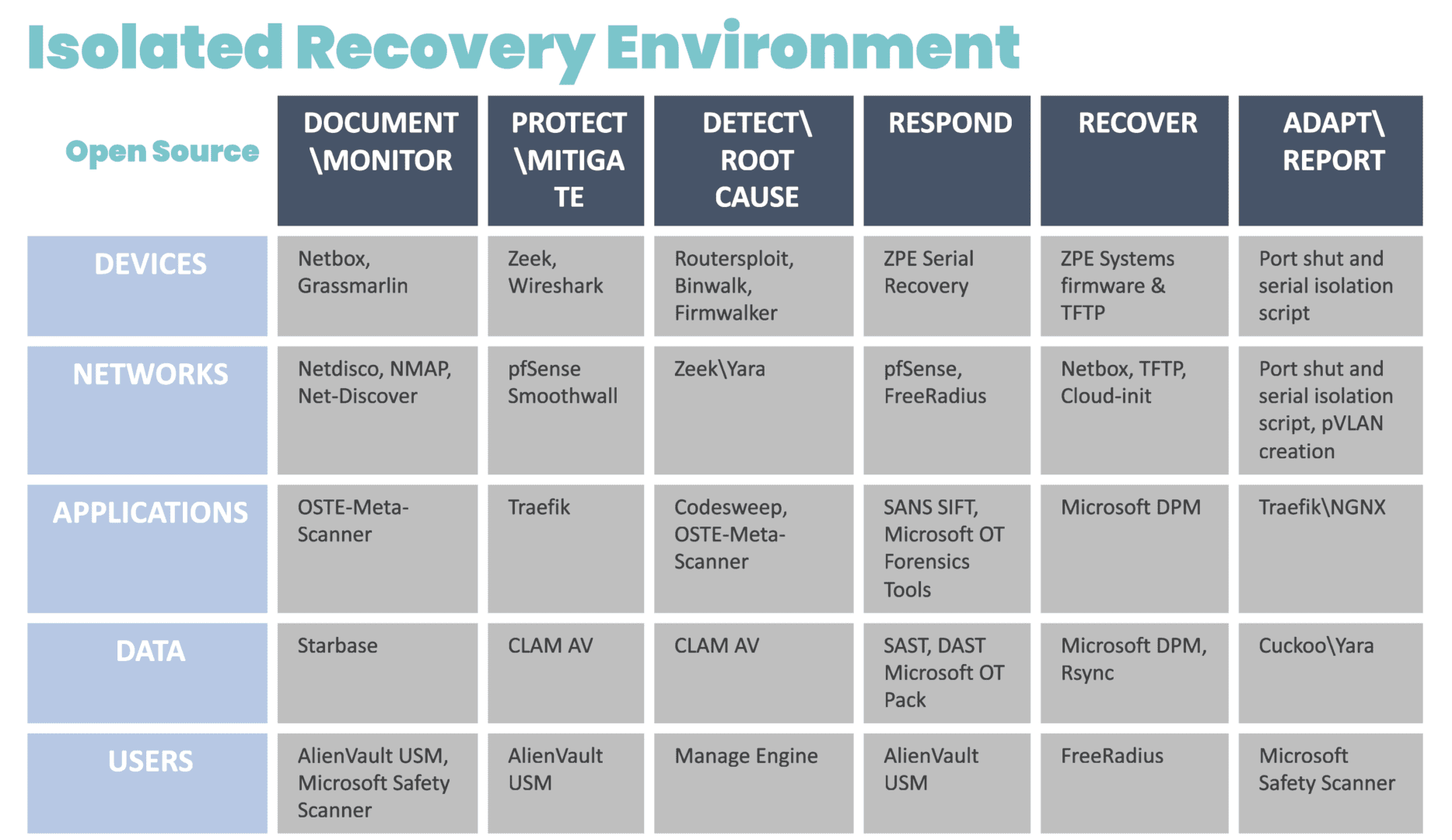
                          Because IMI is physically separate from affected systems, it guarantees management access so teams can set up communication and a temporary ‘war room’ for incident response. The IRE can then be created using a combination of cellular, compute, connectivity, and power control (see diagram for design and steps). Docker containers should be used to bring up each step.

                          Diagram showing a chart containing the systems and open-source tools that can be deployed for an Isolated Recovery Environment

                          Image: The infrastructure and incident response protocol involved in the Isolated Recovery Environment. These products were chosen from free or open source projects that have proven to be very useful in each of these stages of recovery. These can be automated in pieces for each phase, and then be brought down via Docker container to eliminate the risk of leakage or risk during each phase.

                          Without diving too far into the technicalities, the IRE enables you to recover survivable data, restore software configurations, and prevent reinfection. Here are some things you can do (and should do) in this scenario, courtesy of the IRE:

                          Establish your war room

                          You can’t fight ransomware if you can’t securely communicate with your team. Use the IRE to create offline, break-the-glass accounts that are not attached to email. This allows you to communicate and set up ticketing for forensics purposes.

                          Isolate affected systems

                          There’s no use running antivirus if reinfection can occur. Use the IRE to take offline the switch that connects the backup and file servers. Isolate these servers from each other and shut down direct backup ports. Then, you can remote-in (KVM, iKVM, iDRAC) to run antivirus and EDR (Endpoint Detection and Response).

                          Restore data and device images

                          The key is to have backup data at its most current, both for patient data and device/software configurations. Because the IRE provides an isolated environment, and you’ve already pulled your backups offline, you can gradually restore data, re-image devices, and restore configurations without risking reinfection. The IRE ensures devices “keep away” from each other until they can be cleansed and recovered.

                          Things You’ll Need To Build The IMI and IRE

                          Network Automation Blueprint

                          We’ve created a comprehensive blueprint that shows how to implement the architecture for IMI and IRE. Don’t let the name fool you. The Network Automation Blueprint covers everything from establishing a dedicated management network, to automating deployment of services for ransomware recovery. Get your PDF copy now at the link below.

                          Gen 3 Console Servers To Replace End-of-Life Gear

                          It’s nearly impossible to build the IMI or deploy the IRE using older console servers. That’s because these only give you basic remote access and a hint of automation capabilities. You’ll still need the ability to run VMs and containers. Gen 3 console servers let you do all of the things for IMI and IRE, like full control plane/data plane separation, hosting apps, and deploying VMs/containers on-demand. They’ve also been validated by Synopsys and have built-in security features I’ve been talking about for years. Check out the link below for resources about Gen 3 and how we’ll help you upgrade.

                          Get in touch with me!

                          I’d love to talk with you about IMI, IRE, and resilience systems. These are becoming more crucial to operational resilience and ransomware recovery, and countries are passing new regulations that will require these approaches. Get in touch with me via social media to talk about this!

                          Zero Trust Security Benefits

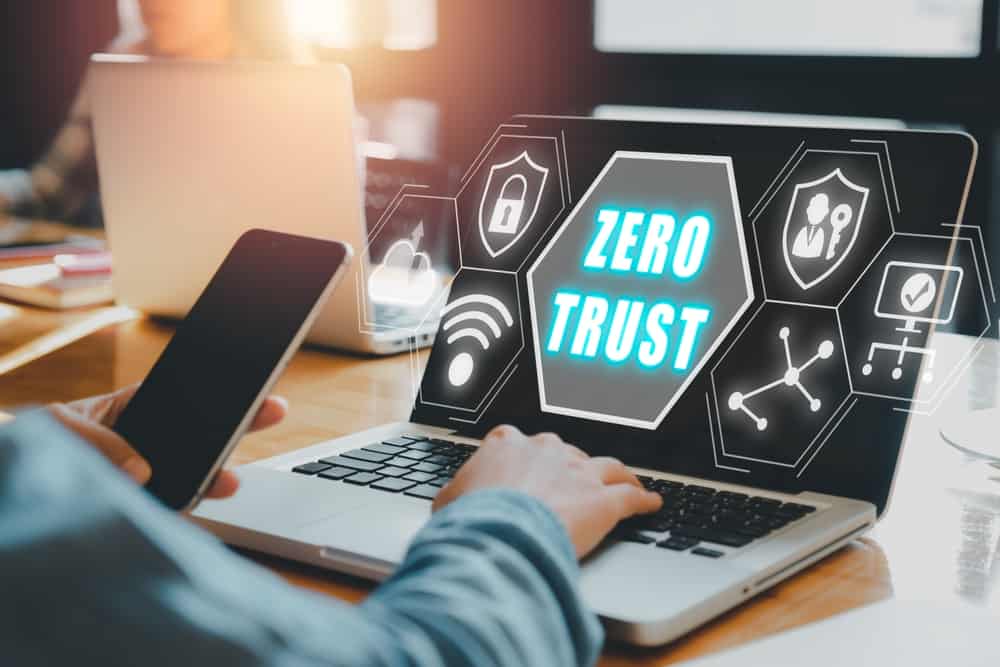
                          A 3D illustration of the words Zero Trust

                          Network security has become more challenging for companies whose employees, devices, and applications no longer reside within one easily defended perimeter. Additionally, cyber attacks like ransomware constantly threaten networks, forcing organizations to operate under the assumption that systems are already breached.

                          Zero trust security is a methodology that helps companies limit the blast radius of an attack to prevent the exfiltration of sensitive and valuable data. Zero trust assumes that every user, device, and application is unsafe until proven otherwise, following the principle of “never trust, always verify.” This guide discusses how zero trust security benefits organizations by increasing network visibility, reducing the scope of cyber attacks, and providing precise security coverage.

                          Zero trust security benefits

                          The Top 3 Zero Trust Security Benefits

                          Improves Network Control

                          Zero trust visibility tools improve network control and efficiency by enabling preventative maintenance, faster incident response, and automation.

                          Reduces Attack Radius

                          Zero trust security limits the lateral movement of attackers on the network to reduce the duration of and damage caused by successful breaches.

                          Provides Precise Security Coverage

                          Zero trust uses highly specific security policies and controls, ensuring the best possible protection for each resource without any coverage gaps.

                          1. Improves network control

                          Implementing zero trust security requires knowing exactly what devices, users, applications, and services access the network, where they reside, and their potential vulnerabilities. Additionally, you must monitor all traffic on the network to identify unusual activity that could indicate compromise, and react to potential breaches. Zero trust teams deploy tools such as SIEM (security information and event management) and inventory discovery and assessment solutions to achieve this level of granular visibility.

                          While these tools are necessary to implement zero trust, the visibility they provide has side benefits that improve network management control and efficiency. Having insight into the health status of every network resource enables preventative maintenance and speedy responses to issues that could affect performance or availability if left unchecked. Many zero-trust solutions also use automation tools, such as automatic device/app discovery or AI threat detection, to cut back on the time your administrators spend on tedious, day-to-day management and monitoring tasks.

                          2. Reduces attack radius

                          Many traditional cybersecurity methodologies focus almost entirely on prevention, but once an attacker breaches the network, teams lack the tools to find or stop them. Zero trust security assumes a breach is already occurring. It provides the tools and techniques needed to stop it, reducing the attack radius and limiting the damage caused to your organization.

                          Zero trust uses network micro-segmentation and precise security policies to create perimeters around individual resources, requiring users to continuously prove their identity and “trustworthiness” as they move around the network. Each checkpoint provides another opportunity for multi-factor authentication (MFA) or security monitoring tools to catch and lock out the account.

                          Zero trust security reduces the duration of attacks, which limits data exfiltration, downtime, and other business impacts.

                          3. Provides precise security coverage

                          Traditional security models create one large perimeter of controls and policies that must address every potential vulnerability on the network. This approach leads to a bloated patchwork of appliances and solutions that may not cover all bases, leaving gaps in your security that could expose critical vulnerabilities.

                          Conversely, zero trust security creates micro-perimeters around individual resources, allowing you to implement the exact policies and controls required to protect each component. Tools like next-generation firewalls (NGFWs) enable teams to micro-segment the network, create micro-perimeters, and enforce access controls. Zero trust identity and access management (IAM) solutions also provide a centralized place to create, deploy, manage, and monitor highly specific security policies to protect individual resources.

                          Zero trust security shrinks your perimeter to smaller network segments, allowing teams to apply the best security policies and controls to protect each micro-perimeter. As a result, you don’t have to worry about any weak points or gaps in your network security.

                          How to take advantage of zero trust security benefits

                          Zero trust security benefits organizations by increasing their overall network visibility, reducing the scope and impact of attacks, and enabling more precise security controls and access policies.

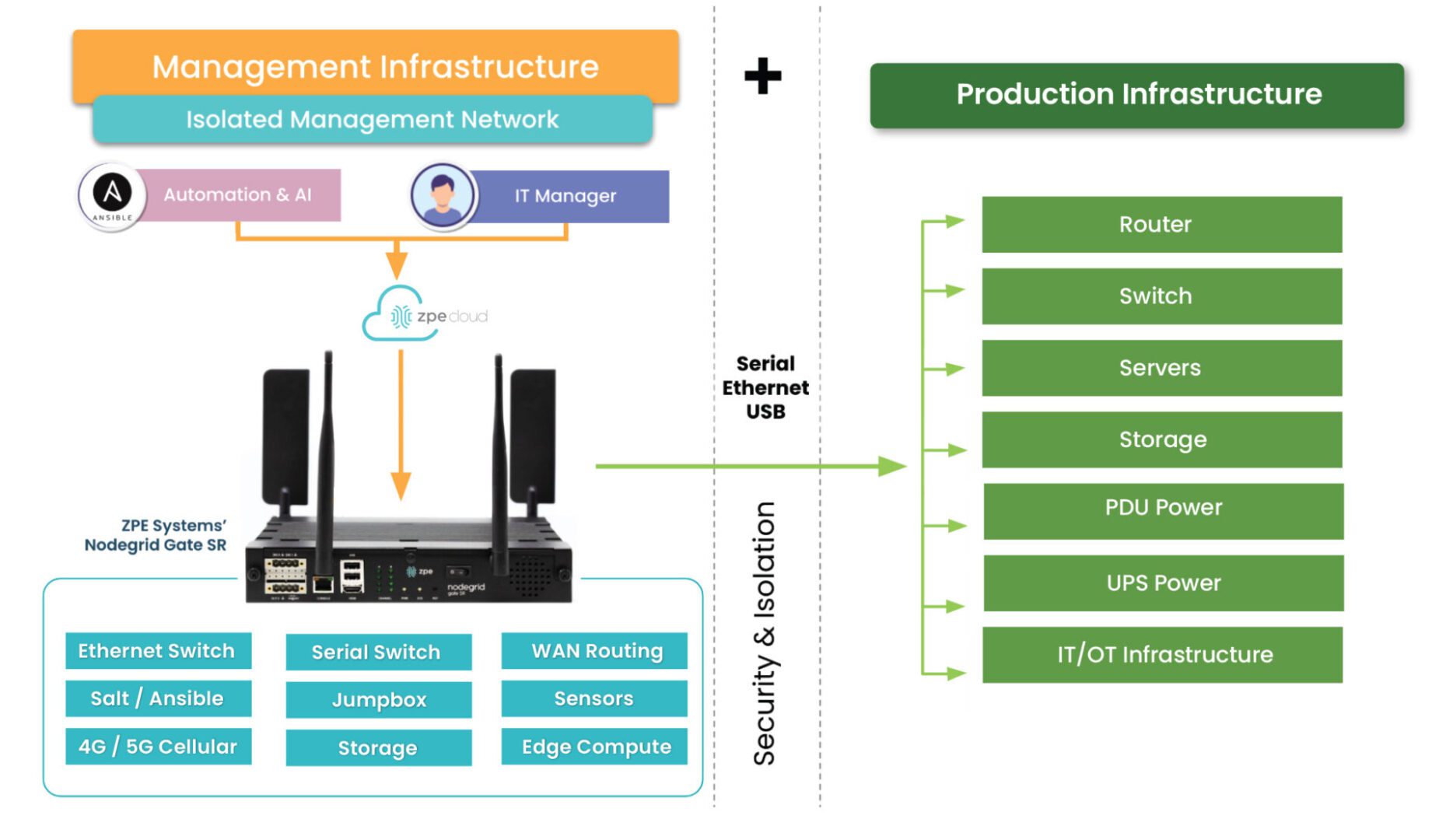
                          One important thing to consider is that you must apply zero trust to both production network resources and management interfaces on the control plane. The best practice is to move management interfaces to an isolated, out-of-band (OOB) network using Nodegrid OOB devices to help create an isolated management infrastructure (IMI) that’s micro-segmented with zero trust policies and controls. A zero-trust IMI prevents attackers from jumping from production resources to the control plane for “crown jewels” infrastructure, significantly improving your security posture.

                          Isolated Management Infrastructure

                          Additionally, achieving zero trust is easier with an open, flexible, vendor-neutral platform that integrates all your tools, features, and controls into one simplified interface. For example, the Nodegrid platform from ZPE Systems serves as a single security gateway with seamless integrations with third-party services like Okta and Palo Alto Panorama. Nodegrid allows you to take advantage of zero trust security benefits with a customized solution that supports your organization’s unique goals and requirements.

                          Want to learn more about how to simplify zero trust security with Nodegrid?

                          ZPE Systems can help your company realize these zero trust security benefits with our secure out-of-band management solutions and vendor-neutral platform. Schedule a free Nodegrid demo to learn more.

                          Watch Demo

                          Network Management Best Practices

                          A collage of concepts related to network management best practices for resilience and security.

                          Network management involves administering, controlling, and monitoring an organization’s network. For most companies, the top priority for network teams is ensuring the continuous availability of critical business services, even during disruptive events like natural disasters, ransomware attacks, and infrastructure failures. Network resilience is the ability to continue operating (if in a degraded state) and delivering digital services in the face of adversity. This guide discusses the network management best practices for improving and supporting network resilience.  

                          Network management best practices

                          Network Management Best Practices for Resilience

                          Isolated Management Infrastructure (IMI)

                          • Moves management interfaces off the production network to protect them from cybercriminals

                          • Out-of-band (OOB) management ensures continuous remote access to IMI even when production infrastructure is offline

                          • Isolated Recovery Environments (IREs) allow teams to restore infrastructure and services without risking reinfection

                          Network Automation

                          • Reduces the risk of failures or security breaches by eliminating human error in configuration changes

                          • Simplifies fleet management tasks like connectivity checks, device location monitoring, and software patching

                          • Application-aware routing, intelligent load balancing, and automatic failover ensure optimal performance and availability

                          Network Security

                          • Zero trust security protects valuable data and resources from attackers already on the network

                          • SASE and SSE extend enterprise security policies and tools to remote users, applications, and devices

                          • AIOps provides enhanced security monitoring, threat detection, and remediation capabilities

                          Isolated Management Infrastructure (IMI)

                          Major ransomware attacks and breaches happen so frequently that cybersecurity professionals must now operate as if the network has already been compromised. This high-threat atmosphere led to the rise of the Zero Trust Security methodology discussed below. It’s also why a recent CISA Binding Directive outlines the best practice of isolating your management interfaces to a designated management network.

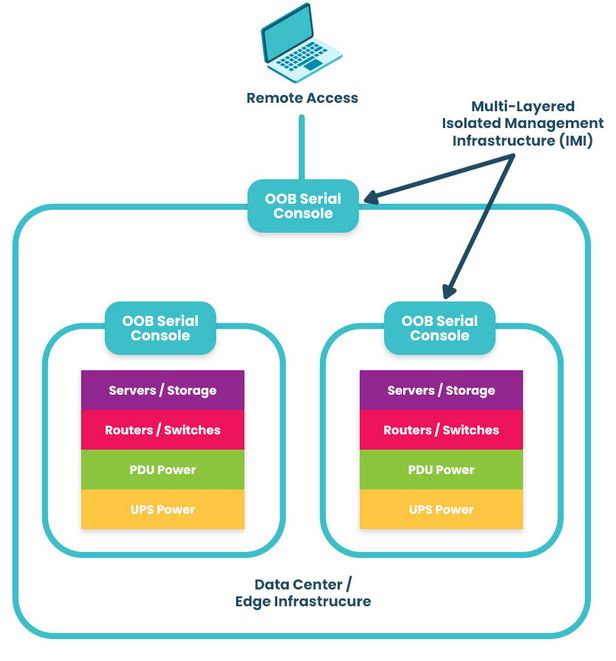
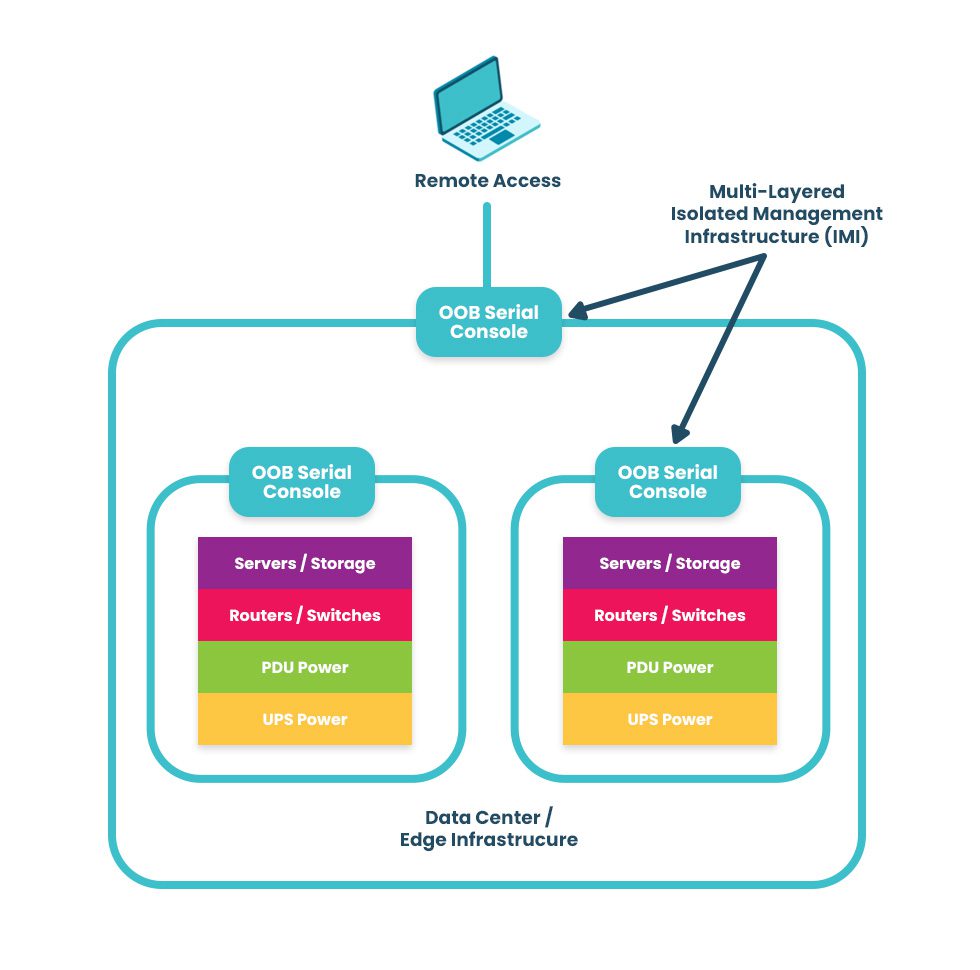
                          Moving all control functions for network infrastructure off the production LAN reduces the risk of cybercriminals accessing your management interfaces and “crown jewel” assets. This practice is known as isolated management infrastructure (IMI), and it separates the management plane from the data plane using designated network infrastructure. Doing so prevents attackers on the production network from finding and accessing the interfaces used to control servers, firewalls, routers, and other critical infrastructure devices. Thanks to management network segmentation and zero-trust security controls, hacking an IMI is almost impossible.

                          A diagram showing a multi-layered isolated management infrastructure.

                          The best practice is to use out-of-band (OOB) serial consoles (a.k.a. console servers or terminal servers) to help construct the IMI. An OOB management solution uses dedicated network interfaces (such as 4G/5G cellular LTE or fiber) to provide an Internet connection for remote management access that doesn’t rely upon the primary production network at all. The benefit of using an OOB console server for the IMI is that teams have continuous access to monitor, manage, troubleshoot, and recover remote infrastructure when the production network is unavailable. Additionally, routing management ports to terminate on OOB terminal servers deployed top-of-rack creates multiple layers of management isolation to protect critical assets from criminals on the network.

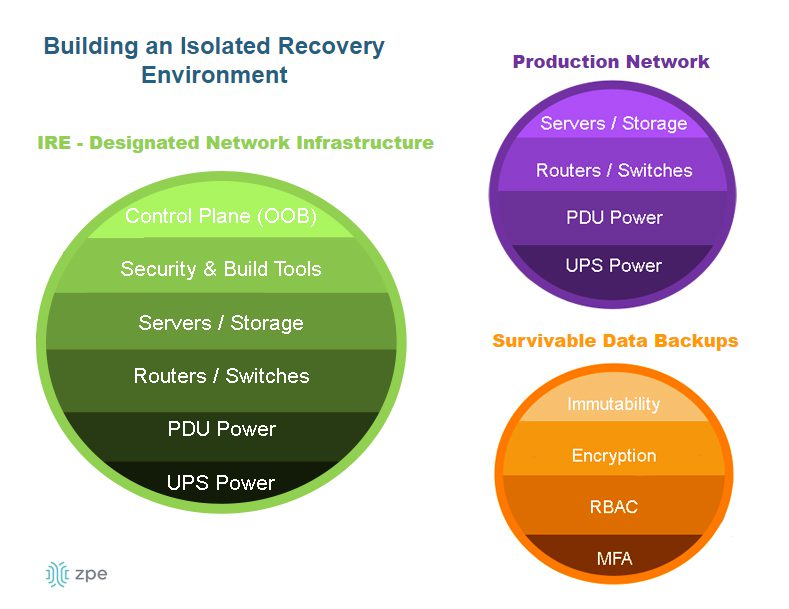
                          A diagram showing the components of an isolated recovery environment.

                          Another network management best practice aided by IMI and OOB serial consoles is an isolated recovery environment (IRE). An IRE is built with designated infrastructure that is easily and quickly deployable, including an OOB control plane (such as a serial console), redundant storage & compute, and security and recovery tools. This gives teams a safe environment to recover from ransomware attacks without worrying about reinfection. Ideally, the IMI will use devices that consolidate network functions to enable easy deployments and scaling of IRE and OOB, but those devices should have robust features that can host the apps, tools, and services required to rebuild systems and restore data.

                          Network automation

                          Modern networks are large, complex, and ever-expanding, with user expectations growing more demanding every day. Even the best network administrator sometimes makes mistakes, either through negligence or because they have an overwhelming amount of work to do. Maybe they copy and paste the wrong security setting for a particular firewall appliance in a rush to deploy a new site on time; perhaps they miss a critical device health alert because they’re responding to a separate incident. These human errors, while understandable, can have devastating consequences on network resilience by causing security breaches, equipment failure, and service outages.

                          Network automation removes human error from the equation, ensuring network management tasks are carried out perfectly every time. Automation streamlines the most tedious network and fleet management tasks so teams can improve efficiency without allowing anything to fall through the cracks. Automation tools also respond to changing network conditions faster than human administrators to optimize the performance and availability of critical systems and services.

                          Network Automation Examples

                          Infrastructure as Code (IaC) abstracts infrastructure configurations from the underlying hardware so they can be written and deployed as repeatable, automatable scripts.

                          Zero Touch Provisioning automatically downloads and installs new network device configurations with little to no human interaction to streamline remote deployments.

                          Software-Defined Wide Area Networking (SD-WAN) decouples WAN control functions from the underlying hardware to enable features like application-aware routing, intelligent load balancing, and automatic failover to improve performance and availability.

                          Automatic Patch Management ensures software vulnerabilities are closed before being exploited by cybercriminals while providing automatic recovery and rollback in case of issues.

                          Network security

                          As discussed above, network breaches occur so frequently that it’s now a security best practice to assume attackers are already on the network. This is part of the zero trust security methodology, which follows the principle of “never trust, always verify” regarding all the users, devices, and applications that access the network. Zero trust security uses strong authentication methods (e.g., 2FA or one-time passwords), hardware roots of trust, and network micro-segmentation. These methods prevent attackers from moving around the network and accessing valuable resources (such as management interfaces).

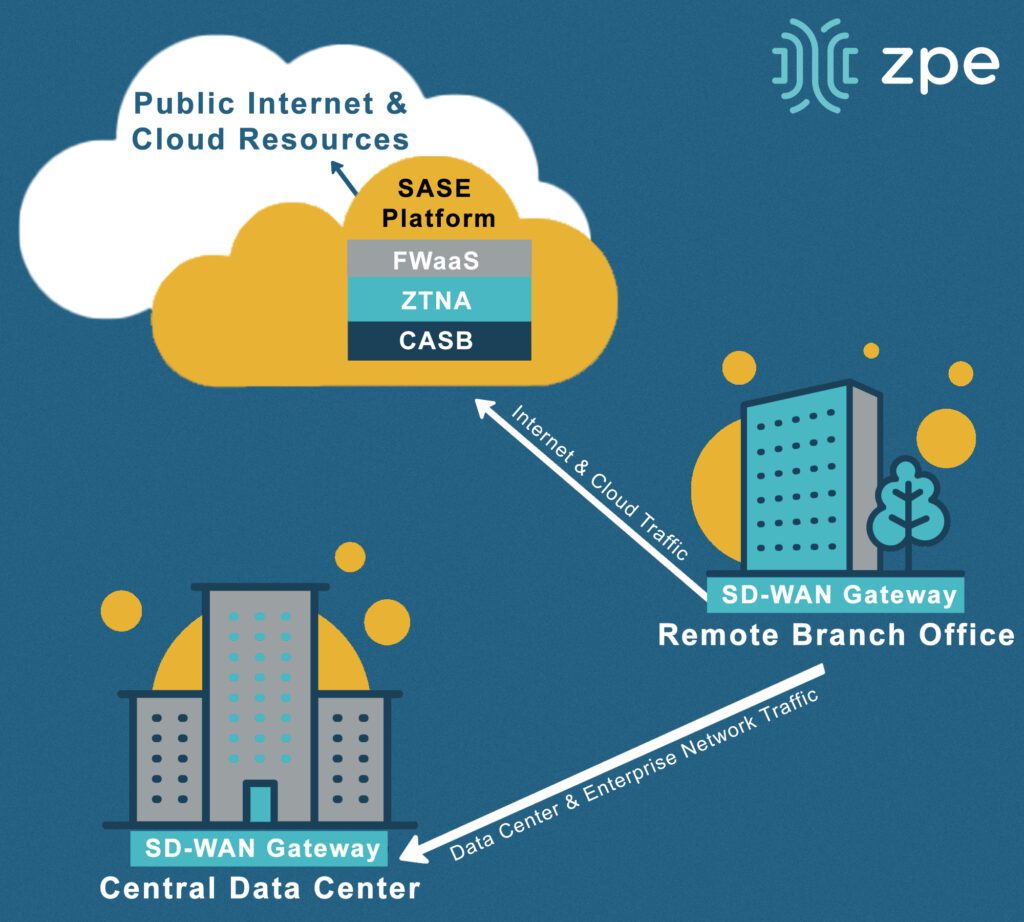
                          Another security-related network management best practice is to extend zero-trust controls and policies to the network’s edges, such as to work-from-home devices, branch offices, and other remote business sites. This is achieved using edge-centric security solutions such as Security Service Edge (SSE) and Secure Access Service Edge (SASE). These technologies route remote, web-destined network traffic through a whole stack of cloud-based security solutions. This allows organizations to apply consistent security to edge traffic without creating bottlenecks at a centralized firewall or deploying additional security appliances at each site.

                          A diagram illustrating a basic SASE network security architecture.

                          Another emerging network management best practice, especially for complex, automated infrastructures, is using artificial intelligence (AI) and machine learning to aid security and recovery. For example, AIOps solutions analyze data pulled from various sources on the network, including monitoring platforms, security appliances, and system event logs. AIOps is excellent at detecting anomalies, extrapolating potential consequences, and positing solutions. It can find novel and zero-day threats on the network, spot the signs of an imminent device failure, and perform root-cause analysis (RCA) to discover the source of problems. AIOps enhances the management, automation, and security practices on this list to improve the overall efficiency and resilience of enterprise networks.

                          Network management FAQs

                          1. How do I ensure interoperability amongst network management solutions?

                          Managing a modern network requires many different solutions, often from many different vendors. All these solutions must work together to prevent the management plane from getting too complex and ensure there are no coverage gaps. One option is to stick within one vendor’s ecosystem, but you may miss out on beneficial features or pay for functionality you don’t need. The best approach is to use a vendor-neutral (a.k.a. vendor-agnostic) network management platform to unify all your tools. To learn more, read The Benefits of Vendor Agnostic Platforms in Network Management.

                          2. What’s the difference between network automation and orchestration?

                          Network automation and network orchestration are two concepts that are often referenced together, leading to some confusion about the difference between them. Network automation focuses on individual tasks and processes, such as deploying a single software update. Network orchestration involves coordinating and managing multiple tasks and processes, or even entire workflows, such as configuring and deploying all the software on a server. To learn more, read IT Automation vs Orchestration: What’s the Difference?

                          3. Is network resilience the same as redundancy and backups?

                          Redundancy and backups are both critical to business continuity, but they do not equate to network resilience. Backups are copies of data, configurations, and code that are used to restore failed (or compromised) production systems. Redundancy duplicates services, applications, and systems so the primary versions can be “failed over” in case of failure or attack. Resilience is an organization’s overall ability to recover or adapt when major disruptions occur. To learn more, read Network Resilience: What is a Resilience System?

                          Resilient network management with Nodegrid

                          These network management best practices represent the industry-leading solutions for addressing the most common resilience challenges facing organizations. The network resilience experts at ZPE Systems can help you implement these practices with Gen 3 out-of-band management solutions and a vendor-neutral network management platform that supports automation. ZPE’s Nodegrid platform is the perfect ransomware recovery multi-tool, providing an isolated control plane as well as access to all the tools and software needed to restore critical operations.

                          Network management best practices for ransomware recovery and resilience

                          Learn more about using Nodegrid to improve ransomware resilience by downloading our white paper, 3 Steps to Ransomware Recovery.

                          Download Whitepaper

                          ZPE Systems offers various solutions to help you implement your enterprise network management strategy.

                          Including data center infrastructure management, critical remote infrastructure management, and a secure uCPE gateway for distributed branch & edge networks. To learn more, contact us online. 

                          Contact Us

                          Network Resilience: What is a Resilience System?

                          A digital web of interconnected network resilience concepts being selected by a business person in a suit.

                          Network resilience means being able to withstand or recover from adversity, service degradation, and complete outages with minimal business disruption. The longer business-critical services are down, or systems are breached, the greater the risk of significant financial, reputational, and legal consequences. A resilience system is a set of technologies that enable an organization to continue operating while teams work to repair failures and recover from cyberattacks. But what exactly is a resilience system, and what does it look like? This guide to network resilience defines resilience systems, provides example use cases, compares them to related technologies like backups and redundant systems, and describes the key components required to build them.

                          What is a resilience system?

                          A resilience system provides all the infrastructure, tools, and services necessary to continue operating, if in a degraded state, during major incidents. It also includes everything needed to recover data, rebuild systems, perform security testing, and continue delivering core business functionality. A resilience system is typically isolated from the production network, preventing cybercriminals from finding and compromising it and ensuring teams have continuous access even if the primary network goes down.

                          Resilience system use cases

                          Some examples of the challenges that resilience systems help overcome include:

                          1. Ransomware recovery

                          In a ransomware attack, cybercriminals infect systems with malware that spreads throughout the network and encrypts any data it encounters. Modern ransomware now uses packaged attacks that move at machine speed, instantly incapacitating entire networks. Organizations completely lose access to critical systems and data until they pay a ransom, often in untraceable cryptocurrency. Ransomware is an exceptionally tenacious form of malware and tends to reinfect backup data and rebuilt systems, significantly hampering recovery efforts and increasing the duration and cost of the attack. The best practice for resilience systems is to isolate them on an out-of-band (OOB) network, inaccessible to hackers who have breached the production in-band network. Doing so creates a safe, isolated recovery environment (IRE) where teams can restore critical data and systems without the risk of reinfection. The resilience system includes all the tools and hardware needed to restore critical business services and infrastructure. An IRE significantly accelerates ransomware recovery and minimizes downtime, so businesses can avoid paying ransoms and reduce the overall cost of attacks.

                          2. Network outages

                          Enterprise network architectures and supply chains are highly complex, with lots of moving parts that rely on external vendors to maintain availability. Just one of those vendors dropping the ball could take the entire organization offline, severely impacting network resilience. For example, in 2023, an expired cryptographic certificate caused Cisco’s Viptela SD-WAN appliances to fail on reboot, completely taking down affected networks until the issue was resolved. With a resilience system, Viptela customers could have potentially avoided this downtime by failing over to alternative network resources. For example, a resilience system with integrated cellular failover allows branches to continue connecting to and delivering critical business services while also providing a lifeline for remote teams to access and recover failed systems. A resilience system also provides observability and automatic notifications so teams are instantly alerted to issues like certificate expirations and can respond quickly to recover critical services.

                          3. Shift to remote work

                          Incidents like ransomware attacks and equipment failures happen frequently enough that companies can create detailed plans and proactively implement solutions to minimize their impact, but not all adverse events are so predictable. When the COVID-19 pandemic struck, the massive shift to remote work strained the network resources of most organizations. Instead of maintaining a limited number of branch offices, teams suddenly had to treat every employee as a new branch, leading to performance degradation and outages as they scrambled to reinforce the business’s remote capabilities. A resilience system gives teams the tools and resources they need to provision additional infrastructure, manage networking logic, deploy new security solutions, and more, even while the primary network is offline or under a heavy load. A resilience system is the key to quickly adjusting network performance and security to adapt to sudden changes like a transition to fully remote operations.

                          Do backups and redundancy equate to network resilience?

                          The short answer is no; backups and redundancy do not equate to network resilience, though they do contribute to making systems more resilient.

                          • Backups are copies of data, configurations, and application code used to do a hot or cold restore when a production system fails. The underlying infrastructure must remain operational for teams to access and use backups, and unless additional resilience measures are taken, it’s easy for backups to become infected or compromised, severely hampering recovery efforts.
                          • Redundancy involves duplicating critical systems, services, and applications as a failsafe in case the primaries go down. Organizations can “fail over” to the redundancies to continue critical business operations during outages. However, redundant systems are just as susceptible to failures and infections without additional resilience measures like out-of-band management and isolated management infrastructure.

                          Backups and redundancy are part of network resilience but alone are not enough to ensure business continuity. Resilience systems focus on maintaining the architecture of the production network while adding the ability to recover or adapt to adversity. The next section discusses all the tools and technologies that make up network resilience systems.

                          What does a resilience system look like?

                          There are four key components that go into a resilience system.

                          Key Components of a Resilience System

                          Alternative Networking

                          Full-stack routing and switching, Wi-Fi, VoIP, virtualization, software-defined network overlays for SDN & SD-WAN

                          Alternative Compute

                          Full-stack compute, containers, virtual machines, and any other resources needed to run applications and deliver services

                          Storage & Storage Recovery

                          Enough storage to recover systems and applications as well as support content delivery

                          Automation

                          Tools like zero-touch provisioning (ZTP) to facilitate speedy recovery while minimizing human error

                          Alternative networking and compute resources ensure the organization can failover in the event of a network failure or continue delivering services when production servers are unavailable. Teams also need enough storage to restore backup data, build new systems, and support the content delivery network (CDN). Automation solutions like zero-touch provisioning (ZTP), configuration management, and security validation tools accelerate the recovery process while mitigating the risk of human error. Combined, these components enable teams to reduce the frequency, severity, and duration of outages, improving overall network resilience.

                          Network resilience with ZPE Systems

                          A resilient network will continue delivering critical business services in the face of any challenge, whether from cybercriminals, supply chain issues, global events, or even plain human error. A resilience system is isolated from the production network to ensure security and availability, and it consists of all the tools and technologies needed to troubleshoot, recover, and deliver your most crucial data, applications, and infrastructure. The Nodegrid platform from ZPE Systems is the perfect foundation for a resilience system. Nodegrid is a vendor-neutral, out-of-band management solution capable of running your choice of third-party software. Nodegrid allows you to build a highly customizable IRE containing all the tools needed to safely recover from ransomware. You can even use Nodegrid to deliver services while the primary network or systems are down, making it your all-in-one network resilience multi-tool.

                          Want to ensure network resilience by accelerating ransomware recovery?

                          Minimize the business impact of ransomware with the help of our whitepaper, 3 Steps to Ransomware Recovery. Learn how to follow Gartner’s best practices to build an Isolated Recovery Environment

                          Download Whitepaper