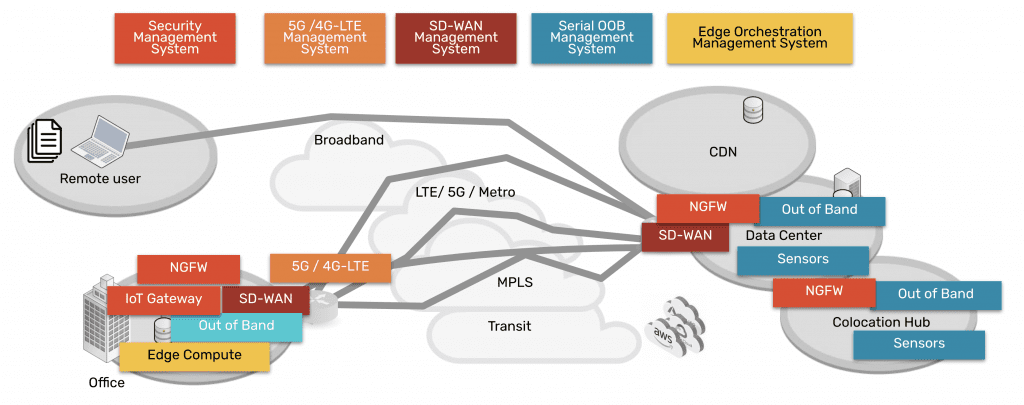
Providing Out-of-Band Connectivity to Mission-Critical IT Resources

Zero Trust Edge Solutions: Continuing the Zero Trust Journey

A glowing shield with a 0 on it overlays a glowing map of the world to represent zero trust at the edge.

The zero trust security methodology follows the principle of “never trust, always verify,” which assumes that any account or device could be compromised and should be forced to continuously establish trustworthiness. This sounds like an extreme approach, but with the frequency of high-profile data breaches and ransomware attacks steadily increasing, security teams must pivot their approach away from prevention and toward damage mitigation and recovery. Zero trust security limits the lateral movement of compromised accounts on the network by establishing micro-perimeters around network resources that continually assess an account’s behavior for suspicious activity.

Organizations also must extend zero trust security policies and controls to remote business sites at their network’s edges, such as branches, Internet of Things (IoT) deployments, and home offices. Zero trust edge solutions are software platforms that provide networking, access, and security capabilities designed specifically for the edge. This guide explains what zero trust edge solutions do and the challenges involved in using them before discussing how to build a unified ZTE platform.

What are zero trust edge solutions?

A zero trust edge solution combines edge-centric security functionality with remote access and networking capabilities. ZTE’s core feature is zero trust network access (ZTNA), which securely connects remote users to enterprise applications and resources, similar to a VPN. ZTNA is more secure than VPNs because it only allows users to authenticate to one resource at a time and prevents them from seeing or accessing anything else until they re-establish their identity and credentials. ZTE’s other features and capabilities vary depending on the vendor and deployment type. ZTE solutions come in three different forms:

  • As a service: Companies can purchase ZTE functionality as a cloud-based, vendor-managed service. Remote users connect to regional points of presence (POPs) to reach the ZTE stack in the cloud before being routed to enterprise resources. This deployment style is easier to deploy for organizations with lots of users in the field but few (if any) physical edge locations to host security or networking solutions.
    .
  • With SD-WAN: Some ZTE providers combine zero-trust features with software-defined wide area networking (SD-WAN) capabilities. SD-WAN creates a virtual network overlay that’s decoupled from the underlying WAN infrastructure, enabling centralized control and automation. Packaging ZTE and SD-WAN together helps organizations consolidate their tech stack at physical edge sites like branches, warehouses, and manufacturing plants while still offering ZTNA to work-from-home and field employees.
    .
  • Build your own: Since there are very few mature ZTE providers on the market, and it can be difficult to find pre-made solutions with all the features needed for complex, distributed edge networks, many teams opt to build their own platform by combining tools from multiple vendors. Typically, these organizations have physical branches with existing WAN infrastructure that they use as regional POPs to host ZTNA and other security solutions.

Why build your own ZTE solution?

If pre-made solutions exist, why would companies go through the hassle of creating their own zero trust edge platform? Presently, there aren’t any “complete” ZTE solutions that offer full, zero-trust protection for branches and other physical edge sites.

For example, many ZTE platforms don’t protect management ports on the control plane, leaving critical edge infrastructure like servers, switches, and power distribution units (PDUs) exposed to cybercriminals. Additionally, branch ZTE solutions rely upon production network infrastructure, so if there’s an outage or ransomware attack, remote management teams are completely cut off from troubleshooting and recovery. These solutions also lack helpful edge networking features like fleet management and automation, and their closed ecosystems limit the ability to extend their capabilities.

Building your own zero trust edge platform allows you to combine all the security, networking, and management functionality you need to get full security coverage and streamline branch operations. The key to creating a robust and efficient ZTE solution is starting with a vendor-neutral platform that can unify the entire security architecture.

How Nodegrid simplifies ZTE

Nodegrid edge networking solutions from ZPE Systems provide the perfect vendor-neutral platform for integrated zero trust edge deployments. All-in-one edge gateway routers deliver a full stack of branch networking capabilities, including out-of-band (OOB) management. OOB creates a dedicated control plane on an isolated network so remote teams have continuous access to manage, troubleshoot, and repair edge infrastructure.

Nodegrid protects the management interfaces on the OOB network with robust, zero trust security processes and controls. For example, the encryption keys for each Nodegrid device are destroyed after provisioning so that only the public key is accessible when needed for authentication to our cloud. Nodegrid devices also use the Trusted Platform Module (TPM) as a hardware security module to prevent cybercriminals from tampering with the configuration or storage.

Our platform runs on the Linux-based, x86 Nodegrid OS, which supports VMs and Docker containers for third-party applications. That means you can deploy ZTNA, SD-WAN, and other zero trust edge solutions without purchasing or managing additional hardware at each branch. Nodegrid’s OOB and failover functionality ensure those security and access solutions remain operational during ISP outages, ransomware attacks, and other disruptions. Teams can also run their favorite tools for automation, troubleshooting, and recovery on the Nodegrid platform, streamlining edge operations and ensuring their toolbox is available on the OOB network. Nodegrid also simplifies fleet management with true zero-touch provisioning to securely and automatically deploy configurations at edge business sites.

Want to unify your zero trust edge solutions with Nodegrid?

Nodegrid provides a robust, vendor-neutral platform to unify and extend your zero trust edge capabilities. Request a free demo to see Nodegrid in action. Watch Demo
What to do if You’re Ransomware’d: A Healthcare Example

What to do if youre ransomwared

This article was written by James Cabe, CISSP, a 30-year cybersecurity expert who’s helped major companies including Microsoft and Fortinet.

Ransomware gangs target the innocent and vulnerable. They hit a Chicago hospital in December 2023, a London hospital in October the same year, and schools and hospitals in New Jersey as recently as January 2024. This is one of the biggest reasons I’m committed to stopping these criminals by educating organizations on how to re-think and re-architect their approach to cybersecurity.

In previous articles, I discussed IMI (Isolated Management Infrastructure) and IRE (Isolated Recovery Environments), and how they could have quickly altered outcomes for MGM, Ragnar Locker victims, and organizations affected by the MOVEit vulnerability. Using IMI and IRE, organizations find that the key to not only speedy recovery, but also to limiting the blast radius and attack persistence, is isolation.

Why is isolation (not segmentation) key to ransomware recovery?

The NIST framework for incident response has five steps: Identify, Protect, Detect, Respond, and Recover. It’s missing a crucial step, however: Isolate. Stay tuned for a full breakdown of this in my next article. But the reason this is so critical is because attacks move at machine speed, and are very pervasive and persistent. If your management network is not fully isolated from production assets, the infection spreads to everything. Suddenly, you’re locked out completely and looking at months of tedious recovery. For healthcare providers, this jeopardizes everything from patient care to regulatory compliance.

Isolation is integral to building a resilience system, or in other words, a system that gives you more than basic serial console/out-of-band access and instead provides an entire infrastructure dedicated to keeping you in control of your systems — be it during a ransomware attack, ISP outage, natural disaster, etc. Because this infrastructure is physically and virtually isolated from production (no dependencies on production switches/routers, no open management ports, etc.), it’s nearly impossible for attackers to lock you out.

So, what really should you do if you’re ransomware’d? Let’s walk through an example attack on a healthcare system, and compare the traditional DR (Disaster Recovery) response to the IMI/IRE approach.

Ransomware in Healthcare: Disaster Recovery vs Isolated Recovery

Suppose you’re in charge of a hospital’s network. MDIoT, patient databases, and DICOM storage are the crown jewels of your infrastructure. Suddenly, you discover ransomware has encrypted patient records and is likely spreading quickly to other crown jewel assets. The risks and potential fallout can’t be understated. Millions of people are depending on you to protect their sensitive info, while the hospital is depending on you to help them avoid regulatory/legal penalties and ensure they can continue operating.

The problem with Disaster Recovery

Though the word ‘recovery’ is in the name, the DR approach is limited in its capacity to recover systems during an attack. Disaster Recovery typically employs a couple things:

  • Backups, which are copies of data, configurations, and code that are used to restore a production system when it fails.
  • Redundancy, which involves duplicating critical systems, services, and applications as a failsafe in the event that primaries go down (think cellular failover devices, secondary firewalls, etc.).

What happens when you activate your DR processes? It’s highly likely that you won’t be able to, and that’s because the typical DR setup relies on the production network. There’s no isolation.

Think about it this way: your backup servers need direct access to the data they’re backing up. If your file servers get pwned, your backup servers will, too. If your primary firewall gets hacked, your secondary will, too. The problem with backup and redundancy systems — and any system, for that matter — is that when they depend on the underlying infrastructure to remain operational, they’re just as susceptible to outages and attacks. It’s like having a reserve parachute that depends on the main parachute.

And what about the rest of your systems? You just discovered the attack has encrypted your servers and is quickly bringing operations to a crawl. How are you going to get in and fight back? What if you try to log into your management network, only to find that you’re locked out? All of your tools, configurations, and capabilities have been compromised.

This is why CISA, the FBI, US Navy, and other agencies recommend implementing Isolated Management Infrastructure.

IMI and IRE guarantee you can fight back against ransomware

You discover that the ransomware has spread. Not only has it encrypted data and stopped operations, but it has also locked you out of your own management network and is affecting the software configurations throughout the hospital. This is where IMI (Isolated Management Infrastructure) and IRE (Isolated Recovery Environment) come in.

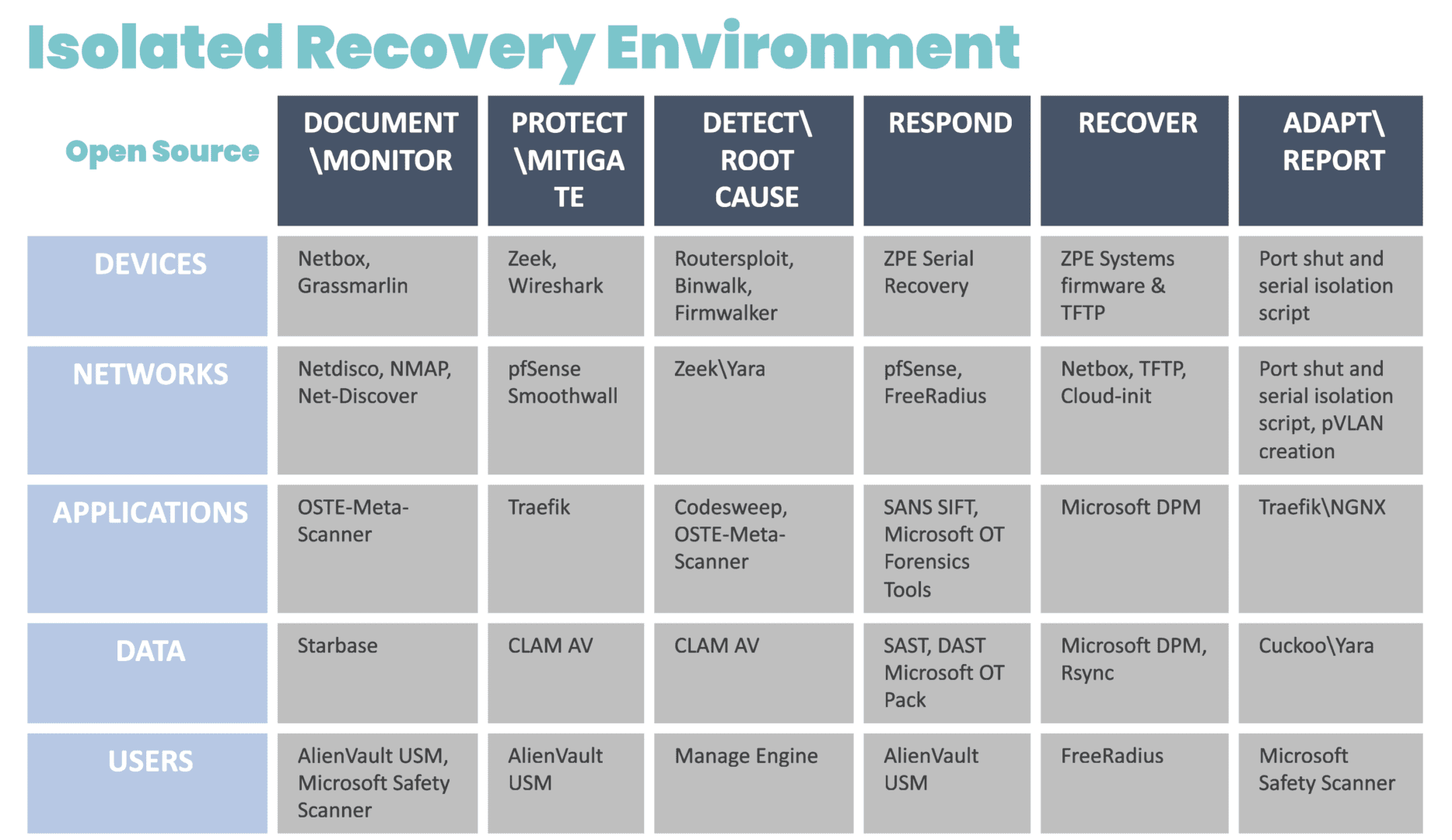
Because IMI is physically separate from affected systems, it guarantees management access so teams can set up communication and a temporary ‘war room’ for incident response. The IRE can then be created using a combination of cellular, compute, connectivity, and power control (see diagram for design and steps). Docker containers should be used to bring up each step.

Diagram showing a chart containing the systems and open-source tools that can be deployed for an Isolated Recovery Environment

Image: The infrastructure and incident response protocol involved in the Isolated Recovery Environment. These products were chosen from free or open source projects that have proven to be very useful in each of these stages of recovery. These can be automated in pieces for each phase, and then be brought down via Docker container to eliminate the risk of leakage or risk during each phase.

Without diving too far into the technicalities, the IRE enables you to recover survivable data, restore software configurations, and prevent reinfection. Here are some things you can do (and should do) in this scenario, courtesy of the IRE:

Establish your war room

You can’t fight ransomware if you can’t securely communicate with your team. Use the IRE to create offline, break-the-glass accounts that are not attached to email. This allows you to communicate and set up ticketing for forensics purposes.

Isolate affected systems

There’s no use running antivirus if reinfection can occur. Use the IRE to take offline the switch that connects the backup and file servers. Isolate these servers from each other and shut down direct backup ports. Then, you can remote-in (KVM, iKVM, iDRAC) to run antivirus and EDR (Endpoint Detection and Response).

Restore data and device images

The key is to have backup data at its most current, both for patient data and device/software configurations. Because the IRE provides an isolated environment, and you’ve already pulled your backups offline, you can gradually restore data, re-image devices, and restore configurations without risking reinfection. The IRE ensures devices “keep away” from each other until they can be cleansed and recovered.

Things You’ll Need To Build The IMI and IRE

Network Automation Blueprint

We’ve created a comprehensive blueprint that shows how to implement the architecture for IMI and IRE. Don’t let the name fool you. The Network Automation Blueprint covers everything from establishing a dedicated management network, to automating deployment of services for ransomware recovery. Get your PDF copy now at the link below.

Gen 3 Console Servers To Replace End-of-Life Gear

It’s nearly impossible to build the IMI or deploy the IRE using older console servers. That’s because these only give you basic remote access and a hint of automation capabilities. You’ll still need the ability to run VMs and containers. Gen 3 console servers let you do all of the things for IMI and IRE, like full control plane/data plane separation, hosting apps, and deploying VMs/containers on-demand. They’ve also been validated by Synopsys and have built-in security features I’ve been talking about for years. Check out the link below for resources about Gen 3 and how we’ll help you upgrade.

Get in touch with me!

I’d love to talk with you about IMI, IRE, and resilience systems. These are becoming more crucial to operational resilience and ransomware recovery, and countries are passing new regulations that will require these approaches. Get in touch with me via social media to talk about this!

IT Automation vs Orchestration: What’s the Difference?

it-automation-vs-orchestration

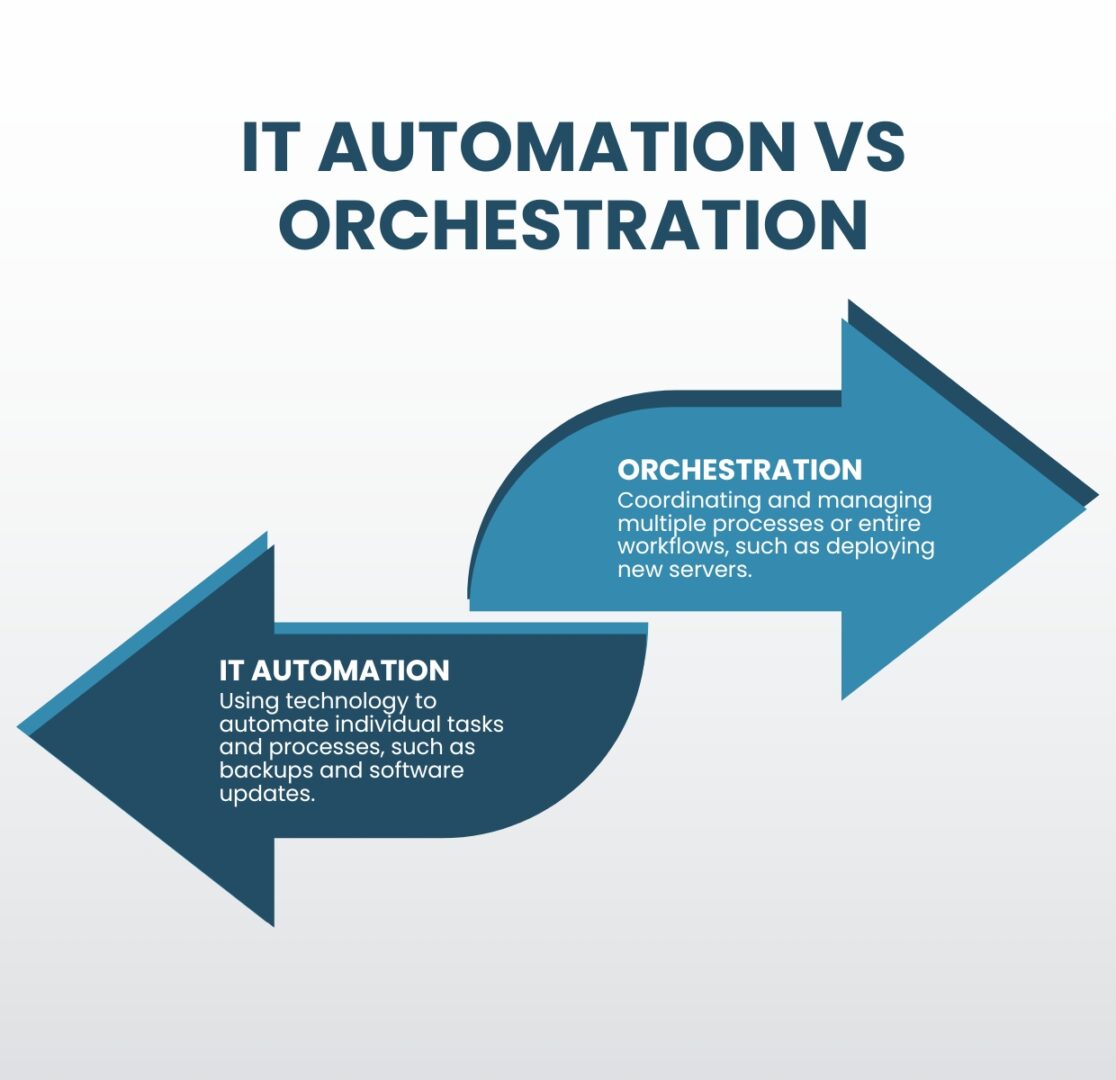
IT automation and orchestration are two important concepts in the field of information technology that are often used interchangeably but are actually quite different. IT automation focuses on individual tasks, whereas orchestration encompasses multiple tasks or even entire workflows. Each approach produces different results and helps teams meet different goals. They also have their own benefits and challenges that must be considered. This guide compares IT automation vs orchestration to clear up misconceptions and help organizations choose the right approach to streamlining their IT operations.

IT Automation vs Orchestration: What’s the Difference?

IT Automation vs Orchestration

IT automation refers to the use of technology to automate repetitive tasks and processes, including things like automated backups, software updates, and monitoring systems. The goal of IT automation is to free up time and resources for IT professionals by automating routine tasks, allowing them to focus on more strategic initiatives.

Orchestration, on the other hand, is the coordination and management of multiple processes or entire workflows. This can include things like configuring and deploying new servers, managing network connections, and monitoring the performance of many different systems. The goal of orchestration is to improve the overall efficiency of IT operations, reducing costs and enabling greater scalability.

The benefits of IT automation vs orchestration

Benefits of IT Automation vs Orchestration

IT Automation

  • Saves time
  • Reduces human error
  • Improves compliance

Orchestration

  • Increases operational efficiency
  • Improves network scalability
  • Ensures IT system reliability

One of the main benefits of IT automation is that it can save time and resources for IT professionals. By automating routine tasks, IT teams can focus on more strategic initiatives and projects. Additionally, automation helps reduce human error and increases the accuracy, speed, and efficiency of tasks. Automation also improves compliance, as automated processes are less prone to human negligence and are easier to audit.

Orchestration, on the other hand, helps improve the overall efficiency and effectiveness of IT operations. By automating the coordination and management of multiple tasks, orchestration helps ensure that different systems and processes work together seamlessly. Additionally, orchestration helps improve the scalability and reliability of IT systems by ensuring different components are configured and deployed correctly.

The challenges of IT automation and orchestration

IT Automation and Orchestration Challenges

IT Complexity

Teams can’t effectively automate IT operations unless they thoroughly understand all the tasks, systems, and workflows comprising a highly complex network.

Automation Skills Gap

A high demand for automation engineers makes it difficult and expensive to recruit, train, and retain qualified IT automation and orchestration professionals.

Supporting Infrastructure

Effective automation and orchestration deployments require a robust underlying infrastructure of specialized hardware and software solutions.

One of the main challenges of automation and orchestration is the complexity of IT systems. As organizations rely more heavily on specialized technology and grow both in size and in number of business sites, IT systems become increasingly complex and difficult to manage. Automation and orchestration help reduce complexity by automating routine tasks and coordinating the management of different systems. However, teams must understand those tasks and systems well enough to know how to automate them effectively; otherwise, mistakes will proliferate or there will be gaps in automated workflows.

Another IT automation and orchestration challenge is the need for skilled professionals to deploy and manage these solutions. As automation and orchestration become more prevalent, the demand for skilled professionals has increased, making it harder (and more expensive) to recruit and retain qualified automation engineers. The alternative is for organizations to spend time and resources training existing IT staff to work with automation and orchestration.

Additionally, organizations need to invest in the technology and infrastructure necessary to support automation and orchestration. Some examples of these automation infrastructure components include:

  • Gen 3 out-of-band (OOB) serial consoles, which allow teams to deploy third-party automation on an OOB network that doesn’t rely on production infrastructure, improving security and resilience. Gen 3 OOB also moves bandwidth-hogging orchestration workflows off the production network, which reduces latency for better performance.
  • Software-defined networking, which virtualizes the control and management processes and abstracts them from underlying LAN and WAN hardware. SDN, SD-WAN, and SD-Branch technologies enable a high degree of automation for networking workflows such as load balancing, application-aware routing, and failover.
  • Infrastructure as Code (IaC), which turns infrastructure configurations into software code. IaC enables the use of version control, zero-touch deployments, automatic configuration management, automated security testing, and other tools and processes that support automation and improve network resilience.
  • Orchestrator software, which controls all of the automated workflows on a network. The orchestrator is the central hub for teams to create, deploy, monitor, and troubleshoot automated workflows and infrastructure.
  • AIOps, or artificial intelligence for IT operations, which analyzes all the logs and data pulled from automated infrastructure devices and security appliances. AIOps provides predictive maintenance insights, automatic root-cause analysis (RCA), enhanced threat detection, and other functionality to help support a complex, automated network infrastructure.

Tips for overcoming IT automation and orchestration challenges

While every organization will face unique IT automation and orchestration hurdles, there are two basic tips to help simplify any deployment. Using consolidated network hardware and vendor-neutral platforms can help reduce the complexity of network infrastructure, the need to hire additional staff, and the cost to deploy automation infrastructure.

  • Consolidated network hardware, such as all-in-one branch/edge gateway routers, significantly reduces the number of devices deployed at each business site. Fewer devices to automate means less complexity, and organizations save money on deployment costs like hardware overhead and automation license seats.
  • Vendor-neutral platforms, such as the Nodegrid infrastructure management platform from ZPE Systems, allow teams to use the automation and orchestration tools they’re most comfortable with regardless of provider, reducing the skills gap. Open platforms ensure seamless interoperability between all the various automated components to decrease management complexity. Vendor-neutral hardware also allows organizations to run software from multiple vendors on a single device, enabling even greater network consolidation to reduce the complexity and cost of automated infrastructure deployments.

Choosing IT automation vs orchestration

IT automation and orchestration are interconnected concepts that are frequently, but incorrectly, used interchangeably. Automation focuses on individual tasks, while orchestration manages multiple tasks and entire workflows. Both automation and orchestration can help improve the efficiency and effectiveness of IT operations, but they have their unique benefits and challenges. Organizations must carefully consider their IT systems and needs when deciding which approach to use.

IT automation vs orchestration simplified

The network automation experts at ZPE Systems have helped Big Tech brands like Amazon and Uber improve operational efficiency and resilience with IT automation and orchestration. Learn how to use these best practices to streamline your IT operations by downloading our Network Automation Blueprint.

Download the Blueprint

Network Resilience: What is a Resilience System?

A digital web of interconnected network resilience concepts being selected by a business person in a suit.

Network resilience means being able to withstand or recover from adversity, service degradation, and complete outages with minimal business disruption. The longer business-critical services are down, or systems are breached, the greater the risk of significant financial, reputational, and legal consequences. A resilience system is a set of technologies that enable an organization to continue operating while teams work to repair failures and recover from cyberattacks. But what exactly is a resilience system, and what does it look like? This guide to network resilience defines resilience systems, provides example use cases, compares them to related technologies like backups and redundant systems, and describes the key components required to build them.

What is a resilience system?

A resilience system provides all the infrastructure, tools, and services necessary to continue operating, if in a degraded state, during major incidents. It also includes everything needed to recover data, rebuild systems, perform security testing, and continue delivering core business functionality. A resilience system is typically isolated from the production network, preventing cybercriminals from finding and compromising it and ensuring teams have continuous access even if the primary network goes down.

Resilience system use cases

Some examples of the challenges that resilience systems help overcome include:

1. Ransomware recovery

In a ransomware attack, cybercriminals infect systems with malware that spreads throughout the network and encrypts any data it encounters. Modern ransomware now uses packaged attacks that move at machine speed, instantly incapacitating entire networks. Organizations completely lose access to critical systems and data until they pay a ransom, often in untraceable cryptocurrency. Ransomware is an exceptionally tenacious form of malware and tends to reinfect backup data and rebuilt systems, significantly hampering recovery efforts and increasing the duration and cost of the attack. The best practice for resilience systems is to isolate them on an out-of-band (OOB) network, inaccessible to hackers who have breached the production in-band network. Doing so creates a safe, isolated recovery environment (IRE) where teams can restore critical data and systems without the risk of reinfection. The resilience system includes all the tools and hardware needed to restore critical business services and infrastructure. An IRE significantly accelerates ransomware recovery and minimizes downtime, so businesses can avoid paying ransoms and reduce the overall cost of attacks.

2. Network outages

Enterprise network architectures and supply chains are highly complex, with lots of moving parts that rely on external vendors to maintain availability. Just one of those vendors dropping the ball could take the entire organization offline, severely impacting network resilience. For example, in 2023, an expired cryptographic certificate caused Cisco’s Viptela SD-WAN appliances to fail on reboot, completely taking down affected networks until the issue was resolved. With a resilience system, Viptela customers could have potentially avoided this downtime by failing over to alternative network resources. For example, a resilience system with integrated cellular failover allows branches to continue connecting to and delivering critical business services while also providing a lifeline for remote teams to access and recover failed systems. A resilience system also provides observability and automatic notifications so teams are instantly alerted to issues like certificate expirations and can respond quickly to recover critical services.

3. Shift to remote work

Incidents like ransomware attacks and equipment failures happen frequently enough that companies can create detailed plans and proactively implement solutions to minimize their impact, but not all adverse events are so predictable. When the COVID-19 pandemic struck, the massive shift to remote work strained the network resources of most organizations. Instead of maintaining a limited number of branch offices, teams suddenly had to treat every employee as a new branch, leading to performance degradation and outages as they scrambled to reinforce the business’s remote capabilities. A resilience system gives teams the tools and resources they need to provision additional infrastructure, manage networking logic, deploy new security solutions, and more, even while the primary network is offline or under a heavy load. A resilience system is the key to quickly adjusting network performance and security to adapt to sudden changes like a transition to fully remote operations.

Do backups and redundancy equate to network resilience?

The short answer is no; backups and redundancy do not equate to network resilience, though they do contribute to making systems more resilient.

  • Backups are copies of data, configurations, and application code used to do a hot or cold restore when a production system fails. The underlying infrastructure must remain operational for teams to access and use backups, and unless additional resilience measures are taken, it’s easy for backups to become infected or compromised, severely hampering recovery efforts.
  • Redundancy involves duplicating critical systems, services, and applications as a failsafe in case the primaries go down. Organizations can “fail over” to the redundancies to continue critical business operations during outages. However, redundant systems are just as susceptible to failures and infections without additional resilience measures like out-of-band management and isolated management infrastructure.

Backups and redundancy are part of network resilience but alone are not enough to ensure business continuity. Resilience systems focus on maintaining the architecture of the production network while adding the ability to recover or adapt to adversity. The next section discusses all the tools and technologies that make up network resilience systems.

What does a resilience system look like?

There are four key components that go into a resilience system.

Key Components of a Resilience System

Alternative Networking

Full-stack routing and switching, Wi-Fi, VoIP, virtualization, software-defined network overlays for SDN & SD-WAN

Alternative Compute

Full-stack compute, containers, virtual machines, and any other resources needed to run applications and deliver services

Storage & Storage Recovery

Enough storage to recover systems and applications as well as support content delivery

Automation

Tools like zero-touch provisioning (ZTP) to facilitate speedy recovery while minimizing human error

Alternative networking and compute resources ensure the organization can failover in the event of a network failure or continue delivering services when production servers are unavailable. Teams also need enough storage to restore backup data, build new systems, and support the content delivery network (CDN). Automation solutions like zero-touch provisioning (ZTP), configuration management, and security validation tools accelerate the recovery process while mitigating the risk of human error. Combined, these components enable teams to reduce the frequency, severity, and duration of outages, improving overall network resilience.

Network resilience with ZPE Systems

A resilient network will continue delivering critical business services in the face of any challenge, whether from cybercriminals, supply chain issues, global events, or even plain human error. A resilience system is isolated from the production network to ensure security and availability, and it consists of all the tools and technologies needed to troubleshoot, recover, and deliver your most crucial data, applications, and infrastructure. The Nodegrid platform from ZPE Systems is the perfect foundation for a resilience system. Nodegrid is a vendor-neutral, out-of-band management solution capable of running your choice of third-party software. Nodegrid allows you to build a highly customizable IRE containing all the tools needed to safely recover from ransomware. You can even use Nodegrid to deliver services while the primary network or systems are down, making it your all-in-one network resilience multi-tool.

Want to ensure network resilience by accelerating ransomware recovery?

Minimize the business impact of ransomware with the help of our whitepaper, 3 Steps to Ransomware Recovery. Learn how to follow Gartner’s best practices to build an Isolated Recovery Environment

Download Whitepaper

Network Resilience Doesn’t Mean What it Did 20 Years Ago

Network resilience requirements have changed

Enterprise networks are like air. When they’re running smoothly, it’s easy to take them for granted, as business users and customers are able to go about their normal activities. But when customer service reps are suddenly cut off from their ticketing system, or family movie night turns into a game of “Is it my router, or the network?”, everyone notices. This is why network resilience is critical.

But, what exactly does resilience mean today? Let’s find out by looking at some recent real-world examples, the history of network architectures, and why network resilience doesn’t mean what it did 20 years ago.

Why does network resilience matter?

There’s no shortage of real-world examples showing why network resilience matters. The takeaway is that network resilience is directly tied to business, which means that it impacts revenue, costs, and risks. Here is a brief list of resilience-related incidents that occurred in 2023 alone:

  • FAA (Federal Aviation Administration) – An overworked contractor unintentionally deleted files, which delayed flights nationwide for an entire day.
  • Southwest Airlines – A firewall configuration change caused 16,000 flight cancellations and cost the company about $1 billion.
  • MOVEit FTP exploit – Thousands of global organizations fell victim to a MOVEit vulnerability, which allowed attackers to steal personal data for millions.
  • MGM Resorts – A human exploit and lack of recovery systems let an attack persist for weeks, causing millions in losses per day.
  • Ragnar Locker attacks – Several large organizations were locked out of IT systems for days, which slowed or halted customer operations worldwide.

What does network resilience mean?

Based on the examples above, it might seem that network resilience could mean different things. It might mean having backups of golden configs that you could easily restore in case of a mistake. It might mean beefing up your security and/or replacing outdated systems. It might mean having recovery processes in place.

So, which is it?

The answer is, it’s all of these and more.

Donald Firesmith (Carnegie Mellon) defines resilience this way: “A system is resilient if it continues to carry out its mission in the face of adversity (i.e., if it provides required capabilities despite excessive stresses that can cause disruptions).”

Network resilience means having a network that continues to serve its essential functions despite adversity. Adversity can stem from human error, system outages, cyberattacks, and even natural disasters that threaten to degrade or completely halt normal network operations. Achieving network resilience requires the ability to quickly address issues ranging from device failures and misconfigurations, to full-blown ISP outages and ransomware attacks.

The problem is, this is now much more difficult than it used to be.

How did network resilience become so complicated?

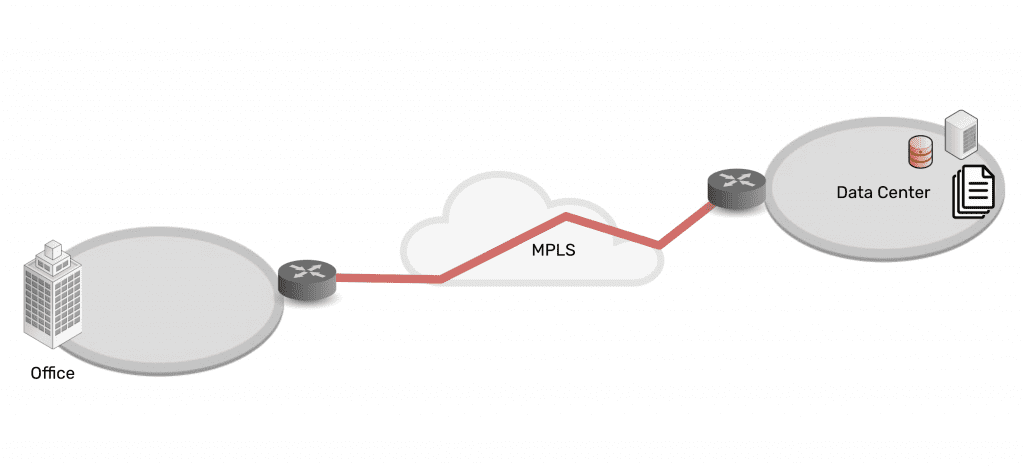
Twenty years ago, IT teams managed a centralized architecture. The data center was able to serve end-users and customers with the minimal services they needed. Being “constantly connected” wasn’t a concern for most people. For the business, achieving resilience was as simple as going on-site or remoting-in via serial console to fix issues at the data center.

Network architecture showing simplicity of data center connected via MPLS to branch office

Then in the mid-2000s, the advent of the cloud changed everything. Infrastructure, data, and computing became decentralized into a distributed mix of on-prem and cloud solutions. Users could connect from anywhere, and on-demand services allowed people to be plugged in around-the-clock. Services for work, school, and entertainment could be delivered anytime, no matter where users were.

Network architecture showing complexity of data center, CDN, remote user, branch office, all connected via many paths

Behind the scenes, this explosion of architecture created three problems for achieving network resilience, which a simple serial could no longer fix:

Too Much Work

Infrastructure, data, and computing are widely distributed. Systems inevitably break and require work, but teams don’t have the staff to keep up.

Too Much Complexity

Pairing cloud and box-based stacks creates complex networks. Teams leave systems outdated, because they don’t want to break this delicate architecture.

Too Much Risk

Unpatched, outdated systems are prime targets for packaged attacks that move at machine speed. Defense requires recovery tools that teams don’t have.

Enabling businesses to be resilient in the modern age requires an approach that’s different than simply deploying a serial console for remote troubleshooting. Gen 1 and 2 serial consoles, which have dominated the market for 20 years, were designed to solve basic issues by offering limited remote access and some automation. The problem is, these still leave teams lacking the confidence to answer questions like:

  • “How can we guarantee access to fix stuff that breaks, without rolling trucks?”
  • “Can we automate change management, without fear of breaking the network?”
  • “Attacks are inevitable — How do we stop hackers from cutting off our access?”

Hyperscalers, Internet Service Providers, Big Tech, and even the military have a resilience model that they’ve proven over the last decade. Their approach involves fully isolating command and control from data and user environments. This allows them to not only gain low-level remote access to maintain and fix systems, but also to “defend the hill” and maintain control if systems are compromised or destroyed.

This approach uses something called Isolated Management Infrastructure (IMI).

Isolated Management Infrastructure is the best practice for network resilience

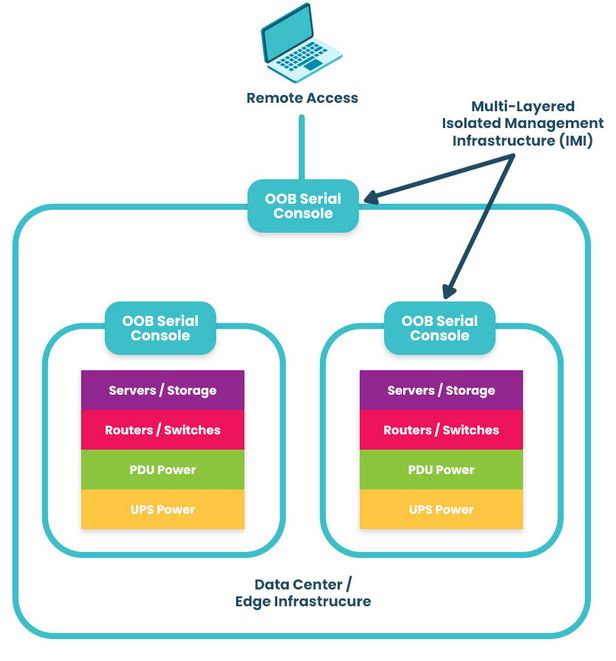
Isolated Management Infrastructure is the practice of creating a management network that is completely separate from the production network. Most IT teams are familiar with out-of-band management as this network; IMI, however, provides many capabilities that can’t be hosted on a traditional serial console or OOB network. And with increasing vulnerabilities, CISA issued a binding directive specifically calling for organizations to implement IMI.

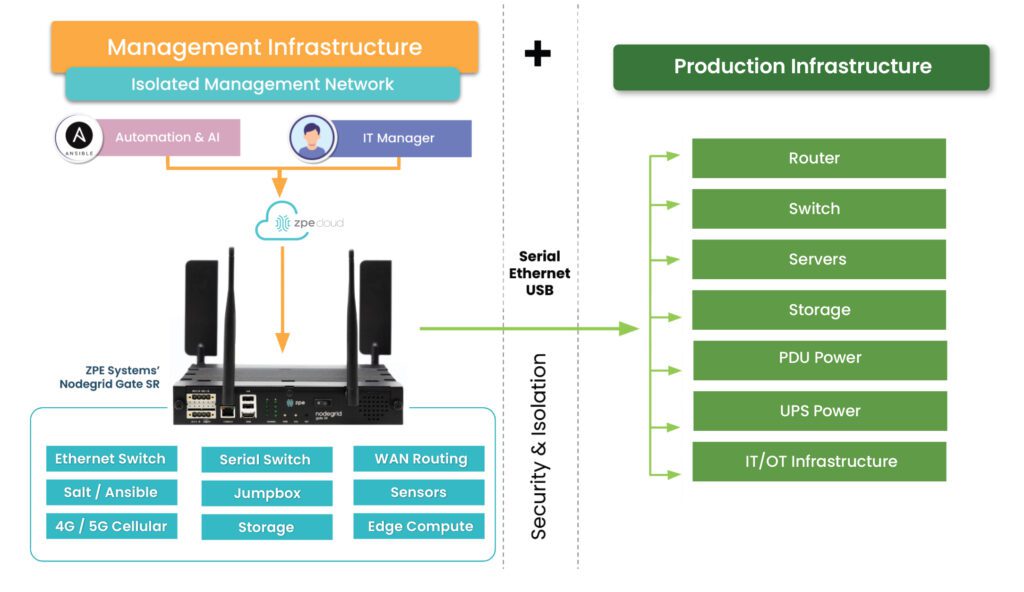
Isolated Management Infrastructure using Gen 3 serial consoles, like ZPE Systems’ Nodegrid devices, provides more than simple remote access and automation. Similar to a proper out-of-band network, IMI is completely isolated from production assets. This means there are no dependencies on production devices or connections, and management interfaces are not exposed to the internet or production gear. In the event of an outage or attack, teams retain management access, and this is just the beginning of the benefits of having IMI.

A network architecture diagram showing Isolated Management Infrastructure next to production infrastructure

IMI includes more than nine functions that are required for teams to fully service their production assets. These include:

  • Low-level access to all management interfaces, including serial, Ethernet, USB, IPMI, and others, to guarantee remote access to the entire environment
  • Open, edge-native automation to ensure services can continue operating in the event of outages or change errors
  • Computing, storage, and jumpbox capabilities that can natively host the apps and tools to deploy an IRE, to ensure fast, effective recovery from attacks

Get the guide to build IMI

ZPE Systems has worked alongside Big Tech to fulfill their requirements for IMI. In doing so, we created the Network Automation blueprint as a technical guide to help any organization build their own Isolated Management Infrastructure. Download the blueprint now to get started.

Gartner Market Guide for Edge Computing

Edge-computing-strategy
In today’s highly distributed enterprise environment, a large portion of business data is generated by devices at the edges of the network. For example, many industries, from healthcare to finance, use IoT (Internet of Things) devices to collect essential and sensitive data. Transmitting this data back to a centralized data center for processing creates network latency and introduces security risks. 

Edge computing moves processing power and applications closer to the sources of data at the edges of the network, which improves performance and reduces risk. This approach is gaining popularity, with recent Gartner research finding that 69% of CIOs have already deployed edge technologies or would deploy by mid-2025. However, most edge deployments focus on individual use cases and lack a cohesive strategy, resulting in “edge sprawl”: many disparate solutions deployed all over the enterprise without centralized control or visibility.

“Edge computing without a strategy will eventually cause digital gridlock.” Thomas Bittman, Gartner Distinguished VP Analyst, in Building an Edge Computing Strategy

Edge sprawl increases complexity, reduces resilience, and ultimately hampers digital transformation. In a report published earlier this year titled “Building an Edge Computing Strategy,” Gartner provides recommendations for reducing edge sprawl with a comprehensive strategy. As we await the next Gartner Market Guide for Edge Computing, let’s discuss their recommendations for building a strategy to manage and orchestrate your edge solutions.

Building a Gartner-approved edge computing strategy

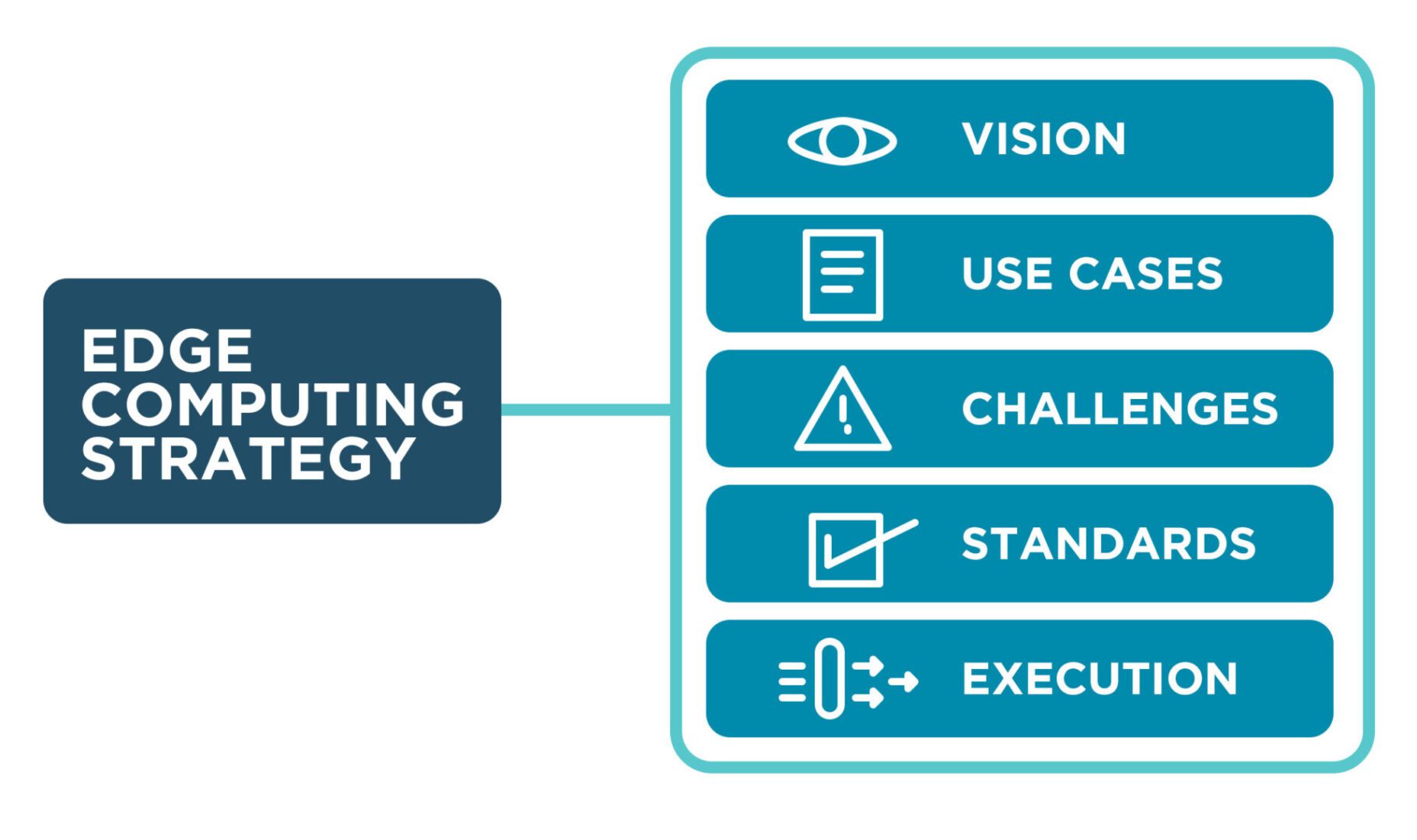
Gartner recommends building an edge computing strategy around five elements: vision, use cases, challenges, standards, and execution.

Edge computing vision

An edge computing vision describes the overall organizational goals and provides direction for teams and stakeholders. It should explain how edge computing supports and relates to other technology initiatives, such as cloud computing, IoT/OT devices, and artificial intelligence/machine learning, as well as how it fits into the overall digital transformation strategy.

Key components of an edge computing vision:

  • The business impact of edge computing in objective terms, such as the amount of money saved
  • How edge computing will accelerate digital transformation
  • A discussion of the digital experience improvements enabled by edge computing
  • The anticipated number of automation projects supported by edge computing
  • What edge computing use cases will be deployed
  • The targeted deployment agility in measurable terms, such as the time to deploy a new site

The edge computing vision provides the target your organization wants to reach in the next five years, and should be continuously updated as goals are met and strategies evolve. It’s crucial to clearly communicate the edge computing vision to get buy-in from executives and staff.

Edge computing use cases

There are often many edge computing use cases within an organization, and an effective edge computing strategy must identify and account for them all in order to avoid sprawl. There are three aspects to consider – the edge computing drivers, the existing edge computing use-case landscape, and potential edge computing use cases.

Edge computing drivers

Edge computing evolved to solve problems other computing architectures can’t handle. Understanding what those problems are will help you identify existing use cases and determine when edge computing should be pursued for a particular use case in the future. Gartner identifies four main edge computing drivers.

Gartner’s four edge computing drivers
Latency/Determinism
 A rapid response is required, or the response time needs to be predictable, and current latency is unacceptable 
Data/Bandwidth
 The cost of transmitting noisy, short-lived data is higher than the cost of moving compute to the edge 
Limited Autonomy
 Operations at the edge must continue even if the connection to the central data center or cloud is interrupted 
Privacy/Security
 The privacy and security risks of transmitting edge data are too high, or regulatory requirements prevent it 
An edge computing strategy should describe the organization’s specific needs and drivers that edge computing will address.

Existing edge computing use-case landscape

Many organizations already use edge computing in some form, even if they don’t call it by that name. Examples include operational technology (OT) deployments in the manufacturing industry and smart check-out systems in retail stores. An edge computing strategy must identify all existing solutions and discuss how they’ll be integrated with the chosen management technologies and best practices (more on those later).

Potential edge computing use cases

An effective edge computing strategy should also describe how the business will identify new use cases in the future. This proactive process should use the previously established edge computing drivers and involve collaboration between IT and the various business units within the organization. Gartner recommends creating a “clearinghouse” for new use case ideas, a structured process for identifying, reviewing, and prioritizing potential edge use cases.

Edge computing challenges

Even as edge computing solves business problems, it creates additional challenges that the strategy must address with new technologies and processes. Gartner identifies six major edge computing challenges to focus on while you develop an edge computing strategy.

  1. Enabling extensibility – Purpose-built edge computing solutions can’t adapt when workloads change or grow, so an edge computing strategy should leave room for growth by using extensible, vendor-neutral platforms that allow for expansion and integration.
  2. Extracting value from edge data – As edge devices generate more and more data, the difficulty of quickly extracting value from that data rises, so organizations should look for ways to deploy AI training and data analytics solutions alongside edge computing units.
  3. Governing edge data – Edge computing sites often have more significant data storage constraints than traditional data centers, so quickly distinguishing between valuable data and destroyable junk is critical to edge ROIs and requires careful governance.
  4. Securing the edge – Edge deployments are highly distributed in locations that lack many security features in a traditional data center, adding risk and increasing the attack surface, so organizations should protect edge computing nodes with a multi-layered defense including zero-trust policies, strong authentication, and network micro-segmentation. Orgs also need a way to take back control of edge infrastructure during ransomware attacks, such as an isolated recovery environment (IRE).
  5. Supporting edge-native applications – Edge-native applications are designed for the edge from the bottom up, so organizations should deploy platforms that support these applications without increasing the technical debt, meaning they should use familiar technologies and interoperate with existing systems.
  6. Managing and orchestrating the edge – Environmental issues, power failures, and network outages can cut technical teams off from critical edge infrastructure, so organizations need edge management and orchestration (EMO) with environmental monitoring and out-of-band (OOB) connectivity.

Gartner recommends focusing your edge computing strategy on mitigating the specific risks, challenges, and inhibitors.

Edge computing standards

Edge computing use cases are often highly diverse, even within a single organization, so it’s critical to establish a set of unifying standards and guidelines to reduce edge sprawl. Many organizations use a cloud center of excellence (CCOE) to govern their cloud computing architecture, so Gartner recommends establishing a similar edge center of excellence (ECOE) based on three pillars.

Gartner’s Edge Center of Excellence (ECOE)
Governance:
  • Maintain the edge computing strategy
  • Develop security, data, and adoption policies
  • Establish metrics to measure value and ROI
Technologies:
  • Reference architectures
  • Technology and architecture standards
  • Trusted vendor list
  • Vendor selection process
Best Practices/Skills:
  • Solutions consulting
  • Training and role definition
  • Expertise evangelization

For an effective edge computing strategy, Gartner recommends creating a unifying set of standards, guidelines, and best practices to be used across all edge computing deployments.

Edge computing execution

An edge computing strategy should include process documentation for the initial deployment of new edge rollouts. Gartner identifies six steps that help ensure successful edge computing launches.

  • Proof of Concept – Test edge deployments in non-production and get feedback from stakeholders
  • Proof of Production – Conduct a pilot to evaluate how you’ll operate, manage, and monitor an edge project at full scale
  • Phased Rollout – Have a phased deployment plan including scale, regions, and functionality
  • Surprises – Expect the unexpected by including guidelines in your edge computing strategy for monitoring and managing changes
  • Evolution – Edge projects frequently change direction based on evolving requirements or unexpected changes, so extensibility is crucial
  • Next-Best Action – Plans for the future frequently change direction, so have alternatives in your strategy to help guide these evolutions

An edge computing strategy that covers all six steps will streamline deployments and improve the agility of edge execution.

What to Expect from the Gartner Market Guide for Edge Computing

Last year, the Gartner Market Guide for Edge Computing discussed the issue of companies deploying individual edge solutions to handle individual use cases without any unified management and oversight. Part of the problem is that the edge computing market is still immature, and another hurdle is vendor lock-in. When edge computing solutions can’t interoperate with other vendors’ hardware and software, teams cannot deploy the universal hardware and unifying orchestration platforms to manage edge architectures efficiently.

Based on the market analysis provided in “Building an Edge Computing Strategy,” Gartner still heavily emphasizes the need to reduce edge sprawl with centralized, vendor-neutral edge management and orchestration (EMO). You can expect Gartner’s next market guide for edge computing to continue pushing for unified management and to highlight vendors with scalable, extensible, open edge computing solutions.

Building an edge computing strategy with Nodegrid

Nodegrid is a vendor-neutral edge infrastructure orchestration platform from ZPE Systems that can help you solve all six of Gartner’s edge computing challenges.

  • Enabling extensibility – Nodegrid’s modular, extensible devices are easy to scale and adapt to handle changing workloads. Nodegrid management hardware runs the open, Linux-based Nodegrid OS, which can host your choice of third-party edge computing applications, so you can deploy and change edge software without buying additional hardware.
  • Extracting value from edge data – Nodegrid’s powerful, extensible computing hardware can run data analysis, machine learning, and artificial intelligence applications to help extract additional value from the massive quantities of data at the edge.
  • Governing edge data – Nodegrid’s ZPE Cloud platform offers a data lake application that helps process and organize edge data.
  • Securing the edge – Nodegrid uses innovative hardware security and advanced, zero-trust authentication methods to defend edge networks, devices, and applications.
  • Supporting edge-native applications – Nodegrid supports Docker containers and other edge-native technologies, allowing teams to use their choice of software platforms to reduce technical debt.
  • Managing and orchestrating the edge – Nodegrid’s environmental monitoring sensors give remote teams real-time insights into conditions in edge deployment sites so they can respond to climate issues and power fluctuations as they occur. Nodegrid’s out-of-band (OOB) management creates an isolated management infrastructure that doesn’t rely on production network resources, giving teams a lifeline to troubleshoot and recover from outages, failures, and cyberattacks faster and more cost-effectively.

Nodegrid is a vendor-neutral Services Delivery Platform that brings all the components of your edge computing strategy under one management umbrella so you can overcome your biggest edge computing challenges.

Get streamlined edge computing with Nodegrid

To learn more about vendor-neutral edge management and orchestration (EMO) as described in the Gartner market guide for edge computing, contact ZPE Systems.

Request a Demo